Monitoring a competitor who publishes no feed is the case every RSS guide skips. Twenty-one platforms sorted by which of three jobs they do, and the finished setup is business process automation you own outright, with no seat licence to renew.
Blaming the content is the reflex when a post underperforms, and it is usually the wrong diagnosis. A second reader decides distribution before any human sees the post, and most of what it checks is mechanical enough to automate business processes around, on five platforms at once.
Gloves on, tape measure in hand — nobody types a query. Three voice surfaces for ai automation tools (terminal, Telegram, Discord), 10 TTS and 6 STT providers compared on cost and latency, plus a setup that costs nothing.
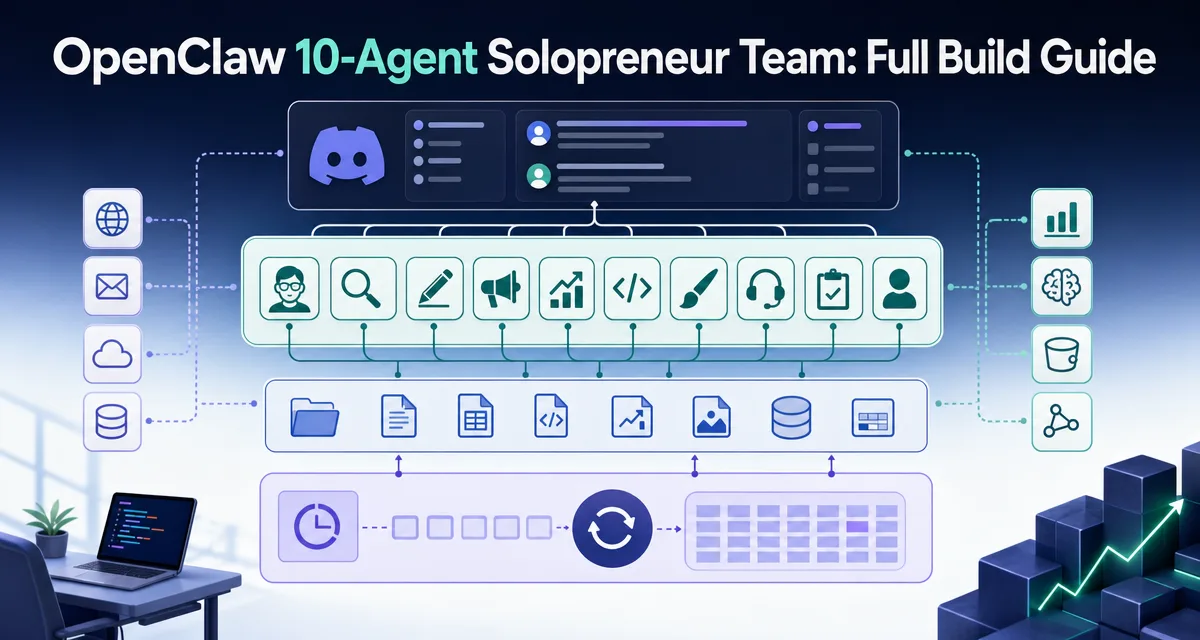
OpenClaw 10-Agent Solopreneur Team: Full Build Guide
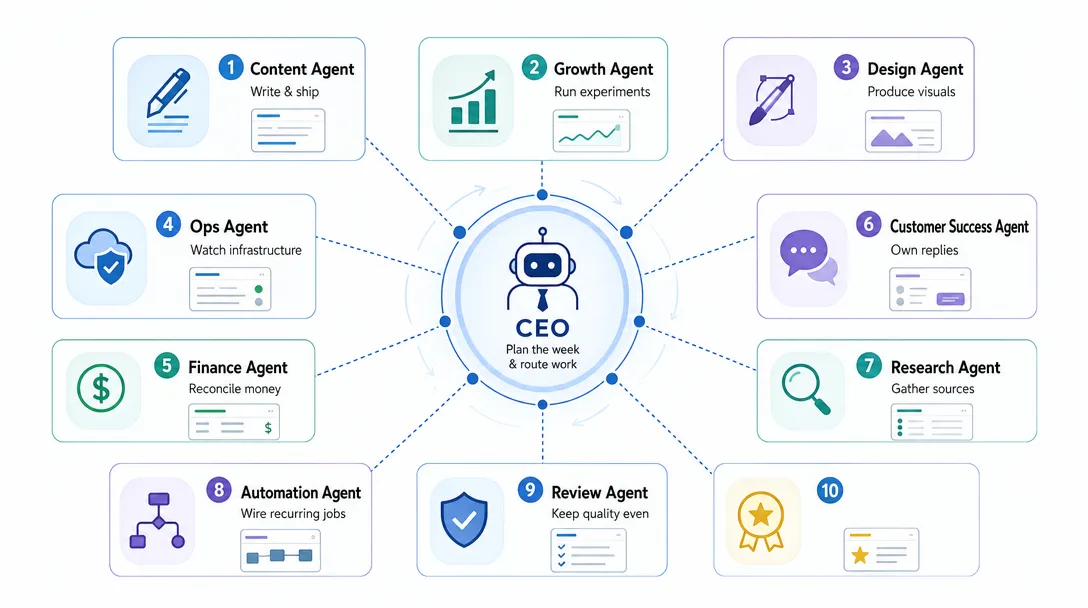
The interesting part is not that ten agents can run. It is the org chart — who owns what, who reports to whom, and which handoffs still need a person standing in the middle.
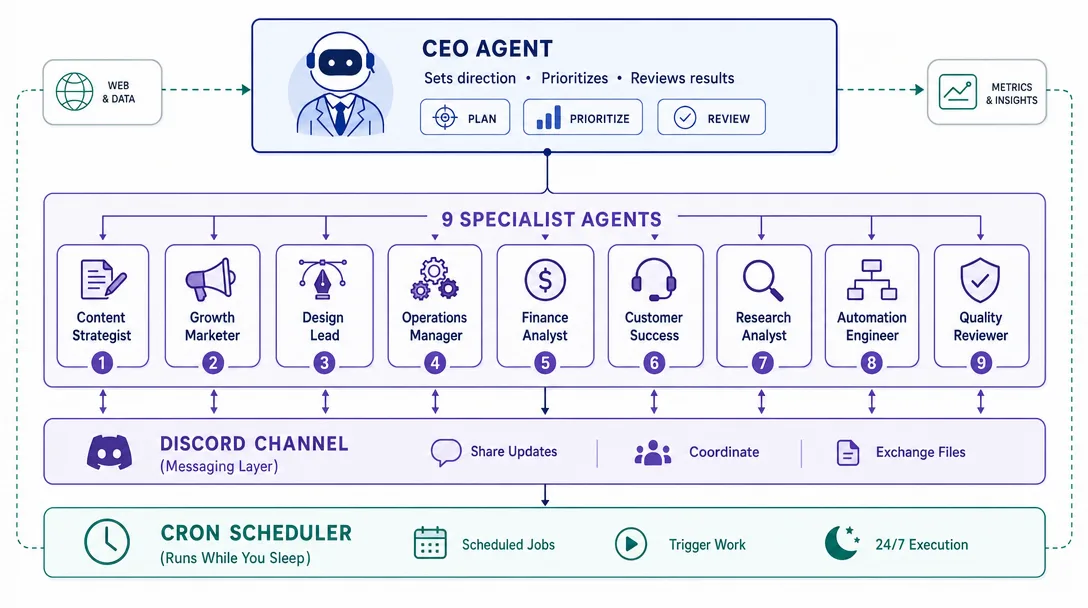
A working OpenClaw deployment with one CEO agent and nine specialist agents — Content, Growth, Design, Ops, Finance, Customer Success, Research, Automation, Review — coordinating through Discord channels and persistent workspace files
The setup runs on a $5/month VPS, costs roughly $50-$200/month in model usage depending on activity, and can be built in a single weekend by someone with no coding background
The ten role specs in this guide are battle-tested templates, not theoretical recommendations — copy them, tune them to your business, deploy them
Cron scheduling closes the loop: agents do morning research before you wake, draft content during the day, and run weekly reviews on Friday afternoons. The team genuinely runs while you don't
Seven specific traps catch most first-time builders. Each has a one-paragraph fix in this guide
Write down the roles a small firm would hire first if money were no object. Now notice that you already cover every one of them, badly, in whatever order the day throws them at you. That is the real reason small operations plateau — not effort, but the fact that every role competes for the same afternoon. Running an AI agent for business work is one answer to that, and the hard part turns out to be the same hard part as with people: not capability, but who owns which decision.
Current OpenClaw note, checked against official docs at time of writing: the examples below use a custom blueprint style. For actual setup, create and verify agents with openclaw agents add and openclaw agents list --bindings, use openclaw cron add --cron ... --tz ... for scheduled jobs, and prefer one Discord bot/account per agent when you need strong per-agent identity. The sample workspaces/ paths are illustrative; align final directories with your configured OpenClaw workspace root.
The phrase "AI one-person company" gets thrown around a lot in 2026, mostly as marketing. This post is the actual build guide.
I run an OpenClaw deployment with one CEO agent and nine specialist agents. They coordinate through Discord channels, hold persistent state in workspace files, hand work to each other through @mentions, and run on a $5/month VPS. They cost about $120/month in model usage. They produce real work — research briefs, draft posts, customer-success replies, weekly reviews — and the team genuinely runs in the hours I'm not at the keyboard.
Below is the full guide. Architecture, models, cost, workspace files, the ten role specs, the Discord setup, a day-in-the-life walkthrough, the Cron loop, and the seven traps. By the end you'll have a working blueprint you can build over a weekend.
Who Is This For
You've read about agent orchestration and want to see a real, working ten-agent deployment
You're a solopreneur (or thinking about being one) and the "team of agents" pitch resonated
You've used Claude Code and built one or two Skills, but never wired multiple agents together
You'd rather see a battle-tested template than a theoretical framework
If you've never deployed an agent framework before, the OpenClaw why post is the right warm-up; the architectural primitives that follow assume you understand why an agent needs a home before you start giving it neighbors.
Chapter 1: Why a One-Person Company Needs Ten Agents
The framing every beginner gets wrong is "how many agents do I need?" The right question is "how many roles does my company need?" — and the answer for a serious solopreneur business is usually somewhere between eight and twelve.
A real solopreneur company has the same role surface as a small startup: someone owns content, someone owns growth, someone owns customer success, someone owns design, someone owns operations, someone owns finance, someone owns research, someone owns review (the editorial gate), someone owns automation. Plus the CEO who coordinates them. That's ten. Drop below six or seven and you're forcing one agent to wear multiple hats, which collapses the specialization advantage. Go past twelve and the coordination cost starts to bite — agents stepping on each other, redundant outputs, more time tuning than working.
The mental model that locks in: replace each role of a small startup with one agent. The agent isn't pretending to be the role. The agent is the role. The CEO sees nine specialists; the work flows the same as it would in a real ten-person company.
Three things change between a real ten-person team and an agent ten-person team:
The salary line drops to roughly $0. A real specialist earns somewhere around $70-150K/year. A specialist agent costs $5-$25/month in model usage
The hiring cycle drops to roughly zero. Adding a new role means writing a new workspace spec — minutes, not months
Coordination is async by default. Discord messages and workspace files replace meetings, and the team's working hours are 24/7
What doesn't change: the specialization premium, the role boundary, the value of having the CEO supervise rather than do the work. Those three are still the load-bearing pieces, and that's what this guide builds.
Chapter 2: The Architecture
Three layers, each with a single job. Get the layers right and the rest is templates.
Layer 1: Discord — the message bus
Every agent gets its own Discord channel. Channels are named for the agent's role: #ceo, #content, #growth, #design, #ops, #finance, #cs, #research, #automation, #review. Conversations are public-by-default to all team members; private DMs are only for personal-info conversations.
Discord serves three functions:
The command channel for sending tasks to specific agents
The bulletin board where agents post outputs for the whole team to see
The audit log — Discord's history is the immutable record of what happened
Discord is the right tool here for one specific reason: it gives every agent a real, named identity with avatars, role colors, and message history. The agent feels like a teammate, not a function call.
Layer 2: Workspace files — the agent's identity
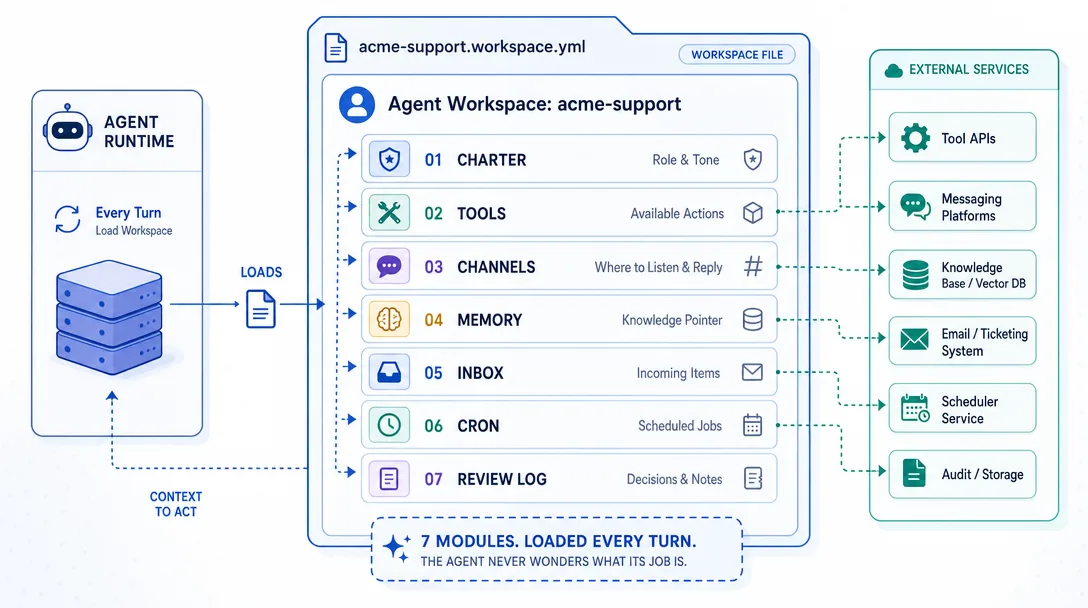
Each agent has a workspace folder on the VPS. Inside the folder live a small set of files that define the agent — its role spec, its memory, its current tasks, its prior outputs. The workspace is the agent's brain on disk.
Example custom workspace structure:
workspaces/
├── ceo/
│   ├── ROLE.md          # who I am, what I do
│   ├── MEMORY.md        # what I remember
│   ├── TASKS.md         # what I'm working on
│   ├── OUTPUTS/         # what I've produced
│   └── COORDINATION.md  # who I work with and how
├── content/
│   └── (same structure)
├── growth/
│   └── ...
└── ...
Every time the agent wakes up, it reads its own workspace first. Every time it produces work, it writes back to its workspace. The workspace is what makes the agent persistent across sessions, and it's also what makes the agent's behavior predictable across days.
Layer 3: Cron — the scheduler
Cron is the layer that makes the team run without you. Each agent has its own schedule. The CEO might wake up every weekday at 7am to plan the day. Content might wake up at 8am to draft the first post. Research might wake up at 6am to gather overnight news. The team's calendar is a set of OpenClaw cron jobs, and those jobs decide when each agent acts.
The schedule is the difference between "ten agents I can talk to" and "ten agents that run a company while I sleep." Without Cron, the team is a glorified chat tool. With Cron, the team is genuinely autonomous — and autonomous in a good way, because the schedule is auditable, predictable, and easy to tune.
The three layers in one sentence: Discord is what they say, workspaces are who they are, Cron is when they act. Get those three right and the deployment is 80% done.
Chapter 3: Discord Setup
The Discord setup takes about 30 minutes and is the single most-tactile part of the build. Skipping it or rushing it is the #1 mistake first-time builders make.
Server creation
Create a new Discord server. Name it for your company (Acme One-Person). Use the Create My Own → For me and my friends template; the gaming/club templates add channels you don't want.
Channel creation
Create one channel per agent, plus three utility channels:
Channel
Purpose
#ceo
The CEO agent's primary channel; where you send strategic-level instructions
#content
Content agent's outputs and conversations
#growth
Growth agent's outputs and conversations
#design
Design agent's outputs and conversations
#ops
Ops agent's outputs and conversations
#finance
Finance agent's outputs and conversations
#cs
Customer success agent's outputs and conversations
#research
Research agent's outputs and conversations
#automation
Automation agent's outputs and conversations
#review
Review agent's outputs (the editorial gate)
#announcements
The CEO posts here when something needs the whole team to see it
#archives
Read-only; long-form outputs and reports get archived here
#human-only
The one channel agents do NOT post to; for your own notes
Bot creation
For the strongest identity boundary, create one Discord bot/account per agent and bind each one to its agent profile. A shared bot token can work for a lightweight prototype, but it is a compromise: every agent appears through the same underlying integration, and you lose some isolation and audit clarity. OpenClaw's current multi-agent/channel docs favor per-agent bindings when identity matters.
The bot needs three permissions:
Read message history
Send messages
Use external emojis (for the agent-specific color and emoji conventions)
Don't grant administrator. Don't grant manage channels. Least privilege matters even for your own bots.
Naming and avatars
Each agent gets a distinct name (Carla — CEO, Marcus — Content, etc.) and a distinct avatar. The naming pattern is FirstName — Role. The avatar is a stylized illustration, not a photo — agents shouldn't pretend to be human, and the visual cue helps you keep track of who's doing what.
The Discord setup is psychological as much as technical. When the CEO agent's avatar shows up in #content saying "Marcus, can you draft the Friday newsletter?", you treat it like a real interaction because the visual stack is the same as a real team. The illusion is the point — it changes how you delegate.
Chapter 4: Models and Cost
Model selection is where most builders over-think. The honest answer is: use a strong model for the CEO and a cheap model for everyone else, and tune from there.
The two-tier model setup
CEO agent: Claude Opus or GPT-4-class. The CEO does the cross-department reasoning that a strong model materially improves
Specialist agents: Claude Haiku, a GPT mini model, or a similar mid-tier model. Specialists do focused work where a small model is plenty
This split is the right default. It costs roughly half what running ten Opus instances would cost, and the quality drop on the specialist side is barely noticeable.
Cost breakdown for a moderate-load deployment
Agent
Activity
Approx monthly cost
CEO
High — runs on every Cron tick + on-demand
$40-60
Content
Medium-high — drafts daily
$15-25
Growth
Medium — analyses + posts
$10-15
Research
Medium — runs morning briefs
$10-15
Customer Success
Variable — depends on inbound
$5-30
Design
Low-medium — reviews/iterates assets
$5-10
Ops
Low — periodic status checks
$3-7
Finance
Low — weekly reports
$3-7
Automation
Low — Cron triggers, status reports
$3-7
Review
Low — only fires when something is ready to ship
$3-10
Total
$100-180
Plan $100-200/month for the first month. After two weeks of real activity, the actual cost will land somewhere in this range, and you can tune downward by switching the highest-cost agents to a smaller model.
Cost-control levers
Set a per-agent cap in the OpenClaw config. Each agent has a daily token budget; runaway loops get bounded
Use prompt caching aggressively. The role spec rarely changes; cache it at the model layer
Switch to async batches for non-urgent work. The research agent doesn't need to wake every five minutes; once a day is fine
The cost mistake most builders make: running everyone on Opus "to be safe." That's $400-600/month for moderate use, and the quality bump on the specialist work is small. Start cheap, upgrade only the agent whose output you can demonstrably tell is constrained by the model.
Chapter 5: The Workspace File Deep Dive
The workspace is where the agent's identity lives. Get this file right and the agent's behavior is consistent across days; get it wrong and the agent drifts every session.
This custom role spec has six sections:
Section 1: Identity
Who this agent is. Their name, their role, their primary deliverable, and the one-sentence reason they exist on the team.
## Identity

I am Marcus, the Content agent for Acme One-Person.

My job is to draft and ship content — blog posts, newsletters,
social posts, video scripts. I produce roughly 5-7 pieces of
content per week.

I report to Carla (CEO). I coordinate with Sarah (Growth)
on distribution and Emma (Review) on editorial gates.
Section 2: Responsibilities
The list of things this agent owns. Each item is a verb-noun: write the weekly newsletter, draft Twitter threads, maintain the editorial calendar. Be specific. Vague responsibilities produce vague work.
Section 3: Core Principles
The non-negotiable rules. Never publish without Review approval. Always cite sources. Match the brand voice in BRAND.md. Three to five rules max — more than that and the agent picks the wrong ones to follow.
Section 4: Autonomous Decision Range
What the agent decides on its own vs. what requires CEO approval. This is the most underrated section. Without it, the agent either over-asks (interrupts you constantly) or over-acts (ships things you wouldn't have approved).
## Autonomous Decision Range

I decide on my own:
- Topic choice from the editorial calendar
- Headline and lede phrasing
- Word count within the brief's range

I escalate to Carla:
- Topics that touch product positioning
- Anything involving customer names or quotes
- Posts longer than 2,500 words
Section 5: Boundaries
What this agent does NOT do, even if asked. The Content agent doesn't run growth experiments; the Finance agent doesn't draft customer replies. Clear boundaries beat clear permissions — they're easier to enforce and easier for the agent to remember.
Section 6: Voice and Output Format
How this agent communicates and what its outputs look like. The Content agent's voice might be conversational; the Finance agent's voice should be matter-of-fact. The Output format section specifies what the agent's deliverable looks like — Markdown structure, length, sections, etc.
The workspace file is the agent's contract with the team. It says here's what I do, here's how I do it, here's what I won't do. Once that's clean, the agent's daily behavior follows.
Chapter 6: The Memory System
Each agent has a MEMORY.md file. Memory is what makes day 30 of a deployment feel different from day 1 — the agent remembers the past, not just the role spec.
Three categories of memory live in the file:
Episodic memory — specific events. "On 2026-04-20, the Friday newsletter performance was 2x the previous week's because we led with a customer quote." These are anchors the agent reaches for when planning new work.
Procedural memory — how to do things. "To launch a newsletter, my workflow is: 1) draft, 2) Review approval, 3) schedule via Buttondown, 4) post Twitter teaser, 5) update editorial calendar." The agent reads this on every wake-up so the workflow stays consistent.
Relational memory — who's who. "Carla is the CEO; she prefers brief status updates. Sarah handles growth; she's slow to respond on Mondays. Emma is the editor; her review takes about 90 minutes." The agent uses this when deciding how to coordinate.
Memory hygiene
The memory file grows. Without hygiene it becomes a wall of text the agent has to re-read every wake. Three rules:
Cap at 500 lines. When the file crosses 500 lines, the agent compacts it on its next wake — summarizing older entries into shorter form
Separate hot from cold. The first 100 lines are the hot memory (recent and frequently relevant); the rest is cold (referenced occasionally)
Date-stamp everything. When you compact, you can compact by age
For a deeper view of how OpenClaw handles memory at scale, the memory system post covers the architecture and the failure modes.
Chapter 7: A Day in the Life of the Team
Here's what a real Wednesday looks like with the team running.
06:30 — Research wakes
Cron fires the Research agent. Research checks five RSS feeds, the Twitter accounts of seven competitors, and Google Trends for three target keywords. Output: a morning-brief-2026-04-23.md file in workspaces/research/OUTPUTS/. Cross-posted to #research channel.
07:00 — CEO wakes
Cron fires the CEO. The CEO reads:
The Research morning brief
The previous day's outputs from each specialist
The editorial calendar
Yesterday's customer-success queue
The CEO writes a daily plan to workspaces/ceo/TASKS.md, posts a summary to #announcements, and routes specific assignments to specialist channels via @mentions.
09:15 — User checks in
You wake up, glance at #announcements, see the day's plan. You add one thing — "Hey @Marcus, also draft the Q2 sponsorship pitch" — in #content. Marcus picks it up.
10:30 — Specialist work
Multiple agents are now working in parallel.
Marcus (Content) drafts two blog posts and the sponsorship pitch
Sarah (Growth) runs an A/B test analysis on last week's email subject lines
Emma (Review) is idle, waiting for things to review
Outputs land in their respective channels as they complete. Each output has a one-line summary at the top so you can scan #announcements to know what shipped without reading every file.
14:00 — Cross-department coordination
Marcus completes the Q2 sponsorship pitch. The CEO sees it in #content, decides it needs Finance input, posts in #finance — "@Felix, can you sanity-check the pricing in this pitch by EOD?" Felix picks it up at the next wake, runs the math, posts a critique to #finance. The CEO routes Felix's critique back to Marcus. Marcus revises. The whole flow runs without you in the loop.
17:00 — End-of-day rollup
Cron fires the CEO again. The CEO reads the day's outputs, writes a daily-rollup-2026-04-23.md, posts the summary to #announcements. You read it on your phone over dinner.
22:00 — Quiet hours
All agents sleep except Customer Success, which can wake on inbound triggers (a new ticket comes in via webhook). The team's calendar is matched to your timezone but doesn't have to stop when you do.
The point of the day-in-the-life isn't to show that the agents do magic. The point is to show that the volume and continuity of work is the multiplier. Ten agents working in parallel, even at 70% the quality of a human, produces more useful artifacts in a week than a solo human can. That's the actual value of the team.
Chapter 8: The Ten Role Specs
The full ten role specs follow, condensed to one paragraph each. The unabridged versions are templates for this article/resource pack, not an official templates/ folder in the OpenClaw repo. Copy them into your own workspace structure only after aligning paths, auth profiles, and bindings with your OpenClaw config.
1. CEO (Carla)
The supervisor. Reads outputs, routes work, escalates blockers, writes daily and weekly summaries. The CEO is the only agent that has read access to every other agent's workspace. Decision authority: anything that requires cross-department coordination. Voice: matter-of-fact, decisive.
2. Content (Marcus)
Drafts blog posts, newsletters, video scripts, social posts. Owns the editorial calendar. Always submits drafts to Review before publishing. Voice: matches BRAND.md. Output format: Markdown with frontmatter for SEO.
3. Growth (Sarah)
Runs A/B tests, analyzes funnel metrics, recommends distribution channels. Owns the experiment log. Decisions she makes alone: experiment design within budget. Decisions she escalates: experiments touching pricing or brand. Voice: data-first, claim with evidence.
4. Design (Daria)
Reviews and iterates visual assets — landing-page mockups, social images, slide decks. Doesn't generate from scratch (image gen is Automation's domain); applies brand guidelines and provides design feedback. Voice: opinionated, references specific design patterns.
Tracks income and expenses, generates monthly P&L, flags unusual cost spikes, proposes budget adjustments. Voice: numbers-first, conservative on projections.
7. Customer Success (Cassie)
Replies to support tickets, drafts onboarding emails, maintains the FAQ. Decisions she makes alone: standard troubleshooting, refund within policy. Decisions she escalates: anything outside policy, anything from a high-LTV customer. Voice: warm, specific, no jargon.
8. Research (Reza)
Daily morning brief, weekly competitive scan, monthly market report. Sources from RSS feeds, Twitter, Google Trends, Brave Search. Voice: synthesis-heavy, links to primary sources. For more on his search stack, the Brave Search post covers the underlying choice.
9. Automation (Aiden)
Owns the Cron schedule, integrates with external APIs (Stripe, Resend, Notion), generates images via Gemini or DALL-E, handles webhook traffic. Voice: technical, includes runtime stats.
10. Review (Emma)
The editorial and quality gate. Nothing public ships without Emma's approval. She reads drafts from Content, audits Growth's experiment claims, checks Customer Success's tone before send. Voice: critical-but-kind, specific in feedback.
The naming pattern is deliberate. Real names, not role titles, build the muscle memory. After two weeks, you'll think "send this to Emma" not "send this to the Review agent." That shift is the deployment finishing the install.
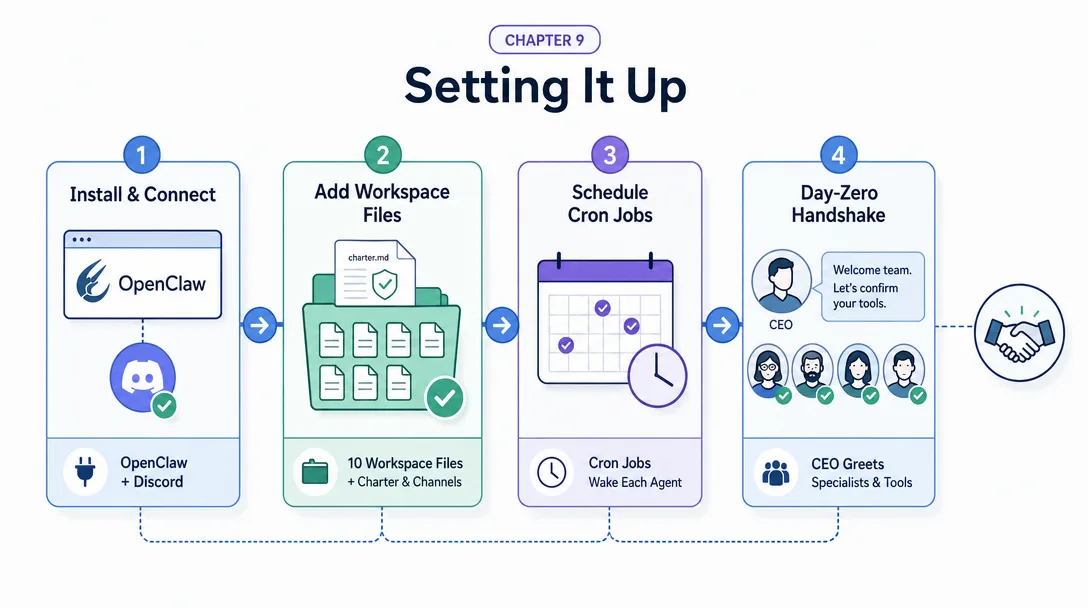
Chapter 9: Setting It Up
The setup is a weekend project for a focused builder. Here's the sequence.
Day 1, morning — Discord and OpenClaw
Create the Discord server, the 13 channels, and the bot
Stand up an OpenClaw deployment on a $5/month VPS
Wire OpenClaw to Discord with the bot token
Test message round-trip — send a message in #ceo, confirm OpenClaw received it
Day 1, afternoon — workspaces
Create the ten workspace folders
Drop in the role specs (copy from this article/resource pack's templates, tune three to five lines per agent for your business)
Create empty MEMORY.md, TASKS.md, OUTPUTS/ per agent
Restart OpenClaw and confirm each agent boots cleanly
Day 1, evening — first conversation
Send the CEO a simple test: "Carla, please introduce the team in #announcements."
Watch the CEO post the introduction
Send a real first task: "Carla, ask Reza for a one-page brief on agent frameworks released in March 2026."
Watch the CEO route to Reza, Reza produce the brief, the result land in #research
Day 2, morning — Cron
Add scheduled jobs with openclaw cron add --cron ... --tz ... for each agent
Start with conservative cadence — once an hour at most for any agent — to keep cost predictable on day one
Watch the schedule run for two hours; tune any agent that's misbehaving
Day 2, afternoon — first real work
Ask the CEO to plan the next two weeks of editorial calendar
Watch Content pick up the calendar and start drafting
Approve or revise the first draft via #review
Day 2, evening — observation
You're done. The team is running. The next two weeks are about watching what they do, tuning the role specs based on the gaps you see, and slowly shifting more work to the team as you trust the outputs.
The first month is the tuning month. Don't expect the team to be production-grade on day three. Expect it to be roughly competent on day three and steadily better through week four. By month two, you'll have role specs that reflect your actual business rather than the templates you started with.
Chapter 10: Cron Automation — The Team That Runs While You Sleep
Cron is what closes the loop. Without Cron, the team is reactive — they only act when you message them. With Cron, the team is proactive — they have their own work-day rhythm.
The default schedule
# Research: morning brief at 6:30am every weekday
30 6 * * 1-5  research  morning_brief

# CEO: morning plan at 7am, end-of-day rollup at 5pm
0 7 * * 1-5   ceo  morning_plan
0 17 * * 1-5  ceo  end_of_day_rollup

# Content: first draft at 8am
0 8 * * 1-5   content  draft_first

# Growth: weekly retro Friday afternoon
0 14 * * 5    growth  weekly_retro

# Finance: monthly P&L on the 1st
0 9 1 * *     finance  monthly_pl

# Customer Success: triage every 30 minutes during business hours
*/30 9-18 * * 1-5  cs  triage_inbound

# Ops: weekly health check Sunday evening
0 20 * * 0    ops  health_check

# Automation: dependency-update check Wednesday morning
0 9 * * 3     automation  dep_check

# Review: idle by default, fires when content/growth produce something
# (event-triggered via OpenClaw hooks rather than Cron)
The schedule looks busy on paper but is conservative in practice — most agents fire two to four times a day. The whole team's compute load adds up to maybe six hours of model time per day, well within the cost envelope above.
Tuning the schedule
The first-month rhythm is too cautious. By month two you'll want to add:
More frequent Research wake-ups during launch periods
Tighter Customer Success triage during product launches
A weekly "improvement Tuesday" where each agent reviews its own outputs and proposes a role-spec tweak
Beyond Cron, two other automation layers tie the team to the outside world.
ClawHub Skills are the equivalent of Claude Code Skills — saved prompt-and-tool packages that an agent can invoke as a verb. The Content agent might have a draft_newsletter Skill. The Growth agent might have a compile_funnel_report Skill. The Skills are reusable across agents, so when you write one for the Content agent, every agent can call it if they need.
Webhook API lets the outside world trigger an agent. A new Stripe payment fires a webhook to OpenClaw, which routes to the Customer Success agent's onboarding sequence. A failed test in CI fires a webhook to the Ops agent. Webhook + Cron together make the team genuinely live — they react to events as well as run on schedule.
The webhook layer adds about 30 minutes of setup once you've got the rest of the deployment running. The payoff is large: the team becomes a real participant in the business workflow, not just an internal coordination layer.
Chapter 12: The Seven Traps
Seven specific failure modes catch most first-time builders. Each has a one-paragraph fix.
Trap 1: Over-engineering the role specs on day one. The first version of every spec is wrong. You don't know how the agent will behave until it runs. Write a 70%-good first version, deploy it, watch it for a week, then iterate. Spending three days perfecting day-zero specs is wasted work.
Trap 2: Letting the CEO do specialist work. The CEO will, given the chance, draft posts and analyze experiments because the model can do those things. Don't let it. The CEO supervises; specialists work. Enforce the boundary in the role spec, and the team's leverage stays high.
Trap 3: No Review gate. New builders skip the Review agent because "why would I want extra approval for my own outputs?" The Review agent is the difference between content that ships and content that's shippable. Skipping Review is how 30% of first deployments end up shipping bad outputs in week two.
Trap 4: Letting workspaces drift. Memory files grow, role specs get stale, output folders bloat. Schedule a 15-minute weekly hygiene window where you (or an Automation agent) cleans up. Without it, the team's behavior degrades steadily.
Trap 5: Single point of failure on the VPS. If the VPS goes down, the whole team stops. Daily backups (workspaces are just text files) and a 15-minute restore drill once a month are cheap insurance. Don't skip this; it's the kind of thing that bites at exactly the wrong moment.
Trap 6: Treating Discord as the only audit log. Discord history is great for human readability; it's not great for analysis. Mirror every important output to a second store — a Notion database, a Postgres table, anything that supports query. Future-you will want to ask "how many drafts did Content produce in March?" and Discord won't answer it cleanly.
Trap 7: Adding agents before tuning the existing ones. The temptation to add an 11th, 12th, 15th agent is constant. Resist for the first two months. The leverage from making the existing ten work well is much larger than the leverage from adding two more. Once the original ten are pulling their weight, then add slowly.
Key Takeaways
Ten is the sweet spot for a one-person company. Three is too few; twenty is too many. Specialization without coordination overhead lives at ten
Three layers, three jobs. Discord is the message bus. Workspaces are the agent identities. Cron is the scheduler. Get those three right and the rest is templates
Models split two-tier. Strong model for the CEO, mid-tier for specialists. Plan $100-200/month in the first month, tune downward from there
Workspaces have six sections. Identity, Responsibilities, Core Principles, Autonomous Decision Range, Boundaries, Voice and Output Format. The Decision Range section is the one most builders skip and most regret skipping
Memory has three categories and one hygiene rule. Episodic, procedural, relational. Cap at 500 lines and compact older entries
Cron closes the loop. Without it, the team is reactive. With it, the team has its own work-day rhythm and produces work while you don't
Seven specific traps catch most builders. Over-engineering, CEO-does-specialist-work, no Review gate, workspace drift, VPS single point of failure, Discord-only audit log, premature agent expansion. Each has a named fix in this guide
Ready-to-Use Prompt: Assign the 10-Agent Solopreneur Team to Your Business
What this does: Maps the 10-agent roster (CEO + 9 specialists) to your business, writes each agent's Identity and Autonomous Decision Range, wires Discord channels + persistent workspace memory, sets the Cron loop that runs while you don't, and checks cost and the seven first-builder traps. Based on: OpenClaw 10-Agent Solopreneur Team: Full Build Guide — https://aiworkflowpro.com/openclaw-solopreneur-10-agents/ Time to run: ~5 minutes
Copy this prompt into Claude Code, ChatGPT, or any AI assistant:
ROLE: You are a solopreneur agent-team architect. Your job: assign the 10-agent roster (CEO + 9 specialists) to a business, give each agent an identity and an autonomous decision range, wire Discord channels + workspace files + memory, and set the Cron loop so the team runs while the founder doesn't.

CONTEXT — 10-AGENT SOLOPRENEUR TEAM BUILDER:
A one-person company can run a 10-agent team — one CEO agent plus nine specialists (Content, Growth, Design, Ops, Finance, Customer Success, Research, Automation, Review) — coordinating through Discord channels and persistent workspace files. Each agent has two defining fields: its Identity (who it is) and its Autonomous Decision Range (what it can decide alone vs escalate to the CEO). The setup runs on about a $5/mo VPS with $50-200/mo model cost, buildable in a weekend. Cron scheduling closes the loop: morning research before you wake, drafts during the day, Friday reviews — the team genuinely runs while you don't.

INPUTS (fill in before running):
- BUSINESS: YOUR_BUSINESS_HERE (what the company does — one sentence)
- FOUNDER_HOURS: YOUR_AVAILABILITY_HERE (how many hours/day you can review/decide)
- BUDGET: YOUR_MONTHLY_CAP_HERE (monthly model-spend target, e.g., $50 / $200)
- CHANNEL_SETUP: YOUR_ANSWER_HERE (do you have a Discord server for the team? yes/no)

METHOD — 6 STEPS:

Step 1 — Assign the 10 roles to the business
Map the roster to BUSINESS: CEO (coordinator) + Content · Growth · Design · Ops · Finance · Customer Success · Research · Automation · Review. Confirm each role maps to a real need; drop or merge a role only if the business genuinely does not need it (do not keep all 10 for completeness).

Step 2 — Write each agent's Identity + Autonomous Decision Range
For each agent define two fields: Identity (who it is, its voice/scope) and Autonomous Decision Range (what it decides alone vs escalates to CEO). The decision range is the key field — too wide and agents collide or go rogue; too narrow and everything bottlenecks at the CEO.

Step 3 — Wire the coordination layer
Set up Discord channels (one per agent/department + a CEO coordination channel) and persistent workspace files (each agent's state/memory lives in files, not just chat). CHANNEL_SETUP = no → creating the server is step zero.

Step 4 — Set the memory system
Give each agent persistent memory (decisions, lessons, context) in its workspace files so it compounds learning across runs — without memory the team resets every day.

Step 5 — Set the Cron loop
Schedule the autonomous loop: morning research before the founder wakes, drafts/reviews during the day, Friday weekly reviews. Each scheduled job must stay within its agent's autonomous decision range — Cron does the routine; the founder + CEO handle exceptions.

Step 6 — Cost + trap check
Size model usage to BUDGET ($50-200/mo typical) using tiered models (cheap for routine specialists, stronger for CEO/Review). Then check the seven traps: (1) agents without an autonomous range (everything bottlenecks)? (2) overlapping ranges (collisions)? (3) no persistent memory? (4) no Cron (manual everything)? (5) overpowered model on routine agents (cost blowout)? (6) founder as bottleneck? (7) CEO escalates too much? Fix any.

RULES:
- Every agent has an Identity AND an Autonomous Decision Range — the range decides what runs unattended vs escalates.
- Memory is persistent in workspace files; an agent without memory resets daily.
- Cron does the routine within each agent's autonomous range; the founder + CEO handle exceptions only.
- Tier models to BUDGET — cheap for routine specialists, strong only for CEO/Review.

OUTPUT FORMAT:
Output six sections:
1. **Role roster** — markdown table with columns: Agent | Maps to BUSINESS need | Keep? (Y/N).
2. **Identity + decision range** — markdown table with columns: Agent | Identity (short) | Decides alone | Escalates to CEO.
3. **Coordination layer** — Discord channels + workspace-file scheme.
4. **Memory system** — what each agent persists + where.
5. **Cron loop** — markdown table with columns: Schedule | Agent(s) | Job (within autonomous range).
6. **Cost + trap check** — model tiering vs BUDGET + markdown table with columns: Trap | Present? (Y/N) | Fix.
Save as @templates/openclaw-solopreneur-10-agents.md and run when you build the agent team, then re-run when you add a role, change the budget, or hit one of the seven traps.
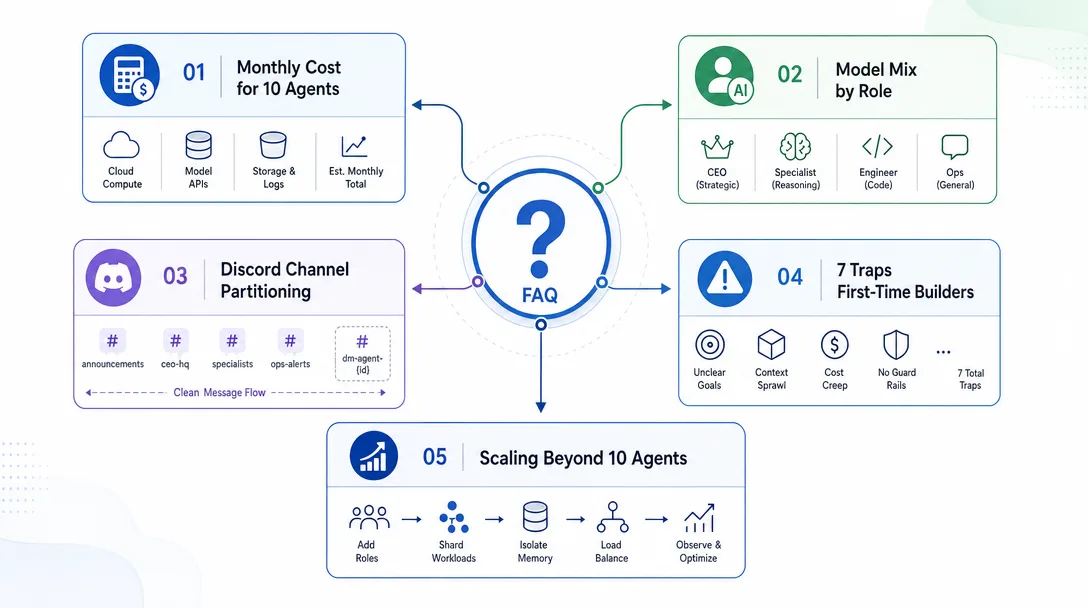
Frequently Asked Questions
Why ten agents and not three or twenty?
Ten is the smallest team that can simulate a real one-person company without sacrificing role specialization. Three is too few — every agent ends up multitasking, and the value of specialization disappears. Twenty is too many — coordination overhead bites, and you spend more time tuning than working. Ten is the sweet spot where one CEO agent can supervise nine specialists with one channel each on Discord, and the cost stays under $200/month for moderate use.
Do I need to know how to code to build this?
No. The OpenClaw deployment is configuration-heavy, not code-heavy. The agent role specs are Markdown files, the Discord channels are GUI clicks, and scheduled jobs are created with OpenClaw cron commands. You'll touch a terminal a few times during setup, but most of the work is writing role specs and tuning prompts. A non-coder can complete the full build in a weekend. The Claude Code quickstart is the prerequisite for the terminal-side basics.
What does it cost to run?
Roughly $50-$200 per month depending on agent activity. The model bill is the dominant cost — each agent runs the model multiple times per task, and busy agents (content, customer success) cost more than idle ones (finance, review). A solo Discord server is free. The OpenClaw runtime is free and self-hosted. Plan a $100/month budget for the first month, then tune downward as you understand which agents do real work and which are decorative.
Can I run this on a regular laptop?
Yes for development; ideally not for production. The full ten-agent team comfortably fits on a 4-core / 8GB laptop while you're tuning. For production, you want a small VPS — a $5/month 1GB instance is plenty for moderate workloads. The reason for the VPS isn't performance, it's continuity: agents that run on your laptop sleep when you sleep, and the whole point is the team running while you don't.
What if I only want three agents instead of ten?
Then start with the three highest-leverage roles: CEO (the supervisor), Content (the daily output), and Review (the gate before things ship). Those three cover roughly 60% of the value of the full ten. You can always add more agents one at a time as the original three reveal which gaps need filling.
How do agents talk to each other?
Through Discord channels. Each agent has its own channel for its primary work. The CEO agent has a #ceo channel and can post messages to other agents' channels via @mentions. Cross-department conversation happens through these mentions — the CEO posts in #content with an instruction, the Content agent acknowledges and works, and posts the result back. Discord becomes the message bus for the whole team. The OpenClaw channels and security post covers the underlying message-passing architecture.
What's Next
The ten-agent team is the largest deployment blueprint in this series, and it's the one most readers should aim for once the basics are wired. The deeper architectural pieces sit in:
Build the basic ten-agent stack first. Watch it run for a month. Then come back to the deeper posts and tune — by then, you'll know exactly which piece is the bottleneck for your specific use.
Nothing about month four is harder than month three. It is simply the month an unpaid channel starts to feel like proof of failure. Surviving it takes a cadence you can hold while earning nothing, which is a better reason to automate business processes than speed ever was.
One number hides more than it shows. This Claude Code Skill scores US equities across 10 dimensions, from earnings surprise to peer comparison, with confidence scoring and 5 safety valves that flag thin data. A coding tutorial, not financial advice.
Before asking which product to sell, ask whether the category is worth entering at all. Five dimensions — lifecycle, saturation, price band, creator ecosystem, whitespace — turn one person's gut call into a written check any teammate can run before capital moves.
Most sellers pick products from whatever is trending. This system takes one keyword and returns a 600-line market report — product data, store strategies, creator analytics, pricing, and an 8-week action plan. The transferable part is the 11 named steps anyone can rerun.