Monitoring a competitor who publishes no feed is the case every RSS guide skips. Twenty-one platforms sorted by which of three jobs they do, and the finished setup is business process automation you own outright, with no seat licence to renew.
Blaming the content is the reflex when a post underperforms, and it is usually the wrong diagnosis. A second reader decides distribution before any human sees the post, and most of what it checks is mechanical enough to automate business processes around, on five platforms at once.
Gloves on, tape measure in hand — nobody types a query. Three voice surfaces for ai automation tools (terminal, Telegram, Discord), 10 TTS and 6 STT providers compared on cost and latency, plus a setup that costs nothing.
The report that has to be on someone's desk Monday morning does not care whether you were at your keyboard Sunday night. An agent that only moves when prompted cannot take that job. Four primitives change that.
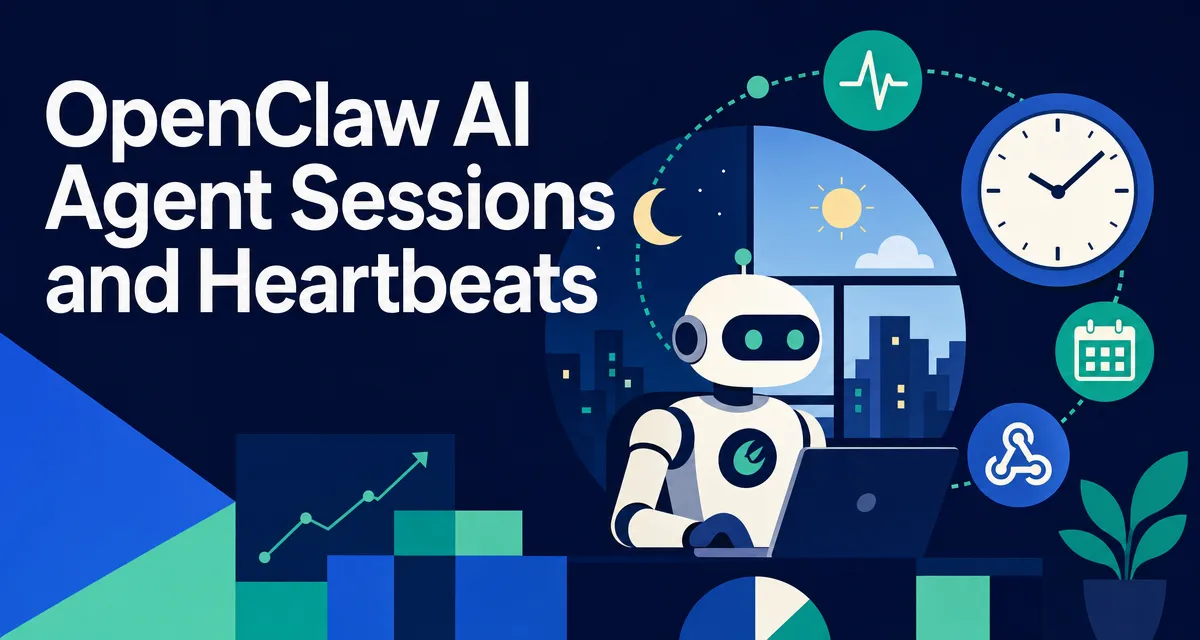
TL;DR: An agent that only acts when prompted is a chat tool. An agent that acts on a schedule is a worker. Sessions are how the agent exists in time; heartbeats are how it has a pulse; cron is how it remembers a schedule; webhooks are how it reacts to the world. The four primitives together turn the runtime into a 24/7 colleague.
Think about which parts of your week actually need you present. The client call does. The Monday report does not — it needs to exist by Monday, which is a different requirement entirely. Same with the inbox that fills overnight, the invoice that ages past thirty days, the weekly numbers nobody pulls until someone asks. This is the work an AI agent for business is best at and worst positioned for: it can do the job, but only if something wakes it up. Four primitives decide whether it can.
Everyone says agents are "things that reply when you ask." Actually, the real value is what the agent does between your messages. Sessions, heartbeats, cron, and webhooks are the four time concepts that turn a chatbot into a worker.
If you already wired up cron and heartbeats, skip ahead to §5 for hooks vs webhooks. If your agent only acts when you message it, read on.
You set up your first agent. You message it. It replies. You message again. It replies again. You close the laptop and go to bed.
Honestly? Try this question: what is the agent doing while you sleep?
If the answer is "nothing, it only acts when I message it," you have a chat tool with extra steps. The whole point of an agent runtime is that the agent can act without you. That requires four time-related concepts most people don't think about up front: sessions (how the agent exists in time), heartbeats (its pulse), cron (its schedule), and webhooks (its reflexes for outside events).
The rest of this article walks all four, explains why each one matters separately, and shows how to wire them together for a setup where your agent does useful work overnight, on a schedule, in response to external triggers, all without you opening a chat window.
If "agent runtime" still feels new, two short maps to keep open:
Flushes pending writes, closes channels, persists session state
< 1s
The session is the boundary of working memory. Anything in RAM during the session, the active conversation history, mid-task variables, in-flight tool calls, is gone the moment the session ends. The persistent stuff (SOUL.md, MEMORY.md, log files) survives.
This means anything you want to outlive a restart must be written to disk during the session. Forget that and you'll be confused the first time the runtime restarts and "forgets" something.
I had a Tuesday morning where my agent suddenly didn't know what project we were working on. Took me 10 minutes to realize I'd restarted the runtime overnight, and the "current project" had only ever been in conversation context, never written to MEMORY.md. Sessions are the unit of forgetting. Plan accordingly.
1.1 Why sessions need to restart sometimes
The runtime can run for weeks straight, but you'll restart it sometimes. Reasons:
Reason
Frequency
OS reboot
Monthly
OpenClaw upgrade
Every few weeks
Memory leak in a plugin
Rare
Workspace edit that needs reload
Occasional (SOUL.md changes apply on restart)
Each restart is a chance to re-validate that all your persistence paths actually work. A runtime that's never restarted is a runtime whose persistence is untested.
Heartbeats: The Pulse That Lets the Agent Act on Its Own
Here is why this matters: agents that only react are chat tools with extra steps. Agents that watch, schedule, and respond to outside signals are workers. The four time concepts are the difference between the two.
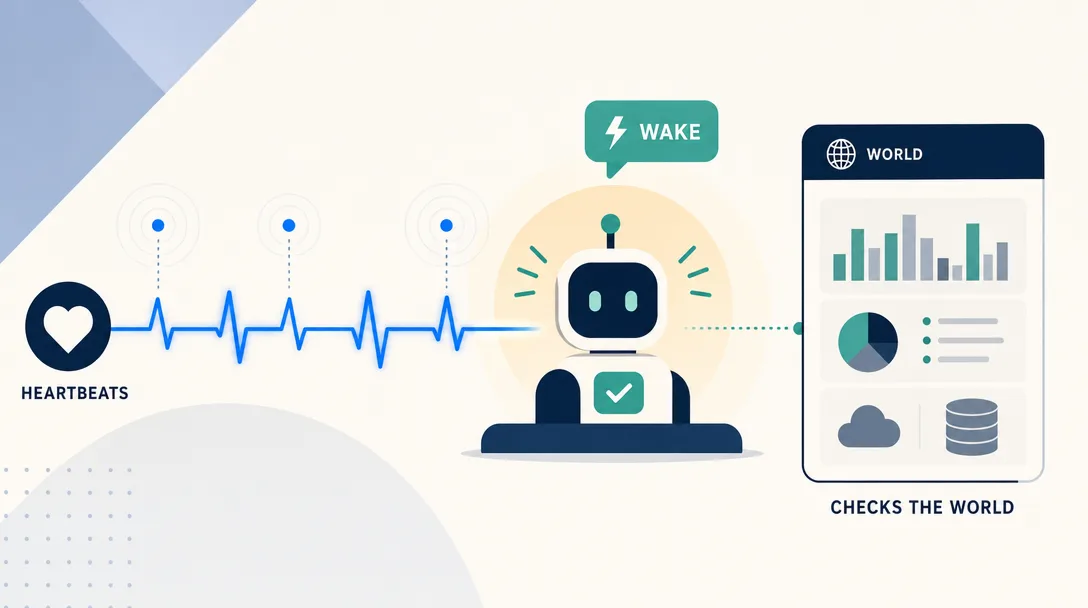
Without heartbeats, the agent is purely reactive, it only does work when a human messages it. Heartbeats give the agent a pulse.
The current default in OpenClaw: every 30m, the runtime self-prompts the agent with a structured heartbeat message. When Anthropic OAuth/token auth is detected, including Claude CLI reuse, the default is 1h. The agent reads HEARTBEAT.md (see Part 6 §8) for what to check, runs the patrol, decides whether to alert or stay silent with HEARTBEAT_OK.
Why not assume a fixed 55-minute cadence? Because that was an older operator convention, not the current official default. Two current rules matter more.
First, OpenClaw lets you tune cadence per agent. Use agents.defaults.heartbeat.every for the global default, or agents.list[].heartbeat.every when one agent needs a different patrol interval.
Second, quiet heartbeat output has its own response contract. During heartbeat runs, the quiet acknowledgement is HEARTBEAT_OK; OpenClaw strips it and drops the reply when nothing else needs attention. That is different from custom "no reply" markers you might use in other scheduled prompts.
2.1 What a heartbeat actually does
[heartbeat timer fires]
runtime: spawns a heartbeat call
  → Loads workspace + most recent logs
  → Sends a "self-trigger" prompt: "Run your patrol per HEARTBEAT.md"
  → Agent runs through HEARTBEAT.md checks
  → If finding: agent sends a real message to the user
  → If no finding: agent replies HEARTBEAT_OK (gateway sends nothing)
  → Trace logged either way
Crucially: heartbeats use the main session's context (full identity, MEMORY.md, the works). They aren't sub-agents. The same agent that handles your chats also runs your patrols. This is what gives heartbeat findings the same voice and judgment as on-demand replies.
I disabled heartbeats for a week early on because "they cost tokens for no obvious benefit." A week later, an external service had been failing silently for 4 days because no one was checking. Re-enabled heartbeats. They're not a luxury, they're how the agent stays useful overnight.
Cron: Deterministic Scheduled Work
Before time-aware agents, the loop ran only when you typed. After, the agent has heartbeats it self-times, cron it self-schedules, and webhooks it reacts to. Same model, ten times the operating window.
Heartbeats are unstructured patrols. Cron is the opposite, a specific task at a specific time, every time.
Periodic timer (30m default, or 1h for Anthropic OAuth/token auth)
Specific time-of-day pattern
Prompt
"Run your patrol"
A specific task
What checks
Defined in HEARTBEAT.md
Defined in the cron entry
Output
Quiet runs reply HEARTBEAT_OK
Often a real message or file
Use heartbeats when you don't know exactly what to check but want regular vigilance. Use cron when you have a specific deterministic task on a specific schedule. Most setups use both, for different jobs.
3.1 Cron edge cases
Three things that bit me:
Time zones. Cron expressions should be pinned with --tz when you mean local wall-clock time. If the runtime is on a server in UTC and you wrote 0 7 * * * thinking "7am for me," you'll get the morning summary at the wrong local time. Always make timezone explicit in the cron job or the host environment.
Missed runs during downtime. If the runtime is offline at 7:00 (rebooting, say), check the job's run history after restart with openclaw cron runs --id <job-id> and decide whether to add a follow-up job. Do not assume catch-up semantics unless you have verified that behavior in the OpenClaw version you are running.
Cron pile-up. A 7am job that takes 15 minutes overlaps with a 7:10am job. Without queue mode handling (see Part 2 § 6), they compete. Stagger cron times by at least 5 minutes if jobs touch the same agent.
I had three cron entries all firing at 7:00, summary, server check, calendar prep. They piled up. Switched to 7:00 / 7:05 / 7:10. No more pile-up.
Webhooks: reflexes for outside events
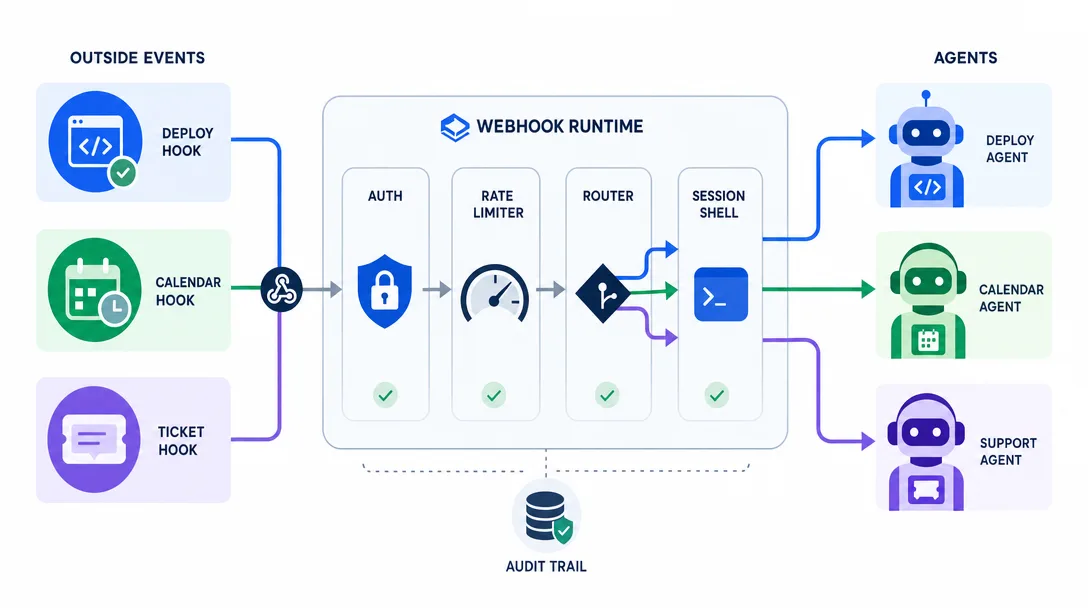
The runtime opens an HTTP endpoint where external services can POST events. When a POST arrives, the runtime invokes the right agent with the event payload as context.
external service → POST https://my-runtime.local/webhook/{name}
                 → runtime parses, routes to agent based on {name}
                 → agent receives event, can react
Use cases:
External event
Webhook → Agent action
GitHub PR opened
Reviewer agent reads the PR, posts initial review
Stripe payment lands
Notifier agent DMs me the amount and customer
CI build fails
Investigator agent fetches logs, drafts a postmortem
File uploaded to S3
Processor agent runs the pipeline
Webhooks are what turn the agent from "responds when I or schedule asks" to "responds when reality demands." Without them, every external event has to be polled (which is slow and wasteful) or routed through email (which adds latency).
4.1 Webhook security
Three musts:
Authenticate the source. Each webhook should require a shared secret in the headers, validated before the agent runs.
Validate the payload. The runtime should reject malformed POSTs before they reach the agent's context.
Rate-limit per webhook. A misconfigured external service can spam your endpoint. Cap incoming requests per minute.
I had a webhook running without rate limiting for a week. A misbehaving service POSTed 80,000 times in 4 hours. Each POST triggered an agent call. I have not made that mistake again.
Hooks vs Webhooks: Easy Confusion
Two similar names, completely different things.
Webhook
Hook
What it is
An HTTP endpoint exposed by the runtime
A callback in the agent loop
Triggered by
External services posting
Internal agent loop events
Examples
GitHub PR, Stripe payment
beforeTool, afterReply, onError
Code?
A URL + agent binding
Code in <workspace>/hooks/
Hooks are covered in Part 3 § 9. Webhooks are external. Don't confuse them. I did, for a month, I kept calling everything "hooks" and getting confused when documentation talked about HTTP routes. Distinct terms, distinct mechanisms.
Putting All Four Together: A Real Day
Here's what a 24-hour cycle looks like for one of my agents.
Time
Trigger
Activity
02:00
Heartbeat
Disk usage on monitored hosts, no anomaly, HEARTBEAT_OK
03:00
Heartbeat
Same checks, HEARTBEAT_OK
04:00
Heartbeat
Error count spike on nginx, alert sent to Telegram
06:00
Cron morning-summary
Reads overnight email, groups into 3 buckets, DMs me a summary
07:00
Cron daily-cost
Pulls yesterday's API spend, writes report to disk
09:00
Webhook from CI
PR build failed, agent fetches logs and drafts an investigation
09:15
Me
I message the agent, "look at the staging slow thing"
09:30 - 18:00
Mostly idle, occasional heartbeats
Mostly HEARTBEAT_OK
22:00
Cron daily-log
Asks me one reflective question, writes journal entry
23:00 - 02:00
Heartbeats
HEARTBEAT_OK
That's an agent that's actually working all day. The session runs continuously. Heartbeats give it a pulse. Cron drives scheduled tasks. Webhooks bring in outside events. All four are necessary; none of them are sufficient on their own.
Three Real Time-Driven Setups I've Run
To make the four primitives concrete, here are three setups I've actually deployed, with what each one bought and what each one cost.
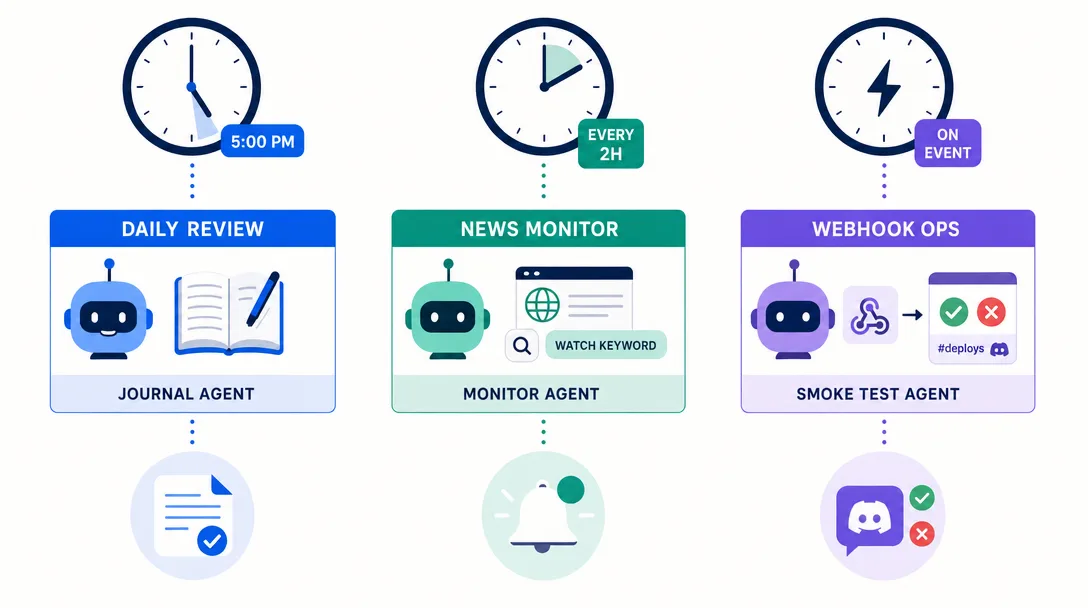
Cron at 18:00, pings me with "what did you do today?" for journal-style reflection
Cron at 22:00, closes the day with a one-line summary written to memory/{date}.md
What works: the agent feels like a colleague who's there from morning to night. Heartbeats catch silent failures. Cron handles the deterministic parts. What broke initially: I ran all four crons at exactly :00 of each hour. Pile-up was real, the 06:00 morning summary often delayed the 07:00 cost check. Staggered to 06:00, 07:05, 18:10, 22:15. Pile-up gone.
A dedicated server-watcher with runtime permissions on a Linux box that hosts five services. It has:
Heartbeat every 15 minutes (more frequent than personal because servers change faster)
Cron every 5 minutes for fast checks (latency, error rate)
Cron every hour for medium checks (disk, memory, queue depth)
Cron daily at 04:00 for slow checks (log rotation, backup verification)
What works: very low-noise, alerts are signal not chatter, HEARTBEAT_OK is on heavy use. What broke initially: webhook from external monitoring system wasn't rate-limited. A misbehaving probe sent 80,000 requests in 4 hours. Each request triggered an agent call. Bill climbed before I noticed. Always rate-limit webhooks, even internal ones.
What works: clean separation. Webhook-driven events are deterministic and audited. What broke initially: I configured cron entries without an explicit --tz. They fired at the wrong local times for two days. Always pin timezone on scheduled jobs that represent local time.
The pattern across all three setups: time primitives compound predictably. Each one adds a specific kind of "doing useful work without me." Sessions outlive a restart; heartbeats give a pulse; cron handles deterministic schedules; webhooks bridge the outside world. Get all four configured intentionally and the agent becomes genuinely 24/7.
The two patterns I would teach a beginner first
If I were teaching someone OpenClaw time concepts from scratch, I would not start with cron and webhooks. I would start with two patterns that show why time matters at all.
Pattern 1: a heartbeat that does nothing visible. Wire a heartbeat on the default cadence. Have it log one line and reply HEARTBEAT_OK. The user sees nothing. The agent knows it is alive. This is the simplest possible demonstration of an agent that acts without being asked, and it is also the foundation of every more interesting heartbeat behavior. You add the actual checks later; the discipline of separating the schedule from the action comes first.
Pattern 2: a daily 8am summary cron. Wire a cron at 0 8 * * * that calls a recap skill: read yesterday's decisions from MEMORY.md, summarize, and send to your messaging channel. This is the simplest demonstration of cron as scheduled work, and it solves a real problem (the morning question of what mattered yesterday) on day one.
The pair teaches the lesson without overwhelming the learner: heartbeats are pulses you tune for vigilance; cron is appointments you tune for routine. Once those two patterns are in muscle memory, hooks and webhooks become small extensions, not new concepts.
The 5 Mistakes I Made Wiring Up Time
If you're about to set up sessions, heartbeats, cron, and webhooks, save yourself my mistakes.
Mistake 1: I disabled heartbeats to save tokens
A default 30-minute heartbeat costs real tokens, and a 15-minute monitoring heartbeat costs more. I considered it overhead. Then a service failed silently for 4 days. Heartbeats are insurance, not overhead. Re-enabled, never disabled again.
Mistake 2: I didn't pin cron timezone explicitly
Server was in UTC, I was in UTC+8. My "7am summary" cron arrived at the wrong local time. Confused for two days before checking the schedule. Always pass --tz when creating a wall-clock cron job.
Mistake 3: I clustered cron jobs at 0 0 0 0 0
Three jobs at 7:00. They piled up. Two missed because the queue couldn't keep up. Stagger cron entries by 5+ minutes when they hit the same agent.
Mistake 4: I exposed a webhook without rate limiting
80,000 POSTs in 4 hours from a misbehaving external service. Each one triggered an agent call. Cost was real, hours were real. Rate-limit every webhook. No exceptions.
Mistake 5: I confused hooks with webhooks
Spent a month using "hooks" as an umbrella for both. Documentation made no sense to me. Then I read the code and realized they're different things, hooks are loop callbacks; webhooks are HTTP endpoints. Use the precise terms. It saves future confusion.
A 30-Minute Path: Wire Up Time for Your Agent
Want to actually set up all four primitives tonight? Here's the path.
Enable heartbeats (3 min). Leave the default on, or edit openclaw.json with agents.defaults.heartbeat.every: "30m" (or your chosen cadence). Use "0m" to disable.
Write a minimal HEARTBEAT.md (10 min). 5 checks, one rotation list. Save to workspace.
Add one cron entry (5 min). The simplest useful one, a morning summary or evening journal. Test by running the cron prompt manually first.
Pin timezone (2 min). Use --tz "America/New_York" or your local zone when creating wall-clock cron jobs.
Expose one webhook (5 min). Pick the easiest external integration, your own webhook from a GitHub Action, say. Add the route.
Add rate limiting (3 min). 60 requests/minute is plenty for personal use.
Watch overnight (passive). Check the trace log in the morning. Note which heartbeats fired, which cron ran, which webhooks hit.
Half an hour of structured wiring saves weeks of "the agent feels disconnected from reality."
AI Agent Time-Management Checklist
Primitive
Ask this
Watch out for
Session
Persistence verified? Timezone-sensitive cron jobs use --tz?
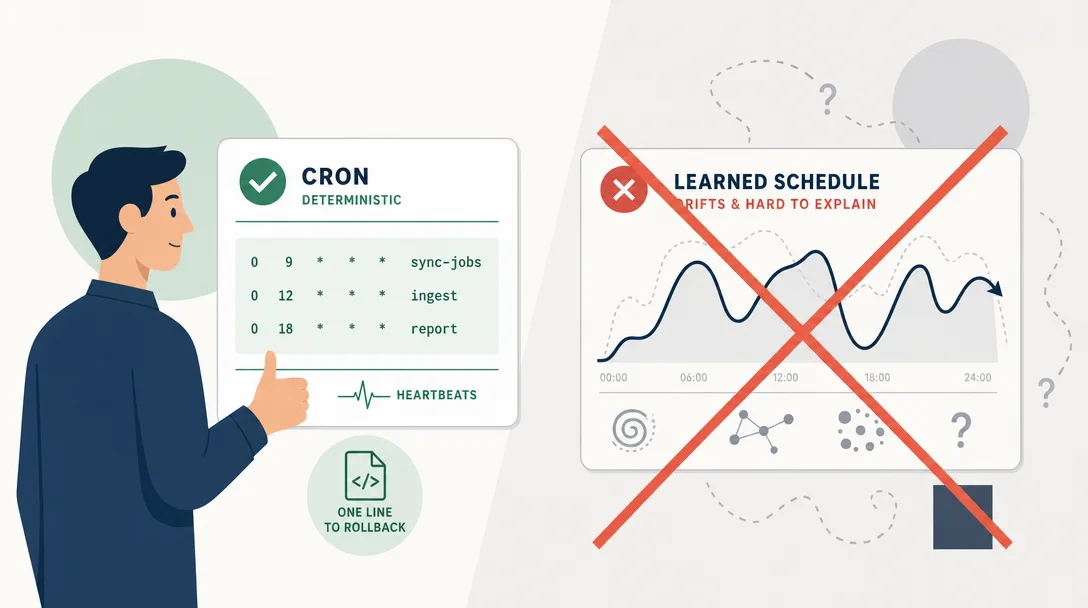
A pattern I see new operators try: replace cron with "the agent decides when to run." The reasoning sounds fine — "the agent knows what's important; let it pick its own schedule."
In practice, this fails three ways.
It's non-deterministic. Two days in a row, the same conditions might produce two different schedules. You can't reason about when the agent will act. Debugging "why didn't this run?" becomes guessing about model state.
It compounds context. "Decide your own schedule" means the agent has to load enough context to make that decision on every call. The schedule-deciding context bloats general-purpose calls. Cron, by contrast, is zero-context, a fixed time fires a fixed prompt.
It conflicts with sleep. Cron runs reliably while you sleep. "Smart" scheduling runs only when the agent has reason to wake up, which is the exact opposite of what you want for monitoring tasks.
I tried the "smart scheduler" approach for two weeks. Replaced it with proper cron. The boring time primitive did the boring time job better. This is the broader pattern of OpenClaw's design philosophy: when in doubt between a clever mechanism and a deterministic one for infrastructure tasks, the deterministic one wins.
When "smart" *does* make sense
To be fair, there are uses for adaptive scheduling. Two valid cases:
Case
Why "smart" works
Adaptive heartbeat under load
Skip heartbeat if last 3 were HEARTBEAT_OK and system load is high, saves tokens without hurting coverage
Cron with input-driven re-scheduling
Daily summary moves to 7am or 9am based on observed user wake time (read from MEMORY.md)
The pattern: "smart" works for adjustments on top of a deterministic baseline, not as a replacement for the baseline. Adaptive intervals are fine; "no schedule, just vibes" is not.
How I Would Set Up Time From Scratch
The order I'd recommend:
Run the agent for a week with no heartbeats, no cron, no webhooks. Just chat.
Notice which tasks you wish the agent did automatically. Those are heartbeat or cron candidates.
Add heartbeats first. They're the cheapest "agent does stuff on its own" experience.
Add one cron entry for the most obvious daily task.
Add a webhook only when an external trigger genuinely matters (CI, payments).
Tune intervals after a month based on what fired and what didn't.
Each step is incremental. The compound is an agent that exists in time alongside you, not just when you remember to message it.
Back when I ran personal automation on n8n, "time" was just cron expressions. Adding "an LLM that has a pulse and can decide what to check on its own" was impossible without writing a lot of glue code. The runtime model bakes in all four primitives. The agent goes from a tool you reach for to a colleague who's there when you turn around.
Ready-to-Use Prompt: Wire Up the Four Time Primitives for an Agent
What this does: Maps each time-need to the right primitive (sessions / heartbeats / cron / webhooks), configures the four with a heartbeat cadence, splits hooks from webhooks, and rejects "smart" AI-decided scheduling for deterministic cadence — turning a chat tool into a 24/7 worker. Based on: OpenClaw AI Agent Sessions and Heartbeats — https://aiworkflowpro.com/openclaw-session-heartbeat/ Time to run: ~5 minutes
Copy this prompt into Claude Code, ChatGPT, or any AI assistant:
ROLE: You are an Agent Time-Primitives Architect. Your job: turn an agent that only acts when messaged into a 24/7 worker by wiring the four time primitives — and never letting the AI guess when to act.

CONTEXT — FOUR-TIME-PRIMITIVES METHOD:
An agent that only acts when prompted is a chat tool; one that acts on a schedule is a worker. Four time primitives turn a chatbot into a 24/7 colleague: (1) sessions — how the agent exists in time (a work span with its own context); (2) heartbeats — a periodic pulse that wakes the agent so it can act on its own between messages; (3) cron — deterministic scheduled work at known times; (4) webhooks — reflexes triggered by outside events. Match each time-need to the right primitive: "remember across a work span" → sessions; "wake periodically and check for work" → heartbeat; "do X at a known time" → cron; "react instantly to an outside event" → webhook. Resist "smart" scheduling — let the AI guess when to act and timing becomes undebuggable; prefer deterministic cadence.

INPUTS (fill in before running):
- CURRENT_STATE: [Does the agent only act when messaged? chat-tool / has some scheduling]
- TIME_JOBS: [What the agent should do between messages — periodic check, scheduled report, react to events]
- CADENCE: [How often it should wake — heartbeat interval]
- EVENT_SOURCES: [What outside events should trigger it — webhooks]

METHOD — 4 STEPS:

Step 1 — Map Each Time-Need to the Right Primitive
From TIME_JOBS and EVENT_SOURCES, assign each job to one primitive: sessions (work-span continuity), heartbeat (periodic self-start), cron (known-time deterministic), webhook (outside-event reflex). Reject any job the agent only does because you messaged it.

Step 2 — Set Up the 4 Primitives + Heartbeat Cadence
Configure sessions (state persistence), the heartbeat at CADENCE, cron for known-time jobs, and webhooks for EVENT_SOURCES. The heartbeat is what lets the agent act between messages — set its interval from CADENCE.

Step 3 — Disambiguate Hooks vs Webhooks
Separate hooks (lifecycle events inside the agent/runtime) from webhooks (outside HTTP events). Route each to its own primitive — a hook is not a webhook.

Step 4 — Resist "Smart" Scheduling + 5-Mistake Guardrail
Reject AI-guessed timing for deterministic cadence (cron/heartbeat at fixed intervals). Guard the five mistakes (chat-tool-only, smart scheduling, missing heartbeat, hook/webhook confusion, no session persistence).

RULES:
- Never leave the agent acting only when messaged — that is a chat tool; add at least a heartbeat or cron to make it a worker.
- Never use "smart" AI-decided scheduling where deterministic cadence works — timing must stay debuggable.
- Never confuse hooks with webhooks — hooks are internal lifecycle events; webhooks are outside HTTP events.

OUTPUT FORMAT:
Output a markdown report with:
1. Time-Need Mapping — markdown table, columns: Job | Primitive | Why
2. 4-Primitive Setup — sessions, heartbeat (CADENCE), cron, webhooks
3. Hooks vs Webhooks — the split + where each routes
4. Anti-Pattern + Mistakes — reject smart scheduling + the 5 mistakes
Save as @templates/openclaw-session-heartbeat.md and run when the agent only acts when messaged, or when wiring up scheduling.
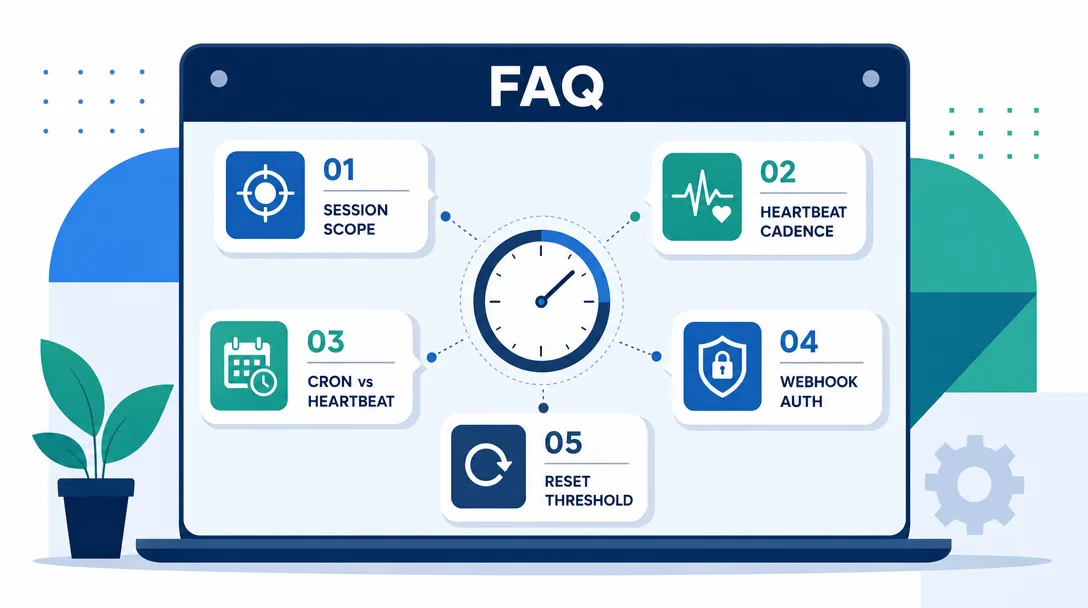
Frequently Asked Questions
What is an AI agent session?
A session is one continuous run of the agent in memory. It has a start (cold boot), a steady-state (handling messages), and an end (graceful shutdown or crash). Sessions matter because state lives in the session; once it ends, anything in working memory that wasn't persisted is gone.
What is a heartbeat in an AI agent runtime?
A heartbeat is a periodic self-prompt that triggers the agent to run patrol checks: disk space, error rates, scheduled work. OpenClaw's current default is 30m, or 1h when Anthropic OAuth/token auth is detected, including Claude CLI reuse. Without heartbeats, the agent is purely reactive; with heartbeats, it has a pulse and can act on its own.
How are cron and heartbeats different?
Heartbeats are unstructured patrols (the agent decides what to check). Cron is structured: a specific task at a specific time. Use heartbeats for general monitoring, cron for deterministic scheduled work like "send the daily summary at 7am."
What is a webhook in this context?
A webhook is an external HTTP endpoint that triggers an agent to run when something happens elsewhere — a CI build finishes, a file is uploaded, a Stripe payment lands. Webhooks make agents reactive to the outside world, not just to human messages.
What is the current OpenClaw heartbeat default?
OpenClaw defaults to 30m, or 1h when Anthropic OAuth/token auth is detected, including Claude CLI reuse. Set agents.defaults.heartbeat.every or per-agent agents.list[].heartbeat.every to tune it. Use 0m to disable.
Closing
Sessions are time. Heartbeats are pulse. Cron is schedule. Webhooks are reflex. All four wire the agent into the world that exists when you're not at the keyboard.
A chat product hides time entirely; the only "time" it knows is "you sent a message." An agent runtime makes time legible: you can see when the heartbeat fired, when cron ran, when the webhook hit. Legibility is what makes time-driven work operable, and operable is what lets you trust the agent to be there when you're not.
One last thing. The four primitives compound. Heartbeats without cron means general vigilance but no scheduled work. Cron without heartbeats means scheduled work but no spontaneous monitoring. Webhooks without either means reactive but never proactive. Sessions without persistence means everything resets at the worst moment. The agent that genuinely feels like a colleague is the one where all four are configured intentionally — not the one with the most agents or the smartest model. Time is what separates a tool from a teammate.
What This Article Does Not Cover
Three deliberate omissions worth naming, so you can decide whether to chase them next.
Performance benchmarking. I do not chart latency or throughput numbers in this article, because the right benchmarks depend heavily on your model choice, channel mix, and tool ratios. The honest path is to instrument your own agent for a week, then optimize the top three contributors. Generic benchmarks would be misleading.
Multi-tenant isolation at the company scale. Everything here assumes a personal or small-team runtime. Running OpenClaw for hundreds of users across multiple paying tenants raises a different set of questions, billing isolation, per-tenant quotas, secret partitioning, that the codebase does not solve out of the box today.
Cross-runtime portability. OpenClaw concepts map onto other agent runtimes, but the file formats and config keys do not. If you switch runtimes, expect to rewrite the workspace files, not just rename them. The thinking transfers; the syntax does not.
If any of those three matters for your situation, treat this article as the foundation, not the finish line.
A note on time-zone correctness
One detail that bit me twice in the first month: time-zone drift between the agent runtime, the cron schedule, and the user's expectation. The runtime ran in UTC, the cron entry was specified in UTC, and I expected morning summaries at 8am local. The agent dutifully delivered them at 4am local.
The fix is small but worth knowing on day one: pin the cron expression to the user's timezone explicitly with openclaw cron add --tz, or compute the UTC equivalent of the local time you actually want. The choice has to be deliberate.
The same trap shows up with heartbeats during daylight-saving transitions. A duration-based heartbeat fires fine in either UTC or local time; the trouble is when downstream actions assume a specific local hour. Audit which actions actually depend on local time, and pin them to a timezone-aware cron schedule rather than a wall-clock heuristic.
A Short Note on Observability
Across sessions, heartbeats, cron, and webhooks, the single highest-impact discipline is logging every triggered event with timestamp and source. Without that log, the agent feels nondeterministic, things happen at unclear times for unclear reasons. With it, every "why did the agent do X at 2am" question has a one-line answer.
Gloves on, tape measure in hand — nobody types a query. Three voice surfaces for ai automation tools (terminal, Telegram, Discord), 10 TTS and 6 STT providers compared on cost and latency, plus a setup that costs nothing.
A Skill is an operating manual, not a plugin. The five-layer architecture behind workflow automation that survives context compression, session crashes, and handoffs: SKILL.md as the single entry point, deterministic scripts, run state for crash recovery, and a resource layer.
Two of the three fixes can be undone the same afternoon. The third cannot, and it is the one people reach for first. LoRA cut costs tenfold, which made the expensive option tempting rather than correct. In business process automation, the order you try things in is the whole decision.
Fine tuning turns a generalist into a specialist - skip the baseline and you can never prove it worked. Five steps on Google Cloud: baseline, data prep, instruction design, hyperparameters, evaluation. Plus the finding that surprises business process automation buyers: 100 good samples beat 1,000.