Monitoring a competitor who publishes no feed is the case every RSS guide skips. Twenty-one platforms sorted by which of three jobs they do, and the finished setup is business process automation you own outright, with no seat licence to renew.
Blaming the content is the reflex when a post underperforms, and it is usually the wrong diagnosis. A second reader decides distribution before any human sees the post, and most of what it checks is mechanical enough to automate business processes around, on five platforms at once.
Gloves on, tape measure in hand — nobody types a query. Three voice surfaces for ai automation tools (terminal, Telegram, Discord), 10 TTS and 6 STT providers compared on cost and latency, plus a setup that costs nothing.
Agent Workflow Complete Guide: How to Build AI Automation That Actually Ships in 2026
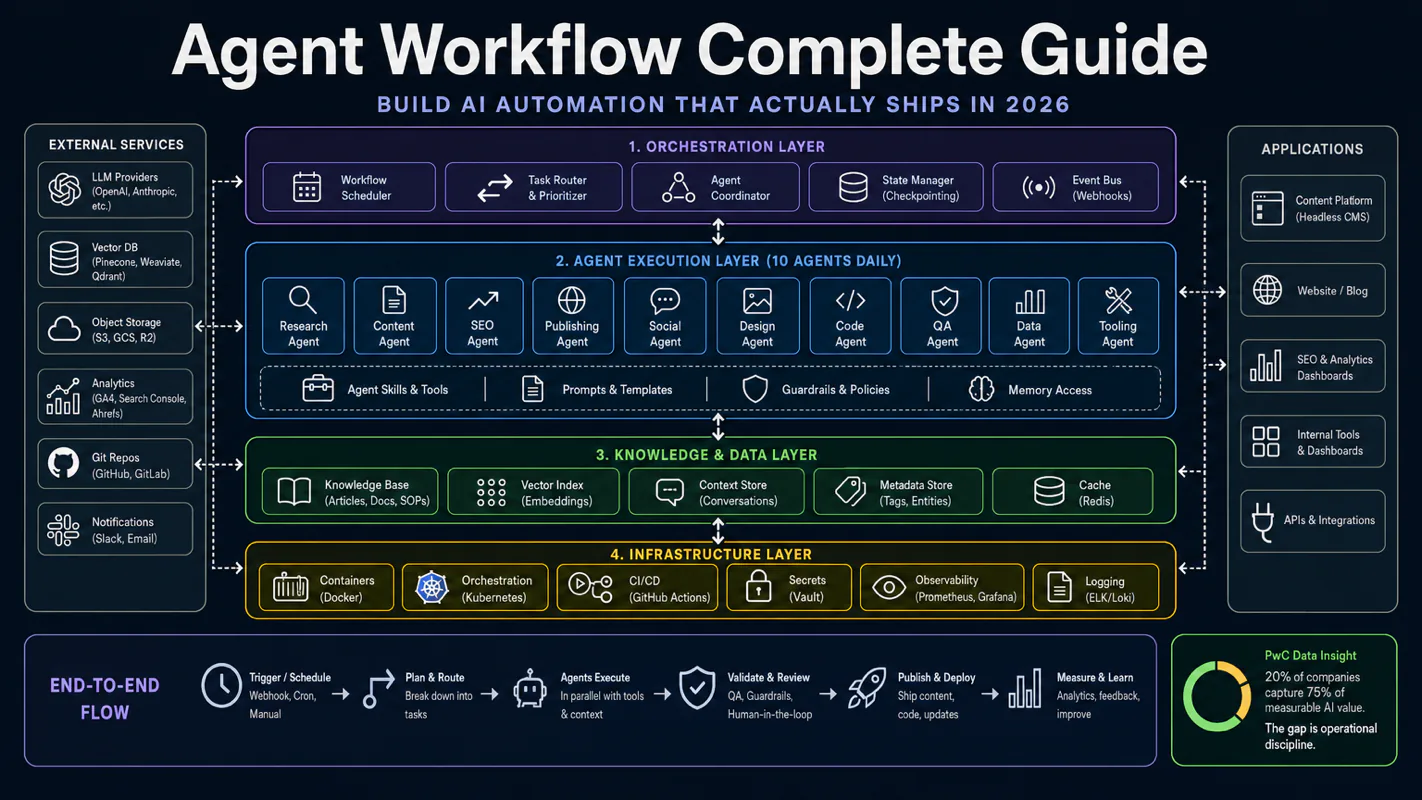
20% of companies capture 75% of the measurable AI value while running the same models as everyone else. The gap is operational: a three-layer architecture, five maturity levels, and the reliability math that makes human gates non-negotiable in any workflow automation build.
Ninety-five percent sounds like a pass. Chain ten steps at ninety-five percent each and the full run finishes clean about six times in ten — so a nightly invoice-matching routine that looks excellent at every step still hands you four bad mornings a fortnight. That one number explains most of what follows: why serious deployments put a person at two or three named checkpoints instead of trusting the chain, and why the 80% of companies stuck in pilots are not short on model quality. Anyone comparing workflow automation software should ask where the gates sit, because per-step accuracy is not what decides whether a process survives production.
PwC's 2026 survey surfaces a brutal split: 20% of companies capture 75% of measurable AI value while the remaining 80% run pilots that never scale. Both groups use the same models. The gap is operational discipline and knowledge infrastructure — not technology.
I run 10 agent instances daily across content creation, multi-platform publishing, SEO analysis, tool development, and multi-brand operations. This is not a lab demo. It is a production system that ships every day. This guide unpacks everything I have validated — from what an agent workflow actually is, to a 10-step checklist you can start today.
Key takeaways
Three-layer architecture: single agent, single task → single agent, multi-step → multi-agent collaboration
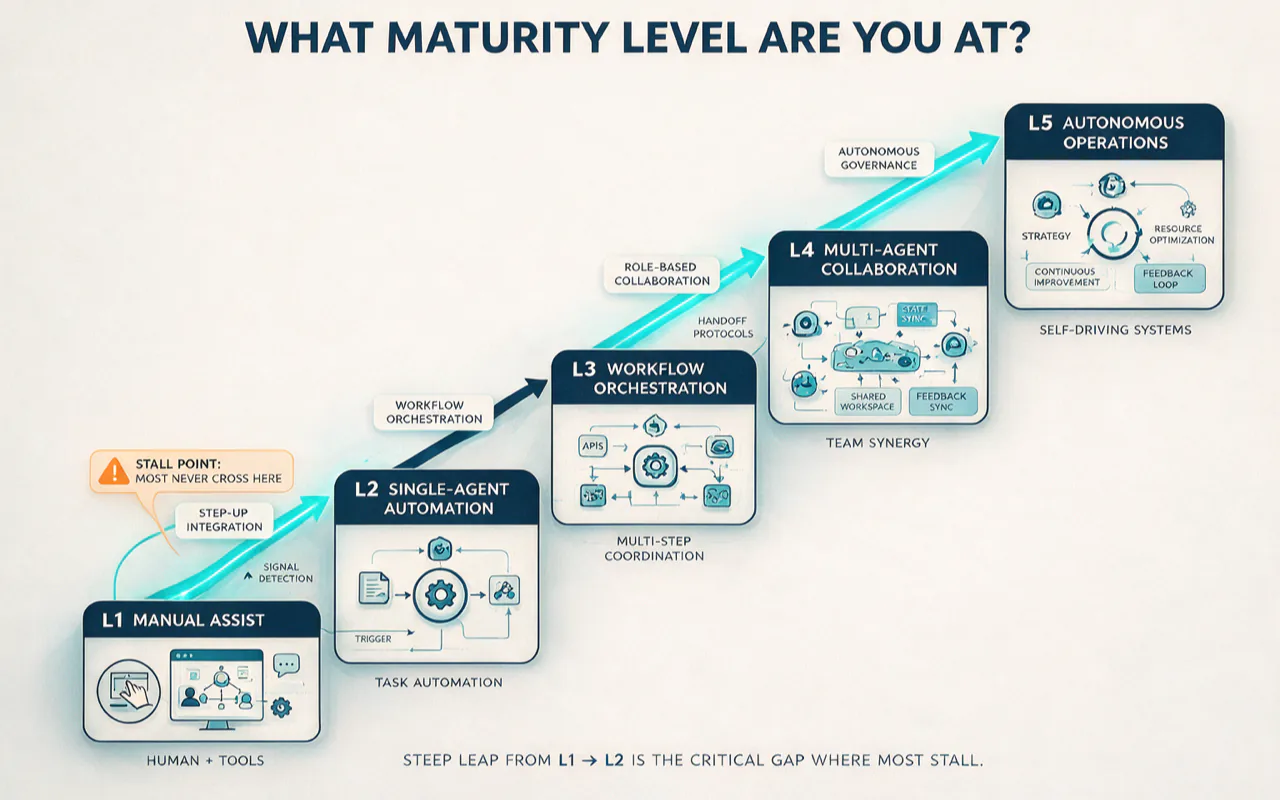
Five maturity levels: L1 manual assist → L5 autonomous operations — most people stall at the L1-to-L2 leap
Your knowledge base is the foundation of agent output quality — Anthropic's research and my production experience converge on this
Reliability math: 95% per-step success decays to 60% across 10 steps — this explains why you need human gates
Full-stack agent operations for a solo business cost $300-800/month, 10-18x cheaper than a full-time assistant
What Exactly Is an Agent Workflow?
Andrew Ng told Bain & Company in April 2026 that the "let a thousand flowers bloom" strategy mostly fails. The real transformation is not improving efficiency 3% in a hundred places — it is achieving 100x acceleration at critical chokepoints.
That statement defines the value proposition of agent workflows precisely. An agent workflow is not "AI that answers your emails." It hands an entire business pipeline to an AI-driven multi-step process where agents make autonomous decisions, use tools, coordinate tasks, and complete complex objectives with minimal human intervention.
In plain terms: traditional automation works like an assembly-line worker — you draw every step, it follows the script, it stops at anything unexpected. An agent workflow works like a capable intern with judgment — you give a goal, it decides how to reach it, and it reroutes when blocked.
IBM and Redis confirm the same core from different angles: agent workflows invert the traditional pipeline model. The agent receives a goal, then plans how to accomplish it — rather than executing predefined steps. The distinction from RPA is clear: RPA follows predefined rules, while agent workflows adapt dynamically to real-time data and unexpected conditions.
But a distinction more important than any definition emerged from my production work: the dominant pattern in 2026 production systems is neither pure agent nor pure workflow. It is a hybrid. The outer shell is a predictable workflow (known steps, controllable costs, auditable). The inner layer embeds agent capability at nodes that require judgment (dynamic reasoning, tool calls, adaptive processing).
Microsoft's Agent Framework documentation describes this middle ground precisely: use an agent when the model should decide what to do, use a deterministic executor when code should decide the outcome, and use a human gate when a person should make the call.
How Agent, Workflow, and Agentic Workflow Relate
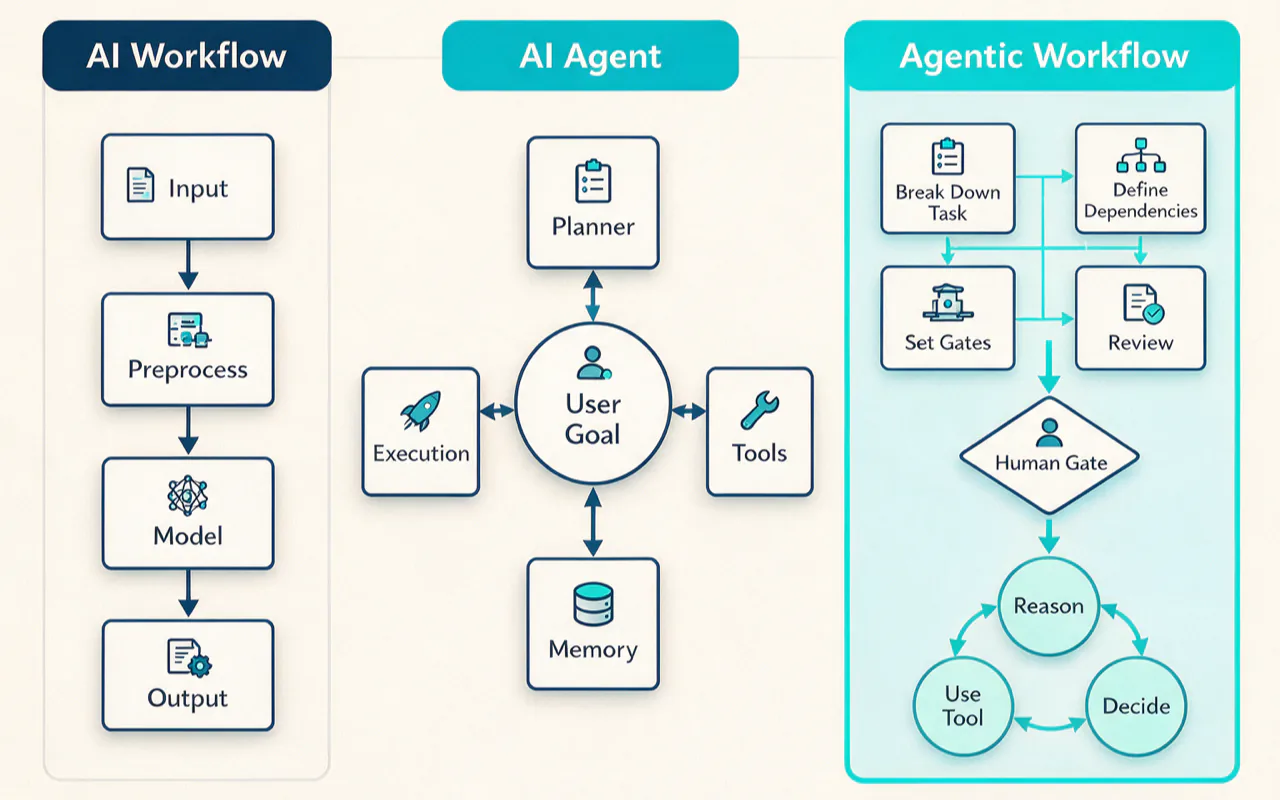
These three terms get used interchangeably, but they point to different things.
AI Workflow executes a predefined path of sequential steps. Steps are fixed, order is fixed, costs are predictable. Suited for deterministic tasks like "receive email, classify, forward to the right team."
AI Agent is a goal-driven computational entity that autonomously decides its execution path at runtime — what to do next, which tool to use, when to stop. Flexible but expensive: token consumption runs 3-20x that of an equivalent workflow.
Agentic Workflow is the hybrid. The developer draws the graph (defines steps and gates); the LLM fills in execution details at each node. Externally predictable, internally adaptive. Anthropic introduced this distinction in their December 2024 paper Building Effective Agents. LangChain, Microsoft, OpenAI, and Google subsequently converged on the same framing.
My system is a textbook agentic workflow: workflow step files define structure and gates ("research first, draft second, quality-check third"), but the concrete execution within each step is delegated to the agent autonomously.
What Does the Market Actually Look Like?
The agent AI market is exploding. IDC pegs the 2026 global market at $7.6 billion, projected to reach $236 billion by 2034 — 31x growth at over 40% compound annual growth rate. McKinsey estimates agent AI can unlock $2.3 trillion in annual economic value.
The other side of the coin is equally stark.
Digital Applied, synthesizing over 150 data points, concludes that 88% of AI agent projects fail to reach production. 79% of companies have adopted AI agents in some form, but only 11% run them in production. 68% are stuck in the "adopted but not in production" chasm.
Gartner's forecast is blunter: over 40% of agentic AI projects will be canceled before 2027 — due to cost overruns, unclear business value, and insufficient control.
The failure breakdown reveals the root cause: infrastructure gaps account for 41%, governance and security barriers for 38%, ROI measurement failure for 33%, and skills gaps for 29%. The successful 12% share four attributes — they invested in infrastructure before deployment, wrote governance documentation before deployment, captured baseline metrics before piloting, and assigned dedicated business ownership.
For solo developers and one-person businesses, this data is actually good news. You do not have the "organizational inertia" problem. You can build the agent system correctly from day one.
How Does the Solo Business Wave Change Things?
Carta's 2025 Solo Founders Report shows solo-founder enterprises grew from 23.7% in 2019 to 36.3% by mid-2025. Maturing AI agent tooling accelerated this trend — businesses that once required teams of 5-10 people can now run on one person plus a suite of agent workflows.
Pieter Levels represents the extreme case: over $3 million annual revenue, zero human employees, running on PHP + jQuery + SQLite on a $40/month VPS. But his success is not about AI — it is a decade of building in public that compounded SEO surface area. AI amplified his execution capacity; it did not create it.
A more instructive reference is 500k.io (self-reported): $9,500 monthly recurring revenue, a single Meta Ads client generating $114,000 in annualized revenue. His agent tool stack costs $565/month — a ~17x leverage ratio. The core tool is Claude Code Max plus a small set of auxiliary tools (his stack page lists about four).
The common thread across all these cases: a solo business does not mean "AI makes money automatically." It means one person makes decisions while AI handles execution. The value of agent workflows is not replacing the person — it is enabling one person to manage operations that previously required an entire team.
What Does a Production Agent System Look Like?
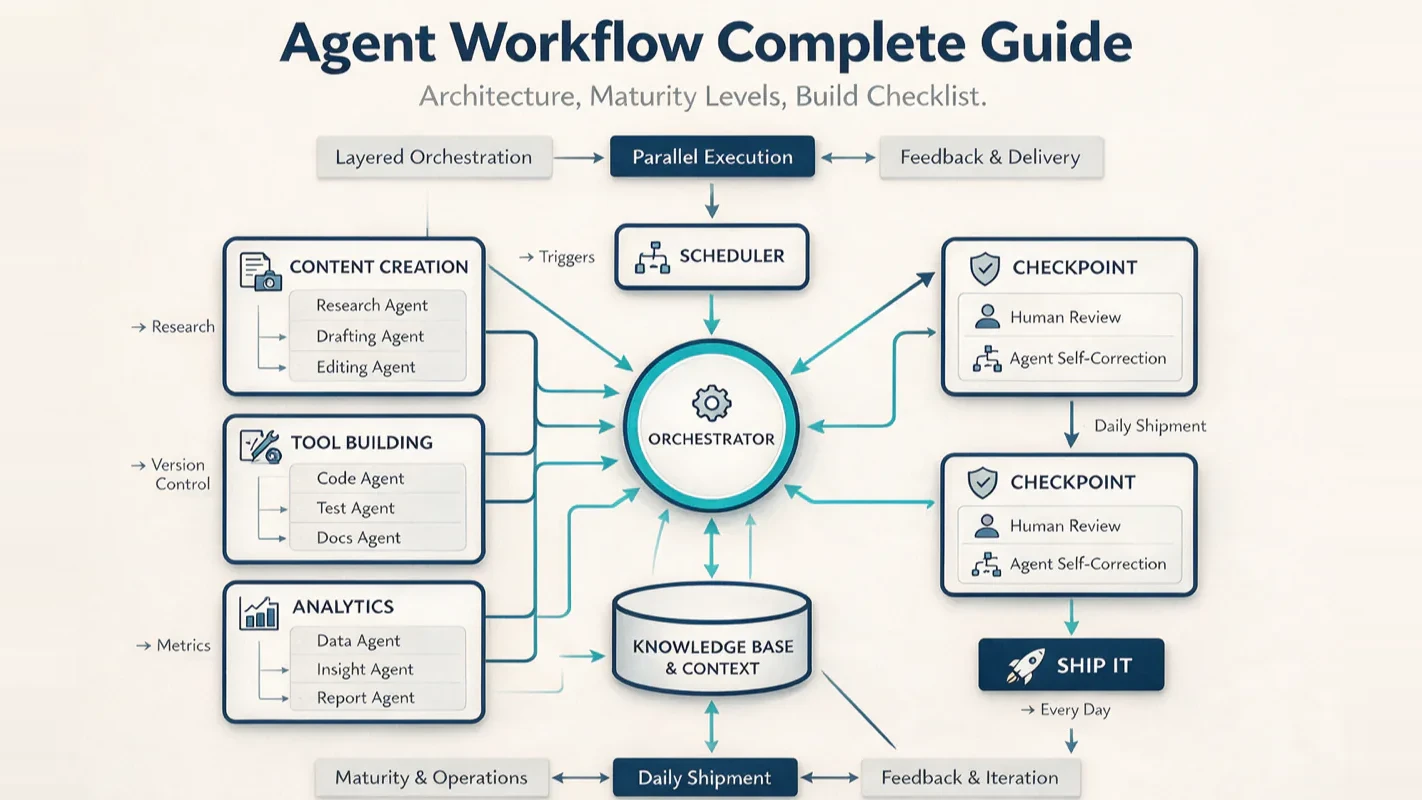
I operate across three parallel pipelines — content creation, tool development, and operations analysis — all driven by agent workflows. Here is how each works in practice.
Content Creation: How One Article Goes from Zero to Published
Writing a deep-dive article is not "open an editor and start typing." The agent-driven creation pipeline has six stages.
Stage 1 — Topic selection and research. A search-and-collect tool automatically executes multi-round web searches, scraping competitor content, industry data, and community discussions. A standard research run executes 15-25 searches, scrapes 5-10 full articles, and produces a structured source document. The agent also checks existing material in the knowledge base to avoid duplicate work.
Stage 2 — SEO framing and outline. The agent generates an article skeleton from the collected material. This is not random generation — it references brand positioning, target audience profiles, and SEO specifications stored in the knowledge base to ensure the skeleton serves both content strategy and search ranking.
Stage 3 — Drafting. The workflow step file is a precise instruction set. The writing agent accesses brand voice files, platform rules, and style libraries to maintain consistent output.
Stage 4 — Three-layer review. Static quality checks (platform compliance, readability, fact verification, SEO audit) feed into dynamic refinement (multi-persona review panel with iterative polish), then human sign-off. Three layers, sequential, non-skippable.
Stage 5 — Imagery and publishing. A batch image workflow generates visuals. A CMS dispatch tool handles multi-platform publishing in a single operation — replacing the manual grind of opening six different platform dashboards and pasting content one by one.
Stage 6 — Ongoing SEO. After publishing, an agent automatically confirms sitemap updates, submits search engine index requests, and identifies internal linking opportunities.
Running this pipeline once compresses the topic-to-publish cycle from 8 hours to 2 hours. The agent handles research collection (90 minutes to 15 minutes), first draft (3 hours to 30 minutes), image creation (1 hour to 15 minutes), and multi-platform distribution (30 minutes to 5 minutes). I still spend 2 hours on topic decisions, outline review, quality control, and brand-tone tuning.
Tool Development: Why Tools Are Compound-Interest Assets
I treat tools as compound-interest assets. When an operation runs three or more times, it gets packaged into a CLI command or Skill. The current system has 10 unified entry points covering the full business domain — search and collection, content distribution, audio/video processing, document conversion, knowledge base retrieval, cloud management, and more.
A new tool command goes from requirement to production-ready in 2-3 hours, down from a full day.
Operations Analysis: Data-Driven Decisions
Scheduled tasks run data collection automatically. SEO metrics, social media performance, and site traffic all aggregate without manual work. Monthly analysis compresses from a full day of manual work to 1 hour of review and decision-making.
How Does the Three-Layer Architecture Work?
The three-layer architecture for agent workflows is not a theoretical framework — it maps directly to three stages I walked through in practice.
Layer 1: Single Agent, Single Task
This is where most people stay. Open Claude or ChatGPT, give it a task, get a result. Vibe coding lives at this layer — you describe requirements by feel, and the AI executes by guess.
The defining characteristic is "fire and forget": every interaction is independent, with no memory, no accumulated context, no workflow. Like introducing yourself to the company every morning.
The ceiling is obvious — AI output quality depends on the context you provide. Manually entered context is always limited, so output is always limited.
Layer 2: Single Agent, Multi-Step
The key to crossing into Layer 2 is CLAUDE.md + Skill-driven workflows. The agent no longer handles single tasks; it executes multi-step workflows where each step has defined inputs, execution logic, and output format.
For an article on my site, this means a multi-step workflow spanning SEO framing, source retrieval, full-article drafting, static quality checks, dynamic refinement, and human sign-off. The agent reads step files sequentially, follows the execution section line by line, and produces output in the specified format.
The core infrastructure at this layer is the knowledge base. The CLAUDE.md hierarchy lets agents automatically load the right context in different directories — entering the brand directory surfaces positioning and voice guidelines; entering the standards directory surfaces writing rules and red lines. Without a knowledge base, multi-step workflows become a loose pile of stitched-together prompts.
Most people stall at the L1-to-L2 transition. The blocker is not technical — CLAUDE.md and Skills are ready-made infrastructure. The blocker is unwillingness to do foundation work: writing CLAUDE.md files, organizing standards, packaging Skills, accumulating knowledge. These upfront investments show no immediate return, but once built, they become compound-interest assets that produce continuously.
Layer 3: Multi-Agent Collaboration
Layer 3 is multiple agents running simultaneously and coordinating with each other. My implementation spans three dimensions:
Task dispatch — a multi-agent assignment system. A dispatch hub manages the task pool and routes work to different agent instances based on task type and priority.
Team collaboration — Claude Code's native Agent Team capability. A Team Lead creates teams and assigns tasks; Teammates are independent Claude instances that collaborate through shared task lists and messaging.
Scheduled autonomy — time-triggered autonomous agents. No manual start required; agents execute tasks on preset schedules and write results back to the knowledge base.
These three layers stack. On any given day, I run 10 agent instances — some at Layer 2 (like writing a single article) and some at Layer 3 (like processing different brand tasks across multiple windows in parallel).
Anthropic's own data backs the multi-agent value: multi-agent systems outperform single-agent Claude Opus 4 by 90.2% on internal research benchmarks. But the cost is real — agents typically use about 4x the tokens of chat, and multi-agent systems use about 15x. Multi-agent is not a free lunch.
What Maturity Level Are You At?
Synthesizing Microsoft's CMM five-level framework, Gartner's four-level autonomy model, and my production experience, I developed a five-level maturity model aimed at solo developers and one-person businesses.
Level
Name
AI Role
Human Role
Validation
L1
Manual Assist
Single Q&A, stateless
Provides all context manually
Can use AI for answers, but starts from zero every time
L2
Single-Agent Automation
CLAUDE.md-driven multi-step execution
Designs context and standards, reviews output
Agent independently completes a multi-step workflow
L3
Workflow Orchestration
Multi-step workflows + tool chains
Designs workflows, maintains knowledge base, makes key decisions
3-5 reusable workflows running stably
L4
Multi-Agent Collaboration
Parallel agents + task dispatch
Dispatch strategy, exception handling
Multiple agents running simultaneously without conflicts
L5
Autonomous Operations
Scheduled tasks + automatic decisions + human gates
Strategic decisions, taste judgment
Agents work while you are away
L1 — Manual Assist. Open ChatGPT, ask a question, get an answer. Every interaction stands alone. No context accumulation. The vast majority of AI users worldwide stay here.
L2 — Single-Agent Automation. The agent has persistent context (CLAUDE.md). It knows your project, preferences, and standards. It executes multi-step tasks. Validation: the agent completes tasks without needing your background re-explained.
L3 — Workflow Orchestration. Multiple workflows cover different business scenarios. Tool chains take shape. The knowledge base evolves from simple folders into a CLAUDE.md hierarchy plus a standards system. Validation: saving 10+ hours of manual work per week.
L4 — Multi-Agent Collaboration. Multiple agent instances run simultaneously on different tasks with state synchronization and conflict resolution. Validation: running 3+ agents concurrently with zero file conflicts.
L5 — Autonomous Operations. Scheduled tasks handle routine work automatically. Exceptions auto-escalate to human review. Validation: agents run for 7 consecutive days with zero emergency human intervention.
I currently operate at L4-L5 — 10 parallel agent instances daily, scheduled tasks and a dispatch system enabling partial autonomous operations, but some workflows still require manual triggers and intensive review.
The critical insight: most people stall at the L1-to-L2 leap. This is a mindset problem, not a technical one. It requires understanding the "invest context upfront, harvest compound returns long-term" logic.
Why Is the Knowledge Base the Foundation of Everything?
This is my deepest operational insight, and the dimension competitors completely miss.
Anthropic's context engineering guide states explicitly: good context engineering finds the smallest possible set of high-signal tokens that maximizes the probability of the desired outcome. My knowledge base system is the extreme implementation of this principle.
Layered Context Injection with CLAUDE.md
My knowledge base contains thousands of files, but the agent never needs all of them at once. The CLAUDE.md hierarchy delivers context on demand:
The root CLAUDE.md provides global navigation — like a company overview telling the agent where each department sits
Each subdirectory's CLAUDE.md provides local context — like a department handbook with domain-specific rules and resources
Trigger-word routing — the agent encounters terms like "brand," "workflow," or "standards" and automatically navigates to the corresponding directory
This design maps directly to what Anthropic describes as just-in-time context: maintain lightweight identifiers and dynamically load data at runtime rather than preloading everything. Martin Fowler's site (Birgitta Boeckeler at Thoughtworks) systematically analyzed this context configuration approach and validated its effectiveness for coding agent scenarios.
Standards as System Prompts at the Right Altitude
My standards cover everything from Markdown formatting to tool development, writing voice to SEO, brand management to inbox processing. Each standard balances "specific enough to guide behavior effectively" against "flexible enough to provide strong heuristics."
Anthropic calls this "the right altitude for system prompts" in their context engineering guide — too specific and it becomes brittle with high maintenance overhead; too vague and it lacks signal.
An agent without a standards system is like a new employee without a handbook — guessing company norms from scratch every time.
A Knowledge Base Is Not a Document Library — It Is the Agent's Brain
Most people think of a knowledge base as "a place to store files" — passive, waiting for someone to query it.
My knowledge base is active. Through the CLAUDE.md hierarchy, the standards system, and tool routing tables, it shapes agent behavior proactively. When an agent enters any directory, the knowledge base injects the correct identity, rules, and resources into the context. This is not RAG — RAG is the agent asking a question and then querying a database for answers. In my system, the agent has not asked the question yet, and the answer is already in the context.
Knowmax's industry research confirms this: "AI agents themselves 'know' nothing. They retrieve, reason, act — and the quality of retrieval and reasoning depends entirely on the quality of the knowledge base." Fin.ai's ROI benchmark data is more direct: insufficient knowledge base investment is the top controllable factor in AI agent project failure.
Why Does Reliability Math Demand Human Gates?
This is the core issue most practitioners overlook — and the key to understanding every architectural choice in my system.
Reliability math is punishing. If per-step success is 95% (already high), a 10-step workflow drops to 0.95^10 = 60% end-to-end. A 20-step workflow falls to 36%. Even at 99% per-step, 20 steps still yield only 82%.
These numbers explain several critical phenomena:
Why 88% of agent projects fail to reach production — multi-step reliability decays exponentially, and most teams underestimate this decay.
Why my workflows are not 20-step end-to-end autonomous runs — I divide workflows into 6 stages, each with 3-5 autonomous steps internally (95% per step yields 77-86% per stage), with human review and course-correction between stages. This hybrid autonomy model captures automation efficiency without suffering exponential reliability decay.
Why Gartner recommends tiered governance — Gartner's May 2026 report proposes a four-level agent autonomy model: observe (read-only), recommend (propose but human executes), execute after approval (human approves before action), and autonomous (independent within defined guardrails). Treating agent governance as binary — fully locked or fully trusted — is exactly why 40% of projects get canceled.
My workflow system implements tiered governance naturally: daily data collection and format conversion sit at Level 1-2; content creation and publishing sit at Level 3 (key operations get human gates); scheduled tasks sit at Level 4 (autonomous within strict guardrails, exceptions escalate via notifications).
What Does a $4,200 Agent Failure Look Like?
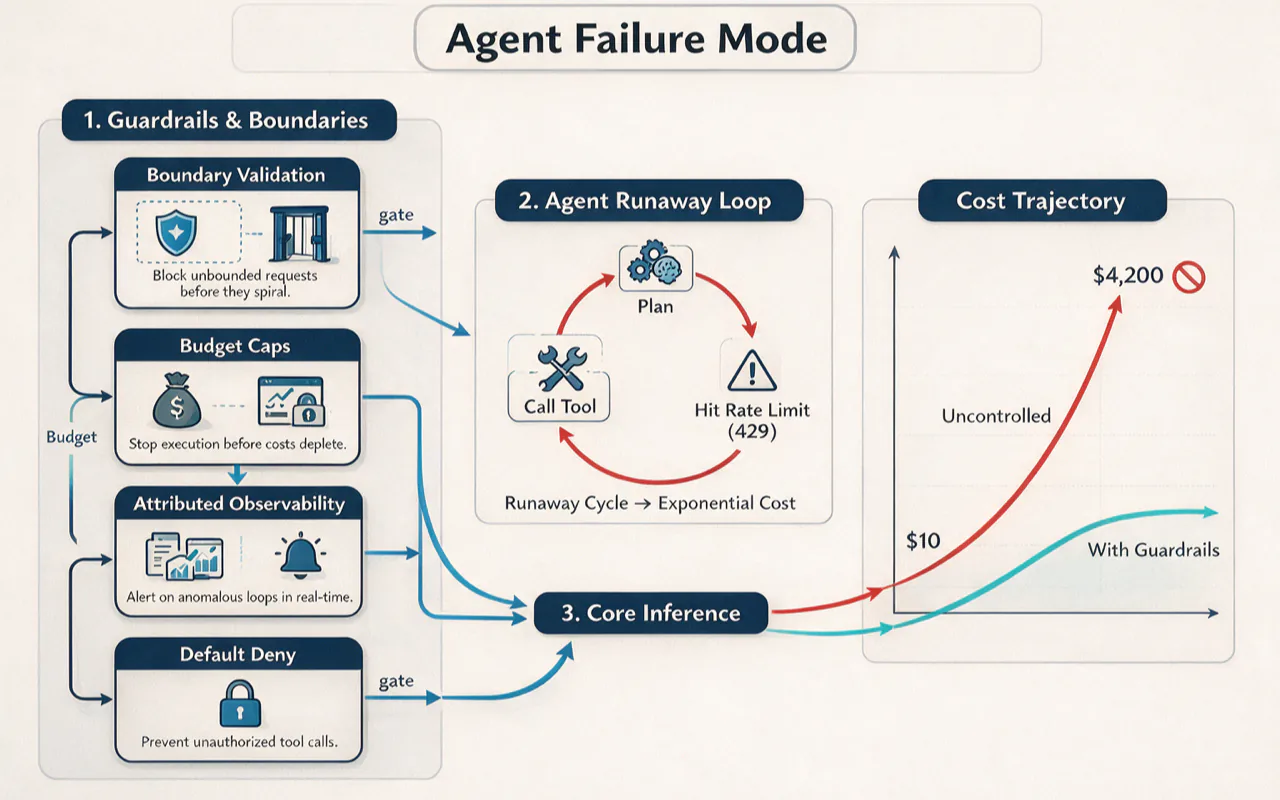
In April 2026, an agent was instructed to "keep trying until successful" while syncing order data to a CRM. It started on a Friday evening. The agent hit a 429 rate-limit error and entered a loop — plan, call tool, 429, re-plan, call tool — roughly 4,800 times per hour. The founder was at a family wedding with a closed laptop. The cost curve: $42 at hour 1, $200 at hour 4, $1,000 at hour 12, $4,200 at hour 63. Exponential growth, because the model bills on an ever-lengthening re-planning context. The founder lost a bridge round over it.
This case illustrates four non-negotiable guardrails:
Boundary validation — type checking, permission verification, and per-tool rate limiting on every tool call
Budget caps — dollar ceiling, token ceiling, wall-clock time ceiling, recursion depth ceiling — all four must execute before model inference, not after
Attributed observability — when Agent A tells Agent B to call a tool, you must be able to reconstruct the call chain within 30 seconds
Default deny — agents inherit zero permissions; every permission is explicitly granted, logged, and revocable
The post-mortem author, Sattyam Jain, puts it sharply: "Architecture is the product. The model is an upstream dependency that can degrade any given week." He runs 15+ Claude agents in production with 99.9% availability over 90 days — not because the model is stronger, but because the architecture is tighter.
My system has embedded these four patterns from day one — dual-zone credential management maps to default deny, workflow step-file permission boundaries plus hook pre-checks map to boundary validation, and tiered model routing implicitly provides budget control.
How Do Anthropic's Five Patterns Map to Production?
Anthropic's Building Effective Agents is the most widely cited agent architecture document globally. It defines five workflow patterns, and my daily operations embody all five.
Prompt Chaining — decompose a task into sequential steps, each processing the output of the previous one, with programmatic check gates in between. My content creation workflow is textbook prompt chaining: topic selection, research, outline, draft, imagery, publishing — each stage's output feeds the next.
Routing — classify input and direct it to a specialized downstream task. My 10 unified entry points implement routing: the agent says "I need to search" and hits the search-and-collect entry point; "I need to publish" hits the content distribution entry point. Tiered model routing is another application: simple classification tasks route to low-cost models, complex reasoning routes to top-tier models.
Parallelization — multiple agents working simultaneously on independent subtasks. My multi-brand parallel processing is parallelization — handling different brand tasks across different windows at the same time.
Orchestrator-Workers — a central agent dynamically decomposes tasks, delegates to worker agents, and synthesizes results. My dispatch hub is this pattern implemented for solo operators.
Evaluator-Optimizer — one agent generates, another evaluates and provides feedback, iterating in a loop. My three-layer review system (static checks, dynamic refinement, human sign-off) is a multi-layer evaluator-optimizer.
My system did not implement these patterns by studying Anthropic's paper first. These patterns emerged naturally from production iteration — and the paper retroactively validated the practice. Practice preceded theory; theory confirmed practice.
What Are the Hardest Lessons from Building Agent Workflows?
Lesson 1: Agents are not omniscient — they need precise context. Early on, I made the mistake of letting agents "figure things out" from vague task descriptions. The result was directional drift, inconsistent voice, and inaccurate citations. The fix was context precision — workflow step files are instructions, not suggestions. This aligns with Beam AI's findings: Princeton NLP confirmed that a single agent matches multi-agent on 64% of benchmarks. The lever is context precision, not agent count.
Lesson 2: Workflows are iterated into existence, not designed in one shot. I initially tried to design complete workflows upfront. Two weeks of design required major revisions at first execution. The method that stuck is "minimum viable workflow + continuous iteration" — get it running, discover problems through actual execution, fix one issue at a time, evolve forward without backward compatibility.
Lesson 3: Knowledge base maintenance costs are ongoing. A knowledge base with thousands of files is not a build-and-forget asset. Brand positioning changes, platform rules shift, tools update — every change requires synchronizing related documents. My countermeasure is a "document sync" discipline: after creating or modifying any file, immediately check and update upstream and downstream references. Without this discipline, a knowledge base turns into a graveyard of outdated documents within months.
Lesson 4: State synchronization is the hardest challenge in multi-agent collaboration. When multiple agents run simultaneously and one modifies a file while another continues working on the old version — conflicts arise. Beam AI's research confirms: shared-state race conditions grow at N(N-1)/2 quadratic rate. My solutions include file locking, worktree isolation, and explicit read-write permission boundaries.
Lesson 5: A solo business is not "zero human effort" — it is "one human plus N agents." Agents handle research, first drafts, formatting, publishing, and data collection. I handle topic direction, content quality review, brand-tone calibration, and business strategy. This division does not disappear as agents get more capable — because the review is not about "is this correct?" but "is this good?" That requires human taste and judgment.
How Do You Build Your First Agent Workflow? A 10-Step Checklist
This is the complete path I have validated in production. Platform-agnostic.
Step 1: Define a single, measurable goal. Describe what the agent should do in one sentence. Write precise inputs, processing logic, and outputs. Set a success metric. Common failure: defining an agent that "does everything" — always start with a narrow task.
Step 2: Map the manual process on paper. Write down who currently does this task and what each step involves. Classify each step — deterministic (code handles it), judgment-required (agent handles it), human-review (gate). Common failure: skipping the manual process map and jumping straight to building.
Step 3: Choose your tool platform. Non-coders: n8n or Make (visual builders). Coders: Claude Code + CLAUDE.md (maximum flexibility). Cross-platform integration: n8n (1,000+ app integrations). Common failure: spending two weeks on tool comparisons — start with Claude Code, migrate when complexity demands it.
Step 4: Write the system prompt. Treat it like a job description — identity, scope, available tools, output format, prohibited actions. Someone unfamiliar with the project should be able to predict the agent's behavior from the prompt alone. Common failure: prompts that are too vague.
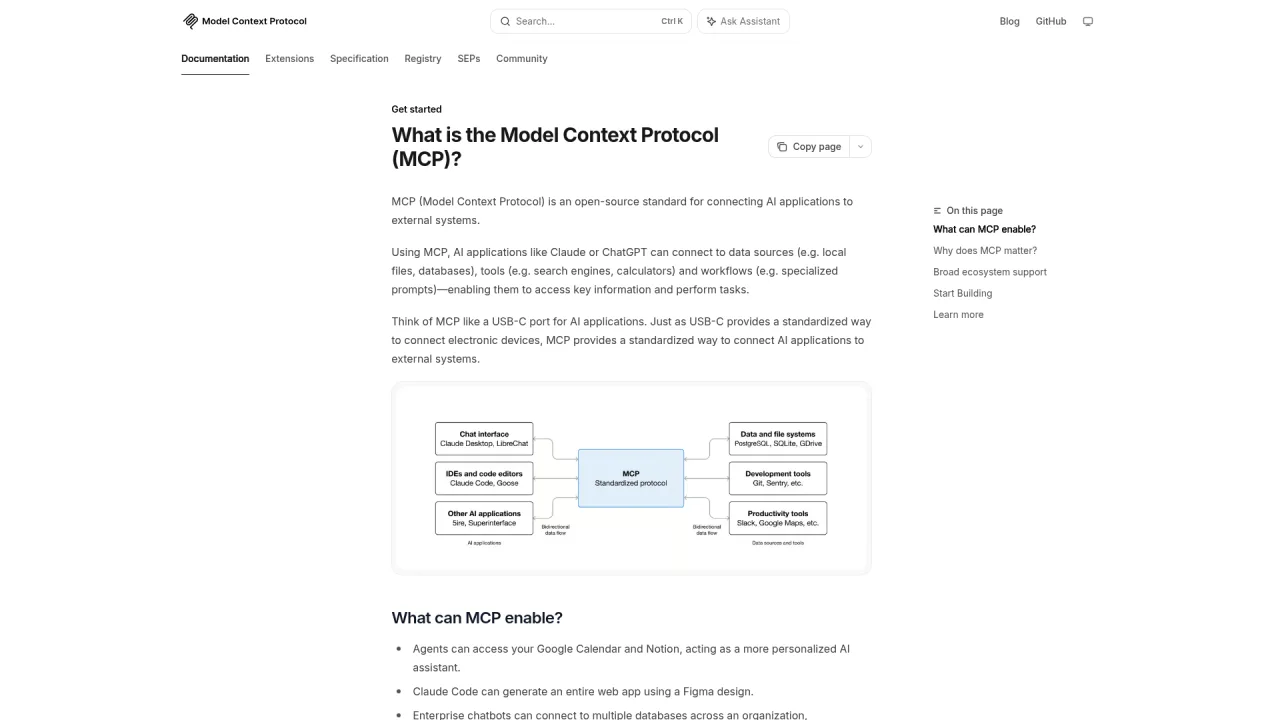
Step 5: Connect tools via MCP. MCP is the 2026 standard tool connection protocol. As of April 2026, 97 million total downloads and over 1,000 compatible servers. Least-privilege access is a hard rule.
Step 6: Design a memory strategy. Three layers: short-term memory (single conversation context), long-term memory (cross-session CLAUDE.md), working memory (runtime scratch notes). Common failure: no memory design, starting from zero every run.
Step 7: Build a test suite. Happy path + edge case + adversarial + batch tests (50 real data points). Acceptance: 90% or higher accuracy on 50 test cases. Common failure: testing only the happy path — 80% of production issues come from edge cases.
Step 8: Add guardrails and human review gates. Four ceilings: dollar cap, token cap, time cap, recursion depth cap. High-risk operations get mandatory human review; low-risk operations can auto-execute. Common failure: trusting the agent to "stop on its own" — the $4,200 incident proves that assumption is lethal.
Step 9: Deploy to production and monitor. Start with a low-risk scenario. Track five metrics: task completion rate, accuracy, latency, autonomous completion ratio, cost per task. Acceptance: 7 consecutive days with zero emergency fixes.
Step 10: Iterate and expand. Stabilize your first agent before building a second. Common failure: expanding before the first agent is stable — shaky foundations cause everything downstream to collapse.
On top of the starter stack: Anthropic Max subscription, multiple domains and CDN, local multi-device power and depreciation, additional SaaS subscriptions.
Compared to Hiring
Dimension
Full-Time Assistant
Agent Workflow
Monthly cost
$3,000-6,000 (US)
$300-800
Work hours
8 hrs/day x 22 days
24/7
Scalability
Hire another person
Spin up another agent instance
Consistency
Varies with individual state
Standards-driven, stable output
ROI Reference
For a solo business, the monthly time savings from agent workflows typically translate to 3-5x the agent's monthly cost — time compression across content creation, SEO operations, multi-platform publishing, and monthly analysis compounds. Payback period rarely exceeds one month.
Digital Applied's data shows that actual total cost of ownership is 3.4x the API cost — observability and orchestration account for 62% of real costs. Many people decide to deploy based on API fees alone and discover that maintenance costs are the real expense. Model routing (sending simple tasks to low-cost models) can reduce costs by roughly 47%.
What Does a Full Technical Stack Look Like?
O'Reilly published what the industry considers the most authoritative agent tech stack reference in June 2026 — a six-layer architecture. My choices cover every layer.
Layer
Responsibility
My Choice
Differentiator
Model & Inference
LLM inference engine
Claude Opus/Sonnet + DeepSeek V4 Flash
Tiered routing by task complexity
Protocol & Tools
Standardized tool connection
MCP servers + unified CLI entry points
Unified entry points as agent-facing interface abstraction
Memory & Knowledge
Persistent state and retrieval
Knowledge base + CLAUDE.md hierarchy + standards system
Sole competitive gap — nobody else builds a complete context system around a knowledge base
Dual-zone credentials + hook pre-checks + human gates
Naturally aligned with Gartner's four-level governance model
Claude Code is the system's core. Subagents handle parallel research and expert delegation; Agent Teams handle complex collaborative tasks; Dynamic Workflows handle large-scale batch processing. For most scenarios, Claude Code's native capabilities plus n8n for cross-platform integration are sufficient. LangGraph suits enterprise scenarios requiring advanced state management and observability.
What Do Real Efficiency Gains Look Like?
These numbers come from my actual work logs.
Scenario
Before Agents
After Agents
Time Compression
Write an 8,000-word deep-dive article
8 hours
2 hours
75%
Full SEO site audit
2 days
3 hours
81%
Publish one article to 6 platforms
2 hours
15 minutes
87%
Monthly operations analysis
1 day
1 hour
87%
Develop a new tool command
1 day
2-3 hours
70%
The time savings come from execution work — research collection, first drafts, format processing, platform distribution. I still invest heavily in topic decisions, quality review, brand-tone calibration, and business strategy. Agents did not replace me; they shifted me from manual operator to decision commander.
Why Is Agent Security the Overlooked Production Prerequisite?
Security is not the opposite of agent capability — it is the prerequisite for agent capability to function.
Digital Applied's data reveals the severity of agent security: 88% of companies deploying agents report at least one security incident, 34% of deployed agents have been affected by prompt injection attacks, 61% of incidents are caused by excessive agent credential permissions, only 14% of organizations have prompt injection detection capability, and only 8% have documented agent incident response procedures. The average cost of an AI-agent-related data breach is $4.7 million.
My agent system has four security layers:
Credential isolation — dual-zone management (sensitive zone stays on local machine; general zone syncs). Keys are never hardcoded or logged. Agents access credentials through a resolver on demand, never touching raw secrets.
Permission boundaries — workflow step files explicitly define what each agent can access and modify. If an operation is not in the step file, the agent does not perform it.
Human gates — critical operations (publishing, deletion, data modification, sending messages) have mandatory human review points. Auto-approved confirmation dialogs are not security mechanisms — only checkpoints requiring actual human content review qualify.
Hook pre-checks — Claude Code's hooks mechanism injects deterministic safety checks before agent execution. For example, automated format validation and sensitive-information scanning after file edits. These checks are deterministic scripts, not LLM-dependent.
These are not theoretical designs. They accumulated from real incidents and near-misses. The stronger the agent's capability, the higher the value of security boundaries.
How Is the Engineering Paradigm Shifting?
2022 was the era of prompt engineering — writing better prompts. 2025 entered context engineering — managing the entire context window. By mid-2026, the community is evolving toward loop engineering — designing agent loops.
Boris Cherny, who leads Claude Code, described the shift precisely: "I don't prompt Claude anymore. I have loops running that prompt Claude and decide what to do. My job is writing loops."
Five building blocks for loop engineering are already available in Claude Code: /loop built-in iteration, cron scheduling, hooks lifecycle callbacks, GitHub Actions CI/CD pipelines, and subagents for parallel context.
Four practical findings from 47 loop tests: stop conditions are genuinely the product — when the loop stops determines output quality; Skills genuinely compound while re-deriving from scratch burns money and increases variance; vague goals produce unverifiable motion; and cost tracking should validate effective work, not file counts.
My system has practiced loop engineering from the start: the dispatch hub is the loop manager, workflow step files are loop bodies, and the knowledge base is the loop's persistent memory. I was doing this before the term existed.
5 Context Configuration Templates You Can Copy Today
These templates are extracted from my production system. Copy and adapt directly.
Template 1: Project-Level CLAUDE.md Skeleton
# Project Name

## What This Is
One-sentence positioning. Who uses it, what it does, what it does not do.

## Tool Routing
| Scenario | Tool | Command |
|----------|------|---------|
| Search | search-scout | `scout search "keyword"` |
| Publish | cms-dispatch | `dispatch publish ghost` |

## Standards
- Writing voice: [link to voice file]
- Coding standards: [link to coding spec]

## Trigger Words
| Keyword | Where to Look |
|---------|---------------|
| brand | brand/{brand}/identity/ |
| standards | standards/ |
Template 2: Skill Configuration
---
description: "One sentence on what this Skill does (max 1536 chars)"
---

# Skill Name

## Inputs
| Parameter | Required | Description |
|-----------|:--------:|-------------|
| topic | Yes | Subject keyword |
| brand | No | Brand name, defaults to primary |

## Execution
1. Read `brand/{brand}/identity/positioning.md`
2. Run search-and-collect (15-25 searches)
3. Generate structured source document

## Output
- Source document written to `dashboard/run-data/{task}/`
- Format: Markdown, sectioned by source
Template 3: Agent Team Launch Configuration
## Team Lead Instructions

You are the project coordinator. Current task: {task description}

### Team Members
- Researcher: responsible for source collection and fact verification
- Writer: responsible for drafting
- Reviewer: responsible for quality checks

### Collaboration Rules
1. Researcher completes source collection, notifies Writer via Task List
2. Writer submits first draft to Reviewer via Mailbox
3. Reviewer returns issues to Writer via Mailbox for revision
4. All members work in their own worktrees, never modifying the main branch directly
Template 4: Workflow Step File
# Step 01: Source Collection

## Input
- Topic keyword (from previous step)
- Brand context (from CLAUDE.md)

## Execution
1. Read `brand/{brand}/identity/positioning.md` to confirm content direction
2. Execute 3 rounds of web search, 5-8 queries per round
3. Scrape top 5 competitor articles in full
4. Verify every data point — trust only official primary sources, never AI summaries
5. Generate structured source document

## Output
- File: `sources.md`
- Format: Sectioned by source, each item tagged with URL
- Validation: every data point has a clickable primary source

## Gate
- None (auto-advance to next step)
Template 5: Tiered Model Routing
## Model Routing Rules

### Low-cost tier (daily classification and tagging)
- Model: DeepSeek V4 Flash
- Scenarios: tag classification, format conversion, batch structured output
- Cost: ~1/10 of top-tier model

### Mid tier (content creation)
- Model: Claude Sonnet
- Scenarios: article drafting, code generation, multi-step reasoning
- Cost: moderate

### High-precision tier (complex judgment)
- Model: Claude Opus
- Scenarios: brand-tone review, architecture decisions, complex research
- Cost: highest — use only when maximum precision is required

### Routing heuristic
- Uncertain which tier? Default to mid tier, evaluate results, then re-route
- Batch tasks (10+ items): force low-cost tier for initial filtering, escalate unclear cases
Agent Workflow Glossary: 25 Core Terms
Core Concepts
Term
Definition
Agent
A computational entity that perceives its environment, makes autonomous decisions, and takes action to achieve goals
Agentic Loop
The repeating cycle of "get context, take action, verify result" — Anthropic's defined core agent operating mode
Multi-Agent
Multiple specialized agents collaborating on a single task; roughly doubles cost but significantly improves performance on complex tasks
Orchestration
Coordinating execution order, data transfer, and error handling across multiple agents or steps
Workflow
A multi-step process where LLMs and tools are arranged along a predefined path; predictable and cost-controllable
Tools and Protocols
Term
Definition
Tool Use
Letting an LLM call external functions to read data or execute actions — the key capability that turns a chat model into an agent
MCP (Model Context Protocol)
An open protocol for standardized LLM connections to external data sources and tools; 97 million total downloads in 2026
A2A (Agent-to-Agent Protocol)
Google-led protocol for inter-agent communication and capability discovery; complements MCP
Skill
A self-contained, on-demand capability package — only its description sits in context; full content loads only when invoked
Hook
A deterministic script triggered at agent lifecycle events; separates operations that do not need LLM judgment
Context and Memory
Term
Definition
Context Engineering
Systematically designing all information loaded into a model's context window; the determining factor of agent output quality
Knowledge Base
A structured information system for storing and organizing domain knowledge — the agent's "brain"
RAG (Retrieval-Augmented Generation)
Retrieving relevant information from external data sources at inference time, injecting it into context, then generating a response
CLAUDE.md
Claude Code's project-level context configuration file, automatically read by the agent at session start
Context Window
The maximum number of tokens an LLM can process in a single inference — the hard limit on how much the agent can "remember"
Security and Governance
Term
Definition
Human-in-the-Loop
A design pattern requiring explicit human approval before high-risk operations execute
Guardrail
Rules and constraints that limit agent behavior scope, enabling maximum capability within safe boundaries
Approval Gate
A checkpoint in a workflow requiring human confirmation before proceeding
Prompt Injection
Manipulating agent behavior by injecting malicious instructions — ranked number one on the OWASP 2025 LLM risk list
Sandboxed Execution
Running agent-generated code in an isolated environment to prevent damage to the host system
Design Patterns
Term
Definition
ReAct (Reasoning + Acting)
A loop pattern alternating between textual reasoning and tool calls — the default form for most production agents
Reflection
A pattern where the agent reviews its own output and iterates to improve
Fan-out / Fan-in
Multiple agents process subtasks in parallel, then merge results — can reduce wall-clock time by 75%
Loop Engineering
The engineering discipline of designing agent loops — "stop prompting the agent; start designing the loop that prompts the agent"
Plugin
A packaging mechanism for distributing Commands, Skills, and Hooks to teams
Ready-to-Use Prompt: Architect an Agent Workflow That Actually Ships
What this does: Turns a desired automation into a maturity-level diagnosis, a three-layer architecture choice, human-gate placements backed by reliability math, and a 10-step build checklist. Based on: Agent Workflow Complete Guide: How to Build AI Automation That Actually Ships in 2026 — https://aiworkflowpro.com/agent-workflow-complete-guide/ Time to run: ~5 minutes
Copy this prompt into Claude Code, ChatGPT, or any AI assistant:
ROLE: You are an Agent Workflow Architect. Your job: turn a desired automation into a maturity diagnosis, a three-layer architecture, human-gate placements backed by reliability math, and a 10-step build checklist.

CONTEXT — AGENT WORKFLOW BUILD METHOD:
The teams that capture real AI value use the same models everyone else has — the gap is operational discipline, not technology. A production agent workflow rests on four decisions. (1) Maturity level — L1 manual assist, L2 assisted automation (agent does a task, human runs it), L3 supervised autonomy (multi-step with human gates), L4 managed autonomy (human handles only exceptions), L5 autonomous operations (unattended with monitoring); most teams stall at the L1→L2 leap. (2) Three-layer architecture — single agent/single task → single agent/multi-step → multi-agent collaboration with an orchestrator. (3) Human gates driven by reliability math: pipeline reliability = per-step reliability ^ number of steps (e.g. 0.95^5 ≈ 77%), so insert a gate wherever cumulative failure probability × failure cost exceeds your tolerance. (4) A knowledge base that grounds every step — it is the foundation of output quality.

INPUTS (fill in before running):
- AUTOMATION_GOAL: [The task you want automated end to end]
- CURRENT_STATE: [How it is done today — fully manual, partly manual, which tools]
- FAILURE_COST: [What one wrong run costs — money, time, or reputation, in concrete terms]
- STEP_RELIABILITY: [Your honest per-step agent reliability, 0–1 — or "unknown"]

METHOD — 4 STEPS:

Step 1 — Diagnose the Maturity Level
Place the workflow at L1–L5 using the criteria above and CURRENT_STATE. State the single biggest obstacle to moving up one level. If at L1, name exactly what is needed to cross to L2 (a defined repeatable task plus a human review loop) — that is where most teams stall.

Step 2 — Choose the Three-Layer Architecture
Pick Layer 1, 2, or 3 based on step count and whether sub-tasks need different agents or tools. Justify in one sentence. Name which of Anthropic's five patterns fits: prompt chaining, routing, parallelization, orchestrator-workers, or evaluator-optimizer.

Step 3 — Place Human Gates with Reliability Math
List each step. If STEP_RELIABILITY is "unknown", assume 0.9 and flag [ASSUMED — confirm]. Compute cumulative reliability = r^n at each step. Mark a gate wherever cumulative failure probability (1 − cumulative reliability) × FAILURE_COST exceeds tolerance. State each gate's type: review, approve, or block.

Step 4 — Produce the 10-Step Build Checklist
Output an ordered build plan: knowledge-base setup first, then harness/rules, then agent steps, then gates, then monitoring. Ten steps total, each with one action and one done-condition.

RULES:
- Never place a workflow above L3 without explicit human gates — reliability math must justify autonomy.
- Never skip the knowledge-base step — it grounds output quality.
- Never hide an optimistic reliability assumption; flag it [ASSUMED — confirm].

OUTPUT FORMAT:
Output a markdown report with:
1. Maturity Diagnosis — level (L1–L5), biggest obstacle, and the L1→L2 crossing requirement if at L1
2. Architecture Choice — layer + pattern + one-line justification
3. Gate Placement Table — markdown table, columns: After Step | Cumulative Reliability | Failure Cost Risk | Gate Type
4. 10-Step Build Checklist — markdown table, columns: # | Step | Done-Condition
Save as @templates/agent-workflow-complete-guide.md and run when designing any new automation, or before promoting a pilot workflow toward production.
Frequently Asked Questions
Do I need to know how to code to build an agent workflow?
Not necessarily. Platforms like n8n, Make, and Coze offer visual builders for zero-code agent workflows. However, knowing Python or TypeScript unlocks deeper customization and the Claude Code + CLAUDE.md route — the most flexible path available. The real barrier is clear requirement articulation, not writing code.
How many steps should an agent workflow have?
Reliability math sets hard constraints: at 95% per-step success, a 10-step workflow drops to 60% end-to-end. Keep each autonomous segment to 3-5 steps and insert human review gates between segments.
Is multi-agent collaboration actually better than a single agent?
Princeton NLP research found that a single agent matches or outperforms multi-agent systems on 64% of benchmarks when given the same tools and context. Multi-agent adds 2.1 percentage points of accuracy but roughly doubles cost. Get your single agent right first; add agents only when true separation is needed.
Can AI agents truly replace human employees?
Agents handle the repeatable operational work — research, drafting, scheduling, monitoring — but the judgment layer stays human: sales conversations, brand voice, founder decisions. Agents shift people from operators to decision-makers rather than replacing them; the exact split depends on the business.
How do I prevent an agent from going rogue?
Four guardrails, non-negotiable: boundary validation on every tool call, budget caps (dollar, token, wall-clock time, recursion depth), attributed observability, and default-deny tool access. All four must execute before model inference, not after.
How many agents can one person manage?
It depends on task complexity and tooling maturity. I currently run about 10 agent instances simultaneously covering content creation, tool development, and operations analysis. Start with 1 agent, add 1-2 per month. The lever is not agent count — it is context quality and workflow stability per agent.
What is the difference between agent workflows and n8n/Make?
n8n and Make are visual automation tools that excel at repeatable fixed-process execution. Agent workflows (like Claude Code + CLAUDE.md) excel at complex tasks that require reasoning and judgment. The two combine well — n8n handles scheduled triggers and data transport; agents handle steps that require thinking. Fixed processes go to n8n/Make; judgment-heavy processes go to agent workflows; the best solution uses both.
Where Do You Start?
Andrew Ng said it: "In ten years we will still be discovering new agent workflows. The good news is that the cost of building keeps dropping."
Agent workflows are not a skill you "learn" and finish. They are a system you start building today and continuously iterate, accumulating compound returns over time. I went from writing my first CLAUDE.md file to running 10 agents simultaneously over the course of nearly a year. Starting today with the methodology validated and the tool chain mature, you could compress that to three months.
The one thing you can do right now: install Claude Code, create a CLAUDE.md file in your project, and write the most basic project context. Five hundred words is enough. That step looks small, but it is the starting point for crossing from L1 to L2 — the qualitative shift from "starting from zero every time" to "agents that carry context."
Do not try to reach the finish line in one jump. Start with a narrow task. Stabilize your first workflow before expanding. Foundation-building time is not a cost — it is an investment. The entire compound-interest effect of my system traces back to that first CLAUDE.md file.
Gloves on, tape measure in hand — nobody types a query. Three voice surfaces for ai automation tools (terminal, Telegram, Discord), 10 TTS and 6 STT providers compared on cost and latency, plus a setup that costs nothing.
Nothing about month four is harder than month three. It is simply the month an unpaid channel starts to feel like proof of failure. Surviving it takes a cadence you can hold while earning nothing, which is a better reason to automate business processes than speed ever was.
One number hides more than it shows. This Claude Code Skill scores US equities across 10 dimensions, from earnings surprise to peer comparison, with confidence scoring and 5 safety valves that flag thin data. A coding tutorial, not financial advice.
Publishing eats your week through research, SEO fields, images, and uploading — not writing. Here is the 10-step workflow automation pipeline that takes a topic to a published draft on one command, and the data contract that lets each step hand off cleanly to the next.