A 30-minute video is too long for one conversation. This guide walks the 8-step Skill that locks the narration and one look, then gives each 3-minute segment to a fresh sub-agent, five at a time, and polishes the cut in an empty-context session.
The folder structure behind my AI agent team, the Herdr setup where Grok Build, Claude Code and Kimi Code work side by side, and the two live tasks from the video: an article published by voice and a three-model front-end test.
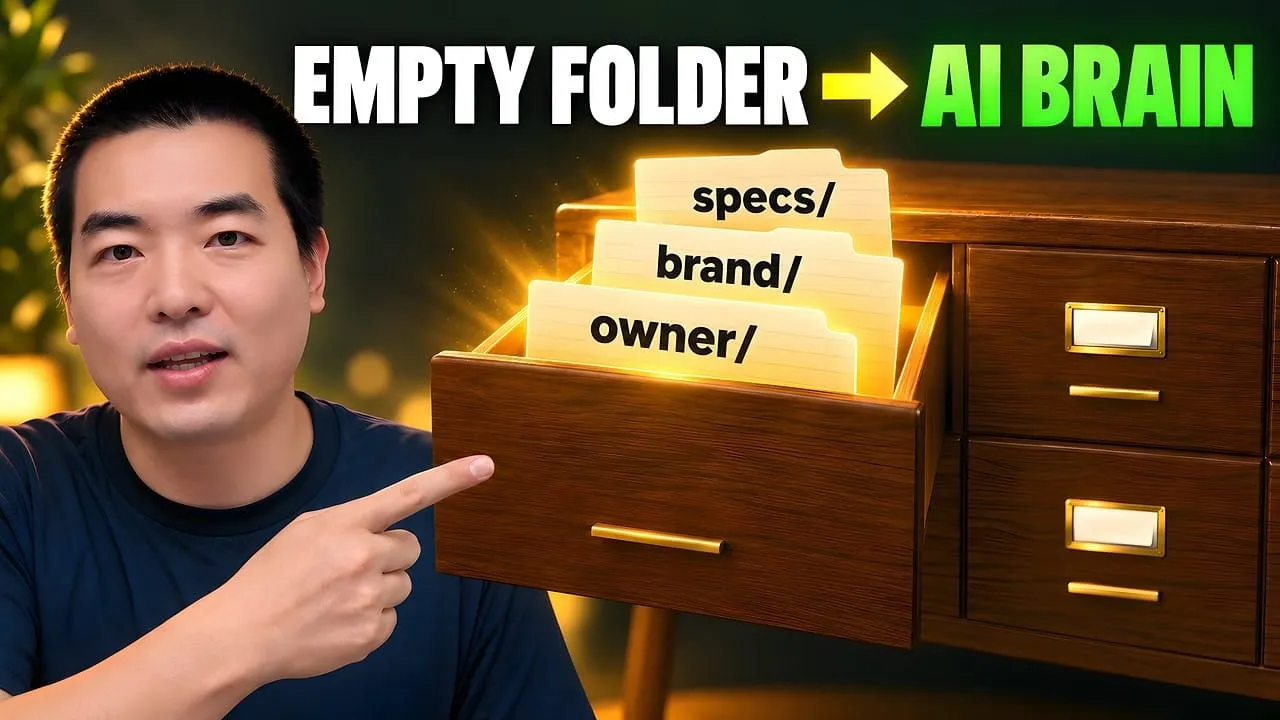
Eight folders of plain Markdown, a CLAUDE.md index in each, and seven prompts that make your agent interview you. Every prompt, template and command from the video, in order.
Why Your AI Agent Gives Different Answers (3-File Fix)
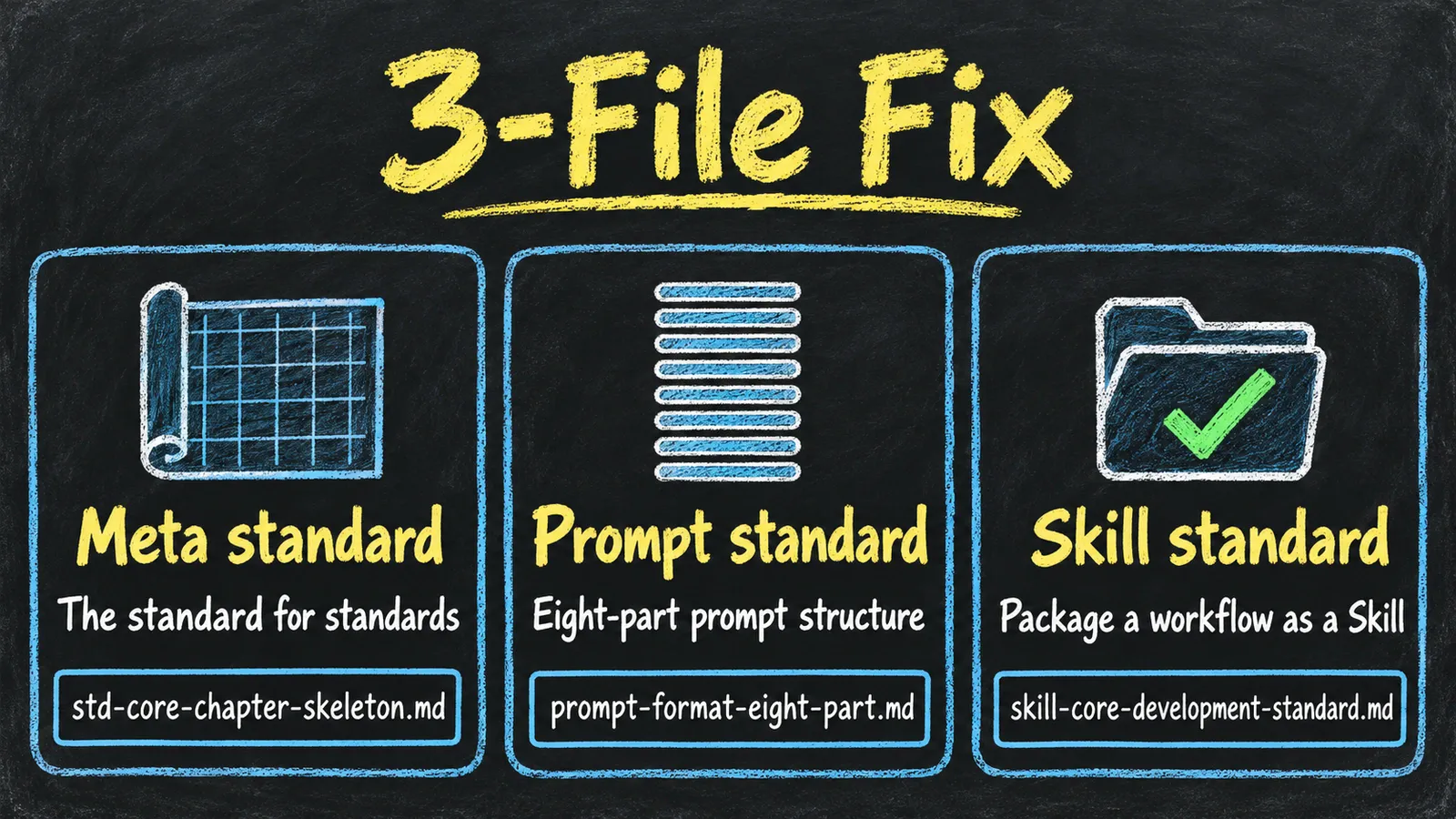
The same request gives a different answer every run because the agent fills every gap with the average of its training data. Three Markdown standards fix that: a meta standard, an eight-part prompt standard and a Skill standard. Free repo, one-prompt install.
You send an agent the same request twice and get two different answers because it fills every gap you left with the average of its training data. I fix that with standards: Markdown files the agent reads before a task and checks its work against afterwards. My knowledge base has over 800,000 files and runs on 32 standards; these are the three the others are built from.
Meta standard. The standard for standards. Every rule file gets the same skeleton, so you can have the agent generate new standards from it.
Prompt standard. Every prompt you reuse gets eight parts: a metadata header, Role, Core Tasks, Input Information, Workflow, Examples / Templates, Output Standard and Refusal Scenarios.
Skill standard. A workflow you repeat becomes a Skill: a SKILL.md entry file, one file per step, a config file and reference material.
One prompt installs all three into your project and adds a short Standards table to your AGENTS.md, so the agent knows which standard to read for which task.
The model matters less than you'd think. I ran every demo on DeepSeek V4 Flash, a cheap model. The standards do the heavy lifting.
What you need
An agent that reads and writes files: Claude Code, Codex, Cursor, Gemini CLI or similar. I used Pi, a terminal coding agent, on DeepSeek V4 Flash.
git, and a project folder to install into. Any folder works; you don't need an existing knowledge base.
A web search tool in your agent for the research prompts. Without one, tell the agent to mark every claim it can't verify as unverified.
For the trailer Skill (step 8): a folder of short brand notes, covering who your channel is for, what it covers and how it sounds. A video generator is optional.
Step by step
Step 1: See what one standard does (2:33)
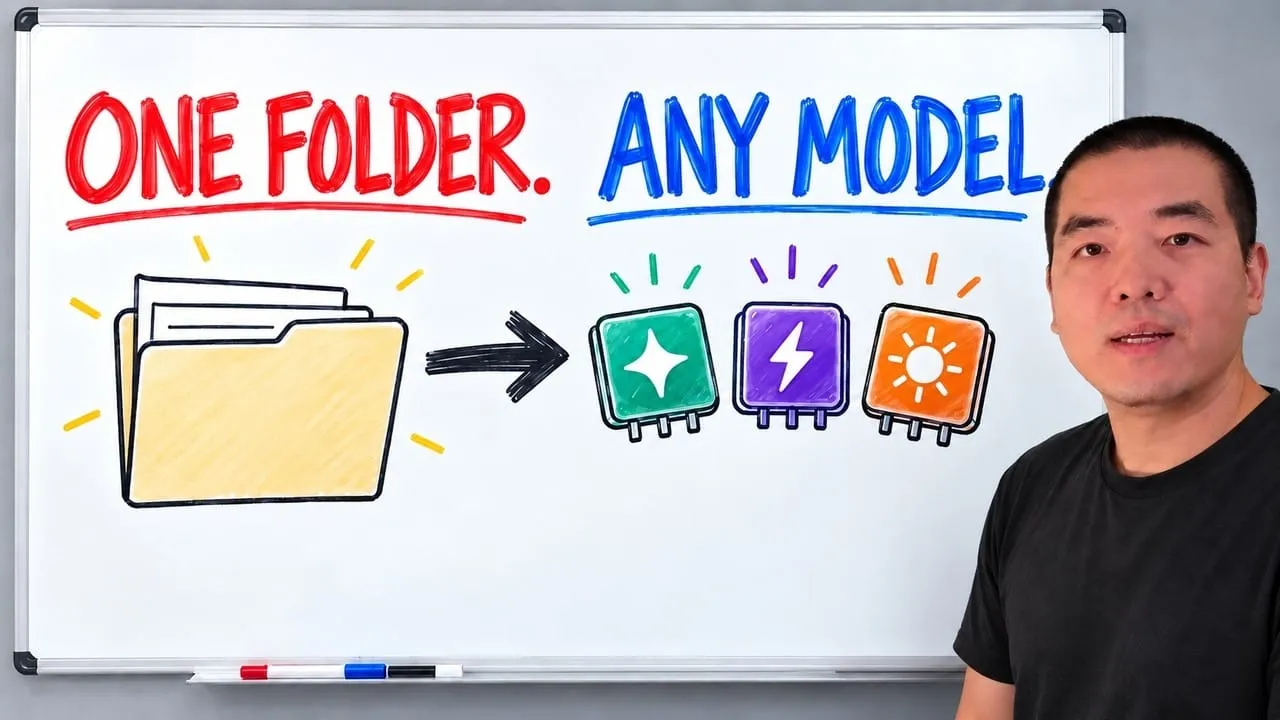
A standard does three jobs. It keeps the output the same shape every run, the way one written process makes a Big Mac taste the same in every McDonald's. It works as a checklist, like a pilot's pre-flight list: the agent checks its draft against every line before it answers. And it survives a model switch: hand the same file to Claude today and DeepSeek tomorrow, and both answer in the same sections, because the structure comes from the file, not the model.
You can see this before installing anything. Save this as standards/report-format.md in any project:
# Report format

A competitor report covers exactly five aspects, in this order:
1. What the product is
2. Who it is for
3. Pricing
4. Strengths
5. Weaknesses

- Format: Markdown, one H2 per aspect.
- Required content: at least one source link per aspect.
- Length: 200 words or fewer.

Before you output, check the draft against every line above and list the result.
Then send this, with a real product in place of {competitor}:
Working directory: your project root. Run pwd first and cd there if you are not in it.

Write the competitor report per standards/report-format.md for {competitor}.
Check your draft against it before you output.
To test the model switch, save that report as competitors.md, then run Summarize competitors.md per standards/report-format.md in two different agents (say Claude Code and Codex) from the same folder. Compare the section headings: they match.
Step 2: Install the three standards with one prompt (6:13)
Start your agent in the root of your own project, not inside the repo, and paste this:
Working directory: the root of my project. Run pwd and show me the result before you change anything.

Install the AI agent standards from https://github.com/aiworkflowpro/awp-playbook-knowledgebase-standards into this project:
1. Clone the repository next to this project, as ../awp-playbook-knowledgebase-standards. If that folder already exists, run git pull in it instead.
2. Copy its standards/ folder into this project as standards/. If a package with the same name already exists here, ask me before overwriting it.
3. Append its template/AGENTS.snippet.md to this project's AGENTS.md. Create the file if it is missing; if it already has a "## Standards" section, merge the rows instead.
4. If this project has no CLAUDE.md, create one containing only the line @AGENTS.md. If it has one that does not import AGENTS.md, add @AGENTS.md as its first line.
5. Keep the clone: its prompts/ folder holds every prompt from the video.
Then show me standards/ one level deep and the Standards section of AGENTS.md, and confirm that standards/awp-meta-authoring-standard/std-core-chapter-skeleton.md, standards/awp-prompt-writing-standard/prompt-format-eight-part.md and standards/awp-skill-development-standard/skill-core-development-standard.md exist. Finally list ../awp-playbook-knowledgebase-standards/prompts/ so I can see the prompts from the video.
If you'd rather use the shell, run this from your project root (macOS, Linux, WSL or Git Bash):
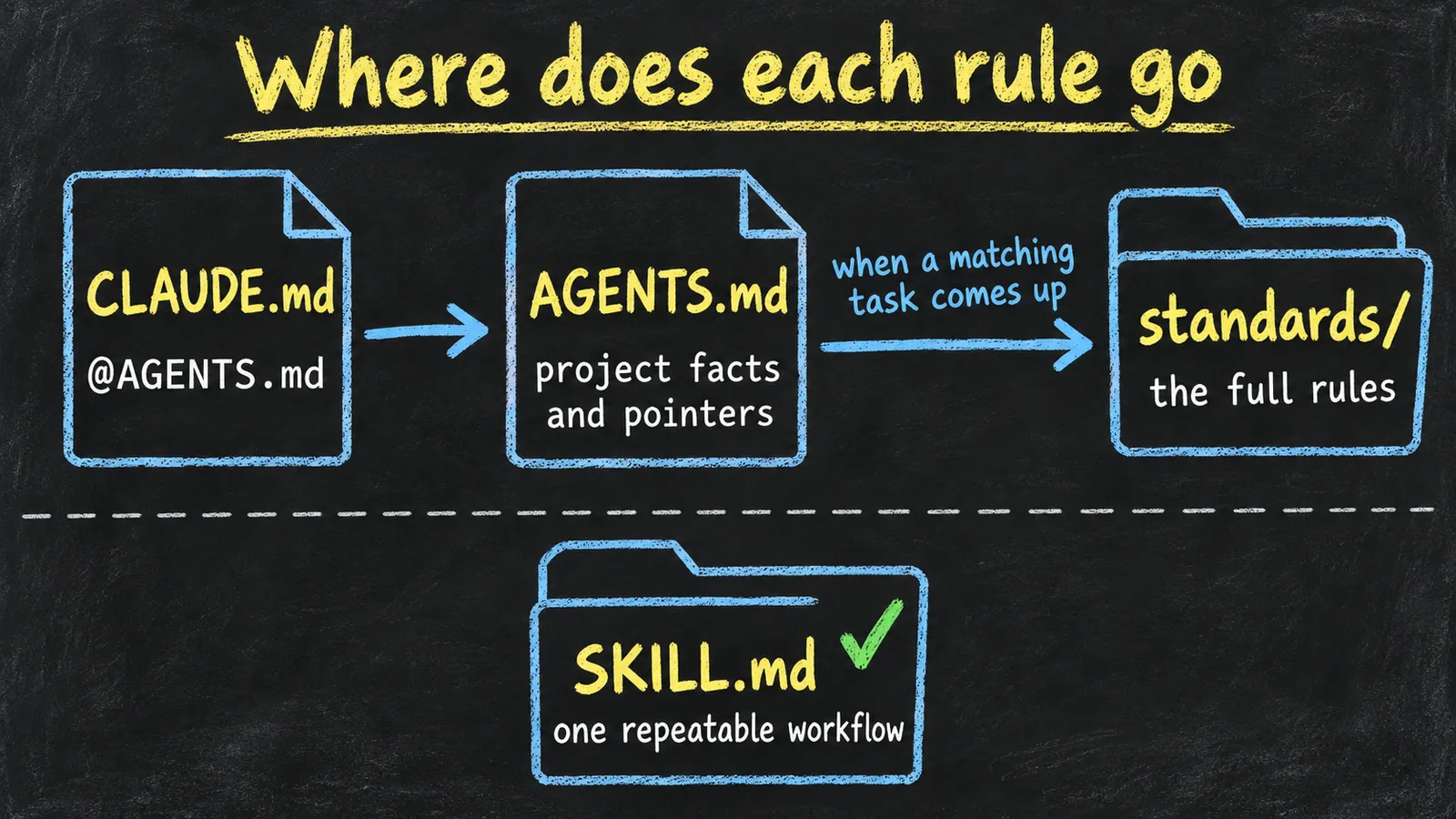
AGENTS.md stays short and only points; the full rules live in standards/ and get read when a matching task comes up.
Step 3: Read the meta standard (7:09)
Tell a renovation crew "make it European style" and you get anything. Give them a drawing with the furniture and the colors and you get the room you meant. std-core-chapter-skeleton.md is that drawing for rule files. Each standard is a package: a CLAUDE.md index plus body files, with a four-part package name (awp-{topic}-{class}-standard). Every body file follows the same order:
#
Section
Question it answers
①
Position
What does it govern, and what is the deliverable?
②
Design Philosophy
Why is it built this way?
③
Organization Framework
How many parts does the deliverable have, and how do they relate?
④
Section Details
What does each part require?
⑤
Shared Rules (optional)
Which rules apply to every deliverable?
⑥
Checklist
How do you check the finished work?
⑦
Build Procedure (optional)
How do you build a compliant deliverable from scratch?
The point of a new standard is to block a weakness you can name. The video names four. The model answers with the average of its training data, so "find me a startup niche" returns markets that are already crowded. It treats its own guesses as facts, even though markets change. It praises its own work. And it stays inside the industries it knows best. Reproduce the first one in an empty folder with no standards loaded:
Help me brainstorm and identify a viable niche for a new software startup idea, so I can build a website to generate profit and revenue.
Then, in the same session, send Now search the web for real evidence before you pick. After the agent writes something, try Now critique your article. Score it out of 10. and see how generous it is.
Step 4: Write a new standard from the meta standard (12:27)
Now turn those weaknesses into a standard. In your project, after the install:
Working directory: your project root. Run pwd first and cd there if you are not in it.
If standards/awp-meta-authoring-standard/ does not exist, stop and tell me to install the
standards first (README, Quick Start).

Read standards/awp-meta-authoring-standard/std-core-chapter-skeleton.md. It is the
meta-standard: the structure every standard follows.

Write a cognitive discipline standard. It should:
- list the cognitive weaknesses of LLMs that lead to obvious, low-quality answers
- give exactly one rule per weakness that forces the agent past it
- give every rule a pass/fail threshold the agent can check
- start with a purge rule: before any research, the agent writes the obvious ideas into a
  quarantine list of at least 30 directions and may not recommend any of them

Follow the meta-standard skeleton exactly. Save it as a package at
standards/awp-cognitive-discipline-standard/: a CLAUDE.md package index plus the standard
itself, with four-part file names.
Check the result: at least five named weaknesses, one rule per weakness, a number in every threshold, the purge rule, and the same section order as the other standards. The one I generated on camera is 318 lines with seven weakness/rule pairs, from W1 Mode-seeking / R1 Purge the Obvious to W7 User Blindness / R7 Context Lock-In.
Then make it prove itself:
Working directory: your project root. Run pwd first and cd there if you are not in it.

Read standards/awp-cognitive-discipline-standard/ and follow it strictly.

Find a SaaS product direction for solo AI content creators: one-person businesses that make
YouTube videos, blog posts and newsletters with AI tools.

Save the run, including the discard list and the evidence you found, to
research/cognitive-discipline-test.md.
In my run, 8 candidates made it to the kill round and 3 survived. Compare yours with the plain brainstorm from step 3. Last, register the standard, because a file no index points to is a file the next session won't find:
If the Standards table in AGENTS.md has no row for standards/awp-cognitive-discipline-standard/
yet, add one: what it is for and when to read it. If a row already exists, check it says both
and do not add a second one. Keep every existing row.
The same pattern works for any domain: a Markdown format standard, a front-end standard, a versioning standard. Once the meta standard is listed in AGENTS.md, even the one-liner works: Using the meta-standard and my agent's cognitive flaws, create a cognitive discipline standard.
Step 5: Learn the eight-part prompt structure (15:17)
"Write an article about AI agents" can produce anything, because the agent fills in everything you left out. That's also why other people's prompts often don't work for you: their context isn't yours. The prompt standard fixes which parts every reusable prompt has, in this order:
A specific role plus the artifact it produces ("Knowledge Architecture Comparison Analyst", not "consultant")
3
Core Tasks
The mission and what success looks like
4
Input Information
Placeholders, the field list, and what to do when input is missing
5
Workflow
Numbered steps and reasoning requirements
6
Examples / Templates
One positive example and one negative
7
Output Standard
The output skeleton, word count and a self-check list
8
Refusal Scenarios
When to refuse: out of scope, unethical, not enough data
Have your agent read it once:
Working directory: your project root. Run pwd first and cd there if you are not in it.

Read the prompt framework: section 3 of standards/awp-prompt-writing-standard/prompt-format-eight-part.md.
List the eight parts in order.
Step 6: Run the A/B test (17:36)
Same research, two prompts. A is the control. Run it in an empty folder next to your project (mkdir ../no-standards && cd ../no-standards), because inside your project AGENTS.md would make the agent read the standards:
Research how people organize knowledge for AI agents in 2026. Compare different approaches like CLAUDE.md, Cursor rules, Cline memory bank, Notion AI, and file-based knowledge bases. What are the pros and cons of each? Which approach is best for a solo creator who uses multiple AI tools?
Then, in the same session, replacing {your project} with your project's folder name:
Save your previous answer, unchanged, to ../{your project}/research/kb-approaches-no-standard.md.
B uses the prompt standard. Start a new session in your project:
Working directory: your project root. Run pwd first and cd there if you are not in it.

Read standards/awp-prompt-writing-standard/prompt-format-eight-part.md. Write an eight-part
prompt for this research task: compare how people organize knowledge for AI agents in 2026.

The prompt must include:
- Role: Knowledge Architecture Comparison Analyst; its output is a comparison matrix.
- Core task: a structured comparison of five approaches: CLAUDE.md, Cursor rules, Cline memory
  bank, Notion AI, file-based knowledge bases.
- Input: the approaches and the evaluation dimensions, with defaults when left blank.
- Workflow: gather documentation, characterize each approach, rate each one on six fixed
  dimensions, then summarize who each approach suits. Use a search tool if one is available;
  otherwise use training knowledge and mark uncertain claims as unverified.
- Six dimensions: structure control, agent context loading, standard composability,
  multi-model portability, knowledge persistence, multi-agent collaboration.
- Output standard: an approach summary table, a matrix where every cell has a rating, one
  sentence of justification and a source, and one best-for bullet per approach.
- Refusal scenarios: fewer than two approaches, systems that are not knowledge management,
  requests to name a single winner.

Save the prompt to standards/prompts/kb-approach-comparison.md (create standards/prompts/ and
research/ if they are missing), then run it and save the output to
research/kb-approaches-with-standard.md.
Score both with one rubric, ideally in a new session or with a different model, since an agent grading its own work is generous:
Working directory: your project root. Run pwd first and cd there if you are not in it.

If standards/prompts/quality-audit-prompt.md is missing, copy it there from
../awp-playbook-knowledgebase-standards/examples/prompt-comparison/quality-audit-prompt.md.
Then read standards/prompts/quality-audit-prompt.md and run it. Score these two files on its six
dimensions:

- Output A (no standard):   research/kb-approaches-no-standard.md
- Output B (with standard): research/kb-approaches-with-standard.md

Give me the per-dimension scores, the gap analysis, and both totals out of 30.
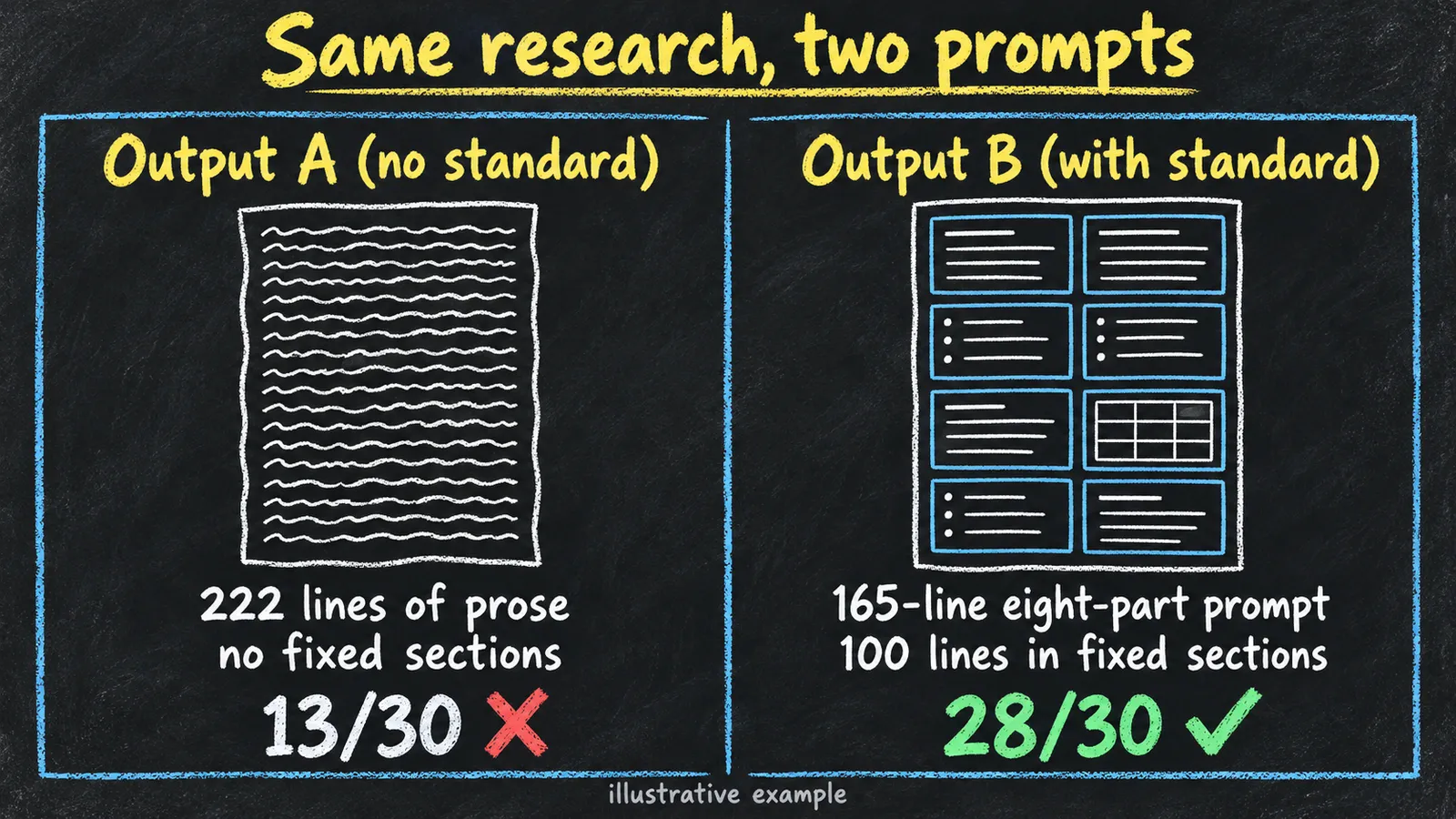
In the run shown, A came back as 222 lines of prose with no fixed sections. B's prompt was 165 lines and its output 100 lines in fixed sections. The 13/30 vs 28/30 on screen is an illustrative example of how the rubric reads; your numbers will differ. What should hold is the direction: B wins on structure consistency, dimension coverage and source traceability.
You don't have to write eight-part prompts by hand. Name the standard and the task, and let the agent draft it:
Working directory: your project root. Run pwd first and cd there if you are not in it.

Use the prompt standard in standards/ to write a complete eight-part prompt: {your task}.
Save it to standards/prompts/{task-name}.md.
When the draft is missing things only you know, follow up in the same session with Interview me to fill in what's missing. One question at a time. I answer by voice. Once all eight parts are filled, run the prompt.
Step 7: Package a workflow as a Skill (20:41)
Prompts cover single tasks. A Skill packages a whole workflow, and the Skill standard decides its shape. Names have four parts, awp-{domain}-{target}-{action}, so the trailer Skill is awp-content-trailer-generating. Here's the package that came out of the recorded run:
awp-content-trailer-generating/
├── SKILL.md            # entry: what it does, the nine steps, hard rules, input, output
├── config/
│   └── default.yaml    # duration, format, brand_dir, output_root, generator settings
├── workflow/
│   ├── step00-preflight.md
│   ├── ...
│   └── step08-deliver.md
└── references/
    ├── rules/          # voiceover-rules.md, visual-mapping-rules.md
    └── specs/          # prompt-framework.md, vocabulary.md
SKILL.md is an index that points at the step files; the steps hold the detail. config/ holds your parameters. Keep keys out of it; environment variables work.
My order: research what already exists (Research what {topic} skills are out there. Save short notes, with links, to research/{topic}-skill-notes.md.), then have the agent generate a Skill from the standard. For the trailer, plan the steps before you ask:
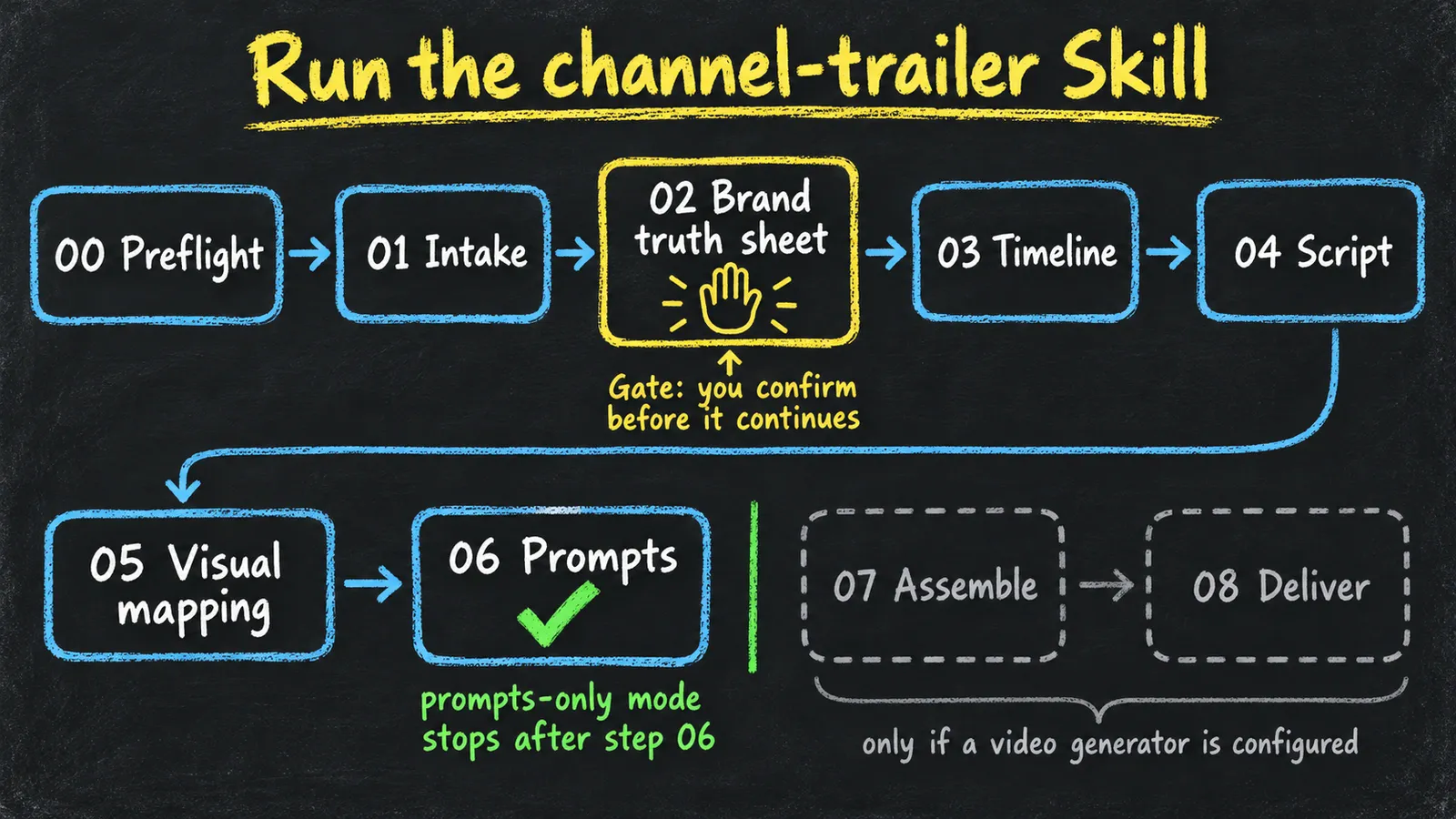
Step
What it does
00 Preflight
Check the tools first: video generator, ffmpeg, a writable output folder
01 Intake
Read channel name, positioning, audience and voice from your brand notes
02 Brand truth sheet
Summarize what was read into one page. Gate: you confirm before it continues
03 Timeline
Split 30 seconds into segments, each with a duration and a beat
04 Script
One voiceover line per segment, within the word budget
05 Visual mapping
Each line becomes one concrete shot: subject, action, environment, camera
06 Prompts
Compile shot prompts for your video tool; submit only if one is configured
07 Assemble
Stitch the segments with transitions
08 Deliver
Music, subtitles, loudness, export
Then build it, replacing {folder with your brand notes}:
Working directory: your project root. Run pwd first and cd there if you are not in it.

Read standards/awp-skill-development-standard/skill-core-development-standard.md. It is the
Skill standard.

Build a channel trailer generator Skill. Input: a channel name. Output: a 30-second
promotional video package. Nine steps: preflight, intake, brand truth sheet (a gate that waits
for my confirmation), timeline, script, visual mapping, compile prompts and generate, assemble,
music and delivery.

Read my brand facts from {folder with your brand notes}. Never invent a brand fact that is not
written there.

Every run writes to a new run folder named with the date and time; never reuse or overwrite
an earlier run.

With no video generator configured, the Skill runs in prompts-only mode: steps 00 to 06 still
run, step 06 writes the shot prompts instead of submitting them, and a missing generator or
generator credential is not a preflight failure.

Build it yourself from the Skill standard; do not copy examples/channel-trailer-skill/ from
the cloned repository (compare against it afterwards if you like).

Follow the Skill standard to produce the full package at skills/awp-content-trailer-generating/:
SKILL.md, config/, workflow/ (step00 to step08) and references/. Then add a row for the Skill
to AGENTS.md: what it does and its trigger words.
Check that workflow/step04-script.md has an input, an output, concrete instructions and quality criteria.
Step 8: Run the channel-trailer Skill (22:38)
Copy the Skill folder where your agent looks for Skills: .claude/skills/ for Claude Code, .agents/skills/ for Codex. Any other agent can keep it in skills/ if you name skills/awp-content-trailer-generating/SKILL.md in the prompt. In config/default.yaml, point brand_dir at your brand notes (for example brand/) and output_root at where runs should go (for example runs/channel-trailer/).
Don't just say "run the Skill". Name the constraints:
Working directory: your project root. Run pwd first and cd there if you are not in it.

Run the awp-content-trailer-generating skill you built in skills/ for {your channel}.

Execute every step in order, step00 through step06, and steps 07 and 08 only if a video
generator is configured. Step 02 is a gate: show me the truth sheet and wait for my
confirmation before step 03. Do not skip a step and do not merge two steps into one answer. Each step writes its own output file into the run folder before you
move on. After each step, tell me which step finished and which file it wrote.

If a step cannot run because a tool is missing, say which step and why, then stop. Do not jump
ahead to a later step you happen to be able to do.
The run folder should end up with one file per step. A gap in the numbers means a step was skipped. Without a video generator, the Skill stops after step 06 and leaves you a truth sheet, a timeline, the voiceover script and five shot prompts. To change the length, set trailer.duration_seconds to 15 or 60 and adjust segments and narration_words_total to match.
What broke
The repo on screen isn't the repo you'll clone. I reorganized it after recording, from a follow-along course into a toolkit you install into your own project. course/reference/ is now standards/, course/steps/ is now prompts/, and the knowledge-base snapshots are gone. The install prompt typed in the video no longer works; use the one in step 2. The full mapping is in the repo's CHANGELOG.md.
The control stopped being a control. Once the standards are installed, your project's AGENTS.md tells the agent to read them, so a "plain" prompt run inside the project isn't plain anymore. Run the control prompts (05 and 12) in an empty folder next to the project.
The agent grades itself too kindly. Ask it to critique its own article and it says the article turned out great. Score with a written rubric, in a new session or with a different model.
Two Skills with one name. If you installed the example trailer Skill and then built your own, the agent has to guess which one to run. Delete the example copy first.
My first trailer Skill broke its own naming rule. It was called awp-content-trailer, three parts where the Skill standard requires four. It's now awp-content-trailer-generating.
Claude Code ignored the standards. It reads CLAUDE.md, not AGENTS.md. Make sure CLAUDE.md contains the line @AGENTS.md; the install adds it.
"Run the Skill" can skip steps. Given only that, an agent can read the step files, decide it already knows the answer and jump from the gate straight to the shot prompts. The prompt in step 8 names every constraint for that reason.
Rendering took 40 minutes. The five shots in the video were rendered with an open-weight video model on a local GPU, which is why I didn't run it live. That setup isn't in the repo, so the Skill ships in prompts-only mode. Paste the shot prompts into whatever video generator you use.
FAQ
Why does my AI agent give different answers to the same prompt?
Because everything your prompt leaves out gets filled in with the average of the model's training data, and that guess changes from run to run. A standard is a Markdown file the agent reads before the task and checks its draft against afterwards, so the structure comes from the file instead of the guess.
Where does each rule go: AGENTS.md, CLAUDE.md or SKILL.md?
Keep AGENTS.md short: project facts and pointers to where the rules live. The full rules go in a standard under standards/, which the agent reads only when a matching task comes up. A SKILL.md packages one repeatable workflow, and CLAUDE.md holds the line @AGENTS.md so Claude Code reads the same file as Codex and Cursor.
Do these standards work with Claude Code, Codex, Cursor and Gemini CLI?
Yes. The standards are plain Markdown and the install writes to AGENTS.md, which Codex and Cursor read directly. Claude Code reads it through the @AGENTS.md line in CLAUDE.md, and for Gemini CLI you add @./AGENTS.md to GEMINI.md.
Are the 13/30 and 28/30 scores in the video real?
They are an illustrative example of how the rubric reads, and they're labelled that way on screen. The prompts, the 165-line eight-part prompt and both outputs are real and sit in the repo's examples/prompt-comparison folder. Your own audit will give different numbers.
Why does the trailer Skill stop at step 06?
The repo ships it in prompts-only mode, which needs no GPU or API key and ends with a truth sheet, a timeline, a voiceover script and five shot prompts. Steps 07 and 08 need a video generator, an audio source and ffmpeg. Paste the shot prompts into the generator you already use.
Do I need a knowledge base before I install the standards?
No. The one-prompt install works in any project folder. In the video the standards sit in knowledge-base/standards/ because I added them to my existing knowledge base; if you have one, install into it the same way.
A 30-minute video is too long for one conversation. This guide walks the 8-step Skill that locks the narration and one look, then gives each 3-minute segment to a fresh sub-agent, five at a time, and polishes the cut in an empty-context session.
The folder structure behind my AI agent team, the Herdr setup where Grok Build, Claude Code and Kimi Code work side by side, and the two live tasks from the video: an article published by voice and a three-model front-end test.
Eight folders of plain Markdown, a CLAUDE.md index in each, and seven prompts that make your agent interview you. Every prompt, template and command from the video, in order.
Stop briefing your AI from scratch. One free folder holds your background, your rules and your voice. Eight prompts build it, no code, and any AI can read it.