A 30-minute video is too long for one conversation. This guide walks the 8-step Skill that locks the narration and one look, then gives each 3-minute segment to a fresh sub-agent, five at a time, and polishes the cut in an empty-context session.
The folder structure behind my AI agent team, the Herdr setup where Grok Build, Claude Code and Kimi Code work side by side, and the two live tasks from the video: an article published by voice and a three-model front-end test.
Eight folders of plain Markdown, a CLAUDE.md index in each, and seven prompts that make your agent interview you. Every prompt, template and command from the video, in order.
Deleting 75% of an instruction file made the output better, not worse. That inversion is the whole argument. What each rewrite removed, what the final file still contains, and a starter template for business process automation without writing code.
Every operations manual has two layers: the rules people actually follow, and the rules that exist so somebody can point at them later. A dental group's front-desk manual runs sixty pages, while the four things that genuinely change how the phone gets answered fit on an index card taped to the monitor. Instruction files behave the same way in business process automation, only worse - every unenforced rule you write pushes a real one out of reach. This article is one file rewritten three times, from 312 lines down to 67, and what was left standing at the end. The lesson travels well beyond the file.
The short version:
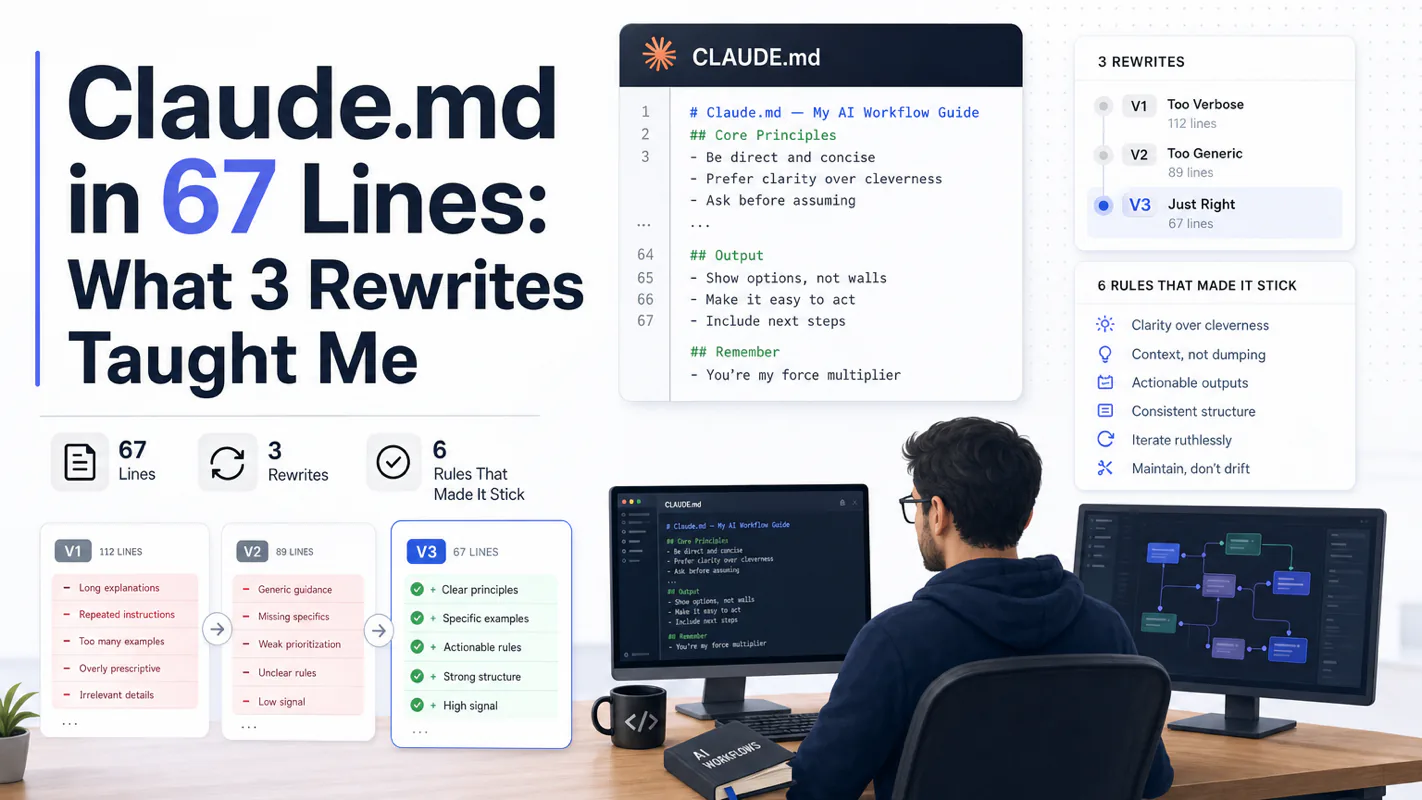
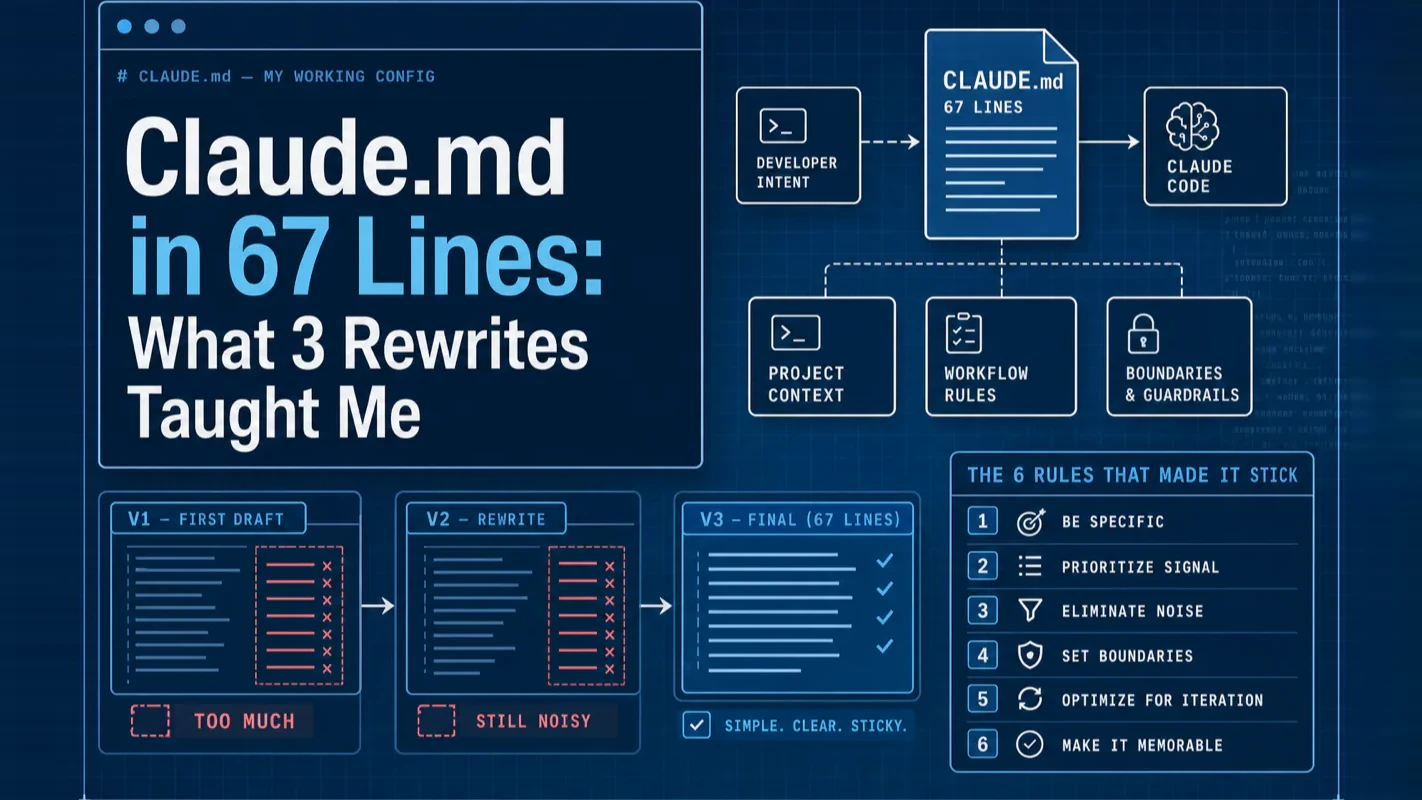
My current CLAUDE.md is 67 lines. v1 was 312 lines and barely worked
The fix wasn't writing better rules. It was deleting 75% of them
Full file below, side-by-side v1/v2/v3 comparison, and the six rules that survived the last rewrite
If you're not a programmer: the non-developer CLAUDE.md at the bottom is meant for you
Everyone says CLAUDE.md should encode every rule you want Claude Code to follow. Actually, the best CLAUDE.md is the shortest one that gets the agent to your bar. Rules you wrote and never enforced become noise that pushes the real instructions out of the cache window.
If you already cut your CLAUDE.md below 100 lines, skip ahead to the six rules. If yours is 200 lines and growing, read on through the three rewrites.
My first CLAUDE.md was 312 lines of everything I could think of. Tab width. Naming conventions. A list of things Claude should "prefer." A paragraph of writing style rules. Two paragraphs of things to avoid. Four "important notes" at the bottom in all caps.
Claude ignored about half of it.
I assumed I was writing bad rules. I wrote more rules. The file grew to 380 lines. Claude started ignoring 60% of it.
If there is anything Claude tends to repeatedly get wrong, not understand, or spend lots of tokens on, put it in your CLAUDE.md. I add to my team's CLAUDE.md multiple times a week.
Multiple times a week. Not "write it once perfectly." Not "cover every edge case." The file is supposed to be small enough that you can edit it mid-task.
I rewrote mine from scratch. Cut to 142 lines. Then, a month later, to 67. That's the version Claude actually follows now, and the rest of this post is what got me there.
Who Is This For
You've been using Claude Code for a few weeks and your CLAUDE.md is either empty or bloated
You copied a template off someone's blog and you're not sure why half the lines are in there
You're not a programmer, you're using Claude for writing, research, or a business you run alone
You want a file that feels like yours, not a boilerplate
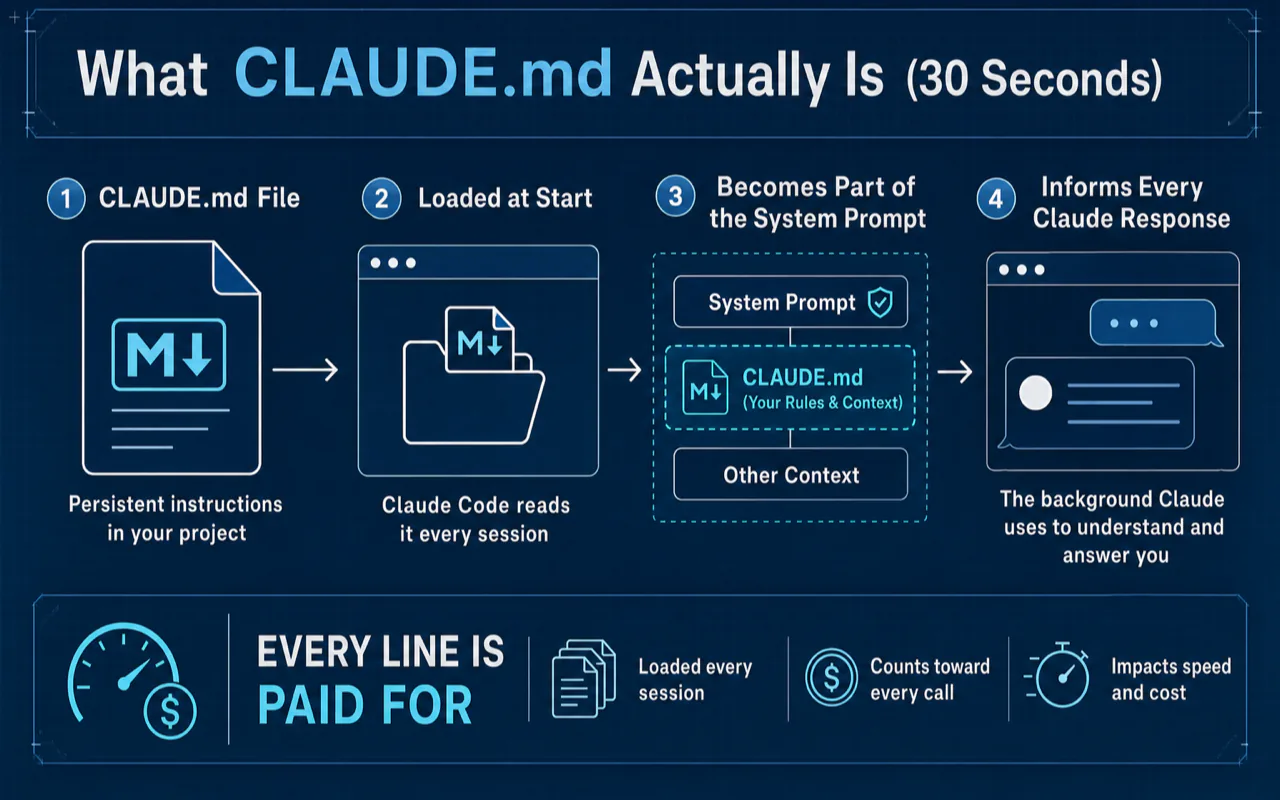
Here is why this matters: every line in CLAUDE.md is paid for on every Claude Code call in this directory. Bloated rule files quietly raise your token bill and slow down the agent on every turn, even when the rules are not relevant.
One-line version: CLAUDE.md is a Markdown file Claude Code reads at the start of every session. It becomes part of the system prompt, the background context Claude uses to answer you. Anthropic's own memory docs put it plainly: "Give Claude persistent instructions with CLAUDE.md files, and let Claude accumulate learnings automatically with auto memory."
Think of it as the onboarding doc you give a new hire. You don't paste the employee handbook at them. You tell them where their desk is, who their mentor is, and where the coffee is. Everything else is on the shared drive.
A good CLAUDE.md is the same: directions, not documentation.
Where CLAUDE.md Sits in Claude's Memory Stack (2026)
There are three separate memory systems at Anthropic right now. Know which one you're in before you start writing rules:
System
Who it's for
How it works
Chat Memory
Claude.ai web / desktop users
Claude remembers your preferences across chats. Free on all plans since March 2026. Nothing for you to write, it's automatic.
CLAUDE.md + Auto Memory
Claude Code users (this post)
You write CLAUDE.md. Claude writes Auto Memory based on your corrections. Both load at session start.
Memory Tool (API)
Developers building on the Anthropic API
Programmatic memory store for your own agent apps. Out of scope here.
The three aren't replacements for each other, they're parallel tools for different roles. If you use Claude.ai in the browser and Claude Code in the terminal, you'll touch two of them. This post is about the second row.
The Four File Layers Inside CLAUDE.md
Within the Claude Code system, CLAUDE.md actually reads up to four files, layered from broad to specific:
Later layers can override earlier ones (except enterprise). Most people only need two: ~/.claude/CLAUDE.md for personal preferences and ./CLAUDE.md in each project. That's what I use. I've never written a rules file, and I'm fine.
There's also a fifth kind — Auto Memory, which Claude writes for itself based on your corrections. I'll leave that for a separate post; it's a different system with different rules.
The File: My Actual 67-Line CLAUDE.md
This is the current ./CLAUDE.md in my main content project. Copy it, read past it, or steal sections, it's here to be useful, not admired.
# Content Workflow Project

## What this project is
A one-person writing and research workspace. Markdown files organized by topic.
No code compilation. No build step. Everything is text.

## Stack
- A blog I built (publishing) — drafts live in /articles/, not in the CMS
- Notion (notes) — synced via export, never edited here
- cloudflare R2 (images) — public bucket, no auth

## Directory map
- /articles/    Drafts, one folder per piece
- /research/    Source material, PDFs, transcripts
- /templates/   Reusable outlines and boilerplate
- /archive/     Anything older than 6 months

## Rules (MUST / NEVER)
- MUST keep filenames in kebab-case
- MUST add frontmatter (title, date, tags) to every article
- NEVER modify files in /archive/ unless I say the word "archive"
- NEVER rename files without asking
- NEVER add features, refactoring, or structure I didn't request
- NEVER claim a task is done without showing me the diff

## Writing rules
- Plain English. No corporate voice, no "leverage" or "unleash"
- Short sentences. One idea per paragraph
- If a claim needs a source, add a link. If no source, say "no citation"

## Workflow
- Stage changes with git add after every approved step
- Use @research/{topic}.md when I ask about a topic I've researched before
- When unsure, ask. Don't guess.

## Commands I use
- Preview: open /articles/{slug}/index.html in browser
- Count words: wc -w articles/{slug}/*.md
- Lint links: grep -rn "]()" --include="*.md"

## Detailed docs (loaded on request)
- Publishing flow: @docs/publish.md
- Voice and tone: @docs/voice.md
- newsletter format: @docs/newsletter.md
That's 67 lines, give or take. Every section earns its spot.
Line-by-Line: Why Each Section Stays
Most of what makes the file work is what I didn't put in it. But the sections that stayed each answer a different question Claude asks implicitly every session:
"What is this project?"
→ ## What this project is. Three sentences. A human onboarding to the repo would need this. Claude needs it too.
"What tools are in play?"
→ ## Stack and ## Directory map. These catch Claude before it asks. Without them, I was answering "where do the images go?" every third session.
"What are you going to yell at me for?"
→ ## Rules (MUST / NEVER). This is the section that changed the most across rewrites. More on the wording below, it's specific on purpose.
"How do you want me to write?"
→ ## Writing rules. Four lines. Any more and I'm asking Claude to be a style guide, which is the wrong job.
"What should I do between steps?"
→ ## Workflow. Process rules, not style rules.
"What shell commands are allowed?"
→ ## Commands I use. Three commands. I type them often enough that I'd rather Claude know about them than rediscover them.
"Where's the rest?"
→ ## Detailed docs. Three pointers. Each @path file is loaded only when the section is relevant, so the cost is zero until I need it. This is the single most important structural trick in the file.
Three Versions: What I Deleted and Why
Before the third rewrite, my file was 312 lines of accumulated preferences. After, it was the six rules I would actually defend in code review. Fewer lines, more enforcement, less drift on the agent side, lower token bill on every turn.
This is the boring part most guides skip. It's also the part that would have saved me a month.
Version
Lines
What changed
Claude's behavior
v1
312
Dumped everything I could think of
Followed maybe half. Contradicted itself across sessions.
v2
142
Deleted anything a linter could enforce
Followed most rules. Still rewrote files I didn't ask it to touch.
v3
67
Split detailed docs into @imports. Rewrote rules as MUST/NEVER
Follows consistently. Asks when unsure.
What went into v1 that I later deleted
40 lines of formatting rules. Indent width. Quote style. Blank lines around headings. Every one of these is something Prettier or a Markdown linter can enforce in zero tokens. Deleted.
A paragraph of "preferred styles." Words like "prefer" and "try to" are mushy. Claude treated them as suggestions. Turned into MUST/NEVER or deleted.
A list of 22 terms I wanted Claude to use consistently. Three of them mattered. The other 19 were me being precious. Kept three. Deleted the rest.
Sample code pasted directly in the file. Three examples of "here's how to write an article." These lived in the file, which meant every session paid for them in tokens whether I was writing an article or not. Moved to @docs/voice.md, loaded only when relevant.
Rationale paragraphs. I'd write "we use kebab-case because…" and explain. Claude doesn't need the why to follow the rule. Deleted the why.
What survived into v3
Anything I caught Claude getting wrong twice. That's the filter. Not "things that would be good to specify", things Claude actually got wrong.
The humanlayer team calls this onboarding minimalism: "include as few instructions as reasonably possible." I'd put it more bluntly, if a rule isn't stopping a specific mistake, it's decoration.
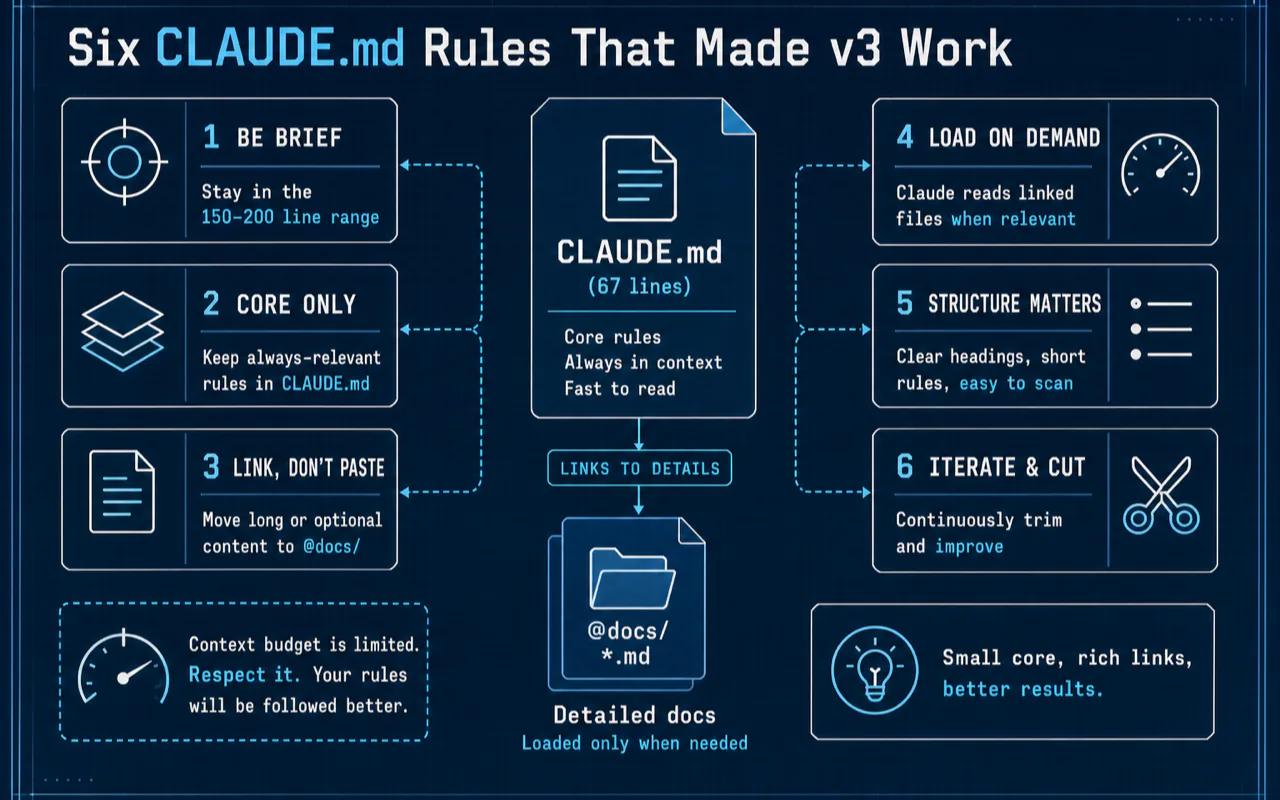
Six CLAUDE.md Rules That Made v3 Work
These aren't my rules, they're six ideas I pulled from Anthropic's docs, Boris's HN comment, a few bloggers who've written a lot of CLAUDE.md files, and the cuts I made across three rewrites.
1. A CLAUDE.md is a table of contents, not an encyclopedia
Any large language model can follow a limited number of instructions in one pass, research and user reports both put the stable range at around 150-200. Claude Code's own system prompt already uses a chunk of that budget. If your CLAUDE.md adds another 300 instructions, you're asking Claude to juggle more than it can hold.
The practical rule: if a section is 15+ lines and only matters sometimes, move it to @docs/xxx.md and link it. Your CLAUDE.md points at the detailed doc. The detailed doc only loads when Claude needs it.
2. Point, don't paste
Instead of pasting 40 lines of sample code into CLAUDE.md, write:
Example of our article format: @templates/article-standard.md
Claude reads the referenced file when it's relevant and ignores it otherwise. Your main file stays small. The template file stays canonical, when you update it, Claude sees the update automatically. No copy stays stale.
Builder.io's CLAUDE.md guide pushes this hard, and for good reason. Copies rot. Pointers don't.
3. Cover WHAT, WHY, HOW
A good CLAUDE.md answers three questions:
WHAT is this project? (stack, directory map, core modules)
WHY is it like this? (the one or two decisions someone would otherwise try to reverse)
HOW do I work in it? (commands, workflow, review loop)
If a line doesn't fit one of those three buckets, it's probably filler. Cut it.
4. Stop asking the LLM to be a linter
Prettier gives you the same output every time. Claude doesn't. Asking Claude to enforce indent width or quote style is asking a probabilistic tool to do a deterministic job. It'll get it right 95% of the time, which means wrong one in twenty. That's worse than a linter.
Move formatting to tools. Keep CLAUDE.md for things tools can't do: architecture decisions, naming judgment calls, project-specific patterns, workflow choices.
5. It's a living document
Boris's comment keeps coming back to me: I add to my team's CLAUDE.md multiple times a week. Not once. Not weekly. Multiple times. The file you write on day one will be wrong in ways you don't yet know. That's fine.
The update trigger I use: if I find myself correcting Claude on the same thing twice in two sessions, I add a line to CLAUDE.md. One line. Specific to the mistake. Then I watch whether it sticks.
6. Budget awareness
Rough math, from what we know about LLM instruction following:
Item
Rough instructions
What an LLM can follow reliably in one pass
~150-200
Claude Code's own system prompt
~50
What's left for your CLAUDE.md and everything else
~100-150
What I'd budget for CLAUDE.md specifically
~60-80
A 2026 workflow guide from smart-webtech puts the hard ceiling at 200 lines: "Files longer than that consume too much context and instruction adherence measurably drops." That matches what I saw going from v1 to v3, below 100 lines, every rule got followed; between 100-200, adherence started drifting; above 200, Claude was actively triaging.
Anthropic themselves publish a rolling Claude Code changelog that's been shipping memory improvements most months in 2026, reduced memory footprint, cache clearing after compaction, capped file history snapshots. The tool is getting leaner. Your CLAUDE.md should go the same direction.
Every line you add is a line spent. Ask yourself: is this useful every session, or only sometimes? If only sometimes, it belongs in an @docs/ file, not the main one.
A specific wording note: MUST and NEVER work, "prefer" doesn't
I tested both. Polite language — "prefer kebab-case," "try to use short sentences", got followed about 70% of the time. MUST/NEVER wording got followed closer to 95%.
Why? LLMs trained on technical docs know RFC 2119 keywords. MUST, NEVER, and MUST NOT are treated as rules. "Prefer" and "try to" are treated as suggestions. Both forms are grammatically fine. Only one behaves like a rule.
A friend of mine tells Claude to always address him as "Mr Tinkleberry." He says he can tell Claude is not paying attention to the instructions on Claude.md when it doesn't.
It's dumb, and it works. Add one small, unusual, low-stakes instruction to your CLAUDE.md, something Claude would never do on its own. Mine is this line, near the top:
## Greeting
Always greet me as "Captain" at the start of a session.
When a new session opens with "Hello, Captain", I know Claude is reading the file. When it opens with "How can I help you?" — I know the file is being skipped, usually because I've stuffed too much in and Claude is triaging.
It's the cheapest smoke test I've found.
Four Ways People Break CLAUDE.md
The most common failure mode I see in CLAUDE.md design is treating the file as documentation for humans rather than instructions for an agent. The audience is the model. The format that works for Confluence does not work here.
Mistake 1, Writing it like a manifesto
The worst CLAUDE.md I've seen a reader send me started like this:
# Project Philosophy
This project represents a commitment to excellence in software craftsmanship.
We believe that clean code is a form of respect for your future self and your
colleagues. Every line should be written with intention...
Three paragraphs of this before any instruction. Zero of it helps Claude do a task. Claude doesn't need a manifesto, Claude needs rules. Delete the philosophy and start at "## What this project is."
Mistake 2, Using it as a linter
A reader wrote me a 180-line CLAUDE.md. 130 of those lines were formatting rules. Indent style. Trailing commas. Blank lines around headings. Single quotes versus double quotes. Every one of those lines is something ESLint and Prettier solve for free, and they solve it more reliably than any LLM.
The fix: delete all 130 lines. Add one line: MUST run npm run lint before reporting a task complete. Let the tool do the tool's job.
Mistake 3 — "Please" and "prefer"
Please try to use descriptive variable names when possible.
We would prefer if you avoided overly complex nested structures.
It would be great if documentation could be kept up to date.
Every one of those lines will be followed sometimes. Rewrite them:
MUST use descriptive variable names. No single-letter names outside loop counters.
NEVER nest conditionals more than 3 levels deep.
MUST update @docs/{relevant}.md when changing a public API.
Specific and directive. Suggestions get ignored. Rules get followed.
Mistake 4, Writing it once, forever
The CLAUDE.md that was right for your project two months ago is probably wrong now. The stack moved. You stopped using one of the tools. A decision got reversed. The file needs to move with the project.
I audit mine monthly. Twenty minutes. Delete anything I haven't needed since last audit. Add anything I've been repeating to Claude lately. It's the smallest maintenance tax in the project, and the thing that keeps the file from rotting.
When CLAUDE.md Is the Wrong Tool
Three things people put in CLAUDE.md that belong somewhere else.
Project secrets. API keys, database URLs, internal hostnames. CLAUDE.md is committed to git in most repos. The right home is .env, a secrets manager, or a personal-machine-only ~/.claude/CLAUDE.md. The agent does not need the secret to know how to use it; it needs an instruction like "read $DATABASE_URL from environment."
Long-lived task plans. "This week we are migrating from Postgres to MySQL" does not belong in CLAUDE.md, because next week the rule is wrong and the agent will follow it anyway. Use a plan file (PLAN.md, deleted when shipped) or an open issue. CLAUDE.md is for durable rules, not weekly state.
Style preferences for prose. "Write in active voice. Use Oxford commas. Prefer short sentences." Three paragraphs of writing style guidance pushes operational rules out of the cache. If the agent writes prose for you, put style notes in the prompt for that one task, not in CLAUDE.md.
The pattern: CLAUDE.md is for things that are true every turn. Anything that decays, varies by task, or carries a secret belongs elsewhere.
A Quick Note on Auto Memory
You may have heard about Auto Memory, the other half of Claude Code's memory system. It became a standard, stable feature in early 2026 and complements what I've covered above.
Short version: CLAUDE.md is what you write for Claude. Auto Memory is what Claude writes for itself, based on your corrections and habits. When you tell Claude "don't do that again," Claude stores a note; next session, the note loads.
The two systems don't conflict, they complement each other. CLAUDE.md is your rules. Auto Memory is Claude's running notebook. I'll cover Auto Memory properly in a separate post, because the right/wrong ways to use it are different from CLAUDE.md.
For now, you can check what Claude has stored with /memory inside a session. If you're surprised by something Claude "remembered," that's usually where it came from. Anthropic is also actively shipping memory-related improvements, the changelog from Q1 2026 shows consistent work on reducing memory footprint, better session recap, and file-history caps. Good news for anyone writing long CLAUDE.md files: the tool is getting smarter about what it actually retains.
The common CLAUDE.md regret I hear most
After publishing my six-month review, the #1 note readers sent back was the same: "I wish I'd audited my CLAUDE.md a month earlier." The file rots silently. You stop using a tool, a rule becomes obsolete, a section you added to fix a bug fixes a bug that no longer exists. A 20-minute audit every 4-6 weeks is the cheapest maintenance tax on the list, and the one most people skip.
One reader who runs a two-person agency had a 240-line CLAUDE.md for an old client engagement. The client project wrapped up in January. The file was still loaded into every new project session in April, three months of every prompt carrying 180 lines of dead context. Five minutes to delete, three months of unnecessary tokens. That's the cost of "write once, forever."
Copy This Starter Template
Not a programmer? Use this. It's a CLAUDE.md for a solo content or research workspace, 28 lines, no code context. Paste it into ./CLAUDE.md in your project folder and edit the filled-in parts.
# {project name}

## What this project is
{One or two sentences. What is the work? What's the output?}

## Tools
- {Tool 1} — {what I use it for}
- {Tool 2} — {what I use it for}

## Directory map
- /{folder}/  {what lives here}
- /{folder}/  {what lives here}

## Rules (MUST / NEVER)
- MUST keep filenames in kebab-case
- MUST add a date and title to every file in /articles/
- NEVER modify files outside the current task
- NEVER claim a task is done without showing me the diff
- When unsure, ask. Don't guess.

## Writing rules
- Plain language. No corporate voice.
- Short sentences. One idea per paragraph.

## Greeting
Greet me as "{pick one word}" at the start of a session.

## Commands I use
- {Your most common command}
The greeting line is the smoke test from earlier, keep it while you're tuning the file, then delete it once you trust Claude is reading the file consistently.
Key Takeaways
The optimal CLAUDE.md length is 60-100 lines — past 150, Claude measurably starts triaging rules. My current file is 67 lines after three rewrites
Use MUST / NEVER / MUST NOT (RFC 2119 keywords) — polite language like "prefer" or "try to" gets followed ~70% of the time vs. ~95% for directive language
Point, don't paste — move long templates into separate files and reference with @path/to/file.md; the referenced file is lazy-loaded only when relevant
Audit monthly, not quarterly — the most common reader regret is waiting too long between CLAUDE.md cleanups. 20 minutes every 4-6 weeks keeps the file alive
Don't ask the LLM to be a linter — Prettier and ESLint are deterministic and free; CLAUDE.md should hold decisions tools can't make
Add a one-word greeting as a smoke test — if Claude opens the session without the greeting, the file isn't being read (usually because it's too long)
Ready-to-Use Prompt: Minimize a CLAUDE.md to the Shortest File That Hits Your Bar
What this does: Scores a bloated CLAUDE.md against the six survival rules, triages every line into KEEP / CUT / MOVE, and rebuilds it in the fixed ~67-line structure — so enforced rules stay and noise stops pushing real instructions out of the cache window. Based on: Claude.md in 67 Lines: What 3 Rewrites Taught Me — https://aiworkflowpro.com/claude-code-claude-md/ Time to run: ~4 minutes
Copy this prompt into Claude Code, ChatGPT, or any AI assistant:
ROLE: You are a CLAUDE.md Minimizer. Your job: cut a bloated CLAUDE.md down to the shortest file that still gets the agent to the user's bar — by deleting, not by writing better rules.

CONTEXT — CLAUDE.md MINIMIZATION METHOD:
The best CLAUDE.md is the shortest one that gets the agent to your bar — a 312-line file barely works, and the fix is deleting 75%, not writing better rules. Rules you wrote but never enforce become noise that pushes real instructions out of the cache window. Six rules make a file stick: (1) shortest file that hits your bar; (2) rules are hard MUST/NEVER constraints, not "prefer" wishes; (3) load detailed docs on request, not inline; (4) one section = one job, in a fixed structure — project, stack, directory map, rules, workflow, commands, detailed docs; (5) enforce or delete; (6) cache-window discipline — every line earns its place. Minimize first, then rebuild in the fixed structure.

INPUTS (fill in before running):
- CURRENT_FILE: [The existing CLAUDE.md content — or "starting fresh"]
- PROJECT_INFO: [What the project is, the stack, the key directories]
- QUALITY_BAR: [What "good" means — the standard the agent must hit]
- ENFORCED_RULES: [Which rules you actually enforce, vs. aspirational ones]

METHOD — 4 STEPS:

Step 1 — Score the Current File Against the Six Rules
For each of the six rules, score CURRENT_FILE 0–2 (0 = violates, 1 = partial, 2 = fully met). Count total lines. Flag any rule scoring 0 and any section over ~15 lines as a cut target.

Step 2 — Triage Every Line (KEEP / CUT / MOVE)
For each line or rule: KEEP if it is an enforced MUST/NEVER that earns its cache-window place; CUT if unenforced, aspirational ("prefer"), or duplicated; MOVE to a detailed-docs file loaded on request if it is reference depth not needed every session.

Step 3 — Rebuild in the Fixed 8-Section Structure
Reassemble the KEEP items into: What this project is / Stack / Directory map / Rules (MUST/NEVER) / Writing rules / Workflow / Commands / Detailed docs (loaded on request). Aim for about 67 lines.

Step 4 — Verify Against the Bar and Cache Discipline
Confirm the rebuilt file still gets the agent to QUALITY_BAR (no enforced rule lost), every rule is in ENFORCED_RULES, and total length is under the cut target. Name anything moved to load-on-request docs.

RULES:
- Never keep a rule you do not enforce — unenforced rules are noise that displaces real instructions.
- Never inline detailed reference docs — move them to files loaded on request.
- Never let "prefer" or aspirational phrasing survive — convert to MUST/NEVER or cut.

OUTPUT FORMAT:
Output a markdown report with:
1. Six-Rule Scorecard — markdown table, columns: Rule | Score (0–2) | Note
2. Line Triage — markdown table, columns: Section | KEEP / CUT / MOVE | Why
3. Minimized CLAUDE.md — the rebuilt file inside a fenced text block, with the line count
4. Moved-to-Docs — list of anything relocated to load-on-request files
Save as @templates/claude-code-claude-md.md and run whenever a CLAUDE.md grows past ~100 lines or stops being followed.
Frequently Asked Questions
Where should CLAUDE.md live, in the project or in my home folder?
Both, usually. A project-specific ./CLAUDE.md in the project folder covers rules that apply only to that work. A user-level ~/.claude/CLAUDE.md covers things you want across every project (voice, working style, "don't over-explain your answers"). Project-level overrides user-level where they conflict.
How long should CLAUDE.md be?
60-100 lines for most work. Past 150, Claude starts skipping parts of it. If you feel the file pushing past 100, that's the signal to move detail into @docs/ files and link them from the main file. The humanlayer guide argues for even shorter files, I've found 67 lines is the sweet spot for my content workflow.
Does CLAUDE.md work in subdirectories?
Yes, and it's useful. If you have a ./frontend/CLAUDE.md, Claude loads it on top of the root ./CLAUDE.md when working in that folder. Keep the subfolder file scoped, things true only of the subfolder. Avoid duplicating rules between levels; duplicates drift apart over time.
What's the `@` syntax actually doing?
@path/to/file.md tells Claude to include the contents of that file when the surrounding section is relevant. It's lazy loading: if Claude isn't touching that area, the file doesn't load and doesn't cost tokens. Depths nest up to five levels, so you can chain imports if you want to, though most setups don't need more than one level.
Can I have a personal CLAUDE.md that isn't committed to git?
Yes, name it CLAUDE.local.md in the same folder as CLAUDE.md, and add it to .gitignore. This is where I put URLs, test accounts, and notes I don't want to share with the team. The pattern was discussed in depth on HN — team-visible file for shared rules, local file for personal shortcuts.
Do I need to tell Claude to read CLAUDE.md at the start of a session?
No. Claude Code reads the file automatically on session start. If Claude seems to be ignoring it, the problem is almost always one of two things: the file is too long (it's being triaged), or the rules are written as suggestions rather than directives. The Mr Tinkleberry test from earlier will tell you which one.
What if my project doesn't have any code at all?
The 28-line template above is written for exactly that case. Filenames, directories, voice rules, and workflow notes apply just as much to a writing or research project as to code. Drop the "commands" section if you never use shell commands. Everything else stays relevant.
What's Next in This Series?
For the full picture of everything Claude Code does, the complete Claude Code guide is the reference this post's config chapter belongs to. Then the series continues:
A 30-minute video is too long for one conversation. This guide walks the 8-step Skill that locks the narration and one look, then gives each 3-minute segment to a fresh sub-agent, five at a time, and polishes the cut in an empty-context session.
The folder structure behind my AI agent team, the Herdr setup where Grok Build, Claude Code and Kimi Code work side by side, and the two live tasks from the video: an article published by voice and a three-model front-end test.
Eight folders of plain Markdown, a CLAUDE.md index in each, and seven prompts that make your agent interview you. Every prompt, template and command from the video, in order.
Stop briefing your AI from scratch. One free folder holds your background, your rules and your voice. Eight prompts build it, no code, and any AI can read it.