A 30-minute video is too long for one conversation. This guide walks the 8-step Skill that locks the narration and one look, then gives each 3-minute segment to a fresh sub-agent, five at a time, and polishes the cut in an empty-context session.
The folder structure behind my AI agent team, the Herdr setup where Grok Build, Claude Code and Kimi Code work side by side, and the two live tasks from the video: an article published by voice and a three-model front-end test.
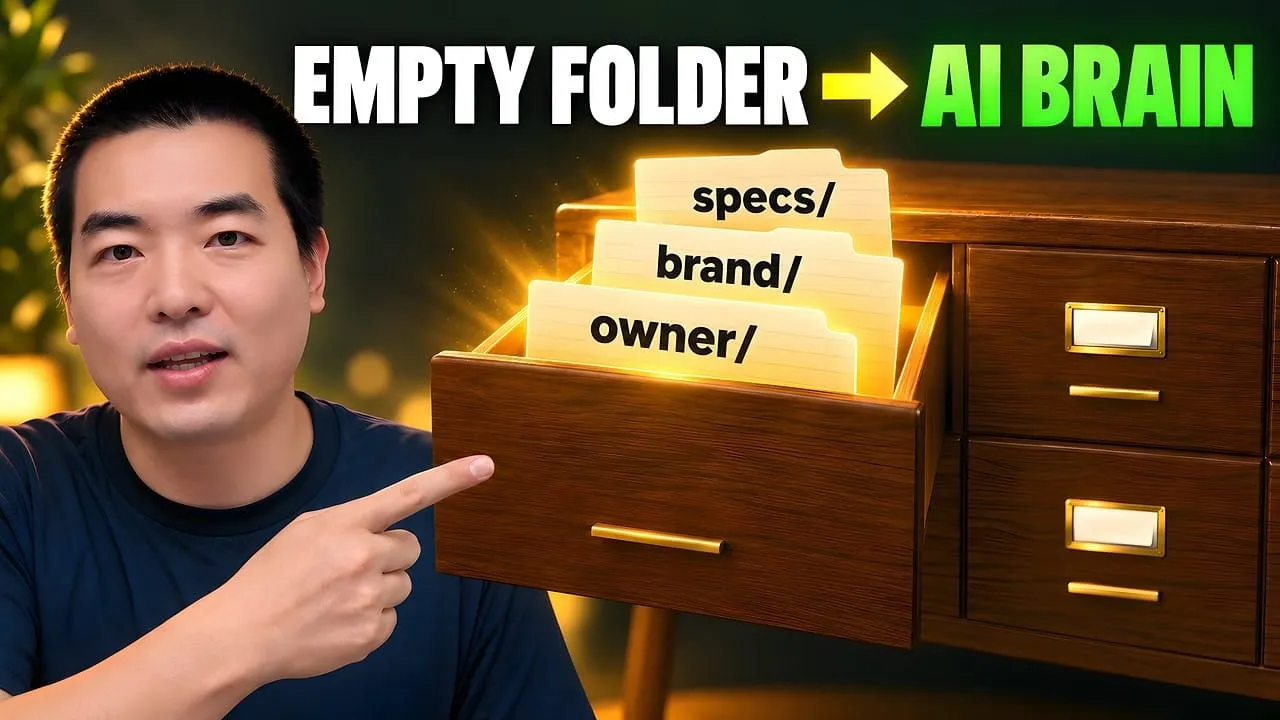
Eight folders of plain Markdown, a CLAUDE.md index in each, and seven prompts that make your agent interview you. Every prompt, template and command from the video, in order.
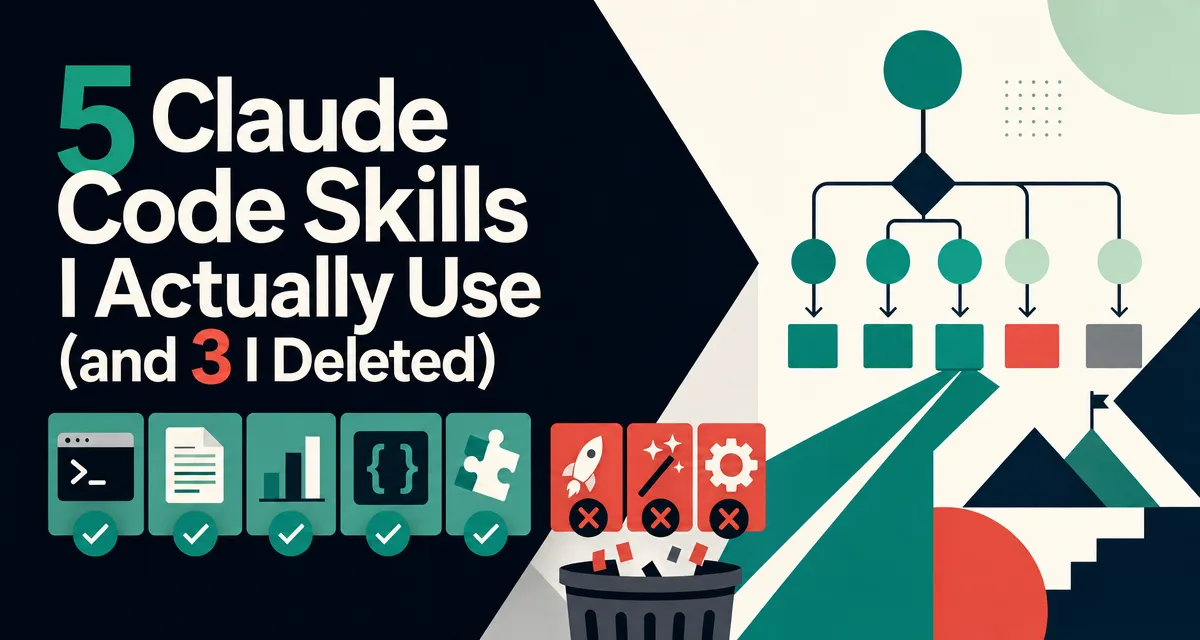
5 Claude Code Skills I Actually Use (and 3 I Deleted)
Everyone says build a Skill for anything you do twice. Most workflows are not Skill-shaped. Eight built, five still running, three deleted: full SKILL.md source for the survivors, honest post-mortems on the rest, and the 5-gate test before the next one.
I built 8 Skills over three months. 5 are still on my machine. 3 are deleted
The first Skill I built took 2 hours, triggered 3 times, then got removed. That's how the decision tree below was born
Full SKILL.md snippets for the 5 survivors + honest post-mortems on the 3 I killed + a checklist so you don't build the wrong ones
Examples are from content work (writing, research, newsletters) — no code-heavy scenarios needed
Every written procedure a business keeps is a small ongoing liability. The intake form changes, the price list changes, the person who wrote step four leaves, and the document quietly starts lying to whoever follows it. What makes that expensive is the timing: the cost of keeping a procedure true lands months after the meeting where somebody volunteered to write it, and nobody connects the two. A firm with forty of them is not better organised than one with six, it is carrying more upkeep and noticing less of it. Working out what an ai assistant for business should never be taught is the same discipline, and enthusiasm skips it.
Everyone says you should "build a Skill for everything you do twice." Actually, most workflows are not Skill-shaped. The right rule is the trigger-frequency test: if a workflow does not run three times before the next month, it is a note, not a Skill.
If you already shipped 5 plus Skills that are still active, skip ahead to the decision tree. If your first Skill is gathering dust, read on through the post-mortems.
My first Claude Code Skill was a commit-message-generator. I spent a Saturday afternoon on it. It had a long SKILL.md, a markdown template, three example commits. I was proud of it.
Over the next six weeks, it triggered exactly three times. Each time, I had to rewrite the commit message anyway. On week seven I deleted it.
That's when I realized: I'd been treating Skills like trophies, evidence I was a "power user." But a Skill that doesn't get invoked is just dead code in your home folder, quietly eating startup context every session.
The 5 Skills below are the ones I actually reach for. The 3 I deleted are a warning shot for anyone about to spend their own Saturday afternoon.
Who Is This For
You've read "build Claude Skills for everything!" posts and something feels off
You're not a professional developer, your Claude Code work is writing, research, notes, or running a one-person business
You've maybe built one or two Skills and wondered if you're doing it right
You want a short, honest list of what's worth the effort
If Skills are brand new to you, spend 3 minutes on the official Skills overview first, I'll skim the mechanics below, but the doc is the source of truth.
If you're still on the "prompts vs Skills" fence, read my prompt-pattern cheat sheet first. The rough rule: a prompt you run three times in a week is a Skill candidate. A prompt you run once a month is not.
A Skill that runs three times a quarter is not earning the maintenance cost. The same energy spent on a Skill that runs three times a week is one of the highest-impact moves in a Claude Code setup.
A Skill is a folder under .claude/skills/{skill-name}/ containing at minimum one file called SKILL.md. That file has two parts:
YAML frontmatter at the top, a name and a single-line description that tells Claude when to invoke the Skill
Markdown body — instructions Claude follows after invoking
---
name: outline-from-research
description: Turn a folder of research files into a ranked outline. Use when the user asks to outline, structure, or summarize a research folder.
---

# Steps
1. Read every file in the path the user mentions
2. Group by theme, then by recency
3. Return a bulleted outline...
Two things the docs don't emphasize enough but matter a lot:
Only the description loads at startup. The full SKILL.md body only loads when Claude decides to invoke the Skill. That's what makes Skills cheap to keep around, the body is lazy-loaded (official confirmation here).
The description is single-line. If you write it across multiple lines or forget the single-line constraint, Claude will silently not pick up the Skill. Multiple Reddit posts exist solely because of this footgun.
That's it. Skills are simpler than they look.
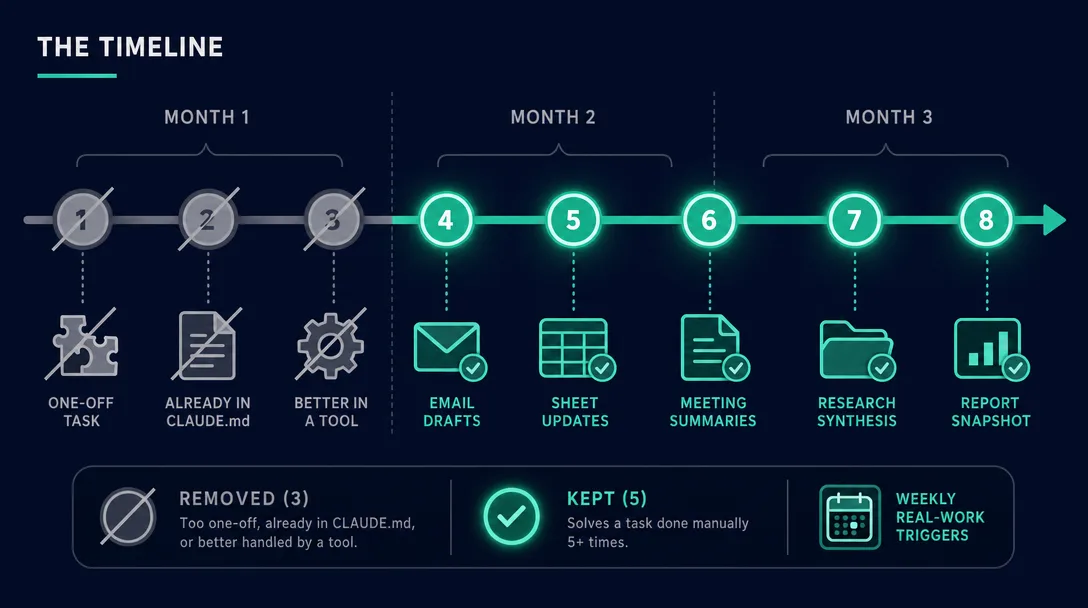
The Timeline: Three Months, Eight Skills
Three months, eight Skills, one spreadsheet of shame. Here's the full list:
#
Skill
Built
Deleted
Why / Why not
1
commit-message-generator
Month 1
Month 2
Too one-off. Prompt was faster.
2
outline-from-research
Month 1
—
✅ Triggers weekly
3
tone-checker
Month 1
Month 2
CLAUDE.md covered 90% of it
4
voice-match
Month 2
—
✅ Triggers on every draft
5
markdown-formatter
Month 2
Month 3
Prettier did it better
6
weekly-roundup
Month 2
—
✅ Triggers every Sunday
7
source-check
Month 3
—
✅ Triggers before publishing
8
format-draft
Month 3
—
✅ Triggers on every finished piece
Three observations after looking at this spreadsheet for an hour:
Every deleted Skill was built in Month 1. I knew less, I was more excited.
Every surviving Skill solved a task I'd already done manually 5+ times. If I hadn't hit the pattern repeatedly, building a Skill for it was premature.
Five surviving Skills is enough. A well-upvoted Reddit post made the same point: "I removed 63% of my Claude Code setup and it got 10x faster. Stop installing everything."
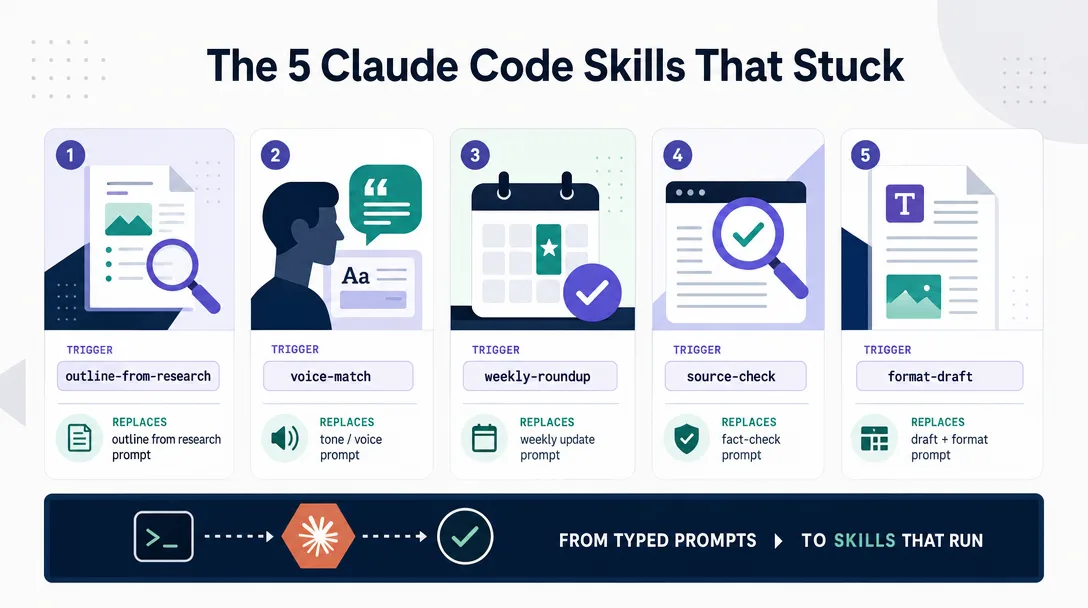
The 5 Claude Code Skills That Stuck
Each Skill below is shown the way I'd actually paste it into .claude/skills/{name}/SKILL.md. Trigger phrasing matters — a bad description means no invocation.
1. outline-from-research
What it does: Takes a folder of research notes (articles I've collected, PDFs I've read, interview transcripts) and returns a ranked outline for a new piece.
When it triggers: "outline my research on X," "turn /research/ai-memory/ into an outline," "what are the best threads in this folder?"
---
name: outline-from-research
description: Create a ranked outline from a folder of research files. Use when the user asks to outline, structure, or summarize a research directory.
---

# Inputs
- Folder path (required)
- Target audience (default: the audience from CLAUDE.md)
- Length target (default: pillar, ~2,500 words)

# Steps
1. List every file in the folder with word count
2. Group by theme; inside each theme, sort by recency
3. Pick the 3-5 strongest themes for the target audience
4. For each theme, propose 1-3 subpoints
5. Return outline as bullets. No prose.

# Output format
- Theme (1 line)
  - Subpoint (1 line)
- Next theme...
Why it works: It replaces a task I was doing in my head badly. I used to scroll a research folder for 20 minutes before writing. Now I paste the path, get a ranked outline in 90 seconds, and skip the scroll.
Real trigger log from last week: 4 invocations.
2. voice-match
What it does: Takes a piece of my previously-published writing, uses it as a voice sample, and rewrites a new draft to match.
---
name: voice-match
description: Rewrite a draft to match the voice of a previously-published piece. Use when the user says "match my voice," "rewrite in my tone," or pastes a sample followed by a draft.
---

# Inputs
- Sample: a previously-published piece (file or pasted text)
- Draft: the new piece to adjust

# Steps
1. Read the sample; note sentence length, sign-off style, vocabulary quirks
2. Read the draft
3. Rewrite the draft to match the sample's rhythm and word choices
4. Keep all facts, data, and quotes intact. Only change voice.

# Rules
- No em-dashes (unless they appear in the sample)
- No "leverage," "unleash," "seamlessly"
- If the sample uses contractions, the output uses contractions
Why it works: Without this Skill, I was pasting a voice sample into every prompt. Manually. Redundantly. This turns 200 tokens of every prompt into one word: "voice-match."
Real trigger log from last week: 6 invocations.
3. weekly-roundup
What it does: On Sunday, reads my week of notes and drafts a short newsletter-style roundup.
---
name: weekly-roundup
description: Compile a short weekly newsletter draft from this week's notes. Use when the user says "weekly roundup," "summarize my week," or "draft Sunday newsletter."
---

# Scope
- Read /notes/ for files dated in the last 7 days
- Read /articles/ for any pieces published this week

# Output
- 3 sections: What I wrote / What I learned / What I'm watching next week
- 3-5 bullets per section
- Plain English. No "I'm excited to share" intros.
- Under 400 words total

# Sign off
- End with a question for readers
- Close with "— Leo"
Why it works: newsletter fatigue is real. Sitting down to write on Sunday is miserable. The Skill turns it into editing instead of writing. 80% there in 30 seconds.
Real trigger log from last month: 4 invocations (weekly, as expected).
4. source-check
What it does: Scans a finished draft, lists every factual claim that doesn't have a source link, and asks me to either add one or downgrade the claim.
---
name: source-check
description: Audit a draft for unsourced factual claims. Use when the user says "source check," "audit sources," or "am I cited right?"

---

# Steps
1. Read the draft file (path provided)
2. Extract every factual claim (numbers, dates, quotes, data, "research shows")
3. For each, check if a source link is present within 2 lines
4. Output a 2-column table: Claim | Has source? (Yes/No)
5. For No rows, suggest: (a) add link, (b) reword as opinion, or (c) remove

# Notes
- Don't fact-check content. Just check for sources.
- Treat first-person experience as exempt ("I spent 2 hours" doesn't need a source)
Why it works: Every article I publish has claims. I forget to link half of them. This Skill is a pre-flight check, and it's saved me from three factually-thin drafts in the last month alone.
Real trigger log: Once per pillar piece. ~2x per month.
5. format-draft
What it does: Applies my publication's frontmatter and Markdown conventions to a finished draft in one pass.
---
name: format-draft
description: Apply publication frontmatter and Markdown formatting rules to a finished draft. Use when the user says "format this for publishing" or "add frontmatter."
---

# Steps
1. Check if the file starts with YAML frontmatter (between --- markers)
2. If missing, add frontmatter template with placeholders (title, slug, date, tags, excerpt)
3. Ensure H1 matches the title
4. Ensure the opening summary block (`> **The short version:**` or `> **The gist:**`, or an untagged bold paragraph) directly follows H1
5. Verify there is exactly one blank line between sections
6. Ensure the final line is "*— Leo*"

# Do NOT
- Rewrite the content
- Reorder sections
- Touch anything outside the format rules
Why it works: Every piece I publish has the same skeleton. Applying it by hand takes 10 minutes and I always miss one thing. The Skill does it in 5 seconds and never forgets the sign-off.
Real trigger log: Once per finished piece. Weekly or more.
The 3 Claude Code Skills I Deleted (and Why)
Before the trigger-frequency test, I built Skills for anything that felt repeatable. After, I built only for workflows with proven repetition. Three Skills got deleted. Five survived. Total maintenance time fell by half.
Not every Skill earns its slot. Here are the three that got cut, with the autopsy.
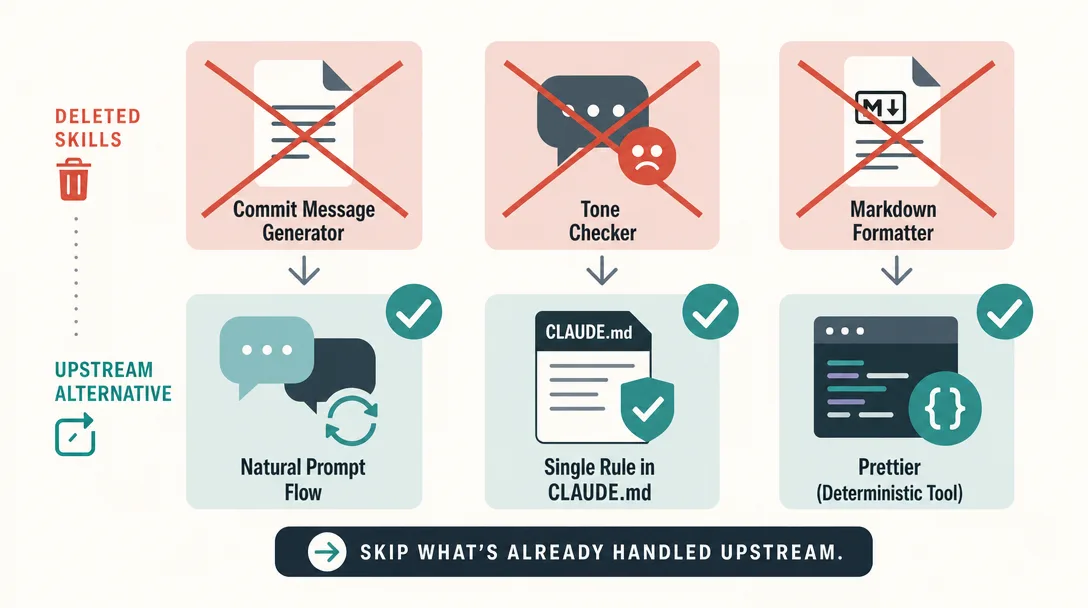
Deleted #1, commit-message-generator
What it tried to do: Generate semantic commit messages from git diff output.
Why I built it: I thought every repetitive task deserved a Skill.
What went wrong: I commit 2-3 times a day. The Skill was invoked 3 times in 6 weeks, because I commit inside Claude Code's flow, where the next prompt naturally is "write a commit message," no Skill needed. Prompt was faster than remembering the trigger phrase.
Lesson: If a task is already inside a natural Claude prompt flow, adding a Skill just creates a second path for the same thing. Second paths rot.
Decision rule learned: If the task happens fewer than ~3 times a month and you're already in a Claude session when it happens, it doesn't need a Skill.
Deleted #2, tone-checker
What it tried to do: Scan a draft and flag "AI-sounding" words — leverage, unleash, seamlessly, game-changer.
Why I built it: I was tired of fishing these out by hand.
What went wrong: I already had a rule in my ./CLAUDE.md that said "No corporate voice. No 'leverage,' 'unleash,' 'seamlessly.'" That rule alone prevented 90% of the offenders from ever appearing in a draft. The Skill was cleaning up a mess that had mostly stopped happening.
Lesson: Don't build a Skill to detect what a CLAUDE.md rule can prevent. Prevention always beats cleanup.
Decision rule learned: Before you build a corrective Skill, ask if a single CLAUDE.md line could make the problem go away upstream.
Deleted #3, markdown-formatter
What it tried to do: Normalize indentation, tabs vs spaces, blank lines in Markdown files.
Why I built it: My drafts had inconsistent formatting.
What went wrong: Prettier does this deterministically. Prettier always returns the same output. Claude doesn't. I was asking a probabilistic tool to do a deterministic job, which is exactly what I argued against in my post on CLAUDE.md. A Reddit user put it bluntly: "Why does this need to be a Claude Skill when it could be a bash script? That seems incredibly wasteful, inefficient and simply slower."
Lesson: If a deterministic tool (linter, formatter, script) can do the job in one command, it's not Skill material.
Decision rule learned: Before building a Skill, ask: can a bash one-liner, a Prettier config, or a 5-line Python script do this? If yes, do that instead.
The Decision Tree Before Building the 9th
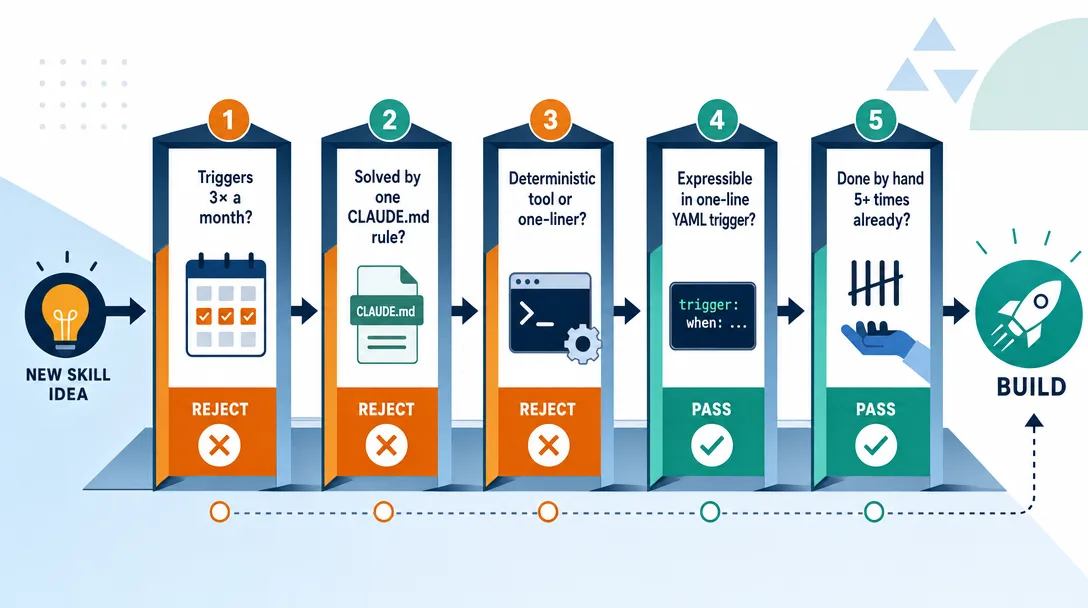
Every new Skill idea goes through these five gates. If any answer is a clear "no," I don't build it.
Gate 1, Will this trigger at least 3 times a month?
Under 3 invocations a month, a Skill is negative-value: you spent an hour building it, you'll spend 20 seconds a month using it, and it eats startup context tokens every session whether you use it or not.
Gate 2, Is this already solvable with CLAUDE.md?
If the problem can be prevented by a 1-2 line rule in ./CLAUDE.md or ~/.claude/CLAUDE.md, do that. Skills are for actions, CLAUDE.md is for rules. Don't use one to do the other's job.
Gate 3, Can a deterministic tool do this?
Prettier, ESLint, sed, a bash script, a Make target, all faster, cheaper, and more predictable than a Skill. Use the probabilistic tool only where probabilistic behavior is the feature (creative, reasoning, judgment), not the bug.
Gate 4, Can I describe the trigger condition in one sentence?
The YAML description field must be a single line that tells Claude when to invoke the Skill. If you can't write that sentence, you haven't yet formed a clean enough mental model to make this a Skill, and Claude will invoke it inconsistently.
Gate 5, Have I already done this task manually 5+ times?
The best signal you need a Skill is that you're tired of repeating the same prompt. 5+ times is my personal threshold. Fewer than that, you're optimizing a fantasy.
If a Skill passes all five gates, it's worth an hour of your Saturday. If it fails any, don't build it, and you'll have more time to use the Skills that do.
The Maintenance Cost Most People Forget
When I see beginners build their first Skill, the analysis usually stops at "will this save me time per run?" The bigger question is "will this earn the maintenance cost over six months?"
The Skill ages with the world it touches. A Skill that wraps the GitHub PR workflow needs an update every time GitHub changes its review UI or comment format. A Skill that wraps Claude Code itself needs an update when Claude Code adds new commands or changes existing ones. Maintenance is not zero, even for Skills that work perfectly today.
Stale Skills are worse than no Skills. A Skill that produced great output last quarter and now produces subtly wrong output is harder to detect than no Skill at all. The agent runs it, the output looks plausible, and the bug ships into your work. The cost is not abstract; it is rework on something you thought was done.
The trigger-frequency test catches both. A Skill that runs three times a week sees enough surface area to fail loudly when its assumptions break. A Skill that runs three times a quarter is just rotting between uses. The frequency is what keeps the Skill honest.
How to Know a Skill Is Dying
Three signals tell me a Skill needs a rewrite or a deletion.
Signal 1: I am editing the output by hand on every run. If I am rewriting the agent's answer more than light edits, the Skill is mismatched against the work. Either the trigger is wrong (the Skill runs in a context it was not designed for) or the body is stale (the world changed and the Skill did not). Both call for a rewrite or a deletion.
Signal 2: The trigger fires for the wrong cases. If the Skill activates when I did not want it to, the trigger description is too loose. Tighten it, or accept that the cases that match are not real Skill cases.
Signal 3: I avoid using it. When I notice myself doing the work manually instead of invoking the Skill, the Skill is dead in practice. Sometimes this means the workflow changed. Sometimes the Skill output is annoying. Either way, deletion is the honest move; keeping it pretends the maintenance cost is zero, which is the lie that makes Skill folders bloat.
A Starter Skill You Can Copy Today
If you want one Skill to start with, use the outline-from-research one above. Here it is again in a complete .claude/skills/outline-from-research/SKILL.md form:
---
name: outline-from-research
description: Create a ranked outline from a folder of research files. Use when the user asks to outline, structure, or summarize a research directory.
---

# Inputs
- Folder path (required)
- Target audience (default: the audience from CLAUDE.md)
- Length target (default: pillar-length piece, ~2,500 words)

# Steps
1. List every file in the folder with word count
2. Group by theme; inside each theme, sort by recency
3. Pick the 3-5 strongest themes for the target audience
4. For each theme, propose 1-3 subpoints
5. Return outline as bullets. No prose.

# Output format
- Theme title (1 line)
  - Subpoint (1 line)
- Next theme...

# Notes
- Do not read files outside the folder
- Do not write to disk, return outline only
Drop that file in place, open Claude Code in a project, say "outline my research in /notes/ on AI workflows," and you should see it fire.
Key Takeaways
5 working Skills is a ceiling, not a floor — beyond 10-15 you pay startup context for descriptions Claude rarely uses
Only the description loads at startup — the full SKILL.md body is lazy-loaded when Claude decides to invoke, so a well-scoped Skill is cheap to keep
Five gates before you build — must trigger ≥3x/month, can't be solved by CLAUDE.md, deterministic tool won't do, can describe trigger in one sentence, already done manually 5+ times
The description field must be single-line — YAML multi-line breaks silent Skill invocation. A common footgun documented in many Reddit posts
Don't build a Skill to fix what CLAUDE.md can prevent — prevention always beats cleanup; build Skills for actions, keep CLAUDE.md for rules
If a bash script or Prettier can do the job, do that instead — probabilistic tools are only worth it when the task requires judgment
What I Track to Decide on the Ninth Skill
After the first eight, my decision tree got an instrumentation layer. Three numbers I track per Skill, and the rules I use to read them.
Trigger count per week. Anything below three runs per week for two weeks in a row goes to the watch list. Below one run per week, deletion candidate. The number is recorded automatically by my Skill wrapper; I do not rely on memory because memory undercounts deletions and overcounts reuse.
Edits per output. I keep a quick tally of how many edits I made to the agent output before shipping. Above five edits per run for a Skill, the Skill body is wrong somewhere; below one edit per run, the Skill is well-targeted. The tally takes ten seconds per run and tells me which Skills are silently degrading.
Rebuild interest. Once a quarter, I ask myself per Skill: would I rebuild this from scratch knowing what I know now? Yes means keep. No means delete. Maybe means rewrite the SKILL.md from a blank file rather than patching the existing one, the rewrite usually surfaces better triggers and better structure than incremental edits ever do.
Those three numbers, run weekly, keep my Skill folder honest. Without them, I added Skills faster than I deleted them. With them, the count is stable around five for the past two quarters, which is exactly the number where each Skill still earns its place. The numbers are not magic; the discipline of looking at them weekly is what does the actual work, the Skill folder gets pruned because I look, not because I am clever.
Ready-to-Use Prompt: Gate a Skill Idea and Audit Your Living Skills
What this does: Runs a new Skill idea through a 5-gate decision tree (build vs note vs extend) and audits your current Skills for keep / watch / delete — so you only build Skill-shaped, high-frequency work and kill what rots. Based on: 5 Claude Code Skills I Actually Use (and 3 I Deleted) — https://aiworkflowpro.com/claude-code-skills/ Time to run: ~4 minutes
Copy this prompt into Claude Code, ChatGPT, or any AI assistant:
ROLE: You are a Skill portfolio governor. Your job: gate a new Skill idea through the 5-gate decision tree, then audit your living Skills for keep, watch, or delete — so you build only Skill-shaped, high-frequency work and kill what rots.

CONTEXT — SKILL DECISION GATE:
"Build a Skill for everything you do twice" is wrong — most workflows are not Skill-shaped. The real test is trigger frequency: if a workflow does not run three times before the next month, it is a note, not a Skill. The author built 8 Skills over three months, kept 5, deleted 3 (the first — a commit-message generator — took 2 hours, triggered 3 times, then got removed). A 5-gate decision tree stops you building the wrong ones, and a dying-Skill check stops you maintaining what no one reaches for — because maintenance cost is the cost most people forget.

INPUTS (fill in before running):
- CANDIDATE: YOUR_SKILL_IDEA_HERE (the workflow you are thinking of packaging — or "none, just audit")
- LIVING_SKILLS: YOUR_CURRENT_SKILLS_HERE (the Skills on your machine + rough use frequency — or "none")
- HOURS_MAINTENANCE_TASTE: YOUR_TASTE_HERE (how much upkeep you will realistically sustain — low / medium / high)

METHOD — 6 STEPS:

Step 1 — Trigger-frequency gate
Will CANDIDATE run at least 3 times before next month? Yes = pass. No = it is a note, not a Skill — stop, keep it as a prompt or note. This is the hardest gate and the most common failure.

Step 2 — Skill-shaped gate
Is CANDIDATE a repeatable procedure with fixed steps (not a one-off, not pure open-ended judgment)? Score shape 0-2: 0 = one-off, 1 = partial, 2 = clearly repeatable. Under 2 = not Skill-shaped; keep as a prompt.

Step 3 — Effort-vs-return + no-duplicate gates
Estimate build effort vs return (does packaging beat just prompting each time?). Then check LIVING_SKILLS and CLAUDE.md: does anything already cover this? If a duplicate exists, extend the existing one — do not build a ninth.

Step 4 — Maintenance gate
Score upkeep against HOURS_MAINTENANCE_TASTE. A Skill you cannot sustain rots. If upkeep exceeds your taste and trigger frequency is borderline, do not build — maintenance is the cost most people forget.

Step 5 — Decision: build / note / extend
Verdict from gates 1-4: pass all → build; fail frequency or shape → note/prompt; duplicate → extend existing. State the verdict + the single deciding gate.

Step 6 — Audit living Skills for dying
For each entry in LIVING_SKILLS run the dying signs: trigger frequency dropping, you reach for it less over time, it breaks or produces stale output, upkeep exceeds value. Mark each keep / watch / delete. Delete any Skill with falling frequency and upkeep exceeding value — that is how 3 of 8 got removed.

RULES:
- The trigger-frequency gate (≥3×/month) is non-negotiable — fail it and the idea is a note, not a Skill.
- Most workflows are not Skill-shaped; default to "note/prompt" unless all gates pass.
- Never build a duplicate — extend an existing Skill or CLAUDE.md entry instead.
- Maintenance cost decides keep/delete for living Skills as much as usage does.

OUTPUT FORMAT:
Output six sections:
1. **Trigger-frequency gate** — yes/no + count estimate.
2. **Skill-shaped score** — 0-2 + one-line reason.
3. **Effort/return + duplicate check** — build payoff + any existing coverage.
4. **Maintenance gate** — upkeep vs HOURS_MAINTENANCE_TASTE + pass/fail.
5. **Verdict** — build / note / extend + the single deciding gate.
6. **Living-Skills audit** — markdown table with columns: Skill | Use frequency trend | Upkeep vs value | Keep/Watch/Delete.
Save as @templates/claude-code-skills.md and run before building any new Skill, then re-run monthly to audit the living set and delete what is dying.
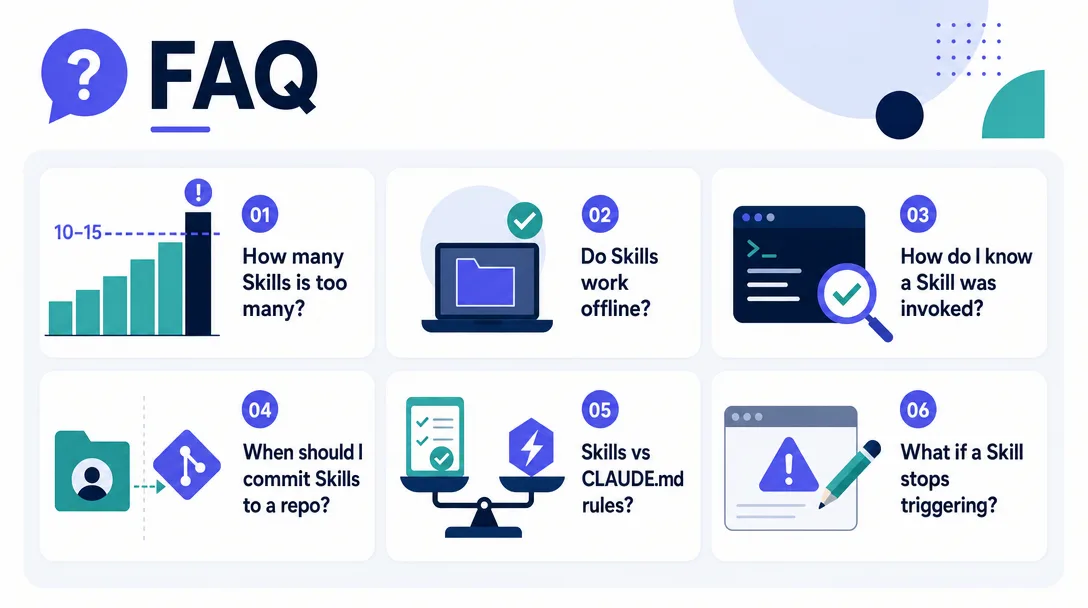
Frequently Asked Questions
How many Skills is too many?
Based on my own math and public discussions from heavy users, roughly 10-15 Skills is where diminishing returns kick in. Past that, you're paying startup context for descriptions Claude rarely uses. Audit quarterly. Delete the bottom third.
Do Skills work offline or only with paid plans?
Skills work anywhere Claude Code runs, including in the free tier of Claude Code itself. The Skill files live on your disk. The only requirement is that you have an active Claude Code session, Skills don't call out to extra services unless you explicitly script them to.
How do I know if a Skill is being invoked?
Two ways: (1) watch the session output, Claude usually mentions the Skill name when it fires, and (2) run /context inside a session to see whether the Skill's content is currently in context. If you never see a Skill invoked when you expect it to, rewrite the description field. That's almost always the culprit.
Should I commit Skills to my project's repo or keep them in ~/.claude/?
Project Skills (./.claude/skills/) commit to your repo and load only for that project. User Skills (~/.claude/skills/) are personal and global. My rule: if the Skill depends on a specific project's structure, it goes project-local. If it's about how I write or how I work, it goes user-global. Voice-match is user-global. Format-draft is project-local.
Are Skills better than just adding more rules to CLAUDE.md?
They solve different problems. CLAUDE.md is for always-on rules. Skills are for on-demand actions. If you're asking every session, it's a CLAUDE.md rule. If you're asking sometimes, in specific situations, it's a Skill. Mistaking one for the other is the single most common beginner error.
What if my Skill isn't triggering?
95% of the time, the description is the problem. Make it single-line. Make it specific about when to invoke. Include 2-3 likely trigger phrases. If that doesn't fix it, check that SKILL.md is exactly that filename (not skill.md, not README.md) and sits inside {skill-name}/ under one of the skills folders.
Deletion as a Skill Design Tool
The instinct most people have, including me, is to fix a Skill that is not working. Tweak the trigger. Edit the SKILL.md. Add an example. Adjust the output format. The instinct is wrong more often than it is right.
Deletion is faster, and the information you get from deletion is cleaner. If you delete a Skill and notice within a week that you miss it, you know exactly which behavior was carrying the weight, the gap is concrete. You can rebuild a sharper version with the gap as a brief, instead of patching a foggy version forever.
If you delete a Skill and never miss it, you also know something useful: the Skill was load-bearing in your imagination but not in your work. Either the workflow changed without you noticing, or it was never a Skill-shaped problem to begin with. Either way, the deletion freed disk space and cognitive space, which is the only space that ever matters.
The hardest part of Skill design is being honest about which Skills earn their place. Deletion is the test that filters quickly, cheaply, and without drama. Use it more than you think you should.
What I Would Build Starting Over
Three Skills first, in this order, on a fresh Claude Code install.
Skill 1: a content brief Skill. Trigger on "give me a brief for X." Output: title options, audience, three angles, three risks, ideal outcome. This pattern fits content work that runs every week, the trigger fires, and the structure scales across topics.
Skill 2: a project log Skill. Trigger on "log today." Output: a dated entry with the three things shipped, the one decision made, and the one open question. This Skill earns its place because the structure is what makes the log readable later, free-form notes never get reread.
Skill 3: a debug-first Skill for a recurring task. Pick whatever you debug most often, deploys, content publishing, data refreshes, and write a Skill that runs the standard 5 checks. Saves time on every run, and creates a paper trail you can grep when something breaks.
Three Skills, three to four weeks of compounding value, before you go anywhere near number eight.
A Note on This Article's Shelf Life
AI tooling moves fast, and articles age. Three habits keep this one from becoming a relic faster than necessary: I revisit the recommendations quarterly, I cull patterns that have become automatic, and I add new ones only when they earn a permanent place in my actual work. If a section here feels stale to you, it probably is. Send me a note and I will look.
A 30-minute video is too long for one conversation. This guide walks the 8-step Skill that locks the narration and one look, then gives each 3-minute segment to a fresh sub-agent, five at a time, and polishes the cut in an empty-context session.
The folder structure behind my AI agent team, the Herdr setup where Grok Build, Claude Code and Kimi Code work side by side, and the two live tasks from the video: an article published by voice and a three-model front-end test.
Eight folders of plain Markdown, a CLAUDE.md index in each, and seven prompts that make your agent interview you. Every prompt, template and command from the video, in order.
The same request gives a different answer every run because the agent fills every gap with the average of its training data. Three Markdown standards fix that: a meta standard, an eight-part prompt standard and a Skill standard. Free repo, one-prompt install.