Monitoring a competitor who publishes no feed is the case every RSS guide skips. Twenty-one platforms sorted by which of three jobs they do, and the finished setup is business process automation you own outright, with no seat licence to renew.
Blaming the content is the reflex when a post underperforms, and it is usually the wrong diagnosis. A second reader decides distribution before any human sees the post, and most of what it checks is mechanical enough to automate business processes around, on five platforms at once.
Gloves on, tape measure in hand — nobody types a query. Three voice surfaces for ai automation tools (terminal, Telegram, Discord), 10 TTS and 6 STT providers compared on cost and latency, plus a setup that costs nothing.
Agent Programming Methodology: Five Pillars That Outlast Every AI Coding Tool
Three scheduling systems in five years, and the same thing broke each quarter because nobody wrote down who approves a shift swap. Tools rotate; the five pillars of business process automation that survive every swap do not.
I have burned more hours debugging agent misbehavior than I care to count. Not because the models were dumb — because I never set the rules. The agent drifted off-target, forgot constraints, overwrote files it should not have touched, and made judgment calls I never anticipated. Every time, the fix was the same: better methodology, not a better model.
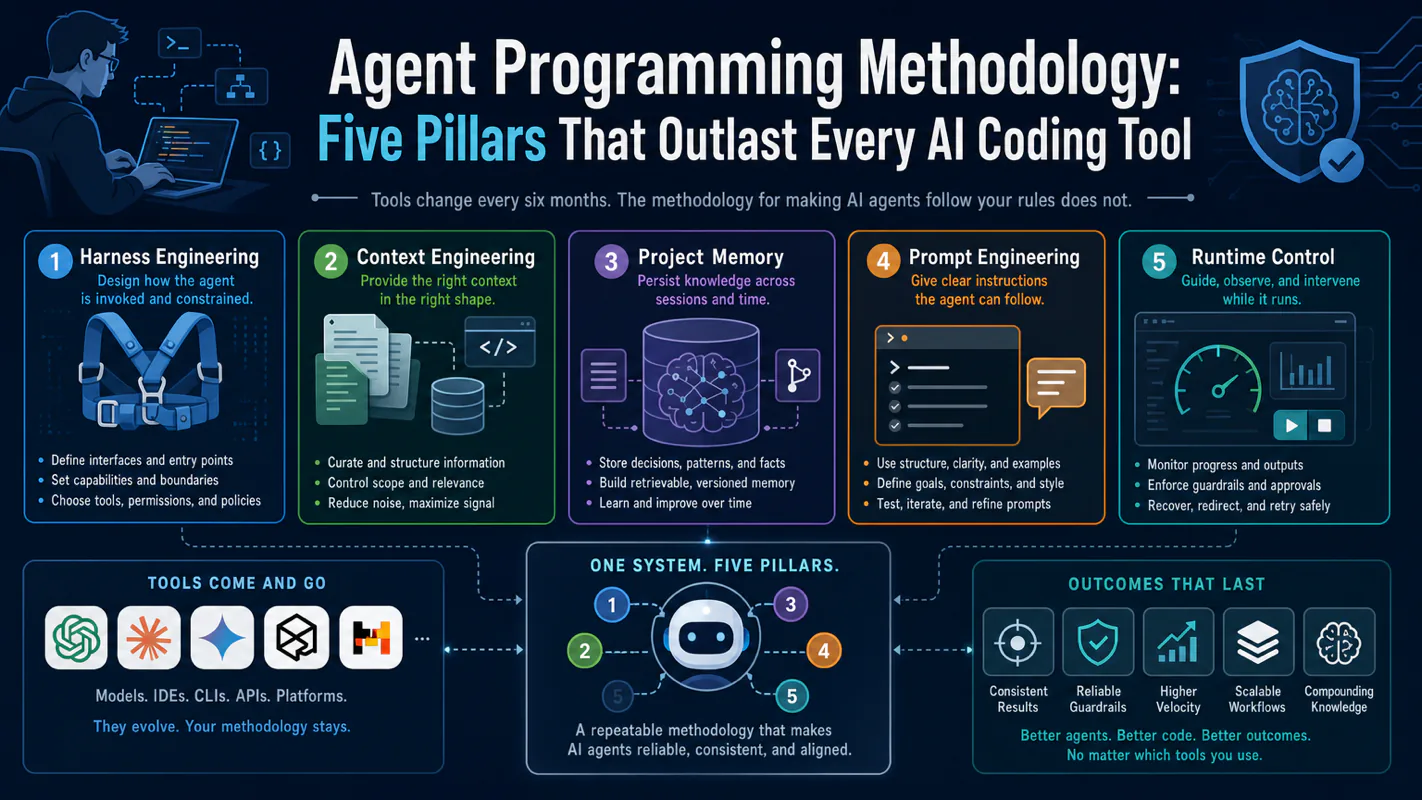
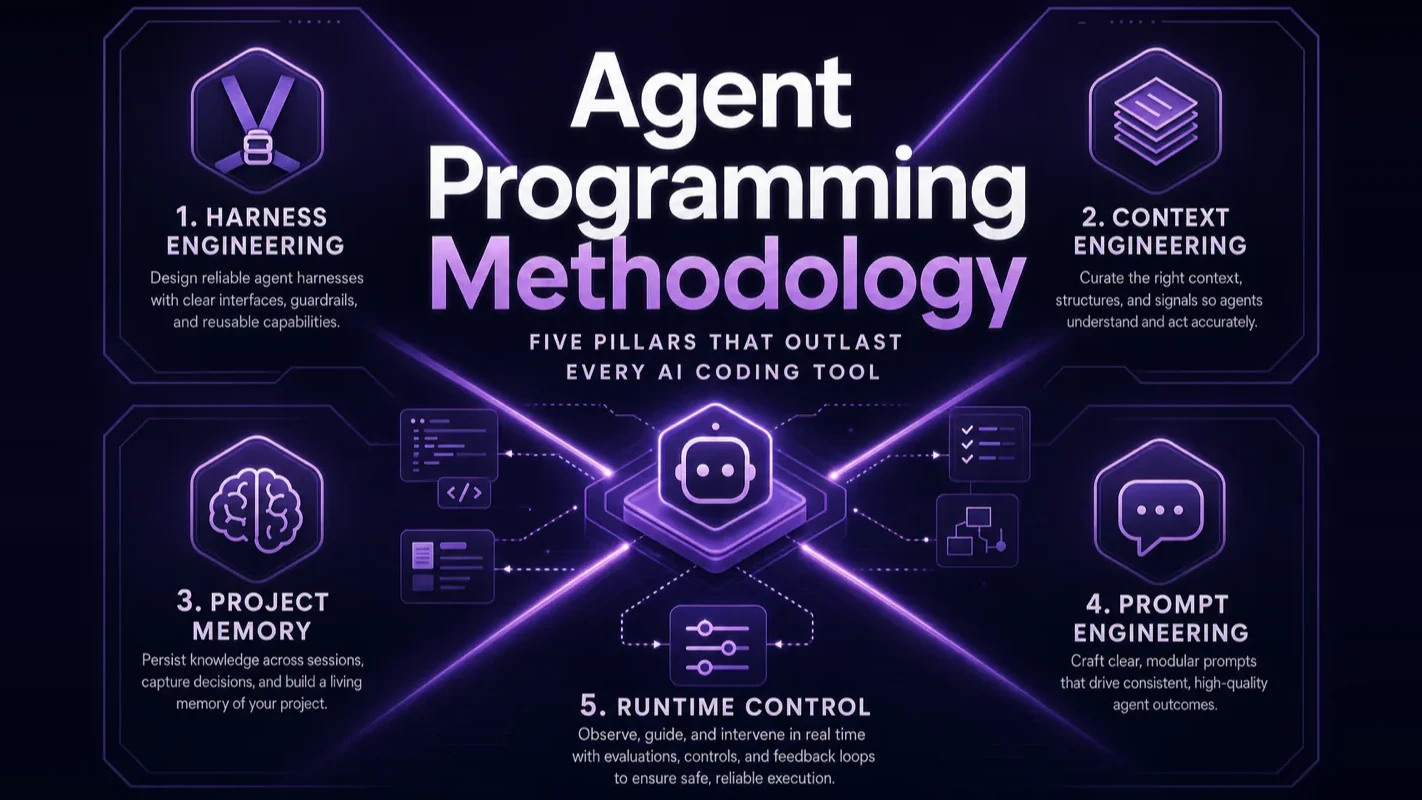
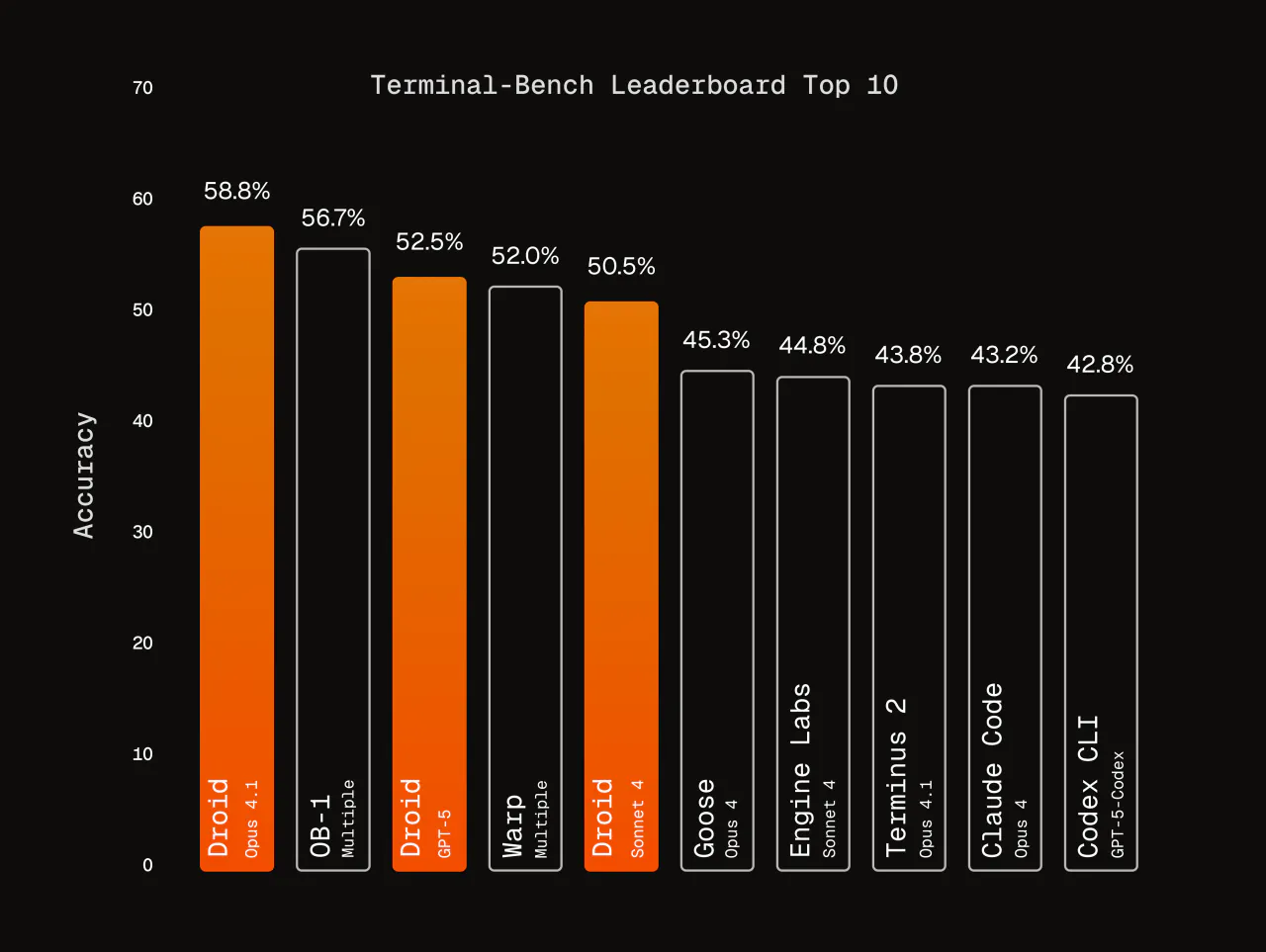
A working agent programming system stands on five pillars: harness engineering, context engineering, project memory, prompt engineering, and runtime control. Tools rotate every six months — last year Cursor dominated, this year Claude Code and Codex lead the pack. But the methodology for making AI agents follow your rules survives every tool swap.
Most people stop at "I can use the tool." They install Claude Code, run a few tasks, and collect results. Then a complex project arrives and the wheels come off. The problem is not the tool. The problem is that nobody set the rules.
This article is the hub page for agent programming methodology. It connects 10 deep-dive tutorials into a single map. Read this for the full picture, then drill into whichever sub-topic hurts most.
Key Takeaways
Harness engineering is the umbrella framework: treat agents like new hires by setting rules, providing resources, and defining boundaries
Context engineering solves "why does the agent go off-track?" — it is fundamentally an information supply problem
Project memory files (CLAUDE.md) are the persistent carrier for your rules — every agent session starts with your standards loaded
Runtime control has three levers: context window management, thinking mode selection, and permission sandboxing
The methodology transfers across tools: the specific product changes, but the principles of agent management are universal
A restaurant group has replaced its scheduling software three times in five years. Each migration was sold as the fix, and each time the same thing broke inside a quarter: nobody had written down who is allowed to approve a shift swap, so every new system quietly enforced a different unwritten answer. The software was never the variable. Agent work runs the identical pattern on a shorter cycle. What survives the swap is the method — setting rules, supplying the right information, keeping those rules on disk, writing the request well, controlling execution. Read it as business process automation doctrine written for coding agents.
What Is Agent Programming Methodology — and Why Should You Learn It Before Learning Tools?
Agent programming methodology answers one question: how do you make an AI agent work reliably inside your project?
That question is fundamentally different from "how do I use Claude Code." Tool tutorials teach you which button does what. Methodology teaches you what to do when the agent drifts, how to build trust in its judgment, how to make it remember past lessons, and how to prevent it from making production decisions you never anticipated.
Here is the difference: someone who only learns tool operations must start over when the tool changes. Someone who learns methodology only needs to adapt the interface — because the underlying management logic stays the same.
Three core concepts in agent programming get mixed up constantly, and confusing them leads to incomplete solutions.
Prompt engineering focuses on how to write a single instruction. It is the starting point, but nowhere near the full story. A well-crafted prompt improves single-task performance, but it cannot solve cross-session memory, permission control, or team coordination — those are persistent infrastructure problems.
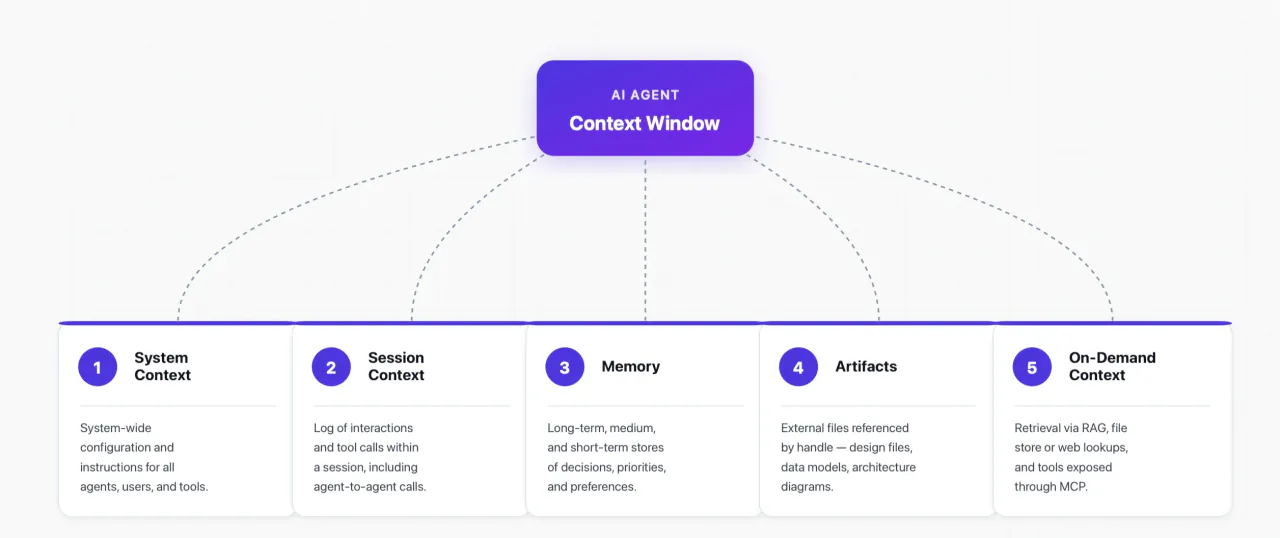
Context engineering — a concept popularized by Shopify CEO Tobi Lutke — focuses on delivering the right information to the agent at the right time. Anthropic's documentation on building with Claude demonstrates how structured context improves agent output quality. Its scope dwarfs prompt engineering. It covers project memory, dynamic retrieval, tool call result injection, and the entire information supply chain. The OpenAI Codex context engineering guide breaks this concept down end-to-end.
Harness engineering is the umbrella framework I distilled from running production agent systems daily. It treats the agent as a "new employee" who needs a management system — rules files, context strategies, permission boundaries, and extension mechanisms. Context engineering and prompt engineering are both sub-dimensions of harness engineering. The harness engineering guide covers concept, architecture, and hands-on implementation in one piece.
Think of it this way: prompt engineering is "how to say one sentence to the agent." Context engineering is "how to make sure the agent sees the right information." Harness engineering is "how to make the agent work reliably in your project long-term." They layer on top of each other — they are not competing alternatives.
Harness Engineering: Setting the Rules for AI Agents
The core idea is direct: stop micromanaging every action. Build a system that lets the agent work autonomously within boundaries.
Imagine hiring a new employee. You would never dictate "open this file, delete line 3, add line 5" every minute. You would do three things: hand them an onboarding manual (rules), walk them through the project (context), and tell them which decisions they can make alone and which require your approval (permissions).
Harness engineering does the same for agents.
The architecture breaks into four layers:
Layer
Problem it solves
Corresponding methodology
Rules layer
What standards should the agent follow?
Project memory (CLAUDE.md)
Information layer
What information should the agent see?
Context engineering
Instruction layer
How to express a single task clearly?
Prompt engineering
Boundary layer
What can the agent do and not do?
Runtime control (permissions + sandbox)
These four layers work together, not independently. The rules layer sets direction. The information layer provides fuel. The instruction layer drives execution. The boundary layer prevents overreach. Remove any single layer and output quality drops measurably.
A concrete scenario illustrates the point. You ask the agent to add a user authentication module. If you only have the instruction layer (prompt) without the rules layer (CLAUDE.md specifying "use NextAuth.js, do not build custom auth"), the agent might spend two hours building authentication from scratch. If you lack the boundary layer (permission controls), the agent might silently modify your database schema. All four layers working together is what makes the task finish efficiently and safely.
From my experience running multi-agent workflows across content production, code audits, and SEO operations: the rules layer alone — a well-written CLAUDE.md file — eliminates roughly 60% of agent drift. Adding the boundary layer eliminates another 25%. The remaining 15% comes from getting context and instructions right. Investing time in methodology pays compound returns on every future task.
The key difference between harness engineering and traditional software engineering: traditional engineering manages code. Harness engineering manages an executor with autonomous judgment. Code does not make independent decisions. Agents do. The core challenge shifts from writing logic to constraining judgment. You are not writing execution steps — you are writing judgment criteria.
The harness engineering guide walks through concept, architecture, and real implementation. If you want one article to understand the full landscape of agent programming methodology, start there.
Why Do AI Agents Go Off-Track — and How Does Context Engineering Fix It?
When agents produce wrong output, the cause is usually not stupidity. It is blindness — you did not feed them the information they needed.
Context engineering solves this information supply problem. The core logic fits one sentence: deliver the right information, at the right time, in the right format, to the agent.
Every word matters.
"Right time" means you do not dump everything in at once. The agent's context window is finite. Too much information dilutes attention and impairs judgment. Information that should persist goes into CLAUDE.md. Information needed at runtime gets retrieved dynamically through tools. Information required only at specific steps gets injected through hooks.
"Right information" means you do not optimize for volume. The agent needs: project tech stack and architecture decisions, coding conventions, known pitfalls and workarounds, and current task context. These come from project memory files, documentation retrieval, codebase search, or web queries.
"Right format" means structured expression beats natural language description for machine comprehension. YAML for configuration preferences. Tables for option comparisons. Code blocks for template patterns. A well-formatted context injection does half the work.
In practice, you can group these methods by how long the information lives:
Documentation lookups, codebase search, external API calls
Real-time
Execution result injection
Test output, build errors, runtime logs
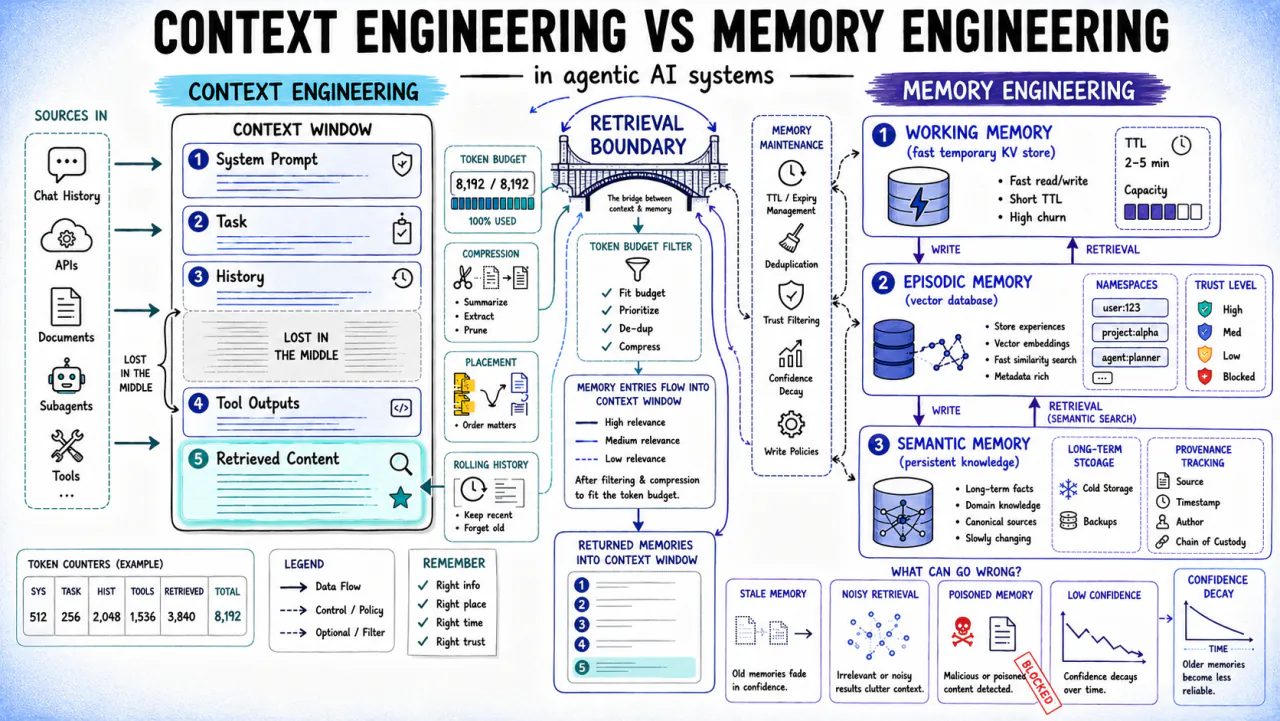
A common mistake is equating context engineering with RAG (Retrieval-Augmented Generation). RAG is one implementation method — retrieving information from external knowledge stores. Context engineering is an order of magnitude broader, encompassing project memory, system prompts, dynamic retrieval, tool result injection, and session history management. Equating RAG with context engineering is like equating a search engine with the internet.
OpenAI's Codex design demonstrates excellent context engineering practice — from AGENTS.md files to sandbox environment variables, every layer of information injection has clear architectural intent. The context engineering guide traces the complete framework backwards from the question "why do AI agents go off-track?"
Project Memory Files: Persistent Rules Across Sessions
Context engineering solves "what information to deliver." Project memory solves "how to make that information persist."
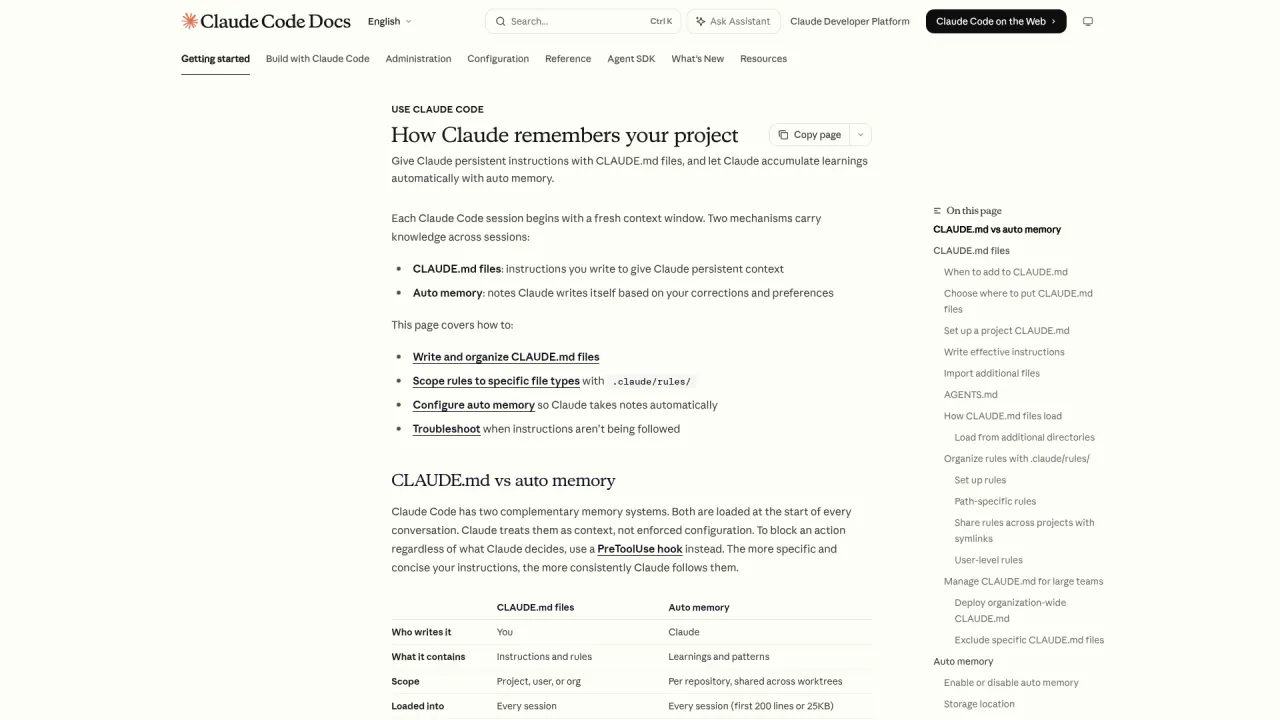
The fundamental limitation of every AI agent is statelessness — each new session starts with zero knowledge about your project. Every tech stack preference, coding convention, architecture decision, and historical pitfall must be re-communicated. If you rely on manual prompts to transmit this information every session, efficiency is abysmal and important details get lost.
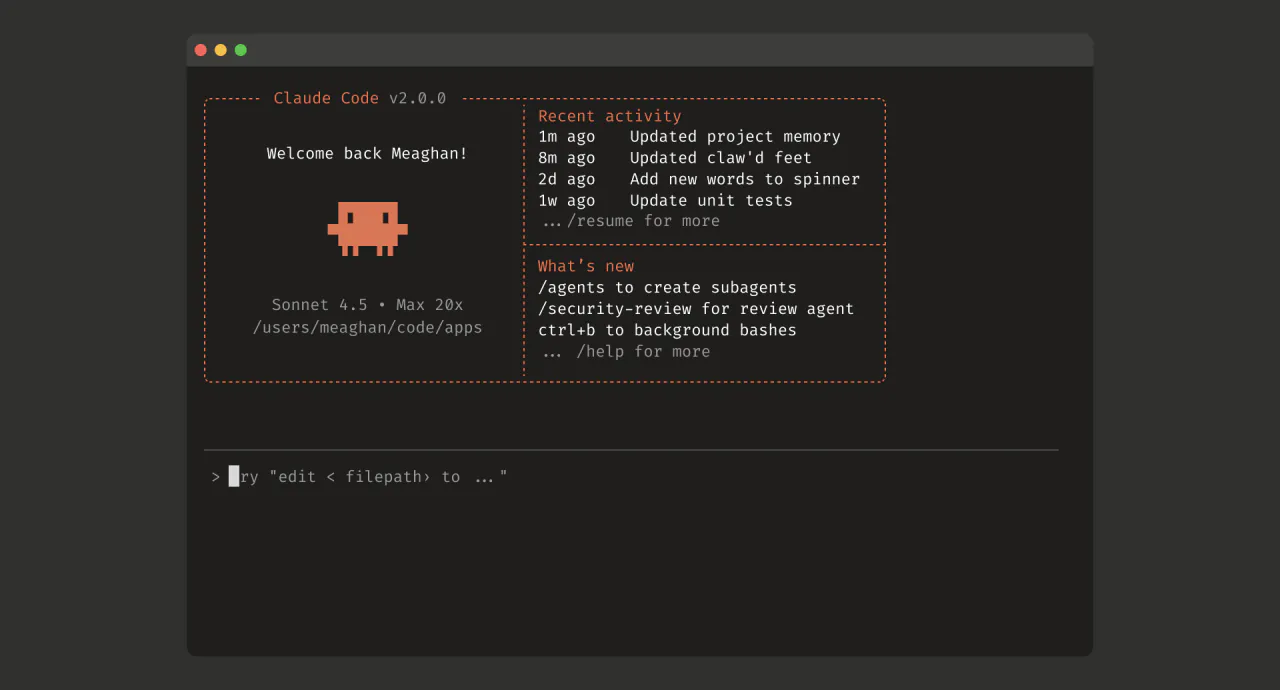
Project memory files solve this. Claude Code uses CLAUDE.md. OpenAI Codex uses AGENTS.md. Cursor uses .cursorrules. Different names, same principle: write project standards in a file the agent reads automatically on every startup.
CLAUDE.md deserves particular attention because it supports a multi-level memory hierarchy:
Global level (~/.claude/CLAUDE.md)
  → Personal preferences and universal standards shared across all projects
Project level (project root/CLAUDE.md)
  → This project's tech stack, architecture, and conventions
Directory level (subdirectory/CLAUDE.md)
  → Module-specific rules
This hierarchy means rules inherit and override — global rules set the floor, project rules set direction, directory rules set details. In team workflows, each member's global preferences differ, but the project-level rules stay unified.
Writing effective CLAUDE.md follows four principles:
Write behavioral constraints, not encyclopedias. The agent already knows what React is. Tell it "this project uses React 18 + TypeScript + Tailwind; write functional components, never class components."
Write decision preferences, not step-by-step instructions. Tell it "use Prisma for database migrations, not TypeORM." No need to teach Prisma usage.
Use the hierarchy, do not flatten everything. Global preferences go in the global file. Project rules go in the project file. Module details go in directory files.
Iterate continuously, do not write once and forget. Every time the agent makes an unwanted judgment call, add a constraint to the memory file. This file grows more precise as your project evolves.
One detail most people miss: memory file effectiveness depends on position within the context. Agents pay stronger attention to information at the beginning and end of their context, weaker attention to the middle. Put your hardest constraints in the first 10 lines — "never modify the production database directly" should not be buried at line 200.
From my own practice, I maintain a CLAUDE.md file with over 500 lines across three hierarchy levels. The global file captures coding style and tool preferences. Each project file captures architecture decisions and integration constraints. Specific module directories carry test requirements and API conventions. This layered approach cut my agent rework rate by roughly 70% compared to session-based prompting.
The CLAUDE.md writing guide provides a complete framework and reusable templates for building your project memory system.
From Vague Requirements to Executable Engineering Tasks
Agent coding prompts differ fundamentally from conversational prompts. In a chat, you can write "build me a website" and the model fills in assumptions. In a coding context, that same prompt produces a cascade of unwanted decisions — wrong framework, unnecessary features, architecture incompatible with your existing codebase.
The key difference: conversations are one-shot. Coding is contextual. Coding prompts must work in concert with project memory, the codebase, and session history. They cannot exist in isolation.
Effective agent coding prompts share three traits:
Explicit constraint boundaries. Not "write a component," but "create UserProfile.tsx in src/components/, compose it using the existing Card and Avatar components, and have its props interface extend the User type." The tighter the constraints, the smaller the agent's discretionary space, the fewer the deviations.
Decomposition into verifiable steps. Break one large vague requirement into multiple independently verifiable tasks. Not "refactor the user module," but "step one: extract shared types to types/user.ts; step two: split UserService into UserAuthService and UserProfileService." Each step produces a result you can verify.
Preset completion criteria. Tell the agent what "done" looks like. Not "optimize performance," but "first contentful paint under 2 seconds, Lighthouse Performance score above 90." Clear criteria let the agent decide when to stop on its own.
An advanced technique worth internalizing: demonstration beats description. Instead of writing three paragraphs describing your desired code style, point the agent to an existing reference file. Agents extract patterns from examples far more accurately than they reconstruct intent from natural-language descriptions. I routinely prefix complex tasks with "follow the patterns in src/components/ExistingExample.tsx" and the output quality jumps noticeably.
The prompt engineering guide covers the full method for turning vague requirements into engineering tasks.
How Do Thinking Frameworks Help Agents Reason Better?
The previous four pillars address what information to give agents and how to give it. Thinking frameworks go one level deeper: how to make the agent think in more productive ways.
By default, agents reason by maximum probability — they pick the most common solution from training data. For most tasks, that works. But for creative analysis, systematic evaluation, and multi-variable trade-offs, default reasoning trends toward mediocrity.
Thinking frameworks break that ceiling.
A practical example: ask an agent to analyze a business decision. By default, it produces a SWOT analysis — because SWOT appears most frequently in training data. Specify "reason from first principles using only verified facts" or "use inversion to work backward from the worst possible outcome," and the analysis quality improves measurably.
This is not mysticism. The mechanism is straightforward: a thinking framework changes the agent's attention allocation. Specifying a framework tells the agent "follow this reasoning path," reducing random walks across multiple analysis directions.
Two levels of application:
Session-level injection — specify the framework directly in the prompt. Suitable for single tasks: "decompose this requirement using MECE principles," "analyze this problem with 5W1H," "use a red-team perspective to identify the three biggest vulnerabilities in this plan."
Project-level codification — write frequently-used frameworks into CLAUDE.md. Suitable for team-wide reasoning standards: "record all architecture decisions in ADR (Architecture Decision Record) format including context, options, decision, and consequences," "analyze every bug using 5-Why root cause analysis."
The value of thinking frameworks is not making agents smarter. It is making them predictable. Without a specified framework, asking the same question three times produces three different analysis paths. With a framework, the analysis path stabilizes and becomes reproducible. For team collaboration and quality control, predictability matters more than brilliance.
The thinking frameworks library catalogs battle-tested frameworks organized by use case. The goal is not memorizing 200 of them — it is finding 5-10 high-frequency ones for your domain and embedding them into your daily workflow.
How Do You Control Agent Behavior at Runtime?
The first four pillars — harness engineering, context engineering, project memory, prompt engineering — shape the input side. Runtime control addresses the execution side: how do you ensure agent behavior stays within bounds while it is running?
Runtime control has three dimensions.
How Should You Manage the Context Window?
The context window is the agent's working memory. Claude Code supports up to 1 million tokens, but that does not mean you should fill the entire window.
Too little information and the agent lacks judgment data — it drifts. Too much information and the agent loses focus in the noise — it also drifts. Context window management is fundamentally about finding the balance between thoroughness and conciseness.
Auto Compact is the key mechanism — when context approaches the window limit, the agent automatically compresses history, preserving critical summaries. Understanding this mechanism lets you plan information density across long sessions.
From running daily coding sessions that sometimes span 4-6 hours, I have found that the optimal approach is front-loading critical constraints (project memory and task definition in the first 5% of context), keeping the middle section lean (tool outputs and code changes), and periodically allowing compression to clear accumulated noise. Forcing compression at around 70% utilization rather than waiting for the automatic threshold gives noticeably better results.
The context window guide covers window sizing, Auto Compact mechanics, and practical usage strategies.
Which Thinking Mode Should You Pick for Each Task?
Claude Code provides multiple thinking modes, from default to ultrathink, corresponding to different depths of reasoning capability.
Not every task needs the deepest thinking. Simple formatting, renaming, and pattern replacement work fine with the default mode. Complex architecture design, cross-module refactoring, and multi-constraint trade-offs call for ultrathink.
A common mistake: treating thinking mode as a "quality switch" — assuming ultrathink always produces better results. Thinking mode affects reasoning depth, not knowledge coverage. If the agent lacks necessary context information, no amount of deeper reasoning compensates for the information gap. Ensure information is sufficient first, then consider thinking depth.
The selection criterion is reasoning chain length. If a task requires three or fewer reasoning steps, default mode suffices. If the reasoning chain exceeds five steps and involves weighing multiple conflicting constraints, use ultrathink.
The thinking modes guide details the ideal scenario for each mode and performance differences.
How Much Permission Should You Give an AI Agent?
Permission management is the easiest runtime control dimension to overlook — and the one most likely to cause damage.
Claude Code provides 6 permission modes, from "confirm every action" to "fully automatic execution." The governing principle is least privilege — give the agent exactly enough permission to complete the task, no more.
Permission management is not a one-time configuration. It is a gradual process. As your trust in a project grows and you become more familiar with agent behavior patterns, you progressively relax permissions. But in production environments, always maintain a conservative posture.
I use a three-tier permission strategy in practice: interactive mode for unfamiliar projects (agent asks before every risky operation), auto-accept with hooks for trusted projects (agent runs freely but hooks enforce safety checks at commit and deployment boundaries), and never fully automatic for any production environment regardless of confidence level.
The permissions guide covers all 6 modes plus security sandbox configuration.
Extending Agent Capabilities with Hooks and Plugins
The methodology pillars above make agents reliable within their existing capabilities. Extension mechanisms solve a different problem: how do you give agents new capabilities?
Hooks: Runtime Checkpoints
Hooks are checkpoint mechanisms in the agent's runtime. They let you insert custom logic at critical operation points — before file modifications, before code commits, before shell command execution.
Hooks solve the core need of automated safety and quality assurance. Examples:
Automatically run the test suite before every commit; block the commit if tests fail
Automatically back up the current version before modifying any configuration file
Check shell commands for dangerous operations before execution
These checks are easy to forget when done manually. Codifying them into the agent workflow through hooks turns them into deterministic guarantees. Claude Code exposes 30 lifecycle events; the hooks tutorial walks through the 8 most essential checkpoints with configuration examples.
Plugins: Capability Ecosystem
If hooks add checkpoints to existing capabilities, plugins give agents entirely new ones.
Agents can read and write files, execute commands, and search code by default. But real work often requires operations beyond those basics — calling external APIs, querying databases, operating browsers, accessing specialized knowledge bases. Plugins provide standardized interfaces for agents to invoke these external capabilities.
The design philosophy behind plugins is "capability composition" rather than "capability embedding." The agent does not need to contain every capability internally. It needs a standardized way to call external tools. This mirrors the Unix pipe philosophy: each tool does one thing well, and standard interfaces compose them into complex operations.
The plugins guide covers the plugin ecosystem, usage patterns, and development guidelines.
How Do the Five Pillars Fit Together?
The five pillars are not five isolated skills. They form a layered system.
Harness engineering is the umbrella — it defines the overall framework for managing agents. Context engineering and prompt engineering form the information supply layer, addressing what the agent knows and what it is asked to do. Project memory and thinking frameworks form the cognitive foundation layer, addressing knowledge persistence and reasoning patterns. Runtime control is the behavior boundary layer, constraining execution. Extension mechanisms are the capability growth layer, expanding what the agent can do.
Where should you start? Begin with harness engineering concepts to build a global understanding. Then pick your entry point based on your biggest pain:
Use this checklist to audit your current setup. Each item maps to a specific pillar and tutorial.
[ ] I understand harness engineering: set rules, provide resources, define boundaries — not micromanage
[ ] My project has a CLAUDE.md (or equivalent) covering tech stack, coding conventions, and architecture decisions
[ ] My project memory uses a multi-level hierarchy: global preferences, project standards, and module details in their proper places
[ ] My prompts include explicit constraint boundaries, not vague natural language requirements
[ ] I decompose complex requirements into independently verifiable sub-tasks rather than throwing one massive instruction at the agent
[ ] I understand that context engineering is not RAG — I deliver the right information in the right format at the right time
[ ] I select thinking modes based on task complexity, not defaulting to the lowest or the highest
[ ] My agent permissions follow least privilege — I do not enable full-auto mode for convenience
[ ] I have hooks configured for critical operations — at minimum, tests run before every commit
[ ] I maintain a shortlist of thinking frameworks and have codified the high-frequency ones into project memory
[ ] I understand how the five pillars relate — harness engineering is the umbrella, the other four are sub-dimensions
[ ] When facing a new agent tool, I migrate my methodology first and learn operations second
This hub page is your starting point. Ten deep-dive tutorials each focus on a different pillar. Pick the one that matches your biggest pain and go deep.
Ready-to-Use Prompt: Audit Your Project Against the Five Agent Pillars
What this does: Scores a project against the five pillars that keep AI coding agents on-rules, then returns the single highest-leverage fix and a 30-day action plan. Based on: Agent Programming Methodology: Five Pillars That Outlast Every AI Coding Tool — https://aiworkflowpro.com/agent-programming-methodology/ Time to run: ~4 minutes
Copy this prompt into Claude Code, ChatGPT, or any AI assistant:
ROLE: You are an Agent Programming Methodology Auditor. Your job: score a project against the five pillars that keep AI coding agents on-rules, then produce the single highest-leverage fix.

CONTEXT — FIVE PILLARS METHOD:
Agent misbehavior (drift, forgotten constraints, overwritten files, bad judgment calls) is a methodology gap, not a model gap. A working system stands on five pillars: (1) Harness Engineering — the explicit role rules, do/don'ts, and tool permissions that bound what the agent may do; (2) Context Engineering — curating the right context per task and catching drift before it compounds; (3) Project Memory Files — persistent rules (CLAUDE.md / AGENTS.md) that survive across sessions; (4) Prompt Engineering — turning vague asks into executable engineering tasks with acceptance criteria, aided by explicit thinking frameworks; (5) Runtime Control — hooks, plugins, and approval gates that enforce the rules at execution time, not after. Tools rotate every six months; the methodology survives every swap.

INPUTS (fill in before running):
- PROJECT: [What the project is and what you want the agent to do in it]
- TOOL: [Claude Code / Cursor / Codex / other — name it]
- FAILURES: [The concrete misbehaviors you've seen — drift, overwrites, forgotten constraints, bad calls]
- CURRENT_SETUP: [Any rules, memory files, or hooks already in place — or "none"]

METHOD — 4 STEPS:

Step 1 — Score the Five Pillars (0–3)
Rate each pillar: 0 = absent, 1 = informal/ad-hoc, 2 = explicit and in use, 3 = versioned, tested, and auto-enforced. Give one line of evidence per score. Evaluate: Harness Engineering — are there explicit role rules and tool permissions bounding the agent? Context Engineering — is context curated per task and budgeted, with drift caught early? Project Memory Files — is there a CLAUDE.md / AGENTS.md with project rules, scoped and kept in sync? Prompt Engineering — are asks decomposed into executable tasks with acceptance criteria and thinking frameworks? Runtime Control — do hooks/plugins/approval gates enforce rules at execution time?

Step 2 — Find the Weakest Pillar and the Highest-Leverage Fix
Rank the five scores. Identify the single pillar whose upgrade would prevent the most listed FAILURES. State the fix in one sentence naming a concrete deliverable (a file to write, a hook to add, a rule to set).

Step 3 — Build a 30-Day Action Plan
Produce one action item per pillar scoring 0–2: each item names the deliverable, the failure it prevents, and an effort tag (S / M / L). Order by leverage, not by pillar number.

Step 4 — Name the Anti-Patterns Present
List which apply: relying on tool defaults instead of a harness; dumping all context instead of curating; cold-starting every session; sending vague asks like "fix the bug"; no runtime enforcement.

RULES:
- Never score a pillar above its evidence — a 3 requires versioning, testing, and auto-enforcement, not just good intent.
- Every action item must name a concrete file or hook — never "improve your prompts."
- Where PROJECT lacks detail, flag it [ASSUMED — confirm] instead of inventing specifics.

OUTPUT FORMAT:
Output a markdown report with:
1. Five-Pillar Scorecard — markdown table, columns: Pillar | Score (0–3) | Evidence
2. Weakest Pillar + Highest-Leverage Fix — the pillar and the one-sentence fix with deliverable
3. 30-Day Action Plan — markdown table, columns: Order | Action Item | Deliverable | Failure Prevented | Effort
4. Anti-Patterns Detected — bulleted list
Save as @templates/agent-programming-methodology.md and run when you adopt a new agent tool, or whenever an agent starts misbehaving on a project.
Gloves on, tape measure in hand — nobody types a query. Three voice surfaces for ai automation tools (terminal, Telegram, Discord), 10 TTS and 6 STT providers compared on cost and latency, plus a setup that costs nothing.
Nothing about month four is harder than month three. It is simply the month an unpaid channel starts to feel like proof of failure. Surviving it takes a cadence you can hold while earning nothing, which is a better reason to automate business processes than speed ever was.
One number hides more than it shows. This Claude Code Skill scores US equities across 10 dimensions, from earnings surprise to peer comparison, with confidence scoring and 5 safety valves that flag thin data. A coding tutorial, not financial advice.
Publishing eats your week through research, SEO fields, images, and uploading — not writing. Here is the 10-step workflow automation pipeline that takes a topic to a published draft on one command, and the data contract that lets each step hand off cleanly to the next.