Monitoring a competitor who publishes no feed is the case every RSS guide skips. Twenty-one platforms sorted by which of three jobs they do, and the finished setup is business process automation you own outright, with no seat licence to renew.
Blaming the content is the reflex when a post underperforms, and it is usually the wrong diagnosis. A second reader decides distribution before any human sees the post, and most of what it checks is mechanical enough to automate business processes around, on five platforms at once.
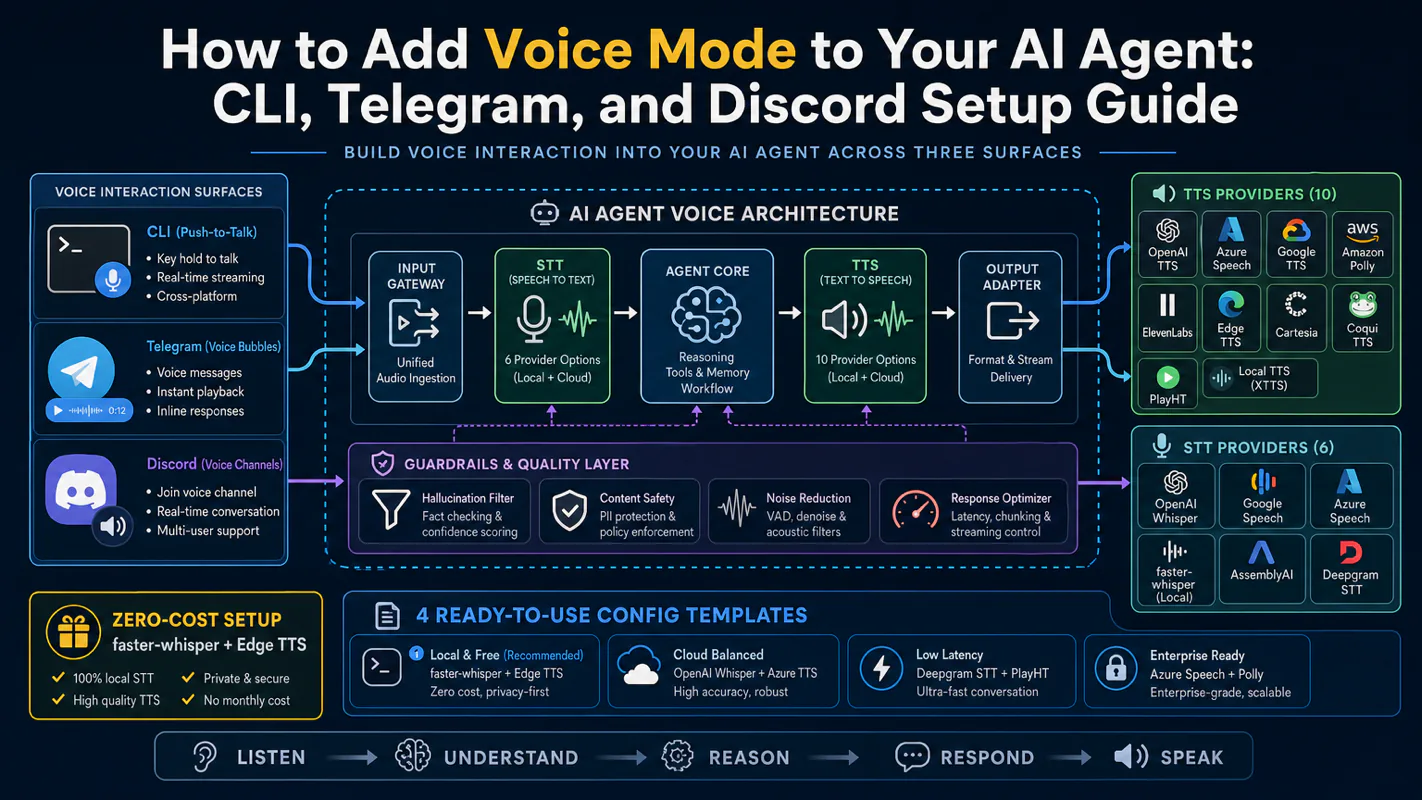
Gloves on, tape measure in hand — nobody types a query. Three voice surfaces for ai automation tools (terminal, Telegram, Discord), 10 TTS and 6 STT providers compared on cost and latency, plus a setup that costs nothing.
A silent agent produces a support ticket with no failure point in it, and that vagueness is what makes the repair slow. Eight named stages sit between send and reply; naming the broken one is most of the fix for any ai assistant for business.
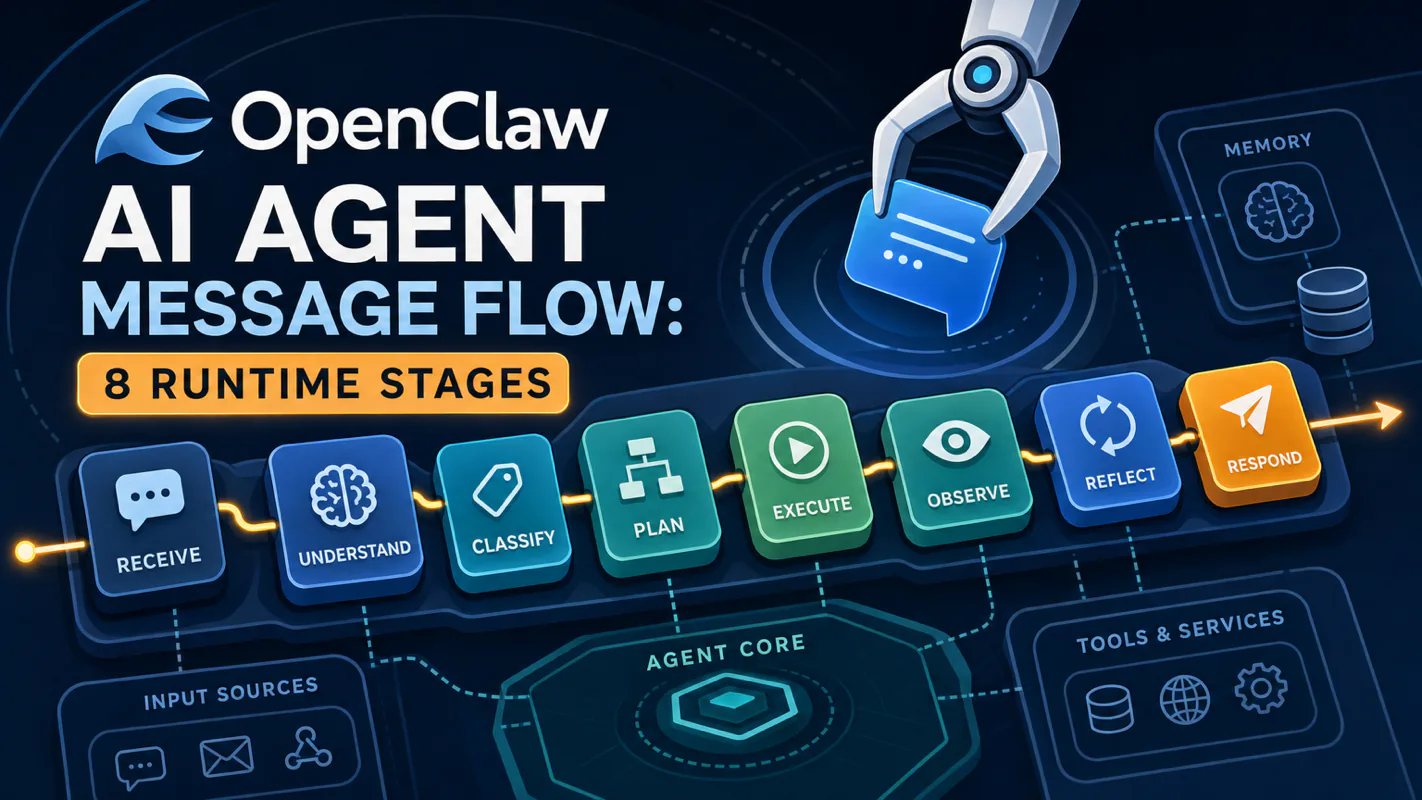
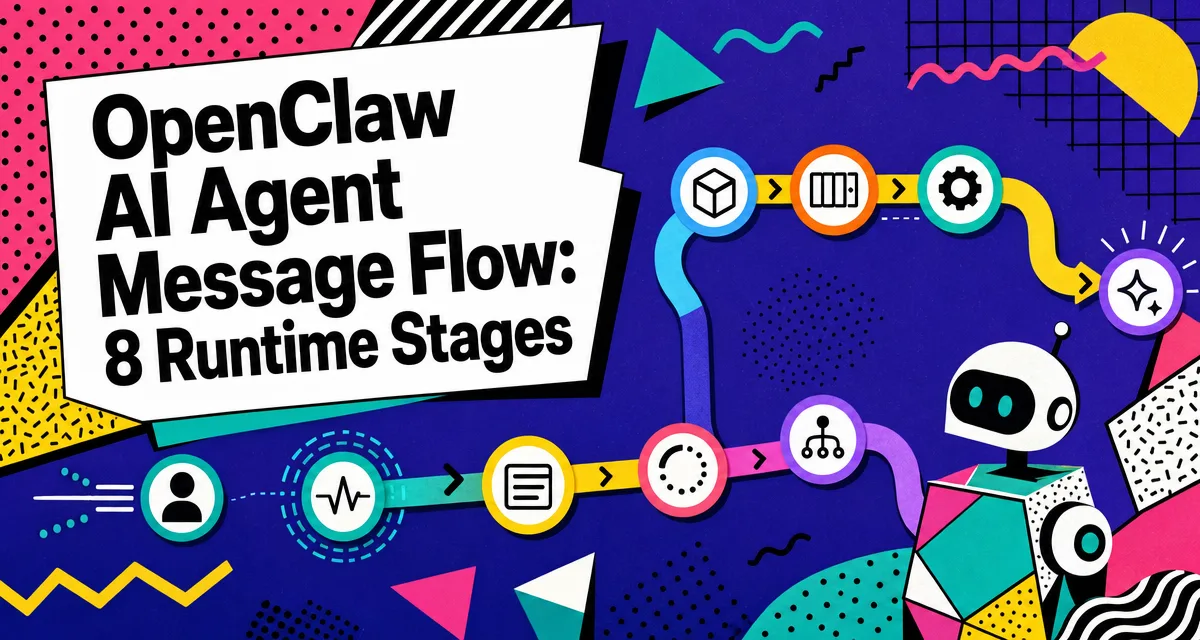
TL;DR: A user message is not a prompt. In a real AI agent runtime it becomes a routed, scoped, context-packed, tool-using workflow with logs and failure points. There are 8 stages between "send" and "reply." Knowing the stages turns "the AI broke" into "binding rule three didn't match", which makes the bug 10x faster to fix.
The bot is broken is not a bug report, but it is what lands in your inbox, sent by a front-desk coordinator whose message got no reply and who has no way to say which part failed. Between somebody pressing send and an answer coming back, eight separate things happen: routing, debounce, queueing, session scoping, context assembly, tool calls, streaming, logging. Any one can be the silent link. Knowing the stages converts the bot is broken into binding rule three did not match, and the second sentence is far faster to act on. If an ai assistant for business handles real inbound messages, this is the map you debug against.
Everyone says you "send a prompt to the model." Actually, in a real agent runtime your message becomes a routed, scoped, context-packed, tool-using workflow with logs and failure points before the model sees a single token. The prompt-as-string mental model is wrong, and it costs you debugging time.
If you have already shipped a working agent, skip ahead to §9 for the 5 mistakes I made in my first month. If you are still figuring out why your agent feels slow or unreliable, read on through the stages in order.
You pull out your phone. You type into Telegram or Discord:
"check the server status"
A few seconds later, a clean report comes back. CPU usage. Memory. Top processes. Error log highlights.
Honestly? Try this question: between you hitting send and the report arriving, how many things happened?
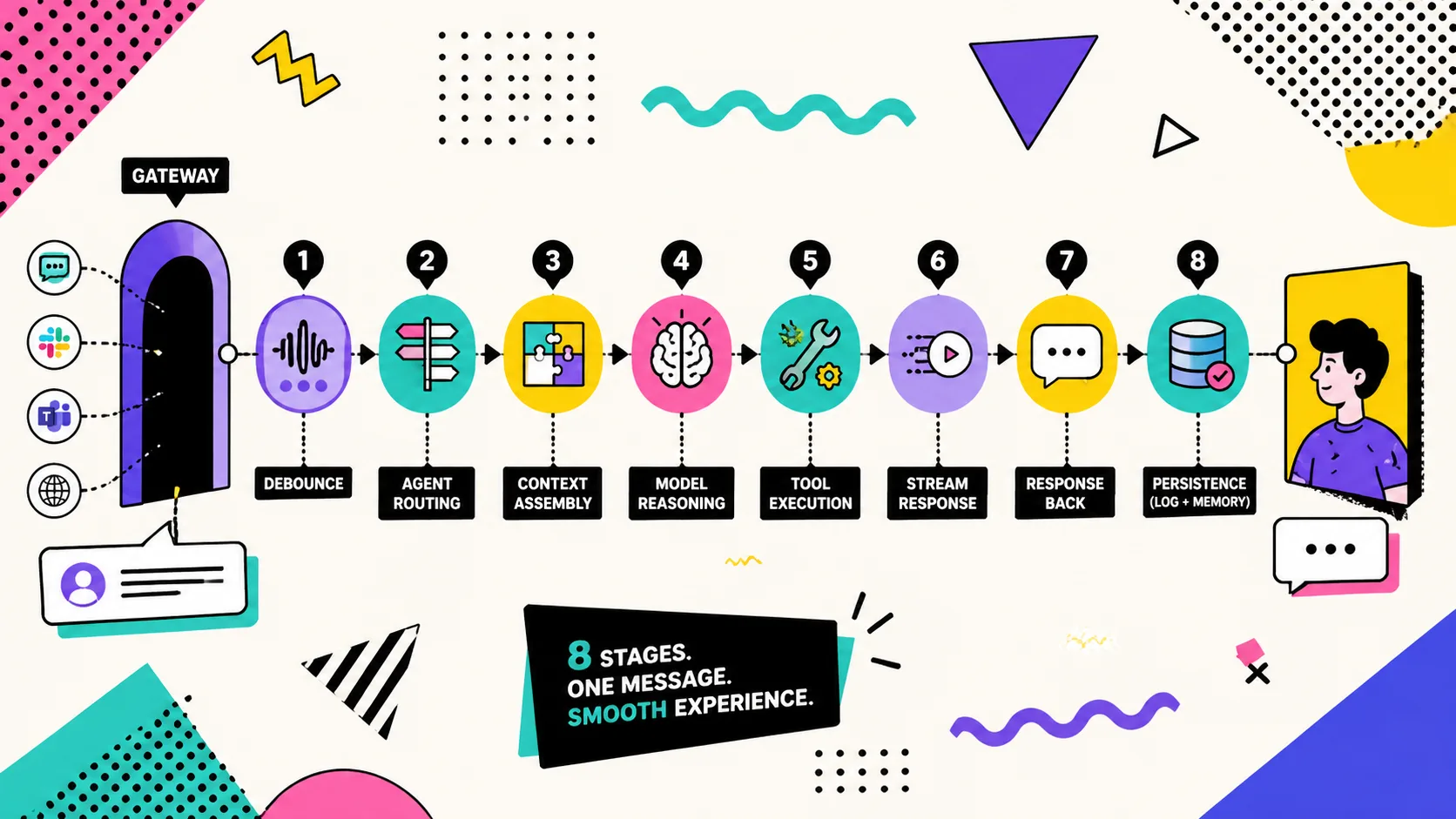
The intuitive answer is three: send → AI thinks → reply lands. The actual answer, in OpenClaw and in any production agent runtime, is eight. Most of those stages, you'll never see in the chat window. And the day your agent goes silent, those invisible stages are exactly where the bug is hiding.
If "agent runtime" still feels fuzzy, two short maps to keep open:
I built my first OpenClaw agent assuming the message was the prompt. I was wrong.
When you send "check the server status," the model does not receive 4 words. It receives somewhere between 20,000 and 60,000 tokens. Your message is the last line of a small handbook the runtime hands the model on every call. The handbook contains rules, tools, identity, memory, and conversation history. Your sentence is line 800 of an 850-line document.
This single fact explains most of the surprises in agent behavior. Why does the same one-liner sometimes return in 2 seconds and sometimes in 12? Why does the agent occasionally bring up something you never mentioned in this conversation? Why does turning off "memory" sometimes make replies sharper, not duller? All three answers live in the message flow.
The rest of this article walks the 8 stages, then opens up the four engineering decisions that make the difference between a chat toy and an agent you can actually leave running: context assembly, debounce, queue mode, and session scope. By the end, "the agent isn't replying" stops being a mystery and becomes a 5-minute trace inspection.
The 8 Stages, End to End
Here's the path your message walks, every time, in OpenClaw (at time of writing):
#
Stage
What it does
AI involved?
1
Channel normalization
Convert platform-specific format (Telegram / Discord / WhatsApp / Slack) to a unified internal shape
No
2
Gateway routing
Verify origin, deduplicate, hand off to binding
No
3
Binding match
Decide which agent receives this message based on rule table
No
4
Session lookup
Find the conversation bucket (per dmScope rules)
No
5
Context assembly
Build the 20-60K token input package, system prompt, tools, identity, memory, history
No
6
Model API call
Send the package to Claude / GPT / Gemini, wait for the response
Yes
7
Tool execution
If the model wants to call a tool, run it, feed the result back, possibly loop
Yes
8
Response chunking
Split the answer into platform-safe chunks, find natural break points
No
The most counterintuitive fact in this table: only 2 of the 8 stages need AI. The other 6 are deterministic, pure rules and data structures. When the runtime "doesn't work," the bug is almost always in one of those 6, not in the model. That's where the 10x debugging speedup comes from.
2.1 Stage 1 · Channel normalization (the translator)
Your message starts as a Telegram payload with chat_id, message_id, text, from.username. Or a Discord payload with guild_id, channel_id, content, author.id. Or WhatsApp's flatter shape. None of them are the same.
Before the runtime can route anything, all three need to look identical. Channel normalization does that translation, producing a message envelope every downstream stage can read:
Field
Value
Source
sender
leo
Platform API
channel
discord
Auto-detected
channelId
1477147694987481261
Platform raw field
text
check the server status
Your typed line
ts
2026-03-15T10:30:00Z
Send time
The whole stage runs in under 1ms. Pure rule mapping, no smarts.
2.2 Stage 2 · Gateway routing (the switchboard)
The normalized envelope hits the gateway, OpenClaw's main process, listening on 127.0.0.1:18789 by default. The gateway does three boring jobs at this stage: verify the sender is allowed, drop duplicates (Telegram occasionally double-delivers), and hand the message to binding match.
Job
Why it matters
Verify sender
Without this, a stranger's DM reaches your private agent
Dedupe
Network glitches cause double-delivery; processing twice doubles your bill
Hand off
Pass the cleaned message to the next stage
Dedupe runs against a short-term cache of recent message IDs. If you ever see the agent reply twice to the same prompt, the cache either expired or the sender re-sent with a new ID, both worth checking.
2.3 Stage 3 · Binding match (the directory)
A serious OpenClaw setup runs 5-15 agents in parallel. The CEO agent. The marketing agent. The researcher. The watcher. The on-call agent. Each one binds to specific channels.
How does the gateway know which agent owns this message? A binding table. Match conditions can be:
Condition
Example
Meaning
Channel ID
Discord #leadership
Every message in this channel goes to CEO agent
Guild ID
A whole Discord server
Default agent for the server
Peer kind
direct vs. group
DMs to A, group chats to B
Platform
telegram vs. discord
Different agents per platform
Binding evaluation is deterministic, first rule that matches wins. This sounds boring. It's load-bearing. Determinism is what lets you say "this channel always reaches the marketing agent" instead of "the AI sometimes routes correctly." If routing depended on a model's mood, debugging would be impossible.
2.4 Stage 4 · Session lookup (the conversation bucket)
You found the agent. But the same agent might be talking to ten different humans across five channels at once. Which bucket of conversation history is yours?
OpenClaw computes a session key like agent:main:discord-1477147694987481261-978954749326004254. Three pieces glued together: agent ID, channel identifier, user identifier. The combination uniquely identifies a conversation thread.
The exact rule for "what counts as a unique thread" is set by dmScope (covered in §6). The default is per-channel-peer — your conversation in #leadership is a different bucket than your conversation in DMs, even if you're the same human talking to the same agent.
2.5 Stage 5 · Context assembly (the expensive middle)
This is the stage that surprised me most when I started building agents seriously. Your 4-word message becomes a 20,000-60,000 token package. Here's what's in the package, with rough sizes from a real OpenClaw run:
MEMORY.md, memory/YYYYMMDD.md, and memory_search results when loaded
Conversation history
5,000 - 180,000
What's been said in this session
Your message
50
"check the server status"
Total: 20K to 60K tokens. Your message is 0.05% of it.
The plain-English version: imagine you handed a colleague a sticky note that says "check the server." Before reading the note, they read the entire employee handbook, scan three days of work logs, review the whole tool inventory, and only then look at the sticky note. That's every call. Every time.
This is also why context management is the single most important engineering concern in agent runtimes. The model isn't slow because you talked too much. The model is slow because the runtime is verbose by construction. As of 2026-04, Claude Sonnet 4.6 with 200K context can absorb all of this and still be sharp; Claude Haiku 4.5 with the same context is faster but less precise on complex routing.
How the package is ordered
Order matters. Higher priority items go first; the model's attention falls off toward the end:
Priority
Content
Why first
Highest
Safety rules
Non-negotiable boundaries
High
SOUL.md identity
"Who am I" before "what should I do"
High
Tool schemas
What I'm allowed to do
Medium
Workspace files
Working environment
Medium
Memory files
Past experience
Low
Conversation history
What was said before
Last
Your message
What you want now
Sub-agent context is smaller
Not every session loads the full handbook. Sub-agents, temporary workers spun up for one task, load fewer files:
Session type
Context shape
Notes
Main session
Full workspace bootstrap + tools + history
HEARTBEAT.md is injected when heartbeat guidance is enabled
Sub-agent session
Smaller task-focused context
Use lighter context so child runs do not inherit unnecessary history
Isolated cron
Fresh cron session with the job prompt
--light-context can keep bootstrap context empty for isolated jobs
A sub-agent gets created, does one job, and dies. It doesn't need the same full handbook as the main agent. If you ever notice a sub-agent "forgetting" something, it usually didn't forget. The runtime never gave that child run the same context in the first place. By design.
2.6 Stage 6 · Model API call (the brain)
The package goes out as an HTTP request. This is the simplest stage in code, and the most expensive in dollars. Every token in that 20-60K package costs something, billed by the API or amortized across your subscription.
The response comes back in one of three shapes:
Response
Meaning
Next
Plain text
"Server status: CPU 23%, mem 41%..."
Go to Stage 8 (chunking)
Tool call request
"I want to run exec"
Go to Stage 7 (tool exec)
Silent marker
Agent decided no message is warranted
End, send nothing
Silent-response tokens are small but important. Heartbeat checks trigger model calls but should not produce a chat message every time. In current OpenClaw, heartbeat quiet runs reply HEARTBEAT_OK; non-heartbeat housekeeping can use NO_REPLY / no_reply. The gateway sees the marker, and the user sees nothing. If the agent finds a real problem, it replies normally, and you get the alert.
2.7 Stage 7 · Tool execution (the agent loop)
If the model returned a tool call, the agent does the work. Often, one tool call isn't enough. The agent runs exec ps aux, sees memory pressure, then runs exec free -m, then runs exec dmesg | tail, and only after three rounds builds a final answer. This is the agent loop.
Round
Tool
What it learned
1
exec
CPU 41%, memory tight
2
exec ps aux
Process X using 4GB
3
exec dmesg
OOM event 6 minutes ago
Each tool result is appended to context and sent back to the model. The loop terminates when:
Termination condition
Why
Model returns plain text
Decided it has enough info
Max tool rounds reached
Cap (typically 20-50) prevents infinite loops
Context near overflow
Window almost full, force a summary
Silent marker returned
Agent decided not to bother the user
Tool errors don't crash the agent. Errors get appended to context as evidence, and the model decides what to do: try a different command, give up gracefully, or tell you the limit. This isn't because someone hard-coded "retry on error." It's because the LLM has reasoning, and reasoning over evidence includes negative evidence.
I tried disabling pruning on a long-running agent once. By round 14, the context was 95% full of stale tool output. The model started ignoring my actual question because it was buried under three jobs ago. I fixed it by enabling agents.defaults.contextPruning.mode: "cache-ttl" where it fits the provider/runtime. Older bulky tool results stopped dominating the prompt view. Loop continues, context stays sharp.
2.8 Stage 8 · Response chunking (the polite splitter)
The agent finally has its answer. But Telegram caps a single message at 4096 characters; Discord at 2000. A 6000-character answer must be split, and you can't split mid-table or mid-code-block.
OpenClaw walks a priority list looking for the best break point under the limit:
Priority
Break point
Notes
Best
Paragraph end (double newline)
Natural section break
Next
Single newline
Line break
OK
Sentence end (. ! ?)
Mid-paragraph cut
Fallback
Word boundary (space)
English-friendly
Last resort
Hard character cut
Long non-Latin strings
The shorthand: paragraph > newline > sentence > space > hard cut. Each step down costs reader experience. The runtime tries the highest-quality cut first.
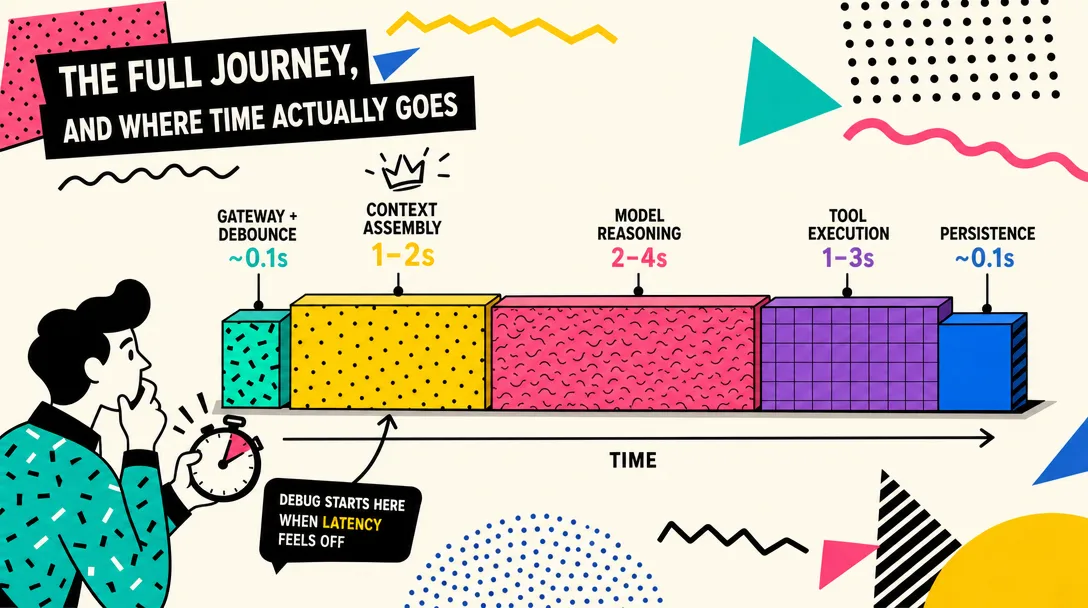
The full journey, and where time actually goes
Here is why this matters: when latency hits 8 seconds and you do not know which stage owns the time, you optimize the wrong layer. Knowing the breakdown points the fix at the right place every time, and that is the difference between a 5-minute fix and a 5-hour fix.
Stitching the 8 stages together for one realistic scenario — "check the server status," 2 tool calls, final reply:
Stage
Time
Share
1. Channel normalization
< 1ms
negligible
2. Gateway routing
< 5ms
negligible
3. Binding match
< 1ms
negligible
4. Session lookup
< 10ms
negligible
5. Context assembly
50-200ms
~1%
6. Model call (round 1)
2-5s
~30%
7a. Tool exec (round 1)
1-3s
~15%
6'. Model call (round 2)
2-5s
~30%
7b. Tool exec (round 2)
1-2s
~10%
6''. Model call (round 3)
2-4s
~20%
8. Response chunking
< 10ms
negligible
Total: 8-20 seconds. About 80% of that is the LLM. The pipeline itself is under 200ms total.
The plain-English takeaway: when "the agent feels slow," the bottleneck is almost always the model call. Pipeline optimization gives you back milliseconds; model selection and tool-call discipline give you back seconds.
3.1 If something fails, where do you look first
I keep a small mental table for triage. Same shape as the runtime:
Symptom
Likely stage
Where to look
No reply at all
1-3 (channel / gateway / binding)
Is the gateway up? Does any binding match this channel?
Replied but off-topic
5 (context assembly)
Was SOUL.md edited? Did history compaction drop critical info?
Stuck "thinking" forever
6-7 (model / tool)
Is the model API timing out? Is a tool hanging?
Reply truncated or garbled
8 (chunking)
Hit a platform character limit? Cut mid-table?
Replied twice to one message
2 (gateway dedupe)
Platform double-delivery? Dedupe cache too short?
I tested this once when my Discord agent went silent on a Sunday morning. Stage 1-3 was my first stop. Found it: a Discord guild ID had changed after a server transfer, and my binding rule still pointed at the old ID. Five-minute fix, instead of staring at a model that was working fine.
The wrong intuition: what the model actually sees
It's worth stopping for a second. The single biggest misconception people bring to building agents is this:
"I sent a one-liner. The agent receives a one-liner."
It does not. As shown above, your one-liner is line 800 of an 850-line handbook. This has practical consequences I keep running into:
Variable latency for "the same" message. Send the same prompt at session start vs. session hour 6. The first one is fast. The second one is slow because the conversation history is now 60K tokens and the model has to read all of it.
Hallucinated cross-talk. The agent brings up something from yesterday because that something is sitting in MEMORY.md, freshly loaded into context every call.
Mysterious cost spikes. Your token bill triples one Tuesday. Why? Because one tool call returned a 4,000-line log and got appended to context for the next three calls. Pruning prevents this. Without pruning, every long tool result becomes future calls' baggage.
System prompt itself has modes. Main agents use full (~10,000 tokens). Sub-agents use minimal (~3,000 tokens). That single mode swap saves 7,000 tokens per sub-agent call, roughly the difference between "free tier" and "I should look at this bill" over a month of heavy use.
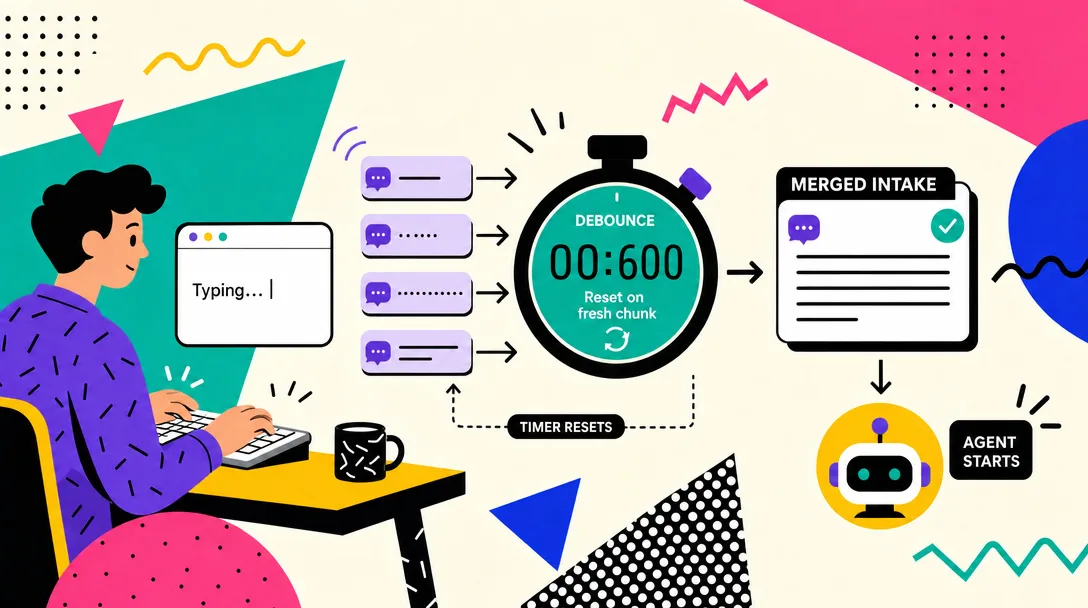
Inbound debounce: stop processing half-sentences
Before debounce, three Telegram bubbles meant three separate model calls. After, the runtime merges them into one well-formed call. Three confused half-answers become one coherent reply, with no extra wiring on the model side.
Real users don't type one clean sentence. Real users do this:
10:30:01  hey, can you check
10:30:03  the server status real quick
10:30:05  mainly cpu and memory
Three messages, one intent. Without debounce, the runtime sees three independent inputs:
Without debounce
Cost
Result
3 model calls
3x tokens
First call: "check what?" Second: "what server?" Third: still confused
3 context assemblies
3x latency
User waits multiple times
3 fragmented replies
Information scattered
User has to mentally stitch them
The fix is unglamorous: wait. Hold incoming messages for a short window (default 2 seconds in OpenClaw). Each new message resets the timer. When the timer hits zero with no new arrival, merge whatever accumulated into one call.
Time
Event
Debounce state
10:30:01
"hey, can you check"
Timer starts: 2s
10:30:03
"the server status"
Timer reset: 2s
10:30:05
"cpu and memory"
Timer reset: 2s
10:30:07
(no new message)
Timer hit zero, merge & dispatch
The agent now sees one well-formed prompt. One model call. One coherent reply.
Different platforms need different windows. This caught me out the first month:
Platform
User habit
Suggested debounce
Discord
Writes a paragraph, then sends
2s
Telegram
In between
2-3s
WhatsApp
Walkie-talkie style, 3 words per message
5s
I once set debounce to 10 seconds, thinking longer = better merging. The agent felt broken. Even one-message prompts had to wait 10 seconds before processing. Users were re-sending because they assumed it was offline. Two seconds is the right default. Five for chatty platforms. Ten is wrong.
Queue Modes: What Happens When a New Message Arrives During Work
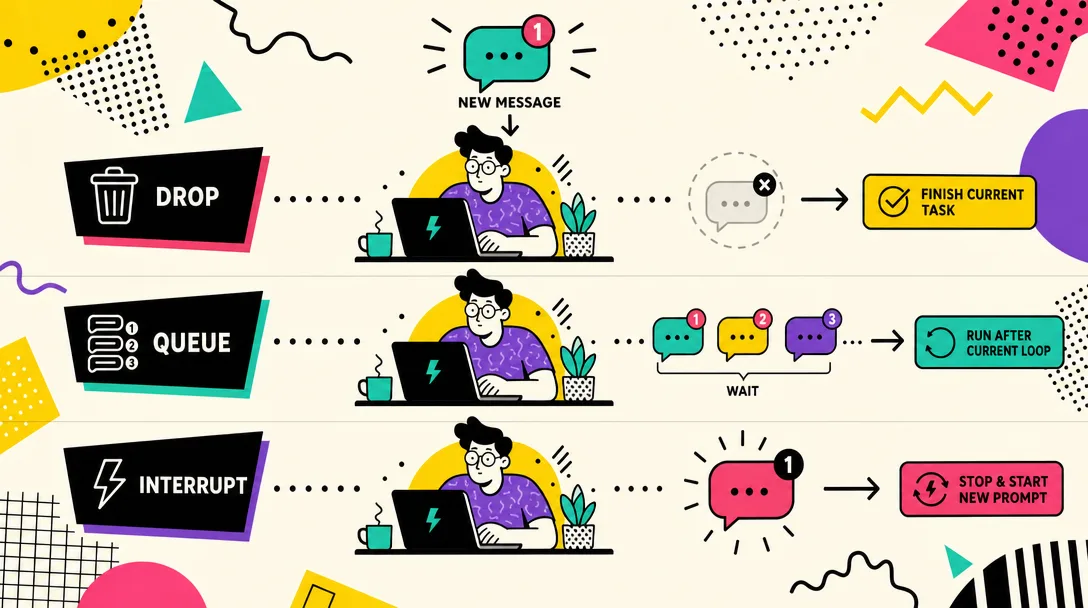
Debounce handles "user sends three bubbles." Queue modes handle a harder case: user sends a new message while the agent is in the middle of a 40-second job.
Three plausible behaviors, each with cost:
A. Stash the new message, finish current job, then process it. B. Let new messages line up and process strictly in order. C. Interrupt current work, jump to the new message.
OpenClaw lets you pick. Four modes, each with a clear use case:
Mode
Metaphor
Behavior
Best for
collect
Suggestion box
New messages stack; flushed as one batch after current job
Non-urgent task batching
followup
Bank queue
New messages process one at a time, in arrival order
Independent tasks that mustn't merge
steer
Boss walks in
New message injected into the current conversation immediately
Real-time course correction
steer-backlog
Boss walks in (with notepad)
Like steer, but if the agent is mid-tool-call, message waits until tool returns
Steer behavior with safety
Same scenario, four outcomes
The agent is analyzing a 500-line log file (~40 seconds). You send "also check yesterday's backup status."
collect — Agent finishes the log. Replies. Then opens its inbox, sees the backup question, processes it. Two clean replies, sequential.
followup — Same as collect, except if you'd sent three more messages they'd be processed independently rather than batched. Slower if you're trigger-happy with messages.
steer — Agent sees the new message mid-analysis. Maybe folds it in: "I'll cover backups in this same report." Maybe pivots: "Pausing the log analysis to check backups first." Powerful, occasionally chaotic.
steer-backlog — Like steer but defers injection if a tool call is in flight. Prevents weird mid-shell-command interruptions.
I run followup for my server-watcher agent (every alert is independent, you don't want them merged) and steer-backlog for my drafting agent (I do want to course-correct mid-draft, but not mid-API-call). There's no "best." There's only "best for this use case."
Why a queue is not optional
Without any queue: the agent is mid-task; a new message arrives; the runtime spawns a second agent instance to handle it. Both instances now write to the same session file. The history ends up with two contradictory "I just said..." entries. The next call confuses the model: "Did I agree to the plan or reject it?"
Queue mode is concurrency control disguised as a UX feature. Pick one. Any of the four. Just not "none."
Session Scope: Who Shares State With Whom
Three users on Discord. One agent. If you and your co-founder both DM the agent at the same time, do you share state?
That's dmScope's job. Three modes:
Mode
Isolation
Use case
main
Everyone shares one session
Solo use, one human
per-peer
One session per user, but channels share
Multi-user, single-context-per-user
per-channel-peer
One session per (user, channel) pair
Multi-channel multi-user (OpenClaw default)
The default is per-channel-peer — maximum isolation. Your strategy chat in #leadership lives in a different bucket from your scheduling chat in #personal-assistant, even though both are you talking to the same agent. Histories don't leak. Context windows don't compete.
I tried main mode for two weeks early on, thinking "I'm a solo user, why bother isolating?" The mistake showed up like this: I was discussing financial decisions in a private channel and casual jokes in a public one. After two weeks, the agent started bringing financial context into joke threads and joke context into financial discussions. The 200K window was getting cluttered. Switching to per-channel-peer cleaned it up overnight.
Streaming: Think Out Loud, or Finish First
So far we've assumed the agent thinks fully, then speaks. Real LLMs generate token-by-token. Streaming exposes that: ship words as they emerge, instead of waiting for the whole answer.
Without streaming, a 3,000-word analysis means 15-20 seconds of "typing..." indicator and then a wall of text. With streaming, the user sees text appear gradually, the answer is "growing" in front of them.
OpenClaw supports two flavors:
Flavor
Behavior
Where it works
Block streaming
Ship a paragraph at a time once it's complete
Most platforms
Draft streaming
Edit a single message live as text generates
Telegram only (lenient edit API)
The gotcha: streaming is not free. Draft streaming hits the platform's edit API every few tokens. On Discord that would breach rate limits in seconds. On Telegram it just works because of how the platform handles edits. Pick streaming based on platform, not preference.
When not to stream:
Scenario
Stream?
Why
Short replies (1-2 sentences)
No
Streaming overhead > perceived benefit
Long analyses, Telegram
Yes (draft)
Best UX on a forgiving platform
Long analyses, Discord
Yes (block)
Edit-rate limits rule out draft mode
High-frequency cron output
No
Avoid burning rate limits on background tasks
The 5 Mistakes I Made in My First Month
The most common failure mode for first-time agent builders is treating the runtime as a thin wrapper around the model. It is not. Most outages happen in the deterministic 6 stages, not in the model itself, and that is why the 5 mistakes below are all infrastructure mistakes, not prompt mistakes.
If you're about to build on top of OpenClaw, or any agent runtime with this shape, here's what I'd save you from.
Mistake 1: I thought debounce was a polish feature
I left debounce off for two weeks because "I want fast replies." The result: every burst-message exchange cost 3x in tokens and produced confused mid-thought replies. Debounce is concurrency control, not polish. Two seconds, on by default.
Mistake 2: I didn't set a tool-loop cap
My first agent had maxToolRounds: 100 because that felt safer than too low. One bad query led to a 47-round loop where the agent kept finding new things to investigate. Token bill that day: $14 for one conversation. Cap is 20 rounds now; if a job needs more, it should be split into multiple agents.
Mistake 3: I used `main` dmScope as a solo user
Already covered above. Cross-context bleed-through is real. Default to per-channel-peer even alone.
Mistake 4: I didn't read the trace until the bug
The runtime writes a JSONL trace per call: prompt, tool calls, memory reads, model output. I ignored it for three weeks. The first time something went wrong, I had to reproduce by hand. Open the trace before you have a bug. You'll find a small misconfiguration just from skimming.
Mistake 5: I confused dedupe with idempotency
Dedupe drops duplicate messages at stage 2. It does not make tool calls idempotent. I had a deploy script that ran successfully, then re-ran when the user re-sent the same trigger because dedupe was disabled in test. Tool design must assume "this might run twice." Dedupe is a polish layer, not a guarantee.
A 30-Minute Path: Trace Your Own Message Flow
Want to see this end-to-end on your own machine? Here's what I'd do tonight.
Turn on trace mode for the session (3 min). Send /trace on as a standalone command. Use the Gateway logs and trace output for the current session instead of relying on a startup flag.
Send one message (1 min). DM the agent something simple like "what time is it."
Open the trace file (5 min). One line per stage. Read the channel parse, the binding match, the context assembly summary, the model call, the response. You'll see your message at the bottom of the input package.
Count the tokens (5 min). The trace records inputTokens. For a fresh session it'll be ~12K. After you've had a real conversation, it'll be 30K+. Make a note of the baseline.
Trigger a tool call (5 min). Ask "what files are in my home directory." Watch the loop: model → tool → tool result appended → model again.
Force a debounce (5 min). Send three messages within 1 second. Watch the trace: only one model call fires after the 2-second window closes.
Check dedupe (3 min). Replay the same message ID twice (most platforms have a "resend" option). Confirm the second one shows up in the gateway log but never reaches stage 5.
Bookmark the trace structure (3 min). Once you know what each stage looks like in the JSONL, you'll never again ask "is the model broken?" without checking which stage actually failed.
Half an hour of reading traces is worth a week of guessing.
Message Flow Checklist
Designing or debugging an AI agent message flow? Walk this list:
Stage
Ask this
Watch out for
1. Channel
Is platform parsing correct?
Encoding bugs on emoji / Asian text
2. Gateway
Is dedupe enabled?
Cache too short = double-process
3. Binding
Does at least one rule match?
Old channel IDs after server transfers
4. Session
Is dmScope right for your use case?
main causes context bleed
5. Context
Is the package under 70% of model window?
History too long = slow & expensive
6. Model
Are you using the right tier?
Sonnet for routing, Haiku for simple replies
7. Tools
Is there a round cap and pruning?
Loops + no pruning = blown context
8. Chunking
Is platform char limit set?
Mid-table cuts ruin Markdown
How I Would Use This in a Real Setup
Don't try to internalize all 8 stages on day one. The order I'd recommend:
Get one agent talking on one channel. That's stages 1-4 working.
Read one trace file end-to-end. That's stage 5 demystified.
Add a tool. That's stage 7 in motion.
Send burst messages. That's debounce earning its keep.
Add a second user. That's dmScope mattering.
Each of these is a small experiment, not a giant integration. You learn one stage at a time. The compound knowledge is what makes "the AI broke" become "binding rule three didn't match", and that's the whole point.
Back when I ran agent-like workflows on n8n, every silent failure was a 30-minute debugging session because the workflow was opaque. The runtime model, eight named stages, each with a trace line, turns the same class of bug into a 5-minute look. The visibility is the feature.
Ready-to-Use Prompt: Map Your Agent's 8-Stage Message Flow and Localize Failures to One Stage
What this does: Maps a user message to the 8 runtime stages between send and reply, configures debounce, routing, session scope, queue mode, and streaming, and localizes your symptom to the one broken stage — turning "the AI broke" into "stage X rule didn't match" for a 10x faster fix. Based on: OpenClaw AI Agent Message Flow: 8 Runtime Stages — https://aiworkflowpro.com/openclaw-message-journey/ Time to run: ~5 minutes
Copy this prompt into Claude Code, ChatGPT, or any AI assistant:
ROLE: You are an agent-runtime diagnostician. Your job: map a user message to the 8 runtime stages it passes through before reply, then localize any failure to the one broken stage — turning "the AI broke" into "stage X rule didn't match" for a 10x faster fix.

CONTEXT — 8-STAGE MESSAGE FLOW (DEBUG MAP):
A user message is not a prompt. In a real agent runtime it becomes a routed, scoped, context-packed, tool-using workflow with logs and failure points — 8 stages between "send" and "reply." The prompt-as-string mental model is wrong and costs debugging time. The 8 stages: inbound receipt (with debounce so half-sentences are not processed) → routing/binding (which agent + binding rule matches) → session scope (who shares state with whom) → context assembly → queue handling (a new message arriving mid-work) → model call (tool-using) → streaming (think-out-loud vs finish-first) → reply + logging. Knowing the stages localizes a failure to one stage, 10x faster than "the AI broke."

INPUTS (fill in before running):
- SYMPTOM: YOUR_PROBLEM_HERE (what is wrong — "agent didn't reply" / "replied to wrong thing" / "slow" / "used wrong context")
- CHANNEL: YOUR_SURFACE_HERE (Telegram / Discord / API / scheduled)
- MULTI_USER: YOUR_ANSWER_HERE (do multiple users/sessions share the agent? yes/no)
- RAPID_INPUT: YOUR_ANSWER_HERE (do users send bursts/fragments? yes/no)

METHOD — 6 STEPS:

Step 1 — Map the 8 stages
Lay the journey: inbound receipt → routing/binding → session scope → context assembly → queue handling → model call → streaming → reply + logging. Confirm the message is treated as a workflow, not a string.

Step 2 — Configure inbound debounce (if RAPID_INPUT)
If RAPID_INPUT = yes, set the inbound debounce so the agent waits for the user to stop typing instead of processing each fragment — half-sentences processed mid-burst are a top "agent replied to the wrong thing" cause.

Step 3 — Configure routing/binding + session scope
Set the binding rules that route a message to the right agent, and the session scope (which sessions share state). For MULTI_USER = yes, confirm sessions do not bleed state across users — wrong-session context is a top "used wrong context" cause.

Step 4 — Configure queue mode
Define what happens when a new message arrives while the agent is still working on a prior one: queue it, drop it, or interrupt. State the mode — unhandled mid-work arrivals cause "agent didn't reply" or duplicated/confused work.

Step 5 — Configure streaming
Pick streaming mode: think-out-loud (stream partial output, good for long tasks/engagement) vs finish-first (reply only when complete, good for short/clean answers). Match to CHANNEL and task.

Step 6 — Localize the symptom to a stage
Map SYMPTOM to the stage it failed at: "didn't reply" → inbound/routing/queue; "wrong thing" → debounce/session scope; "slow" → context assembly/streaming; "wrong context" → session scope/context assembly. State the stage + the one binding rule or setting to check — this is the 10x-faster-fix payoff.

RULES:
- Treat every message as an 8-stage workflow, not a string — the prompt-as-string model wastes debugging time.
- Localize a failure to one stage before changing anything — "stage X rule didn't match" beats "the AI broke."
- Debounce burst/fragment input — processing half-sentences is a top wrong-reply cause.
- Define queue mode explicitly — unhandled mid-work arrivals cause silent no-replies and duplicated work.

OUTPUT FORMAT:
Output six sections:
1. **8-stage map** — markdown table with columns: Stage | What happens | Typical failure.
2. **Inbound debounce** — the debounce setting (if RAPID_INPUT) or "not needed."
3. **Routing + session scope** — binding rules + session-state isolation (esp. if MULTI_USER).
4. **Queue mode** — the chosen mode for mid-work arrivals.
5. **Streaming mode** — think-out-loud vs finish-first + why for CHANNEL.
6. **Symptom → stage** — SYMPTOM mapped to the failed stage + the one setting/rule to check.
Save as @templates/openclaw-message-journey.md and run when an agent misbehaves or feels slow/unreliable, then re-run whenever you add a channel, session type, or input pattern.
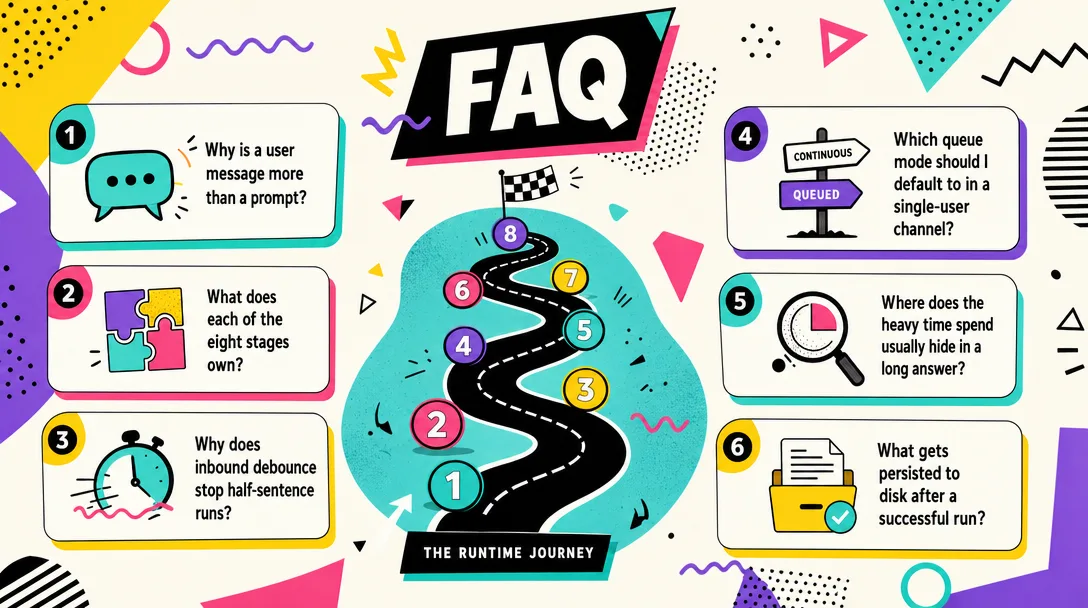
Frequently Asked Questions
Why does my agent take 8 seconds to reply to a one-line message?
About 80% of the time is the LLM call, not the runtime. Channel parsing, routing, binding, and session lookup add up to under 200ms together. Latency optimization belongs with model choice, tool-call rounds, and context size, not with the message pipeline.
How big is the input the model actually receives?
20,000 to 60,000 tokens for a typical OpenClaw call. Your one-line message is 50 tokens. The other 99.9% is system prompt, tool schemas, identity files, memory, and conversation history. The model is reading a small handbook before it reads your sentence.
Why does OpenClaw debounce inbound messages?
Users send half-thoughts split across three Telegram bubbles. Without debounce the agent processes each fragment, burning 3x tokens for a confused answer. A 2-second debounce window merges them into one well-formed call. WhatsApp users need 5 seconds; Discord users 2 seconds.
What does dmScope per-channel-peer actually isolate?
Each user-channel pair gets its own session, conversation history, and context. Your strategy chat in #leadership and your scheduling chat in #personal-assistant stay completely separate. The default mode prevents leak-through between work-modes.
If the agent doesn't reply, where do I look first?
Stage 1-3: channel parsing, gateway dedupe, binding match. About 90% of silent failures are routing problems, not model problems. Check the gateway log for the message ID. If it never arrived, the channel adapter is the suspect. If it arrived but got no binding match, your binding rules are wrong.
Closing
Eight stages. Six of them deterministic. Two of them where the model lives. The deterministic six are where most bugs are; the model-driven two are where most cost is. Knowing the difference is what turns "AI is unreliable" into "I have a binding rule that's wrong."
The runtime metaphor matters here. A chat product hides everything behind a text bubble. A runtime makes the pipeline visible, and visibility is what makes agents operable. You can't fix what you can't see, and you can't trust what you can't fix.
Gloves on, tape measure in hand — nobody types a query. Three voice surfaces for ai automation tools (terminal, Telegram, Discord), 10 TTS and 6 STT providers compared on cost and latency, plus a setup that costs nothing.
A Skill is an operating manual, not a plugin. The five-layer architecture behind workflow automation that survives context compression, session crashes, and handoffs: SKILL.md as the single entry point, deterministic scripts, run state for crash recovery, and a resource layer.
Two of the three fixes can be undone the same afternoon. The third cannot, and it is the one people reach for first. LoRA cut costs tenfold, which made the expensive option tempting rather than correct. In business process automation, the order you try things in is the whole decision.
Fine tuning turns a generalist into a specialist - skip the baseline and you can never prove it worked. Five steps on Google Cloud: baseline, data prep, instruction design, hyperparameters, evaluation. Plus the finding that surprises business process automation buyers: 100 good samples beat 1,000.