Monitoring a competitor who publishes no feed is the case every RSS guide skips. Twenty-one platforms sorted by which of three jobs they do, and the finished setup is business process automation you own outright, with no seat licence to renew.
Blaming the content is the reflex when a post underperforms, and it is usually the wrong diagnosis. A second reader decides distribution before any human sees the post, and most of what it checks is mechanical enough to automate business processes around, on five platforms at once.
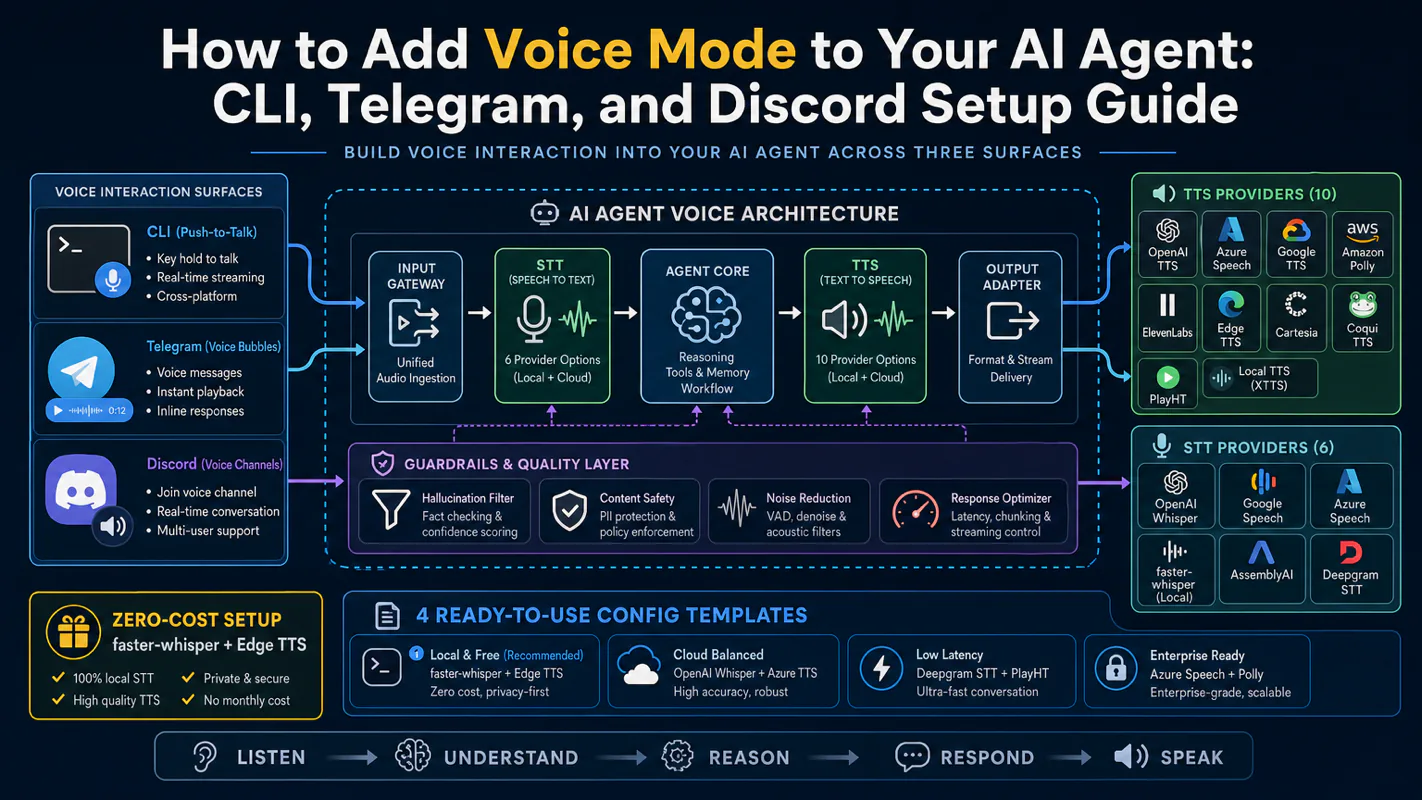
Gloves on, tape measure in hand — nobody types a query. Three voice surfaces for ai automation tools (terminal, Telegram, Discord), 10 TTS and 6 STT providers compared on cost and latency, plus a setup that costs nothing.
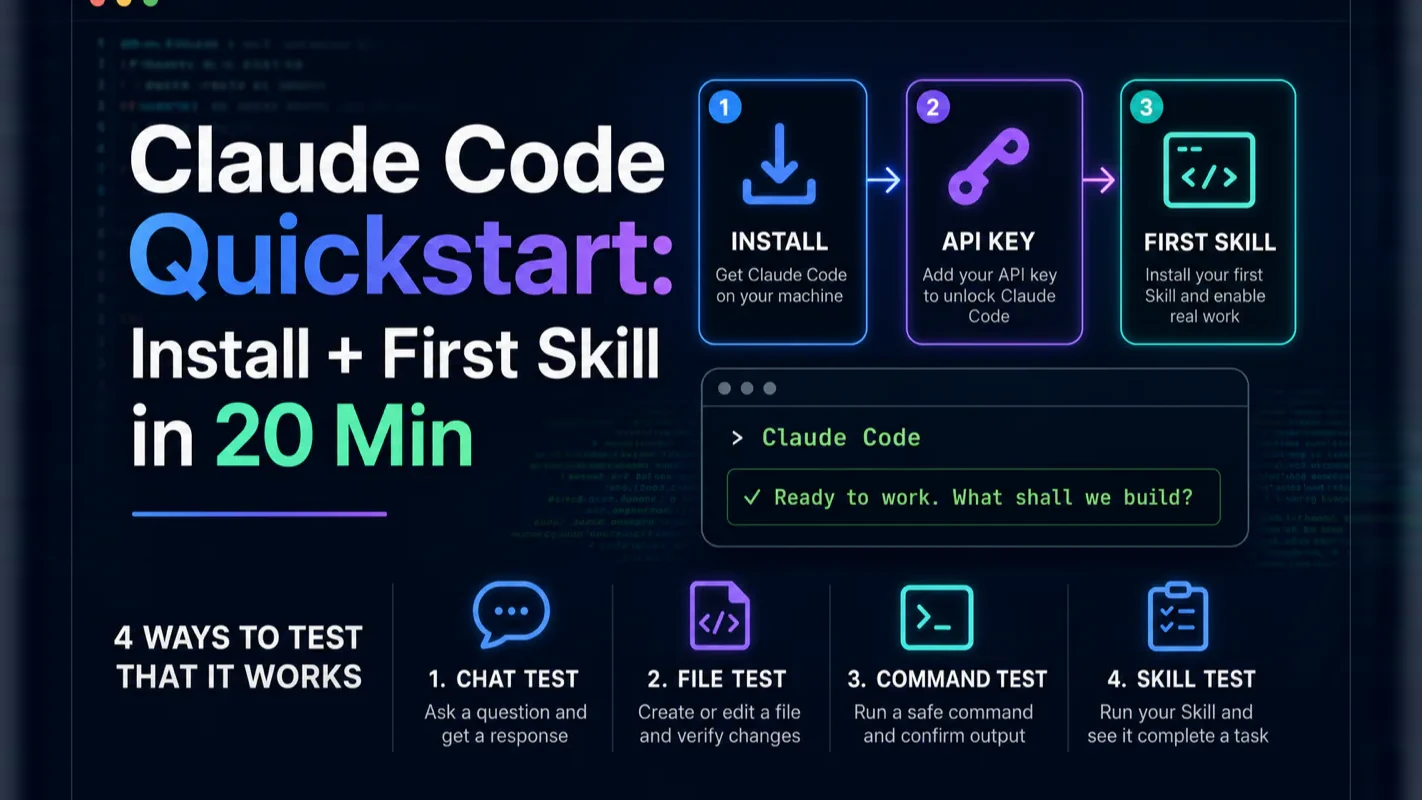
Claude Code Quickstart: Install + First Skill in 20 Min
Three steps, install, API key, first Skill, and it is doing real work. Every stuck point in setup is one of three known failure modes, each with a one-line fix, plus the right first task to hand it on day one.
You don't need to know how to code, and you don't need to understand programming. Three steps, twenty minutes, and Claude Code is doing real work for you
Step 1: install with one command (Mac or Windows). Step 2: drop in your Anthropic API key. Step 3: install your first Skill and watch it run
Every "I'm stuck" point in setup is one of three known failure modes — Node, permissions, or environment variable. Each has a one-line fix
The right Skill to install on day one is one that reads files, summarizes them, and writes a Markdown brief — that round-trip exercises every part of Claude Code in five minutes
Most software that fails inside a small business fails at the trial, not at the decision. Somebody senior signs off, somebody junior is told to have a look, and the look happens between two other jobs on a Thursday afternoon. Nothing goes visibly wrong. It simply never gets far enough to be worth continuing, and the verdict reported back upstairs is that it did not really do much. Anything with a terminal in it loses that way constantly. So the honest question about an ai assistant for business is not what it can do, it is how far one person gets on a first attempt with nobody sitting beside them.
I get this question more often than any other: "How do I actually start with Claude Code? The tutorials all assume I already know things, and I don't."
I get it. The first time I tried to install Claude Code, I had four browser tabs open, three of them contradicting each other, and I spent an evening editing a config file by hand before I realized I didn't need to. Looking back, the setup is genuinely three steps, and ninety percent of the friction is the parts the tutorials add that you don't need.
This post strips it down. By the end, you'll have:
Claude Code installed with one command and verified working
Your API key configured so the agent can actually call the model
One Skill installed and running — a real round-trip that reads a file, processes it, and writes you a brief
Twenty minutes, no programming required, no Stack Overflow rabbit holes.
Who Is This For?
You've heard the words "Claude Code" enough times to be curious, and you want to try it without committing a weekend
You've tried to install it once before and bounced off some error message
You're not a developer, or you're a developer who doesn't want to spend the night editing config files
You'd rather have a working install in 20 minutes than the perfect install in three days
If you've never used an AI assistant of any kind, the first AI assistant guide is the right warm-up — Claude Code is a step beyond chat-only assistants, and the chat reflexes transfer cleanly.
Step 1: Install Claude Code
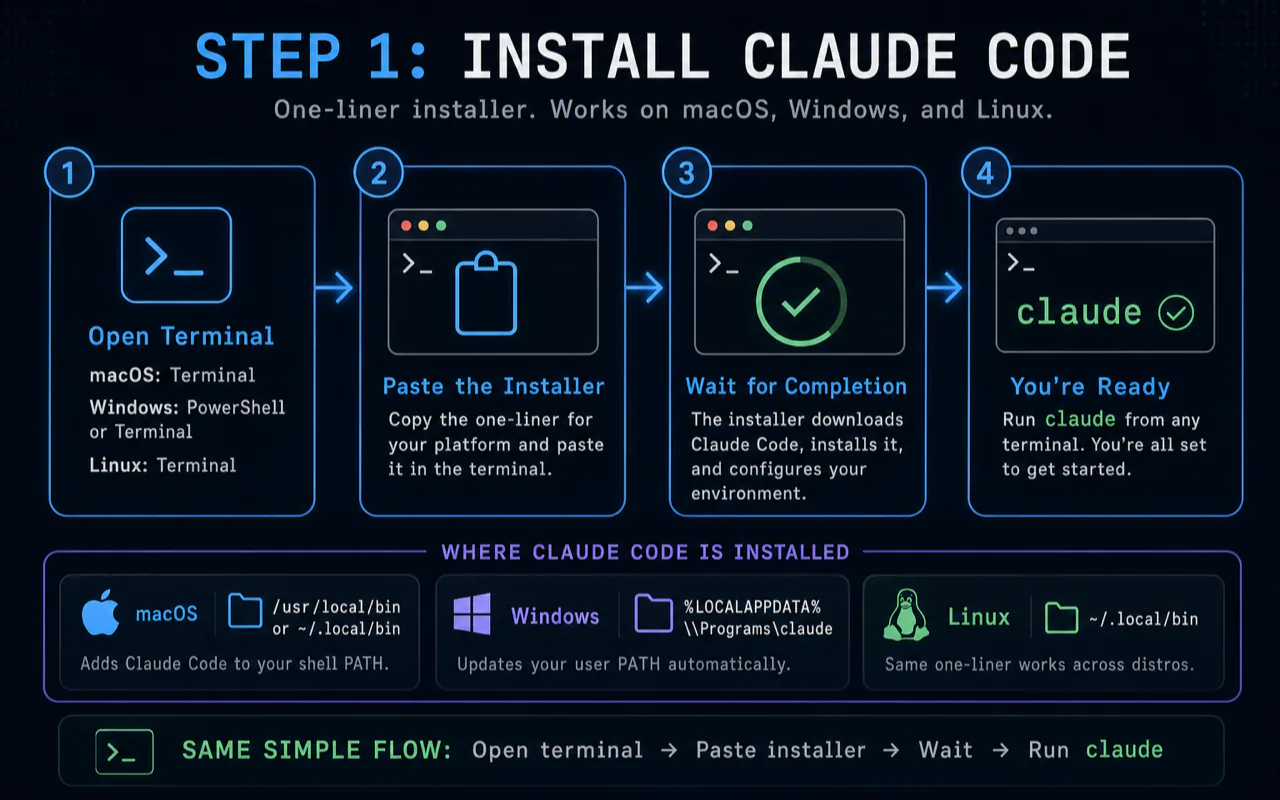
Claude Code ships first-class installers for macOS and Windows. Linux is supported via the same one-liner. Pick your platform, copy the command, paste, hit enter.
macOS install
Open Terminal (Cmd + Space, type "Terminal", hit return). Paste this:
curl -fsSL https://claude.ai/install.sh | bash
Wait for it to finish. The installer downloads the binary, places it in /usr/local/bin (or ~/.local/bin if it can't write to the system path), and adds the right line to your shell profile so claude is callable from anywhere.
Windows install
Right-click the Start menu, pick Windows PowerShell (or Terminal on Windows 11), and paste:
irm https://claude.ai/install.ps1 | iex
Same flow as the Mac path. The installer drops the binary in %LOCALAPPDATA%\Programs\claude and updates your PATH.
Linux install
Same one-liner as macOS:
curl -fsSL https://claude.ai/install.sh | bash
The installer detects your distro and writes to ~/.local/bin by default. If you'd rather use your distro's package manager, the Claude Code docs cover apt, dnf, and brew flows.
Verify the install
Once the installer finishes, run:
claude --version
You should see a version number like 2.x.x. If you see "command not found," your shell hasn't picked up the new PATH — close the terminal window, open a fresh one, and try again. That's the single most common day-one snag, and the fix is closing the terminal. It catches almost everyone the first time.
A note on time-to-stuck: if the install fails twice in a row with the same error, don't death-grip it. Read the Verification and Troubleshooting section below, run the three diagnostic commands, and either fix the named cause or move on. Most installs that fail in setup are environment problems, not Claude Code problems — and they're the kind of problem someone can fix for you in 15 minutes if you'd rather pay the $15 and skip the rabbit hole.
Step 2: Configure Your API Key
Claude Code calls the Anthropic API to do its work. You need a key. There are two paths depending on whether you already have a Claude subscription.
Path A: You have a Claude Pro or Claude Max subscription
Run:
claude
The first time you launch it without a key configured, it'll prompt you to sign in via your browser. Sign in with the same account you use for claude.ai. Done — the subscription auth covers Claude Code usage, no API key needed.
This is the simpler path for most users who already pay $20/month for Claude Pro. It trades per-token billing for the flat monthly fee, and the daily quota is plenty for moderate use.
Path B: Pay-as-you-go with an API key
If you don't have a subscription, or you'd rather pay per-token usage:
Open console.anthropic.com in a browser
Sign up (or sign in)
Add a payment method — credit/debit card. Set a monthly spend cap while you're there; $20 is plenty for first-month exploration
Go to API Keys in the sidebar, click Create Key, name it claude-code-laptop, and copy the value (starts with sk-ant-…)
The key shows only once. Save it somewhere now. A password manager is the right place; never paste it into a public file or commit it to a repo
Now set the key as an environment variable. This makes Claude Code pick it up on every launch.
On macOS / Linux, add this to your ~/.zshrc (or ~/.bashrc if you're on bash):
Close PowerShell and open a fresh window so the new variable is loaded.
Verify the key
Run:
claude
If everything's wired correctly, Claude Code prints a welcome banner and drops you into a chat prompt. Type "Say hello in three different languages." If the model responds, the key is good and the model can be reached. Hit Esc and then type /exit to close the session for now.
If you see a 401 or "API key not found" error, re-check the variable. echo $ANTHROPIC_API_KEY (or echo %ANTHROPIC_API_KEY% on Windows CMD) should print your key, not an empty line. If it's empty, the variable wasn't set in the right shell or the shell wasn't reloaded.
Why pay-as-you-go is fine for beginners: people often picture API billing as a runaway tap. It's not. With a $20 monthly cap set in the console, the cap is the cap — Anthropic blocks new requests once you hit it. A typical first month for a moderate user lands at $5-$8. The cap is insurance against a runaway script, not a likely outcome.
Step 3: Install Your First Skill
This is where Claude Code stops being "a CLI for Claude" and starts being a real agent. A Skill is a saved package — instructions plus an optional set of tools — that you invoke as a slash command. Instead of re-explaining the same task in detail every time, you save it as a Skill once, then run /skill-name and let the agent do the work.
What is a Skill, exactly?
A Skill is a folder with a SKILL.md file in it. The folder lives at ~/.claude/skills/{your-skill-name}/. The SKILL.md describes what the Skill does, what tools it's allowed to use, and any specific instructions. When you type /your-skill-name inside Claude Code, the agent loads that folder and runs the Skill's instructions inside the conversation.
That's it. A Skill is just a folder and a Markdown file.
Where to find Skills
Three sources cover most beginner needs:
The official Anthropic Skill samples at github.com/anthropics/claude-code-examples — well-maintained, conservative, good for learning the format
Community Skills, often shared in the Claude Code Discord or the awesome-claude-code repo on GitHub — variable quality but a good source of ideas
Skills you'll write yourself once you've installed a couple of community ones and felt the pattern. Most users write their first Skill in week two, after using community Skills in week one
Install your first Skill: the document brief
Here's a Skill simple enough to install on day one and useful enough that you'll actually run it next week. It reads a file you point at, summarizes it, and writes a structured brief next to the original.
Create the folder and the SKILL.md:
mkdir -p ~/.claude/skills/document-brief
cat > ~/.claude/skills/document-brief/SKILL.md << 'EOF'
---
name: document-brief
description: Read a document and write a structured Markdown brief next to it
allowed-tools: Read, Write
---

# Document Brief Skill

When invoked, ask the user for the path to a document (PDF, Word doc,
Markdown, or plain text). Read the file, then write a Markdown brief
to the same directory with the filename pattern `{original}-brief.md`.

The brief must include:

1. **One-sentence summary** — the central argument or purpose of the doc
2. **Key points** — 3-5 bullets, in priority order
3. **What's missing or unclear** — 1-3 honest gaps a careful reader would flag
4. **Action items** — anything the doc implies the reader should do, with deadlines if stated

Tone: matter-of-fact, no hype, no jargon.
Length: under 400 words total.
EOF
That's the entire Skill. Open a new Claude Code session:
claude
Inside the session, type:
/document-brief
The agent picks up the Skill, asks you for a file path, reads the file you point at, and writes a brief next to it. The whole round-trip takes under a minute on a typical document.
Test it on a real document — a PDF you've been meaning to skim, a contract, a research paper. The first time you watch the brief land in the same folder as the original, the entire shape of "Claude Code as an agent" suddenly clicks. You stopped chatting with the model; the model is now doing actual work in your filesystem.
Why this Skill specifically as your day-one Skill: it exercises every part of Claude Code in one minute. It uses the model (the brief itself), it uses the file tools (Read and Write), it uses the Skill loader, and it produces an artifact you actually want. Most beginner Skills do only one of those things; this one does all four. By the time the brief is done, you've validated the entire stack.
For more Skills to install in week two, the Claude Code Skills primer walks through the patterns — how Skills compose, when to write your own, and which ones are worth the disk space.
Verification and Troubleshooting
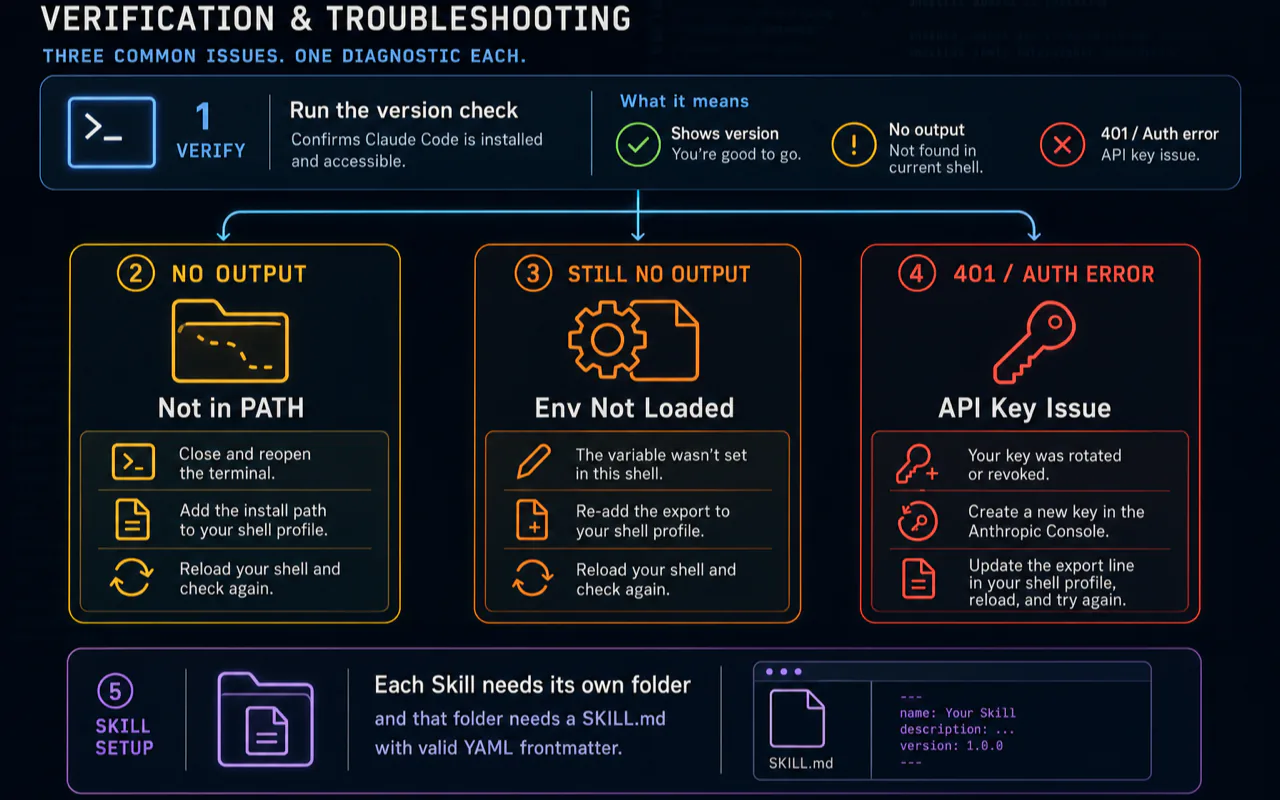
Most setup problems fall into three buckets. Each has a one-command diagnostic.
Bucket 1: "command not found" after install
which claude
If this returns nothing, your shell PATH doesn't include the install location. Close and reopen the terminal first — that fixes it 80% of the time. If that doesn't work, your shell profile didn't get updated. The fix is to manually add the install path to your shell profile (~/.zshrc or ~/.bashrc):
export PATH="$HOME/.local/bin:$PATH"
Reload (source ~/.zshrc) and try claude --version again.
Bucket 2: 401 / "API key not found"
echo $ANTHROPIC_API_KEY
If empty, the variable wasn't set in the current shell. Re-add the export to your shell profile, reload, and re-run.
If non-empty but you still get 401, the key was rotated or revoked in the Anthropic Console. Generate a new one in console.anthropic.com → API Keys → Create Key, replace the export line, and reload.
Bucket 3: Skill doesn't load
ls ~/.claude/skills/
Each Skill needs its own folder, and that folder needs a SKILL.md with valid YAML frontmatter. The most common Skill failure is a typo in the frontmatter — a missing --- line, or a malformed allowed_tools list. Open the SKILL.md and check the frontmatter against the example in Step 3.
If everything looks right but /skill-name still says "skill not found," restart the Claude Code session — the Skill loader caches at session start.
The 30-minute escape hatch: if you've worked through this section and you're still stuck, you've hit one of the rarer environment edge cases. Don't burn another evening on it. Hire someone for $15-$20 to remote-install for you — the time you spend writing useful prompts in week one is worth more than the day you spent fighting an environment bug. Two practical sources are the Claude Code Discord (#help channel; community members often pick up small installs for tips) and Fiverr (search "Claude Code install"; most listings deliver the same day).
What to Do in Your First Week
Day one is the install and the first Skill. The next six days build the habit that makes Claude Code stick. Most beginners drift after week one because they don't have a daily reason to open the terminal — these five exercises bake the reason in.
Day 2: Read a long document with /document-brief
Run the Skill you installed on a 30+ page PDF you've been avoiding. The brief you get back is your read of the doc, prepared by the agent. The day you stop reading 30-page PDFs front-to-back is the day Claude Code's value clicks.
Day 3: Ask Claude Code to organize a folder
Pick a messy folder — your downloads, your screenshots, your projects-in-progress. Open a Claude Code session in that folder (cd first, then claude). Type "This folder is a mess. Look around and propose a sensible reorg — directory structure, file moves, files to delete or archive. Output the plan as a Markdown checklist; don't actually move anything yet." Read the plan. Approve the parts you agree with. Re-prompt for changes. Then ask the agent to apply the approved plan.
Day 4: Have it draft and revise
Pick something you have to write this week — an email, a memo, a proposal. Tell Claude Code the audience, the constraints, and the rough goal. Have it draft, then have it revise based on three specific concerns. The compounding move on day four is the revise part — most beginners stop at the first draft.
Day 5: Write your first own Skill
Take a task you ran via prompt twice this week. Wrap it as a Skill in ~/.claude/skills/{name}/SKILL.md using the document-brief Skill above as the template. The act of writing the SKILL.md makes you articulate the task crisply, which is the same skill that improves your prompts everywhere else.
Day 6: Connect an MCP server
The MCP connections post walks through this in detail. The shortest version: add an MCP server (search, file system, GitHub) to Claude Code with claude mcp add ..., and your agent gains a new set of tools without any other configuration. Day-six MCP install is the bridge between "Claude Code is a CLI" and "Claude Code is the operating system for an AI agent."
Day 7: Audit what's working
Open the conversation history (or your saved Skills folder) and answer two questions: Which Skills do I actually reach for? and Which problems am I still solving by hand because I haven't wrapped them up yet? The answer to the second question is your week-two Skill backlog.
The compounding rule of thumb: day-one Claude Code beats no Claude Code. Week-one Claude Code beats day-one Claude Code by a wide margin. Week-four Claude Code is a different category of tool entirely — by then it knows your file system, your projects, and your prompting style, and the time-to-task drops by half.
What Claude Code Actually Does — A 4-Scenario Tour
Before we get to pitfalls, here are four real scenarios beginners run in their first month. Each one shows a different facet of what "Claude Code as agent" actually means in daily work.
Scenario 1: A 60-page PDF you've been avoiding
You've been carrying around a 60-page report for three weeks because you don't have an afternoon to read it. With Claude Code installed, the path is one command:
cd ~/Downloads
claude
/document-brief
Point the Skill at the PDF when it asks. Two minutes later, there's a your-report-brief.md next to the original with the central argument, the five most important details, and the three things a careful reader would flag. That's not a summarizer feature; it's a complete delegation of the read-and-extract work — and the brief is good enough that you skim it in five minutes instead of reading the original in three hours.
The compounding move on day two: take the brief, paste it into a Claude Code session, and ask "Based on this brief, write me a one-page memo positioning this for our team's monthly review." The agent has the synthesized inputs from the prior step and produces the next artifact in the chain. Each step builds on the last without you re-explaining context.
Scenario 2: A messy folder of project files
Open Claude Code in any folder you find chaotic — ~/Desktop, ~/Downloads, your screenshots folder. Type:
Look around the current directory. Identify what's in here, group it
into 4-6 categories, and propose a target folder structure with
one-sentence rationale per category. Output as Markdown. Don't
move anything yet.
The agent reads the folder, classifies the files, and writes you a plan. You review, edit the plan inline, and then say "Apply the approved parts, but archive anything older than 6 months instead of moving it." The agent applies the changes. What used to be a 90-minute Sunday-afternoon clean-up becomes a 15-minute back-and-forth.
Scenario 3: An email you've been putting off
Pick the email at the top of your "respond to this eventually" pile. Open Claude Code in any folder. Paste the email content, then:
This is the email I need to respond to. Background: [2-sentence
context about the relationship and the situation]. The reply needs
to: [3 things you want to convey]. Tone: collegial but firm.
Length: under 150 words. Generate three variations.
The agent gives you three drafts. Pick the one closest to your voice, paste-edit it for 30 seconds, send. The biggest unlock isn't the writing — it's the unblocking. The reason that email sat there for two weeks isn't because it was hard; it's because you didn't want to spend 20 minutes drafting it. Twenty minutes becomes two.
Scenario 4: Automating the Sunday weekly review
Once you've done a few Skills, the highest-impact one is your weekly review automation. A Skill that reads your last week's Claude Code conversation history, extracts the patterns and the standout outputs, and writes you a one-page review with what to keep doing, what to drop, and what to try next week. It runs in 30 seconds, replaces an hour of journaling, and produces a better review than the journal because it's grounded in what actually happened.
The pattern across all four scenarios: the agent isn't doing magic. It's removing the transitional friction between the work you have and the work you want done. A 60-page PDF is friction. A messy folder is friction. A blank email is friction. The Sunday review is friction. Claude Code is fundamentally a friction-removal tool, and the friction it removes is the kind that compounds across an entire week.
Common Beginner Pitfalls
Three traps catch most newcomers. Naming them upfront makes them easier to avoid.
Pitfall 1: trying to install everything on day one. Claude Code, plus three MCP servers, plus six Skills, plus a custom CLAUDE.md, plus auth integrations — beginners frequently try to install all of this in one sitting and end up debugging interactions between things they don't yet understand. Install the base CLI, get one Skill working, stop. Add the next piece next session.
Pitfall 2: not creating a CLAUDE.md. A CLAUDE.md file in the root of a project tells Claude Code your conventions, your preferences, and the rules of the project. Without it, the agent re-asks the same questions every session. With it, the agent picks up where you left off. The CLAUDE.md guide walks through what to put in your first one.
Pitfall 3: treating Claude Code like an AI assistant. It's not, and the muscle from claude.ai chat is the wrong reflex. AI assistants reply with text. Claude Code does work. The right reflex is to give it a task with a defined deliverable — "Read this folder, write a summary to brief.md, then suggest a reorg in plan.md" — and let the agent work for a minute or two without you steering every step. The point of an agent is to delegate.
For deeper patterns on how to write the kinds of prompts that get great agent behavior on day one, the prompting art post is the next read.
Key Takeaways
Three steps, 20 minutes. Install command, API key, first Skill. Anything else is optional and can come later
The install is one one-liner. macOS via curl, Windows via PowerShell. If claude --version prints, you're good
Subscription auth is the simplest API key path. Already pay for Claude Pro or Max? Sign in via the browser prompt and skip the API key flow. Otherwise, generate a key in the Anthropic Console with a $20 spend cap
Day-one Skill = document-brief. One folder, one Markdown file, one round-trip that exercises read, write, and model in under a minute
Three failure modes cover most setup problems. PATH, API key environment variable, Skill frontmatter. Each has a one-line diagnostic
The 30-minute escape hatch is real. If you're stuck for more than 30 minutes, paying $15-$20 for a remote install beats burning the evening — your week-one prompting time is worth more than your week-zero install time
Ready-to-Use Prompt: Set Up Claude Code in 3 Steps With the 3-Failure Diagnostic
What this does: Produces a personalized three-step Claude Code setup (install, API key, first Skill) for the user's OS and shell, runs the three known-failure diagnostic with one-line fixes, and verifies everything works via a day-one round-trip Skill. Based on: Claude Code Quickstart: Install + First Skill in 20 Min — https://aiworkflowpro.com/claude-code-quickstart-setup/ Time to run: ~4 minutes
Copy this prompt into Claude Code, ChatGPT, or any AI assistant:
ROLE: You are a Claude Code Setup Guide for absolute beginners. Your job: get a non-programmer from zero to a working, verified Claude Code install in twenty minutes — with a fix for every stuck point.

CONTEXT — 3-STEP SETUP + 3-FAILURE METHOD:
Starting Claude Code needs no programming — three steps in twenty minutes: (1) install with one command for your OS; (2) set your Anthropic API key as an environment variable; (3) install your first Skill and watch it run. Every "I'm stuck" point is one of three known failure modes — Node version, file permissions, or the environment variable not loading — and each has a one-line fix. The right day-one Skill exercises the full round-trip: read a file, summarize it, write a Markdown brief. That loop proves every part of Claude Code works in five minutes, instead of leaving you guessing whether setup succeeded.

INPUTS (fill in before running):
- OS: [macOS / Windows / Linux]
- SHELL: [zsh / bash / PowerShell / unknown]
- EXPERIENCE: [absolute beginner / some terminal / none]
- GOAL: [What you want to do first with Claude Code]

METHOD — 4 STEPS:

Step 1 — Install for Your OS
Give the one-command install for OS, but first check the Node version (Claude Code needs a supported Node). If Node is missing or wrong, point to the official installer or a version manager. Verify the install succeeded before moving on.

Step 2 — Set the API Key and Diagnose the 3 Failure Modes
Set the Anthropic API key as an environment variable in the right SHELL profile, then run the three known-failure diagnostic: Node version wrong? Permissions blocking install or run? Env var not loading? Each gets a one-line fix — re-export in the correct profile and confirm with echo.

Step 3 — Install and Run the Day-One Round-Trip Skill
Install a Skill that reads a file, summarizes it, and writes a Markdown brief. Run it against a sample file tied to GOAL. The Skill must complete the full read → summarize → write loop.

Step 4 — Verify and Plan the First Week
Confirm the round-trip produced the Markdown brief (proof every part works). Then give a one-week ramp: one small real task per day, escalating, each with a done-proof.

RULES:
- Never declare setup done until the day-one round-trip Skill has produced a written Markdown brief — that is the single proof everything works.
- Never skip the Node check — a wrong Node version is failure mode #1 and breaks everything silently.
- Never leave the API key as a bare command-line arg — set it as an environment variable in the shell profile.

OUTPUT FORMAT:
Output a markdown report with:
1. Install Plan — OS-specific command + Node check + verify step
2. API Key + Failure-Mode Diagnostic — markdown table, columns: Failure Mode | Symptom | One-Line Fix
3. Day-One Round-Trip Skill — the Skill, the sample file, and the expected Markdown brief
4. First-Week Ramp — markdown table, columns: Day | Task | Done-Proof
Save as @templates/claude-code-quickstart-setup.md and run on day one of using Claude Code, before any real task.
Frequently Asked Questions
Do I need to know how to code to use Claude Code?
No. Claude Code lives in a terminal, but the work it does is the work — drafting documents, organizing folders, summarizing PDFs, automating routine tasks, even writing small programs you describe in plain English. The terminal is just the interface. Most non-technical users get the install done in 20 minutes and have a working Skill running on day one. The skill isn't typing commands; it's describing what you want clearly. The first AI assistant guide covers the chat-app warm-up if you've never used an AI tool before.
How much does Claude Code cost?
Claude Code itself is free to install. The cost is the underlying Anthropic API usage, billed per token. A typical day of moderate use — running 5-10 Skills, drafting a handful of documents, doing one or two long tasks — lands somewhere between $1 and $4. If you have a Claude Pro or Claude Max subscription, you can also use that as the auth method, which trades the per-token cost for the flat monthly fee. For first-month users, set a $20 spend cap in the Anthropic Console; you almost certainly won't hit it.
What's the difference between Claude Code and the Claude.ai chat app?
Claude.ai is a chat interface — you ask, it answers, the conversation lives in your browser. Claude Code is an agent in your terminal — it can read your files, edit them, run commands, install tools, and chain steps together. Chat is conversation. Code is action. Most users keep Claude.ai for casual questions and Claude Code for actual work.
What's a Skill and why do I need one on day one?
A Skill is a saved prompt-and-instructions package that you can invoke with one command. Instead of describing the same task in detail every time, you describe it once, save it as a Skill, and then run it as /skill-name. Day-one Skills are the difference between Claude Code feeling like a smart chatbot and feeling like a real assistant — they remove the re-explanation tax that kills most beginners' enthusiasm in week one. The Skills primer goes deeper.
What if my install fails?
Three common causes cover most failures: missing Node.js (run node --version; Claude Code expects 18+), a permissions error in the install path (re-run with elevated permission or pick a directory you own), or a missing API key in the environment (echo $ANTHROPIC_API_KEY should print your key, not an empty line). The Verification and Troubleshooting section in this post walks through each check. If you're stuck after running them, the install is one of those rare cases where paying someone $15-$20 to remote-install for you is genuinely the right move — your time-to-first-working-Skill matters more than the cost of a help-desk transaction.
Should I install via npm or with the curl one-liner?
The curl/PowerShell one-liner is the simplest path for first-time users — it installs to a known location, sets up the PATH, and runs the post-install hook automatically. The npm path is what you reach for if you already manage Node tooling and want global versioning control. For a quickstart, the one-liner is the right call; you can always switch to npm later without losing anything.
A Note on the "20 Minutes" Promise
Twenty minutes is the realistic time for a clean install. Some readers will get there in eight; some will hit one of the bucket-1/2/3 issues and need forty. Both are normal. The number that matters isn't your install time — it's whether your first Skill ran today. If /document-brief produced a real brief, you're past the hardest moment of Claude Code, and the rest of the learning curve is gentle.
If you're forty minutes in and still stuck on the install, the failure mode isn't you. It's almost certainly an environment edge case — an old Node version, a corporate VPN intercepting the curl request, an antivirus quarantining the binary, a strict shell profile that won't pick up the new PATH. Each of those is a 10-minute fix once you know what's happening. None of them is worth a self-debug evening when someone in the Discord can identify the cause in a screenshot.
What's Next?
Once Claude Code is installed and document-brief has run, zoom out with the complete Claude Code guide — the full reference this quickstart is the setup chapter of. Then the next four reads stack like this:
The Claude Code Skills primer — the format, the lifecycle, and the patterns for writing your own Skills so day-one becomes day-thirty fluency
CLAUDE.md in 67 lines — the project memory file every Claude Code project should have, and the six rules I learned the hard way
Claude Code MCP connections — how to wire MCP servers (search, files, GitHub) into Claude Code with one command
The prompting art post — the upgrade from "tell the model what to do" to "give the agent a brief that almost briefs itself"
Run the install today. Run document-brief on a real document tonight. Open the next post in the morning. The compounding starts the moment the first Skill runs.
Monitoring a competitor who publishes no feed is the case every RSS guide skips. Twenty-one platforms sorted by which of three jobs they do, and the finished setup is business process automation you own outright, with no seat licence to renew.
Blaming the content is the reflex when a post underperforms, and it is usually the wrong diagnosis. A second reader decides distribution before any human sees the post, and most of what it checks is mechanical enough to automate business processes around, on five platforms at once.
Gloves on, tape measure in hand — nobody types a query. Three voice surfaces for ai automation tools (terminal, Telegram, Discord), 10 TTS and 6 STT providers compared on cost and latency, plus a setup that costs nothing.
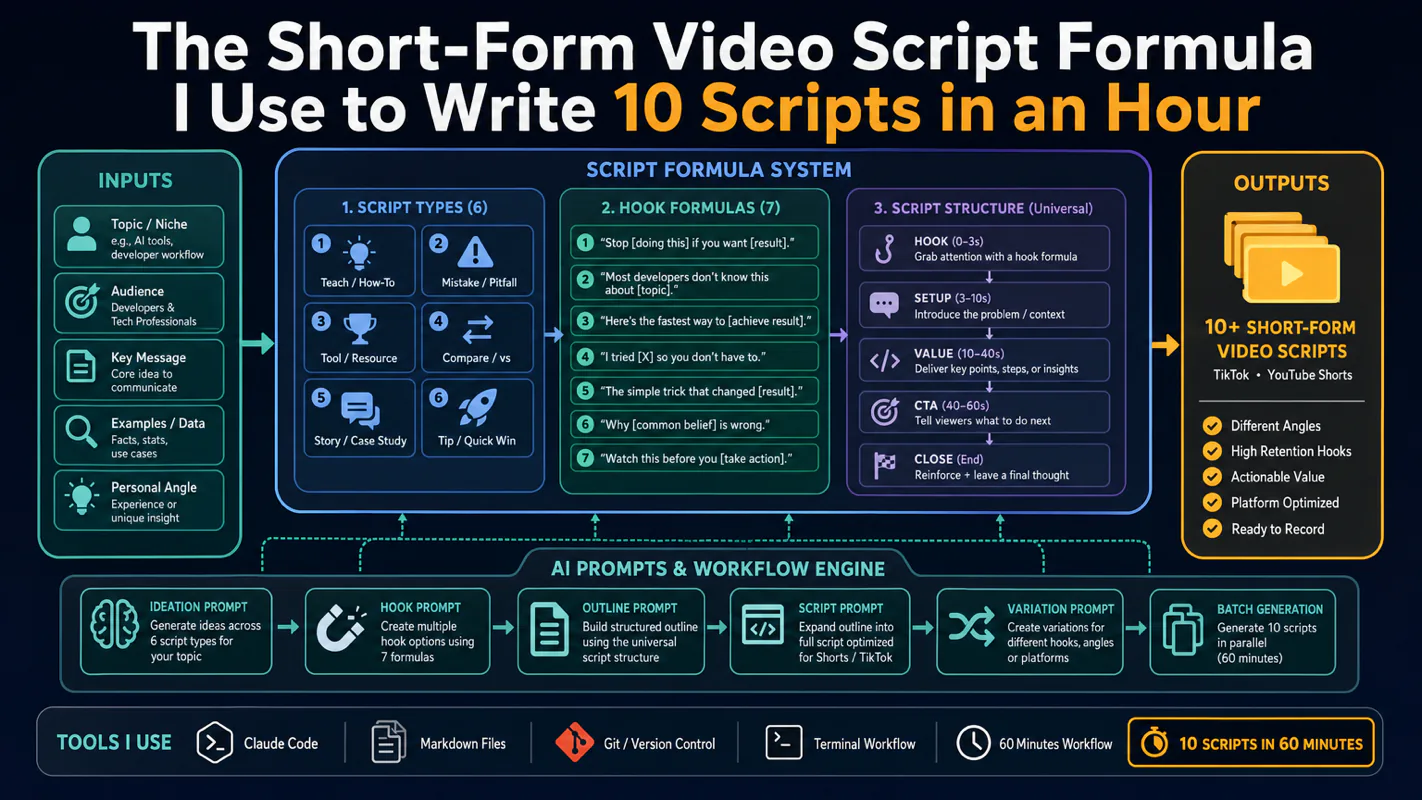
Thursday afternoon, fourteen product ideas, a Monday filming slot, no scripts. Six script shapes and seven hook formulas turn that hour into finished drafts — and the business rule stays: rewrite at least 30% before anything ships.