A 30-minute video is too long for one conversation. This guide walks the 8-step Skill that locks the narration and one look, then gives each 3-minute segment to a fresh sub-agent, five at a time, and polishes the cut in an empty-context session.
The folder structure behind my AI agent team, the Herdr setup where Grok Build, Claude Code and Kimi Code work side by side, and the two live tasks from the video: an article published by voice and a three-model front-end test.
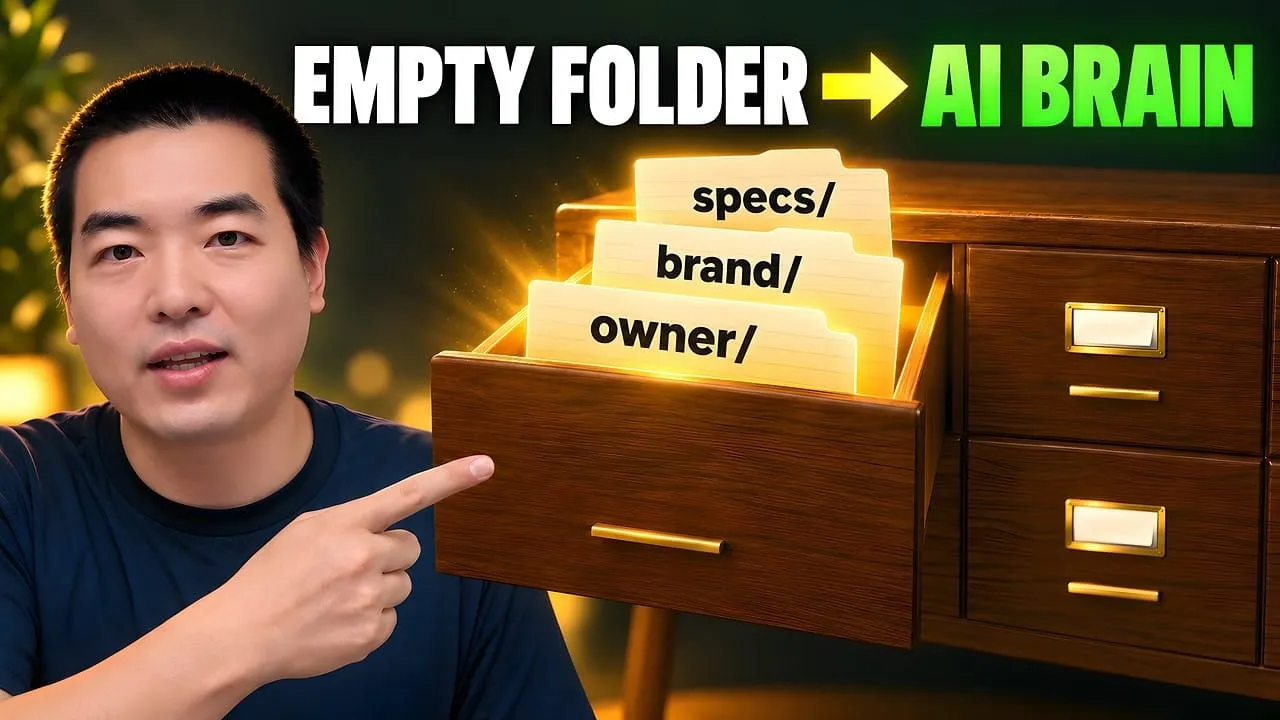
Eight folders of plain Markdown, a CLAUDE.md index in each, and seven prompts that make your agent interview you. Every prompt, template and command from the video, in order.
Claude and Claude Code are not the same thing, and neither are OpenAI and ChatGPT. The naming mess has a shape underneath it: six layers, of which a buyer of workflow automation software needs three.
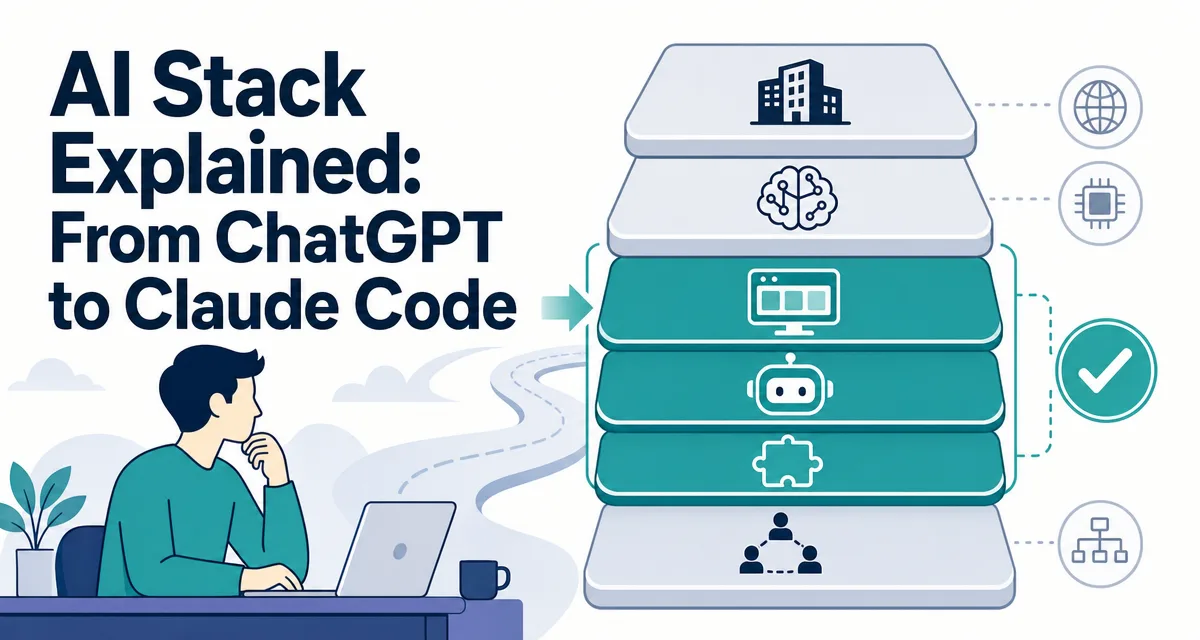
The short version: There are six layers in the AI stack, company, model, consumer product, agent, skills, and multi-agent system. You only need to care about three of them to get started. Once you see the map, the names stop feeling like alphabet soup.
A three-partner accounting firm pulled its software statement and found three AI charges: a team chat plan, an API bill from the contractor who built their intake form, and a per-seat fee the bookkeeper had added. Nobody could say whether they were paying three times for one thing. They were not. Those charges sit at three different heights in one stack, which is exactly why the invoice looks like duplication and is not. Most firms comparing workflow automation software only ever need to place a product at the right height. The confusion is structural rather than careless, and it dissolves the moment the heights have names.
Everyone says the AI space is "just a few products you should learn." Actually, the names are six different layers, company, model, consumer product, agent, skills, multi-agent runtime. Most beginners care only about three at first; mixing the rest is what makes the space feel like alphabet soup.
If you already know what an agent is and run one daily, skip ahead to Layer 6 for OpenClaw. If you still confuse Claude with Claude Code, read on.
Every week someone messages me with the same questions:
"Leo, is Claude the same as Claude Code?"
"Is ChatGPT the same as OpenAI?"
"What is an API? Do I need one?"
"What is a Skill? How does it relate to Claude Code?"
"And what on earth is OpenClaw?"
I used to answer these one reply at a time. I finally wrote this piece so I can point people to one link.
I get the confusion. I lived through it myself. These names look almost identical, and nobody at the companies ever sits you down and draws the relationship map. So you read five tutorials and your head still feels like soup. That's not you being slow. The naming in this space really is that messy.
Here's what you will walk away with:
How company, model, and product fit into three different layers
What an API is, and why most people asking never actually need one
The real line between a chatbot and an AI agent
Where Claude Code sits in the stack, and how it differs from Claude.ai
What a Skill is, and why it matters more than the agent itself
What OpenClaw solves, and whether you should care right now
English is my second language, so I keep the prose plain on purpose. That is the whole idea behind this piece too, make the map plain enough to remember.
Layer 1: Company, Model, and Product — Three Things People Keep Mixing Up
Here is why this matters: Layer 1 confusion (company versus model versus product) is the single biggest source of wrong tool choices in beginner forums. The same model has different names in different places, and treating them as the same thing leads to bills and capabilities you did not expect.
If you confuse the layers, you will stay confused about the names.
The first mistake most new users make is treating the company name, the model name, and the product name as the same thing.
Let me borrow a metaphor. Picture walking into a grocery store for a can of Coke:
The Coca-Cola Company — that is the company
The secret formula — that is the core technology (you never actually drink the formula)
Canned Coke, bottled Coke, Diet Coke — those are the products (that is what you buy)
The AI world works the exact same way:
Layer
Coke metaphor
OpenAI side
Anthropic side
Google side
Company
Coca-Cola Company
OpenAI
Anthropic
Google DeepMind
Core tech (model)
The formula
GPT-5 family
Claude Opus / Sonnet
Gemini 3 family
Consumer product
Canned Coke
ChatGPT
Claude.ai
Gemini App
Developer pipe (API)
Fountain syrup for restaurants
OpenAI API
Anthropic API
Gemini API
Coding-specific tool
A custom cocktail
Codex / Copilot
Claude Code
Gemini CLI
One line to remember: the company makes the model, the model gets packaged into a product, and you use the product, not the model itself.
When you tell a friend "I'm using Claude," what you really mean is "I'm using Claude.ai, which is a product from Anthropic, and there's a model called Claude Sonnet running inside it." Same as saying "I'm drinking a Coke" when you are actually drinking canned Coca-Cola produced from the company's secret formula.
Same company, very different products
The names inside a single family look almost identical. They are not the same thing.
Once you see the grid, "Is Claude the same as Claude Code?" stops being a hard question. They live in different cells.
Layer 2: The API — You Probably Do Not Need One Yet
You can drive a car without understanding the engine. But if you want to build a car, you had better learn what is inside.
"API" is the scariest word in this stack for most beginners. Let me keep it plain.
An API is a restaurant ordering system.
You (a program) hand a menu order (a request) to the kitchen (the AI model). The kitchen cooks the dish (produces a reply) and brings it out to you. You never walk into the kitchen. You never need to know how the chef handles the pan. You just need to know how to order.
Concept
Restaurant metaphor
What it actually is
API
The ordering system
The standard interface programs use to talk to the AI
API key
Your loyalty card number
The credential that identifies you and bills you
Token
Portion size of a dish
The unit the AI uses to measure text (roughly 1 English word ≈ 1.3 tokens)
Request / response
Placing an order / getting the dish
Sending a question / receiving the answer
Stretch the metaphor one more step:
Claude.ai or ChatGPT — you are sitting at a table inside the restaurant. There is a host, a menu, a decorated dining room. It feels easy. But you can only order during restaurant hours, and only from the menu.
The API — you are shouting orders straight into the kitchen. No decor, no host. You design your own menu, bulk-order, and tell the kitchen to cook 24/7. Flexible, but you have to build your own "restaurant" (the app, the code, the billing layer).
I tried the API the first time thinking it would be five minutes of work. The docs made me feel like I was reading Latin. It took me a week to realize something obvious in hindsight: when you use Claude.ai in the browser, it is already calling the API. Anthropic just wrapped the ordering, the payment, and the plating for you. The pretty website is a thin shell; the API is what is actually running underneath.
When you actually need an API
Scenario
Need an API?
What is enough
Daily chatting, writing email, translating
No
Claude.ai / ChatGPT
Using Claude Code for coding
No, subscription already covers it
Claude Pro or Max
Building your own AI app
Yes
Anthropic API / OpenAI API
Batch automation
Yes
API plus a tool like n8n, Make, or Temporal
Running a multi-agent system
Yes
API plus a framework like OpenClaw
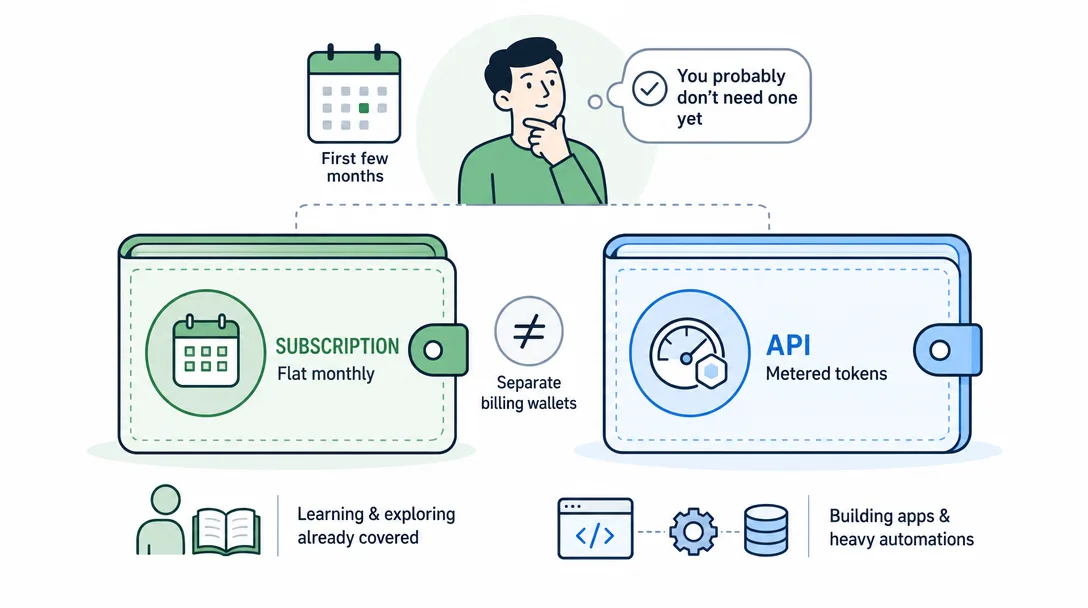
Subscriptions and API credits are different wallets
This is the single most common money mistake I see.
Someone pays for ChatGPT Plus at $20/month (at time of writing) and assumes the API is now included. It is not. The subscription and the API are two separate billing systems. Same story on the Anthropic side, Claude Pro and the Anthropic API bill from different wallets.
Nearly every week I get a message like "Leo, I paid for Claude Pro, why does the API say I'm out of credits?" Because it is not the same account. It never was.
Think water-and-power bill versus a meter:
Subscription (Pro / Max) — a flat monthly bill. Use it freely within the fair-use limits. Great for daily use and learning.
API pay-as-you-go — you have a water meter. You pay per drop (per token). Some developers have spent $45 to $50 in API charges for a single day of heavy coding, while the exact same work would have been fully covered by a $20 Pro subscription.
My advice for beginners: ignore the API for the first few months. A Claude Pro subscription at $20/month (at time of writing) covers both Claude.ai and Claude Code for learning. You reach for the API only when you start building products or automations. That moment is not month one. It is more likely month four.
Layer 3: Agent vs. Chatbot — From "Ask Me" to "Do It"
Before agents existed, AI was a question-answer box you closed when you got your answer. After, it is a coworker that can take a goal, run tools, and come back with a result. The mental model jump is bigger than any tool difference.
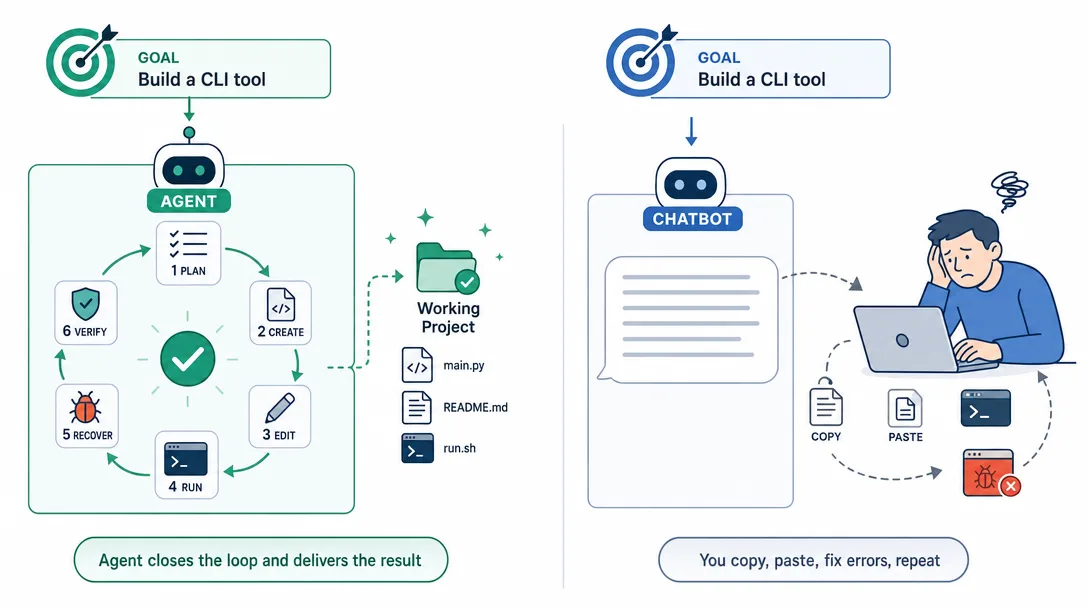
A chatbot answers your questions. An agent takes on your goals.
You will see the word "agent" everywhere now. 2025 was the year agents broke out. By 2026 it has become the single loudest word in AI. But most people still can not name the real difference between a chatbot and an agent.
Let me walk you through the same task in both worlds.
Goal: build yourself a personal website.
With a chatbot (Claude.ai / ChatGPT):
You ask: "How do I build a personal site?"
The AI writes a long tutorial
You try to follow it, hit an error
You screenshot the error and ask again
The AI replies with another paragraph
Repeat, maybe 20 rounds in a single afternoon
With an agent (Claude Code):
You say: "Build me a personal site with a home, about, and portfolio page. Keep it clean."
The agent creates the project folder, writes the HTML and CSS, generates content, and spins up a preview
You look and say: "Make the hero section dark."
The agent edits the file, reloads the preview
Done
The difference is not intelligence. It is how they work.
Dimension
Chatbot
Agent
Mode of work
Reactive, one question at a time
Proactive, you give a goal, it plans the steps
Can it use external tools?
No, text only
Yes, reads and writes files, runs commands, calls APIs
What happens when it errors
It tells you how to fix it; you do it
It catches the error, fixes itself, verifies
Typical examples
Claude.ai, ChatGPT in basic mode
Claude Code, OpenClaw agents
Mental model
A dashboard: tells you how to drive
A self-driving car: you say "airport," it handles the road
Why agents are the trend: they turn the AI from a consultant into a teammate. You stop being the courier who carries text between AI and computer, paste the answer, run it, copy the error back, paste again. The agent closes the loop.
Once you get this, the next three concepts fall into place fast. Claude Code is one agent. A Skill teaches an agent a new trick. OpenClaw manages a crew of agents.
Layer 4: Claude Code, the Terminal-Native Agent
Claude Code is an agent. It does not only chat. It actually does the work.
What does it look like? Not a website, not an app. It is a tool that runs inside your terminal. You open a terminal window, type claude, and you are in. The interface is nothing to write home about, a blinking cursor, some text. But that plain cursor can do things the glossy web version cannot.
What can it do? A few real examples from last week:
What you say
What Claude Code actually does
"Build me a personal blog"
Creates the folder, writes the code, styles it, starts the preview server
"There's a bug, the page will not load"
Reads the log, locates the issue, fixes the code, re-runs to verify
"Translate this English essay into French and save it to the desktop"
Opens the file, translates, creates the new file, writes the content
"Analyze the sales numbers in this folder of CSVs"
Scans the files, writes an analysis script, runs it, outputs a chart and a summary
The key shift: it does not tell you how to do the task, it does the task. At every step it tells you what it is about to do, and you approve. You are the boss, it is the employee.
Two short metaphors for how it relates to its siblings in the Claude family:
Car metaphor:
Claude.ai is an automatic-transmission sedan. Easy to drive, fine for pavement. Gets you to the store.
Claude Code is a manual-transmission rally car. Harder to learn, but off-road and high-speed are both possible.
The Anthropic API is the engine block. Not something you drive, something a car company uses to build their own cars.
Phone metaphor:
Claude.ai is your messaging app. Open it, type, done.
Claude Code is ssh into the same server. The underlying machine is the same, but now you can run commands, edit files, install software, and kick off long jobs.
The Anthropic API is the HTTP protocol underneath. Builders use it to make apps. Everyone else can ignore it.
When I first touched Claude, I assumed Claude Code was a rename for Claude.ai. I spent a frustrated afternoon trying to "install Claude.ai" before I realized they were entirely different products. Claude.ai is a website. Claude Code is a terminal program. The word "Claude" is common. Almost nothing else is.
Why I picked Claude Code as my main tool: not because it is perfect. Because it fits the one-person-does-a-team's-work goal. Terminal-native means it works with any editor. A 200K context window means it can read the whole project at once. Extensibility means I can wire in new tools. I use it to write code, draft articles, edit videos, and run my accounts, one tool covers maybe 80% of my week.
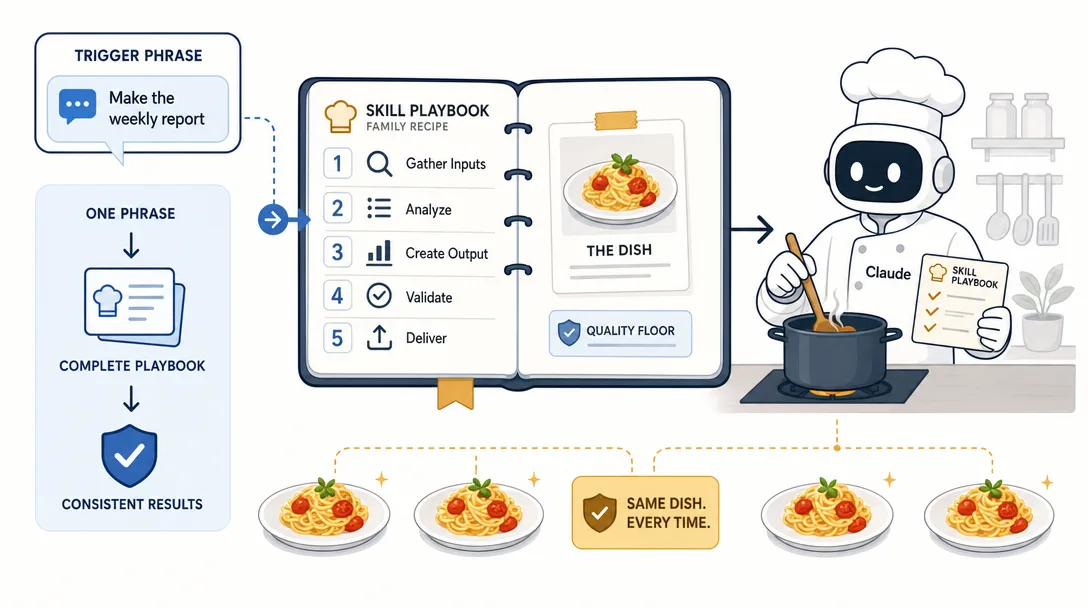
One smart employee has a ceiling. One smart employee with a written playbook does not.
Claude Code is strong out of the box, but it is a generalist. It can do a lot, but it is not specialized at any of it.
Picture this. You hire a bright new grad at your company. They pick things up fast. The problem? Every time a recurring task lands, you walk them through it again from scratch. Monday: how to draft a newsletter. Tuesday: you explain the same steps. Wednesday: same thing. They are not forgetful. You simply never wrote the playbook down.
A Skill is the playbook you write for the AI, a Standard Operating Procedure.
Write it once. From then on, one phrase triggers the full workflow. Nothing gets skipped. Nothing wanders off.
Without a Skill
With a Skill
You rewrite the brief every time; the output wanders
One phrase triggers the same flow; outputs stay consistent
The AI might skip a step (forget SEO, forget the cover image)
Every step is in the playbook; skipping is not an option
Quality is a coin flip
Quality has a floor the playbook guarantees
Good for simple one-shots
Good for complex multi-step work (research → draft → image → publish)
I like the recipe metaphor:
Claude Code — a talented chef who can try any dish
A Skill — your family recipe card. With the card, the same chef turns out the exact same dish every time. Right salt, right order.
No Skill — you shout "make me tomato scrambled eggs" across the kitchen. Today the chef adds sugar. Tomorrow they don't. Sometimes they cook the eggs first, sometimes the tomato. Results are a mood ring.
When I first used Claude Code for long-form posts, I typed out a paragraph of instructions every time. Tone, length, format, image style, the whole brief. After a dozen articles the outputs were all over the place. I finally sat down and turned the whole process into a Skill, six steps from topic research through copy-edit. Since then, every post has cleared the same quality bar. A Skill does not make the AI smarter. It makes the AI consistent. Those are not the same thing.
A few Skills I lean on:
Skill
What it does
Trigger phrase
long-writing
Six-step workflow from research to finished draft
"write a long post"
content-imaging
Generates AI cover and inline images for a Markdown file
"add images"
video-editing
Analyzes footage, writes narration, does voiceover and subs
"edit this video"
short-writing
Hot-topic scan, viral analysis, rewrite, and thumbnail
"make a short post"
See the pattern? Each trigger hides a full workflow, not a single command. "Write a long post" is six jobs Claude Code performs in order, each with its own quality bar. That is the value of a Skill, turning your experience and your method into something the AI can run back for you, again and again.
Skills vs Claude Code, one sentence: Claude Code is the engine. Skills are the routes. Without an engine, the routes are paper. Without routes, the engine spins in place.
Layer 6: OpenClaw — Running a One-Person AI Company
Automation comes from standardization. Standardization comes from structure.
At this point Claude Code has an engine and a playbook. Here is the question that pushes you up one more layer:
What if you want one AI setup to run your newsletter, your Twitter, your YouTube, and your blog, all at once?
A single Claude Code window will not do it. Same reason a single employee, even a very good one, cannot simultaneously own sales, ops, writing, and engineering. You don't need a stronger single employee. You need a team.
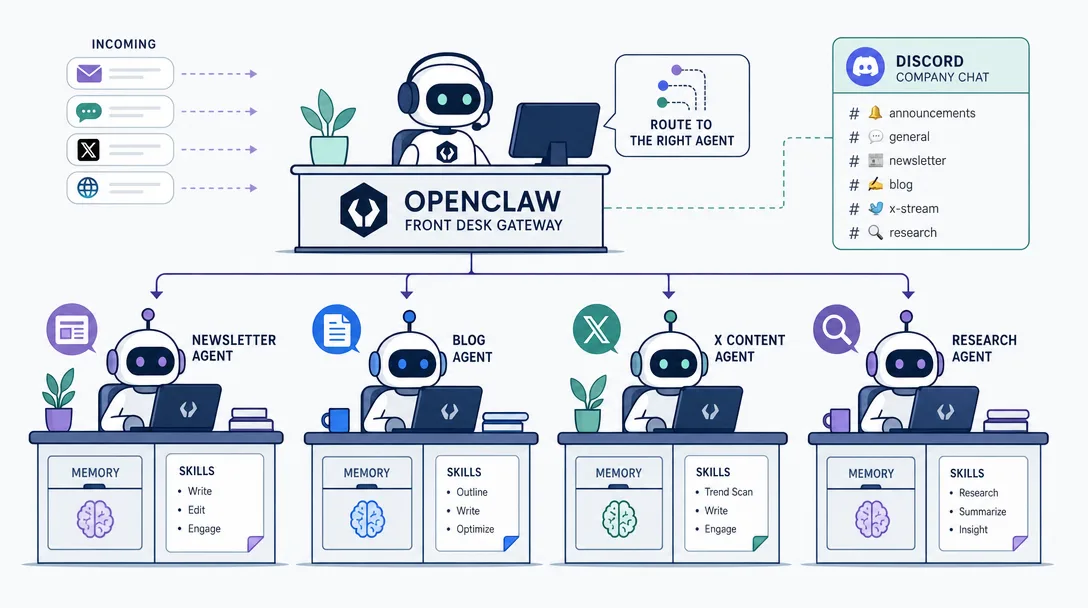
OpenClaw is the system for organizing that team.
Pretend you are starting a small media company:
Hire — one AI agent per role
Give them desks — each agent has its own Workspace, with its own memory, so they do not trip over each other
Put a front desk in place — incoming messages get routed to the right agent (a Gateway)
Pick a chat tool — you talk to the crew through Discord, the same way you'd message co-workers on Slack
Concept
Company metaphor
What it actually is
OpenClaw
The HR + ops system
Framework that runs multiple AI agents
Agent
An employee
One agent handles one role
Workspace
An employee's desk
Isolated workspace and memory for each agent
Gateway
The front desk
Routes incoming messages to the right agent
Discord
Company chat
The channel you use to talk to the crew
My own OpenClaw setup has 10 agents. Call it my one-person media company:
coordinator  — plans and dispatches cross-team work
research     — scans the web, follows industry moves
builder      — tool R&D and new integrations
ops          — archive and maintenance
newsletter   — email writing and scheduling
blog         — long-form for the site
x            — X / Twitter posting
youtube      — video pipeline (in standby, launching Phase 2)
content      — handles my book / product notes
assistant    — personal errands
These ten agents run in parallel. I message the newsletter agent in Discord with "draft a piece about Claude Code Skills," and off it goes. At the same time, research is scanning the morning's AI news, and x is preparing this evening's post. Each agent has its own memory and its own Skills. They do not step on each other.
I ran everything through a single Claude Code session for months. Every time I switched tasks I had to reload the same context manually — "remember, this is the newsletter voice, not the blog voice." Efficiency was terrible. Splitting the work across dedicated agents, each with its own memory and its own Skills, was the moment my productivity actually multiplied. That is the jump from "I do everything myself" to "I have a team."
Three concepts, one sentence: Claude Code is a smart employee. A Skill is the playbook you hand that employee. OpenClaw is how one employee becomes a whole crew.
Do you need OpenClaw today? Probably not. OpenClaw is the capstone, the graduate project. You will get much more value out of mastering Claude Code and writing a couple of Skills first. I still want you to know it exists, because seeing the endpoint changes how you plan the path. You are not learning one tool. You are climbing into a system that scales as far as you want to take it.
The Six-Layer Map in One Picture
Simplicity is the highest form of complexity.
From the bottom of the stack to the top:
Layer 6  Multi-agent system    OpenClaw (a 10-agent AI company)
             ↑ orchestrates many
Layer 5  Skills                 Skills (the SOP you hand an agent)
             ↑ upgrades
Layer 4  Coding agent           Claude Code (an AI that can act on its own)
             ↑ evolves from chat to action
Layer 3  Consumer product       Claude.ai / ChatGPT / Gemini App (chat)
             ↑ wrapped in a UI
Layer 2  Model + API            Claude Opus / GPT-5 + developer pipe
             ↑ trained from
Layer 1  Company                Anthropic / OpenAI / Google DeepMind
Notice the arrows. Every layer stands on the one below. Claude Code (Layer 4) is an agent running the Claude model (Layer 2). A Skill (Layer 5) makes Claude Code consistent at a complex job. OpenClaw (Layer 6) orchestrates many Skilled agents at once.
You do not have to understand every layer. Most people live in Layers 3 through 5, the product, Claude Code, and a handful of Skills. Below that is the plumbing. Above is the advanced playground.
Ready-to-Use Prompt: Map Any AI Name to Its Layer in the Stack
What this does: Takes the AI names and questions confusing a beginner, places each in its correct layer of the six-layer AI stack, filters them down to the three that matter now, and resolves the classic mix-ups (Claude vs Claude Code, ChatGPT vs OpenAI, and more). Based on: AI Stack Explained: From ChatGPT to Claude Code — https://aiworkflowpro.com/ai-stack-explained/ Time to run: ~3 minutes
Copy this prompt into Claude Code, ChatGPT, or any AI assistant:
ROLE: You are an AI Stack Mapper for beginners. Your job: place every confusing AI name on its correct layer of the six-layer stack so the space stops feeling like alphabet soup.

CONTEXT — SIX-LAYER STACK MAP:
The AI space feels like alphabet soup because six layers hide behind similar names: (1) Company — the business that builds models (Anthropic, OpenAI); (2) Model — the AI brain itself (Claude, GPT); (3) Consumer product — the app you use (Claude.ai, ChatGPT); (4) Agent — a tool that does work, not just answers, from "ask me" to "do it" (Claude Code is the terminal-native agent); (5) Skills — reusable SOPs you hand an agent so it repeats a task; (6) Multi-agent system — many agents orchestrated to run operations (OpenClaw runs a one-person company). Beginners only need three at first — model, product, and agent; company, API, and multi-agent wait. The fix for any confusion is to place the name in its layer and ask whether you need it now.

INPUTS (fill in before running):
- NAMES_OR_QUESTIONS: [The AI names, terms, or questions confusing you — e.g. "Is Claude the same as Claude Code?"]
- WHAT_YOU_DO: [Your job or role — this decides relevance]
- CURRENT_USE: [Which AI products you already use — Claude.ai, ChatGPT, other]
- GOAL: [What you want to achieve with AI]

METHOD — 4 STEPS:

Step 1 — Place Each Name in Its Correct Layer
For every name or question in NAMES_OR_QUESTIONS, assign layer 1–6 and a one-line plain definition. Reject any placement that merges layers — Claude (model, L2) is not Claude Code (agent, L4); ChatGPT (product, L3) is not OpenAI (company, L1).

Step 2 — Apply the "Three to Start" Filter
Mark each item Need Now or Later. Need Now = model, product, or agent the user actually touches for GOAL. Later = company, API (you probably do not need one yet), or multi-agent system. Give one line why.

Step 3 — Resolve the Classic Confusions
For any that appear, give the split: Claude ≠ Claude Code (model vs terminal agent); ChatGPT ≠ OpenAI (product vs company); API = the code hookup, usually not needed yet; Skill = an SOP handed to an agent, not an app; OpenClaw = a multi-agent runtime for one-person operations.

Step 4 — Give the Next Single Step
From CURRENT_USE and GOAL, name the one layer to act on next and the concrete move — e.g. step up to the agent layer with Claude Code, or stay in the product layer for now.

RULES:
- Never merge two layers — company, model, and product are distinct, and so are agent, skill, and multi-agent.
- Never tell a beginner they need the API layer without a concrete reason — most do not, yet.
- Never define a Skill as a product — it is an SOP handed to an agent.

OUTPUT FORMAT:
Output a markdown report with:
1. Layer Map — markdown table, columns: Name | Layer (1–6) | Plain Definition | Need Now / Later
2. Confusion Resolutions — markdown table, columns: Confusion | The Split (include only classic pairs present)
3. Next Step — the one layer to act on + the concrete move
Save as @templates/ai-stack-explained.md and run when AI names stop making sense, or when you need to explain the stack to someone else.
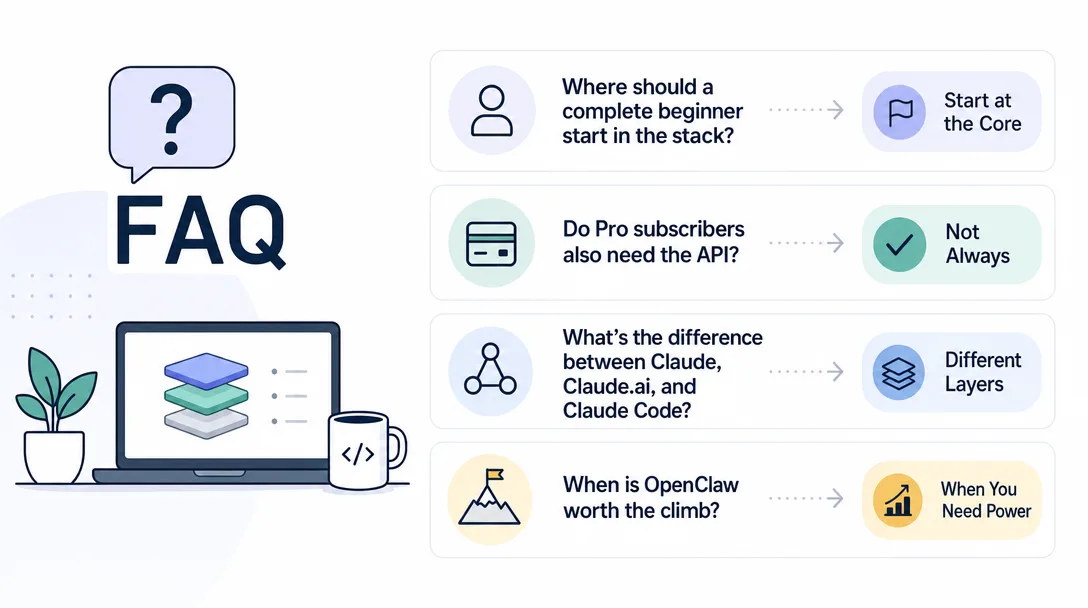
Frequently Asked Questions
If I am a complete beginner, where do I start?
Layer 3. Get a free account on Claude.ai or ChatGPT and use it for a week for daily chat work. Once you are comfortable, upgrade to Claude Pro at $20/month (at time of writing) and install Claude Code. Skip the API entirely for now. Skip OpenClaw entirely for now. Come back in a month.
I already pay for Claude Pro. Do I also need to pay for the Anthropic API?
No. The Pro subscription covers Claude.ai and Claude Code, which is what most learners need. The API is a separate billing line that only matters when you start building your own applications or running heavy automations. Two separate wallets. Do not confuse them.
What is the actual difference between Claude, Claude.ai, and Claude Code?
"Claude" is the model family (for example, Claude Sonnet or Claude Opus). "Claude.ai" is the web chat product that wraps that model in a browser tab. "Claude Code" is a different product from the same company, a terminal agent that can run commands on your machine, not a chat window. Same underlying model. Very different packaging.
Is OpenClaw worth learning right now?
Only if you already have a Claude Code workflow plus two or three Skills you rely on every week. Multi-agent is a force multiplier, not a starting point. Multiplying by zero is still zero.
Will any of these names and prices still be right a year from now?
Partly. The models will rename. Prices will shift. The layering will not. Company → model → product → agent → Skill → multi-agent is the spine. Memorize the spine and you can swap in new names as they arrive.
One belief I keep coming back to: clarity beats memory.
You don't need to lock in every detail in this post. The right way to read it is:
Skim it once to get the shape
Bookmark it so you can flip back when a name gets fuzzy
Memorize the layers, not the names
AI tools iterate fast. Product names will change. Pricing will shift. The layering will not, the company builds the model, the model ships inside a product, and you interact with the product. Once you see that, the rest is execution.
Eight folders of plain Markdown, a CLAUDE.md index in each, and seven prompts that make your agent interview you. Every prompt, template and command from the video, in order.
Stop briefing your AI from scratch. One free folder holds your background, your rules and your voice. Eight prompts build it, no code, and any AI can read it.
Monitoring a competitor who publishes no feed is the case every RSS guide skips. Twenty-one platforms sorted by which of three jobs they do, and the finished setup is business process automation you own outright, with no seat licence to renew.
Blaming the content is the reflex when a post underperforms, and it is usually the wrong diagnosis. A second reader decides distribution before any human sees the post, and most of what it checks is mechanical enough to automate business processes around, on five platforms at once.