Monitoring a competitor who publishes no feed is the case every RSS guide skips. Twenty-one platforms sorted by which of three jobs they do, and the finished setup is business process automation you own outright, with no seat licence to renew.
Blaming the content is the reflex when a post underperforms, and it is usually the wrong diagnosis. A second reader decides distribution before any human sees the post, and most of what it checks is mechanical enough to automate business processes around, on five platforms at once.
Gloves on, tape measure in hand — nobody types a query. Three voice surfaces for ai automation tools (terminal, Telegram, Discord), 10 TTS and 6 STT providers compared on cost and latency, plus a setup that costs nothing.
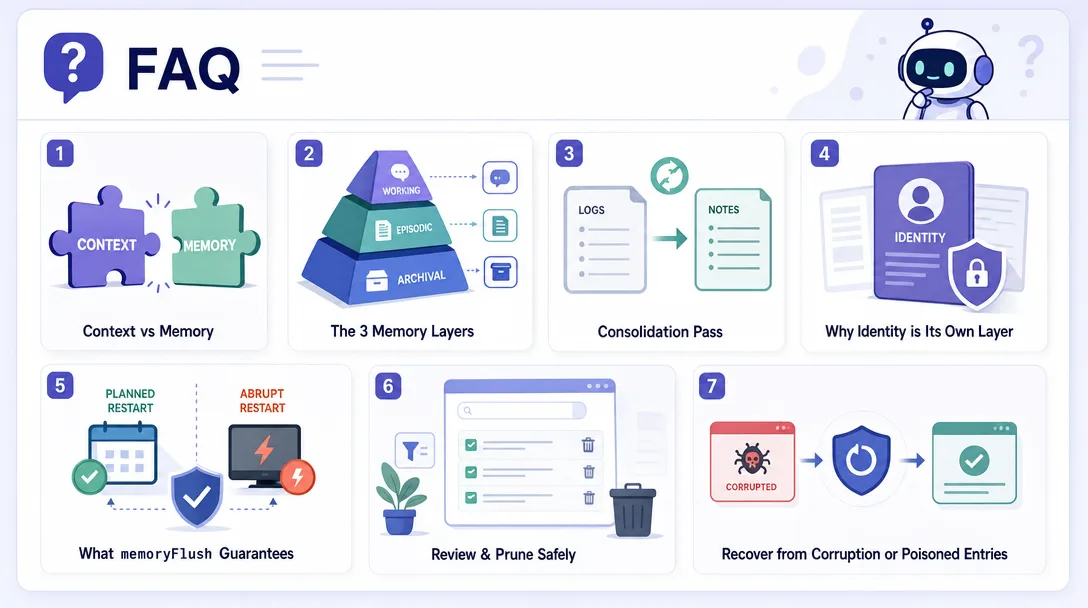
Context dies when the conversation ends. Memory survives. An AI agent doing real business work needs three memory layers: append-only logs, refined notes, and identity. Get the layering wrong and it asks who you are every Monday.
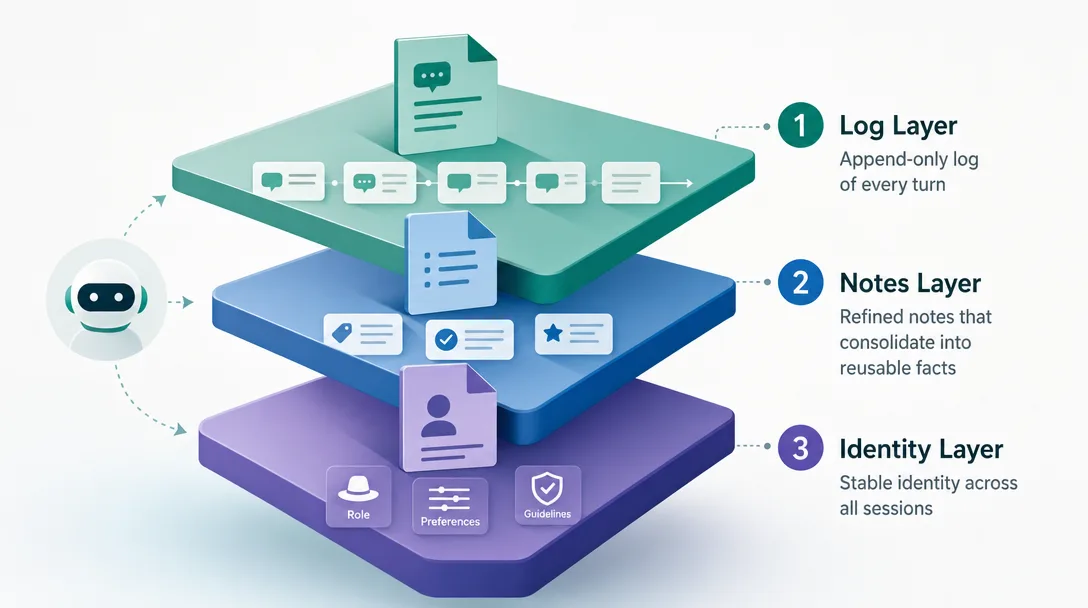
TL;DR: AI agent memory is the difference between a chatbot that resets every morning and a worker who knows you. Context lives in RAM and dies with the session; memory lives on disk and survives. Real memory has three layers, append-only logs (Layer 1), refined notes in MEMORY.md (Layer 2), and identity in SOUL.md (Layer 3). Each layer has a promotion rule. Get the layers right and the agent stops asking who you are every Monday.
Most people meet this problem the same way: you hand an AI agent a real piece of business work — the weekly report, the invoice check, the client follow-up — and by the next session it has forgotten your rules, your format, and who the client is. You end up re-explaining the job every time, which costs more than doing it yourself. That is a memory problem, not a model problem, and it has a fixable structure.
Everyone says memory and context are the same thing. Actually, context is RAM that dies with the session; memory is disk that survives. Treating them as one bucket is the most expensive mistake new agent builders make.
If you already wrote MEMORY.md by hand, skip ahead to §4 for the five life stages of a fact. If your agent still resets every Monday, read on.
You tell your agent on a Tuesday: "always check Caddy first, never restart Nginx without warning me."
On Wednesday you ask: "the staging server is slow, fix it."
Honestly? Try this question: does the agent remember Tuesday's rule, or does it restart Nginx?
If you're using ChatGPT, the rule is gone unless you explicitly typed it into the "memory" feature, and even then it's competing with a small opaque note store. If you're using a real agent runtime, that rule lives in a Markdown file on disk and is injected or recalled through explicit memory tools. The difference between these two outcomes is what AI agent memory actually means.
The rest of this article walks the three-layer model, the five life stages of a single fact moving through it, the memoryFlush salvage step that happens before compaction summarizes old context, and the five mistakes I made before I trusted my agent to remember anything.
If "agent runtime" still feels new, two short maps to keep open:
Context vs Memory: The Most Expensive Misunderstanding
The single most common mistake people make about agents is mixing up context and memory. They sound similar. They're not.
Dimension
Context
Memory
Where it lives
The model's input window (RAM)
Markdown files on disk
Lifetime
Ends with the session
Persists indefinitely
Size limit
Bounded by the model's context window
Bounded by disk space (effectively unlimited)
Purpose
"What are we talking about right now"
"What happened and what matters"
Compression risk
Older entries get summarized away
Never gets compressed
Cost per call
Counted in tokens, every turn
Loaded once on boot, cheap to read
The implication is bigger than it looks. Anything you tell the agent that you want it to remember must be written to memory before the conversation ends, or it dies. The model itself has no mechanism for "save this for later." The runtime has to do that, deliberately, on disk, in a file you can read.
ChatGPT's "memory feature" is a clever hack on top of the same constraint. It runs a side process that extracts a few facts from your chat and stores them in a 50-entry list. Next conversation, those entries get pasted into the system prompt. As of 2026-04 the cap is around 50 entries, useful for "user prefers metric units," useless for "here are 200 facts about your project." A real agent memory system needs different mechanics.
I learned this the hard way in my first month with OpenClaw. I'd tell the agent something I considered important — "the production deploy script is at /opt/deploy.sh, never run it without my approval", and a week later the agent would helpfully run it. The rule had been in the conversation history. The conversation history had been compressed because it was 60K tokens long. The rule got summarized into "user discussed deployment" and the specifics evaporated. Memory and context look the same to the user. They're radically different to the runtime.
The naive design and why it breaks
If you're designing an agent memory system from scratch, the obvious first move is "put everything in one big MEMORY.md file and load it as bootstrap context."
I built that. It worked for two weeks. Then it broke in three ways simultaneously.
It got too big to load. A real conversation generates dozens of facts a week. After two months, MEMORY.md was 4,500 lines. Loading it as bootstrap context burned context I needed for actual work. The agent's effective working space shrank because its memory file got fat.
It mixed importance levels. "User prefers em-dashes over semicolons" sat next to "user's home server IP is 192.168.1.40" sat next to "user once mentioned they like sushi." The model couldn't tell which was load-bearing. When it had to compress under pressure, it sometimes kept the sushi and dropped the IP.
It had no rule for forgetting. Old facts that had been contradicted six times still sat there, polluting the prompt. New facts kept being appended without any check for whether they replaced old ones. The file became a graveyard.
The fix isn't a bigger file. The fix is three files with different rules.
The OpenClaw Three-Layer Architecture
Here is why this matters: the agent that knows you on Wednesday is the same model as the one that did not know you on Tuesday. The difference is one disk file. Memory architecture is what turns a chatbot into a coworker.
OpenClaw's memory system, checked against the official docs on 2026-04-29, has three core files/layers plus an optional dreaming review layer. Each one has a different promotion rule and a different cost profile.
Layer
What it stores
File
Loaded when
Layer 1, Daily notes
Running context and observations
memory/YYYYMMDD.md (workspace-scoped)
Recalled by memory_search / memory_get; recent notes can appear in startup context
Layer 2, Refined
Durable facts, preferences, decisions
MEMORY.md (workspace-scoped, optional)
Main/private sessions when present and allowed
Layer 3, Identity
Behaviors that have stabilized into rules
SOUL.md (workspace-scoped)
Bootstrap context
Review layer, optional
Dream Diary and promotion review output
DREAMS.md
Human review; deep dreaming can promote qualified items into MEMORY.md
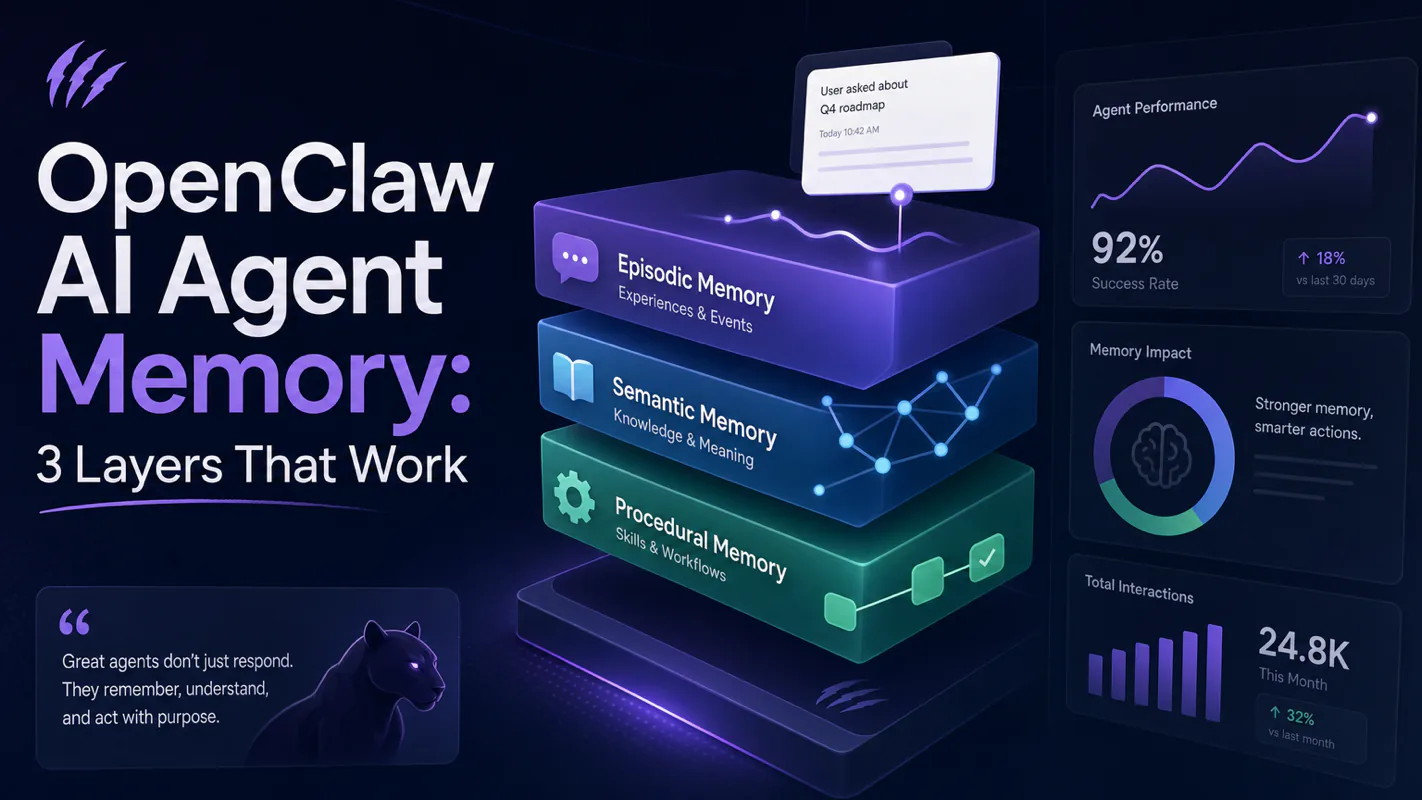
The shape rhymes with how human memory is described: episodic → semantic → procedural. You don't need to take that analogy seriously to make the design work, you just need to take the costs of each layer seriously. Each one is loaded under different conditions because each one represents a different bet on what's worth keeping.
3.1 Why the three are not negotiable
I tried to skip Layer 1 once, thinking "I don't need raw logs, I'll just promote good stuff straight to MEMORY.md." It broke quickly. The agent had to make the promote-or-discard decision in real time, mid-conversation, with no opportunity to look back. Half the time it promoted noise; the other half it discarded gems. You can't make a good promotion decision without raw evidence to compare against. Layer 1 exists so Layer 2 can be smart.
I also tried to skip Layer 3 once, thinking "MEMORY.md is enough, why have an identity file?" That broke too. After a month of accumulated MEMORY.md entries, the agent's behavior drift was real: small contradictions in different MEMORY.md lines compounded into "the agent feels like a different person this week." Pulling stable behavioral rules into a small SOUL.md (~50-100 lines) gave the agent an anchor. MEMORY.md is data. SOUL.md is identity. Conflating them produces an unstable agent.
3.2 A concrete example: one fact through three layers
You tell the agent: "from now on, when you check the server, run top first, not htop — htop isn't installed in the container."
Here's how that fact moves:
Stage
Where it lives
What gets done
1. The conversation happens
Layer 0 (context)
Both turns are in the active conversation
2. Memory note written
Layer 1 (today's daily note)
Durable detail is written to memory/20260425.md
3. Memory consolidation or deep dreaming runs
Layer 1 → Layer 2
The rule "use top, not htop" gets extracted and added to MEMORY.md under "deploy preferences"
4. Three weeks pass, the rule is repeatedly applied without contradiction
Layer 2 → Layer 3
Promoted to SOUL.md as "When inspecting the server, default to top (htop not present)"
5. Six months later, htop gets installed
Layer 3 update
The line in SOUL.md is edited, not deleted — "Default to htop (replaced top, 2026-10)"
Each layer has a different volatility profile. Layer 1 churns daily; Layer 2 changes weekly; Layer 3 should change monthly at most. If your SOUL.md changes more than once a week, you're using it as MEMORY.md.
Five Life Stages of a Fact
Before three-layer memory, the agent either remembered nothing past the session or remembered everything as a swamp. After, raw events live in logs, refined facts in MEMORY.md, and durable identity in SOUL.md. Each layer has a promotion rule.
Tracking a single piece of information from "user said it" to "agent embodies it" makes the architecture concrete.
4.1 Stage 1, Born in conversation
A fact is just text in the active context. It's still part of an ongoing exchange, not yet committed to anything.
4.2 Stage 2 — `memoryFlush` salvages it
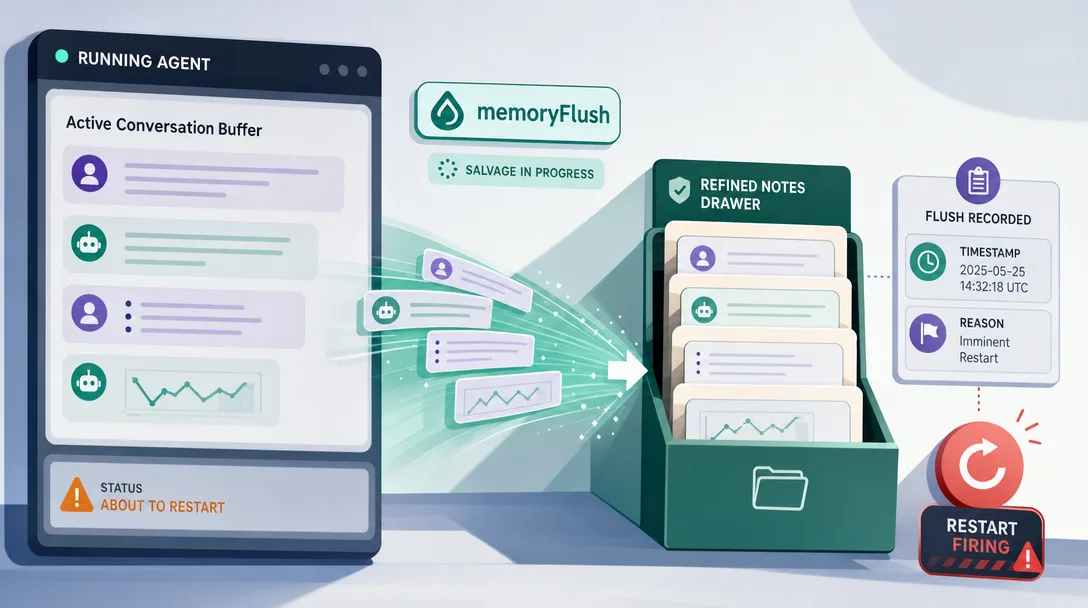
Conversation history is finite. When the session nears auto-compaction, the runtime is about to summarize older turns into a compact entry. Before that compaction runs, memoryFlush can fire. The agent gets one chance to save durable details to memory files with a note like:
- type: fact
  topic: deploy preferences
  content: "use `top` not `htop` (htop not installed)"
  evidence: "user said this in 2026-04-25 chat"
That note is appended to today's Layer 1 daily note. The original conversation can now be summarized with less risk of losing the durable detail.
If memoryFlush doesn't run, the rule may survive only as a vague compaction summary instead of a durable memory entry. I disabled memoryFlush once thinking it was overhead. Lost three days of casually-shared rules. Re-enabled it. Have not turned it off since.
4.3 Stage 3, Written to today's log
The note lives in memory/20260425.md. It's append-only in practice. Easy to write, easy to read, no structure beyond timestamps and sections. This is the cheapest layer: writes are free, reads happen only when the session startup path or a memory tool specifically asks for them.
4.4 Stage 4, Refined into MEMORY.md
A consolidation pass, manual promotion, or optional dreaming deep phase can read Layer 1 notes and promote worthy items into Layer 2.
The promotion rule:
Promote if
Skip if
Mentioned ≥ 2 times across separate conversations
Said once and never referenced again
Has clear "always / never" framing
Conditional or context-dependent ("for this one task...")
Survived without contradiction
Was contradicted later in the same week
Has an identifiable topic
Free-form opinion without category
After promotion, the entry in MEMORY.md looks like:
## Deploy preferences

- Use `top`, not `htop` (htop not installed in container) — added 2026-04-26
Topic-grouped. Sourced. Dated. Editable.
4.5 Stage 5, Promoted to SOUL.md
Some facts in MEMORY.md grow into behaviors. After enough application, they stop being "this user happens to want X" and start being "this is who I am for this user." That's the SOUL.md tier.
The promotion rule from MEMORY.md to SOUL.md is more conservative:
Promote if
Skip if
Applied repeatedly across many distinct tasks
Applied to one specific tool only
Hasn't been contradicted in 30+ days
Recently revised or qualified
Generalizes ("be concise") rather than specifies ("use top")
Requires conditional logic
In SOUL.md, the entry might look like:
## Operational style

- Default to non-interactive observability (e.g., `top`) so output is parseable
- When in doubt about a destructive action, ask before running
Notice it generalized. The specific htop fact from earlier became part of a broader principle. That's the signature of a Layer 3 entry: principles, not facts.
Cold Start: How the Agent Comes Back in the Morning
When the runtime restarts (after a reboot, a deploy, or an overnight stop), the agent needs to "wake up" with the right state in context.
OpenClaw's startup context, in the common main/private session case:
Order
Loaded
Why first
1
Bootstrap files such as AGENTS.md, SOUL.md, USER.md, IDENTITY.md, TOOLS.md, HEARTBEAT.md when applicable
Stable identity, operating rules, user profile, and tool boundaries
2
MEMORY.md when present and allowed
Curated long-term facts for main/private sessions
3
Recent daily memory only in specific startup cases such as bare /new or /reset
One-shot startup context, not ordinary every-turn bootstrap
4
Older memory/*.md files
Loaded on demand through memory_search / memory_get
Large bootstrap files are capped by bootstrapMaxChars and bootstrapTotalMaxChars, so the right goal is concise high-signal files rather than dumping every memory into startup context.
The plain English version: an employee comes back to work after the weekend. They reread their badge (SOUL.md), flip through their notebook (MEMORY.md), and search older diaries only when the task needs them. They don't reread everything they've ever written, that would take all morning. Startup memory is selective on purpose.
memoryFlush: The Salvage That Prevents Amnesia
memoryFlush deserves its own section because it's the single mechanism that prevents the agent from forgetting things you said.
6.1 The problem it solves
Conversation history is bounded. When you've been chatting for a long time, the runtime has two options: send the whole conversation to the model on every call (expensive, slow) or summarize old turns into a compact summary (cheap, fast, but lossy).
OpenClaw uses compaction when the session nears the model context limit or hits a provider context-overflow error. memoryFlush.softThresholdTokens is a configurable pre-compaction buffer for the housekeeping turn; it is not a simple "conversation crossed 4000 tokens" rule. Compaction keeps the gist; memory files preserve the specifics.
6.2 The solution
memoryFlush runs just before auto-compaction. It reminds the agent to save durable details and asks:
"Anything in here worth keeping forever? If yes, emit a structured note now."
Whatever the agent emits gets written to memory files immediately, usually today's memory/YYYYMMDD.md. Then compaction runs. The next call sees a compact summary in context plus durable notes available through memory.
6.3 The trigger settings
Parameter
Current role
What it controls
memoryFlush.enabled
on by default
Whether the silent pre-compaction memory turn runs
memoryFlush.model
optional exact provider/model
Dedicated model for the housekeeping turn
memoryFlush.softThresholdTokens
configurable buffer
How early the memory flush should run before compaction pressure
memoryFlush.systemPrompt / prompt
configurable wording
What the agent is told to write and which silent token to use when nothing should be saved
I leave this alone first, then tune only after /status and memory review show that compaction is happening too often or durable notes are being missed. The right value depends on model window, tool-output size, and how dense your conversations are.
6.4 The economics of memoryFlush
Each flush burns some extra input/output tokens because it is a real housekeeping turn. The exact cost depends on the selected memory-flush model, the amount of context being reviewed, and the provider's current pricing. The cost of not running flush is harder to count: every forgotten rule turns into a future re-explanation. Flush is one of the highest-impact memory settings in OpenClaw; turn it off and you lose much of the compound benefit of an agent that remembers.
There's also a quality dimension that token math misses. A flush that surfaces "use top not htop" prevents a future call where the agent runs the wrong command, which prevents an error message, which prevents a follow-up "let me try a different approach" round, which prevents a small drift in the agent's perceived reliability. The agent that remembers feels qualitatively different from the agent that approximates. Flush is what buys you that difference.
Three concrete MEMORY.md sections
A workspace's MEMORY.md typically settles into three durable sections. Knowing the shape ahead of time helps the agent file new facts in the right place.
7.1 Deploy preferences
Things about how you operate the systems the agent helps with. Server names, deploy scripts, "always do X first," "never restart Y."
## Deploy preferences

- Production deploy script: /opt/deploy.sh, never run without explicit user approval
- Caddy is reverse proxy; check its status before Nginx
- Restart sequence: app → caddy → never the database
7.2 User preferences
Things about how you want the agent to communicate with you. Tone, format, style.
## User preferences

- Concise replies; bullet points over paragraphs
- Code blocks with language hint always
- Quote actual file paths, never paraphrase
7.3 Decision frames
Heuristics the agent has observed you using. Not strict rules, patterns.
## Decision frames

- "If it touches production, ask first", observed across 5+ conversations
- "Prefer Markdown over JSON for human-readable output", confirmed three times
- "When unsure between two equally valid paths, ship the simpler one", stable for 2 months
These three sections aren't enforced by the runtime. They emerge naturally because human users tend to give three kinds of guidance: about the systems, about themselves, and about decision-making. If your MEMORY.md has 30 sections, you haven't been consolidating; you've been hoarding.
7.4 What about syncing memory across machines
A practical question shows up the moment you run agents on more than one machine: my Mac Mini at home, my laptop on the road, a Linux server in the cloud. If each one has its own MEMORY.md, they drift. If they share one, conflict resolution gets messy.
I run my MEMORY.md and SOUL.md in a Syncthing-managed folder so all three machines see the same files. Layer 1 logs stay local, they're per-machine telemetry, not shared knowledge. The trade I made:
Sync layer
What gets synced
Risk
Layer 3 (SOUL.md)
Always synced
Low, file is small, edits are rare
Layer 2 (MEMORY.md)
Synced
Medium, concurrent edits possible if I'm using two machines at once
Layer 1 (logs)
Local only
None, telemetry is per-environment
When a conflict happens (rare, maybe once a month), syncthing creates a MEMORY.sync-conflict-2026-04-25-laptop.md and I merge by hand. The 5 minutes of monthly merge work is cheaper than the alternatives (centralized DB, eventual-consistency CRDT, or just letting machines drift).
If syncthing isn't your tool, the same shape works on any file-based sync (rsync over a cron, iCloud, Dropbox, Git). The point is that file-based memory makes "sync" a solved problem — pick a tool, point it at the directory, done.
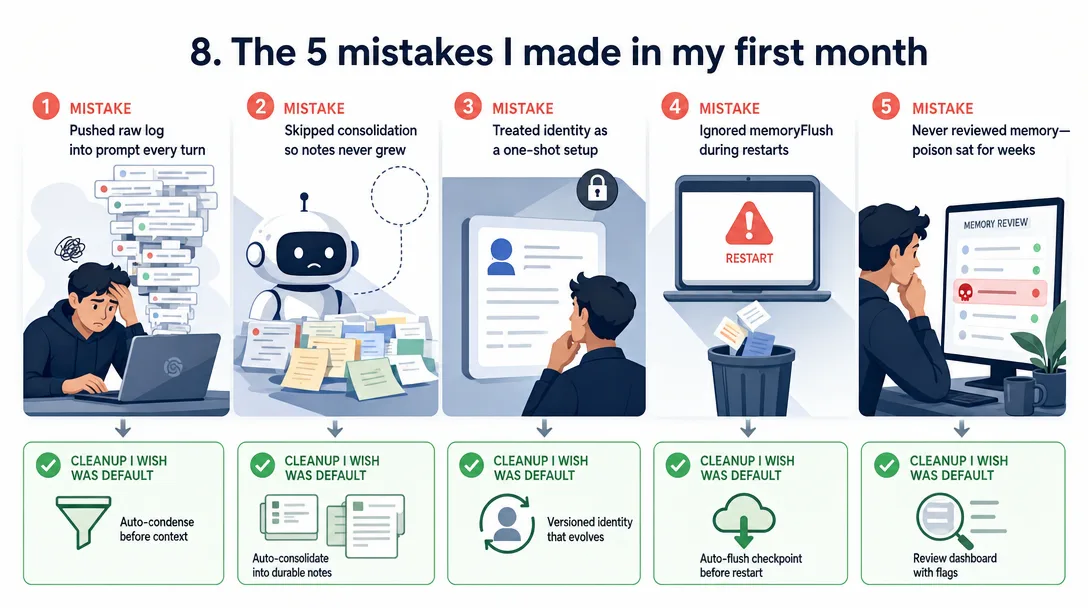
The 5 Mistakes I Made in My First Month
If you're about to set up an agent memory system, save yourself my mistakes.
Mistake 1: I disabled `memoryFlush` to save tokens
It costs a few hundred tokens per flush. I considered it overhead. After three days of "the agent forgot the rule I gave it on Monday," I turned it back on. Without memoryFlush, important details are more likely to be reduced to vague compaction summaries instead of durable notes. The token cost of running it is far smaller than the cost of repeating yourself.
Mistake 2: I dumped everything into MEMORY.md without curation
By month two, MEMORY.md was 6,000 lines. Loading time bloated. The agent's quality dropped because half its working context was old, low-signal entries. Curation is the work. I now schedule a weekly 10-minute manual scan: anything that hasn't been referenced in 30 days gets archived to a MEMORY-archive-2026-04.md. The active file stays under 800 lines.
Mistake 3: I wrote contradictory rules to SOUL.md
SOUL.md said both "be concise" and "always explain your reasoning fully." The model split the difference unpredictably. SOUL.md is for stable, non-contradictory rules. When two rules conflict, the resolution belongs in SOUL.md too — "be concise; expand reasoning only when explicitly asked."
Mistake 4: I didn't read MEMORY.md for two months
I wrote it. I let the agent write it. I never read it. When the agent started acting strangely, I finally opened it and found six entries that were obvious mistakes, facts that had been "promoted" from a misread conversation. MEMORY.md is yours, not the agent's. Read it monthly. Edit it. Delete what's wrong.
Mistake 5: I expected "memory" to be one thing
I kept asking "where does the agent remember X?" as if there were one answer. The answer is "depends on the layer." Today's chat? Layer 1. A rule that's been confirmed three times? Layer 2. Part of how the agent introduces itself? Layer 3. Treating memory as monolithic is what makes it confusing. Treating it as three layers with three rules is what makes it operable.
A 30-minute path: trace your own memory layers
Want to see all three layers on your own machine? Here's what I'd do tonight.
Open the workspace memory directory (2 min). ls -la ~/.openclaw/workspace/ for the default profile, or ~/.openclaw/workspace-<profile>/ when OPENCLAW_PROFILE is set. You'll see bootstrap files, optional MEMORY.md, and a memory/ subdirectory of dated notes.
Read SOUL.md and MEMORY.md (5 min). Don't edit yet, just read what's there. Notice the difference in style: SOUL.md is principles, MEMORY.md is facts.
Open today's daily note (3 min). cat memory/$(date +%Y-%m-%d).md if the file exists. Scroll to the last few entries, that's what the agent wrote most recently.
Observe memoryFlush (5 min). Have a long conversation with durable details, then use /status to watch compaction behavior and check today's memory note for saved details. Do not treat 4000 tokens as a universal trigger.
Promote a fact manually (5 min). Find one Layer 1 entry you want to keep. Add it to MEMORY.md under the appropriate section. The agent will load it on the next turn.
Edit SOUL.md to add a rule (5 min). Pick one stable behavior you want guaranteed. Add it as a one-liner. Restart the runtime if needed; observe behavior change next turn.
Run memory_search (5 min). From the agent's chat, ask it to search memory for a topic. Watch which layer the result comes from in the trace.
Half an hour of this and the three-layer model stops being abstract.
AI Agent Memory Checklist
Designing or debugging an AI agent memory system? Walk this list:
Layer
Ask this
Watch out for
Layer 1 (logs)
Are daily logs being written? Are old logs archived, not deleted?
Disk filling up = log rotation broken
Layer 2 (MEMORY.md)
Under 1,000 lines? Topic-grouped? Curated weekly?
4,000+ lines = hoarding, not memory
Layer 3 (SOUL.md)
Under 100 lines? No contradictions? Changes <1/week?
Frequent edits = it's still MEMORY.md, not SOUL.md
Disabled = durable details may only survive as vague summaries
Startup context
Bootstrap files concise? MEMORY.md curated?
Slow or bloated startup = memory files too large
Promotion rules
Documented for L1→L2 and L2→L3?
Implicit rules = inconsistent behavior
How I Would Use This in a Real Setup
Don't try to build all three layers on day one. The order I'd recommend:
Enable Layer 1 logging. Just write everything down for a week.
Read your own logs after a week. Notice which 5-10 facts you'd want preserved.
Hand-write those into MEMORY.md under three sections (deploy / user / decisions).
Keep MEMORY.md alive for a month. Add 1-2 entries a week. Resist the urge to "make it complete."
After a month, look at MEMORY.md and ask: "what's stable enough to be SOUL.md?" Promote 3-5 lines. Keep SOUL.md tiny.
Leave memoryFlush enabled. Tune memoryFlush.softThresholdTokens only after you understand your model window and compaction pattern.
Schedule a weekly memory review. 10 minutes, looking at MEMORY.md and pruning.
Each step is small. The compound result, after a month, is an agent that genuinely remembers you.
Back when I ran personal automation on n8n, "memory" meant a Postgres table I had to query manually. Every workflow re-read its config from the database, every time. Switching to file-based three-layer memory made the same kinds of automations feel less like cron jobs and more like a colleague who knew the project. Memory in plain Markdown is what changes the agent from a tool to a teammate.
Ready-to-Use Prompt: Architect an Agent Memory System in 3 Layers
What this does: Splits context (session RAM) from memory (disk), stands up the three layers (append-only logs → MEMORY.md → SOUL.md) with promotion rules, runs facts through the five life stages plus a memoryFlush salvage, and builds the three MEMORY.md sections with a cold-start reload. Based on: OpenClaw AI Agent Memory: 3 Layers That Work — https://aiworkflowpro.com/openclaw-memory-system/ Time to run: ~5 minutes
Copy this prompt into Claude Code, ChatGPT, or any AI assistant:
ROLE: You are an Agent Memory System Architect. Your job: stop an agent from resetting every Monday by splitting context from memory and layering disk-based memory with promotion rules and a salvage flush.

CONTEXT — CONTEXT-VS-MEMORY 3-LAYER METHOD:
The most expensive mistake in agent memory is treating context and memory as one bucket. Context is RAM that dies with the session; memory is disk that survives. Real memory has three layers, each with a promotion rule: Layer 1 append-only logs (raw event stream, never edited); Layer 2 MEMORY.md (refined notes: deploy preferences, user preferences, decision frames); Layer 3 SOUL.md (identity — who the agent is, core directives, rarely changes). A fact moves up a layer only when it proves durable: log → MEMORY.md when worth remembering, MEMORY.md → SOUL.md when identity-level stable. The five life stages of a fact (observed → logged → promoted to MEMORY.md → promoted to SOUL.md → retired) plus a memoryFlush that salvages durable facts before a session dies stop the agent from asking who you are every Monday.

INPUTS (fill in before running):
- CURRENT_STATE: [Does the agent reset every session, or have some memory? resets / partial / has MEMORY.md]
- FACT_TYPES: [What kinds of facts it must remember — deploy prefs, user prefs, decisions, identity]
- SESSION_PATTERN: [How sessions end — graceful close / crash / timeout]
- VOLATILITY: [How often prefs/identity change — stable / frequent]

METHOD — 4 STEPS:

Step 1 — Enforce the Context-vs-Memory Split
Confirm context (session RAM) and memory (disk) are separate. If CURRENT_STATE treats them as one bucket, split them — context dies, memory survives. Name what lives in the wrong place.

Step 2 — Set Up the 3 Layers With Promotion Rules
Stand up Layer 1 (append-only logs), Layer 2 (MEMORY.md refined notes), Layer 3 (SOUL.md identity). Write the promotion rule for each: log → MEMORY.md when worth remembering; MEMORY.md → SOUL.md when identity-level stable against VOLATILITY.

Step 3 — Run the 5 Life Stages + memoryFlush Salvage
Map FACT_TYPES through the five stages: observed → logged → promoted to MEMORY.md → promoted to SOUL.md → retired when stale. Add the memoryFlush: before SESSION_PATTERN ends a session, flush durable facts to the logs/MEMORY.md so context death never causes amnesia.

Step 4 — Build the 3 MEMORY.md Sections + Cold Start
Populate MEMORY.md with the three concrete sections — deploy preferences, user preferences, decision frames — and define the cold-start: how the agent reloads SOUL.md plus MEMORY.md each morning so it comes back knowing you.

RULES:
- Never treat context and memory as one bucket — context is RAM that dies; memory is disk that survives.
- Never promote a fact up a layer without the promotion rule firing — durability earns the promotion.
- Never let a session end without a memoryFlush — unsalvaged context dies and the agent forgets.

OUTPUT FORMAT:
Output a markdown report with:
1. Context-vs-Memory Split — what lives where now + what to move
2. 3-Layer Setup — markdown table, columns: Layer | Holds | Promotion Rule
3. Fact Life Stages + memoryFlush — the 5 stages + the salvage trigger
4. MEMORY.md Sections + Cold Start — the three sections + the morning reload
Save as @templates/openclaw-memory-system.md and run when the agent forgets across sessions, or when designing its memory.
Frequently Asked Questions
What is the difference between context and AI agent memory?
Context lives in the model's input window for the duration of one call and is gone the moment the session ends. Memory lives on disk as plain Markdown and survives restarts. ChatGPT's "memory feature" is closer to a 50-entry sticky note than a real memory system. Real AI agent memory has three layers: append-only conversation logs, refined notes, and identity files.
Why three layers and not one big MEMORY.md?
One file gets too big to load as bootstrap context, mixes important and trivial entries, and has no rule for what to forget. Three layers separate daily notes (Layer 1, memory/YYYYMMDD.md), refined notes (Layer 2, MEMORY.md), and identity (Layer 3, SOUL.md). Each layer has its own promotion rule and cost profile.
What is memoryFlush in OpenClaw?
memoryFlush is the silent salvage step that runs before auto-compaction. Before the runtime summarizes older turns, memoryFlush reminds the agent to save durable notes to memory files, commonly memory/YYYYMMDD.md. softThresholdTokens is a configurable pre-compaction buffer, not a universal "conversation crossed 4000 tokens" trigger.
When should a fact be promoted from MEMORY.md to SOUL.md?
When it stops being a single fact and becomes part of how the agent describes itself. "User prefers concise replies" starts in MEMORY.md. After it shows up in three different conversations and never gets contradicted, it earns a line in SOUL.md as a behavioral rule. Promotion is explicit, not automatic.
How does OpenClaw recover memory after a restart?
Startup injects the workspace bootstrap files such as AGENTS.md, SOUL.md, USER.md, IDENTITY.md, TOOLS.md, HEARTBEAT.md when applicable, and MEMORY.md when present and allowed for the session. Daily memory files under memory/ are normally recalled on demand through memory_search and memory_get, with special startup handling on bare /new or /reset turns.
Closing
Three layers. One promotion rule each. One salvage step. That's the whole shape.
A chat product hides memory behind opaque vibes, sometimes it remembers, sometimes it doesn't, you'll never know why. An agent runtime makes memory legible: you can open SOUL.md and read the rules; you can open MEMORY.md and see the facts; you can grep the logs and find the evidence. Legibility is what makes the memory operable, and operable is what makes the agent worth keeping running.
Gloves on, tape measure in hand — nobody types a query. Three voice surfaces for ai automation tools (terminal, Telegram, Discord), 10 TTS and 6 STT providers compared on cost and latency, plus a setup that costs nothing.
A Skill is an operating manual, not a plugin. The five-layer architecture behind workflow automation that survives context compression, session crashes, and handoffs: SKILL.md as the single entry point, deterministic scripts, run state for crash recovery, and a resource layer.
Two of the three fixes can be undone the same afternoon. The third cannot, and it is the one people reach for first. LoRA cut costs tenfold, which made the expensive option tempting rather than correct. In business process automation, the order you try things in is the whole decision.
Fine tuning turns a generalist into a specialist - skip the baseline and you can never prove it worked. Five steps on Google Cloud: baseline, data prep, instruction design, hyperparameters, evaluation. Plus the finding that surprises business process automation buyers: 100 good samples beat 1,000.