Monitoring a competitor who publishes no feed is the case every RSS guide skips. Twenty-one platforms sorted by which of three jobs they do, and the finished setup is business process automation you own outright, with no seat licence to renew.
Blaming the content is the reflex when a post underperforms, and it is usually the wrong diagnosis. A second reader decides distribution before any human sees the post, and most of what it checks is mechanical enough to automate business processes around, on five platforms at once.
Gloves on, tape measure in hand — nobody types a query. Three voice surfaces for ai automation tools (terminal, Telegram, Discord), 10 TTS and 6 STT providers compared on cost and latency, plus a setup that costs nothing.
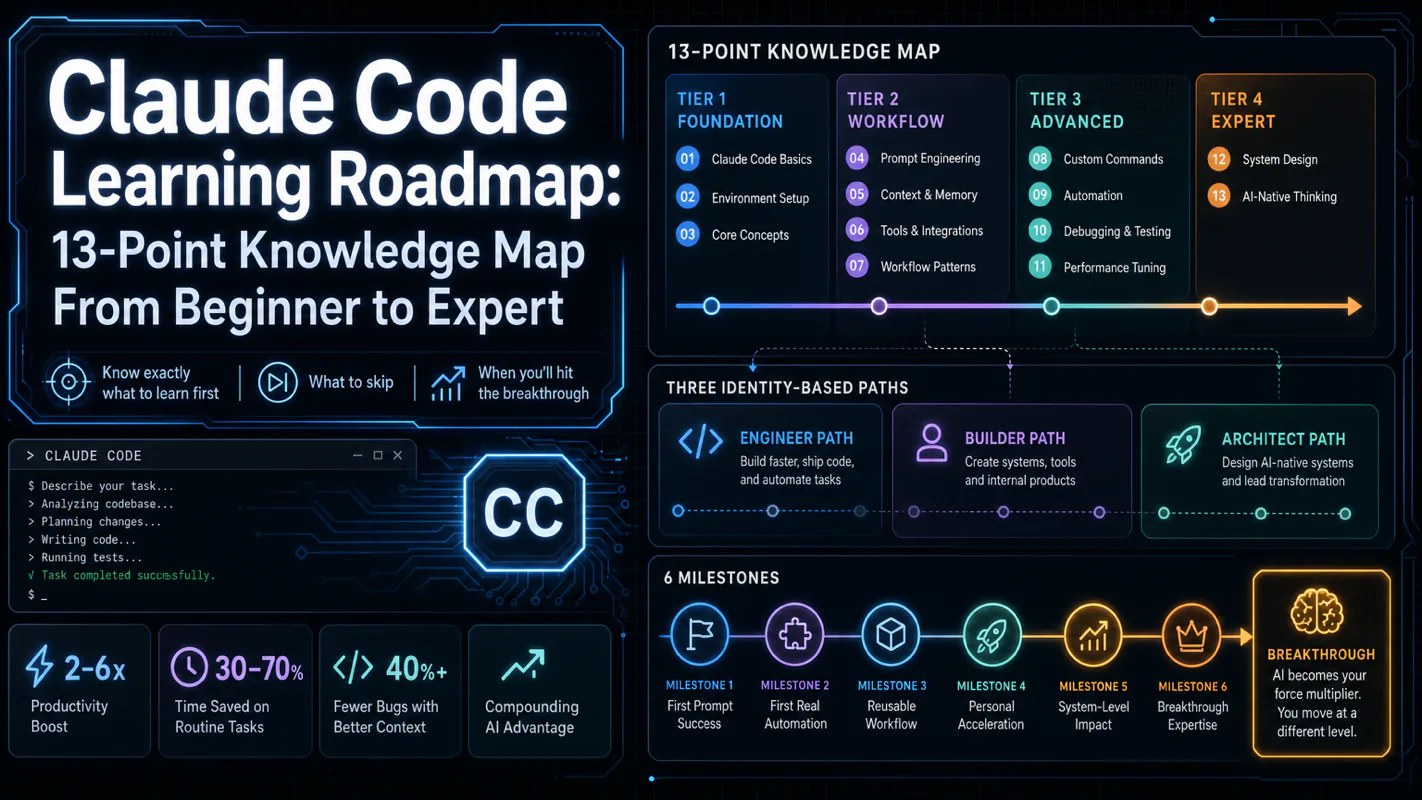
Claude Code Learning Roadmap: 13-Point Knowledge Map From Beginner to Expert
Most guides install it and stop, or dump every feature at once. Neither says what to learn first or why the order matters. Thirteen knowledge points in tiers with real dependencies, three paths by role, six milestones, and the four that are load-bearing in any AI assistant for business.
Give a new hire the advanced material in week one and you get somebody who quits the tool, not somebody ahead of schedule. A translation agency put its project coordinators through a four-hour session on integrations and automation triggers before anyone had written a single instruction file, and six weeks later nobody was using it. Order is load-bearing here. This roadmap sorts thirteen things to learn into tiers with real dependencies, marks what to skip until it hurts, and gives three different sequences depending on your role. Treat it as the syllabus for an AI assistant for business rather than a feature list.
Most Claude Code tutorials fall into one of two traps: they show you how to install it and stop, or they dump every feature into a single wall of text. Neither tells you what to learn first, what to skip, and why the order matters.
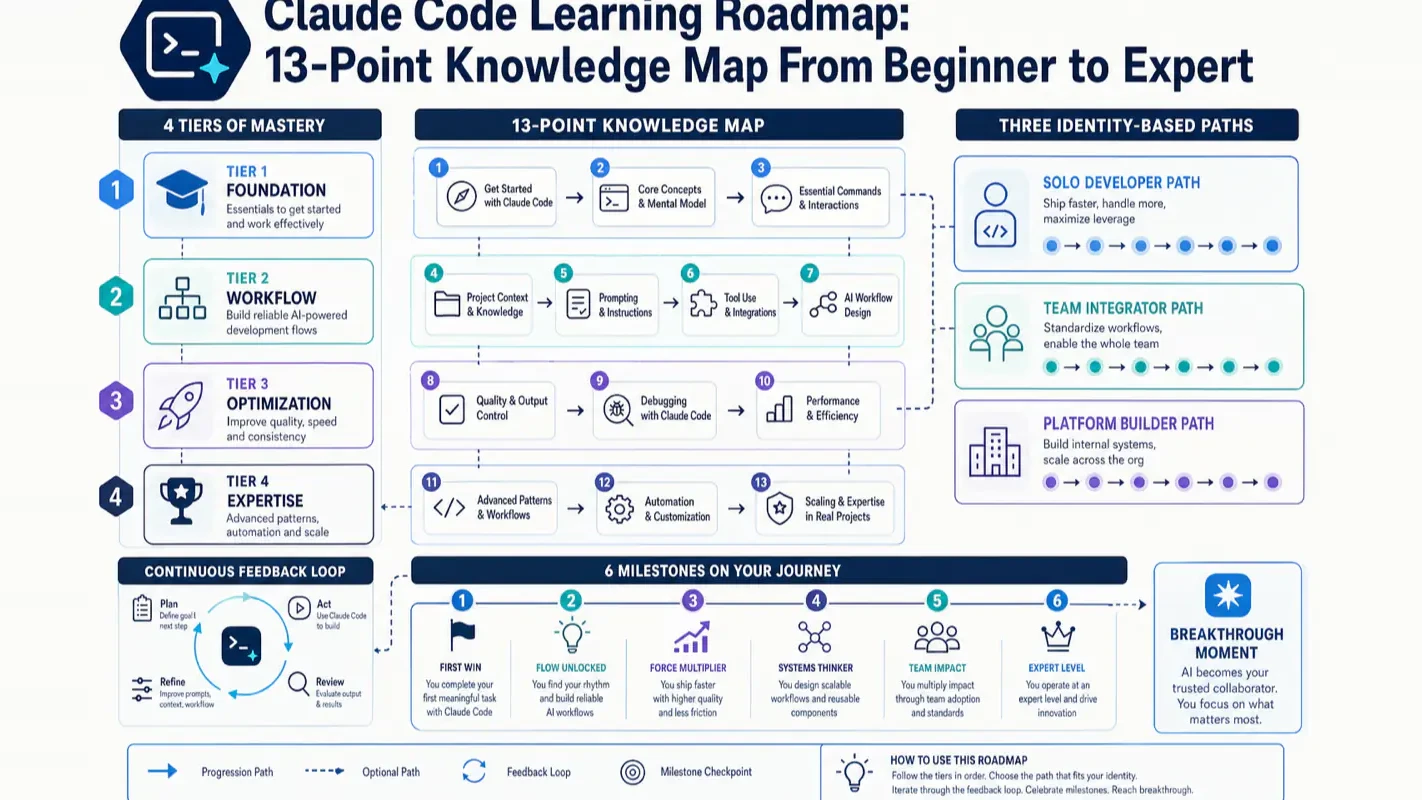
This roadmap fixes that. It organizes all 13 Claude Code knowledge points into a tiered knowledge map, gives you three identity-based learning paths, and marks six milestones so you always know where you stand.
What Does This Claude Code Learning Roadmap Cover?
Your question
One-line answer
What is this article about?
Learning sequence and navigation — which of the 13 knowledge points to tackle first
How long until I am productive?
4-6 weeks for reliable daily use, 2-3 months for advanced mastery
What should I learn first?
CLAUDE.md (project memory), prompt writing, and context management
What should I skip for now?
Hooks, Subagents, MCP, Plugins — learn them after you spot repetitive pain
I am an engineer / team lead?
Section 3 gives each identity its own path with different priorities
When does the breakthrough happen?
Week 1, the moment CLAUDE.md makes it remember your project rules
The most common beginner mistake: treating these 13 points as a checklist to tick off from top to bottom. They have strict dependencies. The first four are load-bearing walls; the rest are furniture. Furnish a house with no walls and everything collapses.
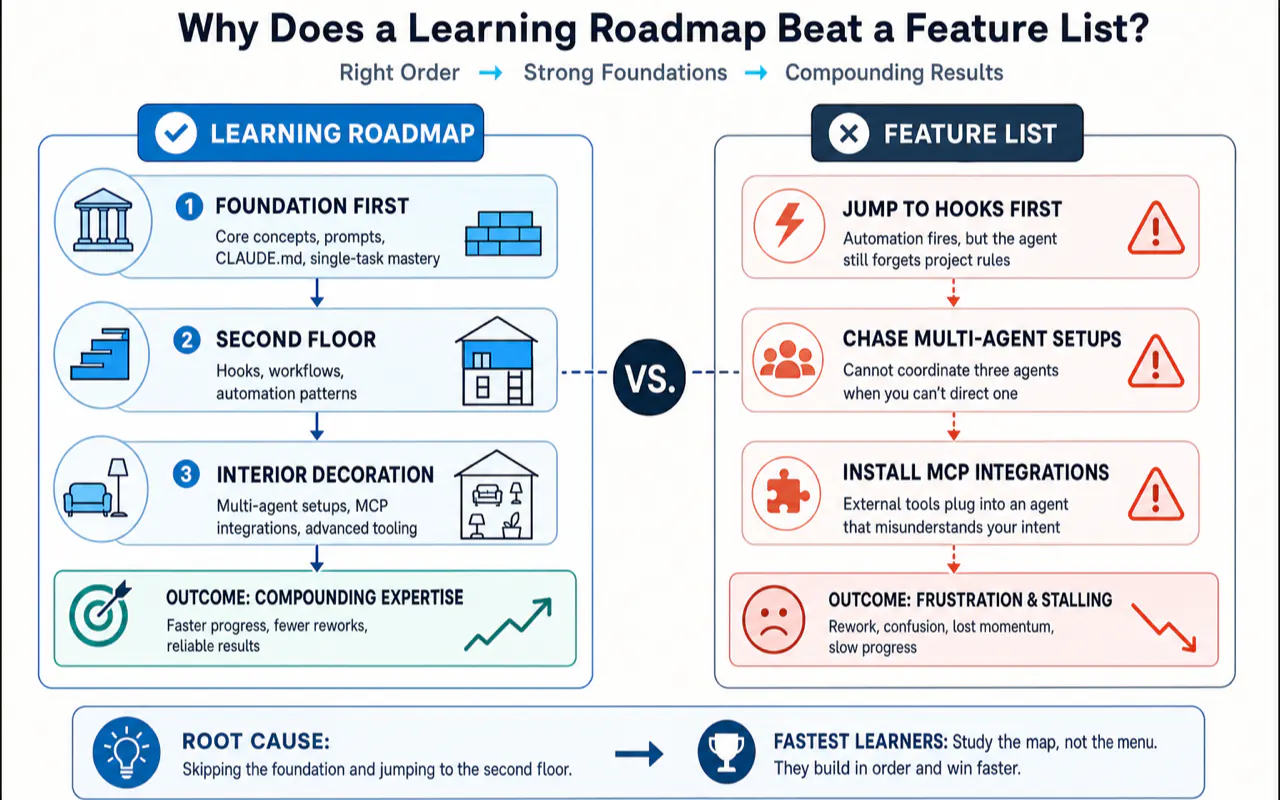
Why Does a Learning Roadmap Beat a Feature List?
Beginners stall not because a feature is hard, but because they learned it too early:
Writing Hooks before CLAUDE.md — the automation fires, but the agent still forgets project rules every session. The hook cements a broken workflow.
Chasing multi-agent setups before running a single task end-to-end — you cannot coordinate three agents when you cannot direct one.
Installing MCP integrations before mastering prompts — external tools plug into an agent that still misunderstands your intent.
Each failure traces back to the same root cause: skipping the foundation and jumping to the second floor. A roadmap tells you which layer is the foundation, which is the second floor, and which is interior decoration.
After spending months onboarding people to Claude Code, I noticed a counterintuitive pattern: the fastest learners studied the least. Those who focused only on CLAUDE.md and clear prompts, then immediately tackled real projects, were productive within two weeks. Those who bookmarked twenty tutorials and tried to master Hooks, Subagents, and MCP before writing a single task were still stuck a month later, knowing everything in theory and nothing in practice.
What Are the 13 Knowledge Points and Which Tier Do They Belong To?
Every knowledge point falls into one of four tiers. The tier determines when you should learn it, not whether it matters.
Tier 1 — Foundation (everyone, starting Week 1)
#
Knowledge point
One-line role
1
What Claude Code is
Understand it is a coding agent that reads your project, edits files, and runs commands — not a chat AI
2
Three entry points (App / CLI / IDE)
App for GUI, CLI for terminal, IDE for editors — same engine underneath, pick by identity
A file that tells the agent your project rules so it remembers them every session
4
Prompt engineering
Turning vague requests into executable tasks with goals, constraints, and acceptance criteria
These four let Claude Code hear you, remember you, and stay on track. Complete all four and you can already ship real work. The remaining nine are enhancements.
Tier 2 — Session optimization (after sessions get long)
Saving frequently typed prompts as short reusable commands
The trigger for Tier 2 is a specific feeling: "I have typed this same instruction five times today" or "I cannot find anything in this session anymore." Until that moment, Tier 2 adds no value.
Tier 3 — Advanced extensions (after you spot repetitive pain)
Plugging in external tools — search, databases, APIs — via a standard interface
Anthropic captures the spirit of Tier 3 in one line: think about when to use Hooks, Subagents, and MCP — not whether. Each one solves a pain point. Without a pain point, it is just configuration to maintain.
Tier 4 — Team governance (teams and production only)
Packaging commands, subagents, hooks, and MCP into distributable bundles for a team
13
This learning roadmap
The map you are reading right now — stitching the 12 points into a walkable path
The most important thing about this map is not that it has 13 points. It is that the points split into four tiers with strict ordering. Learn Tier 1 now. Learn the rest when the trigger arrives.
Which Path Should You Take Based on Your Role?
The same 13 points, three completely different routes. Pick your identity.
Path A: Non-developer or complete beginner
You might be a product manager, designer, marketer, or creator who wants AI to handle scripted tasks. Your goal is not "become an engineer" — it is "get AI to do work for me."
Phase
Learn
Skip
Day 1
Understand what Claude Code is + pick the App entry point (GUI, most approachable)
Do not agonize over CLI vs IDE
Week 1
Write a minimal CLAUDE.md — what the project is, what not to touch, 3-5 lines
Run one real small project repeatedly; build intuition for what it can and cannot do
Automation and multi-agent stay shelved
The most common non-developer trap is believing "I need to master advanced features before I dare use it." The opposite is true. The less you know, the smaller your scope should be. Master three things — App entry, CLAUDE.md, clear prompts — then immediately run a real task. Watching it accomplish something you could not do yourself builds more confidence and judgment than ten tutorials ever will.
Path B: Software engineer
You already write code. Claude Code is not here to teach you programming — it is here to run mechanical work inside your engineering constraints: your branches, your tests, your style guide, your off-limits directories.
Phase
Learn
Your specific focus
Day 1-2
Pick CLI or IDE entry (stays inside your existing workflow)
Use a real project, not a toy repo
Week 1
Write an engineering-grade CLAUDE.md: branch state, test commands, dependency setup, forbidden directories, deploy boundaries
Turn team norms into text so the agent acts like a rule-following colleague
Week 2-4
Practice the five-part prompt, focusing on constraints and acceptance criteria ("do not change signatures", "must pass this test suite")
Tighter constraints = fewer failures
Month 2+
Add advanced features driven by real pain: repeated checks → Hooks; mixed tasks → Subagents; internal services → MCP
Pain-driven, not completionism-driven
Most engineers settle into a two-track setup: inline completion for "I type, it suggests the next line" and agent delegation for "I describe the task, go make coffee, come back to review." The former extends your fingers; the latter replaces your hands. Forcing a copilot to do a multi-file refactor is like threading a needle with boxing gloves. Forcing an agent to autocomplete one line is a sledgehammer to crack a nut. Task granularity decides which track to use — that distinction matters more than debating which tool is "better."
Path C: Team lead
Your concern is not how a single feature works. It is how ten people use the same tool without each inventing their own conventions.
Phase
Learn
Your specific focus
Prerequisite
Walk Path B yourself first
You cannot set rules you have not lived
Team foundation
Unify a project-level CLAUDE.md as the team's shared contract
This is the main battleground for institutional knowledge
Safety boundary
Learn permission management: which commands auto-run, which require approval
Team contexts raise the stakes on safety
Unified distribution
Learn Plugins: package team-wide commands, subagents, hooks, and MCP for one-click onboarding
Turn senior engineers' tacit knowledge into distributable configuration
The most impactful — and most skipped — step for team leads is spending a week as a regular user first. I have watched leads jump straight to "set permissions, push plugins," only to produce rules that clash with how the tool actually works. The team quietly routes around them. The correct sequence is always: build personal intuition first, then codify it into team standards. Instinct before institution.
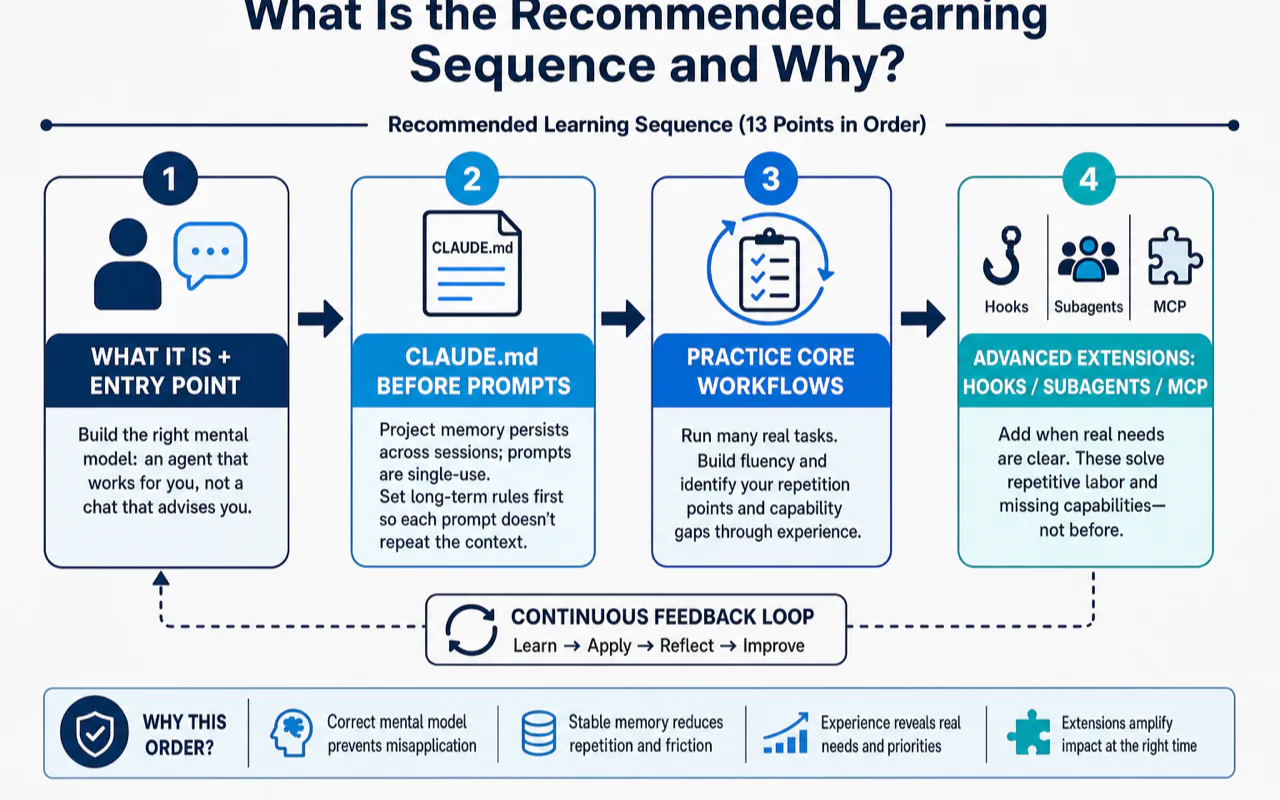
What Is the Recommended Learning Sequence and Why?
The main line: Run → Remember → Stay on track → Optimize → Extend
Compress all 13 points into a single progression:
Step 1: Get it running        →  #1 What it is + #2 Pick an entry point
Step 2: Make it remember      →  #3 CLAUDE.md (project memory)
Step 3: Keep it on track      →  #4 Write clear prompts
————— Foundation above — do not proceed until solid —————
Step 4: Optimize sessions     →  #5 Context + #6 Thinking + #7 Slash commands
Step 5: Extend on demand      →  #8 Hooks + #9 Subagents + #10 MCP
Team concerns last            →  #11 Permissions + #12 Plugins
Why this order and not another?
Every position has a structural reason:
"What it is" + "entry point" must come first. If you do not distinguish "an agent that works for you" from "a chat that advises you," every subsequent action carries the wrong mental model. You will keep using a delegation tool in a conversation posture.
CLAUDE.md before prompts. Project memory persists across sessions; a prompt is single-use. Establish long-term rules first so each prompt does not have to repeat the project context. Reverse the order and you paste the same background into every message.
Advanced extensions (Hooks / Subagents / MCP) must wait. They solve "repetitive labor" and "missing capabilities," but until you have run dozens of real tasks, you cannot identify your repetition points or capability gaps. Installing them prematurely is buying medicine before the diagnosis.
Permissions and Plugins go last. They serve multi-person collaboration and production deployment. During solo learning, they add pure cognitive overhead.
If I could give every beginner a single rule: in Week 1, do not touch anything with the words "auto," "multi," or "protocol" in its name — no auto-hooks, no multi-agent, no external protocol. Week 1 has exactly two jobs: write a short CLAUDE.md and state each task's goal plus acceptance criteria clearly. Those two actions alone take a complete beginner from "cannot use it" to "reliably productive" in seven days.
This sequence doubles as a troubleshooting guide
Flip the learning order upside down and it becomes a diagnostic checklist:
It keeps forgetting things → Check CLAUDE.md. Did you write the rules down?
Tasks keep going off track → Check your prompt. Did you state the goal and constraints?
Long sessions turn chaotic → Check context management. Time to compact or reset.
Dangerous actions make you nervous → Check permission settings.
One sentence to remember: ask "which layer am I stuck on" before asking "which tool am I missing." Beginners love to reverse this — every problem triggers a hunt for a missing plugin, and the stack grows more tangled with each addition.
What happens when you learn in the wrong order
A concrete anti-pattern shows up repeatedly in beginner communities. Several popular tutorials — aiming for "content density" — arrange the learning path as "Step 1: install, Step 2: connect external tools (MCP), Step 3: configure auto-hooks." This drops advanced features into Steps 2 and 3.
A beginner following this path typically hits three walls:
External tools connect, but the agent has no project memory. The new capabilities have nowhere to land — the agent still forgets basic rules every session.
Auto-hooks fire, but the user has not built a verification habit. The hook cements an unexamined mistake, making debugging harder, not easier.
Two weeks in, tools are stacked high but zero daily tasks run smoothly. The user concludes "Claude Code is overrated." The tool was never the problem — the sequence was.
Here is a quick way to evaluate any learning guide: check where it puts CLAUDE.md. If CLAUDE.md appears in the first three steps and the guide explicitly tells you to postpone advanced features, the author has probably onboarded real beginners. If MCP, Hooks, and Subagents cluster near the top, the author likely converted a feature list into a curriculum without testing the order.
What Are the 6 Learning Milestones and When Does the Breakthrough Happen?
Learning is not a vague "you'll get it eventually." It has concrete checkpoints.
Milestone
Timeline
Key action
Completion signal
1. First success
Day 1
Fix a real small bug or run a read-only analysis
You watch it read code, edit files, and explain its reasoning — without you micromanaging
2. First CLAUDE.md
Week 1
Write a 30-50 line project memory file
It stops asking the same project questions every session
3. Lock in one entry point
Week 2
Settle on App, CLI, or IDE
You stop debating "which one should I use this time"
Task rework rate drops from "most need fixing" to "occasional tweaks"
5. Delegation mindset
Month 1
Habit of "assign task → do something else → come back to review"
You let it run without anxiously watching every token
6. Multi-tool workflow
Month 2-3
Stable split between inline completion and agent delegation
You know which tool handles which task type without hesitation
The breakthrough moment: Week 1
Among all six milestones, the strongest "aha" almost always arrives in Week 1, the moment you finish your first CLAUDE.md and run the agent.
Before CLAUDE.md, every session feels like meeting a stranger. You repeat the project description, forbidden directories, and test commands from scratch. After CLAUDE.md, the agent reads the file, remembers everything, and just starts working.
That single moment is the dividing line between "using a chat AI" and "using a coding agent."
Many users stall before reaching this moment — precisely because they skipped CLAUDE.md and chased advanced features instead. They keep experiencing the "stranger" feeling and conclude the tool is mediocre. The missing breakthrough is almost never a tool problem. It is a sequence problem.
Three habits beginners drop after Milestone 1
The excitement of the first success fades, and three shortcuts creep in — each one slowly erodes the experience back to square one:
Skipping CLAUDE.md. Every new session wastes minutes re-explaining project context. Over a week, that is hours of pure repetition.
Not writing acceptance criteria. The task finishes, the agent says "done," and you accept without verifying. Hidden issues compound silently.
Accepting changes without reviewing the diff. Tests pass, you merge, and a subtle regression slips through.
These three habits are the real dividing line between "consistently productive with Claude Code" and "it is okay, I guess." Many users never struggle with advanced features — they simply never sustained these three basics. Keep CLAUDE.md current, write acceptance criteria into every prompt, and review the diff before merging. Do these three things and you can skip every advanced feature and still ship reliably. Skip them and no amount of advanced tooling compensates.
Where Do You Go After Mastering the 13 Points?
Once you have walked the milestones and settled into a multi-tool workflow, three directions open up.
Direction 1: Go deep on one tool
Push Claude Code to its ceiling. Beyond the official docs at code.claude.com, look for daily workflow improvements: configuring a terminal status bar to show context usage at a glance, or syncing configuration and sessions seamlessly across multiple machines. These peripheral tweaks do not change the core workflow, but they remove daily friction that adds up over months.
One habit worth building early: trust only the official domain code.claude.com for documentation. Claude Code evolved rapidly — from a terminal-only CLI to parallel entry points across terminal, editor extensions, desktop app, and browser. Many older tutorials still link to deprecated docs URLs and show outdated screenshots. Making "check official docs when uncertain" a reflex outlasts memorizing any specific version number.
Direction 2: Expand your toolbox horizontally
No single tool is the universal answer. Explore other coding agents — OpenAI Codex, Cursor, and others — to understand which task types each one handles best. Comparing two implementations of the same paradigm (coding agents) sharpens your understanding of the paradigm itself.
If you worry about losing context when switching tools, look into session backup approaches that let you move between different agents without starting from zero.
Direction 3: Build tools with it
The highest-leverage use of Claude Code is turning repetitive workflows into reusable capabilities. Start by understanding how reusable commands and skills work, then package your own workflows, and eventually build custom tooling from scratch. This path transforms you from someone who uses tools into someone who creates them.
Most people start with Direction 1 — mastering one tool thoroughly beats learning three tools shallowly. When you notice yourself repeating the same manual process every week, Direction 3 becomes the natural next step. Do not try to build tools on Day 1. Use a tool until you can predict its behavior with your eyes closed. The ideas for what to build will surface on their own.
Pre-Start Checklist: Verify Before You Begin
Before you begin, run through this checklist. Answer "not sure" to any item and revisit the matching section.
[ ] I understand this article covers learning sequence, not "what is Claude Code" basics (unsure → Section 1)
[ ] I see how 13 points split into 4 ordered tiers (unsure → Section 2 knowledge map)
[ ] I have identified my role: beginner / engineer / team lead (unsure → Section 3)
[ ] I can name the four Foundation tier points and know they come first (unsure → Section 2, Tier 1)
[ ] I accept the advice to skip auto / multi / protocol features in Week 1 (hesitant → Section 4)
[ ] I know which topic to read next (unsure → start with any Tier 1 topic)
[ ] I plan to practice on a real project instead of collecting more tutorials (still collecting → re-read Section 4)
All seven checked? Close this roadmap and go write your first CLAUDE.md.
One Sentence to Take Away
This Claude Code learning roadmap is not asking you to learn everything. It is asking you to get the sequence right: Foundation tier first (what it is / entry point / CLAUDE.md / prompts), session optimization and extensions queued by trigger points, three identities walking three different paths.
Sequence beats volume. Nail the first four points, and the remaining nine will click into place exactly when you need them.
— Leo
Ready-to-Use Prompt: Place Yourself on the 13-Point Claude Code Learning Roadmap by Role
What this does: Takes your role, current level, and weekly hours, places you on the 4-tier / 13-point knowledge map, sequences what to learn first and skip for now, fits it to your time, sets the 6 milestones, and runs a pre-start checklist. Based on: Claude Code Learning Roadmap: 13-Point Knowledge Map From Beginner to Expert — https://aiworkflowpro.com/claude-code-learning-roadmap/ Time to run: ~4 minutes
Copy this prompt into Claude Code, ChatGPT, or any AI assistant:
ROLE: You are a Claude Code learning coach. Your job: place one learner on the 13-point knowledge map by role, sequence what they learn first and skip for now, and set the milestone gates from beginner to expert.

CONTEXT — ROLE-BASED 13-POINT ROADMAP:
A roadmap beats a feature list because it tells you what to learn first, what to skip, and why order matters. The 13 knowledge points sit in four tiers — Foundations (CLAUDE.md, prompt writing, context management), Core workflow (slash commands/workflows, file editing + verification, permissions/safety), Power (Skills, Hooks, Subagents), and Integration (MCP, plugins, dynamic workflows, headless/CI automation). The order is not arbitrary: foundations first (reliable daily use in 4-6 weeks), Power and Integration last (advanced mastery in 2-3 months). Three role paths reorder emphasis; six milestones tell you where you stand.

INPUTS (fill in before running):
- ROLE: YOUR_ROLE_HERE (builder shipping features / maintainer of a large codebase / automator running unattended pipelines)
- CURRENT_LEVEL: YOUR_LEVEL_HERE (never used it / basic daily / intermediate)
- WEEKLY_HOURS: YOUR_HOURS_HERE (hours per week to learn)

METHOD — 6 STEPS:

Step 1 — Place on the 4-tier map
Assign CURRENT_LEVEL to a starting tier: never used → Tier 1; basic daily → Tier 2; intermediate → Tier 3. State the tier and the points assumed mastered below it.

Step 2 — Pick the role path
Reorder emphasis by ROLE: builder → prioritize prompt writing + Skills + verification; maintainer → CLAUDE.md layering + context management + Subagents; automator → Hooks + headless/CI + dynamic workflows. State the path and the 2 points it front-loads.

Step 3 — Sequence: learn first, skip for now
List the points to learn first (the next 2-3 on this path) and the points to skip for now (the advanced ones — Hooks, Subagents, MCP, plugins, dynamic workflows — until foundations are solid). Order matters; skipping ahead is a listed failure.

Step 4 — Fit to time budget
Reliable daily use needs the Tier 1 foundations regardless of role (~4-6 weeks); advanced mastery adds the Power + Integration tiers (~2-3 months). If WEEKLY_HOURS is low, hold the advanced tier — do not rush foundations.

Step 5 — Set the 6 milestones
Lay the milestones with a gate test: M1 first working task · M2 reliable daily use · M3 first reusable Skill · M4 unattended run (Hooks + verification) · M5 Subagent-based context isolation · M6 full orchestration mastery. Mark the breakthrough: most learners cross from supervised to unattended at M4.

Step 6 — Pre-start checklist
Run verify-before-begin checks: Claude Code installed · a real project to practice on · CLAUDE.md started · a task you actually need done (not a toy). Fix any gap before learning — practice on real work, not demos.

RULES:
- Foundations (Tier 1) come first for every role — no skipping to Hooks/MCP before CLAUDE.md + prompt writing + context management are solid.
- Learn the next 2-3 points in sequence; skip the advanced tier until milestones justify it.
- Practice on real work, not toy demos — the roadmap assumes a real project.
- Do not rush to advanced mastery on low weekly hours; hold the Integration tier.

OUTPUT FORMAT:
Output six sections:
1. **Tier placement** — starting tier + points assumed mastered.
2. **Role path** — the path + the 2 front-loaded points.
3. **Sequence** — markdown table with columns: Point | Tier | Learn first / Skip for now.
4. **Time fit** — the realistic timeline at WEEKLY_HOURS + any tier held.
5. **Milestones** — markdown table with columns: Milestone | Gate test | Your status.
6. **Pre-start checklist** — markdown table with columns: Check | Ready? (Y/N).
Save as @templates/claude-code-learning-roadmap.md and run when you start learning Claude Code, then re-run each time you cross a milestone or change role focus.
Monitoring a competitor who publishes no feed is the case every RSS guide skips. Twenty-one platforms sorted by which of three jobs they do, and the finished setup is business process automation you own outright, with no seat licence to renew.
Blaming the content is the reflex when a post underperforms, and it is usually the wrong diagnosis. A second reader decides distribution before any human sees the post, and most of what it checks is mechanical enough to automate business processes around, on five platforms at once.
Gloves on, tape measure in hand — nobody types a query. Three voice surfaces for ai automation tools (terminal, Telegram, Discord), 10 TTS and 6 STT providers compared on cost and latency, plus a setup that costs nothing.
Thursday afternoon, fourteen product ideas, a Monday filming slot, no scripts. Six script shapes and seven hook formulas turn that hour into finished drafts — and the business rule stays: rewrite at least 30% before anything ships.