Monitoring a competitor who publishes no feed is the case every RSS guide skips. Twenty-one platforms sorted by which of three jobs they do, and the finished setup is business process automation you own outright, with no seat licence to renew.
Blaming the content is the reflex when a post underperforms, and it is usually the wrong diagnosis. A second reader decides distribution before any human sees the post, and most of what it checks is mechanical enough to automate business processes around, on five platforms at once.
Gloves on, tape measure in hand — nobody types a query. Three voice surfaces for ai automation tools (terminal, Telegram, Discord), 10 TTS and 6 STT providers compared on cost and latency, plus a setup that costs nothing.
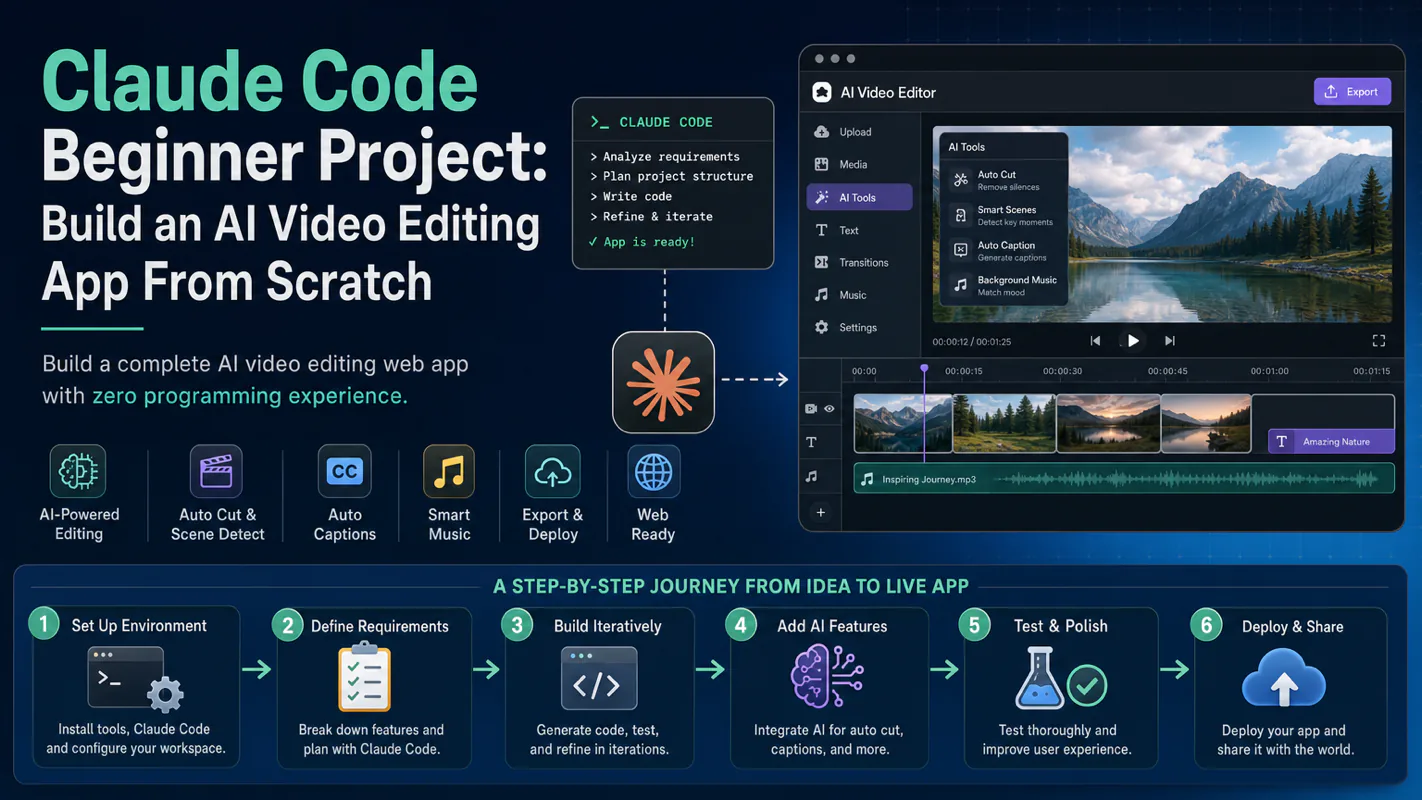
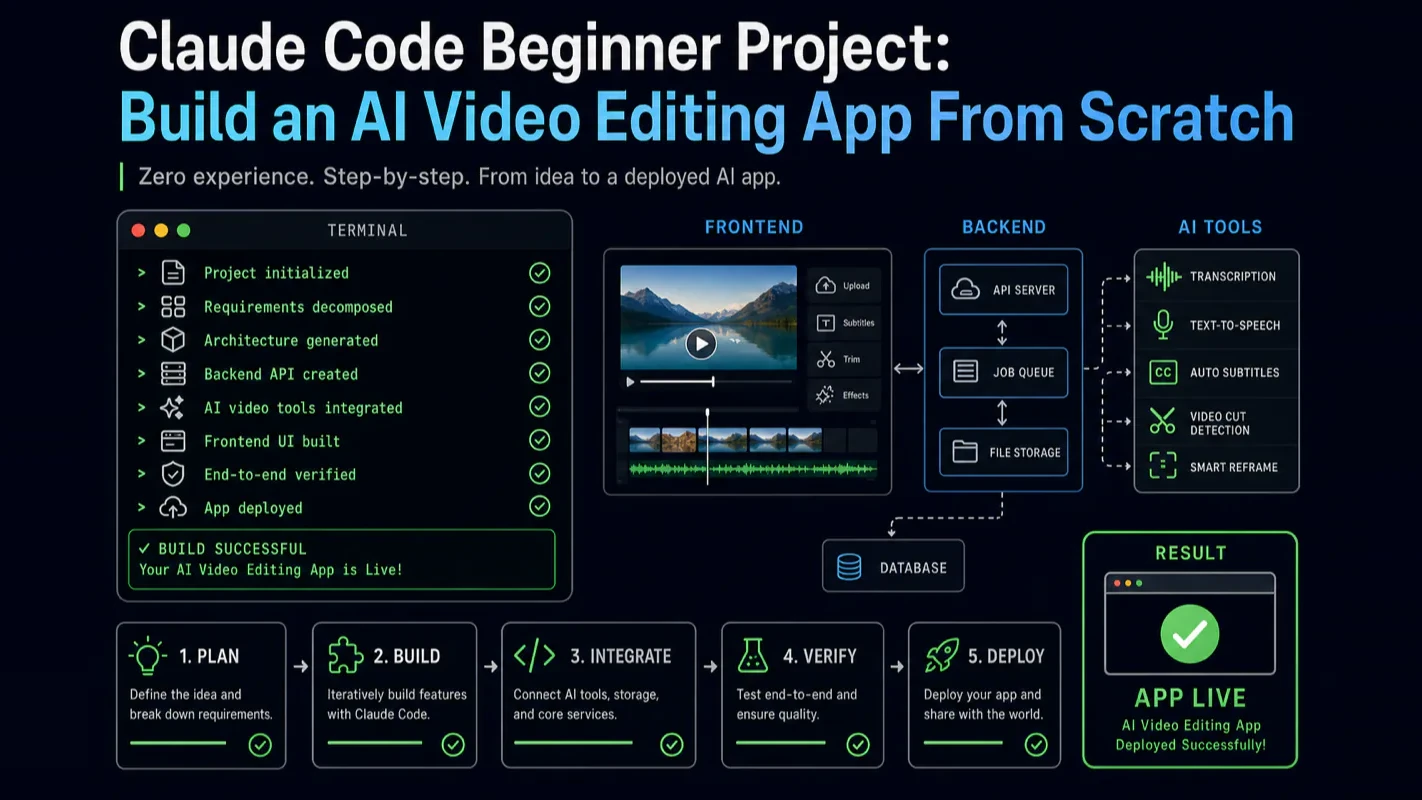
Claude Code Beginner Project: Build an AI Video Editing App From Scratch
A complete video editing web app, built by someone who never wrote a line of code by hand. Install through cloud deploy, memory architecture, boundary-first development, hooks, Docker builds, and five principles that transfer - where business process automation builds rather than connects.
Every operator eventually hits the same wall: the off-the-shelf product does ninety percent of the job, and the missing ten percent is the part that is actually yours. A subscription box company can buy inventory software and email software, but the thing that decides which sample goes in which box based on last month's returns exists nowhere, so somebody does it by hand every month, forever. This is an account of building a real working application from zero with no manual coding, and the five principles that held it together. Read it as the case for business process automation that builds rather than connects.
A complete AI video editing web app — built entirely by someone who never wrote a line of code manually. That is what Claude Code makes possible for absolute beginners.
This guide walks you through the full journey: from installing Claude Code to deploying a production app that analyzes raw video, generates narration, synthesizes voiceover, and outputs finished short-form content. You will learn the five development principles that make AI-assisted coding work, the boundary-first strategy that eliminates rework, and the exact tool stack I used across three months and 4,000+ conversations.
What This Tutorial Covers
Beyond the finished app, you walk away with a repeatable development process that works for any project:
Claude Code installation, terminal configuration, and GitHub SSH setup
Memory system architecture: personal memory vs. project memory
MVP product design: translating automation workflows into product requirements
Boundary-first development: build inputs and outputs first, core logic last
MCP tool extensions and Hooks automation
Docker multi-stage builds and one-click cloud deployment
Five core development principles that apply to any AI-assisted coding project
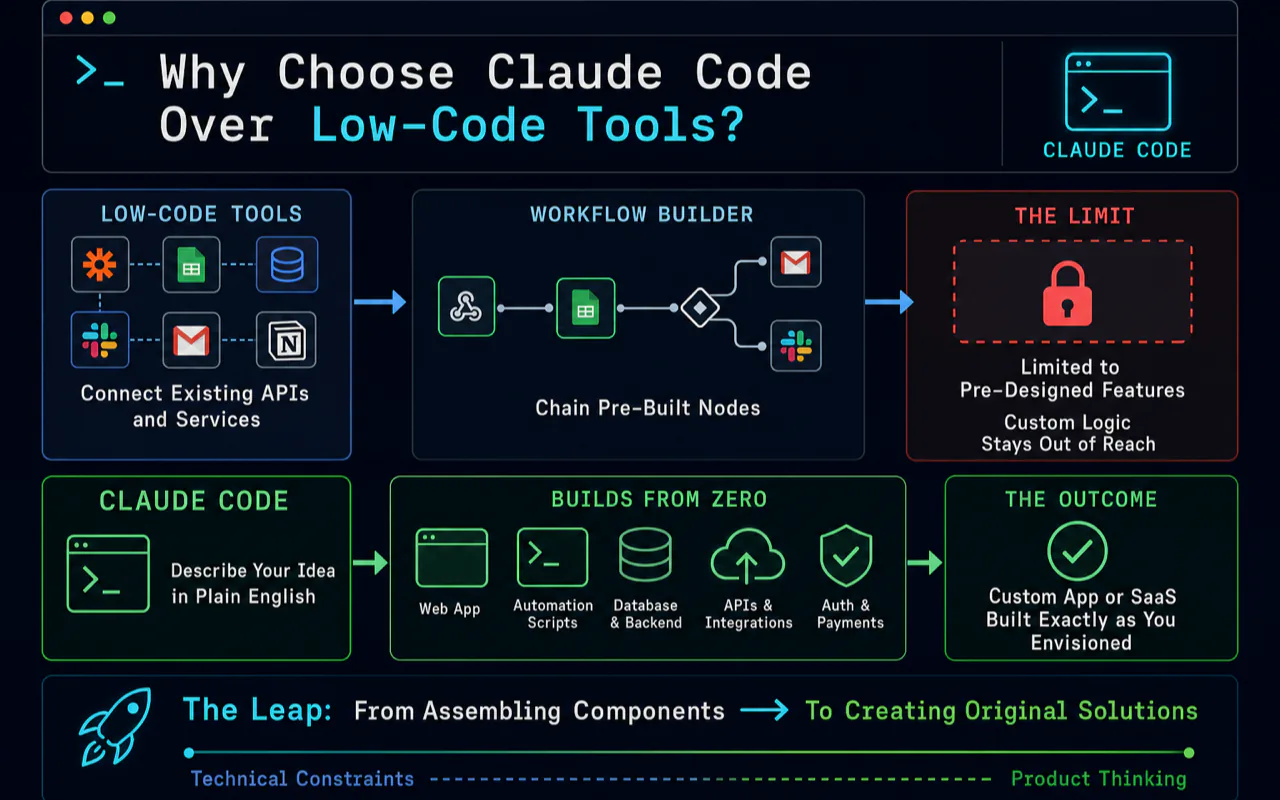
Why Should You Choose Claude Code Over Low-Code Tools?
Low-code platforms like n8n connect existing APIs and services. They excel at chaining pre-built nodes into automation workflows. But they hit a ceiling: you can only use features someone else designed. Custom logic stays out of reach.
Claude Code creates from zero. A custom web app, an automation script suite, a complete SaaS product — anything you can describe clearly, it can build. The constraint shifts from technical skill to product thinking.
This distinction matters because it defines your learning path. Moving from low-code tools to Claude Code is the leap from assembling components to creating original products.
Dimension
Low-Code (n8n)
Claude Code
Core capability
Connect existing API services
Create any software from scratch
Skill required
Understanding APIs and data flows
Clearly describing requirements
Output ceiling
Limited to available nodes
Limited only by imagination
Learning curve
Visual drag-and-drop, fast start
Requires product thinking
Best fit
Repetitive automation tasks
Custom product development
Deployment
Runs inside the platform
Deploys independently to any server
Core Concepts Every Beginner Needs
Three concepts form the foundation for everything that follows. Understanding them before you start saves hours of confusion later.
CLAUDE.md Memory System
The memory system separates Claude Code from ordinary AI chat. It works on two levels:
Personal memory (~/.claude/CLAUDE.md): applies across all projects. Records your preferences, toolchain, and coding style. Example entries: "I use TypeScript, Next.js, and Tailwind CSS" or "Deploy to Vercel."
Project memory (root-level CLAUDE.md): applies only to the current project. Records architecture decisions, tech stack, and development conventions.
Good memory files let Claude Code "remember" who you are and what the project needs in every new conversation. From my experience, every minute spent writing precise memory instructions saves ten minutes of back-and-forth communication.
The biggest mistake beginners make is writing vague memory files — something like "I like clean code." That instruction changes nothing. Effective memory files contain specific tech stack choices ("Frontend: Next.js + TypeScript + Tailwind CSS"), explicit code standards ("Functions must not exceed 20 lines," "Never use the any type"), and file structure conventions ("Components go in the components/ directory, organized by feature subdirectory"). After dozens of iterations, my personal memory file runs several thousand words of precise instructions. Claude Code now writes code matching my style with almost zero additional communication.
A benchmark that validates this approach: by early 2026, Claude Code contributed to roughly 4% of all public commits on GitHub. Anthropic reported a 67% increase in merged pull requests per engineer after adopting Claude Code internally.
MCP (Model Context Protocol)
MCP is Claude Code's tool extension interface. Through MCP, you connect external capabilities: browser control, GitHub operations, database queries, file search, and more. Think of it as installing drivers on a computer — once connected, Claude Code can see and operate additional systems.
Hooks Automation
Hooks trigger scripts at specific events. Examples: auto-running a linter after Claude Code generates code, running type checks before every commit, or updating project docs when a session ends. These automated quality gates eliminated nearly all manual code formatting and type errors in my project.
Structuring a Full-Stack Beginner Project
The video editing app is a full-stack web application. Here is the tech stack that proved reliable for a complete beginner:
Framework: Next.js (frontend and API routes)
Language: TypeScript
Video analysis & narration: Gemini API
Voice synthesis: Fish Audio (200K+ voice library) and Microsoft TTS (free tier)
Audio/video processing: FFmpeg
Core feature modules:
Task management: Create, view, and manage all editing tasks
Style system: 20+ preset editing styles with custom style creation (including one-click style cloning from viral videos)
Model configuration: Gemini model selection, sampling parameters, resolution settings
Voice settings: Dual engine — premium voices via Fish Audio, free voices via Microsoft TTS
Editing engine: Single-video editing and multi-video remix modes
System settings: Concurrency limits, batch sizes, subtitle toggles, and fine-grained controls
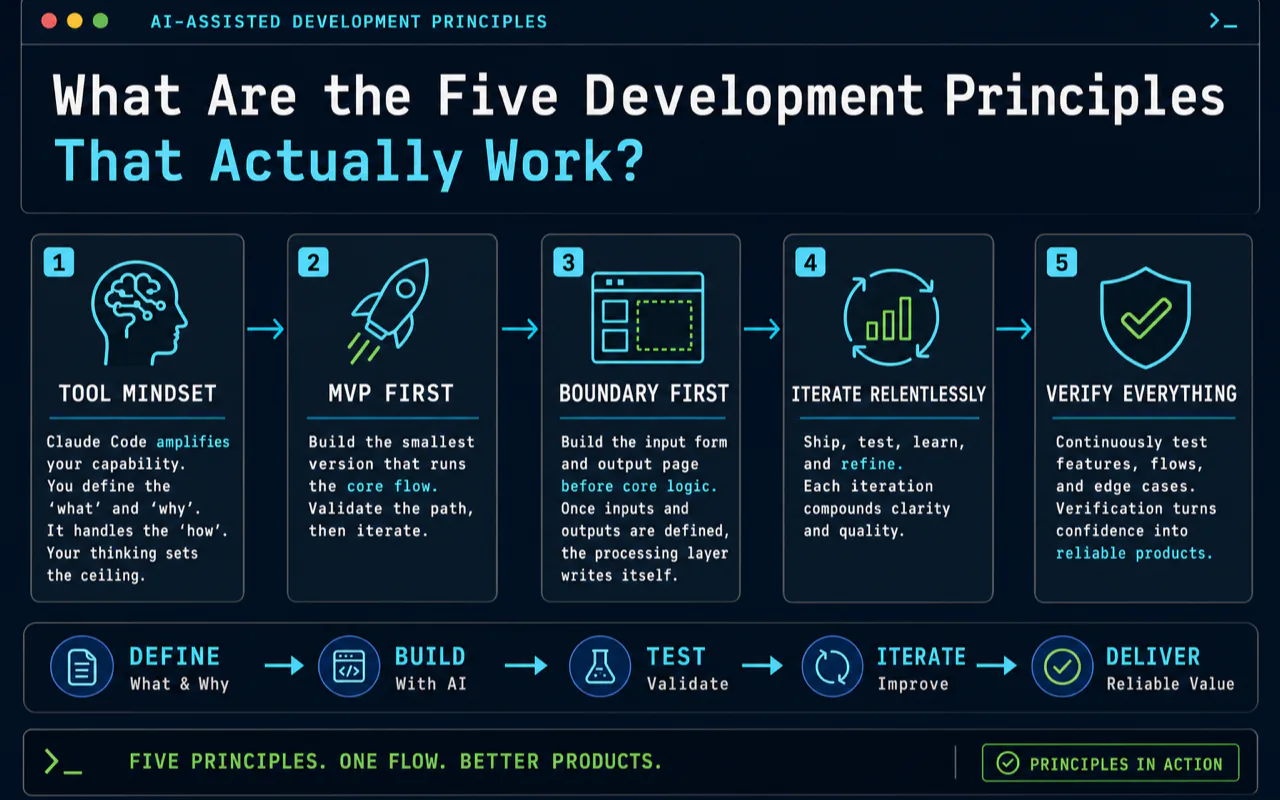
What Are the Five Development Principles That Actually Work?
These principles emerged from three months of intensive building. They apply to any AI-assisted coding project, not just video editing.
Principle 1: Tool mindset. Claude Code is not a programmer replacement. It is a capability amplifier. You supply the "what" and "why." It handles the "how." Your thinking and judgment determine the output ceiling.
Principle 2: MVP first. Never attempt a perfect product on the first pass. Build the smallest version that runs the core flow, then iterate. The first version of my video editor handled exactly one editing style — but it proved the entire technical path was viable.
Principle 3: Boundary first. Build the input form and the output display page before touching core logic. Once you know what goes in and what comes out, the processing layer writes itself. This single strategy eliminated most rework in my project.
In practice, the most common beginner mistake is building the core processing logic first — video analysis, narration generation — then creating the input form afterward. That approach fails because by the time you build the form, you discover the core logic's interface does not match what the frontend needs. Massive rework follows. My approach: build a complete input form defining every parameter the user can set, then build a results page defining exactly what the output looks like. With clear input/output specifications, implementing the middle layer becomes straightforward.
Principle 4: TDD-driven. Write test cases before writing core logic. Tell Claude Code "I expect input X to produce output Y." It writes code that satisfies the test. Test cases become the best requirement documents.
TDD has a unique advantage in AI-assisted coding: the test case is simultaneously a requirement and an acceptance criterion. When you tell Claude Code "this video input should produce a six-scene narration script," you define both what to build and how to verify it. Claude Code writes code satisfying that test. You run the test. It passes. Move on. This workflow lets someone with zero coding background produce reliable, tested code.
Principle 5: Progressive delivery. Deploy after every feature completion. Validate in real environments. Never wait until everything is "done" — accumulated issues at that point become overwhelming.
How Do You Set Up the Development Environment?
After testing multiple configurations, this combination proved most reliable:
Tool
Recommendation
Why
Terminal
iTerm2 (Mac) / Windows Terminal
Split panes, rich shortcuts
Editor
VS Code + Claude Code extension
Native integration, fast file navigation
Node.js
v20 LTS
Best stability
Package manager
pnpm
Fastest, lowest disk usage
Version control
Git + GitHub SSH
Native Claude Code support
Deployment
Vercel or Zeabur
One-click deploy, zero ops
A practical tip from daily use: combine terminal and editor. Run Claude Code in the terminal for primary conversations and code generation. Use VS Code for browsing file structures and making manual micro-adjustments. In my daily workflow, roughly 70% of development time happens in terminal-based Claude Code, 30% in VS Code for review and navigation.
Installation (3 minutes):
Subscribe to Claude Max 20x ($200/month, includes Claude Code usage)
Run npm install -g @anthropic-ai/claude-code in your terminal
Navigate to your project directory and run claude
Complete browser authentication on first launch
How Does the Style Cloning Feature Work?
One standout feature: cloning editing styles from viral short-form videos with a single action.
The workflow is straightforward. Find a video whose style you want to replicate. Extract its subtitles. Send both the video and subtitles to Gemini. It analyzes narration style, pacing characteristics, and narrative structure, then outputs a complete set of editing prompts. Save those prompts as a custom style, and batch-generate videos in the same style going forward.
I tested this across food documentaries, finance commentary, drama highlight reels, and product advertisement formats. All reproduced the original style with reasonable fidelity.
What Does the Cost Structure Look Like?
Per-video production cost varies by quality tier:
Configuration
Cost per Video
Daily Capacity
Best For
Low-code workflow (n8n)
~$0.15
10-20 videos
Single account
Gemini Flash + Microsoft TTS
~$0.01
100+ videos
Content matrix, budget
Gemini Flash + Fish Audio
~$0.15
100+ videos
High quality at scale
Gemini Pro + Fish Audio
~$0.50
50+ videos
Maximum quality
For batch production scenarios — say, a ten-account content matrix — the web app deploys to multiple servers for parallel processing. Both cost and throughput outperform low-code workflow approaches at this scale.
How Does Claude Code Compare to Other AI Coding Tools?
Dimension
Claude Code
Cursor
GitHub Copilot
Interface
Terminal CLI
IDE-embedded
IDE plugin
Core capability
Autonomous full-stack development
Conversational code editing
Line-by-line autocomplete
Autonomy
Completes entire features independently
Requires human guidance
Suggests line-by-line
Best for
Non-programmers building products
Experienced developers
Daily coding speedup
Price
$200/month (Max 20x)
$20/month (Pro)
$10/month
The short version: Copilot autocompletes. Cursor edits conversationally. Claude Code engineers autonomously. These are different capability tiers entirely.
What Mindset Shifts Do Beginners Need?
Three misconceptions slow beginners down more than any technical gap.
"I do not know code, so I cannot learn this." Claude Code's core function is translating natural language into code. You need requirement-description skill, not programming skill. I have seen an interior designer build a floor plan annotation tool and a trade professional build a multilingual product description generator — both with zero coding background. Both tools are now in daily production use within their businesses.
"AI-generated code is unreliable." Claude Code output does require validation. But accuracy already exceeds most expectations. In my experience, over 80% of outputs run without manual changes. The remaining 20% typically resolve within one or two follow-up prompts. The habit to build is a generate-test-fix cycle, not an expectation of perfection on the first attempt.
"I should learn all the concepts before I start building." The opposite is true. Start building. Learn theory when you hit a wall. You do not need to understand React's virtual DOM to build a React app with Claude Code. Learning through real project problems is ten times more effective than front-loading tutorials.
The core insight: in the age of AI coding, what determines your output is not technical ability but product thinking and requirement clarity. If you can describe clearly what a product should look like, what it should do, and who it serves, Claude Code can build it.
Ready-to-Use Prompt: Plan a Beginner Claude Code Project Boundary-First
What this does: Turns a project idea into a runnable MVP slice, a boundary-first task list with acceptance tests for each step, and a personal-vs-project memory setup — governed by the five principles that stop AI-coding rework. Based on: Claude Code Beginner Project: Build an AI Video Editing App From Scratch — https://aiworkflowpro.com/claude-code-beginner-project/ Time to run: ~5 minutes
Copy this prompt into Claude Code, ChatGPT, or any AI assistant:
ROLE: You are a Claude Code Beginner Project Planner. Your job: turn a beginner's project idea into a boundary-first, verify-each-step build plan a non-coder can actually ship.

CONTEXT — FIVE-PRINCIPLE BOUNDARY-FIRST METHOD:
Claude Code lets a non-coder ship a full app, but only with a repeatable process. Five principles make AI-assisted coding work: (1) Boundary-first — define every task's boundary (inputs, outputs, what changes, what must not change, acceptance) before the agent codes; this kills most rework; (2) MVP-first — build the thinnest end-to-end slice that runs, then deepen; (3) Memory split — separate personal memory (global preferences, root CLAUDE.md) from project memory (project rules), so context is never re-explained; (4) Verify-each-step — confirm each agent action against its acceptance boundary before moving on; (5) Run-state integrity — keep the project runnable at every commit. Translate the idea into an MVP, then break it into boundary-first tasks executed one verified step at a time.

INPUTS (fill in before running):
- PROJECT_IDEA: [What the beginner wants to build]
- SKILL_LEVEL: [absolute beginner / some / can read code]
- STACK_HINT: [Any tech preference — or "let Claude Code choose"]
- DEPLOY_TARGET: [Where it should run — local / web / mobile]

METHOD — 4 STEPS:

Step 1 — Score the Plan Against the Five Principles
For each principle, score PROJECT_IDEA's current plan 0–2: 0 = not addressed, 1 = vague, 2 = concrete. Flag any 0 as a rework risk before building.

Step 2 — Define the MVP Slice
Cut PROJECT_IDEA to the thinnest end-to-end path that runs: one input → one core transform → one output, deployed to DEPLOY_TARGET. Reject any feature off this path and list it as "later."

Step 3 — Break Into Boundary-First Tasks
Decompose the MVP into ordered tasks. For each, write the boundary: inputs, outputs, what changes, what must not change, and a one-line acceptance test the beginner can run. Each task must leave the project runnable when done.

Step 4 — Set Up Memory and Run-State Rules
Define the memory split: what goes in the personal/root CLAUDE.md (global preferences, SKILL_LEVEL) vs the project CLAUDE.md (stack, conventions, the task list). Add the rule: verify against acceptance after every task and commit only runnable states.

RULES:
- Never let the agent code a task whose boundary (inputs/outputs/acceptance) is undefined — that is where rework comes from.
- Never build features off the MVP path before the slice runs end to end.
- Never accept a task as done until the beginner has run its acceptance test and the project still runs.

OUTPUT FORMAT:
Output a markdown report with:
1. Principle Scorecard — markdown table, columns: Principle | Score (0–2) | Rework Risk
2. MVP Slice — the one input → transform → output path + the "later" feature list
3. Boundary-First Task List — markdown table, columns: # | Task | Inputs | Outputs | Must Not Change | Acceptance Test
4. Memory Split — markdown table, columns: Memory File | What Goes In It
Save as @templates/claude-code-beginner-project.md and run at the start of any beginner Claude Code build, before the first line of code.
Frequently Asked Questions
Can I build a real app with Claude Code if I have zero coding experience?
Yes. Claude Code translates plain English requirements into working code. You do not need to know any programming language. What matters is your ability to describe what you want clearly. In my experience, over 80% of Claude Code output runs without manual edits, and the remaining issues typically resolve within one or two follow-up prompts.
How much does it cost to run Claude Code for a beginner project?
Claude Max subscription is $200 per month and includes Claude Code usage. For the video editing project itself, each processed video costs between $0.01 (using free Microsoft TTS) and $0.50 (using Gemini Pro + premium voice), depending on your quality requirements. Most beginners recoup the subscription cost within the first week through dramatically faster development cycles.
What is the difference between Claude Code, Cursor, and GitHub Copilot?
Copilot provides line-by-line autocomplete inside your editor. Cursor offers conversational code editing within an IDE. Claude Code operates as an autonomous AI engineer in your terminal — it navigates codebases, understands file dependencies, runs terminal commands, executes tests, and deploys applications independently. The capability tiers are fundamentally different: autocomplete versus conversational editing versus full autonomous development.
How long does it take to build a complete app as a beginner?
The MVP of the video editing app took one week to reach a working prototype that could process a single video style. The full-featured version with 20+ editing styles, dual voice engines, batch processing, and cloud deployment took about three months of part-time work. Most of that time was spent on product thinking and testing — not fighting with code.
Video Tutorial: This guide has a companion video walkthrough. Watch the full build process on YouTube:
Monitoring a competitor who publishes no feed is the case every RSS guide skips. Twenty-one platforms sorted by which of three jobs they do, and the finished setup is business process automation you own outright, with no seat licence to renew.
Blaming the content is the reflex when a post underperforms, and it is usually the wrong diagnosis. A second reader decides distribution before any human sees the post, and most of what it checks is mechanical enough to automate business processes around, on five platforms at once.
Gloves on, tape measure in hand — nobody types a query. Three voice surfaces for ai automation tools (terminal, Telegram, Discord), 10 TTS and 6 STT providers compared on cost and latency, plus a setup that costs nothing.
Thursday afternoon, fourteen product ideas, a Monday filming slot, no scripts. Six script shapes and seven hook formulas turn that hour into finished drafts — and the business rule stays: rewrite at least 30% before anything ships.