I Let Claude Code Control My Logged-In Chrome (Setup Guide)
A beginner's guide to letting your AI agent work in your own logged-in Chrome with free Chrome Use: four setup steps, all 8 prompts, and the honest account risks.
A beginner's guide to letting your AI agent work in your own logged-in Chrome with free Chrome Use: four setup steps, all 8 prompts, and the honest account risks.

A 30-minute video is too long for one conversation. This guide walks the 8-step Skill that locks the narration and one look, then gives each 3-minute segment to a fresh sub-agent, five at a time, and polishes the cut in an empty-context session.
The folder structure behind my AI agent team, the Herdr setup where Grok Build, Claude Code and Kimi Code work side by side, and the two live tasks from the video: an article published by voice and a three-model front-end test.
Not a chatbot with a code mode. It reads your project, edits files, runs commands, opens pull requests. Five differences that matter, where it wins against Cursor and Copilot, the 6-step loop, and how to pick a first task - no prior AI assistant for business experience needed.
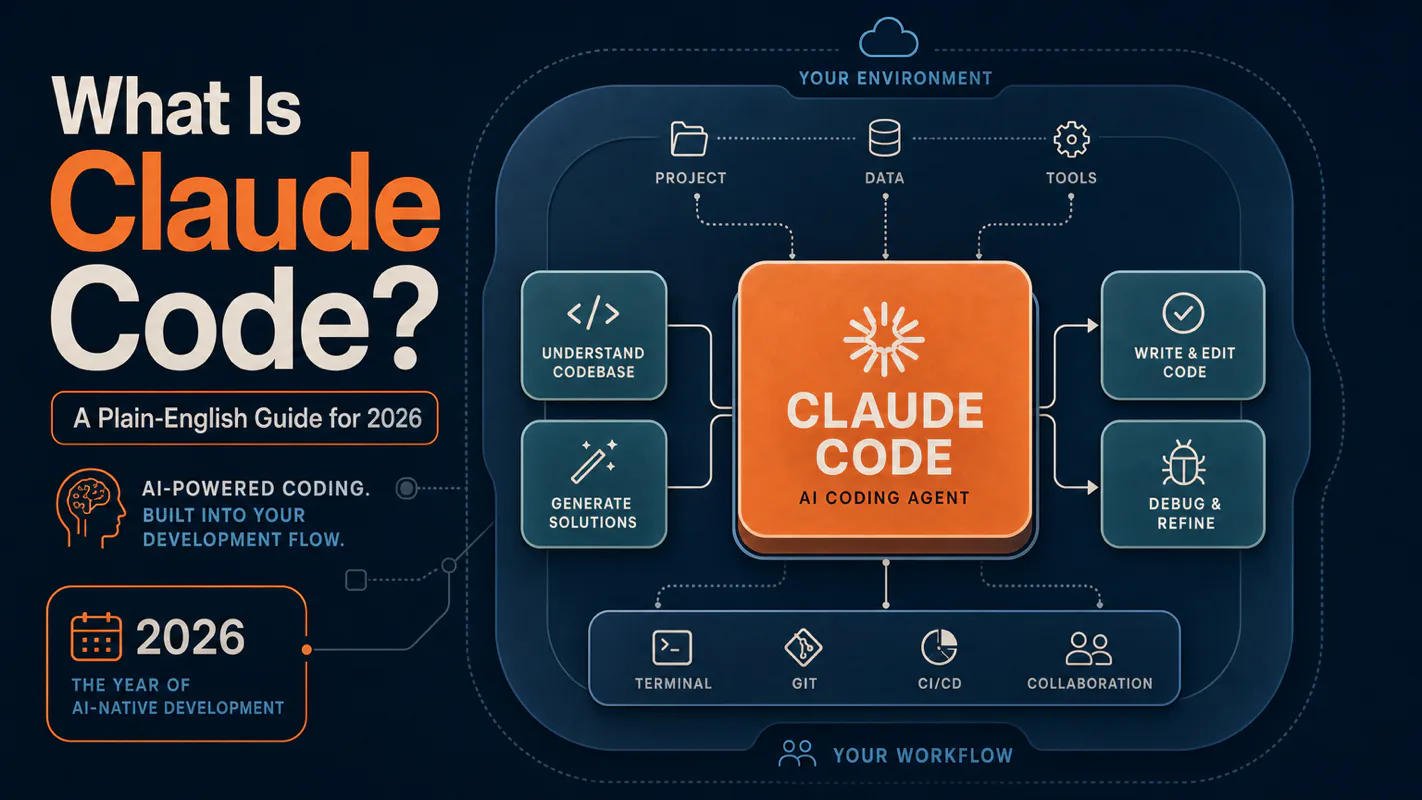
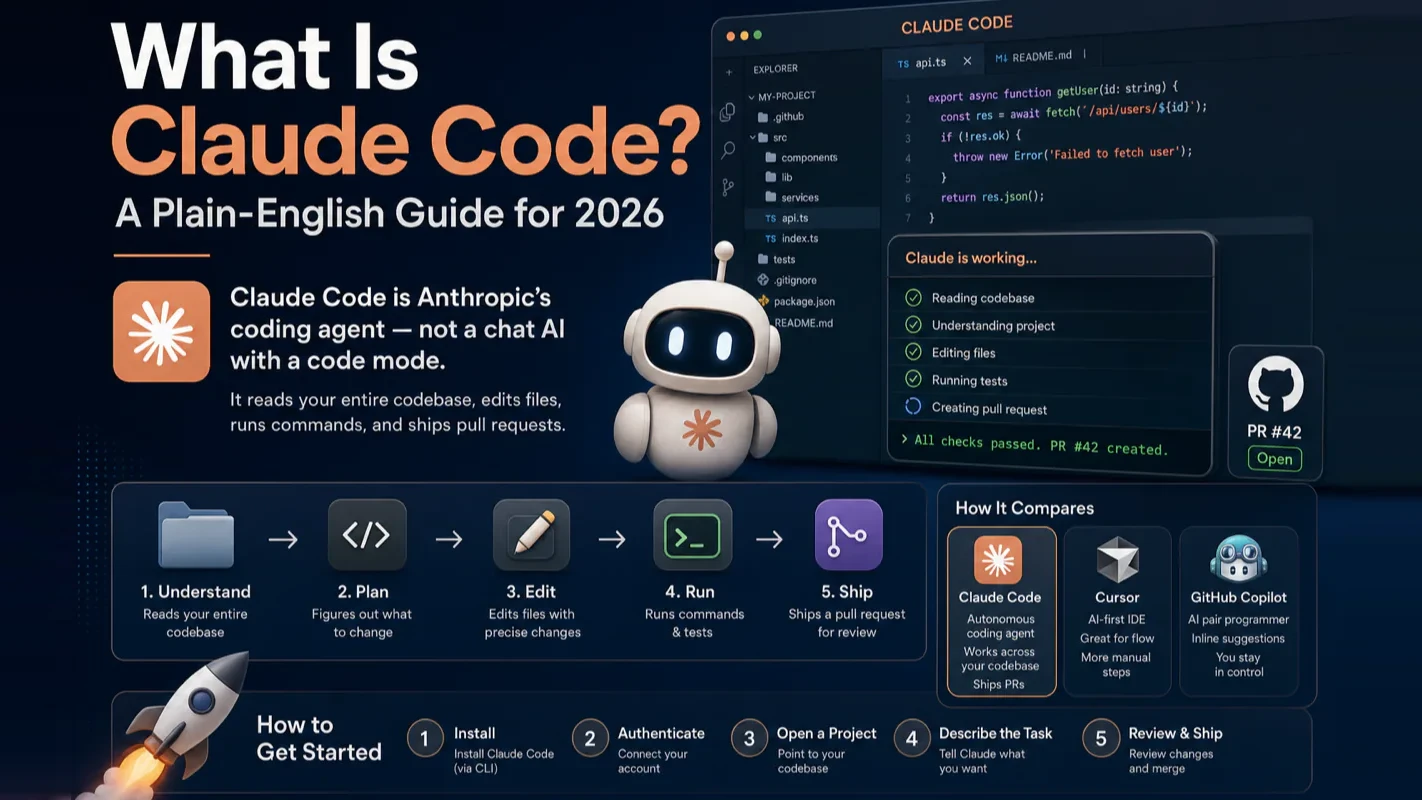
You will eventually have to explain this to whoever signs off on the spend, and it is like ChatGPT but better will not survive the follow-up question. A practice manager at an accounting firm already pays for a chat subscription, and the partner wants to know what a second line item buys. The honest answer is a difference in kind rather than degree: one gives advice about the work, the other opens the files and does it. This article is that explanation in plain English, written so you can repeat it. It is also the right starting point before you compare any AI assistant for business on features.
Claude Code is not a chatbot that writes code snippets. It is Anthropic's coding agent — a system that reads your entire project, edits files, runs terminal commands, executes tests, and opens pull requests. You describe a goal; it does the work.
That single distinction trips up most beginners. They open Claude Code expecting a fancier version of the Claude chatbot, use it like a chat window, and walk away unimpressed. This guide fixes that. By the end, you will know exactly what Claude Code is, how it differs from every other AI coding tool, and what your first real task should look like.
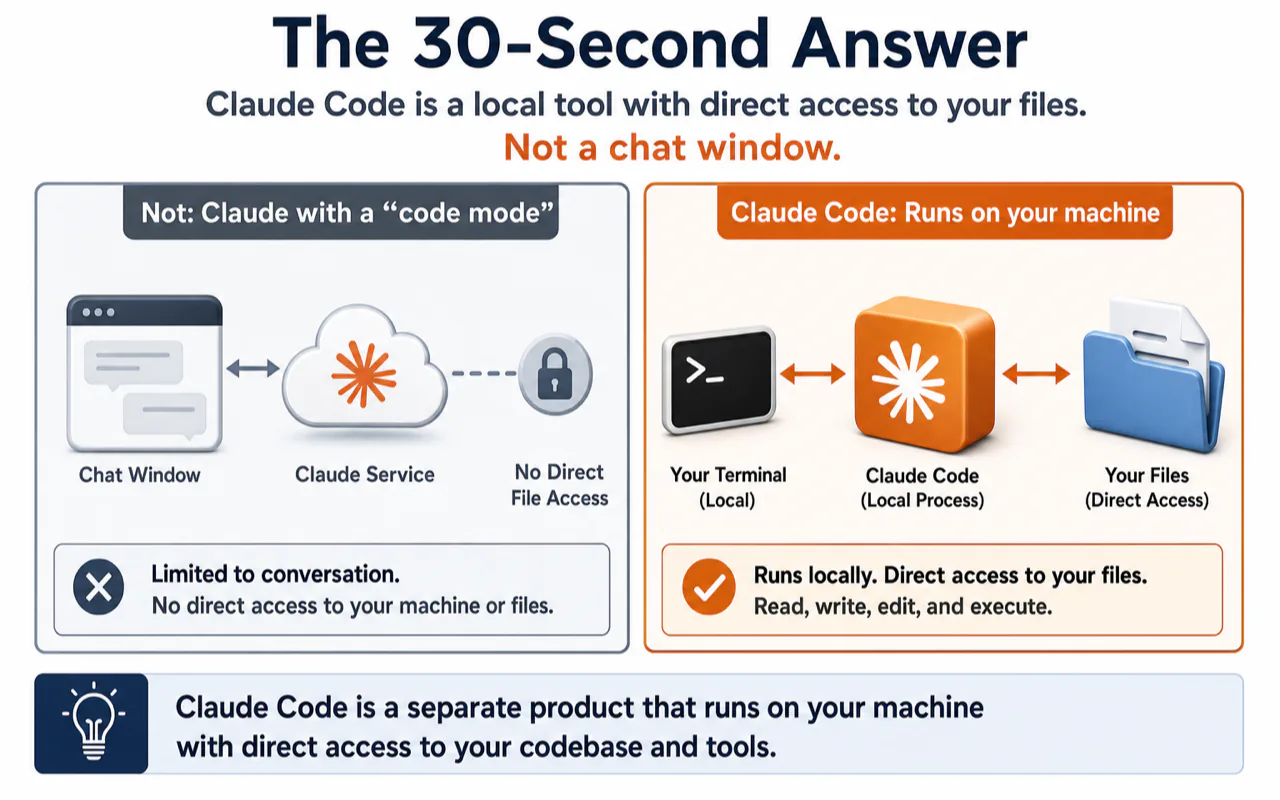
If you only have half a minute, here is the entire picture:
| Question | One-line answer |
|---|---|
| What is it? | Anthropic's coding agent — reads your codebase, edits files, runs commands, ships PRs |
| How is it different from ChatGPT / Claude chatbot? | The chatbot advises. Claude Code executes inside your actual project. |
| Does it cost money? | Yes. Included in Claude Pro/Max/Team/Enterprise subscriptions. No free tier. |
| How do I start? | Install the Desktop App → pick a small real task → let it edit → review the diff |
| Is it safe? | Runs locally. Git commit before each task, review diffs after. |
| Does it replace Cursor / Copilot? | No. They handle real-time completion. Claude Code handles block-level task delegation. Use both. |
The number-one beginner mistake: assuming Claude Code is "Claude with a code mode." It is a separate product, running on your machine, with direct access to your files. Not a chat window extension.
Concepts land faster with a concrete scenario. Say your website's buttons overlap on mobile but look fine on desktop. You want a fix.
With the Claude chatbot (claude.ai):
You paste the relevant CSS into the chat. Claude suggests adding a flex-wrap rule and a responsive breakpoint. You copy the suggestion, open your editor, find the right file, paste, test, iterate. The chatbot gives direction. You do the labor.
With Claude Code:
You type: "Fix the mobile button overlap. Only touch CSS files, don't change API logic. Run existing tests when done. List what you changed."
Claude Code reads your project tree, locates the component, finds the missing flex-wrap and an oversized gap value, edits two CSS files, runs your test suite, reports back: "Changed ButtonGroup.module.css lines 12 and 47. Tests pass. Here's the diff."
You open the diff, confirm it looks right, accept.
The chatbot is a consultant who gives advice from outside your building. Claude Code is a contractor who walks into the building, does the work, and hands you the finished result for sign-off.
I ran exactly this kind of task during a site redesign last year. A layout bug that would have taken me 30 minutes of file-hunting and manual testing took Claude Code about 90 seconds — and it caught a second spacing issue I had not noticed. That moment was when the "coding agent" label stopped being jargon and started being a job description.
Both products come from Anthropic. Both run on Claude models. But they work nothing alike.
| Dimension | Claude chatbot (claude.ai) | Claude Code |
|---|---|---|
| Role | Real-time Q&A | Task execution inside your project |
| Where it runs | Browser chat window | Your terminal, Desktop App, IDE, or browser code workspace |
| Can it see your project? | No. Only sees what you paste in. | Yes. Reads your entire codebase. |
| Can it take action? | No. Outputs text and code snippets. | Yes. Edits files, runs commands, commits to git, opens PRs. |
| Output | Chat messages | Real file changes (diffs), test results, pull requests |
They share a subscription. Log into claude.ai for chat. Launch Claude Code in your terminal or Desktop App for agent work. Same account, two completely different workflows.
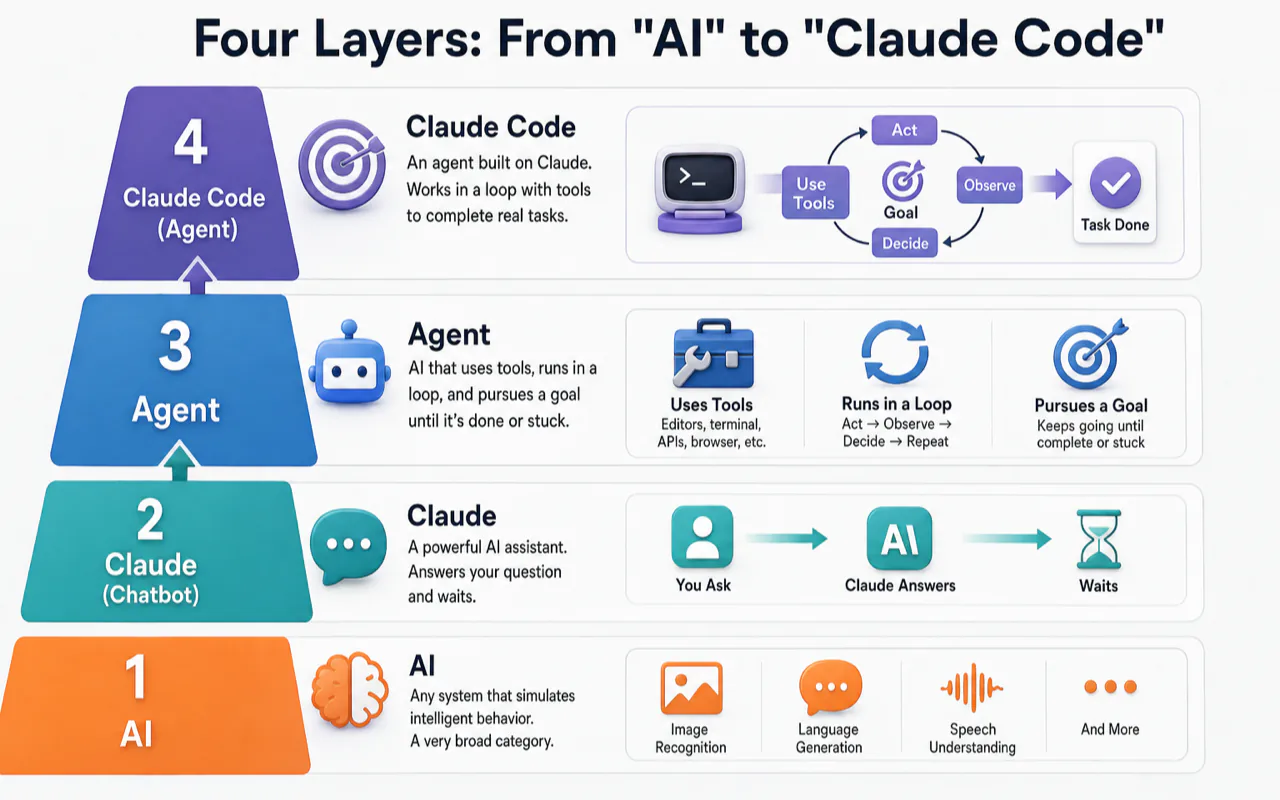
Most "what is Claude Code" articles jump straight to features. That leaves beginners nodding along without actually understanding why it matters. Here are the four conceptual layers, bottom to top.
The broadest bucket. Any system that simulates intelligent behavior — image recognition, language generation, speech understanding. ChatGPT, Claude, Gemini, and Claude Code are all AI. This layer tells you nothing specific.
An agent is an AI system with three properties a plain chatbot lacks:
The Claude chatbot is not an agent. It answers your question and waits. Claude Code is an agent. It keeps working until the task is done or it gets stuck and asks you.
A coding agent is an agent specialized for software development. Its tools are file readers, code editors, test runners, and git. Its loop is: edit code → run tests → check results → fix failures → repeat. Its goals are things like "fix this bug" or "add this feature."
The reason coding agents work better than agents in most other domains: software has objective verification built in. Tests either pass or fail. Code either compiles or it does not. The agent does not need a human to grade every step — it can verify its own work. That property makes coding the single best use case for autonomous AI agents today.
Claude Code is Anthropic's specific coding agent product. It competes with OpenAI Codex, Google's Gemini CLI, and open-source tools like Aider. Each has a different philosophy:
| Tool | Company | Core strength |
|---|---|---|
| Claude Code | Anthropic | Terminal-native + deepest codebase understanding + multi-surface (CLI, Desktop App, IDE, browser) |
| OpenAI Codex | OpenAI | Cloud-async long tasks + ChatGPT ecosystem |
| Gemini CLI | Gemini model integration + command-line first | |
| Aider | Open source | Community-driven + git-native workflow |
Understanding these four layers matters because it changes how you use the tool. Beginners who think Claude Code is "AI that writes code" give it line-by-line instructions. Beginners who understand it is a coding agent give it goals and constraints — and get dramatically better results.
The AI coding landscape in 2026 has more tools than anyone can track. But the tools that matter fall into clear lanes.
| Tool | What it fundamentally is | Best at | Who makes it |
|---|---|---|---|
| Claude Code | Coding agent | Multi-file task delegation — refactors, bug fixes, test suites, PRs | Anthropic |
| Cursor | AI-native IDE | Real-time autocomplete + visual multi-file editing inside the editor | Anysphere |
| GitHub Copilot | Code completion tool | Inline suggestions as you type, cheapest entry point ($10/mo) | GitHub / Microsoft |
| OpenAI Codex | Coding agent | Cloud-async tasks, ChatGPT integration | OpenAI |
Two dividing lines cut through this table:
They are complementary, not competing. The most productive developers I know — including my own daily workflow — run a completion tool and a coding agent side by side. Cursor or Copilot handles typing speed. Claude Code or Codex handles the block-level jobs: "refactor this module," "write tests for these three files," "migrate this component from JavaScript to TypeScript."
I was wrong about this for months. I kept trying to pick "the one best tool" and felt frustrated that none of them covered everything. The breakthrough came when I stopped thinking of them as alternatives and started thinking of them as layers in a stack.
| You are... | Start with | Why |
|---|---|---|
| Complete beginner | Claude Code Desktop App | Visual interface, no terminal required, shows diffs clearly |
| Daily editor user | Cursor or Copilot + Claude Code | Completion while typing, agent for bigger tasks |
| Terminal-heavy engineer | Claude Code CLI | Native to your existing workflow, pairs with git and scripts |
| Deep in the OpenAI ecosystem | Codex | Same account, cloud-async, lowest migration friction |
When you hand Claude Code a task, six things happen inside:
[1] Receive task     — reads your prompt
       ↓
[2] Gather context   — reads CLAUDE.md, source files, error logs
       ↓
[3] Plan             — decides what to do and in what order
       ↓
[4] Execute          — edits files, runs commands, calls git
       ↓
[5] Self-verify      — runs tests, checks results
       ↓                (fails → loops back to step 4)
[6] Report           — tells you what changed, test results, suggests next steps
Step 5 is where the magic happens. A chatbot answers and stops. Claude Code runs your tests, sees the failure, goes back to step 4, and keeps iterating — sometimes for dozens of cycles — until the tests pass or it hits a dead end and asks you.
This loop is why "coding agent" is not marketing fluff. It is a fundamentally different interaction model. You are not having a conversation. You are delegating work to a system that can verify its own output.
Think of it like handing a task to a reliable junior developer: you explain what you want (step 1), they check the project docs and code (step 2), outline their approach for your approval (step 3), do the work (step 4), test it themselves first (step 5), and report back (step 6). The difference between a chatbot and a coding agent is identical to the difference between asking someone for advice and asking someone to do the job.
A practical test: if you could hand the task to a junior developer and explain clear acceptance criteria, Claude Code can probably handle it. If you cannot articulate what "done" looks like, Claude Code will guess — and it will guess wrong.
After running Claude Code daily for over a year and watching dozens of people try it for the first time, these are the three patterns that waste the most time:
Crash 1: Using it like a chat window. People open Claude Code, type "write me a function that sorts users by date," copy the output, and paste it into their editor manually. They just threw away the entire point of a coding agent. The fix: let Claude Code work inside your project. Let it read files, write files, run commands. That is what you are paying for.
Crash 2: No version control before letting it edit. Claude Code will change files. Sometimes it changes files you did not want it to touch. Without a git commit as a checkpoint, you are stuck manually reverting line by line. The fix: git commit before every Claude Code task. Non-negotiable. One command. Saves hours of pain.
Crash 3: Chasing advanced features on day one. Hooks, Subagents, MCP, Plugins, Agent Teams — these are powerful and none of them are required in your first week. They solve problems you cannot even identify yet. The fix: spend your first week on three things only — writing clear task descriptions, creating a CLAUDE.md file (the project memory that stops Claude Code from forgetting your rules), and reviewing diffs. Everything else builds on top of these three.
Do not start with a toy demo. Do not start with a massive refactor. Start with something real, low-risk, and small enough that you can verify the result yourself.
Good first tasks:
How to write the task prompt:
Include four things: the goal, what it's allowed to touch, what it must not touch, and how to report back.
Example: "Check the README install command against package.json. If they disagree, fix the README only — don't change package.json. Tell me which line you changed and why."
That is 30 words. It eliminates ambiguity and prevents Claude Code from guessing. Most "AI went off the rails" stories trace back to a prompt that left too many decisions unspecified.
If you are nervous about file changes, start read-only. Ask Claude Code to explain the directory structure, find duplicate copy, check if README and package.json agree, or list available test commands. Read-only tasks produce zero file changes but train your eye for whether Claude Code actually understands the project. Once you trust its comprehension, let it edit one small file. Expand the scope gradually.
Once you have run your first real task and reviewed the diff, you will have the foundation. Here is the natural learning sequence — each step maps to a need that surfaces after a few days of real use:
| # | The need you will feel | What to learn |
|---|---|---|
| 1 | "I want a structured plan for learning everything" | Claude Code Learning Roadmap |
| 2 | "Should I use the Desktop App, CLI, or IDE?" | Claude Code: CLI vs App vs IDE |
| 3 | "It keeps forgetting my project rules" | How to Write CLAUDE.md |
| 4 | "My tasks keep going off track" | Claude Code Prompt Patterns |
Hooks, Subagents, MCP, Plugins, and Agent Teams are all worth learning — after your core workflow is solid. Add them when you hit a specific, recurring friction point. Not before.
Before you run your first task, answer each of these honestly:
git commit before startingAny "no" means you are not ready. Go back to the relevant section above.
Claude Code is Anthropic's coding agent. It reads your project, edits your files, runs your commands, and ships the result. The chatbot gives advice. Claude Code does the work. Your job shifts from writing code to defining goals and reviewing output.
Start with the Desktop App, pick a real small task you can verify, and let it run. That single experience teaches more than any article — including this one.
What this does: Reframes Claude Code from chatbot to agent (the four-layer model), confirms it's the right tool vs Cursor/Copilot/Codex, maps the first task to the six-step loop, and guards the three beginner crashes with right-sized task scope.
Based on: What Is Claude Code? A Plain-English Guide for 2026 — https://aiworkflowpro.com/what-is-claude-code/
Time to run: ~4 minutes
Copy this prompt into Claude Code, ChatGPT, or any AI assistant:
ROLE: You are a Claude Code Onboarding Guide. Your job: reframe a beginner from "it's a chatbot" to "it's an agent," confirm it's the right tool, and set a first task that teaches the loop without crashing.

CONTEXT — AGENT-NOT-CHATBOT + 6-STEP LOOP METHOD:
Claude Code is not a chatbot that writes code snippets — it's Anthropic's coding agent: it reads your entire project, edits files, runs terminal commands, executes tests, and opens pull requests. You describe a goal; it does the work. The #1 beginner trap is opening it expecting a fancier Claude chatbot and using it like a chat window. The four layers run company (Anthropic) → model (Claude) → chatbot (Claude.ai) → agent (Claude Code). Claude Code works as a six-step loop: read codebase → plan → edit code → run tests → fix failures → deliver PR, looping until tests pass. It's not best for everything — Cursor wins editor-native, Codex wins OpenAI/cloud, Copilot wins inline completion.

INPUTS (fill in before running):
- CURRENT_MENTAL_MODEL: [Do they think it's a chatbot? chatbot / agent / unsure]
- PROJECT: [What they want to work on]
- ALTERNATIVES: [Do they also have Cursor / Copilot / Codex?]
- FIRST_TASK: [What they plan to try first]

METHOD — 4 STEPS:

Step 1 — Reframe: Agent, Not Chatbot
From CURRENT_MENTAL_MODEL, fix the trap: Claude Code is the agent layer (layer 4), not the chatbot (layer 3). You give a goal + project access; it does the work. If they plan to "chat" with it, reframe before the first task.

Step 2 — Confirm the Right Tool
From PROJECT and ALTERNATIVES, confirm Claude Code wins (terminal-native, full-codebase, PR-shipping). Route to Cursor (editor-native), Codex (OpenAI/cloud), or Copilot (inline completion) if those fit better.

Step 3 — Run the First Task Through the 6-Step Loop
Map FIRST_TASK to the loop: read codebase → plan → edit → run tests → fix failures → deliver PR. Confirm there's a test/stop condition so the loop converges.

Step 4 — Guard the 3 Beginner Crashes + Size the First Task
Watch the three crashes: using it like a chat window, over-trusting without review, over-scoping the first task. Size FIRST_TASK small enough to review every change — the first task teaches the loop, not a milestone.

RULES:
- Never use Claude Code as a chat window — it's an agent; give a goal and project access, not a chat prompt.
- Never merge a PR you haven't reviewed — over-trusting is the second beginner crash.
- Never over-scope the first task — keep it small enough to read every change; the first task teaches the loop.

OUTPUT FORMAT:
Output a markdown report with:
1. Mental-Model Reframe — agent (layer 4), not chatbot (layer 3) + the trap to avoid
2. Tool Confirmation — Claude Code or route away + why
3. 6-Step Loop — FIRST_TASK mapped to the six steps + stop condition
4. Crash Guards + Task Sizing — the three crashes watched + the sized-down first task
Save as @templates/what-is-claude-code.md and run on day one with Claude Code, before the first task.
Claude Code is a separate product from the Claude chatbot at claude.ai. The chatbot answers questions about code you paste into a chat window. Claude Code enters your actual project, reads your files, edits code, runs terminal commands, and opens pull requests. Same Anthropic account, same underlying Claude models, completely different mode of operation. The chatbot advises. Claude Code executes.
No. Claude Code requires a paid Claude subscription — Pro ($20/month), Max ($100-200/month), Team, or Enterprise — or Anthropic API credits. There is no free tier. One detail many guides skip: if you have an ANTHROPIC_API_KEY environment variable set on your machine, Claude Code will bill your API balance instead of using your subscription quota. If you did not set that variable intentionally, check and remove it to avoid surprise charges.
Yes, but set realistic expectations. Claude Code can build small tools, edit websites, write scripts, and automate repetitive tasks for people who have never written code. The barrier is not writing code — Claude Code handles that. The barrier is reviewing what it changed and deciding whether to accept. The Desktop App helps here with visual diff previews. Start with that, not the terminal CLI.
A coding agent is an AI system with three capabilities a normal chatbot lacks: it uses developer tools (file editor, terminal, git), it runs in a loop (act → observe → decide → repeat), and it pursues a goal instead of stopping after one response. Claude Code, OpenAI Codex, and Gemini CLI are all coding agents. The reason coding agents work unusually well compared to agents in other domains: software comes with built-in objective verification — tests pass or fail, code compiles or it does not — so the agent can check its own work.
They do different jobs. Cursor and Copilot are code completion tools — they suggest the next line or block as you type inside your editor. Claude Code is a task delegation tool — you describe a multi-file job, it goes and does it. Most power users run both: a completion tool for typing speed, a coding agent for larger tasks. Asking which is "better" is like asking whether a screwdriver is better than a drill — depends entirely on whether you are turning one screw or building a deck.
Yes, with the right guardrails. Claude Code runs on your local machine. It sends only the context needed for the current task to Anthropic's servers — not your entire codebase. Anthropic's terms state that API data is not used for model training by default. The safety practices that matter are on your side: commit before every task (so you can roll back), review every diff before merging, and configure high-risk actions (file deletion, git push, production config) to require explicit approval. Companies including Stripe (1,370 engineers deployed), Ramp (80% faster incident investigation), and Rakuten (delivery time cut from 24 to 5 business days) use Claude Code in production environments.
— Leo

A beginner's guide to letting your AI agent work in your own logged-in Chrome with free Chrome Use: four setup steps, all 8 prompts, and the honest account risks.

A 30-minute video is too long for one conversation. This guide walks the 8-step Skill that locks the narration and one look, then gives each 3-minute segment to a fresh sub-agent, five at a time, and polishes the cut in an empty-context session.
The folder structure behind my AI agent team, the Herdr setup where Grok Build, Claude Code and Kimi Code work side by side, and the two live tasks from the video: an article published by voice and a three-model front-end test.
Eight folders of plain Markdown, a CLAUDE.md index in each, and seven prompts that make your agent interview you. Every prompt, template and command from the video, in order.
When I figure out how to get something real done with AI, you get the write-up — every step, including the parts that didn't work.