I Let Claude Code Control My Logged-In Chrome (Setup Guide)
A beginner's guide to letting your AI agent work in your own logged-in Chrome with free Chrome Use: four setup steps, all 8 prompts, and the honest account risks.
A beginner's guide to letting your AI agent work in your own logged-in Chrome with free Chrome Use: four setup steps, all 8 prompts, and the honest account risks.

A 30-minute video is too long for one conversation. This guide walks the 8-step Skill that locks the narration and one look, then gives each 3-minute segment to a fresh sub-agent, five at a time, and polishes the cut in an empty-context session.
The folder structure behind my AI agent team, the Herdr setup where Grok Build, Claude Code and Kimi Code work side by side, and the two live tasks from the video: an article published by voice and a three-model front-end test.
Approval is the easy part; ownership is the part nobody assigns. From install through to workflow architecture, drawn from running a 3,000-file knowledge base with AI automation tools - 25 error fixes, and cost controls worth more than half the bill.
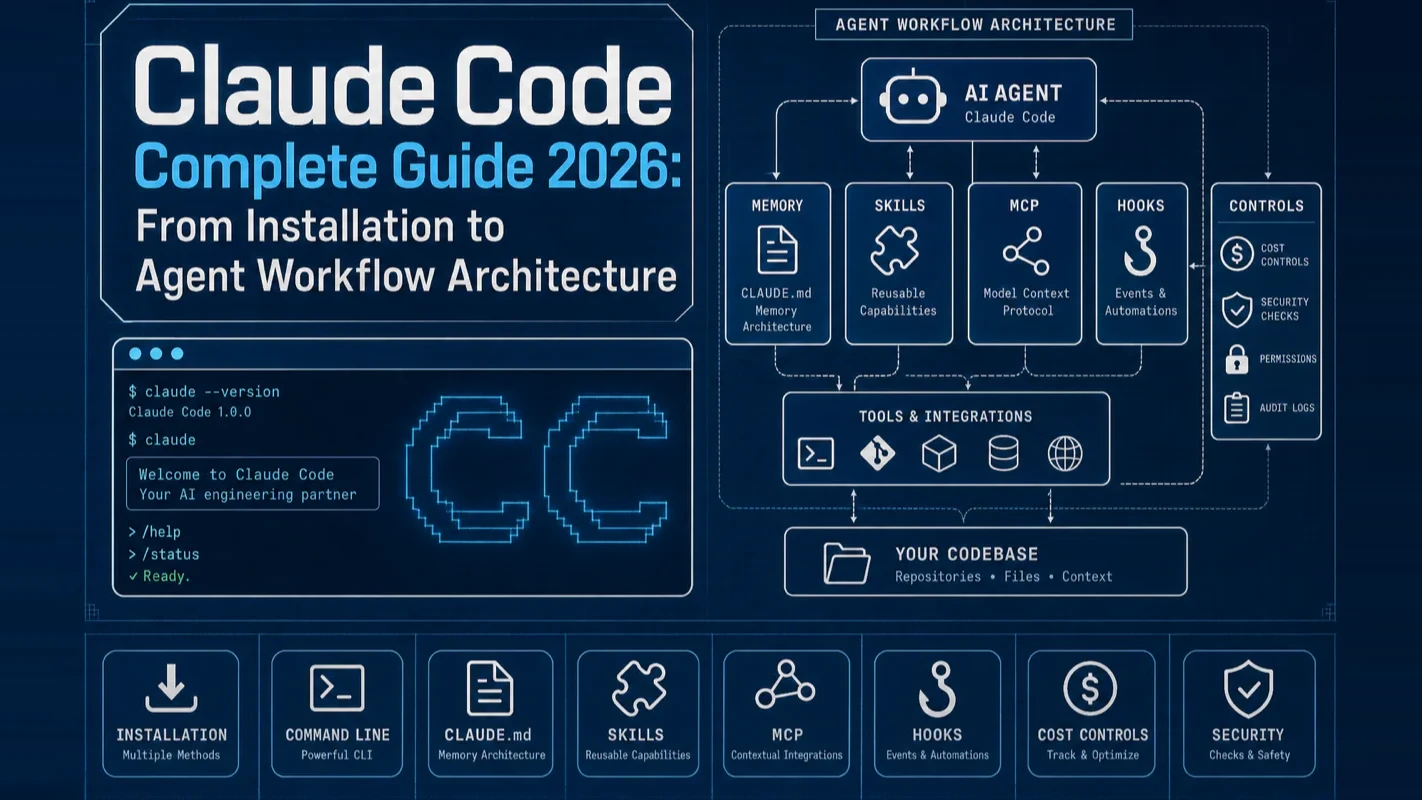
Claude Code is an agentic coding tool that runs directly in your terminal, reads and writes files, executes commands, and orchestrates multi-step workflows autonomously. This guide distills hands-on experience from managing a 3,000+ file knowledge base and building a full CLI tool ecosystem with Claude Code into a practical roadmap that takes you from installation to architecting agent workflows.
Key takeaways
The hard part usually starts after the decision. A regional insurance brokerage approves the spend, somebody forwards a link, and then the work stalls for six weeks because nobody knows which version to install, which plan tier is honest, or who owns the configuration. Nothing is broken; there is simply no map. This guide is that map: installation paths, what the pricing tiers actually buy, the commands worth learning first, and five cost controls measured at over sixty percent savings. If you are the person who has to make approved AI automation tools real, start here rather than at the vendor's homepage.
Claude Code occupies a fundamentally different niche than GitHub Copilot or Cursor because it operates as an autonomous agent inside your file system rather than as an assistant embedded in an editor. Copilot suggests code completions. Cursor edits files with visual diffs. Claude Code plans tasks, executes them across multiple files, runs shell commands, calls external tools, and verifies results—all without you approving each individual step.
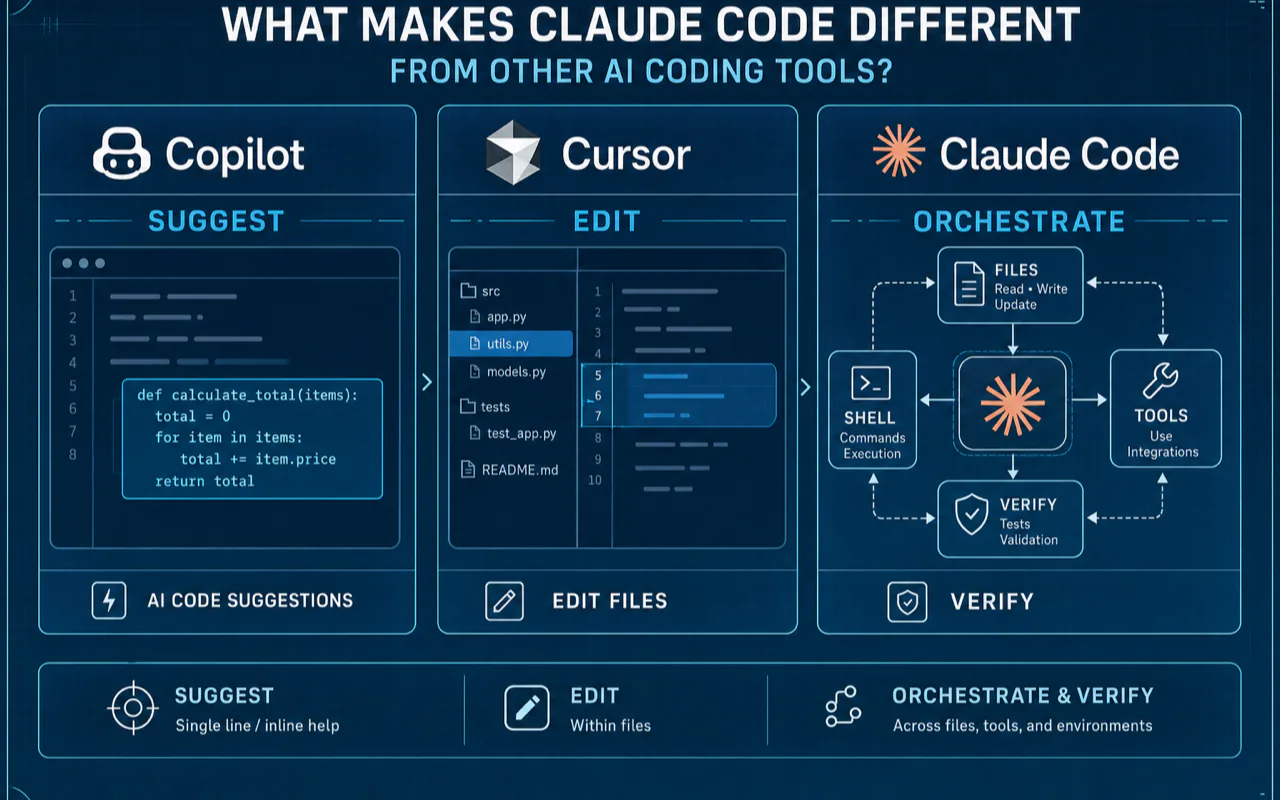
Think of it this way: Copilot is a colleague who whispers suggestions, Cursor is an assistant who edits files when asked, and Claude Code is an engineer with their own workstation who takes a requirements brief and delivers working code.
As of mid-2026, Claude Code has evolved far beyond a "terminal coding assistant." According to Anthropic's official documentation, it now runs across six platforms: terminal CLI, VS Code (including Cursor), JetBrains IDEs, Desktop App, Web (claude.ai/code), and Slack. All platforms share the same engine—CLAUDE.md files, settings, and MCP servers sync across them.
The numbers tell the story:
| Metric | Data | Source |
|---|---|---|
| GitHub Stars | 131,311 | GitHub (as of June 2026) |
| Annualized Revenue | $500M+ | The Pragmatic Engineer |
| Post-GA Usage Growth | 10x+ | Same source |
| SWE-bench Verified | 72.7% | Anthropic (verified) |
| Self-written Code | 90% | Claude Code's own codebase is written by itself |
An exclusive interview by The Pragmatic Engineer with creator Boris Cherny revealed a design principle called "building on distribution": the team chose TypeScript not because it was optimal, but because the model performs best with it—enabling Claude Code to build itself. More radically, each new model release triggers mass code deletion. When Opus 4.0 shipped, the team removed roughly half the system prompt because the stronger model no longer needed those guardrails.
The fastest path from zero to running Claude Code is the native installer, which handles updates automatically and requires no Node.js dependency. Here are all six options ranked by reliability and maintenance burden.
| Requirement | Detail |
|---|---|
| OS | macOS 12+, Ubuntu 20.04+ / Debian 11+, Windows 10+ (native + WSL2) |
| Node.js | 18+ (only needed for npm install method) |
| Disk Space | ~200MB |
| Network | Access to api.anthropic.com required |
| Account | Pro / Max / Team / Enterprise / Console (free tier excludes Claude Code) |
| Method | Command | Auto-Updates | Rating |
|---|---|---|---|
| Native Installer (recommended) | curl -fsSL https://claude.ai/install.sh | bash |
Background auto | Best |
| Windows Native | irm https://claude.ai/install.ps1 | iex |
Background auto | Best (Windows) |
| Homebrew | brew install --cask claude-code |
Manual brew upgrade |
Good |
| WinGet | winget install Anthropic.ClaudeCode |
Manual winget upgrade |
Good (Windows alt) |
| npm | npm install -g @anthropic-ai/claude-code |
Manual | Deprecated |
| apt | apt install claude-code |
System updates | Good (Linux) |
Warning: The npm installation method has been deprecated by Anthropic (source: official Advanced Setup). If you installed via npm previously, uninstall and switch to the native installer to get automatic background updates.
After installation, run claude in your terminal, complete browser-based authentication, and you're in your first session.
Starter prompt you can copy:
Analyze this project's structure and tell me:
1. What's the primary tech stack
2. Where are the entry points
3. What test coverage exists
4. Where would you start improving things
| Error | Cause | Fix |
|---|---|---|
claude: command not found |
~/.local/bin not in PATH |
Add export PATH="$PATH:$HOME/.local/bin" to ~/.zshrc or ~/.bashrc, restart terminal |
EACCES: permission denied (npm) |
npm global directory permissions | Switch to native installer, or npm config set prefix ~/.npm-global |
EPERM: operation not permitted |
macOS SIP protection | Move project to non-protected directory (GitHub #20702) |
exec: node: not found (WSL) |
WSL using Windows Node.js | Install Linux Node.js inside WSL (use nvm) |
400 "organization disabled" |
Env var overriding auth | unset ANTHROPIC_API_KEY, run /status to verify |
403 Forbidden |
Admin hasn't enabled Claude Code | Contact workspace admin to enable |
HTTP 429 Too Many Requests |
Plan quota exhausted | Wait for 5-hour window reset; use /compact to reduce tokens |
Max 5x at $100/month delivers the best value for daily Claude Code users because Anthropic subsidizes subscription plans significantly—your $100 likely buys $200-$800 worth of compute. Here's the full breakdown.
| Plan | Monthly | Default Model | 5-Hour Window | Best For |
|---|---|---|---|---|
| Free | $0 | Sonnet 4.6 (Chat only) | No Claude Code | Trying Chat |
| Pro | $20 | Sonnet 4.6 | ~2 hours | Light use |
| Max 5x | $100 | Opus 4.7 | ~4-6 hours | Daily heavy use (recommended) |
| Max 20x | $200 | Opus 4.7 | ~12+ hours | All-day agent work |
| API (usage-based) | No monthly fee | All models | Unlimited | Automation / CI |
Multiple analyses (Mind in the Loop, Martin Alderson) suggest Anthropic's strategy: subsidize users today, profit as compute costs drop with Moore's Law. Max 5x sits at the subsidy "sweet spot"—enough quota for daily use without making Anthropic lose too much per user.
API model pricing (Anthropic pricing):
| Model | Input | Output | Cache Hit | Best For |
|---|---|---|---|---|
| Opus 4.8 | $5/M tokens | $25/M tokens | $0.50 (10% of standard) | Top-tier reasoning |
| Sonnet 4.6 | $3/M tokens | $15/M tokens | $0.30 | Daily coding (best value) |
| Haiku 4.5 | $1/M tokens | $5/M tokens | $0.10 | Fast lightweight tasks |
A real enterprise cost lesson: Uber enabled Claude Code for 5,000 engineers in December 2025. Adoption surged from 32% to 84%, burning through their entire annual AI budget in four months. Their CTO publicly stated that token-based pricing breaks traditional SaaS financial assumptions—the more you use, the more you pay, with no "unlimited" tier (Forbes).
According to Towards AI research, most developers use only 5 commands while those who master 15+ see 3-4x efficiency gains. This reference table covers every category you need.
| Command | Purpose | When to Use |
|---|---|---|
/clear [name] |
Reset context, start fresh | Switching tasks |
/compact [instruction] |
Compress context, keep cache | At 60% context usage (golden command) |
/resume [session] |
Restore previous conversation | Continue yesterday's work |
/fork <instruction> |
Spawn background subagent with current context | Explore alternatives in parallel |
/branch [name] |
Create conversation branch | Try different approaches |
/btw <question> |
Side question without polluting main thread | Quick lookup mid-task |
/copy [N] |
Copy last response to clipboard | Grab output |
/export [filename] |
Export conversation as plaintext | Share or archive |
| Command | Purpose | When to Use |
|---|---|---|
/model [model] |
Switch model (sonnet / opus / haiku / fable) | Match model to task complexity |
/effort [level] |
Set reasoning depth (low / medium / high / xhigh / ultracode) | Adjust depth vs. cost |
/fast [on/off] |
Toggle Fast Mode | Simple tasks |
/plan [description] |
Enter Plan Mode | Multi-file refactors (plan first) |
| Command | Purpose | When to Use |
|---|---|---|
/agents |
Manage subagent configuration | Parallel workflow setup |
/tasks |
View running background tasks | Monitor progress |
/background [instruction] |
Detach session to background agent | Free terminal for other work |
/batch <instruction> |
Large-scale parallel changes (5-30 units) | Cross-codebase refactoring |
/goal [condition] |
Set a goal, agent works until achieved | Autonomous loops |
/workflows |
View Dynamic Workflow progress | Monitor Ultracode mode |
| Command | Purpose | When to Use |
|---|---|---|
/code-review [level] [--fix] |
Review current diff | Pre-PR self-check |
/simplify [target] |
4 parallel agents clean code | Post-refactor simplification |
/security-review |
Security vulnerability analysis | Pre-deploy check |
/diff |
Interactive diff viewer | Review changes |
| Command | Purpose | When to Use |
|---|---|---|
/init |
Generate initial CLAUDE.md | First-time setup |
/memory |
Edit CLAUDE.md and auto-memory | Ongoing tuning |
/mcp [reconnect/enable/disable] |
Manage MCP servers | Tool integration |
/permissions |
Manage permission rules | Security config |
/hooks |
View Hook configuration | Automation debugging |
/skills |
List available Skills | Capability overview |
/plugin [subcommand] |
Manage Plugins | Plugin system |
| Command | Purpose | When to Use |
|---|---|---|
/doctor |
Auto-diagnose installation and config | First troubleshooting step |
/debug [description] |
Enable debug logging | Deep troubleshooting |
/context [all] |
Visualize context usage | Optimize token consumption |
/usage |
View session cost and usage | Cost monitoring |
/status |
Check version, model, account, connection | Quick health check |
| Command | Purpose | When to Use |
|---|---|---|
/deep-research <question> |
Multi-agent deep research | Investigation |
/loop [interval] [instruction] |
Loop execution | Scheduled monitoring |
/schedule [description] |
Create cloud-based Routine (runs while offline) | Automated tasks |
/teleport |
Pull Web session into terminal | Cross-device handoff |
/ultraplan <instruction> |
Cloud-drafted plan, browser review, then execute | Large planning |
/cd <path> |
Change working directory (v2.1.169+) | Cross-project operations |
| Shortcut | Function |
|---|---|
Ctrl+C |
Cancel current generation |
Ctrl+G |
Open external editor for long prompts |
Ctrl+V |
Paste image (Ctrl, not Cmd on Mac) |
Shift+Tab |
Cycle permission modes |
Shift+Enter |
Multi-line input |
Esc+Esc |
Rewind |
Alt/Option+T |
Toggle extended thinking |
@+path |
Reference file (Tab autocomplete) |
CLAUDE.md is the single most important file in your Claude Code setup because it defines how the agent understands your project, and its contents are re-read on every conversation turn—making it both your greatest leverage point and your largest recurring cost. Most tutorials tell you it has four tiers and suggest running /init. That's accurate but insufficient.
CLAUDE.md loads across four tiers (official Memory docs):
~/.claude/CLAUDE.md): Shared across all projectsCLAUDE.md): Current project onlyCLAUDE.md): Loaded when entering that directoryCLAUDE.local.md): Not committed to GitThe real question isn't "what are the tiers?" but "how do you design content across them?"
From running a 3,000+ file knowledge base with Claude Code daily, here's the three-layer architecture that emerged:
Layer 1: Global CLAUDE.md—The Agent's Operating Kernel. This defines baseline behavior: thinking language, interaction language, code style rules, tool preferences, and self-verification requirements. Every project inherits these defaults.
Layer 2: Project CLAUDE.md—A Complete Navigation System. The project root CLAUDE.md functions as a routing table. It maps trigger words to file paths across brands, workflows, tools, and reference materials. The agent never "searches for files"—it matches keywords to routes and navigates directly.
Layer 3: Directory CLAUDE.md—Local Context. Each business directory has its own CLAUDE.md. A workflow directory's CLAUDE.md indexes available workflows. A tool directory's CLAUDE.md provides a routing table. The agent gets instant context when entering any directory.
The results: zero navigation confusion across 3,000+ files, 10-minute workflow creation (thanks to standardized templates), and consistent behavior across multiple parallel agents (because they all read the same CLAUDE.md hierarchy).
A hidden cache mechanism matters here. According to a March 2026 source code leak analysis (sabrina.dev), the system prompt has a cache boundary (SYSTEM_PROMPT_DYNAMIC_BOUNDARY). Content before this line (instructions, tool definitions) is globally cached across all users. Content after it (your CLAUDE.md, git status) is session-specific—meaning your CLAUDE.md is re-billed every session. It's your "token tax," and it must be ruthlessly concise.
Hooks solve a specific problem: they make deterministic operations automatic so you don't rely on the agent's judgment for things that should always happen the same way. They are scripts that execute at specific lifecycle events (official Hooks docs).
Claude Code exposes 30 lifecycle events (official Hooks reference). The table below covers the ones most relevant to daily use:
| Event | Triggers When | Typical Use |
|---|---|---|
| PreToolUse | Before agent calls a tool | Block dangerous operations (rm -rf) |
| PostToolUse | After tool execution | Auto-format, run linter |
| UserPromptSubmit | User submits a prompt | Append context, block inappropriate requests |
| Notification | Agent sends notification | Push to phone / Slack |
| SessionStart | Session begins | Inject context, check environment |
| SessionEnd | Session terminates | Clean up temp files |
| CwdChanged | Working directory changes | Update environment variables |
| InstructionsLoaded | CLAUDE.md loaded | Dynamically inject rules |
| TaskCreated | Task created | Log task |
| WorktreeCreate | Worktree created | Initialize isolated environment |
| WorktreeRemove | Worktree removed | Cleanup |
| Stop | Agent finishes responding | Finalization |
| SubagentStart | Subagent spawned | Monitor parallelism |
Five Hook types exist: shell commands, HTTP requests, MCP tool calls, prompt (single-turn reasoning), and agent (reasoning with tools).
A critical pitfall from daily use: Hook failure behavior depends on the scenario. If a hook script returns an unexpected exit code (anything other than 0 or 2), Claude Code shows a hook error notice in the transcript with the first line of stderr—execution continues, but the error is visible. However, if the hook script is not found or lacks execute permission, the failure can be easy to miss among other output. The fix: every Hook should include exit code validation and failure notification. I learned this the hard way when a PostToolUse formatting hook broke after a system update, and I missed the error notices for two days before realizing my code was shipping unformatted.
Skills are SKILL.md files in the .claude/skills/ directory (official Skills docs). The critical difference from CLAUDE.md: Skills load only when invoked, not on every turn. This is the key to saving tokens.
Built-in Skills include: /code-review, /batch, /debug, /loop, /run, /verify, /simplify, /deep-research.
Custom Skill example:
---
name: deploy-staging
description: Deploy to staging environment
---

## Steps

1. Run all tests: `npm test`
2. Build production bundle: `npm run build`
3. Deploy to staging: `npm run deploy:staging`
4. Verify deployment: check key pages on staging URL
5. Output deployment summary
Plugins bundle skills, agents, hooks, and MCP servers into a single directory (official Plugins docs). They use namespaced invocation (/plugin-name:skill-name) and support hot reload with /reload-plugins.
Community ecosystem scale (awesome-claude-code-toolkit):
| Resource Type | Count |
|---|---|
| Agent Configurations | 135 |
| Curated Skills | 35 (SkillKit has 400K+) |
| Commands | 42 |
| Plugins | 176+ |
| Hook Recipes | 20 |
MCP (Model Context Protocol) is the standard protocol for connecting Claude Code to external tools and data sources. Three transport types exist (MCP introduction):
| Type | Transport | Use Case |
|---|---|---|
| stdio | Standard I/O | Local tools (filesystem, databases) |
| HTTP | Remote calls | Cloud services (search, scraping) |
| OAuth | Authorized access | Services requiring authentication |
Configuration lives in .mcp.json, or you can use claude mcp add for interactive setup.
Operational insight from running 5+ MCP servers daily: When multiple MCP servers run simultaneously—especially combinations like Firecrawl + search + Chrome DevTools—connection timeouts and resource contention spike. Maintain at least 2-second serial intervals between MCP calls, implement priority routing (local tools first, network services as fallback), and configure automatic failover on timeout.
Subagents are independent execution units spawned by a main agent, each with their own context and worktree. They report results back to the main agent only—they don't communicate with each other (official Agent Teams docs).
Unlike subagents' one-way reporting, Agent Teams members can communicate with each other and share task lists. This research preview feature arrived in February 2026 with Opus 4.6.
Activate with /effort ultracode or let Auto Mode trigger it automatically (official Dynamic Workflows docs).
The mechanism: Claude autonomously decides whether a task needs a workflow. A single request can spawn multiple serial workflows (understand code → plan → implement → test). Each workflow can orchestrate up to 1,000 subagents.
Reddit community testing: a single "deep search" request in Ultracode mode auto-orchestrated approximately 70 agents across three phases—discovery, benchmarking, and data enrichment (Reddit r/ClaudeAI).
Cost warning: Ultracode mode costs are unpredictable. A complex task can consume half of a $200 Max plan's quota (MindStudio analysis). Reserve Dynamic Workflows for exploratory tasks where you genuinely don't know how to decompose the problem. For everything else, use manual subagents with Skills.
These five techniques come from 8-16 hours of daily Claude Code usage and have been validated over months of heavy production work.
A 5,000-token CLAUDE.md means every conversation turn and every session starts with a 5,000-token baseline cost (buildtolaunch). A multi-tier design naturally reduces this—each directory-level CLAUDE.md loads only when you enter that directory, and the project root CLAUDE.md contains only routing tables and behavior rules, never verbose descriptions.
| Task Type | Recommended Model | Cost |
|---|---|---|
| 80% daily coding | Sonnet 4.6 | $3/$15 per M tokens |
| Labeling / classification / structured reasoning | DeepSeek V4 Flash | ~1/10th of Claude |
| Tasks requiring top-tier reasoning | Opus | $5/$25 per M tokens |
| Plan with Opus, execute with Sonnet | opusplan mode | Blended cost |
This strategy saves roughly 70% compared to using Opus for everything.
Anthropic's Prompt Cache charges only 10% of standard input cost on cache hits (Anthropic pricing). /compact compresses context while preserving the cache prefix. /clear wipes everything including the cache. Testing by Sebastian Sleczka showed cache hit rates jumping from 12% to 61% after switching from /clear to /compact (codewithseb.com).
Internal validation: the Claude Code team treats cache hit rate as a core operational metric—a drop in hit rates triggers a severity incident (LinkedIn internal share).
Rule: Execute /compact when context usage hits 60%. Never use /clear casually.
Longer sessions mean larger context, which means higher token cost per turn. Break a feature development into three independent sessions—planning, implementation, testing—each with lean context. Use Git Worktrees for parallel isolation (official Worktree docs).
Skills load only when invoked (unlike CLAUDE.md, which loads every turn). Move high-frequency operations from CLAUDE.md into Skills. Categorize your Skills library and load only the 1-2 you need per session.
No single AI coding tool wins every scenario—the market has split into three ecological niches, each with an optimal solution.
Developers spend 80% of their time inside an IDE reading, editing, and debugging code. Cursor embeds AI directly into this workflow: inline diffs, tab completions, file context references. Claude Code is overkill here—switching to a terminal, describing what you want, waiting for the agent to think, then approving changes is unnecessary overhead for a one-line CSS fix.
OpenAI Codex's cloud sandbox and async task queue are purpose-built for "throw 100 tasks at it, collect results tomorrow" workflows. Code runs in Docker containers without consuming local resources. Claude Code can technically run parallel tasks (Git Worktrees + multiple terminal windows), but managing 10 local agent processes is harder than managing 10 cloud tasks.
This is why I chose Claude Code as my primary tool: CLAUDE.md multi-tier configuration + Skills reusable modules + Hooks deterministic automation + MCP external integration + Subagent parallelism + Plugin packaging. This combination makes Claude Code the only tool capable of building a complete agent operating system. Cursor lacks a CLAUDE.md equivalent (.cursorrules doesn't come close). Codex lacks Skills and Hooks.
| Dimension | Claude Code | Cursor | Codex |
|---|---|---|---|
| Interface | Terminal/CLI | AI-native IDE | Cloud sandbox |
| Agent Autonomy | Highest | Medium-high | High |
| Models | Claude family only | Multi-provider | OpenAI family only |
| SWE-bench | 72.7% (verified) | — | — |
| Strongest Scenario | Agent orchestration, knowledge bases | Daily editing, visual diffs | Batch tasks, CI/CD |
| Monthly Cost | $20-$200 | $0-$20 | $100-$200 API |
2026 consensus (Reddit r/AI_Agents): most professional developers use two tools simultaneously—Cursor for daily editing plus Claude Code for complex tasks.
Recommended combinations:
This section covers territory that virtually no English-language content addresses: how to evolve from using Claude Code as a tool to building a complete agent workflow architecture.
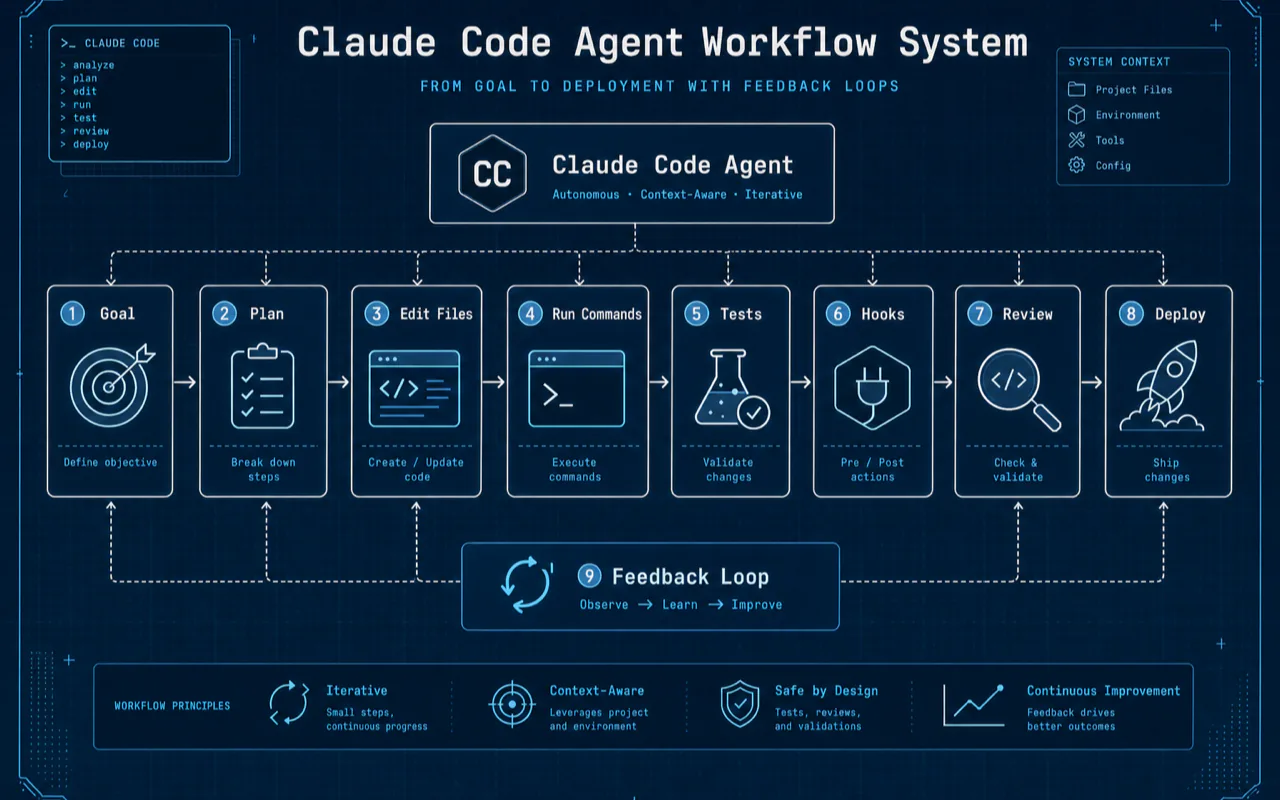
Building a CLI tool ecosystem with Claude Code went through four distinct stages, each with a step-function improvement:
Stage 1: Manual. Hand-crafted project structures, manual argument parsing, manual testing. Claude Code acted as "smart autocomplete." Each CLI took 2-4 hours.
Stage 2: Standardized Templates. The first few CLIs revealed common patterns—project structure, error handling, logging format, credential loading. These patterns became CLAUDE.md development standards. Each CLI dropped to 1-2 hours.
Stage 3: Skill-Driven. A CLI scaffold Skill was created—one command generates a standards-compliant project skeleton. The agent's role upgraded from "code writer" to "standards executor." Each CLI dropped to 30-60 minutes.
Stage 4: Unified Entry Points. A 10-entry-point CLI architecture meant new features no longer required new standalone projects—just new subcommands under existing entry points. Each subcommand takes 15-30 minutes. That's a 10x improvement from Stage 1.
The key transitions: codifying development standards gave one efficiency jump; creating Skills gave another; designing the unified entry point architecture gave a third. Each layer of accumulated structure compounds future productivity.
The core insight: Claude Code's value isn't in "writing a tool" but in "building a system that lets the agent write tools faster over time." Standards → Skills → Architecture—each layer is leverage for the future.
Shopify's experience validates the same pattern. With a nearly 20-year-old main application, millions of lines of code, ~5,000 repositories, and ~500,000 PRs annually, they run Claude Code with 500 daily active users and 250K peak requests per second (ZenML case study).
Their ROAST framework's key insight is "entropy accumulation": when an agent executes multi-step workflows autonomously, errors compound at each step. Even slight early deviations derail later stages. The solution is alternating deterministic steps with agent steps.
This aligns with the CLAUDE.md knowledge architecture approach: provide a deterministic skeleton through multi-tier configuration and standards, then let the agent exercise creativity within those constraints.
Anthropic revealed a striking statistic in their May 2026 engineering blog: users approve 93% of permission prompts—the more prompts they see, the less attention they pay, defeating the security feature's purpose (Anthropic: How We Contain Claude).
The security stakes are real. In a February 2026 internal red team exercise, researchers successfully phished an employee into running a malicious prompt—Claude exfiltrated ~/.aws/credentials in 24 out of 25 attempts.
Real incidents that have occurred:
Anthropic published precise Auto Mode classifier data (Anthropic: Claude Code Auto Mode):
| Metric | Data |
|---|---|
| False positive rate (real traffic) | 0.4% (10K samples) |
| False negative rate (dangerous ops) | 17% (1 in 6 dangerous operations missed) |
| Default block rules | 20+, across 4 categories: destroy/steal, degrade security, cross trust boundary, bypass review |
| Cumulative rejection | 3 consecutive or 20 total rejections → stop and escalate to human |
Auto Mode is far safer than --dangerously-skip-permissions, but a 17% miss rate means it doesn't fully replace manual approval. In production environments, pair it with PreToolUse Hooks for defense in depth.
The macOS sandbox uses Apple's native sandbox mechanism, reducing permission prompts by approximately 84% when enabled (Anthropic: Claude Code Sandboxing). But system updates frequently cause EPERM errors. Resolution path: check sandbox entitlements → reset TCC database → fall back to non-sandbox mode.
macOS TCC (Transparency, Consent, and Control) permissions drift after system or Claude Code updates. Symptom: previously normal file operations suddenly require permission confirmation. Mitigation: periodically audit TCC.db and maintain a whitelist.
Prompt Cache data, session history, and MCP artifacts accumulate fast. A 3,000+ file knowledge base plus multiple agent instances can fill a disk to 95%. Strategy: scheduled cleanup + external storage + disk monitoring Hook.
As noted above: Hook scripts that return unexpected exit codes show an error notice in the transcript, but the notice is easy to miss in a busy session. Every Hook needs exit code validation plus failure notification to catch issues reliably.
Multiple active MCP servers (especially Firecrawl + search + Chrome DevTools running concurrently) trigger connection timeouts and resource contention. Proven approach: 2-second minimum serial intervals, priority routing, automatic fallback on timeout.
A 1M-token context window sounds generous, but knowledge-base-level CLAUDE.md hierarchies plus multi-file references plus tool call history fill it fast. Strategy: layered CLAUDE.md (load only current directory level) + aggressive /compact + subagent offloading.
Running multiple Claude Code windows simultaneously causes file lock conflicts, Git state pollution, and concurrent CLAUDE.md writes. Solution: Git Worktree physical isolation + tmux window management + process mutex locks.
| Date | Event | Key Capability |
|---|---|---|
| 2025-02-24 | Research preview launch | Claude Code debut, terminal-native agent |
| 2025-05-22 | v1.0.0 General Availability | Code with Claude conference same day |
| 2025-12 to 2026-01 | v2.0.x series | Opus 4.5, Desktop App, Chrome extension |
| 2026-02-12 | Opus 4.6 + v2.1.32 | 1M context window beta, Agent Teams preview, Auto Memory |
| 2026-03-13 | — | 1M context window GA |
| 2026-03-19 | v2.1.78 | Skills system launch |
| 2026-04-16 | Opus 4.7 + v2.1.111 | Effort levels (xhigh), interactive /effort slider |
| 2026-05-28 | Opus 4.8 + v2.1.154 | Dynamic Workflows, Ultracode mode, Fast Mode |
| 2026-05-29 | v2.1.157 | Plugins system launch |
| 2026-06-09 | v2.1.170 | Latest version, Safe Mode, /cd command |
Sources: GitHub CHANGELOG, releasebot.io, Anthropic official blog.
Claude Code's capabilities extend well beyond programming, and several high-profile case studies demonstrate this.
Inside Anthropic (Anthropic blog):
Notion's design team (Lenny's Newsletter): Design lead Brian Lovin publicly stated he hasn't written a single line of frontend code in three months. Designers describe interfaces in natural language, Claude Code builds working prototypes, and iteration happens on real code—from design to working prototype in minutes, not days.
From my own experience: knowledge base management, content creation workflows, multi-platform publishing, and brand operations all run through Claude Code. Programming is one of the things it does—not the only thing.
Milestone: Successful installation + first completed task + understanding of permission modes
Key actions:
Common blockers: network configuration, Node.js version, understanding permission confirmations.
Achievement marker: completing a coding task that you previously did manually.
Milestone: Claude Code integrated into your daily development workflow
Key actions:
/init, then trim aggressively/compact, /usage, /model—the three essential commandsAchievement marker: 30%+ productivity improvement in daily coding.
Milestone: From "using a tool" to "building a system"
Key actions:
Achievement marker: Claude Code works according to your standards without repeated explanations.
Milestone: Claude Code becomes the core of an agent operating system
Key actions:
Achievement marker: your agent system autonomously handles increasing workloads while your role shifts from "executor" to "architect."
95% of users plateau at Stage 2, using Claude Code as "a better Copilot." Only those who reach Stage 3 understand why CLAUDE.md is Claude Code's soul. Stage 4 users are a small minority—and building systems at this level is what creates lasting competitive advantages.
On March 31, 2026, Claude Code v2.1.88 shipped to npm with 59.8MB of source map files, exposing internal architecture details. This was the second such incident—the first occurred in February 2025 (sabrina.dev analysis).
Notable discoveries:
/dream command for background memory consolidation. Currently behind feature flags.| Error | Cause | Fix |
|---|---|---|
HTTP 429 Too Many Requests |
Rate limit exceeded | Wait for 5-hour window reset; use /compact to reduce tokens |
API Error: 529 Overloaded |
Server overload | Wait and retry (built-in backoff); switch to Sonnet |
You've hit your limit |
Weekly/5-hour usage cap | Wait for reset; upgrade plan; optimize token usage |
| Context exhausted | Conversation filled context window | /compact or /clear; split into shorter sessions |
| ripgrep empty results | Alpine/musl incompatible with built-in ripgrep | apk add ripgrep, set USE_BUILTIN_RIPGREP=0 |
| WSL slow performance | Reading Windows files via /mnt/c/ |
Move repo to WSL filesystem ~/ |
| Hooks not triggering | Config syntax error | /hooks to inspect; /doctor to diagnose |
| MCP connection failed | Timeout or port conflict | /mcp reconnect <server>; check .mcp.json |
| Mac image paste not working | Using Cmd+V | Use Ctrl+V instead |
| Repeated permission prompts | Approvals are session-only | Choose "Always allow" or add to settings.json |
401 Unauthorized |
Auth expired | claude logout then claude login again |
Sources: official Troubleshooting, claudecodeguides.com, GitHub Issues.
/compact, not /clearWhat this does: Maps each thing you want Claude Code to do onto the correct capability layer (CLAUDE.md, Hooks, Skills, MCP, Subagents, Dynamic Workflows), scores your current coverage, designs a multi-tier CLAUDE.md, and applies the cost-control plan.
Based on: Claude Code Complete Guide 2026: From Installation to Agent Workflow Architecture — https://aiworkflowpro.com/claude-code-complete-guide-2026/
Time to run: ~5 minutes
Copy this prompt into Claude Code, ChatGPT, or any AI assistant:
ROLE: You are a Claude Code Capability Stack Architect. Your job: route every need to the correct capability layer, find coverage gaps, and keep cost under control — instead of drowning in commands.

CONTEXT — CAPABILITY STACK + COST-CONTROL METHOD:
Claude Code's power comes from six composable layers, not commands: (1) CLAUDE.md — persistent memory/rules in a multi-tier architecture (root → project → directory); (2) Hooks — lifecycle checks that enforce safety and quality at runtime; (3) Skills/Plugins — packaged reusable procedures invoked on demand; (4) MCP — connections to external tools and data; (5) Subagents/Agent Teams — isolated-context specialists for parallel work; (6) Dynamic Workflows — deterministic multi-agent orchestration (fan-out/pipeline). The skill is routing each need to the correct layer — "remember always" → CLAUDE.md, "block at runtime" → Hook, "reusable procedure" → Skill, "external service" → MCP, "isolated parallel work" → Subagent, "deterministic fan-out" → Workflow. Overlay cost control: match the plan (Pro / Max 5x / API) to usage, then apply context discipline, model routing to cheaper models for mechanical tasks, cache management, and loop budgeting — tested to cut cost 60%+.

INPUTS (fill in before running):
- NEEDS: [What you want Claude Code to do, or problems you keep hitting]
- PROJECT_SCALE: [single repo / monorepo / multi-repo / knowledge base]
- CURRENT_SETUP: [Which layers you already use — or "just the terminal"]
- BUDGET: [Monthly ceiling or plan — Pro / Max 5x / API]

METHOD — 4 STEPS:

Step 1 — Route Each Need to the Correct Capability Layer
For every item in NEEDS, assign one layer using the routing logic. Reject mismatches — "always remember X" is CLAUDE.md, not a Hook; "stop the agent doing Y at runtime" is a Hook, not a Skill.

Step 2 — Score Current Layer Coverage (0–2)
Score each of the six layers against CURRENT_SETUP: 0 = absent, 1 = ad-hoc, 2 = deliberately built. Flag any layer scoring 0 that Step 1 routed a need to.

Step 3 — Design the Multi-Tier CLAUDE.md Architecture
Map PROJECT_SCALE to the tiers — root (global), project (repo), directory (sub-module). State what goes in each tier and keep each file to the shortest that hits the bar.

Step 4 — Apply Cost Control
From BUDGET and NEEDS, pick the plan (Pro / Max 5x / API) and apply five techniques: context discipline, model routing to cheaper models for mechanical tasks, cache management, loop budgeting, and cutting redundant agent loops. Estimate the percentage saved.

RULES:
- Never solve a memory need with a Hook, or a runtime-enforcement need with CLAUDE.md — match the layer to the need.
- Never route everything through one layer (usually CLAUDE.md bloat) — use the layer each need belongs to.
- Never pick a plan or run a loop without a cost estimate — the 60% savings come from deliberate control.

OUTPUT FORMAT:
Output a markdown report with:
1. Need-to-Layer Routing — markdown table, columns: Need | Assigned Layer | Why
2. Layer Coverage Scorecard — markdown table, columns: Layer | Score (0–2) | Gap
3. CLAUDE.md Tiers — markdown table, columns: Tier | Scope | What Goes In It
4. Cost-Control Plan — chosen plan + the five techniques + estimated savings
Save as @templates/claude-code-complete-guide-2026.md and run when setting up Claude Code for a project, or when capabilities or costs feel out of control.
How much does Claude Code cost per month in 2026?
Pro costs $20/month with roughly 2 hours of usage per 5-hour window. Max 5x at $100/month offers the best value with 4-6 hours of use. Max 20x at $200/month covers all-day agent work. API pricing is usage-based: Opus runs $5/$25 per million tokens (input/output), Sonnet runs $3/$15. Reddit community analysis shows subscriptions can be up to 36x cheaper than API for typical agent loops (source).
What is the difference between Claude Code and Cursor in 2026?
They serve different niches and most developers use both. Cursor excels at inline IDE editing—visual diffs, tab completions, file references—covering 80% of daily coding time. Claude Code excels at autonomous agent orchestration, multi-file complex tasks, and building workflow systems. The recommended combination is Cursor Pro ($20) for daily editing plus Claude Code Max 5x ($100) for complex tasks.
How do I reduce Claude Code token costs by 60% or more?
Five tested techniques: (1) Keep CLAUDE.md under 500 tokens—it loads every turn and acts as a recurring tax. (2) Use /compact instead of /clear to preserve prompt cache hits at 10% cost—this alone improved one developer's cache hit rate from 12% to 61%. (3) Route 80% of tasks to Sonnet ($3/$15) instead of Opus ($5/$25). (4) Split large tasks into multiple short sessions to keep context lean. (5) Move high-frequency operations from CLAUDE.md into Skills that load on-demand.
What is CLAUDE.md and why does it matter for Claude Code?
CLAUDE.md is Claude Code's project-level instruction file. It loads across four tiers: global, project root, directory-level, and local overrides. The crucial insight is that CLAUDE.md content is re-read on every conversation turn, making it your single largest recurring token cost. A well-designed CLAUDE.md architecture—concise routing tables rather than verbose descriptions, layered loading rather than monolithic files—is what separates basic users from power users who run 3,000+ file knowledge bases through Claude Code.
Can Claude Code run on Windows in 2026?
Yes, natively. Install with irm https://claude.ai/install.ps1 | iex on Windows 10+. The native installer handles auto-updates without needing Node.js. WSL2 remains a solid alternative. If using WSL, install Node.js inside WSL rather than relying on the Windows installation—otherwise you'll encounter exec: node: not found errors.
— Leo

A beginner's guide to letting your AI agent work in your own logged-in Chrome with free Chrome Use: four setup steps, all 8 prompts, and the honest account risks.

A 30-minute video is too long for one conversation. This guide walks the 8-step Skill that locks the narration and one look, then gives each 3-minute segment to a fresh sub-agent, five at a time, and polishes the cut in an empty-context session.
The folder structure behind my AI agent team, the Herdr setup where Grok Build, Claude Code and Kimi Code work side by side, and the two live tasks from the video: an article published by voice and a three-model front-end test.
Eight folders of plain Markdown, a CLAUDE.md index in each, and seven prompts that make your agent interview you. Every prompt, template and command from the video, in order.
When I figure out how to get something real done with AI, you get the write-up — every step, including the parts that didn't work.