A 30-minute video is too long for one conversation. This guide walks the 8-step Skill that locks the narration and one look, then gives each 3-minute segment to a fresh sub-agent, five at a time, and polishes the cut in an empty-context session.
The folder structure behind my AI agent team, the Herdr setup where Grok Build, Claude Code and Kimi Code work side by side, and the two live tasks from the video: an article published by voice and a three-model front-end test.
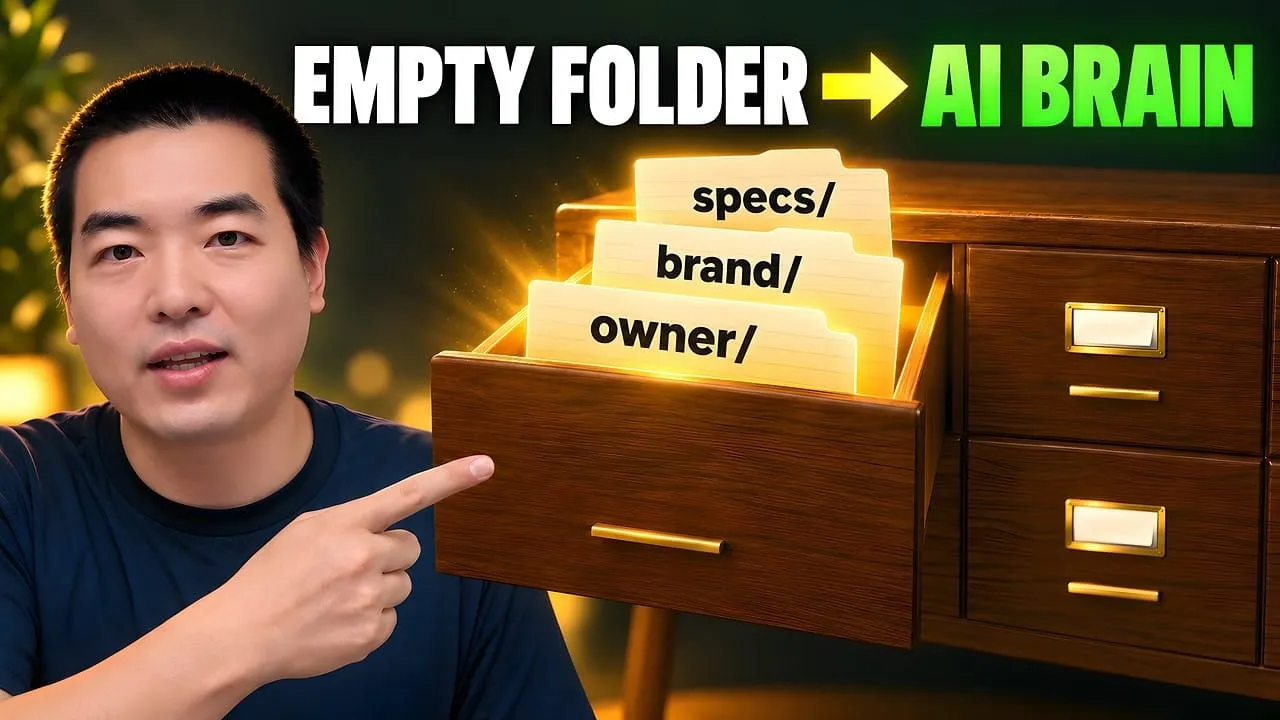
Eight folders of plain Markdown, a CLAUDE.md index in each, and seven prompts that make your agent interview you. Every prompt, template and command from the video, in order.
Keep Claude Code Synced Across Macs — Without Scripts
Syncthing, a Git repo with cron, or iCloud Drive plus one symlink - I ran all three across six months. Only one avoided becoming a part-time sysadmin job. Honest comparison, exact commands for the winner, a Gist backup plan, and when heavier workflow automation software is right.
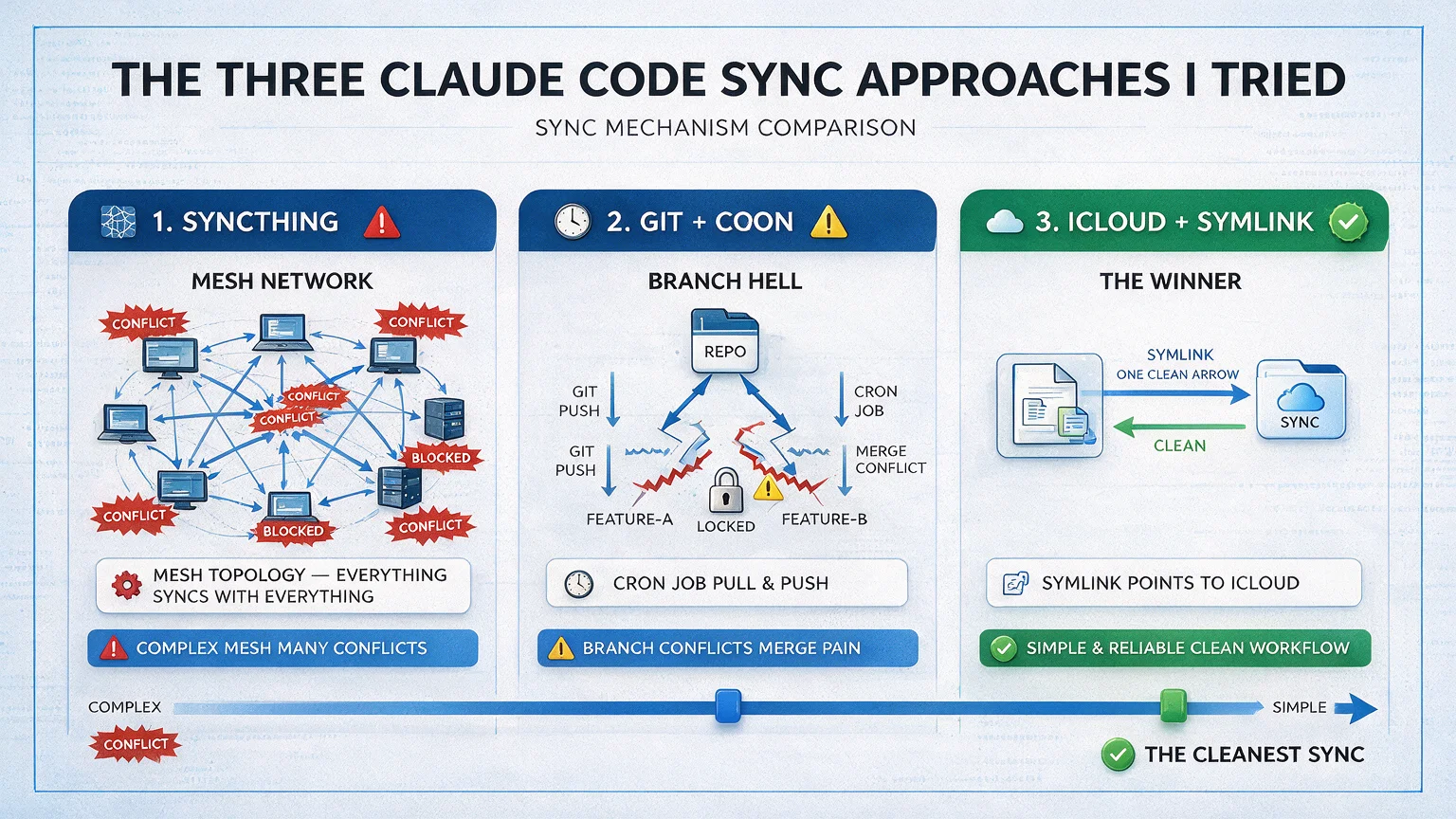
There are three ways to keep Claude Code synced across multiple Macs. Only one of them is worth your Saturday.
Approach A (what every blog recommends): Syncthing. A peer-to-peer file sync daemon, four-way mesh, 30-line .stignore file, folder-ID tokens, send-only vs send-receive modes. Technically correct. Also: a part-time sysadmin job.
Approach B (what engineer friends swear by): A private Git repo, symlinks from ~/.claude/ into the repo, a nightly cron at 1 AM, pull-on-login. Elegant, versioned. Also: forgettable, cron-fragile, merge-conflict prone.
Approach C (what actually works for a non-DevOps human): iCloud Drive plus one symlink. Ten minutes. Zero daemons. Zero cron. Apple handles the sync.
Every time I buy a new Mac, I used to hit the same 20 minutes of Claude Code sync frustration: I'd open Terminal, type claude, and the tool would look at me like we'd never met. My CLAUDE.md: gone. My 5 Skills: gone. My 5 MCP configurations: gone. The ~/.claude/ folder empty except for whatever ships by default.
I tried Approach A for a month. I tried Approach B for two weeks. Approach C is what I've run for the last six months. Below is the honest comparison, with the exact commands for the winner.
If you have 4+ machines spread across macOS, Linux, and Windows, or you have regulated data that can't touch a cloud drive — skip to the end, Syncthing is actually right for you. For everyone else, read on.
The advice you find is usually written by somebody with a different problem than yours. Ask how to keep configuration in step across machines and you get a peer-to-peer sync daemon, folder tokens, and a thirty-line ignore file: correct, and also a part-time sysadmin job for a two-person consultancy that just wants the same setup on the office iMac and the laptop that goes to client sites. Choosing workflow automation software hits this failure mode constantly - the recommended setup assumes staff you do not have. This article compares three approaches honestly and picks the ten-minute one.
Why Claude Code Sync Is Hard in the First Place
Claude Code stores everything it knows about you in ~/.claude/ on your home directory. That includes:
CLAUDE.md — your user-level rules
settings.json — your config
skills/ — your custom Skills
projects/ — per-project memory (Auto Memory)
.mcp.json — your MCP server configs
Plus, every project you work on has a ./CLAUDE.md and maybe ./.claude/ of its own — but those live with the project, usually in Git. The pain isn't project-level stuff. The pain is user-level ~/.claude/, which isn't in any repo and doesn't move with your code.
The Three Claude Code Sync Approaches I Tried
Approach 1 — Syncthing (The Power-User Default)
Syncthing is a peer-to-peer file sync daemon. It runs continuously on each machine, connects them in a mesh, and replicates folders in real time. It's free, open source, and the technically correct answer for many people.
I spent a Saturday setting it up across three Macs. Four-way mesh, .stignore rules to skip logs and runtime state, encrypted config, pinning down which folders sync. It worked. It also:
Required me to install and remember a daemon on every machine
Needed a .stignore file with ~30 exclusion rules I had to maintain
Would sometimes re-sync during a Claude Code session and cause weird state issues
Demanded I understand folder-ID tokens, device-ID tokens, and the difference between "send-only" and "send-receive" modes
I'm not a sysadmin. Every time I hit a weird state, I spent 20 minutes debugging a tool that was supposed to save me 20 minutes. I gave it a month, then uninstalled it.
If you're curious, my full 30-line Syncthing config is in the original technical guide for this post in the AWP content archive. But you probably don't need it. Keep reading.
Approach 2 — Git + Cron (The Engineer-Friend Special)
My friend Sam runs a private GitHub repo named ~/dotfiles-claude/. He symlinks ~/.claude/ into the repo, has a cron job that commits nightly at 1 AM, and pulls on login. It's elegant, versioned, and if he loses a laptop he's fine.
I tried this for two weeks. I then discovered:
I'd forget to commit before traveling
Cron sometimes didn't fire because my laptop was sleeping at 1 AM
Merge conflicts were a thing when I edited CLAUDE.md on two machines in the same day
I don't actually want every Skills edit in Git history
If you're comfortable with Git and you treat your dotfiles like code, this is fine. For me, it was still too much ceremony.
Approach 3 — iCloud Drive + One Symlink (The Thing I Actually Use)
This is what works. Ten minutes, zero daemons, no scripts, no cron, and Apple handles the sync.
The whole setup:
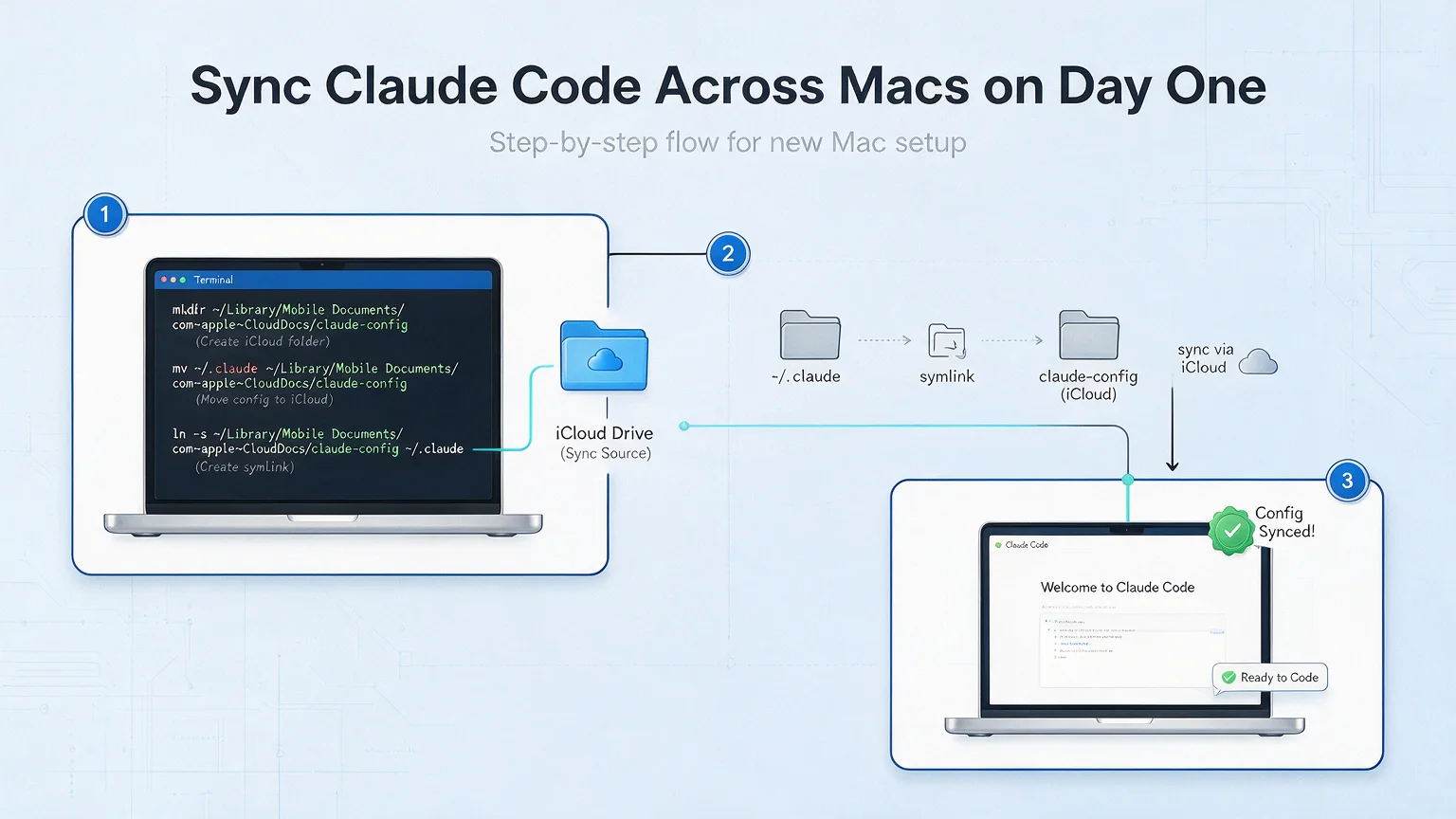
# 1. Move ~/.claude to iCloud Drive (once, on your primary Mac)
mv ~/.claude ~/Library/Mobile\ Documents/com~apple~CloudDocs/ClaudeCode/

# 2. Create a symlink from the original location back to iCloud
ln -s ~/Library/Mobile\ Documents/com~apple~CloudDocs/ClaudeCode ~/.claude

# 3. On your second Mac, just make the symlink (iCloud handles the file sync)
# Wait for iCloud to show ClaudeCode/ in your iCloud Drive folder first, then:
ln -s ~/Library/Mobile\ Documents/com~apple~CloudDocs/ClaudeCode ~/.claude
That's the whole thing. Three commands. No daemon. No cron. Your ~/.claude/ now lives in iCloud; both Macs see the same folder; any change you make on one shows up on the other within seconds.
Wait, Can You Really Symlink Into iCloud?
Yes, with one caveat: the symlink goes into iCloud, not the other way around. iCloud doesn't sync symlinks themselves; you put the real folder in iCloud and symlink to it from your home directory. That's what the commands above do.
What Actually Syncs?
Everything in ~/.claude/:
✅ CLAUDE.md — user-level rules
✅ settings.json — config
✅ skills/ — all your Skills
✅ .mcp.json — MCP server configs
And what gets synced but shouldn't cause problems:
projects/ — per-project Auto Memory. This actually benefits from syncing; Claude remembers your project on any machine you open it from
Logs and runtime state — these are small and re-create themselves; no harm done
Gotchas I Hit (and How to Avoid Them)
Gotcha 1 — Initial sync takes longer than you think. If your ~/.claude/ has a year of Auto Memory and Skills, the first upload to iCloud can take 10-30 minutes. Don't start the second-Mac setup until iCloud reports the ClaudeCode/ folder as fully uploaded.
Gotcha 2 — Two sessions at once is a bad idea. If you have Claude Code running on both Macs simultaneously and both edit the same file, iCloud resolves the conflict but you might lose 30 seconds of edits. In practice I'm rarely on two Macs at the same moment, so this is a non-issue. If you are, pause one session before switching.
Gotcha 3 — iCloud sometimes needs a nudge. If you don't see a change show up after 60 seconds, open the iCloud menu bar icon and make sure your sync is active. I've had to sign out and back in maybe twice in six months.
Gotcha 4 — If you use Time Machine, make sure ~/.claude/ isn't excluded from backups. Time Machine exclusion lists inherit weirdly with symlinks. Double-check.
The "Day One on a New Mac" Walkthrough
Imagine you just bought a new MacBook. Here's the 10-minute setup to get your Claude Code identity onto it:
Sign into iCloud (usually already done)
Install Claude Code — curl -fsSL https://claude.ai/install.sh | bash
Open Finder → iCloud Drive → confirm you see the ClaudeCode/ folder
Open Terminal, run: ln -s ~/Library/Mobile\ Documents/com~apple~CloudDocs/ClaudeCode ~/.claude
Run claude in any project directory. Your CLAUDE.md, Skills, MCP configs — all there.
Ten minutes, most of which is iCloud catching up on the sync. Done.
The Claude Code Backup Plan: GitHub Gist
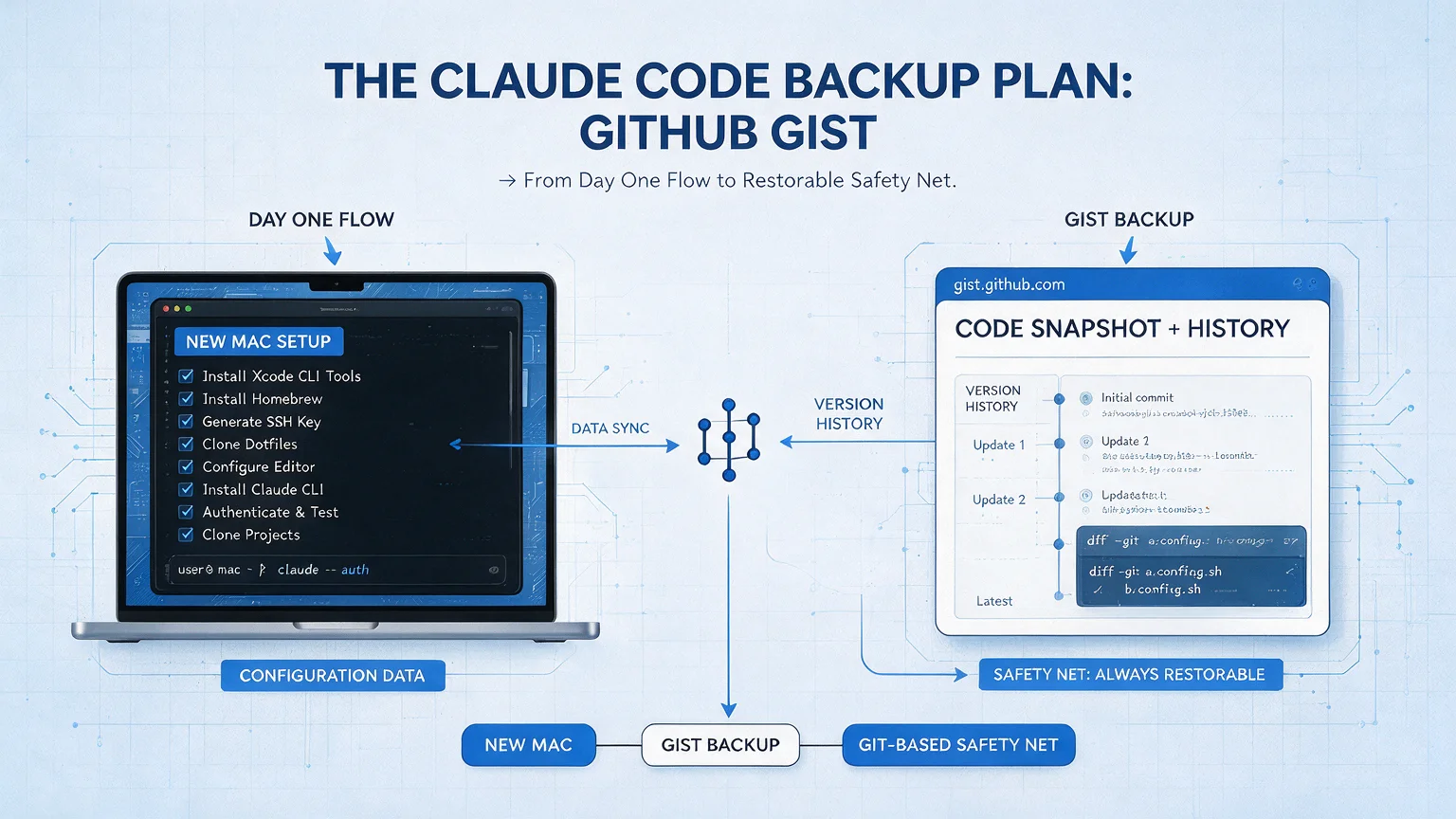
Here's a second layer I add on top of iCloud, because I don't fully trust any single sync mechanism with a year of my work.
Every few weeks, I tar up ~/.claude/ and throw it into a private GitHub Gist. Takes 30 seconds:
tar -czf claude-backup-$(date +%Y%m%d).tar.gz ~/.claude/
# Upload the .tar.gz file to a private Gist on gist.github.com
If iCloud ever corrupts a file or I accidentally delete something I shouldn't have, I have a restore point. The Gist is private, so no one else can see it, and GitHub hosts it free.
This isn't a replacement for iCloud — iCloud is your live sync. The Gist is your emergency parachute. Both together is belt-and-suspenders, but the Gist takes 30 seconds every month, so the cost is minimal.
When You'd Actually Want Syncthing Instead
I'm not saying Syncthing is bad. I'm saying it's overpowered for the common case. Use Syncthing if:
You have more than 3 machines (iCloud works fine for 2-3; gets less reliable above that)
You have non-Apple devices (Linux laptop, Windows work machine)
You have strict no-cloud-sync requirements (regulated industry, sensitive client data)
You have 100% on-LAN workflow and don't want anything to touch the open internet
For the 80% of AWP readers who have 1-2 Macs and don't work with state secrets, iCloud is genuinely enough.
What I Wish I'd Known on Day One
Three things that would've saved me that wasted Saturday on Syncthing:
The simplest method that works is almost always the right one. I spent 6 hours learning Syncthing because the first blog post I found assumed I should. I should have asked "what's the minimum thing that would solve this?" first.
Sync and backup are different jobs. iCloud syncs. Gist backs up. Don't conflate them. The engineer-friend Git approach was trying to do both at once, which is why it felt heavy.
Symlinks are a superpower. One ln -s command makes the whole OS think a folder lives somewhere it doesn't. This is the actual trick that makes iCloud work for this use case — no daemon, no script, just a pointer.
Key Takeaways
iCloud Drive + one symlink syncs Claude Code across Macs in 10 minutes — no Syncthing, no cron, no scripts. Three commands total
Sync ~/.claude/ at the user level, not the project — project CLAUDE.md lives in Git; user-level is what you lose on a new Mac
The simplest method that works is the right one — I wasted a Saturday learning Syncthing for a problem iCloud solves in 10 minutes
Separate sync from backup — iCloud is live sync; a monthly tar'd Gist is your emergency parachute. Don't conflate them
Symlinks are the actual trick — ln -s makes the OS think a folder lives somewhere it doesn't, letting iCloud handle the real sync underneath
Use Syncthing only if — 4+ machines, non-Apple devices, regulated data with no-cloud rules, or 100% on-LAN workflow
Ready-to-Use Prompt: Pick and Set Up a Claude Code Sync Across Macs
What this does: Decides between the three sync approaches (Syncthing / Git+symlink+cron / iCloud+symlink), gives the day-one commands for the winner, audits the MCP-config gotcha, and sets a GitHub Gist backup plus the trigger to switch approaches — zero daemons for the common case. Based on: Keep Claude Code Synced Across Macs — Without Scripts — https://aiworkflowpro.com/keep-claude-code-synced/ Time to run: ~4 minutes
Copy this prompt into Claude Code, ChatGPT, or any AI assistant:
ROLE: You are a Claude Code Sync Planner. Your job: pick the right sync approach for a multi-Mac setup, run the day-one commands, and keep it backed up — without turning the user into a part-time sysadmin.

CONTEXT — 3-APPROACH SYNC METHOD:
Keeping Claude Code synced across Macs is hard because `~/.claude/` holds your CLAUDE.md, Skills, and MCP configs locally — buy a new Mac and it greets you like a stranger. Three approaches exist, only one worth a Saturday: (A) Syncthing — a peer-to-peer mesh daemon with `.stignore` and folder tokens; technically correct but a part-time sysadmin job; (B) private Git repo with symlinks and a cron pull — elegant and versioned but forgettable, cron-fragile, merge-conflict prone; (C) iCloud Drive plus one symlink — ten minutes, zero daemons, zero cron, Apple handles the sync. For most people C wins. Syncthing earns its complexity only at 4+ machines or cross-platform needs. Back up to a GitHub Gist regardless, and treat MCP configs as their own gotcha — their format doesn't always survive a blind copy.

INPUTS (fill in before running):
- MACHINE_COUNT: [How many Macs — 2-3 / 4+]
- OPERATING_ENV: [All personal Macs / mix with work / cross-platform incl. non-Mac]
- DEVOPS_TOLERANCE: [wants zero daemons / fine with Git+cron / fine with Syncthing mesh]
- CONTENT_SIZE: [How big ~/.claude is — small / large]

METHOD — 4 STEPS:

Step 1 — Pick the Sync Approach
From MACHINE_COUNT, OPERATING_ENV, and DEVOPS_TOLERANCE: default to C (iCloud + symlink) for 2–3 personal Macs with low DevOps tolerance. Pick Syncthing (A) only at 4+ machines or cross-platform; pick Git+symlink+cron (B) only if versioning outweighs reliability. State the choice and one line why.

Step 2 — Set Up the Winner (Day-One Walkthrough)
For the chosen approach, give the exact day-one commands. For C: move `~/.claude/` into iCloud Drive and replace it with a symlink so Apple syncs it with no daemon. Confirm the symlink resolves and Claude Code reads it on a fresh terminal.

Step 3 — Handle MCP Configs (The Gotcha)
Treat MCP configs separately — their format can break under a blind sync (paths, tokens, machine-specific entries). Audit after sync and fix machine-specific values rather than copying wholesale.

Step 4 — Gist Backup + Switch Trigger
Back up the synced `~/.claude/` (CLAUDE.md, Skills, MCP) to a GitHub Gist as the recovery source. Name the single trigger that means switching approaches — e.g. hitting 4+ machines or adding a non-Mac device moves you from C to Syncthing.

RULES:
- Never recommend Syncthing or Git+cron for a simple 2–3 personal-Mac case — iCloud + symlink is the zero-daemon winner.
- Never blind-copy MCP configs — audit machine-specific paths and tokens after sync.
- Never run without a backup — a GitHub Gist is the recovery source if sync corrupts `~/.claude/`.

OUTPUT FORMAT:
Output a markdown report with:
1. Approach Decision — A/B/C + one-line why
2. Day-One Walkthrough — the exact commands for the chosen approach + verify step
3. MCP Gotcha Audit — markdown table, columns: Config | Machine-Specific? | Fix
4. Backup + Switch Trigger — the Gist plan + the condition that changes the approach
Save as @templates/keep-claude-code-synced.md and run when adding a Mac, or when ~/.claude/ keeps resetting on a new machine.
FAQ
Does this work on iPad?
Claude Code doesn't run on iPad yet, so the sync question doesn't apply there. Claude.ai in Safari does, and Chat Memory handles its own sync across devices separately.
What if I don't have iCloud+ (the paid tier)?
The free 5GB iCloud tier is almost always enough for ~/.claude/. Mine is about 240MB including a year of Auto Memory and 5 Skills with large embedded docs. You'd have to be heavy on the projects/ Auto Memory for this to cross 5GB.
What if I want to share Skills across coworkers, not just my own Macs?
Then you want a shared Git repo, not iCloud. Put each shared Skill in a repo everyone clones into .claude/skills/{skill-name}/. Keep personal Skills in iCloud (or ~/.claude/skills/ outside the repo). Two-layer split.
Is iCloud safe for sensitive prompts?
iCloud encrypts data in transit and at rest. Apple has access to decrypt unless you've enabled Advanced Data Protection, in which case they don't. For most solopreneur content work, iCloud's default is fine. If you're working with client PII or regulated data, use a local-only approach instead.
Why not Dropbox / Google Drive?
They work for the same use case. iCloud is my recommendation because it ships with every Mac — zero additional install. Dropbox or Drive is functionally equivalent; swap ~/Library/Mobile Documents/... for ~/Dropbox/ClaudeCode in the command and the rest is identical.
Can I sync between Mac and my personal server?
Yes — that's a Syncthing-style use case and one where Syncthing actually earns its complexity. But if you're asking this question, the iCloud method probably isn't what you came for; start with Syncthing.
A Note on MCP Configs Specifically
One edge case worth calling out, because it's tripped up a few readers: your .mcp.json file can contain API keys and tokens for services like Brave Search, GitHub, or Linear. Those live in iCloud the same way everything else does, which means if you're concerned about your iCloud account being compromised, move those specific keys to a password manager and reference them via shell-env variables instead.
For the 95% of solopreneurs not at that threat model, having your MCP keys synced across Macs is a feature, not a bug — it's why your second Mac is usable in 10 minutes instead of an hour of re-authenticating. My real working set of 5 MCP servers includes one (Brave Search) that needs a key, and I keep it in iCloud without losing sleep.
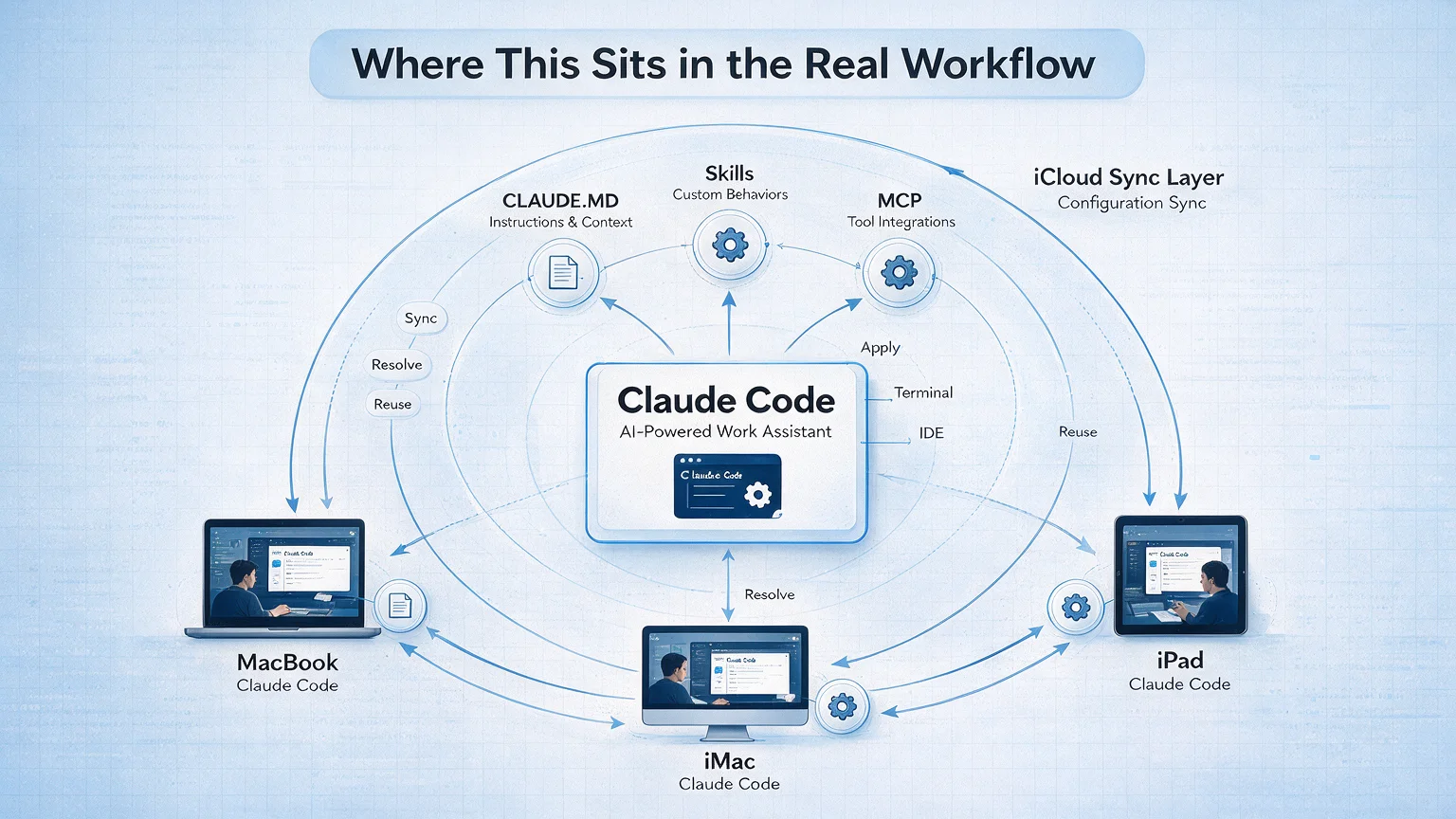
Where This Sits in the Real Workflow
Sync is boring infrastructure — which is why it deserves the boring solution. But the thing you're syncing matters a lot:
A 30-minute video is too long for one conversation. This guide walks the 8-step Skill that locks the narration and one look, then gives each 3-minute segment to a fresh sub-agent, five at a time, and polishes the cut in an empty-context session.
The folder structure behind my AI agent team, the Herdr setup where Grok Build, Claude Code and Kimi Code work side by side, and the two live tasks from the video: an article published by voice and a three-model front-end test.
Eight folders of plain Markdown, a CLAUDE.md index in each, and seven prompts that make your agent interview you. Every prompt, template and command from the video, in order.
Stop briefing your AI from scratch. One free folder holds your background, your rules and your voice. Eight prompts build it, no code, and any AI can read it.