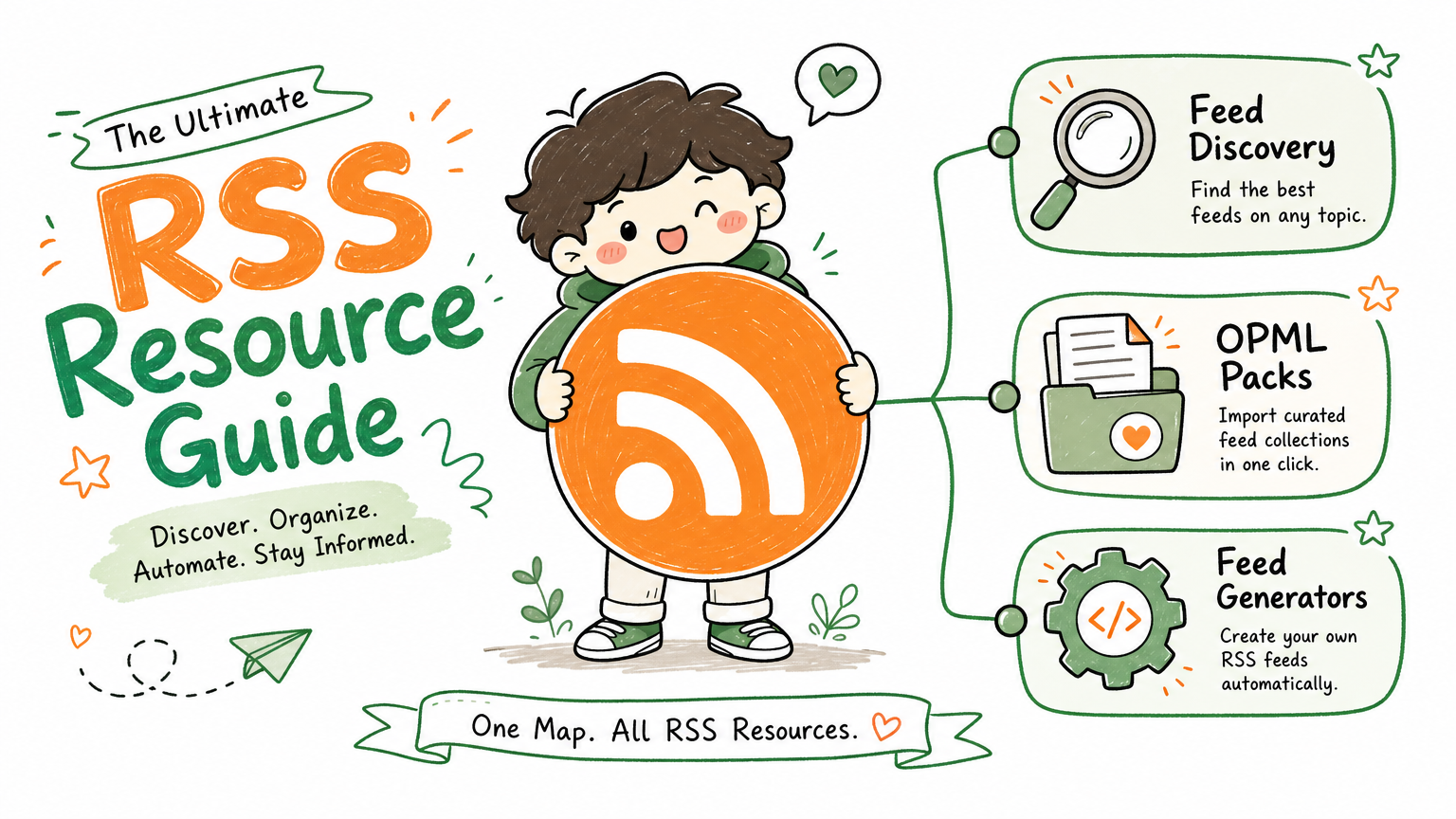
Monitoring a competitor who publishes no feed is the case every RSS guide skips. Twenty-one platforms sorted by which of three jobs they do, and the finished setup is business process automation you own outright, with no seat licence to renew.
Blaming the content is the reflex when a post underperforms, and it is usually the wrong diagnosis. A second reader decides distribution before any human sees the post, and most of what it checks is mechanical enough to automate business processes around, on five platforms at once.
Gloves on, tape measure in hand — nobody types a query. Three voice surfaces for ai automation tools (terminal, Telegram, Discord), 10 TTS and 6 STT providers compared on cost and latency, plus a setup that costs nothing.
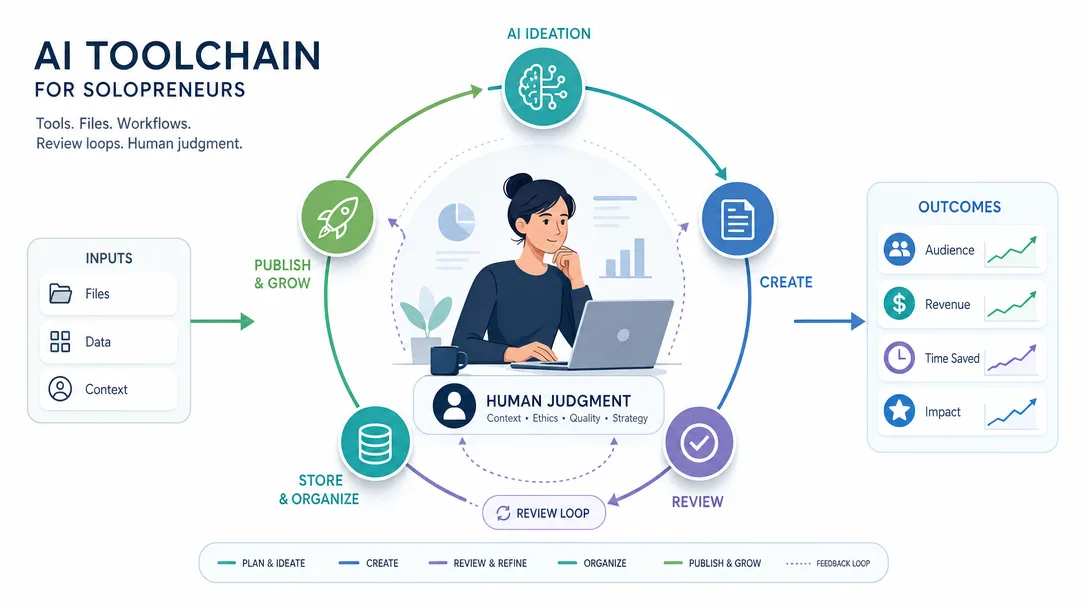
AI Toolchain for Solopreneurs: Run a One-Person Business Like a Team
Buying tools feels like building a business, right up until the month you realise nothing got shipped. The five layers decide what you actually need — and in which order.
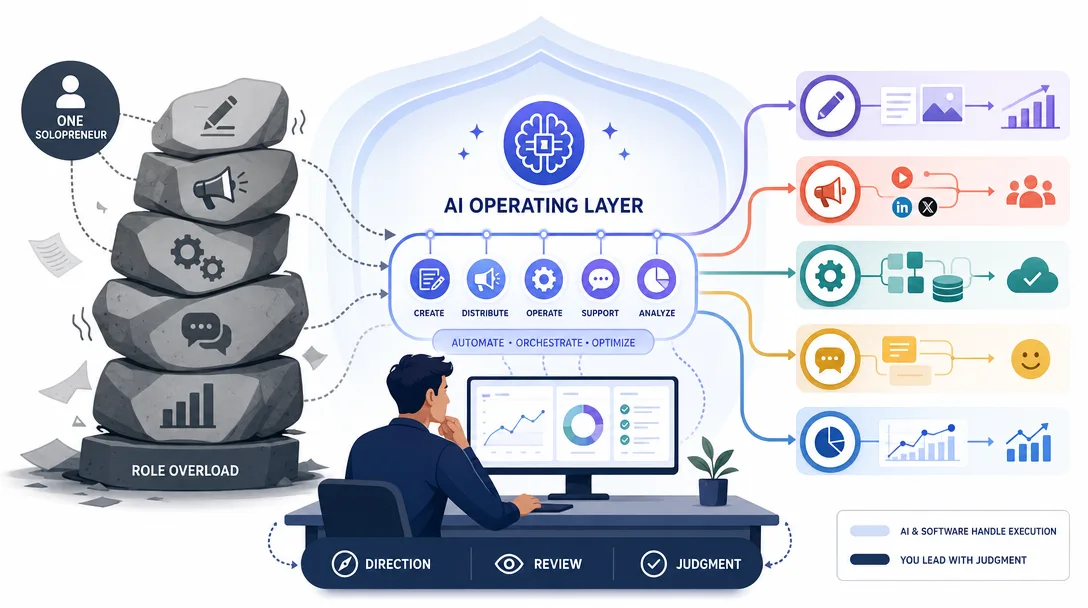
An AI toolchain is not a shopping list. It is the operating system for a one-person business.
The five layers are creation, distribution, monetization, operations, and analysis.
Start with the workflow, then choose tools. Tool collecting is one of the easiest ways to avoid shipping.
Claude Code, MCP, skills, and a project knowledge base can become a control console, but only when you keep permissions, review, and verification in the loop.
Count the subscriptions on last month's card. Most one-person operations are paying for eleven or twelve, using four properly, and could not say which one would break the week if it disappeared tomorrow. That is not overspending, it is the absence of a shape: tools got bought one urgent problem at a time, so nothing sits in relation to anything else. AI for small business only compounds once the layers are named — because then a new tool has to earn a slot instead of just an invoice.
The previous articles built the business logic: direction, brand, story, content, offer, and audience. If you have not read the acquisition piece, start with your first 1,000 true fans.
Now we need the machine that helps one person operate it all.
Morning arrives.
You need to write an article, make a cover image, publish three social posts, answer a few customer messages, check revenue, update the landing page, and review last week's content data.
If you do all of that manually, you are not building a one-person business.
You are building a one-person factory.
The point of an AI toolchain is not to make you "more productive" in the vague sense. The point is to separate the work that needs your judgment from the work that only needs execution.
AI should handle production drag.
You keep the taste.
AI Toolchain for Solopreneurs in 2026: A Market Snapshot
Every solopreneur newsletter, podcast, and Twitter thread now sells an AI tool stack. The market is loud. The data points are scarce.
A 2026 spot check for "AI toolchain for solopreneurs" mostly returns broad tool round-ups (Corporate Playbook Pro, HiNomad, SaaSToolsGuide, F3 Fund It and others). The common pattern is tool-by-category lists and generic large-stack recommendations.
The useful gap is attaching the toolchain to a 5-layer infrastructure with named one-time-config artifacts: a CLAUDE.md operating manual, reusable Skills, MCP plugin layer, approval gates, and a 30-day implementation plan. The gap is not "more tools." The gap is the architecture that turns the tool stack into a system that runs the business while the operator sleeps. That is what this guide is.
Why One Solopreneur Cannot Be Seven People
Everyone says AI lets one person do the work of ten. Actually, the math is more like 1.5x to 3x for most workflows, and the lift shows up only when the toolchain is right. Here is why this matters: picking the wrong tool stack costs more than not using AI at all, because every wrong subscription becomes a 12-month sunk cost the solopreneur must work around.
A small content business often needs these roles:
Role
Work
Writer
Articles, emails, scripts, product copy
Designer
Covers, diagrams, social assets
Social operator
Scheduling, formatting, replies, distribution
SEO operator
Keywords, structure, internal links, audits
Developer
Website, landing pages, automations
Analyst
Traffic, conversion, revenue, experiments
Support
Customer questions, onboarding, refunds
Hiring those people is expensive.
Doing all of that yourself is worse.
The correct move is not "work harder." It is to build a system where AI and software cover repeated execution while you stay responsible for direction, judgment, and review.
This is the difference:
Bad solo operating model
Better solo operating model
Learn every role from scratch
Build workflows for repeated tasks
Open 20 tools every day
Use a small stack with clear jobs
Ask AI for one-off help
Give AI project files and repeatable processes
Publish when motivated
Run a calendar and review loop
Trust AI output blindly
Inspect, edit, test, and approve
If something repeats three times, it belongs in the system.
If something needs taste, keep it close.
The Five-Layer AI Toolchain Infrastructure
A one-person business needs five layers:
Layer 5: Analysis       - see what is working
Layer 4: Operations     - keep the business running
Layer 3: Monetization   - turn trust into revenue
Layer 2: Distribution   - get the work in front of people
Layer 1: Creation       - produce the valuable thing
The lower layers need more human judgment. The upper layers should become more automated over time.
If you spend all day checking analytics, moving files, scheduling posts, and formatting documents, the system is upside down.
The goal:
Layer
Human should do
AI/tools should do
Creation
point of view, examples, final edit
research, outline, first draft, format variants
Distribution
channel strategy, final approval
repurposing, scheduling drafts, format conversion
Monetization
offer judgment, proof, pricing decisions
sales page drafts, FAQ, payment-page copy
Operations
rules, exceptions, customer trust
reminders, status checks, standard replies
Analysis
decisions and tradeoffs
data aggregation, weekly summaries, anomaly detection
This table is more important than any tool recommendation.
Without it, you will buy software and still feel overwhelmed.
Choose AI tools after the workflow, not before
Most AI toolchain posts are lists:
use this writing app,
this image generator,
this meeting tool,
this automator,
this analytics dashboard.
Lists are tempting because they feel actionable.
They often create more work.
Choose tools with three rules:
Rule
What it means
Maturity
The tool is stable enough that you are not betting your business on a weekend project
Replaceability
Your data can export, and a backup option exists
Workflow fit
It removes a repeated bottleneck you have already felt
Do not add a tool because it is interesting.
Add a tool because a repeated workflow is now painful enough to deserve infrastructure.
This is the order:
Run the workflow manually.
Document the steps.
Identify the repeated friction.
Automate one part.
Review whether the automation actually saved effort.
This prevents "toolchain cosplay": a beautiful stack with no business moving through it.
Layer 1: Creation — Where AI Does Most of the Lifting
Back when content creation meant a writer, an editor, and a designer in three different Slack threads, the bottleneck was coordination. Now AI compresses the three roles into one chair, but the editorial judgment still has to come from a human.
Before this layer existed as a real workflow, a solopreneur shipped one good post a week and called it consistent. After: the same operator ships three useful pieces a week with one well-edited research note as the source of all three.
Creation is the root.
Your articles, videos, templates, courses, scripts, code, and frameworks are the product surface of the business.
AI can help a lot here.
Task
AI can help with
Human must keep
Writing
research, outline, draft, rewrite, summary
point of view, examples, final edit
Design
concepts, image prompts, layout ideas
brand taste, accuracy, approval
Video
script, chaptering, transcript cleanup
presence, judgment, final message
Code
scaffolding, edits, tests, refactors
requirements, review, deployment approval
Audio
transcript, cleanup, notes
voice, story, final quality
The rule:
AI can create the clay. You still sculpt.
I would start with:
one general AI assistant for thinking and drafting,
one file-based workspace for repeatable workflows,
one image/design tool if visuals matter,
one place where final content lives.
Do not overbuild this layer.
If the point of view is weak, more creation tools only produce weak work faster.
Layer 2: Distribution — Create Once, Adapt Many Times
If your distribution stack is already three platforms or fewer, skip ahead to Layer 3. If you are publishing the same idea five different ways manually, the next 600 words save you about six hours a week.
Distribution answers:
How does the work reach the right people?
The ideal is "create once, adapt many times."
One long article can become:
a newsletter,
a LinkedIn post,
an X thread,
a short video script,
a carousel outline,
FAQ snippets,
a lead magnet checklist,
sales email material.
AI is strong at format conversion, but weak at knowing whether a channel is strategically worth your time.
Avoid the trap of building a complicated monetization stack before you have a clear offer.
Your first version can be extremely simple:
One landing page.
One payment link.
One onboarding email.
One delivery folder.
One feedback form.
If that cannot sell, adding a CRM will not save it.
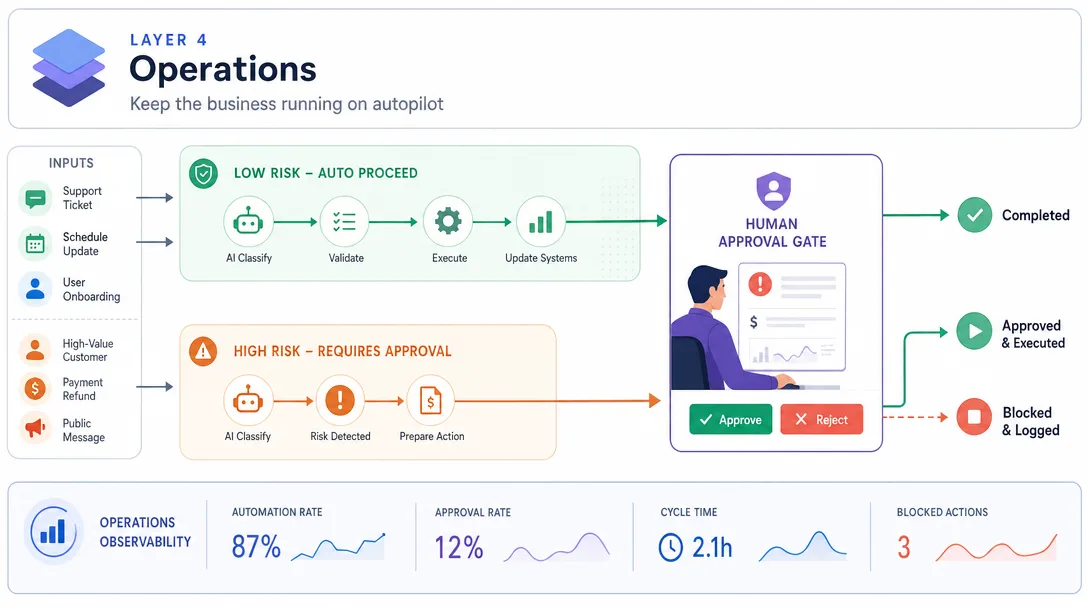
Layer 4: Operations — Keep the Business Running on Autopilot
Operations keep the business running when you are not actively pushing.
This includes:
support replies,
task tracking,
file organization,
customer onboarding,
invoice reminders,
content calendar reminders,
weekly review setup,
backup and credential hygiene.
This is where many solopreneurs bleed time.
Not because each task is large.
Because small tasks create constant switching.
AI can help by drafting replies, sorting notes, creating checklists, watching recurring tasks, and turning messy instructions into SOPs. But operations also carry trust risk. If an AI sends the wrong email to a customer, that is your responsibility.
So use a tiered rule:
Risk
AI autonomy
Low
Draft, rename, summarize, format
Medium
Prepare and ask for approval
High
Human must inspect and approve
Customer money, public publishing, legal claims, refunds, and account changes should not run on blind automation.
There is also a real choice between two kinds of automation here, and getting it wrong is expensive. Zapier itself frames the split clearly: traditional Zaps are deterministic ("if this, then that"), while AI agents are probabilistic ("an AI agent takes a goal, decides which steps to run, calls tools and chatbots as needed, and keeps going until the goal is met or it escalates to a human.") For a solopreneur, the rule of thumb is boring but reliable: when the inputs and outputs are predictable (new Stripe charge → row in spreadsheet → Slack message), use a deterministic platform like Zapier or Make; they process 3.1 billion automated tasks per month across 8,000+ apps for a reason. When the work needs reading, judgment, or open-ended response (classify an inbound email and draft a reply that matches your voice), use an LLM agent. Putting reasoning behind a deterministic Zap or putting routine plumbing behind an LLM agent both waste money and create fragility.
Layer 5: Analysis — See What Is Working Before You Scale
Analysis tells you what is working.
Most solo operators either ignore data or drown in it.
Use a small dashboard:
Question
Metric
Is attention growing?
visits, views, reach
Is trust growing?
subscribers, replies, saves
Is demand appearing?
sales calls, downloads, buying questions
Is money growing?
revenue, conversion rate, refunds
Is the system sustainable?
hours spent, tasks automated, bottlenecks
AI can summarize data and spot patterns, but it cannot decide your values.
Maybe the highest-traffic topic attracts the wrong audience.
Maybe the smallest newsletter segment buys the most.
Maybe one high-touch offer creates better profit than ten low-ticket products.
The tool can show the pattern.
You decide the strategy.
Claude Code as a Solopreneur Control Console
Claude Code is useful because it works in a project context. The economics are public, which makes it easier to plan around: per Anthropic's official pricing page, at time of writing Claude Opus 4 is $5 input / $25 output per 1M tokens, Sonnet 4 is $3 / $15, and Haiku 3.5 is $1 / $5 a 5x spread between cheapest and most expensive tier. Cache hits cost just 0.1x the standard input rate, which is why Anthropic's own cost guidance reads: "Choose Haiku for simple tasks, Sonnet for complex reasoning." For a solopreneur, that one sentence is the whole optimization strategy: don't run every prompt on the most expensive model just because it exists.
According to the Claude Code docs, Claude Code can work with your codebase and project context and can use tools such as MCP when configured. The important phrase is "when configured."
It is not magic.
It is not an all-knowing employee.
It operates within the files, tools, permissions, and instructions you provide.
That makes it well-suited for a solopreneur because a one-person business already lives in files:
articles,
prompts,
landing pages,
content calendars,
offer docs,
customer notes,
scripts,
analytics exports,
SOPs,
brand rules.
If those files are organized, Claude Code can help maintain and operate them.
If those files are a mess, Claude Code mostly helps you create a larger mess.
Anthropic describes MCP as an open standard for connecting AI assistants to the systems where data lives, including content repositories, business tools, and development environments. Their MCP announcement and Claude MCP explainer are worth reading if you want the official framing.
In plain English:
MCP gives an AI tool a structured way to connect to approved external tools and data sources.
Useful examples:
Connector type
What it can help with
Search
Find current sources
Browser automation
Test pages, capture screenshots
GitHub
Read issues, manage code, inspect repos
Docs
Pull framework documentation
Database
Query business data
Cloud storage
Manage files and assets
MCP is not a universal permission slip.
You still need configuration, credentials, security boundaries, and judgment.
For a solopreneur, the safest framing is:
MCP expands what the AI can reach. Your workflow defines what it should do.
CLAUDE.md: Your One-Person Business Operating Manual
The most useful part of a file-based AI toolchain is not the model.
It is the operating manual.
In Claude Code projects, a CLAUDE.md file can provide persistent project instructions: what the project is, how files are organized, which commands to run, what style to follow, what not to do.
For a one-person business, that file becomes the business brainstem.
It should include:
Section
What to write
Identity
What the business does and who it serves
Audience
Primary customer profiles
Voice
Writing style and banned phrases
Content system
How articles move from idea to publish
Offer system
Current product ladder and pricing rules
Tools
Approved local commands and external tools
Safety rules
What requires human approval
File map
Where important assets live
Review process
How to self-check outputs
The benefit is simple:
You stop re-explaining the business every time.
Skills: reusable AI workflow modules
Skills are reusable workflow modules.
Instead of asking an AI tool from scratch every time, you write a repeatable process once and call it when needed.
Examples:
Skill
Business job
Article research
gather sources, summarize, extract angles
Article drafting
turn outline into draft with brand rules
Content polishing
format, check style, add internal links
Image planning
create cover and illustration prompts
Publishing prep
validate frontmatter, links, schema
Social repurposing
turn article into platform-specific assets
Weekly review
summarize metrics and recommend one decision
The important pattern:
Do not automate chaos. Automate a workflow you already understand.
If you cannot write the process in ten steps, it is not ready to become a skill.
A Realistic Starter AI Toolchain Stack
Here is the smallest stack I would start with:
Layer
Starter setup
Creation
One AI assistant, Markdown files, one design tool
Distribution
One owned base, one discovery channel
Monetization
One landing page, one payment link, one delivery folder
Operations
One task board, one SOP folder, one support inbox
Analysis
Weekly spreadsheet or simple dashboard
Control
Project folder with operating manual
Do this for 30 days before adding more.
The question is not "which tools are best?"
The question is:
Can this stack run one real business loop from idea to customer feedback?
If yes, improve it.
If no, adding tools is premature.
Common AI toolchain mistakes for solopreneurs
I have made some of these.
Mistake
Fix
Tool collecting
Add tools only after bottlenecks appear
Automating too early
Manually run the workflow 5-10 times first
No file system
Put decisions, prompts, outputs, and reviews in stable folders
No approval gates
Define what AI cannot publish, send, delete, or charge
Trusting drafts
Review facts, tone, links, and claims
One giant prompt
Break workflows into files and steps
No weekly review
Have AI summarize, but you decide
The biggest one is no approval gates.
AI agents can be very useful, but the business still needs adult supervision.
Before any AI workflow touches public content, customer data, money, or infrastructure, ask:
What can it read?
What can it write?
What can it publish?
What can it delete?
What needs approval?
How do I inspect the diff?
How do I recover?
This is not paranoia.
It is operations.
The AI workflow: 5 prompts to build your toolchain docs
Read docs/current-tools.md and docs/business-model.md.

Audit my current toolchain across five layers:
- creation,
- distribution,
- monetization,
- operations,
- analysis.

For each layer, identify:
- current tools,
- repeated workflows,
- manual bottlenecks,
- unnecessary tools,
- missing approval gates,
- next one automation to build.

Save to reviews/tool-audit.md.
Sample output (snippet):
Layer
Current tools
Bottleneck
Unnecessary
Missing gate
Next automation
Creation
Notion + Claude + Figma
Drafting feels heavy without an outline
Grammarly Pro
None
Outline → first draft prompt
Distribution
Buffer + manual LinkedIn
Repurposing each article takes 2h
Hootsuite trial
Auto-post to LinkedIn
Article → 5 social drafts
Monetization
Stripe + Carrd
None
Webflow (unused)
Pricing change unaudited
None this month
Operations
Gmail + Trello
Customer reply latency 1-2 days
Slack solo workspace
Refund script approval
Canned-reply library
Analysis
GA4 + Plausible
Ignoring data for weeks at a time
One of GA4/Plausible
None
Weekly metrics summary
If the output recommends adding 5 new tools, reject it and force the model to find one to remove for every one to add. Net stack growth is the failure mode here.
Prompt 2: Workflow map
Read docs/content-system.md and docs/offer.md.

Map my weekly business workflow from idea to customer feedback.
Break it into steps.
For each step, mark:
- human judgment,
- AI-assisted execution,
- tool used,
- output file,
- approval required.
Save separate files to workflows/creation.md, workflows/distribution.md, workflows/monetization.md, workflows/operations.md, and workflows/analysis.md.
Prompt 3: Operating manual
Read every file in docs/ and workflows/.

Create a CLAUDE.md operating manual for this one-person business.
Include:
- business identity,
- audience,
- voice,
- file map,
- approved tools,
- workflow steps,
- safety rules,
- self-check commands,
- weekly review process.

Do not include secrets.
Save to CLAUDE.md.
Prompt 4: Automation candidates
Read reviews/tool-audit.md.

Rank automation candidates by:
- weekly time saved,
- error reduction,
- setup difficulty,
- risk level,
- reversibility.

Recommend the first 3 automations to build.
For each, define acceptance criteria and approval gates.
Save to reviews/automation-roadmap.md.
Prompt 5: Weekly review
Read the latest analytics export, content log, revenue notes, and support notes.

Summarize the week:
- what shipped,
- what created subscribers,
- what created revenue,
- what caused support load,
- what should be repeated,
- what should be deleted,
- one decision for next week.

Save to reviews/week-[date].md.
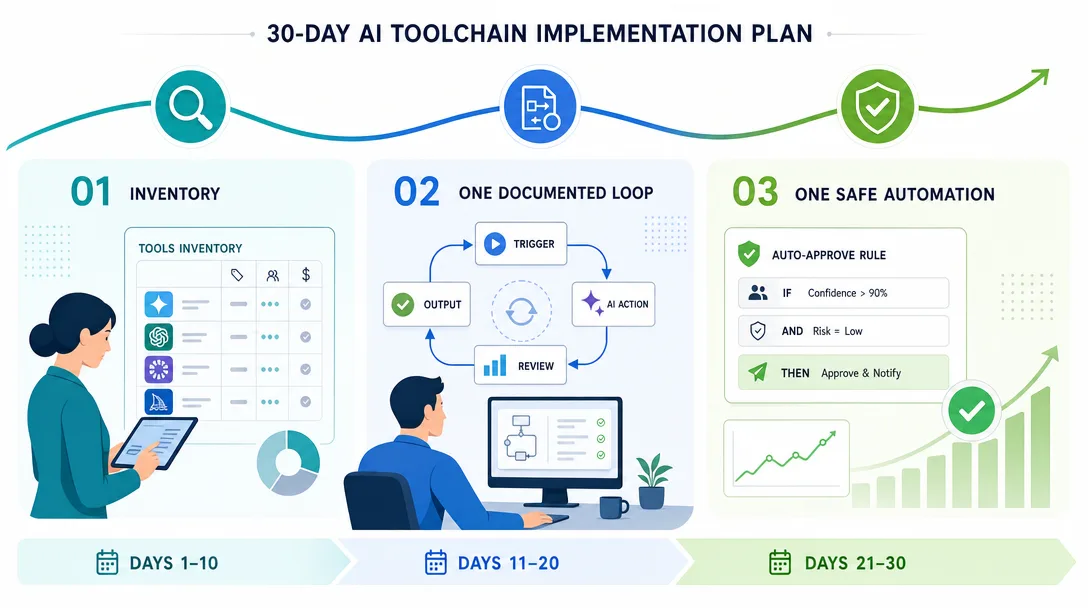
A 30-Day AI Toolchain Implementation Plan
A toolchain becomes real only when it changes next week's work.
Here is a simple 30-day rollout.
Days 1-3: inventory the business
Do not install anything yet.
Write down the real work you already do:
Area
Questions
Creation
What do you publish every week? Where are drafts stored?
Distribution
Which channels actually matter? Which ones are just guilt?
Monetization
What is the current offer? How does someone buy?
Operations
Which repeated tasks interrupt deep work?
Analysis
Which numbers affect decisions? Which numbers are vanity?
The output is one file: docs/current-tools.md.
List every tool, subscription, folder, recurring task, and business file. This is not glamorous work, but it prevents the most common failure: building automation on top of a fuzzy business.
If a tool has no clear job, mark it as "questionable."
If a workflow has no owner, mark it as "manual risk."
If a file matters but lives in a random download folder, move it into the business system.
Days 4-7: document one weekly loop
Choose one loop.
For most solopreneurs, the best loop is content:
idea -> research -> outline -> draft -> edit -> publish -> repurpose -> review
Do not document every possible workflow. Document the one workflow that creates the most trust.
For each step, write:
input,
action,
output,
tool,
approval gate,
where the file lives.
By the end of week one, you should have one workflow that another person could understand without asking you ten questions.
That is the first sign you are building a business system instead of a personal habit.
Days 8-14: add AI to the slowest step
Do not automate the whole loop.
Pick the slowest step.
If research is slow, build a research prompt.
If drafting is slow, build an outline-to-draft workflow.
If distribution is slow, build a repurposing workflow.
If review is slow, build a weekly reporting template.
The first automation should be boring and reversible. It should save time without creating risk.
A good first automation looks like this:
Read the finished article.
Create:
- one newsletter intro,
- three LinkedIn post drafts,
- five X post drafts,
- one FAQ section,
- one internal-link suggestion list.

Do not publish anything.
Save drafts to distribution/[slug]/.
That is useful because it speeds up work but does not touch customers, money, or live pages.
Days 15-21: create approval gates
Now make the system safer.
Approval gates are not bureaucracy. They are what let you use more automation without losing control.
Use this rule:
Action
Default gate
Drafting
AI can do it
Formatting
AI can do it
Internal file organization
AI can do it if reversible
Public publishing
human approval
Customer messages
human approval unless low-risk template
Pricing changes
human approval
Refunds and account changes
human approval
Deleting files
human approval and backup
Infrastructure changes
human approval and rollback plan
Write these rules in your operating manual.
Then make every workflow mention the gate explicitly.
This one habit prevents vague instructions such as "handle my launch." A good agent workflow should know whether "handle" means draft, prepare, schedule, or publish.
Days 22-30: review and delete
The last week is not for adding tools.
It is for deleting complexity.
Run a tool audit:
Question
Decision
Did this tool save measurable time?
keep or remove
Did it reduce quality?
remove or restrict
Did it create new maintenance work?
simplify
Did it require too much supervision?
downgrade to manual
Did it touch sensitive areas?
add approval gates
At the end of 30 days, the best outcome is not a huge stack.
The best outcome is a smaller stack that reliably runs one important loop.
The monthly tool deletion audit for solopreneurs
Most solopreneurs need fewer tools than they think.
The hard part is deleting tools after you have emotionally justified them.
Run this audit once a month:
Tool
Keep if
Delete if
AI writing tool
It produces drafts you actually publish
You only use it for experiments
Image tool
Visuals are part of the business
It creates assets you never ship
Scheduler
You publish on multiple channels weekly
You still post manually because setup is annoying
Analytics tool
It changes decisions
It creates dashboards you never read
Automation tool
It saves repeated work
It creates brittle workflows you constantly fix
Notes tool
It is the real source of truth
It duplicates files in another system
The audit should feel a little uncomfortable.
That is the point.
Every extra tool creates:
another login,
another billing cycle,
another data silo,
another workflow exception,
another place where context can disappear.
Your goal is not to own impressive software.
Your goal is to ship, learn, sell, and improve with the least operational drag possible.
Approval Gates and Recovery Plans for AI Automation
Automation without recovery is gambling.
Before you let AI touch an important workflow, define the recovery path.
screenshot review, test payment, price verification
File cleanup
backup, dry run, explicit delete list
Analytics report
raw data retained, assumptions stated
The principle is simple:
The more public or irreversible the action is, the more boring the workflow should be.
Good automation is boring.
It leaves logs.
It shows diffs.
It saves drafts before publishing.
It makes rollback obvious.
It does not ask you to trust a black box.
This is why a file-based workflow is so useful. Markdown files, version control, exports, and logs are not fashionable, but they are inspectable. A solopreneur does not need enterprise governance. A solopreneur needs clear files, clear commands, and clear approval points.
What Should a Solopreneur Never Automate?
Some work should stay close to you.
Do not automate:
your positioning decision,
your promise to customers,
your final editorial judgment,
your personal stories,
sensitive customer conversations,
pricing strategy without review,
refund decisions without context,
public claims about results,
legal or tax conclusions,
relationship-building conversations.
AI can prepare material around these areas.
It should not own them.
The temptation is to automate anything uncomfortable. But discomfort is often a signal that the work contains judgment.
Writing the first honest positioning statement is uncomfortable.
Raising prices is uncomfortable.
Replying to a disappointed customer is uncomfortable.
Choosing what not to build is uncomfortable.
Those are owner decisions.
Keep them.
The Solopreneur Operating Rhythm: Daily, Weekly, Monthly, Quarterly
Once the toolchain exists, run it on a rhythm.
Daily:
capture ideas,
draft or edit one asset,
answer important customer messages,
check the task board once,
avoid checking analytics unless there is an active launch.
Weekly:
publish the primary asset,
repurpose it into channel-specific drafts,
review subscribers, revenue, replies, and bottlenecks,
choose one improvement for next week,
delete or postpone low-value tasks.
Monthly:
audit tools,
update the operating manual,
review the offer,
review pricing,
decide whether one workflow deserves more automation.
Quarterly:
revisit positioning,
inspect whether the audience still matches the offer,
update the product ladder,
decide what to stop doing.
The daily rhythm protects focus.
The weekly rhythm protects shipping.
The monthly rhythm protects the system.
The quarterly rhythm protects strategy.
Without rhythm, the toolchain becomes another place to hide from the work. You can spend hours improving prompts, reorganizing folders, testing model settings, and comparing tools while the audience sees nothing new from you.
That is the wrong game.
The correct question is:
Did the toolchain help me publish, learn, sell, or serve this week?
If the answer is no, simplify it.
A Practical Example: One Week in a Solopreneur AI Toolchain
Imagine a solopreneur who teaches workflow automation to non-technical founders.
Their weekly loop could look like this:
Day
Human job
AI/toolchain job
Monday
choose one painful founder problem
research examples and draft outline
Tuesday
add personal point of view
create first article draft
Wednesday
edit for clarity and proof
prepare SEO title, FAQ, internal links
Thursday
approve final article
draft newsletter and social variants
Friday
publish and reply to comments
collect metrics and customer questions
The AI does not decide the business.
It does not choose the promise.
It does not invent fake proof.
It removes the repetitive middle layer between idea and published asset.
That is enough.
If this system helps one person ship one strong article every week, capture real audience questions, and turn those questions into a better offer, it is already a serious business advantage.
You do not need science fiction.
You need a repeatable loop.
Start with one honest loop you can inspect, improve, and run again next Monday morning.
Before the 5-layer model, you collect AI tools the way most people collect bookmarks. After: every tool earns its place by closing a specific layer gap, and the rest get cancelled at the end of the month.
Key takeaways
An AI toolchain for solopreneurs is not a list of apps. It is a 5-layer operating system: creation, distribution, monetization, operations, analysis, with you keeping judgment.
Choose tools after the workflow, never before. Run the workflow manually 5-10 times, then automate the slowest step. Tool collecting is the easiest way to avoid shipping.
Claude Code becomes a control console only when files are organized and CLAUDE.md, skills, and approval gates are in place. Without that discipline, AI just creates a bigger mess.
MCP expands what the AI can reach. Your workflow defines what it should do. Permissions, configuration, and recovery are still your job.
Keep approval gates explicit: drafting and formatting can run free; public publishing, customer messages, pricing, refunds, and deletions need a human in the loop.
Run the rhythm. Daily protects focus, weekly protects shipping, monthly protects the system, quarterly protects strategy.
FAQ: AI Toolchain for Solopreneurs
What is an AI toolchain for solopreneurs?
An AI toolchain is the set of tools, files, workflows, and review loops that help one person produce, distribute, sell, operate, and analyze a business. It is not a random list of AI apps.
Which AI tools should a solopreneur start with?
Start with one general AI assistant, one writing or coding workflow environment, one content base, one distribution tool, one payment or offer platform, and one analytics layer. Add tools only after a repeated workflow creates a clear bottleneck.
Is Claude Code required for a one-person business?
No. Claude Code is useful when your work lives in files, scripts, websites, and repeatable workflows. It can act as a control console when configured with access, project instructions, and tools. Beginners can start with simpler AI assistants and add Claude Code later.
What is MCP in simple terms?
MCP stands for Model Context Protocol. It is an open standard that can connect AI tools to configured external data sources and tools. In plain language, it gives an AI system a structured way to work with approved tools and context.
What should humans still do in an AI toolchain?
Humans should keep judgment, taste, positioning, final approval, customer conversations, and ethical responsibility. AI can reduce execution drag, but it should not replace verification or business judgment.
Ready-to-Use Prompt: Architect a 5-Layer Solopreneur AI Toolchain
What this does: Maps the one-person business's recurring jobs to the five layers (Creation, Distribution, Monetization, Operations, Analysis), applies workflow-before-tools so tool collecting doesn't replace shipping, wires Claude Code as the control console, and keeps permissions, review, and verification in the loop. Based on: AI Toolchain for Solopreneurs: Run a One-Person Business Like a Team — https://aiworkflowpro.com/solopreneur-ai-toolchain/ Time to run: ~5 minutes
Copy this prompt into Claude Code, ChatGPT, or any AI assistant:
ROLE: You are a Solopreneur AI Toolchain Architect. Your job: build the operating system for a one-person business across five layers — workflow first, tools second, never letting tool collecting replace shipping.

CONTEXT — FIVE-LAYER SOLOPRENEUR TOOLCHAIN METHOD:
An AI toolchain is not a shopping list — it's the operating system for a one-person business. Five layers: (1) Creation — where AI does most of the lifting (writing, images, video, code); (2) Distribution — create once, adapt many across platforms; (3) Monetization — turn trust into revenue; (4) Operations — keep the business running on autopilot; (5) Analysis — see what's working before you scale. Choose tools after the workflow, not before — tool collecting is one of the easiest ways to avoid shipping. Claude Code plus MCP plus a CLAUDE.md operating manual becomes the control console — but only when permissions, review, and verification stay in the loop.

INPUTS (fill in before running):
- BUSINESS: [What the one-person business does]
- RECURRING_JOBS: [The recurring weekly jobs — write, publish, support, check revenue, etc.]
- CURRENT_TOOLS: [Tools already collected — or "none"]
- AUTONOMY: [How much on autopilot — full / gated]

METHOD — 4 STEPS:

Step 1 — Map the Business to the 5 Layers
Place every job in RECURRING_JOBS into its layer: Creation, Distribution, Monetization, Operations, Analysis. Any job that doesn't fit a layer is a stray process — fold it in or cut it.

Step 2 — Apply Workflow-Before-Tools
For each layer, define the workflow first, then choose the minimum tool that does it — using CURRENT_TOOLS where it fits. Reject adding any tool without a defined workflow slot; tool collecting is how solopreneurs avoid shipping.

Step 3 — Wire Claude Code as the Control Console
Stand up Claude Code + MCP + a CLAUDE.md operating manual as the console spanning all five layers. Route each layer's work through it, with skills for the repeatable workflows.

Step 4 — Analysis Layer + Permissions/Review/Verification In-Loop
Make Analysis the layer that gates scaling — see what works before you scale. Keep permissions, review, and verification in the loop per AUTONOMY: autopilot only where verification is automatic; human review where stakes are high.

RULES:
- Never choose a tool before the workflow it serves — tool collecting replaces shipping.
- Never run a layer on autopilot without verification in the loop — autopilot without verification is silent failure.
- Never scale a layer the Analysis layer hasn't validated — see what works first.

OUTPUT FORMAT:
Output a markdown report with:
1. 5-Layer Map — markdown table, columns: Layer | Jobs | Tool
2. Workflow-Before-Tools Check — each layer's workflow + the minimum tool (or "cut")
3. Control Console — Claude Code + MCP + CLAUDE.md routing per layer
4. Analysis + In-Loop Plan — the analysis gate + where review/verification stay in the loop
Save as @templates/solopreneur-ai-toolchain.md and run when standing up or pruning the one-person business's toolchain.
What's next in the series?
You have the operating system. Next, in Part 9: 12-Week Solopreneur Launch Plan, we sequence everything, direction, brand, story, content, offer, audience, and toolchain, into a deliverable plan with weekly milestones and review gates.
If your toolchain feels overbuilt before you have a real audience, Part 7: Your First 1,000 True Fans is the right loop to run first, automation amplifies whatever the business actually does, including silence.
This series is part of the One-Person Company AI Playbook, the complete guide to building a solo business with AI tools.
The business is the judgment, audience, offer, trust, and repeated delivery.
The toolchain makes the business operational.
Build it in layers. Keep the stack small. Put your knowledge in files. Turn repeated workflows into skills. Connect tools only when they serve a process. Add approval gates before anything public, financial, or customer-facing.
AI can help one person operate like a team.
But you are still the owner.
That is the job.
Before you close this tab: open a folder called ai-toolchain/, create one empty CLAUDE.md, and inside it write three sections, Identity (who the business serves), Voice (how it sounds), and Approval gates (what AI cannot do without you). Save it. Tomorrow, fill in the file map. That is Hour 1 of your operating manual.
Monitoring a competitor who publishes no feed is the case every RSS guide skips. Twenty-one platforms sorted by which of three jobs they do, and the finished setup is business process automation you own outright, with no seat licence to renew.
Blaming the content is the reflex when a post underperforms, and it is usually the wrong diagnosis. A second reader decides distribution before any human sees the post, and most of what it checks is mechanical enough to automate business processes around, on five platforms at once.
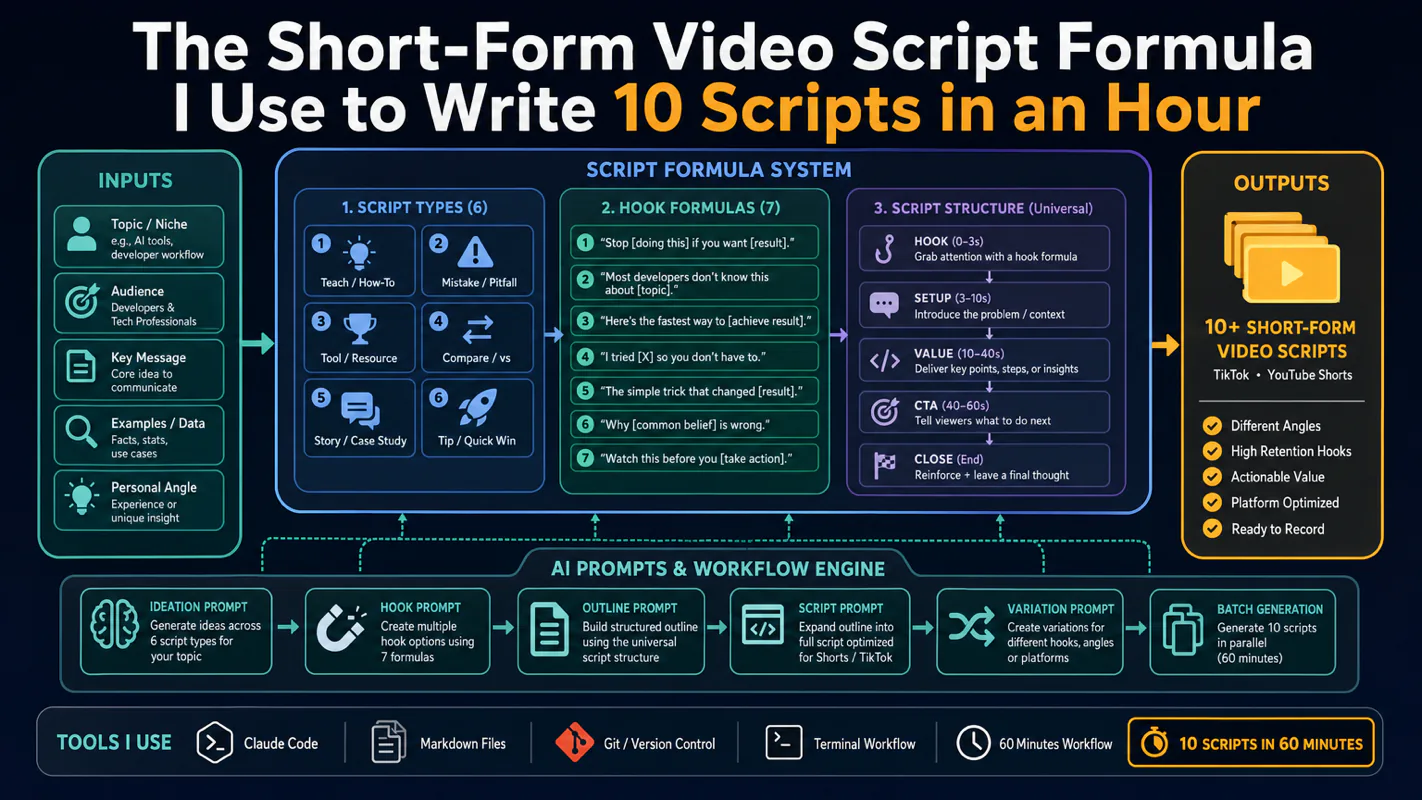
Thursday afternoon, fourteen product ideas, a Monday filming slot, no scripts. Six script shapes and seven hook formulas turn that hour into finished drafts — and the business rule stays: rewrite at least 30% before anything ships.
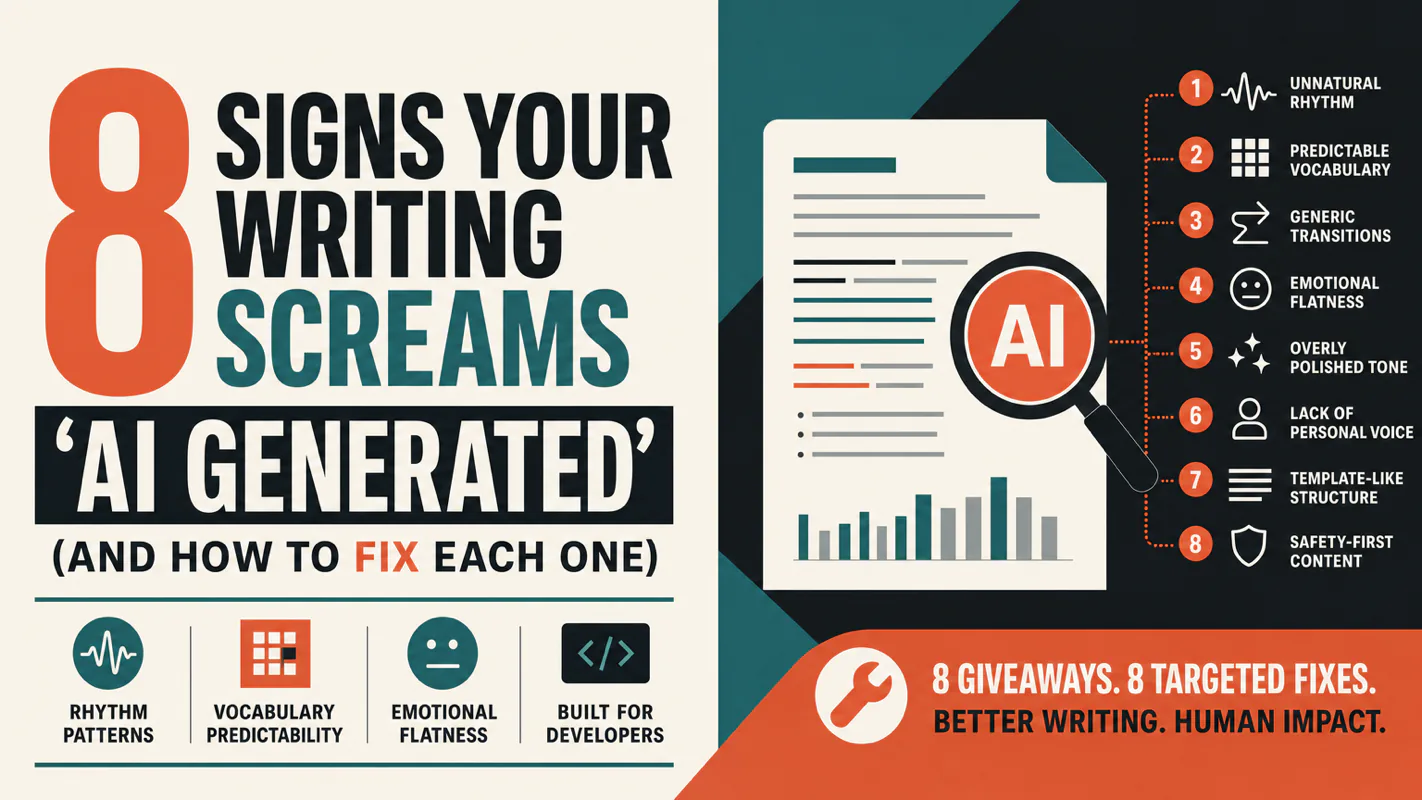
A detector score cannot survive a conversation with the freelancer it just cost three weeks of payment. What holds up is the specific thing on the page: rhythm, vocabulary, missing detail. Eight of them here, and the reason review stays human when you automate business processes.