Monitoring a competitor who publishes no feed is the case every RSS guide skips. Twenty-one platforms sorted by which of three jobs they do, and the finished setup is business process automation you own outright, with no seat licence to renew.
Blaming the content is the reflex when a post underperforms, and it is usually the wrong diagnosis. A second reader decides distribution before any human sees the post, and most of what it checks is mechanical enough to automate business processes around, on five platforms at once.
Gloves on, tape measure in hand — nobody types a query. Three voice surfaces for ai automation tools (terminal, Telegram, Discord), 10 TTS and 6 STT providers compared on cost and latency, plus a setup that costs nothing.
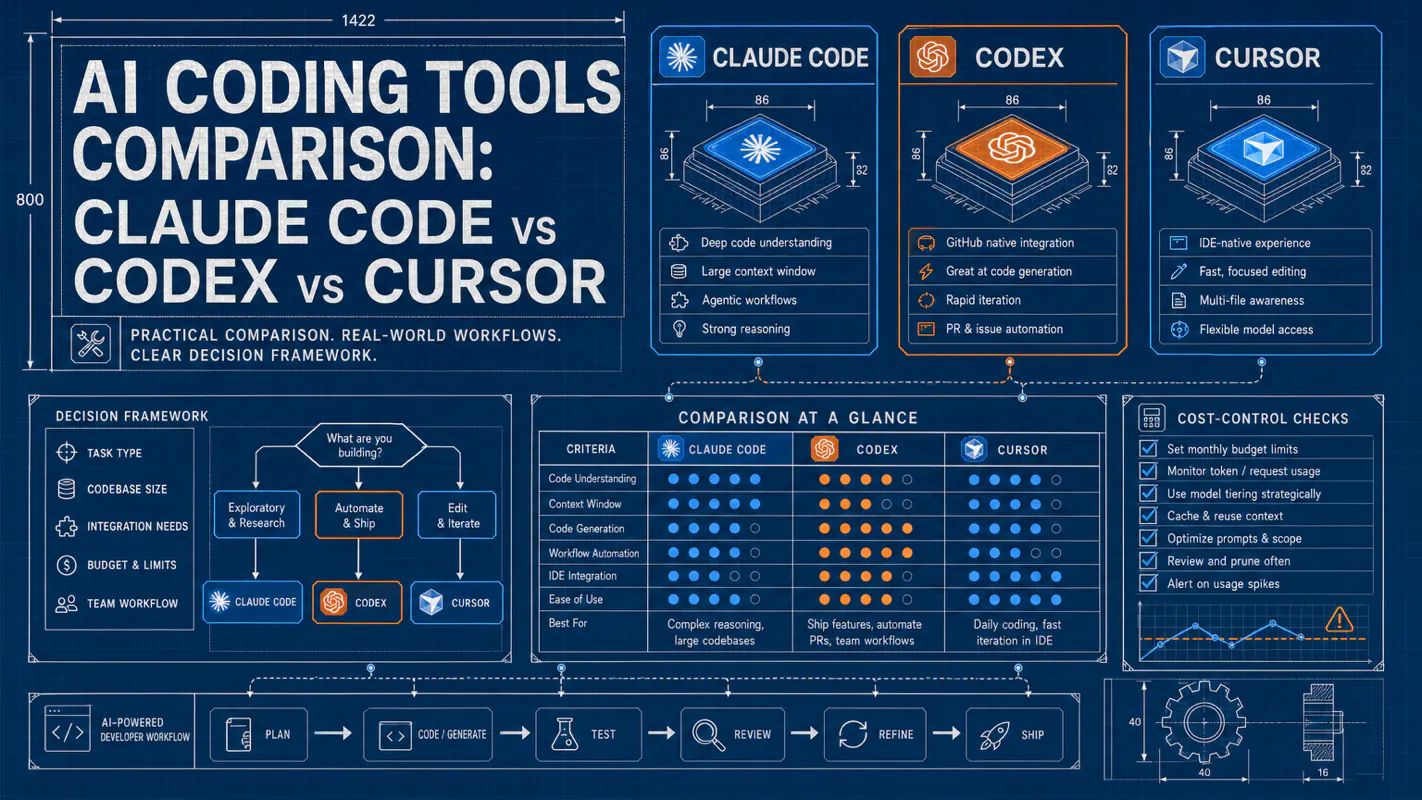
AI Coding Tools Comparison: Claude Code vs Codex vs Cursor
A practical comparison of major AI coding tools, based on daily production use of Claude Code, Codex, and Cursor. The reusable part of any ai automation tools decision is the framework, not the price table: cost drivers, a nine-dimension scorecard, and source links for current vendor docs.
Claude Code, Codex, and Cursor solve different AI coding jobs. Picking one universal winner is the wrong move. After months of running all three in production daily, the more durable answer is a multi-tool system where each tool handles what it does best. This comparison uses a dated snapshot for pricing and capabilities, but the main value is the decision framework you can keep reusing as vendor plans change.
Key takeaways:
No single "best" AI coding tool exists, but there is a best combination for your workflow.
Treat all prices, model names, quotas, and benchmark scores as dated snapshots. Re-check official vendor pages before buying.
The real cost driver is not the sticker price. It is premium model usage, agent loops, context size, code review usage, and time spent reviewing AI output.
My production routing is simple: Claude Code for terminal-native reasoning, Codex for OpenAI/cloud task workflows, Cursor for editor-native visual iteration.
A recruiting firm's operations lead spent two evenings on the comparison sheet: twelve columns, every vendor's plan, a weighted score at the bottom. Six weeks later the winning vendor had renamed its tiers and moved a model behind a higher plan, and the sheet was scrap. The work was not wasted because the answer was wrong. It was wasted because it was saved as an answer instead of as a method. That is what this article tries to fix. The prices below are a dated snapshot on purpose; what is meant to survive is the reasoning under them, including which ai automation tools you route which work to and which costs never appear on a pricing page.
What Does Each AI Coding Tool Actually Do?
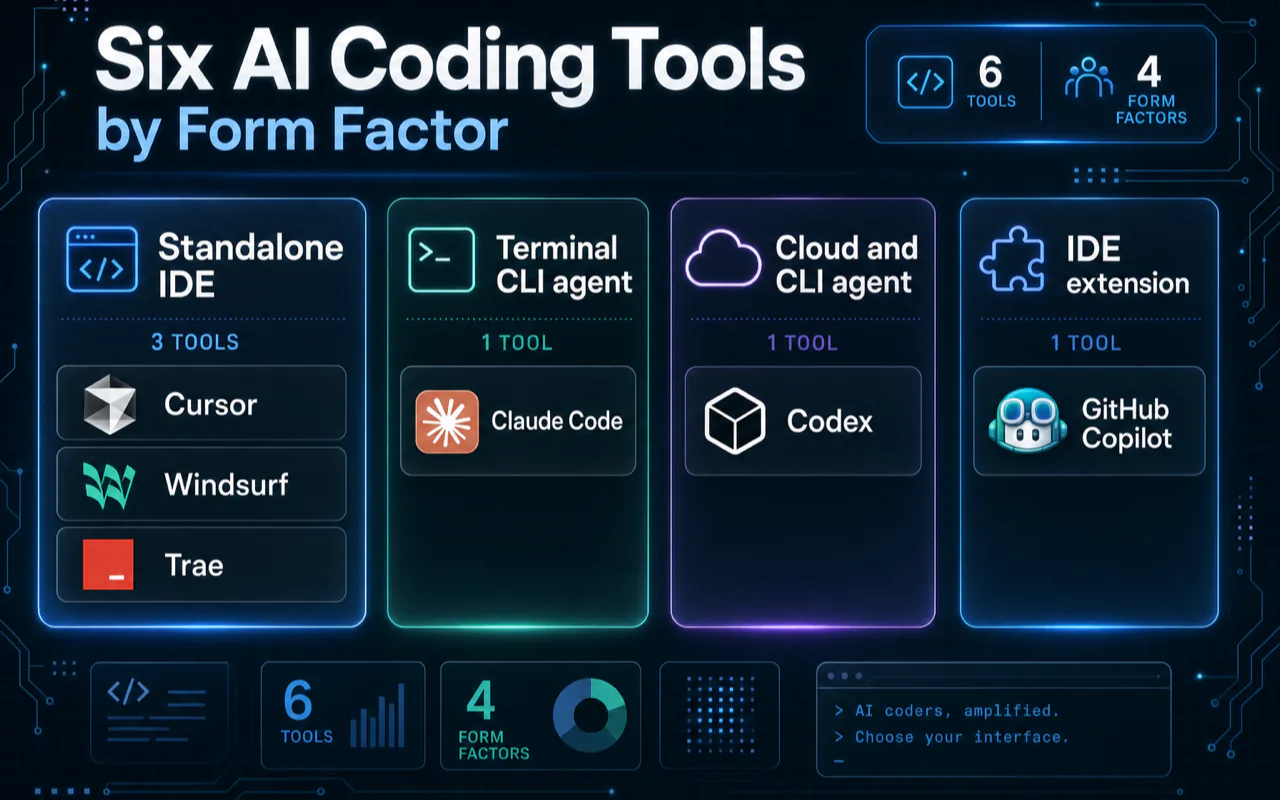
Before comparing features, understand that these six tools are fundamentally different species solving different problems. Claude Code lives in the terminal as an autonomous agent. Cursor extends VS Code into an AI-native IDE. Codex runs tasks in isolated cloud sandboxes. Confusing their categories leads to bad decisions.
Tool
Company
One-Line Description
Form Factor
Cursor
Anysphere
AI-native IDE built on VS Code, multi-model router
Standalone IDE
Claude Code
Anthropic
Terminal-native AI coding agent with project instructions, hooks, MCP, and IDE integrations
Terminal CLI + IDE extension
Codex
OpenAI
ChatGPT ecosystem coding agent, four entry points unified
Web + CLI + IDE extension
Windsurf
Cognition AI
Rebranded as Devin Desktop, Cascade Agent + SWE-1.5 model
Standalone IDE
GitHub Copilot
GitHub / Microsoft
Broad IDE assistant with plan-dependent model access, agent, code review, and AI Credits controls
IDE extension + GitHub
Trae
ByteDance
AI-native IDE, fully free tier
Standalone IDE
Think of it this way: Cursor is a VS Code that writes code alongside you. Claude Code is a senior developer living in your terminal. Codex is ChatGPT that learned to code and can spin up its own machines to work. They complement rather than replace each other.
How Much Do AI Coding Tools Really Cost? (Pricing Snapshot)
Pricing is the first gate in any selection decision, but it is also the fastest part of this article to expire. Listed prices below are a rough snapshot from vendor pages and public docs checked around July 2026. Use the table to understand plan shape, not as a permanent quote.
Individual Plans
Tier
Cursor
Claude Code
Codex
Windsurf
Copilot
Trae
Free
Hobby: limited usage
No stable free tier for heavy work
Free/light exploration depending on product surface
These listed prices tell only half the story. A base subscription can still produce overage, throttling, or quality tradeoffs when you use premium models, large contexts, autonomous loops, or code review at scale. The next section explains why.
What Are the Hidden Costs Behind Listed Prices?
The "affordable" entry price no longer equals affordable actual usage. This is the biggest cognitive trap in choosing AI coding tools.
Billing Explosion Cases by Tool
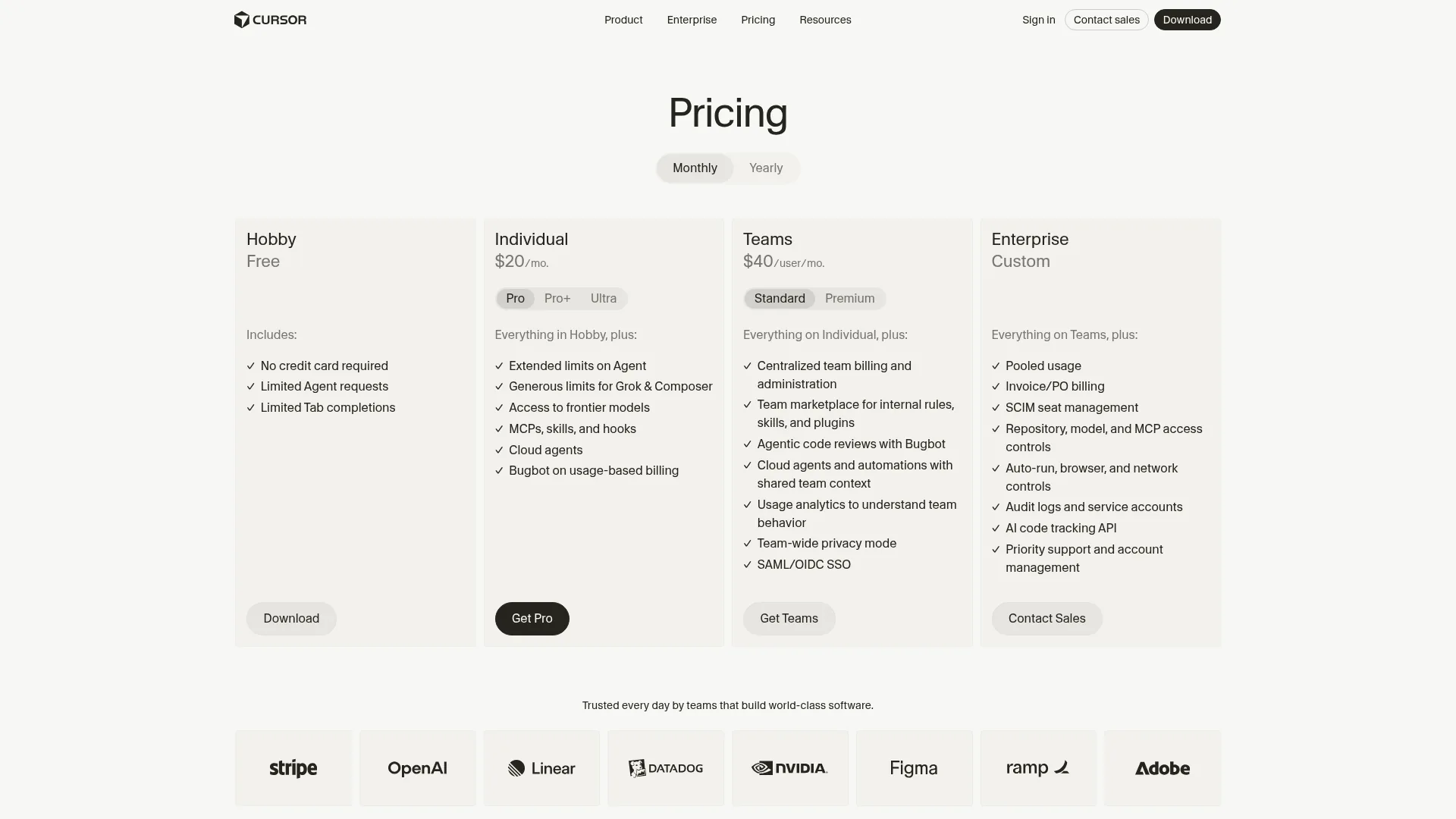
Cursor: Cursor's official pricing page says each plan includes a set amount of model usage and that on-demand usage can continue after included usage is consumed, billed in arrears. That means the risk is not the editor price alone; it is which model you select, how often you run agent mode, and whether overage is enabled.
Claude Code: Cost and throttling risk come from long sessions, large context, repeated tool calls, sub-agent fan-out, and unnecessary MCP context. Keep project instructions compact, exclude irrelevant files, and avoid using the strongest model for routine edits.
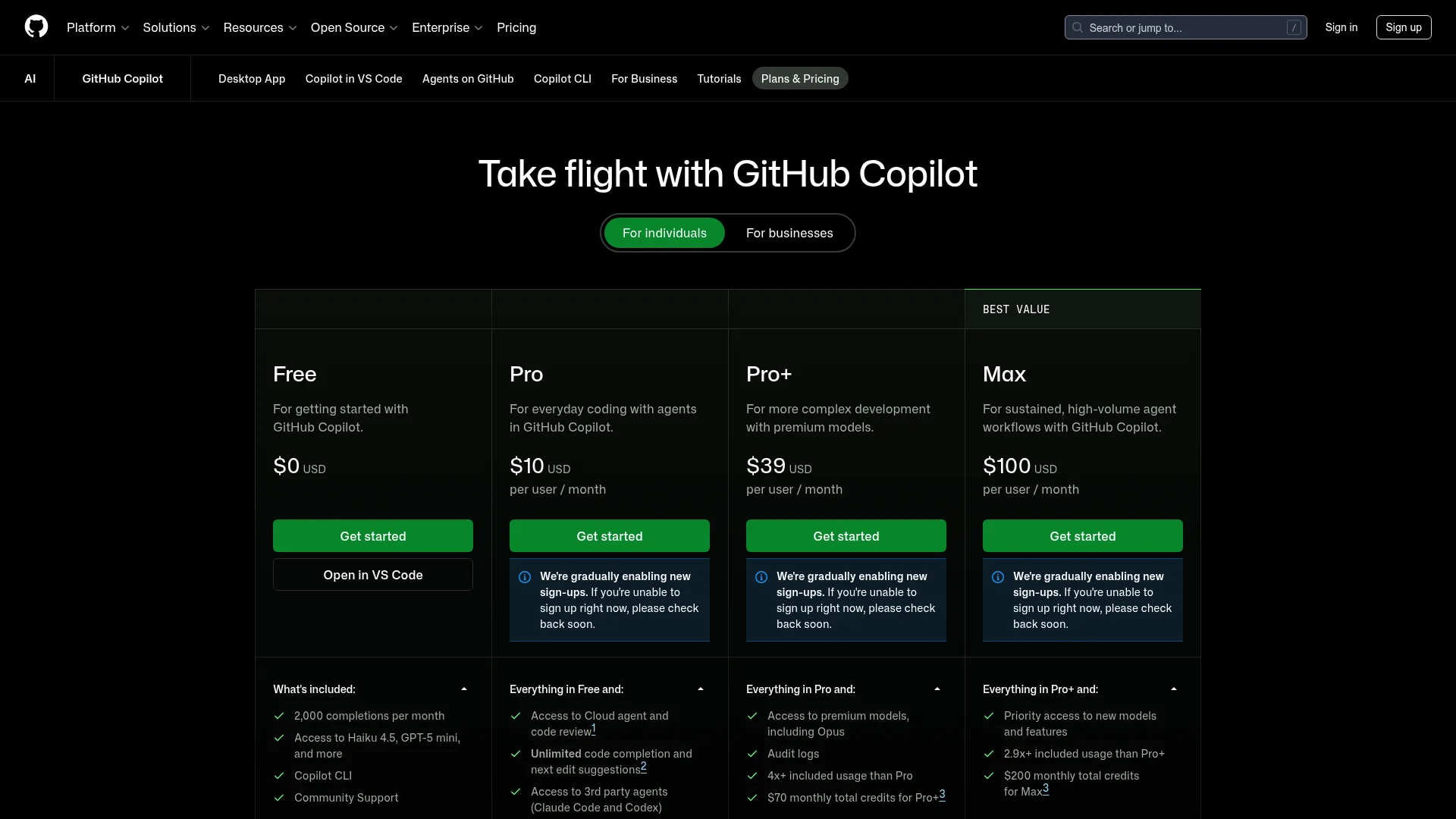
GitHub Copilot: GitHub's official plans page now emphasizes AI Credits, paid usage controls, and admin budgets. For teams, the important question is not only seat count; it is which premium features and model calls consume credits.
Windsurf and other IDE agents: Quotas, credits, and plan names change quickly. Treat any third-party pricing article as stale unless it links to the current vendor page and a verification date.
True Annual Cost for a 10-Person Team
Third-party cost case studies are useful, but they are not universal evidence. The repeatable lesson is simpler:
Direct subscriptions are usually the smallest line item.
Review time, failed generations, debugging, production incidents, and rework can dominate total cost.
Track tool usage per project, not only per user, because agentic workflows can turn one prompt into many model calls.
For critical paths such as authentication, payments, migrations, security controls, and data deletion, require human review and tests before merging AI-generated code.
Pricing Changes to Watch
Surface
What to verify
Why it matters
Cursor
Included model usage, on-demand usage, team/admin controls
Overage can continue after included usage if enabled
GitHub Copilot
AI Credits, paid usage policies, budgets, code review usage
Team cost depends on premium feature usage, not only seats
Claude Code
Plan limits, model availability, release notes, local context behavior
Long sessions and large repos can hit limits quickly
Gemini Code Assist
Edition, quota, and deprecation notes
Some individual IDE/CLI tiers stopped serving requests on June 18, 2026
The industry trend is clear: vendors are moving toward metered or quota-aware usage because agentic coding consumes expensive inference. The era of simple "unlimited" promises is weaker than it looks.
How Do These Tools Compare on Technical Specs?
This table covers the hard parameters that matter for tool selection: underlying models, context windows, agent capabilities, and extensibility. Context window differences barely matter for small projects but become decisive when working across dozens of files.
Dimension
Cursor
Claude Code
Codex
Windsurf
Copilot
Trae
Underlying models
Multi-model, plan-dependent
Anthropic models, release-note dependent
OpenAI models, product-surface dependent
Vendor and model dependent
GitHub model access varies by plan
Vendor and region dependent
Proprietary model
Check Cursor docs
--
--
Check current Windsurf/Cognition docs
--
Check current docs
Context window
Model and plan dependent
Model and plan dependent; strong repo-context workflow
Model and task-surface dependent
Model dependent
Model dependent
Model dependent
Agent capability
Agent/editor workflows
Hooks, sub-agents, MCP, project memory, IDE integrations
CLI, cloud, GitHub integration, and ChatGPT surfaces
Cascade/agent workflows
Agent/code review features vary by plan
Builder/agent workflows vary by plan
MCP support
Supported
Deep native support
Supported but complex setup
Supported
Supported
Limited
Open source
Closed
Closed
CLI open source
Closed
Closed
Closed
The gap between claimed and effective context matters more than most comparisons acknowledge. Do not compare only model context-window numbers. Compare how each tool selects files, summarizes history, preserves project instructions, runs tests, and exposes what it is actually sending to the model.
What Does Token Efficiency Look Like in Practice?
Token efficiency is workload-specific. A tool that spends more tokens can still be cheaper if it avoids rework; a tool that spends fewer tokens can still be expensive if it loops through failed edits. Measure three numbers on your own repo:
Tokens or credits consumed per accepted change
Human review minutes per accepted change
Test pass rate before manual intervention
Public benchmarks and blog comparisons are useful for discovery, but they cannot replace a one-day trial on your own codebase.
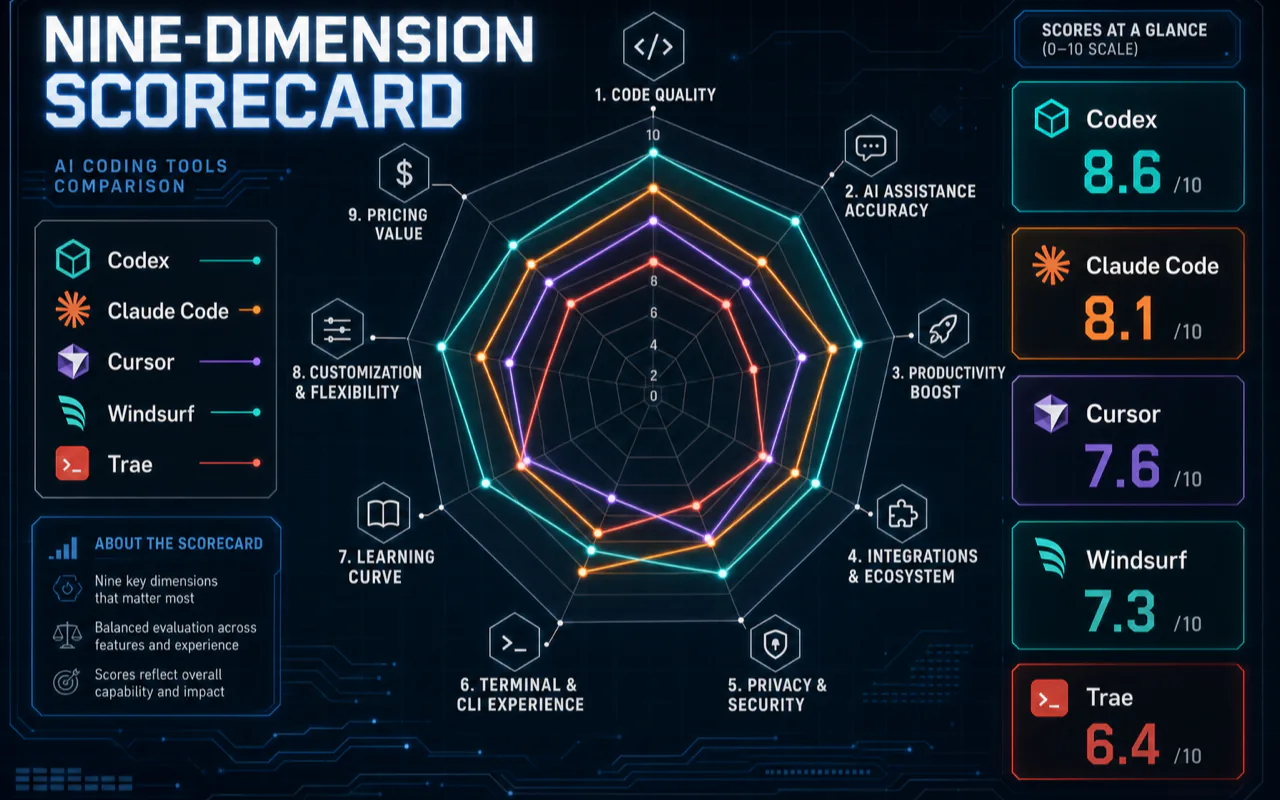
How Do AI Coding Tools Score Across Nine Dimensions?
Each dimension scored 1-10 based on production use, industry benchmarks, and community consensus. Five tools compared (Copilot excluded from scoring due to its transitional state during the billing model change).
Dimension
Codex
Claude Code
Cursor
Windsurf
Trae
1. Code generation quality
9.0
9.5
8.5
7.5
7.0
2. Context understanding depth
8.5
10
7.0
6.5
5.5
3. Agent autonomy
10
9.5
7.0
7.0
6.0
4. Price-to-value ratio
8.5
7.0
7.5
8.0
10
5. Beginner friendliness
7.5
5.0
9.0
8.5
8.5
6. Production stability
9.5
9.0
7.5
7.0
6.5
7. Ecosystem extensibility
9.0
8.5
9.5
6.5
5.0
8. Team collaboration
9.0
7.5
8.5
7.0
5.0
9. Learning curve
7.0
5.0
9.0
8.0
8.5
Total
78.0
71.0
73.5
66.0
62.0
Why Do Total Scores Mislead You?
Total scores: Codex (78.0) > Cursor (73.5) > Claude Code (71.0) > Windsurf (66.0) > Trae (62.0)
This ranking is misleading. Cursor outscores Claude Code primarily because beginner friendliness (9.0 vs 5.0) and learning curve (9.0 vs 5.0) inflate its average. For experienced developers, those two dimensions carry far less weight than code quality and agent capability.
Rankings flip entirely by scenario:
Scenario
First
Second
Third
Basis
Async delegation / parallel execution
Codex
Claude Code
Cursor
Cloud sandbox / 8 sub-agents / fire-and-forget
Code quality / complex reasoning / large refactors
Claude Code
Codex
Cursor
SWE-bench top 5 / blind test 67% win rate
Daily IDE editing / autocomplete / visual work
Cursor
Windsurf
Trae
VS Code ecosystem / sub-100ms completions
Zero budget
Trae
Copilot Free
Gemini Free
Full-featured free tiers
Enterprise compliance / team deployment
Copilot
Cursor
Codex
4.7M paid seats / SOC 2 compliance
My personal ranking is Codex > Claude Code > Cursor because my workflow relies heavily on async parallel dispatch and autonomous agent execution, which happens to be Codex's strongest area. Most industry benchmarks rank Claude Code first overall, supported by solid data on code quality and reasoning depth. Tool rankings have no universal answer. The key is finding the combination that fits how you actually work.
What Drives Each Score?
Code generation quality (Claude Code 9.5, Codex 9.0): My scoring weights accepted patches, test pass rate, and how often I had to correct architecture mistakes. Do not copy these scores blindly; rerun the same task set against your own repository.
Context understanding depth (Claude Code 10, Codex 8.5): Claude Code performs best for my large repository tasks because project instructions, terminal access, and context management stay close to the codebase. Codex performs well when I can package a task for cloud execution or a PR-style workflow. Cursor is strongest when I need editor-local iteration.
Agent autonomy (Codex 10, Claude Code 9.5): This is Codex's strongest dimension in my workflow because I often want task packaging, cloud execution, GitHub review, and CLI/cloud handoff. Claude Code is stronger when the agent needs to stay in an interactive terminal loop with local project conventions.
How Does a Three-Tool System Work in Practice?
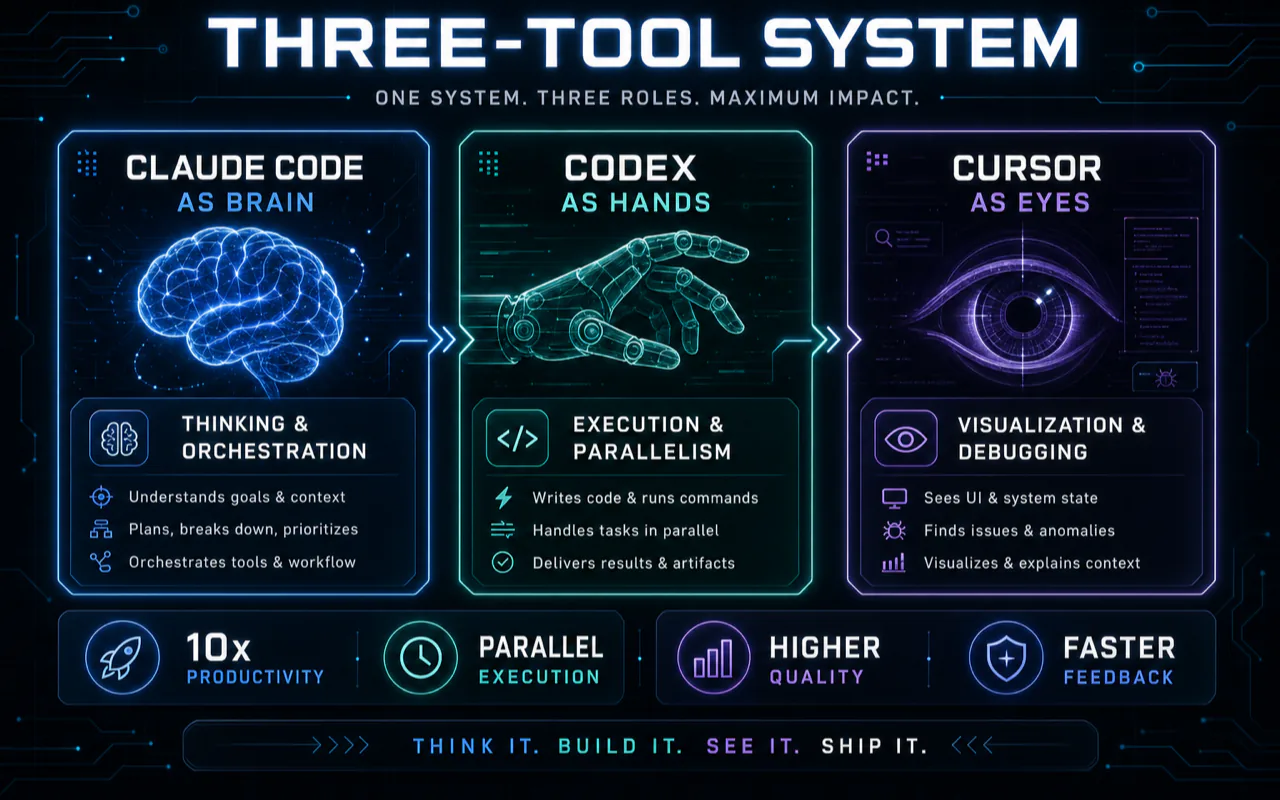
Most comparisons try to answer "which one is best." That question is wrong. After months of production use, I built a three-tool collaboration system. Not three tools open simultaneously fighting each other, but precise routing by task type.
Claude Code is the "brain" -- responsible for thinking and orchestration. The core workflow centers on Claude Code. CLAUDE.md files drive agent behavior, defining architecture constraints, coding standards, and tool routing. Claude Code's strength is not writing a single function but understanding an entire project's intent. I use it for multi-agent orchestration, large-scale refactoring, and complex workflow automation such as SEO audits, content generation pipelines, and multi-platform publishing.
Codex is the "hands" -- responsible for execution and parallelism. Cloud sandbox isolation is a unique advantage. I use Codex for batch tasks that need no interactive supervision: periodic execution of scheduled tasks (content collection, data sync, format conversion), batch code modifications (adding type annotations to 20 files simultaneously), and parallel research tasks (spinning up 5 instances investigating different topics at once). Its strength is fire-and-forget: describe the task, it completes independently in the cloud, and automatically submits a PR.
Cursor is the "eyes" -- responsible for visualization and debugging. I open Cursor when I need to frequently inspect code structure, debug complex UI, or fine-tune frontend work. Its inline completion is genuinely the best, the visual diff experience has no substitute, and the VS Code extension ecosystem keeps daily editing smooth. But I rarely use Cursor as my primary tool. Once task complexity exceeds "change a few files," Cursor's agent mode falls short of Claude Code's autonomous capability.
How Do They Compare on the Same Task?
Scenario 1: Adding a new command to a CLI tool
Dimension
Claude Code
Cursor
Codex
Completion time
~25 minutes
~40 minutes
~35 minutes
Manual interventions
2
8
1
Code quality
Passed tests first try
Required 2 rounds of manual fixes
Passed but inconsistent style
Claude Code won because the CLAUDE.md file defined coding standards (full type hints, set -euo pipefail, uv package management), and the agent followed them automatically. Every output matched project conventions without reminders. Cursor needed repeated prompting to follow the same constraints.
For this type of cross-200-file large-scale refactor, Claude Code's project-instruction and terminal-native workflow was the deciding factor. Cursor started losing track of earlier modifications around the 50-file mark in my test.
When Does Dual-Tool Collaboration Help?
Dual-tool collaboration helps when the task has two different modes: architecture plus polish, backend plus frontend, or exploration plus implementation. It does not help for tiny edits. One critical rule: tasks under 10 minutes are usually not worth splitting across tools because context-switching overhead eats the gains.
Which Tool Should You Pick for Your Scenario?
Different scenarios call for entirely different tools. Here are cross-referenced recommendations across three decision axes.
By Task Type
Task
First Choice
Why
Writing new code from scratch
Cursor Agent mode
Visual scaffolding in the IDE
Fixing bugs
Claude Code
Terminal: locate, fix, test, verify in one loop
Large refactors (20+ files)
Claude Code
Project-instruction and terminal workflow are strongest in my setup
Code review
Claude Code or Codex
Deepest understanding, or native GitHub integration
Batch similar modifications
Codex Cloud Task
Fire-and-forget, automatic PR
Frontend UI development
Cursor
Smooth inline completion, rich VS Code extensions
Learning a new language/framework
Trae or Copilot Free
Free and beginner-friendly
By Budget
Budget
Setup
Coverage
$0
Free editor + Copilot Free or current vendor free tier + local fallback
Evaluation and light learning only
$20
Cursor Pro or Claude Code Pro (pick one)
Full AI IDE or terminal agent
$40
One terminal agent + one editor agent if both are actively used
Budget tables are a starting point, not a prescription. My own approach uses cheaper fallback models for simple tasks such as tagging, classification, and batch structured reasoning, while reserving Claude Code, Codex, and Cursor for tasks where their workflow advantage is visible.
By Developer Profile
Profile
Recommended Setup
Monthly Cost
Student
Copilot Free (Student Pack) + Trae
$0
Junior developer
Cursor Pro or Claude Code Pro
$20
Senior developer
Claude Code Max 5x + Cursor Pro
$120
Full-time indie developer
Claude Code Max 20x + Cursor Pro + DeepSeek fallback
$225-240
Team CTO
Copilot Business + Claude Code Team
$119+/seat
Should You Trust SWE-bench Scores?
Almost every comparison cites benchmark scores as the definitive quality measure. Use them carefully. Before trusting a leaderboard, check five things:
Which model and tool wrapper was tested
Whether the task measured patch generation, repository repair, autocomplete, or autonomous agent work
Whether the benchmark is fresh enough to reduce data contamination risk
Whether the scoring system runs tests or relies on human preference
Whether your language/framework mix resembles the benchmark
For buying decisions, run a 10-task internal benchmark on your own repository. That is more useful than copying a public leaderboard number.
What Weaknesses Does Nobody Else Mention?
A comparison that only discusses strengths is useless. These are real production incidents and community pain points.
Claude Code -- rate limiting and session management remain real constraints. Anthropic's release notes change frequently, so check the current limits and plan behavior before designing a workflow around very long autonomous sessions.
Cursor -- file deletion incidents. The Cursor forum documents multiple severe incidents: the agent leaving the repository directory and deleting a local Documents folder, crash-time file modifications partially clearing a project, and accepting an AI terminal suggestion that wiped an entire day's code. These are not feature comparison issues. They are real production safety risks.
Copilot -- pricing controls matter. GitHub's official plan page emphasizes AI Credits, paid usage controls, and enterprise budgets. Admins should set budgets before enabling paid usage for premium features.
Windsurf and smaller IDE agents -- plan stability varies. Verify current quotas and refund/credit policies before moving a team workflow onto any fast-changing editor agent.
How Can You Cut AI Coding Tool Costs?
Low-Cost Stack
Layer
Tool
Free Allowance
Primary completions
Copilot Free or current free IDE tier
Check current quota
Backup completions
Cursor/Trae/Windsurf free tier
Check current quota
IDE
VS Code, Cursor free tier, or another editor
Free editor, AI quota varies
Terminal agent
Aider or local model workflow
Free software, model/runtime cost varies
Local fallback
Ollama + Qwen3/DeepSeek
Fully offline, zero cost
Do not assume any free AI coding stack is stable. Google now documents that Gemini Code Assist IDE Extensions and Gemini CLI stopped serving requests for some individual tiers on June 18, 2026. Free plans are good for evaluation; production work needs a fallback plan.
Cost Control Techniques by Tool
Cursor: Start with the default/auto model route. Only manually select expensive frontier models for tasks that justify the cost. Disable or monitor on-demand usage if you want hard budget control.
Claude Code: Keep project instructions compact, exclude irrelevant files, compact context at natural breakpoints, and reserve the strongest model for tasks where cheaper models fail. The cost-control habit matters more than a specific model name.
Multi-tool fallback strategy: Route simple classification, tagging, formatting, and repetitive edits to cheaper models or local workflows. Reserve expensive interactive agents for complex reasoning and cross-file changes.
Student Optimal Setup
For students, start with GitHub's current student benefits, a free editor, and a local-model fallback. Re-check each vendor's student policy because education offers change frequently.
What Industry Shifts Should You Watch?
Vendor consolidation and pricing changes. AI coding tools sit on expensive frontier models, so plan names, included usage, and vendor ownership can change quickly. Treat acquisitions, funding rounds, and model launches as reasons to re-check your dependency risk, not as reasons to rewrite your whole workflow overnight.
Signals to watch over the next six months:
Agent-first workflows keep expanding. More tasks will start with intent and acceptance criteria rather than line-by-line edits.
Pricing becomes more metered. Premium model calls, code review, long-running agents, and cloud tasks are easier to meter than basic autocomplete.
Multi-tool collaboration becomes normal. Developers will increasingly route work across editor agents, terminal agents, cloud agents, and local models.
There is no "best" AI coding tool. There is only the best combination for your workflow. If you take away one conclusion: pick tools by budget, switch tools by task, and never use your most expensive tool for your simplest work.
For a solo developer, start with one primary paid tool and one cheap fallback. Add a second paid tool only when you can name the exact task category it handles better.
The right move is not waiting for "the best one" to emerge. It is building a small evaluation loop: choose tools, run the same 10 tasks, record accepted changes, review time, test pass rate, and actual usage cost, then adjust your routing.
Ready-to-Use Prompt: Architect a Multi-Tool AI Coding Stack
What this does: Scores Claude Code, Codex, and Cursor against your real coding jobs, decomposes true monthly cost (not sticker price), and assigns each tool the job class it owns. Based on: AI Coding Tools Comparison: Claude Code vs Codex vs Cursor — https://aiworkflowpro.com/ai-coding-tools-comparison-2026/ Time to run: ~5 minutes
Copy this prompt into Claude Code, ChatGPT, or any AI assistant:
ROLE: You are an AI Coding Tool Stack Architect. Your job: route a developer's real coding jobs across Claude Code, Codex, and Cursor — never crowning a single winner.

CONTEXT — MULTI-TOOL ROUTING + REAL-COST METHOD:
No single AI coding tool wins; there is only a best combination for your workflow. Claude Code, Codex, and Cursor are different species: Claude Code is terminal-native autonomous reasoning, Codex runs OpenAI/cloud task workflows, Cursor is editor-native visual iteration. Two principles make the choice durable as vendor plans change. (1) Treat every price, model name, quota, and benchmark (including SWE-bench) as a dated snapshot — the framework must survive re-checking vendor pages. (2) The real cost driver is never sticker price; it is the sum of five hidden drivers: premium-model usage, agent-loop count, context size, code-review usage, and human hours spent reviewing AI output. Score tools on weighted job fit, decompose real cost, then assign each tool the job class it owns.

INPUTS (fill in before running):
- SCENARIOS: [The coding jobs you actually do — greenfield, refactor, debug, code review, docs, tests]
- TEAM_SIZE: [Solo / small / large]
- CURRENT_SPEND: [What you pay for AI coding today, monthly]
- CONSTRAINTS: [Budget ceiling, vendor lock-in tolerance, self-host requirement]

METHOD — 4 STEPS:

Step 1 — Inventory and Weight Your Scenarios
List every coding job from SCENARIOS. Weight each 1–3 by monthly frequency × importance. Drop any tool that cannot serve your top-weighted scenario.

Step 2 — Score the 3 Tools on 9 Dimensions
Score Claude Code, Codex, and Cursor 0–2 per dimension: agentic autonomy, codebase reasoning depth, editor-native experience, terminal-native capability, model flexibility, context-window handling, cost transparency, speed/latency, extensibility (hooks/MCP). Multiply each score by the weight of the scenario it serves most; sum per tool. Tag every score [VERIFY — dated snapshot].

Step 3 — Decompose Real Monthly Cost
For each tool, estimate the five hidden drivers — premium-model usage, agent-loop count, context size, code-review usage, human review hours — and sum to a true monthly cost. Compare against CURRENT_SPEND. Flag the single driver that dominates.

Step 4 — Assign the Multi-Tool Routing
Give each tool the job class it owns best, defaulting to the proven production routing: Claude Code for terminal-native reasoning, Codex for OpenAI/cloud task workflows, Cursor for editor-native visual iteration. Where two tools overlap on a scenario, name the owner and one line why.

RULES:
- Never declare one tool the universal winner — the output is a routing, not a ranking.
- Never quote a price, quota, or benchmark without a [VERIFY — dated snapshot] tag.
- Never let sticker price drive the decision — Step 3's real-cost sum must.

OUTPUT FORMAT:
Output a markdown report with:
1. Scenario Weighting — markdown table, columns: Scenario | Weight | Tools That Can Serve It
2. Nine-Dimension Scorecard — markdown table, columns: Dimension | Claude Code | Codex | Cursor
3. Real-Cost Decomposition — markdown table, columns: Tool | Premium Models | Agent Loops | Context | Code Review | Human Review Hours | True Monthly Cost
4. Multi-Tool Routing — markdown table, columns: Job Class | Owner Tool | Why
Save as @templates/ai-coding-tools-comparison-2026.md and run when first assembling an AI coding stack, or whenever vendor plans, prices, or models shift.
Frequently Asked Questions
Which AI coding tool should you choose first?
Choose by workflow, not by a universal ranking. Use Claude Code for terminal-native agent work and repository reasoning, Codex for OpenAI ecosystem tasks and cloud or CLI workflows, and Cursor when you want an AI-first editor with strong inline editing. Re-check official docs and pricing before committing.
Why do AI coding tool bills exceed the sticker price?
Listed prices and actual costs diverge because premium model calls, large context, agent loops, code review, and cloud tasks can consume credits or trigger overage. Set budgets and measure usage per accepted change.
Is a multi-tool setup better than one AI coding tool?
For experienced developers, often yes. Route work by task type: terminal agent for repository-wide reasoning, cloud agent for background tasks, and editor-native tools for visual iteration. Keep very small tasks in one tool because context switching can erase the benefit.
Should you trust benchmark leaderboards?
Use benchmarks as one signal, not as the purchase decision. Check test date, task type, model version, tool wrapper, and scoring method. Then run a small trial on your own repository.
Can you rely on a free AI coding stack?
Free tiers are useful for evaluation and light coding, but they change often. Google documents that some Gemini Code Assist individual tiers stopped serving IDE extension and Gemini CLI requests on June 18, 2026. For serious work, confirm current quota and fallback options before relying on any free stack.
Monitoring a competitor who publishes no feed is the case every RSS guide skips. Twenty-one platforms sorted by which of three jobs they do, and the finished setup is business process automation you own outright, with no seat licence to renew.
Blaming the content is the reflex when a post underperforms, and it is usually the wrong diagnosis. A second reader decides distribution before any human sees the post, and most of what it checks is mechanical enough to automate business processes around, on five platforms at once.
Gloves on, tape measure in hand — nobody types a query. Three voice surfaces for ai automation tools (terminal, Telegram, Discord), 10 TTS and 6 STT providers compared on cost and latency, plus a setup that costs nothing.
Thursday afternoon, fourteen product ideas, a Monday filming slot, no scripts. Six script shapes and seven hook formulas turn that hour into finished drafts — and the business rule stays: rewrite at least 30% before anything ships.