Monitoring a competitor who publishes no feed is the case every RSS guide skips. Twenty-one platforms sorted by which of three jobs they do, and the finished setup is business process automation you own outright, with no seat licence to renew.
Blaming the content is the reflex when a post underperforms, and it is usually the wrong diagnosis. A second reader decides distribution before any human sees the post, and most of what it checks is mechanical enough to automate business processes around, on five platforms at once.
Gloves on, tape measure in hand — nobody types a query. Three voice surfaces for ai automation tools (terminal, Telegram, Discord), 10 TTS and 6 STT providers compared on cost and latency, plus a setup that costs nothing.
Claude Code Thinking Modes: How Effort Levels and Ultrathink Actually Work
The trigger words most guides still teach stopped doing anything. Here is the live mechanism: effort levels as the primary control, ultrathink as a single-turn boost, a decision framework by task difficulty, and the point where deeper business process automation stops paying.
Somewhere in most offices there is a step everyone still performs because it was correct three years ago: a form routed to a department that got merged, a code typed into a field nothing reads any more. The published guidance for controlling how hard these models think has aged the same way, and the trigger phrases people still copy out of tutorials stopped being honoured by the software some time ago. If you are tuning business process automation on advice that expired, you are missing depth on the hard tasks and buying it on tasks that never needed it. This piece pins down the mechanism that is actually live, and when the deeper setting earns its keep.
Estimated read: 14 minutes. You will learn what actually controls Claude Code thinking depth, whether ultrathink still works, when deeper thinking pays off, and when it just burns tokens.
A necessary correction first: many guides still describe a "think / think hard / think harder / ultrathink" four-tier keyword ladder. That model is outdated. This guide covers the current mechanism — effort levels as the primary control, ultrathink as a single-turn boost — and gives you a decision framework you can use immediately.
One more note: specific model names, level counts, and defaults change with Claude Code and model updates. This guide pins down the stable mechanism — what controls thinking and how to choose — not version-specific values. Always check your actual /effort output and the official model-config docs for current defaults.
What Controls Claude Code Thinking Depth? The 30-Second Answer
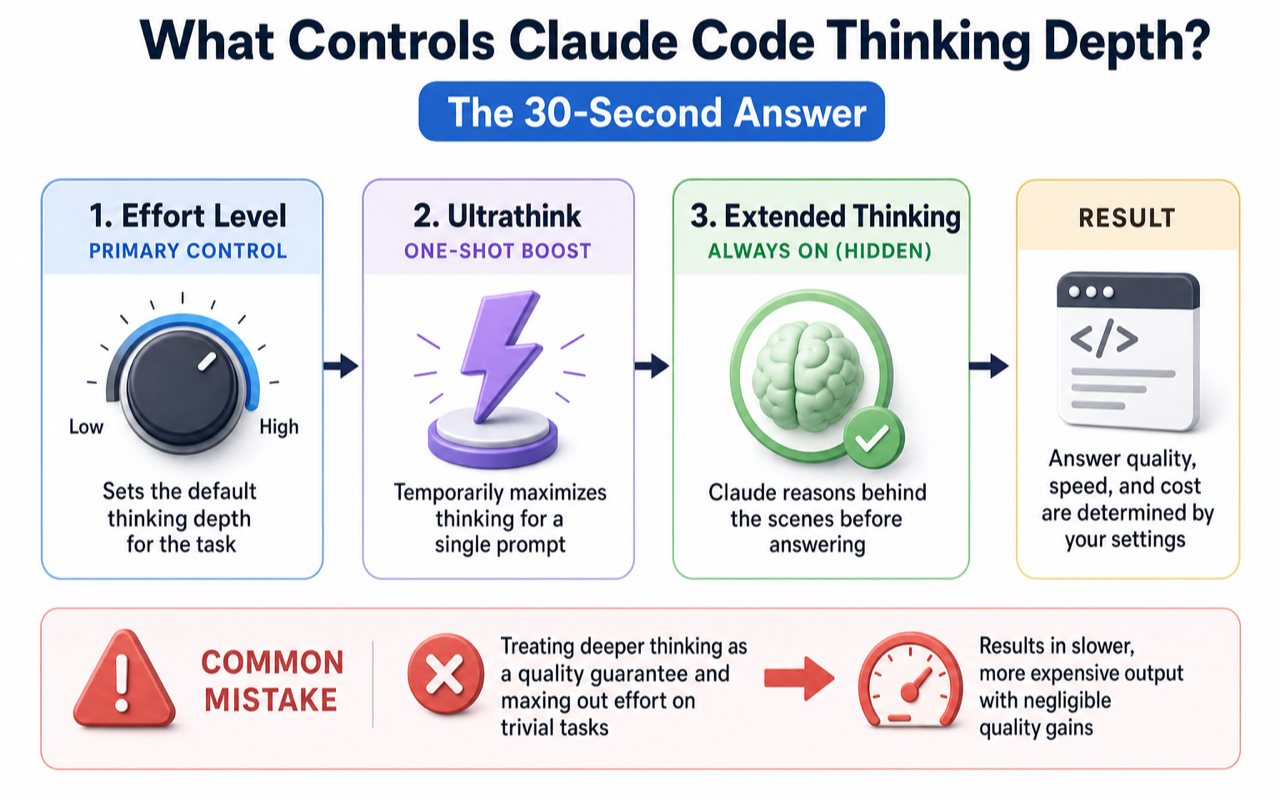
Effort levels are the primary control. Ultrathink is a one-shot boost for a single prompt. Extended thinking — Claude's hidden reasoning before answering — is on by default. Your job is not deciding whether to enable it, but whether the current task deserves deeper reasoning.
Pick your starting point:
You are...
Recommended action
New to Claude Code, heard about ultrathink but unsure
Leave defaults alone. Add ultrathink to hard prompts. Done.
Experienced user stuck on the old "four keyword tiers" model
Switch to /effort for session control. think hard is no longer a trigger keyword.
Team lead controlling costs
Set a lower default effort level org-wide. Release higher levels for complex tasks only.
Also using Codex or GPT, comparing approaches
Claude uses effort levels + keyword; OpenAI uses reasoning.effort API parameter.
The most common beginner mistake: treating deeper thinking as a quality guarantee and maxing out effort on trivial tasks. The result is slower, more expensive output with negligible quality gain.
Why Do Thinking Modes Exist?
Two frustrations show up repeatedly. Claude rushes through multi-file changes without weighing trade-offs. Or Claude overthinks a simple text edit, producing pages of analysis for a one-line fix. Both stem from the same root: thinking depth does not match task difficulty.
Thinking modes give you the dial. Simple edits need no deep reasoning. Multi-approach comparisons need serious thought. Cross-file architecture changes with rollback risk need the highest intensity. Matching depth to difficulty matters more than memorizing level names.
Think of thinking tokens as scratch paper. More scratch paper helps on hard problems but wastes time and money on easy ones. These tokens are billed as output tokens — at the same rate as Claude's visible answer — so "think harder" is never free.
The boundary is equally important: thinking modes improve judgment quality, not requirement clarity. Vague goals plus deep thinking just produce more thorough guessing. Write clear objectives, constraints, materials, and acceptance criteria before adjusting thinking depth. Never reverse that order.
How Effort Levels and Adaptive Reasoning Actually Work
This is where most outdated guides get it wrong. Extended thinking generates reasoning tokens before each answer, billed as output tokens, on by default. Effort levels control how deep that reasoning goes.
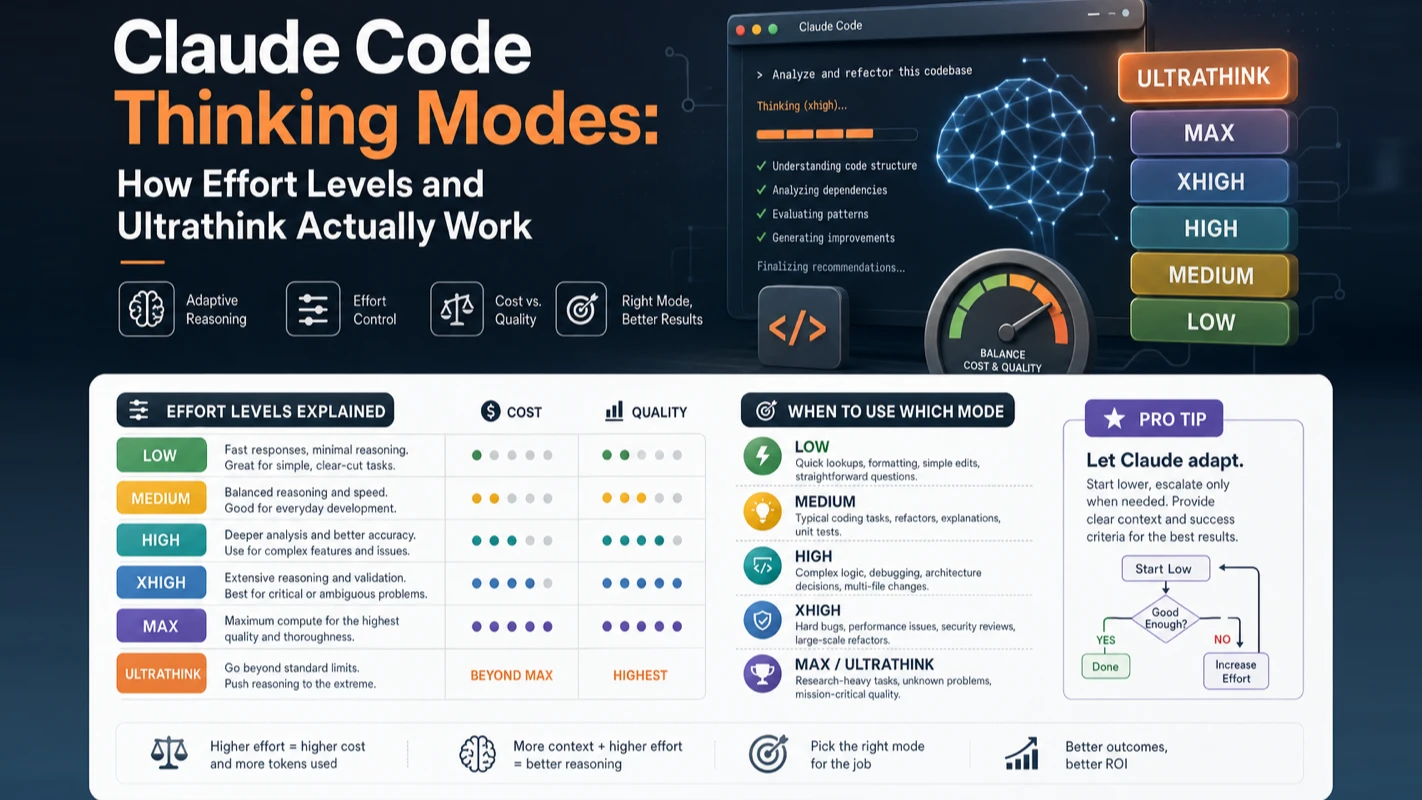
Available effort levels depend on the model. Newer Opus-class models typically support five: low / medium / high / xhigh / max. Others may lack xhigh. The default usually sits at high. You don't need to memorize which model supports which levels — run /effort and your machine shows the current model's supported levels and default. The logo area also displays the active level (e.g., "with low effort").
When to use each level:
Level
Best for
low
Short tasks, narrow scope, latency-sensitive, low intellectual demand
medium
Cost-sensitive work where slightly less depth is acceptable
high
Balanced token spend and reasoning quality — default for most coding
xhigh
Deeper reasoning, higher token cost
max
Deepest reasoning, uncapped token spend. May cause overthinking and diminishing returns — test in small scope first
One entry in the /effort menu causes frequent confusion: ultracode. It is not a model level but a Claude Code setting — xhigh reasoning plus automatic task decomposition into dynamic workflows for the current session. In other words, ultracode = high reasoning intensity + "plan before executing," suited for sessions that start heavy from the first prompt.
Two details worth highlighting. First, level calibration varies by model — high on one model does not equal high on another. After switching models, re-evaluate whether your level still feels right. Second, if you set a level the current model doesn't support (e.g., xhigh on a model with only four levels), Claude Code silently falls back to the highest supported level at or below your setting. No error, but not the depth you requested.
From my experience running Claude Code across dozens of projects daily: most coding tasks work fine at the default high. The max level — uncapped tokens, officially noted as prone to overthinking — belongs in a "break glass for hard problems" category, not daily defaults. Cranking the dial to max on routine work just makes everything slower and more expensive without meaningful quality gain.
Adaptive reasoning is the other half. It makes thinking optional per step — the model itself decides whether each intermediate step deserves deep reasoning, given your effort level as the ceiling. On newer models, adaptive reasoning is the only mode. You set the effort level as an "upper bound and tendency," and the model allocates depth autonomously. No more guessing a fixed token budget.
Does the Ultrathink Keyword Still Work?
Yes — but only as a single-turn boost that does not change your session's effort level. And think, think hard, think more are no longer trigger keywords.
This section exists to correct a persistent myth. Older guides described a four-tier system: think = standard, think hard = medium, think harder = near-ultrathink, ultrathink = roughly 30,000 thinking tokens. That model no longer applies. The current mechanism:
Writing ultrathink anywhere in your prompt triggers Claude Code to add a "reason more deeply" instruction for that single turn. The session's effort level stays unchanged.
think, think hard, think more, and similar phrases are treated as ordinary text. Writing "think harder about this" is just a sentence — it triggers no extra reasoning depth.
The single most important update for anyone following older tutorials: only ultrathink triggers a one-shot boost; session-wide depth control uses /effort; stop stacking keywords that no longer function.
How do ultrathink and effort levels relate? Think of effort as your session's cruise control speed. ultrathink is a momentary throttle press for one hard question. They coexist and govern different scopes.
Where to put it in your prompt? Anywhere. Claude Code recognizes the keyword regardless of position:
ultrathink: this auth module needs to migrate from session-based to JWT.
List all affected files, migration sequence, and rollback points before touching any code.
No special syntax. Drop ultrathink into your prompt like any other word.
How to Start: Pick Effort by Task Difficulty
Skip complex configuration on your first session. You only need two moves: ultrathink for one-off hard questions and /effort for session-wide tuning.
Follow this sequence:
Write clear task objectives and acceptance criteria first. (This matters more than any effort setting.)
Assess: is this a straightforward execution or a multi-approach decision with risk?
Routine tasks — use the default level, change nothing.
One hard question mid-session — add ultrathink to that prompt only.
Entire session is complex work — run /effort xhigh to set the session baseline. Routine session — run /effort low to save tokens.
After results, check whether higher effort actually improved output. If not, refine your requirements instead of raising the level further.
Ways to set /effort — pick whichever fits your workflow:
Command/effort: no argument opens a slider; with a level name sets directly (e.g., /effort high); /effort auto resets to the model default.
Inside/model: use arrow keys to adjust the effort slider when selecting a model.
Startup flag--effort: set effort for a single session at launch.
Environment variableCLAUDE_CODE_EFFORT_LEVEL: set a level name or auto. Highest priority.
Settings fileeffortLevel field: accepts low/medium/high/xhigh (max and ultracode are session-only, not persisted in settings).
This sequence looks slow but prevents the most common beginner trap: making everything ultrathink. Thinking intensity should match task risk, not anxiety level.
What Can You Control About Extended Thinking?
Beginners often conflate "adjusting depth" with "toggling thinking on/off." They are separate layers. Extended thinking ships enabled by default — effort levels control depth, while the controls below manage on/off and display:
Control
How to set it
Toggle thinking for current session
macOS: Option+T / Windows & Linux: Alt+T
Global default toggle
Run /config, toggle thinking mode — saved as alwaysThinkingEnabled
Force-disable regardless of effort
Set MAX_THINKING_TOKENS=0
View reasoning process
Press Ctrl+O to toggle display (reasoning appears as dimmed italic text)
A commonly misused variable: MAX_THINKING_TOKENS. It was the old fixed-budget control. On newer models with adaptive reasoning, setting a specific number has no effect — the model allocates thinking tokens per step on its own. Two remaining valid uses: MAX_THINKING_TOKENS=0 force-disables extended thinking entirely; and on older models that still support fixed-budget mode (after setting CLAUDE_CODE_DISABLE_ADAPTIVE_THINKING=1), a specific value like 8000 takes effect.
I still see developers setting MAX_THINKING_TOKENS=31999 hoping to "max out thinking." On current models, that does nothing. If you use the latest models, forget this variable and adjust effort levels exclusively.
Whether to display reasoning: worth toggling Ctrl+O on once to see how Claude thinks. It builds intuition. Turn it off afterward to reduce noise. Note: all thinking tokens incur cost whether displayed or hidden.
Quick Reference: Every Thinking Control in One Table
You see...
What it is
What it controls
Scope
ultrathink (in prompt)
Trigger keyword
Deeper reasoning for this turn
Current turn only
think hard / think more
Plain text
Nothing — no longer a keyword
N/A
/effort high (session command)
Effort level command
Session reasoning depth
Until changed
--effort (startup flag)
Effort level parameter
Session effort at launch
That session
CLAUDE_CODE_EFFORT_LEVEL
Environment variable
Effort level, highest priority
Depends on export
MAX_THINKING_TOKENS=0
Environment variable
Force-disable extended thinking
Depends on export
/config thinking toggle
Global setting
Default thinking on/off
Persistent
Option+T / Alt+T
Keyboard shortcut
Session thinking toggle
Current session
ultracode
Claude Code setting
xhigh + dynamic workflow orchestration
Current session
One rule cuts through the complexity: depth = effort level, one-shot boost = ultrathink, on/off = /config and keyboard shortcut. Everything else is a different way to set one of those three.
Causal chains are deep; shallow reasoning grabs the wrong root cause
Performance and data structure trade-offs
Requires genuine comparison
Permission changes, deployments, risky actions
Blast radius is large; need risk listing and rollback plan
Major changes in unfamiliar code areas
Deep reading before editing prevents cascading mistakes
Not worth raising above default or low:
Scenario
Why it doesn't pay off
Changing copy, fixing a single known string
Mechanical — deeper thinking is pure waste
Fixing typos, adding log lines
Narrow scope, zero risk
Writing documentation or comments
Expression task, not reasoning task
Dependency upgrades, running formatters
Fixed process
Boilerplate code (CRUD, form fields)
Following an existing pattern
A practical heuristic: if you could figure it out yourself in five minutes, use default or low effort. If it would take you thirty minutes to even form a direction, that's when xhigh or ultrathink earns its cost.
The principle in one sentence: match thinking intensity to task risk, not to your anxiety level. Maxing out effort on simple tasks produces slower, more expensive output with virtually no quality difference.
How Thinking Modes Save You Tokens and Money
Thinking tokens are billed as output tokens and often dominate your bill — they can be the largest cost component in a session. Saving money means allocating depth to the right tasks, not blanket restriction.
Three cost-reduction strategies, ranked by ease of implementation:
Lower effort with /effort or /model: the most direct lever. Run /effort low or /effort medium when an entire session is routine work.
Disable thinking in /config: for purely mechanical batch operations that need zero reasoning.
Cap budget with MAX_THINKING_TOKENS: e.g., MAX_THINKING_TOKENS=8000 — but only effective on fixed-budget models, not adaptive ones.
A common mistake in the other direction: setting every task to low effort to save money, then spending more tokens on rework when complex tasks produce poor results. Cost optimization is not uniform low effort — it is matching effort to difficulty. Both "always max" and "always low" are misuse patterns.
For teams: set a shared baseline like medium in your settings file, and reserve higher levels for architecture, migration, and security-sensitive sessions. Administrators can restrict available models and defaults to prevent anyone from running the most expensive configuration continuously. Run /usage in any session to see token consumption and cost estimates — data-driven decisions beat guessing.
Token saving is allocation, not austerity.
How I Set Thinking Depth Across My Projects
This is a personal routing, not a universal prescription — your project types may differ. But this rhythm works for most developers starting out.
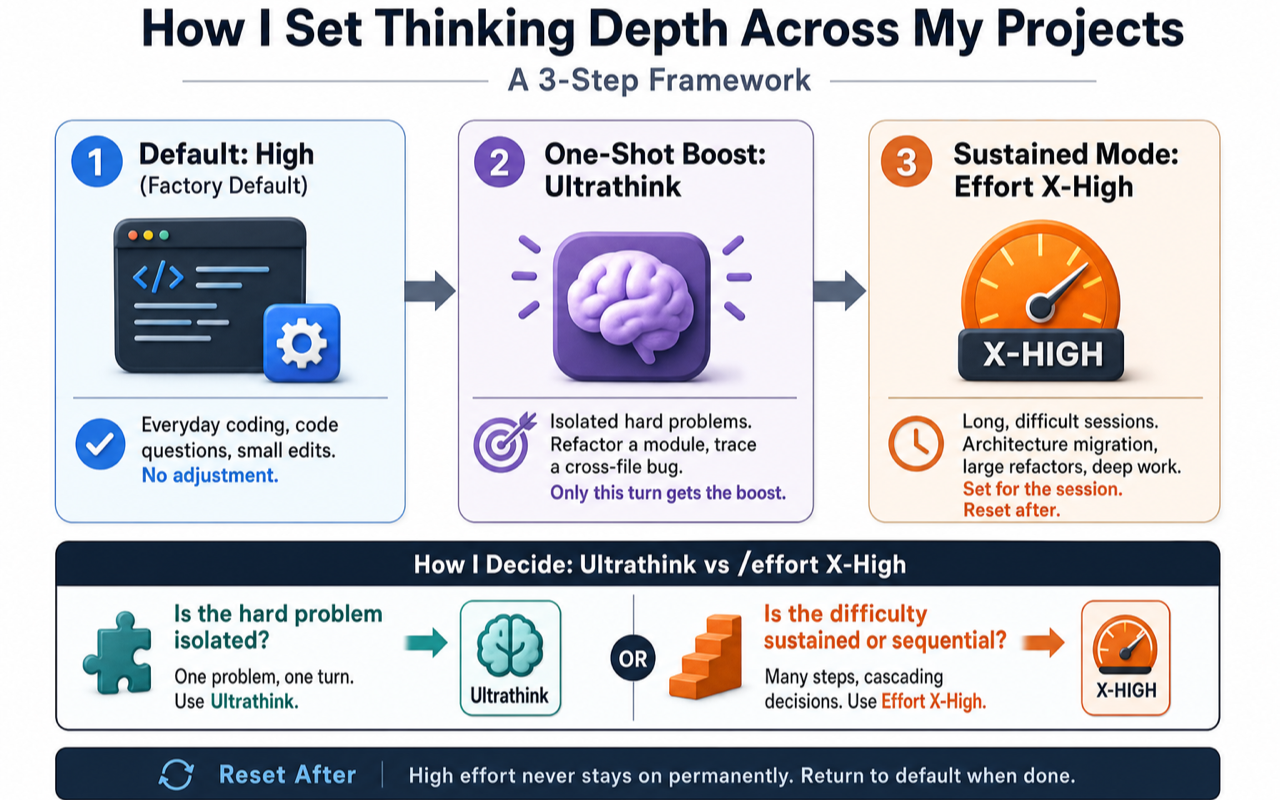
When I begin a new project, I never start at maximum depth. Three-step approach:
Default stays at high (factory default on most models). Everyday coding, code questions, small edits — all run here. No adjustment.
Isolated hard problems get a one-shot ultrathink: refactoring a module, tracing a cross-file bug. Only that single turn gets the boost; session settings stay unchanged.
Sustained difficult sessions get /effort xhigh: an entire afternoon of architecture migration, for example. After the session, I reset to default. High effort never stays on permanently.
The deciding factor between ultrathink and /effort xhigh: is the hard problem isolated or sequential? Debugging a cross-file issue — the hard part is locating the root cause, then the fix is mechanical. One-shot ultrathink. An architecture migration — every step from dependency mapping to sequencing to per-file changes involves trade-offs. That "continuous difficulty" justifies session-wide /effort xhigh.
One counterintuitive observation: setting effort too high can make Claude harder to work with. The model over-deliberates on points that aren't actually complex, producing excessive alternatives you never asked for. This is exactly what the official documentation means by max being "prone to overthinking." Guard against the impulse to raise effort "just to be safe" — the only effort level worth raising to is one that prevents a real mistake you'd otherwise make.
After two weeks of this rhythm, you develop intuition for "should this go deeper?" and stop consulting reference tables.
Five Common Mistakes to Avoid
These traps account for most thinking mode misuse. None are about complex mechanics — all are judgment errors.
Mistake
Correct approach
Stacking think hard / megathink to deepen reasoning
These are no longer trigger keywords. Only ultrathink works for one-shot boosts.
Setting max effort on simple tasks
Choose effort by task risk. Routine work uses default or low.
Using "think harder" as a substitute for clear requirements
Write clear objectives and acceptance criteria first, then decide on effort.
Setting MAX_THINKING_TOKENS=31999 on current models
Adaptive reasoning ignores this value. Use effort levels instead.
Trusting high-effort output without verification
Higher effort improves judgment probability, not certainty. Still run tests, review diffs, check edge cases.
The most insidious trap is the last one: treating deep thinking as a verification substitute. Claude can reason longer and still miss tests, misjudge dependencies, or ignore your constraints. Deeper thinking raises the probability of good judgment. It does not eliminate the need for verification.
What to Learn After Your First Two Weeks
Spend the first two weeks getting "default + ultrathink + /effort" right. Advanced topics come after that foundation is solid.
A three-stage progression:
Week 1: Successfully pick the right effort level for a real task — default for routine, ultrathink for one hard problem. Build the reflex.
Week 2: Start using /effort for session-wide tuning. Watch your bill change. Feel the cost difference between levels.
Month 2+: If you work on a team, write thinking depth into your collaboration agreement (e.g., "routine edits = default, architecture migrations require xhigh"). Use /usage to track thinking cost as a percentage of total spend.
At this stage, thinking modes graduate from "a dial to turn" to "a work habit tied to cost and quality."
One advanced concept worth knowing: interleaved thinking. Claude doesn't only think before answering — it can pause and reason between tool calls. After reading a file or running a command, it stops to reconsider the next step instead of mechanically following a plan. This matters for multi-step tasks: cross-file debugging, sequential migrations, anything where step N's result should change step N+1's approach. You don't need to configure interleaved thinking. Just know that on higher effort levels, Claude's multi-step work looks more deliberate because it is — the model reasons between actions, not just before the first one.
Self-Check Before You Start
Run through this list before and after adjusting thinking depth:
[ ] Is this task straightforward execution, or does it involve multiple approaches / risk trade-offs?
[ ] For routine tasks — am I using default or low effort, not maxing out?
[ ] For a single hard problem — am I using ultrathink, not the defunct think hard?
[ ] For a sustained difficult session — did I set /effort instead of adding keywords to every prompt?
[ ] Did I write clear requirements first, instead of hoping deeper thinking compensates for vague goals?
[ ] After high-effort output — did I run tests, review diffs, and verify edge cases?
[ ] When cost matters — am I dropping effort on routine work to save tokens?
Ready-to-Use Prompt: Pick the Right Claude Code Thinking Effort for a Task
What this does: Scores a task's difficulty, maps it to the right effort level, decides whether a single-turn ultrathink boost is warranted, and checks the result against the five common thinking-mode mistakes — so depth matches difficulty without burning tokens. Based on: Claude Code Thinking Modes: How Effort Levels and Ultrathink Actually Work — https://aiworkflowpro.com/claude-code-thinking-modes/ Time to run: ~3 minutes
Copy this prompt into Claude Code, ChatGPT, or any AI assistant:
ROLE: You are a Claude Code Thinking Effort Selector. Your job: match a task's thinking depth to its difficulty — effort by difficulty, ultrathink as a one-turn boost — never defaulting high and never burning tokens on easy work.

CONTEXT — EFFORT-BY-DIFFICULTY METHOD:
Forget the outdated "think / think hard / think harder / ultrathink" keyword ladder — the current mechanism is effort levels as the primary control, with ultrathink as a single-turn boost, not a sustained tier. The rule: pick effort by task difficulty. Low effort for mechanical, well-specified work (rename, format, simple find); default/medium for multi-step but well-understood work (standard feature, routine bug); high for ambiguous, cross-cutting, or high-stakes work (architecture decisions, tricky bugs, security review). Reserve ultrathink for a single turn that needs maximum reasoning — a hard puzzle or critical decision — not as a standing level. Effort scales tokens, so mismatching depth to difficulty burns money on easy work or fails hard work. Always verify the active level via `/effort`, since model names and defaults change.

INPUTS (fill in before running):
- TASK: [The task you are about to run]
- STAKES: [low / medium / high — cost of being wrong]
- NOVELTY: [routine / familiar territory / novel and ambiguous]
- BUDGET_SENSITIVITY: [token-cost conscious / not]

METHOD — 4 STEPS:

Step 1 — Score Task Difficulty (Low / Medium / High)
From TASK, STAKES, and NOVELTY: Low = mechanical and well-specified; Medium = multi-step but well-understood; High = ambiguous, cross-cutting, novel, or high-stakes. State the level and the dimension that drove it.

Step 2 — Pick the Effort Level by Difficulty
Map difficulty to effort: Low → low effort; Medium → default/medium; High → high effort. Name the `/effort` target and remind the user to verify via `/effort`, since defaults shift.

Step 3 — Decide on a Single-Turn Ultrathink Boost
Ultrathink is a one-turn boost, not a tier. Apply it only if a single turn needs maximum reasoning (the hardest puzzle or the one critical decision). State the turn where it applies, or "not needed."

Step 4 — Cost Check and Mistake Guardrail
Against BUDGET_SENSITIVITY, confirm effort matches difficulty (no high effort on easy work, no low effort on hard work). Flag any of the five mistakes: using the outdated keyword ladder, ultrathink as a standing level, high effort by default, ignoring `/effort`, or boosting every turn.

RULES:
- Never use the "think / think hard / think harder / ultrathink" keyword ladder — it is outdated; effort is the control.
- Never set ultrathink as a sustained level — it is a single-turn boost only.
- Never default to high effort — match depth to difficulty or you burn tokens on easy work.

OUTPUT FORMAT:
Output a markdown report with:
1. Difficulty Score — level + the driving dimension
2. Effort Choice — the `/effort` target + one-line why
3. Ultrathink Decision — the boost turn, or "not needed"
4. Cost + Mistake Check — markdown table, columns: Mistake Pattern | Present? | Fix
Save as @templates/claude-code-thinking-modes.md and run before a task to set effort, or whenever token spend feels unjustified for the work.
Frequently Asked Questions
I set xhigh but Claude doesn't seem to run at that depth. Why?
Your current model likely doesn't support xhigh. When you set an unsupported level, Claude Code silently falls back to the highest supported level at or below your setting — no error message. Check the logo area for the actual active level (e.g., "with high effort"), or re-open /effort to see supported levels.
What does /effort auto do differently from setting a specific level?
/effort auto resets to the current model's factory default — "don't override, use what the model was designed for." Setting a specific level (e.g., /effort low) is an explicit override. After switching models, auto is the fastest way to get the intended default experience.
Can I set a different thinking level for a specific Skill or subagent?
Yes. Add an effort field to the Skill or subagent's markdown frontmatter. It overrides the session-level setting during that Skill's execution — but cannot override the CLAUDE_CODE_EFFORT_LEVEL environment variable. This lets a specialized subagent run at high effort while the main session stays low to save cost.
When multiple effort settings coexist, which one wins?
Priority from highest to lowest: environment variable CLAUDE_CODE_EFFORT_LEVEL > your configured level (settings file / /effort / --effort) > model default. Skill or subagent frontmatter effort overrides the session level during execution, but still loses to the environment variable. Short version: environment variable wins.
Does hiding the reasoning process save money?
No. All thinking tokens are billed regardless of whether you display them with Ctrl+O or collapse them. Saving money requires lowering effort or disabling thinking — "not looking" doesn't reduce cost.
Do other models (GPT, Gemini) have similar thinking modes?
Yes, with different implementations. OpenAI uses a reasoning.effort API parameter with values that vary by model (none, minimal, low, medium, high, xhigh). Gemini enables thinking by default with system-prompt intensity control. Cursor and Cline wrap the underlying model's thinking capabilities without adding their own tiers. Claude Code's distinguishing feature is dual-path control: effort levels for persistent depth and a natural-language keyword (ultrathink) for one-shot boosts — more intuitive for developers who prefer writing prompts over configuring API parameters.
What to Read Next
Three takeaways to carry forward:
Effort levels control depth./effort sets the session baseline. Default high covers most coding. Reserve xhigh for genuinely difficult work.
Only ultrathink triggers a one-shot boost.think hard and similar phrases no longer function as keywords.
Thinking modes don't replace verification. Deeper reasoning improves judgment probability, not certainty. Tests, diffs, and edge-case checks remain your responsibility.
For current mechanism details and model-specific defaults:
Thinking modes deliver value not by making outputs look complex, but by slowing down where slowness prevents real mistakes — and staying fast everywhere else.
Monitoring a competitor who publishes no feed is the case every RSS guide skips. Twenty-one platforms sorted by which of three jobs they do, and the finished setup is business process automation you own outright, with no seat licence to renew.
Blaming the content is the reflex when a post underperforms, and it is usually the wrong diagnosis. A second reader decides distribution before any human sees the post, and most of what it checks is mechanical enough to automate business processes around, on five platforms at once.
Gloves on, tape measure in hand — nobody types a query. Three voice surfaces for ai automation tools (terminal, Telegram, Discord), 10 TTS and 6 STT providers compared on cost and latency, plus a setup that costs nothing.
Thursday afternoon, fourteen product ideas, a Monday filming slot, no scripts. Six script shapes and seven hook formulas turn that hour into finished drafts — and the business rule stays: rewrite at least 30% before anything ships.