A 30-minute video is too long for one conversation. This guide walks the 8-step Skill that locks the narration and one look, then gives each 3-minute segment to a fresh sub-agent, five at a time, and polishes the cut in an empty-context session.
The folder structure behind my AI agent team, the Herdr setup where Grok Build, Claude Code and Kimi Code work side by side, and the two live tasks from the video: an article published by voice and a three-model front-end test.
Eight folders of plain Markdown, a CLAUDE.md index in each, and seven prompts that make your agent interview you. Every prompt, template and command from the video, in order.
ComfyUI Cloud Platforms Comparison 2026: 17 Options Ranked by Use Case
Seasonal demand makes owned hardware the expensive option and the slow one at the same time. Seventeen ComfyUI platforms across four tiers, where choosing among ai automation tools comes down to billing shape rather than the spec sheet.
An apparel brand needs four hundred product images in the two weeks before a seasonal drop and roughly forty a month the rest of the year. Buy hardware sized for the peak and it idles ten months; size it for the average and the drop slips. That mismatch is the actual argument for renting compute rather than owning it, and it means the useful question is not which GPU but which billing shape. This guide ranks 17 ComfyUI cloud platforms across four tiers with a five-minute decision tree. Among ai automation tools, image pipelines are where the pricing model outweighs the feature list.
Running ComfyUI locally eats VRAM. Buying a top-tier GPU risks obsolescence in six months when the next open-source model doubles the memory requirement. The smarter move: rent compute on demand. But with 17+ ComfyUI cloud platforms now competing — each optimized for a different use case — picking the wrong one wastes both money and time.
After testing multiple platforms across real production workflows (image generation, video pipelines, LoRA training, and API deployment), here is the direct verdict:
Fastest start for non-technical creators: RunComfy or Comfy Cloud (zero environment setup)
Maximum GPU flexibility for developers: RunPod (widest hardware selection, per-second billing)
Official backing with top-tier hardware: Comfy Cloud (run-only billing, but watch the node allowlist)
Enterprise API deployment: Replicate (containerized hosting, warm-start caching)
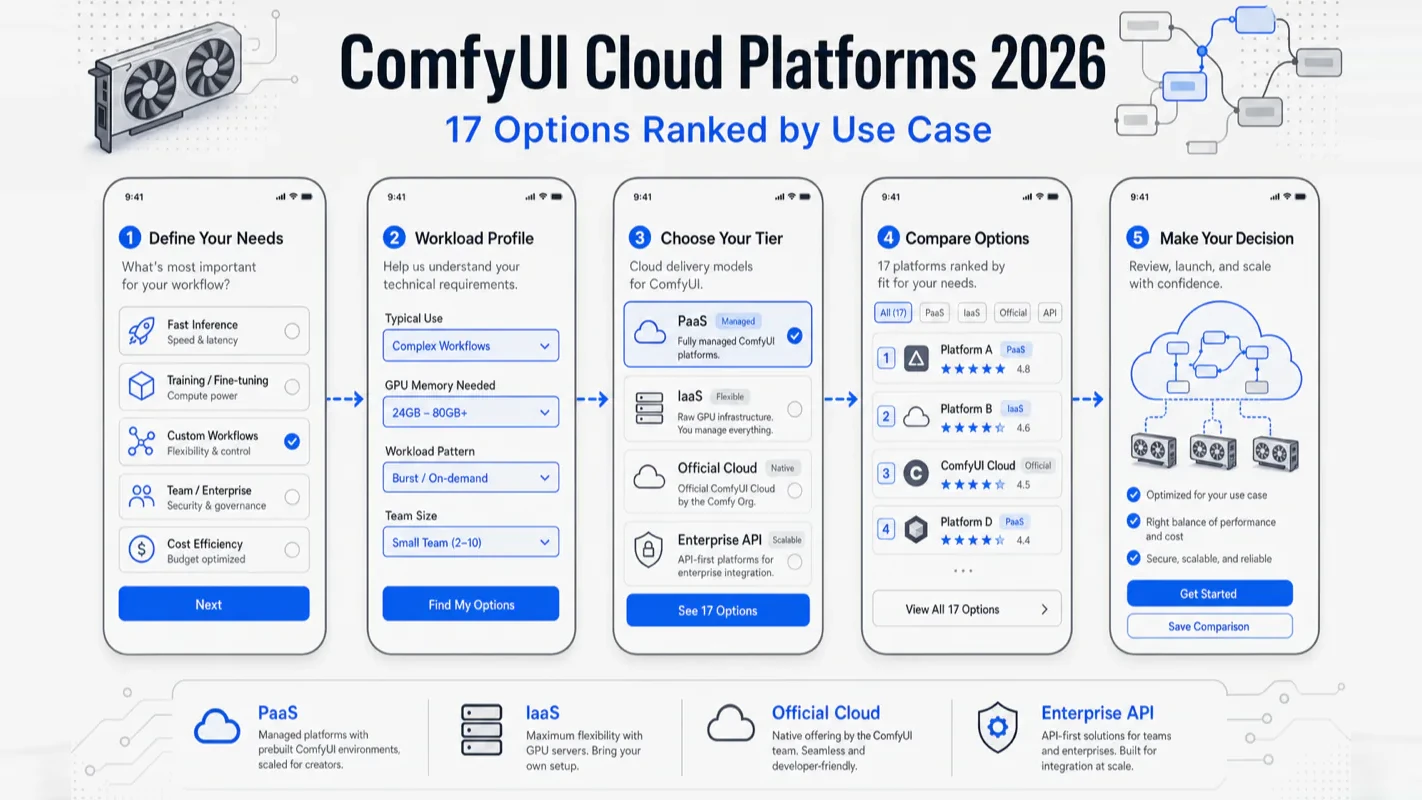
This guide maps all 17 platforms across four tiers, explains what each does best, and gives you a decision tree to lock in your choice in five minutes.
The Four Tiers of ComfyUI Cloud Platforms
Every ComfyUI cloud platform falls into one of four tiers. The tier determines how much setup you handle versus how much the platform handles — and what you trade for that convenience.
Tier
Core Experience
Representatives
PaaS (Platform as a Service)
Pre-installed ComfyUI, nodes, and models — drag and run
PaaS platforms hand you a ready environment. ComfyUI is installed, popular nodes are pre-loaded, model files sit in the right directories. You open the browser and start connecting nodes. The trade-off: some custom nodes may not be available, and you cannot install system-level dependencies.
IaaS platforms give you a raw GPU instance. You install everything — OS configuration, Python environment, ComfyUI itself, model downloads. Total freedom, but you need command-line skills and patience for dependency conflicts.
The Official tier is Comfy Cloud, built by the ComfyUI team. It pairs top-tier hardware with run-only billing (idle time is free). The trade-off: a node allowlist restricts which community nodes you can use.
Enterprise / API platforms treat ComfyUI as a backend service. They suit developers building products on top of ComfyUI, not daily creative work.
For roughly 80% of creators, PaaS or Official is the right starting point. Technical users graduate to IaaS. Teams building products look at the API tier.
Why Does Cloud Beat Buying a GPU for Most ComfyUI Users?
Three forces tilt the economics toward cloud for the majority of creators.
Hardware investment depreciates faster than models evolve. Video generation and multimodal workflows push VRAM requirements upward every few months. A flagship GPU purchased today may struggle with next quarter's open-source release. Cloud platforms let you jump between VRAM tiers on demand — consumer-grade for image work today, large-VRAM instances for video tomorrow — and release the hardware when you are done.
Cloud eliminates "environment hell." The most frustrating part of local ComfyUI is not insufficient VRAM — it is CUDA version mismatches, Python dependency conflicts, and custom nodes that refuse to install. PaaS platforms pre-resolve all of this. IaaS platforms offer pre-built images. I have spent more time debugging local PyTorch-CUDA conflicts than I care to admit, and every hour spent troubleshooting is an hour not spent creating.
Cloud makes experimentation cheap. A local GPU is a large upfront commitment. If you discover you do not use ComfyUI as much as expected, that money is sunk. Cloud billing is incremental — test a workflow for a few dollars, confirm the use case, then scale up.
When does a local GPU make sense? Only when three conditions align: daily usage exceeds six hours, your workflow is stable enough that you never need to switch VRAM tiers, and you already own a suitable GPU from gaming or 3D work. Everyone else saves money and time on cloud.
What Makes Comfy Cloud Stand Out — and What Are the Pitfalls?
Comfy Cloud is the official cloud platform built by the ComfyUI team. The hardware is industry-leading — Blackwell architecture RTX 6000 Pro with 96 GB VRAM and 180 GB system RAM.
Two features are exclusive to Comfy Cloud. First, run-only billing: you pay nothing while building a workflow, adjusting parameters, or thinking about the next connection. Charges only tick while a workflow actively executes. No other platform offers this, and it matters enormously for iterative creators who spend more time designing than rendering. Second, first-party updates: every new ComfyUI feature lands on Comfy Cloud before any third-party platform catches up.
But community feedback on Reddit's r/comfyui surfaces real problems. Credit consumption lacks transparency — users report balances dropping without clear per-run breakdowns. LoRA support is incomplete — imported custom-trained LoRAs fail in certain node configurations, which blocks creators who rely heavily on style models. Cold starts re-download models — spinning up a new worker triggers full model downloads, adding minutes to what should be a fast iteration cycle.
Best for: Creators running mainstream model workflows (Flux, Wan, Qwen-Image) who value top-tier hardware and run-only billing. Skip if: your workflow depends on niche community nodes or a large library of custom LoRAs.
How Does RunPod Compare for Developers Who Want Full Control?
RunPod dominates the IaaS tier internationally. It offers bare GPU instances ranging from consumer cards to enterprise H100/H200 hardware, billed per second. Both "Secure Cloud" (dedicated instances, higher availability) and "Community Cloud" (shared instances, lower cost) tiers are available.
The GPU selection is the widest in the industry. One-click templates include a ready-to-go ComfyUI image — you can start building workflows within minutes of spinning up an instance. The international ComfyUI community produces extensive RunPod deployment guides, including full LoRA training pipelines.
The biggest pain point, reported repeatedly on r/comfyui: cold start and network latency are rough. Instance startup often takes several minutes. Model loading adds more delay. European server bandwidth occasionally drops to near-unusable levels. For users in Asia-Pacific regions, the latency compounds further.
I have personally run LoRA training jobs on RunPod and found the flexibility unmatched — I could pick exactly the GPU I needed, attach persistent storage for model files, and tear down the instance the moment training completed. The per-second billing meant I paid for precisely the compute I used. But I would not recommend it for real-time interactive workflows where every second of latency breaks creative flow.
Who should use RunPod: developers who need full environment control, LoRA training on cloud hardware, or the lowest possible per-compute-hour cost. Not a good fit if you want instant startup or cannot navigate Linux command-line basics.
Which PaaS Platform Offers the Best Out-of-the-Box Experience?
RunComfy — Clean ComfyUI, No Modifications
RunComfy positions itself as "three clicks to launch ComfyUI." It delivers an unmodified native ComfyUI interface — workflows built locally transfer to RunComfy without compatibility surprises. A large template library covers everything from basic image generation to advanced video pipelines.
The pitch is simplicity with fidelity. Because RunComfy runs stock ComfyUI, your local and cloud environments stay in sync. No proprietary node wrappers, no hidden modifications.
The community notes limited user base relative to RunPod and RunningHub, and some feedback flags pricing clarity as an area for improvement.
Best for: International creators who want native ComfyUI experience plus a big template library. Skip if: you need rock-bottom pricing or massive batch processing.
RunningHub — Largest Node Ecosystem for China-Region Creators
RunningHub pre-installs virtually every mainstream ComfyUI node package and updates daily. It integrates China-origin AI models (Jimeng, Kling, Seedance, Wan) alongside international models (Flux, SDXL). Proprietary ComfyUI_RH_ nodes add platform-specific capabilities like local-cloud hybrid execution via API keys.
The node coverage is its moat — a community-shared workflow almost always runs without missing-node errors. The trade-off: those proprietary nodes lock workflows to RunningHub. If portability matters, build core logic with standard nodes and use RH_ nodes only for non-critical features.
RunningHub shines when you want zero environment hassle and access to both China-region and international model ecosystems. The deal-breaker: workflow portability across platforms, since proprietary nodes lock you in.
Liblib AI — Model Library Plus Visual LoRA Training
Liblib AI operates as both a model-sharing community (similar to Civitai) and a ComfyUI cloud platform. Its standout feature: a fully visual LoRA training interface. Upload training images, set parameters, click start — no code, no command line.
Liblib packages complex workflows into one-click "applications" that hide the node graph entirely. Users upload an image or type a prompt and get results. This design suits designers and e-commerce operators who need output, not node-level understanding.
The caveat flagged by multiple community reviews: online generation results sometimes differ from local results using identical parameters. For commercial projects that demand pixel-level reproducibility, test your critical workflow on Liblib before committing.
Best for: Designers, e-commerce teams, and anyone who wants visual LoRA training without touching code. Skip if: pixel-perfect cross-platform reproducibility is non-negotiable.
TusiArt (China-region version) and Tensor.Art (international version) combine a model marketplace with native ComfyUI workbench. The distinguishing feature is the social layer — follow creators, browse their shared workflows, and clone configurations with one click. Learning advanced ComfyUI techniques by studying community workflows is one of the fastest paths available, and this platform optimizes for that pattern.
The platform provides daily free compute credits, though the daily allowance is moderate. Like Liblib, there is some discrepancy between online and local results because of pre-installed node version differences.
If you learn best by studying other people's workflows and want a bilingual community around you, TusiArt is a strong fit. Production teams that need guaranteed parameter consistency should look elsewhere.
SeaArt — Underrated Multi-Entry-Point Platform
SeaArt covers web, mobile app, and mini-program interfaces — the widest range of access options among China-region platforms. Model library depth is competitive. The gap: less community depth-testing coverage compared to RunningHub and Liblib, meaning fewer troubleshooting resources when you hit an edge case.
Treat SeaArt as a backup when your primary platform runs out of GPU stock. The smaller community means fewer troubleshooting resources when you hit an edge case.
What Do IaaS Platforms Offer Beyond RunPod?
AutoDL — The De Facto Standard for Budget-Conscious Technical Users
AutoDL is a pure GPU rental service with strong presence in the China-region developer community. Per-second billing, persistent data volumes, and the richest ecosystem of Chinese-language ComfyUI deployment tutorials make it the China-region counterpart to RunPod.
The critical operational tip: always store model files on AutoDL's persistent data volume, not the system disk. System disks risk data loss on instance release. Managing workflow configuration files via Git ensures you can switch instances without re-downloading multi-gigabyte models — a lesson I learned the hard way after losing a full model library to an accidental instance release.
AutoDL suits technical users with Linux skills who run ComfyUI daily and need China-region network access at the lowest possible cost. If you have zero command-line experience, start with a PaaS platform instead.
Alternative IaaS Providers
OneThingAI, Hengyuan Cloud, and several smaller GPU vendors occupy the same tier as AutoDL — bare metal rental with ComfyUI image support, sometimes at slightly lower prices. Their user bases are smaller, meaning less community troubleshooting content. Treat them as a backup pool: default to AutoDL (or RunPod internationally), and switch to an alternative only when GPU stock or pricing creates a specific reason.
How Do Enterprise and API Platforms Fit the Picture?
ViewComfy — Turn Workflows Into Shareable Web Apps
ViewComfy solves a different problem: workflow productization. A no-code app builder converts any ComfyUI workflow into a simplified web interface that non-technical colleagues or clients can operate without seeing the node graph. Serverless API support handles scaling automatically.
Enterprise features — SSO, private S3 storage integration, user management — make ViewComfy the only platform purpose-built for team deployment. A design agency, for example, could package an AI image generation workflow as an internal tool for designers who have never opened ComfyUI.
The sweet spot: developers productizing workflows, agencies deploying AI capabilities internally, or teams with enterprise security requirements. Solo creators who do not need to share workflows have no reason to pay the premium.
Replicate — The Default for API-First Deployment
Replicate hosts AI models as API endpoints. The platform follows the Cog containerization standard for packaging models. ComfyUI integration requires containerizing your workflow into Replicate's Cog format — you lose the visual interface but gain production-grade hosting with warm-start caching that keeps instances active between requests.
Pricing sits 30-50% higher than equivalent RunPod configurations. The learning curve concentrates on containerization, not ComfyUI itself.
Replicate makes sense for engineering teams embedding ComfyUI into SaaS products. If you want to interact with ComfyUI visually or cost is a primary concern, look elsewhere.
ComfyICU — Built for Batch Parallel Execution
ComfyICU specializes in multi-GPU parallel execution. Submit a batch of workflow runs and the platform distributes them across GPUs simultaneously. Where a single-GPU platform queues 200 images sequentially, ComfyICU processes them in parallel.
ComfyICU shines for e-commerce batch image generation, LoRA A/B testing, and dataset augmentation — any scenario where you need hundreds of outputs from one workflow. It is not the right choice for interactive single-image creation.
How Should Subscription vs. Pay-Per-Use Pricing Affect Your Decision?
Low-frequency users (a few sessions per week) save money with pay-per-use or per-run billing. High-frequency users (daily sessions) benefit from subscriptions or monthly plans. The hidden cost of subscriptions is paying for unused capacity. The hidden cost of pay-per-use is the forgotten running instance — one overnight GPU session can cost more than a month of subscription.
Comfy Cloud's run-only billing model is a structural exception. Because idle time costs nothing, you can leave a workflow open while you think, research reference images, or adjust parameters. Every other platform charges for that idle time.
RunDiffusion takes yet another approach: flat subscription pricing that bundles ComfyUI, Automatic1111, and kohya_ss training. If you split time across multiple tools and prefer predictable monthly costs, RunDiffusion eliminates the mental overhead of tracking per-minute charges.
Which Platform Should You Pick? A Decision Tree for 6 Common Profiles
Stop comparing spreadsheets. Find your profile and follow the arrow.
Profile 1: Non-technical creator or designer, no command-line experience
Pick RunComfy (cleanest interface) or Liblib AI (one-click apps hide all complexity). Both eliminate environment setup entirely.
Profile 2: Experienced ComfyUI user who wants the largest node library
Pick RunningHub. Near-complete node coverage, daily updates, and one-click workflow cloning from the community. The strongest option for workflow diversity.
Profile 3: Creator who needs to train custom LoRA models
Pick Liblib AI (visual training interface, no code required) or RunPod (full control over training pipeline). The first removes barriers; the second removes limits.
Profile 4: Developer who needs full environment control at the lowest cost
Pick RunPod (international) or AutoDL (China-region network). Both offer per-second billing, persistent storage, and complete customization.
Profile 5: Developer building a product on top of ComfyUI
API deployment: Replicate (containerized, production-grade). Web app conversion: ViewComfy (no-code builder + serverless). Raw flexibility: RunPod.
Profile 6: Power user who wants official backing and top-tier hardware
Try Comfy Cloud — but verify your workflow's node compatibility first. Use the free credits to run your actual workflow end-to-end before committing to a subscription.
All 17 Platforms Side by Side
Dimension
RunPod
Comfy Cloud
RunComfy
RunningHub
Liblib AI
TusiArt
ViewComfy
Replicate
AutoDL
Tier
IaaS
Official
PaaS
PaaS
PaaS
PaaS
PaaS+API
API
IaaS
Setup difficulty
Medium
Very low
Low
Low
Very low
Low
Medium
High
High
Customization
Full
Medium (allowlist)
Medium
Medium
Low
Medium
Medium
High
Full
Node ecosystem
Self-install
Allowlist
Medium
Strong
Medium
Medium
Medium
Self-install
Self-install
API capability
Strong
Planned
Medium
Strong
Weak
Medium
Very strong
Very strong
None
Team features
Medium
Planned
Medium
Medium
Weak
Medium
Very strong
Medium
Weak
LoRA training
Strong
Weak
Weak
Medium
Very strong
Medium
Weak
Medium
Strong
Long-term cost
Low
High
Medium
Medium
Medium
Medium
Medium
High
Very low
What Community Feedback Should You Watch For?
Platform
Top praise
Top complaint
Comfy Cloud
Best hardware + run-only billing + official support
Credit consumption opaque, LoRA support gaps, cold-start re-downloads
RunPod
Price flexibility + widest GPU selection
Slow cold starts, poor network latency for Asia-Pacific users
Small user base, learning curve for app conversion
Seven Pitfalls That Catch Everyone
Seven mistakes the community reports again and again:
Do not load a large balance upfront. Platforms update pricing, plans, and billing rules frequently. Start with the minimum top-up, validate your workflow, then scale spending.
Watch credit expiration and monthly resets. Most platforms expire gifted credits. Subscription plans typically reset unused quota monthly. Do not hoard credits.
Shut down IaaS instances immediately after use. GPU instances bill per second. Leaving one running overnight can cost more than a week of normal usage. I once forgot an AutoDL instance over a weekend — the bill was unpleasant.
Store models on persistent volumes, not system disks. Both RunPod and AutoDL have limited system disk space, and releasing an instance can wipe it. Keep model files on persistent/data volumes and manage workflow configs with Git.
Expect workflow portability traps. RunningHub's proprietary ComfyUI_RH_ nodes do not exist on other platforms. Comfy Cloud's node allowlist may block community nodes. Build core workflows with standard nodes.
Validate before committing. Every platform offers some free credits or trial. Run your most-used workflow end-to-end before subscribing or making a large deposit.
Maintain a backup platform. The AI industry moves fast — pricing changes, rate limits appear, policies shift. Having a tested backup means you are never stuck. A practical split: RunPod for primary flexibility, Comfy Cloud for top-tier jobs, RunComfy for quick tests.
Related Reading
AI Video Creation Guide 2026 — Complete AI video creation workflow covering tools, models, and production pipelines
Ready-to-Use Prompt: Pick the Right ComfyUI Cloud Platform by Profile and Workload
What this does: Matches your profile and workload to one of four deployment tiers and a specific platform, sizes the GPU to the job, decides subscription vs pay-per-use, flags the seven pitfalls, and sets a community-signal exit test — so you rent compute on demand instead of buying a GPU that obsoletes in six months. Based on: ComfyUI Cloud Platforms Comparison 2026: 17 Options Ranked by Use Case — https://aiworkflowpro.com/comfyui-cloud-platforms/ Time to run: ~5 minutes
Copy this prompt into Claude Code, ChatGPT, or any AI assistant:
ROLE: You are a ComfyUI cloud platform advisor. Your job: match one user's profile and workload to the right deployment tier and specific platform, decide subscription vs pay-per-use, and flag the seven pitfalls — so they rent compute on demand instead of buying a GPU that obsoletes in six months.

CONTEXT — COMFYUI CLOUD PLATFORM SELECTOR:
Running ComfyUI locally eats VRAM, and buying a top GPU risks obsolescence when the next model doubles the memory requirement — so renting compute on demand is the smarter move. Seventeen-plus platforms sort into four tiers: PaaS (managed, zero setup — RunComfy, ViewComfy), IaaS (raw GPU rental, full control — RunPod), Official (Comfy Cloud, run-only billing, but a node allowlist), and API (deploy workflows as endpoints — Replicate, ViewComfy serverless). The decision is profile-driven: non-technical creators want PaaS, developers want IaaS, product builders want API/no-code, and the pricing model (subscription vs pay-per-use) must match how often you actually run.

INPUTS (fill in before running):
- PROFILE: YOUR_PROFILE_HERE (non-technical creator / developer wanting control / product builder / enterprise-API deployer / occasional user)
- WORKLOAD: YOUR_JOBS_HERE (image gen / video pipelines / LoRA training / API serving — and how heavy)
- USAGE_FREQUENCY: YOUR_PATTERN_HERE (daily constant / weekly / occasional)
- BUDGET_MODE: YOUR_PREFERENCE_HERE (subscription / pay-per-use / minimize spend)

METHOD — 6 STEPS:

Step 1 — Pick the tier
Match PROFILE to a tier: non-technical creator or product builder → PaaS; developer wanting control → IaaS; official/hardware priority → Official; API/enterprise deployer → API. State the tier + why.

Step 2 — Pick the specific platform
Within the tier, pick by WORKLOAD: fastest managed start → RunComfy or Comfy Cloud; widest hardware + per-second billing → RunPod; no-code app + serverless API → ViewComfy; containerized API with warm-start caching → Replicate. Name the platform + the one reason it wins for WORKLOAD.

Step 3 — Size the GPU to the job
Match VRAM to WORKLOAD: image gen → mid GPU; video pipelines / LoRA training → high-VRAM GPU; API serving → balance VRAM + cold-start. Pick the smallest GPU that runs the job without OOM — oversizing is the top waste.

Step 4 — Decide subscription vs pay-per-use
Use USAGE_FREQUENCY: daily/constant → subscription (predictable cost); occasional → pay-per-use (no idle spend). If BUDGET_MODE contradicts the frequency rule, flag the overpay risk — do not let a preference override the usage math.

Step 5 — Check the seven pitfalls
Pass/fail: (1) node-allowlist blocking custom nodes (Official tier)? (2) considering a GPU purchase instead of cloud? (3) subscription while usage is occasional? (4) pay-per-use while running constantly? (5) ignoring API cold-start latency? (6) GPU undersized for the workload (OOM)? (7) ignoring community feedback on reliability? Flag the ones the reader is exposed to.

Step 6 — Validate against community feedback
State the one community signal to verify before committing (uptime/reliability complaints, billing surprises, node support) and the exit test: if the platform fails that signal in the first month, switch tiers — the cloud advantage is portability.

RULES:
- Match the tier to the profile first, then the platform to the workload — never pick a platform before its tier fits.
- Size the GPU to the smallest that avoids OOM — oversizing is the top waste.
- Subscription for constant use, pay-per-use for occasional — never let a preference override the usage math.
- Do not buy a GPU to solve a VRAM problem; rent — the hardware obsoletes in months.

OUTPUT FORMAT:
Output six sections:
1. **Tier pick** — the chosen tier + why.
2. **Platform pick** — the specific platform + the one workload reason.
3. **GPU sizing** — the GPU class for WORKLOAD + the no-OOM rationale.
4. **Pricing model** — subscription vs pay-per-use + the usage-math justification.
5. **Pitfall check** — markdown table with columns: Pitfall | Exposed? (Y/N) | Avoidance.
6. **Community check + exit test** — the signal to verify + the one-month switch trigger.
Save as @templates/comfyui-cloud-platforms.md and run when you choose a ComfyUI cloud host, then re-run if your workload, frequency, or budget mode changes.
Frequently Asked Questions
Should I run ComfyUI locally or use a cloud platform?
Cloud wins unless three conditions align simultaneously: you use ComfyUI more than six hours daily, your workflow rarely changes VRAM requirements, and you already own a capable GPU. Model iteration speed keeps shortening hardware ROI periods. Start on cloud, confirm your actual usage pattern, then evaluate whether local investment makes sense.
Can I move workflows between different ComfyUI cloud platforms?
Native JSON workflows are theoretically portable. Two traps break this in practice: RunningHub's ComfyUI_RH_ proprietary nodes load only on RunningHub, and Comfy Cloud's node allowlist silently blocks certain community nodes. Build core workflow logic with standard nodes. Add platform-specific nodes only for non-critical enhancements.
Which platform handles video generation best?
Video generation demands far more VRAM than image generation. Open-source video models like Wan and Hunyuan need 48 GB+ for comfortable operation. Prioritize platforms with 48 GB / 80 GB / 96 GB VRAM tiers — Comfy Cloud (96 GB RTX 6000 Pro), RunPod (up to H200), and RunningHub (high-tier plans) all qualify.
Is it reasonable to use multiple platforms simultaneously?
Absolutely — and most power users do exactly this. A practical split: RunComfy or RunPod for daily work (flexibility and speed), Liblib AI or RunPod for LoRA training (visual interface or bare-metal control), AutoDL for budget batch jobs, Replicate for API deployment. Three to four platforms covering their respective strengths beats concentrating everything on one.
What Should You Do Next?
ComfyUI cloud platform selection is not about finding "the best" — it is about matching your workflow to the right tier. Pick two platforms from the decision tree above, load the minimum credits on each, test your actual workflow for a week, then commit to one as your primary.
Platforms iterate constantly. Pricing, GPU availability, and feature sets shift quarter to quarter. This guide intentionally avoids specific dollar amounts because they expire within months. What does not change: each platform's structural position, its moat, and what the community consistently praises or criticizes. Those are the foundations of a durable decision.
The platform is just the compute layer. What determines your output quality is the workflow design and prompt engineering on top of it.
A 30-minute video is too long for one conversation. This guide walks the 8-step Skill that locks the narration and one look, then gives each 3-minute segment to a fresh sub-agent, five at a time, and polishes the cut in an empty-context session.
Eight folders of plain Markdown, a CLAUDE.md index in each, and seven prompts that make your agent interview you. Every prompt, template and command from the video, in order.
Stop briefing your AI from scratch. One free folder holds your background, your rules and your voice. Eight prompts build it, no code, and any AI can read it.
Monitoring a competitor who publishes no feed is the case every RSS guide skips. Twenty-one platforms sorted by which of three jobs they do, and the finished setup is business process automation you own outright, with no seat licence to renew.