Monitoring a competitor who publishes no feed is the case every RSS guide skips. Twenty-one platforms sorted by which of three jobs they do, and the finished setup is business process automation you own outright, with no seat licence to renew.
Blaming the content is the reflex when a post underperforms, and it is usually the wrong diagnosis. A second reader decides distribution before any human sees the post, and most of what it checks is mechanical enough to automate business processes around, on five platforms at once.
Gloves on, tape measure in hand — nobody types a query. Three voice surfaces for ai automation tools (terminal, Telegram, Discord), 10 TTS and 6 STT providers compared on cost and latency, plus a setup that costs nothing.
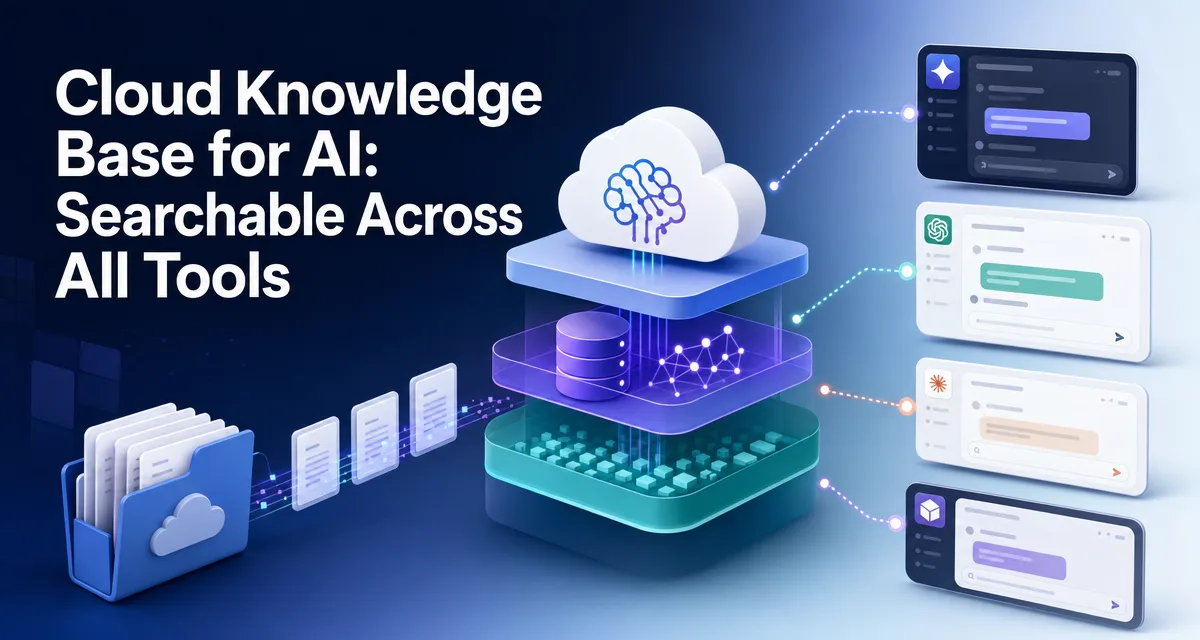
Cloud Knowledge Base for AI: Searchable Across All Tools
One canonical knowledge store any MCP-aware AI tool can query: three independently replaceable tiers, eight industry templates, and per-person access you revoke with a single command. Built so the knowledge stays with the business when the person leaves.
Most AI knowledge-base setups stop at one tool — the docs are queryable inside Claude Code, but Cursor, ChatGPT, Notion AI, and your teammates can't reach them
The fix is brain-mcp: a cloud-hosted, MCP-fronted knowledge base that any MCP-aware AI client can query with one install line
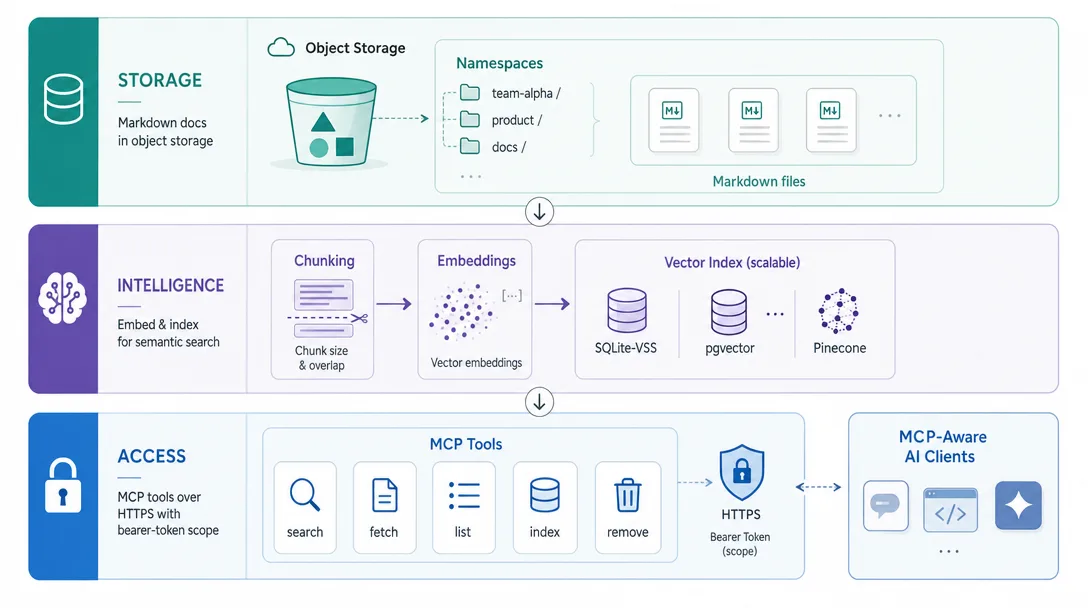
Three tiers, each replaceable independently: storage (R2 / S3), intelligence (embedding + vector index), access (MCP server)
Eight industry templates cover the most common KB shapes — codebase docs, customer support, runbook, research notes, sales playbook, training material, internal wiki, public docs
Multi-user sharing through scoped MCP tokens; revoke access in one command
The single most under-appreciated lever in 2026's AI workflow stack isn't the model. It's the knowledge layer the model can search. A great prompt against a model that doesn't know your project is a polished answer to the wrong question. A mediocre prompt against a model that has read your docs is a usable answer.
Most builders solve this locally. They pile docs into a folder, point Claude Code at it, and call it done. That works — until you open Cursor and want the same docs there, or your colleague asks for the same context, or you switch from Claude Code to ChatGPT for a particular task. The local KB doesn't follow you.
The fix is the cloud-hosted knowledge base — one canonical store that any MCP-aware AI client can query. The open-source server I'll walk through is brain-mcp. By the end of this post you'll have the full architecture, the deploy steps, and the eight industry templates that cover most use cases.
An associate leaves a consulting firm on a Friday. IT revokes the email account in about four minutes. The harder half takes weeks: the client history, the pricing rationale, the half-finished deliverable, the reason one clause was worded that way. All of it lives in a personal drive, and the handover meeting recovers maybe a third. What follows is designed around that Friday — knowledge parked where the whole team can reach it, access handed out per person, revoking it a one-line job — so the work stays and only the login leaves. Any business process automation standing on one person's laptop retires the day they do.
Who Is This For?
You've built a local AI knowledge base inside Claude Code or Cursor and now want it accessible from other tools
You work in a team and need shared knowledge that your colleagues can query in their own AI sessions
You're building an agent system and need the agents to share a knowledge layer
You'd rather see a working architecture than a vendor pitch
If you've never set up an MCP server before, the Model Context Protocol specification covers the protocol fundamentals, and the MCP connections post is a good warm-up — knowing how MCP install works in clients makes the access tier here much easier to follow.
Why Local Knowledge Bases Are the Wrong Default
Local KBs feel right because they're easy. You drop a docs/ folder next to your project, point your AI client at it, and the docs are searchable. The friction is zero on day one.
The problem shows up on day twenty. You're working in Cursor on a different project and you want to reference last month's research. You can't — those docs are locked to the Claude Code project where you indexed them. Or your colleague joins the team and needs to ramp up on the same docs. They can't — those docs only live on your laptop.
Worse: as you build up multiple projects, the local-KB pattern fragments. Each project has its own docs folder, its own indexing, its own slightly different mental model of "what's in there." You end up with five overlapping local KBs and no canonical source of truth.
The cloud-hosted pattern flips this. One KB, accessible from every tool, with permissions and access logs. The cost is a small server. The benefit is the same docs in front of you regardless of which AI tool you happen to be using today.
What Is brain-mcp?
brain-mcp is an open-source MCP server that turns any folder of Markdown docs into a cloud-hosted, semantically searchable knowledge base. Any MCP-aware client — Claude Code, Cursor, Claude Desktop, ChatGPT (via wrappers), and a growing list of others — can query it with one install command.
Under the hood, three things are happening:
The docs live in object storage (R2, S3, or equivalent)
An embedding model converts each doc into vectors stored in a vector index
The MCP server exposes a kb_search tool that takes a query, runs vector search, and returns the top matching docs
That's the whole architecture. The interesting part is how cleanly the three tiers separate.
The Three Tiers
The architecture has three tiers, each owning one job and replaceable without touching the others.
Tier 1: Storage — Where the Docs Live
The docs live in object storage. The default is Cloudflare R2 (because it's free at the scale most KBs operate at), but any S3-compatible store works.
Each subfolder becomes a namespace. The MCP server can scope queries to one or more namespaces, so when you ask "what's the deploy process for Alpha?" the search runs only against projects/alpha/ rather than every doc in storage.
Tier 2: Intelligence — Embedding + Vector Index
When you upload a doc, the intelligence tier converts it into vectors and adds it to the index. Three pieces here:
The embedding model. Most KBs use a small, fast model (OpenAI text-embedding-3-small, Voyage AI's voyage-2, or Anthropic's embedding model) — the difference between models is small at this scale and the cost is dominated by query volume, not model choice
The chunking strategy. Docs are split into chunks before embedding. The default is 500-token chunks with 100-token overlap, which is the right starting point for Markdown docs
The vector index. brain-mcp ships with built-in support for SQLite-VSS (for small KBs), pgvector (for medium), and Pinecone/Weaviate (for large)
The intelligence tier is where most of the cost of running a KB lives — embedding the initial doc set, then re-embedding when docs change. Plan $5-30 in embedding cost for the initial indexing of a typical KB, then a few dollars a month for ongoing updates.
Tier 3: Access — The MCP Server
The MCP server is the public face of the KB. It exposes a small set of tools that AI clients call:
kb_search — semantic search over the docs
kb_get — fetch a specific doc by ID
kb_list — list all available namespaces
kb_index — add new docs (admin only)
kb_remove — remove docs (admin only)
The server runs over HTTPS and authenticates with bearer tokens. Each token has a scope: read-only access to a list of namespaces, or admin access to the whole KB. Tokens are how you implement multi-user sharing — you issue a read-only token to a teammate and revoke it when they leave.
The architectural unlock: because the access tier speaks MCP, every MCP-aware AI client can query your KB with one install line. No client-side glue code, no per-client integration. That's the difference between a KB that lives in one tool and a KB that lives across your whole AI stack.
Eight Industry Templates
Most teams run into the same partitioning question: "how should I split my KB?" Eight templates cover the patterns I've seen work.
Template 1: Codebase docs
For a single product. Namespaces: architecture/, apis/, runbooks/, decisions/. Indexed from the project's docs/ folder. Updated nightly via Cron. Read-token shared with the dev team.
Template 2: Customer support knowledge
Public-facing. Namespaces: getting-started/, troubleshooting/, faq/, policies/. Indexed from the same Markdown source that powers the public docs site. Read-token bundled into a customer-facing chat UI.
Template 3: Personal research notes
For a solo creator. Namespaces: articles/, interviews/, book-notes/, project-logs/. Indexed from a Notion or Obsidian export. Updated weekly. No tokens shared — entirely personal.
Template 4: Sales playbook
For a B2B startup. Namespaces: objections/, case-studies/, pricing/, competitors/. Indexed from sales-enablement Markdown. Read-token shared with the sales team.
Template 5: Onboarding and training
For a growing team. Namespaces: engineering-onboarding/, product-onboarding/, culture/, tools/. Indexed from the team handbook. Read-token issued to each new hire on day one.
Template 6: Compliance and policy
For a regulated industry. Namespaces: regulatory/, internal-policies/, audit-logs/. Indexed from policy docs. Strict access controls — admin tokens only, with audit trail of every query.
Template 7: Internal wiki
For replacing or augmenting Notion / Confluence. Namespaces by department: engineering/, product/, marketing/, ops/. Indexed from a Markdown export of the wiki. Read-token shared org-wide.
Template 8: Public docs
For an open-source project. Namespaces: tutorials/, api-reference/, guides/, examples/. Indexed from the docs site. Read-token public — anyone can query.
The pattern: namespace by intent of access, not by who wrote the doc. The reader doesn't care which engineer wrote a particular runbook; they care whether it's about deploying or debugging. Namespace boundaries should match the questions readers will ask.
Multi-User Sharing in One Command
Once your KB is running, sharing it is one command per user.
# Issue a read-only token for a teammate
brain-mcp token create \
  --name "[email protected]" \
  --scope "read:projects/alpha,read:projects/beta" \
  --expires 90d
The output is a token string. Send it to Alice. She runs:
claude mcp add my-kb https://kb.example.com/mcp \
  --header "Authorization: Bearer alice-token-here"
From that moment, Alice can ask questions in her Claude Code session that search your projects/alpha/ and projects/beta/ namespaces. She can't see anything else. She can't write. She can't admin.
Done. Her access is gone within the next 60-second cache window.
The auditing side is just as clean. Every query is logged with token, timestamp, namespace, and result count. "Did Alice query the salary policy doc last week?" — brain-mcp logs query --token alice --pattern salary answers it in two seconds.
Deployment Walkthrough
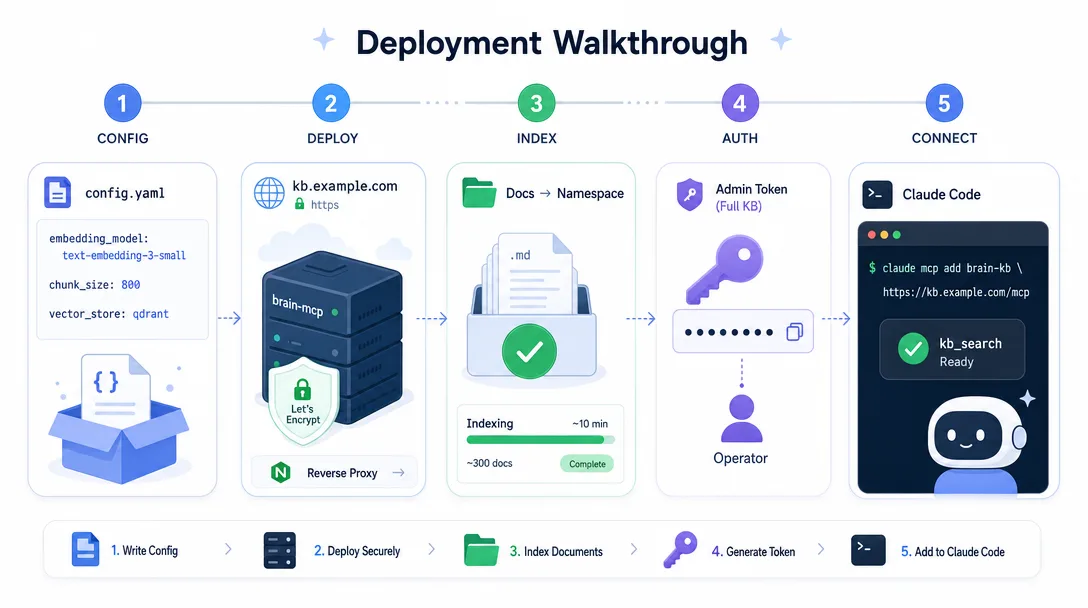
End-to-end deployment takes about 90 minutes. Here's the sequence.
Step 1: Spin up the storage layer
Create an R2 bucket (or S3, or whichever object store you prefer). Get the access keys.
For a KB under 100K chunks, SQLite-VSS is plenty. For larger, switch to pgvector (Postgres extension). For multi-million-chunk KBs, Pinecone or Weaviate.
The MCP server is a single binary. Drop it on a $5/month VPS (or your existing OpenClaw host).
# Run the server
brain-mcp serve \
--config /etc/brain-mcp/config.yaml \
--port 8080 \
--tls /etc/letsencrypt/live/kb.example.com/
Wire it up to a domain via Caddy or Nginx. The HTTPS endpoint becomes the URL teammates use to install.
Step 4: Index your first docs
# Upload a folder
brain-mcp index push \
--namespace projects/alpha \
--source ~/work/alpha/docs/
# Verify
brain-mcp kb stats
The first index of a typical project (a few hundred docs) takes 5-10 minutes and costs $1-3 in embedding fees.
Step 5: Issue an admin token to yourself, install on your AI client
brain-mcp token create --name "leo-admin" --scope "admin:*"
# In Claude Code:
claude mcp add my-kb https://kb.example.com/mcp \
--header "Authorization: Bearer leo-admin-token"
Now in any Claude Code session you can ask "search my KB for our deploy process" and the agent calls the kb_search tool, gets back the top matching chunks, and answers using them.
Day-to-Day Operations
Three operational patterns keep a brain-mcp deployment healthy.
Daily: Index updates via Cron
If your docs live in a Git repo, a daily Cron job keeps the KB in sync:
# Every morning at 5 AM, re-index changed files
0 5 * * * cd /opt/my-kb-source && git pull && brain-mcp index incremental --namespace projects/alpha
brain-mcp index incremental only re-embeds files that changed since the last index, so the daily cost is small.
Weekly: Token rotation
Best practice is to rotate read tokens every 90 days. Set token expiration on issue. Issue new ones a few days before expiration with the same scope. The cost of rotation is small. The cost of a leaked token is large.
Monthly: Storage and cost audit
Run brain-mcp stats once a month and look at:
Total docs indexed (should grow steadily)
Embedding cost MTD (should be predictable)
Query volume by token (find dormant tokens to revoke)
Top-queried namespaces (find docs to write more of)
The monthly review is what separates a KB that decays into noise from one that gets sharper over time.
What Does an Agent Session Look Like?
A real agent workflow with cloud KB access in place looks different from one without. Three concrete examples.
Example 1: The "answer this customer question" workflow
Without cloud KB: the agent answers from its own training data. Often vague, sometimes wrong, never specific to your product.
With cloud KB: the agent runs kb_search against the customer-support namespace, finds the three most relevant FAQs and policy docs, and composes an answer grounded in your actual content. The agent's answer is the same shape your support team would give.
Example 2: The "draft this technical spec" workflow
Without cloud KB: the agent writes a generic spec based on its training data.
With cloud KB: the agent runs kb_search against the architecture and decisions namespaces, retrieves prior specs and the decisions that constrain the new one, and produces a spec that's consistent with your existing system rather than fighting against it.
Example 3: The "onboard this new hire" workflow
Without cloud KB: the new hire reads the docs alone, asks the team a hundred questions over the first two weeks.
With cloud KB: the new hire installs the team KB token, asks their AI client every question they used to bring to the team, gets answers grounded in the team's actual docs. The onboarding tax on senior engineers drops sharply.
The pattern across all three: the value isn't better answers from the AI — it's better grounding for the AI. The model's quality is fixed upstream; the doc layer the model can see is the variable that actually moves the needle.
For more on how knowledge layers integrate with multi-agent systems, the OpenClaw memory system post covers the in-team variant of the same pattern.
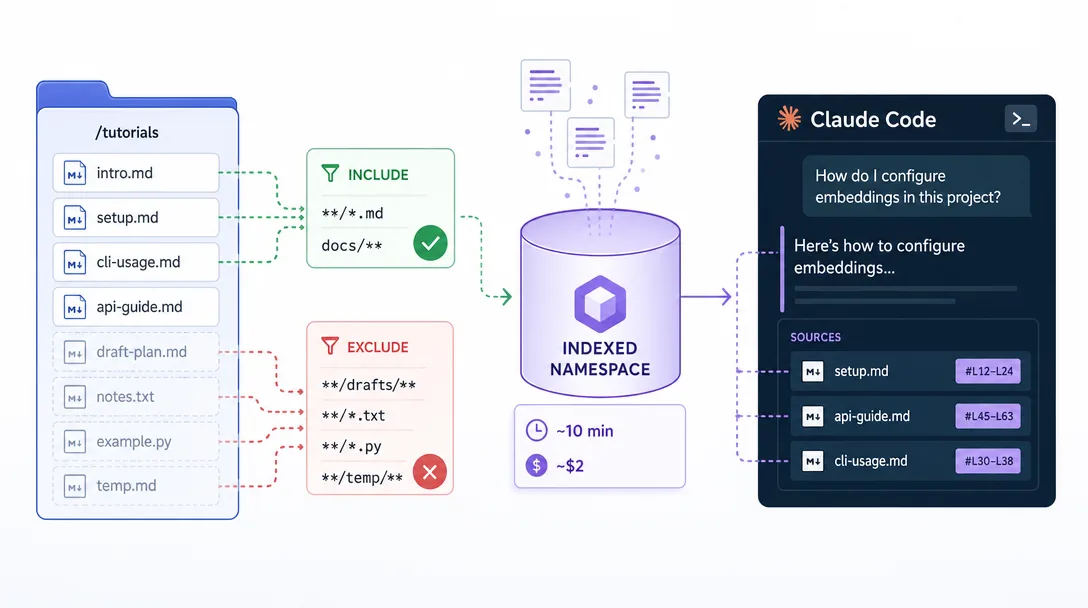
A Worked Example: Indexing a Tutorials Folder
Here's a concrete walkthrough of indexing 35 Markdown tutorials, ~200K words total, into a brain-mcp KB and using it from Claude Code.
Setup phase (one-time, ~30 minutes)
# 1. R2 bucket via the Cloudflare dashboard
# bucket: my-kb, public access disabled, server-side encryption on
# 2. brain-mcp config
cat > ~/brain-mcp/config.yaml << 'EOF'
storage:
type: r2
bucket: my-kb
endpoint: ${R2_ENDPOINT}
access_key: ${R2_ACCESS_KEY}
secret_key: ${R2_SECRET_KEY}
intelligence:
  embedding_model: text-embedding-3-small
  chunk_size: 500
  chunk_overlap: 100
  vector_store: sqlite-vss
  vector_db_path: /var/brain-mcp/vectors.db
access:
bind: 0.0.0.0:8080
tls_cert: /etc/letsencrypt/live/kb.example.com/fullchain.pem
tls_key: /etc/letsencrypt/live/kb.example.com/privkey.pem
audit_log: /var/log/brain-mcp/audit.log
EOF
# 3. Run the server
brain-mcp serve --config ~/brain-mcp/config.yaml
Indexing phase (one-time, ~10 minutes, ~$2 in embedding cost)
The exclude patterns matter — without them, brain-mcp would also index draft files and source-code folders, diluting search quality. Index the docs you want a teammate to actually search; skip the rest.
claude mcp add my-tutorials https://kb.example.com/mcp --header "Authorization: Bearer YOUR_TOKEN"
Then in any session:
What's the difference between an in-memory agent state and a
cloud knowledge base, and which one should I reach for first?
Claude Code's agent recognizes this as a knowledge-base question, calls kb_search with the query, gets back the top three matching chunks, and produces a grounded answer that cites the source docs. The agent stops guessing and starts citing.
What changes after this lands
Before: the same question returned generic "memory systems use vectors" knowledge or required me to manually attach the right docs to the prompt every time. After: the docs follow me into every Claude Code session in any project, every Cursor session, every Claude Desktop conversation. The KB stops being something I remember to reach for and becomes the default substrate the agent reasons over.
The compounding kicks in around week two. You start asking questions of the KB you wouldn't have bothered with before because the cost of asking dropped to nearly zero. The KB grows in proportion to how often it gets queried, and the queries find their way back to the docs that need to be written.
Common Pitfalls
Five issues catch most first-time deployments. Each has a short fix.
Pitfall 1: Indexing too much too soon. Tempting to dump every doc you have into the KB on day one. Resist. Start with one namespace, watch what gets queried, then add more. A focused 500-doc KB beats a sprawling 10,000-doc one.
Pitfall 2: No namespace strategy. Throwing everything into a single namespace makes search noisy and audit logs useless. Set up at least three namespaces from day one — even if two of them are mostly empty initially.
Pitfall 3: Forgetting token expiration. A read-token without an expiration is a permanent backdoor into your knowledge. Set 90-day expiration on every token; rotate before they expire.
Pitfall 4: Skipping the audit log. When something goes wrong (a leaked answer, a wrong recommendation, a confused user), the audit log is what tells you what happened. Enable it from day one. Storage cost is negligible.
Pitfall 5: Treating the KB as immutable. The docs change. The team changes. The questions readers ask change. Run the monthly audit. Prune dead docs. Add docs for the questions that come up repeatedly. A KB that doesn't evolve becomes wrong.
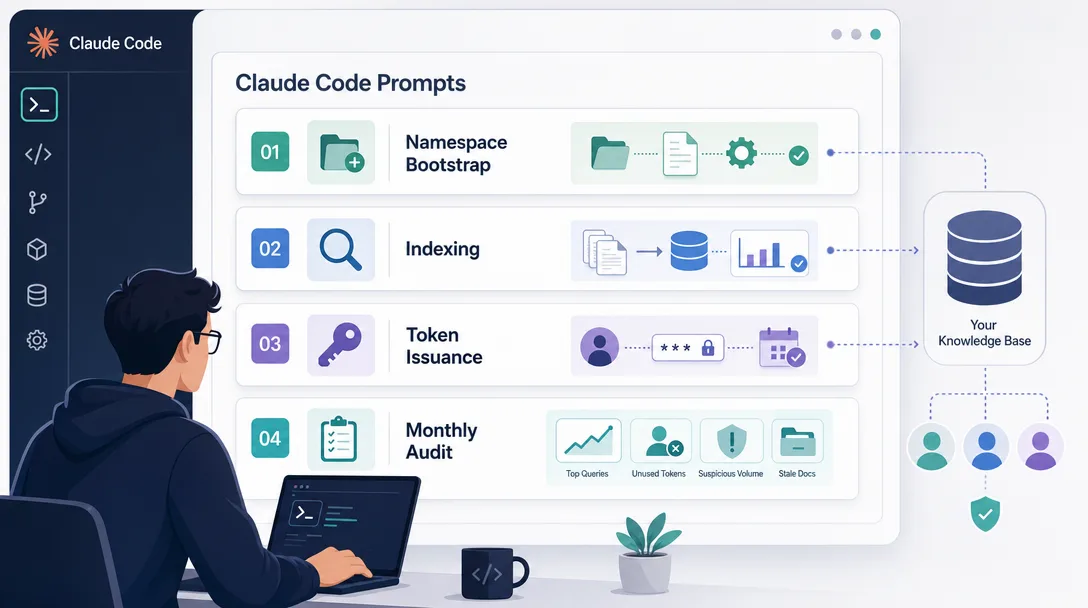
Four Claude Code Prompts to Build and Run Your KB
Theory done. The four prompts below take you from zero brain-mcp to a working KB with two integrations and a daily index job. Each one runs in a single Claude Code session.
Prompt 1: Architecture Decision
I want to spin up a brain-mcp cloud knowledge base for a [SOLO / TEAM]
of [N] people. Expected scale: about [N_DOCS] documents, [N_QUERIES] queries
a day. Budget: $[N] / month.

Recommend:
1. Storage tier — R2, S3, or self-hosted; with one-sentence rationale
2. Intelligence tier — embedding model + vector store; with one-sentence rationale
3. Access tier — VPS spec + domain pattern; with one-sentence rationale

Output as a 3-section Markdown brief, each section 4-6 bullets. End with
the total monthly cost estimate broken down by tier.
The architecture brief becomes the spec sheet for the actual deployment. Save it as kb-architecture.md in your project; you'll reference it again in month two when you're tuning.
Prompt 2: Initial Index Run
Run the initial brain-mcp index against the folder at [PATH]. Apply these
constraints:
- Include only Markdown files
- Exclude any folder named source/, archive/, drafts/, or that starts with a dot
- Set chunk_size 500, chunk_overlap 100
- Use namespace [NAMESPACE_NAME]

After indexing, verify by:
1. Running brain-mcp kb stats and capturing the chunk count
2. Issuing a test query against three known concepts in the docs
3. Reporting the cost as recorded in the audit log

Output: a 5-bullet status summary with the metrics from each step.
Run this once per namespace. The verification step is the part most beginners skip — without it, you don't notice the index missed half your files until you query for something specific in week two.
Prompt 3: Per-Teammate Token Issuance
I'm onboarding [PERSON] to my brain-mcp KB. They need read access to:
- Namespace A: [NAMESPACE]
- Namespace B: [NAMESPACE]
But not:
- Namespace C: [NAMESPACE] (sensitive)

Generate the brain-mcp token create command with the right scope, an
expiration of 90 days, and a name that ties it to the person. Then
generate the install command they should run on their end.

Output: two code blocks (admin command + their install command) plus
a one-paragraph email I can send them with the token included as
{{TOKEN}} placeholder so I can fill it in before send.
The reason this prompt is worth saving as a Skill is that you'll run it ten times in the first month and three times a quarter forever. Friction reduction on routine ops is the underrated KB skill.
Prompt 4: Monthly KB Audit
Run the brain-mcp audit for this month. Pull from the audit log:
1. Top 10 queries by frequency
2. Top 5 namespaces by query volume
3. Tokens that haven't been used in 30+ days (candidates for revocation)
4. Tokens that have hit unusual query volume (potential leaks)
5. Docs in the index that haven't been retrieved by any query in 60+ days
   (candidates for archive)

Output as a 5-section Markdown report with action items for each section.
End with a one-paragraph "what to do about it" summary.
The monthly audit is what separates a KB that gets sharper from one that decays into noise. Run it. Act on it. Sixty minutes once a month buys back the sharpness of the whole knowledge layer.
For a deeper pattern of how Skills compose with KB-aware agents, the Claude Code Skills primer covers the broader Skill format.
Key Takeaways
Local knowledge bases lock to one tool. Cloud-hosted KBs follow you across every AI client and across teammates
brain-mcp is the open-source path. Three tiers — storage, intelligence, access — each independently replaceable
Eight industry templates cover the partitioning patterns most teams need. Codebase, customer support, research, sales, onboarding, compliance, wiki, public docs
Multi-user sharing is one command per user. Token-scoped access, easy revocation, full audit log
Cost is $5-15/month for a typical setup — embedding costs dominate the initial indexing; ongoing operation is cheap
The value isn't smarter AI; it's better-grounded AI. Same model, real docs underneath, much better answers
Related Reading
AI Knowledge Base Best Practices — design principles for structuring and maintaining a knowledge base that stays useful over time
Claude Code Context Management — how Claude Code handles context windows and long sessions, the constraint that makes a persistent KB layer necessary
MCP Complete Guide — the full MCP protocol explained, covering how servers, clients, and tools connect — the layer brain-mcp builds on
Ready-to-Use Prompt: Architect a Three-Tier Cloud Knowledge Base
What this does: Matches your documents to one of eight industry templates, designs a storage/intelligence/access architecture where each tier is independently swappable, and sets up scoped multi-user MCP access — so any AI tool, not just one, can search the KB. Based on: Cloud Knowledge Base for AI: Searchable Across All Tools — https://aiworkflowpro.com/claude-code-knowledge-base-cloud/ Time to run: ~5 minutes
Copy this prompt into Claude Code, ChatGPT, or any AI assistant:
ROLE: You are a Cloud Knowledge Base Architect. Your job: design an MCP-fronted, three-tier knowledge base any AI tool can search — not one locked inside a single client.

CONTEXT — THREE-TIER CLOUD KB METHOD:
Local knowledge bases lock your docs inside one tool — queryable in Claude Code but unreachable from Cursor, ChatGPT, Notion AI, or teammates. The fix is brain-mcp: a cloud-hosted, MCP-fronted KB any MCP-aware client queries with one install line. The architecture is three independently replaceable tiers: (1) Storage — where raw and indexed docs live (R2, S3, other); (2) Intelligence — the embedding model plus vector index that makes docs searchable; (3) Access — the MCP server fronting the KB so any MCP-aware tool can query it. Because each tier is swappable, you change storage, embeddings, or the MCP server without rebuilding the others. Match content to one of eight industry templates (codebase docs, customer support, runbook, research notes, sales playbook, training material, internal wiki, public docs), then share via scoped MCP tokens revocable in one command.

INPUTS (fill in before running):
- DOCS: [What documents or content you want searchable]
- TOOLS: [Which AI clients must reach it — Claude Code, Cursor, ChatGPT, Notion AI, other]
- TEAM: [solo / small team / multi-user]
- CONSTRAINTS: [Budget, cloud preference, self-host requirement]

METHOD — 4 STEPS:

Step 1 — Match to an Industry Template
From DOCS, pick the closest of the eight templates (codebase docs, customer support, runbook, research notes, sales playbook, training material, internal wiki, public docs). State the template and the indexing shape it implies — chunk size, metadata, update cadence.

Step 2 — Design the Three Tiers (Each Independently Replaceable)
Specify each tier: Storage (R2 / S3 / other), Intelligence (embedding model + vector index), Access (MCP server endpoint). For each, state what it takes to swap it without touching the other two.

Step 3 — Set Up Multi-User Access
From TEAM and TOOLS, define scoped MCP tokens — one scope per user or per tool — each revocable in one command. Never share a single token across users.

Step 4 — Define Day-to-Day Operations and Pitfalls
Specify the re-index trigger (when DOCS change), how each tool in TOOLS installs the KB in one line, and the top pitfalls: stale index, oversized chunks, unscoped tokens.

RULES:
- Never couple tiers — storage, intelligence, and access must each be swappable alone.
- Never share one token across users — scope per user/tool so access is revocable.
- Never default to a local-only KB if TOOLS spans more than one client — the point is cross-tool reach via MCP.

OUTPUT FORMAT:
Output a markdown report with:
1. Template Match — the chosen template + its indexing shape
2. Three-Tier Design — markdown table, columns: Tier | Choice | Swap Cost
3. Access Plan — markdown table, columns: Token Scope | User/Tool | Revocable?
4. Operations & Pitfalls — re-index trigger, one-line install per tool, top pitfalls
Save as @templates/claude-code-knowledge-base-cloud.md and run when your knowledge base must be searchable from more than one AI tool or shared across a team.
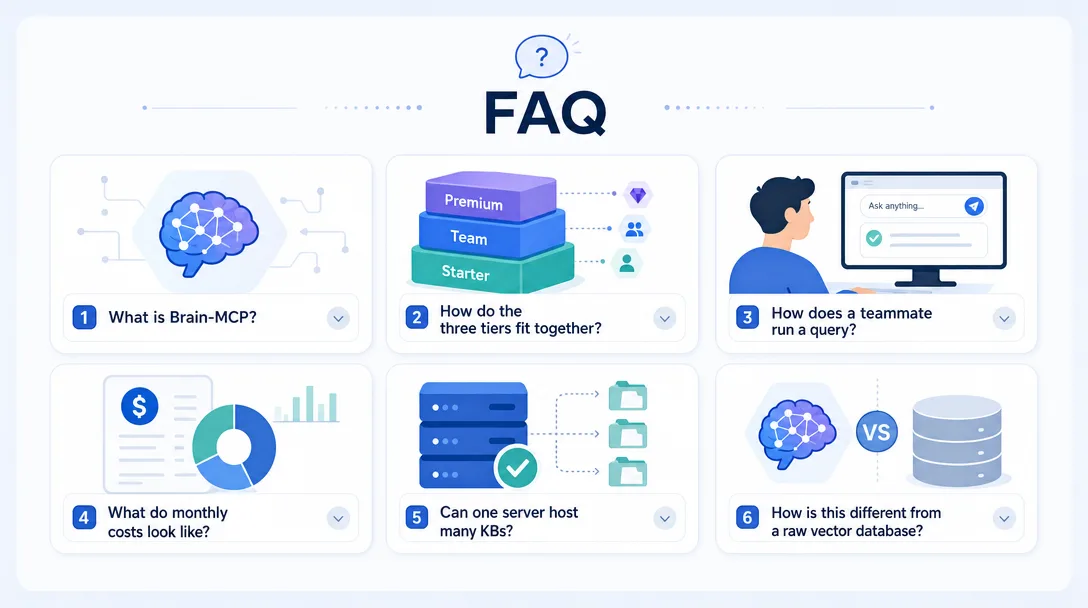
Frequently Asked Questions
What is brain-mcp and why do I need a cloud knowledge base?
brain-mcp is an open-source MCP server that turns any folder of Markdown docs into a cloud-hosted, AI-searchable knowledge base. Local-only knowledge bases lock the docs to one tool — the data is great in Claude Code but unreachable from Cursor, ChatGPT, Notion AI, or a teammate. brain-mcp puts the docs behind a public MCP endpoint so every MCP-aware AI client (and every authorized teammate) can query them with one install line.
What's the three-tier architecture?
Storage tier (where the docs live — Cloudflare R2, S3, or any object store), intelligence tier (the embedding model and vector index that turns docs into semantic search), and access tier (the MCP server that exposes the knowledge to AI tools). Each tier is replaceable independently — swap the storage from R2 to S3 without touching the intelligence layer, swap the embedding model without touching access. The decoupling is the whole point of the architecture.
How does a teammate query my knowledge base?
They install your MCP server endpoint in their AI client with one command (claude mcp add my-kb https://kb.example.com/mcp), and from that moment they can ask questions in their own Claude Code or Cursor session that get answered against your docs. Permissions are token-based — issue a read-only token for someone you want to give access; revoke it instantly if they leave the team.
What does it cost to run?
About $5-15/month for a small-to-medium knowledge base (under 10,000 documents, under 1,000 queries/day). The dominant cost is the embedding API for indexing — about $0.10 per million tokens, which adds up to a few dollars for a typical knowledge base build. Storage on R2 is effectively free at this scale. The MCP server hosts on the same $5/month VPS you'd already use for OpenClaw or any other agent infrastructure.
Can I host knowledge bases for multiple projects?
Yes, that's the standard pattern. Each knowledge base is its own MCP namespace; a single brain-mcp instance can host dozens. You'd typically have one KB per project (your codebase docs, your customer-facing docs, your internal runbook) and route queries by namespace. The eight industry templates in this guide cover the most common partitioning patterns.
How does this differ from a RAG service like Pinecone or Weaviate?
brain-mcp wraps the storage + intelligence layers in an MCP server so any MCP-aware client can query them with one install line, no client-side glue code. Pinecone/Weaviate are pure vector databases — you'd still need to write the agent integration code to make them queryable from Claude Code. brain-mcp's value is the access layer; underneath, it can use any vector database as the intelligence tier.
Privacy and the "Cloud" Word
One question I get every time I show this setup: "Is putting my docs in the cloud safe?" The honest answer has three parts.
Part 1: brain-mcp gives you a self-hosted option. The "cloud" in cloud-hosted refers to network reachability, not vendor dependency. You can run brain-mcp on your own VPS, with your own R2/S3 bucket, with your own embedding model. Nobody but you and your authorized teammates ever sees the docs.
Part 2: The embedding API is the only third-party touchpoint. When you index, the embedding model sees the text. If your docs are sensitive, use an embedding model you trust — Voyage AI, Anthropic, or a self-hosted model — with explicit zero-retention terms. Read the embedding provider's data-retention policy before you index sensitive material. Most major providers offer zero-retention SLA on enterprise tiers.
Part 3: For the most sensitive material, run an offline embedding model. Models like nomic-embed-text or bge-large run locally and never touch a third-party API. The setup is slightly more work — you need a GPU box for indexing — but the privacy guarantee is total. For legal, medical, or regulatory docs, this is the right path.
The choice between hosted and offline embedding is the single most consequential privacy decision in the brain-mcp stack. Pick deliberately. Document the choice in your KB so future-you (and your auditor) can see why.
One last note on the privacy ladder: it is not all-or-nothing. A single brain-mcp deployment can route different folders to different embedding backends — hosted models for the public docs that matter for fast iteration, offline models for the regulated material that can never leave the box. The privacy boundary lives at the folder level, not the deployment level. Set it up once, stop thinking about it.
What's Next?
Once your cloud KB is running, the natural next steps are:
The MCP connections post for the broader MCP install pattern that lets you stack your KB alongside other tools
The OpenClaw memory system post for the multi-agent version of the same pattern — knowledge shared across an agent team rather than a human team
The agent brain post for how the agent decides when to call kb_search vs answer from its own context
Spin up the KB this weekend. Index one project. Run the first three queries from a fresh Claude Code session. The "this changes the workflow" moment usually lands inside the first hour.
Monitoring a competitor who publishes no feed is the case every RSS guide skips. Twenty-one platforms sorted by which of three jobs they do, and the finished setup is business process automation you own outright, with no seat licence to renew.
Nothing about month four is harder than month three. It is simply the month an unpaid channel starts to feel like proof of failure. Surviving it takes a cadence you can hold while earning nothing, which is a better reason to automate business processes than speed ever was.
One number hides more than it shows. This Claude Code Skill scores US equities across 10 dimensions, from earnings surprise to peer comparison, with confidence scoring and 5 safety valves that flag thin data. A coding tutorial, not financial advice.
Publishing eats your week through research, SEO fields, images, and uploading — not writing. Here is the 10-step workflow automation pipeline that takes a topic to a published draft on one command, and the data contract that lets each step hand off cleanly to the next.