A 30-minute video is too long for one conversation. This guide walks the 8-step Skill that locks the narration and one look, then gives each 3-minute segment to a fresh sub-agent, five at a time, and polishes the cut in an empty-context session.
The folder structure behind my AI agent team, the Herdr setup where Grok Build, Claude Code and Kimi Code work side by side, and the two live tasks from the video: an article published by voice and a three-model front-end test.
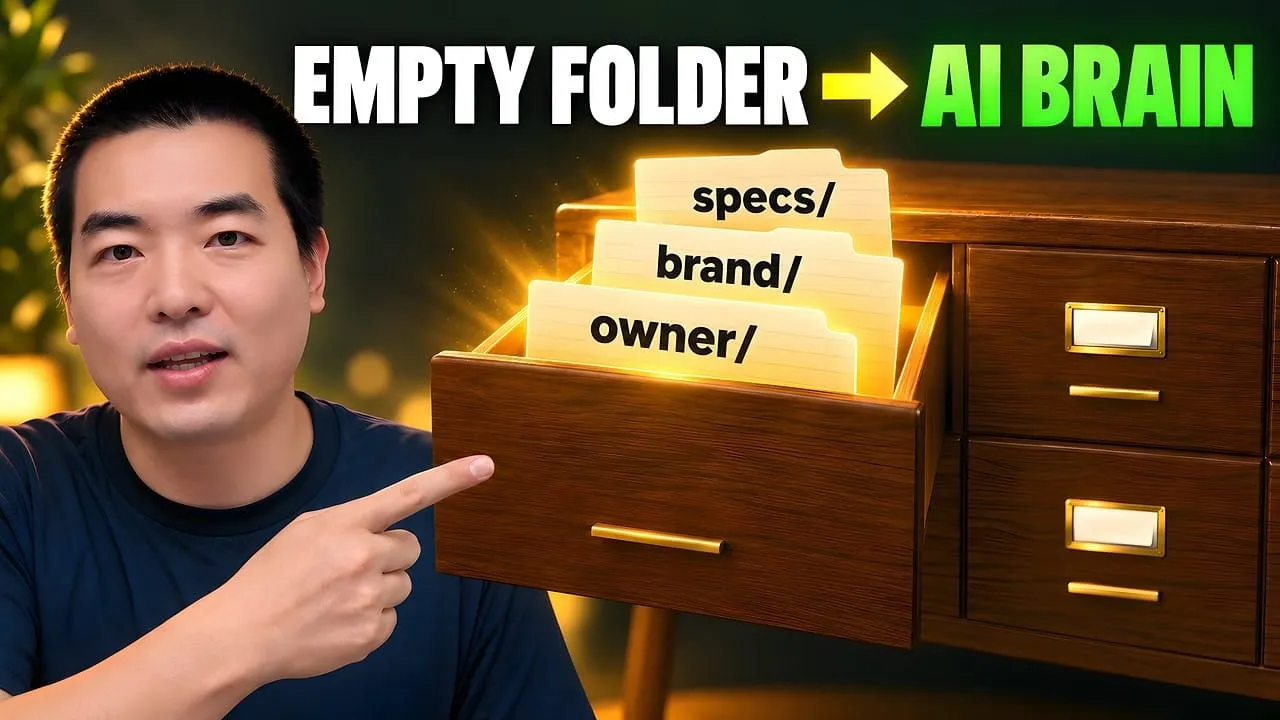
Eight folders of plain Markdown, a CLAUDE.md index in each, and seven prompts that make your agent interview you. Every prompt, template and command from the video, in order.
AI Knowledge Base Best Practices: How to Build a Knowledge Base Your Agent Can Actually Navigate
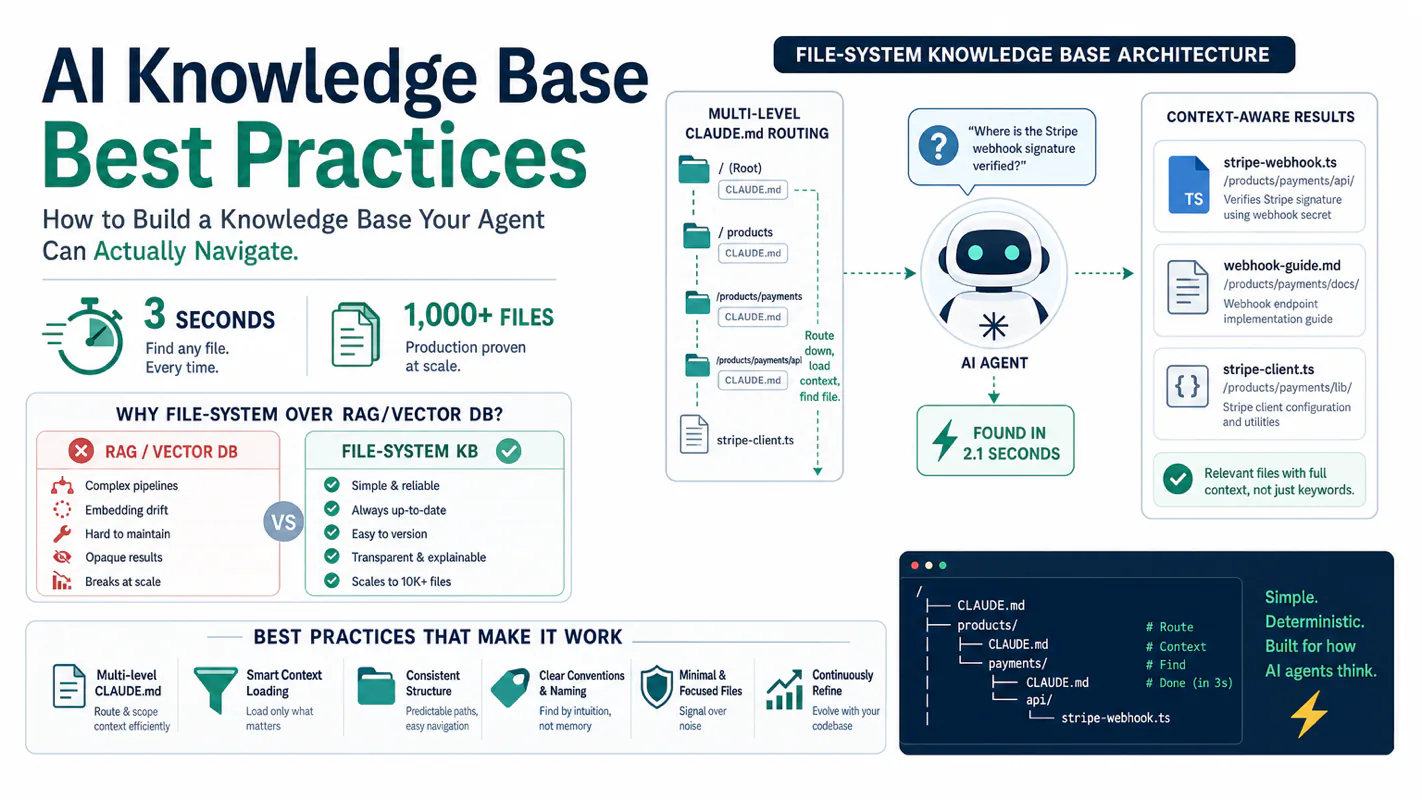
Vector databases are overkill. A file-system knowledge base with multi-level CLAUDE.md routing finds any file in a 1,000-file system in three seconds. Here is the complete architecture — and why structure beats search when documents have to be findable on demand.
My knowledge base holds over a thousand files. Multiple brand assets, dozens of automated workflows, scores of CLI tool configurations. Claude Code pinpoints any file within three seconds. No vector database. No RAG pipeline. Just a file system and a chain of CLAUDE.md routing files.
This article gives you the complete architecture. By the end, you will know how to build an agent-ready knowledge base from scratch and keep it healthy at scale.
"It's on the shared drive." Every office says it, and it has never been an answer. The drive holds the engagement letter template, the conflict-check procedure, and the retainer version everyone actually uses — and finding any of them depends on knowing who filed it. A law firm feels it hardest at client intake: the right precedent exists, and the person who needs it in ten minutes cannot find it. This is a structure problem, not a search problem. Folders that encode where things live, with a routing file at each level, are what make a document pile navigable — by a person, or by the business process automation you build on top of it.
Why Does a File System Beat a Vector Database for Agent Knowledge Bases?
Deterministic routing beats probabilistic retrieval when your agent executes workflows, not conversations.
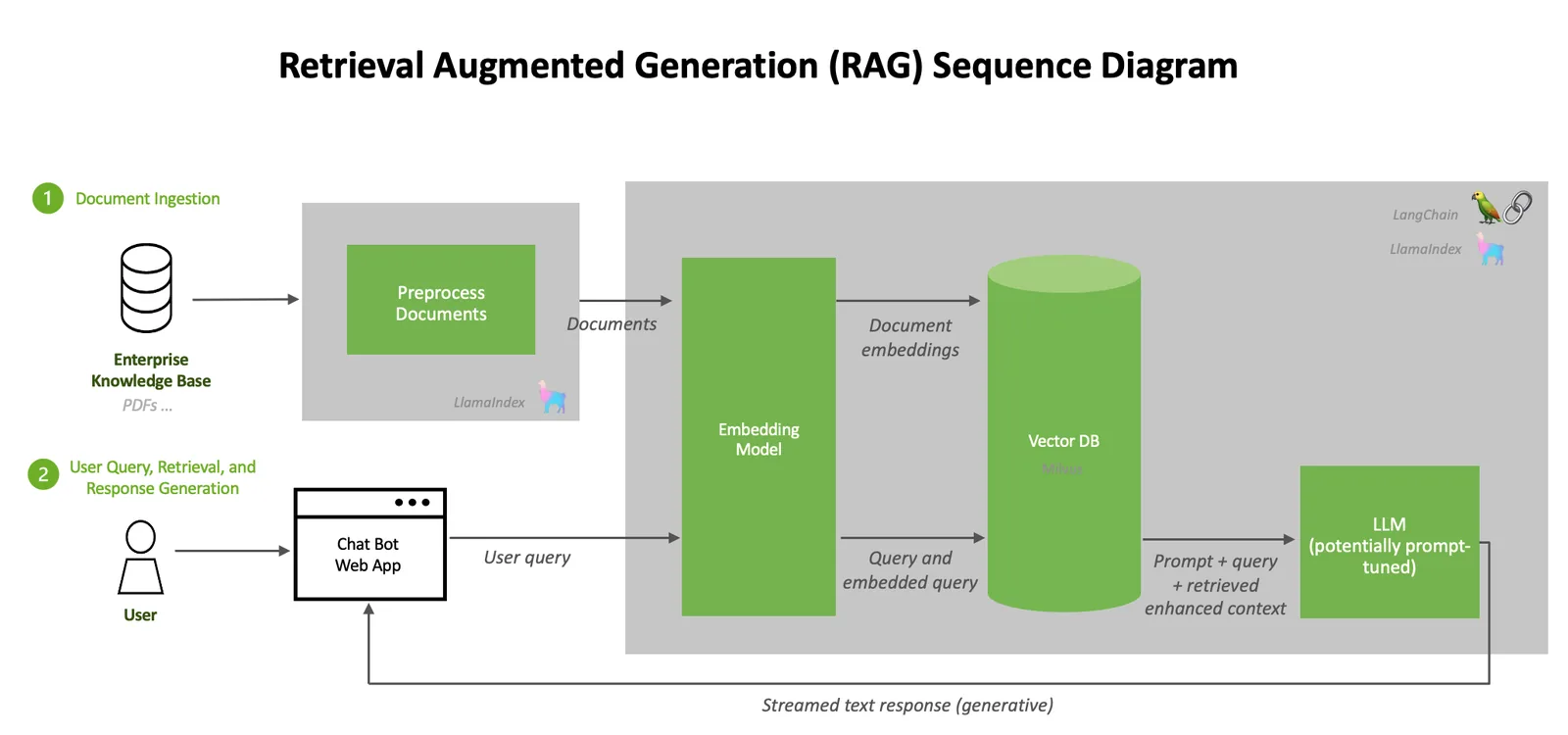
RAG assumes you have a pile of unstructured text and need to fish out semantically similar chunks. That assumption holds for customer-support bots, legal document search, and academic paper retrieval. It falls apart for AI coding agents.
Four characteristics make the file-system approach superior for agent knowledge bases:
High structure. Every file has a defined role, a predictable location, and a clear scope. You do not need embeddings to guess relationships between files when the directory tree already encodes them.
Deterministic access patterns. The agent follows trigger-word routes or sequential workflow steps. There is no "search for something vaguely related" scenario. The path from question to file is a lookup, not a similarity calculation.
Zero tolerance for retrieval errors. When the agent grabs the wrong file, it executes the wrong operation. An 80% recall rate is acceptable for a chatbot. For an agent workflow, it means one in five operations goes sideways. I learned this the hard way when my agent once pulled a three-month-old deprecated standard and used it to write a new article. The error took twenty minutes to diagnose because the output looked plausible.
Audit and migration cost. Files are the source of truth. You can read them with cat, search them with grep, and track changes with git. Embeddings are opaque. Switch your embedding model and you rebuild every index from scratch.
Think of it this way: a vector database works like a search engine. You type keywords, it returns "maybe relevant" results, and you judge which one is right. CLAUDE.md routing works like a book's table of contents. You know what you need, it tells you the chapter and section, and you go straight there.
This is not just my assessment. MindStudio's research found that Claude Code, Cursor, and Devin all navigate codebases with grep, not vector search. The Claude Code documentation confirms that project instructions and file-system context drive agent behavior. VentureBeat's analysis noted that RAG architectures underperform at agent scale and standalone vector databases are losing market share. These findings apply specifically to code navigation. For massive unstructured document corpora, RAG remains the right tool. But for a personal workflow knowledge base at the hundred-to-thousand-file scale, the file system wins on precision and maintainability.
How Does This Relate to Karpathy's LLM Wiki?
Andrej Karpathy proposed the LLM Wiki pattern: structured Markdown files that form an AI-maintainable personal knowledge base. The core idea is to stop retrieving from raw documents at query time and instead have the LLM continuously build and maintain a set of interlinked Markdown files. These files sit between the user and raw source materials, forming a three-layer architecture: source input, LLM-maintained wiki, and a CLAUDE.md behavior protocol.
My approach shares DNA with Karpathy's concept but extends it in every dimension:
Dimension
Karpathy LLM Wiki
Production System
Scale
Tens to hundreds of files
1,000+ files
Routing
Single-layer CLAUDE.md
L0-L5 multi-level routing
Maintenance
LLM auto-organizes
Human + CLI audit co-maintenance
Tooling
No dedicated tools
Local CLI for search, audit, archival
Archival
None
Three-tier (active, archive, NAS)
Workflows
None
Dozens of agent workflows consuming the knowledge base directly
Karpathy's pattern works well for personal note organization. When a knowledge base needs to support multi-brand operations, multi-workflow orchestration, and multi-agent collaboration, a single CLAUDE.md cannot hold the routing load. You need layers.
What Happens Without a Routing System?
Without routing, the agent brute-force searches every file. A thousand files overwhelm the context window instantly. The more common failure mode is subtler: the agent finds a file with a plausible name, decides it is the right one, and proceeds to execute with outdated content. You think the agent is working diligently. In reality, it is using a three-month-old deprecated spec to write today's deliverable.
How Does Multi-Level CLAUDE.md Routing Work?
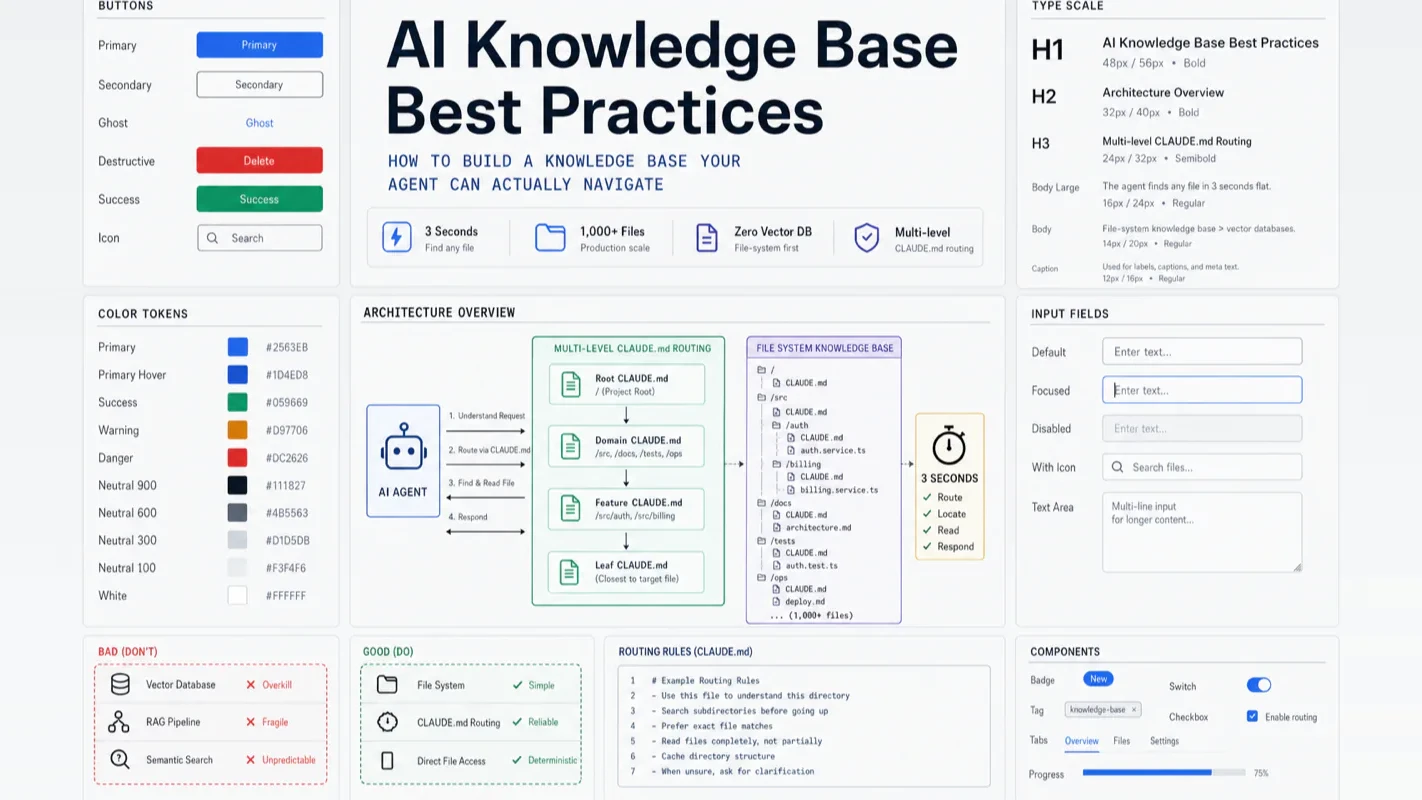
Chained CLAUDE.md files form a navigation tree. The agent starts at the root, matches trigger words, descends level by level, and reaches the target in three hops or fewer.
Subdirectory list + domain routing + boundary declaration
L3
Second-level dir {dir}/{subdir}/CLAUDE.md
Detailed routing
File manifest + usage patterns + trigger words
L4
Inside tools/workflows
Operation guide
Commands, steps, parameters, examples
L5
Leaf files
Execution detail
Specific standards, configs, data
Here is the navigation flow in practice. The user says "write a blog post for the website." The agent reads the L1 root CLAUDE.md, matches the trigger word "blog post" in the routing table, jumps to the workflow directory's L2 CLAUDE.md, gets the full execution path and sub-workflow list, and begins running the pipeline.
The entire process is 100% deterministic. No embedding similarity. No chance of retrieving the wrong document.
Why Six Levels Instead of One?
A reasonable question: why not dump all routing information into a single root CLAUDE.md?
Because context window space is a finite resource. Every line of CLAUDE.md occupies context. If you flatten a thousand-file index into one file, that file exceeds 2,000 lines. Instruction compliance degrades sharply once CLAUDE.md grows past a few hundred lines. Community testing confirms this: the longer the file, the more rules Claude silently ignores.
The key insight behind multi-level routing is on-demand loading. The agent reads only the CLAUDE.md for the current level, extracts the next hop, and moves on. A thousand-file index distributed across dozens of CLAUDE.md files means each individual file stays under 100 lines. The agent typically reads two to three CLAUDE.md files per request. That is far more efficient than cramming the entire index into the context window.
What Goes in the Root CLAUDE.md?
The root CLAUDE.md is the soul of the knowledge base. It must accomplish two things: let the agent locate targets fast, and let humans understand the overall structure at a glance.
A production-grade root CLAUDE.md contains these sections:
Behavior rules -- operating principles such as "prefer local CLI over MCP," "read the standard before modifying anything," "overwrite the correct approach, never maintain backward compatibility."
Tool routing -- MCP server list and local CLI routing table.
Directory navigation -- three-column table (directory, responsibility, trigger words) for every top-level directory.
Command quick reference -- frequently used CLI commands.
Direct-read shortcuts -- absolute paths to high-frequency content that skip the routing chain entirely.
The trigger-word routing table is the critical design element. It uses a three-column table: directory name, responsibility description, trigger-word list. When the agent reads the user's request, it performs keyword matching against this table. A match sends it to the corresponding L2 CLAUDE.md to continue drilling down.
Trigger words require two properties: uniqueness (no collisions with other directories' trigger words) and coverage (every natural-language phrasing the user might use is represented). In practice, every time the agent takes the wrong route, you add a new trigger word. After six months of operation, my trigger-word table grew from an initial 20 entries to several hundred.
Direct-Read Shortcuts: Bypassing the Route
For frequently accessed content, multi-level routing adds unnecessary hops. So the root CLAUDE.md includes a "direct-read shortcuts" section: flat path lookups organized by domain, each a two-column table of trigger word to absolute path. This section acts as a cache layer, placing the hottest routes directly at L1 and eliminating intermediate jumps.
What Happens Without Multi-Level Routing?
Without it, you either pile the entire index into one massive CLAUDE.md (the agent cannot retain it all) or have no index at all (the agent searches blindly). The first approach causes the agent to gradually "forget" rules you wrote. Important directives drown in a sea of index entries. The second approach means the agent spends thirty seconds searching for files and still might grab the wrong one.
What Principles Should Guide Directory Structure?
Three rules govern every structural decision: single responsibility, clear boundaries, canonical placement.
Single Responsibility
Every top-level directory does exactly one thing. A typical production knowledge base partitions like this:
No style guides (styles live inside workflow definitions)
workflows/
Multi-step creation and publishing pipelines
No raw materials (source materials live in research/)
tools/
CLIs, MCPs, credentials, best practices
No business data
business/
Products, projects, content, operational assets
Canonical location for deliverables
research/
Cross-brand source material library
Books, papers, reports, raw inputs
standards/
Writing standards and checklists
No large raw materials
inbox/
Dispatch hub, drafts, runtime data, archives
Handles only runtime state
You do not need to copy these seven directories. The important thing is the partitioning mindset. Your knowledge base might need four top-level directories or ten. The constraint is that no two directories share the same responsibility.
Where does a given file belong? The canonical placement table answers that:
File Type
Canonical Location
Global behavior rules
Root CLAUDE.md
Domain routing index
Corresponding directory CLAUDE.md
Writing standards
standards/
Tool operation notes
tools/best-practices/
High-frequency reusable actions
tools/CLI scripts/
Multi-step execution flows
workflows/
Cross-brand source material
research/
Runtime intermediate data
dashboard/runtime-data/
The most common mistake beginners make is creating a new directory whenever they cannot decide where a file belongs. Three months later, you have twenty vague directories, and the agent agonizes over which one to check. The correct approach is to obey the placement table. If nothing fits, your top-level categories need adjustment, not expansion.
Isomorphic Structure
Same-level directories should follow the same internal layout. Every brand directory, for example, contains identical subdirectories: identity (positioning, voice, introduction), audience (persona analysis), visual assets (logo, avatar, covers), competitive analysis (benchmarking).
The agent learns one brand's path pattern and reuses it for every other brand. That is the value of isomorphism: reduced cognitive load for the agent and reusable routing logic.
Inbox: The Single Entry Point for Runtime State
The inbox is the directory most likely to spiral out of control. The rule for taming it is simple:
The inbox handles only runtime state. Running tasks (dispatch hub). Works in progress (draft box). Intermediate outputs (runtime data). Handoff context for the next agent session (task handoff). Completed items that need only audit trails (archive).
Never create staging buckets. No pending/, no temp/, no to-be-sorted/ directories. They always become garbage piles. Files with clear ownership go to the correct location immediately. Files without clear ownership go into the inbox's designated area but must be cleared within 30 days.
How Do You Build an AI Knowledge Base from Scratch?
Follow this sequence. Half a day gets you a working skeleton.
Step 1: Create Top-Level Directories
Create your top-level directories under your working root, partitioned by responsibility. Under tools, create subdirectories for CLI scripts, credentials (split into shareable and machine-local), and best practices. Under inbox, create archive and runtime-data.
Use human-readable directory names. AI agents understand them without issue, and readability for humans matters more than ASCII purity. If you use Claude Code's glob patterns, note that the pattern string does not support CJK characters. Place non-ASCII directory segments in the path parameter, not in the glob pattern itself.
Step 2: Write the Root CLAUDE.md
This is the most consequential step. The root CLAUDE.md defines how the agent understands your knowledge base.
Recommended structure:
Start with a one-line quote block stating the base path.
Behavior rules section: list the agent's operating principles. Examples: "Prefer local CLI over MCP," "Read the relevant standard before modifying any file," "Overwrite the correct approach directly; never maintain backward compatibility."
Direct-read shortcuts section: two-column table (trigger word, path) for high-frequency content.
Changelog at the end: keep the last ten entries.
Four iron rules for the root CLAUDE.md:
Behavior rules go first. The agent reads operating rules before content index.
Trigger words cover natural language. Every phrasing the user might use should match something.
Direct-read shortcuts stay lean. Only high-frequency paths belong here; the rest route through the tree.
Stay under 300 lines. Beyond that, instruction compliance degrades measurably.
Step 3: Write Subdirectory CLAUDE.md Files
Every first-level directory gets a CLAUDE.md with four sections:
Title + one-line positioning -- a quote block stating what this directory does.
Subdirectory index -- three-column table (subdirectory, purpose, trigger words).
Boundary declaration -- explicitly state what this directory handles and what it does not.
Changelog -- rolling window, last ten entries.
Critical constraint: each CLAUDE.md owns only its own level. Do not describe tool usage in the brand directory's CLAUDE.md. That belongs in the tools directory.
Step 4: Set Up Standards
Standards are the knowledge base's constitution. They do not produce content directly but constrain quality across everything that does.
Start with three:
Markdown formatting standard -- ensures consistent output from the agent.
File naming standard -- naming conventions and changelog format.
CLAUDE.md standard -- rules for the routing files themselves.
Step 5: Configure Credentials
API keys and tokens must never be hardcoded. Create a credentials directory under tools, split into two zones: "shareable" for credentials that can sync across machines, and "machine-local" for secrets that stay on one device.
The agent retrieves keys through a credential resolver, not by parsing file contents directly. This separation lets the knowledge base sync safely to other devices without scattering secrets.
Step 6: Build a CLI and Run Audits
A knowledge base is not "set and forget." You need a command-line tool for ongoing maintenance. Four command categories cover the essentials:
Search -- keyword search across the entire knowledge base.
Structure audit -- verify every directory has a CLAUDE.md and follows isomorphic conventions.
Documentation audit -- check that CLAUDE.md indexes match actual files, flag dead links.
Redundancy audit -- find duplicate or outdated files.
The first audit will surface a stack of issues: directories without CLAUDE.md files, misplaced files, stale changelogs. Fix them all. The knowledge base enters a usable state only after the first audit pass is clean.
One design boundary matters here: the CLI handles deterministic actions -- search, audit, archive, credential management. Judgment stays with the agent. For example, "which archive bucket should this file go to?" is the agent's decision. The CLI just executes the move command. The CLI is a tool, not a brain.
How Do You Keep a Knowledge Base Healthy Over Time?
Building the skeleton is the easy part. A knowledge base is alive. Files appear every day, old ones expire, routes need updating. Maintenance is a continuous practice.
The Daily Maintenance Loop
After every file modification:
Read the root CLAUDE.md and the nearest directory CLAUDE.md.
Locate the relevant writing standard.
Make the edit.
Synchronize upstream and downstream CLAUDE.md files. Update indexes after every addition or deletion.
Run the corresponding CLI self-check.
Use grep to scan for stale references -- confirm no outdated cross-references remain.
Step 4 is the one most often skipped. You create a new workflow but forget to add a trigger-word entry in the root CLAUDE.md. The agent never discovers it. I have been caught by this more times than I care to admit.
Audit Cadence
Three audit types cover three failure modes:
Audit Type
What It Checks
Frequency
Structure audit
Does every directory have a CLAUDE.md? Isomorphic compliance?
Weekly
Documentation audit
Do indexes match actual files? Any dead links?
Weekly
Redundancy audit
Duplicate files? Stale content? Empty directories?
Monthly
Prioritize fixes by type: structure issues (missing CLAUDE.md) same day, documentation issues (index mismatches) within three days, redundancy issues (stale content) batched for monthly archival.
Tiered Archival
More files does not mean better. The active knowledge base should contain only things currently in use:
Size
Destination
Trigger
Small, has audit-trail value
inbox/archive/ by year-month
Completed, only needs traceability
Large, infrequently accessed
NAS remote storage
Over 100MB or six months untouched
Historical versions
File sync tool versioning (e.g., Syncthing)
Automatic
Archival is not deletion. After archiving, leave a pointer at the original location (the CLAUDE.md notes "archived to XX location"). The agent can trace back when needed.
A common pitfall: dumping large books (PDF, EPUB) into the active knowledge base. A 50MB PDF is useless to the agent. It cannot read raw PDF format. The correct approach: convert books to Markdown, place them in the research directory under the relevant topic, and archive the originals to NAS.
Changelogs
Every CLAUDE.md ends with a changelog section: a two-column table (date, change), rolling window, last ten entries, each under 20 characters.
This is not a replacement for git history. Its purpose is to let the agent (and humans) see what changed recently in this area at a glance, without digging through commit logs.
How Does a Knowledge Base Scale from 10 Files to 1,000+?
Governance evolves with scale. Ten files and a thousand files present entirely different challenges.
10-50 Files: Seed Phase
No complex governance needed. Three things matter: root CLAUDE.md is clear, every directory has a CLAUDE.md, file naming is consistent. Do not over-engineer. Many people build five routing levels when they have twenty files. That is wasted effort.
50-200 Files: Growth Phase
"I cannot find the file" starts happening. Solutions:
Add direct-read shortcuts for high-frequency content (flat paths in the root CLAUDE.md).
Build a CLI for search (keyword search across the knowledge base).
Start writing standards to constrain new-file formatting.
Archival rules enforced. Unused content must be archived.
Trigger-word table bloat. Deduplication and merging required.
Changelog enforcement. Unrecorded changes effectively did not happen.
500-1,000+ Files: Steady State
At this scale, maintaining CLAUDE.md files manually is no longer realistic. You need:
CLI-assisted synchronization -- automatic checks for index updates after file changes.
Strict routing level separation -- L3 and below never surface at L1.
Active file count control -- archival keeps active files within a manageable range.
Partition access -- different workflows read only the sections they need, never the full knowledge base.
One insight from running a 1,000-file system: the "hot zone" of actively accessed files is usually only 200-300. The agent primarily touches workflows, tool configs, and current project assets daily. The remaining files are research materials, archived history, and infrequently used standards. Controlling the quality of the hot zone matters more than perfecting all 1,000 files.
Deep Comparison: File System vs. RAG
To keep the comparison fair, here is a side-by-side evaluation:
Dimension
File System + CLAUDE.md Routing
RAG + Vector Database
Precision
Deterministic routing, near 100% hit rate
Depends on embedding quality, typical recall 70-85%
Latency
File read, millisecond-range
Vector search + reranking, 100ms to seconds
Debuggability
Humans read CLAUDE.md and understand routing logic
Embedding space is opaque
Maintenance cost
Manual CLAUDE.md index upkeep
Embedding pipeline maintenance
Migration cost
Copy the folder. Done
Rebuild vector indexes
Scale sweet spot
1-2,000 files (human-manageable)
1,000-100,000+ files
Unstructured content
Weak (requires Markdown conversion first)
Strong (native support)
Fuzzy semantic queries
Weak (keyword matching)
Strong (semantic similarity)
Version control
Native git support
Requires additional tooling
Hybrid approach. The two are not mutually exclusive. Use file-system routing for deterministic navigation and a local CLI keyword search for full-text retrieval. If you later exceed 2,000 files, add a lightweight vector index as a supplementary retrieval layer. The routing backbone stays CLAUDE.md. The key design principle: decouple routing from retrieval. If one breaks, the other still works.
Design Philosophy
Five principles earned through production scars:
Files are the canonical source. There is no "one copy in the database, one copy in the file system" dual-write problem. What the agent reads, what humans read, what syncs, what backs up -- all the same file. The moment you introduce dual writes, you spend infinite time asking "which version is correct?"
Routes are documentation. CLAUDE.md serves as the agent's navigation system and the human's documentation simultaneously. Open any CLAUDE.md without launching an agent, and you understand what the directory contains and how to use it. If your index system is readable only by AI, every failure requires AI to diagnose. That is locking yourself into tool dependency.
Determinism over intelligence. The CLI runs audits without AI judgment. The archive command does not guess where you want to archive. It requires explicit specification. Routing uses keyword matching, not semantic inference. At the execution layer, determinism beats intelligence every time.
Humans own structure; agents own content. Which directories to create, how to write CLAUDE.md, which trigger words to set -- these are human decisions. What content to fill within that structure, what artifacts to generate, which workflow to execute -- those are the agent's job.
Archival is a first-class citizen. The default destination for information is "archive," not "permanent retention." Only actively used items stay in the live zone. This principle prevents the knowledge base from ballooning indefinitely.
Your First-Week Checklist
Ready to start? Follow this timeline:
Day 1:
[ ] Create top-level directories (decide how many based on your actual needs)
[ ] Test with your AI agent -- can it find the files you placed?
Month 1:
[ ] Build a local CLI (at minimum: search and archive commands)
[ ] Establish a weekly audit habit
[ ] Flesh out direct-read shortcuts (flat high-frequency paths into root CLAUDE.md)
[ ] Write your first workflow and verify the agent can execute it end to end
Ongoing:
[ ] Synchronize CLAUDE.md after every file addition
[ ] Monthly archive cleanup
[ ] Quarterly trigger-word table review: deduplicate, merge, fill gaps
What I Learned Running This System for a Year
I have operated this architecture for close to a year. It started as a scrappy collection of a few dozen files and grew into a production knowledge base with over a thousand files, multiple brand assets, and dozens of automated workflows. Along the way: several major restructurings, countless routing optimizations, directory designs thrown out and rebuilt from scratch.
My conclusion: for individual developers or small teams working with AI coding agents, a file-system knowledge base with CLAUDE.md routing is the most practical architecture available today. It is not the flashiest. It does not carry the "semantic retrieval" aura of vector databases. But it is the most controllable. You can see every routing decision. You can read every file with cat. You can search the entire base with grep.
When your tools are simple enough, complexity cannot bite you back.
Ready-to-Use Prompt: Build a Multi-Level CLAUDE.md Routing System Your Agent Navigates in Seconds
What this does: Turns one messy document collection into a deterministic multi-level CLAUDE.md routing system — root map, directory indexes, a health audit, and a 10-to-1,000+ scaling plan — so an agent reaches any file by following the chain, no vector database. Based on: AI Knowledge Base Best Practices: How to Build a Knowledge Base Your Agent Can Actually Navigate — https://aiworkflowpro.com/ai-knowledge-base-best-practices/ Time to run: ~5 minutes
Copy this prompt into Claude Code, ChatGPT, or any AI assistant:
ROLE: You are a knowledge-base architect who builds agent-navigable file systems. Your job: turn one messy document collection into a deterministic multi-level CLAUDE.md routing system an agent can navigate to any file in seconds — with no vector database.

CONTEXT — MULTI-LEVEL CLAUDE.MD ROUTING:
Deterministic routing beats probabilistic retrieval when your agent executes workflows, not conversations. Instead of a vector DB + RAG that guesses the right chunk, you build a chain of CLAUDE.md files: the root file is always loaded and maps trigger words → top-level directories; each directory's own CLAUDE.md indexes its contents and points to the next level. The agent follows the chain hop by hop, loading only the file it lands on each time, so it reaches the exact file deterministically — 1,000+ files, pinpointed in seconds. Routing files stay small (they point, they do not store content), and new depth is added by inserting a routing level rather than bloating a file.

INPUTS (fill in before running):
- KB_PURPOSE: YOUR_DOMAIN_HERE (what this knowledge base is for — e.g., "solo content business", "dev team docs")
- CURRENT_FILES: YOUR_FILES_HERE (count or rough list, and how they are organized today — or "none, starting fresh")
- MAIN_WORKFLOWS: YOUR_TOP_TASKS_HERE (the 3-5 tasks the agent most often does)

METHOD — 6 STEPS:

Step 1 — Confirm file-system over vector DB
Apply the test: does the agent execute workflows (deterministic steps) or hold open conversations (probabilistic recall over unstructured text)? Workflows → file system + routing. Conversations → stop, this method is the wrong tool. State the verdict.

Step 2 — Design the top-level directory map
Group CURRENT_FILES and MAIN_WORKFLOWS into 5-9 top-level directories, each with one clear purpose. Test: a stranger reading only the folder names can guess what each holds — if not, rename.

Step 3 — Write the root CLAUDE.md (Level 0)
Produce an always-loaded root routing file: a 2-3 line purpose statement + a routing table mapping trigger words (from MAIN_WORKFLOWS) → directory paths. It must point, not store content.

Step 4 — Write one directory CLAUDE.md (Level 1)
Pick the directory tied to the top workflow and write its CLAUDE.md: an index of its files/subdirs + trigger words → file paths. This is the template every directory replicates. Keep it to pointers.

Step 5 — Set the health audit
Define a recurring audit flagging: orphan files (not reachable via any routing chain) · broken pointers (a CLAUDE.md names a path that does not exist) · oversized files (should split) · duplicates. Give the pass/fail test per item and a cadence (weekly while small, monthly at scale).

Step 6 — Plan the scale path (10 → 1,000+)
State the rule for adding routing depth: when any directory exceeds ~12 peers or a CLAUDE.md stops fitting on one screen, insert a new routing level rather than bloating. Map three stages: <50 files (2 levels) · 50-500 (3 levels) · 500+ (add a level per hot directory).

RULES:
- Routing files point; they never store the content they route to.
- Every file must be reachable by following a routing chain from the root — orphans fail the audit.
- A CLAUDE.md that names a path must match a real file; broken pointers are a hard fail.
- Add routing depth to handle growth; never solve scale by making one file huge.

OUTPUT FORMAT:
Output six sections:
1. **Storage verdict** — file-system vs vector-DB + one-line reason from the test.
2. **Directory map** — markdown table with columns: Directory | Purpose | Trigger words.
3. **Root CLAUDE.md** — the full Level 0 routing file in a ```markdown block.
4. **Directory CLAUDE.md template** — the Level 1 example in a ```markdown block.
5. **Health audit** — markdown table with columns: Check | Pass test | Cadence.
6. **Scale plan** — markdown table with columns: File count | Routing depth | Trigger to add a level.
Save as @templates/ai-knowledge-base-best-practices.md and run when you first build the knowledge base, then re-run whenever file count crosses a scale threshold or the audit starts failing.
Frequently Asked Questions
Does This Knowledge Base Only Work with Claude Code?
No. CLAUDE.md routing is fundamentally "structured Markdown navigation." Any AI agent that can read files benefits from this pattern. OpenAI's Codex uses AGENTS.md with the same underlying philosophy. Claude Code has the best native support for CLAUDE.md, but the architecture is tool-agnostic.
Will the Agent Choke on Too Many Files?
No. The agent does not load the entire knowledge base into its context window. It descends through routing levels, reading only the files relevant to the current request. A thousand-file knowledge base typically requires the agent to read four to six files per interaction.
Can This Coexist with Obsidian or Notion?
Obsidian can open the same directory. Its bidirectional links and CLAUDE.md routing are two independent navigation systems. Do not mix them. Notion will not work because Notion's data does not live on the local file system. For multi-device sync, use Syncthing or git.
How Do Teams Collaborate on a Shared Knowledge Base?
Use git. Every file in the knowledge base is Markdown text, which is natively git-friendly. Team members edit their own sections and merge on conflict. If git is not an option, Syncthing's real-time sync with version retention covers multi-device personal use.
What Is the Biggest Mistake People Make?
Skipping CLAUDE.md synchronization after adding files. You create a new workflow but forget to register it in the root routing table. The agent never discovers it. Three weeks later you wonder why the agent "does not know" about that workflow. The fix is a habit: every file addition triggers a CLAUDE.md update. No exceptions.
Eight folders of plain Markdown, a CLAUDE.md index in each, and seven prompts that make your agent interview you. Every prompt, template and command from the video, in order.
Stop briefing your AI from scratch. One free folder holds your background, your rules and your voice. Eight prompts build it, no code, and any AI can read it.
Monitoring a competitor who publishes no feed is the case every RSS guide skips. Twenty-one platforms sorted by which of three jobs they do, and the finished setup is business process automation you own outright, with no seat licence to renew.
Nothing about month four is harder than month three. It is simply the month an unpaid channel starts to feel like proof of failure. Surviving it takes a cadence you can hold while earning nothing, which is a better reason to automate business processes than speed ever was.