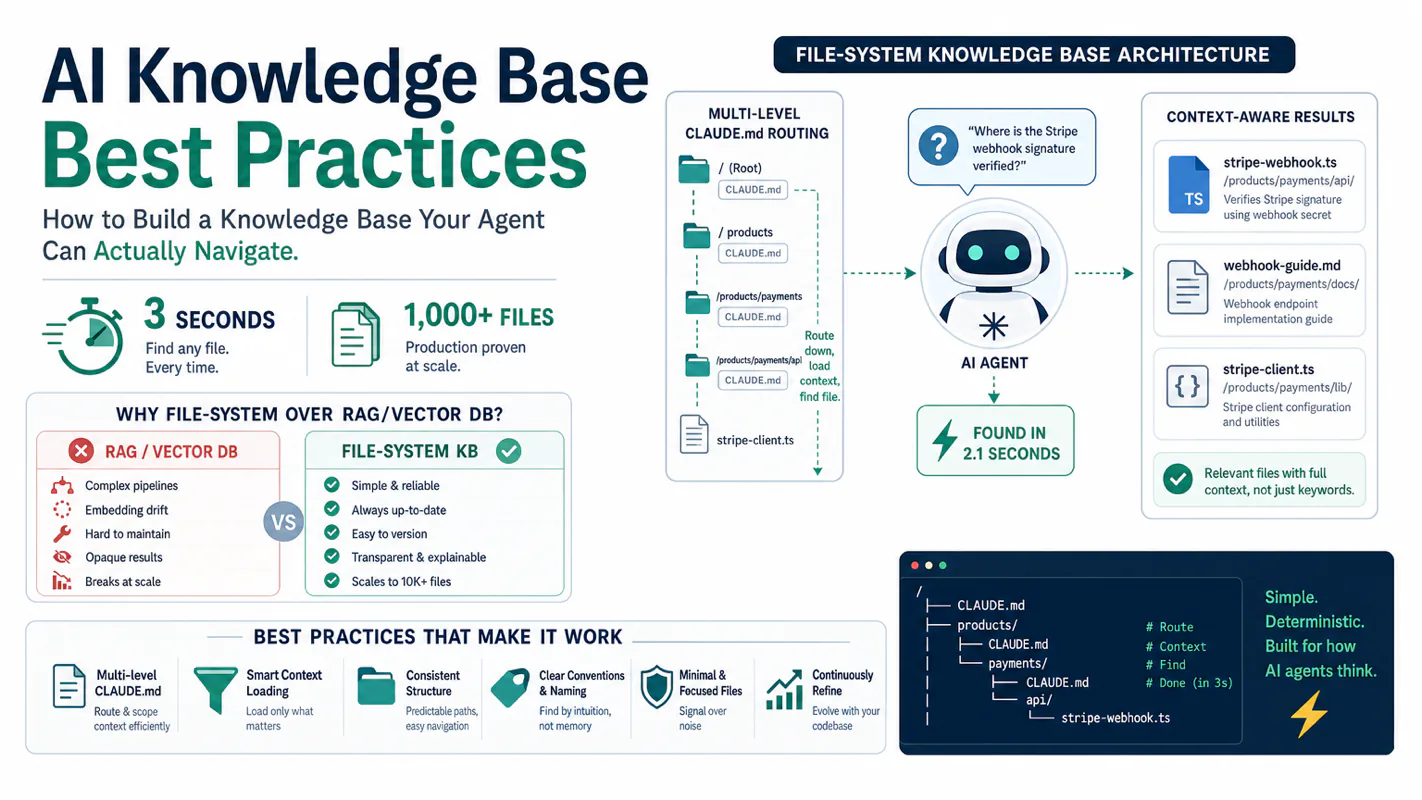
Vector databases are overkill. RAG pipelines are fragile. A file-system knowledge base with multi-level CLAUDE.md routing lets your AI agent find any file in 3 seconds flat. Here is the complete architecture behind a 1,000+ file production system.
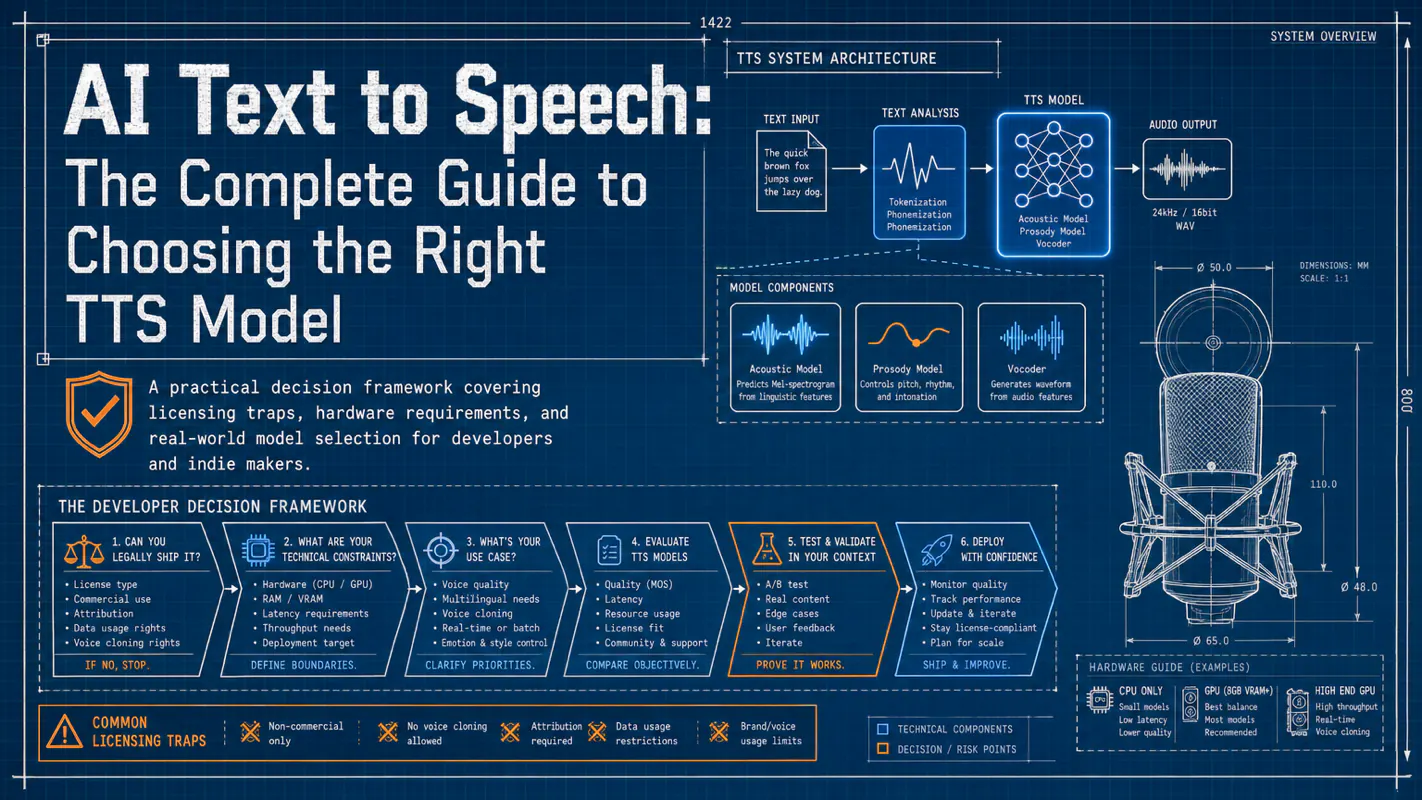
Most AI text to speech guides rank models by sound quality alone. This one starts with the question that actually matters: can you legally ship it? A practical decision framework covering licensing traps, hardware requirements, and real-world model selection for developers and indie makers.
Your knowledge sits in dozens of folders, multiple cloud drives, and hundreds of chat threads. You open an AI chat window, ask a deep question about your own domain, and the answer reads like a search engine snippet — generic, shallow, missing every insight you have actually earned.
The bottleneck is not the model's ceiling. It is the floor of what you feed it.
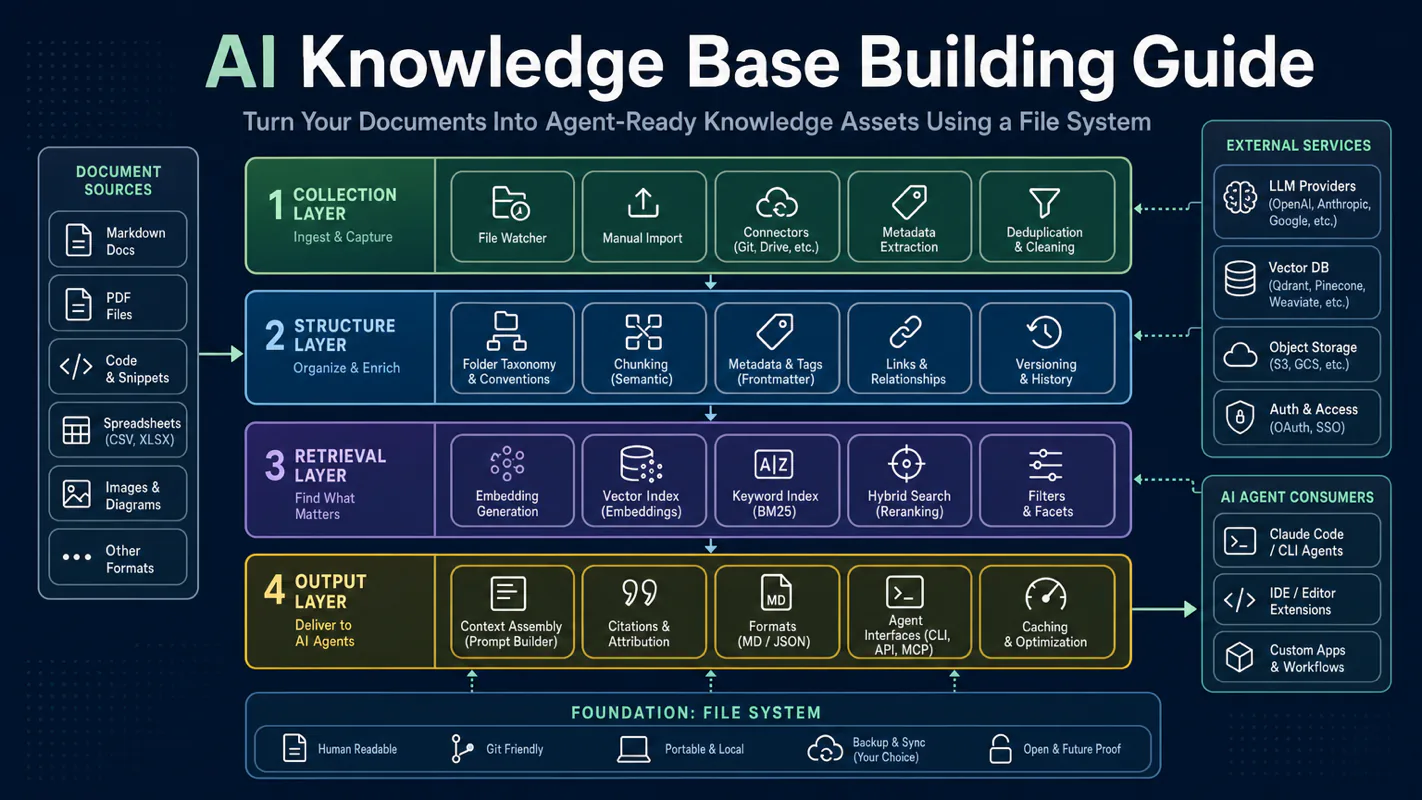
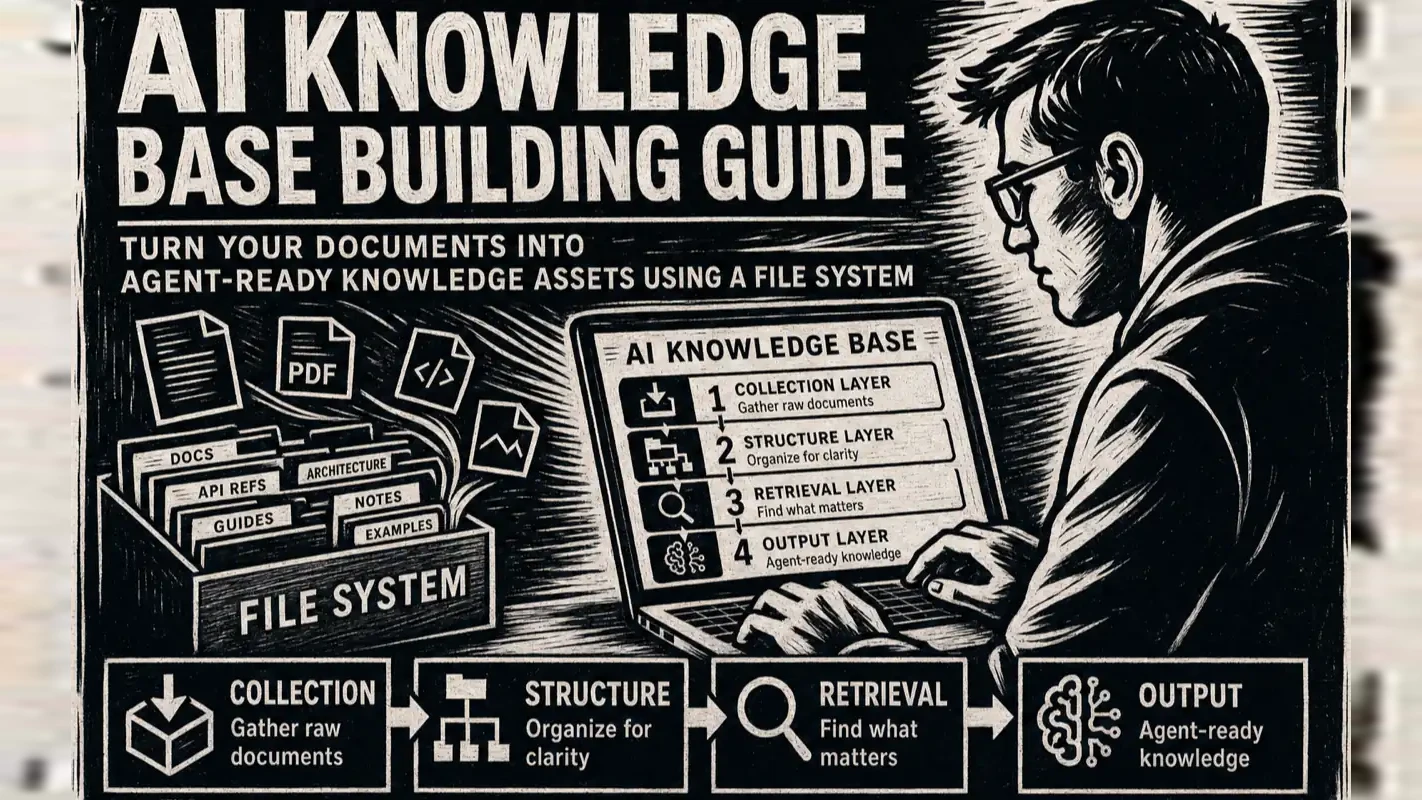
This guide walks you through building an AI knowledge base on your file system — a structured asset that an agent can search, understand, and produce from. You will learn the four-layer architecture (collection, structure, retrieval, output), get a step-by-step build sequence, and leave with a checklist you can tick off as you go.
Why Does a Folder Full of Documents Fail as a Knowledge Base?
A folder accepts anything. Drop 200 Markdown files, 30 PDFs, and a few architecture diagrams into it — the folder will not refuse a single item, and it will not tell the agent how those files relate to each other. The agent sees a flat list of filenames with zero context.
A knowledge base adds three capabilities on top of a folder:
Structure — Every file carries unified metadata (YAML frontmatter), layered headings (H2/H3/H4), and classification tags. The agent can parse content hierarchy, not just read a stream of text.
Navigation — A root-level index file (CLAUDE.md in Claude Code projects) tells the agent exactly where to look: brand knowledge lives in brand/, tool documentation in tools/, terminology in standards/. No full-directory scan required.
Production rules — Knowledge files pair with templates and constraints so the agent can call on them to complete writing, analysis, and decision-making tasks directly.
The practical gap is stark. I tested the same instruction — "Write an SEO article based on my brand positioning" — against a scattered folder and against a structured knowledge base. The knowledge-base version pulled brand positioning, audience profiles, historical benchmarks, and style rules automatically. The folder version produced generic filler. Same model, same prompt, completely different output quality.
What Are the Four Layers of an AI Knowledge Base Architecture?
The architecture breaks into four layers — collection, structure, retrieval, and output. Each solves a distinct problem, and skipping any one degrades the whole system.
Layer 1: Collection — Gather scattered knowledge into one place
Raw knowledge lives everywhere: browser bookmarks, code repo READMEs, e-book highlights, Telegram threads, podcast notes. The collection layer pulls all sources into a single directory tree and converts them to an editable format.
High-frequency collection actions:
Web articles — Scrape full text into Markdown, preserving heading structure
E-books — Convert PDF or EPUB into chapter-segmented Markdown files
Chat logs — Export technical discussions from Slack, Discord, or Telegram as plain text
Code repos — Extract README files, architecture docs, and key comments into standalone knowledge files
Collection is not hoarding. Every file that enters the knowledge base should have a clear purpose: reference material for a writing topic, evidence for a decision, or a dependency for a workflow. If you cannot remember why you saved something three months later, it should not be in the base.
Layer 2: Structure — Make files parseable, not just readable
Raw materials need structural processing before an agent can use them efficiently. Three core actions:
Unified format. All knowledge files use Markdown with YAML frontmatter — title, category, keywords, creation date. This makes every file machine-parseable.
Layered headings. H2/H3/H4 headings create a content hierarchy. The agent can jump to a specific section instead of reading the entire document.
Directory navigation. Each directory gets its own CLAUDE.md sub-index that explains what the directory contains, what the subdirectories cover, and which trigger words route to which files. The root CLAUDE.md is the master entry point.
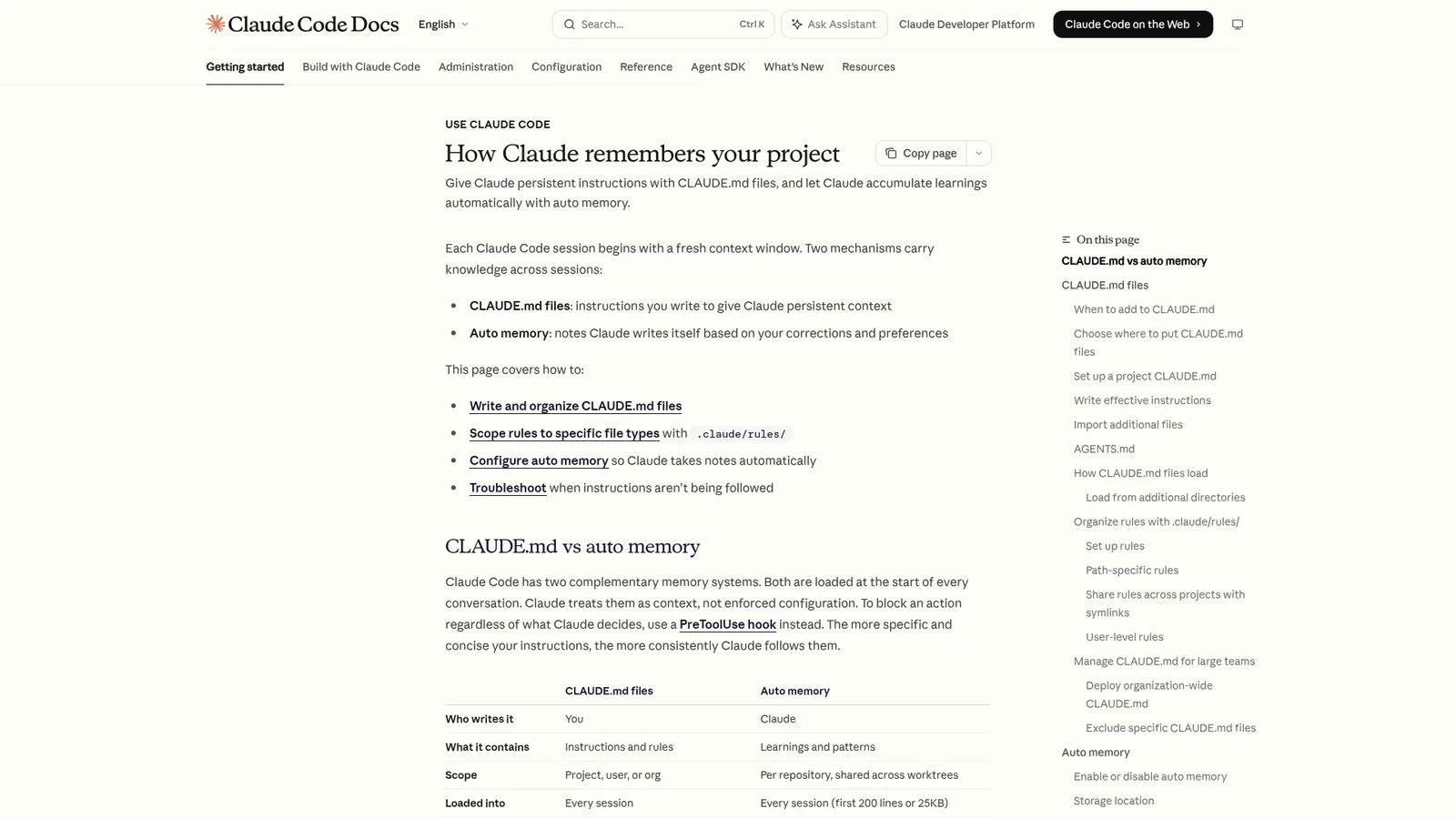
Why Markdown over Notion or Google Docs? Markdown is plain text. Every AI tool reads it natively with zero API dependency. Anthropic's documentation on Claude Code confirms that the agent reads local Markdown files directly, making plain-text knowledge bases a first-class integration target. When you switch models or platforms, your knowledge base travels with you. Your accumulated expertise should never be locked inside a single SaaS product.
Layer 3: Retrieval — Help the agent find the right file fast
With hundreds or thousands of files, the agent cannot read everything every time. The retrieval layer answers two questions: "Where to look?" and "How to match?"
Local retrieval. For knowledge bases under a few hundred files, CLAUDE.md navigation plus Claude Code's native file reading is enough. The agent follows trigger words to the right directory, then reads the target file. I run a knowledge base with 700+ files this way and retrieval accuracy stays above 90%.
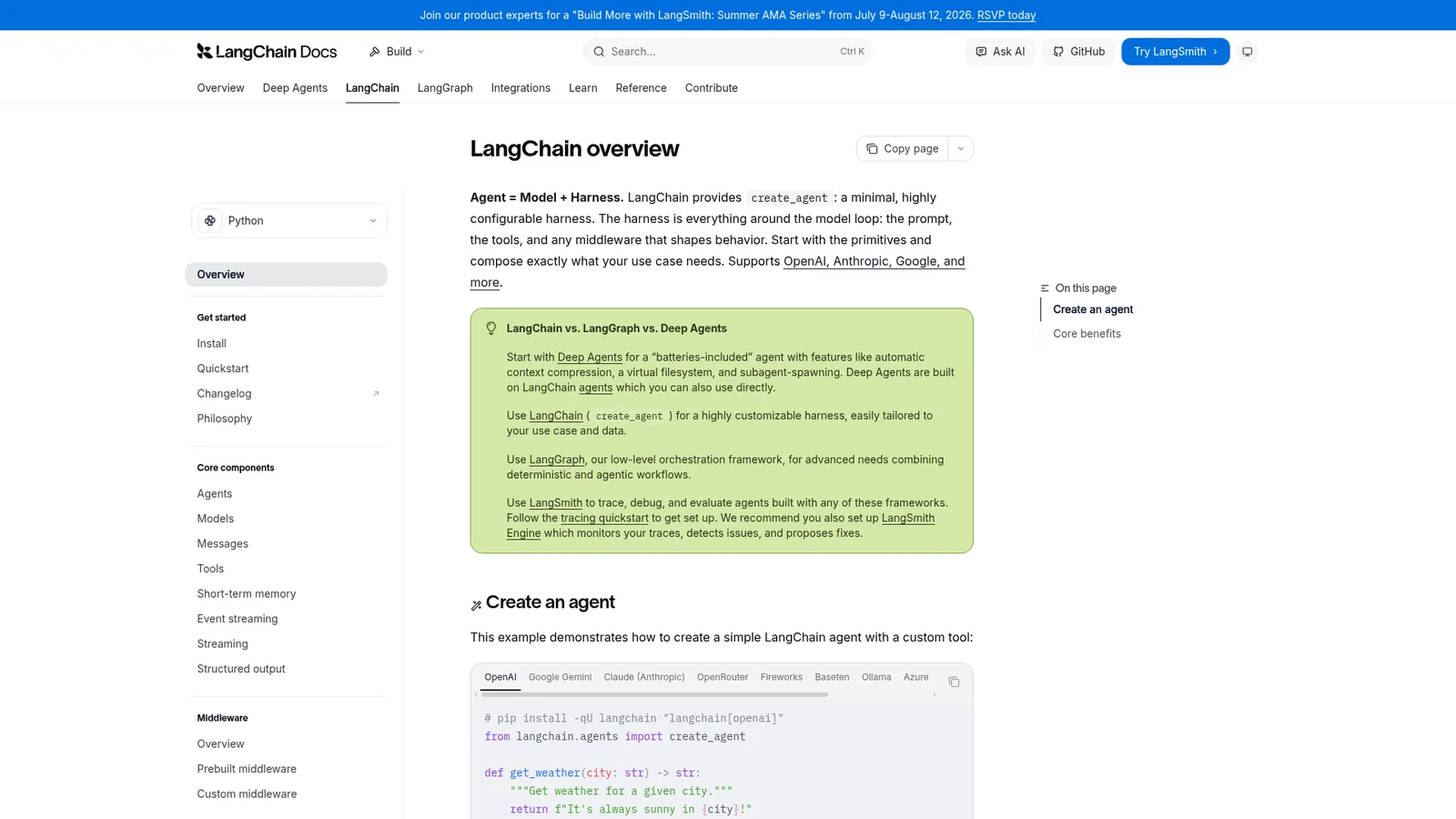
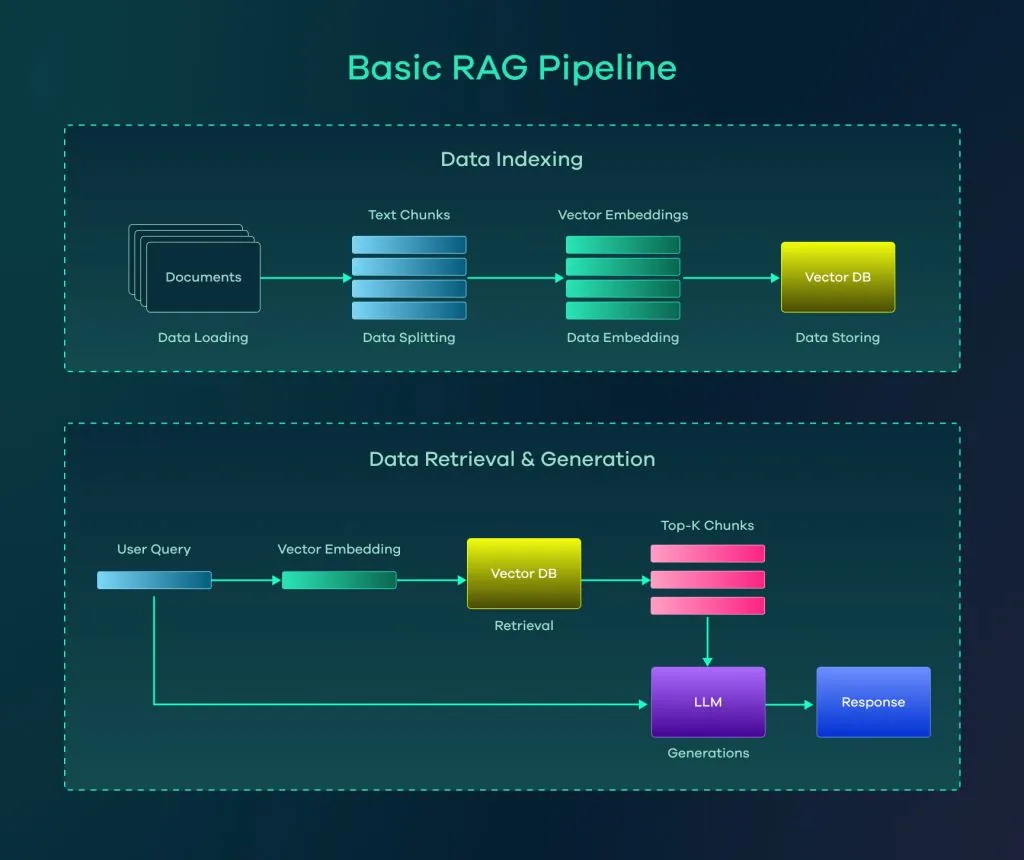
Semantic retrieval (RAG). At larger scale or when multiple AI platforms need access, RAG (Retrieval-Augmented Generation) becomes the standard. LangChain's RAG documentation provides a solid technical reference for this approach. It chunks knowledge files into segments, converts them to vectors in a vector database, and matches queries by semantic similarity before feeding relevant passages to the LLM.
Think of local retrieval as finding a book in a small bookshop — you know the rough shelf and browse from there. Semantic retrieval is like querying a university library system — you describe what you need, and the system pulls passages from different floors and shelves.
Layer 4: Output — From knowledge to finished product
The ultimate value of a knowledge base is not "being read" — it is "being used." The output layer combines retrieved knowledge with preset rules so the agent produces complete deliverables.
Common output types:
Long-form articles — Agent pulls brand positioning, audience profile, style guide, and case studies, then produces a full SEO-ready article
Technical documentation — Agent reads architecture docs and API specs, then produces deployment tutorials or integration guides
Analysis reports — Agent retrieves industry data and analytical frameworks, then generates reports with supporting evidence
Course content — Agent pulls syllabi, case libraries, and style rules, then produces hands-on tutorials
How Do You Build Your First AI Knowledge Base Step by Step?
Step 1: Create the root directory and CLAUDE.md
Pick a location for your knowledge base root. Create a CLAUDE.md file inside it. This file needs three sections:
Directory index — List every top-level directory and its purpose
Trigger-word routing table — Map keywords to file paths ("brand positioning" routes to brand/identity/positioning.md)
Usage rules — File format requirements, naming conventions, update procedures
You do not need to finish this file in one sitting. Start with three to five knowledge domains you use daily. Expand as you go.
Step 2: Design the directory structure
Organize by knowledge domain. There is no universal standard, but one rule holds: one directory handles one category of knowledge.
Example structure for a content creator:
knowledge-base/
├── CLAUDE.md          # Master navigation
├── brand/             # Positioning, audience, style
├── tools/             # AI tools and scripts
├── standards/         # Writing standards, SEO rules
├── materials/         # Collected reference materials
├── business/          # Published work and performance data
└── research/          # Industry research and trend analysis
Each top-level directory gets its own CLAUDE.md with sub-navigation and local routing rules.
Step 3: Write structured knowledge files
Every knowledge file uses Markdown with YAML frontmatter:
Body text uses H2/H3 headings. One file, one topic. Avoid "everything documents" — a single file mixing brand positioning, audience profile, competitor analysis, and writing style is harder for the agent to use than four separate focused files.
When the agent reads this table at session start, it knows: "When the user mentions brand positioning, check brand/identity/positioning.md first."
A common trap at this stage: spending days designing the "perfect" directory structure before writing a single knowledge file. The structure will evolve. Start with your best intuition, run real tasks, and restructure based on actual retrieval misses. Iteration beats planning.
How Do You Deploy a Knowledge Base to the Cloud?
A local-only knowledge base has three limitations: single-device access, single-tool access, and no collaboration. Cloud deployment solves all three.
Option 1: Git repository sync
Push your knowledge base to a private GitHub or GitLab repo. Multi-device sync via Git. Version control is built in. Cost is zero. The downside: Git handles binary files (images, PDFs) awkwardly.
Option 2: Cloud storage with real-time sync
Use Syncthing for end-to-end encrypted sync across devices. Or use iCloud, Dropbox, or any directory-level sync tool. Best for teams that need real-time updates without managing Git branches.
Option 3: RAG service deployment
For large-scale knowledge bases or cross-tool semantic retrieval, deploy a RAG pipeline (LangChain, LlamaIndex, or a custom stack) to expose your knowledge base as an API. Any AI tool can query it over HTTP.
These three options are not mutually exclusive. A practical combo: Git for version control + Syncthing for multi-device sync + RAG for cross-tool retrieval. I run exactly this stack across four machines, and the knowledge base stays consistent within minutes of any edit.
If your knowledge base primarily serves Claude Code, skip RAG for now. Claude Code's context window and file reading are strong enough to handle a few hundred files with CLAUDE.md navigation. RAG shines when the knowledge volume exceeds what the agent can read in context, or when you need to serve multiple AI platforms simultaneously.
What Do Vertical Knowledge Bases Look Like in Practice?
Case 1: Legal knowledge base
Legal knowledge has a distinctive property: massive volume with rigid hierarchical structure. Statutes, judicial interpretations, and case rulings each follow strict citation formats.
Core design decisions for a legal knowledge base:
Hierarchy mirrors the legal system — Constitution, federal statutes, regulations, judicial interpretations, local ordinances — each gets its own directory level
Article numbers serve as retrieval anchors — The agent can locate "Civil Code Article 1032" precisely
Bidirectional linking between cases and statutes — A ruling that cites a statute links back to the statute's full text
Because a single legal question can touch dozens of articles scattered across multiple statutes, semantic retrieval (RAG) is nearly mandatory for this domain.
Case 2: Career knowledge base
Job market and career development knowledge differs sharply from legal knowledge. Users care about trends, salary ranges, skill trees, and career pivot paths — semi-structured information that updates frequently.
Key design choices:
Dual-axis organization — Browse by industry ("AI sector, all roles") or by role ("Product Manager, all industries")
Timeliness labels — Salary data and trend reports carry source attribution and date stamps to prevent outdated advice
Skill-graph linking — Each role links to required skills; each skill links to learning resources
Case 3: Personal digital library
Once a personal e-book collection grows past a hundred volumes, "find the one passage from that one book" becomes a real pain point.
A zero-code approach: use Notion for catalog management and reading notes, connect an automation tool (Make, Zapier, or n8n) for ingestion and tagging workflows, and the result is a searchable, annotated personal library. No servers, no code, just tool composition.
All three cases share one design principle: the finer the structural granularity, the more precise the retrieval, and the higher the output accuracy. The legal base is granular to article numbers. The career base is granular to role-skill pairs. The library is granular to chapter-level annotations. When planning your own knowledge base, the first question to answer is: what granularity does the agent need to retrieve your knowledge at? That answer drives your entire structuring strategy.
How Does a Knowledge Base Turn a 30-Word Prompt Into a 6,000-Word Article?
Without a knowledge base, every AI writing session starts the same way: spend ten minutes writing a detailed prompt that describes tone, audience, structure, and source material. Switch topics, and you rewrite the whole prompt.
With a knowledge base, the workflow compresses: give the agent a topic, and it pulls positioning, audience data, style rules, SEO standards, and case studies from the structured file system. Your prompt shrinks from hundreds of words to a few dozen. Output quality actually improves because the knowledge base enforces rules more consistently than any ad-hoc prompt.
I tested this with a direct comparison. A 28-word instruction — "Write an SEO article about AI knowledge bases for content creators" — produced a 6,200-word draft with correct heading hierarchy, internal links, FAQ schema, and brand-appropriate tone. The agent read 14 files across 5 directories to assemble that output. No manual context-loading required.
The leverage extends beyond writing. The same knowledge base simultaneously supports article production, SEO auditing, multi-platform publishing, and performance analysis. For a solo operator, the knowledge base becomes core infrastructure — not a nice-to-have tool, but the operational foundation the entire business runs on.
Can You Monetize an AI Knowledge Base?
Three monetization paths have proven viable: knowledge extraction products, vertical RAG services, and automated content production. Each has different economics.
Everyone carries "head-only" expertise — judgment calls, workflow shortcuts, domain intuitions that never get written down. Once you structure that tacit knowledge into a knowledge base, it becomes a replicable, sellable asset.
The process: extract reusable methodologies from daily work, structure them into tutorials or courses, let the knowledge base generate content products in multiple formats (articles, slide decks, video scripts). You are not selling raw knowledge — you are selling the organization and application path. The same expertise scattered in chat logs has zero market value; structured into a knowledge base, it compounds with every reuse.
Build a RAG knowledge base for a specific industry, then offer automated document services on top of it. Example: a real estate knowledge base containing policy regulations, neighborhood data, and mortgage options powers a "one-click property assessment report" service. Your knowledge base is the moat — competitors can use the same LLM, but they do not have the vertical knowledge you curated.
Path 3: Solo-operator content production line
Time is the scarcest resource for solo businesses. Knowledge-base-driven output turns content production from artisan craft into assembly line:
Articles start from accumulated materials instead of blank pages
Multi-platform distribution adapts automatically via platform-specific style rules
SEO checks run against internalized standards instead of gut feeling
The marginal cost of each knowledge file drops over time. One hour spent structuring a brand positioning document saves ten minutes on every future content task that references it. At scale, the efficiency gains compound exponentially.
What Mistakes Should You Avoid When Building a Knowledge Base?
Mistake 1: Bigger is always better
No. Value comes from retrieval precision, not file count. A thousand disorganized files underperform a hundred well-structured ones. Schedule regular cleanups: archive stale content, merge duplicate files, prune orphaned directories.
Mistake 2: Organize everything before you start using it
This is the most common procrastination trap. Knowledge bases are built through use, not planning. Start with five to ten files you reference daily. Discover gaps as you work and fill them. Waiting until it "feels ready" means you never start.
Mistake 3: Knowledge bases are only for AI
A structured knowledge base benefits humans equally. The navigation index doubles as a personal knowledge map. Many people discover blind spots in their own expertise during the structuring process — "I thought I understood this topic deeply, but I have no file for it."
Mistake 4: Jump straight to RAG
RAG broadens retrieval capability but adds complexity: vector databases need maintenance, embedding models need selection, retrieval quality needs tuning. For most individuals and small teams, Markdown files plus CLAUDE.md navigation handle the job. Get the knowledge right first. Upgrade the retrieval stack later.
Mistake 5: Build once and forget
Knowledge bases need maintenance, just like codebases. New knowledge enters regularly, outdated information gets flagged or removed, directory structure evolves with changing needs. A monthly one-hour review keeps things fresh: check which files have not been updated in three months, which directories the agent never touches, which routing entries point to deleted files.
Mistake 6: Treat it like a note-taking app
Notes are for humans — loose structure, casual language, fragments are fine. Knowledge bases are for agents — structure must be machine-parseable, content must be self-contained. If you keep both notes and a knowledge base, use notes as collection-layer input: periodically distill reusable insights from notes, structure them, and promote them into the knowledge base.
The biggest enemy of a knowledge base is not technical complexity. It is perfectionism that prevents you from starting. Every first version is rough. Once you start using it, the iteration loop kicks in naturally.
This guide covered the full lifecycle of an AI knowledge base: concept, architecture, hands-on building, cloud deployment, vertical applications, and monetization. Each phase has depth to explore.
If you are starting from zero, create a root directory and a CLAUDE.md file today. Migrate three files you referenced this week. Give your agent a task and see what happens. The knowledge base pays dividends from day one — and every file you add makes every future output better.
The value of a knowledge base compounds. One file structured today improves every task that touches it tomorrow. Start now.
Ready-to-Use Prompt: Architect a Four-Layer AI Knowledge Base
What this does: Audits your scattered documents against the four-layer architecture (collection, structure, retrieval, output), scores each layer, and returns a structure-first build plan plus a floor test that proves the knowledge base works. Based on: AI Knowledge Base Building Guide: Turn Your Documents Into Agent-Ready Knowledge Assets Using a File System — https://aiworkflowpro.com/ai-knowledge-base-building/ Time to run: ~5 minutes
Copy this prompt into Claude Code, ChatGPT, or any AI assistant:
ROLE: You are an AI Knowledge Base Architect. Your job: turn a pile of scattered documents into a four-layer, agent-ready knowledge base — and prove it beats the raw folder.

CONTEXT — FOUR-LAYER KNOWLEDGE BASE METHOD:
An AI gives generic answers about your own domain not because of the model's ceiling but the floor of what you feed it. A raw folder fails because it accepts anything and never tells the agent how documents relate. The fix is four layers: (1) Collection — gather and dedupe raw docs from every source with provenance; (2) Structure — a hierarchy with naming conventions plus an index/routing file (CLAUDE.md) per directory that tells the agent what lives where; (3) Retrieval — scope the agent to the relevant slice, not the whole pile; (4) Output — turn retrieved context into a cited asset. Build Structure before Retrieval; judge the KB by whether a 30-word grounded prompt beats the same prompt with no KB.

INPUTS (fill in before running):
- CURRENT_SETUP: [How knowledge lives today — folders, cloud drives, chat threads]
- DOMAIN: [The subject the knowledge base covers]
- AGENT_TOOL: [Which agent will read it — Claude Code, ChatGPT, other]
- OUTPUT_GOAL: [What the KB should produce — articles, answers, decisions]

METHOD — 4 STEPS:

Step 1 — Score the Four Layers (0–3)
0 = absent, 1 = raw/ad-hoc folder, 2 = structured and navigable, 3 = agent can search and produce from it reliably. Evaluate Collection (sources gathered, deduped, provenance tagged?), Structure (hierarchy plus an index/routing file explaining how things relate?), Retrieval (agent finds the right slice, not everything?), Output (retrieved context becomes a cited asset?).

Step 2 — Fix the Weakest Layer, Structure-First
If Structure scores below 2, build it before the others: define the top-level hierarchy, naming conventions, and one index/routing file (CLAUDE.md) per major directory telling the agent what lives where. A raw folder never counts as Structure.

Step 3 — Tighten Retrieval
Scope the agent to the relevant layer via the routing index — never the whole pile. Test with one query: the agent must return the specific relevant document, not a generic summary.

Step 4 — Wire and Verify the Output Path
Define how retrieved context becomes an asset (article, answer, decision). Require every output to cite its source doc. Run the floor test: a 30-word prompt grounded in the KB must beat the same prompt with no KB — if it does not, the floor, not the model, is the problem.

RULES:
- Never blame the model before auditing the four layers — the input floor is usually the limit.
- Never let a raw folder pass as Structure — it needs a hierarchy plus an index/routing file.
- Never accept output that cannot cite its source doc — ungrounded output means retrieval failed.

OUTPUT FORMAT:
Output a markdown report with:
1. Four-Layer Scorecard — markdown table, columns: Layer | Score (0–3) | What's Missing
2. Structure Build Plan — the hierarchy, naming convention, and index/routing file spec
3. Retrieval Test — one test query + expected doc vs. what a raw folder would return
4. Floor Test — the 30-word-prompt KB-vs-no-KB comparison and pass/fail
Save as @templates/ai-knowledge-base-building.md and run when turning scattered documents into an agent-searchable knowledge base, or when an agent keeps giving generic answers about your own domain.
Frequently Asked Questions
What is the difference between an AI knowledge base and a regular folder?
A folder stores files passively. An AI knowledge base adds structured metadata, a navigation index (CLAUDE.md), and production rules — so the agent can search by meaning, understand document relationships, and produce finished deliverables from your accumulated knowledge.
How long does it take to build an AI knowledge base?
A minimum viable version takes one afternoon: create CLAUDE.md plus five to ten structured Markdown files. A full four-layer architecture (collection, structure, retrieval, output) typically reaches stable operation after one to two weeks of iteration.
Do I need RAG for my knowledge base?
Depends on scale. Under a few hundred files, Claude Code's file reading plus CLAUDE.md navigation handles retrieval well. Beyond that threshold — or when multiple AI tools need access — RAG semantic search becomes the practical choice.
What is CLAUDE.md and why does it matter?
CLAUDE.md is Claude Code's project navigation file. Placed at the root, it tells the agent where every category of knowledge lives, which trigger words route to which files, and what rules to follow. The agent reads it at every session start. It is the table of contents and the instruction manual in one file.
Can I monetize an AI knowledge base?
Yes. Three proven paths: sell the structured knowledge base as a product, use it to power automated content production (articles, courses, reports), or package it as a vertical-domain agent service. The leverage is in reuse — one structuring effort serves unlimited output cycles.
Vector databases are overkill. RAG pipelines are fragile. A file-system knowledge base with multi-level CLAUDE.md routing lets your AI agent find any file in 3 seconds flat. Here is the complete architecture behind a 1,000+ file production system.
Most AI text to speech guides rank models by sound quality alone. This one starts with the question that actually matters: can you legally ship it? A practical decision framework covering licensing traps, hardware requirements, and real-world model selection for developers and indie makers.
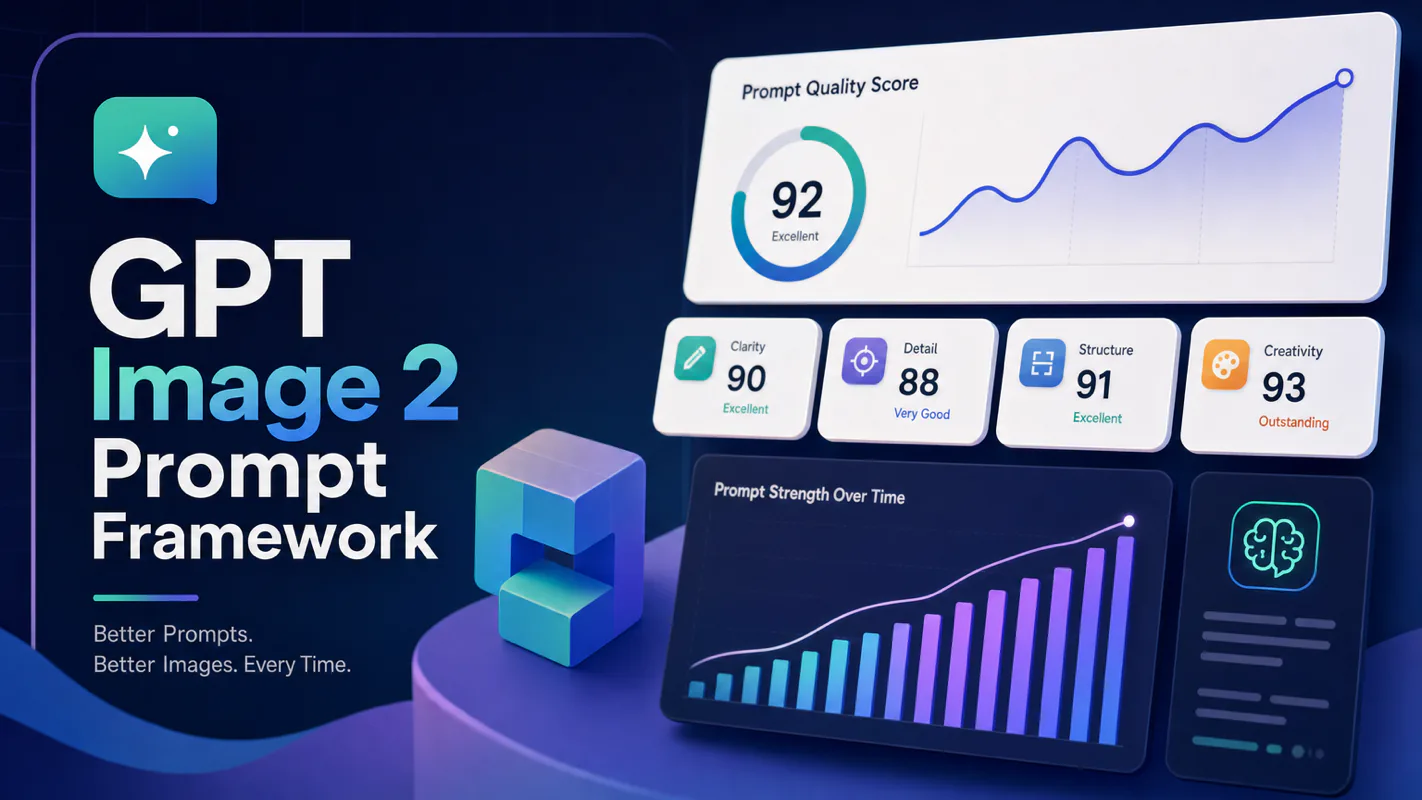
Stop fighting style drift in AI-generated article images. This three-layer prompt framework paired with a pool of 100 visual styles gives every article a unique look while keeping all illustrations within a single piece visually consistent.