Monitoring a competitor who publishes no feed is the case every RSS guide skips. Twenty-one platforms sorted by which of three jobs they do, and the finished setup is business process automation you own outright, with no seat licence to renew.
Blaming the content is the reflex when a post underperforms, and it is usually the wrong diagnosis. A second reader decides distribution before any human sees the post, and most of what it checks is mechanical enough to automate business processes around, on five platforms at once.
Gloves on, tape measure in hand — nobody types a query. Three voice surfaces for ai automation tools (terminal, Telegram, Discord), 10 TTS and 6 STT providers compared on cost and latency, plus a setup that costs nothing.
AI for Small Business: The Knowledge Base That Outlasts Every Model
Every AI tool you pay for is rented. The one thing you can own is a folder on your own disk that any model can read. What a knowledge base actually is, what it is not, and how to build one this afternoon.
Every AI tool you pay for is rented. The subscription, the chat history, the project you filled with your pricing and your tone of voice, the memory that finally learned how you write emails — all of it sits on someone else's server, under someone else's terms. A knowledge base is the part you own, and it is the only part of AI for small business that nobody can switch off. It is a folder on your own disk. Inside it are plain text files that describe how your business works. Any model can read them. No vendor can hold them.
Most advice about AI for small business is a list of things to buy. This is the opposite: the one item on the list you actually get to keep.
Key takeaways
AI for small business runs on a knowledge base: a folder of plain files on hardware you control, written so that both you and a model can read it. It is not memory, not the context window, and not fine-tuning.
Every major vendor lets you export. What comes back is text, not state. Anthropic states in its own help centre that exported data cannot be imported into another Claude account, and OpenAI's transfer page lists memories, files and custom GPTs among the things a transfer does not move.
The system described below holds roughly 103,000 working files across 11 top-level folders on three machines. None of it needs a database, a subscription or a platform.
The starting version of AI for small business is one folder and one file. You can build it in an afternoon, and it will still work after the model you use today has been retired.
This approach has real limits. It has no permission model, it is not a compliance record, and pushing more files into a prompt makes answers worse, not better.
What a knowledge base actually is
, and why AI for small business starts here
A knowledge base is a folder on a disk you control that holds what your business knows, in plain text files, organised so a person or a model can find the right file without searching everything.
That is the whole definition. There is nothing to install and no format to license. If you have a folder called my-work on your laptop with a file in it called README.md, you have started one.
Plain text here means Markdown. That is an ordinary text file with .md on the end instead of .txt. A # at the start of a line makes a heading, a - makes a bullet, and that is nearly all of it. It opens in Notepad on Windows and TextEdit on a Mac, it needs no licence, and every major AI tool reads it. Nothing in this article is more technical than that.
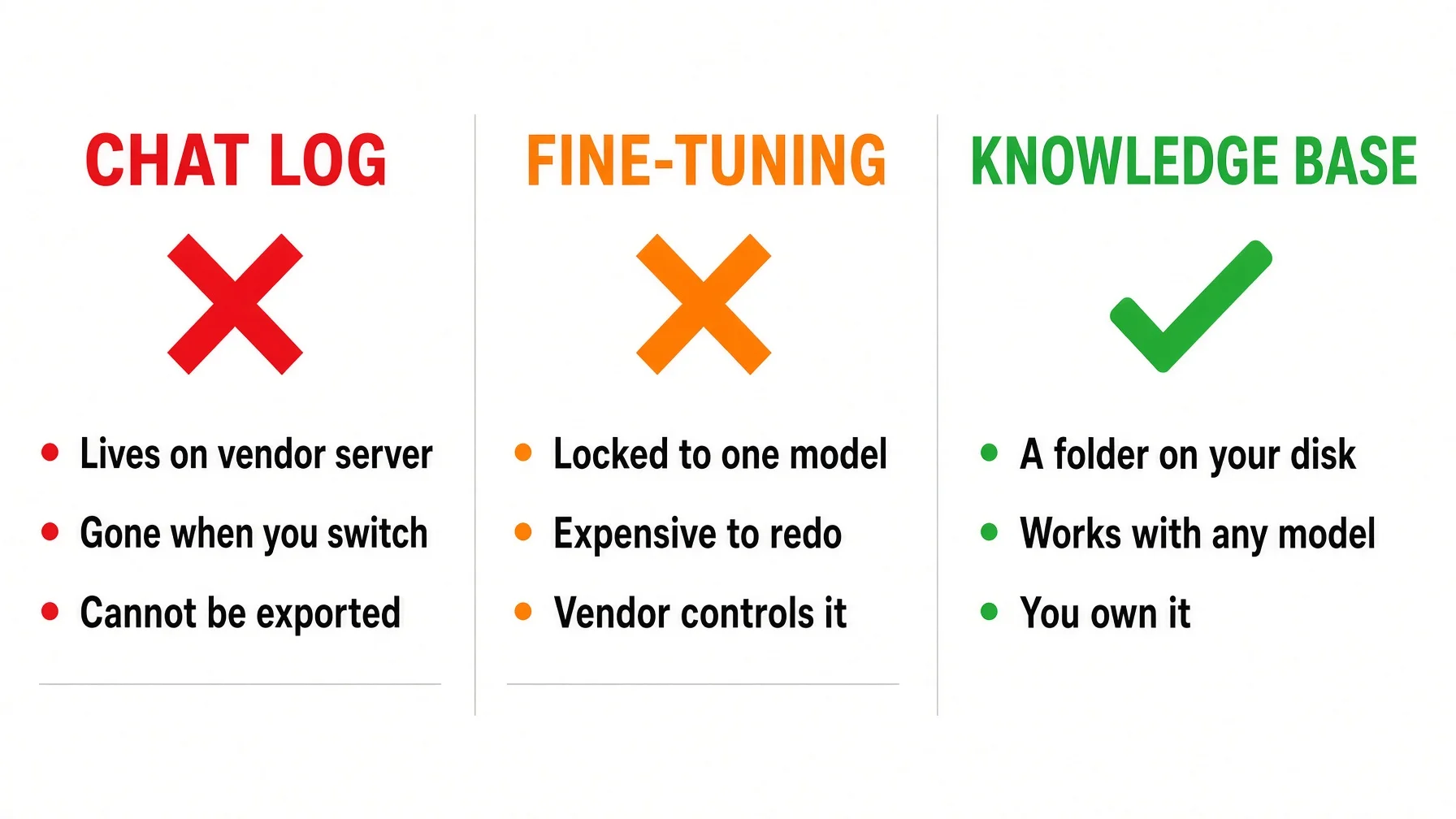
The word gets used loosely, and most AI for small business advice makes it worse. Three things get confused with a knowledge base, and the confusion is expensive, because all three belong to a vendor.
Where it lives
Survives closing the tab?
Survives switching tools?
Survives model retirement?
Context window
Inside one conversation
No
No
No
Memory
Vendor's servers
Yes
No
Depends on vendor
Fine-tuning
Vendor's model weights
Yes
No
No
Knowledge base
Your disk
Yes
Yes
Yes
💡 What a context window is: the amount of text a model can hold in its head during one conversation. Everything you paste, everything it reads and everything it says back competes for the same space. Close the conversation and the space is cleared. Anthropic's own engineering guidance calls it an attention budget, where every new token depletes the budget.
Memory is the vendor's summary of you, not your record
Vendor memory has improved a lot. That is real. OpenAI rebuilt its memory architecture specifically to deal with staleness and scale over multi-year horizons, and Anthropic ships an import flow built to bring users across from a competitor.
But look at what memory is. OpenAI keeps two kinds. Saved memories are the things you told it to remember. Referenced chat history is different: the system decides what is worth keeping, and OpenAI's own guidance says those details can change over time. Their advice is to use saved memories for anything you want it to always remember, because the rest carries no guarantee.
Something the vendor rewrites on your behalf is not a record. You cannot compare it against last month's version, and you cannot open it in six months to check what it thinks your pricing is.
The tell is in Anthropic's own instructions. To move memory in, the documented method is to ask your previous AI to dump everything into a code block. To move memory out of Claude, the documented method is to ask Claude to write its memories out verbatim, then save them by copying and pasting into a local file on your computer. Both directions end in the same place: text you keep yourself.
That is a knowledge base. They just do not call it one.
Fine-tuning expires when the model does
Fine-tuning sounds like the serious answer: train the model on your business and it will know your business. It is the wrong tool, and the vendors say so.
OpenAI's optimisation documentation now states plainly that the fine-tuning platform is being wound down, closed to new users, with the surrounding workflows moving into legacy documentation. The same page sets out the deal even for those still on it: a fine-tuned model keeps working only until the model underneath it is retired. Anthropic publishes a deprecation policy with a notice floor before retirement, which is fair and clearly stated, and also tells you the floor on how long your work has.
Fine-tuning is aimed at behaviour anyway, not at your particular facts. OpenAI's list is things like classification, translation, producing a specific output format, correcting instruction-following failures, and matching a tone and style. Domain tasks do appear on it, but as reasoning patterns learned from many examples — not as a way to load a client list you will edit next Tuesday. For AI for small business the conclusion is blunt: facts that change belong in a file you can open, not in weights you have to retrain.
What about Notion, Obsidian and the company wiki?
The answer differs by tool.
Obsidian is a knowledge base. It reads and writes plain Markdown files in a folder you choose on your own disk. If you use it, you already have what this article recommends. The app is a nice window onto the folder, and if it disappeared tomorrow the folder would still be there.
Notion gets you the text back, not the thing you built, and its own documentation explains the gap. You can export everything as HTML, Markdown or CSV. The export can take up to 30 hours to process, the download link expires within days, and pages the exporting person cannot access are silently left out. Then comes the sentence that matters: you cannot instantly recreate your workspace by re-uploading your exported content. The structure, the relations, the databases — the thing you actually built — does not come back.
A hosted company wiki, and most no code AI platforms that wrap a model in a friendly interface, are the same shape of problem with a different logo. The content is yours in principle and hostage in practice.
🔍 The test that settles it: if the company behind your tool shut down tonight without warning, what do you still have at nine tomorrow morning? Not "could I get it back if I filed a request." What is already sitting on a disk in your office. If the honest answer is nothing, then what you have been building for the last year is not an asset. It is a tenancy. Run that test on every AI for small business tool you currently pay for.
Why AI for small business ends up as five tools
that never talk
Here is the structural problem, and it is not that any single tool is bad.
Small businesses are adopting AI faster than they adopt anything else, and they are doing it by buying several cheap things rather than one expensive thing. The JPMorganChase Institute measured this the hard way, not by asking people but by watching actual payments from 4.6 million firms. Adoption went from under 2 percent to roughly 17.7 percent between 2019 and 2025. Over the same stretch, the market-wide median monthly spend on AI services fell from around $60 in 2019 to under $30 in 2025 — not in a straight line, since it peaked near $80 in 2022 before the decline.
Read that drop carefully, because the report does. It reads the decline as a composition effect: cheap new arrivals pulling the median down, not established users spending less. Firms that adopted early entered well above the $20 a month that recent arrivals start at, and they were spending more, not less, years later. Businesses are not buying one big thing. They are buying several small ones.
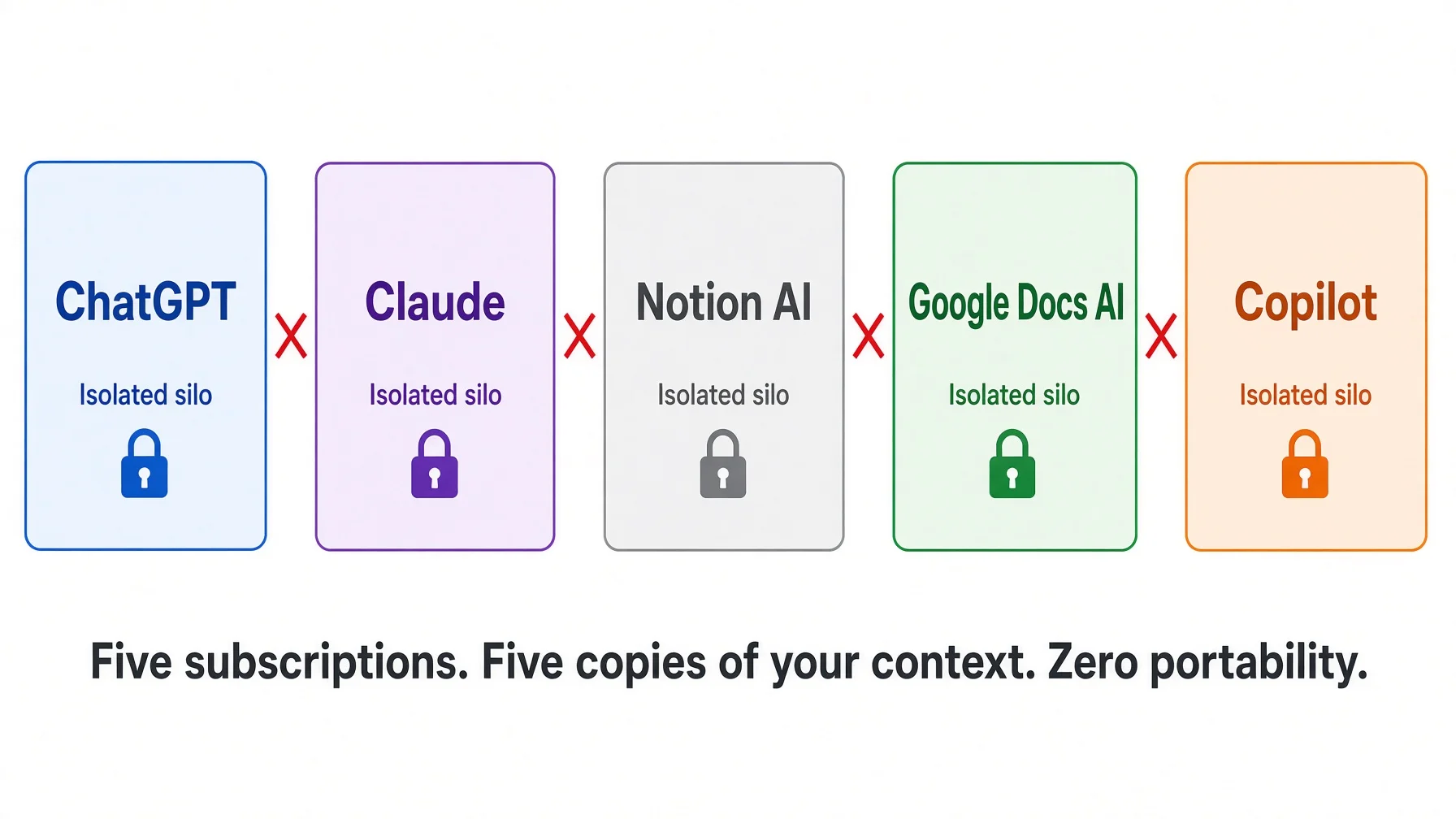
Cheap AI productivity tools multiply, and AI for small business quietly becomes five subscriptions rather than one system. The SBE Council's survey of 517 small business employers found 82 percent had adopted at least one AI tool, and that the typical firm was running five of them. Glean's Work AI Index, a survey of 6,000 full-time digital workers, found 77 percent of AI users bouncing between more than one tool weekly, and about a third using four or more.
Five tools means five places your context lives. A couple of them can reach into a shared drive. None of them holds the same picture of your business.
That same study put a number on the cost: 6.4 hours a week on what it calls botsitting, of which 2.3 hours a week is feeding context into prompts. That is the largest single bucket, bigger than checking output or fixing errors. Before you quote it: Glean sells a context product, so the finding suits them, and the hours are estimates people gave in a survey rather than anything measured. Treat it as an order of magnitude. Even discounted hard, for anyone who bills by the hour, re-explaining yourself is the most expensive thing you do with AI.
Export exists. Import does not.
Now the part almost nobody checks.
Every major vendor gives you an export, because data protection law effectively requires one. GDPR Article 20 obliges a structured, commonly used and machine-readable format. What no law requires is the other half. Where an import path exists at all, it hands the new tool a document to read, not your old workspace to resume.
OpenAI is equally clear about the limits of transferring exported conversations. It will not add old conversations to your chat history, will not restore your original sidebar, and will not move memories, GPTs, files or workspace access.
What you built
Comes out in the export?
Goes into a different tool?
Conversation text
Yes, as a data file
As text you must re-read, not as history
Saved memories
No
No
Custom instructions
No
No
Uploaded project files
Filename and metadata only
No
Custom GPTs and assistants
Reference identifier only
No
Files you kept on your own disk
Not applicable, you have them
Yes, immediately
⚠️ The convenient export needs an account that still works. Export from settings is a self-service feature of an active, signed-in account, and OpenAI's own documentation notes it is not available for Business or Enterprise workspaces at all, with download links that expire about a day after they arrive. If you cannot sign in, you are pushed to a privacy request portal — a legal right rather than a product feature, measured in days, returning a disclosure package rather than a working copy. No buyer's guide to AI tools for small businesses tells you to test the export during the free trial. For AI for small business it is the only criterion that determines what you keep.
What it looks like at 100,000 files
: my own folder
I run a knowledge base built exactly this way. It is not a demo. Here are the numbers, counted on 10 August 2026. You do not need to run anything — the commands are shown so anyone who wants to check the arithmetic can.
find ~/kb -type f -name "*.md" -not -path "*/.*" | wc -l   # 102,983 working files
find ~/kb -name "CLAUDE.md" -not -path "*/.*" | wc -l      # 3,315 routing files
du -sh ~/kb                                                # 90 GB all in
Two notes before the table. The count above excludes hidden folders; include the sync system's own version history and the total is closer to 140,000, which is a number about backups rather than about knowledge. And most of that 90 GB is screenshots, archives and media. The Markdown itself is a small fraction of it.
This is what mine looks like after years of accumulation. AI for small business does not need to look like this on day one. Yours should start with five folders, listed further down. Do not copy this structure.
First, the shape is lopsided and that is fine. The inbox holds over half the files and almost none of the value. The standards folder holds under 1 percent of the files and sets the rules for everything else. A knowledge base is not a filing cabinet where every drawer matters equally.
Second, none of this needs a database. It is folders and text files. You could open any one of them in Notepad.
One small file per folder tells the AI where to look
With a hundred thousand files, an assistant that searches the whole disk every time is useless. It is slow, it picks the wrong file, and it burns your budget doing it.
The fix is a routing file: a short Markdown document in each folder saying what this folder is for, what is inside, and which subfolder to open next. There are 3,315 of them here, nested up to twelve levels deep.
Two separate things make this work, and it is worth pulling them apart.
The signposting is the part you write. The loaded file tells the assistant which folder to open next, so it navigates instead of searching. Neither half works without the other.
One filename does not yet work everywhere, and you will be corrected if you claim it does. AGENTS.md is a genuine cross-vendor convention, published at agents.md and now stewarded by the Agentic AI Foundation under the Linux Foundation. But Anthropic's documentation says explicitly that Claude Code reads CLAUDE.md, not AGENTS.md. The fix is one command. Write your content once in CLAUDE.md, then at the top of your folder create a symbolic link so the other filename points at the same file: ln -s CLAUDE.md AGENTS.md. Both names now resolve to one file on disk, so there is no second copy to keep in step. That is the convention this whole series uses — CLAUDE.md is the source, AGENTS.md is a link to it — and the routing article covers the mechanics in full.
Copies on three machines, and why that is not a backup
The folder sits on three Macs, kept in step by Syncthing, which is open source and peer to peer. Changes land on the other machines in a minute or two. There is no server in the middle, which means no account to lose and no company to outlive.
Syncthing's own documentation is blunt that this is not a backup, because deletions copy across too. That is correct and worth repeating: sync gives you availability, not history. If you want to see what a file said last month, put the folder in Git as well — free version control software that keeps every past version. Two different jobs, two different tools.
Where this approach genuinely breaks
I would rather you hear the limits from me than find them in six months.
More files in the prompt makes answers worse. Chroma's context rot study evaluated 18 models across 194,480 calls and found every one of them got less reliable as input grew, in uneven and often surprising ways rather than by a smooth decline. Their most uncomfortable result: models did better on a randomly jumbled pile of text than on the same text arranged logically. Earlier work found accuracy is highest when the relevant passage sits near the start or end, and degrades significantly in the middle. The lesson is not "do not keep files." It is "point the model at the four files that matter, not at all of them."
There is no permission model. This is the limit people discover last and mind most. A folder is all or nothing: whoever can read the directory reads everything in it, including the pricing logic and the notes on which clients you turn down. No per-file access, no record of who opened what, no way to hand a contractor the checklists without also handing over the margins. Past two or three people who all see everything, a folder stops being adequate, and the answer is a real system with accounts, not a cleverer folder layout.
You cannot hand a browser chatbot a folder off your disk. It will take a link to a cloud folder, and it caps what one project can hold — single digits on the free plan, a few dozen on paid ones, never thousands. To have a model read a directory directly you need a tool running on your own machine with file access. For a small business, uploading the handful of files that matter for today's task is usually enough, and it is where I would start.
It is not a compliance system of record. A broker-dealer keeping records electronically falls under SEC Rule 17a-4, which requires either write-once storage or a complete time-stamped audit trail covering every change and deletion, with the responsible person where applicable, sufficient to reconstruct a deleted record. A folder of text files does none of that. Healthcare and legal record duties are separate problems and are not solved by better filing.
Client-confidential material raises a different question again.
" download style="background:#333;color:#fff;padding:8px 16px;border-radius:6px;text-decoration:none;font-size:13px;white-space:nowrap">Download PDF
is direct about it. Many AI tools learn from what you put into them, which means putting client information in one can disclose it, which means you need the client's informed consent first — and a line buried in your engagement letter does not count. Where the file sits on disk does not change that duty.
There is also a security cost to the convenience. Instruction files loaded automatically at the start of a session get treated almost like an order from you rather than like a document, which is why indirect prompt injection sits first on the OWASP list of LLM risks. If you paste text from a client email or a web page into a file your assistant reads every session, you have given a stranger a line in your instructions. Keep pasted outside material in a separate folder that is not loaded automatically.
So, with every qualifier attached: a plain folder is the most durable and portable option AI for small business has, if all of the following hold. The content is your own operating knowledge, not client files. The body of it is small and stable. One person or a very small team runs it. You are outside heavy regulatory scope. The disk is encrypted. Every one of those conditions is doing work.
Build your AI for small business folder this afternoon
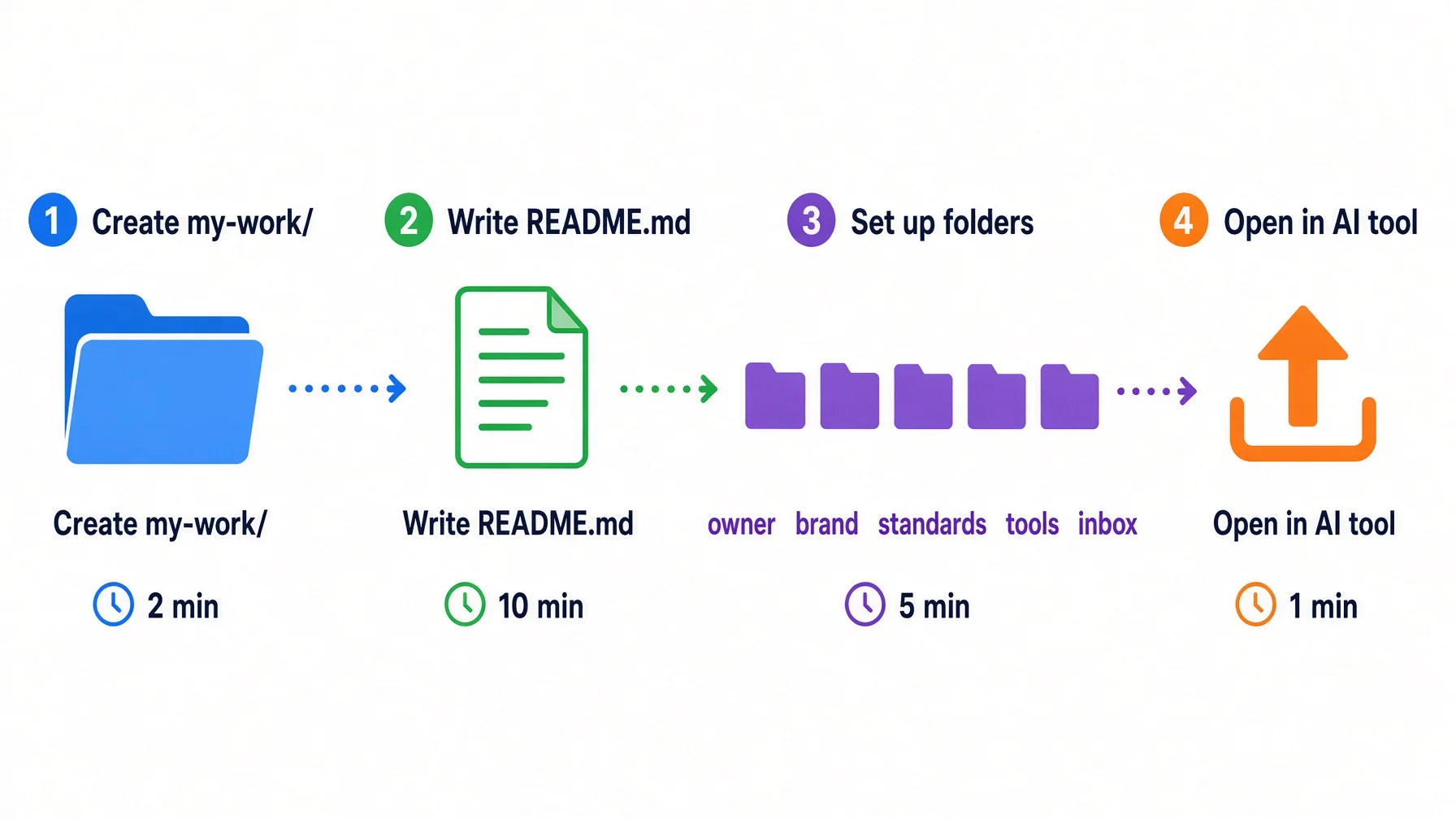
Five steps. The first four take about twenty minutes. This is the cheapest item on any AI for small business shortlist, because it is not a purchase.
Before you start. You are about to create a folder and ask an AI to read it. That requires a tool with local file access — a web browser chat cannot do it. If you need one, pick a free AI tool here. The whole setup takes five minutes.
1. Make the folder. One folder, at the top level of your documents, with a boring name.
my-work/
├── README.md          ← the map: who you are, and what each folder holds
├── owner/             ← who you are and how you decide
├── brand/             ← your voice, and writing samples to imitate
├── standards/         ← the rules your work has to follow
├── tools/             ← what you use, and field notes on each
└── inbox/             ← anything pasted in from outside
Do not create folders you have nothing to put in. An empty folder is a promise you will not keep.
If you have never made a .md file: open Notepad or TextEdit, type a line, then Save As. On Windows, set "Save as type" to All Files first, or Windows will quietly name it README.md.txt. On a Mac, TextEdit needs Format → Make Plain Text before it will save as .md. That step is where most people get stuck, and it takes fifteen seconds once you know.
2. Write the README. This file does most of the work. Everything else is optional.
# Who I am

I am a [profession] working in [city / region].
I mostly serve [type of client] with [type of work].

# What I actually do

- [The job that pays best]
- [The job you do most often]
- [The job you would like more of]

# How I want things written

- Tone: [plain and direct / warm / formal]
- Never say: [words and claims you will not put your name to]
- Always include: [disclaimer, next step, price range]

# Three rules that matter

1. [A rule with real consequences if broken]
2. [A rule about who decides what]
3. [A rule about what never leaves this office]

# What is in this folder

- `owner/` — who I am and how I decide
- `brand/` — examples of my own writing to match
- `standards/` — the rules my work has to follow
- `tools/` — what I use, and notes on each
- `inbox/` — text pasted in from outside, read only when I ask
Write it in your own words. Nobody is grading the prose. The test is whether a competent new hire could read it in two minutes and stop asking you obvious questions.
3. Add three real examples. Not templates. Three actual pieces of your own writing into brand/: a quote you sent, an email a client thanked you for, a description of a service. A model imitating three real samples of you beats any instruction about tone.
4. Point your AI at it. How depends on what you use.
What you use
How it reads the folder
ChatGPT or Claude in a browser
Create a project and upload the files. Re-upload when they change.
A desktop or terminal tool with file access
Give it the folder path. On a Mac, right-click the folder, hold Option, then "Copy as Pathname"; on Windows, shift-right-click and "Copy as path".
Any tool, no setup at all
Paste the contents of README.md at the top of a new chat. Crude, works everywhere, ten seconds.
That last row is the important one. If your knowledge base only works with clever tooling, it fails the portability test it exists to pass. It should also work by copy and paste, in any tool, on any day.
5. Add a file every time you repeat yourself. When you catch yourself explaining the same thing to a model twice, stop and write it down instead. That is the only maintenance rule worth following.
Three things to do once, on a calendar rather than on impulse: turn on full-disk encryption before the folder holds anything about clients, copy the folder to a second machine or a backup drive before you rely on it, and once a month run the review prompt below. Nothing else needs maintaining.
The prompts to copy
Copy this prompt into any AI tool that can read files from your disk. It contains every step — no need to refer back to this article.
You are going to build the first version of my knowledge base as plain files
on my own disk. Work inside my documents folder. Follow the steps in order.

Step 1 — Ask me for my trade, the town or region I work in, the clients I
serve, the three jobs I do most often, and the one thing I explain to people
over and over. Wait for my answers before you create anything.

Step 2 — Create a folder called `my-work/`. Inside it create these five
subfolders and nothing else:
- `owner/` — who I am and how I decide
- `brand/` — my voice, and samples of my own writing to imitate
- `standards/` — the rules my work has to follow
- `tools/` — what I use, and field notes on each
- `inbox/` — anything pasted in from outside, read only when I ask

Step 3 — Create `my-work/README.md`. This one file tells any reader, human or
model, what the folder is. Use exactly these five headings:
- `# Who I am` — two sentences: my trade, my region, the clients I serve.
- `# What I actually do` — three bullets, the jobs from Step 1.
- `# How I want things written` — my tone, the words and claims I will never
  put my name to, and what every piece must always include.
- `# Three rules that matter` — three rules with real consequences if broken.
- `# What is in this folder` — one line for each subfolder above, saying what
  it holds and when to open it.

Step 4 — Put a file called `CLAUDE.md` in `my-work/` holding exactly one
line: `@README.md`. Then put a `CLAUDE.md` in each of the five subfolders,
each holding one sentence that names what belongs in that folder and what
does not. AI tools load files with this name automatically, so the folder
explains itself without me pasting anything. Finally, so that tools which
look for the other common filename find the same content, run this once in
`my-work/` and show me the result of `ls -la AGENTS.md`:
  ln -s CLAUDE.md AGENTS.md
If you cannot create symbolic links here, say so and tell me the manual
step instead — do not make a second copy of the file.

Step 5 — Write `my-work/owner/about-me.md` with four short sections: my name
and trade; what a normal working day looks like; the three rules I care most
about and why each one exists; the kind of work I turn down.

Throughout: plain sentences, no marketing language, no invented facts. Where
you need something I have not told you, leave a `[BRACKET]`, and list every
bracket at the end so I can fill them in.

Step 6 — Verify it. Read `my-work/README.md` on its own and answer three
questions from that file alone: which folder holds the rules my work must
follow, which folder holds writing you should imitate, and which folder you
must not read unless I ask. If any answer is a guess, the routing lines are
too vague — name the line that failed, fix it, and check again.
Step 6 is the one people skip, and it is the one that decides whether any of this helps. A folder that cannot answer those three questions sends your assistant hunting through everything, which is slower and worse than pasting one file by hand.
Once a month, or whenever the folder starts to feel stale, run the second one:
Read the attached README.md and the other files in this folder.

Tell me:
1. What would confuse a competent new assistant reading this cold?
2. Which statements are vague enough to be useless? Quote them.
3. What do I clearly do that is not written down anywhere here?
4. Which file is out of date, judging by contradictions with the others?

Do not rewrite anything yet. Just list the problems, most serious first.
The second prompt keeps it alive. Documentation goes stale silently — there is no error message when a file quietly becomes wrong. A monthly review by the same model that has to read the folder is the cheapest correction available.
The exit test, before you renew anything
Run this on every AI for small business subscription you pay for. Ten minutes, and it is the criterion no buyer's guide includes.
[ ] Find the export function. Not read about it — click it.
[ ] Open what comes back. Readable text, or a format only that product understands?
[ ] Check whether your uploaded files came out as files, or only as a list of filenames.
[ ] Check whether memories, custom instructions and assistants are in there. Usually they are not.
[ ] Ask what happens to the export if the account is suspended or the plan changes.
[ ] Decide, knowing the answers, how much of your working knowledge should live in there at all.
Whatever fails that test is exactly what belongs in your folder instead.
Frequently asked questions
Is a knowledge base the same thing as a shared drive?
A shared drive is storage. A knowledge base is storage plus a written explanation of what is in it. The difference is one file: a README that tells a reader who you are, what each folder holds, and which rules matter. Without it, a model has to guess, and it guesses badly.
Do I need a vector database or RAG for this?
Not at small business scale. Anthropic's own guidance is that a knowledge base under roughly 200,000 tokens, about 500 pages of material, can simply be included in the prompt with no retrieval system at all. Most small businesses will not reach that in years. Fitting is not the same as helping, so keep pointing the model at the few files that matter.
Can I keep this in Google Drive or Dropbox instead of my own disk?
You can, and for most small businesses it is a reasonable trade. Understand what you swapped: convenience and off-site copies, in exchange for a dependency on another account. Keep the files as plain Markdown either way, so moving them out later is a drag and drop rather than a migration.
My business is physical work, not writing. Does this still apply?
Yes, and often more usefully. The knowledge worth capturing is the quoting logic, the site visit checklist, the standard answer to the question every customer asks, and the reasons you turn certain jobs down. None of that is writing work. All of it currently lives only in your head.
Will this stop the AI making things up about my business?
It reduces one specific error: the model inventing details it was never given. It does nothing about the model being confidently wrong on general knowledge. Anthropic's documentation is careful here, describing instruction files as context rather than enforced configuration. A file tells the model what is true. It does not compel obedience.
How many files should I start with?
One. A single README.md a new assistant could read in two minutes is worth more than fifty documents nobody maintains. Add files only when you catch yourself explaining the same thing to a model twice.
What should I not put in this folder?
Passwords and API keys, client matter files subject to professional duties, anything you would not want read aloud in a dispute, and raw text pasted from outside into a file your assistant loads automatically. Keep those elsewhere, with the protection they actually require.
AI for small business: start with the folder, not the tool
Everybody asks the tool question first. Which app, which subscription, which of the hundred lists of the best AI for small business. It is the least durable question you can ask. The model you use today will be retired, repriced or replaced, and the vendor documentation says so in writing, with notice periods.
The folder does not have that problem. No version number, no renewal date, no company behind it. It does have a disk, which is a risk you can buy your way out of for the price of a second one.
Monitoring a competitor who publishes no feed is the case every RSS guide skips. Twenty-one platforms sorted by which of three jobs they do, and the finished setup is business process automation you own outright, with no seat licence to renew.
Blaming the content is the reflex when a post underperforms, and it is usually the wrong diagnosis. A second reader decides distribution before any human sees the post, and most of what it checks is mechanical enough to automate business processes around, on five platforms at once.
Thursday afternoon, fourteen product ideas, a Monday filming slot, no scripts. Six script shapes and seven hook formulas turn that hour into finished drafts — and the business rule stays: rewrite at least 30% before anything ships.
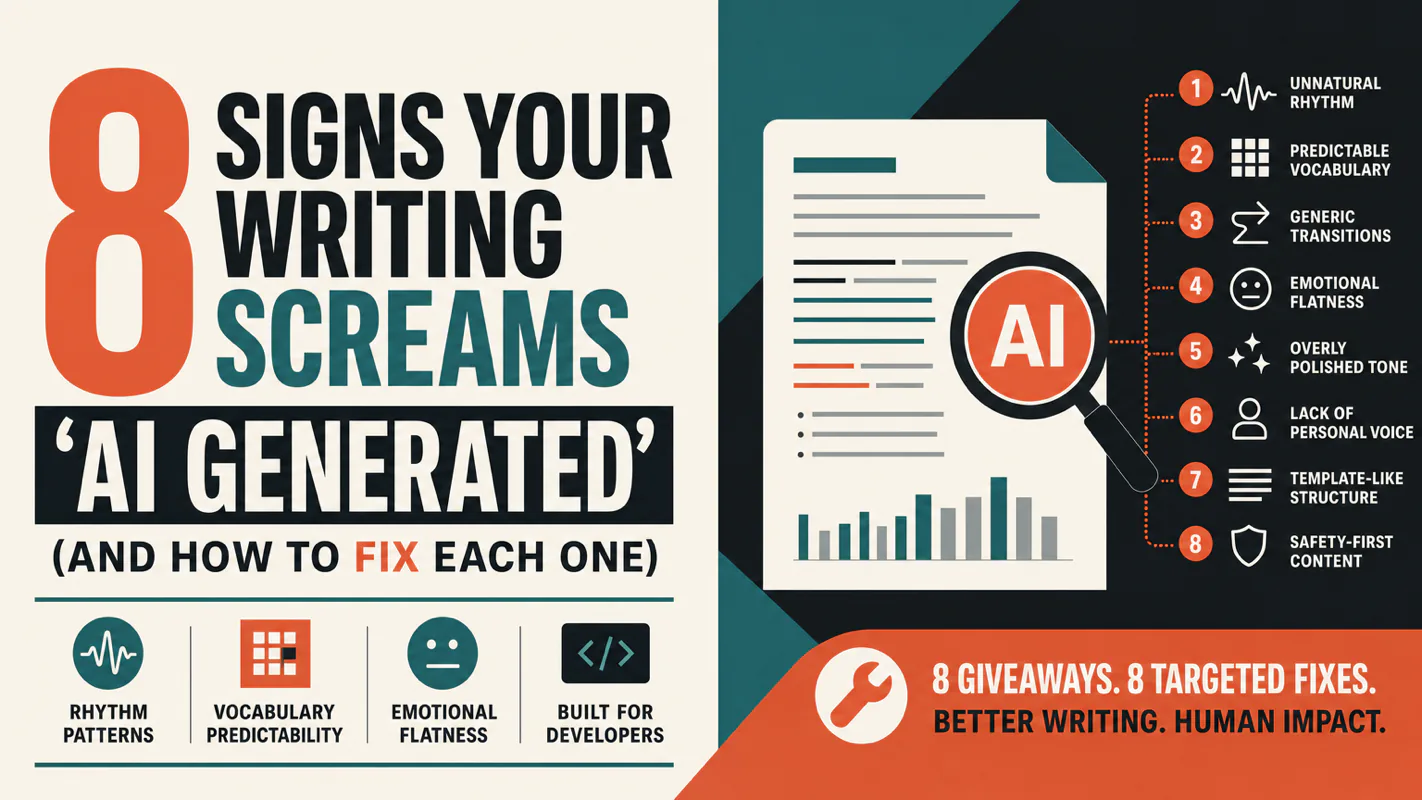
A detector score cannot survive a conversation with the freelancer it just cost three weeks of payment. What holds up is the specific thing on the page: rhythm, vocabulary, missing detail. Eight of them here, and the reason review stays human when you automate business processes.