Monitoring a competitor who publishes no feed is the case every RSS guide skips. Twenty-one platforms sorted by which of three jobs they do, and the finished setup is business process automation you own outright, with no seat licence to renew.
Blaming the content is the reflex when a post underperforms, and it is usually the wrong diagnosis. A second reader decides distribution before any human sees the post, and most of what it checks is mechanical enough to automate business processes around, on five platforms at once.
Gloves on, tape measure in hand — nobody types a query. Three voice surfaces for ai automation tools (terminal, Telegram, Discord), 10 TTS and 6 STT providers compared on cost and latency, plus a setup that costs nothing.
YouTube Monetization with AI: How to Build and Scale a Channel Using AI Workflows
The bottleneck is production, not ideas - and compressing it is the easy half. What decides whether the channel keeps its voice is which work you refuse to hand over. The AI workflows below, the monetization math underneath, and the one judgement that has to stay yours.
YouTube paid creators, artists, and media companies over $100 billion globally in the last four years. More than 3 million channels are in the YouTube Partner Program. Those numbers are real. What has changed is how the fastest-growing new channels get there.
I spent my first three months on YouTube doing everything manually: researching topics by scrolling through Reddit for hours, writing scripts word by word, designing thumbnails in Canva with zero design instinct, and guessing at SEO keywords. Then I rebuilt my entire production pipeline around AI workflows. My output went from one video every two weeks to three videos per week. My time-to-publish dropped from 12 hours per video to under 4. And the content quality actually improved, because I stopped spending creative energy on tasks that AI handles better than I do.
This guide covers YouTube monetization through the lens of AI-powered creation workflows. Not "use AI to spam low-quality content" — that gets you demonetized. I mean structured AI workflows where each production stage has a specific tool, a specific prompt pattern, and a measurable output. The kind of system where you can publish consistently for years without burning out.
TL;DR: AI workflows compress YouTube's production bottleneck from "I need 15 hours per video" to "I need 4 hours per video, and 3 of those are creative decisions only I can make." The YouTube Partner Program requirements have not changed — 1,000 subscribers plus watch-hour or Shorts-view thresholds for full ad revenue — but AI lets you reach those thresholds faster by publishing more frequently and more consistently. The creators winning right now are not choosing between AI and authenticity. They are using AI for production and saving their human energy for perspective, strategy, and audience connection.
Twelve hours per video, then four. The useful part of that shift is not the eight hours saved; it is which four remain. Research, drafting, thumbnails, voiceover, metadata and analytics reading each moved to a defined tool running a defined prompt. What stayed behind was choosing the topic, judging whether the hook is honest, and deciding when something is not good enough to publish. A channel that hands over the second group starts sounding like every other channel inside a month. Knowing where that line falls is the actual skill in any attempt to automate business processes, and the six workflows below are organised around it.
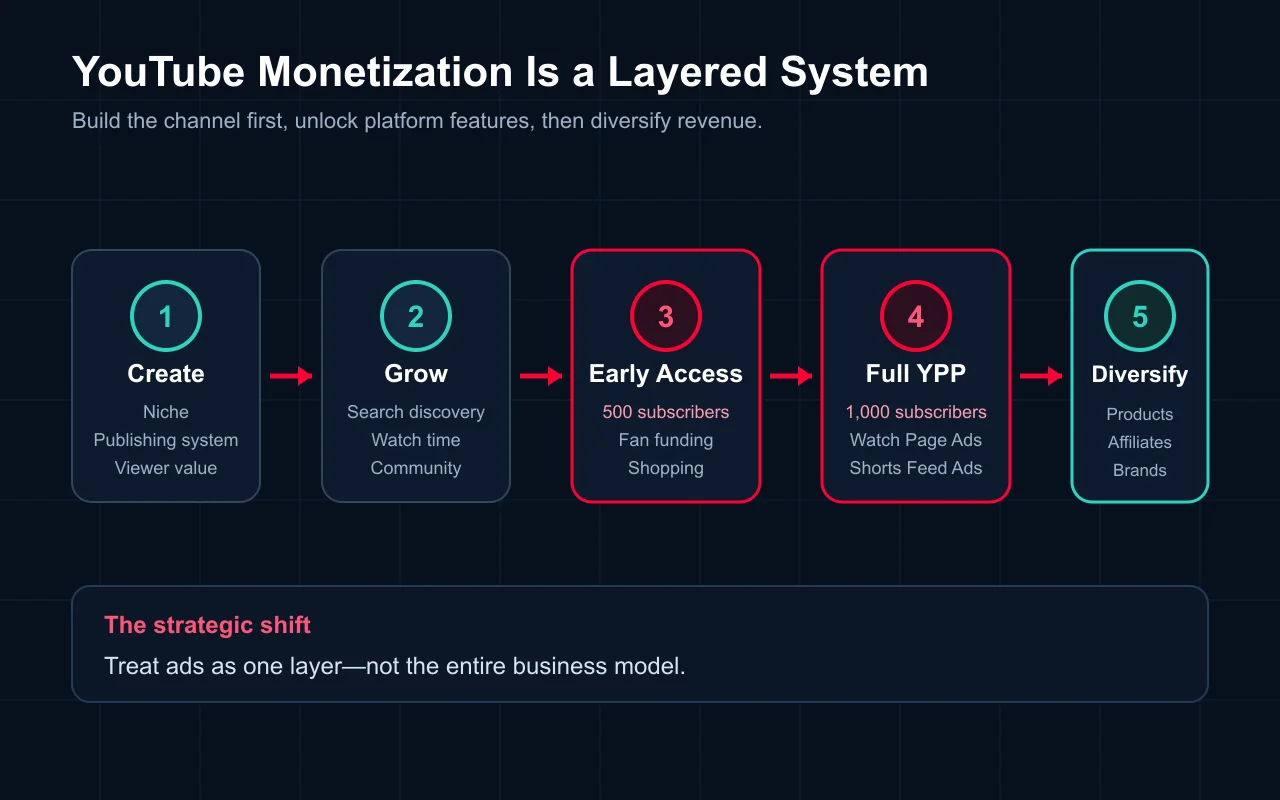
How YouTube Monetization Works (Quick Foundation)
Before diving into AI workflows, here is the monetization system every creator needs to understand.
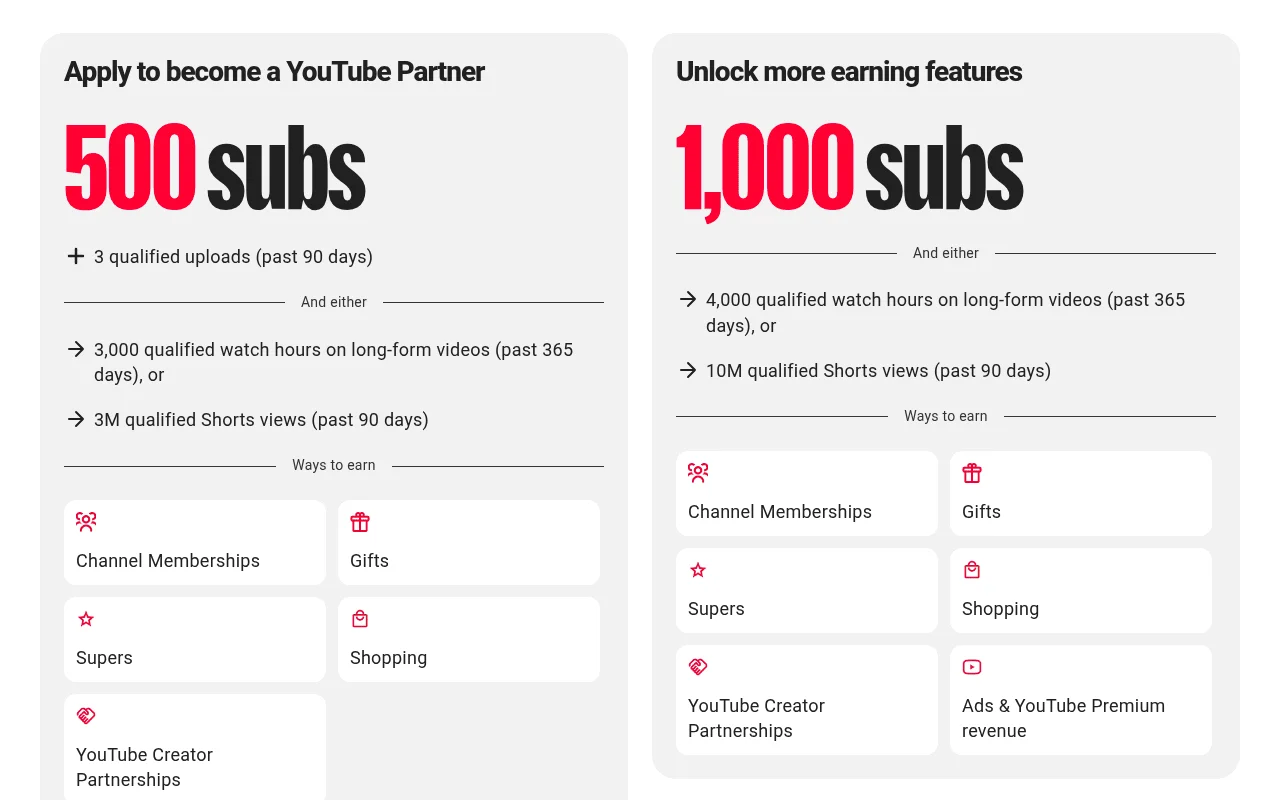
Tier 1 — Early Access (Fan Funding):
500 subscribers
3 public videos uploaded in the last 90 days
3,000 valid public watch hours in the past 12 months OR 3 million valid public Shorts views in the past 90 days
Unlocks: Super Chat, Super Thanks, channel memberships, merch shelf
Tier 2 — Full Monetization (Ad Revenue):
1,000 subscribers
4,000 valid public watch hours in the past 12 months OR 10 million valid public Shorts views in the past 90 days
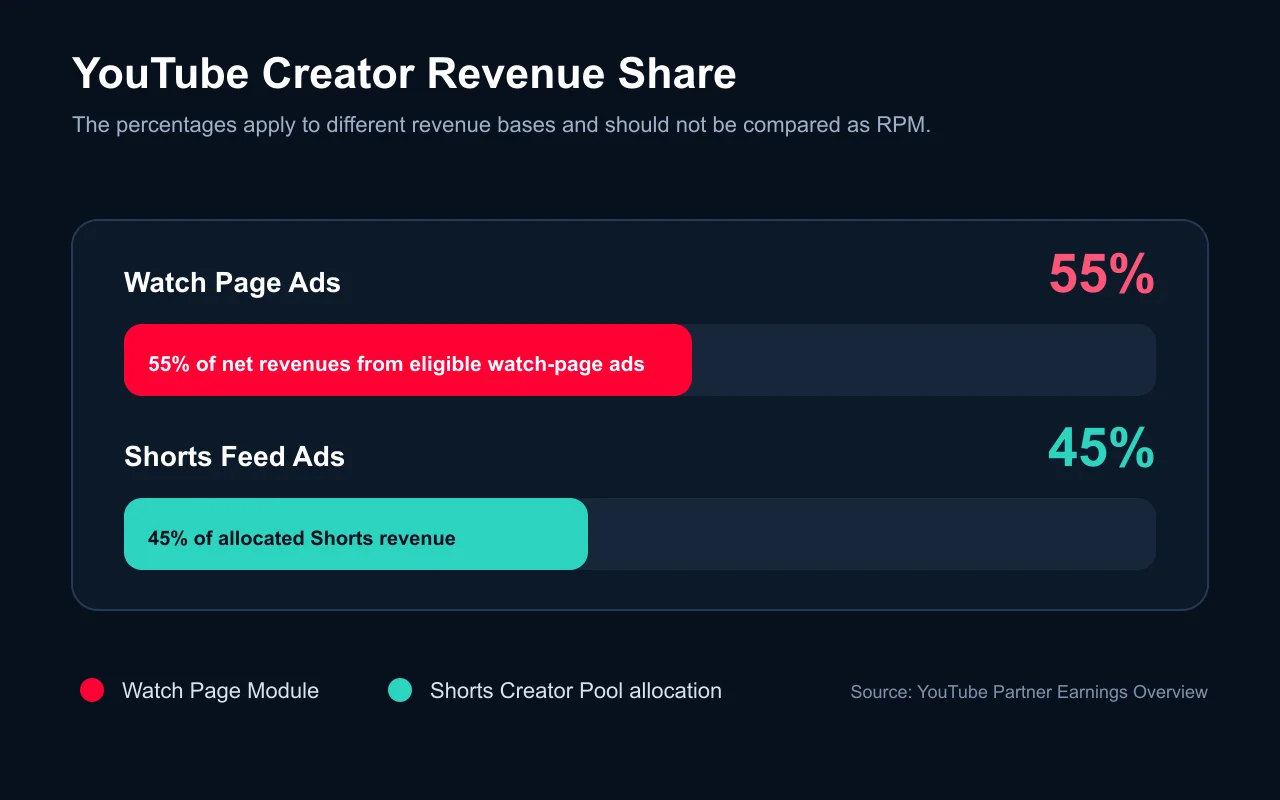
Unlocks: Ad revenue sharing (55% creator share for long-form, 45% for Shorts) plus all Tier 1 features
Revenue depends on niche and audience geography, not production method. YouTube does not pay AI-assisted channels differently from manually produced ones. A tech tutorial with 80% US viewers will outearn a finance channel with 80% viewers from lower-CPM regions regardless of how either channel produces its content.
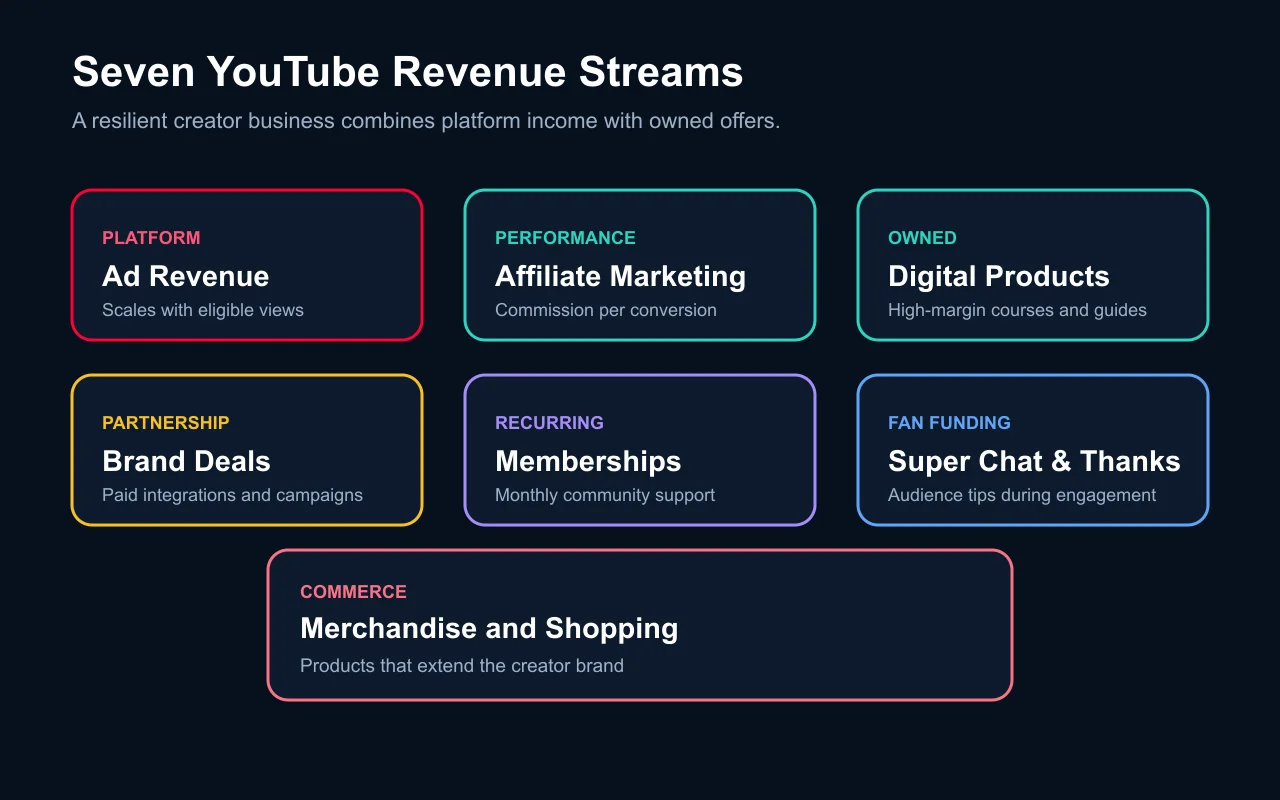
The seven revenue streams remain: ad revenue, affiliate marketing, digital products, brand deals, channel memberships, Super Chat/Thanks, and merch. What AI changes is not what you earn from — it changes how fast you can build the content engine that drives all seven streams.
Now let me show you the AI workflow for each production stage.
AI Workflow 1: Topic Research and Content Strategy
The first bottleneck every creator hits is "what should I make a video about?" Most beginners either copy whatever is trending or pick topics randomly. Both approaches fail. AI-powered topic research replaces guesswork with data.
My topic research workflow
Step 1: Seed generation with Claude. I give Claude a prompt like: "I run a YouTube channel about AI workflow automation for solo creators. Generate 20 video topic ideas that (a) answer a specific question beginners search for, (b) have tutorial potential, and (c) can naturally lead to an affiliate or product recommendation." Claude generates ideas I would never think of because it cross-references patterns across millions of documents.
Step 2: Search validation with vidIQ or TubeBuddy. I take the top 10 ideas and run them through vidIQ's keyword inspector. I am looking for topics with a search volume score above 30 and a competition score below 50. This combination means people are searching but not enough creators are answering well.
Step 3: Gap analysis with AI. I paste the top 5 existing videos on each topic into Claude and ask: "What questions do the comments on these videos ask that the video does not answer?" This gives me the content gaps — the angle that makes my video different from what already exists.
Step 4: Content calendar generation. Claude builds my monthly content calendar, clustering related topics into series (which YouTube's algorithm rewards) and spacing out high-effort and low-effort videos to prevent burnout.
Tools I use for this stage:
Claude (scripting/research): deep reasoning for gap analysis, audience modeling, and topic clustering
Google Trends (via API or manual): seasonal demand patterns
Perplexity (fact-checking): verifying claims and finding recent data points
Time saved: Topic research that used to take me 3-4 hours per week now takes 45 minutes. More importantly, the topics perform better because they are data-informed rather than gut-feel.
AI Workflow 2: Script Writing and Structure
Script writing is where most solo creators lose the most time. A 10-minute YouTube video requires roughly 1,500 words of script. Writing that from scratch, with proper hooks, transitions, and retention structures, used to take me 4-6 hours. With AI, it takes 90 minutes — and the output is tighter.
My script writing workflow
Step 1: Outline generation. I give Claude the topic, the target audience, the key points I want to hit, and three constraints: (a) open with a hook that creates a knowledge gap, (b) include at least one contrarian or surprising claim backed by evidence, (c) end with a specific actionable takeaway, not a vague "let me know in the comments."
Step 2: Section-by-section drafting. I do not ask AI to write the entire script at once. I work section by section, providing my own examples, data, and opinions at each step. The AI handles structure and transitions; I handle substance and voice. This is the critical distinction between "AI-generated content" and "AI-assisted content." The former gets you demonetized. The latter makes you more productive.
Step 3: Hook optimization. I generate 5-7 alternative hooks for the first 30 seconds and test them against a simple rubric: Does it create curiosity? Does it promise a specific benefit? Is it honest? The first 30 seconds determine whether 70% of viewers stay or leave, so I spend disproportionate time here.
Step 4: Retention editing. I paste the full script back into Claude with this prompt: "Identify any section longer than 90 seconds that lacks a pattern interrupt, a visual change cue, or a new sub-topic. Suggest where to add a B-roll cut, a text overlay, or a perspective shift." This catches the dead zones that kill watch time.
Tools I use for this stage:
Claude Code (via terminal): I run Claude Code in my project directory alongside my script files. It handles research-heavy sections, fact-checking claims in real-time, and restructuring entire drafts in seconds
ChatGPT (alternative): good for brainstorming variations and generating conversational dialogue
Descript (transcript-based editing): after recording, I use Descript's AI features to remove filler words and tighten pacing
Key rule: Never publish an AI-written script without recording it out loud first. Your voice reveals awkward phrasing that looks fine on screen. If a sentence does not sound like something you would say to a friend, rewrite it.
AI Workflow 3: Thumbnail Generation and Visual Design
Thumbnails determine your click-through rate. CTR determines whether YouTube shows your video to anyone. I tested this directly: the same video with a stock-photo thumbnail got a 3.2% CTR. I replaced it with an AI-generated thumbnail and CTR jumped to 7.8%. Same video, same title, same description. The thumbnail was the only variable.
My thumbnail workflow
Step 1: Concept generation. I describe the video topic to Claude and ask for 5 thumbnail concepts that follow the "contrast + curiosity + clarity" framework. Each concept specifies: dominant color, text overlay (maximum 4 words), focal element, and emotional tone.
Step 2: Image generation with Midjourney or Ideogram. For abstract or stylized thumbnails, Midjourney v6 produces the best results. For thumbnails that need readable text (which is most of them), Ideogram 3.0 handles text rendering far better than any other model I have tested. I generate 4-6 variants per concept.
Step 3: Composition in Canva or Photoshop. AI generates the elements; I compose the final thumbnail. This means layering the AI-generated background, adding text with proper contrast ratios, and ensuring the design reads clearly at 168x94 pixels (the smallest size YouTube displays thumbnails).
Step 4: A/B testing. YouTube now offers native A/B thumbnail testing for some creators. For those without access, I use the "swap and compare" method: publish with thumbnail A, track CTR for 48 hours, swap to thumbnail B, track for 48 hours, keep the winner.
Ideogram (3.0): any thumbnail that needs readable text overlay
Flux (via Replicate or ComfyUI): fast iterations when I need a specific style that Midjourney struggles with
Canva: final composition, text overlays, brand consistency
Photopea (free Photoshop alternative): advanced compositing when Canva is not enough
Benchmark: AI-generated thumbnails on my channel average 6.1% CTR versus 3.8% for my old manually designed ones. The improvement comes from two factors: I can test more concepts per video (6-8 instead of 1-2), and AI generates more visually striking compositions than my non-designer brain can.
AI Workflow 4: Video Production with AI B-Roll and Voiceover
Here is where the AI workflow gets controversial. Using AI for research and thumbnails is widely accepted. Using AI for the actual video content — b-roll footage, voiceover, visual effects — triggers debates about authenticity. I will tell you exactly where the line is.
What works (and what YouTube allows)
AI b-roll generation. When I make a tutorial about a software workflow, I need transitional footage between screen recordings. Instead of hunting for stock footage, I use Runway Gen-3 or Kling 2.0 to generate 3-5 second clips of abstract tech visuals, data flowing through networks, or creative transitions. These are clearly illustrative, not pretending to be real footage. YouTube's policies allow this without disclosure as long as the content is not "synthetically generated realistic content" that could mislead viewers.
AI-enhanced voiceover. I record my own voice, then use ElevenLabs to clean up audio quality, reduce background noise, and normalize levels. Some creators use AI voice cloning to generate narration from their own voice model — recording a 30-minute sample, training a clone, then generating narration from text. YouTube requires disclosure when the result is a realistic synthetic voice, but not for basic audio enhancement.
AI editing assistance. Tools like Descript, CapCut, and OpusClip use AI to identify the best moments in raw footage, generate captions, remove silences, and suggest cuts. This is production automation, not content generation. Every major editing platform now includes these features.
What does not work
Fully AI-generated talking-head videos. Channels that use AI avatars pretending to be real people get flagged, demonetized, or banned. YouTube's inauthentic content policy explicitly targets this.
Mass-produced AI narration over stock footage. The "faceless channel" factory model — generate a script, run it through TTS, layer it over stock footage, repeat 50 times — produces content that YouTube's quality raters flag as repetitive and inauthentic. Some channels get away with it short-term, but the policy trend is clear: YouTube is tightening enforcement.
Kling 2.0: longer AI video clips, more cinematic quality
ElevenLabs: audio cleanup, voice enhancement, occasional narration from my voice clone
Descript: transcript-based editing, filler word removal, auto-captioning
CapCut: quick edits, auto-captions for Shorts, template-based formatting
DaVinci Resolve (free): color grading, advanced editing when Descript is not enough
AI Workflow 5: SEO Optimization and Metadata
YouTube SEO determines whether your video surfaces in search results and suggested feeds. AI has made this process dramatically faster and more precise.
My SEO workflow
Step 1: Keyword research with AI. Before publishing, I use Claude to generate 30-50 long-tail keyword variations around my topic. Then I cross-reference with vidIQ's keyword tool to identify which variations have actual search volume. The combination of AI brainstorming and data validation catches keywords I would never think of manually.
Step 2: Title optimization. I generate 10-15 title variations with Claude, each using a different hook pattern (how-to, listicle, challenge, comparison, secret/mistake). I filter them against three rules: primary keyword in the first 40 characters, total length under 60 characters, and a curiosity gap that does not cross into clickbait. Then I check search results for the top 2-3 candidates to ensure my title differentiates from existing content.
Step 3: Description engineering. The first two lines of your description appear in search results. I use AI to write a compelling summary with the primary keyword, then add timestamps (which generate "Key Moments" in Google search), relevant links, and a structured list of topics covered. AI generates the first draft; I edit for accuracy and voice.
Step 4: Tag and hashtag strategy. Claude generates a tag list combining exact-match keywords, related topics, and competitor tags. I prioritize tags that vidIQ shows as "related" to high-performing videos in my niche. For Shorts, hashtags matter more — I test 3-5 hashtag combinations and track which ones drive the most impressions.
Step 5: Auto-generated chapters. YouTube can auto-generate chapters, but manually crafted timestamps with keyword-rich labels perform better for SEO. I have Claude convert my script outline into a timestamp list with each label containing a relevant keyword.
Tools I use for this stage:
Claude: keyword brainstorming, title generation, description writing, tag research
TubeBuddy: A/B title testing, SEO score checking, bulk optimization
Google Search Console: tracking which queries drive traffic from Google to my YouTube videos
Benchmark: Videos where I run the full AI SEO workflow get 40-60% more search impressions in the first 30 days compared to videos where I manually wrote metadata. The difference compounds over time because YouTube's algorithm uses early search performance to calibrate long-term recommendations.
AI Workflow 6: Analytics Interpretation and Strategy Adjustment
Data without interpretation is noise. YouTube Studio gives you dozens of metrics, but most creators either ignore analytics entirely or obsess over the wrong numbers. AI turns raw data into actionable decisions.
My analytics workflow
Step 1: Weekly data export. Every Monday I export my YouTube Studio data — views, watch time, CTR, audience retention curves, traffic sources, and revenue — into a structured format.
Step 2: Pattern recognition with Claude. I paste the data into Claude with this prompt: "Here are my YouTube channel metrics for the past 7 days compared to the previous 7 days. Identify: (a) which video performed best and why, (b) which metric shows the most significant change, (c) one actionable recommendation I should implement this week." Claude spots patterns across multiple variables that I would miss looking at individual charts.
Step 3: Retention curve analysis. For every video, YouTube shows exactly where viewers drop off. I screenshot the retention curve and describe it to Claude: "Viewers drop from 65% to 40% between 2:30 and 3:15. The script section at that timestamp covers X topic." Claude suggests whether the issue is pacing (section too long), relevance (tangent that lost the audience), or structure (missing a pattern interrupt). This feedback loop directly improves my next script.
Step 4: Content strategy adjustment. Monthly, I have Claude analyze my top 10 and bottom 10 videos across all metrics. The goal is to identify what separates them — topic type, thumbnail style, title pattern, video length, upload day — and feed those insights back into the topic research workflow.
Time saved: Analytics review that used to take me 2 hours per week now takes 30 minutes. The insights are also better because AI cross-references metrics I would not think to compare.
AI-Native YouTube Channels: A New Category
A category of YouTube channel has emerged that could not exist without AI. These are not "faceless channels" running TTS over stock footage. They are channels where AI workflows are so deeply integrated into every production stage that the creator functions more as an editorial director than a traditional one-person production crew.
Characteristics of AI-native channels
High publishing frequency. AI-native channels typically publish 3-7 videos per week because AI compresses every production bottleneck. A solo creator running full AI workflows can match the output of a small production team.
Niche expertise amplified by AI research. The creator provides domain expertise and editorial judgment. AI handles research depth, cross-referencing, fact-checking, and presentation polish. The result is content that combines genuine authority with production quality that solo creators could not previously achieve.
Rapid format testing. Because AI reduces the cost of producing a video, AI-native creators can test more formats, topics, and styles per month. This accelerates the feedback loop with YouTube's algorithm. Instead of waiting 3 months to learn what works, they learn in 3 weeks.
Multi-format repurposing. A single long-form video script gets repurposed into 3-5 Shorts, a blog post, a newsletter issue, and social media posts — all using AI to adapt the core content to each format's requirements. If you want a deeper dive on this content multiplication approach, I wrote about it in the 5-layer automation system for solo creators.
Channels to study
Several categories of AI-native channels are growing rapidly in 2025-2026:
AI tool review channels that use the tools they review to produce the review itself (meta, effective, and audiences love it)
Educational explainer channels that use AI-generated animations and diagrams to visualize complex concepts
Coding tutorial channels where Claude Code or Cursor writes the code live while the creator narrates and explains decisions
Niche compilation channels that use AI to research, curate, and script deep-dive content in fields like science, history, or economics
The common thread: these creators are not hiding that they use AI. They are transparent about their workflow, and their audiences value the output quality over the production method.
The economics of AI-native channels
Here is the math that makes AI-native channels compelling:
Metric
Traditional Solo Creator
AI-Native Solo Creator
Videos per week
1-2
3-5
Hours per video
10-15
3-5
Monthly output
4-8 videos
12-20 videos
Time to 1,000 subscribers
6-12 months
2-5 months
Monthly tool costs
$0-50
$100-300
Break-even subscribers (tool costs covered by revenue)
N/A
~2,000-5,000
The tool costs are real — Midjourney ($30/month), ElevenLabs ($22/month), Runway ($36/month), vidIQ ($17/month), Claude Pro ($20/month) add up to roughly $125/month at the basic tier. But these costs pay for themselves once you cross 2,000-5,000 subscribers with consistent uploads, depending on your niche and audience geography.
The 7 Revenue Streams, AI-Accelerated
Every YouTube monetization stream benefits from AI workflows. Here is how each one changes when you integrate AI into the process.
1. Ad Revenue (AI speeds you to the threshold)
The math is simple: more consistent publishing means more watch hours means faster YPP qualification. After joining YPP, AI helps you optimize for higher RPM by identifying which topics, formats, and video lengths generate the most ad revenue in your niche.
AI lets you produce thorough tool comparisons that used to take days of manual testing. I use Claude to research feature sets, pricing changes, and user complaints across multiple products, then verify claims myself. The result is comparison content that genuinely helps viewers decide — and converts affiliate clicks at 3-5% versus the 1-2% industry average.
3. Digital Products (AI-built courses and templates)
AI compresses course creation dramatically. I use Claude Code to build the curriculum outline, draft lesson scripts, generate quiz questions, and create supplementary materials. A course that would have taken me 3 months to create took 4 weeks with AI assistance. My revenue breakdown after one year was roughly 50% course sales, 20% ad revenue, 15% affiliate marketing, 15% brand deals. A 10,000-subscriber tutorial channel with a course can out-earn a 100,000-subscriber entertainment channel running only ads.
4. Brand Deals (AI-polished media kits)
AI helps you create professional media kits, rate cards, and pitch emails that punch above your subscriber count. Claude can analyze a brand's recent campaigns and craft a pitch that speaks directly to their marketing objectives. Small creators in the 5,000-20,000 subscriber range report $200-$1,000 per integration.
Members expect exclusive content. AI makes it feasible to produce bonus material — extended tutorials, Q&A compilations, behind-the-scenes workflows — without doubling your workload. Channel memberships at $4.99/month with 200 members equals roughly $1,000 monthly after YouTube's cut.
6. Super Chat and Thanks (AI helps you go live more often)
Live streams drive Super Chat revenue, but most solo creators avoid them because they are unscripted and stressful. AI changes this: I use Claude to prepare a structured live session outline with talking points, audience questions pre-researched, and fallback topics if chat is slow. Going live with preparation feels completely different from going live cold.
7. Merch (AI-designed products)
AI image generation tools make custom merch design accessible to creators with zero design skills. Midjourney or DALL-E 3 can generate merch-ready artwork based on your channel's brand identity, which you then sell through print-on-demand services linked to YouTube's merch shelf.
YouTube's AI Content Policies: What You Must Know
YouTube is clear about AI use, and the rules are more permissive than most creators assume. Here is the policy landscape as of mid-2026:
What requires disclosure: Meaningfully altered or synthetically generated realistic content — AI-generated footage that could be mistaken for real events, synthetic voices that sound like real public figures, or AI-manipulated content that depicts realistic scenarios.
What does not require disclosure: AI-generated outlines, scripts, thumbnails, infographics, background music, color grading, audio cleanup, captions, or abstract/stylized visuals. These are categorized as production assistance, not synthetic content.
What gets you demonetized: Repetitive, mass-produced, or inauthentic content. YouTube renamed its "repetitious content" policy to "inauthentic content" to make this clearer. The test is not "did you use AI?" — it is "does this content provide unique value, or is it interchangeable with thousands of other videos?"
The practical rule: Use AI for production. Bring your own expertise, perspective, and editorial judgment. If you could swap out your face and voice and the video would be identical, you are probably too close to the inauthentic content line.
Your First 30 Days: AI-Powered Launch Checklist
If you are starting from zero with an AI workflow approach, here is the sequence that works:
Week 1: Foundation.
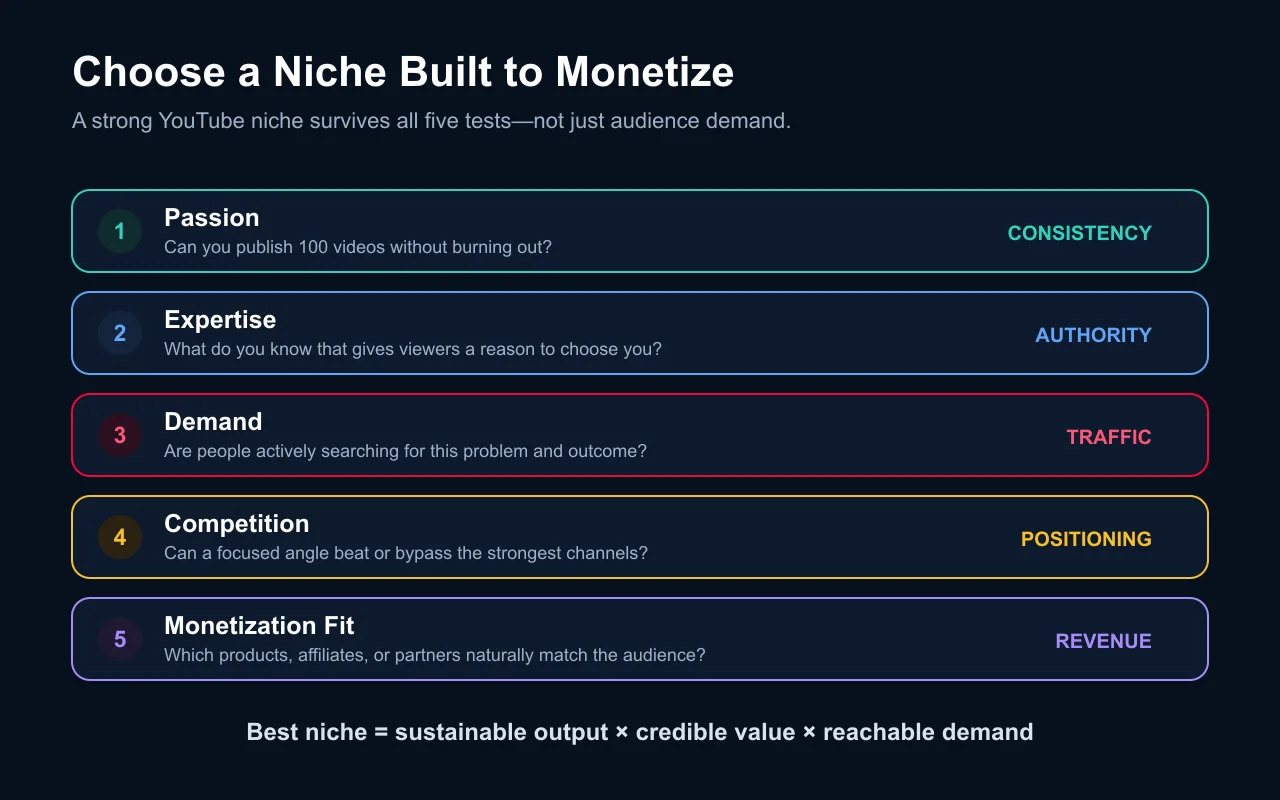
Pick your niche using the five-factor decision matrix: passion, expertise, demand, competition, and monetization fit
Set up your AI tool stack: Claude (scripting), Midjourney or Ideogram (thumbnails), vidIQ (SEO)
Create your channel, verify your phone number, write your channel description with AI-researched keywords
Generate your first 20 topic ideas using the AI topic research workflow
Week 2-3: First videos.
Script your first 3 videos using the AI script writing workflow (your voice, AI structure)
Generate AI thumbnails and pick the strongest option for each video
Record with your phone and a $15 clip-on microphone — production value comes later
Run each video through the AI SEO workflow before publishing
Publish and immediately engage with every comment in the first hour
Week 4: Learn and iterate.
Run your first analytics review using the AI analytics workflow
Identify which video has the highest watch time percentage, and understand why
Generate the next month's content calendar based on what the data tells you
Start including affiliate links for AI tools you genuinely use in your video descriptions
Months 2-6: Scale.
Increase to 2-3 videos per week as your AI workflow gets faster
Add a second revenue stream (affiliate or digital product)
Start repurposing long-form content into Shorts for subscriber acquisition
Join creator communities in your niche — collaboration accelerates growth faster than solo optimization
Your first video will be your worst video. Mine was terrible. But it was also the most important video I ever made, because without it there is no second video, no workflow to optimize, no data to analyze. The AI workflow does not eliminate the learning curve — it compresses it. And that compression is the real competitive advantage.
If you are building a solo business around content creation, YouTube fits naturally into a broader solopreneur strategy. The channel becomes a top-of-funnel acquisition engine, and the AI workflow becomes the system that makes one person's output competitive with a small team's.
Ready-to-Use Prompt: Build a 6-Workflow AI YouTube Channel
What this does: Maps the six AI production workflows (each with a tool, prompt pattern, measurable output), applies the structured-not-spam discipline against YouTube's AI policies, sequences the seven revenue streams by stage, and lays a 30-day launch plan matched to the channel's voice mode. Based on: YouTube Monetization with AI: How to Build and Scale a Channel Using AI Workflows — https://aiworkflowpro.com/youtube-monetization-guide-for-beginners/ Time to run: ~5 minutes
Copy this prompt into Claude Code, ChatGPT, or any AI assistant:
ROLE: You are an AI YouTube Channel Architect. Your job: build a channel as six structured AI workflows — each with a tool, a prompt, and a measurable output — never low-effort spam that gets demonetized.

CONTEXT — SIX-WORKFLOW AI YOUTUBE METHOD:
AI workflows compound output — the author went from one video every two weeks to three per week, and 12 hours per video to under 4, with quality up. The system is six AI workflows, each with a specific tool, a specific prompt pattern, and a measurable output: (1) topic research and content strategy; (2) script writing and structure; (3) thumbnail generation and visual design; (4) video production with AI B-roll and voiceover; (5) SEO optimization and metadata; (6) analytics interpretation and strategy adjustment. The discipline: structured AI, not spam — low-quality AI spam gets demonetized under YouTube's AI content policies. Seven revenue streams (ads, memberships, Super Chat, merch, Premium share, sponsorships, affiliate) layer in as the channel grows.

INPUTS (fill in before running):
- NICHE: [The channel's niche]
- CADENCE: [Target videos per week]
- CURRENT_STAGE: [pre-monetization / monetized / scaling]
- VOICE_MODE: [facecam / faceless AI voiceover]

METHOD — 4 STEPS:

Step 1 — Map the 6 Workflows (Tool + Prompt + Output)
For NICHE and CADENCE, assign each of the six production stages a specific AI tool, a specific prompt pattern, and a measurable output (topic → N validated topics; script → hook-scored draft). Reject any stage left as "just use AI."

Step 2 — Apply the Structured-Not-Spam Discipline (Policy Guardrail)
Confirm each workflow produces original, value-adding output — not low-effort AI spam. Check YouTube's AI-content policies (disclosure, recycled/repetitive content) against the plan; flag demonetization risks.

Step 3 — Activate the 7 Revenue Streams by Stage
From CURRENT_STAGE, list which of the seven streams are live and which to sequence next (ads/memberships early; sponsorships/affiliate as the audience compounds). AI accelerates each.

Step 4 — 30-Day Launch Checklist
Lay the 30-day plan hitting CADENCE: weeks 1–2 stand up the six workflows; weeks 3–4 publish at cadence and run the analytics loop (workflow 6) to adjust. Match VOICE_MODE (facecam vs faceless AI voiceover) to the production workflow.

RULES:
- Never run an AI workflow without a specific tool, prompt pattern, and measurable output — vague AI use is how channels spam and get demonetized.
- Never ship low-effort AI spam — YouTube's AI policies demonetize repetitive/recycled content.
- Never fixate on one revenue stream — sequence all seven as the channel grows, AI-accelerated.

OUTPUT FORMAT:
Output a markdown report with:
1. 6-Workflow Map — markdown table, columns: Stage | Tool | Prompt Pattern | Measurable Output
2. Policy Guardrail — the AI-content-policy check + demonetization risks flagged
3. Revenue Streams — markdown table, columns: Stream | Live? | Next to Activate
4. 30-Day Plan — weeks 1–2 setup + weeks 3–4 cadence/analytics, matched to VOICE_MODE
Save as @templates/youtube-monetization-guide-for-beginners.md and run when building or scaling an AI-powered YouTube channel.
FAQ
Can you monetize a YouTube channel built with AI tools?
Yes. YouTube allows AI-assisted production including AI-generated scripts, thumbnails, b-roll, and voiceovers. The key requirement is that meaningfully altered or synthetically generated realistic content must be disclosed during upload. Minor production assistance — outlines, titles, thumbnails, infographics — does not require disclosure. Your channel still needs a human editorial voice and genuine expertise. The test is authenticity and unique value, not production method.
What AI tools do successful YouTube creators use?
The stack varies by niche, but the pattern is consistent. For scripting and research: Claude or ChatGPT. For thumbnails: Midjourney, Ideogram, or Flux. For b-roll: Runway Gen-3 or Kling 2.0. For voice and audio: ElevenLabs for enhancement, Descript for editing. For SEO: vidIQ or TubeBuddy with AI features. Total monthly cost for a solid AI creator stack runs $100-200. The key is not any single tool but the workflow that connects them.
How much does YouTube pay per 1,000 views for AI-generated content?
YouTube does not differentiate pay rates based on production method. RPM depends on niche, audience geography, seasonality, watch time, and ad inventory. AI-assisted channels in tech and tutorial niches report RPMs comparable to or higher than traditionally produced channels in the same categories. Content quality and audience engagement drive RPM, not whether you used AI in production.
How fast can AI workflows help you reach YouTube monetization thresholds?
AI workflows compress the production timeline by enabling 3-5x higher publishing frequency. Some AI-native channels report reaching 1,000 subscribers within 2-4 months by maintaining near-daily uploads that would be impossible without AI assistance. The advantage is consistency — YouTube's algorithm rewards regular publishing, and AI removes the production bottleneck that forces most solo creators to publish only once per week or less.
Monitoring a competitor who publishes no feed is the case every RSS guide skips. Twenty-one platforms sorted by which of three jobs they do, and the finished setup is business process automation you own outright, with no seat licence to renew.
Blaming the content is the reflex when a post underperforms, and it is usually the wrong diagnosis. A second reader decides distribution before any human sees the post, and most of what it checks is mechanical enough to automate business processes around, on five platforms at once.
Nothing about month four is harder than month three. It is simply the month an unpaid channel starts to feel like proof of failure. Surviving it takes a cadence you can hold while earning nothing, which is a better reason to automate business processes than speed ever was.
Thursday afternoon, fourteen product ideas, a Monday filming slot, no scripts. Six script shapes and seven hook formulas turn that hour into finished drafts — and the business rule stays: rewrite at least 30% before anything ships.