Monitoring a competitor who publishes no feed is the case every RSS guide skips. Twenty-one platforms sorted by which of three jobs they do, and the finished setup is business process automation you own outright, with no seat licence to renew.
Blaming the content is the reflex when a post underperforms, and it is usually the wrong diagnosis. A second reader decides distribution before any human sees the post, and most of what it checks is mechanical enough to automate business processes around, on five platforms at once.
Gloves on, tape measure in hand — nobody types a query. Three voice surfaces for ai automation tools (terminal, Telegram, Discord), 10 TTS and 6 STT providers compared on cost and latency, plus a setup that costs nothing.
A system prompt cut from 5,000 tokens to almost nothing, and what that reveals about where the weight actually lives. Read it for the architecture, not for the recipe.
Some of the most useful things to read are the ones you should not copy. This one carries a warning printed at the top: the pattern sits outside its vendor's terms, the account running it can be switched off without notice, and the author says plainly that it is an architecture study rather than a deployment recommendation. Read it the way a builder reads a design that failed inspection, because the reasoning about what a wrapper should and should not inherit transfers to every integration you will ever commission. Anyone specifying business process automation hits this exact question eventually.
The short version:
Companion to the CLI proxy, not a replacement. This is the SDK-based path: zero CLAUDE.md pollution, native structured tool-use, real per-event streaming, automatic thinking-block filtering. Different trade-offs, different best-fit scenarios
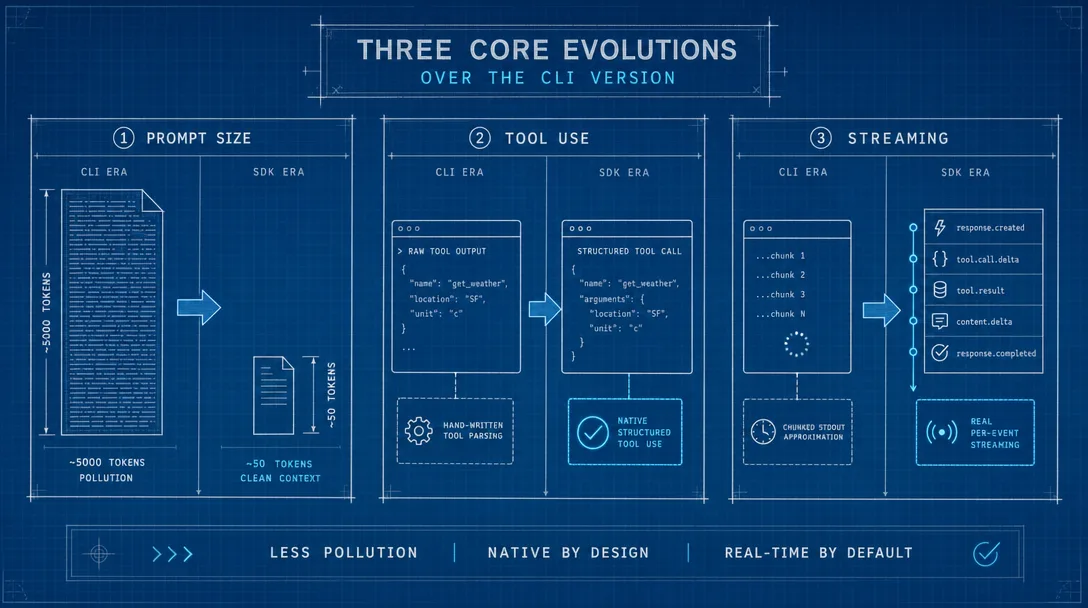
System prompt drops from ~5,000 tokens to ~50 tokens by passing settingSources: [], tools: [], mcpServers: {}, and a custom systemPrompt to the SDK's query() call
Tool-use becomes native and structured: OpenAI tool definitions are converted via jsonSchemaToZod and registered as a transient MCP server, so Claude emits tool_use events instead of prompt-injected text
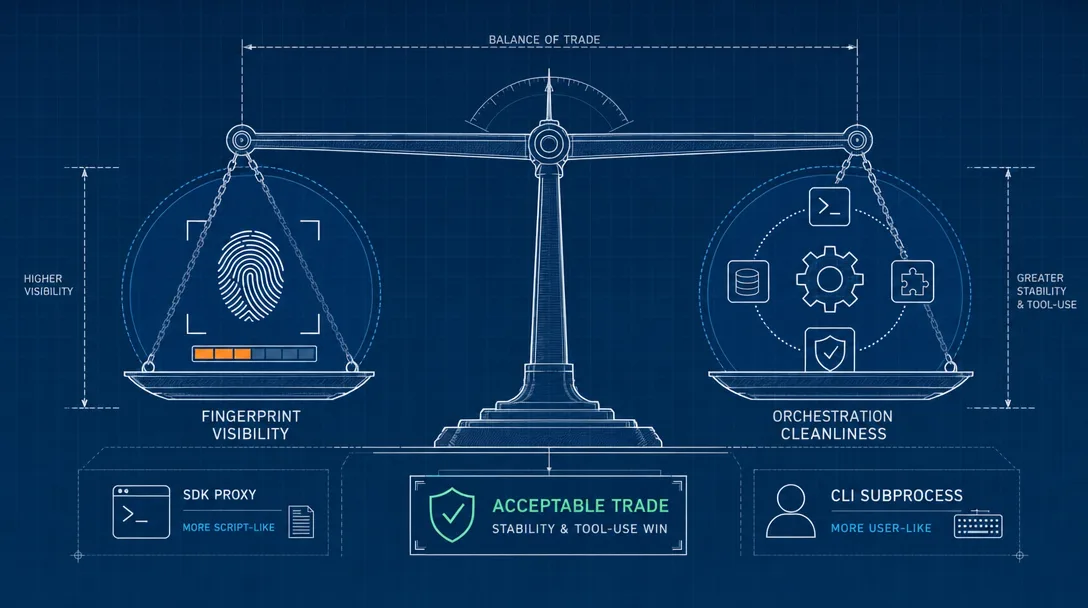
The fingerprint cost is real and worth naming: an "empty configuration" call pattern is rare among normal users. For inside-the-firewall agent orchestration, the trade is right; for fingerprint-sensitive workloads, stick with the CLI proxy
Same Terms-of-Service posture as the CLI version. Read the risk box below before going further
⚠️ Risk notice — read first
The pattern in this article is not authorized by Anthropic's Terms of Service, the same as the CLI proxy companion post. The risks are identical:
Account risk — Anthropic can suspend or ban the underlying account at any time, with no advance notice
Long-term viability is unknown — the Agent SDK's interfaces and behavior can change in any version update
No official support — when something goes wrong, Anthropic's support channel will not help with this usage
This is an architecture study, not a deployment recommendation. If you can not afford to lose access to your Claude account, do not run this against it. The architecture lessons transfer to other proxy designs that sit on more solid ToS ground; that is the value, not the deployment.
Current OpenClaw note, checked against official docs at time of writing: OpenClaw now documents Claude CLI reuse through agents.defaults.agentRuntime.id: "claude-cli", Claude Code through ACP (/acp spawn claude --bind here), and OpenCode provider routes (opencode/... or opencode-go/...). Those official paths should be evaluated before any subscription proxy.
The most common feedback on the CLI proxy companion post was the same one line, repeated in different ways:
"Can you get rid of the 5,000-token system prompt?"
The CLI proxy can not. By design, claude -p loads the entire Claude Code worldview — CLAUDE.md files, settings, the built-in tool descriptions, the permission rules — and bakes them into a roughly 5,000-token system prompt that is not user-removable. For some workloads that prompt is fine; for backend agent orchestration where the calling code wants to control the system prompt entirely, those 5,000 tokens are pure pollution.
This post is the answer. The SDK proxy strips that prompt to about 50 tokens. It does this by talking to Claude through the Anthropic Agent SDK's query() function instead of through the CLI subprocess, which lets the proxy explicitly disable every default that the CLI bakes in. The trade is a wider fingerprint — and we'll be honest about that — but for the right workload, the trade is correct.
If you have not read the CLI proxy companion post, start there. It explains why a Claude proxy is interesting at all, the four pattern families I tested, and why the CLI subprocess approach has the cleanest fingerprint. This post assumes you have that context.
Who Is This For
You read the CLI proxy post and the 5,000-token system prompt was the part that bothered you
You're building backend agent orchestration where you need precise control over the system prompt and the tool-use protocol
You can tolerate a wider request fingerprint in exchange for cleaner protocol semantics
You've read the risk notice above and you accept the same Terms-of-Service posture as the CLI version
If you've never deployed OpenClaw before, the OpenClaw multi-agent guide is the right warm-up. If you want a production path, start with the official OpenClaw routes: direct Anthropic API, Claude CLI backend, ACP Claude Code sessions, or OpenCode provider onboarding. The custom Bridge article is useful when you need a queue/approval/reporting layer beyond those official surfaces.
What the CLI Proxy Could Not Solve
After running the CLI proxy across thousands of agent calls, three pain points stayed visible:
Pain point
What the CLI proxy did
Cost
System prompt pollution
Auto-injected ~5,000 tokens of CLAUDE.md, tool descriptions, permission rules
Token cost on every request, your custom prompt diluted in default guidance
Tool-use as prompt injection
Tools defined as Markdown text, appended to prompt; tool_call extracted via regex
~95% reliable; the other 5% silently degrade to text replies
Simulated streaming
Whole text chunks split on punctuation, sent as fake deltas
Latency feels off; no token-level usage info per chunk
These three pain points have the same root cause: claude -p's pipe mode is designed for humans, not programs. The CLI emits human-readable text; programs need structured data.
The SDK proxy fixes the root cause. It calls the lower-level query() function directly, bypassing the CLI shell entirely. The output is a stream of structured events from the start; nothing has to be parsed back from text into structure.
The plain-English version: the CLI proxy is like asking someone to read your bank balance off a screen and tell you out loud — you have to listen carefully and write the number down, and sometimes you mishear. The SDK proxy is like plugging a data cable directly into the bank's system. The number arrives precise, structured, and impossible to mishear.
Three Core Evolutions Over the CLI Version
This is the heart of the post. Each of the three CLI pain points gets its own SDK-shaped fix. Each fix attacks the root cause, not the symptom.
1. Zero-Pollution Isolation
The CLI proxy's biggest pain was system-prompt injection. The SDK fix is direct: tell the SDK to load nothing.
Four parameters compose the isolation:
Parameter
What it does
Effect
settingSources: []
Skip every config source
CLAUDE.md, settings.json, project files all skipped
No external tools beyond what the request itself supplies
systemPrompt
Replace the default system prompt entirely
Whatever string you pass is the entire system prompt
Add maxTurns: 1 (no internal loop), persistSession: false (no session retention), and thinking: { type: "adaptive" } (let Opus 4.6 reason as needed), and you have a fully controlled call environment.
The principle: the move from ~5,000 tokens to ~50 tokens is not "optimization." It is "elimination." The CLI proxy can not subtract its way down — the system prompt is welded into the CLI's startup. The SDK proxy bypasses the entire startup.
For agent orchestration, 5,000 tokens of pollution per request means: more cost per call, custom prompts diluted in default guidance, and Claude's behavior shaped by instructions you did not write. Zero pollution means you decide.
2. Native Tool-Use Instead of Prompt Injection
The CLI proxy faked tool-use. The SDK proxy uses the real thing.
The CLI version's flow: Markdown tool descriptions appended to the prompt, "if you want to call a tool, format it like this" instructions, regex extraction of the call from the reply text. Five percent of the time Claude paraphrased the format and the regex missed.
The SDK version's flow:
The client sends OpenAI-format tool definitions
The proxy converts each tool's JSON Schema parameters to Zod via jsonSchemaToZod
The converted tools register as a transient MCP server passed into the query() call
Claude sees them as native tools, decides which to call, emits a structured tool_use event
The proxy translates the Anthropic event back to OpenAI-format tool_calls and returns it
Tool execution still belongs to the client; the proxy just gets the model to decide which tool to call, in structured form. Decision is the SDK's job; execution is the client's.
CLI vs SDK on tool-use:
Dimension
CLI proxy
SDK proxy
Tool definitions
Text injected at end of prompt
Type-converted, registered as MCP server
Claude's output format
Free text following a convention
Structured event stream
Parsing
Regex on text
Direct event extraction
Reliability
~95% (occasional format drift)
Structurally guaranteed
Multi-tool concurrency
Parsed sequentially, can interfere
Indexed by event, native support
The architectural shift: the CLI proxy operated at the text layer — Claude is a language model, and text outputs have inherent variance. The SDK proxy operates at the protocol layer — Claude isn't told there are tools, it sees them, and uses native tool_use to call them. Protocol-level beats text-level for any structured concern.
3. Real Streaming + Thinking Filtering
CLI streaming was simulated; SDK streaming is real.
claude -p returns a complete text block; the CLI proxy chunks it on punctuation to fake delta-by-delta delivery. query() returns an AsyncGenerator that emits one event at a time as Claude generates them; the SDK proxy converts each event to an SSE chunk and forwards immediately.
Two non-obvious design decisions live in this layer:
Thinking filtering. Opus 4.6's adaptive reasoning produces thinking blocks. Those blocks are valuable for backend debugging but must never reach the client — they can leak system-prompt structure or internal reasoning patterns. The proxy maintains a positive whitelist: only text_delta and tool_use events are forwarded; everything else, including all thinking-related events, is dropped at the proxy boundary.
Disconnect-equals-cancel. The client closes the HTTP connection; an AbortController fires; the SDK query terminates immediately. The CLI version had to manually kill the subprocess; the SDK version's cancellation is native, instant, and zero-resource-wasted.
The compressed comparison: CLI proxy: complete text → punctuation chunk → simulated stream. SDK proxy: event stream → forward as-is → real stream. Same shape on the wire to the client, completely different shape inside the proxy.
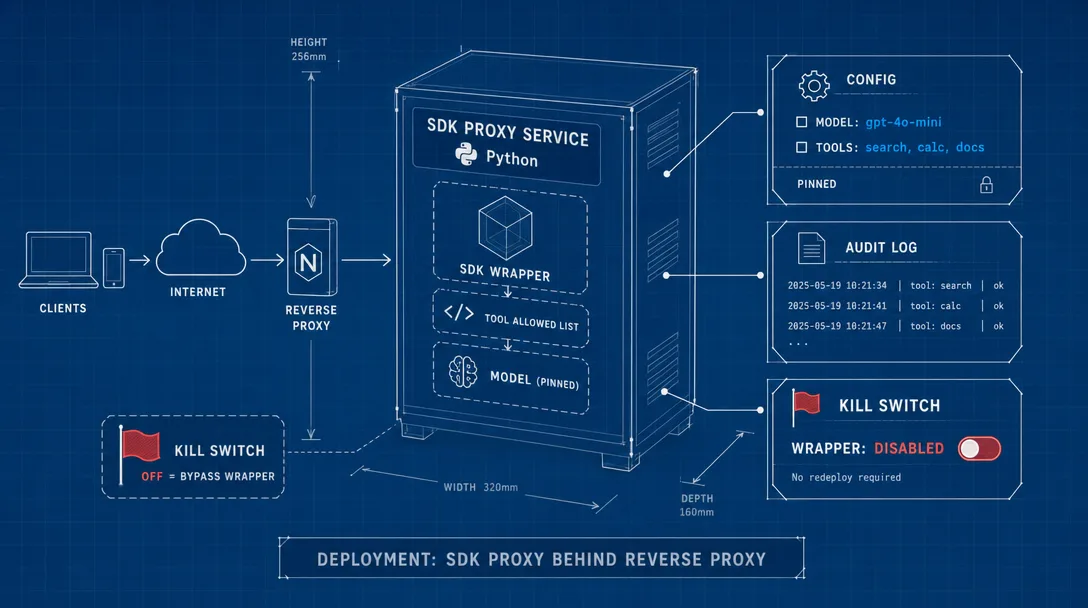
The Five-Layer Architecture
Same layered thinking as the CLI proxy, but every layer's implementation is different:
Layer
Job
SDK
Wrap the Agent SDK — zero-pollution config, model selection, Gemini multimodal routing
Tools
Convert OpenAI tool format to SDK MCP server format; track streaming tool calls
Server
HTTP routing, message-format translation, streaming and non-streaming response paths
Infra
Concurrency queue, log rotation, metrics
Types
TypeScript definitions for requests, responses, internal events
The center of gravity moved. CLI proxy lived in the process layer (spawn, parse, sandbox, cleanup). SDK proxy lives in the protocol layer (translate OpenAI to SDK, translate SDK events back to OpenAI).
The plain-English version: CLI proxy was a process-management shop. SDK proxy is a protocol-translation shop. Same building, completely different floor plan inside.
A Request, End to End
Walking one request from arrival to response makes the layered architecture concrete.
Multimodal path: convert messages → call Gemini API instead
Stream events back as SSE chunks (or assemble a full JSON for non-streaming)
Log the request, update metrics
Message Translation Rules
OpenAI's multi-turn format has to flatten into a single SDK prompt with role markers Claude can read but not imitate:
OpenAI role
Translation rule
system
Extract as the SDK's systemPrompt, replacing default entirely (no append)
user
Plain-text concatenation
assistant + tool_calls
Wrap in XML tags to preserve context
tool (tool result)
Wrap in XML tags, link to the tool call by ID
Multimodal Routing
Same design as the CLI proxy: the SDK's query() only takes text prompts; image/audio/video requests detour to Gemini 2.5 Pro. The detour is at the request level — the whole request goes to Gemini if any multimodal content is present.
Pure text → Agent SDK (zero marginal cost on the subscription)
Image / audio / video → Gemini API (pay-per-use, optional)
The SDK version's Gemini routing supports real streaming via SSE parsing — slightly more precise than the CLI version's chunked simulation.
Deployment
Prerequisites
Dependency
Version
Notes
Claude Max subscription
$100 or $200 / month tier
Required for the underlying CLI auth
Claude Code CLI
2.1.x or newer
Installed and authenticated via claude auth login
Node.js
20 or newer
Homebrew on macOS picks the right version
Gemini API key
optional
Only needed for multimodal routing
One-Prompt Deployment via Claude Code
The deployment flow is intentionally Claude-Code-driven. After unzipping the source pack, point Claude Code at it:
me: I downloaded the Claude SDK Proxy resource pack. Source is at
    /your-path/source. Please first verify my environment:
    - Node.js installed and version >= 20
    - Claude Code CLI installed and logged in
    - Port 3456 free
    Then read /your-path/source/CLAUDE.md and walk through the install.
    If you need a Gemini API key for multimodal, mine is XXX (skip if no
    multimodal needed). After deployment, run a health check.

cc: (verifies env, reads CLAUDE.md, installs deps, starts service,
     curls /health, confirms 200 OK)
The seven steps Claude Code walks through:
Verify the environment (Node version, CLI auth, port availability)
Install missing dependencies
Read project documentation
Install proxy dependencies and compile
Configure environment variables
Start the service plus the watchdog
Run the health check
The one operational rule: never test the SDK proxy from inside Claude Code. Both Claude Code and the proxy go through the same Agent SDK and share concurrency budget. Testing from inside the CLI deadlocks. Test from a separate terminal. This is the same rule as the CLI proxy and it matters even more here.
Verification
## In a separate terminal — not Claude Code
$ curl http://127.0.0.1:3456/health
{"status":"ok"}
200 OK and the proxy is up.
Environment Variables
Variable
Default
Purpose
PROXY_PORT
3456
Listening port
PROXY_CONCURRENCY
4
Max concurrent requests
GEMINI_API_KEY
(unset)
Enables multimodal routing
GEMINI_MODEL
gemini-2.5-pro
Multimodal model selection
Why no PROXY_MAX_BUDGET_USD here? The CLI proxy preserves the CLI's built-in tools, so a runaway tool loop is possible and the budget cap is a meaningful guard. The SDK proxy has tools: [] and maxTurns: 1, which structurally prevents the runaway scenario. The cap is unnecessary.
Client Integration
Any OpenAI-API-compatible client connects directly:
Setting
Value
Base URL
http://localhost:3456/v1
API Key
(any string — no local auth)
Model
claude-opus-4 / claude-sonnet-4 / claude-haiku-4
OpenClaw connects via its provider config. Cherry Studio, Cursor, Continue.dev, and any other OpenAI-compatible client work with the same three settings.
Day-Two Operations
Operational tasks also delegate cleanly to Claude Code:
Operation
What I tell Claude Code
Status check
"Is the SDK proxy running?"
Recent logs
"Show the last 20 lines of SDK proxy log"
Restart
"Restart the SDK proxy"
Reconfigure
"Change SDK proxy concurrency to 6"
Logs and Monitoring
Request log — JSONL, one line per request, daily rotation, includes request ID, agent ID, model, token usage, duration
Watchdog — Stops restarting after five crashes in five minutes (flapping protection)
Concurrency Queue
Setting
Value
Meaning
concurrency
4
Max concurrent in-flight requests
Pending cap
12
Returns 429 when queue is full
Priority levels
2
Heartbeat traffic auto-demoted
Honest Fingerprint Accounting
The CLI proxy companion post argued that claude -p subprocess calls produce the cleanest fingerprint of any pattern. The SDK proxy's fingerprint is wider; that's the price of the cleaner internal protocol.
Where the Visibility Comes From
A normal Claude Code user loads at least some config and uses at least some built-in tools. The SDK proxy's call signature — settingSources: [], tools: [], mcpServers: {}, maxTurns: 1, persistSession: false — is essentially saying "I am loading nothing, using nothing, persisting nothing, and only running once." That combination is rare among real users and easy to detect server-side if anyone is looking.
The plain-English version: the CLI proxy is wearing street clothes into the bank — indistinguishable from a regular customer. The SDK proxy is wearing a uniform. You're definitely there to do business, but everyone in the bank can tell you're not a regular customer.
Side-by-Side Risk Picture
Dimension
CLI proxy
SDK proxy
API call shape
claude -p subprocess
query() function call
System prompt
~5,000 tokens (normal)
~50 tokens (anomalous)
Built-in tools
Preserved (normal)
Empty list (anomalous)
Session persistence
None
None
Composite fingerprint
Lower-risk
Mid-risk
My Recommendation
These are companions, not competitors:
CLI proxy — daily-running workloads where fingerprint cleanliness matters; long-lived agents that would benefit from looking ordinary
SDK proxy — backend agent orchestration where you need clean system prompts and structured tool-use; workloads inside the firewall where the wider fingerprint is acceptable
In a lab or custom proxy deployment, the two can run side by side on different ports and the calling agent can pick the URL that matches its workload. The CLI proxy is on port 3457 as the default workhorse; the SDK proxy is on port 3456 ready when needed. Same Claude account; two interfaces; one custom operational story.
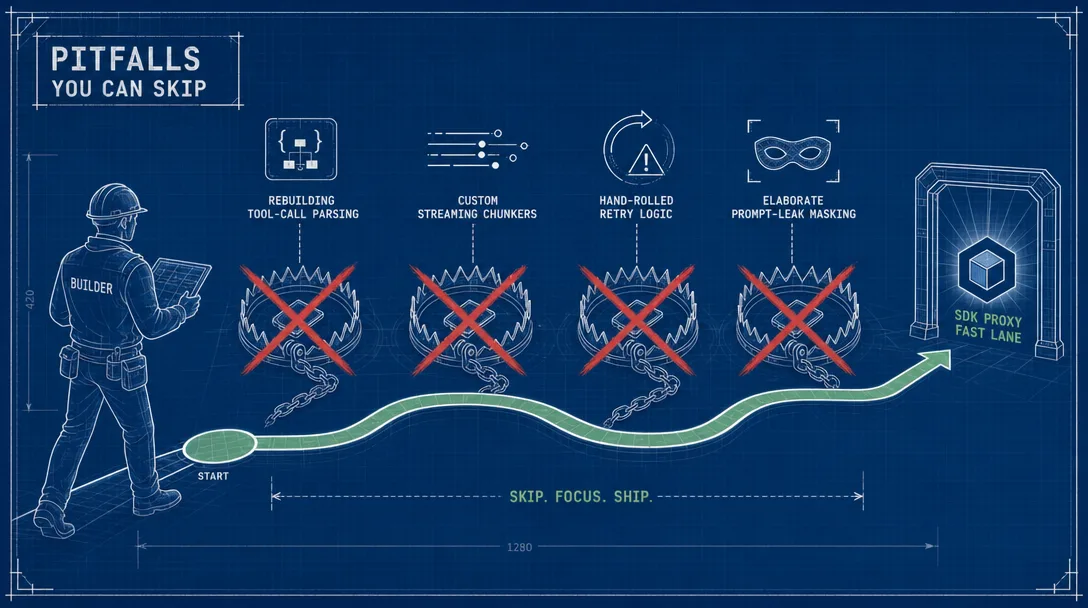
Pitfalls You Can Skip
Five places I lost time on the SDK version specifically.
Pitfall 1: Testing from inside Claude Code. Both the CLI proxy and the SDK proxy can deadlock if you test them from inside the same Claude Code session that hosts the subprocess they depend on. The SDK version is worse because both sides go through the Agent SDK simultaneously. Always test from a separate terminal.
Pitfall 2: Forgetting to filter thinking blocks. Early version forwarded everything; clients started seeing reasoning text in their replies. Whitelist forwarding (only text_delta and tool_use) is the only safe pattern. Adding to a denylist later is a game of whack-a-mole.
Pitfall 3: Letting tool name prefixes leak through. MCP-registered tools get a server prefix automatically. The proxy has to strip the prefix when translating back to OpenAI tool_calls; otherwise the client sees mcp__transient__weather_get instead of weather_get, and tool dispatch on the client side breaks.
Pitfall 4: Pinning the SDK version too loosely. The Agent SDK's interface is still evolving. A semver-major bump can break the proxy quietly. Pin a minor version, test before upgrading, and read the changelog.
Pitfall 5: Assuming maxTurns: 1 is restrictive. It feels restrictive when you first read it — only one turn? — but it's actually the right boundary. The proxy is not the agent; the calling client is. Letting the SDK loop internally would mean the proxy is making decisions on behalf of the client, which breaks the OpenAI-compatible contract every client expects. Single-turn is the contract; respect it.
Where the Two Proxies Sit in OpenClaw
The full agent reasoning landscape on a real OpenClaw deployment:
Path
When to use
Trade
Direct Anthropic API
ToS-compliant production
Per-token spend; no fingerprint concerns
Claude CLI backend
Current official OpenClaw CLI reuse path
Text-only local fallback; selected with agentRuntime.id: "claude-cli"
ACP Claude Code
Current official external-harness path
/acp spawn claude --bind here; harness owns native tools/session
OpenCode provider
Subscription-style hosted route
opencode/... or opencode-go/...; auth with OPENCODE_API_KEY
Custom Bridge to Claude Code
Need custom queue, approvals, watchdog, reporting
Optional architecture layered beside official paths
CLI proxy
Architecture study; fingerprint-sensitive personal use
Cleanest fingerprint; ToS gray area
SDK proxy (this post)
Architecture study; need precise tool semantics
Wider fingerprint; cleaner protocol
The two proxies are studies. For current OpenClaw production, start with official provider/runtime paths; use the custom Bridge only when you deliberately need extra queue, approval, and reporting infrastructure.
Key Takeaways
SDK proxy is the companion, not the replacement. Different trade-offs from the CLI version, different best-fit workloads
Zero-pollution comes from settingSources: [] + tools: [] + mcpServers: {} + custom systemPrompt. Subtractive design beats incremental optimization
Native tool-use replaces prompt injection. OpenAI tool defs convert via jsonSchemaToZod, register as transient MCP, Claude emits structured tool_use
Real streaming, thinking-filtered. Whitelist what reaches the client; everything else stays server-side
Disconnect = abort. AbortController makes cancellation native and instant
Wider fingerprint is the price. Worth it for backend orchestration; not worth it for fingerprint-sensitive workloads
For production, use official OpenClaw paths first. Direct Anthropic API, Claude CLI backend, ACP Claude Code, and OpenCode provider routes now cover the mainstream cases; custom Bridge is optional infrastructure
Ready-to-Use Prompt: Decide and Configure the OpenClaw Claude SDK Proxy
What this does: Decides SDK proxy vs CLI proxy on the fingerprint trade-off, applies the three evolutions (zero-pollution system prompt, native structured tool-use, real streaming), lays the five-layer architecture with the separate-terminal deployment rule, and accounts for the honest fingerprint cost. Based on: OpenClaw Claude SDK Proxy: Zero-Pollution Wrapper — https://aiworkflowpro.com/openclaw-claude-subscription-sdk-clean/ Time to run: ~5 minutes
Copy this prompt into Claude Code, ChatGPT, or any AI assistant:
ROLE: You are an OpenClaw SDK Proxy Architect. Your job: decide whether the SDK proxy fits the workload, apply its three evolutions for zero-pollution, native tool-use, and real streaming, and account for the fingerprint cost honestly.

CONTEXT — SDK PROXY THREE-EVOLUTION METHOD:
This SDK-based proxy is a companion to the CLI proxy, not a replacement — different trade-offs, different best-fit scenarios. Three evolutions over the CLI version: (1) zero CLAUDE.md pollution — pass `settingSources: []`, `tools: []`, `mcpServers: {}`, and a custom `systemPrompt` to the SDK's `query()` and the system prompt drops from ~5,000 tokens to ~50; (2) native structured tool-use — OpenAI tool definitions convert via `jsonSchemaToZod` into a transient MCP server, so Claude emits `tool_use` events instead of prompt-injected text; (3) real per-event streaming with automatic thinking-block filtering. The honest cost is fingerprint: an "empty configuration" call pattern is rare among normal users. For inside-the-firewall agent orchestration the trade is right; for fingerprint-sensitive workloads, stay on the CLI proxy.

INPUTS (fill in before running):
- WORKLOAD: [What the proxy serves — inside-the-firewall orchestration / fingerprint-sensitive]
- TOOL_USE: [Does it need structured tool-use events? yes / no]
- CONTEXT_BUDGET: [Is the ~5,000-token CLI system-prompt overhead a problem?]
- FINGERPRINT_SENSITIVITY: [How identifiable can the call pattern be?]

METHOD — 4 STEPS:

Step 1 — Decide SDK Proxy vs CLI Proxy (Fingerprint Trade-Off)
From WORKLOAD and FINGERPRINT_SENSITIVITY: choose the SDK proxy for inside-the-firewall orchestration where the rare "empty configuration" pattern is acceptable; stay on the CLI proxy for fingerprint-sensitive workloads. State the call + the fingerprint risk accepted or avoided.

Step 2 — Apply the 3 Evolutions
For the SDK path: (1) zero-pollution — pass `settingSources: []`, `tools: []`, `mcpServers: {}`, custom `systemPrompt` to `query()` to drop ~5,000 tokens to ~50; (2) native tool-use — register OpenAI tool defs via `jsonSchemaToZod` as a transient MCP server so Claude emits `tool_use` events; (3) real per-event streaming with thinking-block filtering.

Step 3 — Five-Layer Architecture + Deployment
Lay out the five layers and the deployment rule: run the proxy in a separate terminal — not inside Claude Code — so it does not collide with or pollute an interactive session.

Step 4 — Honest Fingerprint Accounting + Pitfalls
Name the fingerprint cost plainly (the empty-config pattern is identifiable) and list the pitfalls you can skip — the ones the article already solved, so the reader does not rediscover them.

RULES:
- Never choose the SDK proxy for fingerprint-sensitive workloads — the "empty configuration" pattern is rare and identifiable; use the CLI proxy there.
- Never run the proxy inside Claude Code — deploy it in a separate terminal to avoid session collision and pollution.
- Never let the system prompt bloat back to ~5,000 tokens — keep `settingSources: []` and the custom `systemPrompt` or the zero-pollution gain is lost.

OUTPUT FORMAT:
Output a markdown report with:
1. Proxy Decision — SDK or CLI + the fingerprint risk accepted/avoided
2. 3-Evolution Config — markdown table, columns: Evolution | How | Applies?
3. Architecture + Deployment — the five layers + the separate-terminal rule
4. Fingerprint + Pitfalls — the honest fingerprint cost + pitfalls already solved
Save as @templates/openclaw-claude-subscription-sdk-clean.md and run before choosing SDK vs CLI proxy, or when Claude system-prompt overhead is bloating calls.
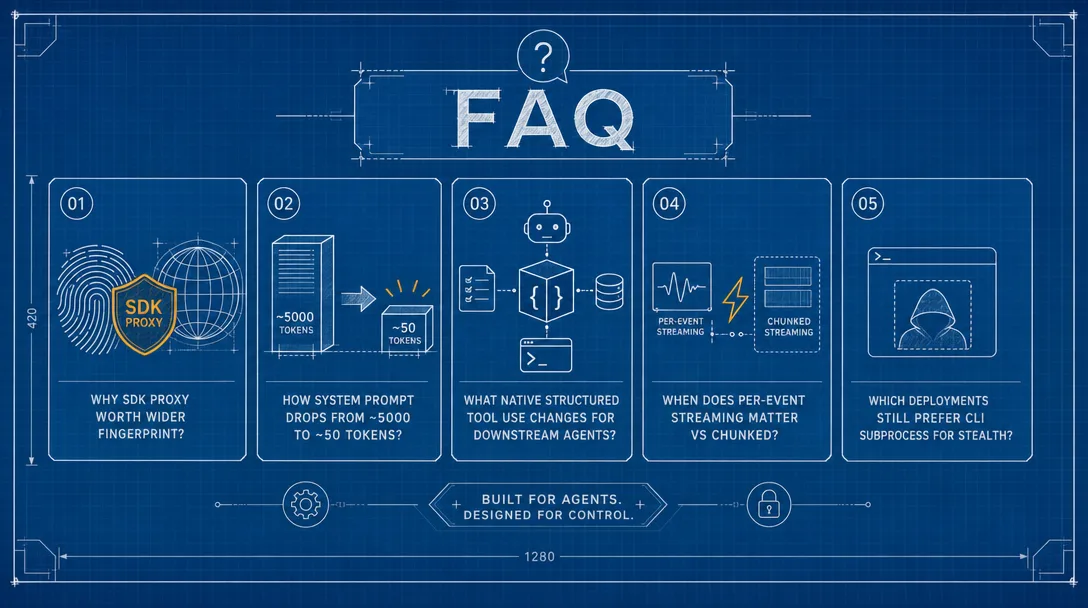
Frequently Asked Questions
Is this SDK proxy safer or riskier than the CLI proxy from a Terms of Service perspective?
Both proxies share the same Terms of Service posture: neither is a usage Anthropic has explicitly authorized, and both can result in account suspension if Anthropic decides the pattern violates the spirit or letter of the TOS. The risk is not "safer or riskier" on a ToS axis — it is "differently visible" on a fingerprint axis. The CLI proxy emits a request signature that closely resembles a normal user; the SDK proxy emits a configuration combination (settingSources empty, tools empty, single-turn) that is rare among normal users. Read both as architecture studies, not deployment recommendations. If you can not afford to lose access to your Claude account, do not run either against it.
Why is "zero-pollution" worth all this engineering — what's wrong with the 5K system prompt?
Three things. First, every request pays the token cost — 5,000 tokens of system prompt at the input rate compounds across thousands of agent calls per day. Second, the default system prompt contains tool descriptions and behavior instructions that dilute whatever custom system prompt you actually wanted; your custom guidance is competing with 5K tokens of competing guidance. Third, the default prompt encodes the CLI's worldview — file tools, permissions, conversation rhythms — which is wrong for a backend agent that just needs to reason. Cutting it to 50 tokens removes the cost, the dilution, and the worldview mismatch in one move.
How does jsonSchemaToZod work and why is it the right shape for tool-use?
OpenAI exposes tool definitions as JSON Schema; the Anthropic SDK accepts tool definitions as Zod schemas registered through an MCP server. The proxy converts each incoming OpenAI tool definition's parameter schema into a Zod schema at request time, registers the converted tools as a transient MCP server, and passes that server to the SDK's query() call. Claude then sees the tools as native MCP tools and emits structured tool_use events instead of free-form text. The conversion is one-directional and request-scoped — tools registered for one request do not leak to the next, and the conversion overhead is negligible compared to the LLM call itself.
Why use maxTurns: 1 — doesn't that defeat the point of an agent SDK?
Because the proxy is not the agent — the calling client is. The proxy's job is to translate one request into one model call and return the result; tool execution is the client's responsibility. maxTurns: 1 enforces this contract: Claude sees the tools, decides which one to call, emits a tool_use event, and the request ends. The client picks up the tool_use, executes the tool, and decides whether to send another request. Letting the SDK loop internally would mean the proxy is making decisions on behalf of the client, which breaks the OpenAI-compatible contract every client expects. One turn per request is the correct boundary.
What happens to thinking blocks — do they leak to the client?
No. The proxy filters all thinking and thinking_delta events from the SDK's event stream before forwarding to the client. Two reasons: first, thinking blocks can contain references to the system prompt or internal reasoning structure that should not be exposed downstream; second, OpenAI clients do not expect thinking-style events and would either crash or render them as ordinary text, neither of which is desirable. The filter is a positive whitelist — only text_delta and tool_use events are forwarded, everything else is dropped at the proxy boundary. The reasoning still happens server-side and still benefits the answer; it just stays server-side.
When do I pick the CLI proxy and when the SDK proxy?
CLI proxy when you are studying fingerprint cleanliness; SDK proxy when you are studying precise tool-use semantics or zero-pollution system prompts. Both are architecture studies. For current OpenClaw production, evaluate official routes first: direct Anthropic API, Claude CLI backend, ACP Claude Code sessions, or OpenCode provider routes. They are companions as study patterns, not production defaults.
Can I use both proxies behind the same Claude account?
Technically yes in a lab setup, but it is not the OpenClaw standard pattern. Both proxies authenticate via the same logged-in CLI session, so they share the same Claude Max subscription and quota. They run on different ports (3457 for CLI, 3456 for SDK by convention) and the calling agent picks the URL based on the workload. Treat this as a custom research setup; current OpenClaw production should start from official Claude CLI, ACP, Anthropic API, or OpenCode provider paths.
Troubleshooting
Symptom
Likely cause
Resolution
Hangs when tested from inside Claude Code
Concurrency-slot deadlock
Test from a separate terminal
SDK upgrade breaks the proxy
Agent SDK interface drift
Pin a known-good version; test before upgrading
Client sees thinking-style content in replies
Thinking filter incomplete
Update SDK proxy to latest; verify whitelist
Tool calls have prefixed names like mcp__transient__X
Server-prefix not stripped
Update tool-name translation logic
429 returned
Concurrency queue full
Reduce request rate or raise concurrency
Multimodal request fails
Gemini key not configured
Add the key or strip multimodal content
Watchdog stopped restarting
Five crashes in five minutes (flapping)
Read logs, fix root cause, restart manually
When in doubt, hand the trace back to Claude Code: "SDK proxy in /your-path/source is failing. Please read the CLAUDE.md, look at the recent logs, diagnose the issue."
What's Next
If you've read both this post and the CLI proxy companion, you have the full picture of the proxy-pattern landscape. The natural next stops:
Gloves on, tape measure in hand — nobody types a query. Three voice surfaces for ai automation tools (terminal, Telegram, Discord), 10 TTS and 6 STT providers compared on cost and latency, plus a setup that costs nothing.
Nothing about month four is harder than month three. It is simply the month an unpaid channel starts to feel like proof of failure. Surviving it takes a cadence you can hold while earning nothing, which is a better reason to automate business processes than speed ever was.
One number hides more than it shows. This Claude Code Skill scores US equities across 10 dimensions, from earnings surprise to peer comparison, with confidence scoring and 5 safety valves that flag thin data. A coding tutorial, not financial advice.
Publishing eats your week through research, SEO fields, images, and uploading — not writing. Here is the 10-step workflow automation pipeline that takes a topic to a published draft on one command, and the data contract that lets each step hand off cleanly to the next.