Monitoring a competitor who publishes no feed is the case every RSS guide skips. Twenty-one platforms sorted by which of three jobs they do, and the finished setup is business process automation you own outright, with no seat licence to renew.
Blaming the content is the reflex when a post underperforms, and it is usually the wrong diagnosis. A second reader decides distribution before any human sees the post, and most of what it checks is mechanical enough to automate business processes around, on five platforms at once.
Gloves on, tape measure in hand — nobody types a query. Three voice surfaces for ai automation tools (terminal, Telegram, Discord), 10 TTS and 6 STT providers compared on cost and latency, plus a setup that costs nothing.
Every list of no-code AI platforms stops at the moment your agent works. Nobody tells you which agents should have a name and which should stay anonymous. Getting that split wrong cost me a week and produced a bug that never threw an error.
Search for no-code AI platforms and you get the same page twelve times: a ranked list of builders, a pricing table, a promise that you can ship an agent this afternoon. All of it stops at the same moment — the agent replies, the demo works, the article ends.
The question that arrives about a week later is not covered anywhere. You now have several agents. Some of them do the same job over and over. Some do a different thing every time. Should this one be somebody, or should it be anybody?
It sounds like a philosophical question. It is actually the most practical decision in the whole setup, and getting it wrong produces failures that are genuinely hard to diagnose, because nothing errors. An agent just quietly makes decisions that were never its to make.
Key takeaways
Every window you run is one of three things: a role seat with a written identity, a tool pool window with no identity at all, or a plain shell with no agent in it.
Give a window an identity only when the work accumulates judgment. Identity has an ongoing maintenance cost, and a role description that no longer matches reality is worse than no description at all.
Fewer than a third of my windows have an identity, and that ratio has drifted toward anonymous over time, not away from it.
A role is a folder. Start an agent with that folder as its working directory and it wakes up in character. No prompt, no template, no configuration.
Name your windows for your worst input method. Mine is voice dictation on a phone, so window names avoid the letter g — speech recognition keeps hearing it as j.
The failure that made me write this: three separate pieces of code decided a window's identity with name.startswith("cy"). When the family grew, four anonymous windows silently inherited a job title.
What every list of no-code AI platforms leaves out
The builders on those lists answer one question well: what should the agent do? You draw a flow, you write instructions in plain language, you connect a few tools, you press run.
None of them answer the second question, which is how many of these should know who they are?
On a hosted platform the question is hidden, because each agent you create is a separate object with a name and a config page. The platform makes everything a named thing by default. That feels tidy, and it is exactly the wrong default once you have more than a handful, because every name is something you now have to keep accurate.
I run more than thirty agent windows on my own machine. Fewer than ten of them have an identity. The rest are capacity — indistinguishable, disposable, picked by whichever one happens to be free. That ratio is not an accident and it is not laziness. It is the single design decision that lets the number of windows grow without the design falling apart.
💡 Window, seat, pool — three words used loosely everywhere, so here is what each one means for the rest of this article. A window is one running agent session; think of a browser tab that stays open. A seat is a window with a written job description attached to it. A pool is a group of windows that are all the same and have no job description, which you pick from by availability rather than by name.
Three kinds of window: how AI agent roles actually get assigned
Fixed role seats — the windows that are somebody
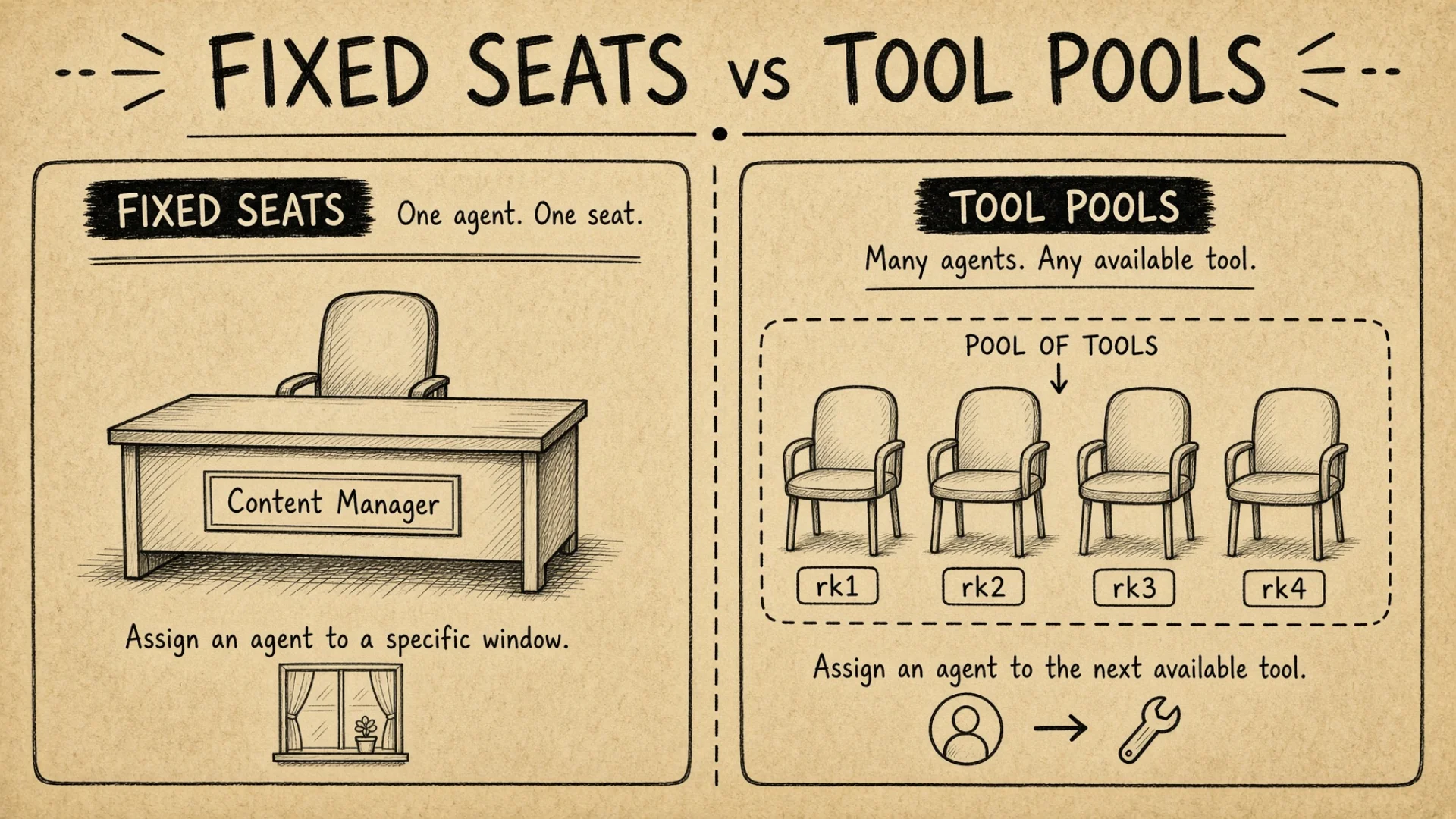
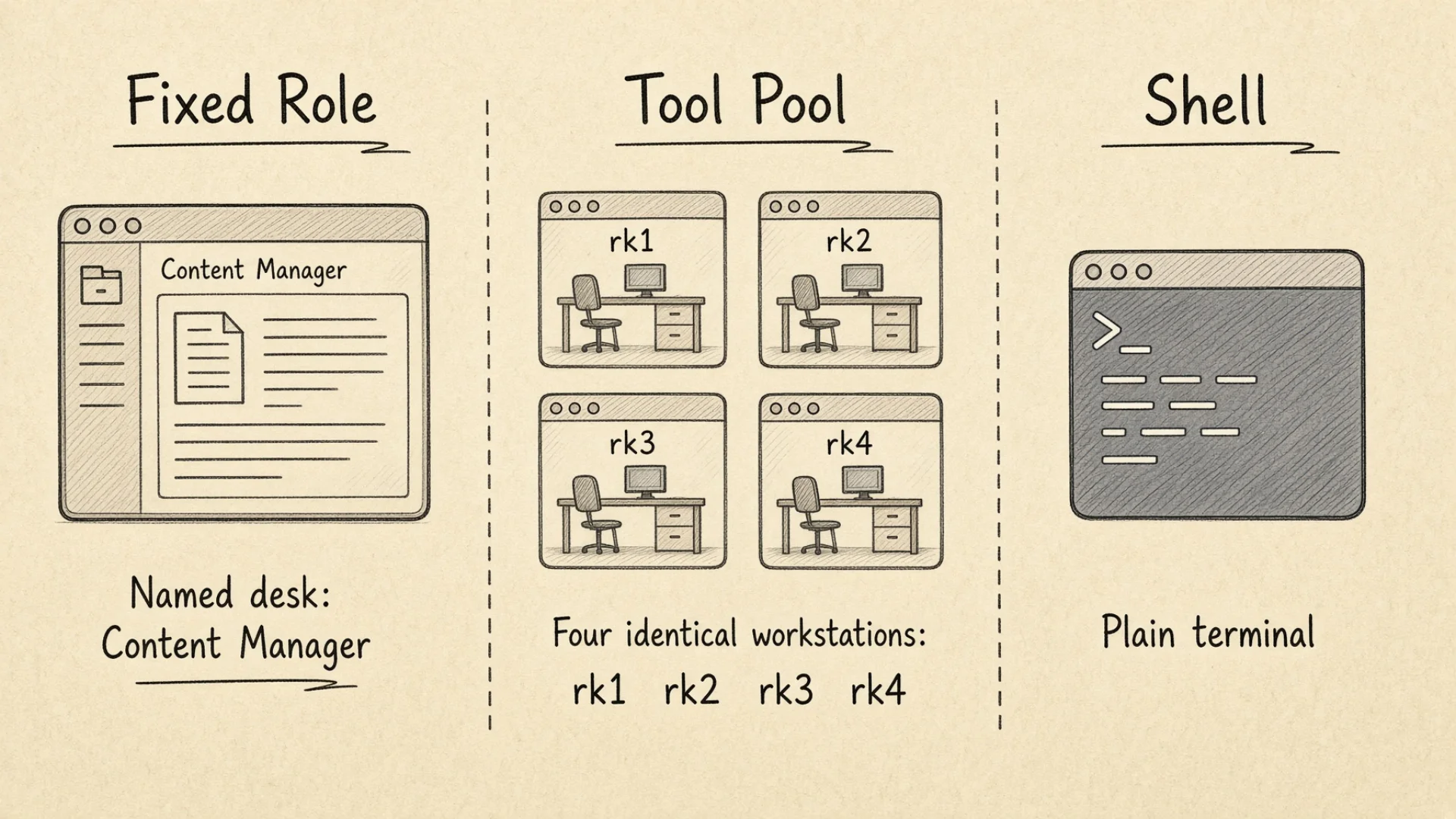
A role seat is a window with an identity. It has a job title, a written description of what it does and doesn't do, an escalation path for when it is unsure, and a working directory that belongs to it alone. (A working directory is just the folder an agent considers "here" — the place it looks first for files, and the place it saves things by default.)
My content window is a role seat. Its instructions say it handles the whole content pipeline — planning topics, writing, publishing on schedule, checking the numbers afterwards. They also say what it must not do: it can write files into my knowledge base, but it cannot send anything to the outside world. If a topic is unclear, it asks me. If competitor names or pricing comparisons come up, it asks me. If traffic drops off a cliff, it tells me immediately instead of investigating on its own.
That is not a prompt. That is a role card, and it lives in a file the window reads every time it starts.
I have sixteen of these role definitions. Most of them do not occupy a permanent window, which I will come back to.
The reason a seat is a seat and not just a saved prompt: it accumulates. The same window, doing the same job, over weeks. It builds up an understanding of my standards that I no longer have to re-explain. When I tell the content window that a piece of writing feels off, that correction gets written into its own preferences file, and next time it does not need telling.
Tool pools — the windows that are anybody
A tool pool is a set of interchangeable windows running the same model with no identity at all.
I run six general-purpose Claude windows, six Grok, two Codex, two Kimi, two Pi and two GLM. No job titles. No role cards. They are capacity and nothing else.
When work comes up I do not pick a specific one. I ask which one is free and send the task there. Which one I get is not interesting information. That is the whole design — a pool window is defined by what it can do, not by who it is.
The instinct when you first build something like this is to give everything a role, because roles feel organised. Most writing about role-based AI agents encourages it — pick a persona, give it a name, assign it a specialty. It is the wrong instinct past the first two or three. Every identity you create is something you have to keep accurate, and accuracy has a running cost. Give a window a role only when the accumulation is worth paying for.
The plain shell — the window that's nobody
One window in my setup runs no agent at all. It is a plain command line, named sh1, sitting at the far right of the tab bar.
I keep it for the same reason a workshop has an empty bench. Sometimes you need to run a command without a conversation happening around it. Check disk space. Look at a log. Restart something.
It has one property worth knowing about, because the equivalent will be true in your own setup: it does not appear in the agent sidebar at all, because that sidebar only lists tabs with a registered agent process. sh1 exists only in the tab bar along the top. It confuses me regularly on the phone, where the two lists look like they should be the same list.
The list of your agents and the list of your windows are not the same list. Whatever tool you use, find out which one you are looking at.
Role seat
Tool pool window
Plain shell
Has a name you'd type
Yes, and it means something
Yes, but only as an index
Yes
Has a written job description
Yes
No, deliberately
No
How you choose it
By name — you want that one
By availability — any will do
It's the only one
What it's worth
Accumulated judgment
Raw capacity
Somewhere to run a command
Cost of keeping it
Ongoing: the description must stay true
Almost none
None
When to add one
When you re-explain the same context repeatedly
When you run out of parallel capacity
You need exactly one
Agent naming conventions that survive your worst input method
Every window name in my setup is a two-letter prefix plus an optional number. The prefix says what the window is. The number distinguishes instances.
hm — chairman. No number; there is only one.
cz — general manager. No number.
cn — content manager. No number.
cc1 through cc6 — the general Claude pool, six interchangeable windows.
rk1 through rk6 — the Grok pool, split across two projects by number range.
sh1 — the plain shell.
Two letters is not an aesthetic choice. It is short enough to type in a dispatch command dozens of times a day without friction, and short enough to read at a glance in a sidebar with thirty rows.
There is one hard constraint on which letters I use, and it comes from an unexpected place: window names avoid the letter g.
I dispatch a lot of work from my phone using voice input. Speech recognition confuses g and j constantly. A misheard letter means a task goes to the wrong window — and because most of my windows are anonymous general-purpose agents, the wrong window will cheerfully accept the task and start working on it. There is no error. There is just work happening somewhere I did not intend, which I find out about later, if at all.
So in July I went after every g in the list. gm1 became cz. gr1 became rk. ag1 became ay. cg1 and cg2 became gl1 and gl2. Five windows, one afternoon. Misdirected voice dispatches went to roughly zero.
Roughly, not exactly, and the gl pair is why: that rename moved the g rather than removing it. Two window names still carry one. They have been the exception since the afternoon I wrote the rule and I have not gone back to fix them, which is the honest version of every naming convention anybody has ever published.
🔍 The general rule is bigger than the letter g. Your naming scheme has to survive your worst input method, not your best one. Mine is a phone in a noisy room, so I removed the letters that get misheard. If you dispatch by typing fast without looking, remove the pairs that are easy to transpose. If you dictate to a smart speaker, say every name out loud once and change any two that sound alike. The test costs five minutes and the alternative is a silent failure mode.
What it costs to get the split wrong
Suppose you skip the distinction and give every window a role.
The direct cost is maintenance. Each of my sixteen role definitions is a file with a job description, boundaries, escalation rules and a routing table. Keeping one accurate takes maybe twenty minutes a month — reviewing whether the responsibilities still match what I actually ask it for. That is over five hours a month across sixteen. If I had given all thirty-plus windows an identity it would be closer to eleven hours, and half of those roles would be fictions I invented to fill slots.
The indirect cost is worse, and it is the one I actually care about: a role that does not match reality is worse than no role at all. An agent following an outdated job description makes confident decisions inside a boundary that has since moved. It does not stop to ask, because its instructions say this is its territory. You find out when the output is wrong in a way that is hard to trace back to a cause.
Now suppose you go the other way and run only anonymous windows.
You pay the re-explanation tax on every single task. Every time I start a piece of writing I would have to explain the brand voice, the audience, the format rules, and the things I have told it not to do. That is ten to fifteen minutes of setup before any work begins. Three times a day and you have spent roughly forty minutes daily re-establishing things you already established.
Worse, you get drift. Explain your standards from memory twenty times and you produce twenty slightly different versions of them. The output wanders and you cannot tell why, because no single explanation was wrong.
The right split is not a compromise between these two. It is recognising that they are different jobs. Work that accumulates judgment gets a seat. Work that is self-contained goes to a pool. Writing in a specific voice accumulates. Reading a log file does not.
🔍 The promotion test, if you want a threshold rather than a principle. Count how many times in one week you paste the same background into a fresh window. Three or more, and that job has earned a seat — you are already maintaining the role, just in your own head and with a fresh copy every time. Fewer than three, leave it in the pool. The test runs in both directions: I have promoted one window this way, and demoted three when the context stopped accumulating and the seat stopped earning the window it was sitting in.
That single sentence is most of what AI agent orchestration turns out to be in practice. The scheduling and the message passing are mechanical and you can buy them or build them in an afternoon. Deciding which windows are allowed to have an opinion is the part nobody can do for you.
How a role becomes a folder
Here is the mechanism that makes role seats cheap enough to be worth having.
A role is a directory. Not a configuration entry, not a prompt library, not a database record. A folder on disk, named for the role, containing that role's instruction files.
To start an agent as that role, you start it with that folder as its working directory:
cd ~/kb/roles/content-manager && claude
That is the whole thing. No role parameter, no template selection, no prompt injection. Claude Code reads instruction files upward from wherever it starts, so an agent launched inside the content manager's folder picks up the content manager's instructions automatically, plus everything general that lives in the folders above it. Most agent tools that can open a local folder behave the same way; check your tool's docs for what it calls the file.
(My actual folders are named in Chinese, because that is the language I think in. The shape is what matters, not the words.)
This design has three consequences I did not fully anticipate.
Roles compose without any code. General rules live high in the folder tree, role-specific rules live in the role's own folder. An agent gets both, in the right order, because that is simply how the file reading works. I never wrote any merge logic. If this idea is new to you, the one-file orientation pattern is the same mechanism at a smaller scale.
Temporary role loading is free. Most of my sixteen roles have no permanent window. When I need one I open a temporary window pointed at that folder, it becomes that role, I use it, and I close it. No setup. The role existed the moment the folder did.
The folder path becomes the role's identity, which is convenient right up until you rename the folder. That one has a section of its own below.
Roles fall into three groups by how they are used, and the groups are very different sizes:
Group
How many
How it wakes up
What it costs to keep
Scheduled
2
On a timer, by itself
Highest — it acts without me watching
Permanently seated but passive
5
Holds a window, waits to be handed work
Medium — the window is occupied either way
Loaded on demand
9
I open a temporary window pointed at its folder
Almost nothing — it is a folder until I use it
The two scheduled roles are the chairman, which does a routine inspection round on a timer, and one of the two social account operators. Everything else waits. No other role starts anything on its own — that is a deliberate limit, not a missing feature, and it is why I can have sixteen roles without sixteen things happening overnight.
The third group is most of them, and it is why the maintenance cost is bearable at all. A role definition used twice a month still earns its keep, because a folder that nobody opened this week cost nothing to keep.
What is actually in a role card
Worth being concrete, because "role" is a word people use loosely. My content manager's card contains:
Identity and trust level — L1, which in my setup means it can write files into the knowledge base but cannot publish anything externally.
Mission — one sentence.
What it does — an explicit list: writing, publishing on schedule, brand voice, fact-checking, topic planning, performance review, growth experiments.
Hard prohibitions — it never sends anything to the outside world. Full stop, no exceptions clause.
Escalation triggers — unclear topic direction, competitor comparisons, pricing claims, anything before publication, and any sharp drop in traffic.
Decision framework — what to do when two priorities conflict, what to do when the voice feels wrong, when to check data versus when to trust judgment.
Startup sequence — the exact order of files to read when the window opens.
Evaluation criteria — what counts as a pass, what counts as excellent, and what counts as a failure.
That last one is the piece most people leave out, and it is the one that makes self-correction possible. Failure for this role is defined explicitly: skipping steps in the workflow, mixing up brand voices, factual errors, or producing something I have to substantially rewrite. An agent that knows what failure looks like can check its own work against it. An agent told to "maintain high quality" cannot.
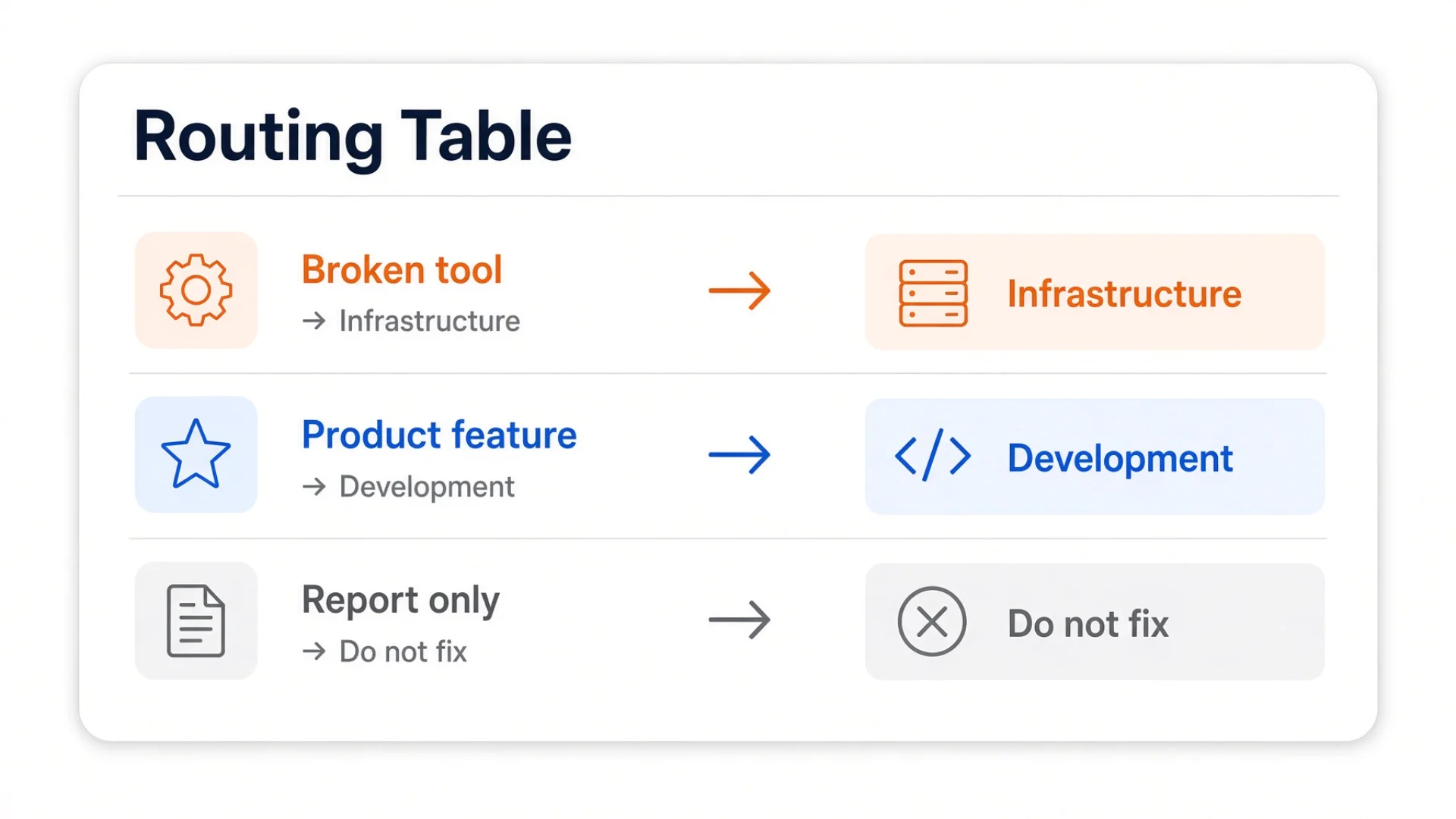
The trust level does real work too. Several of my roles produce only reports and touch nothing — the quality reviewer, the customer analyst, the supervisor. Their output is a recommendation, and something else has to act on it. That separation is not bureaucracy. It means the role whose entire job is to be sceptical has no ability to quietly fix the thing it is sceptical about. The full argument for writing scope and limits rather than personality is in role packages for autonomous agents.
The crash: pool windows that thought they had a job
This is the failure that made me write the article.
What I saw, one morning in August: the production manager's window restarted and came back claiming to be the infrastructure manager. Three anonymous pool windows sitting next to it had all loaded the production manager's personality. A fourth had loaded the infrastructure manager's.
Pool windows are supposed to have no identity whatsoever. Four of them had one, and one role seat had the wrong one.
The cause was a two-letter prefix match. My setup keeps a roster file — one plain text file that lists every window, what it is, and where it starts. (That file is the whole subject of the next article in this series.) The code that decides how to launch a window ignored it. Instead it checked whether the name starts withcy, and if so, treated the window as the production manager.
Which is fine when cy1 is the only window in the family. It stopped being fine when the pool grew and cy2, cy3 and cy4 were added as ordinary interchangeable workers. All four names start with cy. All four got the role treatment.
The most instructive detail: the correct answer was already available and got thrown away. There was a function that looked the window up in the roster file, correctly determined that cy2 was declared as a pool window, and returned "no role." The very next line was the prefix check, which decided it was a role anyway. The right answer was computed and then discarded one line later.
It happened in three independent places. The launch path had it. The restart path had it. And the script that generates startup shortcuts had a related version of the same mistake — it only wrote a shortcut file for the un-numbered prefix cy, so when numbered shortcut files got created by some other process, they inherited the role content.
Why it took so long to surface: adding windows to a pool breaks nothing immediately. The new window comes up generic and works fine. The wrong identity only appears when the window restarts. So the bug was introduced when the pool grew, and detonated days later, with no obvious connection between the cause and the effect.
The fix, in order of importance:
Check the declaration before the name. The roster file already stated plainly which windows are role seats and which are pool. The code now reads that first, and a window declared as pool skips the entire prefix-matching path.
Add a generic launch table for pools, keyed by what the window can do — Claude, Grok, Codex — rather than by what it is called.
Generate a separate shortcut file for every numbered window, so cy1 gets the role version and cy2 through cy4 get the generic one, instead of sharing a single file under an ambiguous name.
Three lessons that generalise past this bug
Prefix matching is invisible fan-out.startswith("cy") looks like it names one thing. It names a family, and the family grows without anyone revisiting the match. Every time you add a member you silently expand the reach of code written when there was only one. The same trap shows up in file globs, tag filters, email rules and permission scopes. If you have ever added a folder and found an old automation quietly acting on it, this is the shape.
Declaration beats convention. My roster file explicitly stated which windows were seats and which were pools. The code ignored it and inferred from the name instead. Names are a convention — convenient, human-readable, and not authoritative. When you have both a declaration and a convention, and they are capable of disagreeing, the declaration has to win. Every time.
Naming schemes leak into code. I chose cy1 for the role and cy2–cy4 for pool windows because they were all the same model family and it read nicely in a sidebar. That aesthetic decision became a load-bearing assumption in three places I was not thinking about. If I were designing the naming again, role seats and pool windows would not share a prefix at all — the boundary would be visible in the name itself.
⚠️ This one applies to you even with two agents and no code. The moment you name things in a family — writer1, writer2, or a folder called client- with a suffix — you have created a pattern that something will match on later. It might be a script, a search, a backup rule, or you at 11pm. Decide now whether every future member of that family should be treated the same way, because that is what you are signing up for.
The related crash: renaming a role folder
Three days earlier, a smaller failure that reinforces the same point.
I renamed a role. The folder changed from one name to another — a genuine improvement; the old name had been wrong for months.
The next time I tried to start that window, it failed. Directory not found.
The rename broke thirteen references, spread across eight files: the startup shortcut on this machine, the startup shortcut on a second machine, two sections of the roster file, two entries in a cache file, three separate references in the fleet management code, an installer script, a health-check function, and two test assertions.
Thirteen references, from renaming one folder.
That is the price of "a role is a directory." The design is beautifully simple, and the path is the identity, which means renaming a role is a high fan-out operation and needs a checklist. I now have one, with four items: shortcuts on every machine, the roster file, the cache, and the code.
The cheaper answer would be a stable internal identifier that never changes, with the display name as a separate field. I have not done that, because eight files is manageable and the simplicity of "the folder is the role" has paid for itself many times over. But I know exactly what I am trading, which is the part most design decisions are missing.
The shape of the fleet today
On my primary machine:
Governance seats (2) — chairman and general manager. Both permanent, both with full role cards.
Social account operators (2) — one per account, deliberately isolated from each other so neither can touch the other's account.
Permanent role seats (3) — content, production, infrastructure.
Tool pools — six general Claude windows, six Grok, two each of Codex, Kimi, Pi and GLM, plus the four windows from the crash above that are now correctly declared as pool.
Two pools with one member each — one running a different agent entirely, one pointed at a model running on a GPU box in the next room. Both are declared as pools, not seats, because a pool of one is still a pool and someday it will not be one.
One plain shell.
More than thirty tabs in total, and the number moves — pools grow and shrink as the work changes. The categories do not move. That is the real point. When I add capacity I add pool windows, and nothing else in the system needs to know about it. When I add a role I add a folder. Those are two different operations with two different costs, and keeping them separate is what lets the whole thing grow without the design degrading.
Do this tonight
You can do all of this with two agent windows and a text editor. No fleet manager required.
[ ] Sort your existing windows into the three buckets. For each agent session you run, ask: does this one accumulate judgment over time, or does it do self-contained tasks? Accumulates means seat. Self-contained means pool. No agent means shell. Most people find they have far fewer real seats than expected — that is the correct result.
[ ] Turn one role into a folder. Pick the seat where you re-explain the most context. Create a folder named for it. Put one file inside listing what this role does, what it must never do, when it should stop and ask you, and what a bad result looks like.
[ ] Write the "must never" list first. Counterintuitive, but the boundaries matter more than the responsibilities. An agent with a fuzzy sense of what it does and a sharp sense of what is off-limits is safe. The reverse is not. My content role's prohibition list has exactly one item on it, and that one item is why I can let it work unsupervised.
[ ] Start the agent with that folder as its working directory. If your tool reads instruction files from where it starts — most that can open a local folder do — the role now loads by itself.
[ ] Rename your windows for your worst input method. Say every name out loud. Change any two that sound alike. Two letters plus a number is enough for thirty windows.
[ ] Write down which windows are seats and which are pools, in a file. One line each. This is your declaration. Even if nothing reads it today, write it — the day something does, you will be glad the answer was stated rather than inferred.
The prompt that gets you started
Copy this into any AI agent. It will sort your own agents into seats and pools, and write your first role card with you.
I run several AI agent sessions. Some do the same kind of work repeatedly and some do one-off tasks, and right now I treat them all the same way — which means I re-explain my standards constantly. Help me organise them, step by step.
Context about me: I'm a beginner. Explain each term in plain language the first time you use it. Ask me questions rather than assuming things about my work.
Step 1 — Explain the two categories. Describe the difference between a fixed role seat (an agent with a written identity, boundaries and accumulated context — worth having when the work builds up judgment over time) and a tool pool (interchangeable agents with no identity, picked by availability — right for self-contained tasks). Explain the maintenance cost of each, and why most windows should be pools.
Step 2 — Sort my work. Ask me to list the kinds of task I give AI agents in a typical week. For each one, tell me whether it belongs to a seat or a pool, and why. Apply this test: does doing this repeatedly build up judgment I'd otherwise have to re-explain? If yes, seat. If no, pool. Push back if I want to make everything a seat — explain that a role card which doesn't match reality is worse than no role card, because the agent then makes confident decisions inside a boundary that has moved.
Step 3 — Write my first role card. Pick the one seat where I re-explain the most context. Interview me and draft a card containing: (a) identity in one sentence, (b) mission in one sentence, (c) an explicit list of what it does, (d) hard prohibitions — things it must never do under any circumstances, (e) escalation triggers — situations where it should stop and ask me, (f) what a failed result looks like, concretely.
Write (d) before (c), and explain to me why the boundaries matter more than the responsibilities.
Step 4 — Make the role a folder. Explain that the simplest way to load a personality is to put its instruction file in a folder named for the role, then start the agent with that folder as its working directory — most agent tools read instruction files from where they start. Help me create the folder and the file. Then warn me: the folder path becomes the role's identity, so renaming it later breaks every reference to it. Have me pick a name I can live with.
Step 5 — Design my naming scheme. Ask how I usually type or dictate commands. If I use voice input, help me pick window names that avoid letters which get misheard. Propose a scheme of a short prefix plus a number, where the prefix means identity and the number means instance. Then warn me about this specific trap: if any code or tooling ever decides how to treat a window by checking whether the name starts with a prefix, that check will silently match every window in the family — so a role seat named ab1 and pool windows named ab2, ab3 will all be treated as the role. Recommend that seats and pools not share a prefix.
Step 6 — Write the declaration. Help me create a simple text file listing every window: name, seat or pool, working directory, which AI. Explain that when a name and a written declaration can disagree about what a window is, the declaration must win — and that having it written down is what makes that possible.
Constraints:
No scripts. No configuration files longer than a few lines.
If I suggest something that will cause a problem later, say so directly and name the specific failure.
Do all six steps in order. Wait for my answer before moving on.
Start with Step 1.
Frequently asked questions
Do I need a special platform to do this?
No. None of the no-code AI platforms on the first page of Google have this as a feature, because the three-way split is a habit rather than a product. Two browser tabs where one is always your writer and one is always your reviewer is already a seat plus a pool. Everything in this article scales down to that.
How many role seats should I have?
Fewer than you think. Start with one — the job where you re-explain the most context — and add a second only when you can name what it does that the first cannot. I have sixteen role definitions and only seven permanent seats.
What's the difference between a role card and a system prompt?
A system prompt is text you send. A role card is a file that lives somewhere and gets read every time the agent starts, including after a restart or a context reset. The difference matters at exactly the moment you need it most: when the session dies and comes back.
Why not give every window a role, just in case?
Because a role you don't maintain goes stale, and a stale role is worse than none. The agent keeps acting confidently inside a boundary that has moved, and it doesn't ask, because its instructions say the territory is its own.
What actually happens when the agent picks up the folder?
It reads instruction files from its working directory and from the folders above it, in order, before your first message. General rules from the parent folders, specific rules from the role folder. No merge logic required — the folder tree does the ordering.
Can one role occupy more than one window?
It can, and that is exactly what caused the crash in this article. I gave a role four windows because the work was parallel, named them with one shared prefix, and three pieces of code decided that anything starting with that prefix was the role. If a job genuinely needs parallel capacity, keep one seat and give the extra windows pool names that do not share the seat's prefix. One seat, many hands.
My agent tool doesn't read instruction files from a folder. Now what?
Then a role is a file rather than a folder, and you paste it at the start of the session instead. You lose the automatic reload after a restart, which is the main thing the folder buys you — so keep the file short enough that pasting it is not a chore, and keep it somewhere you can find in five seconds.
Does this need more than one computer?
No. Everything here runs on one machine. A second one only buys you work that continues while the first is closed. Keeping a roster identical across machines is its own problem, covered in keeping a knowledge base synced across machines.
Monitoring a competitor who publishes no feed is the case every RSS guide skips. Twenty-one platforms sorted by which of three jobs they do, and the finished setup is business process automation you own outright, with no seat licence to renew.
Gloves on, tape measure in hand — nobody types a query. Three voice surfaces for ai automation tools (terminal, Telegram, Discord), 10 TTS and 6 STT providers compared on cost and latency, plus a setup that costs nothing.
Two of the three fixes can be undone the same afternoon. The third cannot, and it is the one people reach for first. LoRA cut costs tenfold, which made the expensive option tempting rather than correct. In business process automation, the order you try things in is the whole decision.
Fine tuning turns a generalist into a specialist - skip the baseline and you can never prove it worked. Five steps on Google Cloud: baseline, data prep, instruction design, hyperparameters, evaluation. Plus the finding that surprises business process automation buyers: 100 good samples beat 1,000.