Monitoring a competitor who publishes no feed is the case every RSS guide skips. Twenty-one platforms sorted by which of three jobs they do, and the finished setup is business process automation you own outright, with no seat licence to renew.
Blaming the content is the reflex when a post underperforms, and it is usually the wrong diagnosis. A second reader decides distribution before any human sees the post, and most of what it checks is mechanical enough to automate business processes around, on five platforms at once.
Gloves on, tape measure in hand — nobody types a query. Three voice surfaces for ai automation tools (terminal, Telegram, Discord), 10 TTS and 6 STT providers compared on cost and latency, plus a setup that costs nothing.
What Is an AI Assistant — And Why Agents Are Different
An AI assistant answers when you ask. An AI agent holds a goal, picks tools, and runs without you watching. Here is the real difference, and the sixteen agents we run on a single folder of plain text.
You already use an AI assistant. It answers when you ask, forgets when you close the tab, and waits for the next question. That is the whole shape of it, and for most of what you do all day it is the right shape.
This article does two things. First it defines an AI assistant properly — what the category covers, what it is genuinely good at, and the four things it cannot do however good the model behind it gets. Then it shows what happens when you close those four gaps, using a system that is running right now: sixteen named agent roles working on a single folder of plain text files, one of them driven by a timer with nobody watching, and a task board that held fifteen jobs in three different states on the day this was written. Everything below is either from that system or from a primary source you can open yourself. If your AI assistant already does good work and you suspect it should be doing more of it without you, this is the gap you are looking at.
Key takeaways
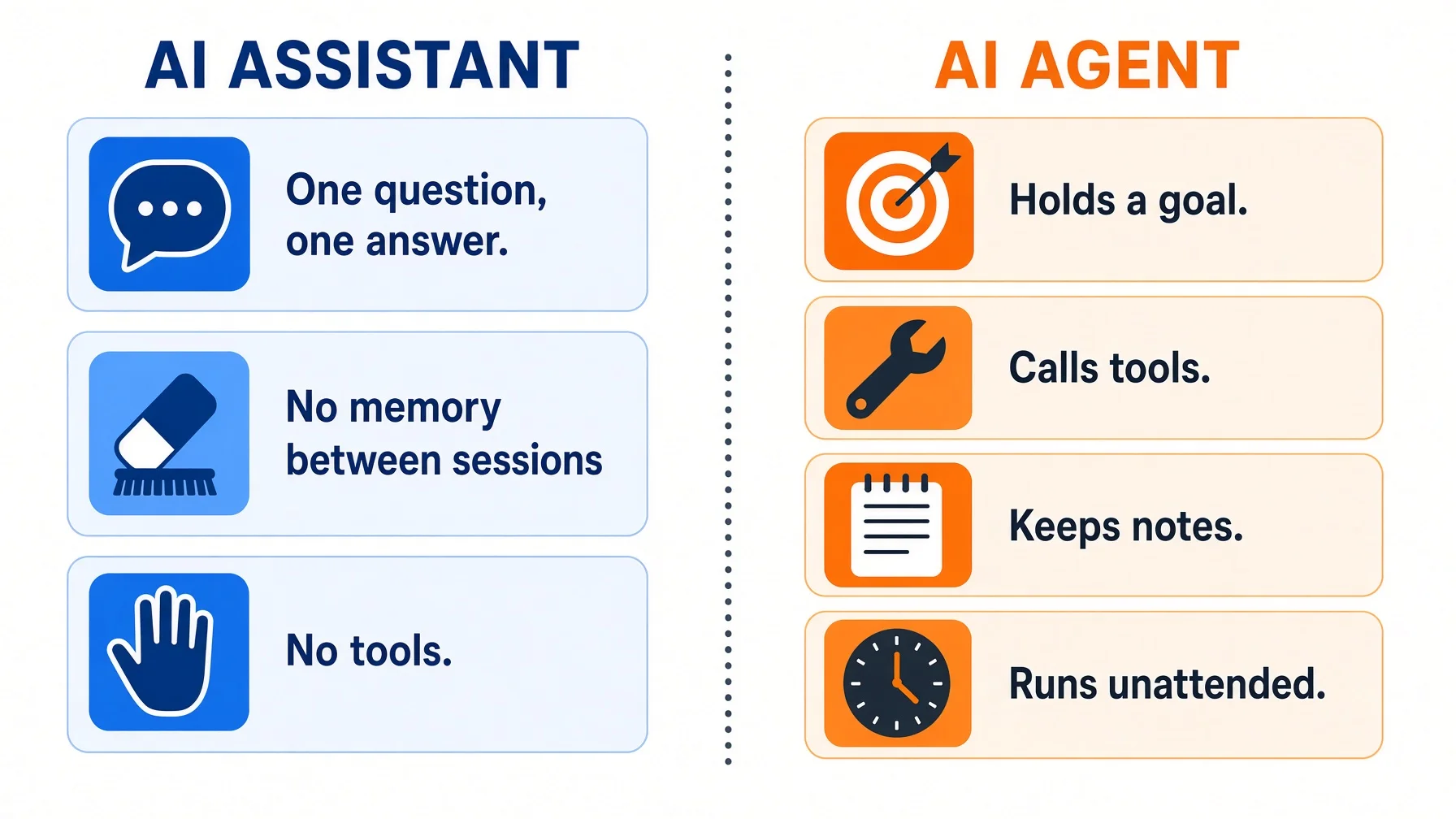
An AI assistant answers when you ask, then stops. No goal of its own, no hands, no start time. You supply all three.
An AI agent adds exactly four things: it holds a goal, calls tools on its own, keeps memory across sessions, and runs when nobody is watching. Take any one away and you are back to an AI assistant.
The sharpest line in the field is Anthropic's: a workflow follows code paths a person wrote in advance; an agent lets the model direct its own process. Most working systems are mostly workflow.
Gartner expects over 40% of agentic AI projects to be cancelled by the end of 2027, and warns about "agent washing" — AI assistants and chatbots relabelled without real autonomy.
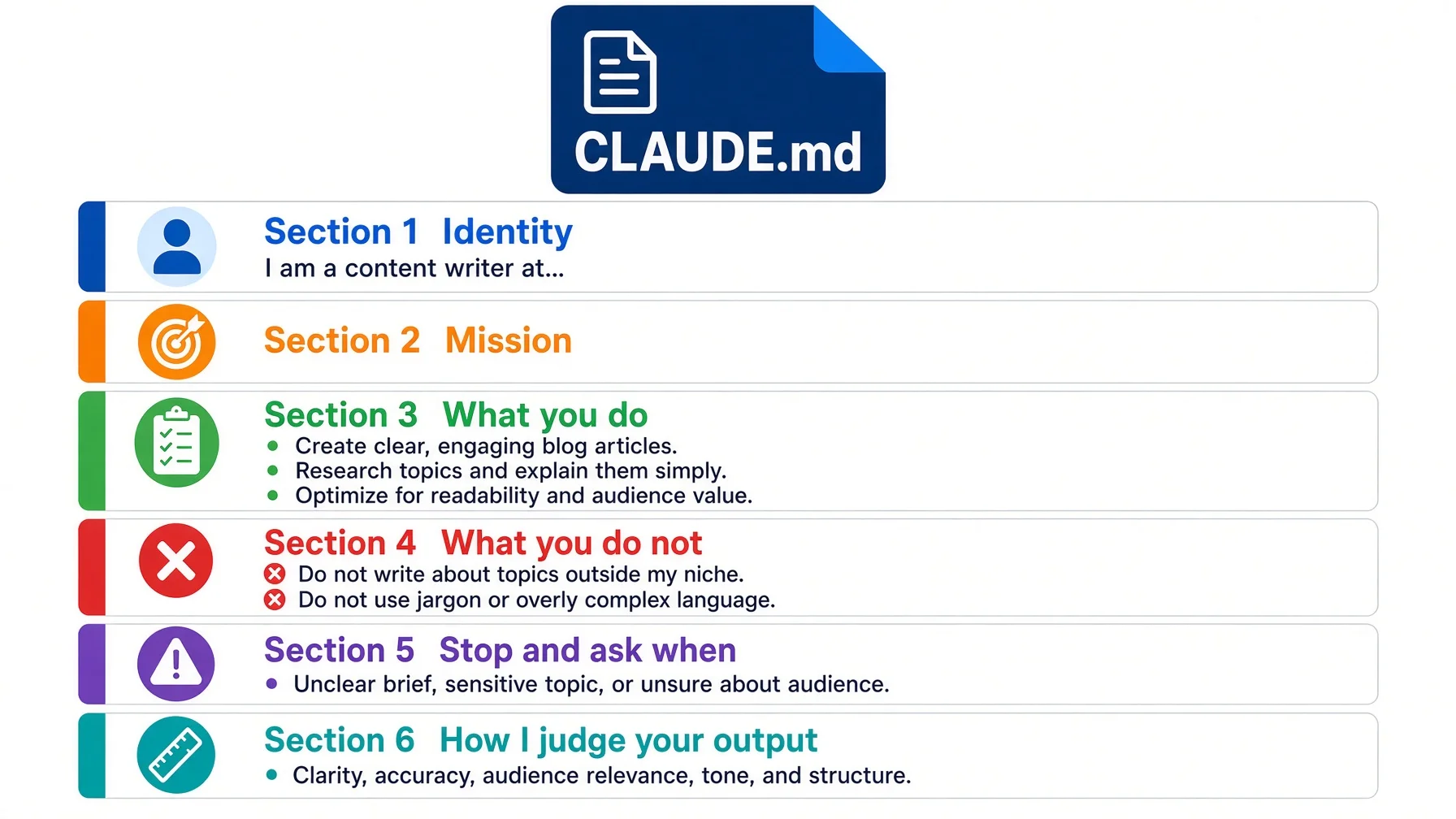
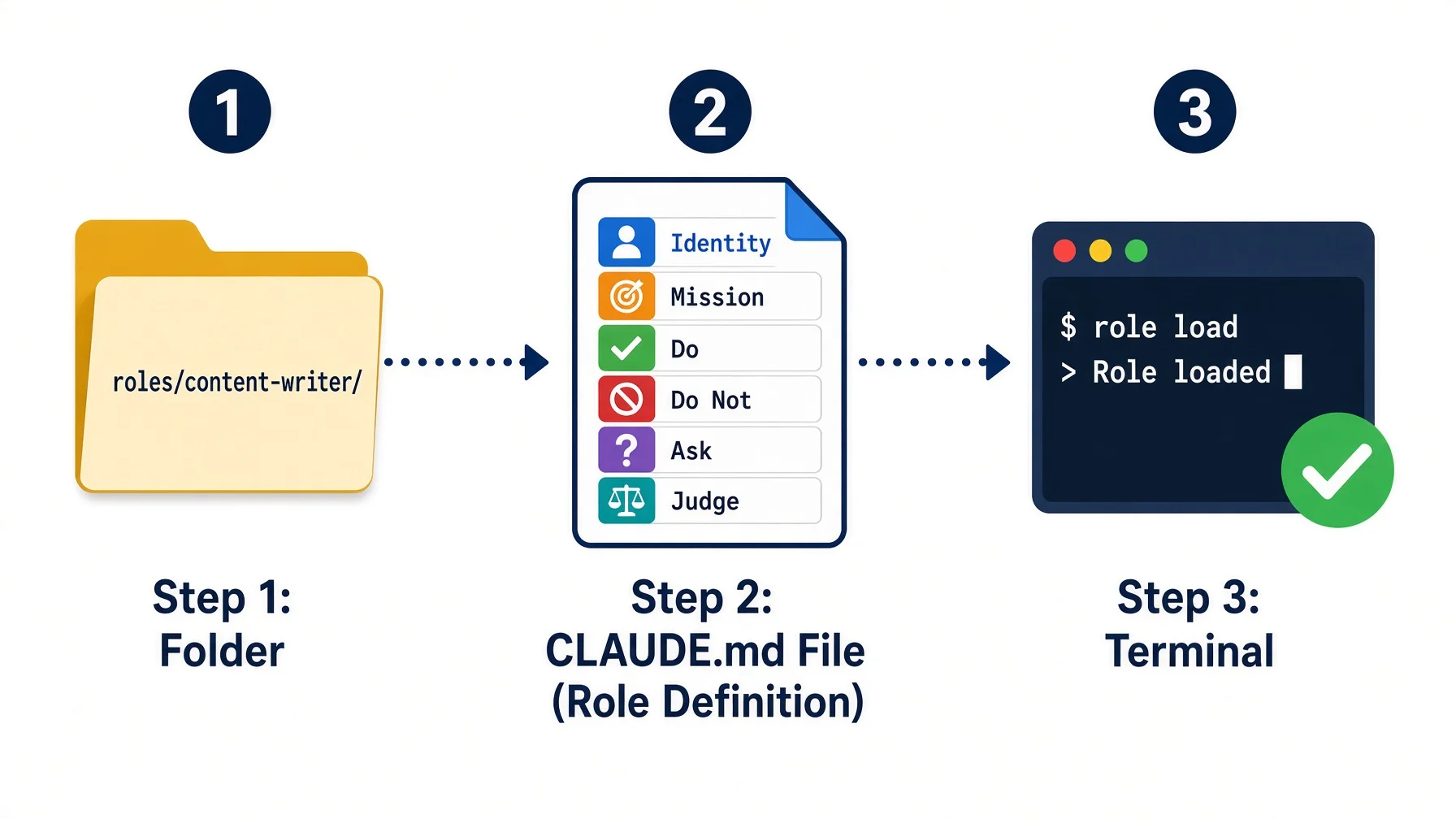
The unit of work is not a clever prompt. It is a role file: identity, three duties, two prohibitions, and the line where the agent must stop and ask a human.
You can build the first one this afternoon with a text editor. No code required.
What is an AI assistant?
An AI assistant is a software tool that takes a request in ordinary language, produces an answer or a piece of work, and then stops and waits for you. It has no goal beyond the request in front of it. You are the one holding the plan.
Almost everything sold under the name fits one of three shapes, and underneath the branding they behave the same way.
Kind of AI assistant
What it looks like
What it is good at
Chat
A text box you type into
Drafting, explaining, summarising, thinking out loud
Embedded
A panel inside an app you already pay for — mailbox, document editor, code editor
Acting on the thing already open in front of you
Voice
A speaker or a phone you talk to
Fixed commands and quick retrieval, hands free
Ask, receive, ask again. That loop is the definition, and it is also the limit.
Here is what an AI assistant does well, and the list is longer than agent enthusiasts admit:
Produce a first version of anything, so you are reacting to a draft instead of staring at a blank page.
Explain a field you do not work in, at whatever level you ask for.
Cut long material down to the part you need.
Rewrite your own text against a standard you describe.
Answer a factual question fast enough that you do not lose your train of thought.
And here is what an AI assistant cannot do, however good the model behind it gets:
Hold a goal. Tell it to keep your pricing page consistent with your rate card and nothing happens until you ask again.
Reach for tools by itself. It cannot decide it needs to open a file, run a search, or call an API unless that decision was handed to it.
Remember on your terms. Vendor memory is a summary the vendor writes and can revise. It is not a record you keep.
Start. An AI assistant has no start time. Nothing happens at 6am unless you are awake and typing.
Those four gaps are the subject of the rest of this article. An agent is what you get when you close them.
💡 Assistant is not a lesser word. Most tasks really are one question and one answer, and for those an AI assistant is cheaper, faster and easier to check than anything autonomous. The mistake is not using an AI assistant. The mistake is using one for work that needs a goal held for a week.
Where an AI assistant stops and an autonomous AI agent starts
An autonomous AI agent is a software system that holds a goal, chooses its own next action, calls external tools to carry that action out, keeps notes that survive between sessions, and continues doing this without a person prompting each step.
Those are the four capabilities that separate it from the AI assistant you already use. Take any one away and you are back to an assistant.
It holds a goal. You state the outcome once — "check whether any scheduled job failed overnight and tell me which" — rather than issuing each instruction. The goal persists across many internal steps.
It calls tools by itself. A tool call (the model invoking an outside function such as a search, a file read, or an API request) is decided by the model, not selected by you from a menu. This is the capability that turns text generation into action.
It keeps memory. Not the context window (the amount of text a model can read in one go, which empties when you close the tab) but durable notes: what it did last time, what it concluded, what is still open. Without this, every run starts from zero.
It runs unattended. Unattended means nobody is clicking "continue." A timer fires, the agent works, and you read the result later. This is the capability most products quietly lack, and the one that changes what the technology is for.
💡 The plainest version: an AI assistant is a very good employee who has amnesia, no hands, and only speaks when spoken to. An agent is the same employee with a notebook, a set of keys, and a start time.
Workflow and agent are not the same thing
The most useful distinction in the field comes from Anthropic's engineering team, and almost no glossary page repeats it. They group everything under agentic systems, then draw a line inside that group: workflows are systems where models and tools are orchestrated through predefined code paths, while agents are systems where the model dynamically directs its own processes and tool usage, keeping control over how it accomplishes the task.
That line matters because it tells you what you are actually building. In a workflow, you decided the steps and the model fills in the content. In an agent, the model decides the steps. Workflows are predictable and consistent for well-defined tasks; agents are the better choice when you need flexibility and model-driven decisions at scale.
Anthropic's own recommendation is worth reading twice, because it runs against the sales pitch: find the simplest solution possible and only add complexity when needed — which may mean not building an agentic system at all. Agentic systems trade latency and cost for better task performance, and you should decide whether that trade makes sense before you make it.
AI assistant
Workflow
Agent
Who decides the next step
You, every time
The person who wrote the path
The model
Tool access
None, or you paste results in
Fixed, wired in advance
Chosen at run time
Memory between sessions
None
Whatever the code stores
Durable notes it maintains
Runs with nobody watching
No
Yes, on a trigger
Yes, on a trigger
Best for
Thinking out loud, drafting
Well-defined repeatable tasks
Tasks needing judgment at each step
Main cost
Your attention
Building and maintaining the path
Tokens, latency, supervision design
Most systems that work in production are mostly workflow with a few genuinely agentic steps. That is not a failure to be ambitious. It is the correct answer for tasks whose steps you already know.
Where the industry actually is
The market numbers are useful mainly as a warning against overcommitting. Gartner predicts that over 40% of agentic AI projects will be cancelled by the end of 2027, citing escalating costs, unclear business value and inadequate risk controls. In a January 2025 Gartner poll of 3,412 webinar attendees, 19% said their organisation had made significant investments in agentic AI, 42% had made conservative investments, 8% none, and the remaining 31% were waiting or unsure.
The same firm expects at least 15% of day-to-day work decisions to be made autonomously through agentic AI by 2028, up from 0% in 2024, and 33% of enterprise software applications to include agentic AI by 2028, up from under 1% in 2024.
Read those together and the picture is coherent rather than contradictory: the direction is real, most current projects are premature, and the difference between the two groups is whether anyone defined what the agent is allowed to decide.
AI assistant, chatbot, agent: which one do you actually need?
Use an agent when a decision has to be made, automation when a routine sequence has to be run, and an AI assistant when you just need something retrieved. That three-way split is not our framing — it comes verbatim from Gartner analyst Anushree Verma, who advises organisations to "start by using AI agents when decisions are needed, automation for routine workflows and assistants for simple retrieval."
The same analyst is blunter elsewhere in the release: "Many use cases positioned as agentic today don't require agentic implementations."
Here is the decision in table form.
If the task is…
Use
Why
Look something up, summarise it, draft a paragraph
AI assistant (the chat window you already have)
One step, you are already there, no state to keep
The same fixed sequence every Tuesday, no judgment
Automation or workflow
Cheaper, faster, and it fails predictably
Steps depend on what the previous step found
Agent
The branching is the work; a fixed path cannot express it
Must run at 6am whether or not you are awake
Agent on a schedule
Nobody is there to click continue
Irreversible: money, publishing, deletion
Agent that stops and asks
Autonomy and irreversibility should never meet unsupervised
The label on the box has stopped being informative
Gartner has a name for why this is confusing: agent washing — the rebranding of existing products such as AI assistants, robotic process automation and chatbots without substantial agentic capabilities. The firm estimates that only about 130 of the thousands of agentic AI vendors are real.
That ratio means the word on the pricing page tells you almost nothing. The four requirements do. Put any product against them:
Does it hold a goal without me restating it each time?
Does it choose which tool to call, or do I choose?
Does anything survive when I close the session?
Can it start on its own?
A product that fails two or more is an AI assistant with new marketing. That is not a reason to avoid it — AI assistants are genuinely useful and usually cheaper. It is a reason not to pay agent prices for one.
⚠️ The expensive mistake: buying agent-branded tooling for work that an AI assistant and a fixed sequence already handle. You pay for autonomy you do not need, absorb the latency and token cost that come with it, and get less reliability than a plain script would have given you. When the steps never change, a fixed path is the better engineering answer, not the embarrassing one.
Is ChatGPT an AI assistant or an agent?
This is the most common version of the question, and the honest answer is: it depends which mode you are in, and the same model sits behind both. Typed into the box, it answers and stops — AI assistant behaviour. Connected to tools, given a goal, and allowed to decide the order of its own calls, it is operating agentically. The model did not change. What changed is how much of the loop you are still holding by hand.
What an AI assistant alone costs you
Working entirely inside an AI assistant has three costs. None of them shows up on an invoice, which is exactly why they run for years.
You re-explain yourself every day. Every session with an AI assistant starts by telling the model who you are, what you are working on, what your standards are, and what you already ruled out last week. That preamble is real work, and you redo it every time. Worse, you do it slightly differently each time, so the output drifts.
Every tool switch is a reset. Context that lives inside a vendor's product leaves with the vendor. Change models, change apps, or lose access to an account, and the accumulated understanding is gone. What you keep is whatever you happened to write down somewhere else. This is why the first thing worth building is not an agent at all — it is a portable knowledge base for AI assistants that you actually own.
Nothing compounds. A good session produces a good answer and no residue. The judgment you spent an hour transferring to the model — the standards, the exclusions, the reasons behind a decision — evaporates when the tab closes. Six months of daily AI assistant use leaves you exactly where you started, only with more transcripts.
The fix for all three is the same and it is unglamorous: write the context down as files, then let something read those files automatically. Agents are what read them. That order matters — the folder first, the agent second. People who build the agent first end up with an automated way to produce inconsistent work.
Beyond the AI assistant: 16 agent roles on one knowledge base
We run sixteen agent roles against a single knowledge base. They are not sixteen products or sixteen subscriptions. Each one is a directory containing a plain text file that states who that role is, and any AI client that opens the directory reads the file and behaves accordingly. A role is what an AI assistant becomes once it has a file to read, a written boundary, and a start time.
The roles split into two layers: three governance roles that coordinate, question, and verify, and thirteen execution roles that do the work — content, research, visuals, code, infrastructure, quality, customer, investment, brand, narrative, video production, and two social account operators.
Four of them, concretely
A timer-driven overseer. One role runs on cron (the Unix scheduler that fires a job at a set time) with nobody watching. It wakes up, reads the current task board, checks what changed, decides what needs doing, delegates to other agents, verifies the results, and reports. Its memory persists across sessions, so the run at 6am knows what the run at midnight concluded.
Its most instructive property is a division of labour it applies to itself: mechanical work — reading tables, comparing numbers, checking status files, moving files — it does directly. Work that needs judgment — writing content, verifying facts, assessing quality, changing code — it delegates to a stronger model in a temporary window. It knows what it is not good at, because that limit is written into its role file.
A dispatcher. A second governance role takes an incoming request, breaks it into tasks, assigns them to the right execution roles, monitors progress, verifies the output, and reports back. This is the role that makes sixteen agents a system rather than sixteen chat tabs.
A social account operator. One execution role runs a single account, unattended, on a schedule, producing roughly ten posts a day — about eight replies and two originals. It has eight defined stop conditions; hitting any one halts the run and escalates to a human. Three consecutive failed reviews also stop it. Autonomy here is bounded by an explicit list, not by good intentions.
A content role. One sentence to this role starts a full pipeline. The article you are reading was produced by it, running a workflow package of fourteen sub-workflows with three review layers — an objective quality check, a multi-round editorial pass, and a human review gate — with automatic phase gates that verify each stage produced its required outputs before the next stage may start.
That last detail is the part worth stealing. The agent is not trusted to be careful. The pipeline verifies it.
What the board looks like right now
On 10 August 2026 the shared task board held fifteen tasks. It is a live queue, so the counts below are a snapshot, not a constant:
State
Count
Meaning
ready
8
Defined and waiting to be picked up
running
3
An agent is working on it now
waiting_user
4
Blocked on a human decision
Two things are worth noticing. First, this is unremarkable — it is a work queue, and it looks like every work queue you have ever seen. That is the point: a functioning agent system produces boring operational artefacts, not demos. Second, four of fifteen are blocked on a person. In a system with sixteen autonomous roles, more than a quarter of the work is deliberately waiting for a human. Autonomy is not the goal. Correctly placed autonomy is.
Trust levels
Every role carries a trust level that decides how far it may go alone.
Level
May do
May not do
L1
Write files inside the knowledge base, produce drafts, run analysis
Publish anything externally
L2
Everything L1 does, plus act on external systems within its scope
Cross the red lines below
The content role is L1. It can write this entire article, restructure files, and run every quality check — and it cannot publish. Publication goes through an approval gate where a human sees the final text, the target section, and the scheduled time before anything ships.
Four red lines stop any role, at any level, and require a human decision: spend money, publish externally, change direction, delete data. They are chosen on one criterion — how expensive the mistake is to reverse.
🔍 Why a file instead of a settings panel: the role definition is a Markdown file in the role's directory. AI clients read files named CLAUDE.md walking up the directory tree, so pointing a session at a role's folder loads that role. Nothing is registered, installed, or configured. Switching a session from one role to another is changing which directory it starts in. That also means the definitions live in version control, diff like code, and travel to any client that can read a folder — which is the same reason the underlying knowledge base survives model changes.
What this is not
It is not a product, a framework, or a multi-agent orchestration platform. There is no runtime coordinating these roles. There is a folder, a set of text files, an AI client that reads them, and a scheduler for the roles that run unattended. Running several of them at once on a single machine is its own separate problem, and solving it needs less infrastructure than most people assume.
It also does not scale to an enterprise unchanged. There is no multi-tenant permission model, no audit trail suitable for compliance review, and no service level agreement. It is built for one operator and a small team.
Four things that made it work
Sixteen roles is the visible result. These four decisions are why it functions rather than producing sixteen kinds of inconsistent output.
1. The unit is a role file, not a prompt
A clever prompt improves one response. A role file improves every response from that role, forever, and can be edited by someone who was not there when it was written. Each of our role files has the same seven sections: identity, mission, what it does, what it does not do, escalation path, decision framework, and how its output is judged.
The two sections that do the most work are the ones people skip. What it does not do prevents the most common failure in multi-agent setups — two roles quietly solving the same problem in different ways. Escalation path defines the boundary of autonomy in advance, when you are calm, rather than in the moment when something has already gone wrong.
2. Trust levels come before autonomy
Deciding what an agent may do alone is a separate design activity from making it capable. We did the permission design first and the capability work second. That ordering feels slow and is not: it is what lets a role run unattended at all, because the question "what happens if it is wrong at 3am" already has a written answer.
3. Red lines are about reversibility, not risk
The four red lines are not the four riskiest actions. They are the four hardest to undo. A bad draft costs ten minutes. A published bad draft costs a reputation. Deleted data may cost everything. Sorting by reversibility rather than by risk produces a much shorter list, and short lists get followed.
4. Shared files are what make experience compound
All sixteen roles read and write the same knowledge base. When one role learns something — a supplier's quirk, a format that performed badly, a step that always breaks — it writes that down, and every other role that reads that directory inherits it. This is the entire mechanism by which the system gets better. There is nothing clever in it. It is a folder with rules about what goes where, and written standards that say how those files must be formatted.
⚠️ Agents fail in specific, catalogued ways. We keep a written catalogue of operational failure modes, grouped into four layers: what the model knows and how confidently, how the input framing distorts the answer, how reasoning and self-correction break down, and how retrieval, memory, tools and permissions fail in agent systems. The single most relevant for beginners: a model can state that it verified something, or completed a task, when it did neither — in fluent, confident prose. This is why the pipeline verifies outputs rather than trusting reports, and why the check runs on the artefact rather than on the agent's summary of the artefact. Notably, that reference is switched off by default and only loaded when explicitly requested. Loading every safeguard into every task makes agents slow and timid; the discipline is knowing when the stakes justify it.
From AI assistant to agent: build your first role this afternoon
You need a text editor and an AI assistant that can read a folder. No code, no framework, no subscription beyond what you already pay for.
Before you start. The steps below need an AI tool that can read files from a folder on your disk — not a web chat window. If you do not have one yet, pick one here (five minutes, and most are free). ChatGPT Work, Claude Cowork, or any terminal CLI will do.
Step 1 — Make a folder for the role. Create a directory named after the job, not the tool. content-editor/, not claude-stuff/. Expected result: an empty folder with a job title for a name.
Step 2 — Write the role file. Inside it, create CLAUDE.md (or AGENTS.md if your client reads that name — same content either way). Use the template below. Expected result: a file under one page long that a new colleague could read and understand.
Step 3 — Name three duties and two prohibitions. Three is deliberate. Ten duties produces an agent with no priorities. The two prohibitions matter more than the three duties, because they are what stop it from wandering into another role's work. Expected result: five specific lines. If a line could describe any job, it is too vague.
Step 4 — Write the escalation line. Finish this sentence: "Stop and ask me before you ___." Anything irreversible belongs after that blank. Expected result: one sentence naming at least one action the agent must never take alone.
Step 5 — Point your AI assistant at the folder and test it. Open a session with that directory as its working directory, or paste the file in. Ask it to state its own role back to you before doing anything. Expected result: it describes the role in its own words. If it cannot, the file is unclear — fix the file, not the prompt.
Step 6 — Give it one real task and read the output critically. Not a test task. Something you would otherwise do yourself today. Expected result: output that is wrong in interesting ways. That is normal and useful.
Step 7 — Write the corrections back into the file. This is the step that makes it an agent role rather than a saved prompt. Every correction you would otherwise repeat becomes a line in the file. Expected result: a file that is longer than yesterday's and produces fewer corrections tomorrow.
Here is the template. Replace everything in brackets.
# [Role name — a job title, not a tool name]

## Identity
You are my [role name]. You work on [what area].
Trust level: [L1 = drafts only, nothing leaves this machine
              | L2 = may act on external systems within scope].

## Mission
[One sentence. What is different in the world when you do this well.]

## What you do
1. [Duty one — specific enough to verify]
2. [Duty two]
3. [Duty three]

## What you do not do
- [Prohibition one — usually another role's job]
- [Prohibition two — usually something irreversible]

## Stop and ask me before you
- [Any irreversible action: spending, publishing, sending, deleting]
- [Anything where being wrong is expensive to undo]

## How I judge your output
- Good: [what a good result looks like, concretely]
- Not acceptable: [the failure you keep seeing]

## Where things live
- Inputs: [folder or file]
- Outputs: [folder or file]
Run one role for a week before adding a second. The failure mode of enthusiasm is six half-defined roles that overlap, and the symptom is that you cannot predict which one will handle a given request.
The prompt, and how to map it to your own work
Copy this prompt into any AI tool that can read files from your disk. It contains every step — no need to refer back to this article.
You are going to help me define my first AI agent role, then act as it. Work
on my disk, in the folder this session started in. Follow the steps in order.

Step 1 — Ask me these three questions and wait for my answers before you
write anything:
1. Which recurring job should this role own?
2. What are the two things it must never do?
3. Which single action must it always stop and ask me about?

Step 2 — Create a folder called `roles/` in the current directory. Inside it,
create a folder named after the job, not after any AI product:
`content-editor/`, never `claude-stuff/`. Inside that, create a file called
`CLAUDE.md`. If I tell you my tool reads `AGENTS.md` instead, keep
`CLAUDE.md` as the real file and give me the one command that points the
other name at it: `ln -s CLAUDE.md AGENTS.md`. Never write the same content
into two real files.

Step 3 — Write the file with exactly these seven headings, in this order:

- `## Identity` — one sentence naming the role and the area it covers, then a
  trust level. L1 drafts only and publishes nothing. L2 may act on outside
  systems inside its stated scope.
- `## Mission` — one sentence on what is different in my work when this role
  does its job well.
- `## What I do` — exactly three numbered duties, each specific enough that I
  can check afterwards whether it happened. Three, not ten.
- `## What I do not do` — exactly two prohibitions. Make one of them another
  role's territory and the other something hard to undo.
- `## Stop and ask me when` — one bullet per irreversible action: spending
  money, publishing, sending a message, deleting anything.
- `## How I judge your output` — two bullets. One describes a good result
  concretely. One names the failure I keep seeing.
- `## Regular work` — the jobs this role handles week to week, and roughly
  when each one comes round.

Write plain sentences, no marketing language. Leave a `[BRACKET]` wherever
you need a fact I have not given you. Keep the file under one page.

Step 4 — Read the file back from disk. Without quoting it, tell me who you
are, one thing you may not do, and the line at which you must stop and ask
me. If you cannot answer all three from the file alone, name the heading that
is too vague, fix it, and read it back again.

Step 5 — Test that the role is in force. Ask me for one real job I would
otherwise do myself today, and do it as this role. Then I will ask you for
something on your prohibited list: refuse it and quote the line that stops
you. If you comply instead of refusing, that prohibition is written too
loosely — rewrite it and show me what changed.

Step 6 — Append every correction I give you to the file, under the heading it
belongs to, then show me the lines you added.
Step 4 earns its place. Making the model state the role back catches an unclear definition in ten seconds instead of after a wasted hour of confidently wrong work. Step 5 catches the other half — a prohibition the model reads and then walks straight past.
Step 6 is what makes this a role rather than a saved prompt. A prompt improves one answer. A file that absorbs your corrections improves every answer that role gives you afterwards, and that single move — prompt to file — is the whole transition from using an AI assistant to running an agent.
Mapping our roles to yours
Our role names come from our work. Yours will not match, and should not. The structure transfers; the labels do not.
What we run
What it does
Your likely equivalent
Governance overseer
Checks state on a timer, delegates, verifies, reports
The weekly review you keep postponing
Dispatcher
Splits a request into tasks and assigns them
Deciding what to do first on Monday
Content role
Research to draft to quality check, one pipeline
Your proposals, posts, or client reports
Research role
Scans outside sources, files what matters
The tabs you never come back to
Quality role
Checks the output against written standards
The proofread you skip when busy
Account operator
Runs one channel on a schedule, unattended
Your posting cadence
Infrastructure role
Fixes the tools the other roles depend on
The scripts that break silently
The pattern underneath: one recurring responsibility, one role, one file, one explicit stopping point. Start with whichever row above describes the thing you redo most often and enjoy least.
Frequently asked questions
What is an AI assistant?
An AI assistant is a software tool that takes a request in ordinary language, produces an answer or a piece of work, and then stops and waits for you. Chat windows, the panels built into your email and documents, and voice products all share that shape. An AI agent is the same technology with four things added: it holds a goal, calls tools by itself, keeps notes between sessions, and starts without you.
Is ChatGPT an AI agent?
It depends on the mode, so test it rather than argue about it. Give it a task with three steps where step two depends on what step one returns, then leave it alone. Completes all three: agentic. Does step one and waits: you are the orchestrator, and it is an AI assistant.
Is Alexa an AI agent?
By Gartner's three-way split, a product that handles simple retrieval and fixed commands is an AI assistant. The test is not whether it speaks or sounds intelligent. It is whether it can pursue a goal across several steps and choose those steps itself. Setting a timer is one step, and you specified it.
What are the five types of agents in AI?
The classic academic split, still used by vendor glossaries such as the AWS one, runs: simple reflex, model-based reflex, goal-based, utility-based, and learning agents. Useful vocabulary. For deciding what to build this week it matters far less than one question — does this task need a decision made, or just a fixed sequence run?
Who are the big players in AI agents?
Any list of names would be stale before you finished reading it, in a category where Gartner expects over 40% of projects to be cancelled by the end of 2027. The more durable purchase is a skill, not a shortlist: learn to define a role and its stopping conditions. That skill moves to whichever vendor is ahead next year.
What is the difference between AI agents and agentic AI?
Agentic AI is the category noun, an AI agent is one architecture inside it, and marketing uses them interchangeably without much harm. The distinction worth your attention is different: within any agentic system, which steps did a person fix in advance, and which does the model choose? That answer decides what you can debug versus what you can only supervise.
Do I need to write code to run an agent?
Not to define one. A role definition is plain text describing who the agent is, what it does, what it must not do, and when to stop and ask. That is writing, not programming, and it is the part that changes your results. Code enters later, only when you want unattended scheduled runs.
What are AI agents in Copilot?
Every vendor applies the word to its own feature set and the definitions do not line up. Rather than learning each one, apply the four requirements to whatever is in front of you. A feature that cannot hold a goal across sessions or act without a fresh prompt is an AI assistant feature, whatever the button says.
How much does it cost to run agents unattended?
Any figure would be stale within a quarter, so use the shape of the trade. Anthropic's guidance is that agentic systems trade latency and cost for better task performance. An unattended agent re-reads context, calls tools and retries, so it consumes far more than the same task typed into a chat box. Route mechanical passes to a cheap model and reserve the expensive one for judgment.
What is agent washing?
Gartner's term for rebranding existing products — AI assistants, robotic process automation, chatbots — without adding real agentic capability. It matters because the label carries a price premium. Cheapest defence: ask the vendor to demonstrate a multi-step task completing with the operator out of the room.
Your checklist
[ ] Name one recurring responsibility you would hand to a colleague if you had one
[ ] Create a folder named after that job
[ ] Write CLAUDE.md inside it: identity, three duties, two prohibitions
[ ] Add the line "Stop and ask me before you ___" and fill in something irreversible
[ ] Set a trust level: drafts only, or allowed to act
[ ] Point your AI assistant at the folder and make it state its role back before working
[ ] Give it one real task, not a test task
[ ] Write every correction you make back into the file
[ ] Run it for a week before defining a second role
[ ] Check the four requirements against any AI assistant you are about to pay agent prices for
Where to go next
You now have a role file, which is the smallest working unit of an agent system. The next question is where that file lives, because a role with nothing to read is still starting from zero every morning. That is what the rest of this series covers: the folder the roles read from, how to lay it out so an agent finds things without searching, and how to keep it working when you change models. Start with what a knowledge base actually is — it is the file underneath everything here.
Monitoring a competitor who publishes no feed is the case every RSS guide skips. Twenty-one platforms sorted by which of three jobs they do, and the finished setup is business process automation you own outright, with no seat licence to renew.
Blaming the content is the reflex when a post underperforms, and it is usually the wrong diagnosis. A second reader decides distribution before any human sees the post, and most of what it checks is mechanical enough to automate business processes around, on five platforms at once.
Thursday afternoon, fourteen product ideas, a Monday filming slot, no scripts. Six script shapes and seven hook formulas turn that hour into finished drafts — and the business rule stays: rewrite at least 30% before anything ships.
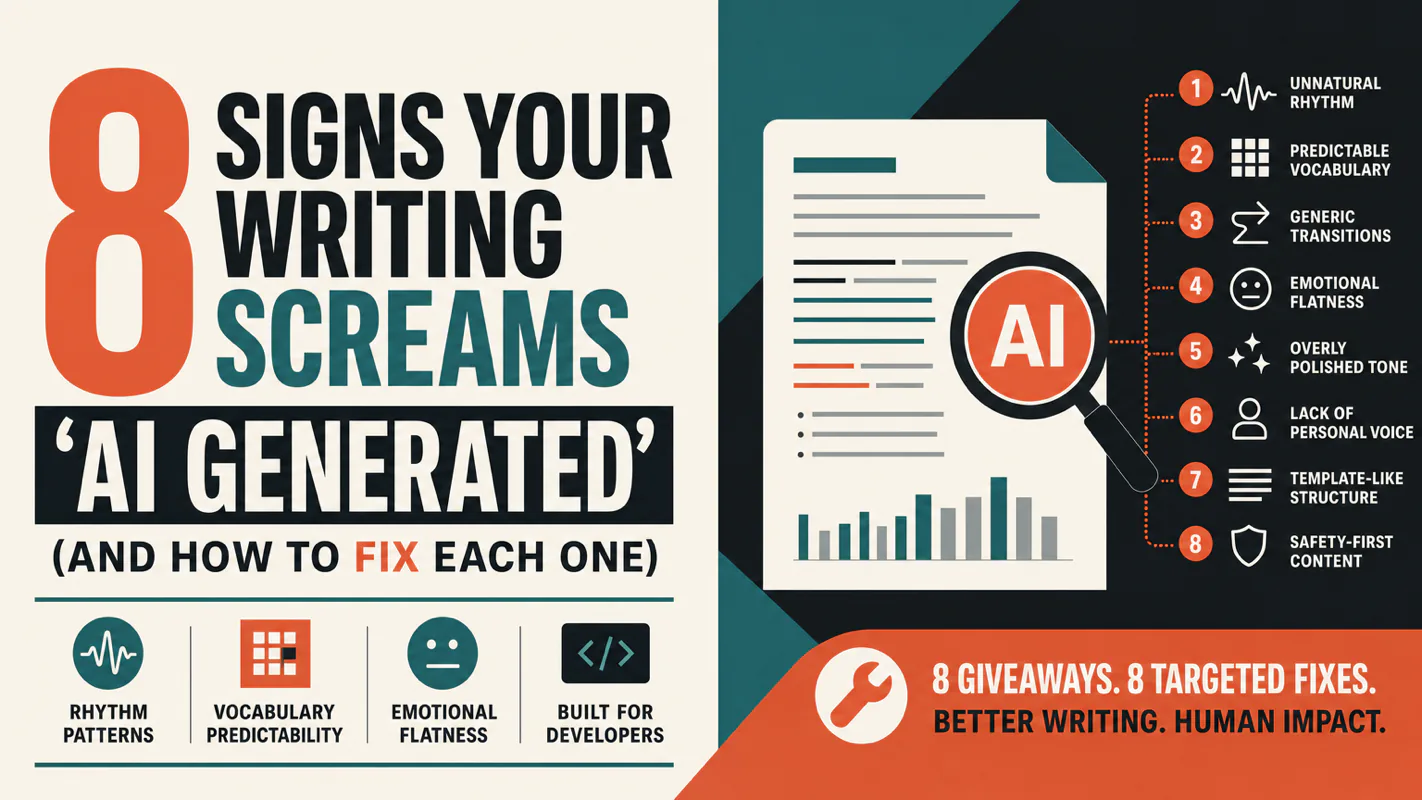
A detector score cannot survive a conversation with the freelancer it just cost three weeks of payment. What holds up is the specific thing on the page: rhythm, vocabulary, missing detail. Eight of them here, and the reason review stays human when you automate business processes.