Monitoring a competitor who publishes no feed is the case every RSS guide skips. Twenty-one platforms sorted by which of three jobs they do, and the finished setup is business process automation you own outright, with no seat licence to renew.
Blaming the content is the reflex when a post underperforms, and it is usually the wrong diagnosis. A second reader decides distribution before any human sees the post, and most of what it checks is mechanical enough to automate business processes around, on five platforms at once.
Gloves on, tape measure in hand — nobody types a query. Three voice surfaces for ai automation tools (terminal, Telegram, Discord), 10 TTS and 6 STT providers compared on cost and latency, plus a setup that costs nothing.
AI Tools for Business: Four Questions, Ten Folders
Every list ranks AI tools for business. None says what to put in one. Four questions, ten folders, measured file counts, and a prompt you can paste tonight.
Search ai tools for business and you get lists. Fifty tools, twenty tools, eleven tools. Most are written by companies that sell one of the tools on the list, and the one they sell is usually near the top.
Not one of those lists answers the question you will have the week after you subscribe to any of these AI tools for business: what do I actually give this thing?
Start with the arithmetic the lists skip.
Tool
List price, 10 August 2026
ChatGPT Plus
$20 / month
Claude Pro
$20 / month
Google AI Pro
$19.99 / month
Microsoft 365 Copilot Business
$21 / user / month
Four subscriptions, one seat, one year
≈ $970
Every figure is from the vendor's own pricing page. Copilot is discounted to $18 at the time of writing, which takes the total to about $936. Multiply by headcount for whichever ones your whole team uses.
Here is what none of these AI tools for business sells you: the accumulated knowledge of your own business, arranged so you can put your hand on the right part of it in thirty seconds. They sell access and usage. The context is yours to supply, and if you do not supply it in an organised form, you supply it by retyping it — every session, in every tool, forever.
This is not an argument against buying AI tools for business. Buy the fifth one if it does something the other four cannot. If you want the tool answer plainly: pick whichever of ChatGPT, Claude, Gemini or Copilot your organisation already pays for. For most trades the gap between them is far smaller than the gap between a fed assistant and a starved one.
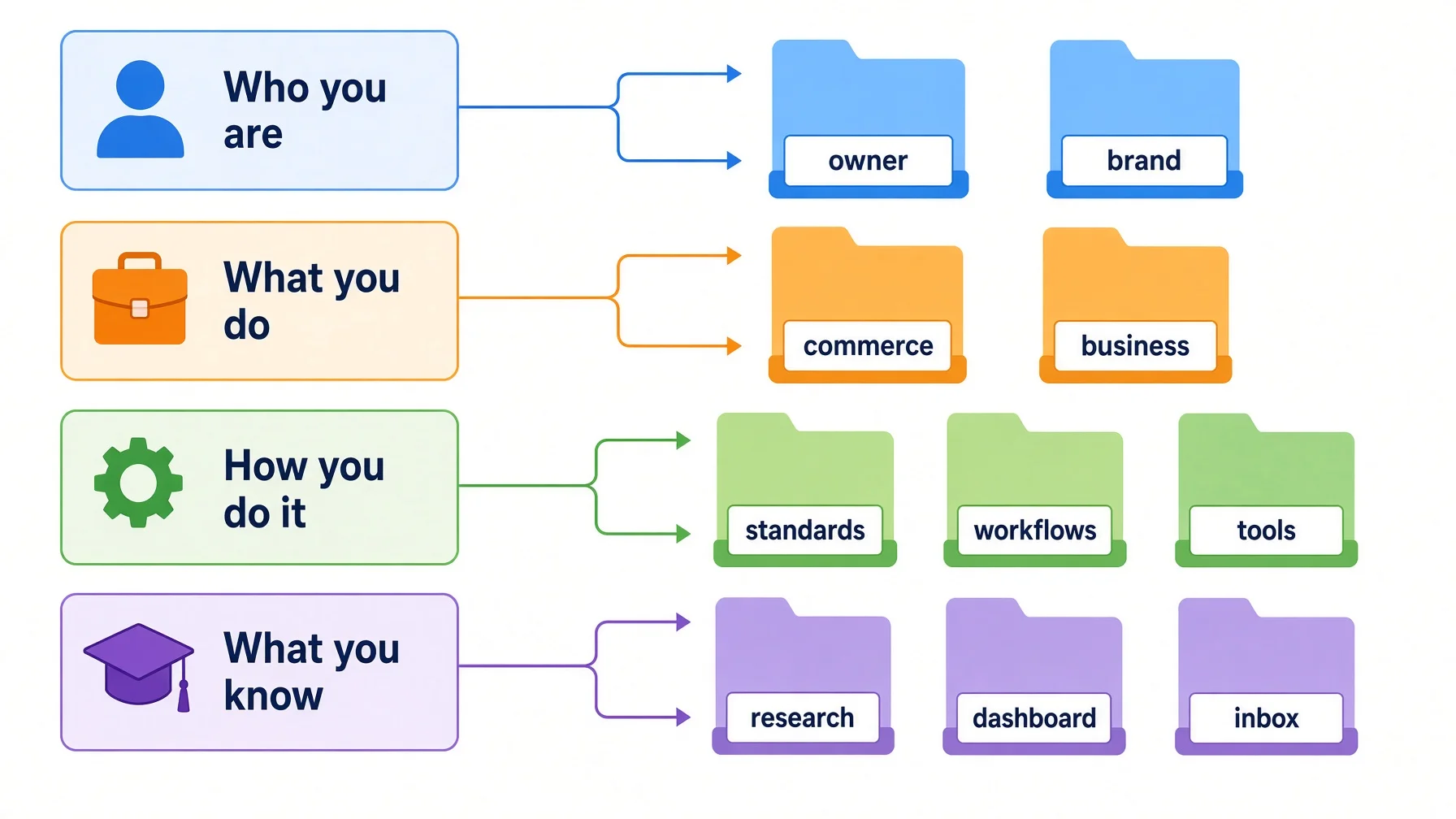
A subscription is the only part of this you can pay for, which is why it is the part people keep buying — and it is not the part that is missing. What is missing comes from four questions:
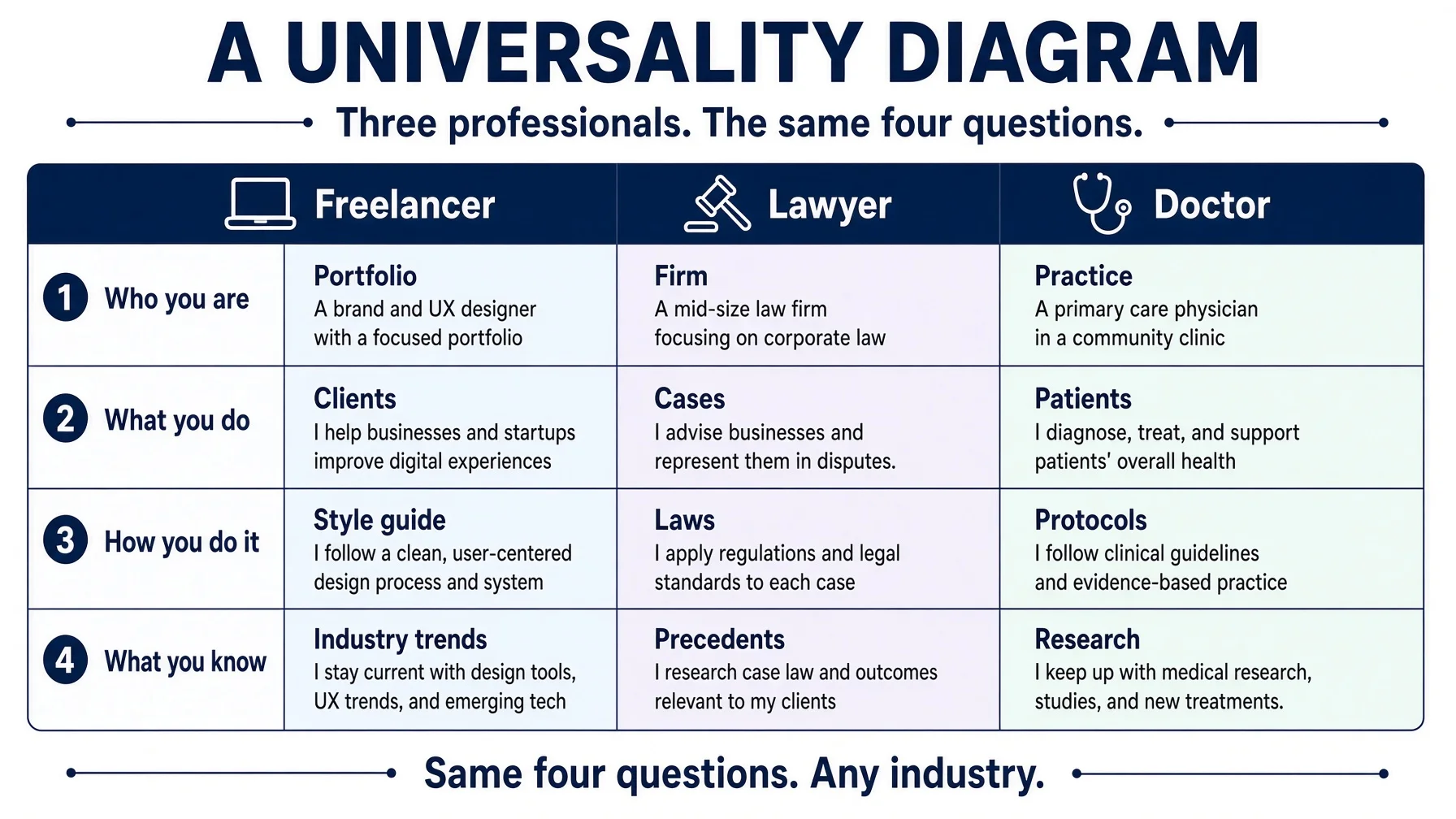
Who are you?
What do you do?
How do you do it?
What do you know?
The ten-minute version, in case you read no further. Open a plain text file. Write three lines: what you refuse to do even when the money is good, the mistake you keep repeating, and how much an assistant may decide without asking you. Attach that file to your next chat and ask it something that hits one of your red lines. Everything below is what happens when you keep going.
Answer the four honestly and you get ten top-level folders. What follows is the mapping, what each assistant will actually read, the measured contents of a knowledge base built this way, two worked examples, a prompt you can paste tonight — and the published evidence against all of this, including an ETH Zurich result finding that the project overviews every model provider recommends do not generally help. That last section is the one to read if you only read one.
What "context" means here — everything the assistant can see during one conversation. Think of a meeting table: whatever you put on it before the meeting starts is what gets discussed. Nothing else exists.
More AI tools for business will not stop you re-explaining yourself
More AI tools for business multiply the number of places you have to re-explain yourself. That is the whole problem in one sentence.
A new hire does not get a laptop and "you have access now." They get the handbook, the client list, and the three things that get you fired — once, and they keep it. Every AI assistant is a new hire on their first morning, every morning, and nobody wrote the handbook.
Search costs are real but badly measured. The one solid figure, from McKinsey's The social economy, is that the average interaction worker spends nearly 20 percent of the week looking for internal information or tracking down colleagues who can help, and that searchable knowledge records can cut search time by as much as 35 percent (McKinsey Global Institute, July 2012). That study predates generative AI entirely, and the widely quoted "1.8 hours a day" version of it appears nowhere in the source.
What AI tools for business actually sell
What you pay for
What it covers
What it does not cover
Model access
A better engine for reasoning and writing
Anything specific to your business
Usage allowance
More messages, longer documents, faster responses
Which document was the right one to send
Built-in memory
Preferences carried between chats inside that one product
Portability to any other product
Integrations
Reading your mail, calendar or drive on request
Judgment about what "good" looks like for you
Your structured knowledge
—
❌ Not sold by anyone. Only you have it.
That last row is the point of this article. It is also why the fifth subscription changes nothing: more engines, same empty tank.
Andrej Karpathy made a related observation while publishing his own minimal knowledge system — that NotebookLM, file uploads and most retrieval systems rediscover your knowledge from scratch on every question, with nothing accumulating in between (LLM Wiki gist, April 2026).
Week one to month six: three hundred files and no current version
Nobody abandons AI tools for business in week one. The failure is not dramatic. It is slow, and by the time you notice it the fix is expensive. It arrives in one of two shapes.
If you never built a structure: it starts as one folder called AI stuff and ends, three months later, as three hundred files across four places with two versions of last quarter's client brief and no way to tell which is current. By month six the output arrives faster but reads generic, so you spend the saved time editing it back toward how your firm actually talks.
If you did build one, you failed the opposite way. Week one you designed all of it — fourteen categories, a naming convention, a template per note type, best-looking system you ever built. Month one, eleven of the fourteen are empty. Month three, you write something and cannot decide which of the three live ones it belongs in, so it stays in Downloads. Month six, you open a standards file describing a process you abandoned in March and quietly stop trusting any of it.
Both failures have one cause: the structure was not built out of work you were already repeating. Categories invented in advance have no gravity — nothing pulls a file into them. Everything below is ordered to prevent exactly that.
What AI tools for business will actually read
Handing files to AI tools for business does not guarantee they read them. Every major platform has limits, and they are not always visible in the interface.
All figures were checked against the vendors' own documentation on 10 August 2026. They change often. Two terms: a context window is how much an assistant can look at in one go; grounding is the set of sources an answer is built from.
One disclosure, because it should change how you read the table: this site sells none of these products and takes no affiliate revenue from any of them. That is why the table reports what each one refuses to do as plainly as what it does. A list written by a vendor will not tell you that its own product silently drops everything past the three-hundredth file.
Platform
Files it will hold
Whole folder?
ChatGPT Projects
5 Free · 25 Plus · 40 Pro/Business/Enterprise (docs)
⚠️ Single files only — but a Drive folder can be linked
Claude Projects
No fixed count; must fit the context window, then switches to search (docs)
Add 300+, but only the first 300 ground the answer (docs)
✅ Yes — SharePoint folder, Copilot picks
Read the Copilot row again. You can add a shared folder holding two thousand documents, and the system will select the three hundred it considers most relevant. You will not be told which.
Even the number is unsettled: Microsoft's support page says 300 while a Microsoft Q&A answer says 100. That tells you how much weight to put on any single figure.
The practical consequence: you cannot hand everything to AI tools for business, so the skill is knowing which small subset to hand over. That is what structure buys you. Not comprehension — selection.
The four questions that produce your folders
Every business, in every trade, can answer these four, whichever AI tools for business it pays for. That is why the method transfers. The second column is deliberately a test rather than a description, so you can tell when an answer is wrong.
Question
Your answer is wrong if…
Folders
Who are you?
…it would be equally true of any competitor in your trade.
owner/ · brand/
What do you do?
…you cannot say which of these you were paid for last month. That test is also the dividing line: paid for it, or still weighing it.
business/ · commerce/
How do you do it?
…it names a button instead of a result.
standards/ · workflows/ · tools/
What do you know?
…it has no expiry date attached.
research/ · dashboard/ · inbox/
Four questions, ten folders. There is an eleventh in the measured base below — personal/ — and it does not come from the four questions. It exists because personal documents have to live somewhere. If you keep those elsewhere, you have ten and nothing changes.
If you have clients, they live inside business/, one folder each — business/acme/ holding their voice rules, their approval chain, and the two things they always ask you to change. Not research/, which is material you gathered for yourself. Not dashboard/, which is only what is live this week. And put the client outside the date: business/acme/2026-08/ is right, business/2026-08/acme/ is wrong, because next month you would look in two places for one client.
The tie-break, which is really the whole method
The questions are ordered by how slowly the answers change. Who you are shifts over years, what you do over quarters, how you do it over months, what you know over weeks.
That ordering is a design choice rather than a measured result — but it is the rule you use when a file could sit in two places. Put it in the folder that changes on the slower clock. A price list you revise quarterly belongs with what you sell, not with what you know. Get this wrong and the fast folders leak into the slow ones, which is how a structure actually dies: not wrong on day one, just research/ slowly becoming everything.
Two of the ten look like padding and need defending. commerce/ holds a single idea under assessment in both examples below; it stays separate because an assistant that reads live services and maybe-someday ideas as one pile will quote the maybe-someday idea to a customer. If you never float uncommitted things, fold it in and run nine. And research/, dashboard/ and inbox/ all sit under "what you know", which stretches the phrase — what actually groups them is churn. The four questions decide what a folder is for. Change rate decides where it sits. Better to say so than pretend one rule produced the other.
This is not the first attempt at the problem
Personal knowledge management already has PARA (projects, areas, resources, archives), Johnny Decimal and Zettelkasten, all predating generative AI. No study compares any of them to this, including this article. If one already works for you, keep it.
What the four questions change is the sorting axis. PARA sorts by how actionable something is, which is right for deciding what to work on this morning. These sort by which question the material answers and how slowly it changes, which is right for deciding what to hand to your AI tools for business. The tiebreaker is whether your bottleneck is picking today's task or assembling today's context.
What ten folders look like when they are full
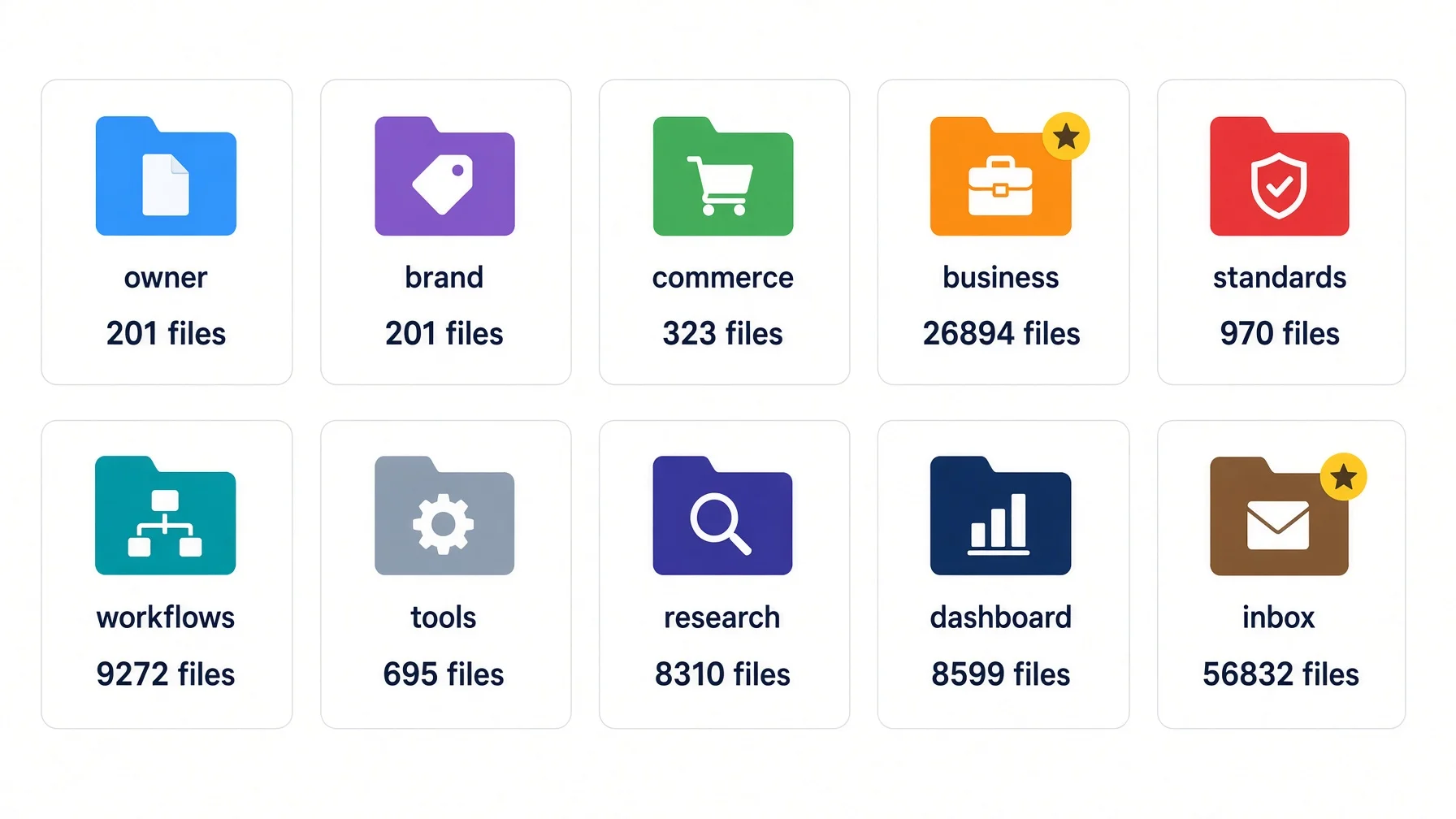
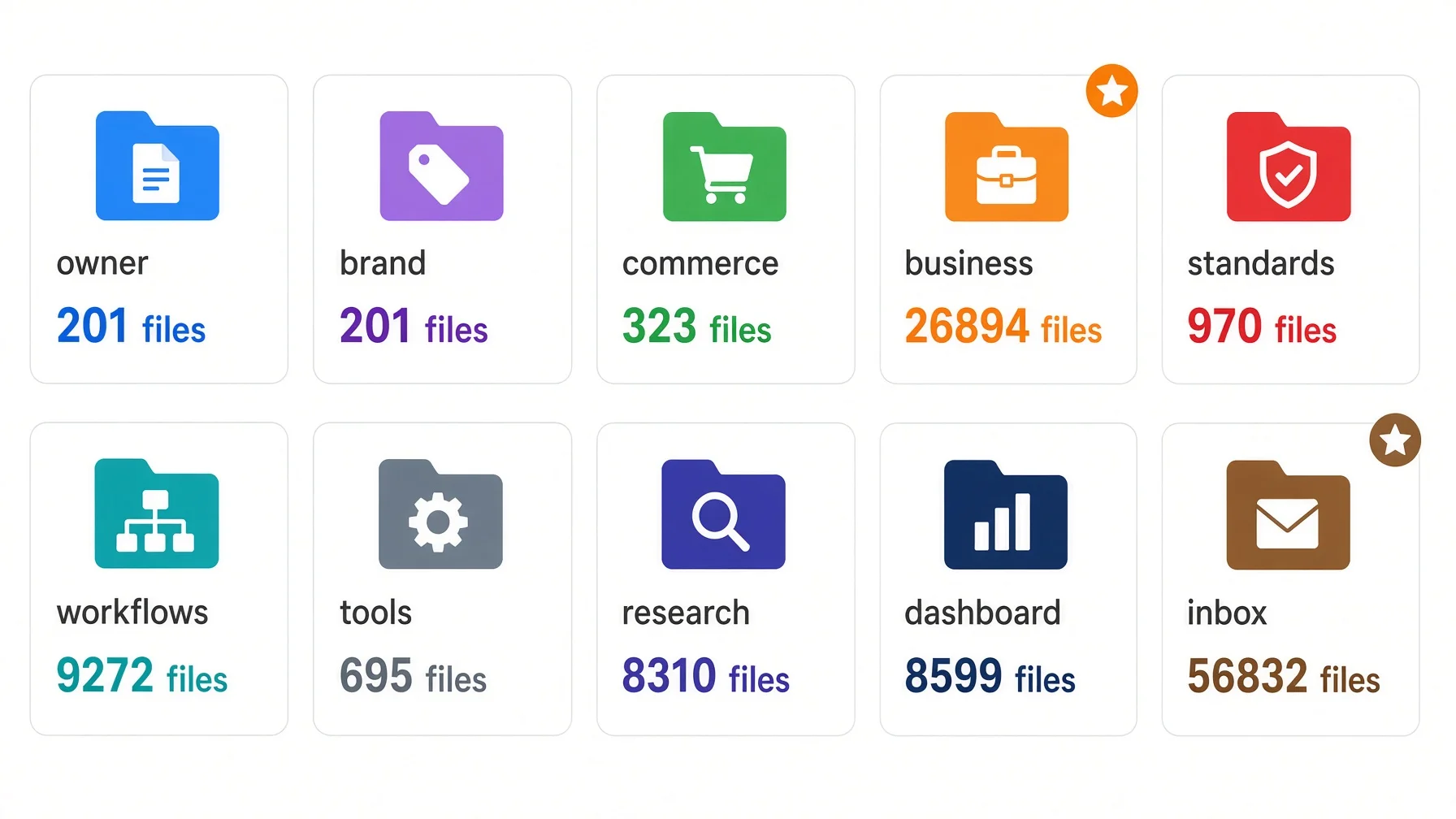
Here is the same structure after a year of heavy use — and before the numbers alarm you: nobody built this on day one, and nobody should. You start with five folders and about an hour. The table exists to show that the shape holds when one branch grows a thousand times faster than another.
These are measured counts from exactly one base, which makes this an existence proof and nothing more. Two standard commands produced it on 10 August 2026 — find ... -name '*.md' for the file counts, du for the disk figures. The count is Markdown only; spreadsheets, images and everything else show up in the disk column instead.
Folder
Question
Markdown files
Disk
inbox/
What you know
56,832
17 GB
business/
What you do
26,905
47 GB
workflows/
How you do it
9,272
1.7 GB
dashboard/
What you know
8,632
4.8 GB
research/
What you know
10,477
15 GB
standards/
How you do it
970
586 MB
tools/
How you do it
695
216 MB
commerce/
What you do
323
13 MB
brand/
Who you are
201
365 MB
personal/
—
31
690 MB
owner/
Who you are
29
124 KB
Across the eleven folders: roughly 114,000 Markdown files, about 88 GB.
Read those two columns as separate measurements. The count is Markdown only; the disk figure includes everything else — personal/ is 31 Markdown files and 690 MB, which is photographs. The only column that bears on the argument is the file count.
First, the range. The largest folder holds about 1,960 times as many files as the smallest. One structure, both ends accommodated without special cases.
Second, the biggest folder is the least valuable — and it is the one that got away.inbox/ is meant to be a transit area: cross-machine transfers, screenshots, and an archive that works as a soft delete. Fifty-six thousand files is not a well-run transit area. It is what a soft delete becomes when moving is easier than deciding — the failure case sitting inside the example, on my own measurement. What saves it is containment: nothing in that folder is ever handed to an assistant. Containment is not the same as emptying.
owner/ holds twenty-nine Markdown files and 124 kilobytes, and it is the only folder whose absence AI tools for business notice. That is testable: hand over everything except owner/, ask for a decision you hold strong views about, and see whether the answer sounds like you or like the average of everyone in your trade. File count measures throughput, not value.
Four folders carry the weight, and the smallest matters most
Each of the eleven has a written skeleton specification saying what belongs in it. Four do most of the work.
1. `owner/` — smallest, and the one that matters
Five dimension folders and a note file, nothing else at the top level:
owner/
├── README.md        ← a three-line note saying what this folder holds
├── experience/      ← what you have done, milestones
├── expertise/       ← what you are good at, and where that ends
├── vision/          ← where you are going
├── judgment/        ← what you believe, how you decide, what you refuse
└── collaboration/   ← how you want an assistant to work with you
That first file is only a note to yourself and to whatever assistant opens the folder. Some tools look for a particular name — Claude reads CLAUDE.md, several agent tools read AGENTS.md — but README.md is understood everywhere and works no matter which subscription you pay for.
judgment/ is the core, and the part almost nobody writes down. In this base it holds ten files:
File
What it settles
Decision framework
How a call gets made
Reading order
What to read first when context is short
Content value check
Whether a piece of work is worth doing
Product value check
Whether a product is worth building
Strategic principles
The long-run commitments
Value priorities
What wins when two goods conflict
Values and red lines
What you will not do for money
Hard constraints
The non-negotiables
Authority boundaries
How far an assistant may decide alone
Failure modes
The mistakes you personally keep making
That last one is the most useful and the most uncomfortable. Writing down the errors you repeat gives an assistant something to check against.
One research finding points the same way: a study of 679 rule files and 25,532 rules across more than 5,000 agent runs found that negative constraints help while positive instructions hurt (arXiv:2604.11088). The same paper carries a caveat that limits how much this can bear, and it is set out in full below. Use the prohibition form as a tiebreaker when you are unsure how to phrase something — not as proof that phrasing is where the value lies.
2. `brand/` — one folder per public face
You can carry more than one; this base holds three, each with the same four domains: strategy/, operations/, identity/ and content/. The skeleton specification carries one boundary rule that is easy to get wrong: identity/voice/ describes how the brand speaks, never how the owner personally speaks. Keeping those apart is what stops an assistant writing your consultancy's proposals in the voice you use for weekend posts.
3. `standards/` — the rules layer
28 specification packages, one folder each, named for what they govern. The distinction that keeps this folder clean: standards are rules, not tutorials. A rule says what "done correctly" means and survives a tool change. A tutorial says which button to click and expires. Tutorials live in tools/ — 108 of them here. Get this boundary wrong and standards/ fills with screenshots that are wrong within a year.
4. `workflows/` — the repeatable procedures
82 workflow packages, each a job broken into ordered steps. This article was produced by one of them, which is the honest test of whether a workflow folder is real: if nothing in it has ever been run end to end, it is a wish list.
Risk: eleven is an endpoint, not a starting point — This grew to eleven over a year. Build five first; the how-to is further down.
Same four questions, a lawyer and a doctor
The four questions are not about software, and they do not depend on which AI tools for business you bought. Fill them in for any trade and you get a working structure.
Both examples are constructed. A later section refuses vendor evidence on the grounds that it was produced by the party selling the conclusion, so it would be poor form to hide that this section is exactly that. Treat it as a demonstration that the questions can be answered in an unfamiliar trade, not as evidence that these are the right answers.
A solo litigation lawyer
Question
The answer
Folders
Who are you?
Fifteen years in employment disputes. You settle rather than litigate when the client's job is recoverable. Your firm promises plain-English advice.
owner/ — the settlement philosophy is a judgment file, not a marketing line. brand/ — the plain-English promise, with examples
What do you do?
Employment claims, contract review, a small retainer advice line. Weighing whether to add HR policy audits.
business/ — the three live services. commerce/ — the audit idea, still being assessed
How do you do it?
Intake questionnaire, conflict check, engagement letter, matter file. A house style that never uses "hereinafter".
workflows/ — intake, step by step. standards/ — drafting style. tools/ — practice management system
What do you know?
Case law you track, the current matter list, everything a client emailed this week.
research/ · dashboard/ · inbox/
A family physician running a small practice
Who are you? Twenty years in family medicine, referring early on cardiac symptoms and late on back pain, promising same-week appointments. → owner/ holds the referral thresholds; brand/ holds the same-week promise.
What do you do? General consultations, chronic disease management, minor procedures, and a travel-medicine clinic under consideration. → business/ holds the three live services; commerce/ holds the travel clinic.
How do you do it? Consultation structure, referral letter template, recall procedure, and the documentation standards your regulator expects. → workflows/, standards/, tools/.
What do you know? Clinical guidelines, today's list, this morning's post. → research/, dashboard/, inbox/.
Risk: client and patient data does not go in here — Both examples put procedures and standards into the structure, never case files or medical records. Confidential material stays wherever your professional obligations already require. The structure holds how you work, not who you work on.
The slots came out identical in both, which is less impressive than it looks — I filled them from one template, so of course they matched. What it does show is narrower and still worth something: neither trade needed a slot the template lacked, and in both the hardest cell was the same one. The lawyer's settle-first preference and the doctor's referral thresholds decide whether an assistant sounds like that practitioner or like nobody, and they are precisely the lines that never get written down. Take that from this section, not the folder names.
Where AI tools for business fit
, and where they do not
Generative AI platforms are consumers of your structure, not owners of it. AI tools for business come in two kinds, and the split decides how much of your structure they ever see.
Agent tools that read your disk — Claude Code, Codex CLI, Cursor and similar — get the folder tree directly, on demand. This is the full-fit case.
Chat products — ChatGPT, Claude, Gemini, Copilot — get whatever slice you hand them, mostly as individual files. For these, the ten folders are for you, not for the assistant. They let you find and hand over the right four documents in thirty seconds instead of the wrong forty. The assistant never sees the tree.
Most small businesses are in this second group. The hour is still worth spending — but the payoff is your own retrieval speed, not the model's comprehension, and it would be dishonest to sell it as the latter.
One convention worth adopting: a plain file named AGENTS.md at the root of a project, read natively by a range of agent tools. It sits below this structure rather than replacing it — your folders answer what exists, the root file answers where to start. Building against the OpenAI platform directly changes nothing either way.
One neighbouring tool worth placing: business intelligence software reads structured rows while these folders hold prose, and the useful direction is the reverse of what people assume. Export the monthly summary from your business intelligence software into dashboard/ as a short note, so the numbers land next to the standards that say what to do about them. A dashboard tells you what happened; only written judgment tells an assistant what you would do about it.
Build the first five folders tonight
The tool question is settled. Pick whichever of the major AI tools for business you already pay for, and assume you will switch at least once. What no subscription includes is a portable copy of your own context — right now it lives in your head and in chat histories you cannot export. Five folders is the smallest thing that moves it onto a disk you own. It costs an hour and nothing else, which makes it the cheapest item in an article that opened with $970 of AI tools for business.
Five folders, about an hour, no new software. Build owner/ (how you decide and what you refuse), brand/ (how the business speaks), standards/ (what finished work must and must never contain), tools/ (what you use and how it is configured), and inbox/ (everything unsorted, emptied on a schedule). Those five carry the method. The other six arrive on their own, and building them early produces empty shells.
Before you start. You will create directories and ask an AI to navigate them. That means a tool that can open a local folder — not a chat window where you paste files one at a time. If you need to set one up, pick a free AI tool here.
With a mouse: open your Documents folder, make a new folder called kb (short for knowledge base), and inside it make five more: owner, brand, standards, tools, inbox. That is the whole step.
With a terminal, if you already use one:mkdir -p ~/kb/{owner,brand,standards,tools,inbox}
Nothing later in this article needs a terminal.
What is a text file here? Plain text, nothing more. Open TextEdit on a Mac (Format → Make Plain Text) or Notepad on Windows, type your sentences, and save. Saving as .md instead of .txt tells an assistant it may read headings and bullets as headings and bullets. Every step below works either way.
1. `owner/` — start here, twenty minutes
If you are doing this for somebody else — you run the office, a partner makes the calls — this folder is theirs. Do not guess. Book fifteen minutes and write down what they say in their own words.
Create one file called judgment and answer:
What do we refuse to do, even when the money is good? Three lines.
What mistake do we keep making? Two lines, specific — "we underprice rush jobs" beats "we should be more careful."
How much can an assistant decide without asking? One line, with a number in it if possible.
It is the highest-value file in the structure.
2. `brand/` — how the business speaks
One file, voice. Paste in two things you have written and are happy with, then three lines on what makes them sound like you. Not adjectives — observable habits. "Short sentences, no exclamation marks, always names the price" is usable. "Professional yet approachable" is not.
3. `standards/` — what "done" means
One file per recurring output: what must be in it, what must never be, how long it should be. Write these as prohibitions wherever you can — partly because one study leans that way with the caveat noted above, partly for a reason needing no study: you know what you refuse more precisely than what you want.
4. `tools/` — what you use and how it is set up
One file per tool: which account, which settings you changed, what it is for. You will thank yourself for this the day you switch AI tools for business and cannot remember why anything was configured the way it was.
5. `inbox/` — the pressure valve
Everything unsorted goes here. The rule that makes it work is that it gets emptied. Skip that and it becomes the 56,832-file folder in the table above. That folder is mine, which is the point: the rule is easy to write, easy to stop keeping, and nothing warns you when you stop.
Put a note in each folder
In each of the five, create a short file — README.md works everywhere — with three lines:
# owner/

What is here: how we decide, what we refuse, our recurring mistakes.
What is not here: client work, brand voice, anything with a date on it.
Where to look instead: brand/ for voice, business/ for client work.
Same idea as a floor directory in a shopping centre: not a description of every shop, just something that stops people wandering the wrong floor. The base above holds 3,332 of them, which should tell you they are not all hand-written — most come from a template and get corrected when they turn out wrong. Write yours by hand for the five that matter.
Verify it before you trust it
The obvious check — upload a file, ask a question it answers, watch the answer come back — proves only that the upload worked. Any assistant echoes a file you just handed it. You need a scenario where your written answer and the default answer disagree.
Open a completely new conversation. No history.
Hand over your judgment file.
Describe a job a sensible assistant would happily accept but that your red lines refuse — the profitable rush job, the sector you will not work in, the client who wants the thing you stopped selling. Ask whether to take it.
Pass: it declines, and names your reason back to you. Fail, read but weak: it accepts while quoting your file elsewhere. The rule is too soft to beat the default, so rewrite it harder. Fail, never read: nothing from the file appears at all.
Those two failures need different fixes and people routinely mistake the first for the second. Weak writing gets rewritten; an unread file is a limits problem, so check the table above.
Keep it alive
Write to the folders only when you catch yourself retyping. This decides whether the structure survives six months, and it replaces the scheduled tidy-up you will not do. The trigger is not a calendar reminder — it is the moment you paste the same background into a chat for the second time. Stop, put it in a file, paste the file instead. Nothing gets written in advance, and nothing gets written because it is Sunday.
Copy this prompt
If you would rather not start from a blank folder, start from a blank conversation instead. Paste this into ChatGPT, Claude, Gemini, Copilot or any of the other AI tools for business you use. It interviews you, then drafts the structure from your answers rather than from a template.
You are helping me move my business knowledge out of my head and my chat
histories into folders on a disk I own, so that any AI tool can be handed
the right context without me retyping it.

Step 1 — Interview me, one question at a time. Draft nothing until I say
I am done. Ask in this order:

1. Who am I? My trade, how long I have done it, and one thing I do
   differently from others in it.
2. What do I do? What I sell right now, and what I am considering adding.
3. How do I do it? The steps I repeat on every job, and what a finished
   piece of work has to contain before I will send it out.
4. What do I know? The reference material I keep going back to, the work
   in progress, and the pile that is not sorted yet.

After each answer, ask one follow-up if the answer was vague. Push hardest
on three things: what I refuse to do even when the money is good, the
mistake I repeat, and how much you may decide without asking me.

Step 2 — When I say I am done, map my answers onto these ten folders and
show me the mapping before you create anything:

owner/ brand/ commerce/ business/ standards/ workflows/ tools/ research/
dashboard/ inbox/

Question 1 fills owner/ and brand/. Question 2 fills business/ for what is
live and commerce/ for what is under consideration. Question 3 fills
workflows/, standards/ and tools/. Question 4 fills research/, dashboard/
and inbox/. If one of my answers has nowhere to go, say so rather than
bending it into the nearest folder.

Step 3 — Create the ten folders under ~/my-work/, and in each one a file
called CLAUDE.md — or README.md if I tell you my tool does not read that
name — holding four lines: the folder name; what goes in it, in one sentence, in
my words from the interview; what does not go in it and which of the other
nine takes that instead; and the words I would type when I want this
folder. If you cannot write to my disk, print exactly what I should create.

Step 4 — Write one more CLAUDE.md above the ten. It holds a single table,
columns Directory, What it is for, Triggers — one row per folder, one line
each. No content of its own, and nothing that repeats what the ten folder
files already say.

Step 5 — Tell me which five to fill first and which can stay empty. Write
my rules as prohibitions wherever a prohibition carries the same meaning.

Step 6 — Give me a test. In a fresh conversation I will hand over the top
file alone and ask where my brand rules live. Tell me now what a correct
answer looks like: it names brand/, quotes the row that sent it there, and
stops instead of guessing at the contents.

Ask your first question now.
Two notes on that. The filename is CLAUDE.md because agent tools look for it; if yours does not, the same four lines in a README.md are read by everything. And if your tool is a chat window rather than something that opens folders, step 3 gives you the text and you make the folders yourself — which takes about ten minutes.
That is the build. Now the part most articles in this genre leave out.
Where this structure breaks
The short version. One measured study supports faster and less repetitive. Nothing supports more accurate, and one study suggests careful rule-writing earns less than it feels like it should. Nobody has measured folder structure directly. If you need a proven accuracy gain, this is not it. If you are tired of retyping the same background, it is.
The published evidence is mixed, and anyone who tells you otherwise has not read it. One warning about what follows: every study here tested assistants that write software, because that is the only setting anyone has measured properly. Nobody has tested this on a law firm or a clinic.
The evidence that cuts against it
Repository overviews — the project-summary files every model provider recommends — do not generally improve success rates. That is the finding of a team at ETH Zurich, who tested context files across 300 SWE-bench Lite tasks plus 138 self-built instances and measured over 20 percent added inference cost on average (arXiv:2602.11988 v2, ICLR 2026 Workshop on Memory for LLM-Based Agentic Systems). An earlier draft phrased it more harshly; the published version says "does not generally improve."
The rule-file study above is more awkward still: shuffled, domain-mismatched and badly formatted rules performed about as well as expert-curated ones, all around a 13.8 percentage-point gain on a selected subset of SWE-bench Verified, with the gain attributed to priming rather than content.
Read the scope before you throw the folders away. Both studies test coding agents solving benchmark tickets inside a repository they can already read in full — the model has the code, and the file only tells it how to behave. That is not the situation here. When you hand four documents to a chat product, the file is the only place that information exists at all. What the finding does kill is the belief that a beautifully worded instruction file makes a model smarter. Spend the effort on what goes in the folders, not on how the sentences are phrased.
The evidence that supports it
A paired study looked at 124 real pull requests across 10 repositories. Where a project instruction file was present, median wall-clock time was 28.64 percent lower and median output tokens 16.58 percent lower — both statistically significant. (Output tokens are the unit these tools bill in, each roughly a fragment of a word.) Median input tokens rose about 3 percent, which the authors do not mark as significant (arXiv:2601.20404, v2 March 2026).
Note what that measures: time and output volume, not accuracy.
What nobody has measured
No published study quantifies whether a structured folder tree beats a flat one. The second gap is wider: those studies ran on software repositories with coding agents, and nobody has measured a solo practitioner picking four documents out of a folder and pasting them into a chat window — the mode most readers of this article are in.
Searching for direct evidence turns up vendor blog posts quoting headline accuracy figures in the eighties against the fifties: self-administered tests, twenty questions, no methodology disclosed, run by companies selling the answer. That is marketing, which is why none of it is cited here.
So what is left? Not "established" — nothing above establishes anything about folders. One measured result, and two claims you have to test on yourself: that you find the right document faster, and that you stop retyping the same background. Those are not findings and this article will not dress them as findings. The verification step above exists so you can check them instead of taking my word. If a month in you are not handing over better material faster, this is not paying and you should stop.
Four more limits
Instruction files are context, not enforcement. Anthropic's own documentation is blunt about CLAUDE.md: it arrives as a user message, following it is not guaranteed, and conflicting files are resolved by picking one arbitrarily. Actual enforcement needs a separate hook mechanism (Claude documentation, checked 10 August 2026).
Auto-loaded files are an attack surface. Anyone who can write to a file an assistant reads automatically can issue instructions on your behalf. That is prompt injection: text hidden in a document, treated as a command. Review outside files the way you would review code you did not write, and never point an assistant at a folder someone else can edit.
Bigger context windows do not solve this, though not for the reason usually given. The "lost in the middle" research showing accuracy drops for information buried in long inputs is from 2023 (arXiv:2307.03172, published in TACL), and newer models handle long inputs measurably better — apply the same discount that the McKinsey figure got. The durable half survives without it: however large the window, something still has to decide what goes into it, and nothing on the market does that deciding for you.
Maintenance scales with the structure, and the bill is real. An hour a month covers the five-folder version honestly. It does not cover the base measured above — 3,332 routing files, 28 standards packages and 82 workflows do not stay true on an hour a month, and the truthful figure at that scale is closer to a morning a week, most of it spent deleting. That cost is the strongest argument in this article for starting at five.
When you should not bother
Skip this if you are not yet using AI tools for business regularly — use them first, notice what you keep retyping, then structure that. Skip it if your work has no written judgment to capture. And skip the full eleven if you are one person with one service: three folders honestly maintained beat eleven half-filled.
FAQ
Which AI tools are best for business?
Pick whichever of the major AI tools for business your organisation already pays for. Switching later takes about an hour once your folders exist — and is effectively impossible when they do not, because everything you taught the old tool lives in chat histories you cannot export.
How can I actually use AI in my business?
Start with one job you repeat weekly, not with a tool survey. Write down who you are, what the job is, the rules the output must follow, and one past example you were happy with. Hand those four over, then compare the result against work you would have done yourself. That comparison is the only benchmark that means anything.
Are there free AI tools for business?
Yes, and this method adds nothing to the bill. Free tiers accept uploaded files, and knowledge apps such as Notion and Confluence have free tiers for individuals and very small teams. The folders are ordinary folders on a disk you already own.
Do I need Notion or a special app?
No, and you do not have to abandon the one you use. What matters is that a copy of the text also exists as ordinary files on a disk you own — that is the version you can hand over, back up, and keep when a subscription lapses. Either keep the files as the master and paste into your app when you want it presentable, or keep the app as the master and export to plain text once a month. What fails is having the only copy behind a login, because then every assistant depends on an integration you do not control.
What if I already have folders?
You are most of the way there. One test: can a stranger tell from the folder names alone what belongs where? If the names describe projects and dates rather than the four questions, leave the names alone and add the three-line note.
Can I use this with a team?
Yes, and the boundaries matter more with a team than alone. standards/ and workflows/ are shared. owner/ is not — it holds one person's judgment, and merging several people's into one file produces a document nobody agrees with. Give each person their own and share the rest.
How long before this pays off, and when should I stop?
Give it a month and judge it on one question: are you handing over better material faster than you were? If yes, keep going. If you are still retyping the same background in week four, the folders are not being written to when it matters, and adding more of them will not help. Stop rather than redesign.
What to do next
A fifth subscription is not what is stopping you. Four unanswered questions are.
Build five folders, not eleven. Empty folders teach you the structure is decorative.
Write your rules as prohibitions. You know what you refuse better than what you want.
Verify in a fresh conversation, using a scenario where your rules and the default disagree.
Assume you will switch AI tools for business. Plain folders on your own disk are the only part that survives.
The point is not tidiness, and "you can take it with you" needs its limit stated. What you carry to the next tool is a folder of plain files, not a trained assistant — the new tool starts as ignorant as the old one, and you still choose what to hand it. The difference is that choosing takes thirty seconds rather than an afternoon of reconstruction, on every tool, including the ones that do not exist yet. Plain files were never clever. They are just the part still standing after each vendor's memory feature stops mattering.
Smallest next action: create owner/ and write the three lines about what you refuse to do. Everything else can wait until that exists.
Platform limits, prices and documentation cited here were checked on 10 August 2026 and change frequently. Verify against the vendor's current page before relying on any figure.
hh — AI Workflow Pro. Industry workflows, rebuilt with AI agents.
Monitoring a competitor who publishes no feed is the case every RSS guide skips. Twenty-one platforms sorted by which of three jobs they do, and the finished setup is business process automation you own outright, with no seat licence to renew.
Blaming the content is the reflex when a post underperforms, and it is usually the wrong diagnosis. A second reader decides distribution before any human sees the post, and most of what it checks is mechanical enough to automate business processes around, on five platforms at once.
Thursday afternoon, fourteen product ideas, a Monday filming slot, no scripts. Six script shapes and seven hook formulas turn that hour into finished drafts — and the business rule stays: rewrite at least 30% before anything ships.
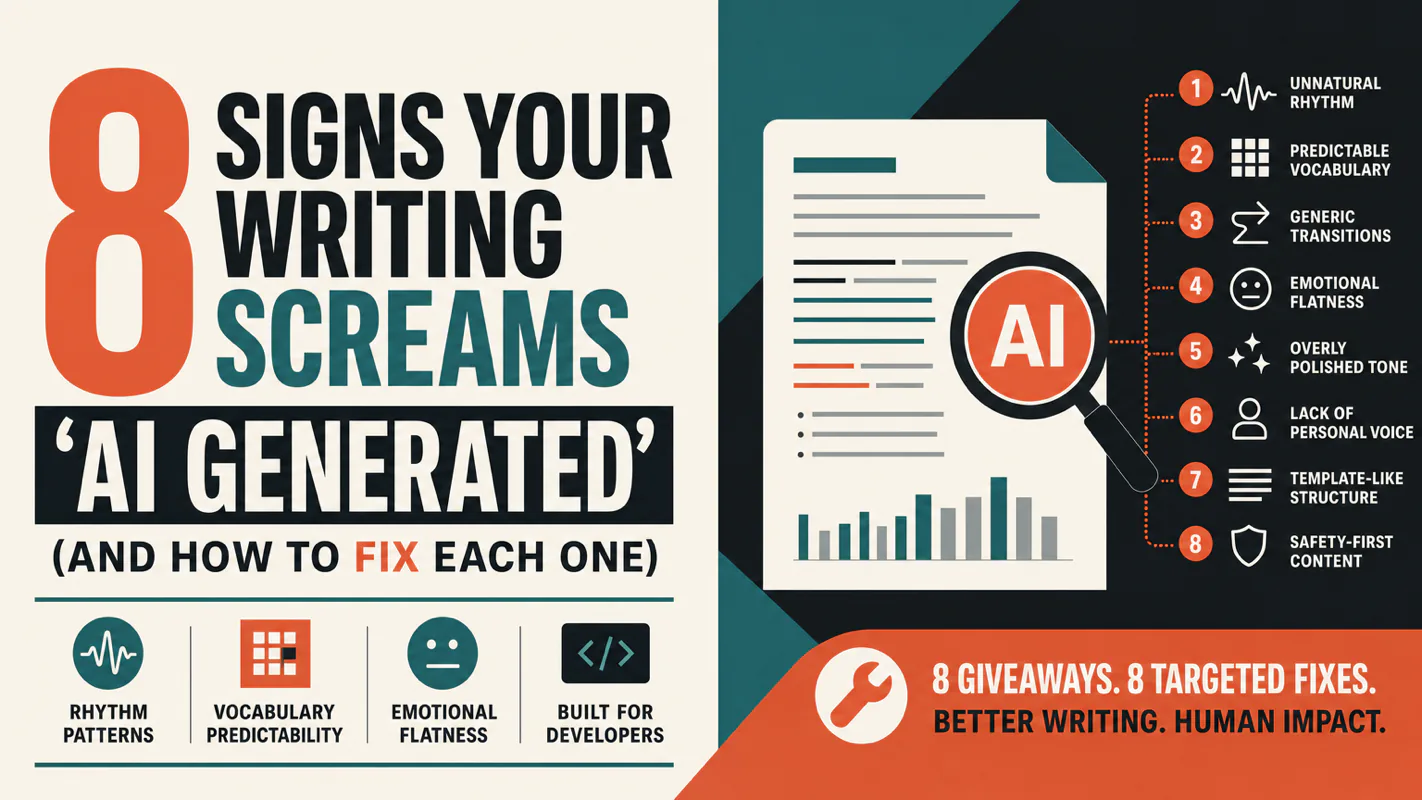
A detector score cannot survive a conversation with the freelancer it just cost three weeks of payment. What holds up is the specific thing on the page: rhythm, vocabulary, missing detail. Eight of them here, and the reason review stays human when you automate business processes.