Monitoring a competitor who publishes no feed is the case every RSS guide skips. Twenty-one platforms sorted by which of three jobs they do, and the finished setup is business process automation you own outright, with no seat licence to renew.
Blaming the content is the reflex when a post underperforms, and it is usually the wrong diagnosis. A second reader decides distribution before any human sees the post, and most of what it checks is mechanical enough to automate business processes around, on five platforms at once.
Gloves on, tape measure in hand — nobody types a query. Three voice surfaces for ai automation tools (terminal, Telegram, Discord), 10 TTS and 6 STT providers compared on cost and latency, plus a setup that costs nothing.
An AI agent for business forgets rules that live only in chat. Put role, rules, and job steps in one folder—and copy a build prompt that interviews you and sets it up in any agent.
On Monday you taught an AI agent for business your refund rule. On Tuesday it invents a “friendlier” refund. On Wednesday you try another AI tool and start from zero.
The model is not the main failure. The failure is that your business rules lived only in chat—where they disappear, drift, or lock to one vendor.
The fix is simple: put the rules in one folder of plain documents. Who the AI is. What it must never break. How to do the job, step by step. Then open that folder in any AI tool that can read files.
You do not need a new “agent platform” to start. You need a source of truth you own—and, later in this article, a copy-paste prompt that interviews you and builds that folder with any general agent.
Why chat is not a business worker
An AI agent for business should behave like a careful hire: finish work across days, follow written rules, stop when unsure, and leave notes a human can check. A chat window has a different job: answer the next message.
People shopping for an AI agent for business often mix three things:
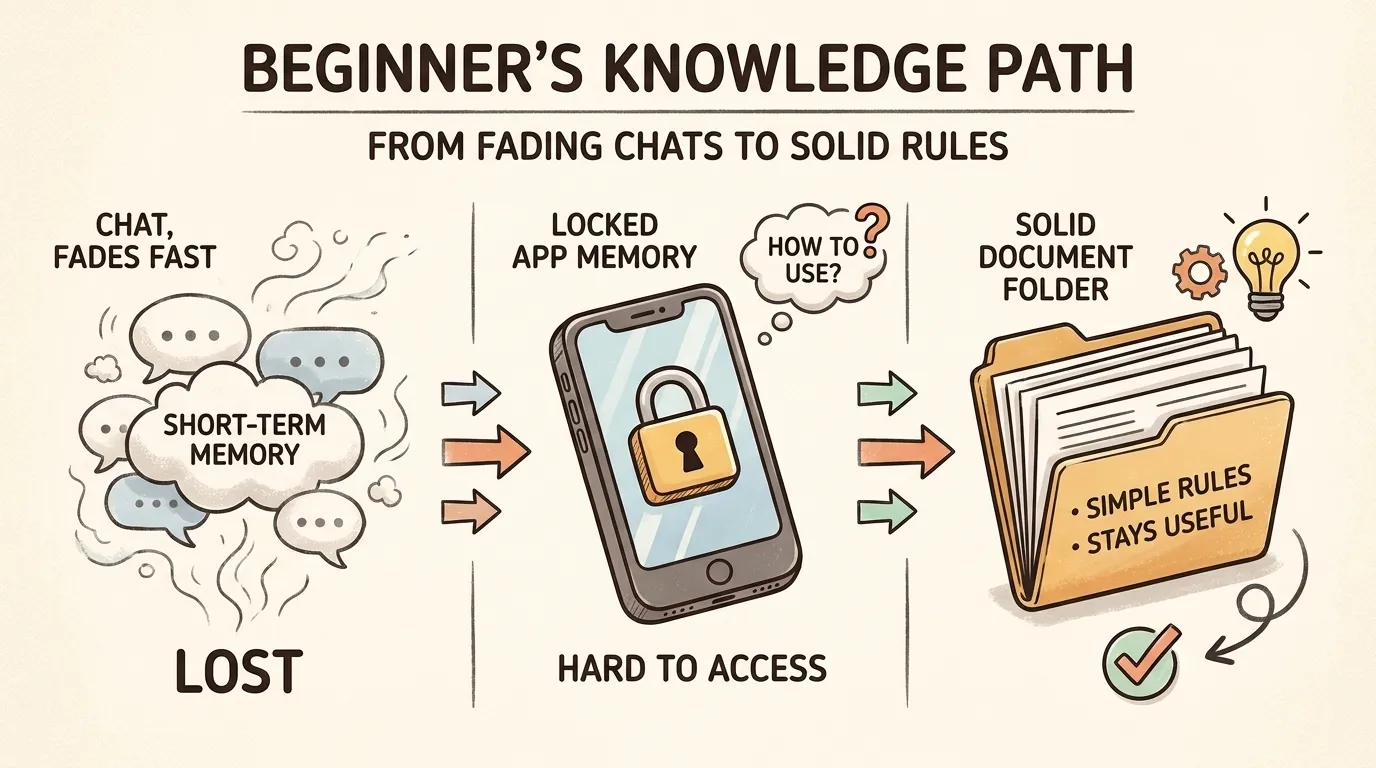
Where the “memory” lives
Survives a new chat?
Survives a new AI tool?
Good for company rules?
This conversation only
No
No
No
The product’s built-in Memory
Sometimes
Rarely
Risky
Your folder of documents
Yes
Yes
Yes
Chat dies when the thread dies. Built-in Memory is handy inside one product, but each product is its own silo. You cannot copy ChatGPT’s memory into another tool the way you copy a file.
Business rules need a place you can edit, review, and carry. That place is a folder—not a mood in a chat box.
Three failures that look like “the AI is dumb”
What you see
What actually broke
It “forgot” the refund policy overnight
The rule lived only in the old thread
It is perfect in ChatGPT and lost in another tool
Policy was trapped in one product’s Memory
It sounds confident and still invents prices
No written “never invent” rule + no handoff gate
If you only upgrade the model, all three failures can return. If you write the rules down once, you fix the system, not the symptom.
What an AI agent for business actually is (one sentence)
An AI agent for business is a general AI that loads your written role, rules, and job steps—and works from those files instead of guessing.
If the files are missing, you only have a chatbot. If the files exist but nobody opens them, you still only have a chatbot. The folder is the job description. The AI tool is the person reading it.
This definition keeps you honest when demos look magical: no files opened → no agent for business, only chat.
Build the folder: four plain pieces
Name the folder after the job, for example billing-agent/ or client-intake/. Inside, keep it boring and clear:
What humans call it
What goes in the file
Keep it
Who you are
Role, tone, hard bans (“never invent refunds”)
Short
Company rules
Policies a new hire would be fired for ignoring
Editable, versioned
Job steps
One file per job: when to use → inputs → steps → output → what to do when stuck
One job per file
What happened
Short logs of decisions and failures
Add only; do not rewrite history
Optional later: a short “facts we always use” note (tools you use, seasonality, client nicknames). Distill it from logs; do not dump everything in on day one.
Think of it as an employee handbook plus checklists, not as “prompt magic.”
Rule: Anything you would put in a handbook lives in files. Built-in Memory is optional sugar—not the system.
How to write a rule that actually sticks
Weak rule: “Be professional with clients.”
Strong rule: “Never promise a delivery date that is not already confirmed in the CRM. If unsure, say you will check and stop.”
Weak rule: “Handle refunds carefully.”
Strong rule: “Partial shipments: refund only the undelivered line items, never the full order, unless a human marks the ticket ‘full refund approved’.”
Test: a stranger who has never worked for you should know what to do and what not to invent.
Example layout (copy and rename)
Use any names you like. The point is one folder, plain text, not perfect filenames.
billing-agent/
  README.md           # what business problem this folder solves
  who-you-are.md      # role and hard bans
  company-rules.md    # refunds, naming, SLAs
  handoff.md          # when a human must take over
  logs/               # what happened
  jobs/               # step-by-step work
    00-index.md
    client-follow-up.md
Same idea if your team prefers uppercase names in examples online. Call the files what your team will actually open. The AI only needs clear paths and clear prose.
Do this in 30 minutes (before you buy anything)
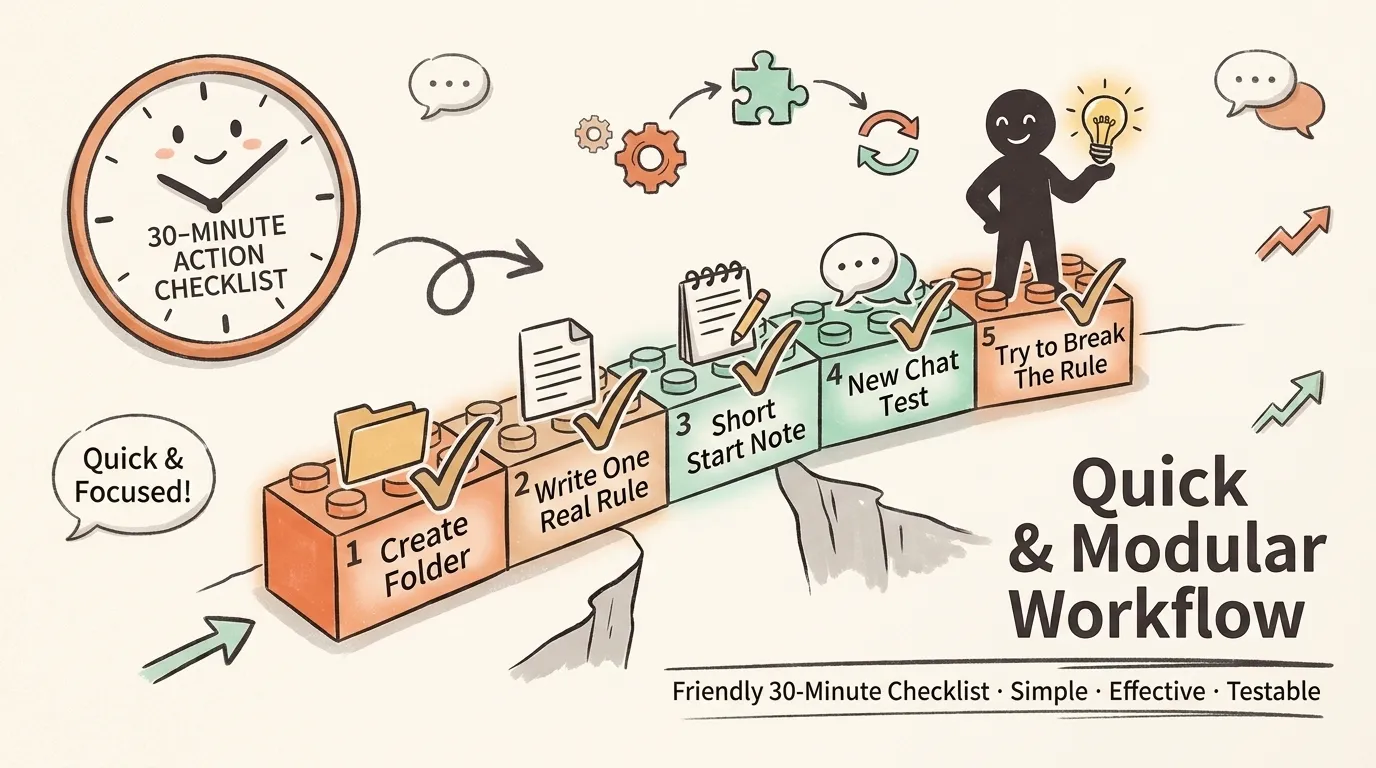
Do this once before you judge any “AI agent for business” product. You can type the files yourself—or skip ahead and let the interview prompt draft them while you answer questions.
Minutes
Action
0–5
Create the folder. Add empty who-you-are, company-rules, one job file, empty logs/.
5–15
Write one real rule from your business (not a toy) and one real job you do this week.
15–20
Write a short start note (ten lines): who you are, where the rules live, which job file to open, when to stop and call a human. Paste it into your tool’s project instructions—or as message 1 if the tool has none.
20–25
Start a brand-new chat. Ask: “What is our refund rule for partial shipments?”
25–30
Try to break the rule in chat on purpose. Pass = the AI refuses or hands off. Fail = the files were never read.
If the new-chat test fails, you do not have an AI agent for business yet. You have a demo that only works while the old conversation is open.
Short start note (template)
Copy, fill the paths, keep it thin:
You are the billing-ops helper described in billing-agent/who-you-are.md.
Company rules live in billing-agent/company-rules.md — follow them over chat guesses.
Before multi-step work, open billing-agent/jobs/00-index.md and pick one job file.
If handoff.md applies, stop and write a handoff note. Do not invent policy.
Ten lines. Not ten pages. If you paste your whole knowledge base into the start note, every chat gets slower and more expensive. Keep the start note short. Open deep files only when the job needs them.
What belongs in the short start note vs the full folder
Load when
What goes there
Everyday picture
At the start of work
Short summary + paths to the folder
Like the whiteboard: “Today’s must-knows”
Only when the job needs it
Full rules, long jobs, logs
Like opening the right binder mid-task
That split is how you stay consistent without stuffing everything into every message.
For cost and context control in heavier setups, see context management for agent cost control on this site. You can ignore brand names there; the idea is the same: do not treat context like free landfill.
Job steps are the real “skills”
Vendors love the word “skill.” Across tools, the durable form is simpler: a job file the AI can follow.
Minimal jobs/client-follow-up.md:
# Job: Client follow-up

## When to use
No reply for 48h; status is "waiting on us".

## Inputs
- Client id or thread link
- Last promise we made (quote from email or CRM)

## Steps
1. Read billing-agent/company-rules.md section "Client tone".
2. Draft a reply in the house format (see Output).
3. List open commitments in bullets.
4. If amount, legal risk, or anger hits handoff.md → stop and hand off.

## Output
- Subject
- Body
- Facts used (with sources)

## If stuck
Do not send. Write questions for a human.
Some tools wrap this as a fancy “Skill.” Others only have markdown. The file is the skill. The product UI is optional packaging.
A second job template (invoice status)
Use this shape for any repeating office task:
# Job: Invoice status check

## When to use
Client asks "where is my invoice / payment status?"

## Inputs
- Client name or id
- Invoice number if they have one

## Steps
1. Read company-rules.md section "What we never invent".
2. Look up status only from the source of truth the human named (accounting tool / sheet).
3. If you cannot access that source, stop and ask the human—do not guess paid/unpaid.
4. Reply with status + date of last known update + next action if unpaid.

## Output
- One short status paragraph
- Source you used

## If stuck
Do not invent balances. Hand off with the missing access listed.
Copy this interview prompt: build the folder with any agent
This is the part you take home.
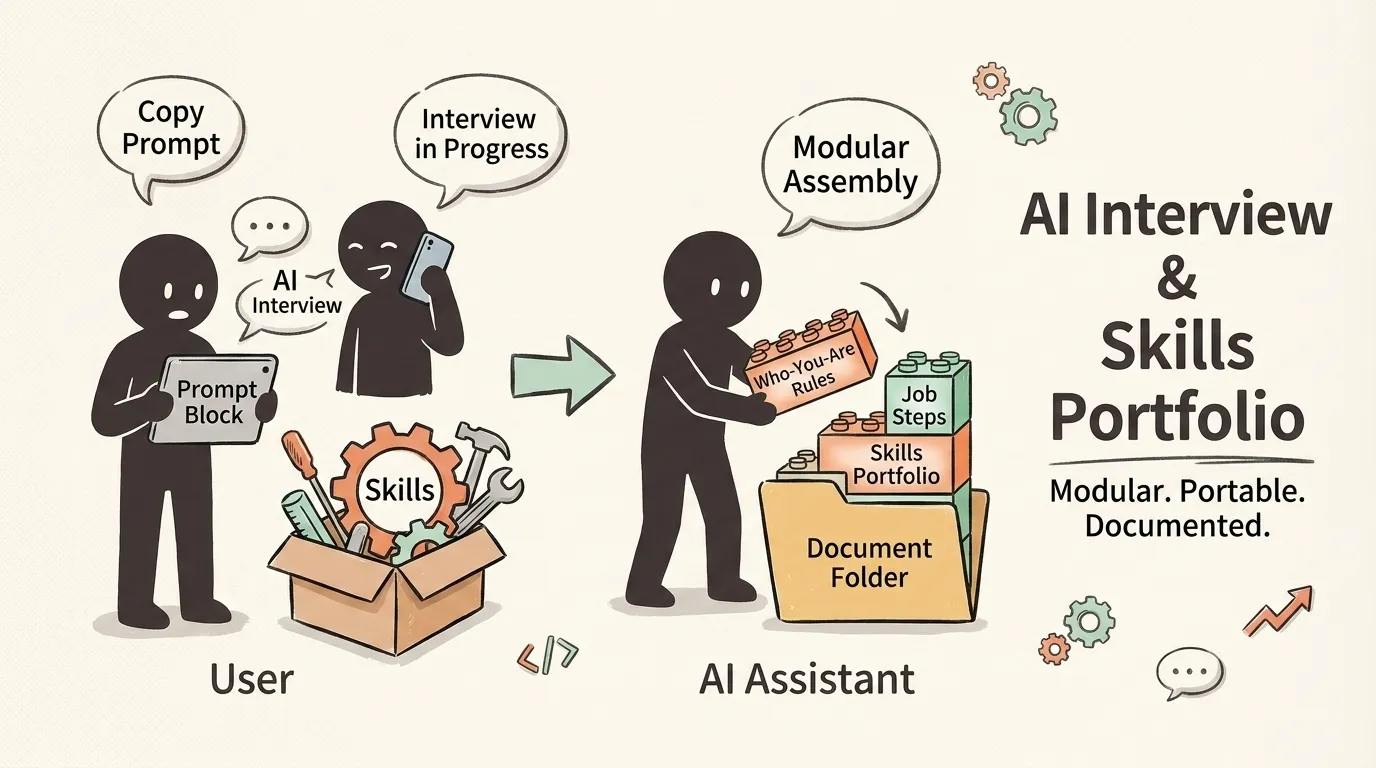
You should be able to leave this article with more than a concept. You should leave with a portable method: paste one prompt into ChatGPT, Claude, Gemini, Cursor, Codex, or any coding agent, answer a short interview, and get a first draft of the whole folder.
What the prompt does
Interviews you about one real job (not your whole company).
Writes plain-language files: who you are, company rules, handoff, one job, start note.
Stops and asks when a rule is fuzzy—it must not invent legal or pricing policy.
Ends with a new-chat verification script you can run yourself.
How to use it
Copy the whole block below.
Paste into any agent that can write text files (or paste files back into a folder yourself).
Answer in short bullets; real examples beat theory.
Review every rule before production. The AI is a clerk, not your lawyer.
Master prompt (copy everything inside the fence)
You are helping me build an "AI agent for business" as a FOLDER of plain documents—not a new software platform.

## Goal
Create a self-contained document folder so a general AI can do ONE real business job consistently across days and tools. Rules live in files I own. Chat is not the source of truth.

## Non-negotiables
1. Use plain language a non-engineer can read. No jargon for its own sake.
2. Prefer short, testable rules over vague advice ("be professional").
3. NEVER invent legal, medical, tax, pricing, or refund outcomes. If I have not stated a rule, ASK—do not fill gaps with confident fiction.
4. One job family only in this first pack (e.g. client follow-up OR invoice status—not both empires).
5. Output must be files I can save as .md (or paste into a folder). Include a 10-line START NOTE for the tool.
6. After drafting, give me a NEW-CHAT verification script (3–5 questions I should ask in a fresh session).

## Interview first (do not draft files yet)
Ask me these questions ONE BATCH at a time (max 6 questions per batch). Wait for my answers before the next batch.

Batch A — Job boundary
1. What is the single job this AI should own in the next 30 days? (one sentence)
2. Who is the human owner if the AI is unsure?
3. What must the AI NEVER do (hard bans)?
4. What tools or systems hold the real data (CRM, email, sheet, accounting app)?
5. What does "done" look like for a typical task?
6. Name one real failure that already happened with AI or staff on this job.

Batch B — Rules that matter
1. Give 3–7 iron rules in your own words (refunds, tone, deadlines, money, privacy).
2. For each rule, give a concrete example of a correct action and a forbidden action.
3. When must the AI stop and hand off to a human? (money, anger, legal, irreversible actions…)
4. Any industry constraints I must respect? (if none, say none)

Batch C — One job walkthrough
1. Walk me through the last time a human did this job well (step by step).
2. What inputs are always required?
3. What should the output look like (format)?
4. What usually goes wrong?

## After I answer
Draft these files in full (use clear headings):

1) README.md — problem, scope, out of scope, success test
2) who-you-are.md — role, tone, hard bans, definition of done
3) company-rules.md — numbered iron rules with examples
4) handoff.md — handoff triggers + handoff note template
5) jobs/00-index.md — when to pick which job
6) jobs/<job-name>.md — When to use / Inputs / Steps / Output / If stuck
7) START-NOTE.md — ≤15 lines: role pointer, rules pointer, open jobs index, handoff, "do not invent policy"
8) logs/README.md — how to append a daily log (template only)

Then:
- List assumptions you still made (if any).
- List questions still open.
- Give the NEW-CHAT verification script.
- Give a 30-minute checklist for me to run manually.

## Style
- Write as a calm operator, not a hype marketer.
- No revenue promises. No "AI will replace your team."
- Filenames may be simple English (who-you-are.md). Do not require a special platform.

Start with Batch A only.
After the pack exists: weekly improve prompt (optional)
Paste this when you have a week of real use and a few messy logs:
You are my operations editor for an AI agent for business document folder.

I will paste:
1) company-rules.md (current)
2) 3–10 short log snippets from this week
3) 1–3 failures or near-misses

Your job:
- Propose ONLY stable rule updates (max 5). Each proposal: old text → new text → why (from a log).
- Reject anything that is a one-off anecdote, not a rule.
- Flag anything that needs a human decision (legal/pricing) instead of a rule change.
- Do not invent new policies I did not support with evidence.
- Output a clean revised company-rules section I can paste, plus a short change log.
After the pack exists: daily run prompt (optional)
When the folder is ready and the tool can open files:
Read START-NOTE.md and follow it.
Then open jobs/00-index.md and pick the job that matches my request.
Obey company-rules.md over any guess.
If handoff.md applies, stop and write a handoff note—do not invent policy.

My request:
[describe the task]
These three prompts are the portable core of the method: interview → improve → run. The folder is the product; the prompts are how any agent helps maintain it.
How the folder gets smarter over time
Files still rot if you never clean them.
Log what happened (decisions, exceptions, “we tried X, it broke Y”).
Once a week, pull stable lessons into company rules or a short facts file—or run the weekly improve prompt above.
Rarely change “who you are”—that is an org change, not a vibe edit.
Bad log: “Talked to client. Fine.”
Useful log: “2026-07-28 — Client asked full refund on partial ship. AI almost offered full refund. Rule partial-only held after re-read. Add example to company-rules.”
Logs are raw material for better rules. Without them, the folder freezes at version 0.9 forever.
Connect the same folder to common tools (when you are ready)
The folder does not change. Only the short start note’s location changes—because each tool looks for instructions in a slightly different place.
Tool (what it is)
Where the short start note usually goes
How to point at your folder
Claude Code (AI coding assistant in the terminal/IDE)
Project instruction file named for Claude
Put the ten-line summary there; point paths at your folder. It does not auto-read every other tool’s filename.
Codex (OpenAI’s coding agent CLI)
Common project instruction file many tools share
Same summary content; do not duplicate the whole rules book.
Cursor (AI IDE)
Project rules / shared instruction file
Always-on short summary; open full job files when the task needs them. Does not read Claude-only files by default.
ChatGPT / Claude.ai / any chat
Custom instructions and/or message 1; upload or paste files if needed
“Read these files, then wait.” Use the daily run prompt.
Any agent that can open a project folder
Message 1 or project root
Point at the folder path; run the daily prompt.
Do not assume one filename works everywhere. In public 2026 comparisons, tools disagree on which instruction file they auto-load. Your folder is shared. The short start note is a per-tool copy of the same summary.
Verify after connecting
Save folder + start note.
New session.
Ask a rule that exists only in the file.
Pass = answer matches the file. Fail = the tool never opened the folder.
Optional: run the verification questions the interview prompt generated for your business.
Common mistakes (and the fix)
Mistake
What goes wrong
Fix
Ten jobs on day one
Shallow rules, nothing verified
One job, one real rule, new-chat test
Rules written like slogans
AI invents details
Add correct vs forbidden examples
Whole handbook in the start note
Slow, costly, noisy
Start note thin; depth on demand
Never logging
Same failure every week
Three-line logs + weekly improve prompt
Trusting the interview draft blindly
Confident wrong policy
Human review of money/legal rules
Copying a stranger’s full pack
Wrong industry, silent risk
Interview your business; steal structure only
When one folder is not enough
Default: one folder, one role, one job family, until it hurts.
Split only when:
Different responsibility (content vs finance vs support)
Different permissions (can touch production vs cannot)
One role’s files crowd out another in the same chat
Then you want multiple folders (or clear boundaries), not “buy an orchestration platform first.” Multi-role examples on this site (for example a 10-agent solopreneur setup) are shapes—not a requirement for your first folder. See also when to split agents.
When you split, copy the interview prompt again for the second job family. Do not glue two empires into one messy handbook.
FAQ
Is ChatGPT Memory enough for an AI agent for business?
No for handbook-level rules. Use product memory for preferences if you like. Keep policy in your folder so every tool can open the same text.
Can I build the folder with a prompt instead of writing it alone?
Yes. That is what the master interview prompt is for. The AI interviews you, drafts files, and gives a verification script. You still own the final rules—especially money and legal lines.
Do I need special project files and a full folder?
Weekend test: one short start note with three rules. Real ops: folder = system, start note = summary + paths. Otherwise each tool grows its own fork of your policies.
When do I need a big search database?
When files are too many to find by name and path. Search helps retrieval. It does not replace short rules that must be obeyed exactly.
How is this different from Zapier or RPA?
Automation moves data. The folder stores judgment, standards, and step quality. Many teams need both.
Is a document folder secure?
Safer than invisible vendor memory if you review changes the way you would review untrusted code. Do not auto-trust random folders from the internet. Project instruction files are powerful.
Will this work on a random agent tool?
If it can read files—or you can paste files into the chat—yes. Message 1 is the loader when nothing auto-loads. You still did not depend on one vendor’s Memory API.
What to do next
You now have a practical contract for an AI agent for business that does not depend on one vendor:
One folder is the agent’s job description.
Start short; open depth only when needed.
Tools differ; the folder does not.
The interview prompt is how you take the method with you—into any agent, for any first job.
Industry work (accounting close, client intake, content ops) is the same shape filled with real rules and real jobs—not a different religion. That is how an AI agent for business stops being a chat toy and starts being equipment.
Smallest next action: copy the master prompt, answer Batch A, and save whatever files come back into a real folder on your disk. Then open a new chat and run the verification script.
Stay in the loop (no account signup)
This site does not ask you to create a product account. Free readers just leave an email—or follow where the build is posted.
Channel
What you get
Where
Email (free)
Occasional field notes when we pressure-test more folders in the wild. Articles on the site stay free.
Open aiworkflowpro.com, scroll to Subscribe, enter your email, confirm the link in your inbox.
No paywall on this article. No “sign up for access.” If you only want one next step after the prompt: use the email box at the bottom of the site, or follow on X if you prefer the timeline.
Leo — AI Workflow Pro. Industry workflows, rebuilt with AI agents.
Monitoring a competitor who publishes no feed is the case every RSS guide skips. Twenty-one platforms sorted by which of three jobs they do, and the finished setup is business process automation you own outright, with no seat licence to renew.
Blaming the content is the reflex when a post underperforms, and it is usually the wrong diagnosis. A second reader decides distribution before any human sees the post, and most of what it checks is mechanical enough to automate business processes around, on five platforms at once.
Thursday afternoon, fourteen product ideas, a Monday filming slot, no scripts. Six script shapes and seven hook formulas turn that hour into finished drafts — and the business rule stays: rewrite at least 30% before anything ships.
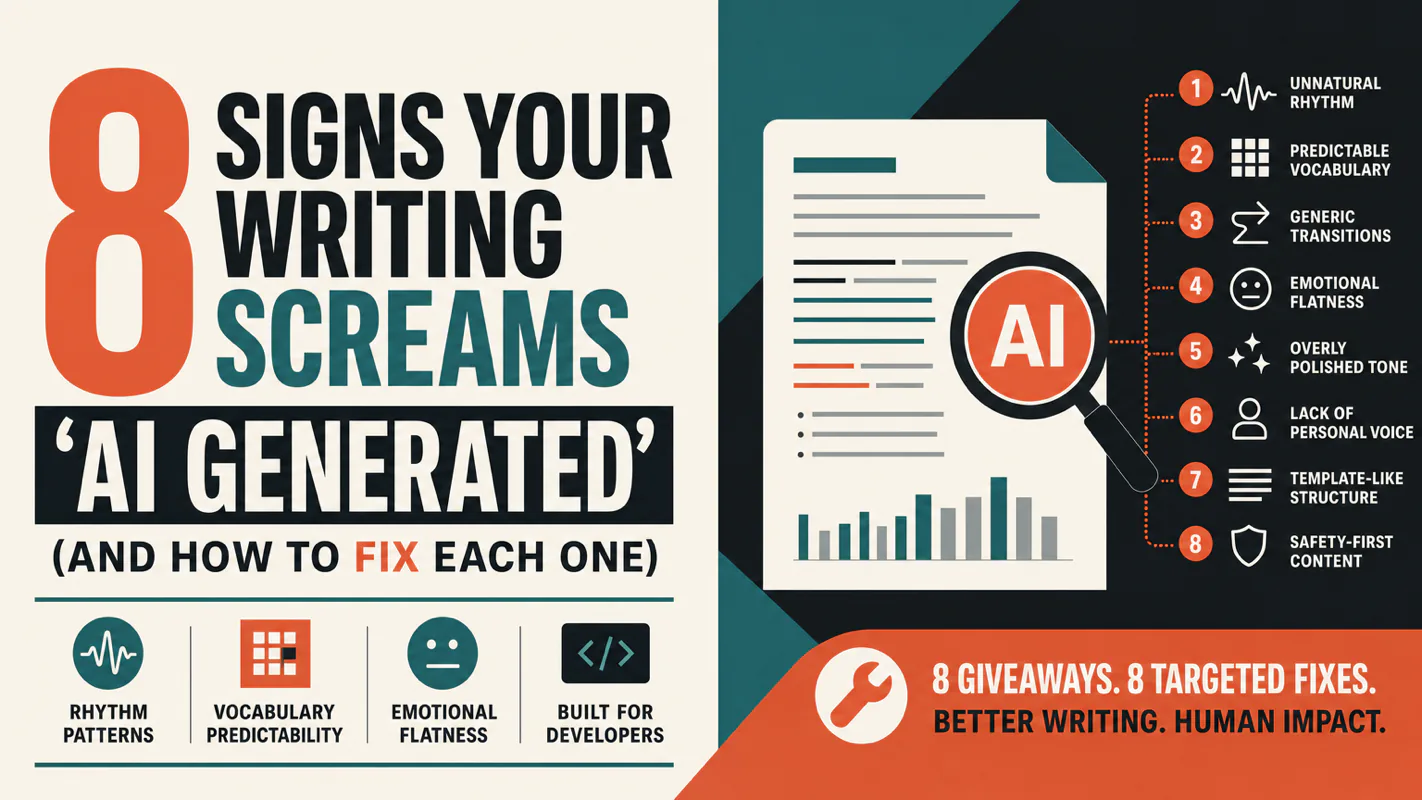
A detector score cannot survive a conversation with the freelancer it just cost three weeks of payment. What holds up is the specific thing on the page: rhythm, vocabulary, missing detail. Eight of them here, and the reason review stays human when you automate business processes.