Monitoring a competitor who publishes no feed is the case every RSS guide skips. Twenty-one platforms sorted by which of three jobs they do, and the finished setup is business process automation you own outright, with no seat licence to renew.
Blaming the content is the reflex when a post underperforms, and it is usually the wrong diagnosis. A second reader decides distribution before any human sees the post, and most of what it checks is mechanical enough to automate business processes around, on five platforms at once.
Gloves on, tape measure in hand — nobody types a query. Three voice surfaces for ai automation tools (terminal, Telegram, Discord), 10 TTS and 6 STT providers compared on cost and latency, plus a setup that costs nothing.
Generative AI Platforms: Switch Models Without Starting Over
Generative AI platforms change every few months. Your instructions do not have to. How one folder runs on seven model backends, and how to test yours tonight.
You do not have to pick the right platform. You have to make sure that picking wrong is cheap.
That distinction is missing from almost everything written about generative AI platforms. Search the term and you get rankings: the best twenty, the best dozen, the definitive list, one writer who says they tried hundreds. Every one helps you decide what to use this quarter. None tells you what happens to your work when you change your mind next quarter — and you will, because 55% of enterprise CIOs surveyed by Dataiku and Harris Poll in April 2026 said they had already switched large language models at least once.
Here is the short version, and it holds across all generative AI platforms equally. The models are rented. The account settings are rented. The one thing you own is a folder of plain text files on your own disk that says who you are, what you are working on, and how you want answers written. Every serious platform will read that folder. So that is where your three months of tuning belongs — not in a settings page with no export button.
This article covers the mechanism that makes generative AI platforms interchangeable, what it costs you not to have it, how one knowledge base currently runs on seven model backends at once, and a test you can run tonight in about an hour using tools you already pay for. If you only want the practical part, skip to Do this tonight.
What portability means when generative AI platforms change
Portability is the part of your setup that survives when the model underneath is replaced.
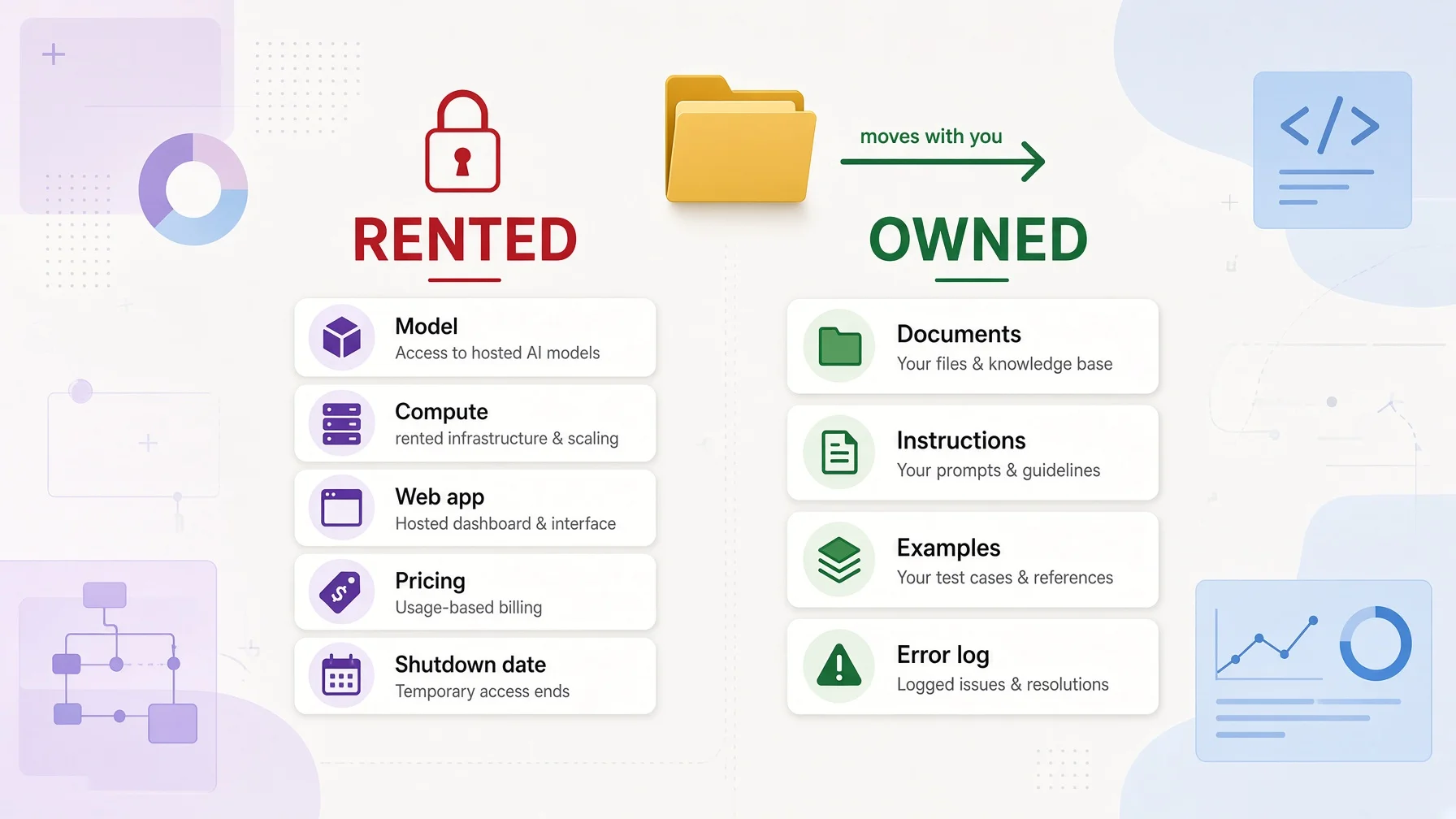
Split what you use into two piles. One pile is rented: the model itself, the machines it runs on, the web app, the account settings, the price, how much text it can hold in one conversation, and the date the vendor switches it off. You control none of it and never did. The other pile is owned: your documents, your instructions, examples of work you liked, and your running list of things the AI keeps getting wrong. That pile is text, and text moves.
The mistake almost everyone makes is putting owned material into the rented pile. You spend an evening writing a genuinely good description of your business into ChatGPT's Custom Instructions box. That description is now your content stored in someone else's product. When you want to try one of the other generative AI platforms, it does not come with you: Custom Instructions and Memory live in account settings, and there is no path that carries them to another vendor. You copy the text out by hand or you write it again. Google's Gems have the same shape — a name, an instructions box, optional uploaded files, all held inside the Gemini web app.
Nobody is being underhanded here. A settings page is simply a convenient place to put a text box, and once your text is in it, your text inherits that product's lifecycle.
Generative AI platforms agreed on a file, then half-implemented it
The fix is not clever. Put the instructions in a text file, keep the file in your own folder, and let each tool read it.
That is precisely what the industry standardised on. AGENTS.md is an open format its own site describes as "a README for agents: a dedicated, predictable place to provide the context and instructions to help AI coding agents work on your project." In December 2025 OpenAI reported it had been "adopted by more than 60,000 open-source projects and agent frameworks including Amp, Codex, Cursor, Devin, Factory, Gemini CLI, Github Copilot, Jules and VS Code," and donated the format to the Agentic AI Foundation under the Linux Foundation — co-founded with Anthropic and Block.
So the format is settled, held by a neutral foundation, and read by most generative AI platforms you would consider. And yet.
Anthropic's own documentation for Claude Code states plainly: "Claude Code reads CLAUDE.md, not AGENTS.md." Anthropic co-founded the foundation that now stewards AGENTS.md, and its flagship coding tool looks for a different filename. The docs are helpful about it — import the other file with an @AGENTS.md line, or link the two names together. But you have to know that, and a "best tools" roundup is not going to tell you.
This is what partial portability looks like. Not a locked door. A door with the handle in a slightly different place on each building.
What each of the generative AI platforms actually reads
Checked 2026-08-10 against each vendor's own documentation.
Platform
Where your instructions go
Claude Code
CLAUDE.md in the project; ~/.claude/CLAUDE.md for every project
Cursor
.cursor/rules/*.mdc in Cursor's own header format; also reads AGENTS.md natively
GitHub Copilot
.github/copilot-instructions.md, plus either AGENTS.md anywhere in the repository or a single CLAUDE.md or GEMINI.md at its root
Codex
AGENTS.md: a global file plus every folder between the project root and where you are working
Grok
AGENTS.md, Agents.md, AGENT.md, CLAUDE.md, Claude.md or CLAUDE.local.md, plus rules folders — the widest filename support of any tool here
ChatGPT
Custom Instructions and Memory in Settings; uploaded files in a Project
Gemini Gems
An instructions box in the Gemini web app plus uploaded Knowledge files
Read that table with one question in mind: which rows can you walk away from in an afternoon? The first five point at a file, so they can. The last two point at a settings page, so they cost you the evening you spent filling it in. There is a fuller version of that comparison at the end of this article.
Why the "top 5" question has no stable answer
Two questions come up again and again around this search: what are the top 5 generative AI platforms, and what are the big 5 AI platforms. Here is the honest answer.
By enterprise API spend, Menlo Ventures' December 2025 report — based on nearly 500 US enterprise AI decision-makers surveyed that November — put Anthropic at 40%, OpenAI at 27% and Google at 21%: three vendors holding 88% of the market. Two years earlier the same measure had OpenAI at 50% and Anthropic at 12%. The leader and the runner-up traded places inside two years.
That is the argument in one data point. Any ranking of generative AI platforms is a photograph of a moving object. A file all of them read is not.
Still, you came here to compare generative AI platforms, so compare on the things that do not change monthly. Published figures, checked 2026-08-10:
Output prices, short-context tiers, checked on each vendor's pricing page. A token is a chunk of text, very roughly three-quarters of a word, so a million tokens is on the order of several paperbacks. Input and output are priced separately because generating text costs the vendor more than reading it. One caveat that stops this being a clean like-for-like comparison: vendors tokenise text differently, and Anthropic notes that its newest models produce roughly 30% more tokens for the same text than its older ones, so the same document costs more tokens on some platforms than others.
Two columns in that table are properties no listicle tracks, and both decide what happens to you later rather than this week. Downloadable weights mean the model cannot be switched off on someone else's schedule. A published notice period means you find out before your workflow breaks rather than after.
What switching generative AI platforms costs you
The cost is an evening if your instructions are in a file, and a rebuild of three months of accumulated context if they are not. Here is what sets that gap.
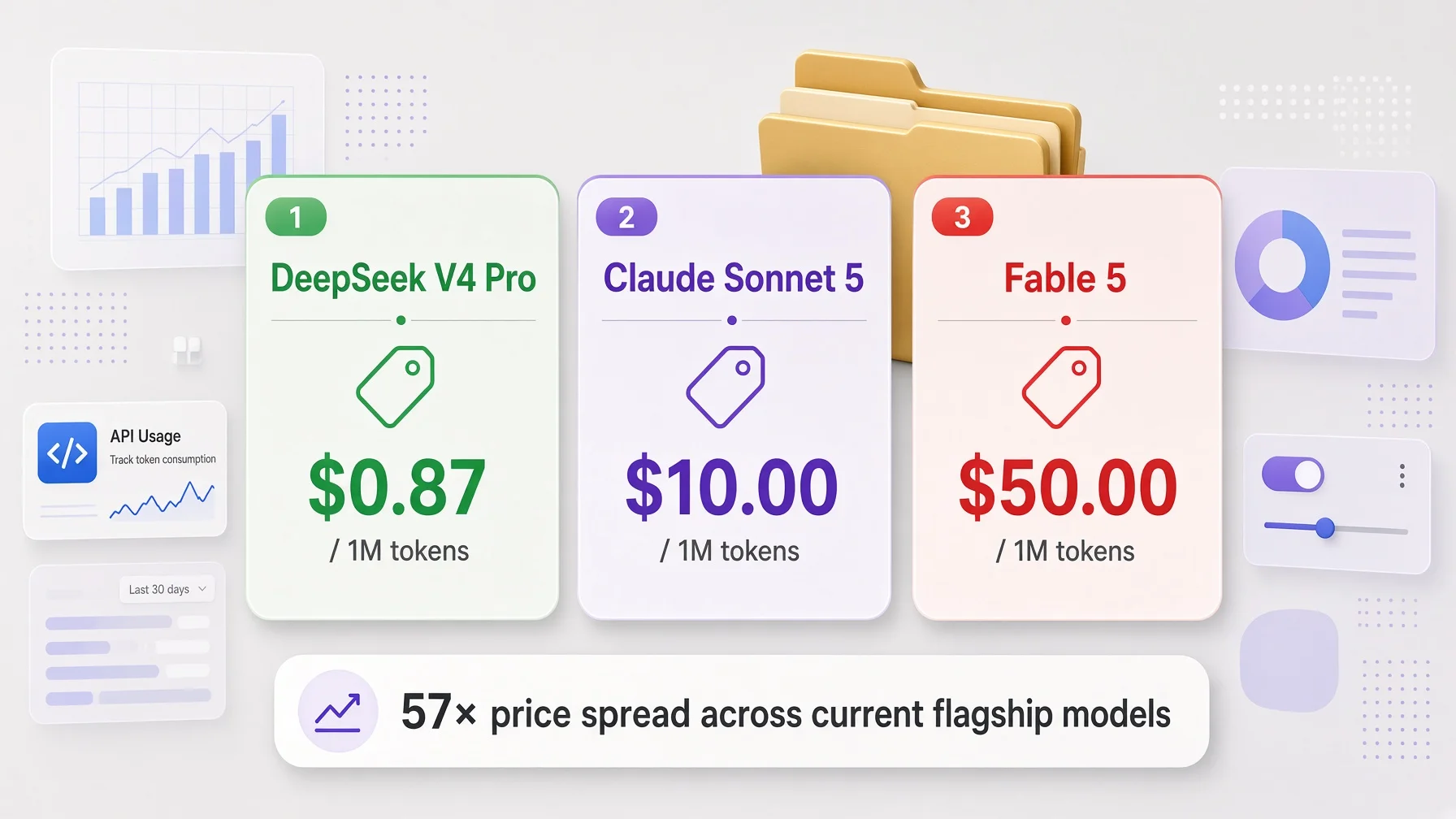
Start with price, because the spread is larger than most people assume. On the table above, DeepSeek V4 Pro lists at $0.87 per million output tokens against Anthropic's Fable 5 at $50.00 — roughly 57× between two current flagship models, for work you might reasonably hand to either.
Three honest caveats. Prices move, and DeepSeek's own page currently warns of a significant increase to come. Those are short-context rates: several of them roughly double above 200,000 tokens, and OpenAI's most expensive listed tier runs several times higher again. And they are API prices — if you pay a flat monthly subscription for ChatGPT or Claude, none of these numbers is your bill. They matter anyway, because they set what the vendors can charge you next year and they show what a heavy user is actually choosing between.
Now the time cost. Dataiku and Harris Poll surveyed 600 enterprise CIOs and published in April 2026: 81% expect to rely on two or more model providers in 2026 just to stay competitive, 93% say different models perform better for different use cases, and 55% have already switched at least once. Their description of the pain is worth quoting: "When models are deeply embedded in application logic, data pipelines, and prompt structures, replacing one provider with another requires significant rework. What should be a configuration decision becomes a reengineering project."
a16z's June 2025 survey of 100 CIOs across 15 industries found 37% running five or more models, up from 29% the year before, under a section titled "Switching costs are rising as AI tackles more complex tasks." One CIO put it this way: "all the prompts have been tuned for OpenAI. Each one of them has their own set of instructions and prompts and details... changing models is now a task that can take a lot of engineering time."
And the retirement clock inside these generative AI platforms runs whether you decide anything or not:
Vendor
Notice promised
A recent example
OpenAI
At least 6 months for generally available models, at least 3 months for specialised variants, as little as 2 weeks for previews
A batch of legacy model snapshots — the documentation table lists around fifteen rows, including five Codex variants — announced 22 April 2026 and shut down 23 July 2026, three months, the stated floor for variants
Anthropic
At least 60 days for publicly released models
Claude Opus 4.1 launched 5 August 2025, retired 5 August 2026 — exactly twelve months, with 61 days' notice
Google
Per-model shutdown dates published, no blanket notice-period commitment
gemini-3-pro-preview released 18 November 2025, shut down 9 March 2026 — under four months
xAI
Per-model retirement notices published, no blanket notice-period commitment
Eight Grok models retired at once on 15 May 2026; old names redirect to a current model rather than failing, but you are then billed at the new model's rate
OpenAI is retiring whole products on that same page, not only models: the Assistants API, Agent Builder, the Evals platform and reusable prompts all carry 2026 shutdown dates. The dates move, so read them off the deprecations page rather than off this article.
Put it together. Generative AI platforms retire models in months. Prices differ by more than an order of magnitude. Four CIOs in five plan to run more than one vendor. If your instructions live in one vendor's settings page, you cannot respond to any of it without retyping — and if you have tuned your prompts to one model's habits, a16z says considerably more than retyping.
How one folder runs on seven model backends
This section is a worked example of the mechanism at production scale. If you want the instructions rather than the evidence, skip to the steps.
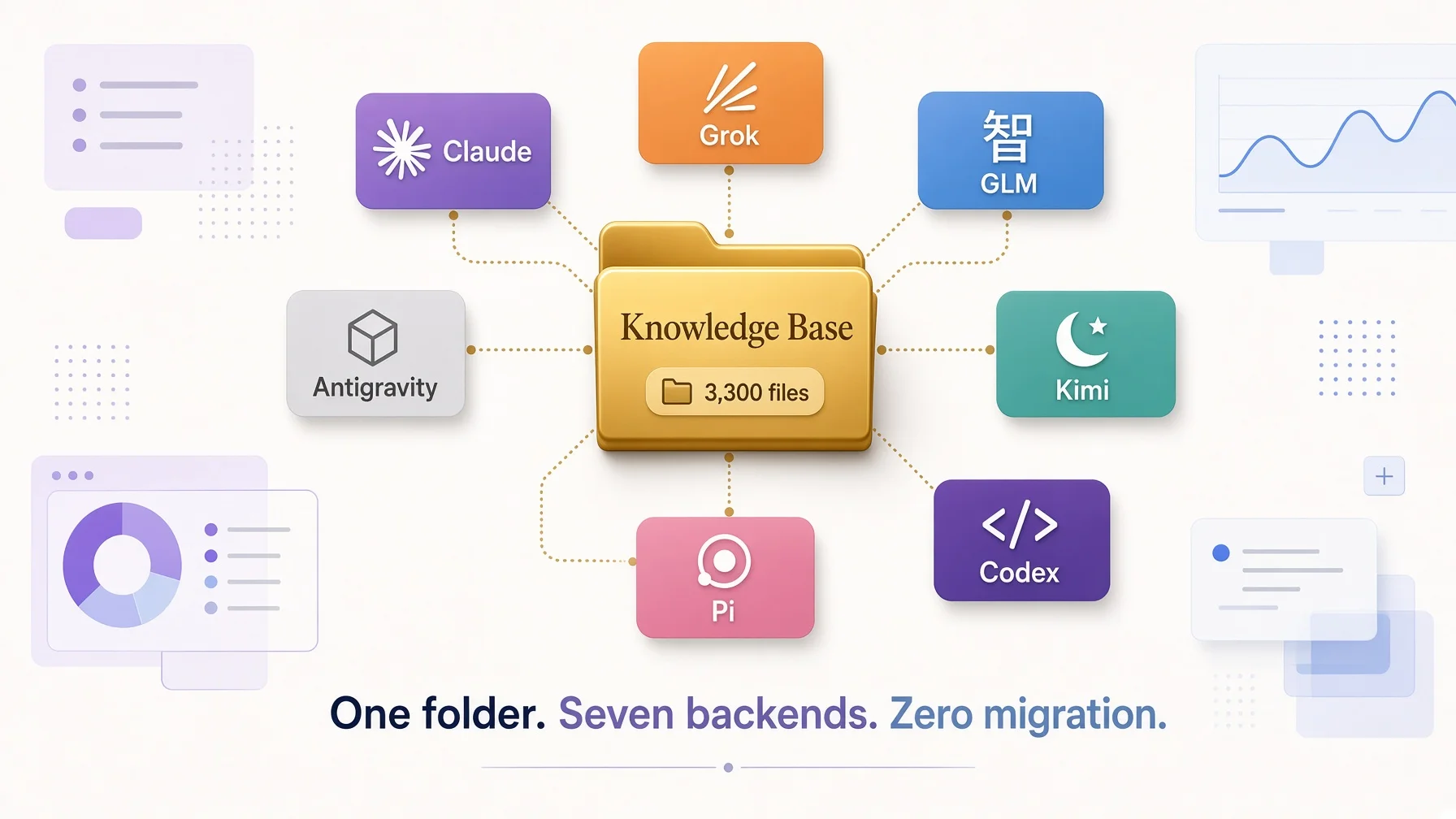
The knowledge base behind this site is a plain folder of Markdown files. As of 10 August 2026 it holds roughly 3,300 CLAUDE.md routing files, 82 workflow packages, 28 specification packages, about 174 credential records of which some 28 are model API keys, and 108 best-practice folders — 18 of them documenting one AI agent platform each. The counts move every week; the shape does not.
That file count deserves a word, since a folder with three thousand instruction files sounds like exactly the sprawl this article warns about. It is not one instruction repeated three thousand times. Each folder holds a short file describing what is in that folder and where to go next, and the tools load them on demand rather than all at once. A reader's own version of this is one file, not three thousand. The number is here to show the mechanism holds at scale, not as something to copy.
Seven model backends run against that same folder: Grok, Claude, GLM, Kimi, Codex, Pi and Antigravity. Each is declared once in a fleet configuration file and gets a fixed number of terminal seats — four for Grok on this knowledge base and six across all pools, four for Claude, two each for Codex, Kimi, Pi and GLM, one for Antigravity. Changing which model does which work means editing seat assignments in that one file. The knowledge base does not change by a character.
Three rules that make it work
One source of truth. Structure, rules and routing live in the CLAUDE.md files and nowhere else. No tool holds a forked copy. If a mirror disagrees with the source, the source wins.
One link, many readers. The folder root holds exactly one symbolic link — AGENTS.md pointing at CLAUDE.md. A symbolic link is a pointer: one real file, two names, guaranteed identical because there is only one file. That single link serves every tool looking for AGENTS.md, and any tool that adopts the format later.
Link identical content, write different content separately, and never copy-and-sync. If a mirror should be identical, it must be a link, so drift is physically impossible. If a tool genuinely needs a different entry file, write a real one and own the difference — which is why the same folder contains more than 250 files named AGENTS.md alongside that single root link. Eighty-three of them are short, deliberately different summaries sitting at the top of individual workflow packages, most of the remainder are archived copies, and a couple of dozen are the same kind of thin entry elsewhere. Different content, written once, owned. What is forbidden is the third option: two real files holding the same text, kept in step by hand. That always drifts, and it is the rule most setups break.
The registry, and why it has to be a table
Which tools are in use changes, so the tool list lives in a table anyone can edit and the three rules above never name a tool. Add a tool, add a row. Drop one, delete the row and its link. No rule gets rewritten.
Tool
What it reads natively
How it is wired in
Claude Code (any backend)
The CLAUDE.md hierarchy
Native — walks up the folder tree from wherever it was launched
Codex
AGENTS.md: a global file plus every folder from project root to current directory
The one root link
Cursor
AGENTS.md plus .cursor/rules/
The same root link
Grok
Global ~/.grok/, then every folder from project root down — but only the current folder when the project is not a Git repository. Accepts six filenames including CLAUDE.md
Native, reads the real file directly; needs a global rule to patch the gap below
Antigravity
Global ~/.gemini/GEMINI.md plus workspace rules
Global file shared with Codex by link
Pi
~/.pi/agent/APPEND_SYSTEM.md, appended into the system prompt and therefore ranked above project files
Global file maintained separately, plus the root link
Hermes
~/.hermes/SOUL.md for identity, plus the working folder's CLAUDE.md, loaded automatically
Working folder goes through the root link
Seven tools in that registry — a different set from the seven model backends above, which is a coincidence of counting rather than a pairing. One real file at the root serves all of them. One link.
The failure that only appears in production
Look at the Grok row again. Grok walks every folder from the project root down to where you are — if the project is a Git repository. This knowledge base is not one. So a Grok session opened inside a subfolder scans that one folder, finds nothing, and never discovers the root file holding all the routing.
The symptom is not an error message. The symptom is an assistant behaving as though it has never seen your rules, which is far harder to diagnose than a crash.
The fix is one paragraph in Grok's global rules file, which loads on every session regardless of folder, telling it to read the project root file first. That is the whole repair, and it exists only because someone hit the problem and wrote a warning next to that row.
The Pi row carries a related trap. Its global file is appended into the system prompt, so it outranks anything in the project — a rule you carefully wrote into the project can be silently overridden by a stale global you forgot about. Neither of these appears in any roundup, because a roundup does not run the tools for a year.
Global settings do not talk to each other
Here is the constraint that surprises people who assume one config file governs everything.
Each tool has its own global settings layer, and those layers are invisible to one another. A rule that must apply everywhere — writing style, in this case — has to be written into all of them: Claude Code's output style file, Grok's global rules, Codex's global file (which Antigravity's links to), Pi's appended system file, and Hermes's identity file. Five separate places, plus the shared project file that all of them reach through the link. Claude Code's output style mechanism is entirely its own; no other tool can read a character of it.
So the honest description of portability is not "write once, run everywhere." It is: the project layer is shared through one link; the global layer is per-tool and has to be distributed deliberately.
Choosing which model does what, without trusting a ranking
The obvious question is which of the seven is best. The useful answer is that the subjective ranking moves faster than anyone can publish it, so seats are assigned on things that can be checked and the subjective part gets re-tested rather than looked up.
Price decides the high-volume work: anything routine goes to the cheap end of that 57× spread, anything where a mistake is expensive goes to the top. Context window decides how much of a folder fits in one session at all. And licence decides whether a model can be retired out from under you — a portability property, not a quality one, and the reason to care about it:
Check the model's own repository page rather than a summary article; summaries get licences wrong often enough to matter, and Kimi K3 is the current example — it is frequently described as MIT and is not.
Everything else — which model writes better, designs better, feels quicker — gets re-tested with a real task rather than assumed. That is not false modesty. It is that 93% of Dataiku's CIOs said different models suit different jobs, and every ranking you read was measured on somebody else's jobs.
What this does not fix
Being straight about the boundary: this solves the document layer, not the code layer, and it only partly solves prompts.
If you have built software against one vendor's API — their function-calling shape, their streaming format — moving is an engineering project, exactly as Dataiku describes, and a portable folder does not help. Prompts sit in between: your instructions travel intact, but instructions tuned against one model's specific habits may need re-tuning against the next one, which is the cost a16z's CIOs were describing. So the honest promise is not that switching becomes free. It is that switching costs you an evening of re-tuning rather than three months of reconstruction, because the raw material survives.
For anyone not writing code against an API — which is most people reading this — the document layer is the whole problem.
Do this tonight
About an hour, and at the end of it your instructions work on any of the generative AI platforms you already pay for. Only step 4 needs a terminal, and it is optional.
Before you start. Step 2 asks you to run the same folder on two different tools and compare what comes back, so you need two installed. If you only have one, pick a second here — that guide also lists which tool reads which file name, which is the detail that decides whether step 3 works first time.
Step 1 — Write the file, 15 minutes
Make a folder somewhere you control, not inside any AI product. Your documents folder is fine. Call it my-work.
Inside it, create one plain text file named CLAUDE.md. One warning that will otherwise cost you the evening: TextEdit on Mac and Notepad on Windows will quietly save it as CLAUDE.md.rtf or CLAUDE.md.txt, and the tools will not find it. On Mac, use Format → Make Plain Text before saving. On Windows, choose "All Files" in the save dialog rather than "Text Documents". Any code editor avoids this entirely.
Here is a starter file. Replace the bracketed parts and delete what does not apply.
# Working instructions

## Who I am
I am a [role] at [organisation], which does [one sentence].
My work mostly involves [two or three activities].

## What I am working on
- [Project name] — [one line on what it is and its current state]
- [Project name] — [one line]

## How I want answers
- Conclusion first, then the reasoning.
- [Short and direct / thorough and structured] — pick one.
- Use [plain language / our internal terms] where they differ.
- Never [hedge, restate my question, open with a summary of what you are about to do].

## Things you keep getting wrong
- When I say [term], I mean [meaning], not [common wrong reading].
- Do not assume [wrong assumption the AI keeps making].

## Words that mean something specific here
- [Term] = [definition]
- [Abbreviation] = [what it stands for, and what it means to us]
Section four is the one that compounds. Every time an AI misreads something about your work, add a line. After a month it is the most valuable file you own, and it is the part no vendor can rebuild for you.
Keep it under about 200 lines — Anthropic's documentation recommends that ceiling for the equivalent file, and xAI makes the same point without giving a number: short, specific instructions get followed more reliably than long ones. A short file read in full beats a long one skimmed.
Step 2 — Test two generative AI platforms head to head, 25 minutes
This is the part worth doing tonight, because it answers "is there a better AI than ChatGPT" for your work rather than in the abstract.
Open two platforms you already have. ChatGPT and Claude, Claude and Gemini, any pair. In each, start a project or a new conversation and upload the CLAUDE.md file itself — consumer web apps take files, not folders, so upload the file rather than trying to attach the directory.
Give both the identical prompt, using a real task you were going to do this week rather than a test question. Then compare, in this order:
Did it follow the format rules from section three? Most of the difference shows up here first.
Did it use your terminology from section five correctly, or fall back on the generic industry meaning?
Did it avoid the mistakes listed in section four?
Is the output any good?
The first three are objective. Judge them before the fourth, because the fourth is where taste creeps in and where every published ranking loses its footing. A platform that reads your rules and produces adequate work beats one that ignores them and produces impressive work, because the first improves every time you improve the file.
Add a dated line at the bottom of your file recording what you found. In three months you will run this again and want to know what changed.
Step 3 — Put the file where each tool looks, 10 minutes
Same content, different locations. From the vendors' documentation, checked 2026-08-10:
Where you work
Where the file goes
ChatGPT
Upload into a Project's files; paste a short version into Custom Instructions
Claude web app
Upload into a Project's knowledge
Gemini
Create a Gem, paste the instructions, upload the file as Knowledge
Claude Code
CLAUDE.md at the project root, or ~/.claude/CLAUDE.md for everything
Cursor
AGENTS.md at the project root
GitHub Copilot
.github/copilot-instructions.md, or AGENTS.md anywhere in the repository
Codex
AGENTS.md at the repository root
Grok
Any of AGENTS.md or CLAUDE.md at the project root
Yes, the web app rows are copying. For a settings box there is no alternative — that is what a settings box means. But you are now copying from a file you own, which takes two minutes, rather than reconstructing three months of context from memory.
Two filenames appear in that table because the tools disagree, not because you need two files. Step 4 makes one file answer to both names.
Step 4 — Make one file answer to two names, 2 minutes
Optional, and only relevant for terminal-based tools.
Decide which name holds the real file, then point the other at it. Order matters: ln -s takes the real file first and the new pointer second.
cd ~/my-work

# CLAUDE.md is the real file; create AGENTS.md as a pointer to it:
ln -s CLAUDE.md AGENTS.md
If you would rather make AGENTS.md the real one — reasonable, since it is the open standard and more tools read it — rename your file first and reverse the arguments:
cd ~/my-work
mv CLAUDE.md AGENTS.md
ln -s AGENTS.md CLAUDE.md
If you get File exists, the second name is already a real file. Do not delete it. Move it aside first with mv AGENTS.md AGENTS.md.backup, then run the link command again.
Check it worked:
ls -la AGENTS.md
You want a line beginning with l and containing an arrow pointing at the other filename. A leading - means you have two real files, and two real files drift.
On Windows, symbolic links need administrator rights or Developer Mode. Use Anthropic's documented alternative instead: put the single line @AGENTS.md inside CLAUDE.md, which imports the other file's contents.
Step 5 — Put a reminder in your calendar, 1 minute
Monthly, thirty minutes: re-run the step 2 comparison against whichever generative AI platforms are current, update section four with anything new that went wrong, and check whether the model you depend on has a retirement date posted.
That last one is not paranoia. Anthropic retired Opus 4.1 exactly twelve months after it shipped. Google shut down gemini-3-pro-preview under four months after release. The date arrives either way; the only question is whether you hear about it before or after it breaks something.
Five ways this goes wrong
The file gets too long. The failure is quiet — long files consume more context and get followed less reliably, and Anthropic and xAI both say so in their documentation. Split by topic and keep the root file short.
You keep two real copies. They agree for a fortnight, then they do not, and you will trust the wrong one at the worst moment. Link or import. Never duplicate.
A global setting silently overrides your project file. Pi appends its global file into the system prompt, above project context. If a tool ignores a rule you definitely wrote, check its global layer before rewriting the rule.
A link points at nothing. Symbolic links do not complain when their target is moved or renamed — they simply stop resolving, and the tool behaves as though the file never existed. If a tool suddenly forgets your rules, verify the link before blaming the model.
You put credentials in the file. Do not. Instruction files get uploaded into web apps, pasted into chats and copied between machines. API keys and passwords belong somewhere else entirely.
The prompt, and what each of the generative AI platforms supports
One prompt, pasted into whichever AI tool you already have open. It builds the file by interviewing you, gives it the second filename, then runs one identical real task on two platforms so you can see which of them is actually reading you. It stops after every step, so a weak answer in step one does not survive until step five.
I want my AI instructions to live in a file I own, so that changing platforms
costs me an upload rather than an evening of retyping. Walk me through it one
step at a time, and wait for me to confirm each step before starting the next.

Step 1 — the file. Check whether ~/my-work/CLAUDE.md exists. If it does, show it
to me and we will improve it. If not, interview me and write it. Ask one question
at a time, and cover exactly these five things:
  1. Who I am — my role, my organisation, what it does in one sentence.
  2. What I am working on now — two or three projects, one line each.
  3. How I want answers written — conclusion first or reasoning first, short or
     thorough, what length, what format.
  4. Words I never want to see — the filler and jargon that makes me wince.
     Push me for at least five. If I stall, offer "delve", "leverage" and
     "seamlessly" as examples to react to, then make me add my own.
  5. Terms that mean something specific in my work — my definition of each, and
     the wrong reading it keeps getting confused with.
Write it as plain Markdown, one heading per section, under 200 lines. Do not add
sections I did not ask for.

Step 2 — the second name. Skip this if I only use web apps. Some tools look for
AGENTS.md, not CLAUDE.md, so give me the command that makes one file answer to
both:
  cd ~/my-work && ln -s CLAUDE.md AGENTS.md
Then give me the command that checks it is a link and not a second real file, and
what the output looks like when it worked. Tell me what to do if the command
reports the file already exists — do not tell me to delete anything.

Step 3 — first tool. Have me open an AI tool, point it at ~/my-work, and give it
exactly this task: "Read CLAUDE.md, then write me a 200-word introduction to
[the topic I name]." Tell me to keep that output.

Step 4 — second tool. Have me open a different AI tool, point it at the same
folder, and give it the identical task. Same topic, same wording, nothing edited.

Step 5 — compare. Ask me for both outputs and score them against my file, not
your taste. For each output, tell me:
  - Which of my format rules it followed, and which it ignored.
  - Whether any of my banned words appeared, quoting each one.
  - Whether it used my definitions or fell back on the generic industry meaning.
Settle those three before you say a word about which reads better. Then tell me
which tool followed my rules more faithfully, and write a dated line at the
bottom of CLAUDE.md recording the result and which tool is now my primary.

Expect the two outputs to differ in style — different models. Both should still
obey my tone rules and banned words. A tool that ignores those fails the only
test here.
Step 5 is the whole trick. Scoring both outputs against your own file, before anyone is allowed to say which one reads better, tells you whether the platform read the file at all rather than whether it writes nicely. Whichever one names your actual rules back to you is the one reading you properly today — and that answer will be different in six months, which is fine, because by then switching costs you an upload and an evening.
What survives when generative AI platforms change
Checked 2026-08-10 against vendor documentation. Formats change; re-check before relying on it.
Platform
Reads a file you own
Reads the open AGENTS.md format
Settings move to another vendor
Codex
✅ Yes, AGENTS.md
✅ Native
✅ Yes — it is only a file
Cursor
✅ Yes, AGENTS.md and .cursor/rules
✅ Native, root and nested
🟡 Partly — AGENTS.md moves, .mdc rules do not
GitHub Copilot
✅ Yes, copilot-instructions.md
✅ Yes, or CLAUDE.md / GEMINI.md instead
✅ Yes — it is only a file
Grok
✅ Yes, six filenames accepted
✅ Native
✅ Yes — it is only a file
Claude Code
✅ Yes, CLAUDE.md
🟡 Needs a link or an @import
✅ Yes — it is only a file
Claude web app
🟡 Project knowledge uploads only
❌ Not applicable
🟡 Re-upload the same file
ChatGPT
🟡 Project files, but not Custom Instructions
❌ Not applicable
❌ No — copy the text out by hand
Gemini Gems
🟡 Knowledge uploads only
❌ Not applicable
❌ No — copy the text out by hand
Both "No" answers sit in consumer web apps. That is what happens when the text box is a feature of a product rather than a file on your disk.
Common questions
What are the top 5 generative AI platforms?
By enterprise API spend, Menlo Ventures put Anthropic at 40%, OpenAI at 27% and Google at 21% in its December 2025 report — three vendors holding 88% of the market. Add xAI and one open-weight provider such as DeepSeek or Zhipu and you have a working top five. Two years earlier the same measure had OpenAI at 50% and Anthropic at 12%, so treat any ranking as a photograph of a moving object.
What are the big 5 AI platforms?
In practice: OpenAI, Anthropic, Google, xAI, and the open-weight tier led by DeepSeek, Zhipu GLM, Qwen and Mistral. The open-weight tier is worth counting separately because those models can be downloaded and run on hardware you control, so they cannot be switched off on the vendor's schedule the way a hosted service can.
Is ChatGPT a generative AI tool?
Yes. ChatGPT is a generative AI product built on OpenAI's models. The distinction worth knowing is between the product and the model underneath: the product holds your Custom Instructions and Memory in account settings, while the model gets replaced on OpenAI's schedule. OpenAI's deprecation policy promises at least six months of notice for generally available models and as little as two weeks for preview models.
Is there a better AI than ChatGPT?
For some tasks, in some months. Dataiku's 2026 survey of 600 CIOs found 93% say different models perform better for different use cases. Rather than trust a ranking, run the same real task on two generative AI platforms with your own instruction file attached and compare. That test takes about half an hour and stays valid, because you can repeat it whenever the models change.
Can I move my ChatGPT custom instructions to Claude?
Not automatically. Custom Instructions and Memory live in ChatGPT account settings, and there is no path that carries them to another vendor — you copy the text out by hand. The way to avoid doing that twice is to keep the master copy in a plain text file on your own disk and paste it into each platform, so the file is the original and every platform is only a copy.
Do I need to know how to code to make my setup portable?
No. The portable part is a plain text file describing who you are, what you are working on, and how you want answers written. Create it in any text editor and upload it to ChatGPT, Claude, Gemini or Copilot. The command-line step in this article is optional and only applies to terminal-based coding tools.
What is AGENTS.md and do I need it?
AGENTS.md is an open file format for giving instructions to AI coding tools, described on agents.md as a README for agents. OpenAI reported it had been adopted by more than 60,000 open-source projects and donated it to the Linux Foundation's Agentic AI Foundation in December 2025. You need it if you use tools that read it, such as Cursor, GitHub Copilot, Codex or Grok. Anthropic's Claude Code reads CLAUDE.md instead, so a project that wants both keeps one real file and points the other name at it.
How often do AI platforms actually retire models?
Often enough to plan for. Anthropic retired Claude Opus 4.1 on 5 August 2026, exactly twelve months after it launched, under a policy promising at least 60 days of notice. Google shut down gemini-3-pro-preview under four months after release. OpenAI commits to at least six months for generally available models and as little as two weeks for preview models. Assume the model you use today has a life measured in months, and keep your instructions somewhere that outlives it.
The point
Everything above is mechanical. Write a file, link it, upload it, re-test it monthly. No individual step is clever and none of it requires you to be technical.
What it buys is the ability to treat generative AI platforms the way you treat every other supplier. You compare on price, on licence, on whether the weights can be downloaded, on which one reads your rules properly this quarter. You move when a model is retired with sixty days' notice, or when a 57× price gap opens between two flagships — and the move costs you an evening rather than a season.
The rankings will keep telling you which platform is best. Let them. You will already have made the question cheap to answer wrong.
Prices, file formats and platform behaviour verified 2026-08-10 against vendor documentation. Model pricing and instruction-file formats change frequently — re-check the linked sources before relying on specific figures.
Monitoring a competitor who publishes no feed is the case every RSS guide skips. Twenty-one platforms sorted by which of three jobs they do, and the finished setup is business process automation you own outright, with no seat licence to renew.
Blaming the content is the reflex when a post underperforms, and it is usually the wrong diagnosis. A second reader decides distribution before any human sees the post, and most of what it checks is mechanical enough to automate business processes around, on five platforms at once.
Thursday afternoon, fourteen product ideas, a Monday filming slot, no scripts. Six script shapes and seven hook formulas turn that hour into finished drafts — and the business rule stays: rewrite at least 30% before anything ships.
A detector score cannot survive a conversation with the freelancer it just cost three weeks of payment. What holds up is the specific thing on the page: rhythm, vocabulary, missing detail. Eight of them here, and the reason review stays human when you automate business processes.