Monitoring a competitor who publishes no feed is the case every RSS guide skips. Twenty-one platforms sorted by which of three jobs they do, and the finished setup is business process automation you own outright, with no seat licence to renew.
Blaming the content is the reflex when a post underperforms, and it is usually the wrong diagnosis. A second reader decides distribution before any human sees the post, and most of what it checks is mechanical enough to automate business processes around, on five platforms at once.
Gloves on, tape measure in hand — nobody types a query. Three voice surfaces for ai automation tools (terminal, Telegram, Discord), 10 TTS and 6 STT providers compared on cost and latency, plus a setup that costs nothing.
Open Source AI Agents: Three Things Herdr Does That tmux Can't
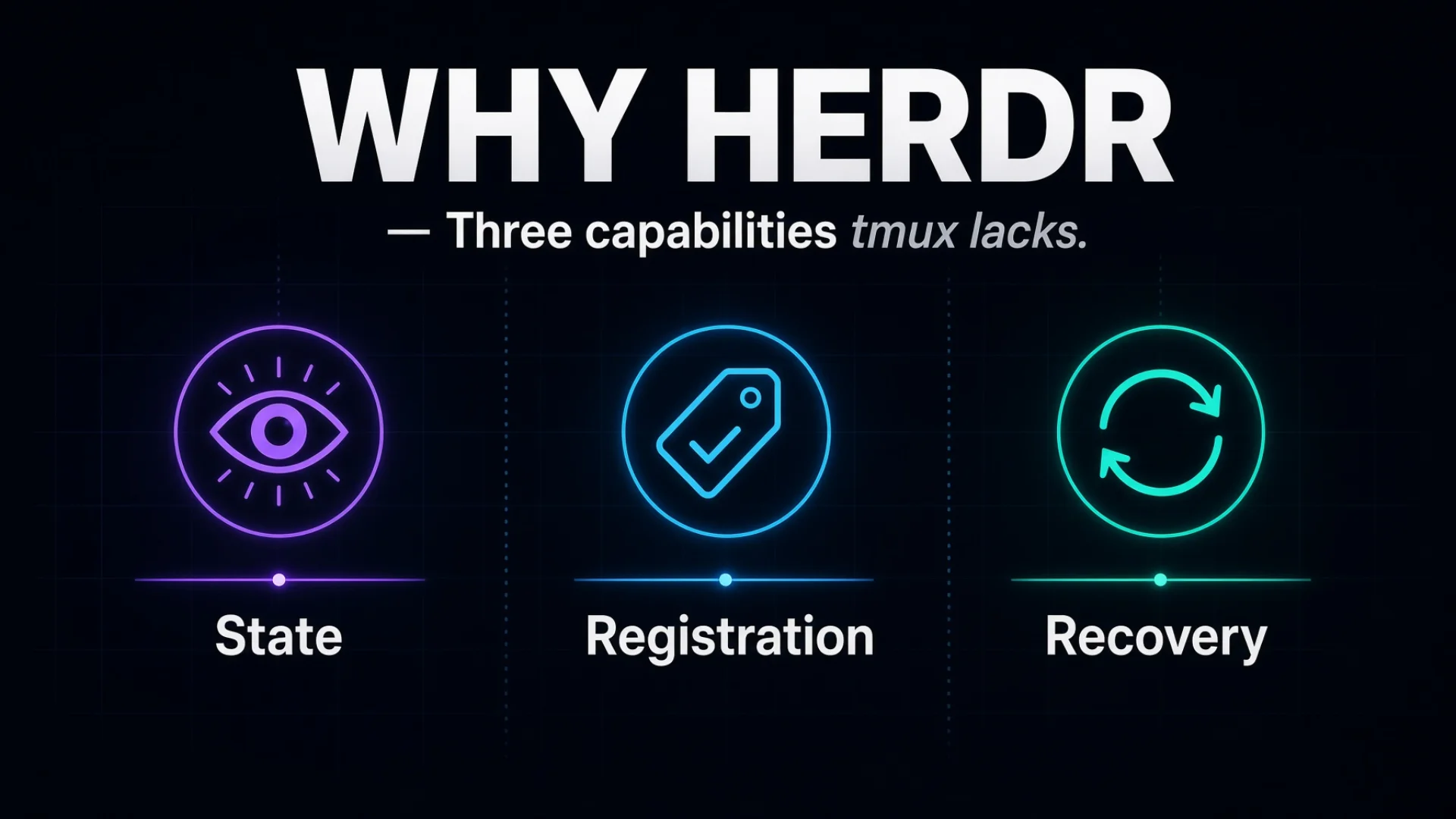
tmux keeps your terminals alive. It has no idea what is inside them. For open source AI agents that run for hours unattended, that gap is the whole problem. Three capabilities close it — state, registration, recovery. I have broken all three, and the breakages are the useful part.
tmux manages terminals. Herdr manages agents. That is the whole difference, and everything below is the consequence.
A terminal is a box that displays text. Open source AI agents are programs with a state — thinking, or finished, or frozen waiting for you to approve a file write. tmux will hold the box open for weeks and never form an opinion about which of those three is happening. You have to look.
Looking is fine at two windows. I run more than thirty. Looking does not scale.
That is the honest case for wanting a tmux alternative: not that tmux is bad at its job, but that its job stops at the edge of the pane. Agents have made the inside of the pane the interesting part. The previous article named the three capabilities that close the gap. This one explains how each works and, more usefully, exactly where each one breaks.
Key takeaways
State awareness — every agent reports idle, working or blocked, and you see all of them at once. Most agents do not report their own state, so the tool reads the screen and matches patterns.
When no pattern matches, the tool reports idle. That is the fallback rather than an error state, and it is the most expensive lie a dashboard can tell you.
Agent registration — knowing that a pane runs Claude Code rather than Grok is what makes bulk restarts safe. Every agent quits with a different key, and guessing wrong types your launch command into a live conversation.
Automatic recovery — a roster file plus a dumb 120-second timer beats a clever event listener, for a specific reason that took me a week to find.
The single highest-value habit in this article is free: one agent, one full-width tab. Split panes are how state detection breaks.
Open source mattered twice in ways I did not anticipate: I could read why the tool was wrong, and I could file a reproducible bug with a script attached.
Thing one: agent state detection
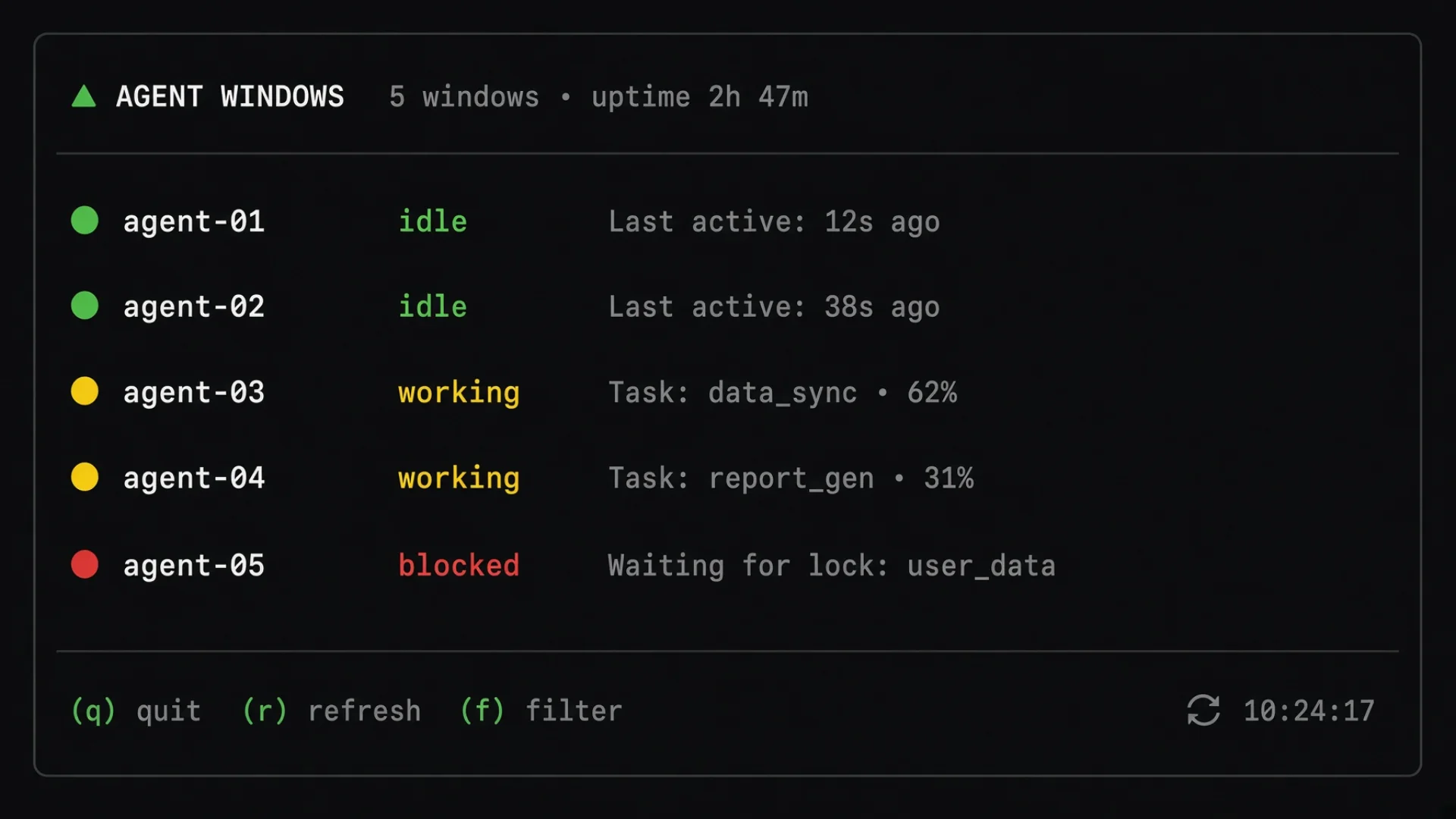
Every agent window reports one of three states:
idle — nothing running, ready for a task
working — processing something
blocked — stopped, waiting for you to approve an action
All of them show at once in a sidebar, one row per agent, each with a coloured marker. The state also rolls upward: a blocked agent makes its tab and its whole workspace look blocked, so a group you are not currently looking at can still raise its hand.
The mechanism is less magical than it sounds, and understanding it is what saves you later. There are two paths, and which one you are on depends entirely on the agent.
Agents that ship proper lifecycle hooks — small bits of code the agent runs when it starts a task, finishes one, or stops to ask you something — report their own state, and that report is authoritative. Everything else, and that is most of the agents I run, gets screen reading. Herdr takes the live bottom of the pane buffer and matches it against rules in a manifest file. Each rule says, in effect, "if this text is visible, the agent is in this state."
When a coding agent wants permission to run a command, it draws a selection menu and prints a hint line underneath: Enter to select · ↑/↓ to navigate · Esc to cancel. A rule looks for that string. Sees it, marks the window blocked, turns the marker red.
That is the whole thing. Pattern matching against rendered text.
Warning: If that sounds fragile, you are right, and you are already being more careful than I was in July. Here is the part that makes it dangerous rather than merely fragile: when no rule matches, Herdr reports idle. As far as I can tell that is deliberate rather than an oversight — blocked detection is strict, because the alternative is a tool that guesses an agent is stuck and starts sending it keystrokes. Strict is the right call. It just means the failure mode is silent and confident.
Thing two: agent registration
Herdr does not only know that a process is running in a pane. It detects the foreground process and knows what kind: this one is Claude Code, that one is Grok, that one is Kimi, that one over there is a plain shell with no agent at all. Six of the seven CLIs I run are recognised without configuration; the seventh declares itself with one line at startup.
This sounds like bookkeeping. It is what makes bulk operations safe.
Consider restarting an agent. To restart it cleanly you first have to make it exit, and every agent quits differently. Claude Code takes /exit. Codex takes two presses of Escape. Antigravity takes /quit. Pi takes none of those.
If your tooling does not know what is in the window, it has to guess. Guessing from the window's name is the obvious shortcut and it is a trap. When the guess is wrong, the exit key does nothing, the agent stays alive, and then your tooling types the launch command into a window where a conversation is still running. The agent receives cd ~/awp && pi --resume … as a chat message and tries to answer it.
That has happened to me twice, from two different entry points, two weeks apart. The second time, three windows started discussing the launch command among themselves. One said the paste looked wrong and it had been expecting a different task. Another asked whether I wanted to make the environment variables in the paste permanent. Both were being helpful. Both were reasoning about garbage.
Registration by kind, reported by the runtime rather than inferred from the name, is what closes that hole. My restart path now refuses to launch anything until it has confirmed a shell actually came back. The worst case is a window that fails to restart, which is a thing I can see and fix — instead of a conversation quietly poisoned, which is a thing I cannot.
Kind and name are separate facts
There is a subtlety here that bites everyone, and it is worth stating on its own line: a window can be running the correct agent and have no name yet.
Herdr recognises the kind immediately, because that comes from the process. The label is a separate operation that has to be accepted by the agent, and some agents are busy at startup. Anything that looks agents up by name reports that window as missing, because by name it does not exist.
I spent weeks reading a startup log that claimed five to eight windows were not running their declared agent, while all of them were running perfectly well. The agents were there. The labels had not landed yet. More on how I fixed the alarm rather than the non-problem below.
Thing three: automatic recovery
Herdr can resume agent sessions after a restart. On all three of my machines I have that turned off, on purpose, for reasons I will come back to. With it off, a machine restart gives me the tabs back as empty shells with a shell prompt in them.
Two background services fill that gap, and neither is clever.
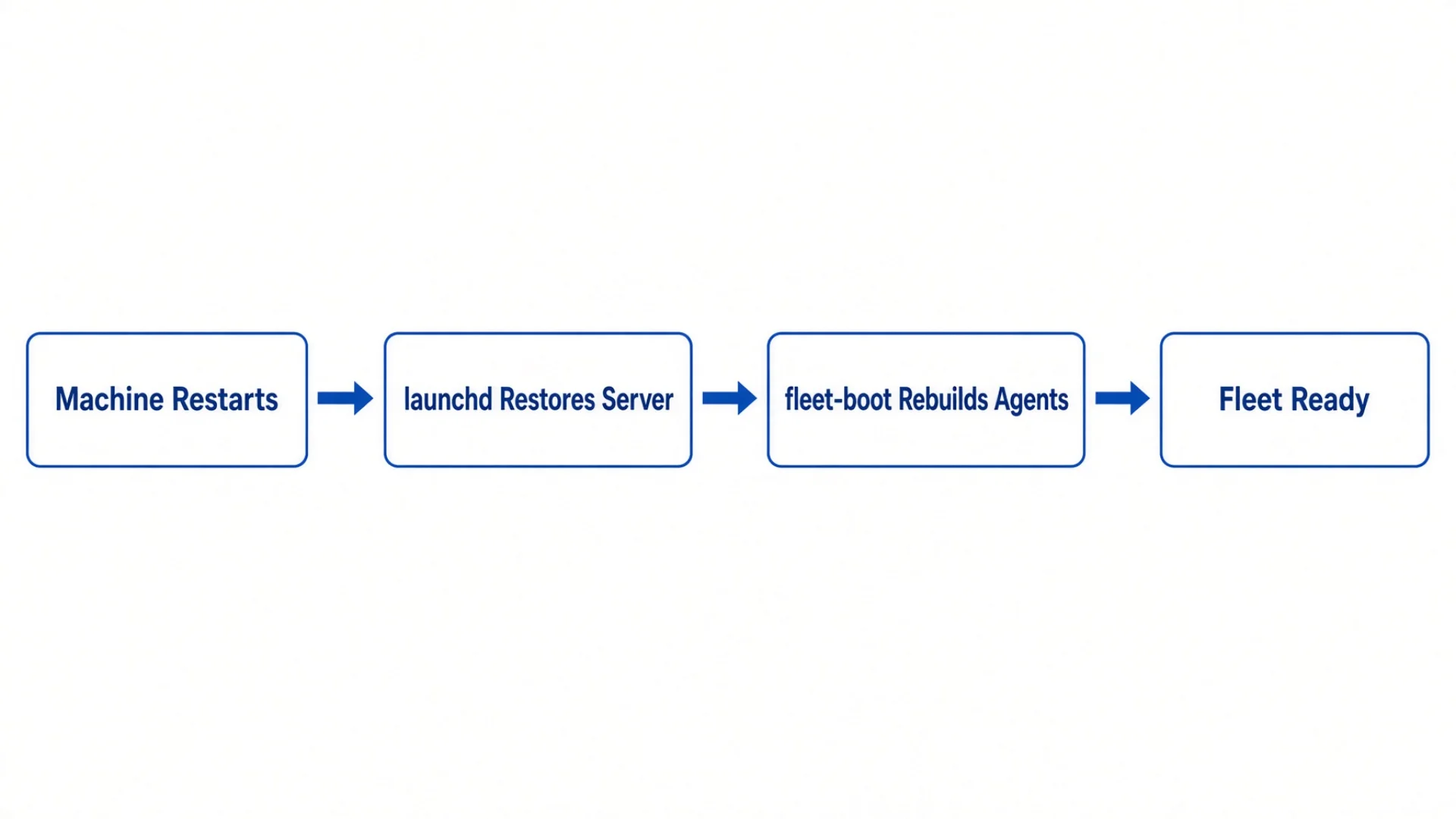
The first keeps the Herdr server alive. It is configured with a flag that means "if this process dies, start it again immediately." Server crash, power loss, accidental kill — it comes back.
The second rebuilds the fleet. Every 120 seconds it reads a roster file listing every window on this machine, which directory it belongs to, and which agent it should be running. It compares the roster against reality and starts whatever is missing.
The roster is the least glamorous part of AI agent orchestration and the part that decides whether any of the rest works. Something has to hold the authoritative list, and it should be a file rather than your memory. There is no list of window names anywhere in the code. Add a window to the roster and it exists; remove it and it stops being rebuilt. The same code runs on all three of my machines and produces three completely different fleets, because each machine reads its own section.
Why a dumb timer beats a clever listener
One decision inside that second service looks wrong until you know why.
It polls every 120 seconds instead of watching for a change event. Watching would be more elegant. Herdr writes a session file whenever agents change, so watching that file seems obvious.
It does not work, for two reasons that only show up in production:
When Herdr restarts with no agents to save, it does not write the file at all — and that is precisely the moment the fleet most needs rebuilding. The event you are waiting for never fires.
Once the rebuild starts agents, it writes the file again. Your watcher is now reacting to its own output.
A dumb 120-second poll has neither failure mode. Two minutes is a fine worst case for something that runs while I am asleep.
Note: This generalises well past multiplexers. Before you replace a timer with an event listener, ask two questions: does the event fire in the failure case you actually care about, and does my reaction to it produce another one? If either answer is bad, the boring timer is the correct engineering.
What it costs to go without
Each missing capability has a specific bill, and the bills are not the same size.
Missing
What you do instead
What it costs
State awareness
Check windows by clicking into them
One agent blocked overnight = a full night of wall-clock time that bought nothing
Agent registration
Restart windows one at a time, remembering each quit key
~20 minutes every time an agent CLI ships an update, and they ship constantly
Automatic recovery
Rebuild the fleet by hand after every restart
30–60 minutes, two windows configured wrong, and eventually you stop restarting at all
The first row deserves more than a table cell. I have had an agent sit blocked overnight on a permission prompt. It had finished ninety percent of a task, hit one command that needed approval, and stopped. The fix took four seconds once I saw it. A whole night bought me nothing.
That is the shape of the expense: not that something broke, but that nothing did. The work stopped and waited politely. Multiply it by the number of long tasks you dispatch in a week and it becomes the most costly failure mode you have.
The third row has a hidden cost too. When recovery is manual, you avoid restarting. You leave a machine up for weeks because rebuilding is a chore, and you accumulate all the slow problems a restart would have cleared. Automation does not only save the thirty minutes. It removes the reason to avoid them.
How I actually do it
This is the longest section on purpose. Everything below is running today, including the parts that are ugly.
The 120-column rule, and the crash that produced it
Here is the fragility I promised.
State detection reads the screen. Screens have a width. Narrow panes wrap text.
The hint line Herdr looks for — Enter to select · ↑/↓ to navigate · Esc to cancel — is long. Below roughly forty columns it wraps across several lines, and the rule looking for it as one contiguous string stops matching. No rule matches, so the idle fallback kicks in.
The result is the worst possible failure: the agent is visibly, obviously waiting for approval, and the dashboard says idle. Not "unknown." Not an error. It confidently reports the one state that means "nothing needs your attention."
I hit this in the first week. The window showed a permission prompt in plain sight. The agent list said idle. I widened the pane to 120 columns and it flipped to blocked immediately.
The fix has two halves, both now automatic:
Every agent gets its own tab. Not a split pane — a whole tab. Split panes are how panes get narrow. Two agents side by side means each is at half width, and half a laptop terminal is comfortably inside the failure zone.
Every agent tab is forced to a virtual terminal of 120 columns by 40 rows at startup, regardless of the window it is being displayed in. The pane is not the window. Herdr can hand an agent a 120-column virtual terminal while you are viewing it on a phone screen 45 columns wide.
That last point matters more than anything else here, because it is what makes phone access work at all. When I open the fleet on my phone and the display gets narrow, detection can briefly degrade — but the underlying agent terminals stay at 120 columns and the readings recover when I put the phone down. The rule I follow: the phone is for looking, the fleet status command is for deciding.
The diagnostic that answers "why does it think that"
When a window's state looks wrong, there is exactly one command worth running.
herdr agent explain <window-name>
It prints which rules matched, what text they matched against, which manifest version produced them, whether screen detection was skipped because a lifecycle hook had authority, and — the useful one — why it fell back to idle when nothing matched at all.
It turns "the dashboard is lying" into "rule X did not fire because the evidence line was truncated" in about five seconds. Every agent state detection failure I have had came back as one of three answers from that command:
The pane is too narrow.
The agent binary is not actually running.
The detection rules are older than the agent.
All three are visible in that output. None are visible from staring at the window.
What open source actually buys you here
I want to be specific about this rather than wave at the licence, because the value showed up twice in ways I did not anticipate.
Herdr is Apache-2.0, and the detection rules are not compiled into the binary — they live in manifest files I can open and read. When a tool's understanding of your agents is wrong, being able to read the rule that got it wrong is the difference between filing a ticket and knowing what to file.
The second time was less convenient and more instructive. My sidebar stopped scrolling. Not the agent output — the sidebar itself, which is Herdr's own interface and has nothing to do with any agent.
I eventually proved the cause with a synthetic client: a script that opens a second connection at a controlled terminal size, injects scroll-wheel bytes, and reads the screen back through a terminal emulator. That removes my hands, my terminal app and my network from the experiment and tests the program itself.
The result was clean and completely unguessable. One client scrolls fine. Attach a second client to the same session and the sidebar freezes. On the older version it only happened when the second client was exactly 24 rows tall — 22 rows fine, 26 rows fine, 24 rows dead. That is why it presented as "sometimes broken": my phone's row count depends on font size and orientation, so it landed on the bad number some days and not others.
Then I retested on the next release. It was worse: any second client of any size froze the sidebar. The "change your font size" workaround was gone.
That went upstream as issue #2255 with the reproduction script attached, and the maintainers came back the same day asking for the exact terminal dimensions of both clients and the byte order I was sending. I could answer, because I had the script. I also checked for duplicates first and found three related reports, all closed as not planned, none of which described this behaviour — that check is what makes a bug report worth a maintainer's afternoon.
Until it is fixed, I have a one-line local workaround that disconnects the phone client and leaves the fleet untouched.
Note: Open source AI agents and the tools that run them are not valuable because they are free. They are valuable because when the thing lies to you, the reason is readable, and the fix has somewhere to go. Both of those failed silently on me, and both had an exit.
Clean start, every time
Herdr's setting for resuming agent conversations on restart defaults to on. All three of my machines have it explicitly off.
That is a real cost. After a restart, every conversation starts empty and context I had built up is gone. I chose it anyway, for one reason: half-restored is worse than not restored.
With resume enabled, a restart gave me a fleet where some windows came back with old context and some came back empty, with no way to tell which by looking. An agent carrying stale context from a task I had already finished is more dangerous than an empty one, because it looks ready and is not. It answers your next question in terms of a conversation you do not remember having.
Off means every window after a restart is in the same known state: empty, fresh, having just reloaded its instruction files. I can reason about that. It also brought a benefit I did not plan for — a clean restart is how the fleet picks up edits to its own instruction files. Change a role definition, restart, every window runs the new one.
There is a matching setting in the rebuild tooling, and both have to agree. When only one was turned off, I got exactly the half-and-half state I was trying to avoid.
Reading the boot log without panicking
For a while, every automatic rebuild ended with what looked like a failure.
started=…  already-correct=2  failed=0
VERIFY: 3 window(s) not running their declared agent
Zero failures, and a verification complaint about three windows. The fleet was fine. Every agent was up and idle. The three flagged windows were running the correct agent — they just had not been given names yet, because that particular agent loads seven background services at startup and takes a while to accept one.
That is the kind-versus-name distinction from earlier, showing up as an alarm.
The fix was to stop conflating two situations in one message. The log now separates them:
VERIFY OK plus fleet ready — success, even when accompanied by a note that some seats are not named yet. The next cycle adopts them.
VERIFY: N window(s) not running their declared agent — a real failure. That seat has no agent record at all. It is not slow; it did not start.
There was a second bug underneath. The rename operation reported success even when the agent had not accepted the name. Three separate places in the code called it and none checked the return value. Rename now reads the name back and retries until Herdr confirms it.
The general lesson, which cost me a week: a monitoring system that cries wolf trains you to ignore it. Those false alarms were not harmless noise. They meant that when a genuine failure appeared in that log, I would have scrolled straight past it. Fixing the alarm mattered more than fixing anything it was reporting.
The restart order that is not optional
Restarting the whole fleet has an order, and skipping a step costs you windows:
Stop the agents first.
Restart the Herdr server.
Trigger the fleet rebuild immediately rather than waiting for the next 120-second cycle.
Skip step one and seven windows fail to come back. The reason is subtle and correct: restarting the server does not kill the agent processes. They survive it. The rebuild then looks at those panes, sees something running, and skips them — which is exactly the behaviour you want, because that is what stops it typing launch commands into live conversations. But it means the seats never get cleanly recycled.
Stop the agents first and the same operation reports zero failures — two runs, zero both times.
The numbers
Thirty-plus windows on the primary machine, across two workspaces; the exact count moves every few weeks
120 × 40 forced virtual terminal on every agent tab, regardless of display size
~40 columns — the width below which the permission hint line wraps and detection silently fails
120 seconds — the rebuild poll interval, and the worst-case recovery time
Conversation resume: off on all three machines, deliberately
Do this tonight
You do not need my infrastructure to get the useful part. You need three habits.
[ ] Give every agent its own tab. Not a split pane. If you are running two agents side by side because it looks efficient, stop. Each is at half width, and half width is where screen-based state detection fails. One agent, one tab, full width. This is free, and it is the highest-value thing in this article.
[ ] Find out what your tools think, not what you think. Whatever runner you use, learn the command that explains its own state detection. In Herdr it is herdr agent explain. Every serious tool has an equivalent. The first time a status display disagrees with your eyes, run it instead of guessing. You will be wrong about the cause — I was, three times running.
[ ] Write down your fleet before you automate it. Open a plain text file. List every window you want, with three columns: the name, the directory it works in, and which AI runs there. That is a roster, and it is what every automation in this article ultimately reads.
[ ] Time a rebuild from scratch. Close everything. Rebuild from your list. However long that took is your recovery cost today, and every automation you add afterwards is measured against that number.
You can maintain a roster by hand for a long time. I did, for weeks. The value is not the automation — it is having one authoritative answer to "what should be running right now." Once that answer lives in a file instead of your head, every rebuild becomes a comparison instead of a memory test.
The prompt that gets you started
Copy this into any agent — Claude, ChatGPT, Grok, Gemini, whichever you use. It walks you through building a fleet roster and getting real visibility into agent state.
I run several AI agent sessions at once in terminal windows, and I keep losing track of which are working, which are finished, and which are stuck waiting for my approval. Help me fix that, step by step.
Context about me: I am a beginner with terminal tools. I do not know what a multiplexer, a pane, or a session is. Explain everything in plain language. Ask questions rather than assuming.
Step 1 — Inventory what I have. Ask how many agent windows I run, what each is for, and which model each uses. Help me write that down as a table with three columns: window name, working directory, and which AI runs there. Call it my fleet roster, and explain why a file beats my memory.
Step 2 — Check for shared windows. Ask whether any of my agents share a window side by side. If any do, explain the problem precisely: tools that detect whether an agent is idle, working or blocked usually do it by reading the text on screen and matching known patterns. In a narrow window, long lines wrap and the pattern stops matching. The specific failure is that an agent waiting for my approval gets reported as idle — the one status meaning "nothing needs your attention." Help me give each agent its own full-width space.
Step 3 — Explain the three states. Describe what idle, working and blocked mean, and which is most expensive to miss. Explain why blocked is the costly one: the agent is not broken, it is waiting politely, and it will wait forever.
Step 4 — Set up a status check. Ask what tool I use — tmux, Herdr, Zellij, or just separate terminal windows. Then give me the single command that shows the state of all my agents at once. If my setup cannot do that, say so plainly and tell me what to change.
Step 5 — Ask what my tool believes. Tell me how to find the diagnostic that explains why my tool thinks an agent is in a given state. Have me run it once on a healthy window so I know what normal output looks like.
Step 6 — Plan for restarts. Ask what happens today when my computer restarts. Help me answer three questions in writing: (a) how long does rebuilding my windows by hand take, (b) do I want agents to resume old conversations after a restart or start fresh, and (c) why. For (b), explain the tradeoff: resuming preserves context, but a half-resumed fleet is worse than a fresh one — an agent carrying stale context looks ready and is not.
Step 7 — Decide how the rebuild is triggered. If I suggest watching for a change event rather than checking on a timer, warn me about the specific trap: the event often does not fire in the failure case you care about, and your own repair writes the same event again, so the watcher reacts to itself. Recommend a plain timer, and help me pick an interval I can live with as a worst case.
Step 8 — One next action. Based on everything above, name the single highest-value change to make this week, and why that one first.
Constraints:
No configuration files. No scripts longer than one line.
Explain every technical term the first time you use it.
If I describe something that sounds like a bad idea, say so and name the specific failure it causes.
Do all eight steps in order. Wait for my answer before moving on.
Start with Step 1.
Frequently asked questions
Is Herdr a replacement for tmux, or something different?
It is a tmux alternative in the sense that you would not run both — they compete for the same job of owning your terminal sessions, and running both caused a real problem for me. It is different in that it is a terminal multiplexer for AI specifically: it identifies and monitors the agent inside each pane, which tmux does not attempt.
Can I get agent state detection on tmux with a script?
Partly, and it is a reasonable weekend project: read the pane contents on a timer and grep for the permission prompt. You will hit the same width problem described here, and you will not get registration by kind, which is the part that makes bulk operations safe. Know what you are building before you build it.
Why does the tool report idle when it does not know?
Because the alternative is worse. A tool that guesses "probably blocked" will eventually start sending keystrokes to an agent that was merely thinking. Strict detection means false idles, loose detection means corrupted conversations. Given those two, false idles are the survivable choice — as long as you know it works that way, which is the reason this article exists.
Does any of this need a cloud account or a subscription?
No. Every component here runs on your own machine. Open source AI agents and the runtime under them are the whole stack; the only network traffic that leaves your laptop is the models the agents call.
How many agents before this stops being overkill?
About five. Below that you can hold "what is each of these doing" in your head. Above it you cannot, and the moment you cannot, an invisible blocked window starts costing you real hours.
What is the single change with the best return?
One agent, one full-width tab. It costs nothing, requires no new software, and removes the failure mode where a blocked agent is reported as idle.
Monitoring a competitor who publishes no feed is the case every RSS guide skips. Twenty-one platforms sorted by which of three jobs they do, and the finished setup is business process automation you own outright, with no seat licence to renew.
Gloves on, tape measure in hand — nobody types a query. Three voice surfaces for ai automation tools (terminal, Telegram, Discord), 10 TTS and 6 STT providers compared on cost and latency, plus a setup that costs nothing.
Two of the three fixes can be undone the same afternoon. The third cannot, and it is the one people reach for first. LoRA cut costs tenfold, which made the expensive option tempting rather than correct. In business process automation, the order you try things in is the whole decision.
Fine tuning turns a generalist into a specialist - skip the baseline and you can never prove it worked. Five steps on Google Cloud: baseline, data prep, instruction design, hyperparameters, evaluation. Plus the finding that surprises business process automation buyers: 100 good samples beat 1,000.