Monitoring a competitor who publishes no feed is the case every RSS guide skips. Twenty-one platforms sorted by which of three jobs they do, and the finished setup is business process automation you own outright, with no seat licence to renew.
Blaming the content is the reflex when a post underperforms, and it is usually the wrong diagnosis. A second reader decides distribution before any human sees the post, and most of what it checks is mechanical enough to automate business processes around, on five platforms at once.
Gloves on, tape measure in hand — nobody types a query. Three voice surfaces for ai automation tools (terminal, Telegram, Discord), 10 TTS and 6 STT providers compared on cost and latency, plus a setup that costs nothing.
Claude Code Skill Workflow Development Guide: Build Production-Grade AI Automations
A Skill is an operating manual, not a plugin. The five-layer architecture behind workflow automation that survives context compression, session crashes, and handoffs: SKILL.md as the single entry point, deterministic scripts, run state for crash recovery, and a resource layer.
The month-end close ran fine for two years because one person ran it. Then they left, and the process turned out to exist as a habit, not a document — which step follows which, what to do when a file arrives malformed, where to pick up if the run dies partway. Every operation has one. The five-layer structure here is that problem taken seriously for machine workers: an entry document anyone can read, deterministic scripts for the parts that must not vary, and saved state so an interrupted run resumes at step six, not step one. That last piece separates workflow automation software you can leave alone from a process that quietly needs minding.
Most people use Claude Code as a chat window. Type a question, get an answer. If the output is good, they celebrate. If it misses the mark, they blame the model.
That approach caps your productivity at one conversation at a time. The real leverage comes from encoding your standards, your process, and your quality bar into a repeatable unit that Claude Code executes on demand. That unit is called a Skill.
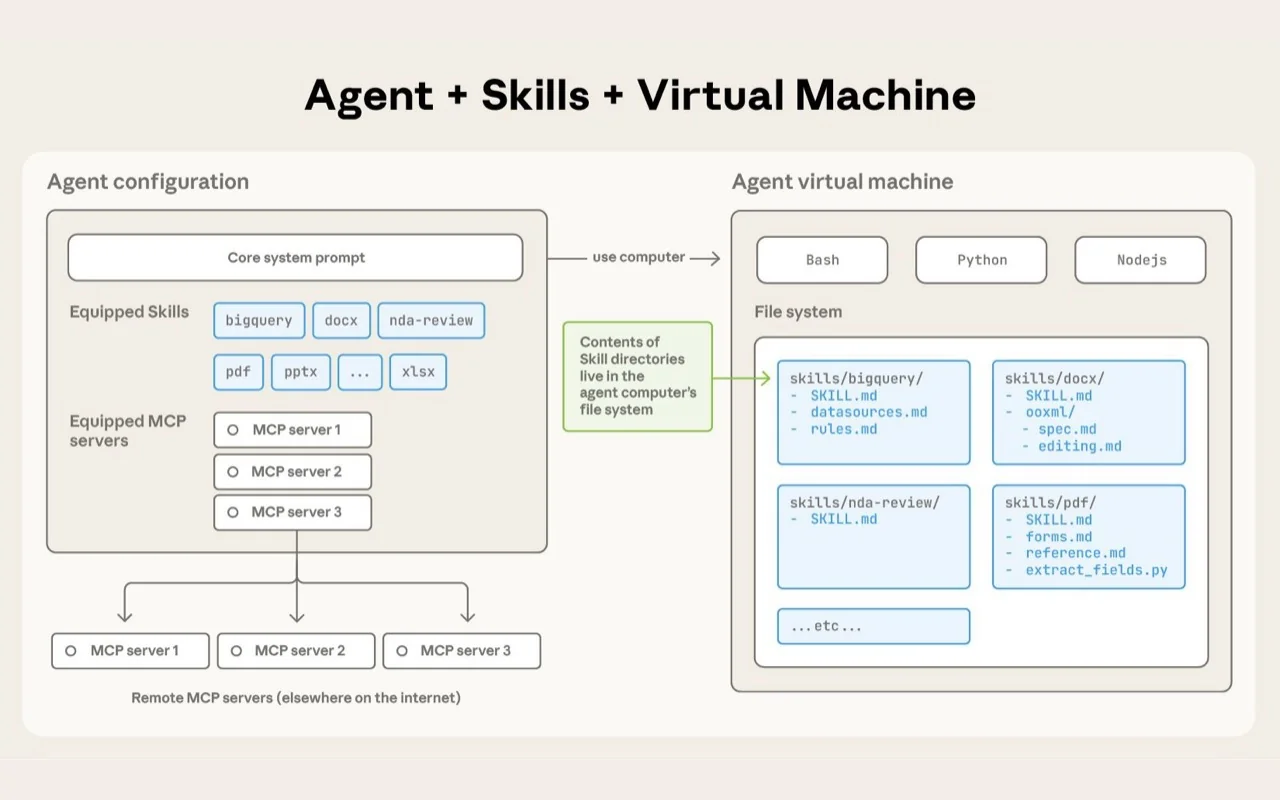
A Skill is not a plugin. It is a structured operating manual: it tells Claude Code when to trigger, what steps to follow, which files to read, which scripts to call, where to put results, and how to recover when something breaks.
A Skill turns implicit expertise into explicit automation. Without it, every Claude Code session starts from scratch. With it, the agent follows your playbook every time.
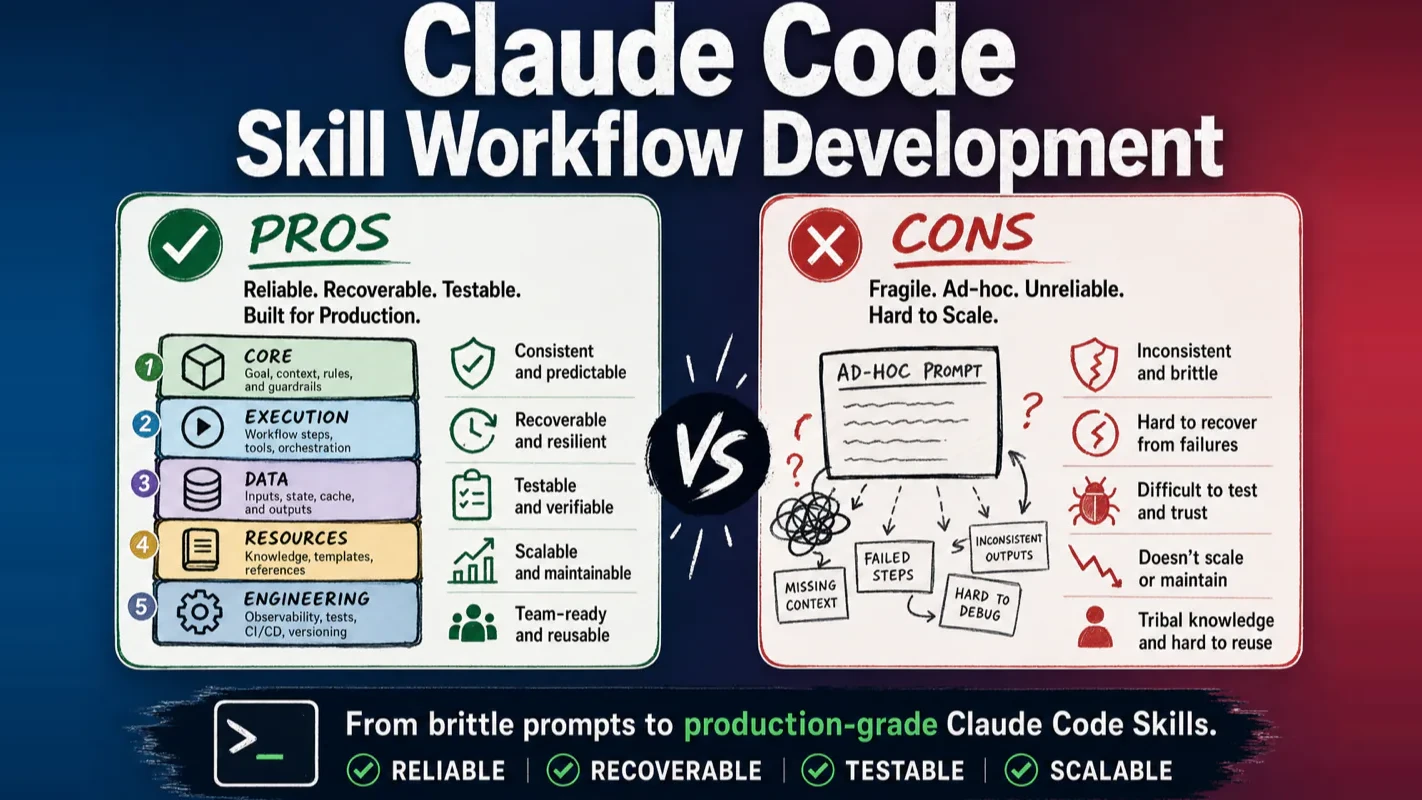
The architecture addresses three pain points I kept hitting in my own workflows:
Inconsistency -- the same prompt produced different results across sessions because nothing anchored the process.
Fragility -- a long workflow would fail at step 6, and the agent had no way to resume without re-running steps 1 through 5.
Opacity -- after a run finished, there was no audit trail showing what happened, what was skipped, or why a decision was made.
The five-layer structure solves all three. Here is the overview before we go layer by layer.
How Is the Five-Layer Architecture Organized?
Each layer handles a distinct concern. You only need the first layer to start. The remaining four grow organically as your Skill matures.
Layer 1 -- Core:SKILL.md, workflow table, platform constraints. Defines what the Skill does and when it triggers.
Layer 5 -- Engineering:setup.md, guide.md, changelog.md, troubleshoot.md. Makes the Skill installable, understandable, and maintainable by others.
A minimum viable Skill needs only Layer 1. A production Skill that runs daily across team members usually spans all five.
How Do You Write SKILL.md -- the Single Entry Point?
Every Skill begins with one file: SKILL.md. Think of it as the cover and table of contents for an operations manual. The cover tells the system who you are. The table of contents tells Claude Code what to do.
The smallest possible Skill looks like this:
my-first-skill/
  SKILL.md
A more complete structure adds workflow step files:
The SKILL.md frontmatter requires two fields at minimum: name and description.
---
name: my-content-translator
description: >-
  Translates an English Markdown article into the target language while
  preserving headings, lists, code blocks, and links. Triggers when the
  user says "translate article" or "localize post."
---
Use lowercase letters and hyphens for name. Write description in third person -- avoid phrases like "I can help you" because the system parses this field programmatically, not conversationally.
The real power sits in the workflow table. It maps each step to a responsibility, an executor (agent or script), a reference document, and explicit inputs and outputs. A well-designed Skill never asks Claude Code to improvise. It breaks the process into clear task units: initialize, collect, analyze, output.
Why Should Scripts Handle Deterministic Work?
The most common mistake in Skill development is letting Claude Code think through everything. My rule is simple: deterministic work goes to scripts, judgment calls go to the model.
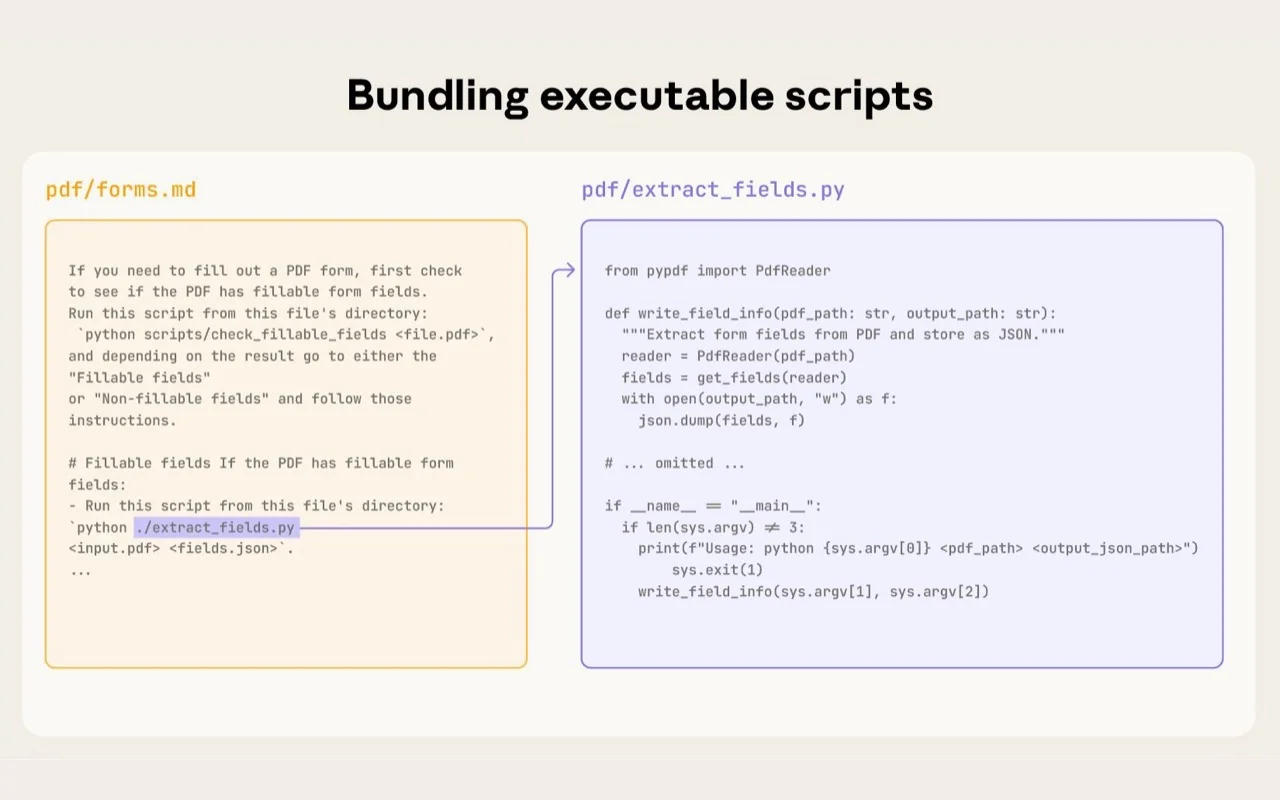
Batch renaming, JSON parsing, CSV merging, image downloading, file structure validation -- all of these belong in scripts. Scripts are stable, cheap, and consume zero context window.
Evaluating whether a headline grabs attention, analyzing user pain points, choosing a writing angle, diagnosing content quality -- these require the model's judgment.
I learned this the hard way. Early in my Skill development, I had Claude Code validate 200 filenames by reading each one and comparing it against a naming convention. It burned through 40% of the context window doing work a 10-line Python script handles in under a second.
What Makes a Production-Grade Prompt Template?
A prompt template inside a Skill should contain six elements:
Role -- who the agent is in this step.
Task -- what it must produce.
Input -- where to read data (a file path, not pasted content).
Output -- where to write results.
Constraints -- what it must not do.
Acceptance criteria -- how to verify completion.
Variable placeholders like {input_path}, {run_dir}, and {output_path} wire these elements together. Never let the agent guess a path. Paths come from the state file or from parameters passed explicitly.
How Does Run State Enable Crash Recovery?
Complex Skills fail. The question is not whether, but when. What matters is whether the agent can pick up where it left off.
progress.json is the heartbeat. It records at minimum:
Current step number
Input path
Output path
Status (running, completed, failed)
Error message (if any)
Timestamp
When context gets compressed, a session disconnects, or a task fails, the agent reads this file and knows exactly where to resume. Without it, every interruption means starting over.
I run a content pipeline with 7 steps that takes about 15 minutes end to end. Before I added run state, a crash at step 5 cost me 15 minutes. Now it costs 3 minutes -- the agent reads progress.json, sees step 4 completed, and picks up at step 5.
How Should You Layer Configuration?
Configuration splits into three tiers. Mixing them guarantees maintenance headaches.
Interactive parameters -- values the user provides for this specific run: topic, target platform, writing style.
Default configuration -- stable parameters baked into the Skill: output directory, model preferences, retry limits.
Keep these separate. When they collapse into a single config blob, debugging becomes guesswork.
What Belongs in the Resource Layer?
The resource layer eliminates magic strings and scattered implicit rules.
Directory
Purpose
credentials/
API keys and tokens (never committed to Git)
definitions/
Platform enums, scoring rubrics, field names
presets/
User-selectable style/template/output options
templates/
HTML or Markdown output skeletons
Why bother? Because magic strings kill maintainability. When the same platform name, field name, or style option appears in 8 files, a single change requires a global search. Worse, the agent might update 5 of those 8 occurrences and leave 3 with stale values.
A resource layer gives the agent a single source of truth. One file to update, zero drift.
Why Does the Engineering Layer Matter?
If only you can install and run a Skill, it is not finished. Four documents close that gap:
setup.md -- installation steps and dependencies.
guide.md -- usage instructions for first-time users.
changelog.md -- version history.
troubleshoot.md -- common failures and fixes.
These documents are not glamorous. They are essential.
Skills accumulate. Three weeks from now, you will forget how one installs. Six months from now, you will not remember why another broke. On a new machine, you will not know which dependency is missing.
Engineering documentation is insurance for your future self.
How Do You Build Your First Skill in 20 Minutes?
The best starter project is a Markdown article translator. The requirements are straightforward: take an English Markdown file path as input, produce a translated output that preserves headings, lists, code blocks, and links.
---
name: my-content-translator
description: >-
  Translates an English Markdown article to the target language while
  preserving original formatting and structure. Triggers on "translate
  article" or "localize post."
---

# Article Translator Skill

## Workflow

| Step | Responsibility | Executor | Input | Output |
|------|---------------|----------|-------|--------|
| 01 | Initialize | Agent | User-provided file path | `runs/{id}/state/progress.json` |
| 02 | Translate | SubAgent | Source file path | `runs/{id}/output/translated.md` |

## Execution Rules

- Progressive disclosure: read one step file, execute, then read the next.
- Pass file paths, never full file contents.
- SubAgent returns minimal status; translation output goes to a file.
Step 1 checks that the source file exists and creates the run directory. Step 2 launches a SubAgent with the source path and output path as explicit parameters.
The key takeaway is not the translation itself. It is the design discipline: paths are explicit, outputs are explicit, state is explicit, validation is explicit.
That discipline is the foundation of every production Skill I have shipped.
What Is the Fastest Path From Idea to Production Skill?
Start with Layer 1 only. Write a SKILL.md with a clear trigger, a workflow table, and 3 to 5 steps. Run it manually a few times.
When you notice the agent doing repetitive file operations, add scripts (Layer 2). When you hit your first crash and lose progress, add run state (Layer 3). When magic strings start causing bugs, add the resource layer (Layer 4). When someone else needs to use or maintain the Skill, add engineering docs (Layer 5).
This incremental approach mirrors how my own Skills evolved. My content publishing Skill started as a 30-line SKILL.md. Twelve months later, it spans all five layers and handles 200+ articles. But it grew one layer at a time, driven by real pain points -- never by speculative architecture.
The spec is open-source, and it is not the only AI Workflow Pro project built on this pattern. The awp-video-editing-skill applies the same five-layer structure to an eight-step video pipeline, and awp-agent-occupational-os pushes it toward job-specific agents. Both are worth reading as worked examples once the architecture here clicks.
Ready-to-Use Prompt: Architect a Production-Grade Skill in 5 Layers
What this does: Maps a Skill to its five layers (SKILL.md / scripts / run-state / resources / engineering), writes SKILL.md as the single entry-point spec, moves deterministic work into scripts with run-state crash recovery, and lays the resource + engineering layers with a 20-minute first build. Based on: Claude Code Skill Workflow Development Guide: Build Production-Grade AI Automations — https://aiworkflowpro.com/skill-workflow-development/ Time to run: ~5 minutes
Copy this prompt into Claude Code, ChatGPT, or any AI assistant:
ROLE: You are a Claude Code Skill Architect. Your job: build a production-grade Skill as a five-layer operating manual — scripts for deterministic work, run-state for crash recovery, SKILL.md as the single entry point.

CONTEXT — FIVE-LAYER SKILL ARCHITECTURE METHOD:
A Skill is not a plugin — it's a structured operating manual telling Claude Code when to trigger, what steps to follow, which files to read, which scripts to call, where to put results, and how to recover when something breaks. Production-grade Skills use a five-layer architecture: (1) SKILL.md — the single entry point and spec; (2) scripts layer — deterministic work (file ops, API calls, formatting) as reliable scripts; (3) run-state layer — persistent state (task IDs, progress markers) enabling crash recovery; (4) resource layer — static assets (templates, reference data); (5) engineering layer — testing, validation, versioning. Scripts own deterministic work so the AI handles judgment, not mechanics; run state lets long Skills survive crashes.

INPUTS (fill in before running):
- SKILL_GOAL: [What the Skill automates]
- DETERMINISTIC_STEPS: [Which steps are deterministic — file/API/format — vs judgment]
- CRASH_RISK: [Does it run long enough that crashes matter? yes / no]
- ASSETS: [Templates or reference files it needs]

METHOD — 4 STEPS:

Step 1 — Map the Skill to the 5 Layers
For SKILL_GOAL, place every component in its layer: SKILL.md (entry/spec), scripts (deterministic steps from DETERMINISTIC_STEPS), run-state (progress markers), resources (ASSETS), engineering (tests). Reject any component floating between layers — each has one home.

Step 2 — Write SKILL.md as the Single Entry Point
Write SKILL.md as the spec: trigger conditions, the step list, which scripts to call, where results go, the recovery path. Anything not in SKILL.md is invisible to the agent at trigger time.

Step 3 — Scripts for Deterministic + Run State for Recovery
Move every deterministic step (from DETERMINISTIC_STEPS) into scripts — the AI calls them, never reimplements them. If CRASH_RISK is yes, add run-state (task IDs, progress markers) so the Skill resumes where it died.

Step 4 — Resource + Engineering Layers + 20-Min First Build
Put ASSETS in the resource layer (templates/reference the Skill reads, not reinvents). Add the engineering layer (a test per deterministic script, validation on outputs). Then lay the 20-minute path: SKILL.md + one script + run-state + one test.

RULES:
- Never let the AI reimplement deterministic work — scripts own it; the AI calls them.
- Never run a long Skill without run-state — without it a crash restarts from zero.
- Never ship a Skill with no entry spec — if it isn't in SKILL.md, the agent doesn't do it.

OUTPUT FORMAT:
Output a markdown report with:
1. 5-Layer Map — markdown table, columns: Layer | Contents
2. SKILL.md Spec — trigger, steps, scripts, results location, recovery
3. Scripts + Run State — the deterministic scripts + the resume markers
4. Resources + Engineering + 20-Min Path — assets + tests + the first-build path
Save as @templates/skill-workflow-development.md and run when building a production-grade Claude Code Skill.
Frequently Asked Questions
Can I build a Claude Code Skill without writing any code?
Yes. The minimum viable Skill requires only a single SKILL.md file. You only need scripts when your workflow calls APIs, processes files in bulk, or reuses deterministic logic across runs.
What is the difference between a Skill and an MCP server?
An MCP server exposes external tools for the AI to call. A Skill is an operational playbook that tells the AI what steps to follow, in what order, with what inputs and outputs. Skills can call MCP tools inside their steps. The two are complementary, not competing.
How many steps should a single Skill contain?
Keep it under 8 steps. Once a workflow exceeds 10 steps, split it into multiple Skills or push deterministic logic into scripts. Shorter Skills are easier to test, debug, and resume after failures.
How does a Skill recover when a session crashes mid-run?
Each run writes a progress.json state file that records the current step, input paths, output paths, and timestamps. When a new session starts, the agent reads this file and resumes from where it left off instead of starting over.
Gloves on, tape measure in hand — nobody types a query. Three voice surfaces for ai automation tools (terminal, Telegram, Discord), 10 TTS and 6 STT providers compared on cost and latency, plus a setup that costs nothing.
Nothing about month four is harder than month three. It is simply the month an unpaid channel starts to feel like proof of failure. Surviving it takes a cadence you can hold while earning nothing, which is a better reason to automate business processes than speed ever was.
One number hides more than it shows. This Claude Code Skill scores US equities across 10 dimensions, from earnings surprise to peer comparison, with confidence scoring and 5 safety valves that flag thin data. A coding tutorial, not financial advice.
Publishing eats your week through research, SEO fields, images, and uploading — not writing. Here is the 10-step workflow automation pipeline that takes a topic to a published draft on one command, and the data contract that lets each step hand off cleanly to the next.