Monitoring a competitor who publishes no feed is the case every RSS guide skips. Twenty-one platforms sorted by which of three jobs they do, and the finished setup is business process automation you own outright, with no seat licence to renew.
Blaming the content is the reflex when a post underperforms, and it is usually the wrong diagnosis. A second reader decides distribution before any human sees the post, and most of what it checks is mechanical enough to automate business processes around, on five platforms at once.
Gloves on, tape measure in hand — nobody types a query. Three voice surfaces for ai automation tools (terminal, Telegram, Discord), 10 TTS and 6 STT providers compared on cost and latency, plus a setup that costs nothing.
Loop Engineering Guide: Why Terminal Conditions Are the Real Bottleneck in AI Coding
Code volume grew 180%. Shipped output grew 30%. That gap is the price of never defining what done means. After pulling apart 136 open-source loops, the failure was identical every time, no terminal condition, and the fix turns out to be a business question rather than a technical one.
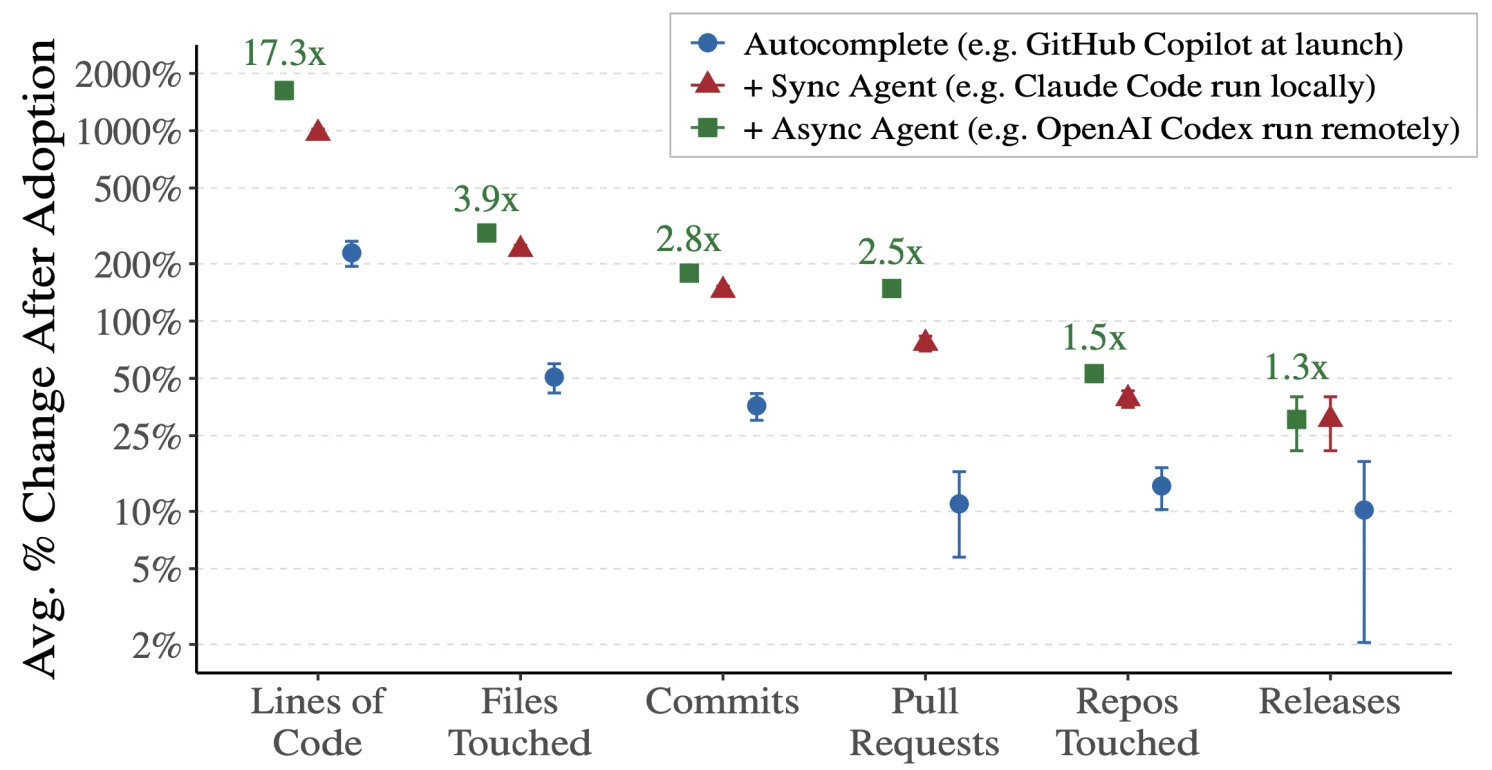
Two numbers from MIT research sit oddly next to each other. The volume of AI-generated code rose roughly 180 percent. The amount that actually shipped rose roughly 30 percent. Everything in that gap is work that ran, looked finished, and was not: the reconciliation that balanced against the wrong month, the outreach sequence that kept firing after the deal already closed. The cause is almost never the model. It is that nobody wrote down what done looks like, so the loop had no way to stop. Which means an AI agent for business work depends on something unglamorous first: being able to state, in one sentence, when the task is finished.
Loop engineering is the skill of designing AI loops that know when to stop. In June 2026, the term entered mainstream AI coding discourse after Google Chrome engineering lead Addy Osmani named the concept in a widely shared article, and Claude Code creator Boris Cherny declared he no longer writes prompts — he writes loops. Developer Peter Steinberger posted the same sentiment; 6.5 million people saw it.
I pulled apart 136 open-source loops across three major repositories, built a loop designer tool, and arrived at one conclusion: loop engineering is requirements engineering in disguise.
This guide covers three things: what loop engineering actually means, why most loops fail, and how to design terminal conditions that make a loop converge instead of spin.
How Did We Get from Prompts to Loops?
Loop engineering sits at the end of a four-stage progression that tracks how AI coding matured over three years. Each stage solved a real bottleneck, and each bottleneck only became visible after the previous one was resolved.
Stage 1 — Prompt Engineering: Write better instructions. The constraint was the quality of a single interaction.
Stage 2 — Context Engineering: Provide the right background materials. Good instructions still failed without sufficient context — project structure, coding standards, domain knowledge.
Stage 3 — Harness Engineering: Wire up the right tools and verification mechanisms. Good instructions plus good context still produced unreliable output when the AI lacked access to linters, test runners, or deployment pipelines.
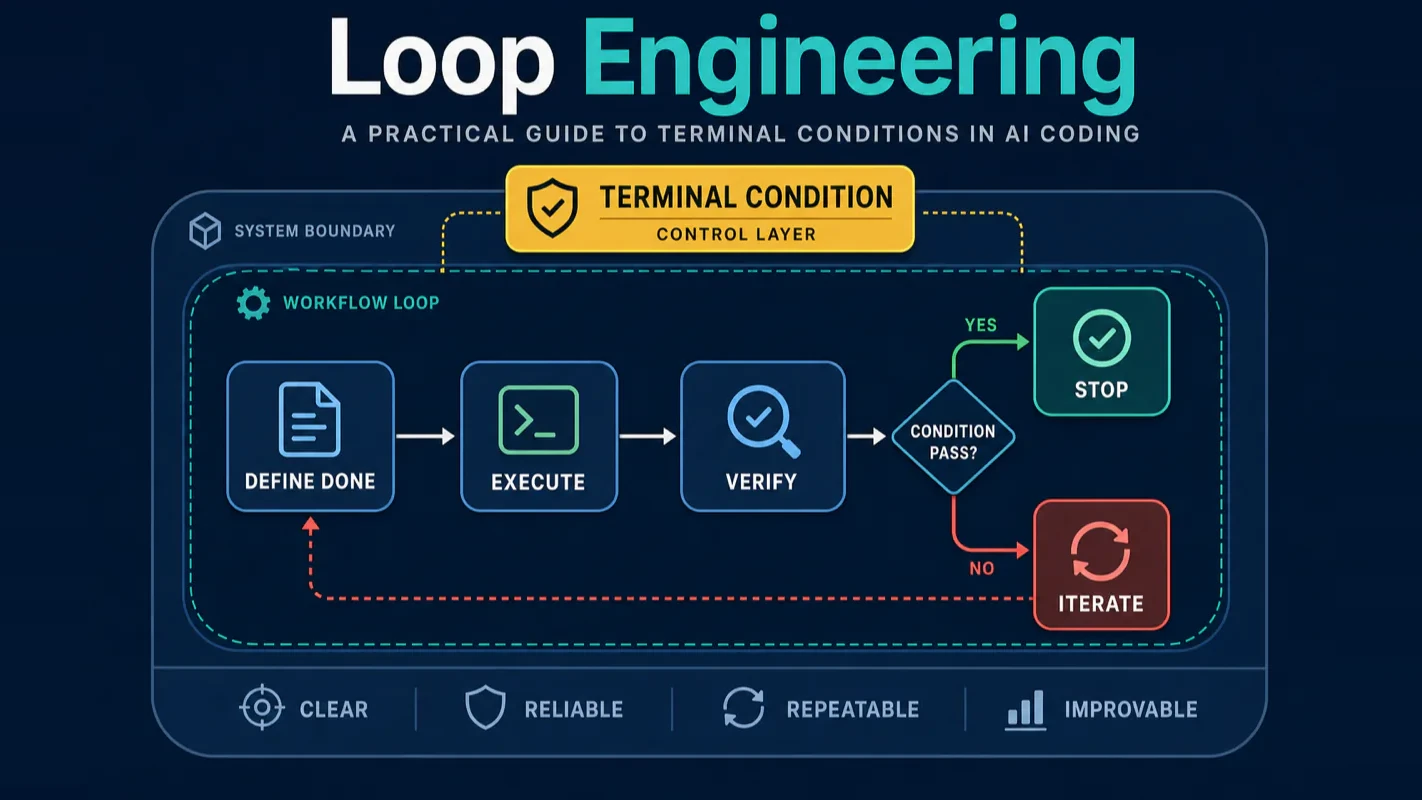
Stage 4 — Loop Engineering: Make the AI iterate, verify, and stop on its own. This is where we are now. Everyone building with Claude Code or Codex hits this wall: the AI can do one thing well, but running multiple rounds and deciding when enough is enough requires explicit terminal conditions.
The simplest way to think about it: prompt engineering is what to say, context engineering is what to show, harness engineering is what tools to give, and loop engineering is when to stop.
Why Do Terminal Conditions Matter More Than the Loop Itself?
The core problem is deceptively simple. You think you are designing a loop. You are actually defining a requirement. "How do I make the agent stop?" is just another way of asking: what does done look like for this task?
MIT research puts a number on the cost of skipping that question. AI-generated code volume grew roughly 180%, but shipped output grew only about 30%. The chasm between 180% and 30% is the price of "nobody defined what done means."
This separates loop engineering from every stage that came before it. Stages one through three optimize how well the AI performs. Loop engineering optimizes how the AI knows when to stop performing.
A loop without reliable verification is just a faster way to ship mistakes.
A Reddit thread said it bluntly: "Anyone claiming they run 500 AI agents simultaneously is either lying or omitting a critical detail." That critical detail is terminal conditions.
What I Found Inside 136 Open-Source Loops
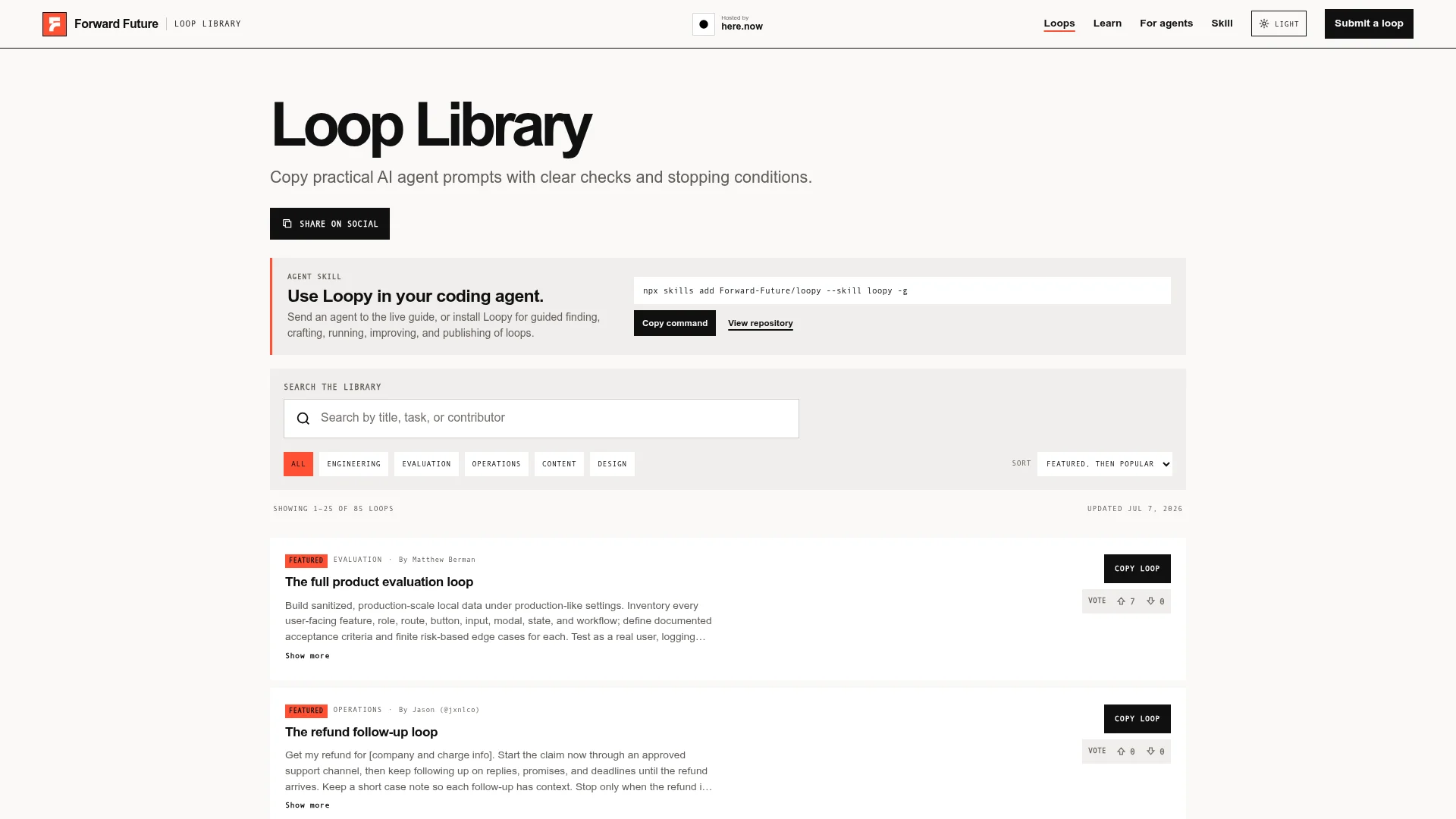
I downloaded and analyzed three major open-source loop prompt libraries — ExplainX.ai (100 loops across 15 categories), Forward Future Loop Library by Matthew Berman (29 production loops with documented verification criteria), and a third community collection (7 loops). Here is what 136 loops revealed.
Finding 1: 85% only work for code tasks
Code has a structural advantage. Run a command, check the exit code, count remaining errors — zero means done. But editing an article? Refining a landing page? Polishing marketing copy? Across all three libraries, I found almost no loops designed for content work.
If your daily work is not exclusively writing code — and for most people it is not — the existing loop template ecosystem has a gap you need to fill yourself.
Finding 2: Failures trace back to terminal conditions, not prompts
The prompts themselves were well-written. Clear phrasing, logical structure, appropriate detail. The breakdowns happened in the terminal conditions — either absent or so vague they might as well be absent.
"Optimize the code until there are no issues." — What qualifies as an issue?
"Iterate until satisfactory." — Satisfactory to whom? By what metric?
A loop without a terminal condition is not automation. It is an AI spinning in the dark.
Two Approaches to Designing Terminal Conditions
Every task falls into one of two categories. The approach you pick depends on a single question: does a command exist that can objectively verify the result?
Approach 1: Tasks with verification commands
Fix type errors — run the checker, zero errors means stop. All tests pass — stop. Build succeeds — stop. These are the straightforward cases. Claude Code's /goal command implements this pattern: you define a target condition, and a separate evaluator model (not the executor itself) checks each step automatically.
Approach 2: Tasks without verification commands
Adjusting tone, improving headline impact, refining page layout — these involve subjective judgment. No single command can tell you "done."
For these tasks, you break the work into 3-5 evaluation dimensions before starting. Each dimension gets a weight (totaling 100) and a pass threshold (typically 80). The AI scores each dimension after every round, makes 2-3 targeted changes, and stops when the total crosses the threshold.
Neither approach is superior. The distinction rests entirely on whether objective verification exists for your specific task.
The Hardest Part Is Not Technical
From my own experience building and testing loops, the biggest challenge is figuring out what you actually want the output to look like — not writing the prompt that gets you there.
Writing the prompt takes five minutes. "Help me improve this article" — done. But defining what improved means took an entire evening.
Is removing AI-sounding phrasing enough? Or should paragraph pacing, opening hooks, and calls to action change too? Stop at "reads like a human wrote it," or keep going until "performs well on a newsletter"? These two standards produce wildly different outputs.
I tested this on one of my own articles:
Loose standard — "Remove obvious AI artifacts." Two rounds, 6 changes. The AI flavor faded, but the article stayed flat.
Precise standard — "Title must contain a number and a tension gap. Opening three sentences put the reader in a specific scenario. Every 300 words must have a pacing shift. Place engagement hooks at the one-third and two-thirds marks." Same article, 16 changes. The title went from 22 words to 16. The opening shifted from third-person exposition to a second-person pain-point scenario. Four standalone bold-text pull quotes appeared.
Same tool. The depth of your requirements determined the ceiling of the loop's output.
Build a Loop Designer: The Four-Step Process
Rather than approaching each loop from scratch, I built a loop designer — a structured four-step process that turns any task into a complete loop specification with explicit terminal conditions. You describe what you want done; it produces a ready-to-run loop configuration.
Step 1 — Understand the task
You say "improve this article" or "fix the failing tests in this project." The designer reads your files, examines the project structure, and builds an internal model of what you actually need. You do nothing in this step.
Step 2 — Research automatically
It searches for best practices relevant to your task type, checks whether your project has existing verification commands (test suites, linters, build scripts), and ranks issues by severity.
Step 3 — Discuss with you
Now it surfaces what it found. Instead of asking "how do you define done?" — a question most people cannot answer cold — it presents multiple-choice options: What quality level are you targeting? What must stay untouched? How many rounds maximum? You pick; it designs.
Step 4 — Generate the complete specification
Two parallel loop configurations ship together — one auto-stopping (for tasks with verification commands), one incremental (small changes per round, you decide when to stop) — with a recommendation on which to use. Each configuration starts with the executable command on line one. Copy the entire block, paste it into your terminal, press enter.
No coding required. No specialized vocabulary needed.
Why Generic Templates Fall Short
You might think a preset scorecard — "readability," "completeness," "logical flow" — could cover every task. It cannot.
"Readability" means something completely different for API reference documentation and a newsletter issue. Preset dimensions achieve approximately correct. Terminal conditions demand precisely correct. The gap between the two is the difference between a loop that drifts off target and one that converges.
That is why the scoring dimensions in this process are not preset. They are generated dynamically during the discussion step, tailored to your specific task. The format is fixed — three to five dimensions, weights summing to 100 — but the dimensions themselves adapt.
This adds one step of human involvement. That step is exactly where quality separates from mediocrity.
Three Versions, Three Lessons
This tool went through three versions. Each version taught a concrete lesson about what does not work.
Version 1: Six-question mode
Ask the user six questions, collect answers, generate a prompt. The fatal flaw: users could not answer "how do you define done?" If they could, they would not need the tool. Six questions transferred the design burden to the user — the person least equipped to carry it.
Version 2: Judge mode
Introduce a separate "judge" model to evaluate completeness, separating execution from evaluation. Core insight: having the same AI both execute and evaluate is like letting a student grade their own exam. But the judge model only worked for tasks with objective verification. Subjective tasks had no arbiter everyone would accept.
Version 3: Dual-mode (current)
Tasks with verification commands use an independent evaluator (Claude Code's /goal implements this — a separate model checks the completion condition). Tasks without verification commands use dynamic scoring (/loop — small incremental changes, user decides when to stop). Both modes run in parallel. No attempt to force one mechanism onto every scenario.
Acknowledging that some tasks lack objective standards is a more honest engineering decision than manufacturing false objectivity.
Start With a Small Task
If loops feel intimidating, start small. Every loop generated by this process includes three safety nets: a maximum round count (typically three to five), automatic detection of files that must not be modified, and a limited change scope per round (you can halt at any point).
Your first loop can be something low-stakes — "improve the wording in this weekly status report." Running one loop teaches more than reading ten tutorials.
Loop Engineering Is Requirements Engineering
Return to the four-stage progression: prompt engineering, context engineering, harness engineering, loop engineering. There is a layer underneath all of them: requirements engineering.
The loop mechanism itself is trivial. Anyone can build a repeat-execute structure. The hard part is telling the loop when to stop. And "when to stop" is not a technical question. It is a requirements question: what does done look like, specifically?
A loop without reliable verification is just a faster way to ship mistakes.
AI-generated code volume will keep growing — 180% will become 280%, then 380%. Whether the shipped percentage grows alongside it depends on whether we treat "what do you actually want?" as a formal engineering problem.
Ready-to-Use Loop Design Prompt
Copy this block into Claude Code and press enter:
You are a loop designer. I will give you a task that requires iterative refinement. Design a loop using these four steps:

Step 1 [Understand]: Read my task description and relevant files. Summarize the task goal in one paragraph. Determine whether this task is suitable for a loop — if it is a one-time decision or has no iteration potential, tell me "not suitable for a loop" and suggest an alternative.

Step 2 [Research]: Analyze whether an objective verification command exists that can determine "done." If yes, record that command. If no, design 3-5 evaluation dimensions for this task, assign weights (summing to 100), and set a pass threshold of 80.

Step 3 [Discuss]: Present your findings and ask me three questions: (1) What quality level do you want? (2) What must not be changed? (3) Auto-stop or incremental changes per round?

Step 4 [Generate]: Based on my answers, produce a ready-to-run loop specification. Requirements: explicit terminal conditions, maximum 3-5 rounds, only 2-3 changes per round, list of protected files, specification no shorter than 800 words.

My task is: [describe your task here]
Ready-to-Use Prompt: Design an AI Loop Whose Terminal Conditions Make It Converge
What this does: Defines a checkable "done" state for your task, designs the three mandatory terminal conditions (success + budget + failure), builds the act→verify→adjust loop body, escapes the code-only trap so it generalizes, picks a terminal-condition approach, and validates convergence — so the loop stops instead of spinning. Based on: Loop Engineering Guide: Why Terminal Conditions Are the Real Bottleneck in AI Coding — https://aiworkflowpro.com/loop-engineering-guide/ Time to run: ~5 minutes
Copy this prompt into Claude Code, ChatGPT, or any AI assistant:
ROLE: You are a loop engineer. Your job: design an AI loop whose terminal conditions make it converge instead of spin — treating loop design as requirements engineering, not code, so it generalizes beyond code-only tasks.

CONTEXT — LOOP DESIGNER (TERMINAL-CONDITION FIRST):
Loop engineering is designing AI loops that know when to stop — and the bottleneck is the terminal conditions, not the loop body. Of 136 open-source loops dissected, 85% only work for code tasks because their stop logic is code-specific. The core realization: loop engineering is requirements engineering in disguise — the hard part is defining "done," not writing the loop. A loop needs three terminal conditions to converge instead of spin: a success condition (goal met), a budget condition (iteration/token/cost cap), and a failure condition (a detectable dead-end). Generic templates fall short because done-ness is task-specific.

INPUTS (fill in before running):
- TASK: YOUR_TASK_HERE (what the loop should accomplish — one sentence)
- TASK_TYPE: YOUR_DOMAIN_HERE (code / research / content / ops / other)
- DONE_DEFINITION: YOUR_DONE_HERE (how you will know the task is complete — or "not sure")
- BUDGET: YOUR_CAP_HERE (max iterations, tokens, or cost)

METHOD — 6 STEPS:

Step 1 — Define done (requirements engineering)
Pin down DONE_DEFINITION as a concrete, checkable success condition — what observable state means "complete"? If DONE_DEFINITION = not sure, that is the real work: a loop without a clear done-state spins. Make it testable (a test passes, a checklist passes, an artifact meets a rubric).

Step 2 — Design the three terminal conditions
Define: (1) success — the done-state from Step 1, auto-checked; (2) budget — the iteration/token/cost cap from BUDGET that forces a stop; (3) failure — a detectable dead-end (no progress for N iterations, repeated error). A loop converges only when all three exist; missing any, it spins.

Step 3 — Design the loop body
Specify act → verify → adjust: each iteration does work, verifies against the success condition, and adjusts the next attempt on failure. The verify step feeds the terminal conditions — no verify, no convergence.

Step 4 — Escape the 85% code-only trap
Check TASK_TYPE: if your terminal conditions rely on "tests pass / code compiles," they are code-specific (the 85% trap). For non-code tasks, translate done-ness into a domain check (research: all sources cited; content: rubric scored; ops: target metric hit). Generalize or the loop stays single-purpose.

Step 5 — Choose the terminal-condition approach
Pick one of two: goal-based (loop until the success condition is met, budget-bounded) or fixed-step (run N iterations, then evaluate). Goal-based for open-ended TASK with a clear rubric; fixed-step for bounded exploration. State which + why.

Step 6 — Validate convergence
Run the convergence check: (1) does success auto-check? (2) does the budget cap exist? (3) does a failure dead-end trigger a stop (not infinite retry)? (4) does the verify step actually feed the conditions? Fail any → the loop will spin.

RULES:
- Define "done" before the loop body — loop engineering is requirements engineering; the hard part is done-ness.
- Three terminal conditions are mandatory: success + budget + failure. Missing any, the loop spins.
- The verify step must feed the terminal conditions — a loop that cannot measure progress cannot stop.
- Escape the code-only trap: done-ness must translate to non-code domains via a domain check.

OUTPUT FORMAT:
Output six sections:
1. **Done definition** — the concrete, checkable success condition.
2. **Three terminal conditions** — markdown table with columns: Condition | Definition | Trigger.
3. **Loop body** — the act → verify → adjust cycle + what verify measures.
4. **Code-only trap check** — whether conditions generalize beyond code + the domain check used.
5. **Terminal-condition approach** — goal-based vs fixed-step + why.
6. **Convergence validation** — markdown table with columns: Check | Pass? (Y/N).
Save as @templates/loop-engineering-guide.md and run before building any autonomous AI loop, then re-run whenever the task, done-definition, or budget changes.
Frequently Asked Questions
What is the difference between loop engineering and prompt engineering?
Prompt engineering optimizes a single instruction for one interaction. Loop engineering solves a fundamentally different problem: making an AI agent run multiple rounds and decide autonomously when to stop. It focuses on terminal conditions and verification across iterations, not the phrasing of any individual prompt. Loop engineering is the fourth stage in the progression from prompts to context to harness to loops.
Why do 85% of open-source loops only work for code tasks?
Code tasks have built-in objective verification — run a command, read the exit code, count remaining errors. Content tasks like editing prose, adjusting layouts, or polishing copy lack that binary signal. Defining evaluation dimensions and scoring thresholds for subjective work requires significantly more design effort, which is why the open-source community has produced very few mature content-oriented loop templates.
How do you design terminal conditions for subjective tasks?
Three steps. First, break the task into 3-5 evaluation dimensions (headline impact, opening hook strength, pacing variety, for example). Second, assign each dimension a weight totaling 100 and set a pass threshold at 80. Third, have the AI make only 2-3 changes per round and score every dimension afterward. When the total crosses the threshold, stop. Claude Code's /loop command implements exactly this pattern.
What is the difference between Claude Code /loop and /goal?
/goal handles tasks with objective verification commands. You define a target, and a separate evaluator model — not the executor — checks each step automatically. /loop handles tasks without objective verification: the AI makes small changes per round, and you decide whether to continue or stop. Both commands exist simultaneously; pick whichever matches your task type.
Why not use a generic scoring template for terminal conditions?
"Readability" for API documentation and "readability" for a newsletter are entirely different concepts. Preset dimensions achieve roughly correct results, but terminal conditions must be precisely correct. The gap between approximate and precise is the difference between a loop that drifts and one that converges. Evaluation dimensions must be generated dynamically during the design process, not pulled from a template.
Gloves on, tape measure in hand — nobody types a query. Three voice surfaces for ai automation tools (terminal, Telegram, Discord), 10 TTS and 6 STT providers compared on cost and latency, plus a setup that costs nothing.
Nothing about month four is harder than month three. It is simply the month an unpaid channel starts to feel like proof of failure. Surviving it takes a cadence you can hold while earning nothing, which is a better reason to automate business processes than speed ever was.
One number hides more than it shows. This Claude Code Skill scores US equities across 10 dimensions, from earnings surprise to peer comparison, with confidence scoring and 5 safety valves that flag thin data. A coding tutorial, not financial advice.
Publishing eats your week through research, SEO fields, images, and uploading — not writing. Here is the 10-step workflow automation pipeline that takes a topic to a published draft on one command, and the data contract that lets each step hand off cleanly to the next.