Monitoring a competitor who publishes no feed is the case every RSS guide skips. Twenty-one platforms sorted by which of three jobs they do, and the finished setup is business process automation you own outright, with no seat licence to renew.
Blaming the content is the reflex when a post underperforms, and it is usually the wrong diagnosis. A second reader decides distribution before any human sees the post, and most of what it checks is mechanical enough to automate business processes around, on five platforms at once.
Gloves on, tape measure in hand — nobody types a query. Three voice surfaces for ai automation tools (terminal, Telegram, Discord), 10 TTS and 6 STT providers compared on cost and latency, plus a setup that costs nothing.
Claude Code /loop Command Practical Guide: 10 Scenarios That Actually Work
Three times a day you check the same page, and three times a day nothing has changed. That is not your work, that is a watch. Ten ready-to-run loops, the interval rule that keeps the bill sane, and the one line every loop needs so it stops on its own instead of running all weekend.
Picture a Tuesday for whoever owns your product listings. At 8am they check whether a competitor dropped price overnight. At noon they check again. At 5pm a third time, and on most days all three checks find nothing changed. Nobody was ever hired to do that; it simply accumulated. This is the exact shape of task an AI agent for business operations handles well, because the question is fixed, the interval is fixed, and a report is only worth sending when something actually moved. The command in this guide is how you hand that over. The cost rules further down are how you keep the handover from getting expensive.
Claude Code's /loop command turns your AI assistant into a background worker. You define the task and the interval, walk away, and come back to finished work. Shipped by Anthropic in March 2026 (requires Claude Code v2.1.72+), /loop marks the shift from conversational coding to autonomous operation.
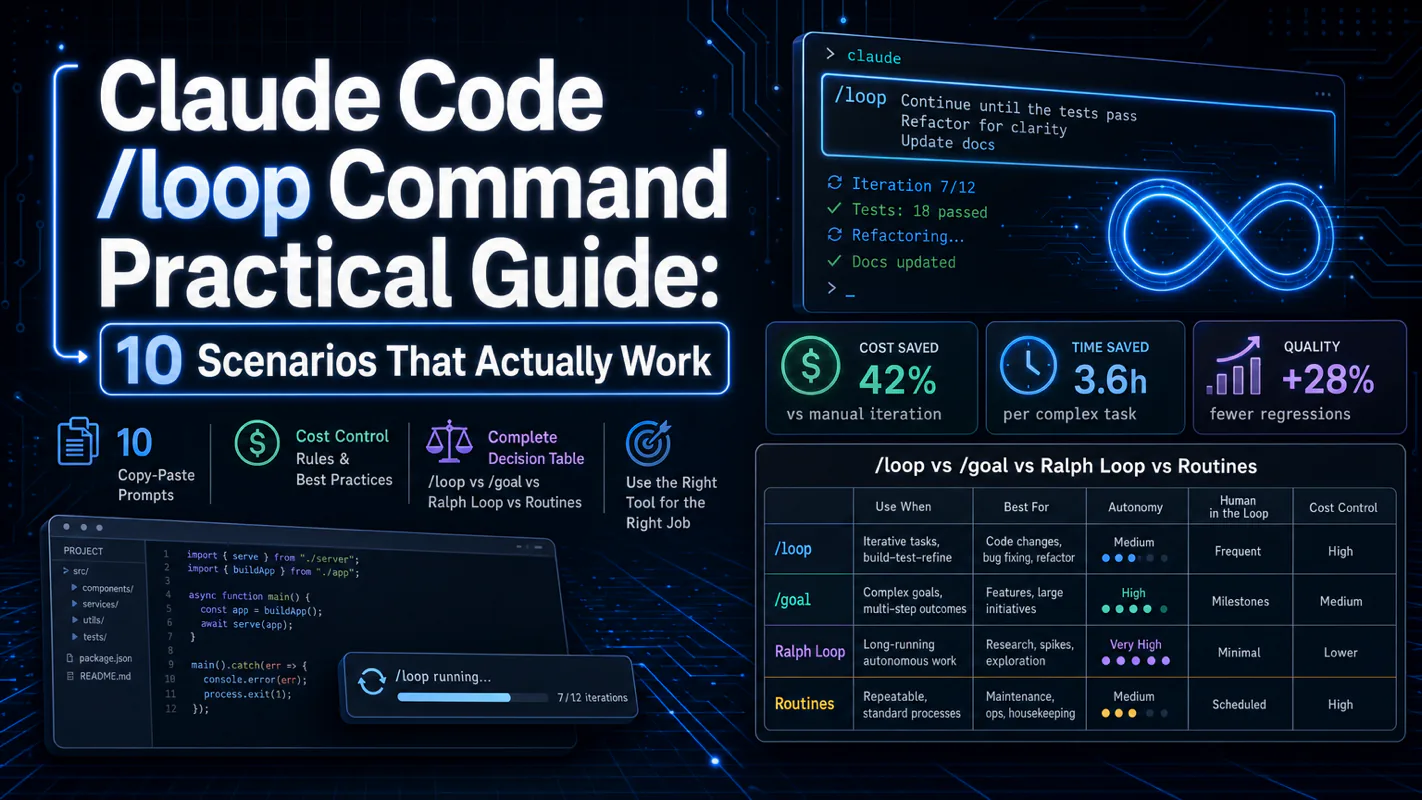
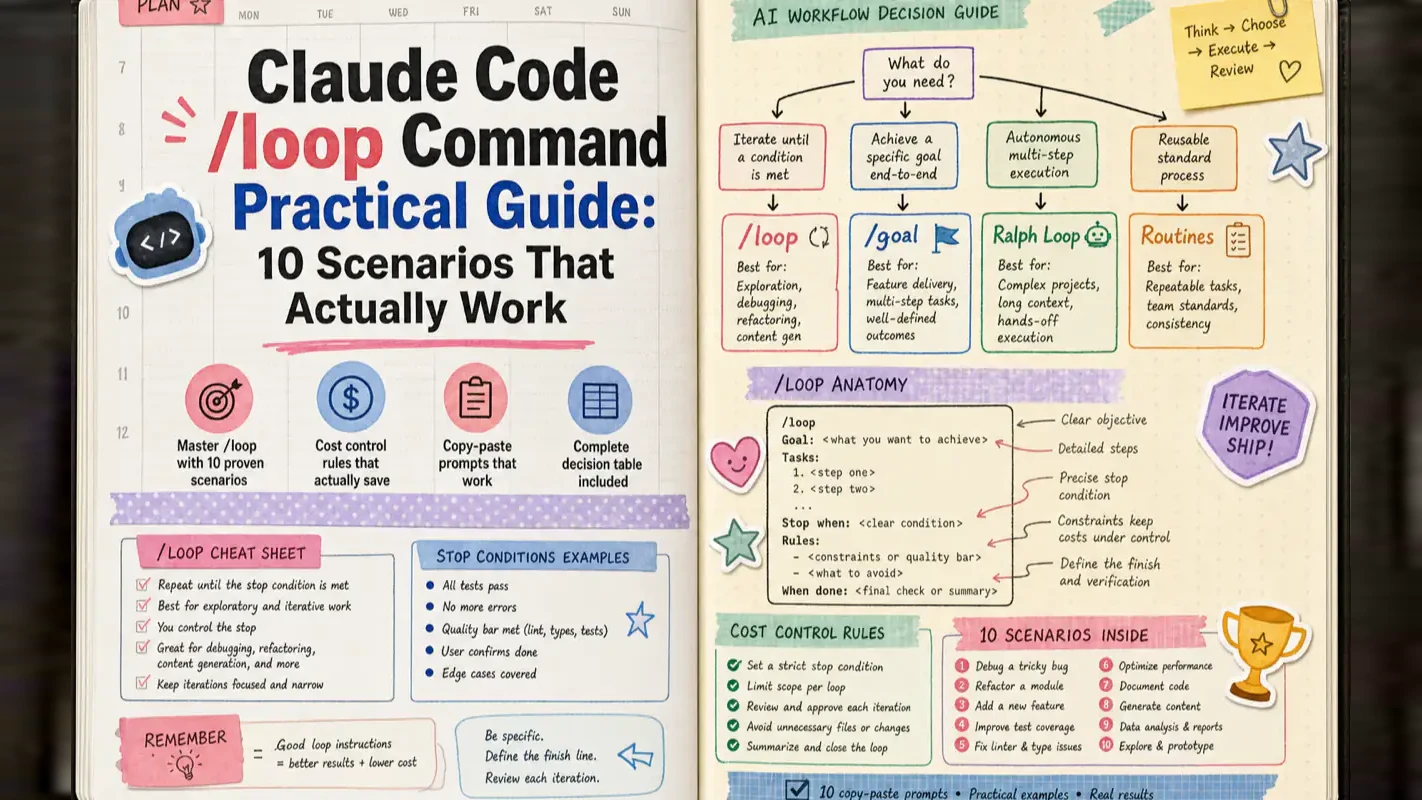
This guide gives you 10 copy-paste scenarios, the cost rules that keep your bill sane, and a complete decision table for choosing between /loop, /goal, Ralph Loop, desktop scheduled tasks, and cloud Routines.
Key takeaways
Three modes: fixed interval, adaptive interval, and maintenance mode
10 practical scenarios with ready-to-use prompts: deep research, SEO audits, competitor monitoring, batch tasks, doc generation, overnight refactoring, daily digests, content pipelines, Skill self-improvement, project-wide orchestration
Intervals under 5 minutes reuse the prompt cache and drastically cut costs
Every loop prompt needs a pre-flight check and an exit condition
Beyond /loop: /goal, Ralph Loop, desktop scheduled tasks, cloud Routines, and GitHub Actions each solve different problems
What Does One Command Change?
At the June 2026 Anthropic developer conference, Claude Code creator Boris Cherny said something that went viral within hours:
"I don't write prompts for Claude anymore. I write loops, and the loops prompt Claude for me."
That single sentence captures what /loop enables: your workflow shifts from "ask and wait" to "set the target and walk away."
From my experience running dozens of loops over the past few months, the command itself is simple. The hard part is knowing when to use it and when not to. Blindly spinning up loops burns money. Thinking first saves both time and budget.
AI coding tools have gone through three phases:
2024 — Conversation mode: You ask, AI answers. This was the vibe coding era.
2025 — Agent mode: AI reads files, writes code, runs tests — but you babysit every step.
2026 — Autonomous mode: AI works on a schedule you set. You do something else.
/loop bridges agent mode to autonomous mode. Google Chrome engineer Addy Osmani formally coined the term "Loop Engineering" in June 2026 — the discipline is no longer about crafting a single prompt, but about designing a robust loop.
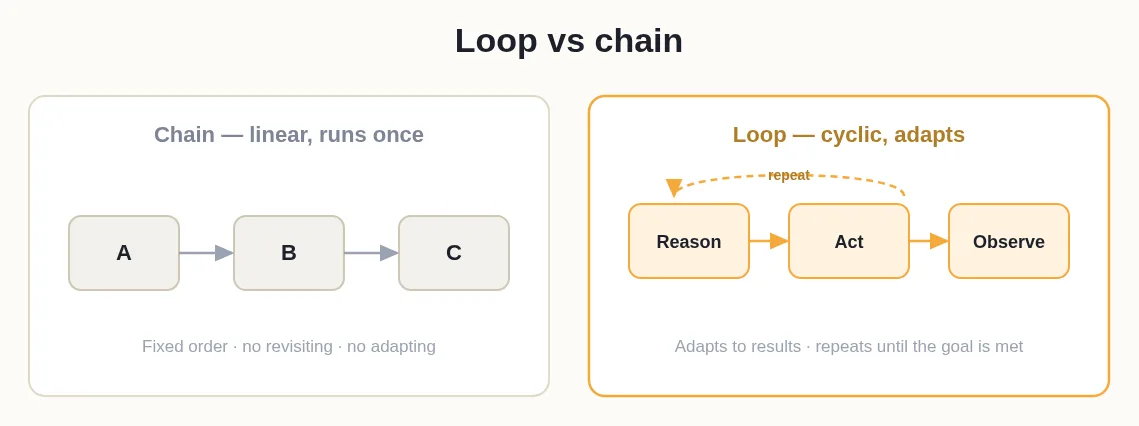
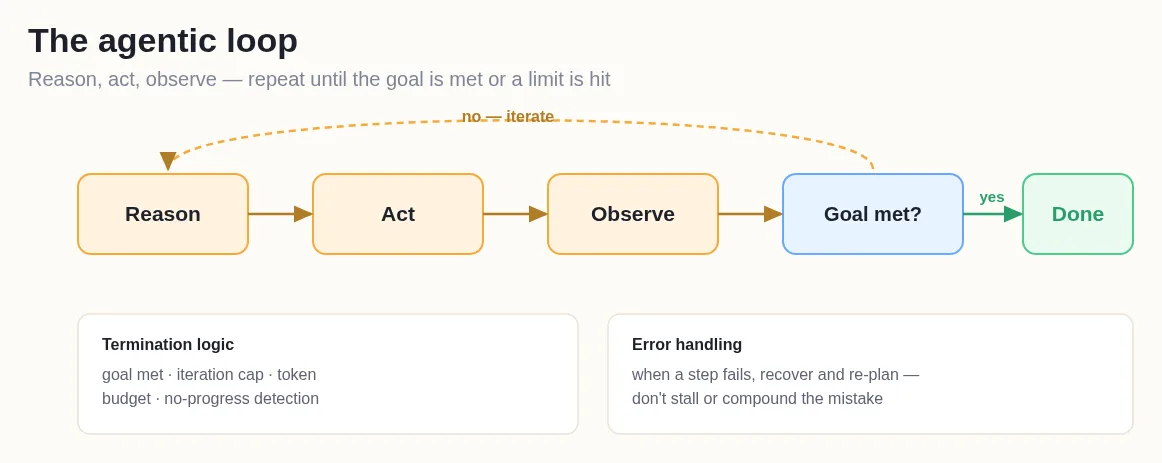
Think of /loop as a work alarm for AI. The alarm rings at your chosen interval, the AI wakes up, does a round of work, then waits for the next ring. You don't need to watch.
How About One-Shot Reminders?
Before covering loops, here is a simpler feature many people miss — one-shot reminders. Just tell Claude in natural language:
"Remind me in 45 minutes to check the integration test results"
"At 3 PM remind me to push the release branch"
Claude creates a single-fire scheduled task that runs once and deletes itself. No loop, no repetition, no management. This is the lightweight cousin of /loop — perfect for "do one thing at one point in time."
What Modes Does /loop Offer?
The syntax is one line. Depending on the parameters you provide, it operates in three modes.
Mode 1: Fixed Interval With a Specific Task
Type /loop followed by an interval and a task description. For example, check deployment status every 5 minutes.
Supported time units: seconds (s, rounded up to minutes), minutes (m), hours (h), days (d). The interval can appear before the task (30m) or in natural language after it (every 2 hours).
This is the most common mode — you know exactly what to do and how often.
Under the hood, Claude converts your input to a standard five-field cron expression with 1-minute precision. Non-divisible intervals (like 7 minutes) get rounded to the nearest valid value, and Claude tells you what it actually set.
Mode 2: Let Claude Decide the Interval
Tell Claude what to do but not how often. Claude adapts — checking every minute when things change rapidly, stretching to once per hour when nothing moves. After each run, it prints the chosen next interval and the reasoning.
From my testing, this mode deserves your first try. Most people default to "every 5 minutes" when adaptive pacing would be smarter and cheaper. In adaptive mode, Claude sometimes switches to the Monitor tool — running a background script that streams output instead of polling repeatedly.
Mode 3: Bare /loop — Automatic Maintenance
Type /loop with zero arguments. Claude runs a built-in maintenance sequence:
Continue unfinished work from the conversation
Maintain the current branch's pull request: handle review comments, fix failing builds, resolve merge conflicts
When idle, run cleanup: find bugs, simplify code
If you place a loop.md file at .claude/loop.md or ~/.claude/loop.md, Claude reads it instead of the built-in tasks. This file is your "standing orders" document — edit it while a loop is running and the next cycle picks up the changes immediately. File size limit: 25,000 bytes.
loop.md works like a duty manual for AI. Every time it wakes up, it checks the manual first. Change the manual anytime; the AI follows the new version on the next wake-up. The mechanism mirrors CLAUDE.md project memory — same philosophy, same best practices.
Critical Constraints
Constraint
Detail
Session-scoped
Close the terminal or exit Claude Code — all loops stop instantly
7-day expiry
Loop tasks auto-delete 7 days after creation (one final run, then gone)
50-task cap
Maximum 50 concurrent scheduled tasks per session
No backfill
Missed runs while Claude is busy get a single catch-up execution
Esc to stop
Press Esc to cancel the current loop without affecting other tasks
Resumable
--resume or --continue restores unexpired tasks
Jitter
Random offset prevents all tasks firing simultaneously — up to 30 minutes for recurring, up to 90 seconds for one-shots at :00 or :30
Common Interval Quick Reference
Natural language works. But for the curious, Claude maps your words to cron expressions:
All times use your local timezone. If your interval doesn't divide evenly into minutes, Claude rounds to the nearest valid value and tells you.
Watch out for jitter. To avoid thundering herds on the API, the system adds random offset per task. Recurring tasks shift up to 30 minutes (or half the interval, whichever is smaller). One-shot reminders at :00 or :30 may fire up to 90 seconds early. If precision matters, pick :03 instead of :00.
How Do You Manage Running Loops?
Ask Claude in plain language — "what tasks are running?" lists all active tasks; "cancel the deployment check" stops a specific one. Under the hood: CronCreate (create), CronList (list), CronDelete (cancel by 8-character ID).
You can nest other slash commands — /loop 20m /review-pr 1234 runs the PR review command every 20 minutes. Any existing Skill or command can be scheduled this way.
Disabling the Scheduler
Set CLAUDE_CODE_DISABLE_CRON=1 to globally disable scheduling in your environment.
What Loops Does Boris Cherny Actually Run?
The creator of /loop said his job is writing loops. Based on his public documentation at howborisusesclaudecode.com, he runs four simultaneously:
babysit — every 5 minutes. Handles code review comments, auto-rebases, escorts pull requests to merge. His highest-volume loop; personal record: 150 PRs merged in a single day.
slack-feedback — every 30 minutes. Converts Slack user feedback into code-change pull requests automatically.
post-merge-sweeper — adaptive interval. Scans for review comments missed after merge.
pr-pruner — hourly. Cleans up stale or abandoned pull requests.
The common thread: each loop is small and does exactly one thing. Not one mega-loop handling everything, but four focused loops each owning a specific concern. Combined, they replace roughly half a maintenance engineer's week.
Boris's core advice: give AI a self-verification mechanism (test suite, build pass, browser confirmation). With reliable verification, AI output quality improves two to three times over.
Inside Anthropic, dozens of loops run concurrently. Their Claude instances even communicate through Slack — one Claude detects a problem and posts to a channel, another Claude's loop picks it up and starts fixing. This is not a hypothetical scenario; it's the actual workflow inside Anthropic today.
Two Advanced Patterns Trending on X
Before the scenarios, two patterns that gained traction on X (Twitter).
Checker Agent: Dual-Session Pattern
Run two Claude Code sessions simultaneously. Session one is your active workspace where you write code. Session two runs /loop every 15 minutes, automatically reviewing session one's output.
Both sessions see the same project files but maintain independent conversation contexts. Session two doesn't know what you were thinking — it only sees file changes. This "blind reviewer" perspective catches issues that session one's accumulated context naturally overlooks.
VISION.md: Direction Anchor Pattern
Credit to Peter Steinberger (OpenClaw creator, now at OpenAI). Place a VISION.md file at the project root with north-star goals and key constraints. Every loop cycle starts by reading VISION.md to confirm direction.
Why? Long-running loops drift. Claude stays on track at round 1 but may deviate by round 20 — especially after auto-compaction drops older context. VISION.md anchors every round. No matter how conversation history gets compressed, this file remains intact.
This aligns directly with the CLAUDE.md project memory concept. If your loop will run more than 10 rounds, anchor it with VISION.md.
10 Scenarios You Can Start Tonight
Each scenario includes a complete prompt you can copy into Claude Code and run immediately. Every prompt follows three principles: pre-flight check (skip when idle), exit condition (don't run forever), output location (write to file, not chat).
Scenario 1: How Can You Automate Deep Research?
The pain: Researching a topic across multiple angles takes 2–3 hours manually, and you'll miss perspectives.
The approach: Write research instructions in .claude/loop.md, then start /loop. Every 20 minutes, Claude searches a new angle and appends findings to the same report.
Prompt (write to .claude/loop.md, then type /loop):
"I'm researching '[TOPIC NAME]'. Each cycle, follow these steps. Step 1: Read report.md and check which angles are already covered. Step 2: Pick one uncovered angle from this list — technical principles and evolution, market landscape and key players, real user feedback and sentiment, cost structure and value comparison, alternatives and competitor analysis, industry trends and predictions, hands-on case studies and best practices, common pitfalls and lessons learned. Step 3: Search for latest information on this angle using at least 3 different keyword queries, reading at least 2 full articles. Step 4: Write a 300–500 word section with source links and append it to the matching chapter in report.md. Step 5: If all 8 angles are covered, write 'Research complete' at the bottom of report.md and stop the loop."
The critical design: "check what's covered first, then pick an uncovered angle." Without this, AI may repeatedly search the same perspective. Requiring "at least 3 different keyword queries" prevents lazy single-search rounds.
Scenario 2: How Do You Run Automatic SEO Audits?
The pain: Checking meta descriptions, title keywords, tag structure, and internal links across dozens of articles is tedious and error-prone.
The approach: Schedule an hourly audit loop that scans article directories systematically.
Prompt:
"/loop 1h Run this SEO audit. Step 1: Scan all .md files in the articles directory, read each file's frontmatter. Step 2: Check six items per article — meta_description between 120–160 characters, title contains the target keyword within the first 60 characters, tags list has at least 2 tags with the first being a primary category, slug is lowercase-hyphenated, body contains at least 2 internal links to other site articles, structured data includes BreadcrumbList + BlogPosting + FAQPage. Step 3: Write failing files to seo-audit.md listing which items failed and suggested fixes. If everything passes, write 'All clear, checked N articles'. Step 4: Compare with the previous audit — flag new issues and unresolved repeats."
If your article directory has hundreds of files, scan only files modified in the last 30 days per cycle — or split by primary tag. Batching beats full-scan for both accuracy and cost.
Scenario 3: How Do You Monitor Competitor Activity?
The pain: Tracking 2–3 competitors' latest content and product updates daily eats time.
The approach: A 30-minute loop searches for competitor activity, diffs against known records, and appends only genuinely new findings.
Prompt:
"/loop 30m Run competitor monitoring. Step 1: Read competitor-log.md for existing records and last check time. Step 2: Search latest activity for [Competitor A], [Competitor B], [Competitor C] — keywords: brand name + 'release', brand name + 'update', brand name + 'tutorial'. Step 3: Diff search results against existing records by title and URL. Append new items to competitor-log.md in format: date | competitor | title | link | type (article/video/product update) | one-line summary. Step 4: If zero new items found this round, write nothing and exit immediately."
The last step is the key — do nothing when there's nothing new. This is the pre-flight check pattern that developer Jiri Dolejs identified as the cost lifeline for production loops. I've run loops for weeks now, and the conclusion is clear: pre-flight checks are not optional optimization — they're mandatory discipline. Without them, most rounds burn full cost doing nothing useful. With them, empty rounds cost near zero.
Scenario 4: How Do You Push Through a Batch Task List?
The pain: You have 10 to-do items in a tasks.md file. Directing Claude through them one by one is slow.
The approach: Use /goal (Claude Code v2.1.139+) with a completion condition — stop when everything is done.
Prompt:
"/goal Open tasks.md and find all items marked 'pending'. Process them top to bottom. After completing each task, change its marker from 'pending' to 'done' and save. Before starting each task, read its description to confirm understanding. If a task can't be completed (missing file, insufficient info), mark it 'needs-human' with a one-line reason and move on. Stop when no items remain 'pending', or after 30 rounds."
/loop is a time-triggered alarm — fires every N minutes. /goal is a condition-triggered target — stops only when done. For tasks with a clear "all finished" state, use /goal. For ongoing monitoring that never truly "finishes," use /loop.
Scenario 5: How Do You Auto-Generate Structured Files?
The pain: Creating 10 similar documentation files or product page skeletons manually leads to inconsistency and fatigue errors.
The approach: Feed /goal a file list and let Claude create each one, matching the style of existing files in the same directory.
Prompt:
"/goal Read file-list.md — each line has a file path and brief description. For each entry: check if the target file exists (skip and mark 'exists' if so); if not, create it using the appropriate format (Markdown for docs, YAML for config, matching language for scripts), following the style of existing files in the same directory. After creating each file, append '[created]' to that line in file-list.md. Stop when all lines are marked. Stop after 25 rounds if not done."
The value: uniform format, zero omissions, no quality dropoff at file number 8. Any "create N things from a template" task should be your first candidate for loop automation.
Scenario 6: Can You Run an Overnight Refactor?
The pain: Splitting an 800-line monolith or migrating legacy patterns takes a full day of focused time.
The approach: Give Claude the refactoring task at night with guardrails, then go to sleep.
Prompt:
"/goal Refactor [TARGET FILE PATH] by splitting it into focused sub-modules. Requirements: 1) Analyze logical groupings — each concern becomes a separate file in a subfolder. 2) Each new file includes necessary imports and works independently. 3) Update all references in the original file to import from the new modules. 4) After each module extraction, run the project tests. 5) If tests fail, revert the current split and try an alternative approach; if the same module fails 3 consecutive times, mark it 'needs-human' and skip. 6) Stop when all modules are extracted and tests pass, or after 40 rounds. Constraints: don't modify files outside the target folder; don't delete the original file (human confirms deletion); each split produces one git commit with a descriptive message."
Community developers have used this pattern to split 800-line files into 6 focused modules overnight — 47 new tests passing, 12 clean commits. Not perfect (two file names could be better, one test was redundant), but 30 minutes of morning cleanup replaces two days of work.
The biggest overnight risk is not AI doing something wrong — it's AI doing something wrong and not stopping. One real case: 12 hours unattended produced 204 pull requests with 509 consecutive build failures. Only 23 lines needed changing. The root cause: AI in a loop is stateless about its own failures. A human steps back after three failed attempts; a looping AI does not. The "3 consecutive failures = skip" clause in the prompt above is a non-negotiable safety valve.
Scenario 7: How Do You Generate Daily Digests?
The pain: You want a daily industry news summary but compiling one manually takes too long.
The approach: A 24-hour loop searches, filters, and writes a digest file each day.
Prompt:
"/loop 24h Run the daily news digest. Step 1: Search the last 24 hours for these keywords — AI coding tools, Claude Code, Codex, AI Agent, AI automation. Step 2: Filter the top 10 results directly relevant to AI coding, excluding ads and duplicates. Step 3: Write a one-line summary (under 50 words) for each with the source link. Step 4: Sort by importance (product launch > feature update > tutorial > opinion), write to daily-digest/YYYYMMDD.md. Step 5: Append a 'Perspective' section — 1–2 trends or observations from today's results."
This usage pattern draws from Allie K. Miller's (former Amazon AI executive) non-coding /loop ideas on LinkedIn — her original list also included "check email every 30 minutes and summarize" and "scan competitor websites hourly for changes." The core insight: these use cases require zero code. Non-technical users can run them directly.
Scenario 8: How Do You Build a Content Pipeline?
The pain: Content creation — from topic selection through research, drafting, editing, to publishing — is a long pipeline. Each step can use AI, but you manually push from stage to stage.
The approach: Write the entire pipeline as a state machine in loop.md.
Prompt (write to .claude/loop.md):
"Run the next content pipeline step. Read pipeline-status.md for current progress. If status is 'topic-selection': search this week's trending topics in AI coding, propose 3 candidates in topics.md, set status to 'topic-pending-review', stop and wait for human selection. If status is 'topic-selected': read the chosen topic, research from 5 different angles, compile material in research.md, set status to 'research-done'. If status is 'research-done': write a 2000–3000 word first draft in draft.md based on research.md, set status to 'draft-done'. If status is 'draft-done': self-review draft.md (check typos, logic gaps, factual accuracy), save the revised version as final.md, set status to 'ready-to-publish'. If status is 'ready-to-publish': do nothing — wait for human review and manual publishing."
Start with bare /loop (adaptive interval). Claude advances the state machine automatically — pausing when human input is needed, resuming when you've made your selection.
This pattern draws from Kieran Flanagan (HubSpot VP Marketing), who built 11 Skills forming a complete content team — one person, zero employees. In auto mode, the system runs the full pipeline every morning; he only reviews output.
Scenario 9: Can /loop Self-Improve a Skill?
The pain: You wrote a Claude Code Skill but its output quality varies. Manual prompt iteration takes 10 minutes per attempt — 20 attempts means 3 hours.
The approach: Inspired by Andrej Karpathy's Autoresearch concept — let the loop iterate: modify prompt, test, score, keep winners, revert losers, repeat.
Prompt:
"/loop 2m Run the Skill self-improvement cycle. Step 1: Read program.md for current optimization goal and constraints. Step 2: Read the current Skill's prompt file. Step 3: Make exactly one change — adjust wording, add a constraint, or change a format requirement. Step 4: Run the modified prompt against all 10 test cases in eval-cases.json. Step 5: Score pass rate. If higher than the previous version, save as best-version.md and git commit 'improvement: pass rate X/10 to Y/10'. If equal or lower, revert. Step 6: Append this round's record to progress-log.md — what changed, pass rate, kept or reverted. Stop after 50 rounds."
Scenario 10: How Do You Orchestrate Project-Wide Improvements?
The pain: Bug fixes, missing tests, outdated docs, and tech debt are scattered everywhere. Tackling them manually takes a week.
The approach: Give /loop an "orchestrator" role — each round it evaluates project state, picks the highest-priority improvement, executes, and commits.
Prompt:
"/loop 10m You are a project improvement orchestrator. Each round: Step 1 — survey current state: read README, check recent git commits, scan for TODO comments and known issues. Step 2 — pick one thing from: fix known bugs (highest priority), add missing tests, update outdated docs, clean up dead code or dependencies, improve error handling. Step 3 — execute the selected improvement, keeping scope small and independent (one thing per round). Step 4 — run tests to confirm nothing breaks. Step 5 — git commit with a clear message describing the improvement. Step 6 — append to improvements-log.md. If the survey finds nothing to improve, exit the round immediately. Stop after 3 consecutive empty rounds."
The Developers Digest founder used a similar approach — started at 11:47 PM, went to sleep. By 1:53 AM, the orchestrator had spawned subagents across 21 repos, opened 59 pull requests, and scaffolded 12 new projects. Extreme, yes — but the principle holds: turn repetitive improvements into loops, each round doing one small thing. Incremental gains compound.
How Should You Configure loop.md?
loop.md is the most overlooked and most valuable configuration mechanism for /loop. It's not documentation — it's standing orders that determine what bare /loop does every time it wakes up.
File Location
Path
Scope
.claude/loop.md (project directory)
Project-level, higher priority
~/.claude/loop.md (home directory)
User-level, applies to all projects without a project-level file
Project-level wins when both exist. Built-in maintenance tasks activate when neither exists.
Five Rules for Effective loop.md
Write it like a prompt. No special Markdown structure needed — just describe the task as if typing after /loop.
Add a pre-flight check. Start with "first check if there's anything to do — if not, do nothing and exit." This prevents empty-round waste.
Specify output location. State which file gets the results and whether to append or overwrite. Otherwise Claude prints to chat, filling the context window within a few rounds.
Edit live. Changes take effect on the next cycle. Mid-loop, you can remove an angle that's been sufficiently covered or add a new check.
Stay under 25,000 bytes. Longer files get truncated. Keep loop.md concise — put detailed background in separate files and reference them with "read context.md for background."
Official Example
From the Claude Code docs:
"Check the release/next pull request. If the build is failing (CI red), pull failure logs, diagnose, and push a minimal fix. If there are new review comments, address each and mark resolved. If there's a merge conflict, resolve it. If everything is green with no comments, just say 'all clear.'"
This example demonstrates every trait of good loop.md: clear priority order, explicit handling for each condition, short exit path when idle.
How Do You Prevent /loop From Burning Money?
The core risk isn't "AI did something wrong." It's AI did something wrong inside a loop while you weren't watching. The community has real incident reports to learn from.
Rule 1: Keep Intervals Under 5 Minutes
Claude Code has a prompt cache mechanism. If two calls happen within 5 minutes, the second reuses the cache — dramatically cheaper. Beyond 5 minutes, the cache expires and every call loads the full conversation history from scratch.
Under 5 minutes = cheap. Over 5 minutes = full price. One user set a 30-minute interval, ran 46 overnight cycles, and each one loaded the complete history cold. Morning surprise: usage nearly exhausted. This is not an edge case — cache expiry is the number one cause of /loop cost blowouts.
If your task doesn't need frequent execution, use adaptive mode (no interval specified) and let Claude pace itself.
Rule 2: Every Prompt Needs a Pre-Flight Check
The biggest loop risk is idle spinning — Claude runs the full workflow every round even when nothing needs doing. Jiri Dolejs emphasizes this:
"Without a pre-flight pattern, your AI burns a full conversation cost every 20 minutes analyzing a codebase that needs zero changes."
The fix is the pre-flight step in every scenario above: round one doesn't start work — it first checks "is there work to do?" If not, skip. This step costs almost nothing but prevents enormous waste.
Rule 3: Always Set an Exit Condition
The second biggest risk is infinite loops — Claude finds an error, the fix introduces a new error, which triggers another fix, indefinitely. A real incident: the fix cycle became a stable attractor — build fails, AI fixes, fix breaks something else, build fails again. The developer's summary:
"A human steps back after the third failure thinking 'I'm making it worse.' An AI in a loop has no such mechanism."
Every prompt must state exit conditions: max rounds ("stop after 30 rounds"), max failures ("skip after 3 consecutive failures on the same issue"), or a done marker ("stop when all items are marked complete").
Rule 4: Closing the Terminal Stops Everything
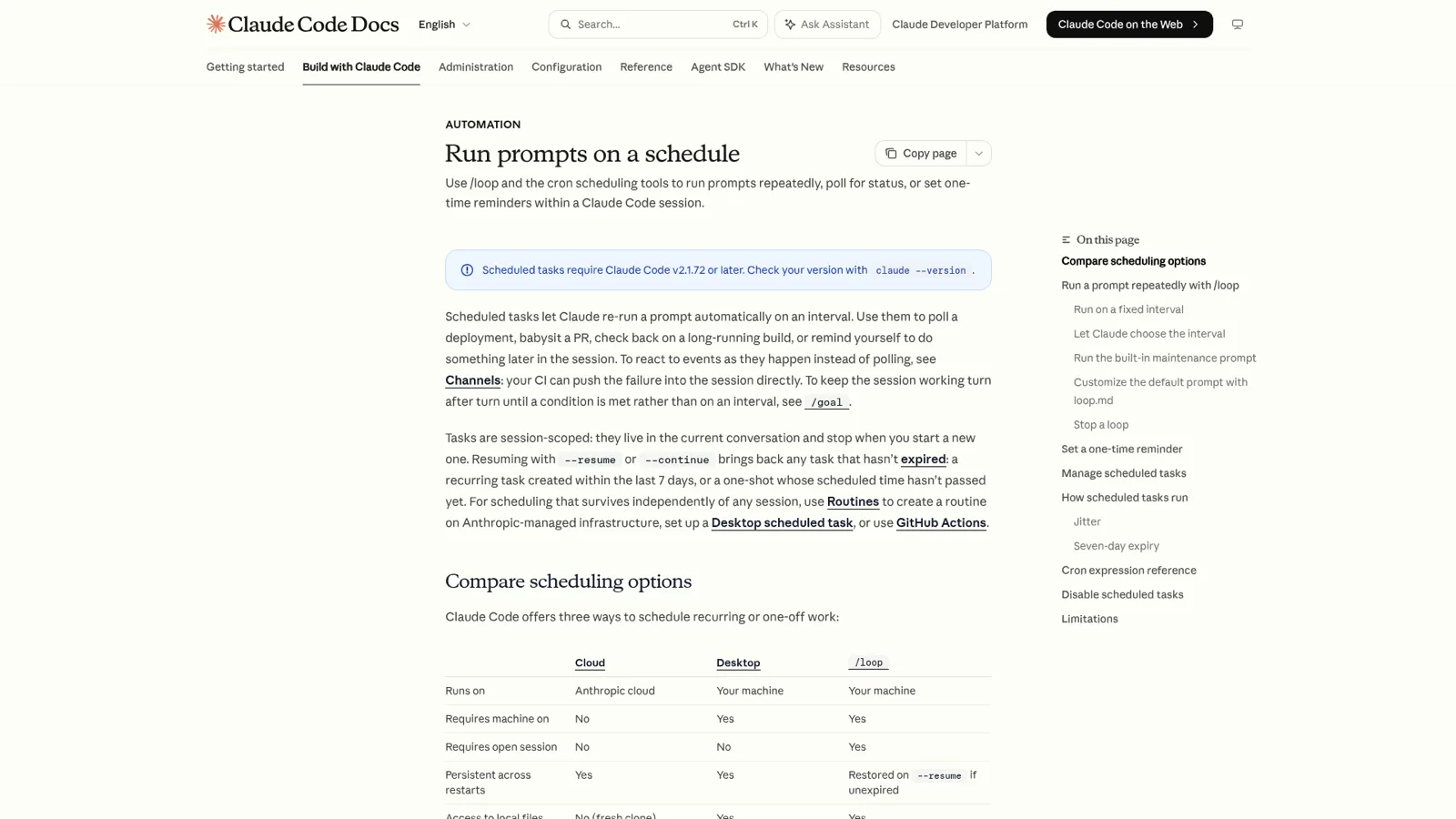
/loop is session-scoped. Close the terminal and all loops die. This is intentional safety design, not a limitation.
Nearly every serious community incident happened during "unlimited unattended AI" runs. The author of a 108-hour unattended experiment catalogued seven incident types. The top three: a subagent deleted an entire source directory, API calls spiraled for an hour consuming heavy resources, and an infinite error loop reported "fixed" each round while the bug persisted. His three primary defenses:
Use Hooks for pre-execution checks that block dangerous commands
Write retry limits into prompts — after 3 consecutive failures, log to a needs-human file and move on
Use a mission.md file to preserve work state before context compaction
"These three prevent 70% of incidents."
What Are Your Options Beyond /loop?
/loop is one tool in a larger autonomous toolkit. Here's the complete decision table.
Tool
One-line description
Needs machine on
Needs active session
Min interval
Max runtime
Best for
/loop
Session work alarm
Yes
Yes
1 min
7 days
Ad-hoc monitoring while working
/goal
Run until done
Yes
Yes
Per-round
Unlimited
Tasks with clear completion criteria
Ralph Loop
Community auto-loop
Yes
New each time
Custom
Unlimited
Complex projects needing fresh context
Desktop tasks
Local background scheduler
Yes
No
1 min
Persistent
Fixed daily routines
Cloud Routines
Remote 24/7 scheduler
No
No
1 hour
Persistent
Automation independent of local machine
GitHub Actions
CI/CD automation
No
No
5 min
Persistent
Production-grade reliability
Quick Decision Guide
"I'm at my desk — keep Claude watching something for me" — /loop
"Just finish this task, no repeating needed" — /goal
"Complex multi-step project, need clean context each round" — Ralph Loop
"I'm going to sleep but want results by morning" — desktop scheduled tasks
"I'll be away for days, but this needs daily runs" — cloud Routines
"This automation must run reliably in production" — GitHub Actions
Why /goal Deserves Special Attention
/goal complements /loop (requires v2.1.139+). The distinction is intuitive:
/loop asks: how often?
/goal asks: when is it done?
You give /goal a completion condition (max 4,000 characters). After each round, a fast small model (default Haiku) evaluates whether the condition is met. Not met = keep going. Met = auto-stop.
Three elements of a good completion condition:
A measurable end state — tests pass, build succeeds, file count hits target, queue is empty
A concrete check method — "test exit code is 0" beats "code should be fine" by a hundred times
An inviolable constraint — "don't modify files outside this module," "public API stays unchanged"
Add safety valves: "or stop after 20 rounds," "or stop after 90 minutes." Claude Code founding engineer Sid Bidasaria once ran a 14-hour /goal refactoring — long horizons work when you have confidence in the guardrails.
/goal works in non-interactive mode and supports remote monitoring from your phone. Paired with auto mode (which removes per-tool-call approval), /goal achieves fully unattended operation.
What Is Ralph Loop?
Before Anthropic shipped /loop, the community solved the same problem with Ralph Loop (also called the Ralph Wiggum Loop). Named after the most persistent character in The Simpsons — not clever, but never gives up.
The mechanism is dead simple: an external shell loop that keeps feeding Claude the same task description file. Claude finishes and exits; the outer loop pulls it back in. Each iteration, Claude sees previous work through the file system (git history, progress.txt) and picks up where it left off.
The fundamental difference: Ralph starts a fresh session each time (clean context window, full cognitive capacity), while /loop accumulates within the same session (context grows, late-round reasoning quality may degrade). For simple tasks /loop suffices; complex multi-step projects may benefit from Ralph's clean-slate approach.
Anthropic also released an official Ralph Loop plugin — install it and type /ralph-loop to set the task description, max iterations, and completion keyword.
How Do /loop, /goal, and Skills Combine?
Boris Cherny's own pattern combines all three:
A /loop checks all open pull requests every few minutes
For each PR with unaddressed review comments, a /goal-style condition evaluates whether comments are resolved
The actual resolution logic lives in custom Skills
This isn't a framework — it's three primitives composed. Dynamic Workflows provide even stronger orchestration — Claude can write its own workflow skeleton on the fly. Anthropic's official blog explicitly recommends: "Pair /loop with repeatable workflows for ongoing triage and research."
Why Is This a Paradigm Shift?
Addy Osmani, in his "Loop Engineering" article, captured the core insight:
"Loop design is harder than prompt engineering, not easier. The leverage point has changed."
Your output used to depend on how precisely you wrote a single prompt. Now it depends on how robust your loop is — does it have pre-flight checks, exit conditions, cost controls, reliable stop signals?
His five layers of loop design:
Intent anchor — loop.md or CLAUDE.md stating goals and constraints
Rejectable verifiers — test pass/fail, type check clean/error — mechanical judgment beats AI self-assessment
Callable Skills — encapsulate complex operations, invoke with one line in the loop
Scheduling — /loop for time triggers, /goal for condition evaluation
My overall assessment: tool-type tasks thrive with /loop; creative tasks don't. Anything with clear pass/fail criteria (file format correct? link resolves? keyword present?) — /loop outperforms manual work. Anything requiring aesthetic judgment (is this copy compelling? does the logic flow? is this example relatable?) — you need to be present. Match the right task to the loop, and productivity multiplies. Mismatch, and you're just giving AI overtime.
But the deepest truth hasn't changed: the clearer you write, the better AI performs. Whether it's a single prompt or a full loop, the test is your ability to articulate requirements. Loops amplify your standards — good standards amplify good results; poor standards amplify poor results.
Self-Check Checklist
[ ] Successfully started at least one /loop task
[ ] Tried adaptive mode (no interval specified)
[ ] Created a .claude/loop.md file in a project
[ ] Every prompt has a pre-flight check (zero-cost exit when idle)
[ ] Every prompt has an exit condition (max rounds or done marker)
[ ] Tried the /goal command for a task with a clear end state
[ ] Understand the differences between /loop, /goal, desktop tasks, and cloud Routines
[ ] Know that intervals over 5 minutes cause cache expiry and higher costs
[ ] Know that closing the terminal stops everything — safety feature, not a bug
[ ] Specified output file paths in prompts (results don't pile up in chat)
Ready-to-Use Prompt: Design a Cost-Safe Claude Code /loop Task
What this does: Decides whether /loop is even the right tool (vs /goal, Ralph Loop, desktop cron, or cloud Routines), picks the mode, writes the loop with an explicit stop condition and no-op gate, and applies cost controls so it cannot burn money while you sleep. Based on: Claude Code /loop Command Practical Guide: 10 Scenarios That Actually Work — https://aiworkflowpro.com/claude-code-loop-guide/ Time to run: ~4 minutes
Copy this prompt into Claude Code, ChatGPT, or any AI assistant:
ROLE: You are a Claude Code Loop Task Designer. Your job: decide if /loop is the right tool, pick its mode, and ship a self-stopping, cost-capped background task — never an open-ended money drain.

CONTEXT — LOOP TASK DESIGN METHOD:
Claude Code's /loop turns the agent into a background worker — define a task and an interval, walk away, return to finished work. Three modes: fixed interval (fire every N), adaptive interval (Claude self-paces the next fire on state change), and maintenance mode (keep something healthy, e.g. tests green). But /loop is not always right — choose against /goal (pursue an objective until met), Ralph Loop (agentic dev loop), desktop scheduled tasks (cron), and cloud Routines (server-side, survives the machine being off). Every loop needs an explicit stop condition and a no-op gate (act only when state changed), plus cost controls — a budget cap, cheap-model routing for mechanical loops, and off-peak spacing — or it burns money while you sleep.

INPUTS (fill in before running):
- TASK: [The background or recurring work to automate]
- CADENCE: [How often it roughly needs to run — or "only when X changes"]
- GOAL_VS_INTERVAL: [Goal-driven (done when achieved) or time-driven (runs on schedule)?]
- BUDGET: [Cost ceiling per day / sensitivity]

METHOD — 4 STEPS:

Step 1 — Decide If /loop Is the Right Tool
Using GOAL_VS_INTERVAL and CADENCE: goal-driven (done when an objective is met) → /goal; must survive the machine off → cloud Routines; cron-shaped → desktop scheduled tasks; recurring background task with a clear interval while you work → /loop. State the choice and one line why.

Step 2 — Pick the Mode
From TASK: fixed interval (predictable cadence), adaptive interval (act only when state changes), or maintenance mode (keep a target healthy). Justify in one line.

Step 3 — Write the Loop With a Stop Condition and a No-Op Gate
Write the loop prompt with: (a) an explicit stop or done condition so it terminates; (b) a no-op gate so each fire returns early when nothing changed; (c) the deliverable each productive fire produces.

Step 4 — Apply Cost Controls
Set a budget cap (max fires or max spend per day from BUDGET), route mechanical loops to a cheaper model, and space fires off the :00/:30 marks. Estimate daily cost at the chosen cadence.

RULES:
- Never ship a loop without an explicit stop condition — an unterminating loop burns money unattended.
- Never run a productive fire when state has not changed — the no-op gate is mandatory.
- Never pick /loop for work that must survive the machine being off — use cloud Routines instead.

OUTPUT FORMAT:
Output a markdown report with:
1. Tool Decision — chosen tool + one-line why (vs the four alternatives)
2. Mode Choice — fixed / adaptive / maintenance + one-line why
3. Loop Prompt — the stop condition, no-op gate, and per-fire deliverable inside a fenced text block
4. Cost Controls — budget cap, model choice, spacing, estimated daily cost
Save as @templates/claude-code-loop-guide.md and run before standing up any background or recurring Claude Code task.
Frequently Asked Questions
Does Claude Code /loop keep running after I close the terminal?
No. /loop is session-scoped — closing the terminal or exiting Claude Code kills all loops. Use desktop scheduled tasks for offline runs, or cloud Routines for fully remote automation.
How long can a loop run?
Loop tasks auto-expire 7 days after creation, running one final time before deletion. Use --resume to restore unexpired tasks when reconnecting.
What is the difference between /loop and /goal?
/loop fires on a time interval — every N minutes — ideal for polling and monitoring. /goal fires on a completion condition — it keeps working until done — ideal for tasks with a clear end state. They're complementary and can be combined.
How do I prevent /loop from burning money?
Three rules: keep intervals under 5 minutes to reuse the prompt cache; add a pre-flight check so empty rounds cost near zero; always set an exit condition (max rounds or done marker).
Can /loop run custom Skills?
Yes. Type /loop 20m /your-skill to schedule any Skill on a recurring interval — encapsulate complex logic in a Skill, then let /loop call it automatically.
What is Ralph Loop?
Ralph Loop is a community-built open-source solution from before /loop existed. It uses a stop hook to intercept Claude's exit and restart with a fresh context each iteration. Anthropic later released /loop as the official built-in alternative. Key difference: Ralph starts a new session each time (clean context); /loop accumulates within the same session.
What tasks work best with /loop?
Three categories: periodic external state polling (deployment, indexing, rank changes), cyclical maintenance (dependency updates, code cleanup, doc refresh), and recurring monitoring (competitor activity, log anomalies, SEO metrics).
How do I choose between /loop and cloud Routines?
Ad-hoc monitoring while working: /loop (zero config, instant start). Fixed daily tasks: desktop scheduled tasks (run without an active session). Fully machine-independent automation: cloud Routines (minimum 1-hour interval).
How many tasks can run simultaneously?
Up to 50 concurrent scheduled tasks per session. When multiple tasks fire at the same time, they queue and execute sequentially without interrupting your active conversation.
What happens with no interval specified?
Claude enters adaptive mode — it decides the interval based on what it observed last round, ranging from 1 minute to 1 hour. Changes trigger frequent checks; stability triggers infrequent checks. Usually cheaper than fixed intervals.
How does loop.md work?
Place .claude/loop.md (project-level) or ~/.claude/loop.md (user-level) with your default loop instructions. Bare /loop reads this file. Edits take effect on the next cycle. File size limit: 25,000 bytes.
Can /loop and /goal work together?
Yes. A common pattern: /loop periodically checks a task list, and for each task uses /goal-style condition evaluation to determine if it's complete. This is the pattern Boris Cherny himself uses.
Gloves on, tape measure in hand — nobody types a query. Three voice surfaces for ai automation tools (terminal, Telegram, Discord), 10 TTS and 6 STT providers compared on cost and latency, plus a setup that costs nothing.
A Skill is an operating manual, not a plugin. The five-layer architecture behind workflow automation that survives context compression, session crashes, and handoffs: SKILL.md as the single entry point, deterministic scripts, run state for crash recovery, and a resource layer.
Two of the three fixes can be undone the same afternoon. The third cannot, and it is the one people reach for first. LoRA cut costs tenfold, which made the expensive option tempting rather than correct. In business process automation, the order you try things in is the whole decision.
Fine tuning turns a generalist into a specialist - skip the baseline and you can never prove it worked. Five steps on Google Cloud: baseline, data prep, instruction design, hyperparameters, evaluation. Plus the finding that surprises business process automation buyers: 100 good samples beat 1,000.