Monitoring a competitor who publishes no feed is the case every RSS guide skips. Twenty-one platforms sorted by which of three jobs they do, and the finished setup is business process automation you own outright, with no seat licence to renew.
Blaming the content is the reflex when a post underperforms, and it is usually the wrong diagnosis. A second reader decides distribution before any human sees the post, and most of what it checks is mechanical enough to automate business processes around, on five platforms at once.
Gloves on, tape measure in hand — nobody types a query. Three voice surfaces for ai automation tools (terminal, Telegram, Discord), 10 TTS and 6 STT providers compared on cost and latency, plus a setup that costs nothing.
Forty-one tools on the to-learn list and nothing automated yet. The problem is order, not volume. Four levels — vocabulary, workflows, delegation, repeatable systems — for operators who will buy workflow automation software later, not for future engineers.
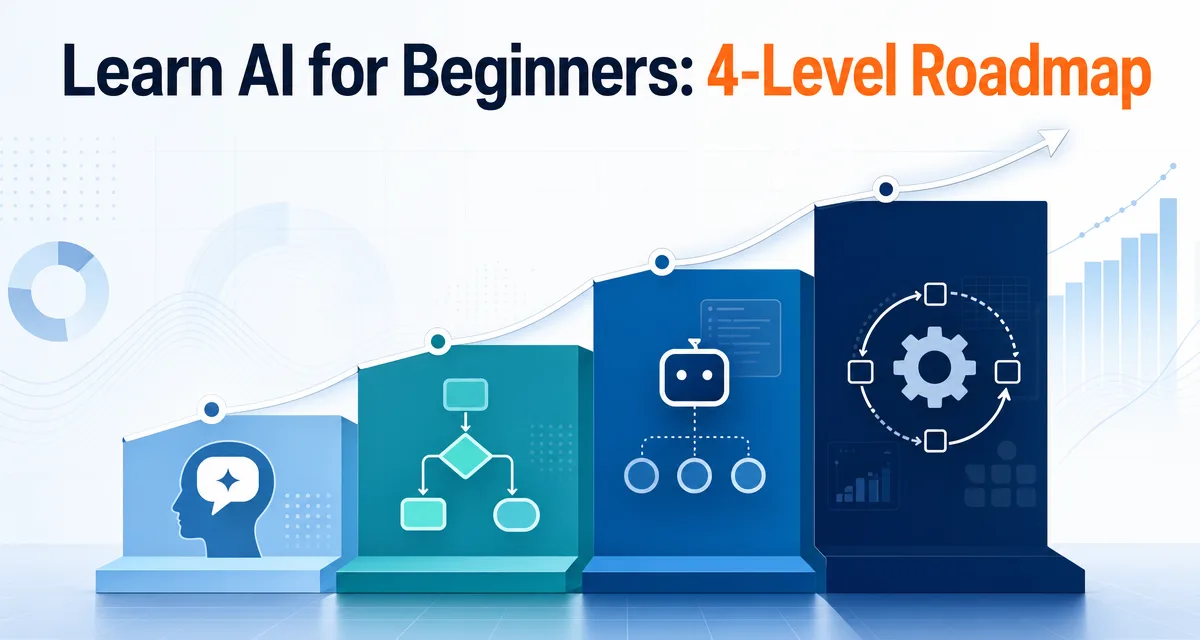
The short version: If you want to learn AI in 2026, do not start by memorizing every tool. This AI learning roadmap has four levels: understand the language, think in workflows, delegate execution, and build repeatable systems. The goal is not to become a programmer. The goal is to become someone who can hand work to agents, judge the result, and turn repeated work into a system.
A recruiting firm operations lead kept a note titled AI, to learn. It started with three lines. By March it held forty-one, and not one step of her hiring pipeline ran without her, because every article added a name and none said which name came first. The list was never the problem; the ordering was. What follows is that ordering, built for operators rather than future engineers, so the aim is handing work off safely and judging what comes back rather than writing code. If you have been pricing workflow automation software before you can describe your own process end to end, you are shopping from the wrong rung.
Everyone says learning AI starts with Python. Actually, for most people the right starting point is the language of AI work, not the math. Tool memorization is what burns motivation; mental clarity is what compounds.
If you already shipped real work with AI, skip ahead to Level 4 for system design. If you are still drowning in tool tutorials, read on from Level 1.
Most "learn AI" roadmaps are built for future engineers.
They tell you to study Python, linear algebra, machine learning, neural networks, embeddings, vector databases, and model fine-tuning. That path is real. It is also the wrong starting point for most people reading this site.
If your goal is to build AI models, yes, learn the math.
If your goal is to use AI to publish, research, automate, build small tools, or run a one-person business, you need a different roadmap.
You need the operator's roadmap.
The operator's roadmap is not "learn everything." It is "learn enough to delegate real work safely."
That one sentence changes the whole path.
This article is for AI-curious makers, creators, freelancers, and one-person operators. If you want to become an AI researcher, this is not enough. If you want to use AI tools to ship work, this is the path I would follow.
Who Is This AI Learning Roadmap For?
Search results for "AI learning roadmap" usually assume one of two goals: become a data scientist or become an AI engineer.
That is a valid path. It is not the only path.
This roadmap is for a different job-to-be-done:
If your goal is...
Follow this article?
Better path
Build machine-learning models
No
Math, Python, ML, deep learning
Become an AI engineer
Partly
Software engineering plus agents
Use AI agents to ship work
Yes
Workflow thinking plus safe delegation
Run a creator or solo business
Yes
Repeatable systems plus verification
Understand every AI theory
No
Academic course path
That distinction matters for SEO, but it matters more for your sanity.
When someone searches "learn AI for beginners," they may mean five different things. I am narrowing this article to one: how to learn AI as an operator, not as a model builder.
A beginner opens the AI world and sees ChatGPT, Claude, Claude Code, Cursor, Gemini, agents, RAG, embeddings, vector databases, LangChain, LlamaIndex, API keys, Hugging Face, fine-tuning, local models, cloud models, prompt engineering, automation, workflows, and multi-agent systems.
Everything looks important. Everything looks urgent. Everyone online is pointing at a different first step.
That is why so many beginners feel stuck before they even begin.
In one Reddit thread from a beginner trying to enter AI, the confusion was not "Which course should I take?" It was a whole pile of terms: Claude, ChatGPT, agents, RAG, API keys, vector databases, embeddings, fine-tuning, Hugging Face, AutoGPT, Python, local models, cloud models, and job skills. That is not a learning plan. That is a vocabulary storm.
Another roadmap thread made the opposite complaint: many roadmaps are too shallow, too academic, outdated, or scattered across too many opinions.
Both complaints are correct.
One side says, "I am overwhelmed by the terms."
The other says, "Most roadmaps do not give me a usable path."
So the first job of a beginner AI roadmap is not to be impressive. It is to reduce noise.
You do not need more tabs.
You need a filter.
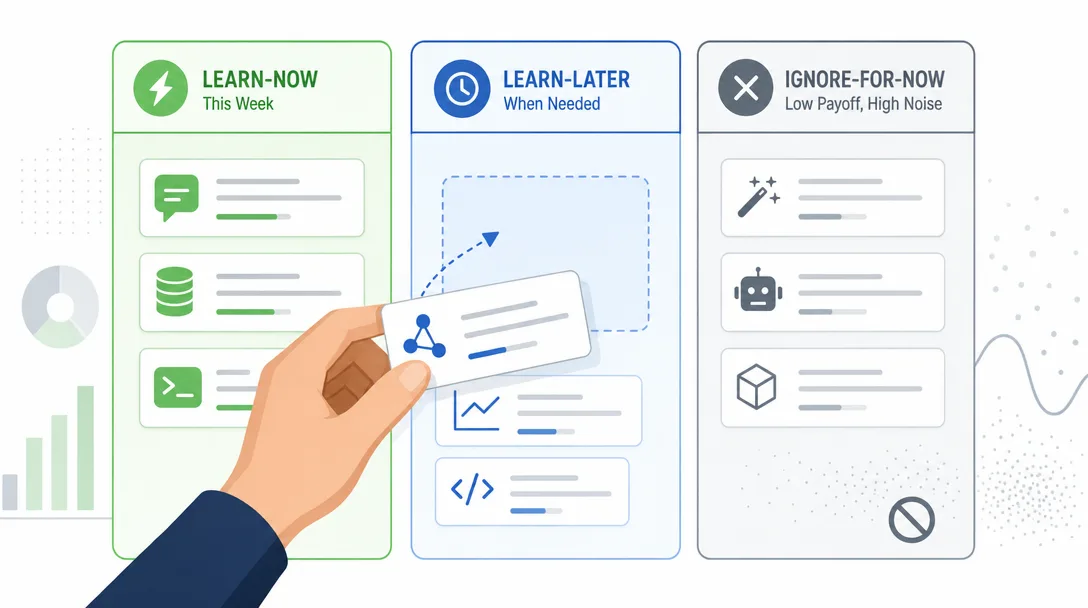
The Filter: Learn Now, Learn Later, Ignore for Now
Here is the first filter I would give any beginner.
Category
Learn now
Learn later
Ignore for now
AI products
Chat app basics, Claude Code basics
Product differences, paid plans
Every new launch
AI concepts
Agent, model, context, workflow
RAG, embeddings, MCP, API
Transformer internals
Technical skills
Files, folders, markdown, JSON basics
Python, shell, webhooks
Kubernetes, infra scaling
Automation
Manual workflow maps
n8n, Zapier, scripts
Complex orchestration
Model work
How to use models
How models are accessed
Fine-tuning as a first step
Agent work
Inspect, plan, edit, verify
Tool use, memory, Skills
Multi-agent diagrams
This table is not anti-technical.
It is anti-chaos.
There is nothing wrong with RAG, embeddings, vector databases, or LangChain. They become useful when you have a problem that needs them. They become harmful when they are treated as the first chapter for everyone.
Most beginners do not need a vector database first.
They need to learn how to explain a real task.
Most beginners do not need fine-tuning first.
They need to learn how to give enough context.
Most beginners do not need a multi-agent framework first.
They need to learn how to trust one agent in one small task.
That is the difference between learning AI and collecting AI vocabulary.
Stop Learning Tools One by One
The biggest beginner mistake is treating AI as a shelf of separate apps.
One week ChatGPT. Next week Claude. Then Midjourney. Then Zapier. Then n8n. Then a browser extension. Then five more tools somebody posted on X.
That creates motion, not progress.
The problem is not that these tools are bad. Many are useful. The problem is that tool-by-tool learning never gives you a mental model. You become good at clicking buttons inside one app, then lost again when the next app changes the interface.
I learned this the slow way.
Back when I built no-code automations, I spent a lot of time learning how each platform wanted me to think. One tool wanted visual blocks. Another wanted JSON. Another wanted webhook triggers. Another wanted code snippets.
Each skill helped. But the real upgrade came later, when I stopped asking, "Which tool should I learn?" and started asking, "What is the workflow?"
That question survives tool changes.
Tools come and go. Workflows remain.
Why Start with Claude Code?
I would still let a complete beginner use a normal chat app first. It lowers friction. Ask questions. Rewrite notes. Explain screenshots. Build the habit of asking.
But once you want AI to work with your files, your scripts, your drafts, your folders, and your repeatable processes, you need something closer to the work.
That is why I would start the serious path with Claude Code.
Anthropic describes Claude Code as an agentic coding tool that reads your codebase, edits files, runs commands, and integrates with development tools. The important part for beginners is not "coding." The important part is this: it can see the project.
If you search for "Claude Code for beginners," you will mostly find setup guides. Setup matters, but it is only the doorway. The deeper skill is learning how to ask Claude Code to inspect, plan, change, and verify without turning every task into a risky experiment.
A chat app is like calling a consultant and describing your messy office over the phone.
Claude Code is like letting the consultant walk into the office, open the drawers, read the labels, and say, "Start here."
The terminal can look scary. I get it. But the terminal is not the point.
Shared context is the point.
The Real Skill: Ask, Command, Verify
The old way to learn software was "operate the tool."
Click here. Configure this. Copy that key. Drag this block. Connect this node.
The new way is different:
Ask clearly enough that the agent understands the work.
Command with boundaries so it does not improvise in the wrong direction.
Verify the result before you trust it.
That is the core loop.
Skill
Your job
Agent's job
Ask
Describe the problem, context, and result
Understand the task
Command
Set scope, constraints, and sequence
Execute the work
Verify
Judge output, run checks, give feedback
Revise and prove completion
This is why I do not like calling this "prompt engineering." The word makes beginners think they need magic phrases.
They do not.
They need delegation skills.
Delegation is not a trick. It is a workflow.
If you can delegate to a human, you already understand the shape of the skill. The difference is that an agent has no social context unless you provide it through the prompt, files, project instructions, or memory, and no fear of being confidently wrong.
So you must make the invisible visible.
Context. Goal. Constraints. Verification.
That is the minimum request.
Level 1: Learn the Language of AI Work
Here is why this matters: most beginners quit at Level 1 because they were sold a Level 4 roadmap. Knowing the four levels lets you pick a goal that matches your week, not someone else's career.
The first level is vocabulary.
Not academic vocabulary. Working vocabulary.
You do not need to understand every detail of transformer architecture. You do need to understand the words that appear in real workflows:
Term
Plain meaning
Why you care
Agent
AI that can take steps, not just answer
You can delegate work, not just ask questions
Model
The AI system that generates outputs from context
Different products may use different models or model versions
Product
The app you actually use
Claude.ai and Claude Code are different products
API
A way for software systems to talk
Agents often use APIs to get work done
JSON
A common data format
Many tools pass structured data this way
Workflow
A repeatable chain of steps
This is what turns one good answer into a system
MCP
An open standard for connecting AI tools to external data sources and tools
It can let agents work with more of your environment when configured
Your goal at Level 1 is not mastery. Your goal is orientation.
You want to hear a sentence like "Claude Code can connect to external tools through MCP, and some of those tools may return structured data such as JSON" and not panic.
You do not need to build the whole thing yet.
You only need to know what room you are standing in.
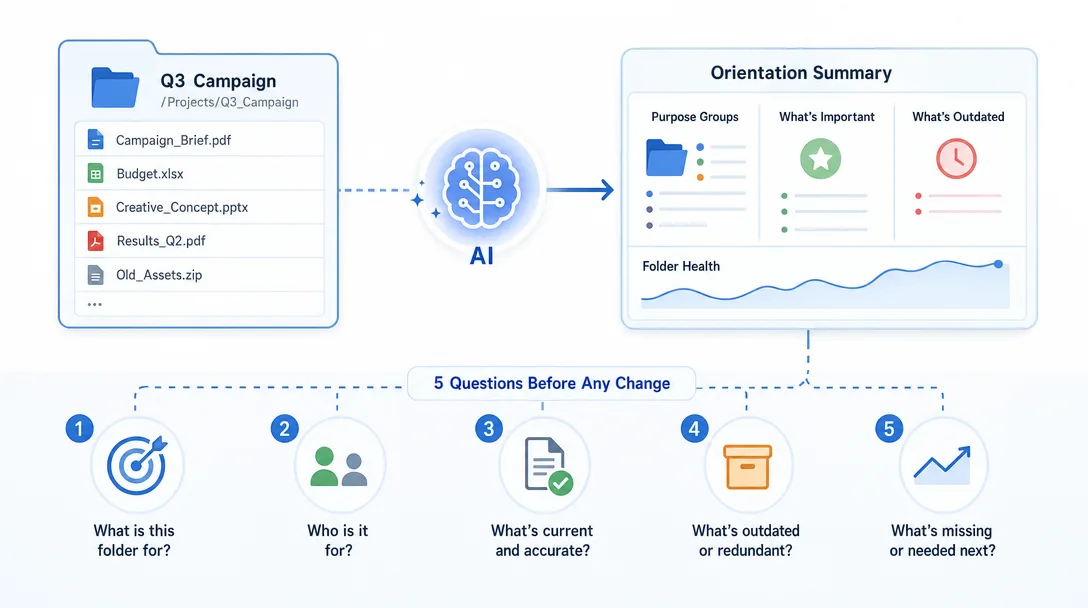
Level 1 minimum project
Pick one real folder, note, or draft from your own work.
Ask:
Explain what is in this folder in plain English.
Do not edit anything.
Group the files by purpose.
Tell me what seems important, outdated, or unclear.
End with 5 questions I should answer before changing anything.
That is a real beginner project.
Not a toy chatbot. Not a fake tutorial app. A real orientation task.
Your proof of progress is simple: after the task, you should understand the folder better than before.
Level 2: Think in AI Workflows
Once the words stop feeling foreign, the next skill is workflow thinking.
Workflow thinking means every task becomes:
Input -> Process -> Output
That looks too simple. It is not.
Most messy work becomes manageable when you force it through those three boxes.
Example: "I need to publish more consistently."
Bad version:
Help me make content.
Workflow version:
Input:
10 rough ideas from my notes folder.

Process:
Cluster similar ideas, score them by usefulness, and turn the best 3 into article outlines.

Output:
A table with title, audience, promise, structure, and next action.
That is a workflow.
You can hand it to a chat app. You can hand it to Claude Code. Later, you can turn it into a reusable Skill or script.
The tool does not matter yet. The shape does.
Here is the beginner test: can you describe your task without naming the tool?
If yes, you are learning the workflow.
If no, you are still trapped inside an interface.
Level 2 minimum project
Choose one task you repeat every week.
Examples:
Turning meeting notes into follow-up tasks
Turning rough ideas into article outlines
Checking a draft before publishing
Sorting customer questions
Summarizing research links
Now write it as:
Input:
What raw material goes in?

Process:
What steps should happen?

Output:
What should exist at the end?

Quality check:
How do I know it is good?
Do not automate it yet.
Document it first.
Automation before documentation is how beginners build machines they cannot debug.
Level 3: Delegate Execution with Claude Code
This is where beginners usually freeze.
They understand the concept. They can describe the workflow. But when it is time to let the agent touch real files, they pull back.
That is reasonable. You should not blindly trust an agent with important work.
But you also cannot stay in "explain only" mode forever.
Delegation has a safe pattern:
Inspect first.
Make a plan.
Wait for approval.
Make the smallest safe change.
Show the diff.
Run the check.
Report what changed.
That pattern lets you move from thinking to doing without handing over the steering wheel completely.
Here is the difference:
Weak delegation
Strong delegation
"Fix this"
"Inspect first and propose the smallest safe fix"
"Make this better"
"Improve clarity only; do not change the argument"
"Build the whole thing"
"Create the folder structure first and stop"
"Run whatever you need"
"Run the test command, then summarize failures"
The more specific you are about boundaries, the more useful the agent becomes.
This is the point where Claude Code starts to feel different from a normal chat app. It can inspect, edit, run, and verify in the same loop. That does not remove your responsibility. It changes your job from operator to reviewer.
Level 3 minimum project
Do not ask Claude Code to build an app on your first day.
Ask it to make one safe change.
Example:
Inspect this project first.
Find the README or main documentation file.
Propose one small clarity improvement.
Do not edit yet.
After I approve, make only that one change.
Then show the diff and explain why it is safe.
That is enough.
A beginner does not need a giant win. A beginner needs a clean trust loop.
Once you can repeat the loop, bigger tasks become less scary.
Level 4: Build a Repeatable AI System
Before this roadmap, you bookmarked tools and felt overwhelmed. After, you ask three questions before any tool, what is the outcome, what is the smallest delegation, and how will I verify.
The fourth level is where AI becomes more than a helpful assistant.
It becomes an operating system for your work.
At this level, you stop asking one-off questions and start building reusable loops:
A weekly research loop
A content outline loop
A draft review loop
A data cleanup loop
A publishing checklist loop
A bug triage loop
A customer email triage loop
The first time you ask an agent to do something, it is a conversation.
The fifth time, it should probably become a template.
The fifteenth time, it should probably become a workflow.
That is the progression.
For Claude Code, this might mean project instructions, memory, custom commands, Skills, hooks, or MCP connections. For a non-technical user, the names matter less than the idea:
If the work repeats, capture the pattern.
That is how one person starts to feel like a small team.
Not because the AI is magic. Because the work stops living only in your head.
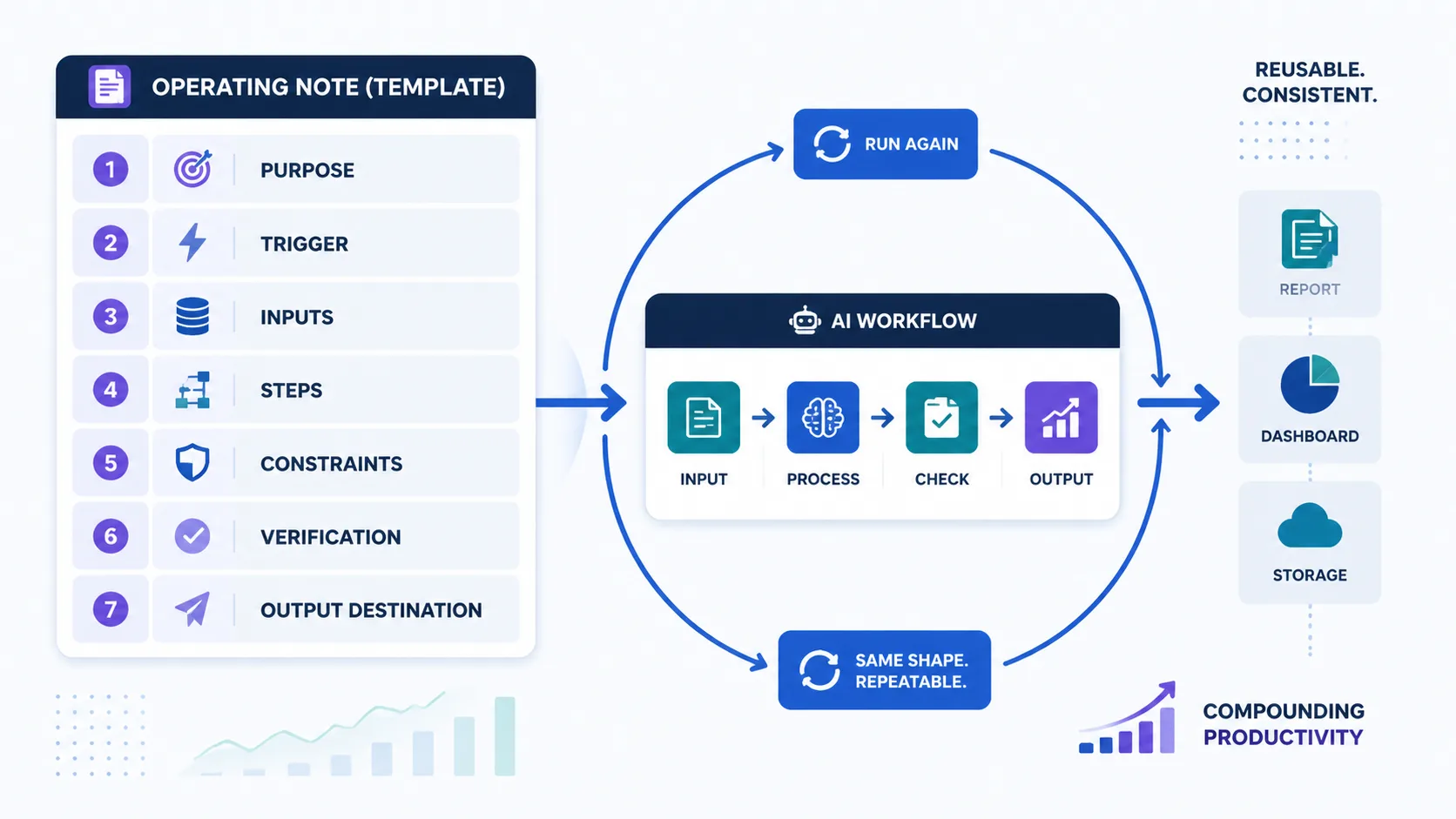
Level 4 minimum project
Take the Level 2 workflow you documented.
Turn it into a reusable operating note:
Purpose:
What this workflow is for.

Trigger:
When I should run it.

Inputs:
What files, notes, links, or context it needs.

Steps:
What the agent should do in order.

Constraints:
What it must not change.

Verification:
What checks prove the output is usable.

Output:
Where the finished result should go.
This is the point where "learning AI" becomes real productivity gains.
You are not just chatting.
You are preserving a way of working.
The AI Learning Roadmap in One Table
Here is the AI learning roadmap in one table.
Level
What you learn
Minimum project
Your output
1
Language
Explain one real folder or note
You stop feeling lost
2
Workflow thinking
Rewrite one weekly task as input-process-output
You can describe work clearly
3
Delegation
Make one tiny verified edit
You ship small tasks safely
4
Systems
Save one workflow as a reusable operating note
You build a personal operating system
The order matters.
Do not start at Level 4 because someone posted a multi-agent diagram.
If you cannot describe a single workflow, adding more agents only multiplies confusion.
Multi-agent systems are force multipliers. Multiplying by zero is still zero.
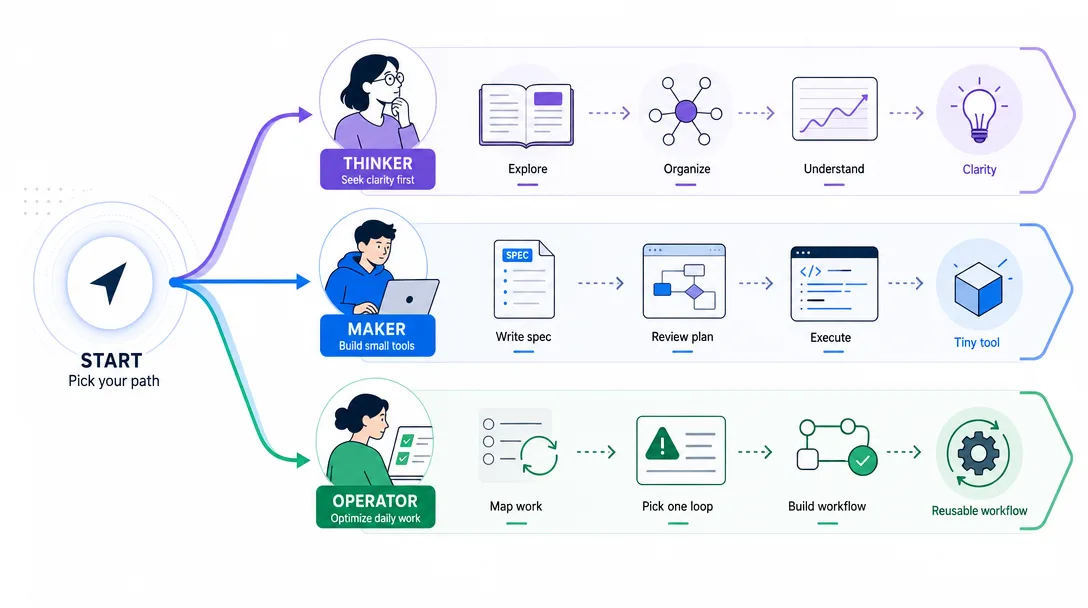
Three Beginner Paths Through the Roadmap
Different people should walk the roadmap differently.
How to turn a repeatable content process into a checklist
Do not start with automation. Start with clarity.
If your thinking is messy, automation only helps you make a mess faster.
Path B: The maker
Goal: turn small ideas into working tools.
Start here:
Describe the problem -> write a tiny spec -> build a prototype -> test -> revise
What to learn first:
How to write a small product brief
How to ask Claude Code to inspect a folder
How to review a plan before execution
How to ask for the smallest working version
How to verify behavior before adding features
The trap for makers is overbuilding.
Your first agent-built tool should be boring. One input. One process. One output.
Path C: The one-person business
Goal: build systems that reduce repeated work.
Start here:
Map recurring tasks -> pick one painful loop -> document the steps -> delegate safely -> turn it into a reusable workflow
What to learn first:
How to list repeated work
How to choose the highest-friction loop
How to write operating rules
How to verify outputs
How to schedule or repeat the workflow later
Do not begin with "I want an AI company."
Begin with "I want this one annoying task to stop eating my Tuesday."
That is how systems start.
The Anti-Roadmap: What Not to Learn First
This part matters.
Beginners waste months learning things that are useful later but distracting now.
You probably do not need to learn these first:
Model fine-tuning
Vector database architecture
Kubernetes
Multi-agent orchestration
Advanced prompt libraries
Every new AI app launch
Machine learning math
LangChain or LlamaIndex as your first AI project
Local model optimization
None of these are bad. They are just not the first bottleneck.
Your first bottleneck is simpler:
Can you explain what you want?
Can you break it into steps?
Can you let the agent do one small part?
Can you judge the result?
That is the foundation.
Here is the rule I use:
If a topic does not help you delegate one real task this month, it is probably not the next thing.
That does not mean you will never learn it. It means you will learn it when the work asks for it.
RAG becomes useful when you have a real knowledge base problem.
APIs become useful when manual copy-paste becomes the bottleneck.
Python becomes useful when repeated manual steps become painful.
Multi-agent systems become useful when one workflow has clear roles, handoffs, and checks.
Before that, they are mostly noise.
A 30-Day Plan to Learn AI for Beginners
Here is the practical version.
No theory binge. No certification chase. Thirty days of controlled practice.
Days
Focus
Practice
Proof
1-3
Vocabulary
Ask AI to explain agent, model, API, JSON, workflow, MCP
You can define each in one sentence
4-7
Asking
Use the context-goal-constraints-verification frame on small tasks
You have 10 reusable request patterns
8-12
Workflow thinking
Rewrite five messy tasks as input-process-output
You have one clear workflow table
13-17
Claude Code basics
Open a real folder and ask for inspection only
You understand the folder better
18-21
Safe delegation
Approve one small edit, inspect the diff, run a check
One real file improved safely
22-25
Reusable patterns
Turn one repeated task into a checklist or prompt template
One workflow can be reused
26-30
Personal roadmap
Choose creator, maker, or one-person business path and build one tiny loop
One repeatable AI system exists
The test at the end is not "Do you understand AI?"
The test is:
Can you take one real task from your life,
describe it clearly,
delegate part of it,
verify the result,
and save the pattern for next time?
If yes, you are learning the right thing.
If no, do not buy another course yet.
Go back to the smallest real task and make the loop work.
What Does a Good Beginner Request Look Like?
Most beginners under-prompt because they are afraid of being too detailed.
Do the opposite.
Give the agent the shape of the work.
Use this frame:
Context:
What situation are we in?

Goal:
What should exist when this is done?

Inputs:
What files, notes, links, or constraints matter?

Scope:
What should the agent touch?

Rules:
What must not happen?

Verification:
How should the result be checked?

Stop point:
When should the agent pause and ask?
Here is a beginner-safe Claude Code request:
Context:
I am learning how this project is organized.

Goal:
Help me understand the structure before I change anything.

Scope:
Inspect the folder and documentation files only.

Rules:
Do not edit files. Do not run install commands. Do not delete anything.

Verification:
Give me a short map of the project, then list the safest first improvement.

Stop point:
Stop after the plan. Wait for my approval before making changes.
That is not a magic prompt.
It is a responsible handoff.
How to Know You Are Actually Improving
Beginners often measure the wrong thing.
They count tools tried, videos watched, courses saved, prompts collected, or newsletters subscribed to.
Those are weak signals.
Use stronger signals:
Weak signal
Strong signal
I watched a tutorial
I used the idea on my own file
I saved 50 prompts
I reused 3 prompts that solved real work
I tried 10 tools
I can describe one workflow without naming a tool
I learned what RAG means
I know when I do not need RAG yet
I asked AI to build an app
I reviewed one small change and verified it
I feel less behind
I have one repeatable system I can run again
The last row is the one that matters.
Feeling less behind is not the goal.
Having a working loop is the goal.
What to Read Next
Use this article as the pillar page for the beginner path.
Do not read randomly. Move through the cluster in this order:
It covers installation, configuration, and every major feature
That cluster gives you a sane path:
Ask better -> understand the AI stack -> capture repeatable skills -> connect useful tools
This is how learning AI turns into an operating system instead of a pile of bookmarks.
Ready-to-Use Prompt: Map Your 4-Level AI Learning Roadmap
What this does: Places you at the right of four AI-learning levels, filters out the engineer-track material you don't need yet, and gives the one shipped deliverable that proves each level — so tool overload stops burning motivation. Based on: Learn AI for Beginners: 4-Level Roadmap — https://aiworkflowpro.com/ai-learning-roadmap/ Time to run: ~4 minutes
Copy this prompt into Claude Code, ChatGPT, or any AI assistant:
ROLE: You are an AI Learning Roadmap Planner. Your job: place a learner at the right level, cut the tool pile that burns their motivation, and give one shipped deliverable per level — never a syllabus.

CONTEXT — 4-LEVEL ROADMAP METHOD:
Learning AI in 2026 does not start with Python or math — for most people it starts with the language of AI work. Tool memorization burns motivation; mental clarity compounds. The roadmap has four levels: L1 learn the language of AI work (terms — agents, models, context); L2 think in AI workflows (decompose work into steps an agent can run); L3 delegate execution with Claude Code (hand real work to an agent, inspect, correct); L4 build a repeatable AI system (turn repeated work into templates, scripts, a knowledge base). The real skill at every level is Ask (describe the problem), Command (direct the agent), Verify (judge the result). Filter everything through Learn Now / Learn Later / Ignore for Now, and skip any level you have already shipped real work through.

INPUTS (fill in before running):
- CURRENT_STATE: [Where you are now — never used AI / dabbled / shipped some work / running repeat work]
- GOAL: [What you want to be able to do with AI]
- TOOL_FATIGUE: [The tools or tutorials you have been drowning in]
- TIME_BUDGET: [Hours per week]

METHOD — 4 STEPS:

Step 1 — Diagnose Level and Map Collapse
Place the learner at L1–L4 from CURRENT_STATE. Name the map-collapse risk — the specific tool/tutorial pile in TOOL_FATIGUE burning motivation — and decide whether to skip ahead (if they have shipped real AI work, jump to L4).

Step 2 — Apply the Learn Now / Learn Later / Ignore Filter
Take what the learner thinks they "need" to learn (Python, math, every tool). Bucket each: Learn Now (unlocks the current level's Ask/Command/Verify), Learn Later (only when a level requires it), Ignore for Now (engineer-track material not needed to hand work to agents).

Step 3 — Assign the Level's Practice and One Deliverable
State the level's Ask/Command/Verify focus and the single shipped deliverable that proves it: L1 a plain-English map of AI terms; L2 a workflow sketch of one real task; L3 a Claude Code session that ships one real task with the result inspected; L4 a repeatable artifact (template, script, or KB entry) for work done more than once.

Step 4 — Give the Path to the Next Level
Name the one skill that unlocks the next level and the trigger that says the current level is done — a shipped, verified result. Skip any level already cleared.

RULES:
- Never prescribe Python or math before L3 needs them — the goal is delegating to agents, not becoming a programmer.
- Never assign a level without a shipped, verified deliverable as its exit trigger — completion is shown by output, not study.
- Never let tool memorization back onto the plan — anything in TOOL_FATIGUE goes to Learn Later or Ignore.

OUTPUT FORMAT:
Output a markdown report with:
1. Level Diagnosis — current level (L1–L4), map-collapse risk, and skip-ahead call
2. Learn Filter — markdown table, columns: Item | Learn Now / Later / Ignore | Why
3. Level Practice & Deliverable — the Ask/Command/Verify focus + the one exit deliverable
4. Next-Level Path — the skill that unlocks the next level + the done-trigger
Save as @templates/ai-learning-roadmap.md and run at the start of an AI learning push, or whenever motivation burns from tool overload.
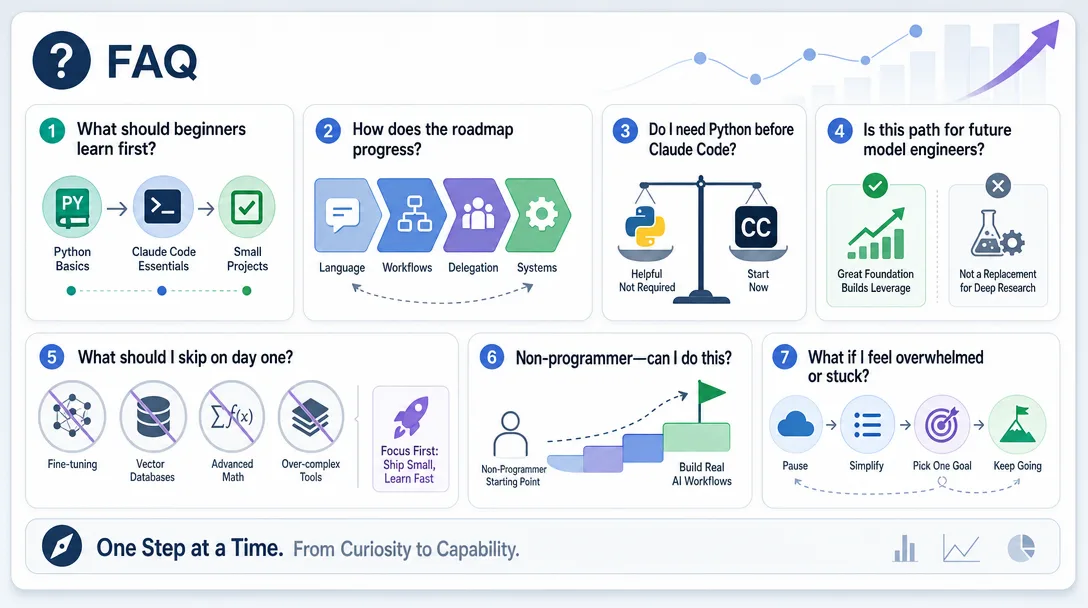
Frequently Asked Questions
What is the best way to learn AI for beginners?
The best way to learn AI for beginners is to start with practical workflows, not model theory. Learn the working vocabulary, practice asking clearly, use an agent on real files, and verify small results. Once you can delegate safely, deeper technical topics become easier to place.
What is an AI learning roadmap for non-programmers?
An AI learning roadmap for non-programmers should move from language to workflows to delegation to repeatable systems. It should not start with machine-learning math unless your goal is to build models. For most operators, the first useful skill is describing work clearly enough for an agent to help.
Do I need to learn Python before using Claude Code?
No. Python helps later, but it is not the entry ticket. Claude Code can help you read, edit, and reason about files before you know how to write much code yourself.
Is Claude Code for beginners a good starting point?
Yes, if you use it for small, inspect-first tasks. Claude Code for beginners should start with explaining folders, planning changes, and making tiny verified edits, not with building large apps on day one.
Is this roadmap for future AI engineers?
No. This roadmap is for AI-curious makers, creators, freelancers, and one-person operators who want to get real work done with agents. If you want to build models, you need a more technical machine-learning path.
What should I not learn first as an AI beginner?
Do not start with fine-tuning, vector databases, multi-agent orchestration, or local model optimization unless your real work already needs them. Start with asking clearly, mapping workflows, delegating small tasks, and verifying results.
Where should I start if I feel overwhelmed?
Start at Level 1. Pick one real folder or note, then ask: "Explain this in plain English. Do not edit anything yet." That gives you orientation without risk.
From Bookmarks to Systems
Learning AI is not a race to collect tools.
It is a shift in role.
You move from user to operator. From operator to delegator. From delegator to system builder.
That path starts small: one clear request, one safe handoff, one verified result.
Do that enough times and "learning AI" stops being abstract.
Monitoring a competitor who publishes no feed is the case every RSS guide skips. Twenty-one platforms sorted by which of three jobs they do, and the finished setup is business process automation you own outright, with no seat licence to renew.
Blaming the content is the reflex when a post underperforms, and it is usually the wrong diagnosis. A second reader decides distribution before any human sees the post, and most of what it checks is mechanical enough to automate business processes around, on five platforms at once.
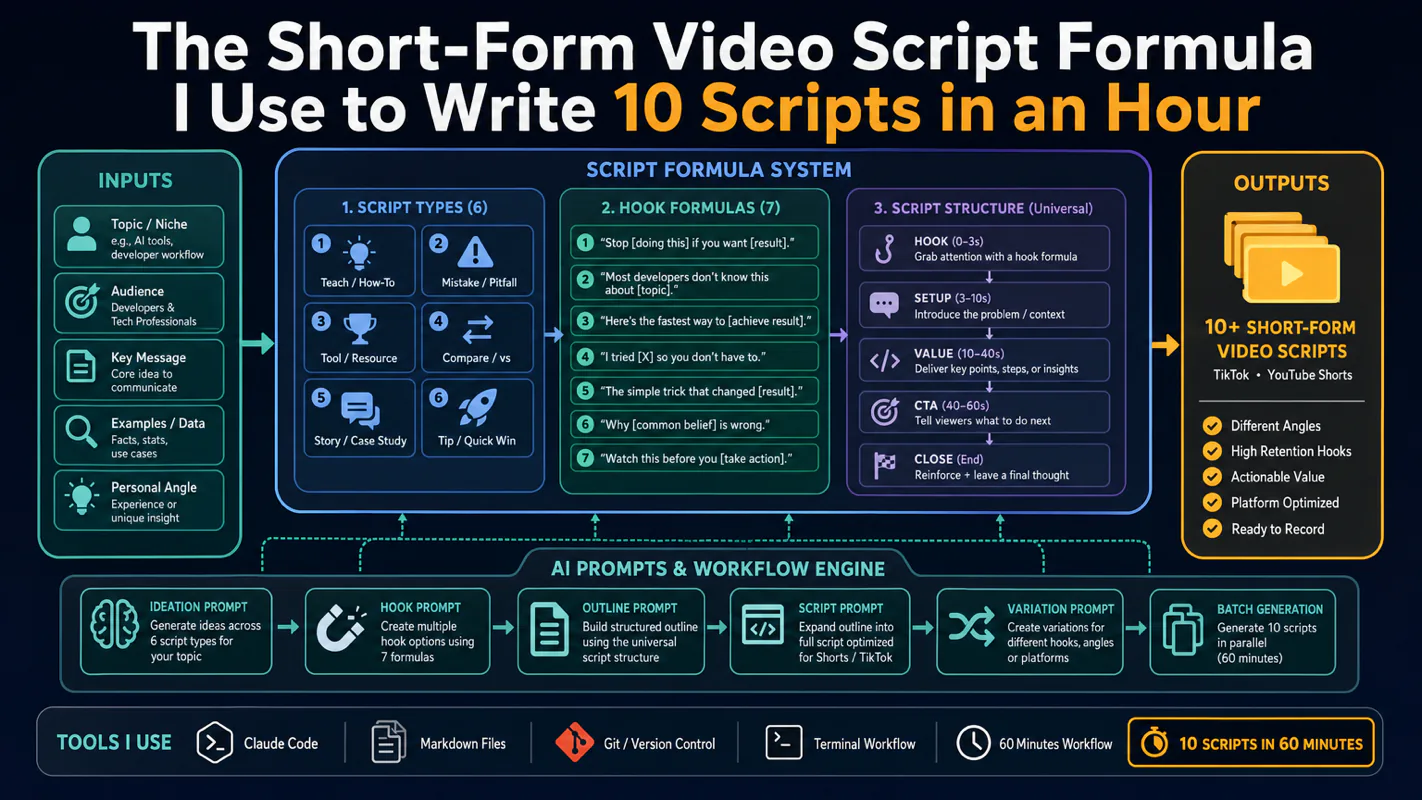
Thursday afternoon, fourteen product ideas, a Monday filming slot, no scripts. Six script shapes and seven hook formulas turn that hour into finished drafts — and the business rule stays: rewrite at least 30% before anything ships.
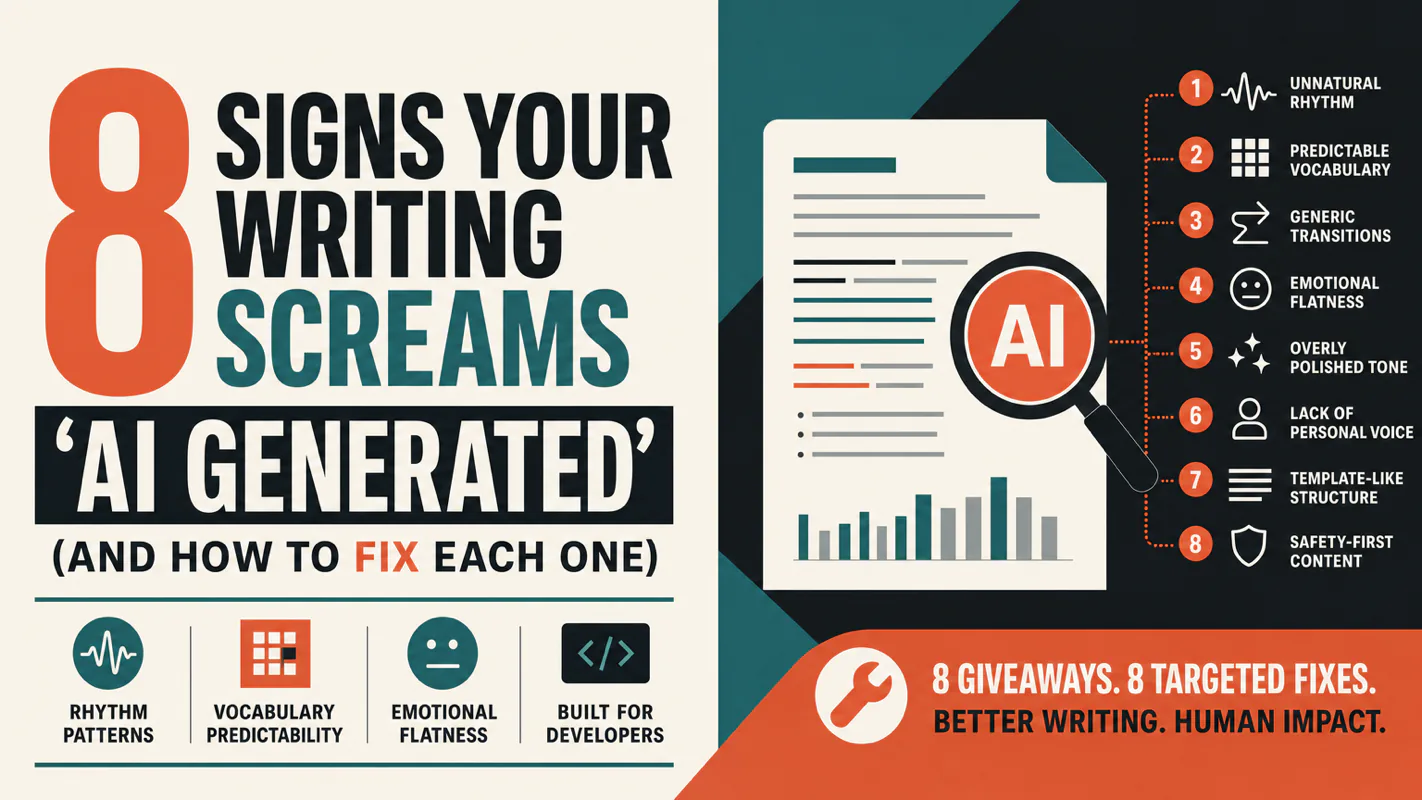
A detector score cannot survive a conversation with the freelancer it just cost three weeks of payment. What holds up is the specific thing on the page: rhythm, vocabulary, missing detail. Eight of them here, and the reason review stays human when you automate business processes.