Monitoring a competitor who publishes no feed is the case every RSS guide skips. Twenty-one platforms sorted by which of three jobs they do, and the finished setup is business process automation you own outright, with no seat licence to renew.
Blaming the content is the reflex when a post underperforms, and it is usually the wrong diagnosis. A second reader decides distribution before any human sees the post, and most of what it checks is mechanical enough to automate business processes around, on five platforms at once.
Gloves on, tape measure in hand — nobody types a query. Three voice surfaces for ai automation tools (terminal, Telegram, Discord), 10 TTS and 6 STT providers compared on cost and latency, plus a setup that costs nothing.
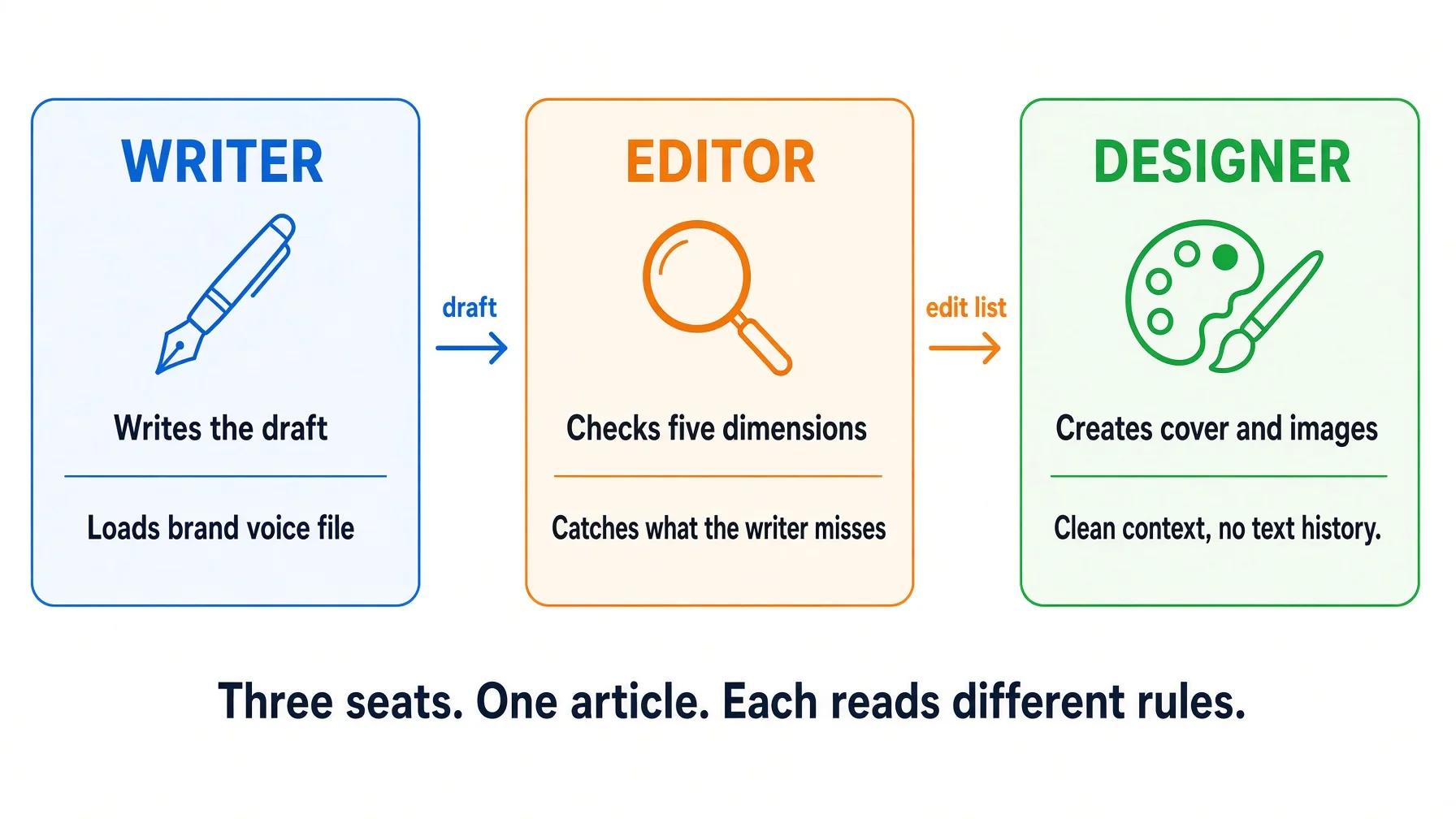
One agent writing, checking and illustrating the same article does all three badly. Here is the nine-stage pipeline I actually run, and the two measured reasons it has to be split into separate seats.
Ask one AI to write an article, check it, and design the cover for it. You will get a competent article, a review that finds nothing serious, and a cover that looks like a slide.
The article is fine. The other two are the problem, and neither is a prompting failure. Both have been measured, and both have the same fix: stop asking one seat to do three jobs.
This is the part an AI automation agency sells you and rarely explains — a pipeline, meaning a written sequence of stages where each stage runs with its own briefing and hands a file to the next one. Most of what gets called ai workflows is a single long conversation with better prompts in it. That is not the same thing, and the difference shows up in the output.
I run a real one for every article on this site. Below is what is actually in it, what happens when I skip it, and how to rebuild the useful 80 percent of it tonight with three browser tabs and no new software.
Three kinds of reader end up on a page like this, and it pays off differently for each:
You are hiring an AI automation agency. Read the stage table as an acceptance checklist. One question separates a good agency from an expensive one: at the end of the engagement, do you hold a folder of step files, or a login?
You are running an AI automation agency. Three seats is the smallest delivery skeleton that survives a client asking how the work gets checked, and the gate script is the part nobody can reproduce from a demo.
You just want better articles. Skip to the build section below. Three windows, one folder, about an hour.
In one screen
A model asked to judge its own output rates it higher than a human would, and gets worse at catching itself precisely when it was wrong.
Long context degrades reasoning on its own — 13.9 to 85 percent, even when retrieval is perfect. A cover designed after 5,000 words of prose is designed from the worst seat in the house.
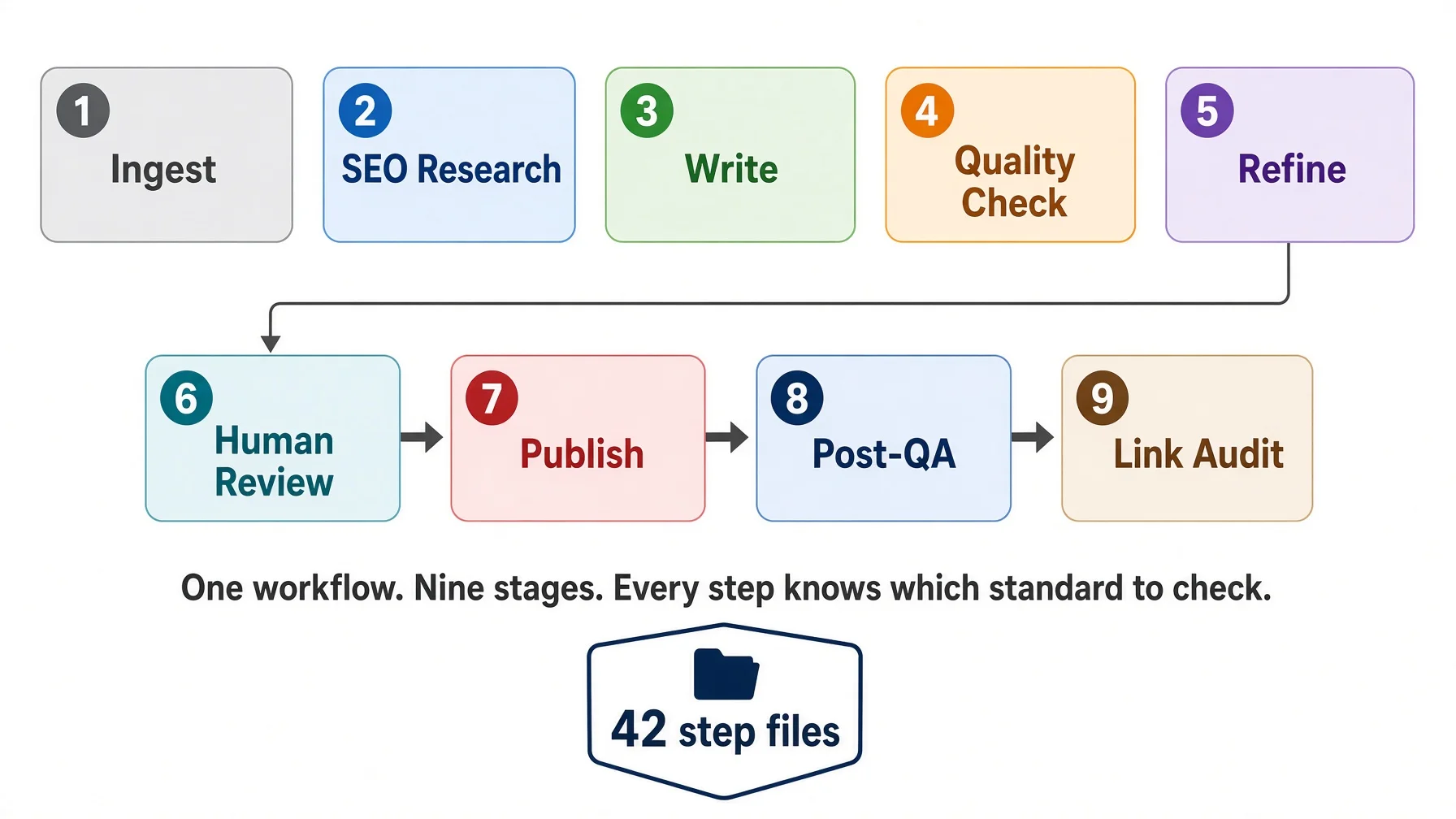
My article pipeline is nine sub-workflows and 40 step files; the whole package is 14 and 54. It produced 10 articles in one day on 31 July 2026.
The handoff is a file, not a conversation. The writing seat gets one compiled brief and is told to read nothing else.
What an AI automation agency should hand over is that folder of stage files, not a login to somebody else's canvas.
Three windows gets you most of it. Nine stages is what one year of fixing mistakes turns three into.
Why an AI automation agency separates writing, checking and design
A pipeline is not about speed. It is about who is allowed to see what.
Every publishing house on earth arrived at the same three roles: someone writes, someone else edits, someone else designs. That structure survived the typewriter, desktop publishing and the internet, which is a strong hint that it is not an artefact of how many people you could afford to hire. The reason it persists is that the writer cannot see the draft the way a first-time reader sees it. The writer knows what they meant. That knowledge is exactly what disqualifies them from checking whether it came through.
Give the whole job to one AI and you have not modernised that structure. You have collapsed it back into one person who is simultaneously drafting, marking their own homework, and art-directing at midnight.
The interesting part is that both halves of this now have research behind them.
In plain terms — A "seat" here means one conversation with one AI, started empty, given one job and one briefing. Three seats can be three tabs of the same product. The word does not imply three subscriptions or three vendors. When an AI automation agency quotes you for "a content pipeline", seats are the unit it should be describing.
The reviewer problem has been measured
If you have ever asked an assistant to review something it just wrote and received a cheerful "this looks solid, here are three small polish suggestions," that is not politeness. It is a documented bias with a name.
Researchers from MATS, NYU and Anthropic showed that LLM evaluators score their own generations higher than texts from other models or humans, in cases where human annotators rate the two as equal quality. They went further and showed the mechanism: models can recognise their own writing at better than chance, and when they fine-tuned that self-recognition ability up or down, self-preference moved with it in a linear relationship (LLM Evaluators Recognize and Favor Their Own Generations, NeurIPS 2024).
A 2025 follow-up complicates this in a way that makes it more useful, not less. Testing on maths, factual knowledge and code — tasks with an objective right answer — the authors found that much of a strong model's self-preference is legitimate: its answers really are better, so preferring them is correct. But the harmful residue sits in a specific place. Harmful self-preference persists when the evaluator got it wrong as a generator, and stronger models showed more of it, not less (Do LLM Evaluators Prefer Themselves for a Reason?). The authors' phrasing is blunt: stronger models struggle more to recognise when they are wrong.
Read that again with your own workflow in mind. The self-review is most reliable on the parts that were already fine, and least reliable on the parts that were not. It is a smoke alarm that works everywhere except the kitchen.
There is a cheap fix and it is structural rather than clever: the reviewer must not have written the thing. A fresh conversation, given the draft and a checklist and no memory of having produced it, has no self to prefer.
The context problem has been measured too
The design failure is different and less discussed. By the time an agent has written 5,000 words, everything in its context is prose — sentence rhythms, transitions, paragraph shapes. Asking it for a cover image at that moment is asking for a visual idea from a mind saturated in text. Anecdotally this produces slides. There is now evidence that the problem is more general than taste.
A team from Illinois, Amazon and Argonne tested five open and closed models on maths, question answering and code, and controlled for the thing everyone assumes is the culprit. They confirmed the model could retrieve every relevant token perfectly — exact match, all evidence recited — and then measured what happened as the surrounding input grew. Performance still dropped by 13.9 to 85 percent, at lengths well inside the models' advertised windows (Context Length Alone Hurts LLM Performance Despite Perfect Retrieval, EMNLP 2025 Findings).
They then removed every remaining excuse. Replaced the irrelevant tokens with whitespace: still dropped. Masked the irrelevant tokens entirely so the model could only attend to the evidence and the question: still dropped. Moved the evidence to sit immediately before the question: still dropped. One concrete number from the paper — Llama-3.1-8B-Instruct retrieved evidence exactly for 970 of 1,000 MMLU problems padded to 30k tokens, matching its short-context retrieval, and its accuracy fell 24.2 percent anyway.
Their mitigation is the same shape as a pipeline: get the model to restate the small amount that matters, then answer from the short version.
That is what a handoff file is. A stage does not inherit the previous stage's transcript. It inherits a compiled summary of what it needs. The pipeline is a long-context problem converted into a series of short-context problems, and the paper says that conversion is worth measurable accuracy.
Going deeper — This also explains a pattern most people notice and misattribute. Quality dropping late in a long session feels like the model getting tired or lazy. It is not tired. The input got long, and length alone costs accuracy. A new window is not a superstition; it is the mitigation.
What actually gets separated
Three things move between seats, and it helps to be exact about which ones. This table is also the shortest way to audit what an AI automation agency means when it tells you the stages are separate.
What separates
What stays shared
The conversation history
The knowledge base on disk
The role and its checklist
The facts, with sources
What each seat is allowed to conclude
The brand voice and the platform rules
Seats do not get different information about the world. They get different jobs, different briefings, and critically, no access to each other's reasoning. My review stages spell this out as a rule: a clean context strips out the other reviewers' conclusions, and nothing else. A reviewer who has not been given the keyword brief and the source material is not independent, just uninformed — and an uninformed reviewer invents objections, which is worse than missing real ones.
What it costs to skip the stages
Here is the honest version, from my own logs.
On 25 July 2026 the content role in my system wrote and published a long-form post in a single window. Four separate times that day it hit a problem, invented a fix on the spot, and got it wrong. The cover was a screenshot that came out black — twice. The article went out with no body images. It found the publishing script had no API entry point and helpfully added one, not knowing that clicking through a browser was deliberate, to stay under a daily quota. It hand-tested aspect ratios that were already written down.
Every one of those answers existed in a file the window had not opened. But notice the shape of the day rather than the individual mistakes: at no point did anything stop and say no. One seat wrote, one seat checked, one seat published, and they were all the same seat. A seat that has just spent an hour solving a problem is the worst available judge of whether the solution was a good one.
The second-order damage was worse than the four errors. While fixing the black covers, the agent wrote itself a new rule — "no AI-generated images" — reasonable in the moment, scoped to nothing. Elsewhere in the same system, long-form articles are supposed to use AI illustrations. Two rules now contradicted each other and the next image task had nowhere to go. The fix was one word: no AI-generated images in social posts.
That is what a missing seat costs. Not one bad cover, but a wrong rule written into the shared standards by an agent that had no reviewer. It is also the day that explains what an AI automation agency is really being paid for: not prompts, but the part of the process that says no.
Where this bites — The failure is quiet. A single-window run produces something, it looks finished, and nothing in the output announces that the review was performed by the author. You only find out later, from a reader or a broken link. Pipelines feel like overhead precisely because they mostly prevent things you never get to see.
How an AI automation agency pipeline actually runs
One article on this site passes through nine sub-workflows containing 40 step files. The full package holds 14 sub-workflows and 54 step files — the extras cover the entry points I use less often, like reworking a published post or running a batch.
None of this was designed up front, and none of it started as ai workflow automation in the product sense — there was no platform, no canvas, no boxes joined by arrows. Most useful ai workflows grow the same way. Every step is a scar. The step that checks tag names against the live site exists because a mistyped tag silently created a duplicate. The step that forbids a self-referencing canonical URL exists because one of those quietly removed an article from the sitemap. Most ai automation tools and workflow automation tools sell you the canvas first. An AI automation agency that has run real volume sells the step files first, because the canvas is the cheap half.
Stage
Steps
What it does
What it hands over
SEO positioning
4
Main keyword, search intent, competitor gaps, outline, tags
Compile the brief, build the head and structured data, draft
A complete draft
Static quality check
6
Safety veto, compliance, readability, facts, SEO fields
A checked draft
Dynamic refinement
3
Eight reader roles in sequence, then a synthesis pass
A refined draft
Human review
4
I read it and decide
The final text
Real-material images
6
Screenshots and genuine external images
Images with sources
AI illustration
3
Cover and body illustrations
Illustrated article
Publishing
4
Push, cluster links, post-publish checks
A live URL
Three mechanisms make this a pipeline rather than a checklist. They are the parts worth stealing, and the three things worth asking an AI automation agency to show you before you sign.
The handoff is a compiled file, not a conversation
Before the writing seat starts, a separate step builds one self-contained brief of roughly 500 to 800 lines. It contains the outline with a stated sub-intent for every section, the verified facts each with a source URL, a glossary of terms with one-line explanations, the voice constraints, and a per-section note on what the reader should be able to copy and use.
The instruction attached to it is the important half: the writing seat reads this file and does not read anything else at run time. Not the standards folder, not the brand folder, not the research transcripts.
That sounds like a restriction. It is a performance decision, and the long-context paper above is why. A writer with the whole knowledge base available operates in a large context and reasons worse. A writer with one compiled brief operates in a small one. The compilation step is where the knowledge base gets read; the writing step is where a much smaller thing gets used.
It also makes the interface explicit. When a draft comes back missing something, the question is never "why didn't it know?" It is: was that in the brief? If not, the brief is fixed, and every future article inherits the fix.
Three review layers, and none of them wrote the draft
Layer one is objective and mechanical. Six step files, each run by a separate clean sub-agent, and between them they apply four rulers: platform compliance — which carries the content-safety veto that stops everything else — then language and readability, then facts, then SEO fields. The remaining two steps are the preparation that loads the draft and the handoff that passes the result on, which is why six steps do not mean six rulers. Findings do not come back as prose advice. Each reviewer emits a structured edit list — the exact anchor text, the operation, the replacement text, the reason — and a small script applies the exact ones with zero drift, handing only the genuinely rewrite-shaped ones to a model. Prose feedback invites reinterpretation. An anchor and a replacement string do not.
Layer two is subjective and adversarial. Eight reader roles run one after another, each a fresh sub-agent, each reading the version the previous one just produced: a complete beginner, the target reader, a domain expert, a pedant looking for overclaims, a skimmer, a competitor advocate, a value assessor, and a pragmatic editor holding the brand voice. Before any of them start, the stage fetches the top three ranking competitors for the keyword and builds a comparison card that every role must read, so nobody reviews in a vacuum.
Two rules keep this from becoming theatre. Each role must produce at least three concrete edits with full replacement text, and the chain must produce at least twenty in total; below that the round is judged insufficient and rejected. If a role genuinely cannot find three, it must instead file a section-by-section justification and say, against the competitor card, why this article beats the top three from its particular angle. "Looks good to me" is not an available output. The loop caps at four rounds and stops early after two rounds with no movement, then escalates to me.
Layer three is me. I read it, I ask for changes, I decide when it ships. Nothing in the two machine layers is allowed to publish.
Going deeper — Layer one and layer two fail differently on purpose. Layer one asks "is this wrong?" and can be answered by a rule. Layer two asks "is this worth reading?" and cannot. Merging them produces a reviewer that quietly settles for compliant and dull, because compliance is the half it can actually verify.
The order is enforced by a script, not by instructions
This is the mechanism I would most like people to copy, because it is the one that survives an agent in a hurry.
The stages run strictly in sequence and may not be dispatched in parallel, because each stage's output is the next stage's required input. That rule is written in the workflow. But it is also in the code: a stage can only be marked complete after its predecessors are complete, and the script refuses otherwise. Skipping requires an explicit force flag, and anything skipped that way is stamped forced in the record. Human review is the only stage a person can wave through.
Three of the longer stages carry an additional gate at the point where their nature changes — retrieval to synthesis, extraction to transformation, compliance to verification. Each step drops a small completion record when it finishes, and the gate reads those records rather than trusting a summary. Missing outputs trigger up to two repair attempts, then a hard stop. Downstream stages run their own pre-flight and verify three things before starting: the upstream gate passed, the handoff file is present, and the artefact index actually resolves to a readable file.
Instructions are advisory to an agent under pressure. A script is not. Every one of those guards exists because a well-intentioned agent decided a step was unnecessary. If an AI automation agency cannot point at the line of code where its stage order is enforced, the order is a suggestion.
The rules that apply switch by themselves
The seats do not only differ from each other. The same seat behaves differently depending on where the work is going, and it does that without being told each time.
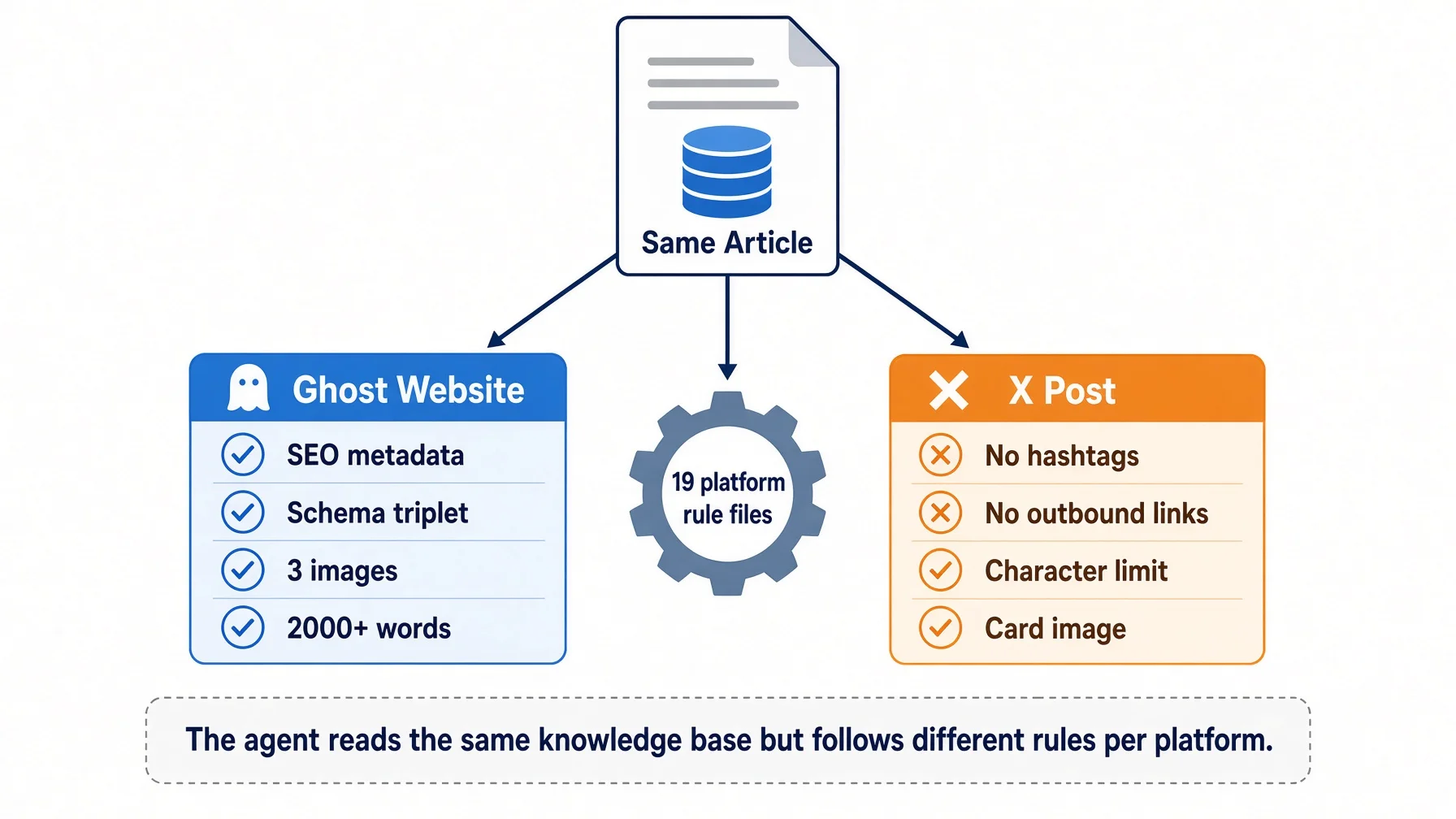
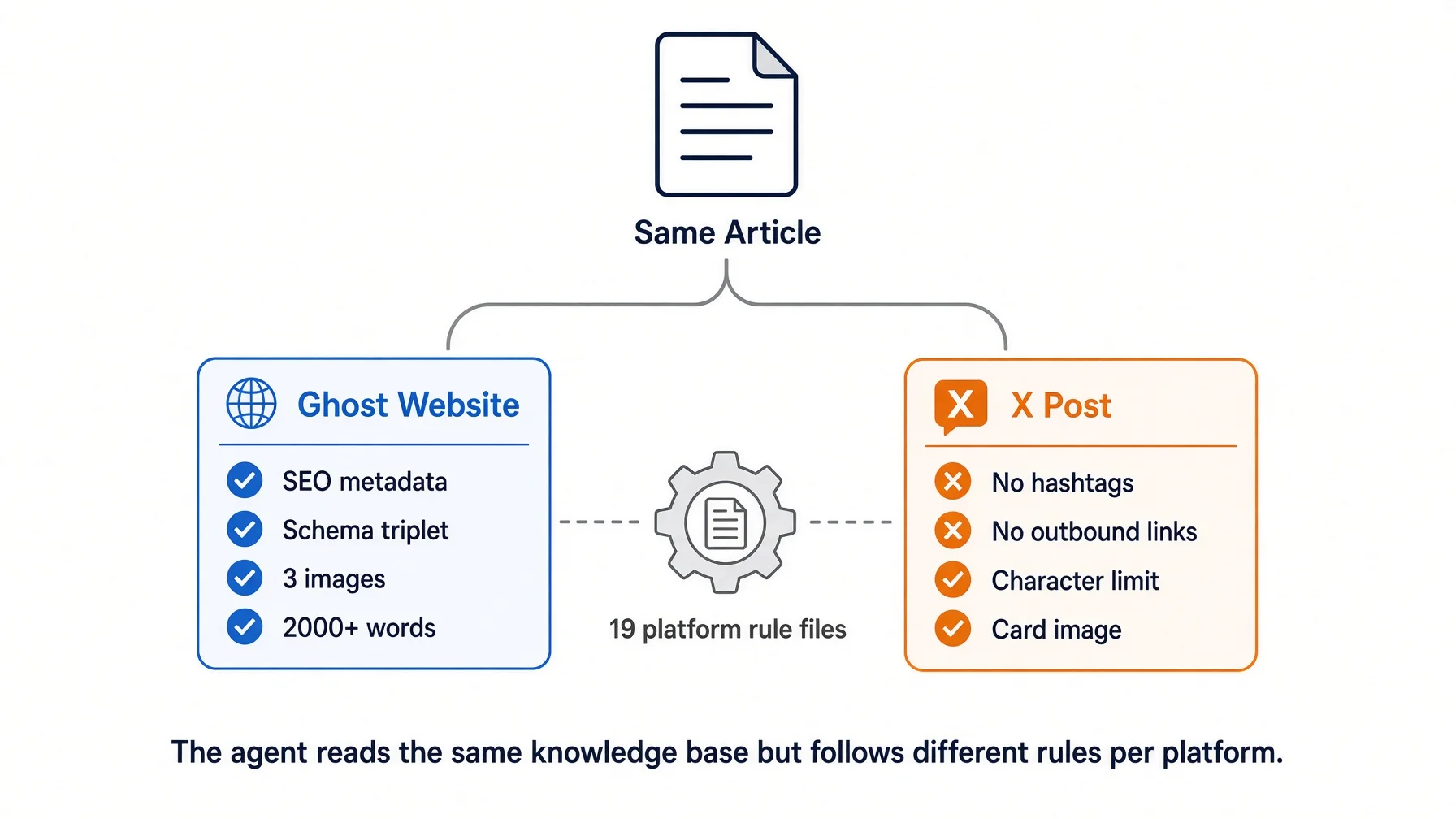
Publishing to this site loads the site's platform file: 2,500 to 4,000 words, H2 and H3 only and never H4, cover at 1200×630 with mandatory alt text, body images at 1600×900 in PNG or WebP with JPEG banned, at least three internal links, descriptive anchor text with "click here" forbidden, a maximum of five tags, and a slug with no dates in it so the canonical URL stays stable forever.
Posting to X loads a different file, and nearly every rule inverts: 280 characters for a short post, no bold or headings or tables or code blocks because the platform renders none of them, links kept out of the body and put in the first reply, one or two hashtags at most, and a first line that decides whether anything else gets read.
Same article, same agent, same knowledge base, two outputs with almost nothing in common — and I did not say "make it shorter" or "remember, no hashtags" either time. The platform folder holds 19 files: 15 describing one platform each, plus four shared ones — a meta-file on how to write a platform file, a glossary, a set of rules that hold on every platform, and a compliance file of things that must never be published anywhere. When X changes something next quarter, I edit one file and every later post follows the new rule, including posts written by an agent that never saw the old one. The article on specification files goes through how those files are written and scoped.
What the briefing does, counted
Here is the experiment that convinced me the briefing is the mechanism rather than the model.
Same model. Same question, word for word: write about 120 words of marketing copy for AWP, aimed at teams using AI agents on real industry work. Three seats, differing only in what each could see.
Seat 1: empty folder
Seat 2: in the base, told to read nothing
Seat 3: in the base, three files loaded
First person I
0
0
3
A failure story
0
0
1
Concrete nouns
0
0
8
Slogan-shaped closing line
1
1
0
Signed
no
no
yes
Average sentence length
14.4 words
14.9 words
7.2 words
Total words
115
119
123
Seat 1 was not ignorant — our role-package repository is public, so the model had seen the company. It got the positioning right and produced 115 words containing no file name, no step, no number, no failure and no first person, closing on "Stop bolting general tools onto specialised work." Correct, and empty. That is the ceiling of public information about you.
Seat 2 was the surprise. It was told explicitly not to open any files, and it still landed the company's actual angle — that the hard part is not the model but turning real industry work into something agents can finish and hand off. It had inherited the folder's index simply by being opened there, before I asked it anything. Context arrives with the working directory.
Seat 3 read three files first — writing style, language rules, brand standard — and the sentences halved. The style file's first line says one idea per sentence. Nobody supervised that. A file did.
One honest note, because it changes how much weight the table can carry: I had planned to count banned words too. All three runs scored zero. A metric that cannot separate the cases should not be used to argue for either, so it is not in the table.
The throughput, and what it does not prove
On 31 July 2026 this pipeline produced 10 tutorial articles in one day, each with its own run directory under my dashboard's output folder. I mention the number because people ask whether the gates make it slow. They do not, because the stages run unattended and my time only goes into layer three.
What that number does not prove is that the pipeline caused the quality. I have no A/B test — no set of articles written single-window and compared against these. The mechanism evidence is solid and cited above; the "and therefore my articles are better" step is practitioner experience, mine and other people's. Treat the shape as transferable and the numbers as a description of one system.
Where this breaks
Four failure modes, all of which I have hit. An AI automation agency that has never hit them has not put enough work through its own pipeline to know where it bends.
Over-constraining kills the work. In August 2026 I briefed an agent to redesign a diagram page and the brief ran to 2,392 characters: exact colour codes, a font-size table, three referenced standards, file paths, a self-check list. What came back was an eight-row table. Every constraint satisfied, no design in it. I rewrote the brief at 1,333 characters — the content, two facts, one sentence of direction, and "do not make this a table" — and got something usable. You cannot ask for consistency and initiative in the same instruction. Decide which the stage needs before you write its briefing.
Handoff files drift. The brief compiles from upstream artefacts, so an upstream change that nobody propagates produces a writer working from last month's outline. This is why the compilation is a step with its own output rather than something the writer does inline.
Stages multiply. Nine is where a year of failures landed me, not where I started. Every step earns its place by preventing something specific, and a step that cannot name the incident it prevents should be deleted. A pipeline nobody can justify line by line becomes a ritual, and rituals get skipped under deadline.
Reviewers converge. Eight roles reviewing in sequence, each reading the previous one's output, will drift toward agreement if you let them share conclusions. Fresh context per role is what keeps the eighth reviewer from simply ratifying the first.
Build your own AI automation agency pipeline tonight
Three windows, one folder, about an hour. Not nine stages. Nine is what three becomes after a year of things going wrong. This is the part of an AI automation agency you can assemble yourself in an evening; most ai workflows sold as a product are this plus a subscription.
Before you start. The pipeline below runs three separate AI sessions, each reading a different briefing file from the same folder. You need at least one tool that can open a local directory — three windows of the same tool count as three seats. If you have not installed anything yet, pick one here; most are free and take under five minutes.
Step 1 — Write three briefing files
In a folder on your disk, create three plain text files. Short is fine; a page each is plenty.
voice.md — who you are, who you write for, three things you always do, three you never do, and one paragraph of your own writing you consider representative.
checklist.md — what "done" means for you. Concrete and checkable: every claim has a source, no sentence over 25 words, headings describe content rather than tease it, the first paragraph answers the question. Aim for eight to twelve items you could tick.
visual.md — your colours, whether you use photography or illustration, what your covers must never contain, and the dimensions your platform actually needs.
Step 2 — Open three separate conversations
Not three turns in one thread. Three separate ones, each starting empty. Same assistant is fine — this runs on whichever ai automation tools you already pay for, and needs none that you do not.
Seat
Gets
Produces
Must not see
Writer
voice.md + the topic + your facts
draft.md
The checklist
Editor
checklist.md + draft.md
A numbered list of edits
The writer's reasoning
Designer
visual.md + the headline and three key points
A cover concept or image
The full draft
The "must not see" column is the whole design. Give the editor the checklist and the writing brief and it starts defending the draft's choices. Give the designer all 5,000 words and you are back to designing from the worst seat in the house.
Step 3 — Move work between them as files
Save the draft. Paste the saved file into the editor window, not the conversation. Take the numbered edits back to the writer window — or apply them yourself, which for the first month I would recommend, because seeing what an independent reader flags is the fastest way to improve voice.md.
For the designer, do not paste the article. Paste the headline and three bullets. That is your compiled brief, and the whole point of it is that it is short.
Step 4 — Add a gate you cannot talk your way past
One rule, written in checklist.md and enforced by you: the editor window opens only after draft.md is saved to disk. No reviewing from the chat scrollback.
It sounds trivial. It is the same rule my script enforces, and it is the one that decays first when you are in a hurry.
Step 5 — Test it in ten minutes
Take a task you have already done in one window. Run it again through three. Then ask the editor window this: quote the checklist items this draft fails, with the exact sentence.
If it quotes real sentences, the separation is working. If it says the draft looks good overall, check that the editor window really is a fresh conversation — that answer is the self-preference bias, and it appears the moment the reviewer has the draft's history in its context. That ten-minute test is also the demo to ask for before you pay an AI automation agency anything.
Translating my folder names to yours
Mine
Yours
What it does
profiles/{brand}/voice/
voice.md
How it should sound
references/judging/
checklist.md
What "done" means
Platform rule files, 15 of them
One file per place you publish
Format limits per destination
The compiled writing brief
The paragraph you paste into each window
The short version, so context stays small
The step-order script
Your own rule about saving first
Stops stages being merged under time pressure
Copy this prompt
Open three AI conversations — three browser tabs of the same assistant counts. Each starts empty and gets exactly one of the briefings below. Replace the bracketed parts. The last two sections are the ones people skip, and they are where the pipeline stops being decoration.
=== WINDOW 1 — WRITER (fresh conversation) ===

You are the writer. Read the voice file below and hold to it in every sentence.

[paste voice.md]

Write 800 words on [topic] for [audience], in the tone that file describes.

Facts you may use, and nothing beyond them:
[paste your verified facts, each with a source URL]

Rules:
- Answer the main question in the first paragraph. Do not warm up.
- Every number comes from the facts above. If it is not there, do not write it.
- End with one specific thing the reader can do today.
- Do not review your own work. Do not summarise what you did.

Output the draft only. Save it as draft-v1.md before you open any other window.

=== WINDOW 2 — EDITOR (new conversation. Do not scroll up and do not
reuse window 1 — the editor must not have seen the draft being written) ===

You are the editor. You did not write this and you have no stake in it.

Standard you are checking against:
[paste checklist.md]

Draft:
[paste draft-v1.md]

Check five things, in this order:
1. Facts — every claim traceable to a source. Flag anything unsourced.
2. Voice — does it match the voice file, sentence by sentence?
3. Structure — does each heading describe what follows, and does the order
   work read once, top to bottom?
4. Filler — sentences that could be deleted with no loss of meaning.
5. Call to action — one specific thing to do, or a vague gesture?

For every failure, output one numbered row:
| # | Which of the five | Exact sentence as written | Replacement sentence | Why |

Rules:
- Minimum three rows. If you find fewer, go section by section and say why each
  passes. "Looks good" is not an output.
- Every row needs full replacement text, not "make this clearer".
- Quote the draft word for word so the edit can be applied automatically.

Output the table only.

=== WINDOW 3 — DESIGNER (fresh conversation, has not read the article) ===

You are the designer. You have not read the article and do not need to.

Visual standard:
[paste visual.md]

Headline: [headline]
The three things a reader takes away:
1. [point]
2. [point]
3. [point]

Produce one cover concept: the central image, the words on it (8 or fewer),
the colours, and why it earns a click from someone who has not read the article.
Then restate it as a single paragraph I can paste straight into an image tool,
with no headings and no commentary.

Rules:
- Readable as a thumbnail. Assume 300 pixels wide.
- No text-heavy layouts. No tables. No screenshots of documents.
- Dimensions: [your platform's cover size]

=== BACK TO WINDOW 1 — REVISE ===

Paste the editor's table into the writer window, under this:

Apply every numbered edit below. For each, either make the replacement exactly
as written or keep your version and give me one line saying why. Change nothing
the table did not flag. Save the result as draft-v2.md.

[paste the editor's table]

=== VERIFY (two minutes, you do this one) ===

Compare draft-v1.md against draft-v2.md:
- Every numbered edit either appears in v2 or has a written reason.
- Nothing changed that the editor did not flag.
A note on window 2, because it is the row that does the work. The instruction to output exact sentence as written plus replacement sentence is what makes edits applicable rather than debatable. Prose feedback gets negotiated. An anchor string and a replacement do not, and once your list is in that shape you can apply it with find-and-replace and stop retyping.
The verify step exists because the failure it catches is silent. A writer window that has been running a while will nod at the edit list and change three of the eleven items, and the reply reads exactly like a full revision. If the diff shows edits quietly dropped, do not argue with it — open a fourth window, paste voice.md plus draft-v1.md plus the table, and revise there. That is the long-context effect from earlier in this article, showing up in your own folder.
Where this bites — The commonest way this collapses is opening window 2 by scrolling up in window 1 because it is faster. It is faster, and it converts the editor into the author. If you only keep one rule from this article, keep that one.
Self-check
[ ] Three separate conversations, each started empty
[ ] voice.md, checklist.md, visual.md saved as files, not held in your head
[ ] The editor cannot see the writer's reasoning
[ ] The designer receives the headline and three points, not the article
[ ] Work moves as saved files
[ ] The editor produced at least three edits with exact quoted text
[ ] You have run the ten-minute test on a task you had already done single-window
What to do next
Tonight: write the three briefing files. An hour, no software.
Tomorrow: run one real piece through three windows and compare it against the same piece done in one. Keep both.
Next week: every time you correct something the editor missed, add the item to checklist.md with a scope clause. That is the whole discipline — the pipeline gets good by absorbing your corrections rather than losing them. In a year you will have nine stages, and you will be able to name the incident behind every one. At that point you are running the thing an AI automation agency would have sold you, and you own every file in it.
And before you sign with an AI automation agency, ask what you finish holding. If the answer is a running system and a login, you bought a dependency. If it is a folder of stage definitions you can read and edit, you bought a process that outlives them.
If you want the version of these briefings that I actually run, join the free list — the platform rule files and the review checklists go out as I revise them.
Two reasons, both measured. Models favour their own output when asked to judge it — LLM evaluators score their own generations higher than others' while human annotators rate them equal, and the effect tracks the model's ability to recognise its own writing. The 2025 follow-up on verifiable benchmarks found the harmful part concentrates exactly where you need the review: when the evaluator was wrong as a generator, and stronger models were worse at catching themselves. Separately, the review happens at the end of a long context, and long input alone costs 13.9 to 85 percent of performance even under perfect retrieval.
What is an AI content pipeline?
A written sequence of stages that content passes through, where each stage has its own instructions, its own inputs, and a defined output the next stage consumes. The distinguishing feature is not automation. It is that each stage runs in a fresh context with only the briefing it needs, so nothing inherits the previous stage's assumptions. An AI automation agency will call the same object a delivery process; the mechanism underneath is identical.
How many stages does a content pipeline need?
Three is enough to get the benefit: write, check, illustrate. Mine has grown to nine sub-workflows and 40 step files, but that took a year of adding a step every time something went wrong. Starting at nine produces a bureaucracy you abandon in a fortnight.
Do I need separate AI tools for each stage?
No. Three tabs of the same assistant works, as long as each starts empty and gets its own briefing. The separation that matters is the context, not the vendor. Most ai automation tools and workflow automation tools sell you the wiring between steps, and the wiring is the part you least need at the start — the value sits in what each step is told, and that is a text file you can write tonight. Using different models per seat removes self-preference entirely, but that is an optimisation rather than the mechanism.
How do I hand work between stages?
Through a file, never through conversation. My writing stage receives one compiled brief of 500 to 800 lines and is told to read nothing else at run time. If a stage needs something not in the file, the fix is to put it in the file — not to widen that stage's access.
What does an AI automation agency actually deliver?
Usually a running system plus a login. The question worth asking before you sign is whether you also finish holding the stage definitions in files you can read and edit. A pipeline that exists only as wiring inside somebody's product is not a process you own.
Won't a pipeline make the output generic?
It can, and this is the real failure mode. Over-constrain a creative stage and you get something that satisfies every rule and contains nothing. Put the constraints on checkable stages — facts, formats, compliance — and leave room on generative ones. You cannot ask for consistency and initiative in the same instruction.
How do I stop a pipeline stage being skipped?
Make the next stage refuse to start. In my system a stage can only be marked done after its predecessors are done, and that check lives in a script rather than in the instructions, because instructions are advisory to an agent under pressure and a script is not.
Monitoring a competitor who publishes no feed is the case every RSS guide skips. Twenty-one platforms sorted by which of three jobs they do, and the finished setup is business process automation you own outright, with no seat licence to renew.
Blaming the content is the reflex when a post underperforms, and it is usually the wrong diagnosis. A second reader decides distribution before any human sees the post, and most of what it checks is mechanical enough to automate business processes around, on five platforms at once.
Thursday afternoon, fourteen product ideas, a Monday filming slot, no scripts. Six script shapes and seven hook formulas turn that hour into finished drafts — and the business rule stays: rewrite at least 30% before anything ships.
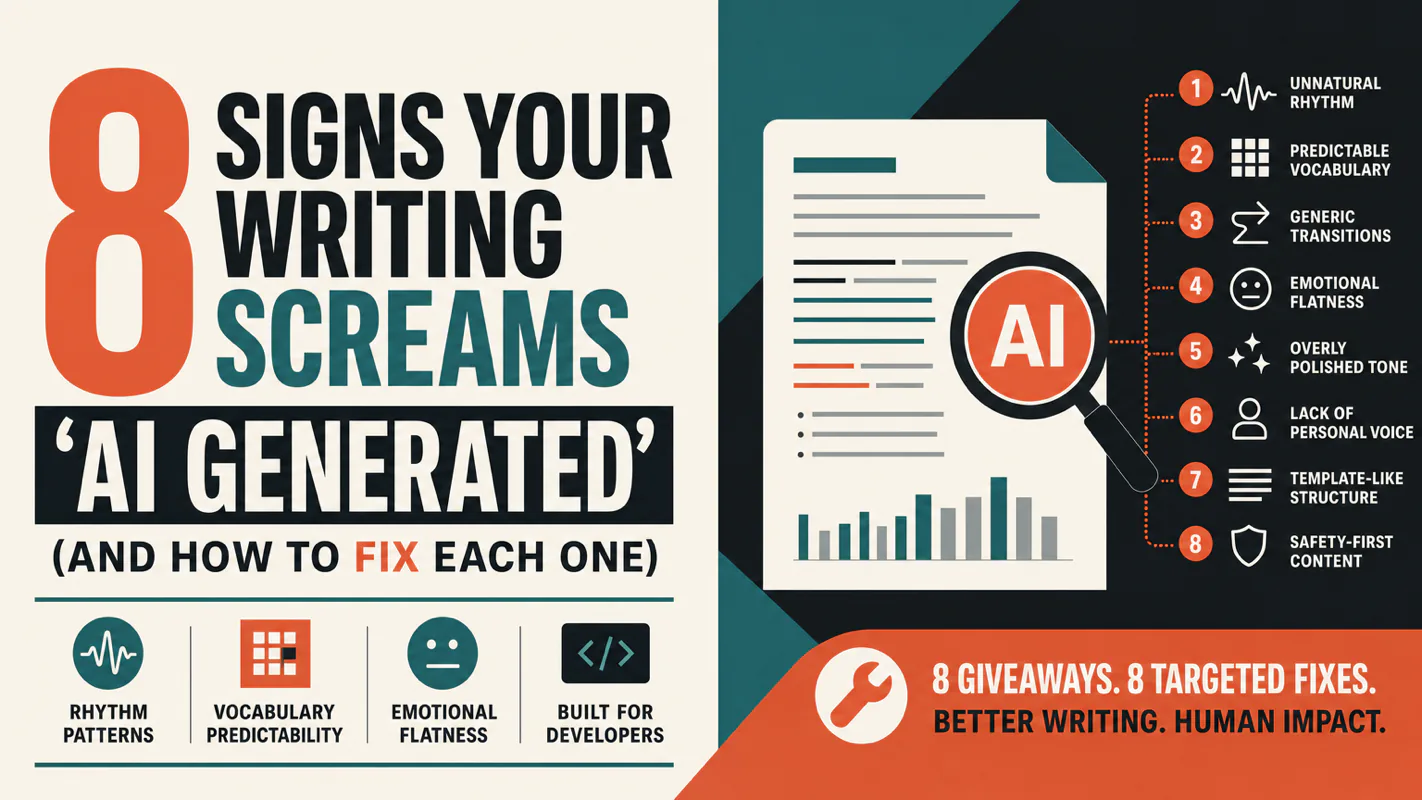
A detector score cannot survive a conversation with the freelancer it just cost three weeks of payment. What holds up is the specific thing on the page: rhythm, vocabulary, missing detail. Eight of them here, and the reason review stays human when you automate business processes.