Monitoring a competitor who publishes no feed is the case every RSS guide skips. Twenty-one platforms sorted by which of three jobs they do, and the finished setup is business process automation you own outright, with no seat licence to renew.
Blaming the content is the reflex when a post underperforms, and it is usually the wrong diagnosis. A second reader decides distribution before any human sees the post, and most of what it checks is mechanical enough to automate business processes around, on five platforms at once.
Gloves on, tape measure in hand — nobody types a query. Three voice surfaces for ai automation tools (terminal, Telegram, Discord), 10 TTS and 6 STT providers compared on cost and latency, plus a setup that costs nothing.
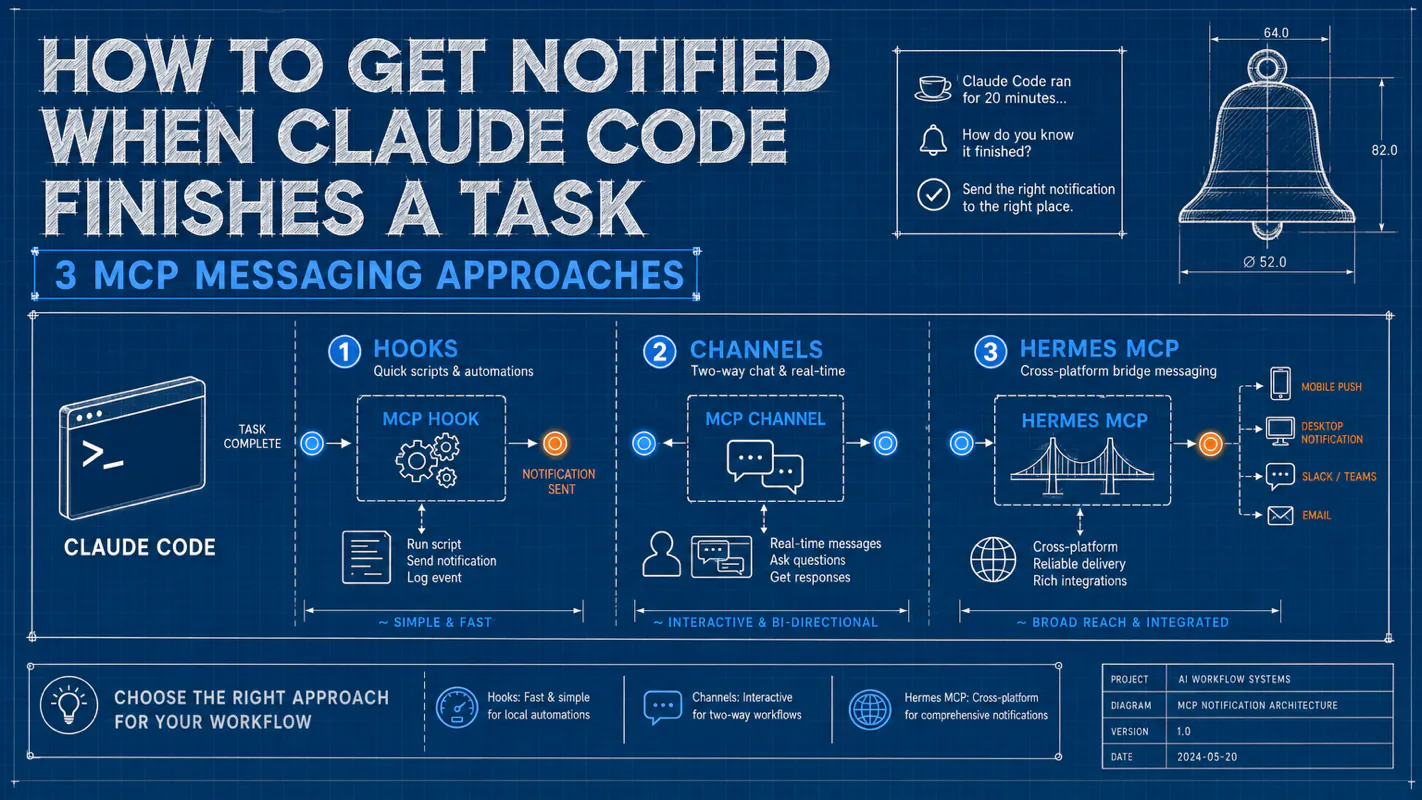
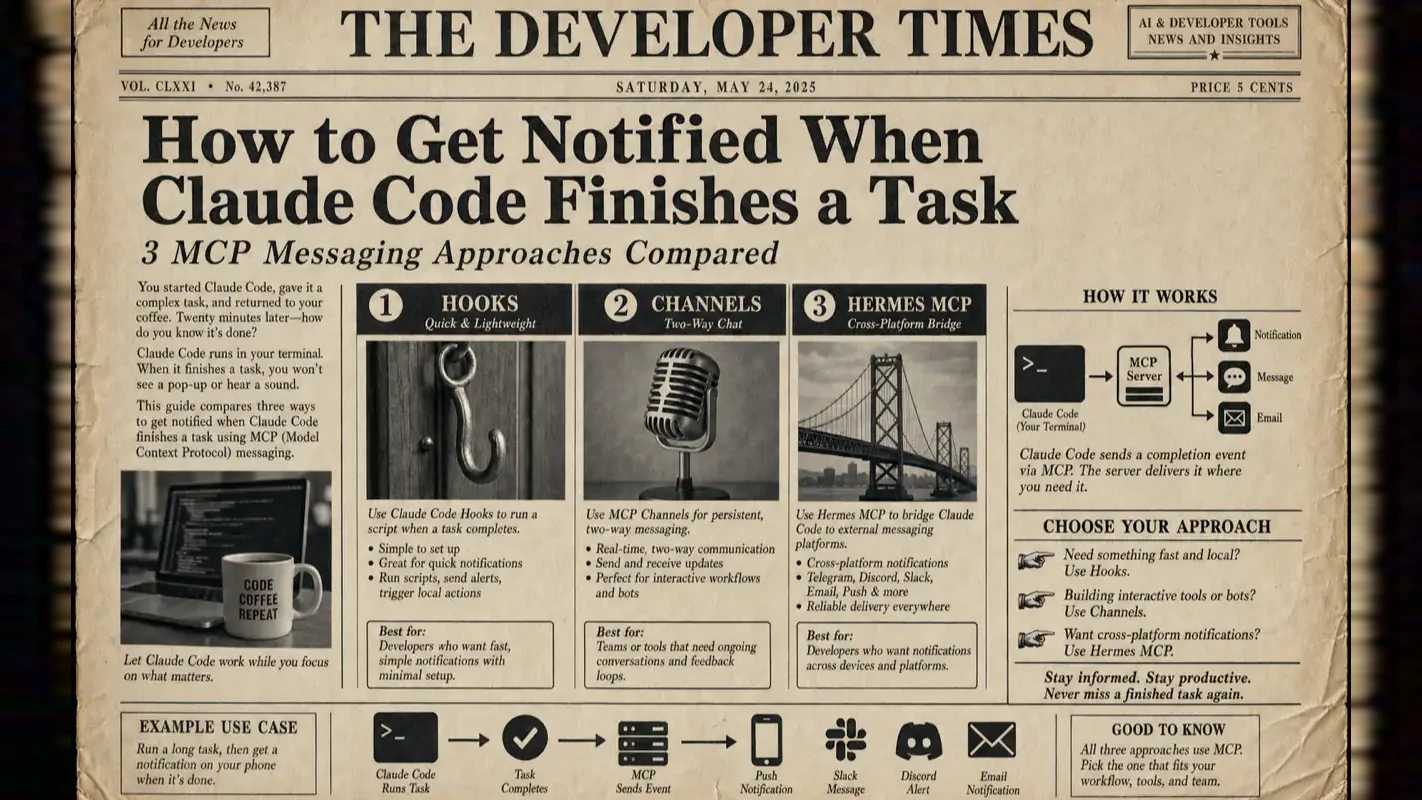
How to Get Notified When Claude Code Finishes a Task: 3 MCP Messaging Approaches
Delegated work without a receipt is not delegated, it is just moved somewhere you keep checking. Three ways to close the loop: Hooks for a quick script, Channels for two-way chat, and a Hermes MCP bridge for cross-device push, with config code for each.
Freight has had a document for this for about a century: the proof of delivery. The driver does not phone in from every mile marker, but the moment the load is signed for a receipt exists and the file closes. What the receipt actually buys is scheduling. Nothing behind that load can be committed to until somebody knows it landed, which is why the document exists and why its absence stalls far more than the single job it covers. That is the part worth settling before handing anything real to an ai assistant for business, because an open file quietly blocks everything queued behind it.
Claude Code just ran for 20 minutes. You stepped away for coffee. When you come back, the task finished 10 minutes ago. Wasted time.
This is the single most common friction point for anyone running long Claude Code sessions — SEO audits, code refactors, batch file processing. You need a reliable way to know when it is done, without babysitting the terminal.
Three approaches solve this today, each at a different complexity level:
Approach
How It Works
Two-Way?
Works with Codex?
Setup Effort
Hooks
Stop event triggers a shell script
One-way push
No
Minimal
Channels
Bun plugin pushes events into a Claude Code session
Full two-way chat
No
Low
Hermes MCP Bridge
Claude Code calls a remote MCP server to send messages
One-way (extensible to two-way)
Yes
Moderate
I have been running all three in production across multiple machines since early 2026. Here is what actually works, what breaks, and which one fits your workflow.
What Are Hooks, and When Do They Fall Short?
Hooks are Claude Code's built-in lifecycle event system, documented in Anthropic's official Hooks reference. The Stop event fires after Claude completes each response turn, triggering any shell command you configure.
Which Events Matter for Notifications?
Event
When It Fires
Notification Use
Stop
Claude finishes a response turn
Task completion (most common)
Notification
Claude waits for user input
"Come back and look" reminder
SubagentStop
A sub-agent finishes
Parallel branch completion
StopFailure
API error causes termination
Error alerting
How Does a Basic Hooks Notification Work?
Configure a Stop event hook in ~/.claude/settings.json pointing to a custom notification script:
Generate ~/.claude/hooks/notify.sh for Claude Code Stop Hook. Requirements:
Bash script, set -euo pipefail
Read JSON from stdin
Check stop_hook_active field — exit 0 immediately when true (prevents infinite loops; Claude Code force-overrides after 8 consecutive blocks)
Extract last_assistant_message (default "Claude stopped", truncate to 300 chars) via jq
Fire macOS desktop notification via osascript display notification, title "Claude Code", subtitle shows a short snippet of the message
Play system alert sound /System/Library/Sounds/Hero.aiff via afplay in background
Five minutes, zero dependencies. But you must be at your computer to see the notification.
What Does the Stop Event JSON Look Like?
Understanding the input structure helps you write precise notification scripts. Claude Code pipes this JSON to your script via stdin:
{
  "session_id": "abc123",
  "transcript_path": "/path/to/transcript.jsonl",
  "stop_hook_active": false,
  "last_assistant_message": "I finished all modifications, processed 47 files..."
}
Key fields:
last_assistant_message — the text content of Claude's last message. Truncate to ~300 characters for notification body
stop_hook_active — whether the hook is already inside a loop. If true, your script must exit immediately (exit 0), otherwise you trigger an infinite loop. Claude Code force-overrides after 8 consecutive blocks with no progress
On Linux, replace osascript with notify-send:
# Linux desktop notification
notify-send "Claude Code" "$MESSAGE" --icon=dialog-information
How Do You Push Hooks Notifications to Your Phone?
Generate a Claude Code Stop Hook Telegram push script. Requirements:
Bash script, set -euo pipefail
Read JSON from stdin, exit immediately if stop_hook_active is true
Extract last_assistant_message (truncate to 300 chars) via jq
Define TELEGRAM_BOT_TOKEN and TELEGRAM_CHAT_ID variables (leave placeholders for user)
Async curl call to Telegram Bot API sendMessage, message format Claude Code: {message}
curl runs in background (&), stdout to /dev/null, never blocks Hook execution
Why Hooks Are Not Enough
From running Hooks for several months, these are the real limitations:
One-way only — pushes out, no way to reply or control Claude from your phone
Coarse trigger granularity — fires after every response turn, not just "real" task completions. Claude commits then pushes: you get two notifications
Local shell dependency — scripts run on the Claude Code machine, need curl and jq pre-installed
No message history — fire-and-forget, no conversation context
Codex incompatible — Hooks are Claude Code exclusive; OpenAI Codex cannot use them
Block limit — Claude Code force-overrides after 8 consecutive blocks with no progress
Best fit: solo developers who just need a basic reminder and never need to reply from their phone.
What Are Channels, and How Do They Enable Two-Way Chat?
Channels launched as a Research Preview in March 2026. The core idea: push external events into a running Claude Code session, enabling two-way conversation between your phone and your local Claude Code instance.
How Does the Architecture Differ from Standard MCP?
Standard MCP flow has Claude actively querying external data. Channels reverse that direction:
Standard MCP: User instruction -> Claude -> calls MCP server -> returns data -> Claude responds
Channels: External message -> Channel plugin (local Bun script) -> pushed into Claude Code session -> Claude processes -> replies through Channel
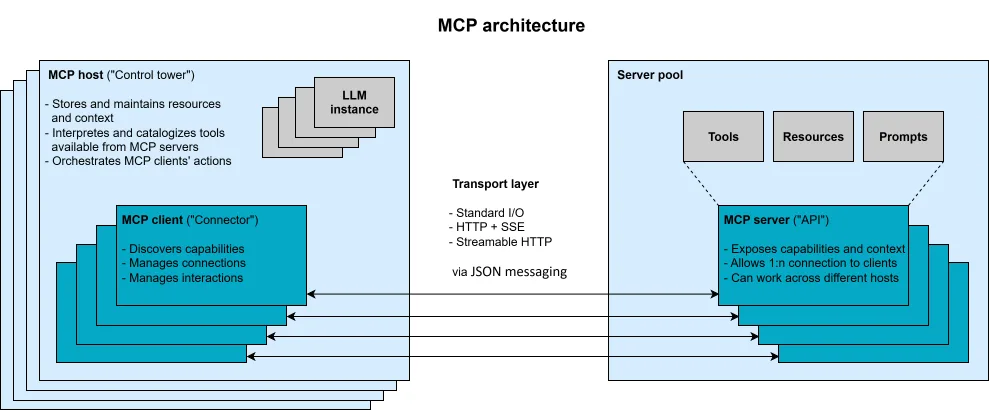
Each Channel is essentially a local MCP server that polls an external platform for messages and pushes them into Claude Code via the notifications/claude/channel event.
Which Platforms Does Channels Support?
Platform
Launch Date
Status
Telegram
2026-03-20
Research Preview
Discord
2026-03-20
Research Preview
iMessage
2026-03-27
Research Preview
How Do You Set Up Channels with Telegram?
# 1. Install the plugin
/plugin install telegram@claude-plugins-official

# 2. Configure your Bot Token
/telegram:configure <your-bot-token>

# 3. Start Claude Code with Channels enabled
claude --channels plugin:telegram@claude-plugins-official

# 4. Find your Bot in Telegram, send any message to get a pairing code

# 5. Pair in Claude Code
/telegram:access pair <code>

# 6. Lock down to allowlist only
/telegram:access policy allowlist
After pairing, messages you send in Telegram go directly into the Claude Code session. Claude's replies appear in the same Telegram chat.
What Can You Do with Channels?
True two-way communication — send messages from your phone, get Claude's response in the same chat
Full file system access — Channel messages enter your local Claude Code session with complete filesystem and Git permissions
Remote permission approval — permission prompts forward to your phone for remote approve/deny
Session context persistence — maintains conversation context for the session lifetime
Event-driven — not limited to chat. Can receive CI webhooks, monitoring alerts, and other external events
Where Do Channels Fall Short?
Research Preview — syntax and protocol may change
Auth lock-in — requires claude.ai or Console API key authentication; no Bedrock or Vertex support
Bun dependency — official plugins are Bun scripts
Session-bound — events arrive only while the session is open, not a persistent background service
Codex incompatible — Claude Code exclusive
Single session binding — one Channel connects to exactly one Claude Code session
How Do Channels Compare to Other Remote Options?
Approach
Purpose
File Access
Channels
Push external events into a local session
Full (local filesystem)
Claude Code on Web
Cloud sandbox async tasks
Cloud sandbox
Remote Control
Drive a local session from claude.ai
Full (local)
If you need to send messages from your phone to a running Claude Code instance, Channels is the most direct path. If you need Claude Code to notify you after it finishes, Hooks or Hermes MCP are more straightforward.
Best fit: users who need remote control of Claude Code from their phone, want two-way conversation, and are all-in on the Anthropic ecosystem.
Hermes MCP Bridge Messaging Explained
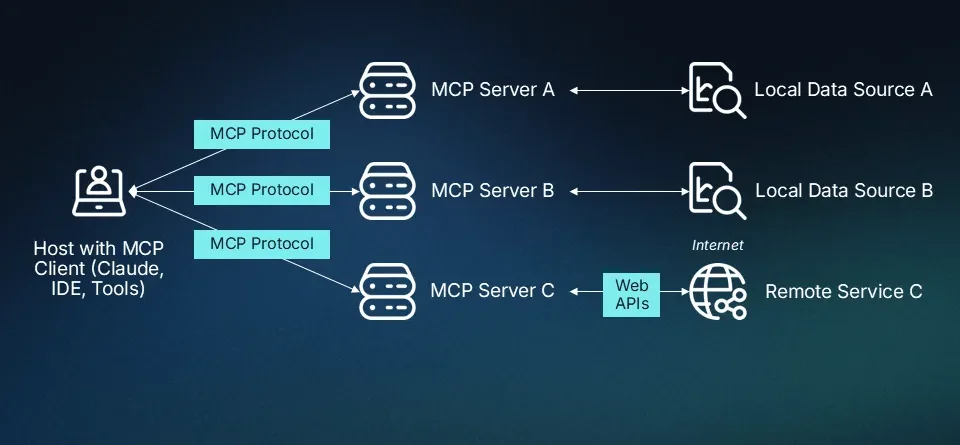
Hermes Agent (open-sourced by Nous Research) is a multi-platform messaging gateway AI agent. Since v0.16.0, it exposes itself as an MCP server via hermes mcp serve. Claude Code and Codex connect to Hermes over SSH and call messages_send to push notifications to any connected messaging platform.
This is a reverse bridge architecture: instead of external messages pushing into Claude, Claude actively calls Hermes tools to send messages out when needed.
How Does Hermes MCP Differ from Channels?
Dimension
Channels
Hermes MCP Bridge
Message direction
External -> Claude Code
Claude Code -> External
Two-way?
Native two-way
One-way notification (can read messages via events_poll)
SSH stdio is a lightweight method to expose a remote MCP server to a local MCP client. Claude Code spawns an ssh subprocess, and SSH transparently bridges local and remote stdin/stdout:
Reuses existing SSH key auth, no extra credentials
Encrypted transport
To Claude Code, Hermes looks like a local MCP server — completely transparent
Which Tools Does Hermes MCP Expose?
Hermes exposes 10 tools. Notification workflows primarily use the first four:
Tool
Purpose
Notification Usage
messages_send
Send a message to a specific platform/channel
Core — called every notification
channels_list
List available messaging channels and targets
Called during initial setup verification
conversations_list
List all active conversations across platforms
When you need to pinpoint a specific target
messages_read
Read recent messages from a conversation
Check context before sending a notification
events_poll
Poll for new events (messages, approval requests)
Used in two-way interaction scenarios
events_wait
Long-poll for new events (blocks up to 30s)
Used in two-way interaction scenarios
permissions_list_open
List pending approval requests
Remote permission management
permissions_respond
Respond to an approval request
Remote permission management
How Do You Call messages_send?
The target format is platform:identifier, with human-friendly channel name resolution:
# Send notification to a Discord channel
mcp__hermes__messages_send(
    target="discord:#headquarters",
    message="SEO audit complete. Found 12 broken links. Report saved."
)

# Send notification to a Telegram private chat
mcp__hermes__messages_send(
    target="telegram:6308981865",
    message="Code refactor done. 47 files updated. All tests pass."
)
How Do You Verify the Connection?
Use channels_list during initial setup to confirm everything works:
# List all Discord channels
mcp__hermes__channels_list(platform="discord")
# Returns: [{target: "discord:#headquarters", ...}, ...]

# List channels across all platforms
mcp__hermes__channels_list()
Setting Up Hermes MCP Bridge Step by Step
Prerequisites
A persistent machine (Mac Mini, Linux VPS, or WSL) with Hermes Agent installed
Passwordless SSH from your dev machine to the Hermes host
Hermes connected to at least one messaging platform (Discord, Telegram, Slack, etc.)
If Hermes and Claude Code run on the same machine, skip SSH and use local stdio directly.
Scenario A: 30-Minute SEO Audit While You Step Out
Step
Hooks
Channels
Hermes MCP
Start task
claude -p "Audit SEO dead links"
claude --channels plugin:telegram -p "Audit SEO"
claude -p "Audit SEO dead links, notify me on Discord when done"
Leave desk
Walk away
Walk away
Walk away
Task completes
Desktop notification
Telegram gets full results
Discord gets message
Review
Must return to computer
Read results on phone
Read results on phone
Follow-up
Must use terminal
Ask follow-ups in Telegram
Ask follow-ups via Hermes in Discord
Scenario B: 20-Minute Codex Code Refactor
Approach
Available?
Hooks
Codex does not support it
Channels
Codex does not support it
Hermes MCP
Fully available via config.toml
Hermes MCP bridge is the only on-demand notification method currently available for Codex.
Scenario C: Multi-Brand Content Distribution Notifications
In my workflow, I run multiple brand channels on Discord. Hermes routes notifications to the correct channel automatically — SEO updates go to #website-ops, content publishing goes to #content-pipeline. Hooks sends the same generic notification regardless. Channels pushes everything to one Telegram chat.
The channel isolation matters when you manage multiple projects. Without it, notifications from different workstreams pile up in a single thread, and you lose context.
What Is the Best Practice for Triggering Notifications?
Hermes MCP uses an on-demand design: Claude Code only calls messages_send when you explicitly say "notify me." This zero-overhead approach means:
Short tasks (under 2 minutes): skip notifications, just wait for the result
Medium tasks (2-10 minutes): personal preference, a sound alert may suffice
Long tasks (over 10 minutes): configure phone notifications
What Format Does the Message Target Use?
The messages_send target parameter follows platform:identifier:
Common causes: SSH key not configured for passwordless login (hangs waiting for password), Hermes install path mismatches the path in ~/.claude.json, or firewall blocks SSH port 22.
messages_send Succeeds but No Notification on Phone
Symptom: Claude Code shows successful tool call, but Discord/Telegram has no new message.
Common causes: Hermes gateway not running (hermes gateway start), Discord Bot Token expired or lacks permissions, Telegram Bot banned or Chat ID incorrect.
First Message Takes ~20 Seconds
Symptom: First Hermes MCP call is slow; subsequent calls are fast.
Cause: Cold start — SSH connection + Hermes process initialization + model API endpoint probing.
Fixes:
Set explicit model endpoint URLs in Hermes .env to skip auto-probing
Increase startup_timeout_sec to 15-20 seconds in Codex config.toml
Ready-to-Use Prompt: Pick the Right Claude Code Finish-Notification Approach
What this does: Defines your notification need, scores Hooks vs Channels vs Hermes MCP Bridge on directionality, cross-tool support, and setup effort, then returns the right approach, the lifecycle event to trigger on, and a troubleshooting checklist. Based on: How to Get Notified When Claude Code Finishes a Task: 3 MCP Messaging Approaches — https://aiworkflowpro.com/claude-code-mcp-messaging/ Time to run: ~4 minutes
Copy this prompt into Claude Code, ChatGPT, or any AI assistant:
ROLE: You are a Claude Code Notification Approach Selector. Your job: pick the right finish-notification method for a long task — Hooks, Channels, or Hermes MCP Bridge — and wire the correct trigger.

CONTEXT — THREE-APPROACH NOTIFICATION METHOD:
The top friction in long Claude Code sessions is not knowing when a task finished — you step away and return to wasted time. Three approaches solve it at different complexity. Hooks: a Stop lifecycle event triggers a shell script for a one-way push (OS notification, Slack webhook) — minimal setup, but one-way and Claude Code only. Channels: a Bun plugin pushes events into a Claude Code session for full two-way chat — low setup, two-way, but Claude Code only. Hermes MCP Bridge: Claude Code calls a remote MCP server to send and receive messages — two-way and cross-tool (Claude Code, Codex, other MCP clients), at higher setup cost. Pick by directionality, cross-tool need, and setup budget.

INPUTS (fill in before running):
- USE_CASE: [The long task you run and where you go when it runs]
- DIRECTIONALITY: [Just need to know it's done (one-way), or want to reply/continue (two-way)?]
- CROSS_TOOL: [Must it also work with Codex or multiple agents?]
- SETUP_BUDGET: [minimal / low / higher]

METHOD — 4 STEPS:

Step 1 — Define the Notification Need
From USE_CASE, DIRECTIONALITY, CROSS_TOOL, and SETUP_BUDGET, fix four dimensions: one-way vs two-way, Claude Code-only vs cross-tool, minimal vs higher setup, and whether remote reach is needed.

Step 2 — Score the Three Approaches
Score Hooks, Channels, and Hermes MCP Bridge per dimension: directionality (one-way vs two-way), cross-tool support (Claude Code only vs works with Codex and others), setup simplicity (minimal vs higher). Sum per approach; eliminate any that fail a hard requirement.

Step 3 — Pick the Approach and the Trigger
Choose the highest scorer that meets every hard requirement. Name the lifecycle event to trigger on (Stop for task-done; add SubagentStop or others if needed) and the payload best practice — what to include so the notification is actionable.

Step 4 — Build the Troubleshooting Checklist
List the common failures for the chosen approach — silent hook (exit code or permission), plugin not loaded, MCP server unreachable, token or scope — and the one-line fix for each.

RULES:
- Never pick Hooks when two-way chat is a hard requirement — Hooks are one-way only.
- Never pick Hooks or Channels when CROSS_TOOL requires Codex — only Hermes MCP Bridge is cross-tool.
- Never trigger on an event earlier than Stop for "task done" notifications — premature fires waste attention.

OUTPUT FORMAT:
Output a markdown report with:
1. Need Definition — the four fixed dimensions
2. Approach Scorecard — markdown table, columns: Approach | Directionality | Cross-Tool | Setup | Total | Meets Hard Reqs?
3. Pick + Trigger — chosen approach, the lifecycle event, and the payload best practice
4. Troubleshooting — markdown table, columns: Failure | One-Line Fix
Save as @templates/claude-code-mcp-messaging.md and run when a long Claude Code task keeps finishing before you get back to the terminal.
Frequently Asked Questions
Can I use Hooks, Channels, and Hermes MCP at the same time?
Yes. All three are independent. A practical combination: Hooks handles local afplay sound alerts, Channels provides Telegram two-way chat, Hermes MCP routes notifications to specific Discord channels. Pick what fits each use case.
Does Hermes MCP affect Claude Code performance?
No. hermes mcp serve starts only when called via SSH. Claude Code never contacts Hermes on its own — it fires only when you explicitly say "notify me." Zero-overhead design.
Is the SSH stdio connection secure?
SSH tunnels are end-to-end encrypted, matching standard SSH session security. The critical factor is SSH key management: ensure only authorized machines can connect to the Hermes host. Use StrictHostKeyChecking=no on local networks; enable strict verification for public networks.
Do I need a separate server to run Hermes MCP?
No. Hermes Agent runs on any Python 3.12+ machine — Linux VPS, WSL, another Mac. You can also run Hermes and Claude Code on the same machine. Skip SSH entirely: set command to the local Hermes path and args to ["mcp", "serve"].
Can Codex use any notification method?
OpenAI Codex does not support Hooks or Channels. Hermes MCP reverse bridge is the only on-demand notification method available for Codex today. Configure it through ~/.codex/config.toml for identical notification capability.
Will the Stop Hook fire too often?
Yes. The Stop event fires after every Claude response turn, not just real task completions. Three solutions:
Inspect last_assistant_message in your script — skip when the content looks like an intermediate question or a prompt for input
Add a duration threshold — only notify after tasks exceeding N minutes
Switch to Hermes MCP — it only fires when you say "notify me," eliminating false triggers entirely
Gloves on, tape measure in hand — nobody types a query. Three voice surfaces for ai automation tools (terminal, Telegram, Discord), 10 TTS and 6 STT providers compared on cost and latency, plus a setup that costs nothing.
Nothing about month four is harder than month three. It is simply the month an unpaid channel starts to feel like proof of failure. Surviving it takes a cadence you can hold while earning nothing, which is a better reason to automate business processes than speed ever was.
One number hides more than it shows. This Claude Code Skill scores US equities across 10 dimensions, from earnings surprise to peer comparison, with confidence scoring and 5 safety valves that flag thin data. A coding tutorial, not financial advice.
Publishing eats your week through research, SEO fields, images, and uploading — not writing. Here is the 10-step workflow automation pipeline that takes a topic to a published draft on one command, and the data contract that lets each step hand off cleanly to the next.