A 30-minute video is too long for one conversation. This guide walks the 8-step Skill that locks the narration and one look, then gives each 3-minute segment to a fresh sub-agent, five at a time, and polishes the cut in an empty-context session.
The folder structure behind my AI agent team, the Herdr setup where Grok Build, Claude Code and Kimi Code work side by side, and the two live tasks from the video: an article published by voice and a three-model front-end test.
Eight folders of plain Markdown, a CLAUDE.md index in each, and seven prompts that make your agent interview you. Every prompt, template and command from the video, in order.
The RSS Feeds List That Doesn't Rot: 8,936 Live Feeds, 21 Categories, One OPML File
The client asked about a policy change you had not seen. It had been public a week, in a publication nobody subscribed to. 8,936 validated feeds, 21 categories, one OPML file — the input layer under any workflow automation software.
If you want to read the open web on your own terms, you need exactly two things: a reader and a list of feeds. Readers are a solved problem — there are a dozen good ones, free and paid, on every platform. The list is where everyone gets stuck.
This article is about a list that solves that half of the problem: awesome-rss-feeds, an open directory of 8,936+ live, HTTP-validated English RSS feeds organized into 21 categories, released into the public domain under CC0.
The rest of this guide is the operator's manual: what the list is, how it was built and why that matters, how to import it into any reader in under a minute, and — the part most RSS guides skip entirely — how to hand the feeds to Claude Code or Codex and turn a wall of headlines into a daily digest that reads itself. By the end you should be able to go from "I've heard RSS is good" to "I have a running information pipeline" in an afternoon.
No nostalgia, no manifesto about the death of the timeline. Just the mechanics of owning your inputs.
A medical billing manager took the same call twice in a month: a clinic asking about a payer policy change she had not seen. Both times it had been sitting in a trade publication for a week, one nobody on her team subscribed to. The fix is not more reading time. It is owning your inputs, meaning a fixed set of sources that arrive on your schedule instead of an algorithm's. This article supplies the raw material: 8,936 validated feeds across 21 categories in one file, plus a way to hand the set to an agent so a morning of headlines arrives already read. Treat it as the input layer under whatever workflow automation software you run.
The one-paragraph version, for the impatient
Download feeds.opml for all 8,936 feeds, or a single-category file like en-ai-research.opml for a focused start. Import it into Inoreader, Feedly, NetNewsWire, Miniflux, FreshRSS, or Readwise Reader — every one of them has a one-line OPML import.
If you use Claude Code or Codex, point it at the raw OPML URL and ask for a digest. That's the whole thing. The sections below explain why each step is built the way it is, and how far you can push it.
RSS and OPML, in plain terms
If you're new to this, two acronyms carry the whole system, and both are simpler than they sound.
RSS (Really Simple Syndication) is a publishing format. When a site "has an RSS feed," it means the site publishes a machine-readable file — usually at an address like example.com/feed — that lists its recent posts with titles, links, dates, and often the full text. The file updates whenever the site publishes.
That's the entire mechanism: a standard file, at a stable URL, that always reflects the latest posts. Atom is a near-identical alternative format; readers handle both, and this guide uses "RSS" to mean either.
A reader (also called an aggregator) is an app that watches a set of feeds for you. You subscribe by giving it feed URLs; it polls each one on a schedule, collects new items, and shows them in one place, newest first. No feed can push an ad into your reader or reorder your list, because the reader only does what you told it: fetch these URLs, show me what's new.
That predictability is the control this whole guide is about.
OPML (Outline Processor Markup Language) is the glue. It's a small file format for lists of feeds — think of it as a subscription list you can move between readers. Instead of pasting 121 feed URLs one at a time, you import one OPML file and get all 121 subscriptions, organized into folders, in a single action.
Every reader in this guide can import and export OPML, which is why the awesome-rss-feeds repository ships OPML files rather than a webpage of links: OPML is the portable, machine-readable unit that both readers and scripts understand.
Put together: RSS is how sites publish, a reader is what watches the feeds, and OPML is how you hand a reader a ready-made list. This directory gives you the OPML; you bring the reader.
Why an RSS list needs to exist at all
RSS didn't die. What died was the convenience of RSS. Google Reader shut in 2013 and took the default reader off the table, which meant the moment you decided to use feeds you also had to decide which reader, which feeds, and how to keep them alive.
The web quietly filled with algorithmic timelines that made that decision for you, and the friction of assembling your own reading list started to feel like a hobby rather than a tool.
Here is the structural fact underneath the nostalgia: an algorithmic feed optimizes for its objective — engagement, watch time, ad surface — which is correlated with your interests but is not the same thing. A subscription feed optimizes for exactly one thing: showing you every post from the sources you chose, in order, with nothing inserted and nothing hidden.
That is not a moral distinction. It's an architectural one.
When you own the subscription list, the ranking function is "chronological," the inclusion function is "everything from these sources," and the removal function is "only what you unsubscribe from." Predictable inputs produce predictable outputs. That predictability is the entire value proposition.
The catch is that the subscription list is your responsibility, and building one from scratch is the tedious part. You can spend a weekend hunting for the RSS URL of every blog you like — half of which have moved the feed, renamed it, or dropped it entirely — and end up with forty feeds, six of which are already dead. This is precisely the work a good directory does for you: it finds the feeds, confirms they're alive, sorts them by topic, and hands you a file you can import in one click.
So the question isn't "why RSS." RSS is just a subscription protocol; the value was never in dispute. The question is "why this list," because RSS directories are common and most of them are bad.
Why most RSS collections rot — and what "maintained" actually means
Search GitHub for "awesome rss" and you'll find dozens of feed collections. Star them and you'll notice a pattern within six months: a meaningful fraction of the links are dead.
This isn't laziness on the maintainer's part. It's the default physics of a link list.
A feed URL is a promise that a server, somewhere, will keep returning valid XML at a stable address. Servers get decommissioned. Blogs migrate platforms and change their feed path.
Publications put the feed behind a login, switch from full-text to summary-only, or quietly replace the RSS endpoint with a "subscribe to our newsletter" page. A personal blog goes silent for two years and the domain lapses.
None of this is announced. The link in the list keeps looking fine — same URL, same anchor text — right up until you import it and your reader shows a permanent error.
A one-time link dump has no defense against any of this. It was accurate on the day it was committed and it decays from that moment forward. Six months later, half the value is gone and there's no signal telling you which half.
The awesome-rss-feeds list is built on the opposite assumption: that a feed's liveness is a fact you have to keep re-establishing, not a property you record once. Concretely, four things separate it from a link dump:
Every feed is HTTP-validated before it lands, and re-checked periodically. A feed doesn't get into the published list because a human thought it looked good. It gets in because a validator fetched it and confirmed three things in sequence — the server returned HTTP 200, the response carried a feed content-type, and the body parsed into at least one real item.
Dead links are dropped, not carried forward. This is the difference between "this URL was valid when I added it" and "this URL is valid now."
Feeds are classified by their actual content, not by where they came from. Most collections inherit their structure from their sources — they merge a "web dev feeds" list and a "science blogs" list and keep those buckets as-is. That's convenient for the maintainer and useless for the reader, because a "web dev" upstream is full of general-tech and career posts, and a "science" upstream leaks into policy and lifestyle.
This list re-classifies every feed by what it publishes — article titles plus the upstream signal — so each of the 21 categories actually stays on topic. When you import the Finance category you get finance, not "a finance list someone made in 2019 that also has three cooking blogs in it."
AI is a first-class citizen, not a sub-bullet. Instead of one bloated "tech" folder, AI is split into three distinct categories — Research & Labs, Engineering & LLM, and News & Insights — because those three audiences barely overlap. A researcher tracking arXiv and lab blogs, an engineer tracking framework releases and LLM tooling, and someone who just wants to know what shipped this week are reading different things.
Collapsing them into one folder serves none of them.
The pipeline is auditable. The full validation funnel — how many feeds went in, how many survived each gate, the final count per category — is published in stats.json. You don't have to trust the "8,936+" number in the README.
You can open the JSON, see the per-category breakdown, and check the generation timestamp. As of this writing that file reads 2026-07-10, active_count: 8936, category_count: 21.
Maintenance you can't verify is just a claim; maintenance with a published funnel is a receipt.
"Maintained," in other words, is not a vibe. It's a specific set of operations run on a schedule, with the output published so you can check the work. That's the whole reason this list is worth writing 8,000 words about — not because RSS is having a moment, but because a verified RSS directory is genuinely rare.
The scale, and the map
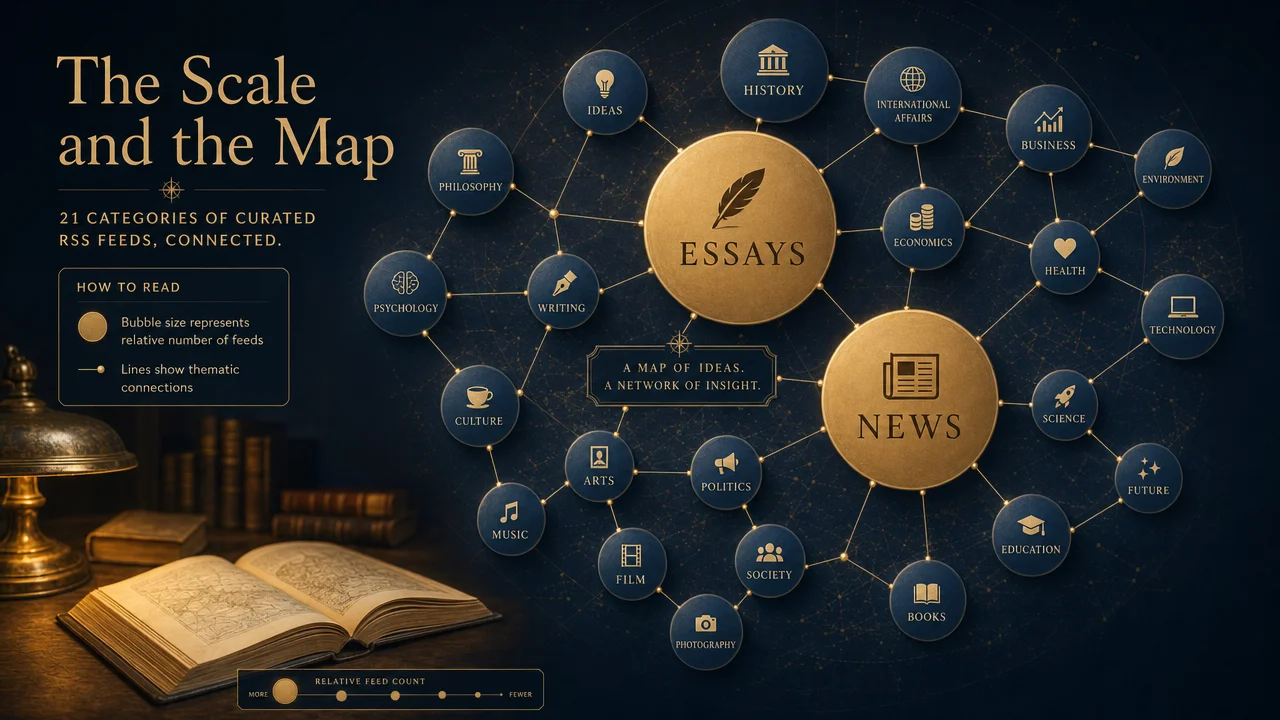
Here is the complete category map, straight from stats.json. The counts are the number of live feeds in each category after validation — not the number of URLs someone once collected.
Category
OPML file
Live feeds
🧠 AI Research & Labs
en-ai-research.opml
121
⚙️ AI Engineering & LLM
en-ai-eng.opml
230
📡 AI News & Insights
en-ai-news.opml
93
🔐 Cybersecurity
en-cybersecurity.opml
550
⚛️ Web Frontend & Standards
en-web-frontend.opml
1,035
🛠️ Developer Tools
en-dev-tools.opml
101
💻 Backend & Systems
en-backend.opml
172
☁️ DevOps & Data
en-devops-data.opml
45
📱 Mobile Development
en-mobile.opml
69
🏗️ Engineering Team Blogs
en-tech-teams.opml
169
🎨 Product Design & UX
en-product-design.opml
27
🔬 Science
en-science.opml
368
🚀 Startups & Indie Hackers
en-startups.opml
94
💰 Finance & Investing
en-finance.opml
207
📰 News & Politics
en-news.opml
1,225
✍️ Essays & Ideas
en-essays.opml
1,616
🎬 Entertainment
en-entertainment.opml
942
🏆 Sports
en-sports.opml
404
🌿 Life & Culture
en-lifestyle.opml
1,166
🎧 Podcasts & Audio
en-podcasts.opml
245
📬 Newsletters
en-newsletters.opml
57
Total
feeds.opml
8,936
A few things are worth reading out of this table rather than just reading it.
The distribution is deliberately uneven, and the shape tells you where the open web still publishes. Essays & Ideas (1,616), News & Politics (1,225), Life & Culture (1,166), and Web Frontend (1,035) are the four heavyweights — which makes sense, because independent writing, journalism, culture blogging, and front-end development are the domains where RSS never actually left. People in those worlds kept their feeds alive because their readers kept using them.
The small categories are just as informative. Product Design & UX has 27 feeds and DevOps & Data has 45 — not because those fields are small, but because their practitioners mostly moved to closed platforms (design lives on Figma communities and social, DevOps knowledge lives in vendor docs and conference talks).
A count of 27 isn't a failure of the list; it's an accurate reading of how much of that field still publishes to open feeds. A directory that padded those numbers with dead links or off-topic blogs would be lying to you about the state of the web.
And the three AI categories — 121 + 230 + 93 = 444 feeds total — are the clearest example of the content-classification principle in action. Those feeds are scattered across a dozen upstream sources, many of which don't have an "AI" bucket at all. Pulling them out and splitting them by audience is exactly the reclassification work that a source-organized list can't do.
Practical guidance: don't import all 8,936 feeds on day one. That's a firehose, and a firehose is how people quit RSS in the first week. Pick one or two categories that map to something you already spend attention on, import those, live with them for a week, and expand from there.
The per-category OPML files exist precisely so you can start narrow. The all-in-one feeds.opml is there for power users, self-hosted aggregators, and — as we'll see — automated pipelines that don't care how many feeds they're chewing through.
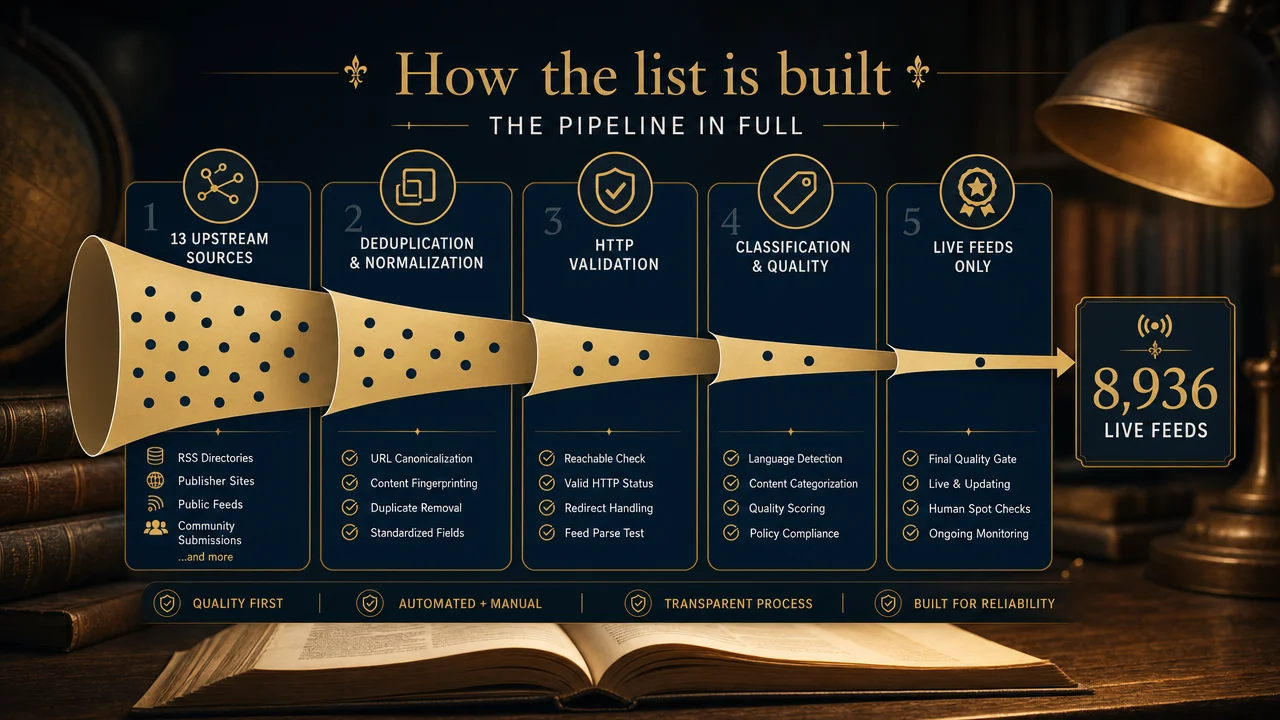
How the list is built: the pipeline in full
The value of this directory is entirely in its process, so it's worth walking through that process in detail. Nothing here is secret; the whole point is that it's auditable.
Step 1 — Aggregate 13 open-source upstream lists
The raw material is other people's work, credited openly. The list aggregates and re-indexes 13 public, open-source upstream feed collections:
plenaryapp/awesome-rss-feeds
simevidas/web-dev-feeds
impressivewebs/frontend-feeds
tuan3w/awesome-tech-rss
RSS-Renaissance/awesome-AI-feeds
RSS-Renaissance/awesome-blogCN-feeds
vishalshar/awesome_ML_AI_RSS_feed
foorilla/allainews_sources
alan-turing-institute/ai-rss-feeds — self-generated feeds for AI sites that don't publish RSS
leontloveless/ai-rss-feeds
jonchretien/dev-lists
JackyST0/awesome-rsshub-routes
chrbailey/agent-data-sources
This matters for two reasons. First, it's honest — the README credits every upstream as "the real data contributor," and this repo's job is validation and reorganization, not pretending to have discovered 8,936 feeds from scratch.
Second, aggregation is where the coverage comes from. Any single upstream list has blind spots; a web-dev list knows nothing about science feeds, an AI list ignores sports. Merging thirteen complementary lists is how you get from a few hundred feeds in any one domain to nearly nine thousand across all of them.
One of those upstreams — the Alan Turing Institute's — even generates feeds for AI sites that don't natively publish RSS, which extends coverage into sources a pure "collect existing feeds" approach would miss entirely.
Step 2 — Deduplicate
Thirteen overlapping lists means heavy duplication. The same popular blog appears in five different upstreams under three slightly different URL forms (http vs https, trailing slash, /feed vs /feed/, feedburner redirects). Dedup collapses these to a single canonical entry.
The stated principle is explicit: a feed isn't re-included when it duplicates an upstream list. Without this step, the "8,936" number would be inflated with the same handful of famous feeds counted over and over.
Step 3 — HTTP-validate through three gates
This is the heart of the pipeline and the reason the list doesn't rot. Every candidate feed is fetched and must clear three gates in order:
Status gate — the server returns HTTP 200. A 404, a 301 to a dead page, a 403 paywall, or a timeout fails here immediately.
Content-type gate — the response carries a feed content-type. This catches the common failure where a URL still "works" but now returns an HTML landing page ("subscribe to our newsletter!") instead of a feed. A 200 status alone isn't enough; the server has to actually be serving a feed.
Parse gate — the body parses into at least one real item. This catches feeds that are technically valid XML but empty, malformed, or permanently stalled. A feed with a valid structure and zero entries is functionally dead, and it fails here.
Only feeds that pass all three land in the published list, and the check is re-run periodically so that feeds which die after inclusion get dropped on the next pass. The three-gate design is the difference between "this looks like a feed URL" and "this is a feed that will actually show you articles today."
Step 4 — Classify by content, with human review
Surviving feeds are sorted into the 21 categories based on what they publish — article titles combined with the upstream signal — rather than which list they came from. This is the step that keeps categories clean, and it's explicitly not fully automated: the pipeline classifies, then a human reviews. Automated classification alone would misfile the edge cases (is a blog about the finance of AI startups "AI," "Finance," or "Startups"?); a human pass resolves them.
The published decision principles back this up — content quality is judged on cadence (updated at least weekly) and format (at least 50% full-text RSS, with summary-only feeds marked but deprioritized), and diversity is enforced by capping any single author or outlet at one or two feeds per category so no single voice dominates.
Step 5 — Audit, diff, publish
The final stages handle change over time. An audit pass handles dead links surfaced since the last run. A diff generates the changelog so the history of what was added and removed is visible, not silent.
And publish pushes the regenerated OPML files, LIST.md, and stats.json. Because the OPML files and LIST.md are generated artifacts, the repo deliberately doesn't accept pull requests that edit them directly — a hand-edited OPML would just be overwritten on the next monthly run.
Contributions go through an issue workflow instead (suggest a feed, report a dead link, propose a category), get folded into the next audit, and flow through the same validation gates as everything else. That's why a suggested feed takes anywhere from a day to a month to appear: it waits for the next scheduled run rather than being spot-added.
The funnel is the product
Step back and the shape is clear: thirteen messy inputs → dedup → a three-gate liveness filter → content classification with a human in the loop → a monthly re-run that drops what died. The 8,936 figure isn't a collection size; it's a survivor count — the number of feeds that were alive, on-topic, and parseable the last time the pipeline ran on 2026-07-10. And because stats.json publishes the funnel, you can audit that count instead of taking it on faith.
Most "awesome" lists ask for your trust. This one hands you the receipt.
Using it, part one: import the OPML into any reader
OPML is the boring, load-bearing standard that makes all of this portable. It's an XML file that lists feeds and their folder structure, and every serious RSS reader can import it. That means the 21 categories in this repo arrive in your reader as 21 pre-built folders — you don't reconstruct the organization by hand, it comes with the file.
Two ways to start:
Single category: grab one file, e.g. feeds/en-ai-research.opml, for a focused, low-volume start. Recommended for your first import.
Everything: grab feeds.opml for all 8,936 feeds across all 21 folders. Recommended for self-hosted aggregators and automation, not for a fresh reader on day one.
Here's where the import lives in each of the six readers the repo calls out:
Reader
Where import lives
Best for
Inoreader
Settings → Import / Export → Import OPML
Full-featured cloud reader, strong filtering and rules
Feedly
Settings → Import OPML
Most popular cloud reader, clean mobile apps
NetNewsWire
File → Import Subscriptions
Free, open-source, native macOS/iOS, no account
Miniflux (self-hosted)
Settings → Import → OPML
Minimal, fast, single-binary, privacy-first
FreshRSS (self-hosted)
Settings → Import → OPML
Powerful self-hosted, good for large feed counts
Readwise Reader
Settings → Import → OPML
Read-it-later + RSS + highlights in one place
A few practical notes that will save you a bad first day:
Cloud vs. self-hosted is the real fork in the road. Inoreader, Feedly, and Readwise Reader run their servers, poll the feeds for you, and sync across your devices — you trade some control for zero maintenance. Miniflux and FreshRSS run on your own box (a $5 VPS, a home server, a Raspberry Pi), which means the feed data never touches a third party and you can point automation directly at your own database.
NetNewsWire sits in between: local-first and account-free, syncing through iCloud or a service of your choice. If you don't have a strong reason, start with a cloud reader; move to self-hosted when you want the automation hooks or the privacy.
Large imports take time to populate. If you import feeds.opml into a fresh cloud account, don't panic when the interface is sluggish for a few minutes — the server is fetching and back-filling thousands of feeds. Self-hosted readers on modest hardware may want the feeds spread across a couple of import passes rather than all 8,936 at once.
This is also, frankly, the strongest argument for starting with a single category: 121 AI-research feeds populate instantly; 8,936 don't.
Folders are yours to prune. After import, you'll have 21 folders. Delete the ones you don't want, and inside the ones you keep, unsubscribe from individual feeds that don't earn their place.
The list is a starting point, not a contract. The fastest way to a reading habit you'll actually keep is to be ruthless in the first week — a folder with 40 feeds you read beats a folder with 400 you skip.
Re-importing is safe. When the repo updates and you want the new feeds, re-importing the OPML is non-destructive in every reader listed — it adds what's new and skips what you already have, rather than wiping your subscriptions. So you can treat the monthly-refreshed OPML as a source you periodically re-pull, not a one-time setup.
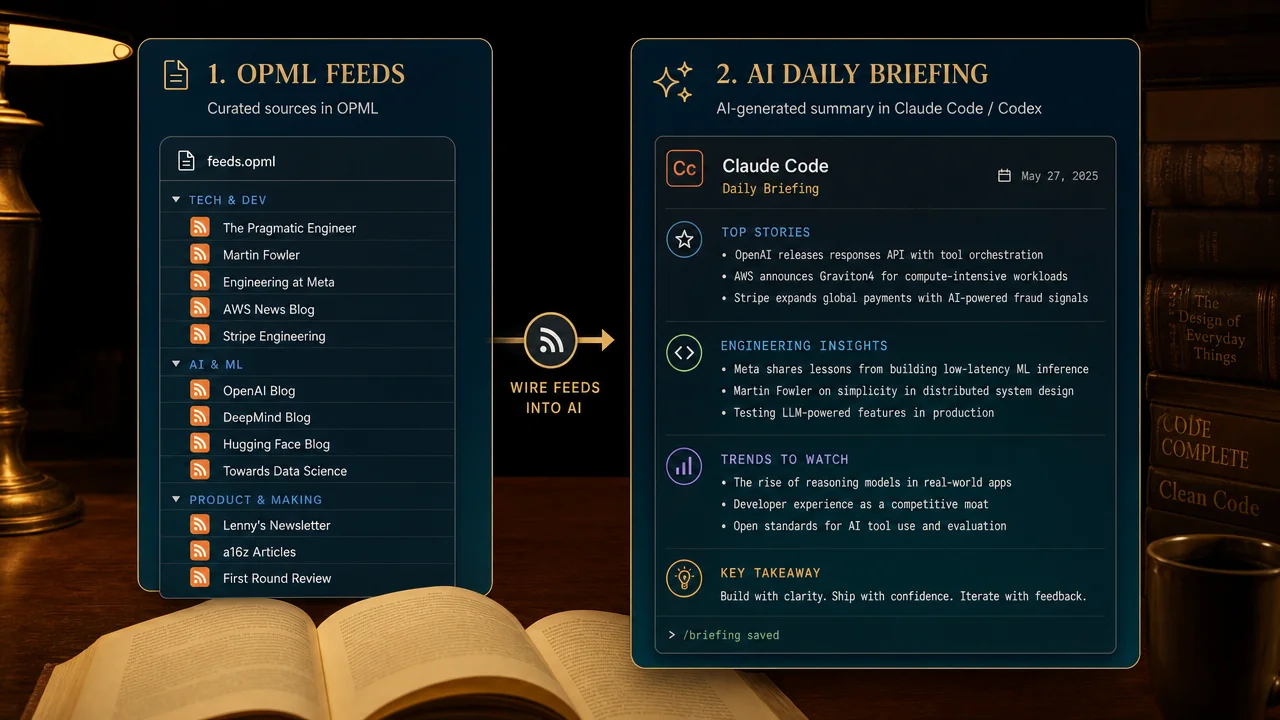
Using it, part two: wire the feeds into Claude Code or Codex
This is the section that separates an RSS list from an RSS pipeline, and it's the reason this directory ships raw OPML URLs rather than just a pretty webpage.
An OPML file is a plain, machine-readable list of feed URLs. A coding agent like Claude Code or Codex can read that file, fetch every feed, parse the entries, pull the article bodies, and write you a summary — with no server to deploy, no cron job to configure, and no glue code to maintain. You describe the pipeline in a sentence or two; the agent builds and runs it in its sandbox.
The repo's own README gives the canonical example:
Download https://raw.githubusercontent.com/aiworkflowpro/awesome-rss-feeds-list/main/feeds/en-ai-research.opml,
parse every feed with feedparser, fetch the article bodies from the last 24 hours,
and write a 500-word digest grouped by topic to my notes.
That single prompt is a complete information product: it fetches the OPML, parses ~121 AI-research feeds, filters to the last 24 hours, groups the results, and writes a digest. Let's unpack why this works and how far you can take it.
Why the agent approach beats a hand-built script
You could write this yourself in Python — and later in this guide we will, for the cases where you want a permanent, unattended pipeline. But for exploratory and one-off work, handing it to an agent is strictly faster, for three reasons:
The agent handles the messy parts. Real feeds are inconsistent: some are full-text, some summary-only, some use content:encoded, some put the body in description, dates come in four formats, and a handful will be malformed. An agent writing feedparser code adapts to these on the fly and recovers from errors instead of crashing the run.
You iterate in natural language. "Now only include posts that mention evaluation or benchmarks." "Group by lab instead of by topic." "Add a one-line 'why it matters' to each item." Each refinement is a sentence, not a code change.
There's nothing to deploy. The agent fetches, parses, and summarizes inside its own environment. You get the digest; you don't get a repository to maintain.
A ladder of prompts, from digest to briefing
Start with the repo's example, then climb:
Daily digest, one category. The baseline. Point at one OPML file, filter to the last 24 hours, summarize.
Fetch https://raw.githubusercontent.com/aiworkflowpro/awesome-rss-feeds-list/main/feeds/en-ai-eng.opml.
Parse all feeds with feedparser. Keep entries published in the last 24 hours.
Write a digest grouped by theme (frameworks, tooling, model releases, infra),
one bullet per story with the source and a link. Skip anything that's purely a job posting or a release-notes changelog.
Cross-category weekly briefing. Point at several OPML files and ask for a synthesis rather than a list.
Fetch the en-ai-news, en-startups, and en-finance OPML files from the awesome-rss-feeds-list repo.
Parse all of them, keep the last 7 days, and write a one-page Monday briefing:
the five threads that showed up across more than one category, with the outlets that covered each.
Flag anything where the finance feeds and the AI-news feeds are telling contradictory stories.
Deduplicated news, one story per event. The single biggest quality-of-life win over a raw reader.
From the en-news OPML, pull the last 24 hours. Many outlets cover the same events.
Cluster entries that are about the same underlying event, and give me ONE line per event
with the list of outlets that covered it, sorted by how many outlets picked it up.
I want to see what's actually happening, not read the same story nine times.
Keyword watch across everything. Turn 8,936 feeds into a single alert.
Fetch feeds.opml (all 8,936 feeds). Parse the last 24 hours.
Return only entries whose title or body mentions "RAG", "context window", or "MCP".
For each, give the title, source, link, and the sentence the term appears in. No summary, just the matches.
Note what the last one does: it uses the entire directory as a monitored surface and collapses it to a handful of hits. That's a genuinely hard thing to do in a normal reader — you'd have to open every folder and skim — and it's a two-line prompt for an agent.
Making it a habit, not a one-off
The natural next question is "can this run every morning without me asking?" Yes, and there are two clean ways:
A saved prompt you re-run. Keep your favorite digest prompt in a note and paste it each morning. Zero setup, fully manual. Fine for most people.
A scheduled agent or script. If you want it unattended, have the agent write the pipeline once as a standalone script (covered in the next section) and schedule it with cron, a systemd timer, or a hosted scheduler. The agent is great for authoring the pipeline; a plain scheduled script is the right tool for running it every day.
The dividing line is simple: use the agent for exploration and iteration, graduate to a script when the pipeline is stable and you want it to run without you in the loop.
Using it, part three: advanced pipelines
Once you're comfortable with the agent-driven approach, here are three patterns that push the list further. All three are things the OPML files make straightforward precisely because they're plain lists of URLs.
Pattern 1 — A custom digest pipeline with feedparser
When a digest is stable enough to run unattended, freeze it into a script. Here's the skeleton an agent would produce — and that you can hand-tune — using Python's feedparser:
import feedparser
import datetime
import xml.etree.ElementTree as ET
import urllib.request

OPML_URL = "https://raw.githubusercontent.com/aiworkflowpro/awesome-rss-feeds-list/main/feeds/en-ai-eng.opml"
WINDOW = datetime.timedelta(hours=24)

def feed_urls_from_opml(opml_url: str) -> list[str]:
    raw = urllib.request.urlopen(opml_url).read()
    tree = ET.fromstring(raw)
    return [
        node.attrib["xmlUrl"]
        for node in tree.iter("outline")
        if node.attrib.get("xmlUrl")
    ]

def recent_entries(feed_url: str, cutoff: datetime.datetime) -> list[dict]:
    parsed = feedparser.parse(feed_url)
    items = []
    for entry in parsed.entries:
        published = entry.get("published_parsed") or entry.get("updated_parsed")
        if not published:
            continue
        ts = datetime.datetime(*published[:6])
        if ts >= cutoff:
            items.append({
                "title": entry.get("title", "").strip(),
                "link": entry.get("link", ""),
                "source": parsed.feed.get("title", feed_url),
                "published": ts,
            })
    return items

def main() -> None:
    cutoff = datetime.datetime.utcnow() - WINDOW
    all_items: list[dict] = []
    for url in feed_urls_from_opml(OPML_URL):
        try:
            all_items.extend(recent_entries(url, cutoff))
        except Exception:
            continue  # a single dead feed shouldn't kill the run
    all_items.sort(key=lambda item: item["published"], reverse=True)
    for item in all_items:
        print(f"- [{item['source']}] {item['title']}\n  {item['link']}")

if __name__ == "__main__":
    main()
That's a complete, dependency-light daily crawler in ~40 lines. The try/except around each feed is the load-bearing detail — with hundreds of feeds, one slow or malformed source will otherwise stall or crash the whole job, and you want the run to shrug it off.
From here you can pipe all_items into an LLM call for summarization, write to Markdown instead of stdout, or store to a database. Note that because the list is already HTTP-validated, your script starts from a population of feeds that were alive at the last audit — you're not wasting most of your run timing out on dead URLs the way you would with a raw, unvalidated feed list.
Pattern 2 — A local RAG index over your feeds
If you want to ask questions of your feeds — "what have the AI-eng blogs said about evaluation harnesses in the last month?" — a digest isn't enough; you want retrieval. The recipe:
Ingest. Use the feedparser crawler above, but widen the window (30–90 days) and keep the full article body, not just the title.
Chunk. Split each article into overlapping passages of a few hundred tokens so retrieval returns focused excerpts rather than whole posts.
Embed. Run each chunk through an embedding model and store the vectors alongside the source metadata (title, link, feed, date).
Store. A local vector store is plenty here — sqlite-vec, Chroma, or LanceDB all run on your laptop with no server. The corpus from even a few hundred feeds over a month is small by RAG standards.
Query. At question time, embed the question, retrieve the top-k chunks, and hand them to an LLM with instructions to answer only from the retrieved passages and cite the source link for each claim.
The reason this works cleanly on this particular list is the content classification. Because the categories are on-topic, you can build a scoped index — a RAG over just en-ai-research + en-ai-eng gives you an AI-focused knowledge base without dragging in sports and lifestyle noise you'd then have to filter out at query time. A source-organized list would force you to clean the corpus first; a content-classified one lets you scope it by picking OPML files.
A minimal ingestion loop, reusing recent_entries from Pattern 1 but keeping bodies:
# pseudo-code sketch — swap in your embedding + vector store of choice
for url in feed_urls_from_opml(OPML_URL):
    parsed = feedparser.parse(url)
    for entry in parsed.entries:
        body = entry.get("content", [{}])[0].get("value") or entry.get("summary", "")
        for chunk in chunk_text(body, size=400, overlap=60):
            vector = embed(chunk)
            store.add(vector, metadata={
                "title": entry.get("title"),
                "link": entry.get("link"),
                "source": parsed.feed.get("title"),
            })
Then answering a question is retrieve-then-prompt: store.search(embed(question), k=8) → feed the chunks and their source links to an LLM → get a cited answer. You've turned a subscription list into a private, queryable research corpus that updates whenever you re-run ingestion.
Pattern 3 — A multi-source aggregation dashboard
The third pattern is a personal front page. Instead of reading in a reader, you generate a single static HTML (or Markdown) page each morning that lays out the day's items grouped by category, and open that. The build is the Pattern 1 crawler run across several OPML files, writing a templated page instead of printing to stdout:
Run the crawler once per category you care about (en-ai-eng, en-finance, en-news, …).
Render each category as a column or section, newest first, with source and timestamp.
Write the whole thing to an index.html, drop it on a static host or open it locally, and schedule the build with cron.
Because it's static output, there's no runtime, no database, and nothing to keep alive — the page is just yesterday's crawl frozen into HTML. It's the lowest-maintenance way to get a "my personal newspaper" view, and it composes naturally with the other two patterns: add a summarization step and it's a digest dashboard; add the RAG index and each item can link to "related past coverage."
The through-line across all three patterns: the OPML files are plain URL lists, so they drop into any pipeline you can imagine. The list did the hard part — finding and validating the feeds — and left you a clean, machine-readable substrate to build on.
RSS as a content-strategy engine
Everything so far has framed the list as a reading tool. For anyone who publishes — a founder writing in public, a marketer running a blog, a developer advocate, a solo operator building in the open — it's also an input to the content-production loop, and this is where a validated, agent-ready feed directory earns its keep a second time.
Three concrete uses:
Competitive and topic monitoring. Build a focused OPML from the categories that map to your space — for an AI-tools builder, that's en-ai-eng, en-ai-news, and en-startups — and you have a standing watch over what your market is shipping and saying. Wired into the keyword-watch prompt from earlier, it becomes an alert: tell the agent to surface only entries mentioning your product category, your competitors, or the problems you solve, and you learn about a competitor's launch or a shift in the conversation the morning it happens, not a week later when it finally reaches your social timeline.
Idea sourcing without the algorithm's bias. Writers who source ideas from a social timeline inherit that timeline's bias toward whatever is already viral. Sourcing from a broad, chronological feed set surfaces the early signal instead — the technical blog post three days before it gets picked up, the niche essay that never trends but names a problem precisely.
Point an agent at your en-essays and en-ai-research feeds with "give me five under-discussed threads from the last week that I could write an original angle on," and you're mining the open web's long tail rather than re-reacting to the same ten viral posts everyone else already saw.
Gap analysis before you publish. A feed-backed RAG index (Pattern 2) answers a question every writer should ask and rarely can: has this already been said, and better? Query your topic against a month of feeds and you get the existing coverage, the angles already taken, and — by their absence — the angle nobody has.
That turns "I hope this is fresh" into "I've checked, and here's the gap I'm filling."
The reason this list is a good substrate for all three is the same reason it's a good reading list: the categories are on-topic, so the monitoring surface is clean; the feeds are validated, so the pipeline isn't burning its run on dead links; and the OPML is machine-readable, so an agent can drive the whole loop. A content-strategy input is only as good as its source data, and a rotting link dump makes a poor foundation. A maintained, classified, validated directory makes a solid one.
One discipline worth keeping: consume to inform, not to imitate. A feed firehose can just as easily produce derivative, me-too content as original work — the difference is whether you use it to find gaps and early signal, or to chase whatever the feeds are already saying. The tool is neutral; the strategy is yours.
Where this fits: the AI Workflow Pro ecosystem
awesome-rss-feeds isn't a standalone experiment; it's one piece of a set of open, agent-oriented resources from AI Workflow Pro. Each one is built on the same principle you've seen here — publish the process, make the artifact machine-readable, keep it maintained — and each has a companion guide.
The connection to this list is direct. The ai-practices list is another auto-curated directory built by the same kind of pipeline. The workflow-agent-spec tells you how to package the digest pipelines from this guide into reusable Claude Code Skills so you're not re-describing them every time.
And the occupational-os roles are exactly the kind of agent personas you'd point at a feed digest — a "market analyst" role reading the finance feeds, a "research scout" reading the AI-research feeds. The RSS list supplies the inputs; the rest of the ecosystem supplies the agents that consume them.
How it compares to other RSS collections
Directness is fairer than vagueness here, so let's be specific about what sets this list apart from the many other "awesome-rss" collections on GitHub. This isn't a knock on those projects — several of them are among the 13 upstreams this list is built from, and they deserve the credit the README gives them. It's a description of what changes when you add a maintenance pipeline on top.
Validation vs. collection. The typical awesome-rss list is a curation effort: a person found good feeds and wrote them down. That's valuable, but it captures liveness only at commit time and decays afterward.
This list treats liveness as a fact to re-establish on a schedule, through three HTTP gates, with dead links dropped on each pass. The practical result: when you import it, a very high fraction of the feeds actually resolve to live articles, because the ones that didn't were removed before publication.
Content classification vs. source classification. Most collections inherit their folder structure from the sub-lists they merged, so a "tech" folder is really "whatever three tech lists happened to contain," complete with off-topic drift. This list re-classifies by what each feed publishes, with a human reviewing the edge cases, so a category is a category. The clearest proof is AI: instead of one "AI/ML" bucket, you get Research & Labs, Engineering & LLM, and News & Insights, split by audience — a distinction that's impossible to make if you organize by source.
Published funnel vs. a trust-me number. A collection tells you it has "500+ feeds." This list publishes stats.json with the per-category counts and a generation timestamp, so the 8,936 figure is auditable rather than asserted. You can open the file and check it.
Scale through aggregation vs. one person's reach. Any single curator has domain blind spots. By aggregating 13 complementary upstreams and then deduplicating, this list reaches nearly 9,000 live feeds across 21 domains — breadth no single hand-maintained list matches — without double-counting the famous feeds that appear in all of them.
Agent-native by design. Finally, this list is built to be consumed by machines, not just browsed by humans. Raw OPML URLs, one file per category and one for everything, are exactly the shape a coding agent or a Python script wants. Many collections are Markdown tables of links — great for reading, awkward for piping into a pipeline. Here the artifact is the machine-readable file.
The honest summary: if you want to browse a nicely written list of feeds, plenty of good ones exist. If you want a directory you can import today and trust that the links resolve, scope by clean topic, audit the counts, and feed straight into an agent — that combination is what this one is built for.
Frequently asked questions
Is it really free? What's the license?
Yes, and it's about as free as software gets. The repository is released under CC0-1.0, a public-domain dedication — you can use, copy, modify, and redistribute the OPML files for any purpose, commercial or not, with no attribution required. (The underlying feed data is aggregated from public open-source upstream lists, and those upstreams keep their own licenses; CC0 covers this repo's compilation and organization.) In practice, for importing feeds and building pipelines, treat it as unrestricted.
Do I need to know how to code to use this?
No. The core use — download an OPML file, import it into Feedly or NetNewsWire, read — involves zero code and takes under a minute. Coding only enters the picture for the advanced pipelines (Claude Code digests, RAG indexes, custom crawlers), and even those are increasingly "describe it to an agent in a sentence" rather than "write it yourself." Start with the reader import; reach for the pipelines only when you want automation.
What does "HTTP-validated" actually guarantee?
It guarantees that, at the last pipeline run, each published feed passed three gates: the server returned HTTP 200, the response was served as a feed content-type, and the body parsed into at least one real item. It does not guarantee a feed will never go dark later — feeds die between audits — which is why the check is re-run periodically and dead links are dropped on each pass. It's a strong liveness signal, not an eternal warranty. The stats.json timestamp tells you how fresh the last validation was.
How often is the list updated?
The pipeline runs on a monthly cadence — around the first of each month, maintainers review the month's issues, re-crawl the upstreams, fold in community-suggested feeds, re-validate everything, re-classify, handle dead links, diff the changelog, and publish. So the list is a monthly-refreshed snapshot, and stats.json records when the current one was generated.
Should I import all 8,936 feeds at once?
Only if you're feeding an automated pipeline or running a self-hosted aggregator built for volume. For a normal reader, no — that's a firehose and the fastest way to abandon RSS. Import one or two categories that match what you already follow, live with them for a week, and expand deliberately. The per-category OPML files exist for exactly this.
How do I suggest a feed or report a dead link?
Through the repo's issue workflow, not by editing files. The OPML files and LIST.md are generated artifacts that get overwritten on each monthly run, so a PR editing them wouldn't survive. Instead, open an issue using the templates — one for suggesting a new feed (URL, homepage, suggested category, a short reason), one for reporting a dead link (the URL and the error type), and one for proposing a new category. Suggestions are folded into the next monthly audit, so expect a delay of anywhere from a day to a month before an accepted feed appears.
Why are some categories so small — is Product Design (27 feeds) broken?
No, it's accurate. A small count reflects how much of that field still publishes to open RSS feeds, not a gap in the list. Design and DevOps practitioners largely moved to closed platforms and vendor docs, so there simply aren't thousands of live design feeds to find. Padding those categories with dead links or off-topic blogs would make the number bigger and the list worse. The uneven distribution is a feature: it's an honest map of where the open web still publishes.
Can I use this with a self-hosted reader like FreshRSS or Miniflux?
Yes, and it's a natural fit. Both accept OPML import directly (Settings → Import → OPML), the feed data stays entirely on your own server, and you can point scripts or agents straight at your reader's database or API. FreshRSS in particular handles large feed counts well, so it's a reasonable home for the full 8,936-feed import if you want everything in one self-hosted place.
What's the difference between this and just following accounts on social media?
Control over the ranking and inclusion functions. A social timeline decides what you see and in what order, optimizing for its engagement objective; you get an algorithmically curated subset, reordered, with content inserted. An RSS subscription shows you every post from the sources you chose, newest first, with nothing added and nothing hidden. RSS also has no engagement mechanics — no likes, no reply threads, no infinite scroll — so it tends to produce reading rather than scrolling. Neither is universally better; they're different tools. RSS is the one where you hold the ranking function.
Do I need Claude Code or Codex to get value from this?
Not at all. The agent integration is an optional power-user layer. The list stands entirely on its own as a validated set of OPML files for any RSS reader. If you never write a single prompt, you still get 8,936 vetted feeds in 21 clean folders. The agents just let you turn that raw stream into digests, briefings, and searchable indexes when you want to.
The bottom line
The value of awesome-rss-feeds isn't that it collected a lot of RSS feeds. Anyone can collect links. The value is the process bolted on top: thirteen open-source upstreams merged and deduplicated, every feed pushed through three HTTP validation gates, classified by what it actually publishes rather than where it came from, AI broken out as a first-class topic, and the whole funnel published in stats.json so you can audit the count instead of trusting it.
What you get is a survivor list — 8,936 feeds that were alive, on-topic, and parseable on 2026-07-10 — refreshed monthly, in a format both humans and agents can consume.
The move from here is small and concrete. Pick one category that maps to something you already care about. Import its OPML into whatever reader you'll actually open.
Live with it for a week. If you use Claude Code or Codex, point it at the same OPML and ask for a morning digest. That's the entire on-ramp — from "RSS sounds good" to a running information pipeline — and it costs an afternoon, not a weekend.
Readers were always a solved problem. Now the list is, too. The only thing left to decide is what you want to read.
A 30-minute video is too long for one conversation. This guide walks the 8-step Skill that locks the narration and one look, then gives each 3-minute segment to a fresh sub-agent, five at a time, and polishes the cut in an empty-context session.
The folder structure behind my AI agent team, the Herdr setup where Grok Build, Claude Code and Kimi Code work side by side, and the two live tasks from the video: an article published by voice and a three-model front-end test.
Eight folders of plain Markdown, a CLAUDE.md index in each, and seven prompts that make your agent interview you. Every prompt, template and command from the video, in order.
The same request gives a different answer every run because the agent fills every gap with the average of its training data. Three Markdown standards fix that: a meta standard, an eight-part prompt standard and a Skill standard. Free repo, one-prompt install.