I Let Claude Code Control My Logged-In Chrome (Setup Guide)
A beginner's guide to letting your AI agent work in your own logged-in Chrome with free Chrome Use: four setup steps, all 8 prompts, and the honest account risks.
A beginner's guide to letting your AI agent work in your own logged-in Chrome with free Chrome Use: four setup steps, all 8 prompts, and the honest account risks.

A 30-minute video is too long for one conversation. This guide walks the 8-step Skill that locks the narration and one look, then gives each 3-minute segment to a fresh sub-agent, five at a time, and polishes the cut in an empty-context session.
The folder structure behind my AI agent team, the Herdr setup where Grok Build, Claude Code and Kimi Code work side by side, and the two live tasks from the video: an article published by voice and a three-model front-end test.
Permissions, sandboxes and keeping agents safe

Most people find out where the boundary sits by hitting it mid-task. The two layers are simple enough to understand in advance — and understanding them in advance is the whole difference.
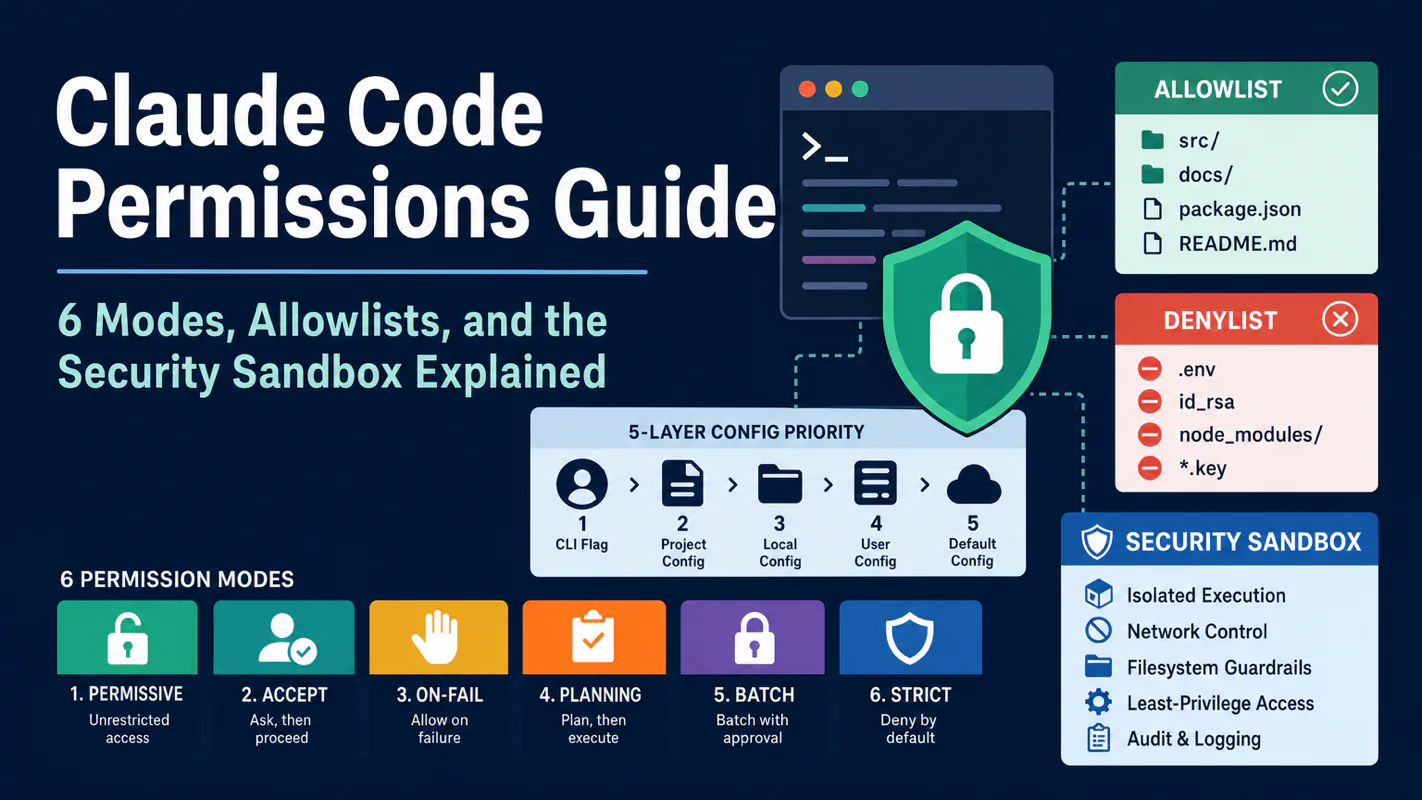
Permission prompts are not friction - they are what makes file-editing safe for real projects. Six modes compared, allowlist and denylist rules, the five-layer config priority chain, the OS sandbox as a second defence, and the one setting business process automation should never use.

One clever message turns a permission nobody remembers granting into an incident. Three stacked layers keep an ai agent for business safe even after the model has been talked around, and the day to install them is the day you open the first channel.
When I figure out how to get something real done with AI, you get the write-up — every step, including the parts that didn't work.