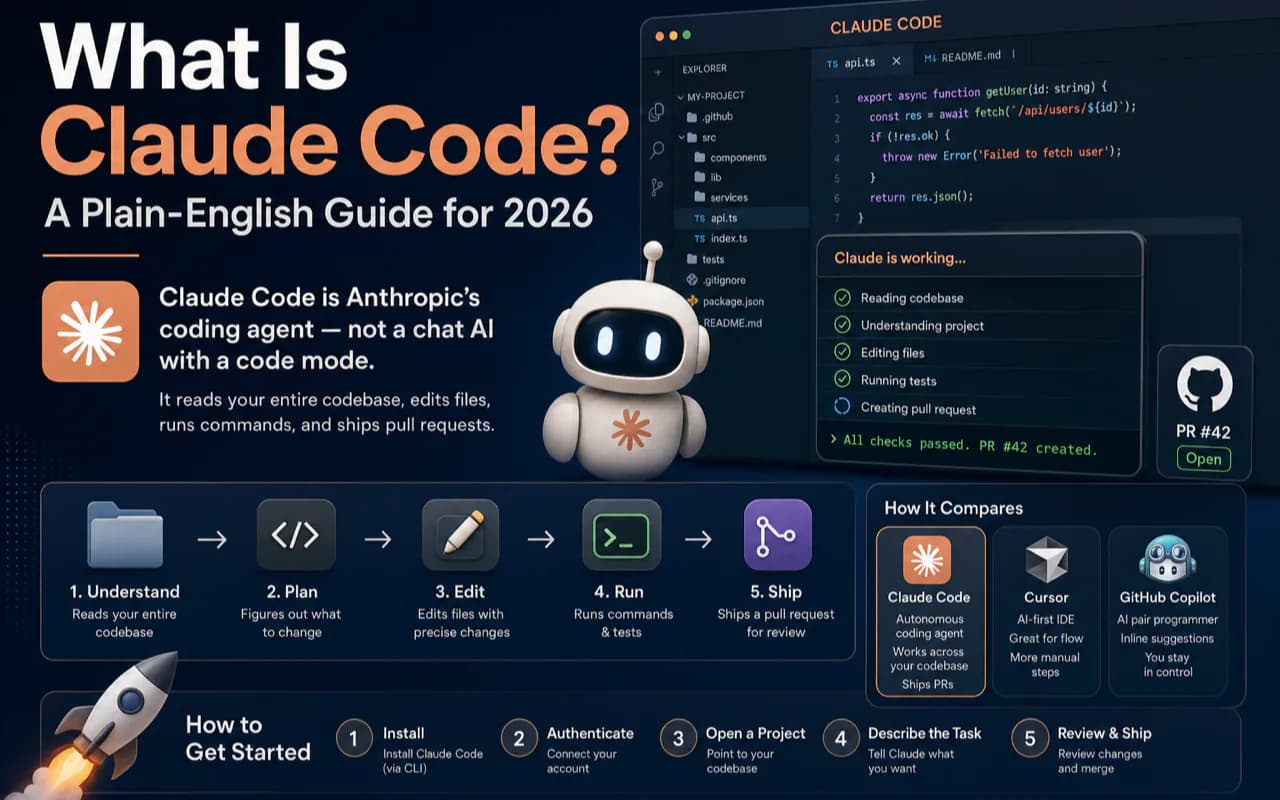
Claude Code is not a chatbot that writes code snippets. It is Anthropic's coding agent — a system that reads your entire project, edits files, runs terminal commands, executes tests, and opens pull requests. You describe a goal; it does the work.
That single distinction trips up most beginners. They open Claude Code expecting a fancier version of the Claude chatbot, use it like a chat window, and walk away unimpressed. This guide fixes that. By the end, you will know exactly what Claude Code is, how it differs from every other AI coding tool, and what your first real task should look like.
The 30-Second Answer
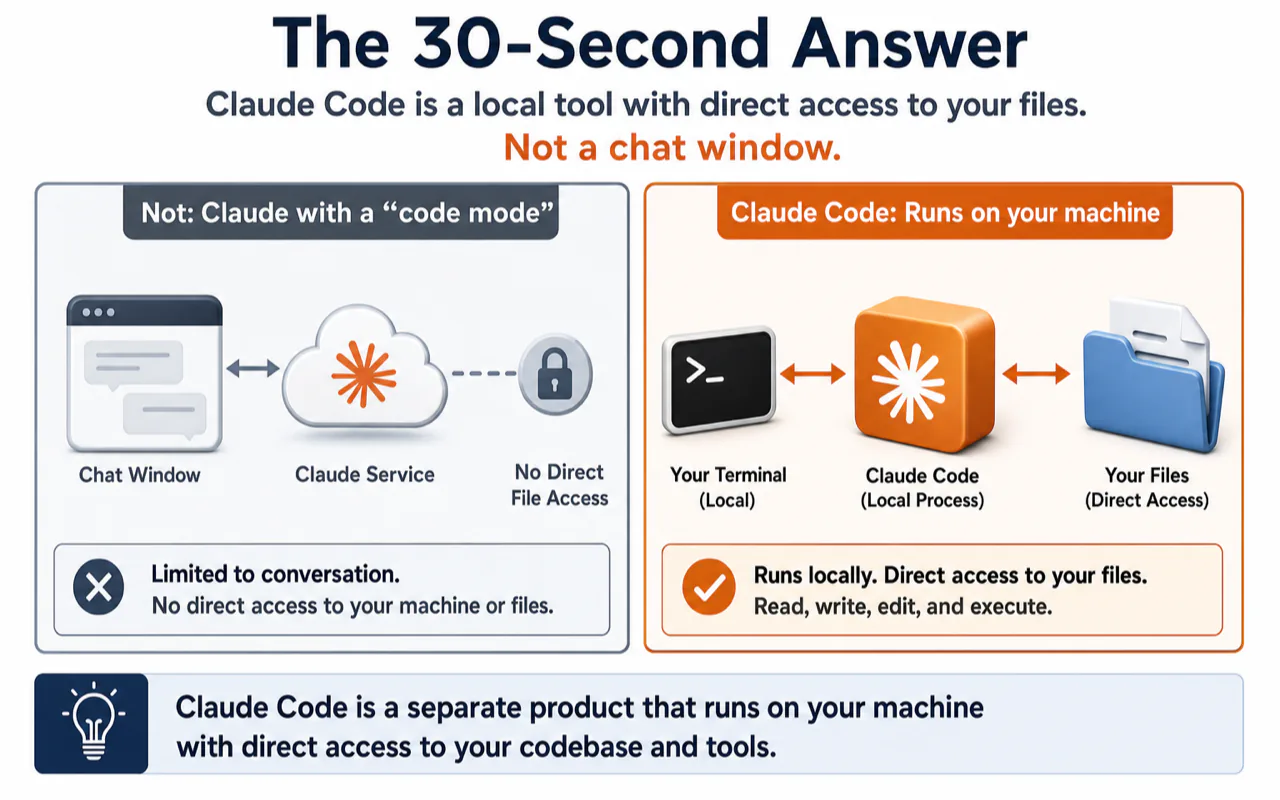
If you only have half a minute, here is the entire picture:
| Question | One-line answer |
|---|---|
| What is it? | Anthropic's coding agent — reads your codebase, edits files, runs commands, ships PRs |
| How is it different from ChatGPT / Claude chatbot? | The chatbot advises. Claude Code executes inside your actual project. |
| Does it cost money? | Yes. Included in Claude Pro/Max/Team/Enterprise subscriptions. No free tier. |
| How do I start? | Install the Desktop App → pick a small real task → let it edit → review the diff |
| Is it safe? | Runs locally. Git commit before each task, review diffs after. |
| Does it replace Cursor / Copilot? | No. They handle real-time completion. Claude Code handles block-level task delegation. Use both. |
The number-one beginner mistake: assuming Claude Code is "Claude with a code mode." It is a separate product, running on your machine, with direct access to your files. Not a chat window extension.
What Claude Code Actually Does — A Real Example
Concepts land faster with a concrete scenario. Say your website's buttons overlap on mobile but look fine on desktop. You want a fix.
With the Claude chatbot (claude.ai):
You paste the relevant CSS into the chat. Claude suggests adding a flex-wrap rule and a responsive breakpoint. You copy the suggestion, open your editor, find the right file, paste, test, iterate. The chatbot gives direction. You do the labor.
With Claude Code:
You type: "Fix the mobile button overlap. Only touch CSS files, don't change API logic. Run existing tests when done. List what you changed."
Claude Code reads your project tree, locates the component, finds the missing flex-wrap and an oversized gap value, edits two CSS files, runs your test suite, reports back: "Changed ButtonGroup.module.css lines 12 and 47. Tests pass. Here's the diff."
You open the diff, confirm it looks right, accept.
The chatbot is a consultant who gives advice from outside your building. Claude Code is a contractor who walks into the building, does the work, and hands you the finished result for sign-off.
I ran exactly this kind of task during a site redesign last year. A layout bug that would have taken me 30 minutes of file-hunting and manual testing took Claude Code about 90 seconds — and it caught a second spacing issue I had not noticed. That moment was when the "coding agent" label stopped being jargon and started being a job description.
Claude Code vs. the Claude Chatbot: Five Differences That Matter
Both products come from Anthropic. Both run on Claude models. But they work nothing alike.
| Dimension | Claude chatbot (claude.ai) | Claude Code |
|---|---|---|
| Role | Real-time Q&A | Task execution inside your project |
| Where it runs | Browser chat window | Your terminal, Desktop App, IDE, or browser code workspace |
| Can it see your project? | No. Only sees what you paste in. | Yes. Reads your entire codebase. |
| Can it take action? | No. Outputs text and code snippets. | Yes. Edits files, runs commands, commits to git, opens PRs. |
| Output | Chat messages | Real file changes (diffs), test results, pull requests |
They share a subscription. Log into claude.ai for chat. Launch Claude Code in your terminal or Desktop App for agent work. Same account, two completely different workflows.
Four Layers: From "AI" to "Claude Code"
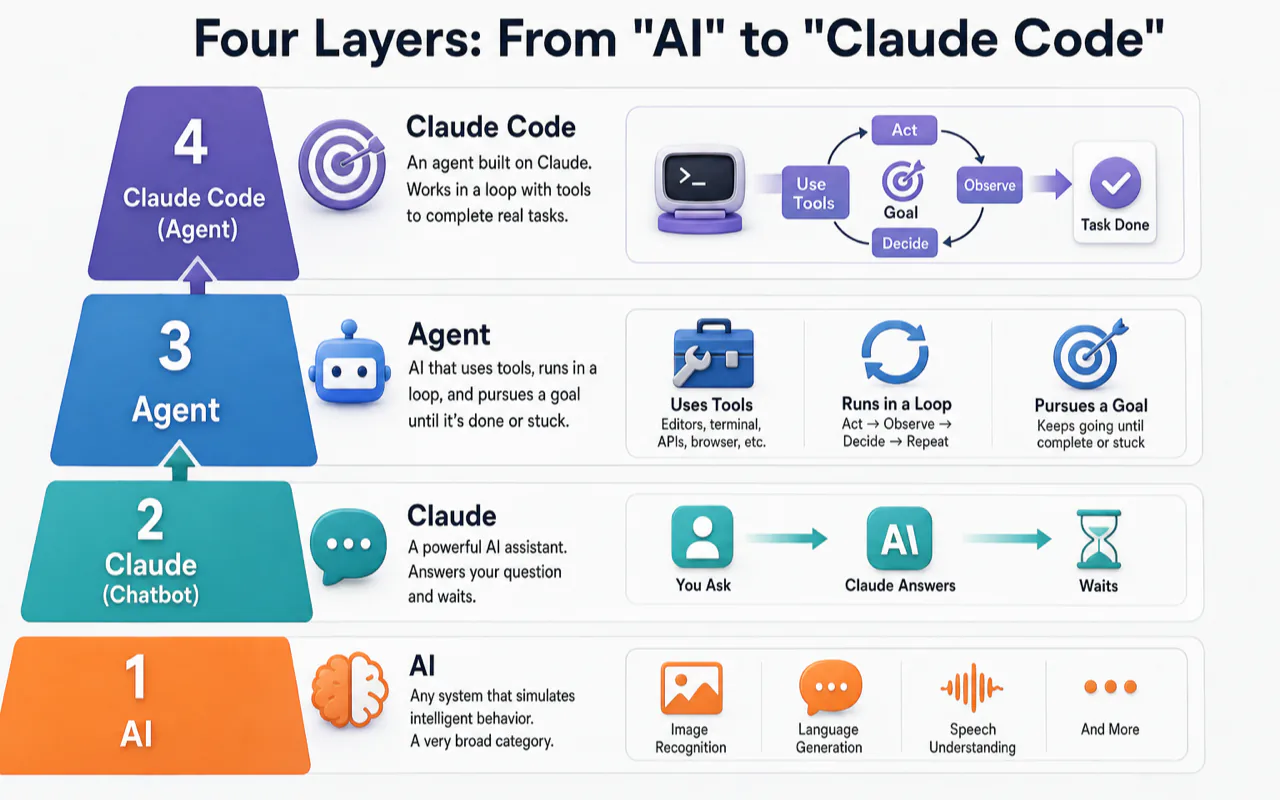
Most "what is Claude Code" articles jump straight to features. That leaves beginners nodding along without actually understanding why it matters. Here are the four conceptual layers, bottom to top.
Layer 1: AI
The broadest bucket. Any system that simulates intelligent behavior — image recognition, language generation, speech understanding. ChatGPT, Claude, Gemini, and Claude Code are all AI. This layer tells you nothing specific.
Layer 2: Agent
An agent is an AI system with three properties a plain chatbot lacks:
- It uses tools — file editors, terminals, APIs, web browsers
- It runs in a loop — act, observe results, decide what to do next, repeat
- It pursues a goal — it does not stop after one answer
The Claude chatbot is not an agent. It answers your question and waits. Claude Code is an agent. It keeps working until the task is done or it gets stuck and asks you.
Layer 3: Coding Agent
A coding agent is an agent specialized for software development. Its tools are file readers, code editors, test runners, and git. Its loop is: edit code → run tests → check results → fix failures → repeat. Its goals are things like "fix this bug" or "add this feature."
The reason coding agents work better than agents in most other domains: software has objective verification built in. Tests either pass or fail. Code either compiles or it does not. The agent does not need a human to grade every step — it can verify its own work. That property makes coding the single best use case for autonomous AI agents today.
Layer 4: Claude Code
Claude Code is Anthropic's specific coding agent product. It competes with OpenAI Codex, Google's Gemini CLI, and open-source tools like Aider. Each has a different philosophy:
| Tool | Company | Core strength |
|---|---|---|
| Claude Code | Anthropic | Terminal-native + deepest codebase understanding + multi-surface (CLI, Desktop App, IDE, browser) |
| OpenAI Codex | OpenAI | Cloud-async long tasks + ChatGPT ecosystem |
| Gemini CLI | Gemini model integration + command-line first | |
| Aider | Open source | Community-driven + git-native workflow |
Understanding these four layers matters because it changes how you use the tool. Beginners who think Claude Code is "AI that writes code" give it line-by-line instructions. Beginners who understand it is a coding agent give it goals and constraints — and get dramatically better results.
Claude Code vs. Cursor vs. Copilot vs. Codex: Where Each One Wins
The AI coding landscape in 2026 has more tools than anyone can track. But the tools that matter fall into clear lanes.
| Tool | What it fundamentally is | Best at | Who makes it |
|---|---|---|---|
| Claude Code | Coding agent | Multi-file task delegation — refactors, bug fixes, test suites, PRs | Anthropic |
| Cursor | AI-native IDE | Real-time autocomplete + visual multi-file editing inside the editor | Anysphere |
| GitHub Copilot | Code completion tool | Inline suggestions as you type, cheapest entry point ($10/mo) | GitHub / Microsoft |
| OpenAI Codex | Coding agent | Cloud-async tasks, ChatGPT integration | OpenAI |
Two dividing lines cut through this table:
- Chat AI vs. coding agent. ChatGPT and Claude chatbot give advice; Claude Code and Codex do the work. This is the biggest gap.
- Completion vs. delegation. Cursor and Copilot suggest the next line while you type; Claude Code and Codex take an entire task and run with it.
They are complementary, not competing. The most productive developers I know — including my own daily workflow — run a completion tool and a coding agent side by side. Cursor or Copilot handles typing speed. Claude Code or Codex handles the block-level jobs: "refactor this module," "write tests for these three files," "migrate this component from JavaScript to TypeScript."
I was wrong about this for months. I kept trying to pick "the one best tool" and felt frustrated that none of them covered everything. The breakthrough came when I stopped thinking of them as alternatives and started thinking of them as layers in a stack.
Who should start where?
| You are... | Start with | Why |
|---|---|---|
| Complete beginner | Claude Code Desktop App | Visual interface, no terminal required, shows diffs clearly |
| Daily editor user | Cursor or Copilot + Claude Code | Completion while typing, agent for bigger tasks |
| Terminal-heavy engineer | Claude Code CLI | Native to your existing workflow, pairs with git and scripts |
| Deep in the OpenAI ecosystem | Codex | Same account, cloud-async, lowest migration friction |
How Claude Code Works: The 6-Step Loop
When you hand Claude Code a task, six things happen inside:
[1] Receive task     — reads your prompt
       ↓
[2] Gather context   — reads CLAUDE.md, source files, error logs
       ↓
[3] Plan             — decides what to do and in what order
       ↓
[4] Execute          — edits files, runs commands, calls git
       ↓
[5] Self-verify      — runs tests, checks results
       ↓                (fails → loops back to step 4)
[6] Report           — tells you what changed, test results, suggests next steps
Step 5 is where the magic happens. A chatbot answers and stops. Claude Code runs your tests, sees the failure, goes back to step 4, and keeps iterating — sometimes for dozens of cycles — until the tests pass or it hits a dead end and asks you.
This loop is why "coding agent" is not marketing fluff. It is a fundamentally different interaction model. You are not having a conversation. You are delegating work to a system that can verify its own output.
Think of it like handing a task to a reliable junior developer: you explain what you want (step 1), they check the project docs and code (step 2), outline their approach for your approval (step 3), do the work (step 4), test it themselves first (step 5), and report back (step 6). The difference between a chatbot and a coding agent is identical to the difference between asking someone for advice and asking someone to do the job.
What Claude Code Does Well — and Where It Falls Short
Strengths
- Multi-file task delegation. Bug fixes, refactors, test creation, documentation — anything that spans multiple files and requires reading the full codebase.
- Codebase comprehension. Point it at an unfamiliar project and ask it to explain the architecture, trace a request flow, or identify the entry point. It reads the real files, not a summary.
- Self-verification. It runs your tests after making changes. If they fail, it tries again.
- Multiple entry points. Terminal CLI, Desktop App (visual diffs, beginner-friendly), IDE extensions (VS Code, JetBrains), and browser/mobile for remote tasks. All entry points connect to the same engine — your CLAUDE.md, settings, and MCP integrations carry over everywhere.
Honest Limitations
- It does not make decisions for you. Whether to ship, whether to restructure, whether to change the database — that judgment stays with you.
- It can be confidently wrong. Tests passing does not guarantee correct logic. It might make tests pass by introducing a deeper problem. Always review the diff.
- Vague instructions produce vague results. "Make it better" gives Claude Code license to change anything. Specify what to change, what not to touch, and what "done" looks like.
- High-risk actions need guardrails. File deletion, git pushes, production config changes — set these to require your approval.
A practical test: if you could hand the task to a junior developer and explain clear acceptance criteria, Claude Code can probably handle it. If you cannot articulate what "done" looks like, Claude Code will guess — and it will guess wrong.
Three Ways Beginners Crash (and How to Avoid Each One)
After running Claude Code daily for over a year and watching dozens of people try it for the first time, these are the three patterns that waste the most time:
Crash 1: Using it like a chat window. People open Claude Code, type "write me a function that sorts users by date," copy the output, and paste it into their editor manually. They just threw away the entire point of a coding agent. The fix: let Claude Code work inside your project. Let it read files, write files, run commands. That is what you are paying for.
Crash 2: No version control before letting it edit. Claude Code will change files. Sometimes it changes files you did not want it to touch. Without a git commit as a checkpoint, you are stuck manually reverting line by line. The fix: git commit before every Claude Code task. Non-negotiable. One command. Saves hours of pain.
Crash 3: Chasing advanced features on day one. Hooks, Subagents, MCP, Plugins, Agent Teams — these are powerful and none of them are required in your first week. They solve problems you cannot even identify yet. The fix: spend your first week on three things only — writing clear task descriptions, creating a CLAUDE.md file (the project memory that stops Claude Code from forgetting your rules), and reviewing diffs. Everything else builds on top of these three.
Your First Task: How to Start Right
Do not start with a toy demo. Do not start with a massive refactor. Start with something real, low-risk, and small enough that you can verify the result yourself.
Good first tasks: - Fix a typo or outdated command in your README - Add a missing entry to .gitignore - Standardize inconsistent copy across a page - Explain and fix a small error you already roughly understand
How to write the task prompt:
Include four things: the goal, what it's allowed to touch, what it must not touch, and how to report back.
Example: "Check the README install command against package.json. If they disagree, fix the README only — don't change package.json. Tell me which line you changed and why."
That is 30 words. It eliminates ambiguity and prevents Claude Code from guessing. Most "AI went off the rails" stories trace back to a prompt that left too many decisions unspecified.
If you are nervous about file changes, start read-only. Ask Claude Code to explain the directory structure, find duplicate copy, check if README and package.json agree, or list available test commands. Read-only tasks produce zero file changes but train your eye for whether Claude Code actually understands the project. Once you trust its comprehension, let it edit one small file. Expand the scope gradually.
What Comes Next
Once you have run your first real task and reviewed the diff, you will have the foundation. Here is the natural learning sequence — each step maps to a need that surfaces after a few days of real use:
| # | The need you will feel | What to learn |
|---|---|---|
| 1 | "I want a structured plan for learning everything" | Claude Code Learning Roadmap |
| 2 | "Should I use the Desktop App, CLI, or IDE?" | Claude Code: CLI vs App vs IDE |
| 3 | "It keeps forgetting my project rules" | How to Write CLAUDE.md |
| 4 | "My tasks keep going off track" | Claude Code Prompt Patterns |
Hooks, Subagents, MCP, Plugins, and Agent Teams are all worth learning — after your core workflow is solid. Add them when you hit a specific, recurring friction point. Not before.
The Beginner Self-Check
Before you run your first task, answer each of these honestly:
- [ ] I understand Claude Code is a coding agent, not the Claude chatbot with a code mode
- [ ] I have a paid Claude subscription (or API credits) that covers Claude Code
- [ ] I installed one entry point (Desktop App recommended for beginners)
- [ ] My first task is real, low-risk, and something I can verify myself
- [ ] I ran
git commitbefore starting - [ ] My task prompt includes a goal, allowed scope, restrictions, and reporting format
- [ ] I expect to review a diff at the end — not have a conversation
- [ ] I will open the diff and read it before accepting
Any "no" means you are not ready. Go back to the relevant section above.
One Sentence to Remember
Claude Code is Anthropic's coding agent. It reads your project, edits your files, runs your commands, and ships the result. The chatbot gives advice. Claude Code does the work. Your job shifts from writing code to defining goals and reviewing output.
Start with the Desktop App, pick a real small task you can verify, and let it run. That single experience teaches more than any article — including this one.
Frequently Asked Questions
What is Claude Code and how is it different from Claude AI?
Claude Code is a separate product from the Claude chatbot at claude.ai. The chatbot answers questions about code you paste into a chat window. Claude Code enters your actual project, reads your files, edits code, runs terminal commands, and opens pull requests. Same Anthropic account, same underlying Claude models, completely different mode of operation. The chatbot advises. Claude Code executes.
Is Claude Code free?
No. Claude Code requires a paid Claude subscription — Pro ($20/month), Max ($100-200/month), Team, or Enterprise — or Anthropic API credits. There is no free tier. One detail many guides skip: if you have an ANTHROPIC_API_KEY environment variable set on your machine, Claude Code will bill your API balance instead of using your subscription quota. If you did not set that variable intentionally, check and remove it to avoid surprise charges.
Can I use Claude Code without coding experience?
Yes, but set realistic expectations. Claude Code can build small tools, edit websites, write scripts, and automate repetitive tasks for people who have never written code. The barrier is not writing code — Claude Code handles that. The barrier is reviewing what it changed and deciding whether to accept. The Desktop App helps here with visual diff previews. Start with that, not the terminal CLI.
What exactly is a "coding agent"?
A coding agent is an AI system with three capabilities a normal chatbot lacks: it uses developer tools (file editor, terminal, git), it runs in a loop (act → observe → decide → repeat), and it pursues a goal instead of stopping after one response. Claude Code, OpenAI Codex, and Gemini CLI are all coding agents. The reason coding agents work unusually well compared to agents in other domains: software comes with built-in objective verification — tests pass or fail, code compiles or it does not — so the agent can check its own work.
Is Claude Code better than Cursor or GitHub Copilot?
They do different jobs. Cursor and Copilot are code completion tools — they suggest the next line or block as you type inside your editor. Claude Code is a task delegation tool — you describe a multi-file job, it goes and does it. Most power users run both: a completion tool for typing speed, a coding agent for larger tasks. Asking which is "better" is like asking whether a screwdriver is better than a drill — depends entirely on whether you are turning one screw or building a deck.
Is Claude Code safe for production code?
Yes, with the right guardrails. Claude Code runs on your local machine. It sends only the context needed for the current task to Anthropic's servers — not your entire codebase. Anthropic's terms state that API data is not used for model training by default. The safety practices that matter are on your side: commit before every task (so you can roll back), review every diff before merging, and configure high-risk actions (file deletion, git push, production config) to require explicit approval. Companies including Stripe (1,370 engineers deployed), Ramp (80% faster incident investigation), and Rakuten (delivery time cut from 24 to 5 business days) use Claude Code in production environments.