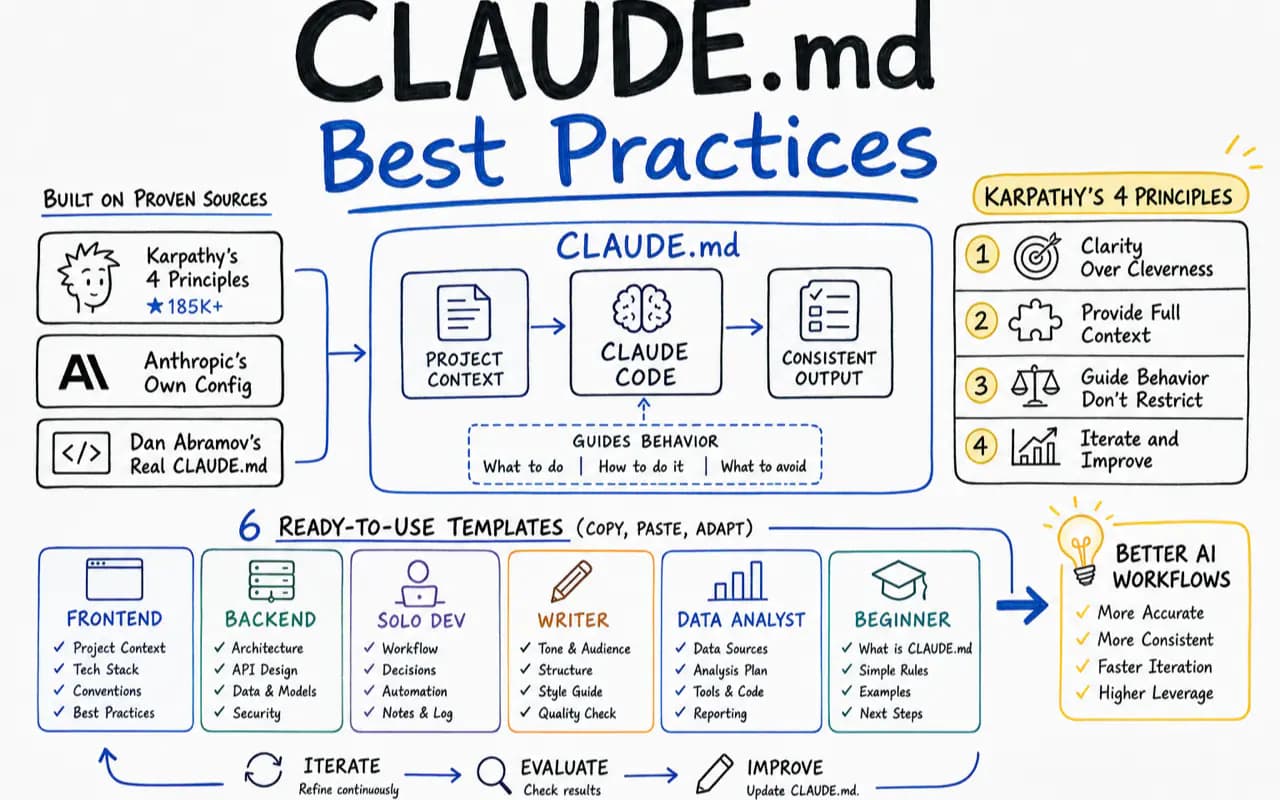
Your CLAUDE.md is either empty or stuffed with /init boilerplate. Both produce the same result: Claude Code forgets your preferences the moment a new session starts.
I spent weeks auditing real CLAUDE.md files across GitHub — from Karpathy's 185K-star behavioral principles to Anthropic's own internal config to Dan Abramov's commit message constraints. The pattern became obvious: most people either write too much (and Claude ignores half of it) or write things Claude already knows from reading the codebase.
This guide does two things. First, I break down what actually works in five high-profile CLAUDE.md files and why. Then I hand you six complete templates — frontend dev, backend dev, solo founder, content creator, data analyst, and student — so you can copy the one that fits and start shipping.
What you get:
- The four-layer scope system and how Claude actually loads your config
- Five real-world CLAUDE.md teardowns with full analysis
- Six ready-to-use templates organized by role
- The router pattern for projects that outgrow a single file
- An anti-pattern checklist to audit your existing setup
Why Does CLAUDE.md Matter More Than Any Other Config?
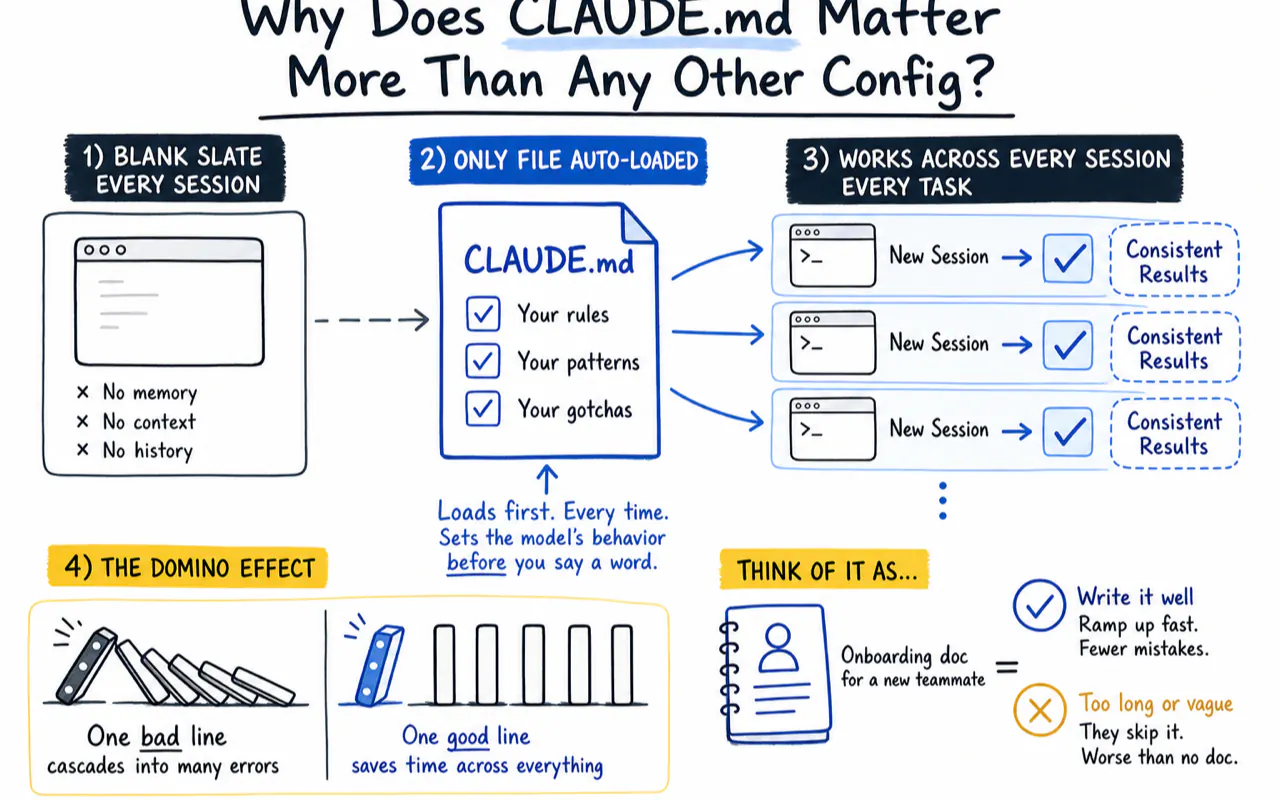
Claude Code starts every session with a blank slate. The architecture discussion from yesterday, the code style you corrected for an hour, the deployment gotcha only you know about — all gone.
CLAUDE.md is the only file that loads automatically into every session. Each rule you write works for you even when you say nothing.
HumanLayer founder Kyle put it well — a single bad line in CLAUDE.md cascades like dominoes:
One wrong instruction
    -> Every research step follows the wrong lead
        -> Plans built on bad research drift further
            -> Code written from drifted plans breaks in production
The reverse holds too. One correct line saves time across every session and every task.
Think of CLAUDE.md as the onboarding doc you write for a new teammate. Write it well, and they ramp up fast with fewer mistakes. Write it too long or too vague, and they skip it entirely — worse than having no doc at all.
How Does Claude Code Actually Load Your CLAUDE.md?
Before you write anything, understand the mechanics. Everything below comes directly from Anthropic's official documentation.
What Are the Four Scope Layers?
Most people think CLAUDE.md is a single file at the project root. It is actually a layered system. Claude Code loads four layers at startup, in order:
| Layer | Location | Who uses it |
|---|---|---|
| Managed policy | /Library/Application Support/ClaudeCode/CLAUDE.md (macOS) |
Entire organization |
| User instructions | ~/.claude/CLAUDE.md |
You personally, across all projects |
| Project instructions | ./CLAUDE.md or ./.claude/CLAUDE.md |
Team-shared, committed to Git |
| Local instructions | ./CLAUDE.local.md |
You personally, current project only, not in Git |
All four layers stack — later layers do not override earlier ones. Subdirectory CLAUDE.md files are smarter: they load only when Claude reads files from that directory.
Why Does Claude Sometimes Ignore Your Rules?
CLAUDE.md is not a hard command. It is injected as a "user message" into the conversation. When injected, Claude Code attaches a system reminder that says roughly:
"This context may or may not be relevant to your current task. Only reference it when actually relevant."
Claude decides which rules apply. The longer your file and the more irrelevant content it contains, the higher the probability that useful rules get skipped.
I hit this myself running a multi-project knowledge base with Claude Code. My CLAUDE.md grew past 400 lines and Claude started ignoring database conventions while editing frontend components. The fix: split domain-specific rules into .claude/rules/ with paths: constraints so they only load when Claude touches matching files.
Common trap: You write an entire database design spec in CLAUDE.md. Claude edits a React component and skips all of it. Not a bug — Claude judged those rules irrelevant to the current task. Solution: put module-specific rules in
.claude/rules/withpaths:fields to scope them.
What Should You Include (and Exclude)?
Anthropic's best practices doc gives a practical checklist:
Include:
- Build commands Claude cannot guess from code (e.g.,
pnpm test:e2e --filter=@app/web) - Code style deviations from conventions (e.g., your team bans default exports)
- Test runner and framework details
- Branch naming conventions and PR habits
- Why you made an architecture decision (not just "use X" but "use X because Y")
- Dev environment quirks (e.g., must source a specific env file first)
- Counter-intuitive gotchas
Exclude:
- Things Claude can infer from code — you have
tsconfig.json, so "this project uses TypeScript" adds zero value - Standard language conventions — Python uses snake_case by default
- Large API docs — link to them, do not paste them in
- Frequently changing info — you will forget to sync CLAUDE.md and create stale instructions
- File-by-file code descriptions — Claude reads directory structure on its own
- "Please write high-quality code" — this instruction is unverifiable and changes nothing
If a rule matters enough, prefix it with
IMPORTANTorYOU MUSTto add weight. But do not overuse emphasis — when every rule screams IMPORTANT, none of them are.
What Do the Best CLAUDE.md Files Actually Contain?
Five real-world configs, fully analyzed. Every file comes from a public repository.
Case 1: Karpathy's Four Principles (185K Stars)
Andrej Karpathy — former Tesla AI director, OpenAI co-founder. His behavioral principles, collected in this GitHub repository, earned over 185,000 stars, making it the most widely shared single CLAUDE.md file. It contains zero project information. The entire file does one thing: constrain how the AI thinks.
The four principles distilled:
- Think before you code — State assumptions. List multiple interpretations. Propose simpler alternatives. Stop and ask when something is unclear.
- Simplicity first — Solve with minimum code. No features nobody asked for. No abstractions for one-time code. No "flexibility" or "configurability" nobody requested. If 200 lines can become 50, rewrite. Gut check: would a senior engineer look at this and think it is over-engineered?
- Surgical changes — Touch only what must change. No drive-by refactors. No formatting fixes on adjacent code. Match existing style. Clean up orphaned references your change created, but leave pre-existing dead code alone. Every diff line must trace back to the user's request.
- Goal-driven execution — Convert tasks into verifiable goals ("add validation" becomes "write test, then make it pass"). Multi-step tasks get a plan with verification at each step.
These four principles belong in your global ~/.claude/CLAUDE.md so they apply to every project automatically.
Case 2: Anthropic's Own claude-code-action (42 Lines)
Anthropic's claude-code-action CLAUDE.md is what their own team uses in production. The most valuable section is "Gotchas" — six traps that come from actual development experience:
- Strict TypeScript enables
noUnusedLocalsandnoUnusedParameters— unused variables break the build GitHubContextis a discriminated union type — you must narrow withisEntityContext()before property access- Token revocation lives in action.yml's
always()step — moving it to run.ts means it never executes on process crash - The catch block in run.ts uses
prepareCompletedto distinguish preparation-phase from execution-phase failures - action.yml outputs reference Step IDs (
steps.run.outputs.*) — changing a Step ID without updating references breaks the pipeline - Integration tests live in a separate repo — this repo only has unit tests
Notice: every single gotcha describes something that actually went wrong. These are not hypothetical rules invented in advance.
Case 3: Dan Abramov's overreacted.io (52 Lines)
React core developer Dan Abramov wrote a CLAUDE.md for his personal blog overreacted.io. The standout feature is commit message constraints with explicit positive and negative examples:
- Wrong: "Refactor component for improved maintainability"
- Right: "Extract date formatting to lib/formatDate.ts"
He does not just tell Claude how to write code. He tells Claude how to communicate about code — down to filename-level specificity.
Case 4: Vercel's next-devtools-mcp (118 Lines)
Vercel's next-devtools-mcp represents enterprise engineering standards. The core strategy: freeze the most common operations into standard step sequences.
Adding a new tool, adding a new resource, adding a new prompt — each operation has deterministic steps. Claude never guesses which files to modify:
- Create file in
src/tools/(export inputSchema/metadata/handler) - Register in
src/index.tstools array - Build and test
This removes the entire class of errors where Claude changes the right code in the wrong file.
Case 5: Karpathy's llm-council (133 Lines)
Karpathy's own project llm-council has a detailed project-level CLAUDE.md — completely different from his four principles. It describes every backend file's key functions, the three-stage pipeline architecture, anonymization strategy for peer review, and four common traps.
The takeaway: the four principles handle thinking habits (global), while llm-council's CLAUDE.md handles project-specific context (project-level). Karpathy uses both.
What Two Patterns Emerge?
| Dimension | Behavioral constraints | Project context |
|---|---|---|
| Examples | Karpathy's four principles | Anthropic / Vercel / Dan Abramov |
| Location | ~/.claude/CLAUDE.md (global) |
./CLAUDE.md (project-level) |
| Content | Thinking habits, simplicity, change discipline | Architecture, commands, gotchas, conventions |
| Length | 30-65 lines | 55-130 lines |
Use both. They complement each other.
What Can We Learn From Chinese Developer Community CLAUDE.md Files?
The English-language cases above are well known. But developers in the Chinese ecosystem have produced equally instructive configs.
overtrue (An Zhengchao) — The Safety-First Approach
The author of EasyWeChat, a major Laravel developer, published a Chinese CLAUDE.md with six sections, each solving a specific class of problem:
- Hard prohibitions: No
git reset/revert/rebase/restore. Norm -rf. Every git operation requires user permission first. - Core beliefs: Incremental progress over big-bang rewrites. Study existing patterns before implementing. Pragmatic over dogmatic.
- Implementation flow: Understand → Test (red) → Implement (green) → Refactor → Verify → Update TODO → Commit. After 3 failed attempts, stop and explain.
- Compiler error handling: Never delete code to bypass compiler errors. Correct path: error → understand root cause → research fix → apply.
Every rule maps to a concrete problem that actually happened. "Never delete code to bypass compiler errors" exists because Claude literally did that.
Consensus From the Developer Community
Several high-engagement posts converge on the same insights:
"Start with an empty file." Developer Chen Cheng (610 likes on X) advises: do not start with a template. Start blank. Every time you repeat a correction to Claude, write it into CLAUDE.md. The file you build this way has zero wasted lines.
"400 lines to 150. Everything improved." Axel Bitblaze (1,900 likes) used Claude Code for two months straight. His CLAUDE.md ballooned to 400 lines and Claude started randomly ignoring rules. He cut it to 150 lines and compliance jumped back up.
"Apple ships CLAUDE.md internally." In 2026, Apple accidentally shipped internal CLAUDE.md files in a Support App update (13,500 likes on X), confirming their teams use Claude Code for app development. Apple pushed an emergency patch to remove the files.
Four Anti-Patterns Worth Memorizing
From a 2,100-star best practices doc:
- Do not front-load restrictions. Add rules one by one as Claude makes actual mistakes.
- Do not blindly
@reference files. Every@-referenced file loads into context every session. Write when to read the file and what to get from it. - Do not say only "never do X" — give the alternative. "Never use Redux" leaves Claude guessing. "Never use Redux; use Zustand" resolves the ambiguity.
- If your CLAUDE.md needs half a page to explain a CLI tool, the tool needs simplification. Write a bash wrapper instead of a manual in CLAUDE.md.
What Patterns Make a CLAUDE.md Actually Work?
After studying dozens of real configs, four patterns hold:
Effective CLAUDE.md files are short. React.dev: 42 lines. Karpathy: 65 lines. Anthropic: 42 lines. overtrue: under 100 lines. None exceeded 200 lines.
Effective CLAUDE.md files grow from real mistakes. Boris Cherny (Claude Code core author) runs the simplest process: every time Claude makes an error, someone writes "don't do that" into CLAUDE.md. He calls this compound interest engineering — the file improves over time, and Claude's error rate drops continuously.
Effective CLAUDE.md files use two layers. Global for thinking style (Karpathy's four principles). Project-level for concrete context (commands, architecture, gotchas). Two layers, zero overlap.
Effective CLAUDE.md files waste no words. They skip what Claude can infer from code, skip standard conventions, skip "please write quality code." The test for every line: if I delete this, will Claude actually make a worse mistake? If not, delete it.
How Should You Structure a CLAUDE.md for Your Role?
Six templates below. All follow the same structure: identity and context first, working method second, constraints embedded in each rule (not listed separately), and delivery standards last. This ordering mirrors how Claude processes context — role first, then behavior, then specifics.
Frontend Developer Template
# [Project Name]

## Stack
- Next.js 15 App Router + React 19 + TypeScript strict (no Pages Router / any / @ts-ignore)
- Styling: Tailwind CSS v4 (no CSS Modules / styled-components / inline style objects)
- State: Zustand (no Redux)
- Package manager: pnpm (no npm / yarn)

## Commands
- `pnpm dev` — development server
- `pnpm build` — production build
- `pnpm test` — run tests
- `pnpm typecheck && pnpm lint` — must pass before every commit

## Code Conventions
- Functional components + hooks only. Max 200 lines per file
- Props interfaces: named `{ComponentName}Props`, always exported
- Named exports everywhere (exception: page.tsx / layout.tsx)
- Commit messages: state what changed and why. Never write "refactor for better maintainability"

## Gotchas
- `src/lib/auth.ts` session logic looks simplifiable — do not touch it. It handles three edge cases; removing any one breaks production auth
- Database migration files are immutable once committed — create a new migration instead
Backend Developer Template
# [Project Name]

## Stack
- Python 3.12 + FastAPI (no Flask / Django)
- Database: PostgreSQL + SQLAlchemy async (no sync sessions)
- Package manager: uv (no pip / poetry / conda)
- Type hints: mandatory on all function signatures (params + return)

## Commands
- `uv run uvicorn app.main:app --reload` — dev server
- `uv run pytest -x -q` — tests (stop on first failure)
- `uv run ruff check . && uv run ruff format --check .` — lint + format check
- `uv run alembic upgrade head` — apply migrations

## Architecture
- `app/` — application code; `app/api/` — route handlers; `app/models/` — SQLAlchemy models; `app/services/` — business logic
- All database queries go through services, never in route handlers directly
- Background tasks use `app/tasks/` with Celery (no inline async background)

## Conventions
- Endpoints return Pydantic response models, never raw dicts
- Errors raise custom exceptions from `app/exceptions.py` — caught by global handler
- Environment config: `app/config.py` reads from `.env` via pydantic-settings (no os.getenv scattered in code)

## Gotchas
- `alembic/versions/` migration files are immutable after merge to main
- The `/health` endpoint bypasses auth middleware intentionally — do not add auth
- Rate limiting on `/api/v1/generate` is set at 10 req/min per user — changing it requires updating both middleware and docs
Solo Developer / One-Person Company Template
# [Business Name]

## Business Overview
- Product A: [name + positioning + stack] (primary revenue)
- Product B: [name] (side project)
- Content channels: Newsletter, blog, social
- Revenue: subscription + one-time purchases
- Product-specific rules live in each product's own CLAUDE.md. This file governs cross-product decisions only.

## Working Principles
- Incremental changes over big rewrites
- Use existing tools — auth/payments/email/storage go through SaaS APIs
- Change one thing at a time. Confirm it works before changing the next
- After 3 failed attempts, stop and explain what is blocking
- State your plan before executing. Wait for confirmation
- Validate before building: minimum viable test of every idea
- Priority: acquisition > retention > monetization

## Safety Boundaries
- `git reset` / `revert` / `rebase` / `rm -rf` — never execute
- Secrets go in environment variables or credential manager. Never hardcode
- Production database: no CLI write operations
- Deleting files or directories: inform and get confirmation first
- Paid operations (sending email, calling paid APIs, deploying to production): confirm first

## Decision Framework (in order)
1. Can I validate this in under 1 hour? If yes, try it now
2. Is it reversible? If yes, move fast
3. How large is the blast radius? If it only affects me, do it
4. Is there a simpler approach? If yes, switch
Content Creator Template
# [Brand Name]

## Identity
- Positioning: [one sentence]
- Audience: [age range + background]
- Tone: professional but not academic, opinionated but not combative
- First person: "I" (never "the author" / "we" / "this article will show you")
- Banned words: synergy, leverage, unlock, game-changer, deep dive, paradigm shift

## Creation Workflow
1. **Topic evaluation** — answer three questions: why would the reader care, what unique angle do I bring, is the timing right
2. **Research** — finish reading before writing, never research mid-draft
3. **Outline** — list H2s first, each H2 answers one specific reader question. No drafting until outline is confirmed
4. **First draft** — prioritize completeness over polish
5. **Self-review** — for each paragraph ask "what would the reader miss if I deleted this?" For each data point ask "what is the source?"
6. **Final draft** — trim, polish, add image placement notes

## Writing Rules
- Conclusion first. Setup never exceeds 3 sentences
- Data and examples over opinions and adjectives
- Technical terms: explain once on first use, then use directly
- One idea per paragraph
- If you can say it in one sentence, do not write a paragraph

## Quality Checklist
- [ ] Readable in a single pass without re-reading
- [ ] Every claim has supporting evidence
- [ ] First three lines make a stranger want to keep reading
- [ ] Image positions are marked
- [ ] Zero banned words
Data Analyst Template
# [Project Name]

## Methodology
- Look at data before choosing methods: run descriptive statistics and distribution plots first, then select the approach
- Normality test (Shapiro-Wilk) is the fork: normal → parametric tests, non-normal → non-parametric
- Multiple comparisons require correction (Bonferroni or FDR)
- Effect sizes and confidence intervals over p-values alone
- One chart, one question

## Data Management
- Raw data: `data/raw/` (read-only, never modified)
- Processed data: `data/processed/`
- Every processing step logged in `data/processing_log.md` (what was done, how many rows affected, missing value strategy + rationale)
- Variable names: snake_case, self-explanatory (`user_age` not `ua`)
- Parameters in `config/` files, never hardcoded
- All paths relative

## Visualization
- Chart type follows data relationship: trend → line, comparison → bar, distribution → histogram/boxplot, relationship → scatter, composition → stacked bar (pie chart only with 5 or fewer categories)
- Visual parameters centralized in `config/plot_style.py`
- Scientific bar charts include error bars (label SD or SEM)
- Every chart needs: title, axis labels with units, legend

## Reporting
- APA format: `M = 3.45, SD = 1.23, t(58) = 2.41, p = .019, d = 0.82`
- State direction: "Group A scored significantly higher than Group B" not "the difference was significant"
- Decimals: 2 places for values, 1 place for percentages, consistent throughout

## Reproducibility
- Every script: header comment with input/output/purpose
- Random seed: 42 everywhere
- Dependencies locked in `pyproject.toml` managed by uv
- Anyone running `uv run python scripts/{name}.py` must get identical output
- Exploration: Jupyter notebooks. Final deliverables: `.py` scripts
Student / Beginner Template
# My Learning Projects

## How I Want to Learn
- Explain what the code does before writing it
- Show me the simplest version first, then add complexity one layer at a time
- When I make a mistake, explain what went wrong and why — do not silently fix it
- Use comments generously in code examples
- If I ask for something beyond my current level, say so and suggest what to learn first

## My Current Stack
- Python 3.12 (learning)
- VS Code
- Git basics (commit, push, pull — I do not know rebase yet)

## Rules
- No advanced patterns I have not learned yet (no decorators, metaclasses, or async until I ask)
- Variable names must be descriptive (`student_name` not `sn`)
- Every function gets a docstring
- Suggest breaking the task into smaller steps when it gets complex

## When I Get Stuck
- Ask me what I think the error means before giving the answer
- Point me to the relevant documentation section
- If I have been stuck for 3 rounds, give me the direct answer with a full explanation
What Do All Six Templates Share?
Every template follows the same order:
- Who you are / big picture — Claude understands context first
- How you work — workflow, methodology, decision framework
- Boundaries embedded in rules — "use uv (no pip/poetry/conda)" packs both the do and the don't into a single line
- What to do when stuck — flag uncertainty, stop after N attempts, ask
- Delivery standard — what "done" looks like
Constraints sit inside rules rather than in a separate "prohibited" block at the top. A CLAUDE.md that opens with a wall of "never do A, never do B, never do C" signals "this user cares about me not making mistakes" rather than "here is what this project needs." Context first, constraints inline — that matches how Claude processes instructions.
When Should You Switch From One File to a Router Architecture?
Small projects: one CLAUDE.md file handles everything. When rules exceed 200 lines, switch to a router pattern.
Single-File Pattern
project-root/
└── CLAUDE.md     <- identity + workflow + constraints + delivery standards, all here
Works for personal projects, single-stack codebases, rule sets under 200 lines.
Router Pattern
~/.claude/CLAUDE.md                    <- global: identity + cross-project thinking
project-root/
├── CLAUDE.md                          <- project: overview + behavior + routing table
├── .claude/rules/
│   ├── frontend.md                    <- lazy-loaded by path: only when editing frontend files
│   └── backend.md                     <- lazy-loaded by path: only when editing backend files
├── docs/
│   ├── architecture.md                <- referenced by @import
│   └── platform-rules/
│       ├── newsletter.md              <- newsletter-specific rules
│       └── youtube.md                 <- YouTube-specific rules
├── subdir-a/CLAUDE.md                 <- submodule rules (loaded on demand)
└── subdir-b/CLAUDE.md                 <- submodule rules (loaded on demand)
I run a knowledge base with over 100 subdirectories, each with its own CLAUDE.md. The root file is a routing table — trigger words mapped to entry paths. Claude reads the current task, finds the relevant subdirectory, and loads only those rules.
Router Design Rules
Root CLAUDE.md holds three things only: identity, behavioral principles, and a navigation table. No tech specifics.
Use trigger words for routing:
| Trigger | Go read |
|---------|---------|
| frontend, components, pages | src/frontend/CLAUDE.md |
| backend, API, database | src/backend/CLAUDE.md |
| deploy, ops, monitoring | docs/ops.md |
Use @import references instead of copying content:
## Architecture
@docs/architecture.md

## Coding Standards
@docs/coding-standards.md
Referenced files are maintained independently. CLAUDE.md stays an index. Maximum 4 levels of nesting.
Use .claude/rules/ for conditional loading — the strongest router mechanism. Add paths: frontmatter so rules activate only when Claude reads matching files:
# .claude/rules/frontend-components.md
---
paths:
  - "src/components/**/*.tsx"
---

Wrap components with forwardRef.
Props interfaces must be exported.
Style with Tailwind, never inline.
Claude editing backend code never sees these frontend rules.
How Do You Build a CLAUDE.md From Zero in One Week?
Day 1: Start with an empty file. Write three lines.
# [Your Project Name]

Interaction language: English
That is it. Use Claude Code normally. Do not try to write everything at once.
Days 2-4: Every time Claude frustrates you, add one rule.
Claude writes a class component? Add "functional components + hooks only." Claude uses npm? Add "package manager: pnpm (no npm / yarn)." Claude writes a 500-line function? Add "max 30 lines per function."
Every rule has a clear origin — a real mistake, not a hypothetical risk.
End of Week 1: Organize.
You now have 20-40 lines, all battle-tested. Group related rules. Delete rules Claude no longer violates. Check for contradictions.
After One Month: Decide on architecture.
Under 100 lines? Keep the single file. Over 200? Start splitting rules into .claude/rules/ and docs/. CLAUDE.md becomes a routing table.
Ongoing: Compound interest.
Every code review that catches something Claude should have known, every correction you repeat in a new session — that is a signal to add a rule. Every rule that does not improve Claude's behavior — that is a signal to delete or sharpen it.
What Does a Before-and-After Rewrite Look Like?
Before (typical first attempt):
# CLAUDE.md

This is a Next.js project with TypeScript and Tailwind CSS.

Please write clean, maintainable code.
Follow best practices for React development.
Use functional components.
Make sure the code is well-tested.
Don't use any deprecated APIs.
Keep the code DRY.
Write meaningful commit messages.
Seven problems:
- "This is a Next.js project" — Claude sees
next.config.jsand already knows - "Please write clean, maintainable code" — unverifiable, Claude thinks all its code is clean
- "Follow best practices" — which ones? Claude's training data contains ten contradictory sets
- "Use functional components" — does not say what to avoid, so class components still appear
- "Make sure the code is well-tested" — which framework? which command? what is "well-tested"?
- "Don't use any deprecated APIs" — too vague to act on
- "Write meaningful commit messages" — what does "meaningful" mean?
After:
# [Project Name]

## Stack
- Next.js 15 App Router + React 19 + TypeScript strict (no Pages Router / any / @ts-ignore)
- Styling: Tailwind CSS v4 (no CSS Modules / styled-components / inline style objects)
- State: Zustand (no Redux)
- Package manager: pnpm (no npm / yarn)

## Commands
- `pnpm dev` — development
- `pnpm build` — production build
- `pnpm test` — run tests
- `pnpm typecheck && pnpm lint` — must pass before every commit

## Code Conventions
- Functional components + hooks. Max 200 lines per file
- Props: interface named `{ComponentName}Props`, always exported
- Named exports (exception: page.tsx / layout.tsx)
- Commit messages: state what file changed and why. Never "refactor for better maintainability"

## Gotchas
- `src/lib/auth.ts` session logic looks simplifiable — do not touch. Handles three edge cases; removing any one breaks production
- Migration files are immutable after commit — always create new migrations
Every line is specific and verifiable. "No Redux; use Zustand" beats "follow best practices." The "Gotchas" section — learned from Anthropic's own approach — predicts where Claude will make mistakes and blocks them in advance.
What Are the Six Most Common CLAUDE.md Mistakes?
1. Too long
Past 300 lines, Claude drops rules at random. The context window fills with irrelevant content and useful instructions get buried. Periodically audit: for each rule, ask "if I delete this, will Claude's output actually get worse?" Uncertain? Delete it and observe for a week.
2. Duplicating linter work
Indent width, single vs. double quotes — ESLint, Prettier, and Ruff handle these faster and more reliably than Claude. Writing formatting rules in CLAUDE.md pays AI prices for linter work. Delegate formatting to tools and run them via Hooks.
3. Contradicting rules
One section says "use default export," another says "ban default export." Claude picks one at random. Behavior becomes unpredictable, and you blame Claude for what is actually a config bug. Declare each rule exactly once.
4. Stale content
CLAUDE.md still says "Next.js 13 app directory" when the project runs Next.js 15. Claude writes code against stale information — harder to debug than having no CLAUDE.md at all. Commit CLAUDE.md to Git and review it during dependency upgrades.
5. Untouched /init output
The /init generated CLAUDE.md fits every project, which means it fits none well. Use it as a starting point, then delete every generic line and add project-specific context.
6. Writing documentation instead of rules
Three paragraphs explaining the history of why you chose FastAPI over Flask. Claude does not need your story. It needs "use FastAPI, no Flask." Long explanations go in docs/. CLAUDE.md links to them.
How Do CLAUDE.md, Skills, and Hooks Work Together?
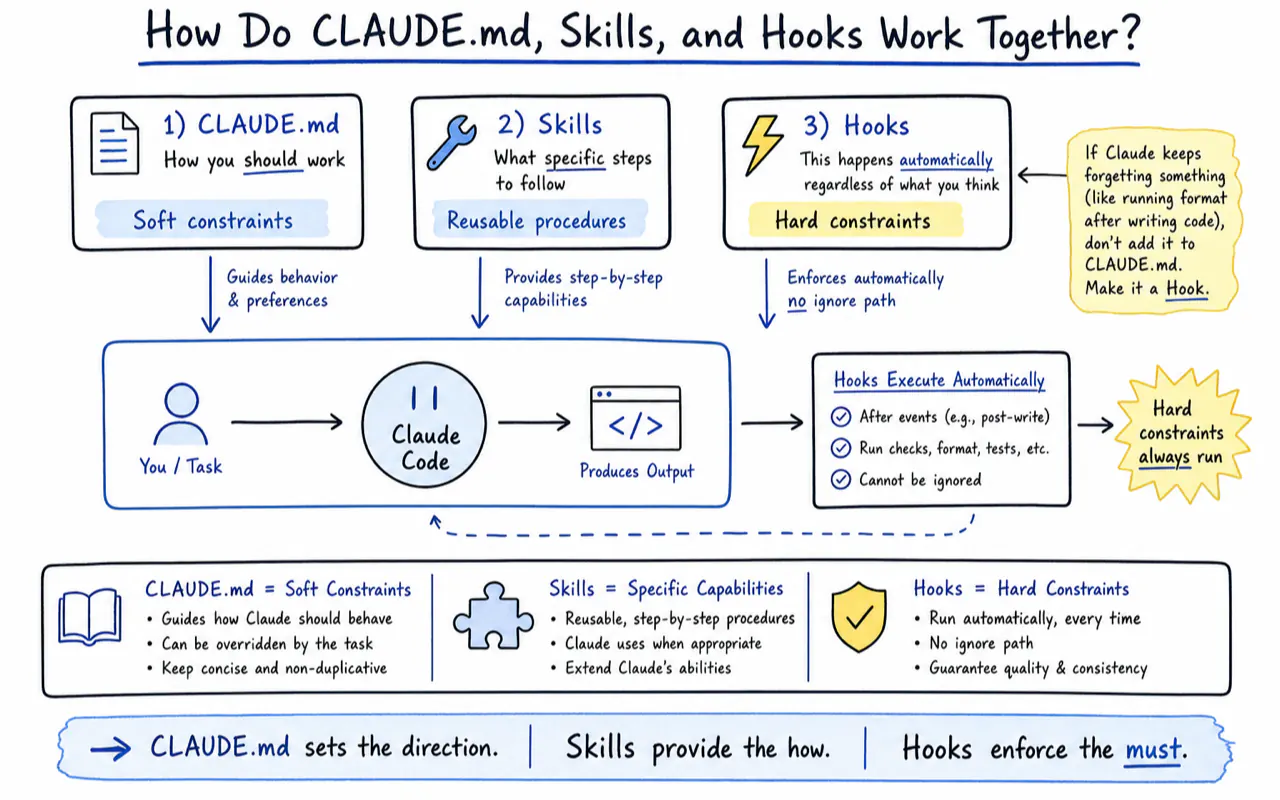
Claude Code has three configuration mechanisms, each handling a different type of instruction:
| Mechanism | What it holds | Trigger |
|---|---|---|
| CLAUDE.md | Factual rules ("always use 2-space indent") | Loads automatically every session |
Skills (.claude/skills/) |
Multi-step procedures ("5-step production deploy") | Manual trigger (/skill-name) or auto-match |
Hooks (.claude/settings.json) |
Deterministic gates ("run Prettier after every file write") | Executes automatically before/after tool calls |
CLAUDE.md governs "how you should work." Skills govern "what specific steps to follow." Hooks govern "this happens automatically regardless of what you think."
If Claude keeps forgetting something (like running format after writing code), adding the rule ten more times to CLAUDE.md will not help. Make it a Hook. Hooks are scripts that execute automatically — there is no "ignore" path. CLAUDE.md is a soft constraint. Hooks are hard constraints.
Quick Audit Checklist
Run through this after writing or updating your CLAUDE.md:
- [ ] Under 200 lines (official recommendation)
- [ ] Only contains info Claude cannot infer from code
- [ ] No rules duplicating linter / formatter
- [ ] No contradicting rules
- [ ] Build, test, and lint commands are complete and accurate
- [ ] Architecture decisions include rationale (not just "use X" but "why X")
- [ ] Common gotchas are listed
- [ ] Committed to Git (project-level)
- [ ] Personal preferences live in CLAUDE.local.md (not in Git)
- [ ] Frequently changing info is linked, not inlined
Related Reading
- Claude Code Complete Guide 2026 - The complete Claude Code reference guide
- How to Write CLAUDE.md - CLAUDE.md fundamentals and syntax
- Claude Code Hooks Tutorial - Combine templates with lifecycle hooks
- Best Claude Code Skills 2026 - Templates optimized for skill projects
- Codex Best Practices Guide - Compare with Codex best practices
Frequently Asked Questions
How does CLAUDE.md relate to Cursor's .cursorrules?
They are independent. CLAUDE.md is for Claude Code. .cursorrules is for Cursor. Neither tool reads the other's config. If you use both, maintain separate files.
What do I do when Claude ignores my rules?
Three possible causes: the file is too long and the rule got buried (trim to under 200 lines); the rule is too vague for Claude to act on ("write good code" should become "max 30 lines per function"); or the rule is irrelevant to the current task and Claude skipped it (move it to .claude/rules/ with paths: scoping). For hard requirements that must never be skipped, convert to a Hook.
How does a team manage CLAUDE.md?
Project-level CLAUDE.md goes into Git. The team maintains it together. Personal preferences go in CLAUDE.local.md (add to .gitignore). Boris Cherny's team at Anthropic has someone add content weekly — during code review, they use @.claude to have Claude auto-write new rules into CLAUDE.md.
What is the relationship between CLAUDE.md and AGENTS.md?
CLAUDE.md is Claude Code-specific. AGENTS.md serves the same purpose for OpenAI Codex. Many projects symlink them (CLAUDE.md -> AGENTS.md) for cross-tool compatibility.
Does CLAUDE.md support non-English languages?
Fully. CLAUDE.md is a standard Markdown file with no language restriction. Declare your interaction language at the top: "Interaction language: English" or any language you prefer.
The most important step is the one only you can take. Open your project, create an empty CLAUDE.md, and start using Claude Code. Every time it makes a mistake, add one line. After a week, that file will outperform any template — because every rule in it comes from your own experience.