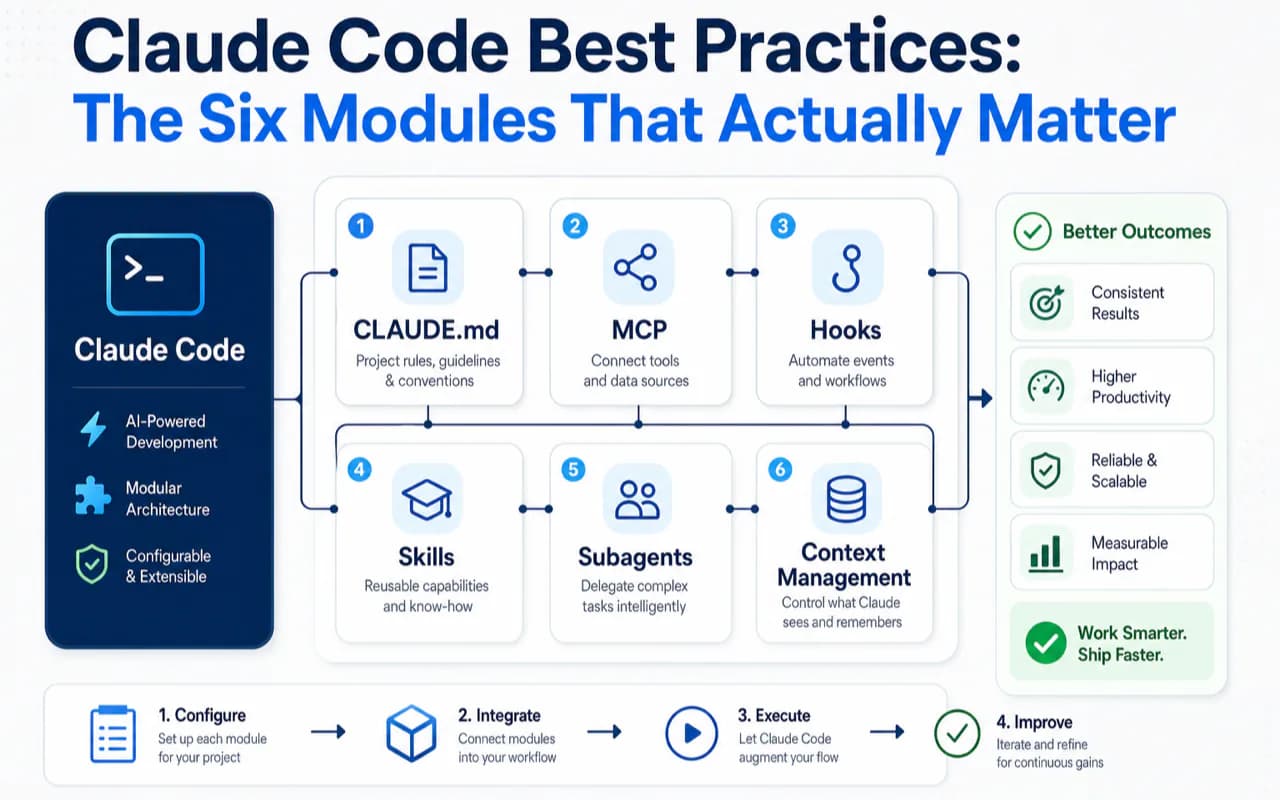
Claude Code ships with six core modules: CLAUDE.md (project memory), MCP (external tool connections), Hooks (deterministic automation), Skills (reusable workflows), Subagents (context isolation), and Context Management (the logic that ties everything together).
Most developers install Claude Code and start using it immediately without configuring any of these. The result: Claude guesses your project conventions, lacks useful external tools, asks permission for every action, and delivers work without verification. It works. But it does not work well.
I made this mistake myself. For the first two weeks, I treated Claude Code like a chatbot with file access. Then I spent a weekend configuring all six modules properly, and the difference was dramatic — fewer corrections, faster iterations, and tasks that used to require supervision now ran unattended.
This guide walks through each module with specific recommendations, decision tables, and prompts you can copy directly. If you already have some Claude Code experience, you will leave with a concrete upgrade plan. If you are new, start with the official best practices page for the basics, then come back here for the configuration depth.
CLAUDE.md — Your Project Memory
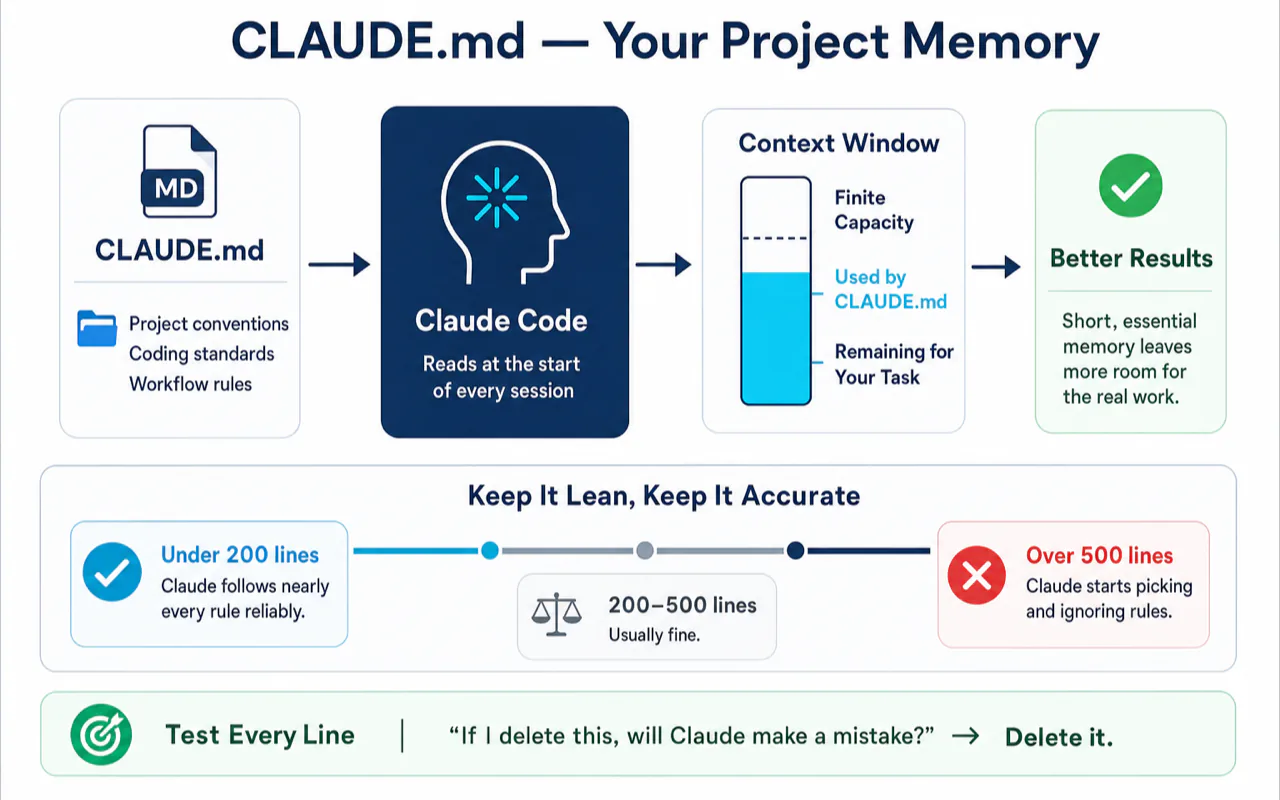
CLAUDE.md is a markdown file that Claude reads at the start of every session. It tells Claude your project conventions, coding standards, and workflow rules. Without it, Claude guesses — sometimes correctly, sometimes not.
Why It Deserves Your Attention First
Every line in CLAUDE.md permanently occupies your context window. That window is finite. Fill it with instructions and you leave less room for the actual task.
Here is what I learned the hard way: shorter CLAUDE.md files produce more accurate results. Below 200 lines, Claude follows nearly every rule reliably. Past 500 lines, it starts treating your instructions like a buffet — picking what seems relevant and ignoring the rest. Our CLAUDE.md best practices and templates guide dives deeper with copy-paste templates for specific tech stacks.
The test for every line: "If I delete this, will Claude make a mistake?" If Claude can infer the rule from your code (it sees import syntax and knows you use ESM), delete the line.
The Four-Layer Strategy
Layer 1: Global CLAUDE.md (~/.claude/CLAUDE.md) — Personal preferences that apply to all your projects. Language settings, commit message format, security rules. Usually 10-20 lines.
Layer 2: Project CLAUDE.md (repository root) — Conventions unique to this project. Tech stack, build commands, test commands, architecture decisions. Commit this to Git so your team shares it. Only write what differs from your global file.
Layer 3: Conditional rules (.claude/rules/ directory) — Rules scoped to specific file types. A python.md file with **/*.py glob matching loads only when Claude touches Python files. Your Python rules do not waste context when you are editing TypeScript.
Layer 4: @import references — CLAUDE.md supports @docs/git-workflow.md syntax to pull in external files. Use this sparingly. Every import permanently enters the context window. For long documents (API references, full specifications), let Claude use the Read tool on demand — it reads the file, processes it, and the content leaves context when done.
Ready-to-Use Prompt
Paste this into Claude Code to audit your existing CLAUDE.md:
Read my global CLAUDE.md (~/.claude/CLAUDE.md) and this project's CLAUDE.md. Audit every line: if removing it would not cause you to make mistakes, mark it "deletable." Flag duplicates between global and project level. Identify language-specific rules that should move to .claude/rules/ as conditional rules. Output a trimmed version under 200 lines.
MCP — External Tool Connections
MCP (Model Context Protocol) lets Claude call external services: search engines, code repositories, web scrapers, browser automation, and API documentation lookups. Without MCP, Claude only operates on local files and terminal commands.
Less Is More
Every MCP server's tool list and descriptions permanently occupy context space. Install 15 servers with 5 tools each, and 75 tool descriptions sit in your window at all times. Claude slows down picking the right tool — like a mechanic staring at 75 wrenches instead of reaching for the one that fits.
Keep 3-5 high-frequency servers active. Comment out the rest. If you have not used a server in a week, it should not be running.
Recommended Configuration
| MCP Server | What It Solves | Why This One | Priority |
|---|---|---|---|
| brave-search | Internet search for current information | Strong results in English, generous free tier | Must-have |
| github | Repository operations (PRs, issues, code search) | One server covers all GitHub operations | Must-have |
| context7 | Latest API documentation for programming libraries | Claude's training data may be outdated; context7 fetches current docs | Recommended |
| firecrawl | Web scraping with JavaScript rendering | Handles modern SPAs where basic scrapers return empty shells | Recommended |
| chrome-devtools | Browser control including authenticated pages | The only option when you need content behind a login | On-demand |
These five cover 90% of daily development needs. If you do data analysis, add a PostgreSQL or SQLite server. If you manage projects, add Notion or Linear. But do not install everything on day one.
Key Management
Never put API keys directly in your configuration file. Store keys in a separate file with 600 permissions (owner-read only). Reference environment variable names in the config and use a wrapper script to inject real values at server startup.
Startup Speed
MCP servers load when Claude Code starts. Dynamic install commands (like npx fetching the latest version) add 2-5 seconds every launch. Install servers globally to a fixed path once, then point your config at the installed binary.
Hooks — Deterministic Enforcement
Hooks are scripts that fire at specific points in Claude's workflow — before a tool runs, after a file changes, when a session starts, or before Claude stops working.
The critical difference from CLAUDE.md: CLAUDE.md is advice. Hooks are law.
Write "never run rm -rf" in CLAUDE.md and Claude follows it 99% of the time. Turn that same rule into a PreToolUse hook that checks the command and returns a non-zero exit code, and Claude physically cannot execute it. No exceptions.
The Decision Rule
Use CLAUDE.md for preferences where violations are fixable after the fact (code style, naming conventions). Use Hooks for rules where violations cause irreversible damage (deleting critical directories, force-pushing to main, exposing secrets).
Four Highest-ROI Hooks
1. UserPromptSubmit — Timestamp injection. Claude does not know what time it is. If your task involves time ("check today's logs"), Claude guesses. A hook that injects the current timestamp with every prompt submission solves this permanently. The script is trivial — get system time, format, output — but the problem it fixes is high-frequency.
2. PreToolUse — Dangerous command blocking. Fires before Claude executes any tool. Your script checks whether the command matches a dangerous pattern (rm -rf /, git push --force, git reset --hard). Match found: block execution, return non-zero. No match: return zero, proceed. This is your last line of defense even if permission mode is fully open.
3. PostToolUse — Automatic linting. Fires after Claude modifies a file. Attach a linter or formatter — Claude writes code, the hook runs the check immediately, and any issues feed back into Claude's next step. In my experience, adding a PostToolUse lint hook cut format-related code review comments by roughly 80%.
4. Stop — Verification + notification. Fires when Claude prepares to stop working. Two uses: run your test suite (tests fail → block stop → Claude keeps iterating), and send a notification to your phone (tests pass → allow stop → push alert). This is the core of unattended mode: you walk away, Claude works, Stop hook runs tests, failures force continued iteration, success triggers notification.
I was wrong about the Stop hook for the first month. I thought it was overkill — why would Claude need a gatekeeper? Then I started running longer tasks overnight. Without the Stop hook, Claude would declare "done" after passing 8 out of 10 tests. With the hook enforcing all tests must pass, it iterated until the full suite cleared. The quality difference was not marginal. It was structural.
Skills — Reusable Workflows
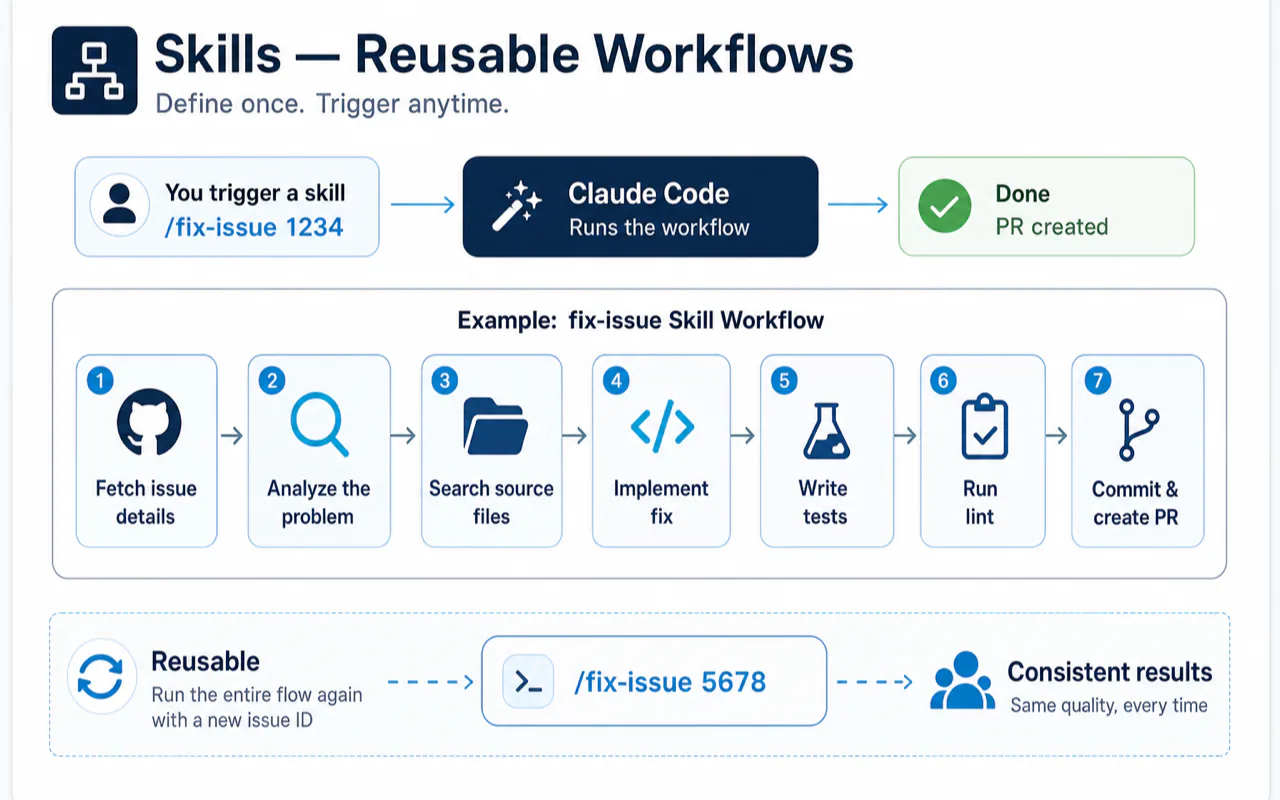
A Skill is a multi-step workflow you define once and trigger with /skill-name. Define a fix-issue skill: fetch GitHub issue details → analyze the problem → search source files → implement fix → write tests → run lint → commit and create PR. Next time, type /fix-issue 1234 and the entire flow runs.
Skills vs Subagents vs MCP
These three get confused constantly. They solve different problems:
| Skill | Subagent | MCP | |
|---|---|---|---|
| Solves | Standardizing multi-step workflows | Context isolation (read many files, return only conclusions) | Connecting external services |
| Triggered by | /skill-name (manual) |
Claude auto-matches or you assign | Claude calls automatically when needed |
| Context | Shares main session | Isolated window | Tool descriptions always in main session |
| Best for | Fix-issue flow, code review checklist, doc generation | Exploring unfamiliar modules, independent code review | Internet search, API docs, GitHub operations |
| Key trait | Steps are fixed, every run is the same | Process varies, only the conclusion matters | Connects to external systems |
Think of it this way: a Skill is a recipe (fixed steps, follow them), a Subagent is a researcher you send out (process is their business, you want the report), and MCP is a wrench (pick it up when you need it).
Five Traits of a Good Skill
-
Precise trigger description. The
descriptionfield in your SKILL.md determines when Claude activates the skill. "Helps with documents" is too vague. "Activates when user asks to extract form fields from PDF, fill forms, redact data, or parse tables" is specific enough to function as a conditional statement. -
Scripts handle deterministic work. Sorting, parsing, formatting — do not rely on Claude's reasoning for mechanical operations. Claude handles intent and judgment; scripts handle repeatable tasks.
-
Keep SKILL.md short. If your skill definition exceeds 50 lines, split it into two skills. Long skills fail more often.
-
Single responsibility. One skill, one job. Do not merge "fix issues" and "write documentation" into one skill.
-
Examples beat abstract rules. Three concrete input/output examples teach Claude more than twenty abstract constraints.
Subagents — Context Isolation
Subagents run in their own context window. They read files, run analysis, and return only the conclusion to your main session. The file contents stay in the subagent's window and never pollute yours.
Why Isolation Matters
Say you need to understand an unfamiliar module. Claude reads a dozen files, traces call chains, maps dependencies. If this happens in your main session, all twelve files permanently occupy your context. After the analysis, that content is useless for your next task — but it still takes up space.
Subagents solve this: read many files, return only the conclusion.
Three Practical Patterns
Research isolation. Send a subagent to explore unfamiliar code. It reads, analyzes, and returns a summary. Your main session stays clean for the actual coding that follows.
Writer/Reviewer separation. Write code in one session. Launch a review subagent from a clean context. The reviewer has no "I wrote this" bias — it examines the code cold, the way a human reviewer would see a colleague's PR. In practice, this catches issues the writing session misses because the reviewer's context contains zero history of the implementation journey.
Multi-role review. Define specialized subagents (security reviewer, architecture reviewer, performance reviewer) in .claude/agents/. Each reviews the same code from a different angle in its own window. Multiple independent perspectives reduce blind spots.
When Not to Use Subagents
Small changes, few files involved, or situations where you need continuous back-and-forth discussion about design decisions. Launching a subagent has fixed overhead. If the task itself takes 30 seconds, the overhead is not worth it.
Context Management — The Logic Behind Everything
The previous five modules all serve the same underlying goal: managing the quality of your context window.
CLAUDE.md controls what loads at session start. MCP tool descriptions occupy permanent space. Hooks provide deterministic control without touching the context. Skills run standardized workflows inside the main context. Subagents isolate expensive exploration into separate windows.
Once you see this unifying logic, the daily habits follow naturally.
Clear Between Tasks
/clear resets your context. Many developers resist this — "I already discussed so much, clearing feels wasteful." The opposite is true. Not clearing between unrelated tasks is the single most common cause of quality degradation.
Previous task residue (file contents, failed attempts, intermediate reasoning) occupies space meant for your new task. Worse, Claude may use stale assumptions from the previous task in the new one.
The rhythm: finish a task, commit, /clear immediately. Use claude --continue to resume a conversation or claude --resume to return to an earlier session.
Compact With Focus
/compact compresses without clearing. You can direct the compression: /compact Focus on the API changes tells the compressor to preserve API-related context and aggressively trim everything else.
Auto-compact triggers when context usage reaches a threshold (typically 80-95%). Set CLAUDE_AUTOCOMPACT_PCT_OVERRIDE=60 in your environment to trigger earlier — this gives complex tasks more headroom before critical information gets compressed away.
The Two-Correction Rule
If you correct Claude twice on the same error and it still gets it wrong, stop. Do not try a third time. The window now contains two rounds of failed attempts and your correction instructions, and Claude is more likely to be confused by this accumulated "failure memory" than helped by it.
The fix: /clear, write a clearer initial prompt, start fresh.
Permission Modes and Environment Variables
Five modes from strictest to most open: default → acceptEdits → plan → dontAsk → bypassPermissions.
For sustained use, I run bypassPermissions paired with PreToolUse hook blocking. Permissions are fully open (maximum speed), but the hook physically prevents the specific dangerous operations I have defined. You also set sensitive path deny-lists in settings (.env, .ssh, .aws) so Claude cannot read those files regardless of permission mode.
This combination eliminates the constant "Allow Claude to read src/index.ts?" interruptions while keeping genuine safety rails in place.
Useful environment variables:
| Variable | Effect | Recommended |
|---|---|---|
ENABLE_PROMPT_CACHING_1H |
Extends prompt cache TTL from 5 minutes to 1 hour — system prompt and CLAUDE.md get cached and reused, saving tokens and latency | "1" |
CLAUDE_AUTOCOMPACT_PCT_OVERRIDE |
Auto-compact trigger threshold | "60" |
CLAUDE_CODE_DISABLE_NONESSENTIAL_TRAFFIC |
Disables non-critical network requests | "1" |
Verification — Give Claude a Testable Standard
Anthropic's own documentation lists "give Claude verifiable success criteria" as its top best practice. The reason is straightforward: when Claude has verification conditions, it enters a build-test-fix loop that produces dramatically better output than "build and stop."
Without verification: "Implement an email validation function." Claude builds it and stops — it assumes it is done, but edge cases may be missing.
With verification: "Implement validateEmail. [email protected] returns true, invalid returns false, [email protected] returns false. Run tests after implementation and fix any failures." Claude enters a loop: implement → test → fail → fix → test → pass → deliver.
Four levels of verification, from basic to thorough:
- Ask Claude to run tests in your prompt (baseline)
/goalsets a persistent verification guard checked every turn- Stop hook deterministically blocks completion until tests pass (recommended minimum for important tasks)
- Subagent adversarial review provides an independent second opinion from clean context
At minimum, reach level 2 for everyday work. For anything that matters, level 3 (Stop hook) is the quality floor.
Related Reading
- Claude Code Complete Guide 2026 - The definitive reference covering installation, configuration, features, and advanced patterns
- Claude Code Hooks Tutorial - Deep dive into the lifecycle event system referenced in the verification hierarchy above
- Claude Code Context Window Management - Master the 1M token context window with auto-compact and cost control strategies
Frequently Asked Questions
What should I put in my CLAUDE.md file?
Only rules Claude cannot infer from your existing code. Commit message format, package manager choice (if multiple are viable), test naming conventions, and a short "never do this" list (3-5 items covering your most common past corrections). Delete anything Claude can figure out from looking at your imports, configs, and existing patterns.
How many MCP servers should I install?
Keep 3-5 always active, comment out the rest. A good starting set: brave-search (web search), github (repo operations), context7 (latest library docs). Add firecrawl and chrome-devtools when your current task needs them. If you have not used a server in the past week, disable it.
What is the difference between CLAUDE.md and Hooks?
CLAUDE.md rules are probabilistic — Claude follows them most of the time but may skip them under complex reasoning pressure. Hooks are deterministic — they fire every time, block or allow actions unconditionally, and cannot be overridden by Claude's judgment. Use CLAUDE.md for fixable preferences (code style). Use Hooks for irreversible safety rules (blocking destructive commands, enforcing test passage before task completion).
When should I use subagents?
When a task reads many files but you only need the conclusion. The subagent reads everything in its own context, processes the information, and sends back a summary. Your main session stays clean. Also use subagents for code review — a reviewer working from clean context catches issues that the writer's context masks through familiarity bias.
How often should I clear context?
After every completed task and commit. Run /clear between unrelated tasks. Residual context from finished work is the most common cause of degraded output quality. If you corrected Claude twice on the same issue without success, that is a clear signal: /clear and rewrite your prompt from scratch.
Is bypassPermissions mode safe?
Only when paired with PreToolUse hooks that block genuinely dangerous operations and a deny-list for sensitive file paths. The combination gives you maximum speed (no permission prompts for routine file reads and edits) with hard safety rails for the operations that actually matter. Without hooks, bypassPermissions removes all guardrails, which is not recommended.
Where to Go From Here
The modules work as a system. Start with CLAUDE.md (biggest impact for least effort), add 3 MCP servers, set up the four core hooks, and use /clear between tasks. That alone puts you ahead of most Claude Code users.
Skills and subagents are next-level optimizations. Add them once your base configuration is solid and you have identified repeatable workflows worth automating.
For the official reference, see Anthropic's Best Practices documentation. For deeper dives into specific modules, the Claude Code features overview covers each extension point with current API details and examples.