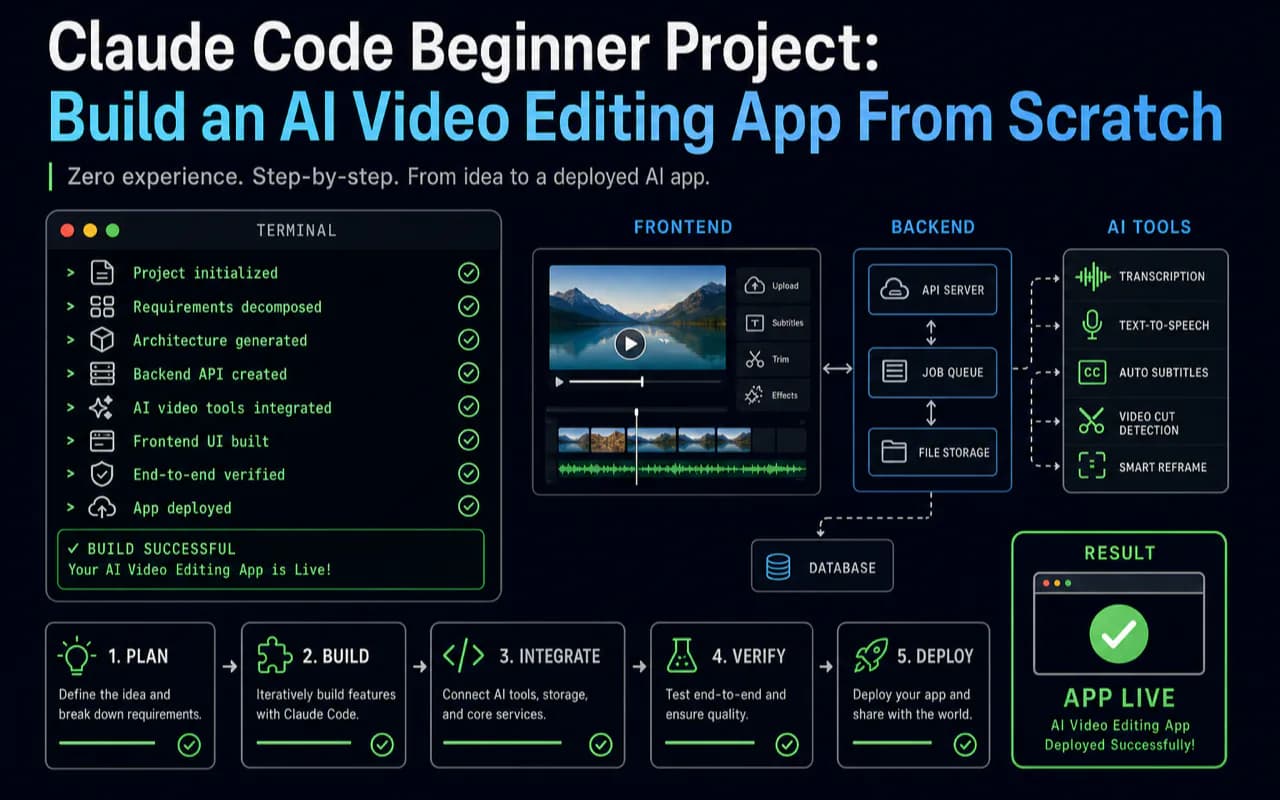
A complete AI video editing web app — built entirely by someone who never wrote a line of code manually. That is what Claude Code makes possible for absolute beginners.
This guide walks you through the full journey: from installing Claude Code to deploying a production app that analyzes raw video, generates narration, synthesizes voiceover, and outputs finished short-form content. You will learn the five development principles that make AI-assisted coding work, the boundary-first strategy that eliminates rework, and the exact tool stack I used across three months and 4,000+ conversations.
What This Tutorial Covers
Beyond the finished app, you walk away with a repeatable development process that works for any project:
- Claude Code installation, terminal configuration, and GitHub SSH setup
- Memory system architecture: personal memory vs. project memory
- MVP product design: translating automation workflows into product requirements
- Boundary-first development: build inputs and outputs first, core logic last
- MCP tool extensions and Hooks automation
- Docker multi-stage builds and one-click cloud deployment
- Five core development principles that apply to any AI-assisted coding project
Why Should You Choose Claude Code Over Low-Code Tools?
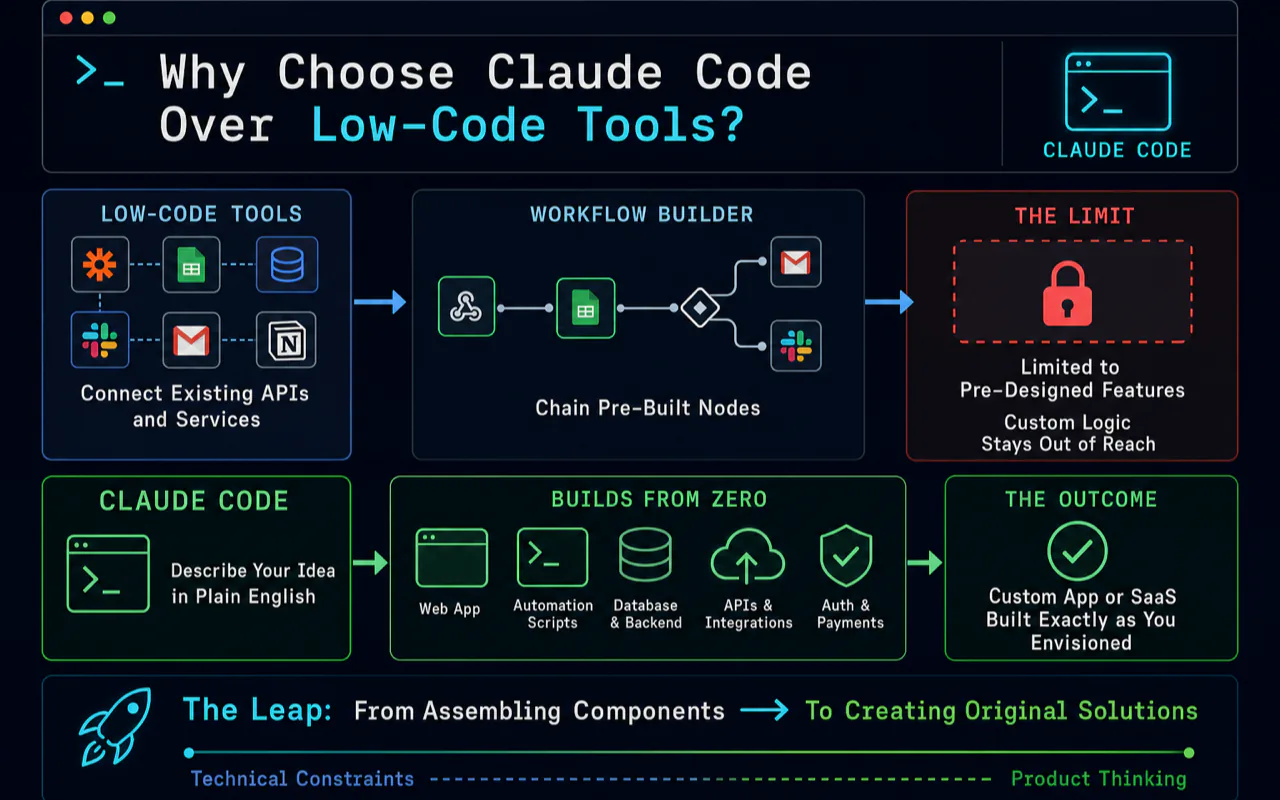
Low-code platforms like n8n connect existing APIs and services. They excel at chaining pre-built nodes into automation workflows. But they hit a ceiling: you can only use features someone else designed. Custom logic stays out of reach.
Claude Code creates from zero. A custom web app, an automation script suite, a complete SaaS product — anything you can describe clearly, it can build. The constraint shifts from technical skill to product thinking.
This distinction matters because it defines your learning path. Moving from low-code tools to Claude Code is the leap from assembling components to creating original products.
| Dimension | Low-Code (n8n) | Claude Code |
|---|---|---|
| Core capability | Connect existing API services | Create any software from scratch |
| Skill required | Understanding APIs and data flows | Clearly describing requirements |
| Output ceiling | Limited to available nodes | Limited only by imagination |
| Learning curve | Visual drag-and-drop, fast start | Requires product thinking |
| Best fit | Repetitive automation tasks | Custom product development |
| Deployment | Runs inside the platform | Deploys independently to any server |
Core Concepts Every Beginner Needs
Three concepts form the foundation for everything that follows. Understanding them before you start saves hours of confusion later.
CLAUDE.md Memory System
The memory system separates Claude Code from ordinary AI chat. It works on two levels:
- Personal memory (
~/.claude/CLAUDE.md): applies across all projects. Records your preferences, toolchain, and coding style. Example entries: "I use TypeScript, Next.js, and Tailwind CSS" or "Deploy to Vercel." - Project memory (root-level
CLAUDE.md): applies only to the current project. Records architecture decisions, tech stack, and development conventions.
Good memory files let Claude Code "remember" who you are and what the project needs in every new conversation. From my experience, every minute spent writing precise memory instructions saves ten minutes of back-and-forth communication.
The biggest mistake beginners make is writing vague memory files — something like "I like clean code." That instruction changes nothing. Effective memory files contain specific tech stack choices ("Frontend: Next.js + TypeScript + Tailwind CSS"), explicit code standards ("Functions must not exceed 20 lines," "Never use the any type"), and file structure conventions ("Components go in the components/ directory, organized by feature subdirectory"). After dozens of iterations, my personal memory file runs several thousand words of precise instructions. Claude Code now writes code matching my style with almost zero additional communication.
A benchmark that validates this approach: by early 2026, Claude Code contributed to 4% of all GitHub commits worldwide. Anthropic's internal team reported each engineer completing 10 to 30 pull requests per day with Claude Code.
MCP (Model Context Protocol)
MCP is Claude Code's tool extension interface. Through MCP, you connect external capabilities: browser control, GitHub operations, database queries, file search, and more. Think of it as installing drivers on a computer — once connected, Claude Code can see and operate additional systems.
Hooks Automation
Hooks trigger scripts at specific events. Examples: auto-running a linter after Claude Code generates code, running type checks before every commit, or updating project docs when a session ends. These automated quality gates eliminated nearly all manual code formatting and type errors in my project.
Structuring a Full-Stack Beginner Project
The video editing app is a full-stack web application. Here is the tech stack that proved reliable for a complete beginner:
- Framework: Next.js (frontend and API routes)
- Language: TypeScript
- Video analysis & narration: Gemini API
- Voice synthesis: Fish Audio (200K+ voice library) and Microsoft TTS (free tier)
- Audio/video processing: FFmpeg
Core feature modules:
- Task management: Create, view, and manage all editing tasks
- Style system: 20+ preset editing styles with custom style creation (including one-click style cloning from viral videos)
- Model configuration: Gemini model selection, sampling parameters, resolution settings
- Voice settings: Dual engine — premium voices via Fish Audio, free voices via Microsoft TTS
- Editing engine: Single-video editing and multi-video remix modes
- System settings: Concurrency limits, batch sizes, subtitle toggles, and fine-grained controls
What Are the Five Development Principles That Actually Work?
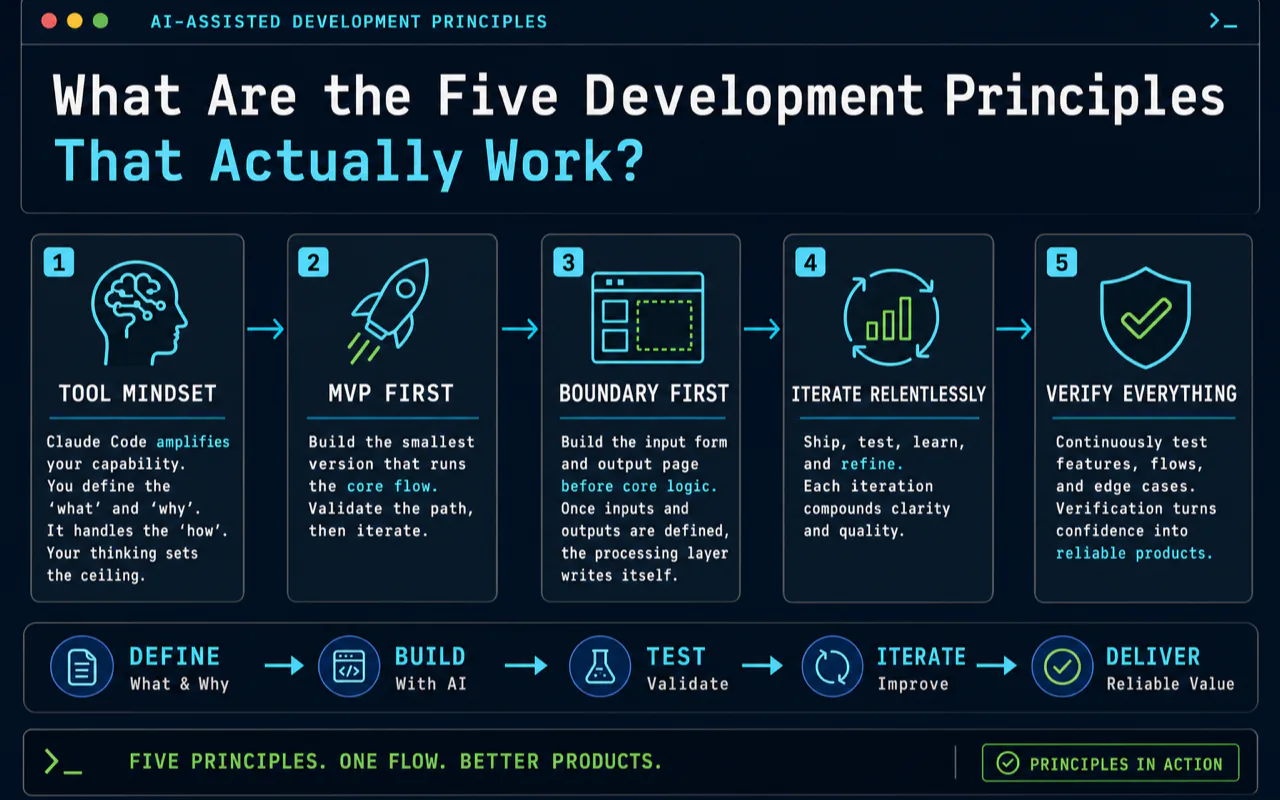
These principles emerged from three months of intensive building. They apply to any AI-assisted coding project, not just video editing.
Principle 1: Tool mindset. Claude Code is not a programmer replacement. It is a capability amplifier. You supply the "what" and "why." It handles the "how." Your thinking and judgment determine the output ceiling.
Principle 2: MVP first. Never attempt a perfect product on the first pass. Build the smallest version that runs the core flow, then iterate. The first version of my video editor handled exactly one editing style — but it proved the entire technical path was viable.
Principle 3: Boundary first. Build the input form and the output display page before touching core logic. Once you know what goes in and what comes out, the processing layer writes itself. This single strategy eliminated most rework in my project.
In practice, the most common beginner mistake is building the core processing logic first — video analysis, narration generation — then creating the input form afterward. That approach fails because by the time you build the form, you discover the core logic's interface does not match what the frontend needs. Massive rework follows. My approach: build a complete input form defining every parameter the user can set, then build a results page defining exactly what the output looks like. With clear input/output specifications, implementing the middle layer becomes straightforward.
Principle 4: TDD-driven. Write test cases before writing core logic. Tell Claude Code "I expect input X to produce output Y." It writes code that satisfies the test. Test cases become the best requirement documents.
TDD has a unique advantage in AI-assisted coding: the test case is simultaneously a requirement and an acceptance criterion. When you tell Claude Code "this video input should produce a six-scene narration script," you define both what to build and how to verify it. Claude Code writes code satisfying that test. You run the test. It passes. Move on. This workflow lets someone with zero coding background produce reliable, tested code.
Principle 5: Progressive delivery. Deploy after every feature completion. Validate in real environments. Never wait until everything is "done" — accumulated issues at that point become overwhelming.
How Do You Set Up the Development Environment?
After testing multiple configurations, this combination proved most reliable:
| Tool | Recommendation | Why |
|---|---|---|
| Terminal | iTerm2 (Mac) / Windows Terminal | Split panes, rich shortcuts |
| Editor | VS Code + Claude Code extension | Native integration, fast file navigation |
| Node.js | v20 LTS | Best stability |
| Package manager | pnpm | Fastest, lowest disk usage |
| Version control | Git + GitHub SSH | Native Claude Code support |
| Deployment | Vercel or Zeabur | One-click deploy, zero ops |
A practical tip from daily use: combine terminal and editor. Run Claude Code in the terminal for primary conversations and code generation. Use VS Code for browsing file structures and making manual micro-adjustments. In my daily workflow, roughly 70% of development time happens in terminal-based Claude Code, 30% in VS Code for review and navigation.
Installation (3 minutes):
- Subscribe to Claude Max 20x ($200/month, includes Claude Code usage)
- Run
npm install -g @anthropic-ai/claude-codein your terminal - Navigate to your project directory and run
claude - Complete browser authentication on first launch
How Does the Style Cloning Feature Work?
One standout feature: cloning editing styles from viral short-form videos with a single action.
The workflow is straightforward. Find a video whose style you want to replicate. Extract its subtitles. Send both the video and subtitles to Gemini. It analyzes narration style, pacing characteristics, and narrative structure, then outputs a complete set of editing prompts. Save those prompts as a custom style, and batch-generate videos in the same style going forward.
I tested this across food documentaries, finance commentary, drama highlight reels, and product advertisement formats. All reproduced the original style with reasonable fidelity.
What Does the Cost Structure Look Like?
Per-video production cost varies by quality tier:
| Configuration | Cost per Video | Daily Capacity | Best For |
|---|---|---|---|
| Low-code workflow (n8n) | ~$0.15 | 10-20 videos | Single account |
| Gemini Flash + Microsoft TTS | ~$0.01 | 100+ videos | Content matrix, budget |
| Gemini Flash + Fish Audio | ~$0.15 | 100+ videos | High quality at scale |
| Gemini Pro + Fish Audio | ~$0.50 | 50+ videos | Maximum quality |
For batch production scenarios — say, a ten-account content matrix — the web app deploys to multiple servers for parallel processing. Both cost and throughput outperform low-code workflow approaches at this scale.
How Does Claude Code Compare to Other AI Coding Tools?
| Dimension | Claude Code | Cursor | GitHub Copilot |
|---|---|---|---|
| Interface | Terminal CLI | IDE-embedded | IDE plugin |
| Core capability | Autonomous full-stack development | Conversational code editing | Line-by-line autocomplete |
| Autonomy | Completes entire features independently | Requires human guidance | Suggests line-by-line |
| Best for | Non-programmers building products | Experienced developers | Daily coding speedup |
| Price | $200/month (Max 20x) | $20/month (Pro) | $10/month |
The short version: Copilot autocompletes. Cursor edits conversationally. Claude Code engineers autonomously. These are different capability tiers entirely.
What Mindset Shifts Do Beginners Need?
Three misconceptions slow beginners down more than any technical gap.
"I do not know code, so I cannot learn this." Claude Code's core function is translating natural language into code. You need requirement-description skill, not programming skill. I have seen an interior designer build a floor plan annotation tool and a trade professional build a multilingual product description generator — both with zero coding background. Both tools are now in daily production use within their businesses.
"AI-generated code is unreliable." Claude Code output does require validation. But accuracy already exceeds most expectations. In my experience, over 80% of outputs run without manual changes. The remaining 20% typically resolve within one or two follow-up prompts. The habit to build is a generate-test-fix cycle, not an expectation of perfection on the first attempt.
"I should learn all the concepts before I start building." The opposite is true. Start building. Learn theory when you hit a wall. You do not need to understand React's virtual DOM to build a React app with Claude Code. Learning through real project problems is ten times more effective than front-loading tutorials.
The core insight: in the age of AI coding, what determines your output is not technical ability but product thinking and requirement clarity. If you can describe clearly what a product should look like, what it should do, and who it serves, Claude Code can build it.
Related Reading
- Claude Code Complete Guide 2026 - The complete Claude Code reference guide
- Claude Code Quickstart Setup - Set up Claude Code before your first project
- 10 Claude Code Mistakes to Avoid - Avoid common mistakes on your first build
- What Is Claude Code? - Understand the tool before starting your first project
- Your First Vibe Coding Project - Another beginner-friendly project walkthrough
Frequently Asked Questions
Can I build a real app with Claude Code if I have zero coding experience?
Yes. Claude Code translates plain English requirements into working code. You do not need to know any programming language. What matters is your ability to describe what you want clearly. In my experience, over 80% of Claude Code output runs without manual edits, and the remaining issues typically resolve within one or two follow-up prompts.
How much does it cost to run Claude Code for a beginner project?
Claude Max subscription is $200 per month and includes Claude Code usage. For the video editing project itself, each processed video costs between $0.01 (using free Microsoft TTS) and $0.50 (using Gemini Pro + premium voice), depending on your quality requirements. Most beginners recoup the subscription cost within the first week through dramatically faster development cycles.
What is the difference between Claude Code, Cursor, and GitHub Copilot?
Copilot provides line-by-line autocomplete inside your editor. Cursor offers conversational code editing within an IDE. Claude Code operates as an autonomous AI engineer in your terminal — it navigates codebases, understands file dependencies, runs terminal commands, executes tests, and deploys applications independently. The capability tiers are fundamentally different: autocomplete versus conversational editing versus full autonomous development.
How long does it take to build a complete app as a beginner?
The MVP of the video editing app took one week to reach a working prototype that could process a single video style. The full-featured version with 20+ editing styles, dual voice engines, batch processing, and cloud deployment took about three months of part-time work. Most of that time was spent on product thinking and testing — not fighting with code.
Video Tutorial: This guide has a companion video walkthrough. Watch the full build process on YouTube:
https://www.youtube.com/watch?v=hy2vZip4m2s