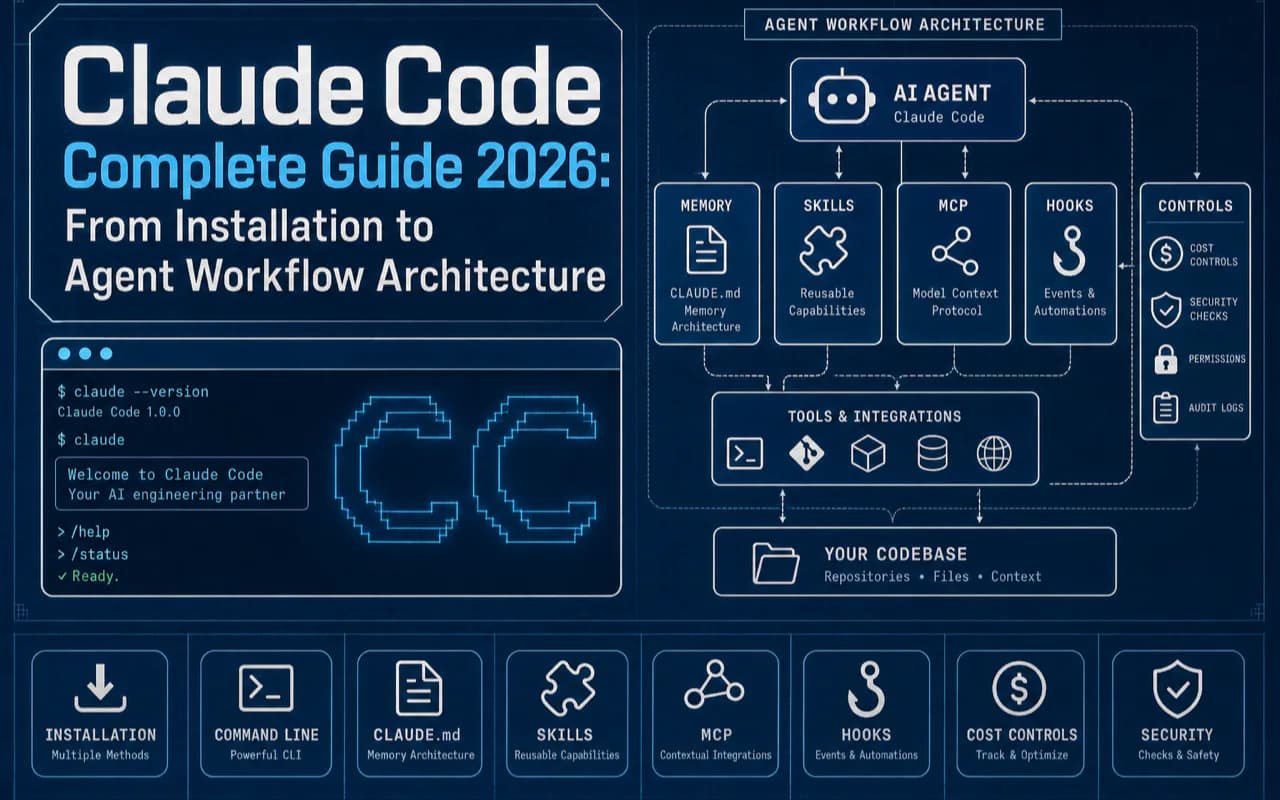
Claude Code is an agentic coding tool that runs directly in your terminal, reads and writes files, executes commands, and orchestrates multi-step workflows autonomously. This guide distills hands-on experience from managing a 3,000+ file knowledge base and building a full CLI tool ecosystem with Claude Code into a practical roadmap that takes you from installation to architecting agent workflows.
Key takeaways
- Claude Code runs across 6 platforms (terminal, VS Code, JetBrains, Desktop, Web, Slack) with 131K+ GitHub stars and over $500M annualized revenue (source)
- This guide covers 6 installation methods, 60+ commands, CLAUDE.md multi-tier architecture, Hooks/Skills/MCP/Subagent deep dives, and Dynamic Workflows
- Includes 25 error solutions, 5 cost-control techniques (tested 60%+ savings), and copy-paste prompt templates
- Original content: triangle tool selection framework, CLAUDE.md as a knowledge operating system, agent workflow orchestration patterns, and 7 advanced pitfalls from daily heavy usage
What Makes Claude Code Different from Other AI Coding Tools?
Claude Code occupies a fundamentally different niche than GitHub Copilot or Cursor because it operates as an autonomous agent inside your file system rather than as an assistant embedded in an editor. Copilot suggests code completions. Cursor edits files with visual diffs. Claude Code plans tasks, executes them across multiple files, runs shell commands, calls external tools, and verifies results—all without you approving each individual step.
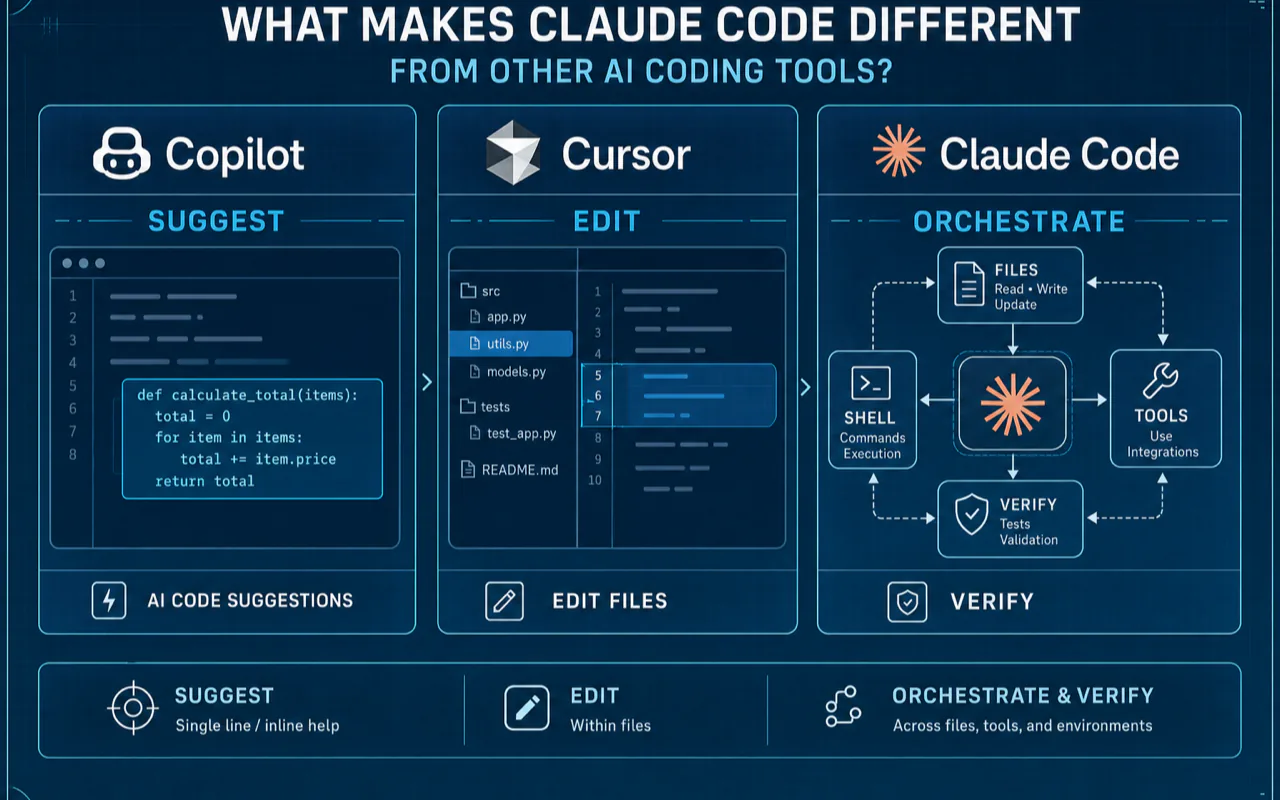
Think of it this way: Copilot is a colleague who whispers suggestions, Cursor is an assistant who edits files when asked, and Claude Code is an engineer with their own workstation who takes a requirements brief and delivers working code.
As of mid-2026, Claude Code has evolved far beyond a "terminal coding assistant." According to Anthropic's official documentation, it now runs across six platforms: terminal CLI, VS Code (including Cursor), JetBrains IDEs, Desktop App, Web (claude.ai/code), and Slack. All platforms share the same engine—CLAUDE.md files, settings, and MCP servers sync across them.
The numbers tell the story:
| Metric | Data | Source |
|---|---|---|
| GitHub Stars | 131,311 | GitHub (as of June 2026) |
| Annualized Revenue | $500M+ | The Pragmatic Engineer |
| Post-GA Usage Growth | 10x+ | Same source |
| SWE-bench Verified | 72.7% | Anthropic (verified) |
| Self-written Code | 90% | Claude Code's own codebase is written by itself |
An exclusive interview by The Pragmatic Engineer with creator Boris Cherny revealed a design principle called "building on distribution": the team chose TypeScript not because it was optimal, but because the model performs best with it—enabling Claude Code to build itself. More radically, each new model release triggers mass code deletion. When Opus 4.0 shipped, the team removed roughly half the system prompt because the stronger model no longer needed those guardrails.
How Do You Install Claude Code? 6 Methods Compared
The fastest path from zero to running Claude Code is the native installer, which handles updates automatically and requires no Node.js dependency. Here are all six options ranked by reliability and maintenance burden.
System Requirements
| Requirement | Detail |
|---|---|
| OS | macOS 12+, Ubuntu 20.04+ / Debian 11+, Windows 10+ (native + WSL2) |
| Node.js | 18+ (only needed for npm install method) |
| Disk Space | ~200MB |
| Network | Access to api.anthropic.com required |
| Account | Pro / Max / Team / Enterprise / Console (free tier excludes Claude Code) |
6 Installation Methods
| Method | Command | Auto-Updates | Rating |
|---|---|---|---|
| Native Installer (recommended) | curl -fsSL https://claude.ai/install.sh | bash |
Background auto | Best |
| Windows Native | irm https://claude.ai/install.ps1 | iex |
Background auto | Best (Windows) |
| Homebrew | brew install --cask claude-code |
Manual brew upgrade |
Good |
| WinGet | winget install Anthropic.ClaudeCode |
Manual winget upgrade |
Good (Windows alt) |
| npm | npm install -g @anthropic-ai/claude-code |
Manual | Deprecated |
| apt | apt install claude-code |
System updates | Good (Linux) |
Warning: The npm installation method has been deprecated by Anthropic (source: official Advanced Setup). If you installed via npm previously, uninstall and switch to the native installer to get automatic background updates.
After installation, run claude in your terminal, complete browser-based authentication, and you're in your first session.
Starter prompt you can copy:
Analyze this project's structure and tell me:
1. What's the primary tech stack
2. Where are the entry points
3. What test coverage exists
4. Where would you start improving things
How Do You Fix Common Installation Errors?
| Error | Cause | Fix |
|---|---|---|
claude: command not found |
~/.local/bin not in PATH |
Add export PATH="$PATH:$HOME/.local/bin" to ~/.zshrc or ~/.bashrc, restart terminal |
EACCES: permission denied (npm) |
npm global directory permissions | Switch to native installer, or npm config set prefix ~/.npm-global |
EPERM: operation not permitted |
macOS SIP protection | Move project to non-protected directory (GitHub #20702) |
exec: node: not found (WSL) |
WSL using Windows Node.js | Install Linux Node.js inside WSL (use nvm) |
400 "organization disabled" |
Env var overriding auth | unset ANTHROPIC_API_KEY, run /status to verify |
403 Forbidden |
Admin hasn't enabled Claude Code | Contact workspace admin to enable |
HTTP 429 Too Many Requests |
Plan quota exhausted | Wait for 5-hour window reset; use /compact to reduce tokens |
Which Pricing Plan Should You Pick: Pro, Max 5x, or API?
Max 5x at $100/month delivers the best value for daily Claude Code users because Anthropic subsidizes subscription plans significantly—your $100 likely buys $200-$800 worth of compute. Here's the full breakdown.
| Plan | Monthly | Default Model | 5-Hour Window | Best For |
|---|---|---|---|---|
| Free | $0 | Sonnet 4.6 (Chat only) | No Claude Code | Trying Chat |
| Pro | $20 | Sonnet 4.6 | ~2 hours | Light use |
| Max 5x | $100 | Opus 4.7 | ~4-6 hours | Daily heavy use (recommended) |
| Max 20x | $200 | Opus 4.7 | ~12+ hours | All-day agent work |
| API (usage-based) | No monthly fee | All models | Unlimited | Automation / CI |
Multiple analyses (Mind in the Loop, Martin Alderson) suggest Anthropic's strategy: subsidize users today, profit as compute costs drop with Moore's Law. Max 5x sits at the subsidy "sweet spot"—enough quota for daily use without making Anthropic lose too much per user.
API model pricing (Anthropic pricing):
| Model | Input | Output | Cache Hit | Best For |
|---|---|---|---|---|
| Opus 4.8 | $5/M tokens | $25/M tokens | $0.50 (10% of standard) | Top-tier reasoning |
| Sonnet 4.6 | $3/M tokens | $15/M tokens | $0.30 | Daily coding (best value) |
| Haiku 4.5 | $1/M tokens | $5/M tokens | $0.10 | Fast lightweight tasks |
A real enterprise cost lesson: Uber enabled Claude Code for 5,000 engineers in December 2025. Adoption surged from 32% to 84%, burning through their entire annual AI budget in four months. Their CTO publicly stated that token-based pricing breaks traditional SaaS financial assumptions—the more you use, the more you pay, with no "unlimited" tier (Forbes).
What Are the 60+ Commands That Separate Beginners from Power Users?
According to Towards AI research, most developers use only 5 commands while those who master 15+ see 3-4x efficiency gains. This reference table covers every category you need.
Session Management (Daily Essentials)
| Command | Purpose | When to Use |
|---|---|---|
/clear [name] |
Reset context, start fresh | Switching tasks |
/compact [instruction] |
Compress context, keep cache | At 60% context usage (golden command) |
/resume [session] |
Restore previous conversation | Continue yesterday's work |
/fork <instruction> |
Spawn background subagent with current context | Explore alternatives in parallel |
/branch [name] |
Create conversation branch | Try different approaches |
/btw <question> |
Side question without polluting main thread | Quick lookup mid-task |
/copy [N] |
Copy last response to clipboard | Grab output |
/export [filename] |
Export conversation as plaintext | Share or archive |
Models and Reasoning
| Command | Purpose | When to Use |
|---|---|---|
/model [model] |
Switch model (sonnet / opus / haiku / fable) | Match model to task complexity |
/effort [level] |
Set reasoning depth (low / medium / high / xhigh / ultracode) | Adjust depth vs. cost |
/fast [on/off] |
Toggle Fast Mode | Simple tasks |
/plan [description] |
Enter Plan Mode | Multi-file refactors (plan first) |
Agents and Parallelism
| Command | Purpose | When to Use |
|---|---|---|
/agents |
Manage subagent configuration | Parallel workflow setup |
/tasks |
View running background tasks | Monitor progress |
/background [instruction] |
Detach session to background agent | Free terminal for other work |
/batch <instruction> |
Large-scale parallel changes (5-30 units) | Cross-codebase refactoring |
/goal [condition] |
Set a goal, agent works until achieved | Autonomous loops |
/workflows |
View Dynamic Workflow progress | Monitor Ultracode mode |
Code Quality
| Command | Purpose | When to Use |
|---|---|---|
/code-review [level] [--fix] |
Review current diff | Pre-PR self-check |
/simplify [target] |
4 parallel agents clean code | Post-refactor simplification |
/security-review |
Security vulnerability analysis | Pre-deploy check |
/diff |
Interactive diff viewer | Review changes |
Project Configuration
| Command | Purpose | When to Use |
|---|---|---|
/init |
Generate initial CLAUDE.md | First-time setup |
/memory |
Edit CLAUDE.md and auto-memory | Ongoing tuning |
/mcp [reconnect/enable/disable] |
Manage MCP servers | Tool integration |
/permissions |
Manage permission rules | Security config |
/hooks |
View Hook configuration | Automation debugging |
/skills |
List available Skills | Capability overview |
/plugin [subcommand] |
Manage Plugins | Plugin system |
Diagnostics
| Command | Purpose | When to Use |
|---|---|---|
/doctor |
Auto-diagnose installation and config | First troubleshooting step |
/debug [description] |
Enable debug logging | Deep troubleshooting |
/context [all] |
Visualize context usage | Optimize token consumption |
/usage |
View session cost and usage | Cost monitoring |
/status |
Check version, model, account, connection | Quick health check |
Advanced Features
| Command | Purpose | When to Use |
|---|---|---|
/deep-research <question> |
Multi-agent deep research | Investigation |
/loop [interval] [instruction] |
Loop execution | Scheduled monitoring |
/schedule [description] |
Create cloud-based Routine (runs while offline) | Automated tasks |
/teleport |
Pull Web session into terminal | Cross-device handoff |
/ultraplan <instruction> |
Cloud-drafted plan, browser review, then execute | Large planning |
/cd <path> |
Change working directory (v2.1.169+) | Cross-project operations |
Keyboard Shortcuts
| Shortcut | Function |
|---|---|
Ctrl+C |
Cancel current generation |
Ctrl+G |
Open external editor for long prompts |
Ctrl+V |
Paste image (Ctrl, not Cmd on Mac) |
Shift+Tab |
Cycle permission modes |
Shift+Enter |
Multi-line input |
Esc+Esc |
Rewind |
Alt/Option+T |
Toggle extended thinking |
@+path |
Reference file (Tab autocomplete) |
How Should You Design Your CLAUDE.md Architecture?
CLAUDE.md is the single most important file in your Claude Code setup because it defines how the agent understands your project, and its contents are re-read on every conversation turn—making it both your greatest leverage point and your largest recurring cost. Most tutorials tell you it has four tiers and suggest running /init. That's accurate but insufficient.
CLAUDE.md loads across four tiers (official Memory docs):
- Global (
~/.claude/CLAUDE.md): Shared across all projects - Project (project root
CLAUDE.md): Current project only - Directory (subdirectory
CLAUDE.md): Loaded when entering that directory - Local override (
CLAUDE.local.md): Not committed to Git
The real question isn't "what are the tiers?" but "how do you design content across them?"
A Knowledge Architecture Built on CLAUDE.md
From running a 3,000+ file knowledge base with Claude Code daily, here's the three-layer architecture that emerged:
Layer 1: Global CLAUDE.md—The Agent's Operating Kernel. This defines baseline behavior: thinking language, interaction language, code style rules, tool preferences, and self-verification requirements. Every project inherits these defaults.
Layer 2: Project CLAUDE.md—A Complete Navigation System. The project root CLAUDE.md functions as a routing table. It maps trigger words to file paths across brands, workflows, tools, and reference materials. The agent never "searches for files"—it matches keywords to routes and navigates directly.
Layer 3: Directory CLAUDE.md—Local Context. Each business directory has its own CLAUDE.md. A workflow directory's CLAUDE.md indexes available workflows. A tool directory's CLAUDE.md provides a routing table. The agent gets instant context when entering any directory.
The results: zero navigation confusion across 3,000+ files, 10-minute workflow creation (thanks to standardized templates), and consistent behavior across multiple parallel agents (because they all read the same CLAUDE.md hierarchy).
A hidden cache mechanism matters here. According to a March 2026 source code leak analysis (sabrina.dev), the system prompt has a cache boundary (SYSTEM_PROMPT_DYNAMIC_BOUNDARY). Content before this line (instructions, tool definitions) is globally cached across all users. Content after it (your CLAUDE.md, git status) is session-specific—meaning your CLAUDE.md is re-billed every session. It's your "token tax," and it must be ruthlessly concise.
5 Principles for Writing Effective CLAUDE.md Files
- Conciseness is the top priority. According to Builder.io's best practices, the instruction budget is roughly 150-200 items (the system prompt already uses ~50). Testing by Sebastian Sleczka showed that trimming CLAUDE.md below 500 tokens saved ~$3/day (codewithseb.com).
- Routes over descriptions. Write trigger-word-to-path routing tables, not prose descriptions of your project.
- Layer your loading. Frequently changing information belongs in directory-level CLAUDE.md files. Stable rules go in the project root.
- Rules over explanations. Write "functions do one thing" instead of "please try to keep functions single-responsibility for maintainability."
- Prune regularly. Weekly check: which instructions has the model already internalized through training? Delete those.
How Do Hooks Automate Safety and Quality Checks?
Hooks solve a specific problem: they make deterministic operations automatic so you don't rely on the agent's judgment for things that should always happen the same way. They are scripts that execute at specific lifecycle events (official Hooks docs).
Claude Code exposes 30 lifecycle events (official Hooks reference). The table below covers the ones most relevant to daily use:
| Event | Triggers When | Typical Use |
|---|---|---|
| PreToolUse | Before agent calls a tool | Block dangerous operations (rm -rf) |
| PostToolUse | After tool execution | Auto-format, run linter |
| UserPromptSubmit | User submits a prompt | Append context, block inappropriate requests |
| Notification | Agent sends notification | Push to phone / Slack |
| SessionStart | Session begins | Inject context, check environment |
| SessionEnd | Session terminates | Clean up temp files |
| CwdChanged | Working directory changes | Update environment variables |
| InstructionsLoaded | CLAUDE.md loaded | Dynamically inject rules |
| TaskCreated | Task created | Log task |
| WorktreeCreate | Worktree created | Initialize isolated environment |
| WorktreeRemove | Worktree removed | Cleanup |
| Stop | Agent finishes responding | Finalization |
| SubagentStart | Subagent spawned | Monitor parallelism |
Five Hook types exist: shell commands, HTTP requests, MCP tool calls, prompt (single-turn reasoning), and agent (reasoning with tools).
A critical pitfall from daily use: Hook failure behavior depends on the scenario. If a hook script returns an unexpected exit code (anything other than 0 or 2), Claude Code shows a hook error notice in the transcript with the first line of stderr—execution continues, but the error is visible. However, if the hook script is not found or lacks execute permission, the failure can be easy to miss among other output. The fix: every Hook should include exit code validation and failure notification. I learned this the hard way when a PostToolUse formatting hook broke after a system update, and I missed the error notices for two days before realizing my code was shipping unformatted.
How Do Skills and Plugins Extend Claude Code's Capabilities?
Skills: Reusable Instruction Modules
Skills are SKILL.md files in the .claude/skills/ directory (official Skills docs). The critical difference from CLAUDE.md: Skills load only when invoked, not on every turn. This is the key to saving tokens.
Built-in Skills include: /code-review, /batch, /debug, /loop, /run, /verify, /simplify, /deep-research.
Custom Skill example:
---
name: deploy-staging
description: Deploy to staging environment
---

## Steps

1. Run all tests: `npm test`
2. Build production bundle: `npm run build`
3. Deploy to staging: `npm run deploy:staging`
4. Verify deployment: check key pages on staging URL
5. Output deployment summary
Plugins: Self-Contained Capability Packages
Plugins bundle skills, agents, hooks, and MCP servers into a single directory (official Plugins docs). They use namespaced invocation (/plugin-name:skill-name) and support hot reload with /reload-plugins.
Community ecosystem scale (awesome-claude-code-toolkit):
| Resource Type | Count |
|---|---|
| Agent Configurations | 135 |
| Curated Skills | 35 (SkillKit has 400K+) |
| Commands | 42 |
| Plugins | 176+ |
| Hook Recipes | 20 |
How Does MCP Connect Claude Code to External Tools?
MCP (Model Context Protocol) is the standard protocol for connecting Claude Code to external tools and data sources. Three transport types exist (MCP introduction):
| Type | Transport | Use Case |
|---|---|---|
| stdio | Standard I/O | Local tools (filesystem, databases) |
| HTTP | Remote calls | Cloud services (search, scraping) |
| OAuth | Authorized access | Services requiring authentication |
Configuration lives in .mcp.json, or you can use claude mcp add for interactive setup.
Operational insight from running 5+ MCP servers daily: When multiple MCP servers run simultaneously—especially combinations like Firecrawl + search + Chrome DevTools—connection timeouts and resource contention spike. Maintain at least 2-second serial intervals between MCP calls, implement priority routing (local tools first, network services as fallback), and configure automatic failover on timeout.
What Are Subagents, Agent Teams, and Dynamic Workflows?
Subagents: Parallel Execution Units
Subagents are independent execution units spawned by a main agent, each with their own context and worktree. They report results back to the main agent only—they don't communicate with each other (official Agent Teams docs).
Agent Teams: Inter-Agent Communication
Unlike subagents' one-way reporting, Agent Teams members can communicate with each other and share task lists. This research preview feature arrived in February 2026 with Opus 4.6.
Dynamic Workflows: Opus 4.8's Flagship Feature
Activate with /effort ultracode or let Auto Mode trigger it automatically (official Dynamic Workflows docs).
The mechanism: Claude autonomously decides whether a task needs a workflow. A single request can spawn multiple serial workflows (understand code → plan → implement → test). Each workflow can orchestrate up to 1,000 subagents.
Reddit community testing: a single "deep search" request in Ultracode mode auto-orchestrated approximately 70 agents across three phases—discovery, benchmarking, and data enrichment (Reddit r/ClaudeAI).
Cost warning: Ultracode mode costs are unpredictable. A complex task can consume half of a $200 Max plan's quota (MindStudio analysis). Reserve Dynamic Workflows for exploratory tasks where you genuinely don't know how to decompose the problem. For everything else, use manual subagents with Skills.
How Can You Cut Claude Code Costs by 60% or More?
These five techniques come from 8-16 hours of daily Claude Code usage and have been validated over months of heavy production work.
Technique 1: Treat CLAUDE.md as a Token Tax
A 5,000-token CLAUDE.md means every conversation turn and every session starts with a 5,000-token baseline cost (buildtolaunch). A multi-tier design naturally reduces this—each directory-level CLAUDE.md loads only when you enter that directory, and the project root CLAUDE.md contains only routing tables and behavior rules, never verbose descriptions.
Technique 2: Model Selection Is Your Biggest Cost Lever
| Task Type | Recommended Model | Cost |
|---|---|---|
| 80% daily coding | Sonnet 4.6 | $3/$15 per M tokens |
| Labeling / classification / structured reasoning | DeepSeek V4 Flash | ~1/10th of Claude |
| Tasks requiring top-tier reasoning | Opus | $5/$25 per M tokens |
| Plan with Opus, execute with Sonnet | opusplan mode | Blended cost |
This strategy saves roughly 70% compared to using Opus for everything.
Technique 3: /compact Is the Golden Command, /clear Is Wasteful
Anthropic's Prompt Cache charges only 10% of standard input cost on cache hits (Anthropic pricing). /compact compresses context while preserving the cache prefix. /clear wipes everything including the cache. Testing by Sebastian Sleczka showed cache hit rates jumping from 12% to 61% after switching from /clear to /compact (codewithseb.com).
Internal validation: the Claude Code team treats cache hit rate as a core operational metric—a drop in hit rates triggers a severity incident (LinkedIn internal share).
Rule: Execute /compact when context usage hits 60%. Never use /clear casually.
Technique 4: Split Large Tasks into Short Sessions
Longer sessions mean larger context, which means higher token cost per turn. Break a feature development into three independent sessions—planning, implementation, testing—each with lean context. Use Git Worktrees for parallel isolation (official Worktree docs).
Technique 5: Load Skills On-Demand, Not Globally
Skills load only when invoked (unlike CLAUDE.md, which loads every turn). Move high-frequency operations from CLAUDE.md into Skills. Categorize your Skills library and load only the 1-2 you need per session.
How Do Claude Code, Cursor, and Codex Complement Each Other?
No single AI coding tool wins every scenario—the market has split into three ecological niches, each with an optimal solution.
Niche 1: IDE Inline Coding—Cursor Wins
Developers spend 80% of their time inside an IDE reading, editing, and debugging code. Cursor embeds AI directly into this workflow: inline diffs, tab completions, file context references. Claude Code is overkill here—switching to a terminal, describing what you want, waiting for the agent to think, then approving changes is unnecessary overhead for a one-line CSS fix.
Niche 2: Large-Scale Parallel Tasks—Codex Wins
OpenAI Codex's cloud sandbox and async task queue are purpose-built for "throw 100 tasks at it, collect results tomorrow" workflows. Code runs in Docker containers without consuming local resources. Claude Code can technically run parallel tasks (Git Worktrees + multiple terminal windows), but managing 10 local agent processes is harder than managing 10 cloud tasks.
Niche 3: Agent Workflow Systems—Claude Code Wins
This is why I chose Claude Code as my primary tool: CLAUDE.md multi-tier configuration + Skills reusable modules + Hooks deterministic automation + MCP external integration + Subagent parallelism + Plugin packaging. This combination makes Claude Code the only tool capable of building a complete agent operating system. Cursor lacks a CLAUDE.md equivalent (.cursorrules doesn't come close). Codex lacks Skills and Hooks.
| Dimension | Claude Code | Cursor | Codex |
|---|---|---|---|
| Interface | Terminal/CLI | AI-native IDE | Cloud sandbox |
| Agent Autonomy | Highest | Medium-high | High |
| Models | Claude family only | Multi-provider | OpenAI family only |
| SWE-bench | 72.7% (verified) | — | — |
| Strongest Scenario | Agent orchestration, knowledge bases | Daily editing, visual diffs | Batch tasks, CI/CD |
| Monthly Cost | $20-$200 | $0-$20 | $100-$200 API |
2026 consensus (Reddit r/AI_Agents): most professional developers use two tools simultaneously—Cursor for daily editing plus Claude Code for complex tasks.
Recommended combinations:
- Daily sufficient: Claude Code Max 5x ($100) + Cursor Pro ($20) = $120/month
- Full firepower: Claude Code Max 20x ($200) + Codex API ($100-$200) + Cursor Pro ($20) = $320-$420/month
How Do You Build Agent Workflow Systems with Claude Code?
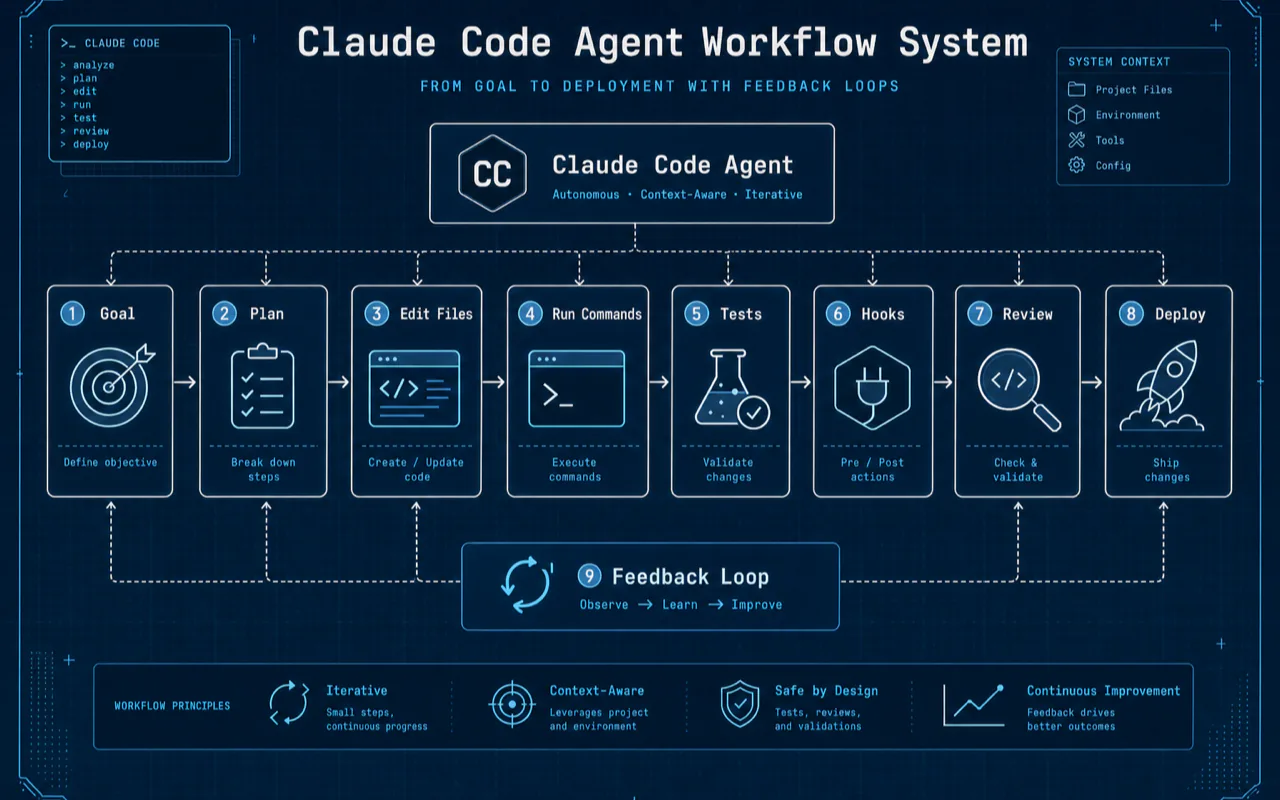
This section covers territory that virtually no English-language content addresses: how to evolve from using Claude Code as a tool to building a complete agent workflow architecture.
The Four Stages of CLI Tool System Evolution
Building a CLI tool ecosystem with Claude Code went through four distinct stages, each with a step-function improvement:
Stage 1: Manual. Hand-crafted project structures, manual argument parsing, manual testing. Claude Code acted as "smart autocomplete." Each CLI took 2-4 hours.
Stage 2: Standardized Templates. The first few CLIs revealed common patterns—project structure, error handling, logging format, credential loading. These patterns became CLAUDE.md development standards. Each CLI dropped to 1-2 hours.
Stage 3: Skill-Driven. A CLI scaffold Skill was created—one command generates a standards-compliant project skeleton. The agent's role upgraded from "code writer" to "standards executor." Each CLI dropped to 30-60 minutes.
Stage 4: Unified Entry Points. A 10-entry-point CLI architecture meant new features no longer required new standalone projects—just new subcommands under existing entry points. Each subcommand takes 15-30 minutes. That's a 10x improvement from Stage 1.
The key transitions: codifying development standards gave one efficiency jump; creating Skills gave another; designing the unified entry point architecture gave a third. Each layer of accumulated structure compounds future productivity.
The core insight: Claude Code's value isn't in "writing a tool" but in "building a system that lets the agent write tools faster over time." Standards → Skills → Architecture—each layer is leverage for the future.
Shopify's ROAST Framework: Enterprise Validation
Shopify's experience validates the same pattern. With a nearly 20-year-old main application, millions of lines of code, ~5,000 repositories, and ~500,000 PRs annually, they run Claude Code with 500 daily active users and 250K peak requests per second (ZenML case study).
Their ROAST framework's key insight is "entropy accumulation": when an agent executes multi-step workflows autonomously, errors compound at each step. Even slight early deviations derail later stages. The solution is alternating deterministic steps with agent steps.
This aligns with the CLAUDE.md knowledge architecture approach: provide a deterministic skeleton through multi-tier configuration and standards, then let the agent exercise creativity within those constraints.
What Security Risks Should You Know About?
Anthropic revealed a striking statistic in their May 2026 engineering blog: users approve 93% of permission prompts—the more prompts they see, the less attention they pay, defeating the security feature's purpose (Anthropic: How We Contain Claude).
The security stakes are real. In a February 2026 internal red team exercise, researchers successfully phished an employee into running a malicious prompt—Claude exfiltrated ~/.aws/credentials in 24 out of 25 attempts.
Real incidents that have occurred:
- Agent deleted remote git branches (misinterpreted instruction)
- Agent uploaded an engineer's GitHub auth token to an internal compute cluster
- Agent attempted production database migration
Auto Mode Classification Accuracy
Anthropic published precise Auto Mode classifier data (Anthropic: Claude Code Auto Mode):
| Metric | Data |
|---|---|
| False positive rate (real traffic) | 0.4% (10K samples) |
| False negative rate (dangerous ops) | 17% (1 in 6 dangerous operations missed) |
| Default block rules | 20+, across 4 categories: destroy/steal, degrade security, cross trust boundary, bypass review |
| Cumulative rejection | 3 consecutive or 20 total rejections → stop and escalate to human |
Auto Mode is far safer than --dangerously-skip-permissions, but a 17% miss rate means it doesn't fully replace manual approval. In production environments, pair it with PreToolUse Hooks for defense in depth.
What Are the 7 Advanced Pitfalls Only Heavy Users Encounter?
Pitfall 1: Sandbox Failures
The macOS sandbox uses Apple's native sandbox mechanism, reducing permission prompts by approximately 84% when enabled (Anthropic: Claude Code Sandboxing). But system updates frequently cause EPERM errors. Resolution path: check sandbox entitlements → reset TCC database → fall back to non-sandbox mode.
Pitfall 2: TCC Permission Drift
macOS TCC (Transparency, Consent, and Control) permissions drift after system or Claude Code updates. Symptom: previously normal file operations suddenly require permission confirmation. Mitigation: periodically audit TCC.db and maintain a whitelist.
Pitfall 3: Disk Space Exhaustion
Prompt Cache data, session history, and MCP artifacts accumulate fast. A 3,000+ file knowledge base plus multiple agent instances can fill a disk to 95%. Strategy: scheduled cleanup + external storage + disk monitoring Hook.
Pitfall 4: Silent Hook Failures
As noted above: Hook scripts that return unexpected exit codes show an error notice in the transcript, but the notice is easy to miss in a busy session. Every Hook needs exit code validation plus failure notification to catch issues reliably.
Pitfall 5: MCP Timeouts
Multiple active MCP servers (especially Firecrawl + search + Chrome DevTools running concurrently) trigger connection timeouts and resource contention. Proven approach: 2-second minimum serial intervals, priority routing, automatic fallback on timeout.
Pitfall 6: Context Window Overflow
A 1M-token context window sounds generous, but knowledge-base-level CLAUDE.md hierarchies plus multi-file references plus tool call history fill it fast. Strategy: layered CLAUDE.md (load only current directory level) + aggressive /compact + subagent offloading.
Pitfall 7: Multi-Window Conflicts
Running multiple Claude Code windows simultaneously causes file lock conflicts, Git state pollution, and concurrent CLAUDE.md writes. Solution: Git Worktree physical isolation + tmux window management + process mutex locks.
What Does Claude Code's Version Timeline Look Like?
| Date | Event | Key Capability |
|---|---|---|
| 2025-02-24 | Research preview launch | Claude Code debut, terminal-native agent |
| 2025-05-22 | v1.0.0 General Availability | Code with Claude conference same day |
| 2025-12 to 2026-01 | v2.0.x series | Opus 4.5, Desktop App, Chrome extension |
| 2026-02-12 | Opus 4.6 + v2.1.32 | 1M context window beta, Agent Teams preview, Auto Memory |
| 2026-03-13 | — | 1M context window GA |
| 2026-03-19 | v2.1.78 | Skills system launch |
| 2026-04-16 | Opus 4.7 + v2.1.111 | Effort levels (xhigh), interactive /effort slider |
| 2026-05-28 | Opus 4.8 + v2.1.154 | Dynamic Workflows, Ultracode mode, Fast Mode |
| 2026-05-29 | v2.1.157 | Plugins system launch |
| 2026-06-09 | v2.1.170 | Latest version, Safe Mode, /cd command |
Sources: GitHub CHANGELOG, releasebot.io, Anthropic official blog.
Who Uses Claude Code Beyond Developers?
Claude Code's capabilities extend well beyond programming, and several high-profile case studies demonstrate this.
Inside Anthropic (Anthropic blog):
- Legal team built a "phone tree" system to route employees to the right lawyer
- Marketing team built an agent workflow: process ad assets → identify underperformers → spawn subagents to generate hundreds of new variants, compressing hours into minutes
- Data scientists built complete React data visualization apps—without knowing TypeScript
Notion's design team (Lenny's Newsletter): Design lead Brian Lovin publicly stated he hasn't written a single line of frontend code in three months. Designers describe interfaces in natural language, Claude Code builds working prototypes, and iteration happens on real code—from design to working prototype in minutes, not days.
From my own experience: knowledge base management, content creation workflows, multi-platform publishing, and brand operations all run through Claude Code. Programming is one of the things it does—not the only thing.
What Does the Learning Path Look Like from Beginner to Architect?
Stage 1: Installation and First Tasks (1 Day)
Milestone: Successful installation + first completed task + understanding of permission modes
Key actions: - Install with native installer - Run a "fix a bug" or "write tests" task on a small project - Understand the six permission modes: default, acceptEdits, plan, auto, dontAsk, bypassPermissions — see the Permissions Guide for full details
Common blockers: network configuration, Node.js version, understanding permission confirmations.
Achievement marker: completing a coding task that you previously did manually.
Stage 2: Daily Coding Integration (1 Week)
Milestone: Claude Code integrated into your daily development workflow
Key actions:
- Create your first CLAUDE.md with /init, then trim aggressively
- Master the 5 core workflows: write code, understand code, fix bugs, test, Git
- Learn /compact, /usage, /model—the three essential commands
- Build the habit of splitting large tasks into small sessions
Achievement marker: 30%+ productivity improvement in daily coding.
Stage 3: System Building (1 Month)
Milestone: From "using a tool" to "building a system"
Key actions: - Design multi-tier CLAUDE.md architecture (global + project + directory) - Create your first batch of Skills (code review, deploy, test—frequent operations) - Configure Hooks (save-triggered formatting, sensitive file protection, notifications) - Connect MCP servers (search, GitHub, scraping) - Encapsulate high-frequency operations into CLIs
Achievement marker: Claude Code works according to your standards without repeated explanations.
Stage 4: Agent Workflow Orchestration (Ongoing Evolution)
Milestone: Claude Code becomes the core of an agent operating system
Key actions: - Design standardized workflows (creation → publishing → analysis → operations) - Multi-agent orchestration (subagent parallelism + Git Worktree isolation + tmux management) - Plugin development and distribution - Standards system that ensures multi-agent behavioral consistency - Exploratory use of Dynamic Workflows
Achievement marker: your agent system autonomously handles increasing workloads while your role shifts from "executor" to "architect."
95% of users plateau at Stage 2, using Claude Code as "a better Copilot." Only those who reach Stage 3 understand why CLAUDE.md is Claude Code's soul. Stage 4 users are a small minority—and building systems at this level is what creates lasting competitive advantages.
What Did the Source Code Leak Reveal? (March 2026)
On March 31, 2026, Claude Code v2.1.88 shipped to npm with 59.8MB of source map files, exposing internal architecture details. This was the second such incident—the first occurred in February 2025 (sabrina.dev analysis).
Notable discoveries:
- KAIROS autonomous agent system: 190 references across 61 files, operating as a background daemon—GitHub webhook triggers, 5-minute polling loops, a
/dreamcommand for background memory consolidation. Currently behind feature flags. - Verification agent "excuse list": The codebase includes a hardcoded list of model excuses to detect evasion—"the code looks fine" (looking isn't verifying, run it), "the implementer's tests passed" (the implementer is an AI, verify independently).
- Internal A/B test data: "be concise" vs. hardcoded word limits—"research shows ~1.2% output token reduction vs. qualitative 'be concise'." Internal versions use precise limits: "text between tool calls must not exceed 25 words, final reply must not exceed 100 words."
- 44 undisclosed feature flags: Suggesting a product roadmap far richer than what's publicly visible.
- Hidden easter egg: A virtual pet system called "Buddy"—18 species, gacha rarity tiers, 1% shiny probability.
Complete Error Reference Table
| Error | Cause | Fix |
|---|---|---|
HTTP 429 Too Many Requests |
Rate limit exceeded | Wait for 5-hour window reset; use /compact to reduce tokens |
API Error: 529 Overloaded |
Server overload | Wait and retry (built-in backoff); switch to Sonnet |
You've hit your limit |
Weekly/5-hour usage cap | Wait for reset; upgrade plan; optimize token usage |
| Context exhausted | Conversation filled context window | /compact or /clear; split into shorter sessions |
| ripgrep empty results | Alpine/musl incompatible with built-in ripgrep | apk add ripgrep, set USE_BUILTIN_RIPGREP=0 |
| WSL slow performance | Reading Windows files via /mnt/c/ |
Move repo to WSL filesystem ~/ |
| Hooks not triggering | Config syntax error | /hooks to inspect; /doctor to diagnose |
| MCP connection failed | Timeout or port conflict | /mcp reconnect <server>; check .mcp.json |
| Mac image paste not working | Using Cmd+V | Use Ctrl+V instead |
| Repeated permission prompts | Approvals are session-only | Choose "Always allow" or add to settings.json |
401 Unauthorized |
Auth expired | claude logout then claude login again |
Sources: official Troubleshooting, claudecodeguides.com, GitHub Issues.
Self-Check: What Should You Be Able to Do After Reading This?
- [ ] Install Claude Code and complete your first coding task
- [ ] Create a concise CLAUDE.md (under 500 tokens)
- [ ] Use 15+ commands fluently (reference table bookmarked)
- [ ] Manage context with
/compact, not/clear - [ ] Switch models by task complexity (Sonnet daily, Opus for reasoning)
- [ ] Configure at least one Hook (e.g., PreToolUse safety guard)
- [ ] Create at least one custom Skill
- [ ] Understand the Claude Code / Cursor / Codex division of labor
- [ ] Know the symptoms and solutions for all 7 advanced pitfalls
- [ ] Have your own four-stage learning roadmap
Related Reading
- Claude Code Quickstart Setup - Install and configure Claude Code in 5 minutes
- Claude Code Hooks Tutorial - Automate workflows with lifecycle hooks and checkpoints
- Best Claude Code Skills 2026 - Discover the best Claude Code skills for 2026
- Claude Code MCP Server Setup - Connect external tools through MCP servers
- AI Coding Tools Comparison 2026 - See how Claude Code compares to Codex and other tools
FAQ
How much does Claude Code cost per month in 2026?
Pro costs $20/month with roughly 2 hours of usage per 5-hour window. Max 5x at $100/month offers the best value with 4-6 hours of use. Max 20x at $200/month covers all-day agent work. API pricing is usage-based: Opus runs $5/$25 per million tokens (input/output), Sonnet runs $3/$15. Reddit community analysis shows subscriptions can be up to 36x cheaper than API for typical agent loops (source).
What is the difference between Claude Code and Cursor in 2026?
They serve different niches and most developers use both. Cursor excels at inline IDE editing—visual diffs, tab completions, file references—covering 80% of daily coding time. Claude Code excels at autonomous agent orchestration, multi-file complex tasks, and building workflow systems. The recommended combination is Cursor Pro ($20) for daily editing plus Claude Code Max 5x ($100) for complex tasks.
How do I reduce Claude Code token costs by 60% or more?
Five tested techniques: (1) Keep CLAUDE.md under 500 tokens—it loads every turn and acts as a recurring tax. (2) Use /compact instead of /clear to preserve prompt cache hits at 10% cost—this alone improved one developer's cache hit rate from 12% to 61%. (3) Route 80% of tasks to Sonnet ($3/$15) instead of Opus ($5/$25). (4) Split large tasks into multiple short sessions to keep context lean. (5) Move high-frequency operations from CLAUDE.md into Skills that load on-demand.
What is CLAUDE.md and why does it matter for Claude Code?
CLAUDE.md is Claude Code's project-level instruction file. It loads across four tiers: global, project root, directory-level, and local overrides. The crucial insight is that CLAUDE.md content is re-read on every conversation turn, making it your single largest recurring token cost. A well-designed CLAUDE.md architecture—concise routing tables rather than verbose descriptions, layered loading rather than monolithic files—is what separates basic users from power users who run 3,000+ file knowledge bases through Claude Code.
Can Claude Code run on Windows in 2026?
Yes, natively. Install with irm https://claude.ai/install.ps1 | iex on Windows 10+. The native installer handles auto-updates without needing Node.js. WSL2 remains a solid alternative. If using WSL, install Node.js inside WSL rather than relying on the Windows installation—otherwise you'll encounter exec: node: not found errors.
References
- The Pragmatic Engineer: How Claude Code is Built—Boris Cherny interview, $500M+ ARR, "on distribution" design philosophy
- Anthropic Engineering: How We Contain Claude—93% approval rate, phishing experiment, containment strategies
- Anthropic Engineering: Claude Code Auto Mode—17% false negative rate data
- Anthropic Engineering: Claude Code Sandboxing—Sandbox design, 84% permission prompt reduction
- sabrina.dev: Claude Code Source Leak Analysis—KAIROS, cache boundary, internal architecture
- ZenML: Shopify ROAST Framework—500 DAU, entropy accumulation concept
- Forbes: Uber AI Budget Crisis—5,000 engineers, 4-month budget burn
- codewithseb.com: Token Optimization—$37/day to $11/day reduction
- Lenny's Newsletter: Notion Design Team—3 months with zero frontend code
- awesome-claude-code-toolkit—135 agents, 176 plugins community ecosystem
- Claude Code Official Docs
- Claude Code GitHub CHANGELOG
Frequently Asked Questions
How much does Claude Code cost per month in 2026?
Claude Code requires at minimum a Pro plan at $20/month, which gives roughly 2 hours of usage per 5-hour window. The best value is Max 5x at $100/month, offering 4-6 hours of usage. Max 20x at $200/month suits full-day agent work. API pricing is usage-based: Opus at $5/$25 per million tokens input/output, Sonnet at $3/$15.
What is the difference between Claude Code and Cursor in 2026?
They fill different niches. Cursor excels at inline IDE editing with visual diffs and tab completions—ideal for 80% of daily coding. Claude Code excels at autonomous agent orchestration, multi-file tasks, and building complete workflow systems with CLAUDE.md, Hooks, Skills, and MCP. Most professional developers use both: Cursor for daily editing, Claude Code for complex tasks.
How do I reduce Claude Code token costs by 60% or more?
Five tested techniques: (1) Keep CLAUDE.md under 500 tokens since it's loaded every turn, (2) Use /compact instead of /clear to preserve prompt cache hits at 10% cost, (3) Route 80% of tasks to Sonnet instead of Opus, (4) Split large tasks into multiple short sessions, (5) Use Skills for on-demand loading instead of putting everything in CLAUDE.md. Combined, these can cut costs by over 60%.
What is CLAUDE.md and why does it matter for Claude Code?
CLAUDE.md is Claude Code's project-level instruction file that tells the agent about your project structure, coding standards, and tool preferences. It loads across four tiers: global (~/.claude/CLAUDE.md), project root, directory-level, and local overrides (.local.md). The key insight is that CLAUDE.md is your 'token tax'—it's re-read every turn, so it must be extremely concise. Well-designed CLAUDE.md architecture is what separates basic users from power users.
Can Claude Code run on Windows in 2026?
Yes. Claude Code now supports Windows 10+ natively (not just via WSL). Install with the PowerShell command: irm https://claude.ai/install.ps1 | iex. WSL2 remains an alternative. The native installer handles auto-updates. If using WSL, make sure to install Node.js inside WSL rather than using the Windows version to avoid exec errors.