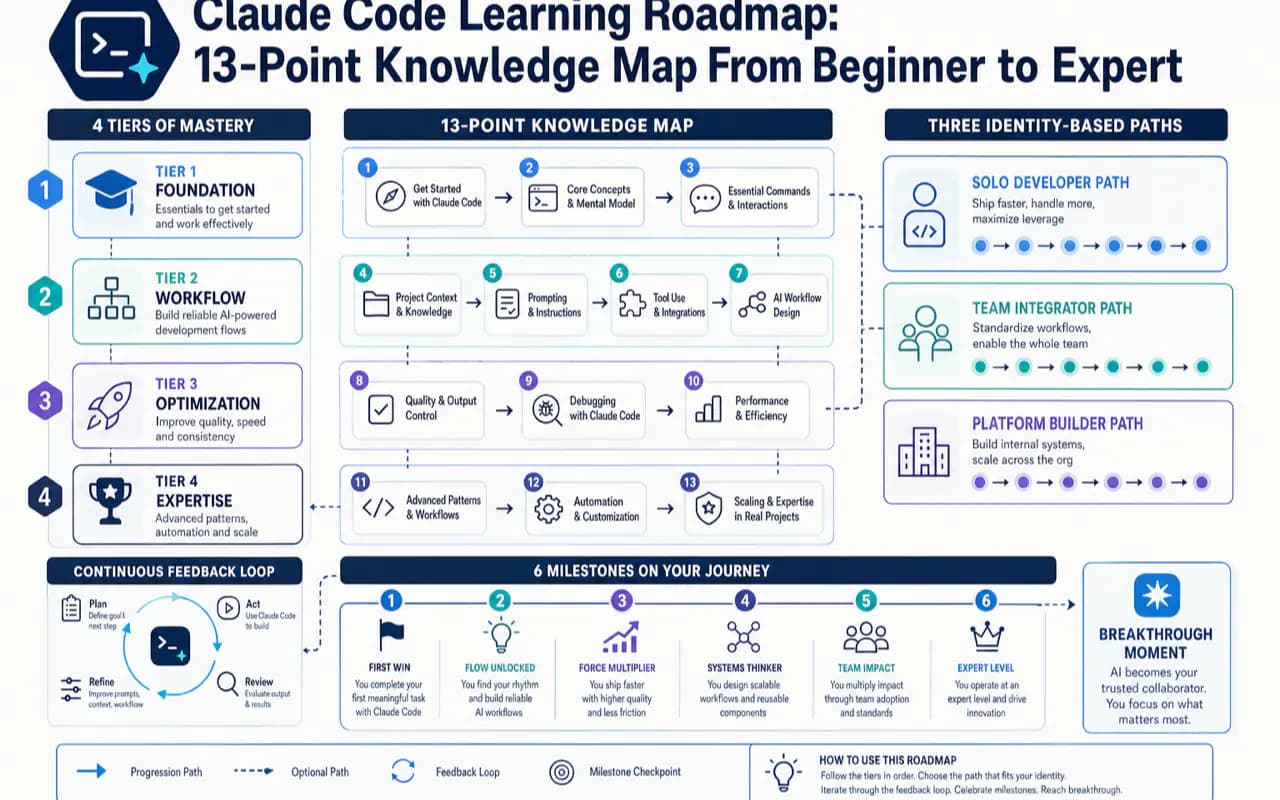
Most Claude Code tutorials fall into one of two traps: they show you how to install it and stop, or they dump every feature into a single wall of text. Neither tells you what to learn first, what to skip, and why the order matters.
This roadmap fixes that. It organizes all 13 Claude Code knowledge points into a tiered knowledge map, gives you three identity-based learning paths, and marks six milestones so you always know where you stand.
What Does This Claude Code Learning Roadmap Cover?
| Your question | One-line answer |
|---|---|
| What is this article about? | Learning sequence and navigation — which of the 13 knowledge points to tackle first |
| How long until I am productive? | 4-6 weeks for reliable daily use, 2-3 months for advanced mastery |
| What should I learn first? | CLAUDE.md (project memory), prompt writing, and context management |
| What should I skip for now? | Hooks, Subagents, MCP, Plugins — learn them after you spot repetitive pain |
| I am an engineer / team lead? | Section 3 gives each identity its own path with different priorities |
| When does the breakthrough happen? | Week 1, the moment CLAUDE.md makes it remember your project rules |
The most common beginner mistake: treating these 13 points as a checklist to tick off from top to bottom. They have strict dependencies. The first four are load-bearing walls; the rest are furniture. Furnish a house with no walls and everything collapses.
Why Does a Learning Roadmap Beat a Feature List?
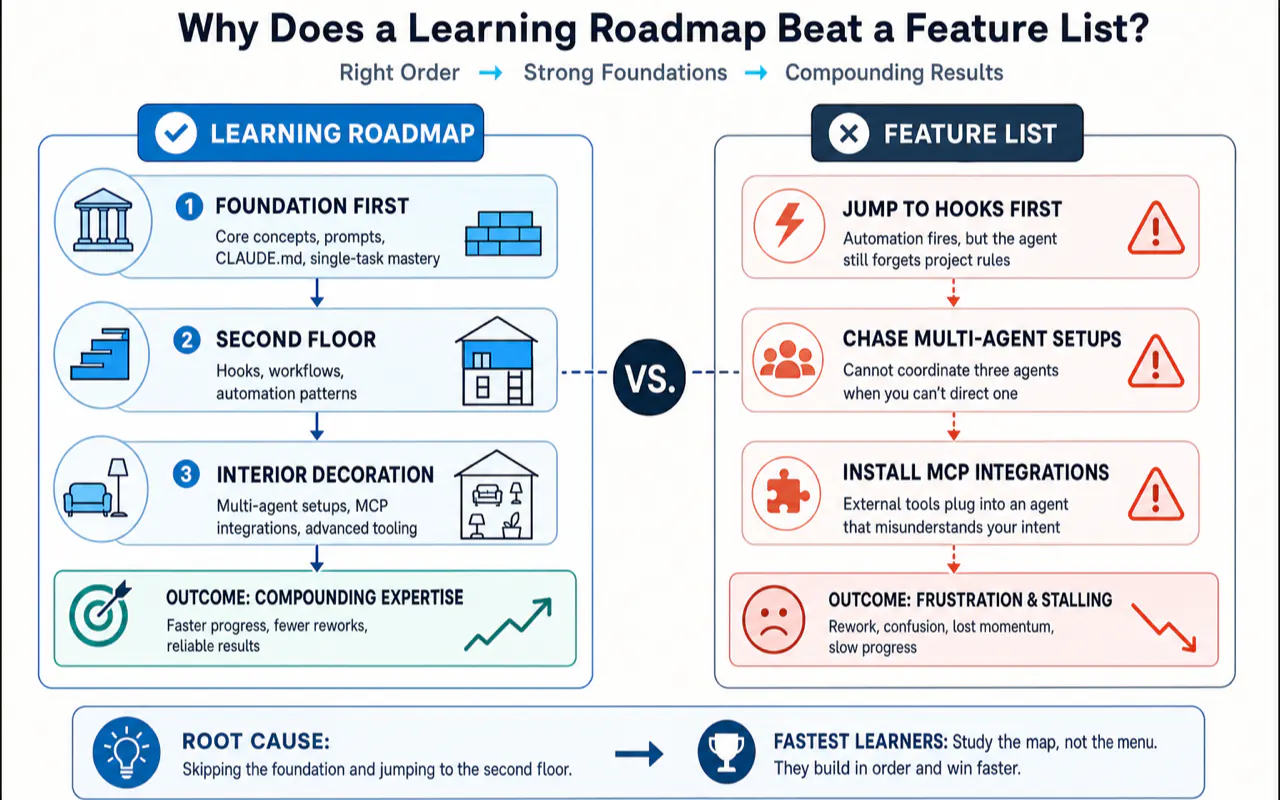
Beginners stall not because a feature is hard, but because they learned it too early:
- Writing Hooks before CLAUDE.md — the automation fires, but the agent still forgets project rules every session. The hook cements a broken workflow.
- Chasing multi-agent setups before running a single task end-to-end — you cannot coordinate three agents when you cannot direct one.
- Installing MCP integrations before mastering prompts — external tools plug into an agent that still misunderstands your intent.
Each failure traces back to the same root cause: skipping the foundation and jumping to the second floor. A roadmap tells you which layer is the foundation, which is the second floor, and which is interior decoration.
After spending months onboarding people to Claude Code, I noticed a counterintuitive pattern: the fastest learners studied the least. Those who focused only on CLAUDE.md and clear prompts, then immediately tackled real projects, were productive within two weeks. Those who bookmarked twenty tutorials and tried to master Hooks, Subagents, and MCP before writing a single task were still stuck a month later, knowing everything in theory and nothing in practice.
What Are the 13 Knowledge Points and Which Tier Do They Belong To?
Every knowledge point falls into one of four tiers. The tier determines when you should learn it, not whether it matters.
Tier 1 — Foundation (everyone, starting Week 1)
| # | Knowledge point | One-line role |
|---|---|---|
| 1 | What Claude Code is | Understand it is a coding agent that reads your project, edits files, and runs commands — not a chat AI |
| 2 | Three entry points (App / CLI / IDE) | App for GUI, CLI for terminal, IDE for editors — same engine underneath, pick by identity |
| 3 | CLAUDE.md (project memory) | A file that tells the agent your project rules so it remembers them every session |
| 4 | Prompt engineering | Turning vague requests into executable tasks with goals, constraints, and acceptance criteria |
These four let Claude Code hear you, remember you, and stay on track. Complete all four and you can already ship real work. The remaining nine are enhancements.
Tier 2 — Session optimization (after sessions get long)
| # | Knowledge point | One-line role |
|---|---|---|
| 5 | Context window (1M tokens) | Managing how much the agent remembers in a single session; knowing when to compact or reset |
| 6 | Thinking modes | Telling the agent to think harder on complex problems and breeze through simple ones |
| 7 | Slash commands | Saving frequently typed prompts as short reusable commands |
The trigger for Tier 2 is a specific feeling: "I have typed this same instruction five times today" or "I cannot find anything in this session anymore." Until that moment, Tier 2 adds no value.
Tier 3 — Advanced extensions (after you spot repetitive pain)
| # | Knowledge point | One-line role |
|---|---|---|
| 8 | Hooks | Automatic scripts at fixed trigger points (e.g., auto-format after every file change) |
| 9 | Subagents | Delegating a self-contained subtask to a specialized child agent |
| 10 | MCP (Model Context Protocol) | Plugging in external tools — search, databases, APIs — via a standard interface |
Anthropic captures the spirit of Tier 3 in one line: think about when to use Hooks, Subagents, and MCP — not whether. Each one solves a pain point. Without a pain point, it is just configuration to maintain.
Tier 4 — Team governance (teams and production only)
| # | Knowledge point | One-line role |
|---|---|---|
| 11 | Permission management | Defining which commands run automatically and which require human approval |
| 12 | Plugins | Packaging commands, subagents, hooks, and MCP into distributable bundles for a team |
| 13 | This learning roadmap | The map you are reading right now — stitching the 12 points into a walkable path |
The most important thing about this map is not that it has 13 points. It is that the points split into four tiers with strict ordering. Learn Tier 1 now. Learn the rest when the trigger arrives.
Which Path Should You Take Based on Your Role?
The same 13 points, three completely different routes. Pick your identity.
Path A: Non-developer or complete beginner
You might be a product manager, designer, marketer, or creator who wants AI to handle scripted tasks. Your goal is not "become an engineer" — it is "get AI to do work for me."
| Phase | Learn | Skip |
|---|---|---|
| Day 1 | Understand what Claude Code is + pick the App entry point (GUI, most approachable) | Do not agonize over CLI vs IDE |
| Week 1 | Write a minimal CLAUDE.md — what the project is, what not to touch, 3-5 lines | Do not write an encyclopedia |
| Week 2-3 | Practice stating tasks clearly — goal + materials + constraints + done criteria | Hooks / Subagents / MCP — all off limits |
| Month 1 | Run one real small project repeatedly; build intuition for what it can and cannot do | Automation and multi-agent stay shelved |
The most common non-developer trap is believing "I need to master advanced features before I dare use it." The opposite is true. The less you know, the smaller your scope should be. Master three things — App entry, CLAUDE.md, clear prompts — then immediately run a real task. Watching it accomplish something you could not do yourself builds more confidence and judgment than ten tutorials ever will.
Path B: Software engineer
You already write code. Claude Code is not here to teach you programming — it is here to run mechanical work inside your engineering constraints: your branches, your tests, your style guide, your off-limits directories.
| Phase | Learn | Your specific focus |
|---|---|---|
| Day 1-2 | Pick CLI or IDE entry (stays inside your existing workflow) | Use a real project, not a toy repo |
| Week 1 | Write an engineering-grade CLAUDE.md: branch state, test commands, dependency setup, forbidden directories, deploy boundaries | Turn team norms into text so the agent acts like a rule-following colleague |
| Week 2-4 | Practice the five-part prompt, focusing on constraints and acceptance criteria ("do not change signatures", "must pass this test suite") | Tighter constraints = fewer failures |
| Month 2+ | Add advanced features driven by real pain: repeated checks → Hooks; mixed tasks → Subagents; internal services → MCP | Pain-driven, not completionism-driven |
Most engineers settle into a two-track setup: inline completion for "I type, it suggests the next line" and agent delegation for "I describe the task, go make coffee, come back to review." The former extends your fingers; the latter replaces your hands. Forcing a copilot to do a multi-file refactor is like threading a needle with boxing gloves. Forcing an agent to autocomplete one line is a cannon aimed at a mosquito. Task granularity decides which track to use — that distinction matters more than debating which tool is "better."
Path C: Team lead
Your concern is not how a single feature works. It is how ten people use the same tool without each inventing their own conventions.
| Phase | Learn | Your specific focus |
|---|---|---|
| Prerequisite | Walk Path B yourself first | You cannot set rules you have not lived |
| Team foundation | Unify a project-level CLAUDE.md as the team's shared contract | This is the main battleground for institutional knowledge |
| Safety boundary | Learn permission management: which commands auto-run, which require approval | Team contexts raise the stakes on safety |
| Unified distribution | Learn Plugins: package team-wide commands, subagents, hooks, and MCP for one-click onboarding | Turn senior engineers' tacit knowledge into distributable configuration |
The most impactful — and most skipped — step for team leads is spending a week as a regular user first. I have watched leads jump straight to "set permissions, push plugins," only to produce rules that clash with how the tool actually works. The team quietly routes around them. The correct sequence is always: build personal intuition first, then codify it into team standards. Instinct before institution.
What Is the Recommended Learning Sequence and Why?
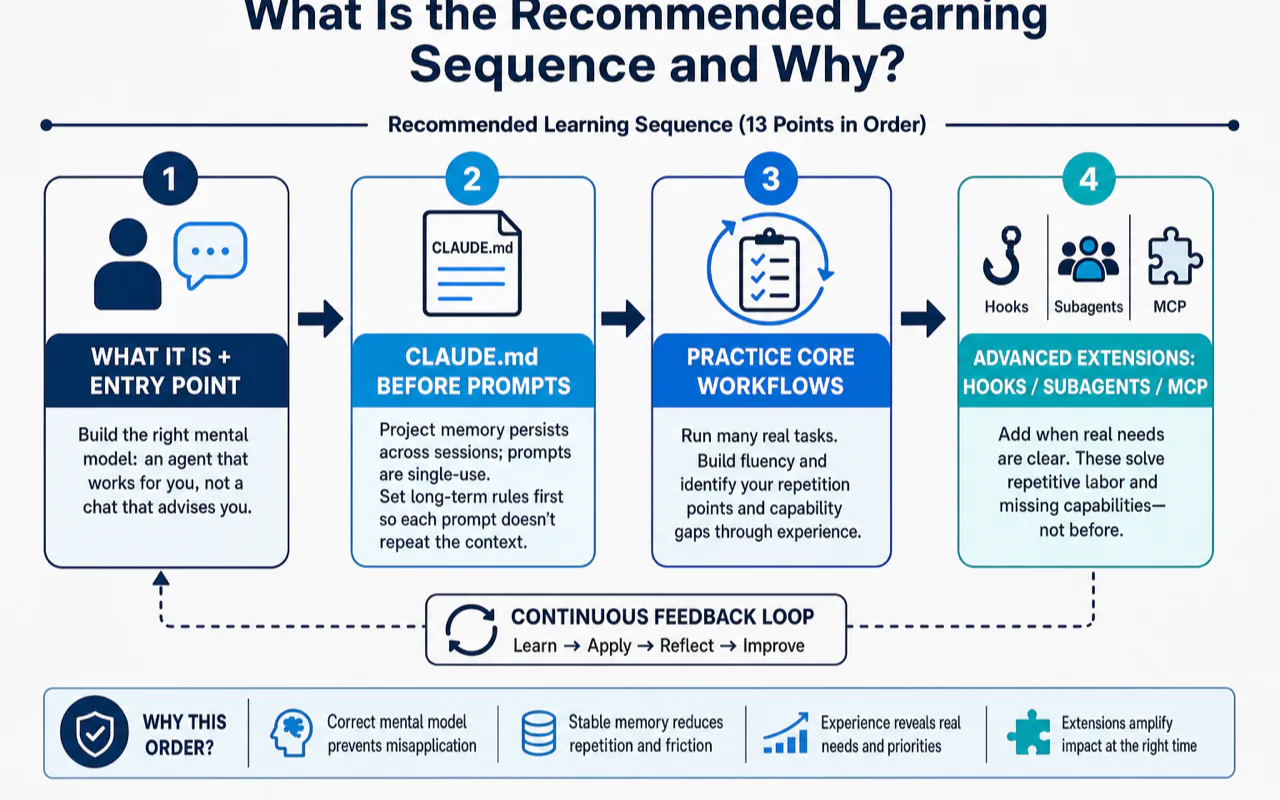
The main line: Run → Remember → Stay on track → Optimize → Extend
Compress all 13 points into a single progression:
Step 1: Get it running        →  #1 What it is + #2 Pick an entry point
Step 2: Make it remember      →  #3 CLAUDE.md (project memory)
Step 3: Keep it on track      →  #4 Write clear prompts
————— Foundation above — do not proceed until solid —————
Step 4: Optimize sessions     →  #5 Context + #6 Thinking + #7 Slash commands
Step 5: Extend on demand      →  #8 Hooks + #9 Subagents + #10 MCP
Team concerns last            →  #11 Permissions + #12 Plugins
Why this order and not another?
Every position has a structural reason:
- "What it is" + "entry point" must come first. If you do not distinguish "an agent that works for you" from "a chat that advises you," every subsequent action carries the wrong mental model. You will keep using a delegation tool in a conversation posture.
- CLAUDE.md before prompts. Project memory persists across sessions; a prompt is single-use. Establish long-term rules first so each prompt does not have to repeat the project context. Reverse the order and you paste the same background into every message.
- Advanced extensions (Hooks / Subagents / MCP) must wait. They solve "repetitive labor" and "missing capabilities," but until you have run dozens of real tasks, you cannot identify your repetition points or capability gaps. Installing them prematurely is buying medicine before the diagnosis.
- Permissions and Plugins go last. They serve multi-person collaboration and production deployment. During solo learning, they add pure cognitive overhead.
If I could give every beginner a single rule: in Week 1, do not touch anything with the words "auto," "multi," or "protocol" in its name — no auto-hooks, no multi-agent, no external protocol. Week 1 has exactly two jobs: write a short CLAUDE.md and state each task's goal plus acceptance criteria clearly. Those two actions alone take a complete beginner from "cannot use it" to "reliably productive" in seven days.
This sequence doubles as a troubleshooting guide
Flip the learning order upside down and it becomes a diagnostic checklist:
- It keeps forgetting things → Check CLAUDE.md. Did you write the rules down?
- Tasks keep going off track → Check your prompt. Did you state the goal and constraints?
- Long sessions turn chaotic → Check context management. Time to compact or reset.
- Dangerous actions make you nervous → Check permission settings.
One sentence to remember: ask "which layer am I stuck on" before asking "which tool am I missing." Beginners love to reverse this — every problem triggers a hunt for a missing plugin, and the stack grows more tangled with each addition.
What happens when you learn in the wrong order
A concrete anti-pattern shows up repeatedly in beginner communities. Several popular tutorials — aiming for "content density" — arrange the learning path as "Step 1: install, Step 2: connect external tools (MCP), Step 3: configure auto-hooks." This drops advanced features into Steps 2 and 3.
A beginner following this path typically hits three walls:
- External tools connect, but the agent has no project memory. The new capabilities have nowhere to land — the agent still forgets basic rules every session.
- Auto-hooks fire, but the user has not built a verification habit. The hook cements an unexamined mistake, making debugging harder, not easier.
- Two weeks in, tools are stacked high but zero daily tasks run smoothly. The user concludes "Claude Code is overrated." The tool was never the problem — the sequence was.
Here is a quick way to evaluate any learning guide: check where it puts CLAUDE.md. If CLAUDE.md appears in the first three steps and the guide explicitly tells you to postpone advanced features, the author has probably onboarded real beginners. If MCP, Hooks, and Subagents cluster near the top, the author likely converted a feature list into a curriculum without testing the order.
What Are the 6 Learning Milestones and When Does the Breakthrough Happen?
Learning is not a vague "you'll get it eventually." It has concrete checkpoints.
| Milestone | Timeline | Key action | Completion signal |
|---|---|---|---|
| 1. First success | Day 1 | Fix a real small bug or run a read-only analysis | You watch it read code, edit files, and explain its reasoning — without you micromanaging |
| 2. First CLAUDE.md | Week 1 | Write a 30-50 line project memory file | It stops asking the same project questions every session |
| 3. Lock in one entry point | Week 2 | Settle on App, CLI, or IDE | You stop debating "which one should I use this time" |
| 4. Solid prompt skills | Week 3-4 | Master goal + materials + constraints + acceptance | Task rework rate drops from "most need fixing" to "occasional tweaks" |
| 5. Delegation mindset | Month 1 | Habit of "assign task → do something else → come back to review" | You let it run without anxiously watching every token |
| 6. Multi-tool workflow | Month 2-3 | Stable split between inline completion and agent delegation | You know which tool handles which task type without hesitation |
The breakthrough moment: Week 1
Among all six milestones, the strongest "aha" almost always arrives in Week 1, the moment you finish your first CLAUDE.md and run the agent.
Before CLAUDE.md, every session feels like meeting a stranger. You repeat the project description, forbidden directories, and test commands from scratch. After CLAUDE.md, the agent reads the file, remembers everything, and just starts working.
That single moment is the dividing line between "using a chat AI" and "using a coding agent."
Many users stall before reaching this moment — precisely because they skipped CLAUDE.md and chased advanced features instead. They keep experiencing the "stranger" feeling and conclude the tool is mediocre. The missing breakthrough is almost never a tool problem. It is a sequence problem.
Three habits beginners drop after Milestone 1
The excitement of the first success fades, and three shortcuts creep in — each one slowly erodes the experience back to square one:
- Skipping CLAUDE.md. Every new session wastes minutes re-explaining project context. Over a week, that is hours of pure repetition.
- Not writing acceptance criteria. The task finishes, the agent says "done," and you accept without verifying. Hidden issues compound silently.
- Accepting changes without reviewing the diff. Tests pass, you merge, and a subtle regression slips through.
These three habits are the real dividing line between "consistently productive with Claude Code" and "it is okay, I guess." Many users never struggle with advanced features — they simply never sustained these three basics. Keep CLAUDE.md current, write acceptance criteria into every prompt, and review the diff before merging. Do these three things and you can skip every advanced feature and still ship reliably. Skip them and no amount of advanced tooling compensates.
Where Do You Go After Mastering the 13 Points?
Once you have walked the milestones and settled into a multi-tool workflow, three directions open up.
Direction 1: Go deep on one tool
Push Claude Code to its ceiling. Beyond the official docs at code.claude.com, look for daily workflow improvements: configuring a terminal status bar to show context usage at a glance, or syncing configuration and sessions seamlessly across multiple machines. These peripheral tweaks do not change the core workflow, but they remove daily friction that adds up over months.
One habit worth building early: trust only the official domain code.claude.com for documentation. Claude Code evolved rapidly — from a terminal-only CLI to parallel entry points across terminal, editor extensions, desktop app, and browser. Many older tutorials still link to deprecated docs URLs and show outdated screenshots. Making "check official docs when uncertain" a reflex outlasts memorizing any specific version number.
Direction 2: Expand your toolbox horizontally
No single tool is the universal answer. Explore other coding agents — OpenAI Codex, Cursor, and others — to understand which task types each one handles best. Comparing two implementations of the same paradigm (coding agents) sharpens your understanding of the paradigm itself.
If you worry about losing context when switching tools, look into session backup approaches that let you move between different agents without starting from zero.
Direction 3: Build tools with it
The highest-leverage use of Claude Code is turning repetitive workflows into reusable capabilities. Start by understanding how reusable commands and skills work, then package your own workflows, and eventually build custom tooling from scratch. This path transforms you from someone who uses tools into someone who creates them.
Most people start with Direction 1 — mastering one tool thoroughly beats learning three tools shallowly. When you notice yourself repeating the same manual process every week, Direction 3 becomes the natural next step. Do not try to build tools on Day 1. Use a tool until you can predict its behavior with your eyes closed. The ideas for what to build will surface on their own.
Pre-Start Checklist: Verify Before You Begin
Before you begin, run through this checklist. Answer "not sure" to any item and revisit the matching section.
- [ ] I understand this article covers learning sequence, not "what is Claude Code" basics (unsure → Section 1)
- [ ] I see how 13 points split into 4 ordered tiers (unsure → Section 2 knowledge map)
- [ ] I have identified my role: beginner / engineer / team lead (unsure → Section 3)
- [ ] I can name the four Foundation tier points and know they come first (unsure → Section 2, Tier 1)
- [ ] I accept the advice to skip auto / multi / protocol features in Week 1 (hesitant → Section 4)
- [ ] I know which topic to read next (unsure → start with any Tier 1 topic)
- [ ] I plan to practice on a real project instead of collecting more tutorials (still collecting → re-read Section 4)
All seven checked? Close this roadmap and go write your first CLAUDE.md.
One Sentence to Take Away
This Claude Code learning roadmap is not asking you to learn everything. It is asking you to get the sequence right: Foundation tier first (what it is / entry point / CLAUDE.md / prompts), session optimization and extensions queued by trigger points, three identities walking three different paths.
Sequence beats volume. Nail the first four points, and the remaining nine will click into place exactly when you need them.
Related Reading
- Claude Code Complete Guide 2026 - Start with the complete guide
- CLAUDE.md Best Practices - Master the highest-ROI file in Tier 1
- Claude Code CLI vs App vs IDE - Choose your interface at Level 2
- Claude Code Hooks Tutorial - Learn hooks at intermediate level
- Claude Code Dynamic Workflows - Master dynamic workflows at advanced level
Frequently Asked Questions
How long does it take to learn Claude Code from scratch?
Expect 4-6 weeks to become productive and 2-3 months to master advanced features. The key is learning in the right order: foundation first (what it is, choose an entry point, write CLAUDE.md, craft clear prompts), then session optimization (context management, thinking modes, slash commands), and finally advanced extensions (Hooks, Subagents, MCP). Jumping to advanced topics before building the foundation is the number one reason beginners stall.
What should a Claude Code beginner learn first?
Start with three things: (1) CLAUDE.md — the project memory file that stops Claude Code from forgetting your project rules every session; (2) Prompt writing — clearly stating goals, constraints, and acceptance criteria cuts task failure rates dramatically; (3) Context management — knowing when to clear or compact a session prevents chaos in longer conversations. Everything else builds on these three.
What is the difference between Claude Code and Cursor or GitHub Copilot?
Cursor and Copilot excel at real-time code completion — you type, they suggest the next line. Claude Code operates differently: you delegate an entire task, it reads your codebase, modifies multiple files, runs commands, and verifies results. Most power users run both: one tool for inline completion, another for block-level task delegation. The task granularity determines which tool fits: single-line suggestions go to a copilot, multi-file refactors go to an agent.
When do most Claude Code users experience their breakthrough moment?
Almost universally during Week 1, right after writing the first CLAUDE.md file. Before that file exists, every new session feels like meeting a stranger — you repeat project rules, directory constraints, and test commands from scratch. The moment Claude Code reads CLAUDE.md and remembers everything without prompting, users cross the line from 'using a chat AI' to 'using a coding agent.' Skipping CLAUDE.md delays this breakthrough indefinitely.
Should I learn Hooks, Subagents, and MCP right away?
No. Hooks, Subagents, and MCP solve specific problems — repetitive checks, task delegation, and external tool integration — that you cannot even identify until you have run dozens of real tasks. Installing them before you have the foundation is like buying medicine before getting sick. Wait until you notice a concrete, recurring pain point, then learn the matching feature. You will learn it faster and retain it longer.